A media-analytics company runs a mix that Kubernetes alone makes awkward: a dozen stateless Go and Node services that are perfectly happy in containers, and a legacy C++ transcoding engine plus a Windows licensing daemon that must run as plain OS processes on bare metal — they tap GPU drivers and a hardware dongle that nobody is going to containerize this decade — and a nightly batch of thumbnail-generation jobs that spin up, chew through a queue, and exit. The platform team wants one scheduler, one service mesh, and one identity story across all of it, without forcing the legacy binaries into containers they were never built for and without standing up three separate control planes. That is precisely the seam HashiCorp Nomad fills. Nomad is a single-binary workload orchestrator that schedules Docker containers, raw OS processes (raw_exec), sandboxed processes (exec), Java applications, and QEMU virtual machines on the same cluster, under the same bin-packing scheduler, with the same Raft-replicated control plane. Bolt Consul onto it and every one of those workloads — container, process, or VM — gets a sidecar proxy, an SPIFFE-style mTLS identity, and a place in a default-deny service mesh where a containerized API and a bare-metal transcoder talk over authenticated, intention-gated traffic as if they lived next door.
This guide builds that cluster end to end and, more importantly, teaches you the model underneath it so you can reason about failures at 02:00 instead of guessing. You will stand up a three-server Nomad control plane and a three-server Consul control plane (co-located but separate processes), join client nodes that each advertise different capabilities, and enable four task drivers deliberately — docker for the containers, raw_exec for the ungovernable legacy binary, exec for the isolated internal services, and java for a JVM analytics worker. You will write real HCL job specs for a service job (long-running API), a system job (a per-node log shipper), and a batch job (the nightly thumbnails), and you will see the scheduler place each according to constraints, affinities, and bin-packing. Then you will wire Consul Connect so each service gets an Envoy sidecar minted a leaf certificate by Vault, lock the mesh to default-deny, and open exactly the one path you need with a Consul intention. By the end you will be able to look at a pending allocation, a blocked mTLS handshake, or a lost quorum and know which of Nomad’s or Consul’s moving parts is the culprit — because the whole point of running your own scheduler is that when it breaks, you are the escalation path.
The reason to invest in this rather than reaching for managed Kubernetes is not contrarianism; it is operational fit. Nomad’s control plane is one Go binary with a handful of ports, its scheduler is legible, and its ability to run a container and a bare-metal process in the same mesh under the same policy engine is genuinely rare. Where that fit is real — mixed legacy-plus-modern estates, edge and on-prem fleets, teams that want a scheduler they can fully understand — it is the right tool. This article is the field manual for making it production-grade: not a toy nomad agent -dev, but a TLS-encrypted, ACL-gated, Vault-integrated, HA cluster that survives a node loss and enforces zero-trust between every workload on it.
What problem this solves
The pain this addresses is the two-platform tax. A team with both containerizable and un-containerizable workloads typically ends up running Kubernetes for the former and a hand-rolled fleet of systemd units (or worse, pet VMs) for the latter, then bolts on a third thing — a service mesh, a secrets store, an identity broker — that only understands one of the two worlds. The legacy binaries live outside the mesh, outside the RBAC model, outside the observability story; they become snowflakes that page a different on-call and drift out of compliance. Meanwhile Kubernetes itself is a large surface: etcd, the API server, kubelet, CNI, CSI, the controller-manager, admission webhooks — a control plane you must staff a team to operate before it schedules a single pod. For an estate that is 60% modern and 40% legacy, that is a lot of machinery to run twice.
What breaks without a unified answer is policy coherence. When the transcoder is a systemd unit on a pet VM, nobody can prove it authenticates to the database with a short-lived credential, nobody gates who is allowed to call it, and when it needs a secret it reads a file that has been on disk in plaintext since 2019. When the same workload becomes a Nomad raw_exec task inside a Consul mesh, it gets an mTLS identity minted by Vault, a default-deny intention posture, a dynamic database credential templated in at launch, and it shows up in the same catalog and the same dashboards as every container. The failure mode you are eliminating is the governance gap between the containers you modernized and the binaries you could not.
Who hits this: platform teams at media, telco, finance, and industrial companies with real legacy — GPU transcoders, licensing daemons, HPC binaries, Windows services, appliances — that must run as processes or VMs, alongside a growing fleet of microservices. Also anyone running edge or on-prem where a full Kubernetes control plane per site is overkill and a single-binary scheduler that federates across regions is a better fit. The unifying signature is heterogeneity: you cannot standardize on containers, so you need a scheduler that does not force you to.
To frame the whole field before the deep dive, here is what Nomad + Consul gives each workload class, and what you would otherwise cobble together:
| Workload class | Nomad driver | Runs as | Gets from Consul mesh | Without this you’d run… |
|---|---|---|---|---|
| Stateless microservice | docker |
Container in a network namespace | Envoy sidecar, mTLS identity, intentions, DNS | Kubernetes + Istio/Linkerd |
| Legacy GPU/dongle binary | raw_exec |
Plain OS process (no sandbox) | Same Envoy sidecar + mTLS + intentions | systemd unit on a pet VM, no mesh |
| Internal sandboxed service | exec |
Process in cgroup+namespace isolation | Same mesh membership | systemd with hand-rolled hardening |
| JVM analytics worker | java |
JVM under resource limits | Same mesh membership | App server / manual JVM launcher |
| Legacy VM image | qemu |
Full virtual machine | Service registration (no sidecar in-VM) | Standalone hypervisor fleet |
| Nightly batch | docker/exec (batch job) |
Short-lived, exits at completion | Registration during run | Cron on a box / a separate batch system |
| Per-node agent | any (system job) | One alloc per eligible client | Registration per node | A DaemonSet — but only for containers |
Learning objectives
By the end of this article you can:
- Explain the Nomad architecture — servers vs clients, the Raft consensus layer, leader election,
bootstrap_expect, and how jobs decompose into groups and tasks — and reason about what a single node loss does to the cluster. - Enable and choose between the docker, exec, raw_exec, java, and qemu task drivers, knowing exactly what isolation each provides, when to opt into the dangerous ones, and how to constrain where they run.
- Write real HCL for the three scheduler types — service, batch, and system — and predict placement given constraints, affinities, spread, and bin-packing.
- Stand up a production Consul control plane with gossip encryption, TLS, and ACLs, and understand the catalog, health checks, DNS, and the Connect service mesh.
- Wire Nomad to Consul so every task — container or process — is registered, health-checked, and injected with an Envoy sidecar, and back the mesh CA with Vault for auditable, short-lived leaf certificates.
- Enforce zero-trust with Consul intentions (default-deny, L4 and L7), and gate every Nomad and Consul API call with ACL tokens and workload identities.
- Diagnose the real failure modes —
pendingallocations, missing CNI plugins, lost quorum, blocked intentions, expired Vault tokens,raw_execrunning as root — from symptom to confirming command to fix. - Right-size the control plane and clients, and reason about the cost trade-off versus running separate container and VM platforms.
Prerequisites & where this fits
You should be comfortable on a Linux host: systemd units, journalctl, network namespaces, and reading a process tree. You should understand basic PKI (a CA signs a leaf certificate; mTLS means both ends present one), TCP/gRPC, and DNS. Familiarity with any orchestrator (Kubernetes, ECS, Swarm) helps because the scheduling concepts transfer even though the mechanics differ. You do not need prior Nomad or Consul experience; this builds the mental model from the control plane up.
Concretely, provision 5 Linux hosts (Ubuntu 22.04 or RHEL 9). Three are the server/control plane; two-plus are clients. One client host carries GPU drivers and the licensing dongle for the raw_exec workloads. Minimum sizing: 2 vCPU / 4 GB on servers, 4 vCPU / 8 GB on clients (more on the GPU node). You need a private network where every node can reach every other on the Consul ports (8300–8302, 8500, 8501, 8502, 8503, 8600), the Nomad ports (4646–4648), and the dynamic Connect sidecar ports. Open these on the perimeter firewalls / security groups, not on the host firewall where you would have to chase every dynamic port. Install Docker Engine 24+ on the container clients; stage the legacy binaries on the raw_exec client. Fetch the binaries: Nomad 1.7+, Consul 1.17+, Vault 1.15+, and the CNI reference plugins (bridge, firewall, portmap) into /opt/cni/bin — Consul Connect’s sidecars require CNI and stay pending without it. Bootstrap a Vault cluster reachable from all nodes; it issues the mesh CA and dynamic secrets, and can later become a Nomad job itself, but bring it up externally first. Have terraform and ansible on your workstation to provision hosts idempotently.
Where this sits: it is the platform layer beneath everything else you run. It pairs with Vault PKI as Enterprise Private CA for Service mTLS, which is the CA that backs the mesh here, and with Set Up SPIFFE/SPIRE for Workload Identity and mTLS Across Heterogeneous Clusters — Consul Connect gives you SPIFFE-style identities without running SPIRE, so read that to understand the identity model you are inheriting. If you are weighing this against managed compute, Azure App Service vs Container Apps vs AKS: Choose the Right Compute frames the container-platform decision Nomad is an alternative to, and Terraform Module: AWS App Mesh shows the equivalent default-deny mesh pattern on ECS/EKS. For human access to the cluster itself, Deploy a Self-Hosted HashiCorp Boundary Cluster for Brokered SSH and RDP Access is the right front door to the nodes.
A quick map of who owns what during an incident, so you page the right person:
| Layer | What lives here | Typical owner | Failure classes it causes |
|---|---|---|---|
| Nomad servers (Raft) | Scheduling state, job specs, leader | Platform team | Lost quorum → no scheduling; slow evals |
| Consul servers (Raft) | Catalog, health, intentions, mesh CA | Platform team | Registration gaps; mesh CA outage |
| Nomad clients | Task drivers, allocations, fingerprinting | Platform + app | pending allocs, driver failures, OOM |
| Envoy sidecars | mTLS, upstream routing, intentions enforcement | Platform (auto-injected) | Blocked traffic, handshake failures |
| Vault | Mesh CA, dynamic secrets, ACL secrets | Security/platform | Leaf issuance halts; template renders empty |
| CNI plugins | Sidecar network namespaces | Platform (host provisioning) | Allocs stuck pending on network setup |
| ACL system | Tokens, policies, workload identity | Security/platform | 403s on API; tasks can’t register |
Core concepts
Six mental models make every later step obvious. Internalize these and the HCL stops being incantation.
Nomad is servers plus clients, and only servers hold state. A Nomad server participates in Raft consensus: the servers elect a leader, replicate an append-only log of state changes, and require a quorum (majority) to commit. With three servers you tolerate one failure; with five you tolerate two. Servers run the scheduler — they receive a job, produce an evaluation, compute allocations (the plan of what runs where), and hand those to clients. A Nomad client is a dumb-by-design agent that fingerprints its host (CPU, memory, drivers, attributes), receives allocations from the leader, and runs the tasks. Clients hold no cluster state; lose one and its allocations reschedule elsewhere. bootstrap_expect = 3 on the servers means “wait until three of us are present, then form the cluster and elect a leader” — set it once, on the servers only, and never on clients.
A job is groups is tasks, and the group is the unit of placement. You submit a job (a deployable unit with a name and a type). A job contains one or more groups; a group has a count (how many copies) and is the atom the scheduler places — every task in a group lands on the same client and shares its network namespace. A group contains one or more tasks; a task has a driver (docker, exec, …) and a config. So “run 3 copies of an API, each with an app container and a log-sidecar container that share a network” is one job, one group with count = 3, two tasks. This nesting is why a container and its Envoy sidecar can talk over localhost — they are two tasks in one group on one node.
The driver decides the isolation, and some drivers are loaded guns. The task driver is the plugin that actually runs your code. docker runs an OCI container with full namespace/cgroup isolation. exec runs a binary inside a chroot with cgroup resource limits and namespace isolation — a sandboxed process, no container image. raw_exec runs a binary with no isolation at all — it is fork() on the host, as whatever user you specify — which is exactly why it can reach a GPU driver and a hardware dongle, and exactly why it is disabled by default and must be explicitly opted into. java launches a JVM under resource limits. qemu boots a full VM image. You choose per task, and you constrain dangerous drivers to specific nodes so a raw_exec job cannot land on a general-purpose client.
The scheduler type decides the lifecycle. Nomad has three schedulers. A service job is long-running and rescheduled to maintain count — your APIs and daemons. A batch job runs to completion and is not restarted once its tasks exit successfully — your nightly jobs, ETL, one-shot tasks; the batch scheduler also optimizes for fast placement and is more tolerant of node churn. A system job runs one allocation on every eligible client and keeps it there as nodes join and leave — your per-node log shippers and agents, the direct analog of a Kubernetes DaemonSet. Picking the wrong type is a classic error: a batch job declared service never stops rescheduling; a per-node agent declared service with a count lands on the wrong number of nodes.
Placement is bin-packing, steered by constraints and affinities. By default Nomad bin-packs — it packs allocations onto the fewest nodes to maximize utilization (the opposite of spreading), because a densely packed cluster is a cheaper cluster. You steer this. A constraint is a hard filter (attribute = "${meta.workload_class}"; value = "container" means “only nodes tagged container are eligible” — violate it and the alloc will not place). An affinity is a soft preference (weighted −100 to 100; the scheduler prefers matching nodes but will place elsewhere rather than fail). spread deliberately distributes allocations across a dimension (e.g. across availability zones) for resilience, trading some bin-packing efficiency. Together these turn “the scheduler decides” into “the scheduler decides within the box I drew.”
Consul is the catalog, the health, and the mesh — three jobs in one. Consul maintains a service catalog (what services exist, where their instances live, keyed by service name), runs health checks (HTTP/TCP/gRPC/script probes that mark instances healthy or not, so only healthy instances are returned), answers DNS (<service>.service.<datacenter>.consul resolves to healthy instances), and — with Connect enabled — runs a service mesh: it injects an Envoy sidecar next to each service, mints each a leaf certificate from its built-in CA (or a Vault-backed one), and enforces intentions (allow/deny rules between service identities, applied at the sidecar on the mTLS layer). Because the identity is a certificate and enforcement is at the sidecar, a raw_exec process is governed by the exact same mesh policy as a container. That is the whole trick.
The vocabulary in one table
Pin every moving part down before the deep sections. The glossary repeats these for lookup; this is the mental model side by side.
| Term | One-line definition | Where it lives | Why it matters |
|---|---|---|---|
| Server | Nomad control-plane node in Raft | 3 control hosts | Holds state; loses quorum if majority dies |
| Client | Nomad worker node running tasks | Client hosts | Runs allocations; stateless; reschedulable |
| Raft | Consensus log for HA state | Servers | Leader + quorum; the availability floor |
bootstrap_expect |
Servers to wait for before forming | Server config | Set on servers only; 3 or 5 |
| Job | Deployable unit | Submitted to servers | The top-level thing you nomad job run |
| Group | Set of tasks placed together | Inside a job | Unit of placement; shares a network |
| Task | One workload with a driver | Inside a group | The actual process/container |
| Driver | Plugin that runs a task | Client | Decides isolation (docker/exec/raw_exec/…) |
| Allocation | An instance of a group on a node | Client | What actually runs; what you debug |
| Evaluation | The scheduler’s decision cycle | Server | Produced on every job change/node change |
| Constraint | Hard placement filter | Job/group/task | Excludes non-matching nodes entirely |
| Affinity | Soft placement preference | Job/group/task | Weighted preference, not a hard rule |
| Catalog | Consul’s registry of services | Consul servers | Source of truth for “what exists where” |
| Intention | Allow/deny rule between services | Consul | Enforced at the sidecar; default-deny |
| Sidecar | Envoy proxy next to a service | Client (as a task) | Terminates mTLS; enforces intentions |
| ACL token | Credential gating an API call | Nomad + Consul | Least-privilege access to the control plane |
The Nomad control plane: servers, Raft, and scheduling
Everything starts with a healthy control plane. Get the number of servers, the ports, and the failure math right before you schedule anything, because a control plane that loses quorum stops making decisions and no amount of client capacity saves you.
Server count and the failure math
Servers form a Raft peer set. Commits require a quorum — a strict majority. The tolerance is floor((N-1)/2). Run an odd number to avoid a wasted node (four servers tolerate the same one failure as three but cost more and have a larger quorum to satisfy). Three is the standard for a single datacenter; five when you want to survive two simultaneous failures (rolling upgrades on a large fleet, or two-AZ-loss scenarios). Never run two (any single failure loses quorum) and never run servers as an even number.
| Servers (N) | Quorum needed | Failures tolerated | Use when |
|---|---|---|---|
| 1 | 1 | 0 | -dev / lab only; any loss = full outage |
| 3 | 2 | 1 | Standard production, single DC |
| 5 | 3 | 2 | Large fleet, rolling upgrades, 2-failure tolerance |
| 7 | 4 | 3 | Rare; Raft write latency grows with peers |
| 2 / 4 / 6 (even) | N/2 + 1 | same as N−1 | Never — wasted node, no extra tolerance |
Two operational rules follow. First, keep servers server-only — do not also run client workloads on them, or a heavy job can starve the scheduler and you lose quorum predictably under load. Second, spread servers across failure domains (AZs/racks) so a single domain loss does not take the majority; but keep them low-latency to each other because Raft commits are synchronous and cross-region latency directly slows every scheduling decision.
The port map you must open
Both control planes have a fixed, small set of ports. Open exactly these; nothing about Nomad or Consul needs a broad allow-all.
| Port | Component | Protocol | Purpose | Direction |
|---|---|---|---|---|
| 4646 | Nomad | TCP/HTTP(S) | API + UI | clients/operators → servers |
| 4647 | Nomad | TCP/RPC | Server↔client, server↔server RPC | all agents ↔ servers |
| 4648 | Nomad | TCP+UDP | Serf gossip (server membership) | server ↔ server |
| 8300 | Consul | TCP/RPC | Server RPC (Raft, catalog writes) | agents ↔ servers |
| 8301 | Consul | TCP+UDP | LAN Serf gossip | all agents |
| 8302 | Consul | TCP+UDP | WAN Serf gossip (federation) | servers ↔ servers |
| 8500 | Consul | TCP/HTTP | API + UI (plaintext) | operators (or disable for TLS-only) |
| 8501 | Consul | TCP/HTTPS | API + UI over TLS | operators → servers |
| 8502 / 8503 | Consul | TCP/gRPC(+TLS) | Envoy xDS (sidecar config) | clients → servers |
| 8600 | Consul | TCP+UDP | DNS interface | agents (service discovery) |
| dynamic | Connect | TCP | Sidecar-to-sidecar mTLS data path | client ↔ client |
The dynamic sidecar ports are why you open ranges at the perimeter, not per-port on hosts: Nomad allocates a port for each sidecar’s inbound listener, and hard-coding host firewall rules for each becomes untenable. Set verify_incoming/verify_outgoing so the RPC ports are useless to anyone without a valid cert regardless of network reach.
What actually happens when you submit a job
Knowing the internal pipeline makes nomad eval status and nomad job status legible. Submitting a job triggers a sequence; when placement fails, the failure is attached to the evaluation, which is why “the job won’t run” is diagnosed by reading the eval, not the job.
| Stage | What happens | Where | How you observe it |
|---|---|---|---|
| Submit | Job registered, version incremented | Leader (Raft write) | nomad job status <job> |
| Evaluation | Scheduler computes desired vs actual | Leader scheduler | nomad eval list / nomad eval status <id> |
| Feasibility | Filter nodes by driver + constraints | Scheduler | Eval shows “nodes filtered” reasons |
| Ranking | Score feasible nodes (bin-pack + affinity) | Scheduler | nomad alloc status -verbose scores |
| Plan | Produce allocations; submit plan | Leader | Allocations appear |
| Placement | Client pulls allocation, runs tasks | Client | nomad alloc status <alloc> |
| Health | Deployment watches health checks | Server + Consul | nomad deployment status <id> |
A blocked evaluation — one the scheduler could not fully place — is the single most common “why won’t it run” state. nomad eval status <eval-id> names the reason: exhausted resources, no node satisfying a constraint, or a driver not detected. Read it first, every time.
Task drivers: docker, exec, raw_exec, java, qemu
The driver is where “mixed workloads” becomes real. Each driver is a plugin the client loads and fingerprints; a task references one. The critical axis is isolation — how much the platform protects the host from the task.
The driver matrix
| Driver | Runs | Isolation | Image/artifact | Enabled by default | Constrain to |
|---|---|---|---|---|---|
| docker | OCI container | Full: namespaces + cgroups + seccomp | Container image | Yes (if Docker present) | Container clients |
| exec | Binary in sandbox | cgroups + namespaces + chroot | Binary via artifact |
Yes (Linux) | General clients |
| raw_exec | Binary, no sandbox | None — runs on host as a user | Local/artifact binary |
No — opt-in | Only the specific host that needs it |
| java | JVM process | cgroups + isolation (like exec) | JAR + JVM | Yes (if Java present) | JVM-capable clients |
| qemu | Full VM | Strong (hypervisor) | VM image (qcow2/raw) | Yes (if QEMU present) | Virtualization-capable clients |
Read the isolation column as a risk column. docker and qemu are strongly isolated; exec and java are moderately isolated (a determined process can be a nuisance but is fenced by cgroups and namespaces); raw_exec is not isolated at all — a raw_exec task is arbitrary code execution on the host as the specified user. That is the price of reaching hardware, and it is acceptable only when (a) the driver is opted-in on exactly the node that needs it, (b) the task runs as an unprivileged service account, never root, and © a constraint pins the job to that node so nothing else can exploit the enabled driver.
Enabling drivers on a client, deliberately
Drivers are configured as plugin stanzas in the client’s Nomad config. The container client and the edge client get different driver sets — this is the mechanism that keeps raw_exec off the general fleet.
# /etc/nomad.d/client.hcl on the CONTAINER client
client {
  enabled  = true
  servers  = ["kv-control-0:4647", "kv-control-1:4647", "kv-control-2:4647"]
  cni_path = "/opt/cni/bin"                 # REQUIRED for Connect sidecars
  meta { workload_class = "container" }     # tag it so constraints can target it
}

plugin "docker" {
  config {
    allow_privileged = false                # never allow --privileged containers
    volumes { enabled = false }             # no arbitrary host bind mounts
    gc { image = true  image_delay = "3m" } # reclaim unused images
  }
}
# /etc/nomad.d/client.hcl on the EDGE client (GPU + dongle)
client {
  enabled  = true
  servers  = ["kv-control-0:4647", "kv-control-1:4647", "kv-control-2:4647"]
  cni_path = "/opt/cni/bin"
  meta { workload_class = "raw" }
}

plugin "raw_exec" {
  config {
    enabled    = true        # EXPLICIT opt-in — off by default for a reason
    no_cgroups = false       # keep cgroup resource limits ON for the process
  }
}
The docker plugin knobs you will actually touch, and the safe default for each:
| Docker plugin setting | What it controls | Safe default | Loosen only when |
|---|---|---|---|
allow_privileged |
Permit --privileged containers |
false |
A workload genuinely needs raw device access (rare) |
volumes { enabled } |
Permit arbitrary host bind mounts | false |
You have a vetted host path to expose |
allow_caps |
Linux capabilities grantable | drop-most | A container needs a specific cap (e.g. NET_BIND_SERVICE) |
gc { image } |
Auto-remove unused images | true |
Never — always reclaim |
gc { image_delay } |
Grace before image GC | 3m |
Tune for pull-churn workloads |
pull_activity_timeout |
Abort slow image pulls | default | Large images on slow links |
extra_labels |
Labels stamped on containers | job/task meta | Fleet-wide labeling standards |
The raw_exec/exec isolation and safety controls:
| Control | Where | Effect | Rule |
|---|---|---|---|
enabled (raw_exec) |
plugin config | Turns the driver on at all | Only on the node that needs it |
user = "<name>" |
task config | Runs the process as that account | Always set; never leave it root |
no_cgroups |
plugin config | Disables cgroup limits | Keep false — you want limits |
constraint (driver present) |
job/group | Pins to nodes with the driver | Always pin raw_exec jobs |
cap_add/cap_drop (exec) |
task config | Fine-grained capabilities | Drop everything not needed |
Schedulers and placement: service, batch, system
The scheduler type is a top-level type on the job and it changes the entire lifecycle. Get it wrong and the cluster does the wrong thing quietly.
The three schedulers
| Scheduler | Lifecycle | Placement | Reschedules on failure? | Use for |
|---|---|---|---|---|
| service (default) | Long-running | count copies, bin-packed |
Yes — maintains count |
APIs, daemons, stateful services |
| batch | Runs to completion | count copies, optimized for speed |
Only on failure, not on clean exit | ETL, nightly jobs, one-shot tasks |
| system | One per eligible node | Every feasible client gets one | Yes, and on new nodes joining | Log shippers, node agents (DaemonSet-like) |
There is also sysbatch (a batch job that runs once on every node — a one-shot DaemonSet) for fleet-wide maintenance tasks. The decision is mechanical:
| If the workload… | Use scheduler | Because |
|---|---|---|
| Serves traffic indefinitely and must stay at N replicas | service | Nomad maintains count, reschedules failures |
| Processes a queue then exits and should NOT restart | batch | Clean exit is success, not a reason to reschedule |
| Must run exactly once on every current and future node | system | Placement follows node membership automatically |
| Must run once on every node then finish | sysbatch | Fleet-wide one-shot |
Constraints, affinities, spread, and bin-packing
These four steer placement. Constraints are the fence; affinities are the preference; spread is deliberate distribution; bin-packing is the default drive toward density.
| Mechanism | Hard or soft | Directive | Effect |
|---|---|---|---|
| constraint | Hard | constraint { attribute … value … } |
Excludes non-matching nodes; alloc won’t place without a match |
| affinity | Soft (−100…100) | affinity { attribute … weight … } |
Prefers matching nodes; falls back rather than fail |
| spread | Soft (weighted) | spread { attribute … target … } |
Distributes allocs across a dimension |
| bin-packing | Default algorithm | (implicit) | Packs onto fewest nodes for utilization |
Constraint operators you will use most, with real attribute examples:
| Operator | Example | Matches when |
|---|---|---|
= / == |
attribute="${meta.workload_class}" value="container" |
Node meta equals the value |
!= |
attribute="${node.class}" value="edge" operator="!=" |
Node is not that class |
> / < / >= |
attribute="${attr.cpu.numcores}" value="4" operator=">=" |
Numeric fingerprint threshold |
set_contains |
driver/attr set includes a value | Capability present |
regexp |
attribute="${attr.kernel.name}" operator="regexp" value="linux" |
Fingerprint matches pattern |
distinct_hosts |
constraint { distinct_hosts = true } |
Spread allocs to different hosts |
distinct_property |
distinct_property = "${meta.rack}" |
One alloc per distinct property value |
Useful built-in fingerprint attributes to constrain against: ${attr.cpu.numcores}, ${attr.memory.totalbytes}, ${attr.kernel.name}, ${attr.os.name}, ${attr.unique.hostname}, ${node.datacenter}, ${node.class}, ${driver.docker} (whether Docker is detected), and any ${meta.<key>} you set on the client. The distinct_hosts constraint is how you guarantee your three API replicas do not all land on one node — critical for real HA, and a thing people forget until a single node loss takes all three replicas down at once.
Bringing up Consul: gossip, TLS, ACLs, and Connect
Consul is the substrate the mesh rides on. Bring it up encrypted and ACL-gated from the first boot; retrofitting security onto a running Consul is painful and error-prone.
Server configuration
Generate the gossip key and CA once, distribute with Ansible. On each of the three control hosts, /etc/consul.d/consul.hcl:
datacenter         = "kv-dc1"
data_dir           = "/opt/consul"
server             = true
bootstrap_expect   = 3
retry_join         = ["kv-control-0", "kv-control-1", "kv-control-2"]
encrypt            = "BASE64_GOSSIP_KEY"        # consul keygen (SAME on every node)
ui_config { enabled = true }

tls {
  defaults {
    ca_file         = "/etc/consul.d/consul-agent-ca.pem"
    cert_file       = "/etc/consul.d/dc1-server-consul.pem"
    key_file        = "/etc/consul.d/dc1-server-consul-key.pem"
    verify_incoming = true
    verify_outgoing = true
  }
  internal_rpc { verify_server_hostname = true }
}

acl {
  enabled                  = true
  default_policy           = "deny"             # zero-trust: nothing is allowed until granted
  enable_token_persistence = true
}

connect { enabled = true }                      # turns on the service mesh + built-in CA
ports {
  grpc_tls = 8503                               # Envoy xDS over TLS
  http     = -1                                 # disable plaintext HTTP; force 8501 HTTPS
  https    = 8501
}
The security-relevant Consul settings and what each buys:
| Setting | Value | What it enforces | If you skip it |
|---|---|---|---|
encrypt |
gossip key | Encrypts + authenticates Serf gossip | Any host can join and eavesdrop membership |
tls.defaults.verify_incoming |
true |
Callers must present a valid cert | RPC open to anyone on the network |
tls.defaults.verify_outgoing |
true |
Agents verify server certs | Susceptible to MITM |
verify_server_hostname |
true |
Cert hostname must match | Cert-swap attacks possible |
acl.default_policy |
deny |
Nothing permitted without a token/policy | Full API open to any caller |
acl.enabled |
true |
ACL system active | No authorization at all |
connect.enabled |
true |
Service mesh + CA on | No sidecars, no mTLS |
ports.http = -1 |
disable plaintext | Forces TLS-only API | Secrets/tokens over cleartext |
Generate certs (consul tls ca create, then consul tls cert create -server -dc kv-dc1), start agents (systemctl enable --now consul), then bootstrap ACLs once:
consul acl bootstrap                # save the SecretID — this is the master management token
export CONSUL_HTTP_TOKEN=<management-token>
consul members                      # expect 3 servers, all alive
consul operator raft list-peers     # 3 voters, one leader
Consul’s three jobs, made concrete
Once Consul is up, it is doing three distinct things. Know which command interrogates which.
| Consul function | What it stores/does | Inspect with | Failure symptom |
|---|---|---|---|
| Catalog | Registered services + instances | consul catalog services, consul catalog nodes |
Service missing → callers can’t discover it |
| Health checks | Per-instance health state | consul health (API), UI health tab |
Unhealthy instance still routed / all evicted |
| DNS | <svc>.service.<dc>.consul |
dig @127.0.0.1 -p 8600 <svc>.service.consul |
Name doesn’t resolve → discovery broken |
| Connect (mesh) | Sidecars, CA, intentions | consul connect ca get-config, consul intention list |
Traffic blocked / handshake fails |
Health check types and when to use each:
| Check type | Probes | Best for | Gotcha |
|---|---|---|---|
| HTTP | GET a path, expect 2xx | Web services with a health endpoint | 3xx counts as warning; keep it 200 |
| TCP | Connect to a port | Non-HTTP services (gRPC without health) | Only proves the port is open, not that the app is sane |
| gRPC | gRPC health-check protocol | gRPC services implementing the standard | App must implement grpc.health.v1 |
| Script | Run a command, exit code | Custom liveness logic | Runs on the client — resource + security cost |
| TTL | App actively reports in | Apps that self-report | Silence = critical; app must heartbeat |
Point the mesh CA at Vault
Out of the box, Connect uses a built-in CA. For production, back the mesh CA with Vault so certificate issuance is auditable, rotation is centralized, and the root of trust lives in your secrets platform rather than inside Consul’s state. Vault here does double duty: mesh CA and the store for dynamic database credentials and the dongle license key the workloads need.
Enable two PKI mounts (root + intermediate), then reconfigure Connect’s CA:
vault secrets enable -path=connect-root pki
vault secrets enable -path=connect-inter pki

consul connect ca set-config -config-file - <<'EOF'
{
  "Provider": "vault",
  "Config": {
    "Address": "https://vault.kv.internal:8200",
    "Token": "<vault-token-with-pki-policy>",
    "RootPKIPath": "connect-root/",
    "IntermediatePKIPath": "connect-inter/",
    "LeafCertTTL": "72h",
    "RotationPeriod": "2160h"
  }
}
EOF

consul connect ca get-config | grep -i provider   # => "Provider": "vault"
The Connect CA knobs that matter, and how to reason about them:
| CA config | What it sets | Typical value | Trade-off |
|---|---|---|---|
Provider |
consul (built-in) vs vault | vault in prod |
Vault = auditable + central; built-in = simpler |
LeafCertTTL |
Sidecar leaf cert lifetime | 72h |
Shorter = tighter blast radius, more churn |
RotationPeriod |
Intermediate CA rotation | 2160h (90d) |
Shorter = safer, more re-issuance |
IntermediatePKIPath |
Vault mount for the signing intermediate | connect-inter/ |
Must exist and be reachable |
| Vault token type | Static vs periodic/auth-method | periodic/renewable | A static token that expires halts leaf issuance |
The last row is a production landmine: if the Vault token Consul uses to sign leaves expires, new sidecars cannot start — existing traffic survives until leaves expire, then everything breaks. Use a periodic token or a Vault auth method with renewal, and alert on Vault token TTL.
Bring up Nomad, integrated with Consul
On the same three control hosts (separate process from Consul), /etc/nomad.d/nomad.hcl:
datacenter = "kv-dc1"
data_dir   = "/opt/nomad"

server {
  enabled          = true
  bootstrap_expect = 3
  encrypt          = "BASE64_NOMAD_GOSSIP_KEY"   # nomad operator gossip keyring generate
}

consul {
  address      = "127.0.0.1:8501"                # Consul HTTPS
  ssl          = true
  token        = "<nomad-server-consul-token>"   # ACL token from Consul bootstrap
  grpc_address = "127.0.0.1:8503"                # Envoy xDS
  # Workload identity: Nomad mints per-task Consul tokens automatically (1.7+)
  service_identity { aud = ["consul.io"] }
  task_identity    { aud = ["consul.io"] }
}

tls {
  http                   = true
  rpc                    = true
  ca_file                = "/etc/nomad.d/nomad-ca.pem"
  cert_file              = "/etc/nomad.d/server.pem"
  key_file               = "/etc/nomad.d/server-key.pem"
  verify_server_hostname = true
  verify_https_client    = false                 # true if you require client certs for the API too
}

acl { enabled = true }
The critical integration block is consul { }. In Nomad 1.7+, workload identity means Nomad mints a short-lived Consul (and Vault) token per task from a signed identity, instead of you distributing a long-lived token to every workload — the service_identity/task_identity stanzas enable it. Start the agents and bootstrap Nomad ACLs:
systemctl enable --now nomad
nomad acl bootstrap                # save the management token
export NOMAD_TOKEN=<nomad-mgmt-token>
nomad server members              # 3 servers, status alive, one raft leader
nomad operator raft list-peers    # 3 voters
Nomad auto-registers its own health into Consul, so consul catalog services now lists nomad and nomad-client. The Nomad↔Consul integration settings, decoded:
Nomad consul setting |
Purpose | Production value |
|---|---|---|
address |
Consul HTTP(S) endpoint | 127.0.0.1:8501 (local agent, TLS) |
ssl |
Use HTTPS to Consul | true |
token |
ACL token for Nomad→Consul ops | Scoped token, not the master |
grpc_address |
Envoy xDS endpoint | 127.0.0.1:8503 |
service_identity / task_identity |
Enable workload-identity token minting | aud = ["consul.io"] |
auto_advertise |
Register Nomad’s own services | true (default) |
checks_use_advertise |
Health-check against advertised IP | true in multi-NIC setups |
Real HCL: three workloads, three schedulers, one mesh
Now the payoff. Three job specs — a service, a batch, and a system job — spanning container, process, and per-node agent, all in the same Consul mesh.
A containerized service job (docker), in the mesh
The connect { sidecar_service {} } stanza is the entire mesh opt-in: Nomad injects an Envoy sidecar and registers the service with Consul. transcode-api.nomad:
job "transcode-api" {
  datacenters = ["kv-dc1"]
  type        = "service"

  group "api" {
    count = 3
    constraint  { attribute = "${meta.workload_class}"  value = "container" }
    constraint  { distinct_hosts = true }   # never put two replicas on one node

    network {
      mode = "bridge"                        # required for Connect
      port "http" { to = 8080 }
    }

    service {
      name = "transcode-api"
      port = "8080"
      connect {
        sidecar_service {
          proxy {
            upstreams {
              destination_name = "transcode-engine"   # the raw_exec service
              local_bind_port  = 9090                  # API reaches engine at localhost:9090
            }
          }
        }
      }
      check {
        type     = "http"
        path     = "/healthz"
        interval = "10s"
        timeout  = "2s"
        expose   = true                       # let the check reach through the sidecar
      }
    }

    task "api" {
      driver = "docker"
      config { image = "registry.kv.internal/transcode-api:1.6.2" }

      template {
        # Dynamic DB creds from Vault — never baked into the image
        data        = "DB_DSN={{ with secret \"database/creds/transcode\" }}{{ .Data.username }}:{{ .Data.password }}@db.kv.internal/jobs{{ end }}"
        destination = "secrets/db.env"
        env         = true
      }
      vault { policies = ["transcode-api"] }
      resources { cpu = 500  memory = 512 }   # MHz and MB — the bin-packing inputs
    }
  }
}
nomad job run transcode-api.nomad. The container reaches the engine at localhost:9090 — its own sidecar — and never needs to know where the engine runs. Note distinct_hosts = true: without it, bin-packing could stack all three replicas on one node and a single node loss would take the whole API down.
A bare-metal process job (raw_exec), in the SAME mesh
This is what Kubernetes will not do cleanly. The transcoder is a plain process, but it still gets a Connect sidecar and an mTLS identity. transcode-engine.nomad:
job "transcode-engine" {
  datacenters = ["kv-dc1"]
  type        = "service"

  group "engine" {
    count = 1
    constraint { attribute = "${meta.workload_class}"  value = "raw" }   # pin to client-edge

    network {
      mode = "bridge"
      port "grpc" { to = 7000 }
    }

    service {
      name = "transcode-engine"
      port = "7000"
      connect { sidecar_service {} }          # a plain process gets an Envoy proxy too
      check { type = "tcp"  interval = "10s"  timeout = "2s" }
    }

    task "engine" {
      driver = "raw_exec"
      config {
        command = "/opt/transcode/bin/engine"
        args    = ["--listen=127.0.0.1:7000", "--gpu=0"]
      }
      user = "transcode"                       # unprivileged service account, NOT root
      template {
        data        = "{{ with secret \"kv/data/transcode/dongle\" }}{{ .Data.data.license }}{{ end }}"
        destination = "secrets/license.key"
      }
      vault { policies = ["transcode-engine"] }
      resources { cpu = 4000  memory = 8192 }
    }
  }
}
nomad job run transcode-engine.nomad. Now both a container and a bare-metal process are services in the same Consul mesh, each fronted by Envoy, each with a Vault-minted identity, governed by one policy engine.
A batch job (nightly thumbnails)
Batch jobs run to completion and are not restarted on clean exit. This one processes a queue and stops. thumbnail-batch.nomad:
job "thumbnail-batch" {
  datacenters = ["kv-dc1"]
  type        = "batch"

  periodic {                                   # optional: schedule it like cron
    cron             = "0 2 * * *"             # 02:00 daily
    prohibit_overlap = true                    # don't start a new run if one is still going
    time_zone        = "Asia/Kolkata"
  }

  group "worker" {
    count = 4                                   # 4 parallel workers chew the queue
    constraint { attribute = "${meta.workload_class}"  value = "container" }

    reschedule { attempts = 1  unlimited = false }   # retry once on failure, then stop
    restart    { attempts = 2  delay = "15s"  mode = "fail" }

    task "thumbnailer" {
      driver = "docker"
      config { image = "registry.kv.internal/thumbnailer:2.3.0" }
      template {
        data        = "QUEUE_URL={{ key \"config/thumbnail/queue\" }}"
        destination = "local/env"
        env         = true
      }
      resources { cpu = 1000  memory = 1024 }
    }
  }
}
nomad job run thumbnail-batch.nomad. With periodic, Nomad becomes the cron — prohibit_overlap prevents a long run from colliding with the next trigger, a guarantee bare cron does not give you.
A system job (per-node log shipper)
A system job runs one allocation on every eligible client — the DaemonSet analog. log-shipper.nomad:
job "log-shipper" {
  datacenters = ["kv-dc1"]
  type        = "system"                       # one alloc per eligible node

  group "shipper" {
    # No count — system scheduler places one per feasible node automatically
    task "vector" {
      driver = "docker"
      config {
        image = "registry.kv.internal/vector:0.38"
        # mount host log path read-only (allowed via a vetted volume, if enabled)
      }
      resources { cpu = 200  memory = 256 }
    }
  }
}
The job-type-to-behavior cheat sheet you will refer to when a job does the “wrong” thing:
You wrote type = |
Nomad will… | Symptom if it’s the wrong choice |
|---|---|---|
service |
Keep count replicas running forever |
A batch task restarts endlessly after it finishes |
batch |
Run count, stop on clean exit |
A service exits and is never brought back |
batch + periodic |
Run on a cron schedule | Great for nightly jobs; no long-running drift |
system |
One alloc per node, follows membership | Adding count here does nothing useful |
sysbatch |
One-shot on every node | Fleet maintenance; finishes and stops |
Zero-trust: intentions and ACLs
The mesh is only zero-trust if you enforce it. Two layers: intentions (which service may call which) and ACLs (who may call the control-plane APIs).
Intentions: default-deny, then open one path
Because you set default_policy = "deny" in Consul, the mesh is deny by default — until you write an intention, the API’s calls to the engine are blocked. That blocked call is proof the mesh is real, not a bug. Open exactly the path you need:
# Allow the API to call the engine; nothing else can
consul intention create -allow transcode-api transcode-engine

# Explicitly deny a noisy neighbor, documented in policy
consul intention create -deny  metrics-scraper transcode-engine

consul intention list
consul intention check transcode-api    transcode-engine   # => Allowed
consul intention check metrics-scraper  transcode-engine   # => Denied
Intentions come in two forms; know when to use which:
| Intention form | Layer | Granularity | When to use |
|---|---|---|---|
L4 (consul intention create) |
TCP/mTLS | Service-to-service allow/deny | Any protocol; default; simplest |
L7 (service-intentions config entry) |
HTTP | Path/method/header rules | HTTP services needing per-route control |
| Precedence | — | Explicit source+dest beats wildcard | More specific rule always wins |
| Default | — | default_policy = deny |
Everything blocked until allowed |
For L7 (e.g. “allow GET but not DELETE”), write a service-intentions config entry with consul config write. Enforcement is at the Envoy sidecar on the mTLS layer, so a raw_exec process is governed by the exact same policy as a container.
ACLs: gate every API call
Both Nomad and Consul have ACL systems. Bootstrap creates a master token; you then create scoped tokens from policies, and never hand out the master. The policy model:
| Concept | Nomad | Consul | Purpose |
|---|---|---|---|
| Bootstrap token | nomad acl bootstrap |
consul acl bootstrap |
One-time master (store in Vault) |
| Policy | HCL policy → capabilities | HCL policy → rules | Defines allowed operations |
| Token | Bound to policies | Bound to policies | The credential a caller presents |
| Role | Group of policies | Group of policies | Reuse policy sets |
| Workload identity | Per-task, auto-minted (1.7+) | Consumed by tasks | No static tokens on workloads |
A minimal Nomad policy that lets a CI system submit jobs to one namespace, nothing else:
# ci-deployer.policy.hcl
namespace "media" {
  policy       = "write"        # submit/stop jobs in this namespace
  capabilities = ["submit-job", "dispatch-job", "read-logs"]
}
node   { policy = "read" }      # read node status, not modify
nomad acl policy apply -description "CI deployer" ci-deployer ci-deployer.policy.hcl
nomad acl token create -name ci -policy ci-deployer -type client
The capability-to-risk map for the tokens you will issue:
| Capability (Nomad) | Grants | Give to |
|---|---|---|
submit-job |
Register/update jobs | CI/CD only |
dispatch-job |
Trigger parameterized jobs | Job dispatchers |
read-logs |
Read alloc logs | Developers (read-only) |
alloc-exec |
Exec into a running alloc | Break-glass ops only |
node:write |
Drain/eligibility changes | Platform operators |
| management (all) | Everything | Nobody day-to-day; store in Vault |
Architecture at a glance
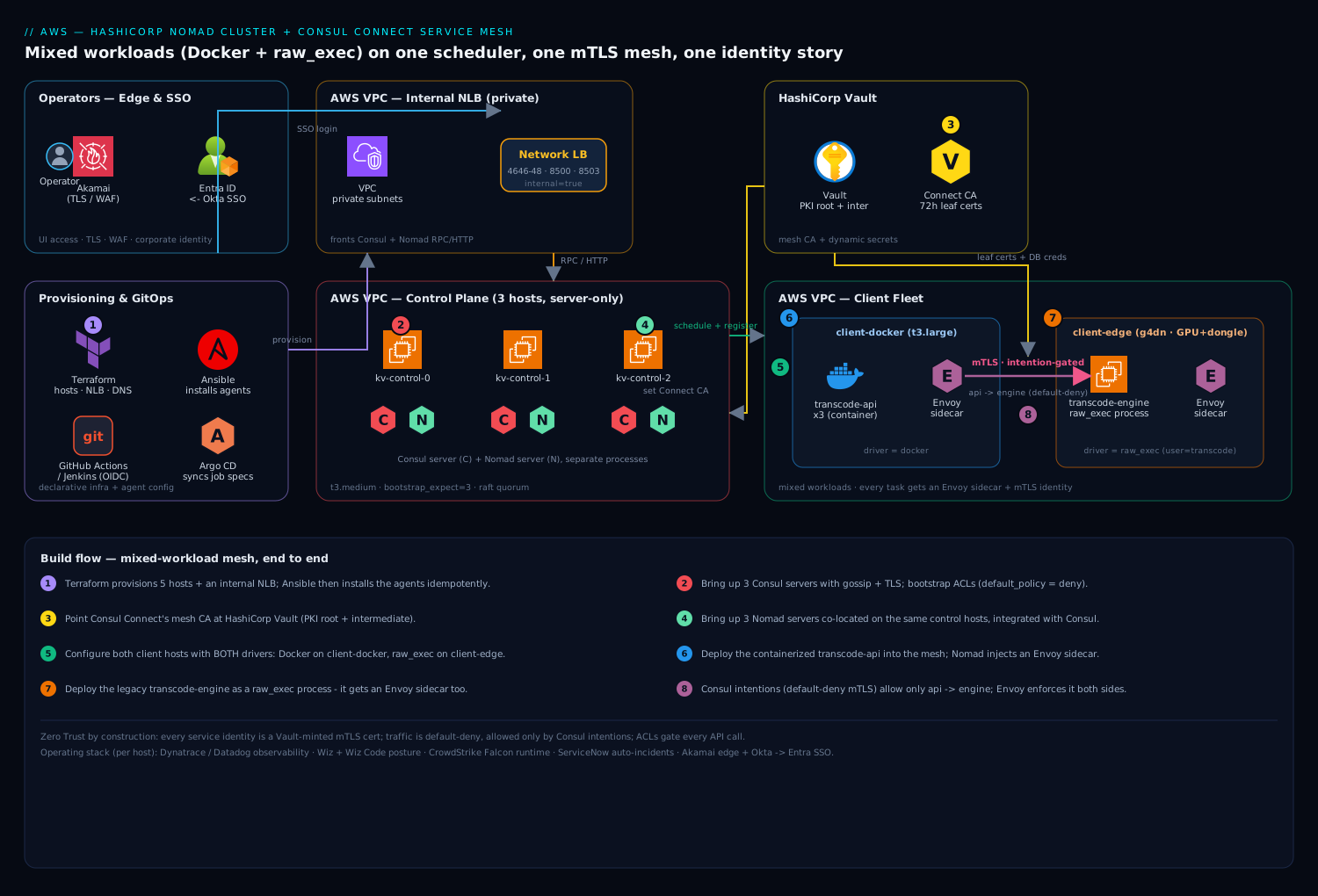
The diagram traces the target topology exactly as the traffic flows, then maps every control onto the hop where it bites. Read it left to right. Operators reach the cluster from the edge through Akamai (TLS termination, WAF) and authenticate to the Nomad and Consul UIs via Entra ID federated from Okta, so humans use corporate SSO and conditional access — never a shared management token. Behind the edge sit the three co-located control hosts: on each, a Consul server (Raft, catalog, health, mesh CA) and a Nomad server (Raft, scheduler) run as separate processes; the two three-node Raft rings each tolerate one node loss. An internal load balancer fronts the RPC and HTTPS ports.
Below the control plane are the client hosts. client-docker runs the docker driver and hosts the containerized transcode-api (three replicas, distinct_hosts) and the nightly thumbnail-batch workers; client-edge runs the raw_exec driver and hosts the bare-metal transcode-engine process next to the GPU and licensing dongle. Every workload — container or process — is paired with an Envoy sidecar that Nomad injects and Consul configures; each sidecar is minted a short-lived leaf certificate by Vault, the mesh CA. All service-to-service traffic flows sidecar → sidecar over mTLS, gated by Consul intentions that are default-deny with exactly one -allow from transcode-api to transcode-engine. Vault also serves the dynamic database credential and the dongle license key that the tasks template in at launch. The whole path is observed by Dynatrace OneAgents on every host and a stray failure raises a ServiceNow incident. The single idea the diagram conveys: one scheduler and one mesh place and govern a container and a bare-metal process identically, from Raft quorum down to the mTLS handshake between them.
Real-world scenario
Meridian Media runs a video-analytics platform: 14 stateless Go/Node microservices, a legacy C++ transcoding engine (GPU-bound, licensed via a USB dongle), a Windows licensing daemon, and a nightly thumbnail batch. Before Nomad they ran the microservices on a self-managed Kubernetes cluster and the legacy binaries as systemd units on four pet GPU VMs — two platforms, two on-calls, and the transcoder living entirely outside the mesh, the RBAC model, and the observability stack. The dongle host read its license key from a plaintext file that had been on disk since 2020, and a Wiz posture scan flagged it every week. Monthly compute was about ₹9.4 lakh, and the platform team of five spent a disproportionate share of its time babysitting the Kubernetes control plane.
The consolidation goal was one scheduler and one mesh. They stood up three control hosts (each Consul + Nomad server), migrated the microservices as docker service jobs with connect { sidecar_service {} }, and — the whole reason for the project — brought the transcoder in as a raw_exec job constrained to the two GPU clients, running as an unprivileged transcode service account, with its dongle license and DB credentials templated from Vault instead of read from disk. The nightly thumbnails became a periodic batch job (prohibit_overlap finally killing the double-run bug that cron never solved), and a Vector log shipper became a system job so every node got one automatically.
The migration surfaced three real lessons. First, on day one the transcoder’s Envoy sidecar would not start and allocations sat pending — the GPU clients had been provisioned from a hardened image that omitted /opt/cni/bin. Staging the CNI reference plugins via Ansible fixed it, and it went into the base image so it never recurred. Second, the microservices’ calls to the transcoder were blocked the moment Connect came on, because the mesh was default-deny and nobody had written the intention; a new engineer nearly rolled the whole thing back thinking the mesh was broken. It was working exactly as designed — consul intention create -allow analytics-gateway transcode-engine opened the one path, and “default-deny is a feature, not a bug” went onto the runbook. Third, two weeks in, all new sidecars suddenly failed to start cluster-wide: the static Vault token backing the Connect CA had expired, halting leaf issuance. They swapped it for a periodic token and added a TTL alert; the fix took ten minutes once they knew where to look, which is the entire value of understanding the CA→Vault dependency.
The outcome: one scheduler instead of two, the transcoder now inside the mesh with a Vault-minted mTLS identity and a dynamic license (the Wiz finding cleared), and the Kubernetes control-plane toil gone. Bin-packing drove GPU-client utilization from ~45% to ~70%, letting them retire one GPU host; monthly compute fell to about ₹7.8 lakh. The lesson on the wall: “A pending alloc, a blocked call, and a dead sidecar each have exactly one cause — read the eval, check the intention, check the Vault token. Owning the scheduler means owning those three checks.”
The migration as a timeline, because the order of the failures is the lesson:
| Phase | What they did | What broke | Root cause | Fix |
|---|---|---|---|---|
| Week 1 | Migrate microservices as docker service jobs | — | — | Clean |
| Week 1 | Bring transcoder in as raw_exec | Sidecar pending |
No CNI plugins on GPU image | Ansible-stage /opt/cni/bin; bake into image |
| Week 2 | Enable Connect + intentions | API→engine calls blocked | Default-deny, no intention written | intention create -allow; document it |
| Week 2 | Steady state | All new sidecars fail cluster-wide | Vault token for Connect CA expired | Periodic token + TTL alert |
| Week 3 | Batch + system jobs | Nightly job double-ran | cron (old) had no overlap guard | periodic + prohibit_overlap |
| Month 1 | Right-size | GPU host over-provisioned | Bin-packing headroom | Retire one host; util 45%→70% |
Advantages and disadvantages
The single-binary, mixed-workload, mesh-everything model both enables this consolidation and imposes real responsibilities. Weigh it honestly.
| Advantages (why this model wins) | Disadvantages (why it bites) |
|---|---|
| One scheduler runs containers, processes, JVMs, and VMs — no two-platform tax | You operate the control plane yourself; there is no managed Nomad the way there is managed Kubernetes on the big clouds |
A raw_exec process and a container share the same mesh, mTLS, and policy engine |
raw_exec is unisolated code execution on the host — a permanent security responsibility you must constrain and audit |
| Control plane is one Go binary with a small port set — legible and fast to operate | Smaller ecosystem than Kubernetes: fewer operators, charts, and off-the-shelf integrations |
| Bin-packing drives utilization up, cutting node count and cost | Bin-packing without distinct_hosts/spread can stack replicas on one node — a single loss takes them all |
| Consul gives catalog + health + DNS + mesh in one system | The mesh CA depends on Vault; a Vault token expiry silently halts all new sidecars |
| Default-deny intentions are true zero-trust across heterogeneous workloads | Default-deny surprises newcomers — blocked traffic reads as “broken” until you learn to write intentions |
| Workload identity (1.7+) removes static tokens from workloads | The identity/ACL model is another system to get right; misconfigure it and tasks can’t register |
| Federates naturally across regions/edge with lightweight gossip | You own upgrades, Raft health, and backups — no cloud SRE catches a quorum loss for you |
The model is right when your estate is genuinely mixed — real legacy you cannot containerize alongside modern services — or when you run edge/on-prem where a full Kubernetes control plane per site is overkill, or when you want a scheduler you can fully understand. It is the wrong choice when your workloads are 100% containerizable and you already have deep Kubernetes investment and a managed control plane, because then you are trading a supported, ecosystem-rich platform for a smaller one to solve a problem you do not have. The disadvantages are all manageable — but only if you know they exist, which is the point of running your own platform: you are the escalation path.
Hands-on lab
This is the centerpiece. You will build a minimal but real cluster — one server, two clients (simulated as agents), Consul + Nomad integrated, Connect on with a built-in CA (Vault optional), and then deploy a container and a raw_exec process into the same mesh, prove default-deny blocks them, open one intention, and watch mTLS traffic flow. It runs on three Linux hosts (or three VMs / a single beefy host with three network namespaces). Where a full HA cluster needs three servers, the lab uses one server + two clients so it fits a laptop; every command is the real one, just scaled down. Estimated time: 45–60 minutes. Teardown at the end returns you to zero.
Sizing note: the lab server is one node (no HA — a single loss ends it), which is fine for learning. For production, re-read the server-count table and run three. The lab uses Connect’s built-in CA to avoid a Vault dependency; the “Vault CA” step is marked optional.
Step 1 — Install the binaries and CNI plugins (all three hosts)
# Add the HashiCorp apt repo and install (Ubuntu 22.04)
wget -O- https://apt.releases.hashicorp.com/gpg | sudo gpg --dearmor -o /usr/share/keyrings/hashicorp-archive-keyring.gpg
echo "deb [signed-by=/usr/share/keyrings/hashicorp-archive-keyring.gpg] https://apt.releases.hashicorp.com $(lsb_release -cs) main" \
  | sudo tee /etc/apt/sources.list.d/hashicorp.list
sudo apt-get update && sudo apt-get install -y nomad consul

# CNI reference plugins (REQUIRED for Connect sidecars)
ARCH=amd64; CNI_VERSION="v1.5.1"
curl -L -o cni.tgz "https://github.com/containernetworking/plugins/releases/download/${CNI_VERSION}/cni-plugins-linux-${ARCH}-${CNI_VERSION}.tgz"
sudo mkdir -p /opt/cni/bin && sudo tar -C /opt/cni/bin -xzf cni.tgz

# Allow bridged traffic to traverse iptables (Connect needs this)
echo 'net.bridge.bridge-nf-call-iptables = 1' | sudo tee /etc/sysctl.d/nomad.conf
sudo modprobe br_netfilter && sudo sysctl --system

nomad version    # expect Nomad v1.7+ (or later)
consul version   # expect Consul v1.17+ (or later)
Expected: nomad version and consul version print 1.7+/1.17+. /opt/cni/bin contains bridge, firewall, portmap and friends.
Step 2 — Start the Consul server (host A) and clients (hosts B, C)
For the lab, use gossip encryption but skip full TLS to keep it readable (production adds the tls {} block from earlier). On host A:
export CONSUL_KEY=$(consul keygen)     # note this — same key on all three
sudo tee /etc/consul.d/server.hcl >/dev/null <<EOF
datacenter = "dc1"
data_dir   = "/opt/consul"
server     = true
bootstrap_expect = 1
bind_addr  = "0.0.0.0"
client_addr = "0.0.0.0"
encrypt    = "${CONSUL_KEY}"
ui_config { enabled = true }
connect   { enabled = true }
ports     { grpc = 8502 }
acl { enabled = true  default_policy = "deny"  enable_token_persistence = true }
EOF
sudo consul agent -config-dir=/etc/consul.d &
On hosts B and C (Consul clients, server = false, pointing at host A):
sudo tee /etc/consul.d/client.hcl >/dev/null <<EOF
datacenter = "dc1"
data_dir   = "/opt/consul"
server     = false
bind_addr  = "0.0.0.0"
client_addr = "0.0.0.0"
encrypt    = "${CONSUL_KEY}"
retry_join = ["<HOST_A_IP>"]
connect   { enabled = true }
ports     { grpc = 8502 }
acl { enabled = true  default_policy = "deny"  enable_token_persistence = true }
EOF
sudo consul agent -config-dir=/etc/consul.d &
Bootstrap Consul ACLs (on host A):
consul acl bootstrap                       # SAVE the SecretID
export CONSUL_HTTP_TOKEN=<secret-id>
consul members                             # expect 3: 1 server, 2 clients, all alive
Expected: consul members lists three nodes, Status = alive, one server and two client.
Step 3 — Start Nomad (server on A, clients on B and C)
On host A (Nomad server):
export NOMAD_KEY=$(nomad operator gossip keyring generate)
sudo tee /etc/nomad.d/server.hcl >/dev/null <<EOF
datacenter = "dc1"
data_dir   = "/opt/nomad"
bind_addr  = "0.0.0.0"
server { enabled = true  bootstrap_expect = 1  encrypt = "${NOMAD_KEY}" }
consul { address = "127.0.0.1:8500"  token = "${CONSUL_HTTP_TOKEN}"  grpc_address = "127.0.0.1:8502" }
acl { enabled = true }
EOF
sudo nomad agent -config=/etc/nomad.d/server.hcl &
On host B (the “container” client — has Docker) and host C (the “raw” client):
# HOST B — docker client
sudo tee /etc/nomad.d/client.hcl >/dev/null <<EOF
datacenter = "dc1"
data_dir   = "/opt/nomad"
bind_addr  = "0.0.0.0"
client { enabled = true  servers = ["<HOST_A_IP>:4647"]  cni_path = "/opt/cni/bin"  meta { workload_class = "container" } }
plugin "docker" { config { allow_privileged = false } }
consul { address = "127.0.0.1:8500"  token = "${CONSUL_HTTP_TOKEN}"  grpc_address = "127.0.0.1:8502" }
acl { enabled = true }
EOF
sudo nomad agent -config=/etc/nomad.d/client.hcl &

# HOST C — raw client (raw_exec opted in)
sudo tee /etc/nomad.d/client.hcl >/dev/null <<EOF
datacenter = "dc1"
data_dir   = "/opt/nomad"
bind_addr  = "0.0.0.0"
client { enabled = true  servers = ["<HOST_A_IP>:4647"]  cni_path = "/opt/cni/bin"  meta { workload_class = "raw" } }
plugin "raw_exec" { config { enabled = true } }
consul { address = "127.0.0.1:8500"  token = "${CONSUL_HTTP_TOKEN}"  grpc_address = "127.0.0.1:8502" }
acl { enabled = true }
EOF
sudo nomad agent -config=/etc/nomad.d/client.hcl &
Bootstrap Nomad ACLs (host A):
nomad acl bootstrap                        # SAVE the management token
export NOMAD_TOKEN=<mgmt-token>
nomad server members                       # 1 server, alive, leader
nomad node status                          # 2 clients, ready
nomad node status -verbose | grep -Ei 'docker|raw_exec'   # confirm drivers detected
Expected: nomad node status shows two ready clients. The docker driver is true on host B, raw_exec is true on host C.
Step 4 — Deploy a containerized service into the mesh
Use a tiny public HTTP echo image so the lab needs no private registry. echo-api.nomad:
job "echo-api" {
  datacenters = ["dc1"]
  type        = "service"
  group "api" {
    count      = 1
    constraint { attribute = "${meta.workload_class}"  value = "container" }
    network    { mode = "bridge"  port "http" { to = 5678 } }
    service {
      name = "echo-api"
      port = "5678"
      connect {
        sidecar_service {
          proxy { upstreams { destination_name = "backend"  local_bind_port = 9090 } }
        }
      }
      check { type = "http"  path = "/"  interval = "10s"  timeout = "2s"  expose = true }
    }
    task "api" {
      driver = "docker"
      config { image = "hashicorp/http-echo:latest"  args = ["-text=hello-from-echo-api"] }
      resources { cpu = 100  memory = 64 }
    }
  }
}
nomad job run echo-api.nomad
nomad job status echo-api                  # 1 running alloc
nomad alloc status -verbose $(nomad job allocs -json echo-api | jq -r '.[0].ID') | grep -i connect-proxy
Expected: the job shows one running allocation; the alloc has a connect-proxy task (the injected Envoy sidecar) alongside your api task.
Step 5 — Deploy a raw_exec “backend” into the SAME mesh
Simulate the legacy binary with a one-line shell process that listens on a port, run via raw_exec on host C, sidecar and all. backend.nomad:
job "backend" {
  datacenters = ["dc1"]
  type        = "service"
  group "svc" {
    count      = 1
    constraint { attribute = "${meta.workload_class}"  value = "raw" }
    network    { mode = "bridge"  port "tcp" { to = 7000 } }
    service {
      name = "backend"
      port = "7000"
      connect { sidecar_service {} }
      check   { type = "tcp"  interval = "10s"  timeout = "2s" }
    }
    task "svc" {
      driver = "raw_exec"
      config {
        command = "/bin/sh"
        args    = ["-c", "while true; do printf 'HTTP/1.1 200 OK\\r\\nContent-Length: 12\\r\\n\\r\\nhello-legacy' | nc -l -p 7000 -q 1; done"]
      }
      user = "nobody"                        # unprivileged — never root
      resources { cpu = 100  memory = 64 }
    }
  }
}
nomad job run backend.nomad
nomad job status backend                    # 1 running alloc on the RAW node
consul catalog services                     # lists: echo-api, backend, plus their sidecars
Expected: both echo-api (container, host B) and backend (raw_exec process, host C) appear in the Consul catalog, each with a sidecar. You now have a container and a bare-metal-style process as peers in one mesh.
Step 6 — Prove default-deny, then open exactly one intention
The API’s upstream call to backend is blocked right now because the mesh is default-deny and no intention exists. Prove it, then allow it:
# Should be Denied — no intention yet
consul intention check echo-api backend                 # => Denied

# Try the call from inside the API alloc — it fails (connection refused/reset via sidecar)
API_ALLOC=$(nomad job allocs -json echo-api | jq -r '.[0].ID')
nomad alloc exec -task api "$API_ALLOC" sh -c 'wget -qO- --timeout=3 http://localhost:9090/ || echo BLOCKED'
# => BLOCKED

# Open exactly one path
consul intention create -allow echo-api backend
consul intention check echo-api backend                 # => Allowed

# Now the same call succeeds — traffic flows sidecar→sidecar over mTLS
nomad alloc exec -task api "$API_ALLOC" sh -c 'wget -qO- --timeout=3 http://localhost:9090/'
# => hello-legacy
Expected: before the intention, the in-alloc call prints BLOCKED and intention check says Denied. After intention create -allow, the same call returns hello-legacy and the check says Allowed. You just watched default-deny mTLS work between a container and a raw_exec process, gated by one policy line.
Step 7 — Validate the whole data path
Walk it top to bottom, exactly as you would in production:
# Control plane healthy
nomad server members                        # server alive, leader
nomad node status                           # 2 clients ready
consul members                              # 3 alive

# Both workloads running with sidecars
nomad job status echo-api                   # 1 running
nomad job status backend                    # 1 running
consul catalog services                     # echo-api, backend, + sidecar-proxy services

# Mesh enforcement is real (deny → allow proven in step 6)
consul intention list                       # shows echo-api -> backend : allow

# DNS discovery works
dig @127.0.0.1 -p 8600 backend.service.dc1.consul SRV +short
The lab validation checklist:
| Check | Command | Pass criteria |
|---|---|---|
| Servers healthy | nomad server members |
Leader elected, alive |
| Clients ready | nomad node status |
Both ready |
| Drivers detected | nomad node status -verbose |
docker on B, raw_exec on C |
| Container running | nomad job status echo-api |
1 running alloc + sidecar |
| Process running | nomad job status backend |
1 running alloc + sidecar |
| Catalog populated | consul catalog services |
Both services + sidecars listed |
| Default-deny works | consul intention check echo-api backend (pre) |
Denied |
| Intention opens path | intention check (post) + in-alloc call |
Allowed + hello-legacy |
| DNS resolves | dig … backend.service.dc1.consul |
Returns the instance |
Step 8 — (Optional) Point the mesh CA at Vault
If you have a dev Vault handy, swap the built-in CA for Vault to see auditable issuance (production step, from the earlier section):
vault server -dev &                         # DEV ONLY — never in prod
export VAULT_ADDR=http://127.0.0.1:8200  VAULT_TOKEN=<dev-root>
vault secrets enable -path=connect-root pki
vault secrets enable -path=connect-inter pki
consul connect ca set-config -config-file - <<EOF
{ "Provider": "vault", "Config": {
  "Address": "http://127.0.0.1:8200", "Token": "${VAULT_TOKEN}",
  "RootPKIPath": "connect-root/", "IntermediatePKIPath": "connect-inter/", "LeafCertTTL": "72h" } }
EOF
consul connect ca get-config | grep -i provider     # => vault
Step 9 — Teardown
Drain gracefully, stop jobs, then stop agents — the reverse of build:
# Stop jobs (-purge removes them from state)
nomad job stop -purge echo-api
nomad job stop -purge backend

# Remove the intention
consul intention delete echo-api backend

# Drain clients so any remaining allocs migrate cleanly (production habit)
for n in $(nomad node status -json | jq -r '.[].ID'); do nomad node drain -enable -yes "$n"; done

# Stop the agents on every host
sudo pkill nomad ; sudo pkill consul
# (optional) wipe state
sudo rm -rf /opt/nomad /opt/consul
Expected: jobs gone, intention removed, agents stopped. The lab leaves no cloud cost because it ran on hosts you already had.
Common mistakes & troubleshooting
The failures below are the ones you will actually hit. Each is symptom → root cause → the exact confirming command → fix.
| # | Symptom | Root cause | Confirm with | Fix |
|---|---|---|---|---|
| 1 | Alloc stuck pending, sidecar never starts |
CNI plugins missing from /opt/cni/bin |
ls /opt/cni/bin; nomad alloc status <id> shows network setup error |
Stage bridge/firewall/portmap via Ansible; bake into image |
| 2 | Service calls blocked right after enabling Connect | Default-deny, no intention written | consul intention check <src> <dst> → Denied |
consul intention create -allow <src> <dst> |
| 3 | Cluster won’t schedule; “no cluster leader” | Lost Raft quorum (majority of servers down) | nomad operator raft list-peers; nomad server members |
Restore servers to regain majority; never run 2 servers |
| 4 | New sidecars fail cluster-wide, existing traffic ok | Vault token for Connect CA expired | consul connect ca get-config; check Vault token TTL |
Use a periodic/renewable token; alert on TTL |
| 5 | raw_exec task running as root |
user not set on the task |
ps -o user= -p <pid> shows root |
Set user = "<unprivileged>"; treat raw_exec as RCE |
| 6 | A node silently never joins | encrypt gossip key differs (or absent) on that node |
consul members (node missing); logs: “encryption mismatch” |
Distribute one identical key via Ansible; restart |
| 7 | Alloc: “No nodes were eligible” | Constraint matches no node, or driver not detected | nomad eval status <eval-id>; nomad node status -verbose |
Fix constraint value / enable the driver on a node |
| 8 | Batch job restarts forever after finishing | Declared type = "service" |
nomad job inspect <job> shows service scheduler |
Change to type = "batch" |
| 9 | Per-node agent lands on wrong count of nodes | Declared service with a count instead of system |
Job type is service |
Change to type = "system" (no count) |
| 10 | Three “HA” replicas all die on one node loss | Bin-packing stacked them; no distinct_hosts |
nomad job status: all allocs on one node |
Add constraint { distinct_hosts = true } or spread |
| 11 | Task can’t register in Consul; 403 in logs | ACL token missing/insufficient, or workload identity misconfigured | Nomad client logs; consul acl token read |
Fix the token/policy; enable service_identity/task_identity |
| 12 | Health check fails through the sidecar | Check can’t reach the app past Envoy | nomad alloc status; check has no expose = true |
Add expose = true to the check (or use a proxy-exposed path) |
| 13 | Container up but not reachable in mesh | App binds 127.0.0.1, not 0.0.0.0 |
nomad alloc exec … ss -ltn inside the task |
Bind 0.0.0.0; the sidecar reaches it from outside |
| 14 | Server also runs client work, quorum flaps under load | Server node is not server-only | nomad node status lists a server host as a client |
Keep the 3 server hosts server-only; move workloads off |
| 15 | Envoy sidecar can’t get config; xDS errors | Wrong grpc_address/gRPC port or TLS mismatch to Consul |
Sidecar logs; nomad consul { grpc_address } |
Point to Consul’s gRPC(-TLS) port (8502/8503); align TLS |
The decision table for the three “why won’t it place” states, which cover the bulk of scheduling confusion:
| If you see… | It’s probably… | Do this |
|---|---|---|
pending for a long time |
CNI missing, resources exhausted, or bad constraint | nomad alloc status <id> then nomad eval status <eval> |
| “No nodes were eligible for evaluation” | Constraint filters out every node | Loosen/fix the constraint; verify driver + meta on nodes |
| “resources exhausted” | Not enough CPU/memory anywhere feasible | Scale clients, lower resources, or free capacity |
| “no cluster leader” | Raft quorum lost | Bring servers back to a majority immediately |
Best practices
- Run an odd number of servers (3 or 5) and keep them server-only. A server that also schedules work loses quorum predictably under load. Spread them across failure domains but keep them low-latency for Raft.
- Encrypt and ACL from the first boot. Gossip
encrypton every node with the same key, TLS withverify_incoming/verify_outgoing, anddefault_policy = "deny"on both Consul and Nomad. Retrofitting is painful. - Treat
raw_execas remote code execution. Enable it only on the specific node that needs it, always setuserto an unprivileged account, keep cgroup limits on, and pin the job with aconstraintso nothing else exploits the enabled driver. - Use workload identity (Nomad 1.7+), not static tokens on workloads. Let Nomad mint per-task Consul/Vault credentials from a signed identity; do not distribute long-lived tokens to jobs.
- Add
distinct_hostsorspreadto anything that needs HA. Bin-packing will otherwise stack your replicas on one node and a single loss takes them all. Density is the default; resilience is opt-in. - Back the Connect CA with Vault and use a periodic token. Auditable, short-lived leaves are the point — but a static token that expires halts all new sidecars, so make the token renewable and alert on its TTL.
- Pick the scheduler type deliberately.
servicefor long-running,batch(withperiodic+prohibit_overlap) for jobs,systemfor per-node agents. The wrong type fails quietly. - Pull secrets with
template, never bake them into images or job specs. Dynamic DB creds and license keys come from Vault at launch and rotate; nothing sensitive lives in Git or a layer. - Deploy via versioned jobs and Git, never edit a running job by hand. Sync job specs from a Git repo (Argo CD / a pipeline), so
nomad job revertis a first-class rollback and desired state is declarative — the same discipline as GitOps with Argo CD and Flux: Deliver from Git. - Drain clients before maintenance.
nomad node drain -enablecordons and migrates allocations cleanly; never yank a client with running work. - Alert on the three things that page you: lost Raft quorum, Vault token TTL for the CA, and blocked-intention counts. These are the failures that turn into outages.
- Set explicit
resourceson every task. CPU (MHz) and memory (MB) are the bin-packing inputs; omit them and the scheduler mis-packs and OOM-kills under load.
Security notes
The mesh is zero-trust by construction, but the guarantees only hold if you keep every control on. Every service identity is an mTLS leaf certificate minted by Vault (the Connect CA), traffic is default-deny and explicitly allowed only by Consul intentions, and ACL tokens gate every Consul and Nomad API call with least privilege. The identity model is SPIFFE-shaped — the same primitives you would otherwise run SPIRE for, per Set Up SPIFFE/SPIRE for Workload Identity and mTLS Across Heterogeneous Clusters — but delivered by Consul so a container and a raw_exec process inherit identical identities. Vault is not just the CA; it is the Vault PKI as Enterprise Private CA for Service mTLS that centralizes issuance and rotation, and the store for dynamic database credentials and the dongle license, so nothing sensitive lives on disk or in a job spec.
The permanent responsibility is raw_exec: because it is unisolated code execution on the host, it must run as an unprivileged account, be constrained to exactly the node that needs it, and be watched by runtime security. Layer the corporate controls on top: a Wiz posture scan (with Wiz Code scanning the Terraform and Nomad HCL in the repo) flags drift — a raw_exec job that sneaks in as root, a security group opened wide, an ACL that widened, a plaintext secret. CrowdStrike Falcon sensors on every node give runtime threat detection across both container and bare-metal workloads, feeding the SOC. Operator access to the UIs federates Okta → Entra ID so humans authenticate with corporate SSO and conditional access, never a shared management token — store the bootstrap tokens in Vault and use them only for break-glass. Human access to the nodes themselves should be brokered, not raw SSH keys: front it with Deploy a Self-Hosted HashiCorp Boundary Cluster for Brokered SSH and RDP Access. The edge sits behind Akamai for TLS and WAF, and the perimeter firewalls restrict the cluster ports to the private network. The security-control-to-threat map:
| Control | Mitigates | Where it lives |
|---|---|---|
| Vault-minted mTLS leaves | Impersonation, eavesdropping between services | Connect CA → every sidecar |
| Default-deny intentions | Lateral movement, unauthorized service calls | Enforced at Envoy sidecars |
| ACL tokens (least privilege) | API abuse, over-broad access | Nomad + Consul control plane |
| Workload identity (per-task) | Long-lived stolen tokens | Nomad 1.7+ token minting |
raw_exec as unprivileged + constrained |
Host compromise via the ungoverned driver | Task user + node constraint |
| Gossip encryption | Rogue nodes joining, membership sniffing | encrypt on every agent |
| Wiz / Wiz Code | Drift, misconfig, plaintext secrets | Repo + running hosts |
| CrowdStrike Falcon | Runtime threats on containers + bare metal | Every node |
| Okta → Entra SSO | Shared/leaked human credentials | UI authentication |
| Boundary | Unbrokered node access | Human SSH/RDP path |
Cost & sizing
Nomad’s cost pitch is twofold: you do not pay the tax of rewriting the transcoder and licensing daemon to fit a container runtime, and you run one scheduler instead of separate platforms for containers and VMs — which is also one control plane to staff and operate. The bill is dominated by client capacity (where the workloads and GPUs live), not the control plane.
Sizing guidance:
| Component | Sizing rule | Rationale |
|---|---|---|
| Nomad/Consul servers | 3 modest nodes (2–4 vCPU / 4–8 GB); 5 for large fleets | Raft is not CPU-heavy; servers are cheap; odd count for quorum |
| General clients | Size to workload sum + ~20% headroom; bin-packing fills them | Density is the whole efficiency argument |
| GPU/edge clients | Size to peak GPU throughput; scale on queue depth, not peak | GPUs dominate cost; don’t provision for the tail |
| Batch capacity | Reuse general clients; batch bin-packs into slack | Nightly jobs use idle daytime headroom |
| Vault | Small HA cluster; it’s the CA + secrets, not a data plane | Modest; but must be HA — its outage halts sidecars |
The cost levers, ranked by impact:
| Lever | Effect on bill | Effort |
|---|---|---|
| Bin-packing (default) to raise utilization | Fewer client nodes for the same load | Free — set resources accurately |
spread/distinct_hosts only where HA needs it |
Avoid over-provisioning for false HA | Low — targeted constraints |
| Scale GPU fleet on queue depth, not peak | Right-sizes the most expensive nodes | Medium — autoscaling on a metric |
| Retire one platform (vs K8s + VM fleet) | Removes a whole control plane’s toil + nodes | One-time migration |
| Reuse clients for batch in slack hours | No dedicated batch fleet | Low — periodic batch jobs |
| Modest server nodes | Control plane is a rounding error | Free |
Rough figures: three server nodes at 2 vCPU/4 GB run a few thousand rupees a month each; the real spend is the GPU/edge fleet, which you scale on actual transcoding queue depth. Vault leaf certs and ACL tokens cost nothing but the discipline to run them. Pipe per-job CPU/memory utilization from Dynatrace into a monthly chargeback so each team owns its footprint — the same metric that tells you when a client host is finally worth adding. The Meridian Media example moved from ~₹9.4 lakh/month across two platforms to ~₹7.8 lakh on one, chiefly by retiring a GPU host that bin-packing made redundant.
Interview & exam questions
Q1. What is the difference between a Nomad server and a client, and how many servers should you run? A server participates in Raft consensus, holds all cluster state, and runs the scheduler; a client is a stateless agent that fingerprints its host and runs allocations. Run an odd number of servers — three for a single datacenter (tolerates one loss), five for large fleets (tolerates two). Never run two (any loss breaks quorum) and keep servers server-only.
Q2. Explain how a job, a group, and a task relate, and what the group guarantees.
A job contains one or more groups; a group has a count and is the unit of placement; a group contains one or more tasks, each with a driver. Every task in a group lands on the same client and shares its network namespace — which is why an app container and its Envoy sidecar talk over localhost.
Q3. When would you use raw_exec over docker or exec, and what is the risk?
Use raw_exec when a workload must reach the host directly — GPU drivers, a hardware dongle, a kernel feature — that container isolation blocks. The risk is that raw_exec has no isolation: it is arbitrary code execution on the host as the specified user. Mitigate by opting it in only on the node that needs it, running as an unprivileged user, keeping cgroup limits, and pinning the job with a constraint.
Q4. Contrast the service, batch, and system schedulers.
service keeps count replicas running indefinitely and reschedules failures — for APIs and daemons. batch runs to completion and does not restart on clean exit — for ETL and nightly jobs. system runs one allocation on every eligible node and follows membership — the DaemonSet analog, for per-node agents.
Q5. What does bootstrap_expect do, and where do you set it?
It tells the servers how many server peers to wait for before forming the cluster and electing a leader. Set it on the servers only (never clients) to your server count (3 or 5). It is read once at initial cluster formation.
Q6. How does a container and a bare-metal process end up in the same service mesh?
Both are Nomad tasks with a service block containing connect { sidecar_service {} }. Nomad injects an Envoy sidecar for each and registers them in Consul; Consul mints each a leaf certificate and applies intentions at the sidecar. Because identity is a certificate and enforcement is at the sidecar, the driver (docker vs raw_exec) is irrelevant to the mesh.
Q7. What is a Consul intention, and what does “default-deny” mean operationally?
An intention is an allow/deny rule between service identities, enforced at the Envoy sidecar on the mTLS layer. With default_policy = "deny", no service can call another until you write an explicit -allow intention — so newly meshed traffic is blocked until you open the path, which is the intended zero-trust behavior, not a bug.
Q8. Why does the Connect CA’s Vault token matter, and what fails if it expires? Consul uses that token to sign sidecar leaf certificates from Vault’s PKI mounts. If it expires, Consul can no longer issue leaves, so new sidecars cannot start (existing traffic survives until its leaves expire). Use a periodic/renewable token and alert on its TTL.
Q9. You submit a job and the allocation stays pending. How do you diagnose it?
Read the allocation (nomad alloc status <id>) and the evaluation (nomad eval status <eval>). The eval names the reason: CNI plugins missing (network setup error), resources exhausted, or no node satisfying a constraint. The failure is attached to the eval, not the job.
Q10. How do constraints, affinities, and spread differ?
A constraint is a hard filter — non-matching nodes are ineligible and the alloc will not place without a match. An affinity is a soft, weighted preference — the scheduler prefers matching nodes but places elsewhere rather than fail. spread deliberately distributes allocations across a dimension (e.g. AZ) for resilience, trading bin-packing density.
Q11. What is workload identity in Nomad 1.7+ and why is it better than static tokens? Nomad mints a short-lived, per-task Consul/Vault credential from a cryptographically signed workload identity, instead of you distributing a long-lived token to every job. It eliminates static secrets on workloads and scopes each task’s access automatically.
Q12. How do you achieve true HA for three API replicas, and what happens without it?
Add constraint { distinct_hosts = true } (or a spread) so the three replicas land on three different nodes. Without it, bin-packing may stack all three on one node, and a single node loss takes the entire API down — HA in name only.
Quick check
- You have three Nomad servers and one dies. Can the cluster still schedule work? What if a second dies?
- A workload must read a USB dongle on a specific host. Which driver do you use, what
userdo you set, and how do you keep the job off every other node? - You enabled Consul Connect and immediately every service-to-service call fails. Is the mesh broken? What is the one command to fix it?
- You want a log shipper on every current and future client node. Which scheduler
typedo you use, and do you set acount? - Your three “HA” replicas all went down when one node was lost. What did you forget in the job spec?
Answers
- Yes after one loss — three servers tolerate one failure (quorum of two survives). No after two — with only one server left, quorum (majority of three = two) is lost, and the cluster elects no leader and cannot schedule until a majority returns. This is why you run three or five, never two.
- Use
raw_exec(it is the only driver with no isolation, so it can reach the dongle), setuser = "<unprivileged>"(never root), and add aconstraintmatching that host’s meta (e.g.attribute = "${meta.workload_class}" value = "raw") so the job pins to it and nothing else exploits the enabled driver. - The mesh is not broken — it is default-deny (
default_policy = "deny"), so all traffic is blocked until you write an intention. Fix it withconsul intention create -allow <source> <dest>for the exact path you need. - Use
type = "system", and set nocount— the system scheduler places exactly one allocation on every eligible node automatically and follows membership as nodes join and leave. - You forgot
constraint { distinct_hosts = true }(or aspread). Bin-packing stacked all three replicas on one node, so a single node loss took them all. Distinct-hosts forces the replicas onto separate nodes for real HA.
Glossary
- Nomad server — Control-plane node participating in Raft; holds cluster state and runs the scheduler. Run an odd number (3/5).
- Nomad client — Stateless worker node that fingerprints its host and runs allocations handed down by the leader.
- Raft — The consensus protocol Nomad and Consul use to replicate state; requires a quorum (majority) to commit, tolerating
floor((N-1)/2)failures. bootstrap_expect— Server-only setting: how many server peers to wait for before forming the cluster and electing a leader.- Job / group / task — A job contains groups; a group (
countcopies) is the placement unit and shares a network; a group contains tasks, each with a driver. - Task driver — The plugin that runs a task:
docker(container),exec(sandboxed process),raw_exec(unisolated host process),java(JVM),qemu(VM). - Allocation — A running instance of a group on a specific client node; the thing you inspect and debug (
nomad alloc status). - Evaluation — The scheduler’s decision cycle, produced on every job or node change; placement failures attach here.
- Scheduler type —
service(long-running, maintains count),batch(runs to completion),system(one per node),sysbatch(one-shot per node). - Bin-packing — Nomad’s default placement algorithm: pack allocations onto the fewest nodes to maximize utilization.
- Constraint / affinity / spread — Hard filter / soft weighted preference / deliberate distribution across a dimension; the levers that steer placement.
- Consul catalog — The registry of services and their instances, keyed by service name; the source of truth for discovery.
- Consul Connect — The service mesh: injects Envoy sidecars, mints mTLS identities, enforces intentions.
- Envoy sidecar — The proxy Nomad injects next to each service (as a task in the group) that terminates mTLS and enforces intentions.
- Intention — An allow/deny rule between service identities, enforced at the sidecar; default-deny means nothing is allowed until explicitly permitted.
- Workload identity — Nomad 1.7+ mechanism that mints short-lived, per-task Consul/Vault credentials from a signed identity, replacing static tokens.
- CNI plugins — The
bridge/firewall/portmapbinaries in/opt/cni/binthat Connect sidecars require for their network namespaces. - Mesh CA — The certificate authority that signs sidecar leaf certificates; built-in by default, Vault-backed in production.
Next steps
- Back the mesh CA properly — Vault PKI as Enterprise Private CA for Service mTLS is the CA design that mints the leaves the sidecars here depend on.
- Understand the identity model you inherited — Set Up SPIFFE/SPIRE for Workload Identity and mTLS Across Heterogeneous Clusters explains the SPIFFE-shaped identities Consul Connect delivers.
- Broker human access to the nodes — Deploy a Self-Hosted HashiCorp Boundary Cluster for Brokered SSH and RDP Access replaces raw SSH keys with just-in-time, audited access.
- Deploy jobs declaratively — GitOps with Argo CD and Flux: Deliver from Git is the pattern for syncing Nomad job specs from a Git repo with first-class rollback.
- Compare against managed compute — Azure App Service vs Container Apps vs AKS: Choose the Right Compute frames when a managed container platform beats running your own scheduler.
- See the mesh pattern elsewhere — Terraform Module: AWS App Mesh is the same default-deny mesh boundary applied to ECS/EKS workloads.