A fintech platform team has been pulling base images straight from Docker Hub into production for two years, and an auditor finally asks the question that ends that era: “prove that the image running in your payments cluster is the one your pipeline built, that it was scanned, and that nobody swapped a layer in between.” Nobody can. There is no private registry of record, no vulnerability gate, no signature — just a latest tag and trust. This guide builds the thing that turns that audit into a five-minute conversation: a self-hosted Harbor OCI registry on Kubernetes, with Trivy scanning every push and physically blocking pulls of vulnerable images, Cosign and Notation signing so a deploy can be made to refuse anything unsigned, and replication so a second region (and the air-gapped DR cluster) always holds the exact same bits.
Harbor is a CNCF graduated project — the same maturity tier as Kubernetes, Prometheus, and Envoy — and it is not a thin wrapper over the Docker distribution binary. It is a collection of microservices (core, portal, jobservice, registry, an optional trivy scanner, a Postgres database, and Redis) that together give you multi-tenant projects with quotas and RBAC, robot accounts for CI, server-side vulnerability scanning with prevent-pull policies, native Cosign/Notation signature storage and enforcement, cross-registry replication (push and pull), a proxy cache that turns Harbor into a pull-through mirror of Docker Hub or GHCR, tag retention and garbage collection to keep storage bounded, and OIDC so humans sign in with corporate identity. Run it right and it becomes the single control plane where “what containers are allowed in this estate” is enforced, not merely documented.
This is an implementation guide and the hands-on lab is its centerpiece: by the end you will have Helm-installed Harbor on a real cluster, created a promotion-structured project layout, minted scoped robot accounts, watched Trivy block a vulnerable pull, signed an image with Cosign, enforced that signature at admission, and replicated the signed artifact to a second registry — every gate verified by watching it fire. Along the way you get the option-by-option reference: every Helm component and its external-vs-in-cluster trade-off, every project metadata flag, every replication trigger and filter, the GC and retention mechanics, the HA topology on object storage, and the failure modes that bite first installs. This is written for a senior platform engineer standing up the registry that a CISO will sign off on — not a quickstart.
What problem this solves
Pulling images directly from public registries into production fails four ways at once, and each one is an incident waiting to happen. First, provenance: with a mutable latest (or even a semantic) tag, you cannot prove the running image is the one your pipeline built — a tag can be repointed, a registry account can be compromised, a typosquatted image can be pulled. Second, vulnerabilities: nobody scans on the way in, so a base image with a critical glibc or openssl CVE lands on a node and nobody knows until a scanner flags it in production, or an attacker exploits it. Third, availability and rate limits: Docker Hub’s anonymous pull rate limits (100 pulls per 6 hours per IP) throttle a busy cluster’s imagePullBackOff into a rolling outage, and a public-registry outage stalls every deploy. Fourth, air-gap and DR: a cluster with no internet egress cannot pull from Docker Hub at all, and a DR region needs the exact same signed artifacts the primary region runs.
What breaks without a gated private registry: an auditor asks for a chain of custody and there is none; a Log4Shell-class CVE drops and there is no inventory of which images contain the vulnerable library and no gate to stop new pulls; a public-registry outage or a rate-limit wall takes down deploys estate-wide; a supply-chain attack (a poisoned base image, a compromised upstream tag) reaches a node because nothing verified what was pulled. The teams that hit this hardest run regulated workloads (fintech, healthcare, government), air-gapped or sovereign clouds, and any multi-cluster estate where “which image ran where” must be answerable months later.
Harbor closes all four gaps under one policy plane. It is a pull-through cache so Docker Hub rate limits and outages stop mattering; a scanning gate so vulnerable images never reach a node; a signing and verification chain so only pipeline-built, unaltered images run; and a replication engine so DR and air-gapped sites hold identical signed bits. The alternative — a managed registry like ACR, ECR, or Artifact Registry — solves storage and basic scanning but charges per feature and per GB, does not give you a single portable policy plane across clouds and on-prem, and cannot run inside a truly air-gapped environment. Harbor is the answer when you need gating, signing enforcement, and cross-registry replication under your own control, on any Kubernetes, at a flat compute-and-storage cost.
Before the deep dive, here is the whole system framed as the four supply-chain guarantees, what enforces each, and where it lives:
| Guarantee | The question it answers | Harbor mechanism | Enforcement point |
|---|---|---|---|
| Provenance | Is this the image my pipeline built? | Cosign/Notation signature stored as OCI artifact | Admission controller + project enable_content_trust_cosign |
| Known-clean | Was it free of critical CVEs at promotion? | Trivy scan-on-push + prevent_vul |
Harbor refuses to serve on pull |
| Availability | Can I always pull, even if Docker Hub is down? | Proxy-cache project (pull-through mirror) | Registry serves from local cache |
| Consistency (DR/air-gap) | Does the DR/offline cluster have identical bits? | Replication rule (push/pull) | Jobservice mirrors digest + signatures |
Learning objectives
By the end of this article you can:
- Install Harbor on Kubernetes with Helm, choosing correctly between in-cluster and external Postgres, Redis, and blob storage for every component (
core,registry,jobservice,trivy,database,redis,portal), and expose it over TLS through an ingress. - Structure the registry around promotion with projects, per-project storage quotas, RBAC roles, and short-scoped robot accounts so CI never holds a human credential.
- Configure Trivy scan-on-push and the prevent-pull vulnerability gate (
prevent_vul+severity) so Harbor physically refuses to serve an image over a severity threshold, plus CVE allowlists for documented waivers. - Sign images with Cosign (keyless or KMS-backed) and Notation, store the signatures as OCI artifacts in Harbor, and enforce them at both the registry (
enable_content_trust_cosign) and at admission (Sigstore policy-controller / KyvernoverifyImages). - Build replication rules — push-based, pull-based, event-based vs scheduled — with name/tag/label filters to mirror projects to a DR Harbor, an ECR/ACR/GAR endpoint, or an air-gapped site, and set up a proxy-cache project.
- Keep storage bounded with tag retention rules and garbage collection, and understand the read-only-window and delete-then-GC mechanics that trip people up.
- Run Harbor highly available on external object storage (S3/Azure Blob/GCS) with replica’d stateless components and managed Postgres/Redis, and wire OIDC SSO with group-to-role mapping.
Prerequisites & where this fits
You should be fluent with Kubernetes objects (Deployments, StatefulSets, Services, Ingress, PVCs, Secrets), comfortable with Helm v3 values files and releases, and understand OCI/Docker registry basics — what a manifest, a digest, a layer, and a tag are, and why a sha256: digest is immutable while a tag is not. You need working kubectl, helm v3.12+, and for the signing sections cosign v2.x, trivy, and crane/oras on your workstation. You should know how cert-manager or a corporate CA issues TLS, and have an OIDC identity provider (Entra ID, Okta, Keycloak, or Dex) available for SSO. The cluster should be v1.27+ with an ingress controller and a default StorageClass; the lab uses a small single-node cluster, but production guidance targets a 3+ node cluster with object storage.
This sits at the center of the software-supply-chain track. Upstream of it are your CI systems — if you run Jenkins with the Kubernetes plugin or push from a managed pipeline, that is what authenticates to Harbor as a robot account. Downstream, Argo CD with SSO and RBAC is what deploys the signed images Harbor stores, and an admission policy verifies the signature before the kubelet pulls. It pairs tightly with independent posture scanning: Wiz Code in GitHub Actions gates the pipeline out-of-band, and CrowdStrike Falcon on Kubernetes protects the registry’s node pool at runtime. For the secrets that back robot tokens and signing keys, External Secrets Operator with Vault keeps them out of Git. And if MinIO is your object store, MinIO with object locking and site replication is where Harbor’s blobs live.
Here is who owns which layer of a Harbor deployment, so you route ownership correctly:
| Layer | What lives here | Who usually owns it | What it breaks if wrong |
|---|---|---|---|
| Ingress + TLS | Hostname, cert, body-size limit | Platform / network | x509 on push; signing refuses non-TLS |
| Harbor microservices | core/registry/jobservice/trivy/portal | Platform team | Scans queue, UI down, pushes fail |
| Postgres + Redis | Metadata, sessions, job queue | DBA / platform | Data loss, session flaps, lost jobs |
| Object storage | Image layers (blobs) | Storage team | Layer read/write failures, bloat |
| Projects + RBAC + robots | Tenancy, quotas, CI credentials | Platform + app teams | Over-broad access; leaked tokens |
| Scan + sign policy | Trivy gate, Cosign enforcement | Security team | Vulnerable/unsigned images run |
| Replication | DR/air-gap mirroring | Platform + SRE | DR drift; stale offline images |
Core concepts
Six mental models make every later decision obvious.
Harbor is microservices, not a binary. A Harbor install is a set of cooperating services. core is the API server and policy brain — it owns projects, users, robots, replication policies, and the scan/sign enforcement logic. registry is the actual OCI distribution engine that stores and serves blobs and manifests (Harbor wraps the CNCF distribution project). portal is the web UI (an Nginx-served SPA). jobservice is the asynchronous worker that runs scans, replication, garbage collection, and retention — this is where the heavy work happens and where under-provisioning bites. trivy is the optional bundled scanner (an Aqua Trivy server). Behind them, a PostgreSQL database holds all metadata and a Redis holds sessions, the job queue, and registry caches. Requests flow: client → ingress (TLS) → core (auth + policy) → registry (blob I/O) → object storage; and asynchronously core enqueues to jobservice, which calls trivy, remote registries, and back into registry.
Everything real is addressed by digest, tags are pointers. A push produces an immutable manifest identified by a sha256: digest; a tag is a mutable label pointing at a digest. Signatures and scan reports attach to the digest, stored as their own OCI artifacts (Cosign uses a sha256-<digest>.sig tag convention; Harbor surfaces them as “accessories”). The entire security model — sign this, scan this, promote this — must operate on digests, because a tag can be moved out from under you. When you cosign sign image:tag, Cosign resolves the tag to a digest and signs the digest; when you promote, you crane copy by digest. Tag-based operations are for humans reading the UI, not for the trust chain.
A project is the unit of tenancy, quota, and policy. Everything in Harbor lives inside a project (the namespace before the first / in harbor.example.com/production/payments-api). A project carries its own members and RBAC (roles: Limited Guest, Guest, Developer, Maintainer, Project Admin), a storage quota, and a bundle of metadata flags that are the policy surface: auto_scan (scan on push), prevent_vul + severity (block pulls over a threshold), enable_content_trust_cosign (require a signature to pull), public (anonymous read), reuse_sys_cve_allowlist, and retention. Structure projects around promotion: a permissive staging where CI pushes freshly built images, and a locked-down production that only receives promoted, scanned, signed digests.
The scan gate is enforced at pull, not just reported. Turning on auto_scan makes Harbor scan every pushed image with Trivy and record the CVE report against the artifact. That is only telemetry until you also set prevent_vul=true with a severity threshold — then Harbor’s registry will return an error on pull for any image carrying a vulnerability at or above that severity. This is a hard control at the registry boundary: a vulnerable image cannot reach a node even if a Deployment references it, because the docker pull / kubelet pull itself is denied. The severity values are none, low, medium, high, critical; high blocks High and Critical.
Signing proves identity; enforcement makes it matter. A signature (Cosign or Notation) is cryptographic proof the image is the exact one signed by a holder of the private key. Harbor stores signatures but signing is worthless unless something verifies them. Two enforcement points: at the registry, enable_content_trust_cosign=true makes Harbor refuse to serve unsigned artifacts from that project; at admission, a policy controller (Sigstore policy-controller or Kyverno’s verifyImages) checks the signature against your public key before the kubelet is allowed to pull, rejecting unsigned or tampered pods. Belt and braces: the registry gate and the admission gate are independent, so a gap in one is caught by the other.
Replication moves digests and their accessories between registries. A replication rule mirrors artifacts — the manifest, its layers, and attached signatures and scan reports — from a source to a destination registry, which can be another Harbor or a foreign registry (ECR, ACR, GAR, Docker Hub, GHCR, Quay). Rules are push-based (this Harbor pushes out) or pull-based (this Harbor pulls in), triggered manually, on a schedule (cron), or event-based (fire on every push/delete). Filters by name, tag, and label scope what moves. This is your DR mirror, your air-gap transfer, and your multi-region distribution — all digest-preserving so the DR image is bit-identical to production.
The vocabulary in one table
Before the deep sections, pin down every moving part. The glossary at the end repeats these for lookup; this table is the mental model side by side:
| Concept | One-line definition | Where it lives | Why it matters |
|---|---|---|---|
core |
API server + policy engine | Deployment | Owns projects, robots, enforcement |
registry |
OCI distribution engine (blob I/O) | Deployment | Stores/serves layers; enforces prevent-pull |
jobservice |
Async worker (scan/replicate/GC/retain) | Deployment | Under-provision → queued scans, lagging DR |
trivy |
Bundled vulnerability scanner | Deployment | Produces CVE reports for the gate |
portal |
Web UI (SPA) | Deployment | Human console; not on the data path |
| Postgres | All Harbor metadata | StatefulSet / external | Loss = registry inventory gone |
| Redis | Sessions, job queue, cache | StatefulSet / external | Loss = flapping logins, lost jobs |
| Project | Tenancy + quota + policy unit | Postgres row | The namespace and the policy surface |
| Robot account | Non-human, scoped, expiring credential | Project or system | What CI uses to push/pull |
auto_scan |
Scan every pushed image | Project metadata | Produces the report the gate reads |
prevent_vul |
Refuse pulls over severity |
Project metadata | The hard vulnerability gate |
enable_content_trust_cosign |
Require a Cosign signature to pull | Project metadata | The registry-side signing gate |
| Replication rule | Mirror artifacts to/from a registry | Postgres + jobservice | DR, air-gap, multi-region |
| Proxy cache | Pull-through mirror of a remote registry | Project (of type proxy) | Beats Docker Hub rate limits/outage |
| Retention | Rules that keep only wanted tags | Project policy | Bounds tag sprawl |
| Garbage collection | Reclaims blobs of deleted manifests | System job | Reclaims disk after deletes |
Installing Harbor with Helm — every component and its dependencies
Harbor ships an official Helm chart (harbor/harbor from https://helm.goharbor.io). The chart deploys all seven functional components plus its two data stores, and the central decision at install time is, for each stateful dependency, in-cluster or external. Get this decision right and the rest is configuration.
The component map
Every Harbor component, what it does, whether it holds state, and how to scale it:
| Component | Role | Stateful? | Scale by | Under-provision symptom |
|---|---|---|---|---|
| core | API + policy + auth | No (state in PG/Redis) | Replicas | API latency, timeouts |
| portal | Web UI SPA | No | Replicas | UI slow (rarely the bottleneck) |
| jobservice | Scan/replicate/GC/retain worker | No (queue in Redis/PG) | Replicas + maxJobWorkers |
Queued scans, lagging replication |
| registry | OCI blob/manifest I/O | Blobs in object store | Replicas | Slow push/pull under load |
| registryctl | Registry control (GC, config) | No | With registry | GC coordination issues |
| trivy | Vulnerability scanner + DB | Vuln DB cache (PVC) | Replicas | Scans serialize, slow |
| exporter | Prometheus metrics | No | Single | No metrics |
| database (PostgreSQL) | All metadata | Yes | External managed | Corruption/loss = inventory gone |
| redis | Sessions, job queue, cache | Yes (semi) | External managed | Login flaps, lost job state |
In-cluster vs external dependencies — the decision that defines your SLA
The chart can run Postgres, Redis, and blob storage inside the cluster (Bitnami subcharts / PVCs) or point at external managed services. For anything beyond a lab, externalize the stateful pieces. The bundled Postgres is a single-replica StatefulSet with no HA, no automated backup, and no point-in-time recovery — fine to demo, wrong to bet a registry-of-record on. Here is the decision, dependency by dependency:
| Dependency | In-cluster (chart default) | External (production) | Why external wins in prod |
|---|---|---|---|
| PostgreSQL | Single StatefulSet, PVC (database.type: internal) |
RDS / Azure DB / Cloud SQL (database.type: external) |
HA, backups, PITR, no in-cluster DBA burden |
| Redis | Single StatefulSet, PVC (redis.type: internal) |
ElastiCache / Azure Cache / Memorystore | Managed failover; sessions survive pod loss |
| Blob storage | filesystem on a PVC (RWM) |
S3 / Azure Blob / GCS / MinIO / OSS/Swift | Durability, no giant RWX PVC, cheap scale |
| Trivy DB | Pulled from GHCR per pod (PVC cache) | Mirror to internal OCI + TRIVY_DB_REPOSITORY |
Works air-gapped; avoids GHCR rate limits |
The supported blob-storage backends and their config keys — Harbor delegates to the underlying distribution storage drivers:
| Storage backend | imageChartStorage.type |
Key config | Notes |
|---|---|---|---|
| Filesystem (PVC) | filesystem |
rootdirectory, RWX PVC |
Lab / single-node only; RWX is a bottleneck |
| AWS S3 | s3 |
region, bucket, IAM/keys |
Most common; use IRSA/instance role |
| Azure Blob | azure |
accountname, container |
Use managed identity where possible |
| Google GCS | gcs |
bucket, service-account key |
Workload Identity preferred |
| MinIO / S3-compatible | s3 |
regionendpoint, secure |
On-prem object lock via MinIO |
| OpenStack Swift | swift |
authurl, container |
Sovereign / OpenStack clouds |
| Alibaba OSS | oss |
endpoint, bucket |
Alibaba Cloud |
Exposing Harbor — the expose block
The expose.type decides how traffic reaches Harbor. For Kubernetes with an ingress controller, use ingress; the alternatives exist for other environments:
expose.type |
What it creates | When to use | TLS handling |
|---|---|---|---|
ingress |
Ingress object (nginx/traefik/etc.) | Standard on K8s with a controller | certSource: secret or cert-manager |
clusterIP |
ClusterIP Service | Behind your own gateway/mesh | Terminate upstream |
nodePort |
NodePort Service | Bare clusters, no LB | Self-managed |
loadBalancer |
Cloud LB Service | Cloud without ingress controller | LB or Harbor TLS |
The expose.tls.certSource sub-choice: auto (chart self-signs — never trust for signing), secret (you provide a real cert as a K8s Secret — the production choice), or none (plain HTTP behind a TLS-terminating proxy). Cosign and Notation refuse a registry without trusted TLS, and docker push fails with x509, so a real certificate is mandatory for the whole point of this guide.
A production-shaped values file
Render a values file that externalizes state, enables the Trivy scanner, and gives jobservice headroom. This is the file the lab section will pare down; here it is at production shape:
# harbor-values.yaml — production shape (external PG/Redis/S3)
expose:
  type: ingress
  tls:
    enabled: true
    certSource: secret            # NEVER 'auto' in prod — signing breaks on self-signed
    secret:
      secretName: harbor-tls
  ingress:
    hosts:
      core: harbor.example.com
    className: nginx
    annotations:
      nginx.ingress.kubernetes.io/proxy-body-size: "0"   # allow large layer pushes
      nginx.ingress.kubernetes.io/proxy-read-timeout: "900"

externalURL: https://harbor.example.com

# Bootstrap admin password — injected from a Secret, never committed (see below)
existingSecretAdminPassword: harbor-admin-secret
existingSecretAdminPasswordKey: HARBOR_ADMIN_PASSWORD

# --- Blob storage: S3 (credentials via existingSecret, not inline) ---
persistence:
  enabled: true
  imageChartStorage:
    type: s3
    s3:
      region: ap-south-1
      bucket: kloudvin-harbor-prod
      # existingSecret holds S3_ACCESS_KEY_ID / S3_SECRET_ACCESS_KEY
      existingSecret: harbor-s3-secret

# --- External PostgreSQL (managed) ---
database:
  type: external
  external:
    host: harbor-pg.abc123.ap-south-1.rds.amazonaws.com
    port: "5432"
    username: harbor
    coreDatabase: harborcore
    existingSecret: harbor-db-secret      # holds the password
    sslmode: require

# --- External Redis (managed) ---
redis:
  type: external
  external:
    addr: harbor-redis.abc123.cache.amazonaws.com:6379
    existingSecret: harbor-redis-secret

# --- Trivy scanner enabled ---
trivy:
  enabled: true
  vulnType: "os,library"
  severity: "CRITICAL,HIGH,MEDIUM"
  ignoreUnfixed: false            # NEVER true just to make the gate green
  offlineScan: false
  # For air-gap: set TRIVY_DB_REPOSITORY to an internal mirror (see replication section)

# --- Component sizing: jobservice does scan + replication + GC ---
core:
  replicas: 2
jobservice:
  replicas: 2
  maxJobWorkers: 10               # concurrent scan/replication/GC jobs
registry:
  replicas: 2
portal:
  replicas: 2

# Harbor-internal component secrets (secretKey etc.) — provide, don't let chart regenerate
existingSecretSecretKey: harbor-secretkey     # 16-char key encrypting stored secrets
Create the supporting secrets, then install with a pinned chart version (never track latest for a stateful platform):
kubectl create namespace harbor

# Bootstrap admin password from your secret manager (Vault/ESO in prod)
kubectl -n harbor create secret generic harbor-admin-secret \
  --from-literal=HARBOR_ADMIN_PASSWORD="$(vault kv get -field=admin_password secret/harbor/bootstrap)"

# The 16-char key Harbor uses to encrypt secrets it stores in Postgres — MUST be stable across upgrades
kubectl -n harbor create secret generic harbor-secretkey \
  --from-literal=secretKey="$(openssl rand -hex 8)"      # exactly 16 chars

helm repo add harbor https://helm.goharbor.io
helm repo update
helm search repo harbor/harbor --versions | head    # pin, e.g. --version 1.16.0

helm install harbor harbor/harbor \
  -n harbor \
  --version 1.16.0 \
  -f harbor-values.yaml

kubectl -n harbor rollout status deploy/harbor-core
kubectl -n harbor get pods
You should see harbor-core, harbor-portal, harbor-jobservice, harbor-registry, harbor-trivy, and (only if you left them internal) harbor-database and harbor-redis, all Running. Browse to https://harbor.example.com and log in as admin.
The Helm values that most define behavior, with their defaults and the trade-off of changing them:
| Values key | Default | When to change | Trade-off / gotcha |
|---|---|---|---|
expose.tls.certSource |
auto (self-signed) |
Always → secret in prod |
auto breaks Cosign/push (x509) |
persistence.imageChartStorage.type |
filesystem |
→ s3/azure/gcs in prod |
filesystem needs RWX; doesn’t scale |
database.type |
internal |
→ external in prod |
Internal PG has no HA/backup |
redis.type |
internal |
→ external in prod |
Internal Redis loses sessions on pod loss |
trivy.enabled |
true |
Keep on unless external scanner | Off = no bundled scan gate |
trivy.ignoreUnfixed |
false |
Leave false |
true hides real CVEs (audit finds them) |
jobservice.maxJobWorkers |
10 |
Raise for heavy scan/replication | Too high starves CPU |
existingSecretSecretKey |
chart-generated | Provide + keep stable | Regenerating it corrupts stored secrets on upgrade |
nginx.ingress...proxy-body-size |
small | Set "0" |
Large layer pushes fail with 413 otherwise |
updateStrategy.type |
RollingUpdate |
Recreate for RWO PVCs |
Rolling + RWO PVC = stuck rollout |
Projects, quotas, RBAC, and robot accounts
Structure the registry around promotion and least privilege. Create a permissive staging project (CI pushes freshly built images here) and a locked-down production project (receives only promoted, scanned, signed digests). Do it via the API so it is reproducible — this is exactly what your Terraform (there is a community terraform-provider-harbor) or Ansible would codify.
HARBOR=https://harbor.example.com
AUTH="admin:$(vault kv get -field=admin_password secret/harbor/bootstrap)"

# staging: permissive, with a 50 GiB storage quota
curl -s -u "$AUTH" -X POST "$HARBOR/api/v2.0/projects" \
  -H "Content-Type: application/json" -d '{
    "project_name":"staging","public":false,
    "storage_limit": 53687091200,
    "metadata": {"auto_scan":"true"}
  }'

# production: locked down; scan-on-push + prevent-pull gate + require signature
curl -s -u "$AUTH" -X POST "$HARBOR/api/v2.0/projects" \
  -H "Content-Type: application/json" -d '{
    "project_name":"production","public":false,
    "storage_limit": 107374182400,
    "metadata": {
      "auto_scan":"true",
      "prevent_vul":"true",
      "severity":"high",
      "enable_content_trust_cosign":"true"
    }
  }'
The RBAC roles
Harbor’s per-project roles, least-privileged first — assign humans (via OIDC groups) and robots to the lowest role that works:
| Role | Pull | Push | Delete | Scan | Manage members | Typical assignee |
|---|---|---|---|---|---|---|
| Limited Guest | Yes (assigned repos) | No | No | No | No | Read-only auditor |
| Guest | Yes | No | No | No | No | Consumers of images |
| Developer | Yes | Yes | No | Yes | No | CI push robot, app devs |
| Maintainer | Yes | Yes | Yes | Yes | No | Release engineers |
| Project Admin | Yes | Yes | Yes | Yes | Yes | Team lead |
There is also a system-level Harbor administrator (the admin account and OIDC-mapped admins) who manages global config, registries, replication, and GC.
Storage quotas
A per-project storage quota caps how many bytes of blobs a project can hold; pushes that would exceed it are rejected. Set them so a busy staging cannot starve production of the shared object store:
| Quota concept | Set via | Enforced on | Behavior at limit |
|---|---|---|---|
| Per-project storage limit | storage_limit (bytes) or UI |
Push (blob upload) | Push rejected: “quota exceeded” |
| Unlimited | storage_limit: -1 |
— | No cap (use with retention/GC) |
| Usage tracking | Automatic, per project | Continuous | Shown in UI; drops after GC |
Note quota is measured against the deduplicated blob store — a layer shared by many images counts once — and usage only drops after garbage collection actually reclaims deleted blobs, which surprises people who delete tags and watch usage stay flat.
Robot accounts — how CI authenticates
Never let a pipeline hold a human’s OIDC credential. Mint a robot account: a non-human identity with an explicit permission set, an expiry, and a token you store in your secrets manager. Robots come in two scopes — project-level (bound to one project) and system-level (cross-project, for replication or platform automation).
# Project-scoped robot for CI to push to staging (least privilege)
curl -s -u "$AUTH" -X POST "$HARBOR/api/v2.0/robots" \
  -H "Content-Type: application/json" -d '{
    "name":"ci-pusher",
    "description":"GitHub Actions push to staging",
    "duration":90,
    "level":"project",
    "permissions":[{"kind":"project","namespace":"staging",
      "access":[{"resource":"repository","action":"push"},
                {"resource":"repository","action":"pull"},
                {"resource":"scan","action":"create"}]}]
  }'
# -> returns {"name":"robot$staging+ci-pusher","secret":"<one-time-secret>", ...}
The returned name has the form robot$<project>+<name> and the secret is shown once — store it immediately in Vault under secret/harbor/ci-pusher; your pipeline reads it at run time, so no long-lived registry password lives in a CI secret store.
The robot account knobs and what each controls:
| Field | Meaning | Values | Best practice |
|---|---|---|---|
level |
Scope | project / system |
Project unless it must cross projects |
duration |
Lifetime in days | integer; -1 = never expires |
Set a real expiry (30–90d); rotate |
permissions[].namespace |
Which project | project name (or * system) |
Narrowest that works |
access[].resource |
What it can touch | repository, scan, artifact, tag, helm-chart, … |
Only what CI needs |
access[].action |
Verb | push, pull, delete, create, list |
Push+pull+scan for a builder |
disable |
Toggle off | boolean | Disable, then delete, on compromise |
Trivy scanning and the prevent-pull gate
Turning on auto_scan makes Harbor call Trivy on every push and store the CVE report against the artifact digest — visible in the UI as a severity histogram. That is telemetry. The gate is prevent_vul=true + a severity threshold, which makes the registry return an error on pull for any image at or above that severity. Set them (already done in the project creation above, shown here standalone for an existing project):
# Enforce on an existing project: scan on push, BLOCK pulls of HIGH+ images
for kv in 'auto_scan:true' 'prevent_vul:true' 'severity:high'; do
  key=${kv%%:*}; val=${kv##*:}
  curl -s -u "$AUTH" -X PUT \
    "$HARBOR/api/v2.0/projects/production/metadatas/$key" \
    -H "Content-Type: application/json" -d "{\"$key\":\"$val\"}"
done
The severity thresholds and exactly what each blocks:
severity value |
Blocks pulls of images with… | Use when |
|---|---|---|
none |
Nothing (gate effectively off) | Reporting only |
low |
Low, Medium, High, Critical | Extremely strict (rarely practical) |
medium |
Medium, High, Critical | Hardened environments |
high |
High, Critical | The common production choice |
critical |
Critical only | Pragmatic first step |
The Trivy scanner configuration knobs (Helm trivy.*) and their effect on findings:
| Setting | Default | Effect | Gotcha |
|---|---|---|---|
vulnType |
os,library |
Scan OS packages + app dependencies | Dropping library misses app-level CVEs |
severity |
CRITICAL,HIGH,MEDIUM |
Which severities Trivy records | Doesn’t set the gate — that’s project severity |
ignoreUnfixed |
false |
Whether to hide CVEs with no fix yet | true hides real risk; audit finds them |
offlineScan |
false |
Skip network calls during scan | Enable for air-gap; less accurate for some ecosystems |
skipUpdate |
false |
Don’t refresh the vuln DB | With stale DB, scans pass images they should fail |
timeout |
~5m | Per-scan timeout | Large images may need more |
CVE allowlists — waiving with a paper trail
Sometimes a High CVE has no fix and a documented risk acceptance. Do not flip ignoreUnfixed=true globally — that hides everything. Instead add the specific CVE to an allowlist, at the system level (applies everywhere) or per project, optionally with an expiry so the waiver is revisited:
# Project-level CVE allowlist: waive a specific, documented CVE until a date
curl -s -u "$AUTH" -X PUT "$HARBOR/api/v2.0/projects/production/metadatas/reuse_sys_cve_allowlist" \
  -H "Content-Type: application/json" -d '{"reuse_sys_cve_allowlist":"false"}'

curl -s -u "$AUTH" -X PUT "$HARBOR/api/v2.0/projects/production" \
  -H "Content-Type: application/json" -d '{
    "cve_allowlist": {
      "items": [{"cve_id":"CVE-2024-XXXX"}],
      "expires_at": 1735689600
    }
  }'
The allowlist options compared:
| Allowlist scope | Applies to | Set where | When to use |
|---|---|---|---|
| System-wide | All projects (if they reuse it) | Administration → Security | A CVE waived org-wide with sign-off |
| Per-project | One project | Project → Configuration | A waiver scoped to one team’s images |
reuse_sys_cve_allowlist |
Project inherits system list | Project metadata | Layer project waivers on system ones |
expires_at |
Time-boxes the waiver | Allowlist object | Force periodic re-review |
Content trust: Cosign and Notation signing
A passing scan proves the image was clean at promotion; a signature proves the image is the one you built and nobody altered it. Harbor stores signatures as OCI artifacts attached to the image digest and shows a “signed” indicator. Two signing ecosystems are supported.
Cosign (Sigstore) — the common choice
Generate a Cosign key pair backed by a KMS so the private key never touches a runner’s disk — Cosign has native backends for HashiCorp Vault, AWS KMS, Azure Key Vault, and GCP KMS:
# One-time: generate a key in Vault's transit engine
export VAULT_ADDR=https://vault.example.com
cosign generate-key-pair --kms hashivault://harbor-cosign
cosign public-key --key hashivault://harbor-cosign > cosign.pub   # for verifiers

# Sign by DIGEST (resolve the tag first), never by mutable tag
IMG=harbor.example.com/production/payments-api
DIGEST=$(crane digest "$IMG:1.4.2")
cosign sign --yes --key hashivault://harbor-cosign "$IMG@${DIGEST}"

# Verify
cosign verify --key cosign.pub "$IMG@${DIGEST}"
Cosign supports three signing modes; pick per your key-management posture:
| Cosign mode | How it works | Key storage | Best for |
|---|---|---|---|
| Key pair (local) | cosign.key + password |
File (avoid in CI) | Local dev only |
| KMS-backed | --key <kms>://... |
Vault/AWS/Azure/GCP KMS | Production — key never on disk |
| Keyless (Fulcio/Rekor) | OIDC identity → short-lived cert, logged to Rekor | No long-lived key | Ephemeral CI with OIDC; public transparency |
Keyless signing (cosign sign with no --key, driven by CI’s OIDC token) issues a short-lived certificate from Fulcio tied to the workflow identity and records the signature in the Rekor transparency log — verification then asserts the identity that signed (--certificate-identity + --certificate-oidc-issuer) rather than a key. It is elegant for ephemeral CI but requires reachable Sigstore infrastructure (or your own), so KMS-backed keys remain the pragmatic choice for air-gapped or fully-self-hosted estates.
Notation (CNCF Notary Project)
For environments standardizing on Notation — the CNCF successor to Notary v1, using X.509 certificates from your CA — sign with a KMS/HSM-backed cert:
notation sign --signature-format cose \
  harbor.example.com/production/payments-api@${DIGEST} \
  --id <cert-key-id> --plugin azure-kv
notation verify harbor.example.com/production/payments-api@${DIGEST}
Cosign vs Notation, so you choose deliberately:
| Dimension | Cosign (Sigstore) | Notation (Notary Project) |
|---|---|---|
| Trust model | Public key OR keyless (OIDC identity) | X.509 certificate chain to a CA |
| Transparency log | Rekor (optional) | No built-in log |
| Ecosystem momentum | Very high; default in most CI | Enterprise/PKI-centric adoption |
| Air-gap fit | KMS mode works; keyless needs Sigstore | Works with internal CA/HSM |
| Harbor storage | OCI artifact (accessory) | OCI artifact (accessory) |
| Admission tooling | policy-controller, Kyverno, Connaisseur | Ratify, Kyverno, Notation plugin |
Always sign and copy by digest, never tag — tags are mutable, digests are not. Harbor stores both signature types as OCI artifacts attached to the image and can then enforce their presence on pull.
Enforcing signatures: the registry gate and admission
Signing is worthless unless something checks it. Two complementary enforcement points, and you want both.
Registry-side: refuse to serve unsigned
Enable the project policy so Harbor’s registry refuses to serve any unsigned artifact from production:
curl -s -u "$AUTH" -X PUT \
  "$HARBOR/api/v2.0/projects/production/metadatas/enable_content_trust_cosign" \
  -H "Content-Type: application/json" -d '{"enable_content_trust_cosign":"true"}'
Admission-side: verify before the kubelet pulls
Install a policy controller so the kubelet is never allowed to pull an unverified image. Using the Sigstore policy-controller (Kyverno’s verifyImages is an equivalent):
helm install policy-controller sigstore/policy-controller \
  -n cosign-system --create-namespace

cat <<EOF | kubectl apply -f -
apiVersion: policy.sigstore.dev/v1beta1
kind: ClusterImagePolicy
metadata:
  name: require-payments-signature
spec:
  images:
    - glob: "harbor.example.com/production/**"
  authorities:
    - key:
        data: |
$(sed 's/^/          /' cosign.pub)
EOF
The Kyverno equivalent, if that is your policy engine:
apiVersion: kyverno.io/v1
kind: ClusterPolicy
metadata:
  name: require-signed-images
spec:
  validationFailureAction: Enforce
  rules:
    - name: verify-production
      match:
        any:
          - resources: { kinds: [Pod] }
      verifyImages:
        - imageReferences: ["harbor.example.com/production/*"]
          attestors:
            - entries:
                - keys:
                    publicKeys: |-
                      -----BEGIN PUBLIC KEY-----
                      ...cosign.pub contents...
                      -----END PUBLIC KEY-----
The two enforcement layers compared — run both:
| Enforcement point | Mechanism | Catches | Blind spot alone |
|---|---|---|---|
| Registry (Harbor) | enable_content_trust_cosign |
Any client pulling unsigned from the project | A client pulling a cached image on a node |
| Admission (K8s) | policy-controller / Kyverno verifyImages |
Any pod referencing unsigned/tampered image | Only guards this cluster; not other pullers |
| Both together | Independent gates | Registry-boundary AND cluster-boundary | — (defense in depth) |
Now Argo CD can sync the production deployment, and any pod referencing an unsigned or tampered image is rejected at admission with a clear error — the verifiable chain the auditor asked for is complete: built → scanned → signed → verified-on-pull.
Replication: DR, air-gap, and multi-registry
A replication rule mirrors a project’s artifacts — manifests, layers, and attached signatures and scan reports — to another registry, digest-preserving. First register the remote as an endpoint, then create a policy.
Register the endpoint
# Register a DR Harbor as a replication target
curl -s -u "$AUTH" -X POST "$HARBOR/api/v2.0/registries" \
  -H "Content-Type: application/json" -d '{
    "name":"harbor-dr","type":"harbor",
    "url":"https://harbor-dr.example.com",
    "credential":{"type":"basic",
      "access_key":"robot$replication",
      "access_secret":"'"$(vault kv get -field=token secret/harbor/dr-robot)"'"}
  }'
Harbor speaks to many registry types as replication endpoints:
| Endpoint type | type value |
Auth | Use case |
|---|---|---|---|
| Harbor | harbor |
Robot / basic | DR / multi-region Harbor |
| Docker Hub | docker-hub |
Token | Publish public images |
| AWS ECR | aws-ecr |
Access key / role | Mirror to/from ECR |
| Azure ACR | azure-acr |
SP / token | Mirror to/from ACR |
| Google GAR/GCR | google-gcr |
SA key | Mirror to/from GAR |
| GitHub GHCR | github |
PAT | Publish to GHCR |
| Quay | quay |
Token | Mirror to/from Quay |
| Generic OCI | docker-registry |
Basic | Any OCI-compliant registry |
Create the rule
# Push-based, event-based: mirror production to DR on every push
curl -s -u "$AUTH" -X POST "$HARBOR/api/v2.0/replication/policies" \
  -H "Content-Type: application/json" -d '{
    "name":"prod-to-dr",
    "src_registry":null,
    "dest_registry":{"id":1},
    "dest_namespace":"production",
    "trigger":{"type":"event_based"},
    "filters":[{"type":"name","value":"production/**"},
               {"type":"tag","value":"**"}],
    "override":true,"enabled":true,"copy_by_chunk":true
  }'
The replication direction and trigger choices, and when each is right:
| Choice | Options | Meaning | When to use |
|---|---|---|---|
| Direction | Push / Pull | This Harbor pushes out / pulls in | Push to a reachable DR; pull on an air-gapped site |
| Trigger: manual | On demand | Run when you click/call | One-off seeding, transfers |
| Trigger: scheduled | Cron | Run on a schedule | Nightly DR sync, off-peak bandwidth |
| Trigger: event_based | On push/delete | Fire immediately | Near-real-time DR (seconds) |
override |
true/false | Overwrite existing tag at dest | Keep dest identical to source |
copy_by_chunk |
true/false | Chunked transfer of large blobs | Big layers over lossy links |
dest_namespace |
project name | Where images land at destination | Preserve or remap project layout |
Replication filters scope exactly what moves — combine them:
| Filter type | Matches on | Example | Effect |
|---|---|---|---|
name |
Repository path | production/** |
Only this project’s repos |
tag |
Tag pattern | v* or ** |
Only release tags, or everything |
label |
Harbor label | signed |
Only labeled (e.g. approved) artifacts |
resource |
Artifact type | image / chart |
Images only, or Helm charts |
Air-gapped and offline transfer
For a cluster that cannot reach the primary, flip to a pull-based rule on the air-gapped Harbor, or export with crane/oras to a transfer disk. Critically, mirror Trivy’s vulnerability database too, or the offline scanner runs on a stale DB and passes images it should fail:
# Mirror the Trivy DB into an internal OCI location for air-gapped scanning
trivy image --download-db-only
oras push harbor.example.com/library/trivy-db:2 \
  db.tar.gz:application/vnd.aquasec.trivy.db.layer.v1.tar+gzip

# Point the air-gapped Harbor's Trivy at the internal DB via the Helm value:
#   trivy.gitHubToken: ""   and set TRIVY_DB_REPOSITORY=harbor.example.com/library/trivy-db
Proxy cache: beating Docker Hub rate limits and outages
A proxy-cache project turns Harbor into a pull-through mirror of a remote registry (Docker Hub, GHCR, ECR public, GAR). Configure your cluster to pull docker.io/library/nginx as harbor.example.com/dockerhub-proxy/library/nginx; the first pull fetches and caches it, every subsequent pull serves from Harbor. This removes the anonymous rate-limit wall (100 pulls / 6 h), survives an upstream outage, and lets you scan and sign upstream images as they land.
# First register the upstream as an endpoint, then create a proxy-type project
curl -s -u "$AUTH" -X POST "$HARBOR/api/v2.0/registries" \
  -H "Content-Type: application/json" -d '{
    "name":"dockerhub","type":"docker-hub","url":"https://hub.docker.com",
    "credential":{"type":"basic","access_key":"<dockerhub-user>",
                  "access_secret":"<dockerhub-token>"}
  }'

curl -s -u "$AUTH" -X POST "$HARBOR/api/v2.0/projects" \
  -H "Content-Type: application/json" -d '{
    "project_name":"dockerhub-proxy","public":false,
    "registry_id": 2,
    "metadata": {"auto_scan":"true"}
  }'
Proxy cache vs a full replication mirror — different tools:
| Aspect | Proxy cache | Replication mirror |
|---|---|---|
| Trigger | On-demand (first pull) | Push/pull rule, scheduled/event |
| Storage | Only what’s been pulled (cached) | Everything the rule matches |
| Freshness | Fetches on cache miss | As of last replication run |
| Auth to upstream | Cached credentials | Endpoint credentials |
| Best for | Reducing egress + rate limits | DR / offline full copies |
| Scanning | Scans on cache (if auto_scan) |
Scans on arrival |
Retention and garbage collection
Left alone, a busy staging project balloons the object store with thousands of superseded :${GIT_SHA} tags. Two mechanisms keep storage bounded, and they are distinct: retention decides which tags to keep (soft policy), garbage collection reclaims the blobs of manifests that are no longer referenced (hard reclaim).
Tag retention
A retention rule per project keeps only what you want — e.g. “the 10 most recently pushed, plus anything tagged v*.” Untagged/older artifacts become eligible for removal; run it on a schedule:
# Retention: keep the latest 10 pushed artifacts in staging (dry-run first!)
curl -s -u "$AUTH" -X POST "$HARBOR/api/v2.0/retentions" \
  -H "Content-Type: application/json" -d '{
    "algorithm":"or",
    "scope":{"level":"project","ref":<staging_project_id>},
    "rules":[{
      "template":"latestPushedK",
      "params":{"latestPushedK":10},
      "tag_selectors":[{"kind":"doublestar","decoration":"matches","pattern":"**"}],
      "scope_selectors":{"repository":[{"kind":"doublestar","decoration":"repoMatches","pattern":"**"}]}
    }],
    "trigger":{"kind":"Schedule","settings":{"cron":"0 0 2 * * *"}}
  }'
The retention rule templates Harbor offers:
| Template | Keeps | Parameter | Typical use |
|---|---|---|---|
latestPushedK |
Last K pushed artifacts | K | Bound staging sprawl |
latestPulledN |
Last N pulled artifacts | N | Keep what’s actually used |
nDaysSinceLastPush |
Pushed within N days | days | Time-boxed retention |
nDaysSinceLastPull |
Pulled within N days | days | Drop cold images |
always |
Always keep (matching tags) | — | Protect v* releases |
Always dry-run a retention rule first (Harbor offers a “what would be deleted” preview) — a mis-scoped pattern can mark production releases for deletion.
Garbage collection
Deleting a tag or letting retention prune it removes the reference but not the bytes. Garbage collection is a separate system job that walks the registry and reclaims blobs no longer referenced by any manifest. Historically GC required a read-only window (the registry rejects pushes during GC to avoid deleting a blob a concurrent push is about to reference); modern Harbor supports non-blocking GC but scheduling it off-peak is still wise.
# Schedule GC weekly at 03:00, deleting untagged artifacts, with worker parallelism
curl -s -u "$AUTH" -X POST "$HARBOR/api/v2.0/system/gc/schedule" \
  -H "Content-Type: application/json" -d '{
    "schedule":{"type":"Weekly","cron":"0 0 3 * * 6"},
    "parameters":{"delete_untagged":true,"workers":3,"dry_run":false}
  }'
Retention vs GC — the distinction that trips everyone up:
| Aspect | Tag retention | Garbage collection |
|---|---|---|
| Operates on | Tags / artifacts (references) | Blobs (bytes) |
| Scope | Per project | System-wide |
| Effect | Marks artifacts for removal | Reclaims disk of unreferenced blobs |
| When space frees | Not directly | Only after GC runs |
| Risk | Deleting wanted tags (dry-run!) | Deleting an in-flight blob (read-only window) |
| Schedule | Per-project cron | System cron, off-peak |
delete_untagged |
n/a | If true, also drops untagged manifests |
The lesson: delete/retain, then GC. Storage usage does not drop the moment you delete a tag; it drops after the next GC reclaims the now-orphaned blobs.
High availability and object storage
A registry-of-record is production infrastructure and must survive a node loss. Harbor’s stateless components (core, portal, jobservice, registry, trivy) scale horizontally — run 2+ replicas of each. The stateful pieces must be externalized and made HA, and the blob store must be shared object storage so any registry replica serves any blob.
The HA topology, component by component:
| Component | HA approach | Why |
|---|---|---|
| core / portal / registry / jobservice / trivy | 2+ replicas, spread across nodes/zones | Stateless; survive node/pod loss |
| PostgreSQL | External managed with HA/failover (RDS Multi-AZ, etc.) | The single source of truth for metadata |
| Redis | External managed with replication/Sentinel or clustered | Sessions + job queue survive failover |
| Blob storage | Object storage (S3/Blob/GCS/MinIO) | Shared across registry replicas; durable |
| Ingress | 2+ ingress controller replicas | No single front-door |
| Trivy DB | Shared/mirrored; per-pod cache | Consistent scan results across replicas |
The updateStrategy gotcha: with filesystem storage on a ReadWriteOnce PVC, a RollingUpdate deadlocks (the new pod can’t mount the volume the old pod holds). On object storage this vanishes because no PVC is contended — another reason object storage is the production choice. If you must use RWO PVCs, set updateStrategy.type: Recreate for the affected components.
Object-storage backends compared for a Harbor blob store:
| Backend | Durability | Object lock (immutability) | Cost model | Best fit |
|---|---|---|---|---|
| AWS S3 | 11 nines | Yes (Object Lock) | Per-GB + requests | AWS estates |
| Azure Blob | 11+ nines | Yes (immutability policies) | Per-GB + ops | Azure estates |
| Google GCS | 11 nines | Yes (retention/hold) | Per-GB + ops | GCP estates |
| MinIO (self-hosted) | Depends on deployment | Yes (WORM object lock) | Your hardware | On-prem / air-gap |
| OpenStack Swift | Cluster-dependent | Limited | Your cluster | Sovereign clouds |
For an on-prem immutable blob store, MinIO with object locking pairs naturally with Harbor — see MinIO object locking and site replication.
OIDC single sign-on
Local accounts do not scale and leave no audit trail security trusts. Switch Harbor’s auth mode to OIDC so humans sign in with corporate identity and group membership maps to Harbor roles. Register an app in Entra ID / Okta / Keycloak with redirect URI https://harbor.example.com/c/oidc/callback, then set the auth config (Administration → Configuration → Authentication, or via API):
Auth Mode:            OIDC
OIDC Provider Name:   Entra ID
OIDC Endpoint:        https://login.microsoftonline.com/<tenant-id>/v2.0
OIDC Client ID:       <app-registration-client-id>
OIDC Client Secret:   <from Vault — never typed in a ticket>
Group Claim Name:     groups
Admin Group:          harbor-admins
OIDC Scope:           openid,profile,email,offline_access
Automatic Onboarding: on
Username Claim:        preferred_username
The OIDC fields that matter and what they do:
| Field | Purpose | Gotcha |
|---|---|---|
| OIDC Endpoint | Issuer URL (.well-known/openid-configuration derived) |
Must include /v2.0 for Entra |
| Group Claim Name | Claim carrying group membership | Entra needs the app configured to emit groups |
| Admin Group | Group whose members are Harbor admins | Match the IdP group name exactly |
| Automatic Onboarding | Create Harbor user on first login | Off = manual onboarding per user |
| Verify Certificate | Validate the IdP’s TLS | Off only for a trusted internal CA scenario |
offline_access scope |
Enables refresh tokens / CLI secret | Needed for the OIDC CLI secret to pull |
With OIDC on, a human uses the OIDC CLI secret (generated in their Harbor profile) rather than their password for docker login, and group-mapped roles govern what they can do. Keep the admin account strictly as break-glass. For deeper IdP setup patterns, see Keycloak identity brokering with OIDC group/role mapping or Okta SAML/OIDC for Kubernetes.
Architecture at a glance
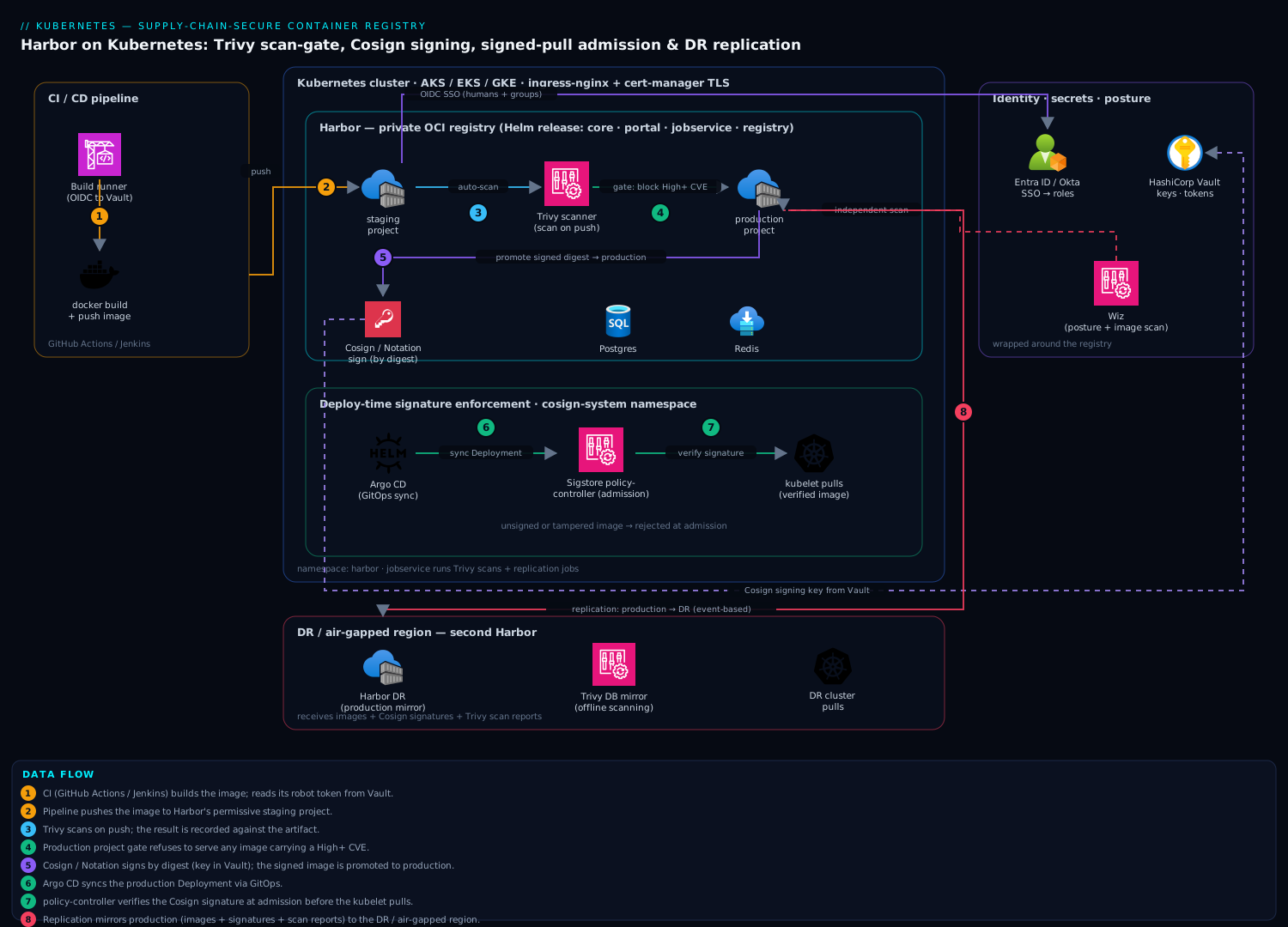
The diagram traces the two paths that flow through Harbor and the controls wrapped around them. Read it left to right. The publish path: CI (Jenkins or a managed pipeline) builds an image and pushes it to the staging project using a scoped robot account; Harbor’s jobservice immediately hands it to Trivy, which scans OS packages and app libraries and records a CVE report; only if the scan passes does the pipeline run cosign sign (key held in Vault) and crane copy the exact digest into the production project. The consume path: Argo CD deploys to the cluster, an admission policy (Sigstore policy-controller / Kyverno) verifies the Cosign signature against the public key before the kubelet pulls, and Harbor’s registry independently refuses to serve any production image whose severity exceeds the prevent_vul threshold or that lacks a signature.
Inside the cluster the Harbor microservices sit together — core (API + policy), registry (blob I/O to object storage: S3/Blob/GCS/MinIO), jobservice (scans, replication, GC), trivy, portal, backed by external Postgres and Redis — fronted by an ingress that terminates TLS. A replication rule (event-based) continuously mirrors the signed production project to a DR Harbor in a second region, and a proxy-cache project mirrors Docker Hub so public pulls never hit the rate-limit wall. Wrapped around all of it: Entra ID/Okta OIDC for who-can-do-what with a full audit trail, Vault holding signing keys and robot tokens, and Wiz independently scanning both the running registry and the images it stores for posture drift. The whole system is one policy plane: built → scanned → signed → verified-on-pull → replicated.
Real-world scenario
Meridian Pay, a payments platform, runs 40 microservices across three AKS clusters (prod in Central India, DR in South India, and a PCI-scoped, air-gapped settlement cluster with no internet egress). For two years every service pulled base images directly from Docker Hub, tagged latest in a hurry during an incident more than once. The platform team is six engineers; the container-registry line item was ₹0 because there wasn’t one — the cost was hidden in risk.
The forcing function was a PCI-DSS audit combined with a near-miss: Docker Hub’s anonymous rate limit throttled a Friday-evening deploy into a 40-minute rolling imagePullBackOff outage during a settlement window. The auditor’s findings were blunt — no registry of record, no vulnerability scanning gate, no image provenance, and the air-gapped settlement cluster was pulling images by copying tarballs a developer built on a laptop. Three failures, one root cause: no controlled registry.
The team stood up Harbor on the prod AKS cluster: Helm chart pinned to 1.16, external Azure Database for PostgreSQL (Flexible Server, zone-redundant HA) and Azure Cache for Redis, blobs on Azure Blob with an immutability policy on the production container, ingress-nginx with a real wildcard cert, and OIDC wired to Entra ID so the six engineers signed in with their corporate accounts and the platform-admins group mapped to Harbor admin. They created three projects — dockerhub-proxy (proxy cache, killing the rate-limit problem on day one), staging (auto-scan, 200 GiB quota), and production (auto-scan, prevent_vul=high, enable_content_trust_cosign). CI (Jenkins on the cluster) got a project-scoped robot with a 60-day expiry, its token in Vault.
The first Trivy scan of their most-deployed base image lit up: a Critical openssl CVE in a base they’d been shipping to production for months. With prevent_vul=high on, that image could no longer be pulled into production — the gate worked before anyone wrote a runbook. They rebuilt on a patched base, and the pipeline started signing every promoted digest with Cosign (key in Azure Key Vault). A Kyverno verifyImages policy on all three clusters rejected any unsigned pod. An event-based replication rule mirrored production to the DR Harbor (installed identically in South India) within seconds of each promotion — DR drift went to zero. For the air-gapped settlement cluster, they installed a third Harbor with a pull-based rule seeded from a monthly transfer disk, mirrored the Trivy DB into an internal OCI location so offline scans stayed current, and retired the laptop-tarball process entirely.
Six weeks later the follow-up audit was a five-minute conversation: every production image had a green signed indicator, a stored CVE report under the high threshold, an Entra-attributed push event, and an identical replica in DR. Storage on the busy staging project was bounded by a latestPushedK=15 retention rule plus weekly GC. The rate-limit outages stopped (proxy cache). Total run cost: about ₹12,000/month — two small AKS node allocations for the Harbor pods across regions, managed Postgres/Redis, and Blob storage — versus the quoted per-scan, per-GB, per-region cost of three managed registries with feature add-ons, which would not have run in the air-gapped cluster at all. The lesson on the wall: “A registry isn’t storage. It’s the one place you decide what’s allowed to run — so make it enforce, not just hold.”
The rollout as a timeline, because sequence was the lesson:
| Week | Move | Effect |
|---|---|---|
| 0 | Rate-limit outage + PCI findings | Forcing function; three gaps identified |
| 1 | Helm install (external PG/Redis/Blob, OIDC) | Registry of record exists; humans on Entra |
| 1 | Proxy-cache project for Docker Hub | Rate-limit outages stop immediately |
| 2 | Projects + robots + auto_scan |
First scan finds a Critical openssl CVE |
| 2 | prevent_vul=high on production |
Vulnerable image can no longer be pulled |
| 3 | Cosign signing + Kyverno admission | Unsigned pods rejected across 3 clusters |
| 4 | Event-based replication to DR Harbor | DR drift → zero; identical signed bits |
| 5 | Air-gapped Harbor + Trivy DB mirror | Laptop-tarball process retired |
| 6 | Retention + GC schedules | Storage bounded; follow-up audit passes |
Advantages and disadvantages
Self-hosting Harbor is a real operational commitment that buys a control plane no managed registry gives you as one unit. Weigh it honestly:
| Advantages | Disadvantages |
|---|---|
| One policy plane: scan gate + signing enforcement + replication under one config, any cloud/on-prem | You operate it — upgrades, Postgres/Redis, object storage, capacity are yours |
prevent_vul physically blocks vulnerable pulls, not just reports (a hard control) |
Under-provisioned jobservice silently queues scans and lags replication |
| Native Cosign + Notation storage and registry-side enforcement | Signing/enforcement is intricate to wire (keys, admission, digests) — easy to misconfigure |
| Runs fully air-gapped — the only real option for offline/sovereign estates | Air-gap adds work: mirror Trivy DB, seed replication offline |
| Proxy cache kills Docker Hub rate limits and outages | Cache correctness/eviction is one more thing to reason about |
| Flat compute+storage cost; no per-scan/per-feature/per-GB SKU stacking | Real HA needs external managed PG/Redis + object storage — not free |
| CNCF-graduated, portable, no cloud lock-in | Steeper learning curve than a one-click managed registry |
| Full audit trail via OIDC; scoped, expiring robot accounts for CI | Misconfigured RBAC/robots can leak broad access if not least-privileged |
The model is right when you need enforcement (not just storage), portability across clouds and on-prem, air-gap capability, or a flat cost at scale. It is the wrong tool if you run entirely in one cloud, want zero operational burden, and a managed registry’s built-in scan and per-GB pricing is acceptable — then ACR/ECR/GAR is less work. Harbor bites hardest on teams that install it with defaults (self-signed TLS, internal PG, one jobservice replica) and never tune it; every disadvantage above is manageable, but only if you know it exists.
Hands-on lab
This is the centerpiece. You will Helm-install Harbor on a local single-node cluster, create a promotion-structured layout, mint a robot account, push an image, watch Trivy block a vulnerable pull, sign an image with Cosign, verify it, and set up a replication rule. It runs on kind (or minikube/k3d) with the bundled internal Postgres/Redis and filesystem storage — not production topology, but every gate is real. Budget ~45 minutes and a few GB of RAM.
Production note: the lab uses internal PG/Redis and self-signed TLS for speed. Everything you learn maps directly to the external-PG, object-storage, real-cert production values shown earlier. Never run this topology in production.
Step 1 — Create a local cluster and namespace.
kind create cluster --name harbor-lab
kubectl create namespace harbor
kubectl get nodes
Expected: one node, Ready.
Step 2 — Add the chart repo and inspect versions.
helm repo add harbor https://helm.goharbor.io
helm repo update
helm search repo harbor/harbor --versions | head -5
Expected: a list of chart versions; note the latest 1.16.x to pin.
Step 3 — Install Harbor with a minimal lab values file. Self-signed TLS, internal PG/Redis, NodePort exposure, small footprint:
cat > harbor-lab.yaml <<'EOF'
expose:
  type: nodePort
  tls:
    enabled: true
    certSource: auto           # LAB ONLY — self-signed; prod uses a real cert
externalURL: https://127.0.0.1:30003
harborAdminPassword: "Harbor12345"    # LAB ONLY — prod injects from a secret
persistence:
  enabled: true
  persistentVolumeClaim:
    registry: { size: 5Gi }
    database: { size: 2Gi }
    redis:    { size: 1Gi }
    trivy:    { size: 5Gi }
database: { type: internal }
redis:    { type: internal }
trivy:
  enabled: true
  ignoreUnfixed: false
jobservice:
  replicas: 1
EOF

helm install harbor harbor/harbor -n harbor -f harbor-lab.yaml --version 1.16.0
kubectl -n harbor rollout status deploy/harbor-core --timeout=300s
kubectl -n harbor get pods
Expected: harbor-core, harbor-portal, harbor-jobservice, harbor-registry, harbor-trivy, harbor-database, harbor-redis all Running (Trivy may take a minute to pull its DB).
Step 4 — Reach the API and log in. Port-forward the notary/core port and set variables:
kubectl -n harbor port-forward svc/harbor 8443:443 >/tmp/pf.log 2>&1 &
sleep 3
HARBOR=https://127.0.0.1:8443
AUTH="admin:Harbor12345"
# -k because the lab cert is self-signed
curl -sk -u "$AUTH" "$HARBOR/api/v2.0/systeminfo" | head
Expected: JSON with Harbor version and auth_mode.
Step 5 — Create the promotion projects. A permissive staging and a gated production:
curl -sk -u "$AUTH" -X POST "$HARBOR/api/v2.0/projects" \
  -H "Content-Type: application/json" \
  -d '{"project_name":"staging","public":true,"metadata":{"auto_scan":"true"}}'

curl -sk -u "$AUTH" -X POST "$HARBOR/api/v2.0/projects" \
  -H "Content-Type: application/json" \
  -d '{"project_name":"production","public":true,
       "metadata":{"auto_scan":"true","prevent_vul":"true","severity":"high"}}'

curl -sk -u "$AUTH" "$HARBOR/api/v2.0/projects" \
  | python3 -c 'import sys,json;[print(p["name"],p["metadata"]) for p in json.load(sys.stdin)]'
Expected: staging and production listed, production showing prevent_vul and severity: high.
Step 6 — Mint a scoped robot account for pushing to staging.
ROBOT=$(curl -sk -u "$AUTH" -X POST "$HARBOR/api/v2.0/robots" \
  -H "Content-Type: application/json" -d '{
    "name":"lab-pusher","duration":1,"level":"project",
    "permissions":[{"kind":"project","namespace":"staging",
      "access":[{"resource":"repository","action":"push"},
                {"resource":"repository","action":"pull"},
                {"resource":"scan","action":"create"}]}]}')
echo "$ROBOT" | python3 -c 'import sys,json;d=json.load(sys.stdin);print(d["name"]);print(d["secret"])'
Expected: a name like robot$staging+lab-pusher and a one-time secret. Capture both into shell vars:
ROBOT_NAME=$(echo "$ROBOT" | python3 -c 'import sys,json;print(json.load(sys.stdin)["name"])')
ROBOT_SECRET=$(echo "$ROBOT" | python3 -c 'import sys,json;print(json.load(sys.stdin)["secret"])')
Step 7 — Log in and push an intentionally vulnerable image. We reuse a well-known old image with known CVEs to trigger the gate. (Docker must trust the self-signed cert; simplest lab path is to add 127.0.0.1:8443 as an insecure registry in the Docker daemon, or use crane/skopeo with --insecure.)
# Pull a small, known-vulnerable base, then push it to staging under the proxy
docker pull alpine:3.9        # old Alpine → known CVEs
crane auth login 127.0.0.1:8443 -u "$ROBOT_NAME" -p "$ROBOT_SECRET" --insecure
crane copy --insecure alpine:3.9 127.0.0.1:8443/staging/demo:vuln
Expected: crane copy completes; the artifact appears under staging/demo. Harbor auto-scans it (Step 5 set auto_scan).
Step 8 — Watch Trivy scan and read the report via the API.
sleep 25   # let the scan complete
curl -sk -u "$AUTH" \
  "$HARBOR/api/v2.0/projects/staging/repositories/demo/artifacts?with_scan_overview=true" \
  | python3 -c 'import sys,json;a=json.load(sys.stdin)[0];print(json.dumps(a.get("scan_overview",{}),indent=2))'
Expected: a scan overview with a severity summary showing High/Critical counts > 0.
Step 9 — Promote the vulnerable image to production and watch the gate BLOCK the pull.
# Promote by copying into production (as admin, which can push)
crane auth login 127.0.0.1:8443 -u admin -p Harbor12345 --insecure
crane copy --insecure 127.0.0.1:8443/staging/demo:vuln 127.0.0.1:8443/production/demo:vuln
sleep 25   # production auto-scans it too

# Now try to PULL it from production — the prevent_vul gate must refuse
crane pull --insecure 127.0.0.1:8443/production/demo:vuln /tmp/out.tar
Expected: the pull is denied with an error like current image with 1 high vulnerabilities cannot be pulled due to configured policy. This is the gate firing — a vulnerable image physically cannot leave the production project.
Step 10 — Prove a clean image passes the same gate. Push a current, patched image:
crane copy --insecure alpine:3.20 127.0.0.1:8443/staging/demo:clean
sleep 20
crane copy --insecure 127.0.0.1:8443/staging/demo:clean 127.0.0.1:8443/production/demo:clean
sleep 25
crane pull --insecure 127.0.0.1:8443/production/demo:clean /tmp/clean.tar && echo "CLEAN PULL OK"
Expected: CLEAN PULL OK — a patched image (below the high threshold) pulls fine. The gate discriminates on severity, not blanket-blocks.
Step 11 — Sign an image with Cosign and verify. Generate a local key pair (lab shortcut; prod uses a KMS):
cosign generate-key-pair            # creates cosign.key / cosign.pub (set a password)
DIGEST=$(crane digest --insecure 127.0.0.1:8443/production/demo:clean)
COSIGN_PASSWORD="" cosign sign --yes --key cosign.key \
  --allow-insecure-registry --allow-http-registry \
  127.0.0.1:8443/production/demo@${DIGEST}

cosign verify --key cosign.pub --allow-insecure-registry \
  127.0.0.1:8443/production/demo@${DIGEST}
Expected: sign reports the signature pushed; verify prints the verified signature payload. In the Harbor UI (https://127.0.0.1:30003, login admin/Harbor12345) the artifact now shows a signature accessory.
Step 12 — (Optional) Set up a replication rule to a second local project. Register the same Harbor as an endpoint and mirror production into a dr namespace to see the mechanics:
curl -sk -u "$AUTH" -X POST "$HARBOR/api/v2.0/registries" \
  -H "Content-Type: application/json" -d '{
    "name":"self","type":"harbor","url":"'"$HARBOR"'",
    "insecure":true,
    "credential":{"type":"basic","access_key":"admin","access_secret":"Harbor12345"}}'

REG_ID=$(curl -sk -u "$AUTH" "$HARBOR/api/v2.0/registries" \
  | python3 -c 'import sys,json;print([r["id"] for r in json.load(sys.stdin) if r["name"]=="self"][0])')

curl -sk -u "$AUTH" -X POST "$HARBOR/api/v2.0/replication/policies" \
  -H "Content-Type: application/json" -d '{
    "name":"prod-to-dr","dest_registry":{"id":'"$REG_ID"'},
    "dest_namespace":"dr","trigger":{"type":"manual"},
    "filters":[{"type":"name","value":"production/**"}],
    "override":true,"enabled":true}'
Trigger it from the UI (Administration → Replications → Replicate) and confirm dr/demo appears with the same digest and the signature accessory carried across.
Validation checklist. You installed Harbor from the chart, structured projects for promotion, minted a least-privilege robot, watched Trivy scan on push, saw prevent_vul block a vulnerable pull while passing a clean one, signed and verified with Cosign, and mirrored a signed artifact via replication. The steps mapped to what each proves:
| Step | What you did | What it proves |
|---|---|---|
| 3 | Helm install with Trivy | The whole platform stands up from one chart |
| 5 | production with prevent_vul |
Policy is project metadata, set reproducibly |
| 6 | Scoped robot | CI authenticates without a human credential |
| 8 | Read scan overview | auto_scan produces the report the gate reads |
| 9 | Vulnerable pull denied | The gate is enforced at pull, not just reported |
| 10 | Clean pull allowed | The gate discriminates by severity |
| 11 | Cosign sign + verify | Signatures store as OCI accessories, verifiable |
| 12 | Replication carries the signature | DR gets bit-identical, signed artifacts |
Teardown.
kill %1 2>/dev/null                 # stop the port-forward
helm uninstall harbor -n harbor
kubectl -n harbor delete pvc --all  # internal PG/Redis/registry state — irreversible
kubectl delete namespace harbor
kind delete cluster --name harbor-lab
rm -f cosign.key cosign.pub harbor-lab.yaml
Common mistakes & troubleshooting
The failure modes that bite Harbor installs, as a scannable table first, then the confirm-command detail for the ones that bite hardest.
| # | Symptom | Root cause | Confirm (exact cmd / path) | Fix |
|---|---|---|---|---|
| 1 | docker push fails with x509: certificate signed by unknown authority |
Self-signed / untrusted TLS (certSource: auto) |
curl -v https://harbor.example.com shows self-signed |
Issue a real cert (certSource: secret + cert-manager) |
| 2 | Push of a large image fails with 413 Request Entity Too Large |
Ingress body-size limit | Ingress annotations; nginx error log | Set proxy-body-size: "0" on the ingress |
| 3 | Scans stay “pending” for minutes; UI shows no CVE report | jobservice under-provisioned / Trivy DB not downloaded |
kubectl -n harbor logs deploy/harbor-jobservice; deploy/harbor-trivy |
Raise jobservice.replicas/maxJobWorkers; check Trivy DB pull |
| 4 | Vulnerable image still pullable from a gated project | auto_scan on but prevent_vul off, or wrong severity |
GET /projects/<p>/metadatas |
Set prevent_vul:true + severity:high |
| 5 | Deleted tags but storage usage doesn’t drop | Retention removes references; blobs need GC | Project quota unchanged after delete | Run/schedule garbage collection |
| 6 | cosign sign fails: error: reading key / TLS refused |
Untrusted registry TLS, or wrong key backend | cosign sign verbose; registry cert |
Real TLS; correct --key (KMS URI) |
| 7 | Admission rejects a signed image | Public key mismatch or wrong glob in policy | kubectl describe the failed pod; policy authorities |
Align cosign.pub with the signing key; fix images.glob |
| 8 | Replication job stuck “InProgress” / fails | Endpoint creds/TLS wrong, or jobservice busy |
GET /replication/executions; jobservice logs |
Fix endpoint robot token/insecure flag; add workers |
| 9 | Pods imagePullBackOff after enabling enable_content_trust_cosign |
Images pulled aren’t signed | kubectl describe pod: “unsigned”/policy error |
Sign the images, or scope the policy correctly |
| 10 | Helm upgrade leaves pods Pending on RWO PVC |
RollingUpdate on a ReadWriteOnce filesystem PVC |
kubectl describe pod: volume multi-attach |
Use object storage, or updateStrategy: Recreate |
| 11 | After chart upgrade, stored secrets/robots break | secretKey regenerated (not pinned) |
Core logs: decrypt errors | Pin existingSecretSecretKey; restore prior key |
| 12 | Air-gapped scans pass images that should fail | Stale Trivy vuln DB | Trivy DB timestamp in pod | Mirror the DB (oras) on a daily schedule |
| 13 | Docker Hub 429 Too Many Requests on cluster pulls |
No proxy cache; anonymous rate limit hit | Node kubelet events; Docker Hub headers | Create a proxy-cache project; pull through Harbor |
| 14 | admin used everywhere; no audit of who did what |
OIDC not configured; shared admin login |
auth_mode = db_auth |
Configure OIDC; make admin break-glass only |
The expanded reasoning for the entries that waste the most time:
1. docker push / cosign sign fails with x509.
Root cause: The registry is served with a self-signed or untrusted certificate (expose.tls.certSource: auto), and Docker/Cosign refuse it.
Confirm: curl -v https://harbor.example.com 2>&1 | grep -i 'self signed'.
Fix: Issue a real certificate — certSource: secret with a cert-manager Certificate, or a CA-issued cert loaded as kubectl create secret tls harbor-tls .... This is the single most common first-install failure and blocks the entire signing story.
3. Scans hang in “pending”.
Root cause: Either jobservice has too few workers (one replica, low maxJobWorkers) so scans queue behind replication/GC, or the Trivy pod never finished downloading its vulnerability DB from GHCR (rate-limited or blocked).
Confirm: kubectl -n harbor logs deploy/harbor-jobservice --tail=50 shows queued jobs; kubectl -n harbor logs deploy/harbor-trivy shows DB download status.
Fix: Raise jobservice.replicas and maxJobWorkers; give Trivy a GitHub token to avoid GHCR rate limits, or mirror the DB internally for air-gap.
4. The gate doesn’t block.
Root cause: auto_scan produces a report but is not the gate; without prevent_vul:true and a matching severity, Harbor serves the image anyway.
Confirm: curl -su admin:... "$HARBOR/api/v2.0/projects/production/metadatas" and check for prevent_vul and severity.
Fix: Set both. Remember severity:high blocks High+Critical; severity:medium is stricter.
5. Storage doesn’t shrink after deletes.
Root cause: Deleting a tag or a retention run removes the reference, not the bytes. Garbage collection is a separate job that reclaims unreferenced blobs.
Confirm: Project quota usage unchanged after deleting tags.
Fix: Run GC (POST /system/gc/schedule with delete_untagged:true) off-peak; usage drops after it completes.
9 & 11. Signing/upgrade footguns.
For 9, enabling enable_content_trust_cosign on a project whose images aren’t signed makes every pull fail — sign first, then enforce. For 11, the secretKey (16 chars) encrypts secrets Harbor stores in Postgres (robot tokens, endpoint credentials); if a chart upgrade regenerates it because you didn’t pin existingSecretSecretKey, Harbor can’t decrypt them and robots/replication break. Always provide and preserve secretKey, and snapshot Postgres before any upgrade.
Best practices
- Real TLS, always. Use a CA-issued or cert-manager certificate (
certSource: secret). Self-signed breaksdocker pushand the entire Cosign/Notation signing story. This is non-negotiable. - Externalize state in production. Managed Postgres (HA, backups, PITR) and Redis, plus object storage for blobs. The bundled internal StatefulSets are for labs, not a registry of record.
- Pin the chart version and the
secretKey. Never tracklatestfor a stateful platform; provideexistingSecretSecretKeyand keep it stable across upgrades or stored secrets become undecryptable. - Give
jobserviceheadroom. Scans, replication, GC, and retention all run here. Run 2+ replicas and tunemaxJobWorkers; one replica silently queues scans and lags DR. - Structure projects around promotion. Permissive
staging(auto-scan), locked-downproduction(prevent_vul+ signing). Never let CI push straight to production. - Sign and enforce by digest, never tag. Tags are mutable; sign the
@sha256:digest and verify the digest at admission. Turn on both the registry gate (enable_content_trust_cosign) and an admission gate (policy-controller/Kyverno). - Scoped, expiring robot accounts. Project-level, least-privileged (
push/pull/scanonly), with a realduration; store tokens in Vault, not CI secret stores; rotate on schedule. - Never
ignoreUnfixed:trueto force a green gate. Waive specific CVEs via a time-boxed allowlist with a documented reason; keep the honest picture an auditor will see. - Bound storage from day one. A
latestPushedK/nDaysSinceLastPushretention rule per busy project plus a weekly GC — and always dry-run retention before enabling it. - Proxy-cache your public bases. A pull-through project for Docker Hub/GHCR removes rate-limit outages and lets you scan and sign upstream images as they land.
- OIDC, with
adminas break-glass. Corporate SSO with group-to-role mapping gives an attributable audit trail; the localadminis emergency-only. - Mirror the Trivy DB for air-gap. An offline scanner with a stale DB passes images it should fail; automate the
orasmirror daily.
Security notes
The whole design is a software-supply-chain control: nothing reaches a node that wasn’t built by your pipeline (signature), known-clean at promotion (Trivy gate), and unaltered since (digest + verification at admission). Harden the registry that enforces all of this:
- Keep signing keys in a KMS/HSM. Cosign’s Vault/AWS/Azure/GCP KMS backends mean the private key never touches a runner’s disk. Rotate and re-sign on a schedule. Keyless (Fulcio/Rekor) is an option where Sigstore infrastructure is reachable.
- Least-privilege robots, short TTLs, tokens in Vault. CI uses project-scoped robots with only the actions it needs and a real expiry; never a human credential, never a
duration:-1token in a CI secret store. - OIDC SSO with group-mapped roles and full audit. Every human action is attributable; the
adminpassword is break-glass in Vault, not a shared login. - Both enforcement gates on. Registry-side
enable_content_trust_cosignand admission-side signature verification, plusprevent_vulfor the CVE gate — defense in depth so a gap in one is caught by the other. - Immutable blob storage where regulation demands it. S3 Object Lock / Azure immutability / MinIO WORM on the production blob store prevents tampering or deletion of stored layers.
- Independent, out-of-band verification. Run Wiz (and Wiz Code in the pipeline) against both the running Harbor and the images it stores, so posture drift, an exposed endpoint, or a CVE that slipped a gate is caught independently. Run CrowdStrike Falcon sensors on the Harbor node pool for runtime protection of the registry itself.
- Lock down the network path. Serve Harbor behind an ingress/WAF; restrict admin access; use private endpoints to the object store and managed databases so blobs and metadata never traverse the public internet.
- Alert on the security signals. A blocked-pull, a failed-signature admission rejection, or a scan finding a Critical should page or ticket, not sit in
jobservicelogs — wire these to your incident tooling.
The security controls and what each defends against:
| Control | Mechanism | Defends against |
|---|---|---|
| KMS-backed Cosign key | Vault/KMS signing | Key theft from a runner |
| Scoped robot + short TTL | Robot account duration + least perms |
Leaked long-lived CI credential |
| OIDC + group roles | Entra/Okta + admin group |
Shared credentials; no audit |
prevent_vul + severity |
Registry pull gate | Vulnerable images reaching nodes |
| Content-trust + admission | enable_content_trust_cosign + policy |
Unsigned/tampered images running |
| Immutable object store | S3 Object Lock / WORM | Tampering/deletion of stored layers |
| Private endpoints | Network isolation to PG/blob | Metadata/blob exfiltration in transit |
Cost & sizing
Self-hosting Harbor is mostly compute and storage you likely already run. Budget the Harbor pods at roughly 1.5–2 vCPU and 4–6 GiB across the core components at idle, scaling with scan concurrency (each concurrent Trivy scan wants ~0.5–1 GiB), plus the managed Postgres (~20 GiB is ample for metadata) and Redis instances, plus however large the blob store grows.
The cost drivers and what each one is:
| Cost driver | What you pay for | Rough INR / month | Scales with | Watch-out |
|---|---|---|---|---|
| Harbor compute (pods) | 1.5–2 vCPU, 4–6 GiB baseline | On existing nodes (≈₹0 marginal) | Scan/replication concurrency | Under-size jobservice = queues |
| Managed PostgreSQL | Small HA managed DB | ~₹4,000–8,000 | Metadata volume (small) | HA tier doubles single-AZ |
| Managed Redis | Small managed cache | ~₹2,000–4,000 | Sessions/job queue | Failover tier costs more |
| Object storage (blobs) | Per-GB layer storage | ~₹2/GB/month + ops | Repo count × image size | Enable retention + GC |
| Replication egress | Cross-region transfer | Per-GB egress | Changed layers only | copy_by_chunk + dedup keep it low |
| Trivy DB bandwidth | GHCR pulls (or internal mirror) | Negligible | Scan frequency | Mirror for air-gap/rate limits |
The single biggest storage control is retention + GC: a busy staging that keeps every :${GIT_SHA} tag can add tens of GB a week; a latestPushedK=15 rule plus weekly GC bounds it. Replication egress is real cross-region transfer, but digest dedup and copy_by_chunk mean only changed layers move — a promoted image that shares 90% of its layers with the last transfers almost nothing.
Versus a managed registry (ACR/ECR/GAR) priced per-GB plus per-scan plus per-region-replication feature: Harbor wins decisively once you store tens of repos and scan thousands of pushes a month, and it is the only option that gives Trivy gating, Cosign enforcement, and cross-registry replication under one policy plane without per-feature SKUs — and the only one that runs air-gapped at all. A three-region Meridian-Pay-shaped deployment landed near ₹12,000/month all-in; the equivalent managed-registry feature stack (private, scanned, replicated, across three regions) is typically several times that and still can’t serve the offline cluster. Observe storage growth and scan volume so the GC schedule is tuned before the bucket — not the bill — surprises you.
Interview & exam questions
1. Name Harbor’s core components and which one does the heavy asynchronous work. core (API + policy engine), registry (OCI blob/manifest I/O), portal (UI), jobservice, an optional trivy scanner, plus Postgres (metadata) and Redis (sessions/queue). jobservice runs scans, replication, GC, and retention — under-provisioning it silently queues scans and lags replication.
2. What is the difference between auto_scan and prevent_vul? auto_scan makes Harbor scan every pushed image and store the CVE report — that’s telemetry. prevent_vul (with a severity threshold) makes the registry refuse to serve on pull any image at/above that severity — that’s the enforced gate. Reporting alone doesn’t stop a vulnerable image reaching a node; the gate does.
3. Why must you sign and enforce by digest, not tag? A tag is a mutable pointer; a digest (sha256:) is immutable content addressing. If you sign a tag, an attacker who can move the tag breaks the trust chain. Cosign resolves the tag to a digest and signs the digest; verification and admission must assert the digest.
4. Where are the two signature-enforcement points, and why run both? At the registry (enable_content_trust_cosign — Harbor refuses to serve unsigned artifacts) and at admission (Sigstore policy-controller or Kyverno verifyImages — the kubelet is blocked from pulling an unverified image). Both are independent gates; running both is defense in depth so a gap in one is caught by the other.
5. Contrast Cosign and Notation. Cosign (Sigstore) uses a public key or keyless OIDC identities with an optional Rekor transparency log; Notation (CNCF Notary Project) uses X.509 certificate chains to a CA. Cosign has broader CI momentum; Notation suits PKI/enterprise trust. Harbor stores both as OCI accessories.
6. What is a proxy-cache project and what problem does it solve? A project of type proxy that turns Harbor into a pull-through mirror of a remote registry (e.g. Docker Hub). The first pull fetches and caches; subsequent pulls serve locally. It defeats Docker Hub’s anonymous rate limits (100/6h) and upstream outages, and lets you scan/sign upstream images as they land.
7. Explain the retention-vs-GC distinction. Retention is a per-project policy deciding which tags/artifacts to keep (e.g. last 10 pushed) — it removes references. Garbage collection is a system job that reclaims the blobs of manifests no longer referenced by anything. Storage doesn’t drop when you delete tags; it drops after GC. Delete/retain, then GC.
8. In-cluster vs external Postgres/Redis for Harbor — which and why? External (managed) in production: the bundled internal StatefulSets are single-replica with no HA, backups, or PITR, and losing them loses the registry’s entire metadata inventory. External managed services give failover and backups; keep internal only for labs.
9. What are the replication trigger types and when do you use each? Manual (on-demand seeding/transfers), scheduled (cron — nightly DR, off-peak bandwidth), and event-based (fires on push/delete — near-real-time DR). Direction is push (to a reachable target) or pull (on an air-gapped site that pulls in). Filters by name/tag/label scope what moves.
10. A pod is imagePullBackOff right after you turned on enable_content_trust_cosign. Why? The images being pulled aren’t Cosign-signed, so the registry refuses to serve them. Enforce after signing is in place — sign the images (or scope the policy) first, then enable content trust, or every pull from that project fails.
11. How do you keep vulnerability scanning accurate in an air-gapped Harbor? Mirror Trivy’s vulnerability DB into an internal OCI location (oras push .../trivy-db:2 ...) and point Trivy at it via TRIVY_DB_REPOSITORY; automate the mirror daily. A scanner with a stale DB passes images it should fail — the most dangerous silent failure in an offline registry.
12. Why is jobservice the component to watch, and what do you tune? It executes scans, replication, GC, and retention — all the asynchronous heavy work. Under one replica with a low maxJobWorkers, scans queue for minutes and replication lags. Tune jobservice.replicas and maxJobWorkers to your scan/replication volume, with real CPU/memory limits.
These map to the CKS (Certified Kubernetes Security Specialist) — supply-chain security, image scanning, admission control, and the Kubernetes and Cloud Native Security Associate (KCSA); the signing and provenance material aligns with SLSA and general DevSecOps competency. A compact mapping:
| Question theme | Primary cert / framework | Objective area |
|---|---|---|
| Image scanning + gates | CKS | Supply-chain security; static analysis |
| Signing + admission enforcement | CKS / KCSA | Admission control; image provenance |
| Registry hardening + RBAC | CKS | Minimize base image / registry security |
| Provenance chain (build→sign→verify) | SLSA | Build integrity; provenance |
| OIDC + robot least privilege | KCSA | Identity and access |
Quick check
- You turned on
auto_scanforproductionbut a vulnerable image still pulls fine. What one project setting is missing? - True or false: signing an image by its tag is fine as long as you verify by the same tag at admission.
- You deleted 200 old tags from
stagingbut the project’s storage usage didn’t move. Why, and what runs to reclaim the space? - Your air-gapped Harbor scans images and everything passes — but you suspect it’s missing recent CVEs. What’s the most likely cause?
- A pod goes
imagePullBackOffimmediately after you enabledenable_content_trust_cosignon its project. What happened?
Answers
prevent_vulis off (and/orseverityis unset).auto_scanonly produces the CVE report; the gate that refuses pulls at/above a severity isprevent_vul:truewithseverity:high. Set both.- False. Tags are mutable — an attacker who repoints the tag breaks the chain. Sign and verify by the immutable
@sha256:digest; Cosign resolves a tag to its digest and signs the digest. - Deleting tags removes references, not the underlying blobs. Garbage collection (a system job) reclaims blobs no longer referenced by any manifest; usage drops only after GC runs. Delete/retain, then GC.
- The Trivy vulnerability database is stale. In an air-gapped install you must mirror the DB internally (
oras) and refresh it daily; an old DB passes images it should fail. Point Trivy at the internalTRIVY_DB_REPOSITORYand automate the mirror. - The image being pulled isn’t Cosign-signed, so with content trust enforced the registry refuses to serve it. Enforce after signing is in place: sign the images (or scope the policy correctly), then enable content trust.
Glossary
- Harbor — a CNCF graduated OCI/container registry: multi-tenant projects, RBAC, scanning, signing, replication, and retention/GC under one control plane.
core— Harbor’s API server and policy engine; owns projects, robots, replication policies, and scan/sign enforcement.registry— the OCI distribution engine that stores and serves blobs and manifests; enforces the prevent-pull gate.jobservice— the asynchronous worker that runs scans, replication, garbage collection, and retention.trivy— the bundled Aqua Trivy vulnerability scanner that produces the CVE reports Harbor gates on.- Project — the tenancy unit (the namespace before the first
/); carries RBAC, a storage quota, and the policy metadata flags. - Robot account — a non-human, scoped, expiring credential (
robot$<project>+<name>) that CI uses to push/pull without a human login. auto_scan— project metadata that scans every pushed image and stores the CVE report against its digest.prevent_vul/severity— the enforced gate: the registry refuses to serve on pull any image at/above theseveritythreshold.enable_content_trust_cosign— project metadata requiring a valid Cosign signature before Harbor will serve an artifact.- Cosign — the Sigstore signing tool; signs image digests with a key (KMS-backed) or keyless (Fulcio/Rekor), storing signatures as OCI accessories.
- Notation — the CNCF Notary Project signing tool; signs with X.509 certificates from a CA.
- Digest — the immutable
sha256:content address of a manifest; the thing you sign, promote, and verify (as opposed to a mutable tag). - Replication rule / endpoint — a policy mirroring artifacts (with signatures and reports) to/from another registry (Harbor, ECR, ACR, GAR, GHCR, Quay), push/pull, manual/scheduled/event-based.
- Proxy cache — a project type that makes Harbor a pull-through mirror of a remote registry, defeating rate limits and outages.
- Tag retention — a per-project policy that keeps only wanted tags (e.g. last K pushed); removes references, not blobs.
- Garbage collection (GC) — a system job that reclaims the disk of blobs no longer referenced by any manifest; storage frees only after it runs.
secretKey— the 16-character key Harbor uses to encrypt secrets it stores in Postgres; must stay stable across upgrades or stored credentials become undecryptable.- OIDC CLI secret — a per-user token generated in Harbor when OIDC is on, used for
docker logininstead of a password. - Prevent-pull gate — shorthand for
prevent_vul: the registry-boundary refusal to serve a vulnerable image.
Next steps
You can now stand up Harbor as a gated, signed, replicated registry-of-record. Build outward:
- Next: Deploy Argo CD with SSO, RBAC, ApplicationSets & multi-cluster — the GitOps engine that deploys the signed images Harbor stores, verified at admission.
- Related: Integrate Wiz Code with GitHub Actions for IaC & container gates — independent, out-of-band supply-chain gating in the pipeline that complements Harbor’s Trivy gate.
- Related: Set up External Secrets Operator with Vault & AWS Secrets — keep robot tokens and Cosign keys out of Git and synced from Vault.
- Related: Deploy CrowdStrike Falcon sensor on Linux & Kubernetes — runtime protection for the Harbor node pool and the workloads pulling from it.
- Related: Deploy MinIO with object locking & site replication — an on-prem, immutable object store for Harbor’s blob backend in air-gapped estates.
- Related: Set up Jenkins with the Kubernetes plugin & ephemeral agents — the CI that builds, pushes to staging, and signs on promotion.