A payments team runs about forty microservices on an EKS cluster, and right now their secrets are a mess: some database passwords are committed to a private repo’s values.yaml (the kind of thing that ends with a 3 a.m. rotation and a postmortem), API keys for a third-party fraud feed are pasted into a Helm chart, and the platform team has no idea which workloads hold which credentials. Two source-of-truth systems already exist in the org — HashiCorp Vault holds the dynamic database credentials and the internal PKI, and AWS Secrets Manager holds the managed-service secrets (RDS rotation, the fraud-feed token). The ask from security is simple to state and annoying to deliver: “stop putting secrets in Git, pull them from the systems that already own them, and make them rotate.” This guide wires External Secrets Operator (ESO) to do exactly that — sync values from both Vault and AWS Secrets Manager into native Kubernetes Secret objects that applications consume normally, with no secret material ever sitting in a manifest or a chart.
ESO is the right tool because it inverts the usual problem. Instead of pushing secrets into the cluster (which is what Sealed Secrets and SOPS do — they encrypt material and commit the ciphertext), it runs a controller that pulls from an external store on a schedule, reconciles the result into a Kubernetes Secret, and re-pulls on a refresh interval so a rotation upstream propagates automatically. Your apps keep reading from a Secret (via env var or mounted file) and never learn there is a Vault or an AWS account behind it. The source of truth stays where it already lives; the cluster holds only a short-lived, narrowly-scoped projection of it.
By the end of this guide you will have the operator installed, a namespaced SecretStore for AWS Secrets Manager authenticated by IRSA (IAM Roles for Service Accounts), a SecretStore for Vault authenticated by the Kubernetes auth backend, a ClusterSecretStore shared across tenants, several ExternalSecret objects that template real config files, a PushSecret that writes a cluster-generated value back to the store, RBAC that stops one team reading another team’s secrets, and a troubleshooting playbook for the auth and sync failures that eat the most time. Every step has the real CLI and YAML, expected output, a validation check, and a teardown.
What problem this solves
The pain is concrete and universal: secrets sprawl into Git, charts, CI variables, and engineers’ laptops, and once they are there nobody can prove they are gone. A password in a values.yaml survives in the repo’s history forever even after you “delete” it; a fraud-feed token pasted into a chart is now in every developer’s clone and every CI cache. When security mandates rotation, the team faces a manual, error-prone redeploy of every affected workload — exactly the kind of change that goes out at 3 a.m. and breaks something. Meanwhile the platform team cannot answer the auditor’s two questions: which workloads hold which credentials, and when were they last rotated.
What breaks without a tool like ESO: rotations are deferred because they are scary, so credentials live for years; a leaked password requires hunting through repos and CI logs to find every copy; and there is no single, reviewable place that says “service X reads secret Y.” Teams that try to solve this by hand-writing a sidecar that calls Vault on startup end up with bespoke, untested glue in every service, no central health signal, and no rotation story.
Who hits this: anyone running stateful or integration-heavy workloads on Kubernetes with an existing secrets backend (Vault, AWS/GCP/Azure secret managers, 1Password, CyberArk) they are required to use — which in a regulated shop is everyone. It bites hardest on multi-tenant clusters where many teams share one control plane and you must guarantee tenant A cannot read tenant B’s secrets, and on multi-cloud estates where the same cluster pulls from two or three different stores. ESO’s whole value is that it makes “secret material never enters Git” the default, makes rotation a config change upstream rather than a redeploy, and gives the platform one CRD-shaped, GitOps-friendly, observable surface for all of it.
To frame the field before the deep dive, here is what ESO replaces and what it does not:
| You currently… | The failure mode | What ESO changes | What ESO does NOT do |
|---|---|---|---|
Commit secrets to values.yaml |
Plaintext in Git history forever | Only a reference (path/key) is in Git; material stays in the store | It is not a secret store — you still need Vault/SM behind it |
| Paste tokens into Helm charts | Copied to every clone and CI cache | The chart references an ExternalSecret, not the value |
It does not encrypt the resulting Secret (etcd encryption is your job) |
| Hand-roll a Vault sidecar per app | Bespoke, untested, no health signal | One controller, one CRD, Prometheus metrics | It does not inject directly into the process — it writes a Secret |
| Rotate by redeploying every workload | Manual, error-prone, deferred | refreshInterval re-pulls; rotation is a store-side change |
It does not restart pods on change (pair with Reloader) |
| Encrypt-and-commit (Sealed Secrets/SOPS) | Ciphertext in Git; rotation = re-encrypt + commit | Pull model; no ciphertext in Git at all | It requires a reachable external store; the others are self-contained |
Learning objectives
By the end of this guide you can:
- Install External Secrets Operator with Helm, verify its three components (controller, webhook, cert-controller) and its four CRDs, and read its
/metricsfor sync health. - Explain the ESO object model —
SecretStore,ClusterSecretStore,ExternalSecret,ClusterExternalSecret,PushSecret— and choose namespaced vs cluster scope correctly. - Wire AWS Secrets Manager as a provider using IRSA so no static keys ever land in the cluster, with a least-privilege IAM policy scoped to named secret ARNs.
- Wire HashiCorp Vault (KV v2) as a provider using the Kubernetes auth backend with a short-TTL role and a read-only policy scoped to exact paths.
- Author
ExternalSecretobjects withdata,dataFrom(extract and find),refreshInterval,creationPolicy,deletionPolicy, and Go templating to produce config files and typed secrets. - Push a cluster-generated value back to a store with PushSecret, and implement multi-tenant RBAC so a namespace can only reach its own store and secrets.
- Operate rotation end-to-end (force-sync,
refreshIntervaltuning, restart strategy with Reloader) and troubleshoot the auth and sync failures with exact commands. - Decide when ESO is the right choice versus Sealed Secrets, SOPS, and the Secrets Store CSI driver.
Prerequisites & where this fits
You should be comfortable with core Kubernetes objects (Secret, ServiceAccount, Deployment, RBAC Role/RoleBinding), with kubectl and helm, and with the idea of a CRD + controller (ESO is a controller that reconciles custom resources into native Secrets). On the cloud side you should know that EKS can expose an OIDC provider that lets a Kubernetes ServiceAccount assume an IAM role (IRSA), and that Vault has pluggable auth backends, one of which (kubernetes) trusts a cluster’s ServiceAccount tokens. You do not need to be a Vault administrator, but you need an admin token once to configure the auth role and policy.
This is the implementation layer of a larger secrets story. Upstream of it sits the policy decision — keep secrets out of Git — covered in Eliminating Secret Sprawl: Pipeline Scanning, Push Protection, and Leaked-Credential Remediation. It pairs with workload-identity foundations from Set Up SPIFFE/SPIRE for Workload Identity and mTLS Across Heterogeneous Clusters (ESO’s auth is a workload-identity problem) and with the CI/CD-side pattern in Configure CyberArk Conjur for Secretless Application Credential Injection in CI/CD. The manifests below are designed to ship through GitOps — see Deploy Argo CD on Kubernetes with OIDC SSO, RBAC, and ApplicationSets for Multi-Cluster GitOps for the delivery layer. If you run on AKS or need the cluster fundamentals, AKS Architecture Explained: Managed Control Plane, Node Pools, and the Azure Integrations That Make It Tick is the adjacent platform read.
Versions assumed throughout (real, current at time of writing):
| Component | Version assumed | Why it matters |
|---|---|---|
| Kubernetes / EKS | 1.27+ (lab uses EKS 1.30) | IRSA + projected ServiceAccount tokens require a modern cluster |
| External Secrets Operator | 0.10.x (chart and app) | v1beta1 API; PushSecret, find, generators are GA-ish here |
| Helm | v3.14+ | OCI + dependency handling for the chart |
| HashiCorp Vault | 1.16+ | KV v2, kubernetes auth, short-TTL roles |
| AWS CLI | v2 | eksctl/IAM/OIDC operations |
vault CLI |
1.16+ | policy + role + KV operations |
A note on the ESO API version: this guide uses external-secrets.io/v1beta1 because it is the version most clusters run today and what the 0.10.x chart serves. ESO has since promoted a stable v1 for the core kinds; the field shapes shown here are unchanged across that promotion, so the manifests are forward-portable — only the apiVersion string moves.
Core concepts
Five mental models make every later step obvious.
ESO is a pull-based reconciler, not a push or an injector. A controller watches ExternalSecret objects. For each one it authenticates to the named store, fetches the requested keys, renders them (optionally through a template), and writes a native Kubernetes Secret. It then re-runs on the refreshInterval. Nothing is pushed into the cluster from outside; the cluster pulls. That is the structural difference from Sealed Secrets/SOPS (which commit ciphertext) and from the CSI driver (which mounts secrets as a volume without ever creating a Secret object).
A SecretStore is the connection; an ExternalSecret is the request. The SecretStore (or ClusterSecretStore) holds how to reach a backend and how to authenticate — provider type, endpoint, region, mount path, and an auth block that points at a ServiceAccount (never a literal credential, if you do it right). The ExternalSecret holds what to fetch and where to put it — which keys/paths, which target Secret, refresh cadence, and any templating. One store is referenced by many ExternalSecrets.
Namespaced vs cluster scope is a blast-radius decision. A SecretStore and an ExternalSecret live in one namespace and can only be referenced there. A ClusterSecretStore and a ClusterExternalSecret are cluster-scoped: one definition, usable from (or pushed into) many namespaces. Cluster scope is convenient for a shared store but widens blast radius — an over-broad ClusterSecretStore plus a ClusterExternalSecret can fan a secret into namespaces that should never see it. The rule: namespaced by default, cluster-scoped only with a namespaceSelector and a tightly-scoped backend role.
Authentication is workload identity, not your login. ESO never uses your Vault token or AWS session. For AWS it uses IRSA: a ServiceAccount annotated with an IAM role ARN, whose projected token (audience sts.amazonaws.com) the controller exchanges for temporary AWS credentials via STS. For Vault it uses the Kubernetes auth backend: ESO mints a ServiceAccount token, Vault’s token_reviewer validates it against the cluster API, matches a role bound to that ServiceAccount, and returns a short-lived Vault token carrying a scoped policy. In both cases the long-lived secret of record never enters the cluster — only an ephemeral, least-privilege credential does.
The target Secret is still a normal Secret. ESO writes a bog-standard Kubernetes Secret, base64-encoded at rest in etcd. It is not magically encrypted. Apps consume it via secretKeyRef env vars or a mounted volume exactly as before — which is the point (zero app changes) — but it means etcd encryption-at-rest (KMS envelope encryption on EKS) and RBAC on the Secret are still your responsibility. ESO removes the Git exposure; it does not remove the need to protect the cluster copy.
The object model in one table
Pin down every kind before the deep sections. The glossary repeats these for lookup; this is the model side by side:
| Kind | Scope | What it declares | Auth lives here? | Referenced by |
|---|---|---|---|---|
| SecretStore | Namespace | How to reach + auth to a backend | Yes | ExternalSecret (same ns) |
| ClusterSecretStore | Cluster | Same, shared across namespaces | Yes | ExternalSecret / ClusterExternalSecret anywhere |
| ExternalSecret | Namespace | What to pull → which target Secret |
No (references a store) | The workload (reads the Secret) |
| ClusterExternalSecret | Cluster | One ExternalSecret fanned to many namespaces |
No | Generates ExternalSecrets per matched ns |
| PushSecret | Namespace | Write a cluster Secret back to a store |
Yes (or references a store) | — (writes upstream) |
| (generated) Secret | Namespace | The native Secret ESO owns |
n/a | App via env/volume |
The control loop, step by step
What the controller actually does on each pass, and where each step can fail (the troubleshooting section maps to these):
| Step | What happens | Inputs | Failure if it breaks |
|---|---|---|---|
| 1. Resolve store | Read the referenced SecretStore/ClusterSecretStore |
secretStoreRef |
SecretStoreNotFound / store not Ready |
| 2. Authenticate | IRSA STS exchange, or Vault k8s-auth login | ServiceAccount token | AccessDenied / Vault permission denied |
| 3. Fetch | GetSecret/GetAllSecrets per data/dataFrom |
Path/key, property | SecretSyncedError (key not found) |
| 4. Render | Apply template/decoding, build the data map |
Fetched values, template | Template parse/exec error |
| 5. Reconcile | Create/update the target Secret, set ownership |
target, creationPolicy |
Conflict (not owner), RBAC denied |
| 6. Schedule | Requeue after refreshInterval |
refreshInterval |
(no error; just cadence) |
Installing External Secrets Operator with Helm
Add the chart repo and install the operator into its own namespace. The CRDs ship with the chart, so install them in the same step.
helm repo add external-secrets https://charts.external-secrets.io
helm repo update

helm install external-secrets external-secrets/external-secrets \
  --namespace external-secrets \
  --create-namespace \
  --version 0.10.4 \
  --set installCRDs=true \
  --set webhook.port=9443 \
  --set serviceMonitor.enabled=true \
  --wait
serviceMonitor.enabled=true exposes the controller’s Prometheus metrics so your monitoring stack (Dynatrace, Datadog, or Prometheus/Grafana) can scrape sync health. Confirm the three components and the CRDs:
kubectl -n external-secrets get pods
kubectl get crd | grep external-secrets.io
You should see externalsecrets.external-secrets.io, secretstores.external-secrets.io, clustersecretstores.external-secrets.io, and pushsecrets.external-secrets.io, plus three Running pods. The three components and what each does:
| Component | Role | Scale notes | If it’s down |
|---|---|---|---|
controller (external-secrets) |
Reconciles ExternalSecret/PushSecret; talks to providers |
Leader-elected; run ≥2 replicas in prod | No secrets sync at all |
webhook (external-secrets-webhook) |
Validating/converting admission for the CRDs | 2+ replicas; needs a valid cert | kubectl apply of CRs is rejected |
| cert-controller | Issues/rotates the webhook’s TLS cert | Single is fine | Webhook cert expires → webhook fails |
The Helm values worth knowing for a production install — defaults are fine for a lab, but these matter at scale:
| Value | Default | What it controls | When to change |
|---|---|---|---|
installCRDs |
true |
Whether the chart manages CRDs | Set false if CRDs are managed separately (GitOps) |
replicaCount |
1 |
Controller replicas | 2+ in prod (leader election handles HA) |
concurrent |
1 |
Reconciles per controller worker | Raise for thousands of ExternalSecrets |
serviceMonitor.enabled |
false |
Emit a Prometheus ServiceMonitor |
true to alert on sync health |
webhook.port |
9443 |
Webhook listen port | Avoid conflicts on hardened nodes |
extraEnv |
[] |
Env for the controller | Proxy settings, AWS region defaults |
resources |
unset | CPU/memory requests/limits | Always set in prod |
A note on installing the CRDs via GitOps: if Argo CD or Flux manages your cluster, set installCRDs=false in the release and apply the CRDs as a separate, earlier sync-wave so the chart upgrade does not race the CRD upgrade. Mixing Helm-managed CRDs with a GitOps-managed chart is the most common reason a CRD field “disappears” after an upgrade.
The AWS path: IRSA, IAM policy, and the AWS SecretStore
ESO must read Secrets Manager as an AWS principal, not with static keys. IRSA maps a Kubernetes ServiceAccount to an IAM role via the cluster’s OIDC provider — no keys land in the cluster. The chain is: ServiceAccount (annotated with the role ARN) → projected token with audience sts.amazonaws.com → ESO calls sts:AssumeRoleWithWebIdentity → temporary credentials → secretsmanager:GetSecretValue.
Step A — least-privilege IAM policy
Scope to the specific secret ARNs (never *). The trailing -* matches the random 6-character suffix AWS appends to every secret ARN:
cat > /tmp/eso-sm-policy.json <<'EOF'
{
  "Version": "2012-10-17",
  "Statement": [
    {
      "Effect": "Allow",
      "Action": [
        "secretsmanager:GetSecretValue",
        "secretsmanager:DescribeSecret"
      ],
      "Resource": [
        "arn:aws:secretsmanager:ap-south-1:111122223333:secret:payments/fraud-feed-*",
        "arn:aws:secretsmanager:ap-south-1:111122223333:secret:payments/rds-app-*"
      ]
    }
  ]
}
EOF

aws iam create-policy \
  --policy-name eso-secretsmanager-read \
  --policy-document file:///tmp/eso-sm-policy.json
The IAM actions ESO actually needs, by capability — grant only what the workload uses:
| IAM action | Needed for | Grant when |
|---|---|---|
secretsmanager:GetSecretValue |
Reading a secret’s value | Always (the core read) |
secretsmanager:DescribeSecret |
Version metadata, tags | Recommended (used by find/version logic) |
secretsmanager:ListSecrets |
dataFrom.find by tag/name regex |
Only if you use find discovery |
secretsmanager:PutSecretValue |
PushSecret writing a new version |
Only on stores that accept pushes |
secretsmanager:CreateSecret |
PushSecret creating a new secret |
Only if push may create secrets |
kms:Decrypt |
Secret encrypted with a CMK | If the secret uses a customer-managed KMS key |
Step B — the IRSA role bound to a ServiceAccount
eksctl writes the OIDC trust policy correctly for you (in production this block lives in Terraform):
eksctl create iamserviceaccount \
  --cluster payments-prod \
  --namespace payments \
  --name eso-aws-sa \
  --role-name eso-aws-secretsmanager \
  --attach-policy-arn arn:aws:iam::111122223333:policy/eso-secretsmanager-read \
  --approve
That produces a ServiceAccount annotated with eks.amazonaws.com/role-arn. Verify it:
kubectl -n payments get sa eso-aws-sa -o jsonpath='{.metadata.annotations}'; echo
Step C — the AWS SecretStore
A SecretStore is namespaced and tells ESO how to reach a backend. This one points at Secrets Manager and authenticates via the IRSA ServiceAccount from Step B — note there are zero credentials in the manifest, only a reference to eso-aws-sa.
# aws-secretstore.yaml
apiVersion: external-secrets.io/v1beta1
kind: SecretStore
metadata:
  name: aws-secretsmanager
  namespace: payments
spec:
  provider:
    aws:
      service: SecretsManager
      region: ap-south-1
      auth:
        jwt:
          serviceAccountRef:
            name: eso-aws-sa
Apply it and confirm ESO can authenticate — a healthy store reports Valid:
kubectl apply -f aws-secretstore.yaml
kubectl -n payments get secretstore aws-secretsmanager
# NAME                 AGE   STATUS   CAPABILITIES   READY
# aws-secretsmanager   8s    Valid    ReadWrite      True
If READY is False, run kubectl -n payments describe secretstore aws-secretsmanager — the events almost always show an IAM AccessDenied (policy scope) or an OIDC trust mismatch. The AWS provider supports three auth modes; pick jwt (IRSA) unless you genuinely cannot use it:
| AWS auth mode | How it works | Keys in cluster? | Use when |
|---|---|---|---|
jwt (IRSA) |
SA token → AssumeRoleWithWebIdentity |
No | Default on EKS — always prefer this |
secretRef (static) |
Access key + secret in a K8s Secret |
Yes (bad) | Only off-EKS with no other identity option |
| Pod Identity (EKS Pod Identity Agent) | SA → role via the Pod Identity association | No | Newer EKS alternative to IRSA, no OIDC URL needed |
The Vault path: Kubernetes auth, policy, and the Vault SecretStore
Vault needs to trust the cluster so ESO can log in with a ServiceAccount token. The chain mirrors AWS but runs through Vault: ESO mints a token for eso-vault-sa → Vault’s kubernetes auth backend validates it with its token_reviewer_jwt → matches the eso-payments role bound to that SA → returns a short-lived Vault token carrying the payments-read policy.
Step A — enable and configure the Kubernetes auth backend
Run these against Vault with an admin token obtained through your workforce IdP-brokered login (you need this once):
vault auth enable kubernetes

vault write auth/kubernetes/config \
  kubernetes_host="https://kubernetes.default.svc" \
  token_reviewer_jwt="$(kubectl create token vault-auth -n payments)" \
  kubernetes_ca_cert=@/tmp/k8s-ca.crt \
  disable_iss_validation=true
Step B — a read-only policy scoped to exact paths
Scope to just the secrets the payments app needs under the kv mount. With KV v2, the policy path includes data/:
vault policy write payments-read - <<'EOF'
path "kv/data/payments/db" {
  capabilities = ["read"]
}
path "kv/data/payments/internal-api" {
  capabilities = ["read"]
}
EOF
Step C — the role bound to a ServiceAccount, with a short TTL
vault write auth/kubernetes/role/eso-payments \
  bound_service_account_names=eso-vault-sa \
  bound_service_account_namespaces=payments \
  policies=payments-read \
  ttl=15m

kubectl -n payments create serviceaccount eso-vault-sa
The eso-vault-sa needs no IRSA annotation — Vault, not AWS, authenticates it. A short ttl (15m here) means a leaked Vault token expires fast.
Step D — the Vault SecretStore
This SecretStore targets the KV v2 engine and logs in at the eso-payments role. version: "v2" matters — pointing v2 config at a v1 mount is the single most common Vault-side mistake here, and it fails with a 403 or an empty secret.
# vault-secretstore.yaml
apiVersion: external-secrets.io/v1beta1
kind: SecretStore
metadata:
  name: vault-backend
  namespace: payments
spec:
  provider:
    vault:
      server: "https://vault.internal.kloudvin.com:8200"
      path: "kv"
      version: "v2"
      auth:
        kubernetes:
          mountPath: "kubernetes"
          role: "eso-payments"
          serviceAccountRef:
            name: eso-vault-sa
kubectl apply -f vault-secretstore.yaml
kubectl -n payments get secretstore vault-backend
# NAME            STATUS   CAPABILITIES   READY
# vault-backend   Valid    ReadWrite      True
A READY=True here means the full chain works: ESO minted a token for eso-vault-sa, Vault’s Kubernetes auth backend reviewed it, matched the eso-payments role, and granted the payments-read policy. The KV-v1-vs-v2 path rules, which trip everyone exactly once:
| Where | KV v2 value | KV v1 value | Note |
|---|---|---|---|
SecretStore.spec.provider.vault.path |
kv (the mount only) |
kv (the mount only) |
Same in both |
SecretStore...vault.version |
"v2" |
"v1" (or omit) |
Wrong value = 403 / empty |
| Vault policy path | kv/data/payments/db |
kv/payments/db |
v2 inserts data/ |
ExternalSecret.remoteRef.key |
payments/db |
payments/db |
No data/ here — ESO adds it |
Vault offers several auth backends ESO can use; kubernetes is the right default inside a cluster:
| Vault auth method | How ESO authenticates | Use when |
|---|---|---|
kubernetes |
SA token reviewed by Vault | Default — ESO runs in a cluster Vault trusts |
approle |
RoleID + SecretID from a K8s Secret |
Vault doesn’t trust the cluster’s SA tokens |
jwt/OIDC |
A projected SA token as a JWT | Bound-audience JWT auth without the k8s backend |
tokenSecretRef |
A static Vault token in a Secret |
Last resort; token sits in the cluster |
ExternalSecrets: pulling values into native Secrets
Now the payoff. An ExternalSecret declares what to pull and where to put it. The refreshInterval is the rotation engine — ESO re-pulls on that cadence and updates the target Secret in place.
Pulling specific keys with data
The first reads two named keys from Vault into one Secret, mapping each remote property to a chosen Secret key:
# externalsecret-vault-db.yaml
apiVersion: external-secrets.io/v1beta1
kind: ExternalSecret
metadata:
  name: payments-db
  namespace: payments
spec:
  refreshInterval: 1h
  secretStoreRef:
    name: vault-backend
    kind: SecretStore
  target:
    name: payments-db-secret      # the K8s Secret ESO will create/own
    creationPolicy: Owner
    deletionPolicy: Retain
  data:
    - secretKey: DB_USERNAME
      remoteRef:
        key: payments/db          # path under kv/data/
        property: username
    - secretKey: DB_PASSWORD
      remoteRef:
        key: payments/db
        property: password
Pulling a whole secret with dataFrom.extract
The second pulls a JSON fraud-feed secret from AWS and flattens every top-level key into the target Secret:
# externalsecret-aws-fraud.yaml
apiVersion: external-secrets.io/v1beta1
kind: ExternalSecret
metadata:
  name: fraud-feed
  namespace: payments
spec:
  refreshInterval: 15m
  secretStoreRef:
    name: aws-secretsmanager
    kind: SecretStore
  target:
    name: fraud-feed-secret
    creationPolicy: Owner
    template:
      type: Opaque
  dataFrom:
    - extract:
        key: payments/fraud-feed  # a JSON secret in Secrets Manager
dataFrom.extract flattens a JSON secret {"api_key":"...","endpoint":"..."} into Secret keys api_key and endpoint. Apply both:
kubectl apply -f externalsecret-vault-db.yaml
kubectl apply -f externalsecret-aws-fraud.yaml
The three ways to specify what to pull, side by side:
| Field | What it pulls | Result in the Secret |
Use when |
|---|---|---|---|
data[].remoteRef |
One property of one remote secret | The secretKey you name |
You want explicit, renamed keys |
dataFrom[].extract |
All top-level keys of a JSON secret | Each JSON key as-is | The remote is a JSON blob you want whole |
dataFrom[].find |
Many secrets matched by name regex or tag | Each matched secret’s keys | Bulk discovery (e.g. all prod/*) |
The remoteRef knobs that change which version and how a value is read:
remoteRef field |
Meaning | Default | Note |
|---|---|---|---|
key |
Path/name of the remote secret | (required) | KV path without data/ |
property |
A single sub-key within the secret | (whole value) | Maps to one secretKey |
version |
Pin a specific version | latest | AWS version-id / Vault version number |
decodingStrategy |
None / Base64 / Base64URL / Auto |
None |
Decode a base64-stored value on the way in |
conversionStrategy |
How to sanitise keys into valid Secret keys |
Default |
Unicode for non-ASCII key names |
Lifecycle policies: who owns the Secret, what happens on delete
Two policies govern the target Secret’s lifecycle, and getting them wrong is a teardown footgun:
creationPolicy |
Behaviour | Use when |
|---|---|---|
Owner (default) |
ESO creates the Secret and sets an owner reference — deleting the ExternalSecret deletes the Secret |
Normal case; ESO fully manages it |
Merge |
The Secret must already exist; ESO merges keys in, does not own it |
A pre-existing Secret you augment |
Orphan |
ESO creates the Secret but sets no owner ref — it survives the ExternalSecret |
You want the Secret to outlive the CR |
None |
ESO does not create a Secret (used with PushSecret-style flows) |
Rare |
deletionPolicy |
Behaviour when the remote key disappears | Use when |
|---|---|---|
Retain |
Keep the last-synced value in the Secret |
Default-safe; a deleted remote shouldn’t break running pods |
Delete |
Remove the key/Secret when the remote is gone |
You want the Secret to track the remote exactly |
Merge |
Remove only the keys that vanished, keep the rest | Partial JSON secrets |
Templating: shaping the Secret your app actually wants
Raw key-value pulls are often not the shape the app expects. ESO’s Go template engine (under target.template) renders the fetched values into config files, connection strings, typed secrets (TLS, dockerconfigjson), or any text — so the app gets exactly what it reads.
A connection string assembled from two Vault keys, plus a rendered .properties file:
# externalsecret-vault-db-templated.yaml
apiVersion: external-secrets.io/v1beta1
kind: ExternalSecret
metadata:
  name: payments-db-templated
  namespace: payments
spec:
  refreshInterval: 1h
  secretStoreRef:
    name: vault-backend
    kind: SecretStore
  target:
    name: payments-db-config
    creationPolicy: Owner
    template:
      engineVersion: v2
      type: Opaque
      data:
        # Build a libpq connection string the app reads as one env var
        DATABASE_URL: "postgres://{{ .user }}:{{ .pass }}@payments-db.internal:5432/payments?sslmode=require"
        # Render a full config file consumed via a mounted volume
        app.properties: |
          db.user={{ .user }}
          db.password={{ .pass }}
          db.pool.max=20
  data:
    - secretKey: user
      remoteRef: { key: payments/db, property: username }
    - secretKey: pass
      remoteRef: { key: payments/db, property: password }
The data keys (user, pass) become the template’s variables; only the rendered template.data ends up in the final Secret. ESO ships template helper functions for the common transforms:
| Template helper | What it does | Example use |
|---|---|---|
{{ .key }} |
Insert a fetched value | password={{ .pass }} |
{{ .x | b64enc }} |
Base64-encode | Building a dockerconfigjson |
{{ .x | b64dec }} |
Base64-decode | A value stored encoded upstream |
{{ .x | toString }} |
Bytes → string | Before string ops |
{{ .json | fromJson }} |
Parse JSON, then index | {{ (.blob | fromJson).host }} |
pkcs12key / pkcs12cert |
Extract key/cert from a PKCS#12 bundle | TLS from a single upstream blob |
{{ .ca | pemFormat }} |
Normalise PEM | Cert chains |
A common typed-secret pattern — produce a real kubernetes.io/tls secret from a PEM cert+key stored in Vault:
  target:
    name: payments-tls
    template:
      type: kubernetes.io/tls
      data:
        tls.crt: "{{ .cert }}"
        tls.key: "{{ .key }}"
The template behaviours worth knowing:
| Behaviour | Detail |
|---|---|
engineVersion: v2 |
The current engine; v1 is legacy — always use v2 |
templateFrom |
Pull a template body from a ConfigMap/Secret instead of inline |
mergePolicy: Merge |
Keep keys from the source that the template doesn’t override |
| Metadata templating | Set target.template.metadata.labels/annotations (e.g. a Reloader annotation) dynamically |
| Missing key | A referenced .key that wasn’t fetched fails the render → SecretSyncedError |
PushSecret: writing cluster values back to the store
Sometimes the cluster generates the secret — a freshly created service account password, a cert from cert-manager, a value from an ESO generator — and you want it landed back in Vault or Secrets Manager so other systems can read it. PushSecret does the reverse direction: it takes an existing Kubernetes Secret and writes it upstream.
# pushsecret-generated-token.yaml
apiVersion: external-secrets.io/v1beta1
kind: PushSecret
metadata:
  name: push-webhook-token
  namespace: payments
spec:
  refreshInterval: 1h
  updatePolicy: Replace          # overwrite the remote value
  deletionPolicy: Delete         # remove upstream if this PushSecret is deleted
  secretStoreRefs:
    - name: vault-backend
      kind: SecretStore
  selector:
    secret:
      name: webhook-token-secret  # an existing K8s Secret to push
  data:
    - match:
        secretKey: token          # key in the source Secret
        remoteRef:
          remoteKey: payments/webhook-token   # destination path/key
          property: token
PushSecret requires write permission on the store — secretsmanager:PutSecretValue (and possibly CreateSecret) for AWS, or ["create","update"] on the Vault policy path. The policy and update knobs:
| Field | Values | Effect |
|---|---|---|
updatePolicy |
Replace / IfNotExists |
Overwrite vs only-create |
deletionPolicy |
Delete / Retain |
Remove or keep the upstream value when the PushSecret is deleted |
secretStoreRefs |
list | Push the same value to multiple stores |
selector.secret.name |
a Secret name |
The source to push |
selector.generatorRef |
a generator | Push a generated value (e.g. a password) instead of a static Secret |
A worked use case: cert-manager issues a TLS cert into a Secret; a PushSecret mirrors it into Secrets Manager so a non-Kubernetes load balancer in the same account can consume the identical cert — one source, two consumers, no manual copy.
Multi-tenancy and RBAC: keeping tenants out of each other’s secrets
On a shared cluster, the guarantee security cares about is tenant A cannot read tenant B’s secrets. ESO gives you several controls; use them together.
Prefer namespaced SecretStores. A namespaced store can only be referenced by ExternalSecrets in the same namespace, so a tenant physically cannot point at another tenant’s store. Reserve ClusterSecretStore for genuinely shared, low-sensitivity material, and gate it.
Scope the backend role to the namespace. This is the real boundary — even if RBAC slips, the Vault role and IAM policy must only grant the paths/ARNs that tenant owns. The Vault role’s bound_service_account_namespaces and the IAM policy’s Resource list are the hard stops.
Lock down who can read the resulting Secret. ESO writes a normal Secret; restrict get/list on it to the owning namespace’s workloads and the operator:
# rbac-tenant-secret-read.yaml
apiVersion: rbac.authorization.k8s.io/v1
kind: Role
metadata:
  name: payments-secret-reader
  namespace: payments
rules:
  - apiGroups: [""]
    resources: ["secrets"]
    resourceNames: ["payments-db-secret", "fraud-feed-secret"]
    verbs: ["get"]
---
apiVersion: rbac.authorization.k8s.io/v1
kind: RoleBinding
metadata:
  name: payments-secret-reader
  namespace: payments
subjects:
  - kind: ServiceAccount
    name: payments-api
    namespace: payments
roleRef:
  kind: Role
  name: payments-secret-reader
  apiGroup: rbac.authorization.k8s.io
Gate ClusterSecretStore with a namespaceSelector. A ClusterExternalSecret (or the consuming ExternalSecret) should only target namespaces a selector allows, so a shared store does not fan secrets everywhere. The tenancy controls and what each one stops:
| Control | Layer | Stops | Limit |
|---|---|---|---|
Namespaced SecretStore |
ESO API | Cross-namespace store reference | None for shared stores |
| Backend role/policy scope | Vault / IAM | Reading paths/ARNs you don’t own | The real boundary — get this right |
RBAC on the target Secret |
Kubernetes RBAC | Pods/users reading another team’s Secret |
Doesn’t stop a namespace-admin |
namespaceSelector on ClusterSecretStore |
ESO API | Unlisted namespaces using a shared store | Selector must be maintained |
| Separate IRSA role per namespace | AWS IAM | One namespace assuming another’s role | One role+policy per tenant to manage |
A ClusterExternalSecret that fans a shared, low-sensitivity value into selected namespaces:
# clusterexternalsecret-shared-ca.yaml
apiVersion: external-secrets.io/v1beta1
kind: ClusterExternalSecret
metadata:
  name: shared-internal-ca
spec:
  externalSecretName: internal-ca
  namespaceSelector:
    matchLabels:
      eso-shared-ca: "true"     # only namespaces with this label get it
  externalSecretSpec:
    refreshInterval: 24h
    secretStoreRef:
      name: shared-pki
      kind: ClusterSecretStore
    target:
      name: internal-ca
    data:
      - secretKey: ca.crt
        remoteRef: { key: pki/internal-ca, property: certificate }
Rotation, refresh, and the restart problem
Rotation is the whole reason teams adopt ESO, and it has two halves: ESO updating the Secret, and the pod picking up the new value.
ESO updates the Secret on refreshInterval. Set it per secret class: long for slow-moving DB creds (1h), short for short-lived tokens (15m). A flat 10s across hundreds of ExternalSecrets will rate-limit you at the AWS Secrets Manager API or hammer Vault — tune it. To force an immediate re-pull without waiting, bump an annotation:
kubectl -n payments annotate externalsecret payments-db \
  force-sync=$(date +%s) --overwrite
The pod does not automatically see the new value. An env-var consumer (secretKeyRef) reads the value once at process start — a Secret change does not restart the pod. Two robust options: pair ESO with Reloader (stakater/reloader) so a Secret change triggers a rolling restart, or consume the secret as a mounted file, which the kubelet refreshes in place (no restart, but the app must re-read the file). Choose by consumer type:
| Consumer pattern | Sees rotation without restart? | How to make rotation work |
|---|---|---|
Env var via secretKeyRef |
No | Reloader annotation, or checksum/secret on the pod template |
Mounted volume (secret) |
Yes (file refreshed) | App must re-read the file periodically |
App reads Secret via API |
Yes | App watches/polls the Secret |
| Connection pool already open | No | App must reconnect with the new credential |
The refreshInterval trade-offs in one view:
refreshInterval |
Rotation lag | API load | Use for |
|---|---|---|---|
15m |
≤15 min | Higher | Short-lived tokens, fraud feeds |
1h |
≤1 h | Moderate | DB passwords, API keys (default-ish) |
24h |
≤1 day | Low | Slow-moving CA certs, config |
0 |
Never re-syncs | One pull | Immutable bootstrap values only |
A worked rotation flow, end to end:
| # | Action | Where | Result |
|---|---|---|---|
| 1 | Rotate the value | Vault / Secrets Manager | New version upstream |
| 2 | ESO re-pulls | On refreshInterval (or forced) |
Target Secret updated |
| 3 | Reloader detects change | Cluster | Annotates the Deployment |
| 4 | Rolling restart | Deployment | Pods pick up the new value |
| 5 | Old credential revoked | Upstream (after grace) | Leaked old value is useless |
ESO vs Sealed Secrets vs SOPS vs the Secrets Store CSI driver
These four tools solve overlapping problems differently. The decisive question is where the source of truth lives and what ends up in Git.
| Dimension | ESO | Sealed Secrets | SOPS | Secrets Store CSI driver |
|---|---|---|---|---|
| Model | Pull from external store | Encrypt → commit ciphertext | Encrypt → commit ciphertext | Mount from external store as a volume |
| Source of truth | Vault / SM / etc. | Git (the SealedSecret) | Git (the encrypted file) | Vault / SM / etc. |
| In Git | Only a reference | Ciphertext | Ciphertext | Only the SecretProviderClass |
Creates a K8s Secret? |
Yes (native) | Yes (controller decrypts) | Yes (via kubectl/operator) |
Optional (secretObjects) — primarily a tmpfs mount |
| Auto-rotation | Yes (refreshInterval) |
No (re-seal + commit) | No (re-encrypt + commit) | Yes (volume re-fetch) |
| Needs an external store? | Yes | No (self-contained) | No (KMS key) | Yes |
| Multi-backend | Many providers | n/a | KMS/age/PGP | Vault/AWS/Azure/GCP |
| Best at | Centralised stores + rotation | Simple GitOps, no external store | Encrypting whole config files in Git | Mounting secrets without a Secret object |
The decision rule:
| If you… | Choose |
|---|---|
| Already run Vault/Secrets Manager and want rotation | ESO |
| Want GitOps with no external store, secrets self-contained | Sealed Secrets |
| Want to encrypt whole files (incl. non-secret config) in Git | SOPS |
Must avoid a Secret object entirely (mount-only, compliance) |
CSI driver |
Want pull-based rotation and a Secret object apps already use |
ESO |
ESO and the CSI driver are not mutually exclusive — some shops use the CSI driver for mount-only workloads and ESO for everything that expects a real Secret. ESO and Sealed Secrets/SOPS rarely coexist because they answer the same “where’s the truth” question oppositely.
Architecture at a glance
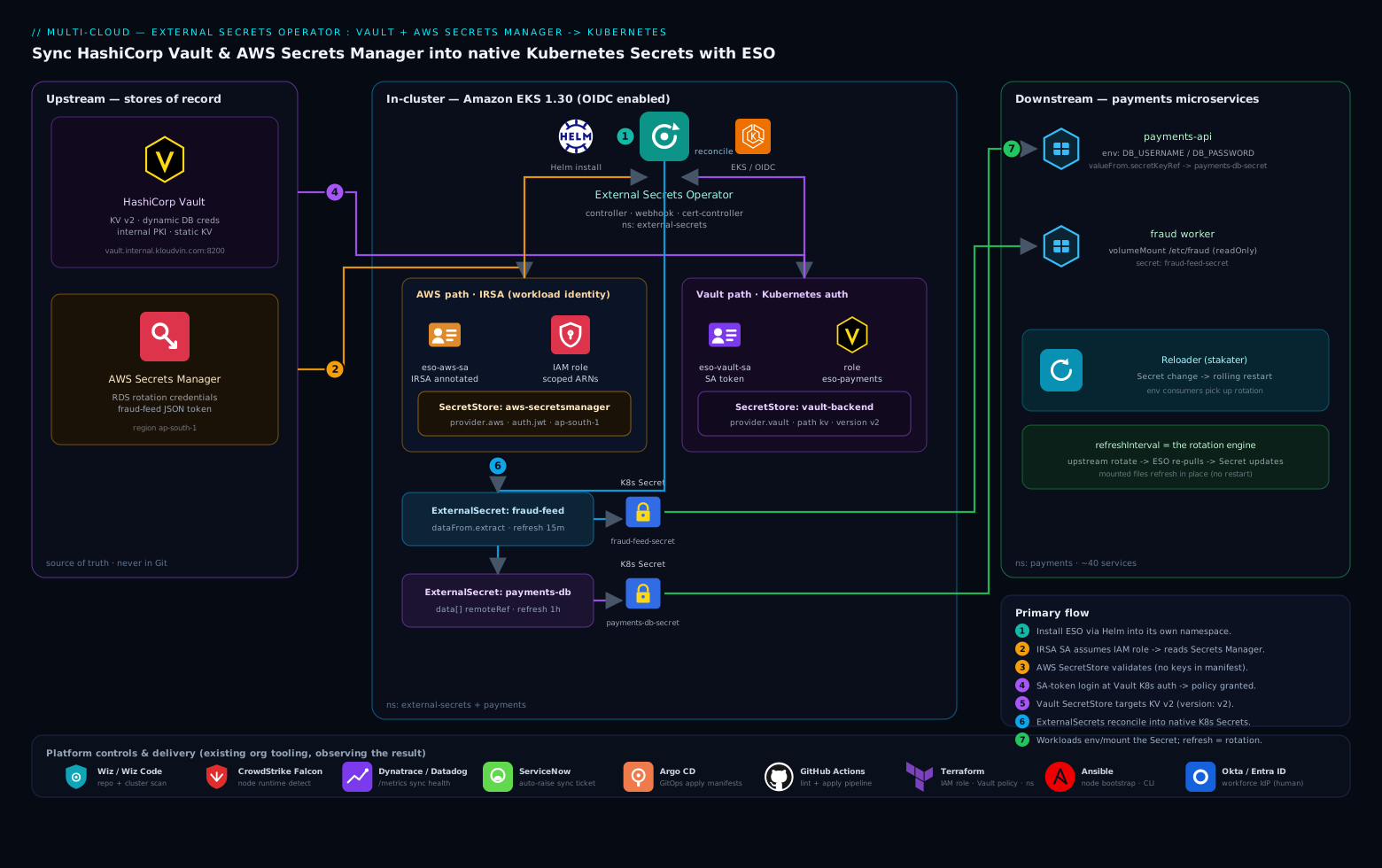
The flow has three planes. Upstream, two stores of record hold the real secrets: HashiCorp Vault (dynamic DB creds, PKI, static KV) and AWS Secrets Manager (RDS credentials, the fraud-feed token). In-cluster, the ESO controller authenticates to each store using workload identity — a Kubernetes ServiceAccount token exchanged at Vault’s Kubernetes auth backend, and an IRSA-annotated ServiceAccount that assumes an IAM role for AWS — then reconciles each ExternalSecret it watches into a standard Kubernetes Secret. Downstream, the payments microservices mount or env-inject those Secrets exactly as they always have. A refreshInterval on each ExternalSecret is what turns an upstream rotation into a fresh Secret without a redeploy.
Read the diagram left to right. On the left, the two stores of record. In the middle, the ESO controller with its two ServiceAccounts — eso-vault-sa (no annotation; Vault authenticates it) and eso-aws-sa (IRSA-annotated; STS authenticates it) — sitting in the external-secrets/payments namespaces, watching SecretStore and ExternalSecret objects. On the right, the native Secrets ESO writes and the pods that consume them via env vars and mounted files. Around the edges, the platform team’s existing tools observe the result: Wiz / Wiz Code scans the repo and the cluster to confirm no plaintext secret is committed and that SecretStore configs are sane, CrowdStrike Falcon runs runtime protection on the nodes so a process that exfiltrates a mounted secret gets flagged, and Dynatrace (or Datadog) scrapes the ESO controller’s /metrics so a sync failure pages someone. Provisioning of the IAM role, the Vault policy, and the namespaces is codified in Terraform, and the manifests ship through Argo CD with GitHub Actions running the pipeline that lints and applies them.
Real-world scenario
Northwind Pay runs the forty-microservice EKS estate from the intro: EKS 1.30 in ap-south-1, 18 nodes, a four-engineer platform team. Before ESO, an audit had flagged 31 distinct secrets committed across nine repos — including the production RDS password, which had not been rotated in 14 months because rotating it meant a coordinated redeploy of six services. The fraud-feed token was in a Helm chart that lived in 40+ developer clones. Monthly spend on the secrets backends was about ₹3,500 (a small Secrets Manager footprint plus the existing Vault cluster, which was already paid for by another team).
The rollout took two sprints. Sprint one: install ESO, stand up the IRSA role and the Vault kubernetes auth role, and migrate the least risky secret — an internal-API key in Vault — to prove the pattern. They hit the classic snag immediately: the first SecretStore for Vault sat at READY=False. kubectl describe showed permission denied; the cause was a v1-style policy path (kv/payments/internal-api) against a KV v2 mount, which needs kv/data/payments/internal-api. One-line policy fix, store went Valid, the first ExternalSecret synced in seconds. That single failure became the team’s onboarding doc.
Sprint two: migrate the RDS password and the fraud-feed token. The RDS password was the high-stakes one. They created payments-rds as an ExternalSecret against Secrets Manager with refreshInterval: 1h, templated it into a DATABASE_URL connection string so no service code changed, and wired Reloader so a rotation triggered a rolling restart. Then the test that mattered: they rotated the RDS password in Secrets Manager (via the managed rotation Lambda), watched ESO update payments-rds-secret within the hour, watched Reloader roll the six consuming Deployments, and confirmed every service reconnected with zero manual steps. The 14-month-stale password problem was now a fully automated, observable event.
The fraud-feed migration exposed a second lesson. They initially set refreshInterval: 10s “to be safe,” and within a day Secrets Manager started throttling — GetSecretValue was being called thousands of times an hour across the namespace. They corrected to 15m (the token rotates daily; 15-minute lag is irrelevant) and the throttling vanished. The fix was free; the lesson — match the interval to the rotation cadence, not to anxiety — went on the wall next to the KV-v2 one.
Outcome: all 31 committed secrets were removed from the live charts and replaced with ExternalSecret references (the Git history was separately scrubbed and the credentials rotated, since history can’t be un-leaked). The auditor’s two questions now had answers: a single kubectl get externalsecret -A listed every workload’s secrets and their sync status, and rotation was demonstrably automatic. Spend was unchanged (~₹3,500); the saving was operational — the next RDS rotation took zero engineer-hours instead of a planned-change window. The line on the wall: “The secret never lived in the cluster — only a fifteen-minute lease on it did.”
Advantages and disadvantages
ESO’s pull-from-store model both solves the Git-exposure problem cleanly and introduces a hard dependency on the store being reachable. Weigh it honestly:
| Advantages | Disadvantages |
|---|---|
| No secret material in Git/charts — only references | The resulting K8s Secret is still base64, not encrypted (etcd encryption is your job) |
Rotation is a store-side change; refreshInterval propagates it |
Env-var consumers don’t auto-restart — needs Reloader or mounted files |
Zero app changes — apps read a normal Secret |
Hard dependency: if the store/auth is down, secrets don’t refresh |
| One CRD-shaped, GitOps-friendly, observable surface for all secrets | Another controller to run, monitor, upgrade (CRD/version skew risk) |
| Multi-provider — Vault, AWS/GCP/Azure SM, and many more in one cluster | Per-provider auth quirks (IRSA audience, KV v2 paths) cost setup time |
| Templating produces exactly the shape the app wants | Templating errors fail silently into SecretSyncedError until you look |
PushSecret covers the reverse direction (cluster → store) |
Push needs write perms — a wider blast radius to manage carefully |
| Per-namespace stores + scoped backend roles give real multi-tenant isolation | Cluster-scoped stores, if misused, widen blast radius across tenants |
The model is right when you already run an external store and want rotation without bespoke glue. It is the wrong tool if you have no external store and want secrets self-contained in Git (Sealed Secrets), if you need mount-only delivery with no Secret object (CSI driver), or if you cannot tolerate a runtime dependency on the store for secret refresh.
Hands-on lab
This lab is the centerpiece: install ESO on a local kind cluster, stand up a dev-mode Vault in-cluster (so you need no external Vault), wire the Kubernetes auth chain, sync a secret, prove rotation, then add a templated secret — entirely free and self-contained. Allow ~20 minutes. (Dev-mode Vault is for the lab only; it is in-memory, unsealed, and insecure by design — never use it in production.)
Step 1 — Create a kind cluster.
kind create cluster --name eso-lab
kubectl cluster-info --context kind-eso-lab
Expected: Kubernetes control plane is running at https://127.0.0.1:<port>.
Step 2 — Install External Secrets Operator.
helm repo add external-secrets https://charts.external-secrets.io
helm repo update
helm install external-secrets external-secrets/external-secrets \
  -n external-secrets --create-namespace --set installCRDs=true --wait
kubectl -n external-secrets get pods
Expected: three Running pods (controller, webhook, cert-controller).
Step 3 — Run a dev-mode Vault in the cluster.
helm repo add hashicorp https://helm.releases.hashicorp.com
helm install vault hashicorp/vault -n vault --create-namespace \
  --set "server.dev.enabled=true" \
  --set "server.dev.devRootToken=root" --wait
kubectl -n vault get pod vault-0
Expected: vault-0 is Running (dev mode auto-unseals with root token root).
Step 4 — Put a secret in Vault and enable Kubernetes auth. Exec into the Vault pod:
kubectl -n vault exec -it vault-0 -- sh -c '
  export VAULT_TOKEN=root
  vault kv put secret/payments/db username=app_user password=Initial-P@ss-1
  vault auth enable kubernetes
  vault policy write payments-read - <<EOF
path "secret/data/payments/db" { capabilities = ["read"] }
EOF
  vault write auth/kubernetes/config \
    kubernetes_host="https://kubernetes.default.svc:443"
  vault write auth/kubernetes/role/eso-payments \
    bound_service_account_names=eso-vault-sa \
    bound_service_account_namespaces=payments \
    policies=payments-read ttl=20m
'
Expected: Success! Data written for each command. (The Vault Helm chart’s dev mode mounts secret/ as KV v2 and auto-configures token_reviewer_jwt from the pod’s own SA, so the minimal config above is enough here.)
Step 5 — Create the namespace, ServiceAccount, and the Vault SecretStore.
kubectl create namespace payments
kubectl -n payments create serviceaccount eso-vault-sa

cat <<'EOF' | kubectl apply -f -
apiVersion: external-secrets.io/v1beta1
kind: SecretStore
metadata:
  name: vault-backend
  namespace: payments
spec:
  provider:
    vault:
      server: "http://vault.vault.svc:8200"
      path: "secret"
      version: "v2"
      auth:
        kubernetes:
          mountPath: "kubernetes"
          role: "eso-payments"
          serviceAccountRef:
            name: eso-vault-sa
EOF

kubectl -n payments get secretstore vault-backend
Expected: READY becomes True within a few seconds. If it stays False, run kubectl -n payments describe secretstore vault-backend and check the events (almost always an auth/path issue).
Step 6 — Create the ExternalSecret and watch the Secret appear.
cat <<'EOF' | kubectl apply -f -
apiVersion: external-secrets.io/v1beta1
kind: ExternalSecret
metadata:
  name: payments-db
  namespace: payments
spec:
  refreshInterval: 1m
  secretStoreRef:
    name: vault-backend
    kind: SecretStore
  target:
    name: payments-db-secret
    creationPolicy: Owner
  data:
    - secretKey: DB_USERNAME
      remoteRef: { key: payments/db, property: username }
    - secretKey: DB_PASSWORD
      remoteRef: { key: payments/db, property: password }
EOF

kubectl -n payments get externalsecret payments-db
# NAME          STORE           STATUS         READY
# payments-db   vault-backend   SecretSynced   True
kubectl -n payments get secret payments-db-secret
Expected: STATUS=SecretSynced, READY=True, and a payments-db-secret of type Opaque with 2 data keys.
Step 7 — Verify the data landed (scratch shell only — never in CI logs).
kubectl -n payments get secret payments-db-secret \
  -o jsonpath='{.data.DB_PASSWORD}' | base64 -d; echo
# Initial-P@ss-1
Step 8 — Prove rotation end to end. Change the value in Vault, force a re-pull, re-read:
kubectl -n vault exec -it vault-0 -- sh -c \
  'VAULT_TOKEN=root vault kv put secret/payments/db username=app_user password=Rotated-P@ss-2'

kubectl -n payments annotate externalsecret payments-db \
  force-sync=$(date +%s) --overwrite

sleep 3
kubectl -n payments get secret payments-db-secret \
  -o jsonpath='{.data.DB_PASSWORD}' | base64 -d; echo
# Rotated-P@ss-2
Expected: the Secret now holds Rotated-P@ss-2. You just rotated a secret with no redeploy and no manifest change.
Step 9 — Add a templated secret (assemble a connection string).
cat <<'EOF' | kubectl apply -f -
apiVersion: external-secrets.io/v1beta1
kind: ExternalSecret
metadata:
  name: payments-db-url
  namespace: payments
spec:
  refreshInterval: 1m
  secretStoreRef:
    name: vault-backend
    kind: SecretStore
  target:
    name: payments-db-url-secret
    template:
      engineVersion: v2
      data:
        DATABASE_URL: "postgres://{{ .user }}:{{ .pass }}@db.internal:5432/payments?sslmode=require"
  data:
    - secretKey: user
      remoteRef: { key: payments/db, property: username }
    - secretKey: pass
      remoteRef: { key: payments/db, property: password }
EOF

kubectl -n payments get secret payments-db-url-secret \
  -o jsonpath='{.data.DATABASE_URL}' | base64 -d; echo
# postgres://app_user:Rotated-P@ss-2@db.internal:5432/payments?sslmode=require
Expected: a single DATABASE_URL key built from two Vault values — the shape an app reads directly.
Validation checklist. What you proved, mapped to the real-world analogue:
| Step | What you did | What it proves | Real-world analogue |
|---|---|---|---|
| 5 | Vault SecretStore via k8s auth |
The auth chain works end to end | Wiring prod Vault |
| 6 | ExternalSecret → native Secret |
Pull model produces a normal Secret |
Migrating a real credential |
| 7 | Decode the value | The data actually landed | Spot-checking a sync |
| 8 | Rotate + force-sync | Rotation needs no redeploy | The 3 a.m. rotation, automated |
| 9 | Templated DATABASE_URL |
App gets exactly the shape it wants | Zero-code migration |
Teardown.
kind delete cluster --name eso-lab
That deletes everything — cluster, ESO, Vault, all secrets — in one command, at zero ongoing cost.
Common mistakes & troubleshooting
The auth and sync failures below eat the most time. First the scannable playbook, then the confirm-command detail for the ones that bite hardest.
| # | Symptom | Root cause | Confirm (exact cmd) | Fix |
|---|---|---|---|---|
| 1 | SecretStore stuck READY=False, events say permission denied |
KV v2 policy path missing data/ |
kubectl -n payments describe secretstore vault-backend |
Policy path kv/data/<p>; set version: "v2" |
| 2 | Vault store READY=False, role not found / service account not authorized |
Role’s bound_service_account_* doesn’t match the SA/ns |
vault read auth/kubernetes/role/eso-payments |
Match bound_service_account_names/namespaces to the real SA |
| 3 | AWS store READY=False, AccessDenied |
IAM policy doesn’t cover the secret ARN | kubectl describe secretstore aws-secretsmanager; CloudTrail |
Add the exact ARN (with -*) to the policy Resource |
| 4 | AWS store fails silently; no STS call | SA token lacks sts.amazonaws.com audience |
kubectl -n payments describe sa eso-aws-sa |
Ensure IRSA annotation; don’t strip token audiences |
| 5 | ExternalSecret SecretSyncedError, “key not found” |
Wrong remoteRef.key/property |
kubectl -n payments describe externalsecret <name> |
Fix path; KV v2 key has no data/; check property name |
| 6 | Secret exists but is empty / missing a key |
property typo, or extract on a non-JSON secret |
Decode the Secret; check the remote shape |
Use the right property, or dataFrom.extract only on JSON |
| 7 | App still sees the old value after rotation | Env-var consumer not restarted | kubectl get secret -o jsonpath shows new value; pod env old |
Add Reloader annotation, or use a mounted volume |
| 8 | AWS throttling / ThrottlingException under load |
refreshInterval too aggressive across many secrets |
Controller logs; SM API metrics | Lengthen interval; batch keys into one JSON secret |
| 9 | kubectl apply of a CR rejected by admission |
Webhook down or cert expired | kubectl -n external-secrets get pods; describe webhook |
Restart webhook; check cert-controller is healthy |
| 10 | Deleting an ExternalSecret deleted the app’s Secret |
creationPolicy: Owner (owner ref) |
kubectl get secret <n> -o yaml (ownerReferences) |
Set creationPolicy: Orphan before delete to keep it |
| 11 | ClusterSecretStore works for one ns, not another |
namespaceSelector / conditions exclude the ns |
kubectl get clustersecretstore <n> -o yaml |
Add the ns label / fix the selector |
| 12 | PushSecret fails with AccessDenied / permission denied |
No write perm on the store | Controller logs | Add PutSecretValue (AWS) or create,update (Vault policy) |
| 13 | Secret syncs once then never updates | refreshInterval: 0 (or unset to a long value) |
kubectl get externalsecret -o yaml |
Set a sane non-zero refreshInterval |
| 14 | Everything Ready but no Secret appears |
RBAC: controller can’t create Secrets in the ns |
Controller logs secrets is forbidden |
Reinstall chart RBAC; check ns isn’t restricted by policy |
The expanded reasoning for the ones that cost the most time:
1. Vault SecretStore stuck READY=False with permission denied.
Root cause: KV v2 splits the data path — the policy must reference kv/data/payments/db, not kv/payments/db, and the SecretStore must set version: "v2".
Confirm: kubectl -n payments describe secretstore vault-backend shows permission denied in the events; vault policy read payments-read shows a v1-style path.
Fix: Rewrite the policy path with data/ inserted; set version: "v2". The ExternalSecret’s remoteRef.key stays payments/db (no data/) — ESO inserts it.
3. AWS SecretStore READY=False with AccessDenied.
Root cause: The IAM policy’s Resource doesn’t include the secret’s full ARN (every Secrets Manager ARN has a random 6-char suffix, so you must end the pattern with -*).
Confirm: kubectl describe secretstore aws-secretsmanager shows AccessDenied; CloudTrail’s GetSecretValue event shows the denied ARN.
Fix: Add arn:aws:secretsmanager:<region>:<acct>:secret:<name>-* to the policy. If the secret uses a customer-managed KMS key, also grant kms:Decrypt.
4. AWS auth fails silently — no STS call appears.
Root cause: ESO’s jwt auth needs the projected ServiceAccount token to carry the sts.amazonaws.com audience. EKS sets this by default, but a hardened cluster that strips audiences breaks AWS auth with no obvious error.
Confirm: kubectl -n payments describe sa eso-aws-sa should show the eks.amazonaws.com/role-arn annotation; check the pod’s projected token audience.
Fix: Ensure the IRSA annotation is present and the cluster isn’t stripping token audiences. Consider EKS Pod Identity as an alternative that doesn’t depend on the OIDC URL.
5. ExternalSecret shows SecretSyncedError, “key not found.”
Root cause: The remoteRef.key or property doesn’t match the remote. With KV v2 the key is the path without data/; property must be an actual sub-key of the secret.
Confirm: kubectl -n payments describe externalsecret payments-db shows the exact missing key/property in the status condition.
Fix: Correct the path/property. To list what’s actually in the Vault secret: vault kv get kv/payments/db.
7. App still reads the old value after rotation.
Root cause: An env-var (secretKeyRef) consumer reads the value once at process start; updating the Secret does not restart the pod.
Confirm: kubectl get secret payments-db-secret -o jsonpath='{.data.DB_PASSWORD}' | base64 -d shows the new value, but kubectl exec into the pod shows the old env var.
Fix: Add a Reloader annotation (reloader.stakater.com/auto: "true") to the Deployment so a Secret change triggers a rolling restart, or consume the secret as a mounted volume (kubelet refreshes the file in place).
8. AWS throttling under load.
Root cause: A short refreshInterval multiplied across many ExternalSecrets exceeds the Secrets Manager API rate.
Confirm: Controller logs show ThrottlingException; SM CloudWatch metrics show a spike in GetSecretValue.
Fix: Lengthen the interval to match the rotation cadence (a daily-rotating token needs 15m, not 10s); batch related values into one JSON secret consumed via dataFrom.extract so one API call returns many keys.
Best practices
- Never put a literal credential in a
SecretStore. Always authenticate via workload identity — IRSA for AWS, Kubernetes auth for Vault. AsecretRef/tokenSecretRefstatic credential in the cluster defeats the point. - Scope the backend role tightly. The IAM policy
Resourceand the Vault policy paths are the real tenant boundary — name exact ARNs and exact KV paths, never*or a wildcard path. - Keep Vault role TTLs short. 15–20 minutes means a leaked token is useless fast. ESO re-authenticates automatically.
- Prefer namespaced
SecretStores; reserveClusterSecretStorefor shared, low-sensitivity material and always gate it with anamespaceSelector. - Match
refreshIntervalto the rotation cadence, not to anxiety.15mfor short-lived tokens,1hfor DB creds,24hfor slow certs. Aggressive intervals throttle the backend. - Pair ESO with Reloader (or mounted files) for true zero-touch rotation. ESO updates the
Secret; something must make the pod pick it up. - Set
creationPolicy/deletionPolicydeliberately.Owner+Retainis a safe default; switch toOrphanbefore deleting anExternalSecretyou want theSecretto survive. - Batch related values into one JSON secret consumed via
dataFrom.extractto cut API calls and cost. - Turn on etcd encryption-at-rest (EKS KMS envelope encryption) — the
SecretESO writes is only base64 otherwise. - Run ≥2 controller and webhook replicas in production; leader election handles HA and a dead webhook blocks all CR applies.
- Alert on
externalsecret_sync_calls_errorandexternalsecret_status_conditionso a broken sync pages someone before the app notices. - Manage CRDs and the chart as separate GitOps sync-waves (
installCRDs=false) so an upgrade never races CRD changes. - Review every
ExternalSecretin PRs — the reference is in Git, so the diff shows exactly which workload reads which path, which is the audit trail you wanted.
Security notes
ESO removes plaintext secrets from Git and Helm entirely — the source of record stays in Vault and AWS, and only short-lived, narrowly-scoped tokens reach the cluster. But the cluster copy still needs protection:
- The target
Secretis base64, not encrypted. Enable etcd encryption-at-rest (EKS supports KMS envelope encryption — turn it on) so theSecretESO writes is encrypted in etcd, like any other. - Lock RBAC on the resulting
Secrets so only the owning namespace’s workloads and the operator canget/listthem. A namespace-wideget secretsgrant leaks everything ESO produced. - Workload identity, least privilege. The IAM policy and Vault policy are the hard boundary — name exact ARNs and KV paths. Grant
PutSecretValue/write only on stores that genuinely acceptPushSecret. - Keep token TTLs short (Vault role
ttl=15m) and don’t strip thests.amazonaws.comaudience from projected tokens (it breaks IRSA silently). - Protect the controller. It holds credentials to every store transitively — run it in its own namespace, restrict who can edit
SecretStores (a malicious store definition could point auth at an attacker’s endpoint), and scan its image. - Layer existing controls. Wiz / Wiz Code continuously scans the repo for any committed credential and the cluster for misconfigured
SecretStores; CrowdStrike Falcon gives node-level runtime detection if a compromised process reads a mounted secret. ESO is the prevention; these are the detection. - For non-Kubernetes systems in the estate, keep using their native secret injection — ESO is for the cluster, and over-centralising risk by routing everything through it is its own anti-pattern. The security controls and what each one buys:
| Control | Mechanism | Secures against |
|---|---|---|
| etcd encryption-at-rest | EKS KMS envelope encryption | Plaintext Secret in an etcd backup |
RBAC on the Secret |
Role/RoleBinding, resourceNames |
One team reading another’s secret |
| Scoped backend role | IAM Resource / Vault policy paths |
A namespace reading paths it doesn’t own |
| Short token TTL | Vault role ttl |
A leaked token staying valid |
Restrict SecretStore edit rights |
RBAC on the CRD | A malicious store pointing auth elsewhere |
| Controller isolation + image scanning | Dedicated namespace, Wiz/Falcon | Compromise of the credential-holding controller |
Cost & sizing
ESO itself is open-source and free; the only direct cost is API calls to the backends and the controller’s modest compute footprint.
- Compute: the controller, webhook, and cert-controller together fit in well under 256 MB / 0.25 vCPU for hundreds of
ExternalSecrets — a rounding error on any cluster. - AWS Secrets Manager bills per secret per month (about $0.40) plus per 10,000 API calls (about $0.05). A tight
refreshIntervalon hundreds of secrets is where this adds up — batch related values into one JSON secret consumed viadataFrom, and lengthen the interval for stable credentials. At15mrefresh, one secret is ~2,880 calls/month — negligible; the same secret at10sis ~260,000 calls/month, which both throttles and costs. - Vault API calls are free, but each ESO login mints a token that counts against Vault’s lease budget; the short TTL keeps the active-lease count low. A 15-minute role TTL with hourly refresh means very few concurrent leases.
- The real saving is operational. Rotations that used to be a manual, error-prone redeploy become a config change upstream — the 14-month-stale RDS password in the scenario went from a planned-change window to a zero-touch event. The cost drivers and how to control them:
| Cost driver | What you pay | Rough figure | Control |
|---|---|---|---|
| ESO compute | Controller/webhook pods | Negligible (<256 MB) | N/A |
| Secrets Manager storage | Per secret / month | ~$0.40 each | Batch related keys into one JSON secret |
| Secrets Manager API | Per 10,000 calls | ~$0.05 | Lengthen refreshInterval; dataFrom.extract |
| Vault leases | Free, but bounded | N/A | Short role TTL keeps active leases low |
| Operational (rotation) | Engineer-hours | Was: a change window | ESO + Reloader → zero-touch |
Rule of thumb: refresh aggressively only what genuinely rotates fast. The default mistake is uniform 10s/30s intervals “to be safe,” which turns a free tool into a throttled, billed one.
Interview & exam questions
1. What problem does ESO solve that Sealed Secrets and SOPS do not? ESO keeps the source of truth in an external store (Vault, Secrets Manager) and pulls from it on a refresh interval, so secret material never enters Git at all and rotation propagates automatically. Sealed Secrets and SOPS encrypt material and commit the ciphertext to Git — the truth lives in Git, and rotation means re-encrypting and re-committing. ESO is the right choice when you already run a store and want rotation; the others suit a self-contained, no-external-store GitOps setup.
2. Walk through how ESO authenticates to AWS Secrets Manager. It uses IRSA: a ServiceAccount annotated with an IAM role ARN gets a projected token with audience sts.amazonaws.com; ESO calls sts:AssumeRoleWithWebIdentity with that token to get temporary credentials, then calls secretsmanager:GetSecretValue. No static keys ever land in the cluster. Confirm a healthy store with kubectl get secretstore showing READY=True.
3. Walk through how ESO authenticates to Vault with Kubernetes auth. ESO mints a token for the configured ServiceAccount; Vault’s kubernetes auth backend validates it via its token_reviewer_jwt against the cluster API, matches a role whose bound_service_account_names/namespaces include that SA, and returns a short-lived Vault token carrying the role’s policy. The long-lived secret never enters the cluster — only an ephemeral, scoped token does.
4. With Vault KV v2, why does a wrong path cause a permission denied or empty secret? KV v2 stores data under a data/ sub-path, so the Vault policy must reference kv/data/payments/db (not kv/payments/db), and the SecretStore must set version: "v2". The ExternalSecret’s remoteRef.key stays payments/db — ESO inserts data/ itself. Mismatching these is the single most common Vault-side ESO error.
5. The Secret updates after rotation but the app keeps using the old value. Why and how do you fix it? An env-var consumer (secretKeyRef) reads the value once at process start; updating the underlying Secret does not restart the pod. Fix it by pairing ESO with Reloader (which rolls the Deployment when the Secret changes) or by mounting the secret as a volume (the kubelet refreshes the file in place, though the app must re-read it).
6. What is the difference between data, dataFrom.extract, and dataFrom.find? data pulls a named property of one remote secret into a named Secret key (explicit, renamable). dataFrom.extract flattens all top-level keys of one JSON secret into the Secret. dataFrom.find discovers many secrets by name regex or tag and pulls them in bulk. Use data for precision, extract for a whole JSON blob, find for bulk discovery.
7. When would you use ClusterSecretStore over SecretStore, and what’s the risk? A ClusterSecretStore is cluster-scoped and referenceable from any namespace — convenient for a shared, low-sensitivity store (e.g. a public CA). The risk is blast radius: an over-broad cluster store plus a ClusterExternalSecret can fan a secret into namespaces that should never see it. Gate it with a namespaceSelector and keep the backend role tightly scoped; prefer namespaced stores by default.
8. How does PushSecret differ from ExternalSecret, and what extra permission does it need? ExternalSecret pulls from the store into a Secret; PushSecret writes an existing cluster Secret (or a generated value) back to the store. It needs write permission on the backend — secretsmanager:PutSecretValue (and possibly CreateSecret) for AWS, or create/update on the Vault policy path — which is a wider blast radius to manage.
9. How do you guarantee tenant A cannot read tenant B’s secrets on a shared cluster? Layer three controls: namespaced SecretStores (so a tenant can’t reference another’s store), tightly-scoped backend roles (the IAM Resource/Vault policy paths are the real boundary), and RBAC on the resulting Secrets (restrict get/list to the owning namespace). A separate IRSA role per namespace stops cross-namespace role assumption.
10. Why can an aggressive refreshInterval cost money and break things? Each refresh is an API call to the backend; a short interval (e.g. 10s) multiplied across hundreds of ExternalSecrets can exceed the Secrets Manager API rate (throttling) and rack up per-call charges. Match the interval to the rotation cadence — a daily-rotating token only needs 15m — and batch related keys into one JSON secret so one call returns many values.
11. What does ESO not protect, and what must you add? ESO removes secrets from Git but writes a normal Kubernetes Secret, which is only base64-encoded in etcd — so you must enable etcd encryption-at-rest (EKS KMS envelope encryption) and lock down RBAC on the Secret. ESO is prevention of Git exposure, not a substitute for cluster-side secret protection.
12. When is ESO the wrong tool? When you have no external store and want secrets self-contained in Git (use Sealed Secrets), when you need mount-only delivery with no Secret object for compliance (use the Secrets Store CSI driver), or when you cannot tolerate a runtime dependency on the store for secret refresh (the store being down means no rotation).
These map to the CKS (Certified Kubernetes Security Specialist) — minimize microservice vulnerabilities and secrets management — and to vendor tracks like HashiCorp Vault Associate (Kubernetes auth, policies) and AWS Security Specialty (IRSA, Secrets Manager, KMS).
Quick check
- With Vault KV v2, your
ExternalSecret’sremoteRef.keyispayments/db. What must the Vault policy path be, and whatversionmust theSecretStoreset? - ESO updated the
Secretafter a rotation, but the running pod still uses the old password. Name the cause and one fix. - True or false: a
SecretStoreshould contain the AWS access key and secret so ESO can authenticate. - You want a
Secretto survive when you delete itsExternalSecret. What do you set, and on which object? - A
PushSecretto Secrets Manager fails withAccessDenied, even though reads work. What permission is missing?
Answers
- The policy path must be
kv/data/payments/db(KV v2 insertsdata/), and theSecretStoremust setversion: "v2". TheremoteRef.keycorrectly stayspayments/db— ESO adds thedata/segment itself. - The cause is an env-var (
secretKeyRef) consumer that reads the value once at startup; updating theSecretdoesn’t restart the pod. Fix it with Reloader (rolls the Deployment onSecretchange) or by consuming the secret as a mounted volume (kubelet refreshes the file). - False. That puts a static credential in the cluster, defeating the point. Use IRSA (
auth.jwt.serviceAccountRef) so no keys land in the cluster. - Set
creationPolicy: Orphanon theExternalSecret’stargetbefore deleting it (the defaultOwnersets an owner reference that cascades the delete). - Write permission —
secretsmanager:PutSecretValue(and possiblysecretsmanager:CreateSecret) — is missing from the IAM policy. Reads only needGetSecretValue/DescribeSecret.
Glossary
- External Secrets Operator (ESO) — a Kubernetes controller that pulls secrets from external stores and reconciles them into native
Secretobjects on a refresh interval. - SecretStore — a namespaced CRD describing how to reach and authenticate to one backend; referenced by
ExternalSecrets in the same namespace. - ClusterSecretStore — a cluster-scoped
SecretStoreusable from any namespace; wider blast radius, gate with anamespaceSelector. - ExternalSecret — a namespaced CRD declaring what to pull from a store and which target
Secretto write; the refresh interval drives rotation. - ClusterExternalSecret — a cluster-scoped CRD that generates an
ExternalSecretin every namespace matched by a selector. - PushSecret — a CRD that writes an existing cluster
Secret(or a generated value) back to a store (reverse direction). - IRSA (IAM Roles for Service Accounts) — EKS mechanism mapping a Kubernetes ServiceAccount to an IAM role via the cluster’s OIDC provider, so pods get AWS credentials with no static keys.
- Kubernetes auth (Vault) — a Vault auth backend that validates a cluster’s ServiceAccount tokens and returns a scoped, short-lived Vault token.
- KV v2 — Vault’s versioned key-value engine; its API/policy paths include a
data/segment, unlike KV v1. refreshInterval— how often anExternalSecret/PushSecretre-syncs; tune to the rotation cadence, not to anxiety.creationPolicy— governs whether ESO creates and owns the targetSecret(Owner), merges into an existing one (Merge), or leaves it unowned (Orphan).deletionPolicy— what happens to theSecretwhen the remote key disappears (Retain/Delete/Merge).dataFrom.extract— pull all top-level keys of one (JSON) remote secret into the targetSecret.dataFrom.find— discover and pull many secrets matched by name regex or tag.- Templating (
target.template) — Go-template rendering of fetched values into config files, connection strings, or typed secrets (TLS, dockerconfigjson). - Reloader — a separate controller (
stakater/reloader) that rolls a Deployment when a referencedSecret/ConfigMapchanges — the standard pairing for env-var rotation. - Secrets Store CSI driver — an alternative that mounts secrets from a store as a volume, optionally syncing to a
Secret; ESO instead creates aSecretobject directly.
Next steps
You can now sync secrets from Vault and AWS into the cluster and rotate them hands-free. Build outward:
- Upstream policy: Eliminating Secret Sprawl: Pipeline Scanning, Push Protection, and Leaked-Credential Remediation — stop secrets reaching Git in the first place.
- Related: Set Up SPIFFE/SPIRE for Workload Identity and mTLS Across Heterogeneous Clusters — the workload-identity foundation ESO’s auth depends on.
- Related: Configure CyberArk Conjur for Secretless Application Credential Injection in CI/CD — the pipeline-side analogue of pulling secrets from a store.
- Delivery: Deploy Argo CD on Kubernetes with OIDC SSO, RBAC, and ApplicationSets for Multi-Cluster GitOps — ship these manifests through GitOps with CRD sync-waves.
- Platform: AKS Architecture Explained: Managed Control Plane, Node Pools, and the Azure Integrations That Make It Tick — the cluster fundamentals if you run on AKS.
- Related: Zero-Plaintext Secret Management in CI/CD: Key Vault & Managed Identity Patterns — the same zero-plaintext goal expressed in the Azure/Key Vault idiom.