Every other thing you build on Google Cloud — a virtual machine, a bucket, a database, a pipeline — sits behind one question Google asks on every single API call: is this caller allowed to do this on this resource? The system that answers it is Identity and Access Management (IAM), and it is the one service you cannot skip. Get IAM right and the rest of the platform is just resources. Get it wrong and you have either an outage (nobody can do their job) or a breach (everybody can). This lesson takes you from “what is a principal” to confidently reading an allow policy, reasoning about inheritance, conditioning a grant, blocking an action with a deny policy, and — the part most newcomers get dangerously wrong — handling service accounts without ever downloading a key. By the end you will be able to design least-privilege access on GCP the way it is actually done in production, and answer the IAM questions that come up in every Associate Cloud Engineer interview.
Learning objectives
By the end of this lesson you will be able to:
- Identify the four kinds of principal (member) and when each is appropriate.
- Distinguish basic, predefined, and custom roles, and explain why basic roles are an anti-pattern.
- Read an allow policy as bindings of members to roles, and explain how it is evaluated.
- Reason precisely about policy inheritance — that it is additive and a union down the hierarchy — and contrast it with how AWS evaluates permissions.
- Apply IAM Conditions to bound a grant, and use a deny policy as a hard override.
- Create and use service accounts safely, preferring impersonation over downloaded keys, and understand
iam.serviceAccounts.actAs. - Explain Workload Identity Federation and why it makes service account keys unnecessary for CI/CD and other clouds.
Prerequisites & where this fits
You need a Google Cloud account, the gcloud CLI (or Cloud Shell, where it is pre-installed), and a basic grasp of the resource hierarchy — Organization → Folders → Projects → Resources — which we cover in the previous lesson, Google Cloud Fundamentals: Global Infrastructure, Resource Hierarchy & Pricing. That hierarchy is not background detail here: it is the thing IAM policies attach to, and inheritance flows along it. This is the Identity module of the Google Cloud Zero-to-Hero course and the foundation for everything that follows, especially the three-tier application lesson next. No prior IAM experience is assumed; if you know AWS IAM, note the explicit contrasts — the models differ in ways that catch people out.
Core concepts: the three questions IAM answers
IAM is, at heart, a function with three inputs and one output. Who (the principal) wants to do what (the permission, expressed via a role) on which resource? The answer is allow or deny. Internalise these terms before anything else:
| Term | What it is | Example |
|---|---|---|
| Principal (member) | The identity making the request | user:alex@example.com, a service account, a group |
| Permission | The finest-grained right to call one API method | storage.objects.get, compute.instances.start |
| Role | A named bundle of permissions you grant (you never grant permissions individually) | roles/storage.objectViewer |
| Allow policy | The list of bindings (member → role) attached to a resource | “alex has Storage Object Viewer on bucket X” |
| Resource hierarchy | Organization → Folders → Projects → Resources | A policy at a folder is inherited by every project beneath it |
Three rules follow from this and they are the whole game:
- You grant roles, not permissions. A role is a collection of permissions. You attach roles to principals on a resource; you cannot bind a bare permission.
- Policies attach to resources, at any level of the hierarchy. You can grant a role at the organization, a folder, a project, or many individual resources (a bucket, a Pub/Sub topic).
- Inheritance is additive and downward. A grant at a parent flows to every child. The effective access of a principal is the union of every grant at the resource and all its ancestors. We expand on this — and on why it is so different from AWS — below.
Principals: the four kinds of identity
A principal (the API still calls it a “member” in policy JSON) is who is asking. There are four kinds you will meet, plus a couple of special set-based ones.
| Principal type | Policy prefix | What it represents | When to use |
|---|---|---|---|
| Google account | user: |
A human, identified by an email (Gmail or a Cloud Identity / Workspace account) | Granting access to an individual person — sparingly; prefer groups |
| Google group | group: |
A collection of accounts and service accounts managed in Cloud Identity / Workspace | The default for human access — grant to the group, manage membership outside IAM |
| Service account | serviceAccount: |
A non-human identity for an application, VM, or workload | Anything code-driven: a VM, a Cloud Run service, a CI job |
| Cloud Identity / Workspace domain | domain: |
Everyone in an entire domain | Broad, coarse grants — use with care |
| All authenticated / all users | allAuthenticatedUsers, allUsers |
Any Google identity, or literally anyone on the internet | Public resources only (e.g. a public website bucket); allUsers makes data public — treat as radioactive |
| Federated identity set | principalSet:// |
External identities mapped in via Workload Identity Federation | Keyless access from CI/CD and other clouds (covered at the end) |
The single most important habit a junior engineer can build: grant to groups, not to individual users. When someone joins or leaves a team you change one group membership instead of hunting through dozens of policies across the hierarchy. Reserve user: grants for genuine exceptions, and treat allUsers as a deliberate, reviewed decision to make something public.
Cloud Identity is the free identity service that gives your organisation managed Google accounts and groups even if you do not use Google Workspace. It is what turns “a pile of personal Gmail accounts” into “a governed directory” — and it is the prerequisite for having an Organization node at all.
Roles: basic, predefined, and custom
A role is a bundle of permissions, and there are exactly three kinds. Choosing the right kind is most of least-privilege.
| Role kind | Examples | Granularity | Scope of permissions | When to use |
|---|---|---|---|---|
| Basic (a.k.a. primitive) | roles/owner, roles/editor, roles/viewer |
Extremely broad — span all services | Project-wide read / read-write / full control | Avoid in production. Fine for a personal sandbox only |
| Predefined | roles/storage.objectViewer, roles/compute.instanceAdmin.v1, roles/bigquery.dataEditor |
Service- and task-scoped, curated by Google | Just the permissions for one job on one service | The default choice — start here, almost always |
| Custom | roles/myorg.bucketLifecycleManager (you name it) |
Exactly the permissions you list | Whatever set you assemble | When no predefined role fits the least-privilege need |
Basic roles are an anti-pattern and you should be able to say why in an interview. roles/owner and roles/editor carry thousands of permissions across every service — including, for Owner, the ability to change IAM itself. Granting Editor “just to get someone unblocked” hands them write access to your databases, networks, and (in many cases) the keys to escalate further. They also cannot be constrained with IAM Conditions (below). The professional move is to grant a predefined role scoped to the task, and only drop to a custom role when even the narrowest predefined role grants more than needed.
Custom roles carry a small operational cost: you own them. When Google adds a new permission to a service, predefined roles get it automatically; your custom role does not, so you must maintain it. Define custom roles at the organization or project level, version them, and keep them few. A useful workflow is to start from a predefined role, see what it grants, and trim — Google’s Role Recommender (part of the IAM Recommender / Active Assist) will even suggest tighter roles based on the permissions a principal has actually used over the last 90 days.
# Inspect exactly what a role grants before you hand it out
gcloud iam roles describe roles/storage.objectViewer

# Create a custom role at the project level from a list of permissions
gcloud iam roles create bucketLifecycleManager \
  --project=my-prod-project \
  --title="Bucket Lifecycle Manager" \
  --permissions=storage.buckets.get,storage.buckets.update \
  --stage=GA
The allow policy and how a request is evaluated
The allow policy (returned by getIamPolicy, historically just “the IAM policy”) is a list of bindings. Each binding pairs one role with a set of members and, optionally, a condition. Here is a real one for a project:
{
  "bindings": [
    {
      "role": "roles/storage.objectViewer",
      "members": [
        "group:data-readers@example.com",
        "serviceAccount:report-job@my-prod-project.iam.gserviceaccount.com"
      ]
    },
    {
      "role": "roles/compute.instanceAdmin.v1",
      "members": ["group:platform-team@example.com"],
      "condition": {
        "title": "nonprod-only",
        "expression": "resource.matchTag('123456789012/environment', 'nonprod')"
      }
    }
  ]
}
When a principal calls an API, Google evaluates the request roughly like this:
- Gather deny policies at the resource and all ancestors. If any matching deny rule applies and no exception covers the caller, the request is denied immediately — deny always wins.
- Gather allow policies at the resource and all ancestors and take their union.
- If some binding grants the required permission and its condition (if present) evaluates
true, the request is allowed. Otherwise the default is deny.
You manage bindings with add-iam-policy-binding / remove-iam-policy-binding (which read-modify-write the policy for you) — almost never by hand-editing the JSON:
# Grant a group a predefined role on a project
gcloud projects add-iam-policy-binding my-prod-project \
  --member="group:data-readers@example.com" \
  --role="roles/storage.objectViewer"

# Read the allow policy AT THIS NODE (does NOT show inherited bindings)
gcloud projects get-iam-policy my-prod-project --format=json
That parenthetical is the trap that snares everyone new to GCP, and it leads straight into inheritance.
Policy inheritance: additive, a union, and not reducible by a child
This is the concept the brief calls out, the one that separates people who think they understand GCP IAM from people who actually do.
A policy set at a parent node is inherited by every descendant. Grant roles/viewer at a folder and every project, and every resource in those projects, inherits Viewer. The principal’s effective access on any resource is the union of every binding at that resource and at all of its ancestors — resource, then project, then folder(s), then organization. It is purely additive: each level can only add access.
The consequence that bites: a child cannot take away what a parent granted. If someone has roles/editor at the folder, granting them a tiny roles/storage.objectViewer at one project beneath does not scope them down — they still have Editor there, because the union includes the folder grant. There is no “more specific binding wins” and no inheritance block on the allow side. If you need to remove a permission that a broad ancestor grant confers, the allow model cannot do it; that is precisely the job of a deny policy (next section).
# The truth about a principal's access has to be read across the WHOLE chain,
# not from a single node's getIamPolicy. Policy Analyzer does that:
gcloud asset analyze-iam-policy \
  --organization=123456789012 \
  --identity="user:alex@example.com"
Contrast with AWS — the difference that catches people out
If your mental model comes from AWS, retune it deliberately. The differences are not cosmetic:
| Concept | Google Cloud IAM | AWS IAM |
|---|---|---|
| Where the policy lives | On the resource (the project/folder/org/resource node) — “resource-centric” | Primarily on the identity (a user/role gets attached policies) — “identity-centric” |
| Inheritance | Automatic and additive down the hierarchy (org → folder → project → resource); a parent grant is inherited and cannot be reduced by a child | No automatic grant inheritance; Service Control Policies (SCPs) at OUs set a permission ceiling (they can only restrict, never grant) |
| Default | Implicit deny; an allow anywhere in the chain wins | Implicit deny; an explicit Deny overrides any Allow |
| Scoping down | Use IAM Conditions (per-binding) and deny policies; you cannot subtract via a child allow | Use SCPs (ceiling) plus permission boundaries on identities |
| “Override” mechanism | Deny policy (separate resource, evaluated first) | Explicit Deny statement in any policy |
The one-sentence version for an interview: GCP IAM is resource-centric with additive, automatic inheritance where allow grants accumulate down the hierarchy and a child cannot revoke a parent’s grant — so you constrain with Conditions and deny policies, whereas AWS is identity-centric where SCPs set a ceiling and an explicit Deny overrides an Allow.
IAM Conditions: bounding a grant with CEL
The allow model is additive, but you are not stuck with all-or-nothing roles. IAM Conditions attach a CEL (Common Expression Language) predicate to a single binding, so the grant only takes effect when the expression is true. This is the scalpel for least privilege on the allow side. Conditions match three attribute families:
| Attribute family | What you can match on | Typical use |
|---|---|---|
| Resource | resource.name, resource.type, resource.matchTag(...) |
Limit a role to specific resources or to resources carrying a tag |
| Date/time | request.time |
Self-expiring grants — the backbone of just-in-time elevation |
| Request | request.path, request properties |
Match on the call itself |
Two everyday examples:
# Time-bound: this compute.admin grant self-expires — no cleanup needed
gcloud projects add-iam-policy-binding my-prod-project \
  --member="user:alex@example.com" \
  --role="roles/compute.admin" \
  --condition='expression=request.time < timestamp("2026-07-01T00:00:00Z"),title=temp-compute-admin,description=Expires 2026-07-01'

# Resource-bound: storage admin only on buckets whose name starts with prod-logs-
gcloud projects add-iam-policy-binding my-prod-project \
  --member="group:storage-ops@example.com" \
  --role="roles/storage.admin" \
  --condition='expression=resource.name.startsWith("projects/_/buckets/prod-logs-"),title=only-prod-logs'
Caveats worth memorising, because they appear in exams and in real debugging: CEL here is a deliberately limited surface (no arbitrary functions); use ==, never =; basic roles cannot be conditioned at all (another reason to avoid them); and resource.name/resource.type are not populated for every service, so test the condition against the real API before trusting it. Conditions are explored in depth — alongside deny policies and impersonation — in the companion lesson Advanced GCP IAM: Deny Policies, Conditional Bindings, and Impersonation Chains.
Deny policies: the hard override
Because allow inheritance can only add access, you need a way to say “no, regardless of any allow grant anywhere.” That is the deny policy — a separate resource from the allow policy, evaluated first, that overrides allow. It is how you claw back a permission that a broad ancestor binding would otherwise confer.
A deny policy attaches to an attachment point (an org, folder, or project, in a URL-encoded form) and contains rules with deniedPrincipals, optional exceptionPrincipals, the deniedPermissions, and an optional denialCondition:
# deny-destructive.yaml — nobody may delete projects or buckets, except break-glass
rules:
- denyRule:
    deniedPrincipals:
    - "principalSet://goog/public:all"
    exceptionPrincipals:
    - "principalSet://goog/group/breakglass-admins@example.com"
    deniedPermissions:
    - "cloudresourcemanager.googleapis.com/projects.delete"
    - "storage.googleapis.com/buckets.delete"
gcloud iam policies create deny-destructive \
  --attachment-point="cloudresourcemanager.googleapis.com/folders/456789012345" \
  --kind=denypolicies \
  --policy-file=deny-destructive.yaml
Three things that bite if you ignore them. First, deny policies act on permissions (e.g. storage.googleapis.com/buckets.delete), not roles — so they cut across every role that contains that permission, which is exactly what makes them powerful. Second, principalSet://goog/public:all means every principal, including you — always pair a broad deny with exceptionPrincipals for the break-glass identities, or you will lock yourself out. Third, an exception principal is an escape hatch from the deny, not a grant — that principal still needs an allow binding for the action to actually succeed. Used well, deny policies are how you enforce “no one deletes production, full stop” in a way no accidental Editor grant can undo.
Service accounts: the identity for your code
A service account (SA) is a special principal that is not a person — it is the identity an application, VM, or workload uses to authenticate to Google APIs. It has an email (my-app@my-project.iam.gserviceaccount.com) but no password and no interactive login. SAs are simultaneously a principal (you grant it roles, so it can do things) and a resource (you grant principals roles on it, so they can use or manage it). That dual nature is the source of most service-account confusion, so hold it firmly.
There are two broad kinds:
| Service account kind | Created by | Notes |
|---|---|---|
| User-managed | You (gcloud iam service-accounts create ...) |
The ones you create for your apps; you control their roles and lifecycle. Up to 100 per project by default |
| Default | Google, automatically (e.g. the Compute Engine default SA PROJECT_NUMBER-compute@developer.gserviceaccount.com) |
Created with broad Editor by default — a classic over-privilege. Disable the automatic Editor grant via org policy and assign purpose-built SAs instead |
| Google-managed service agents | Used by Google services to act on your behalf; you generally do not manage these directly |
The default Compute Engine SA being granted Editor is a textbook over-privilege you should flag in any review: every VM in the project then runs as an identity that can edit almost everything. The fix is to create a dedicated SA per workload with only the roles it needs, attach that to the VM/Cloud Run service, and use the org policy constraint iam.automaticIamGrantsForDefaultServiceAccounts to stop the broad default grant.
Keys versus impersonation — the most important choice you will make
There are two ways to use a service account, and choosing correctly is the single highest-leverage security decision a junior engineer makes on GCP.
| Approach | What it is | Lifetime | Verdict |
|---|---|---|---|
| Downloaded SA key | A JSON file (keys create) containing a private key — a bearer credential |
Never expires until you revoke it | Avoid. The number-one credential-leak vector — copyable, commit-able, and context-free |
| Impersonation | A caller with the right role mints a short-lived token for the SA on demand, no key file | ~1 hour (extendable to 12h via org policy) | Prefer. Nothing to store, rotate, or leak |
| Attached SA | A VM / Cloud Run / GKE workload runs as an SA; the platform supplies credentials automatically via the metadata server | Auto-rotated by the platform | Prefer for workloads on GCP — zero key handling |
A downloaded key has no expiry, no audience binding, and no idea where it is being used; a key committed to a repo in 2022 still works today. Impersonation deletes that whole class of risk. The enabling role is roles/iam.serviceAccountTokenCreator, granted on the target SA (remember: the SA as a resource) to the caller:
gcloud iam service-accounts add-iam-policy-binding \
  deploy-sa@my-prod-project.iam.gserviceaccount.com \
  --member="group:platform-deployers@example.com" \
  --role="roles/iam.serviceAccountTokenCreator"

# Now any member runs gcloud AS the SA, no key file anywhere:
gcloud storage ls --impersonate-service-account=deploy-sa@my-prod-project.iam.gserviceaccount.com
Treat serviceAccountTokenCreator with the same suspicion as roles/owner: whoever holds it on an SA becomes that SA and inherits all its permissions. It is a privilege-escalation primitive by design, so grant it narrowly and audit it.
iam.serviceAccounts.actAs — the permission that lets you attach an SA
There is a second, subtler control you must understand: to deploy a resource that runs as a service account — attach an SA to a VM, a Cloud Run service, a Cloud Function — the deploying principal needs the iam.serviceAccounts.actAs permission on that SA (typically via roles/iam.serviceAccountUser). This exists to prevent privilege escalation: without it, anyone who could create a VM could simply attach your most powerful SA and inherit its rights. actAs is the gate that says “you are allowed to run code as this identity.”
# Let a deployer attach this SA to workloads (VMs, Cloud Run, Functions)
gcloud iam service-accounts add-iam-policy-binding \
  app-runtime-sa@my-prod-project.iam.gserviceaccount.com \
  --member="group:app-deployers@example.com" \
  --role="roles/iam.serviceAccountUser"
Distinguish the two clearly: serviceAccountUser / actAs lets you attach an SA to a workload (deploy-time); serviceAccountTokenCreator lets you mint tokens to impersonate an SA directly (run-time). Both are escalation paths, both are granted on the SA-as-resource, and both belong on every reviewer’s checklist.
Workload Identity Federation: keyless access from outside GCP
So workloads on GCP use an attached SA (no keys), and humans/automation impersonate (no keys). What about a workload outside GCP — a GitHub Actions pipeline, a GitLab runner, an app on AWS — that needs to call Google APIs? The wrong answer, and the most common one, is to download an SA key and paste it into a CI secret. The right answer is Workload Identity Federation (WIF).
WIF replaces the static key with a trust relationship. Your external system already proves its own identity to its own provider with a short-lived OIDC (or SAML) token; GCP’s Security Token Service (STS) exchanges that external token for a short-lived federated GCP credential — only when the claims inside the token match conditions you set (e.g. “this token came from my-org/my-repo on branch main”). No key is created, stored, or able to leak.
The moving parts:
| Component | What it is | Lifetime |
|---|---|---|
| Workload identity pool | A container for external identities, scoped to a project | Permanent |
| Pool provider (OIDC/SAML) | Trust config for one external issuer (GitHub, GitLab, AWS, etc.) | Permanent |
| Attribute mapping | Maps token claims (sub, repository) to Google attributes |
Config |
| Attribute condition | A CEL expression that rejects tokens failing the predicate | Config |
| STS token exchange | The runtime swap of the external token for a GCP federated token | ~1 hour |
The federated identity is then bound to a service account via roles/iam.workloadIdentityUser — the federated cousin of tokenCreator — so the external identity can impersonate the SA and act with its roles. (Newer “direct resource access” lets you grant roles to the federated principalSet:// directly, skipping the SA, though not every client library honours federated principals yet.) The headline: no downloadable key ever exists. The full STS exchange, pool setup, and GitHub Actions worked example are in Keyless Authentication to GCP: Workload Identity Federation for GitHub Actions and CI/CD; the fundamentals point here is simply this is how outside workloads authenticate without keys, and you should reach for it by default.
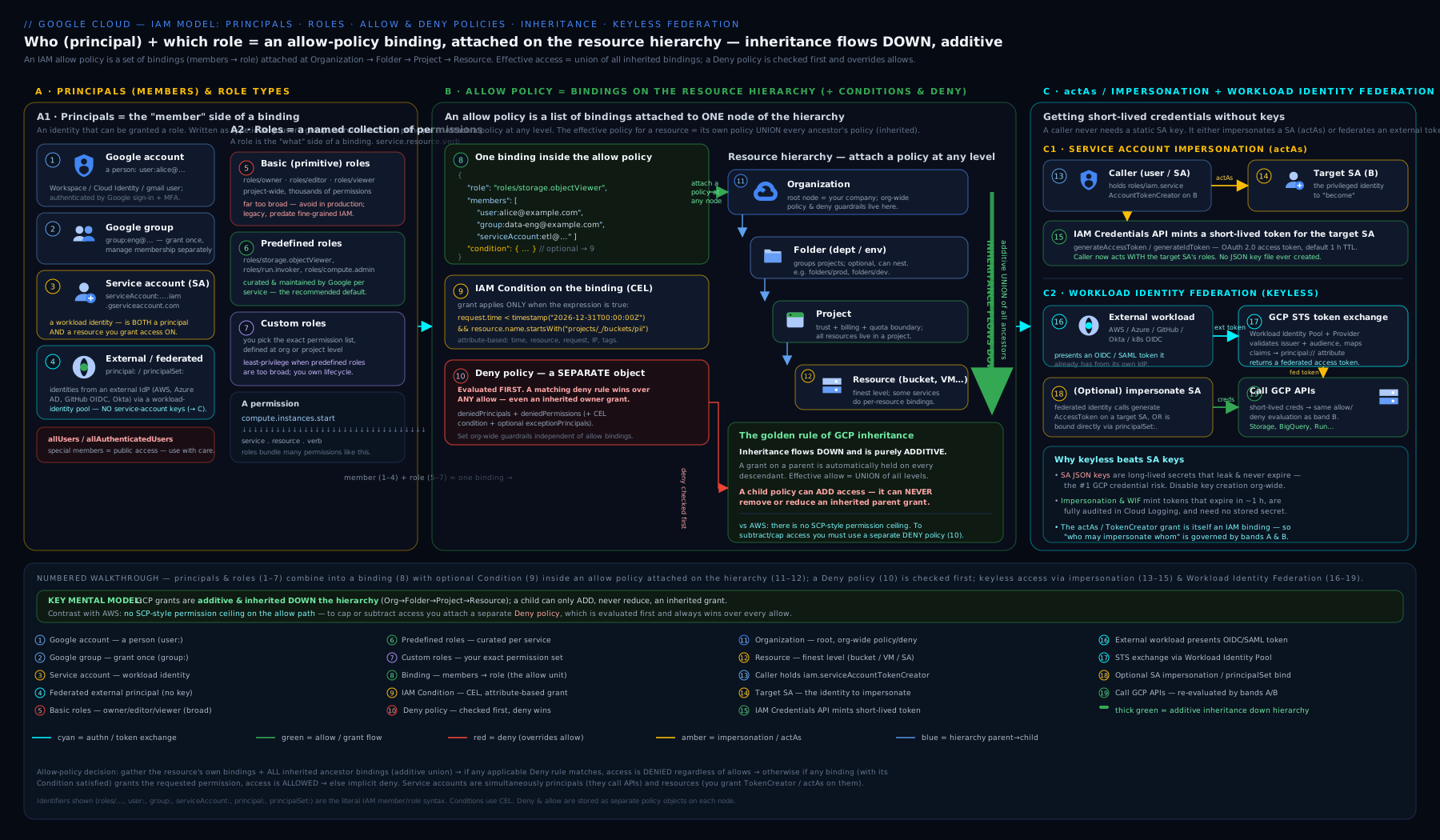
The diagram ties the model together: principals on the left, the role → permission bundling in the middle, allow policies attached at organization, folder, project, and resource with grants accumulating downward as a union, the deny policy sitting in front as a hard override, and on the right the two keyless paths — workloads impersonating attached or target service accounts, and external identities entering through Workload Identity Federation.
Hands-on lab: roles, a service account, impersonation, and a condition
You will create a project-scoped custom role, a least-privilege service account, grant impersonation, prove you can act as the SA without a key, and add a self-expiring conditional grant. Run everything in Cloud Shell or a local shell where you have run gcloud auth login. This stays comfortably inside the GCP Free Tier / $300 credit — IAM operations themselves are free.
Step 1 — Set up variables
export PROJECT_ID="$(gcloud config get-value project)"
export SA_NAME="lab-app-sa"
export SA_EMAIL="${SA_NAME}@${PROJECT_ID}.iam.gserviceaccount.com"
echo "Project: $PROJECT_ID  SA: $SA_EMAIL"
Expected: your project ID and the service account email printed back.
Step 2 — Create a least-privilege service account
gcloud iam service-accounts create "$SA_NAME" \
  --display-name="Lab application SA"

gcloud iam service-accounts describe "$SA_EMAIL" \
  --format="value(email, disabled)"
Expected: the SA email followed by False (not disabled). You have created an identity for an app — note you did not create a key.
Step 3 — Grant the SA exactly one predefined role
gcloud projects add-iam-policy-binding "$PROJECT_ID" \
  --member="serviceAccount:${SA_EMAIL}" \
  --role="roles/storage.objectViewer" \
  --condition=None
Expected: the updated policy prints with a binding for roles/storage.objectViewer listing your SA. The SA can now read objects in any bucket in the project — and nothing else.
Step 4 — Grant yourself impersonation, then act as the SA with no key
export ME="$(gcloud config get-value account)"

gcloud iam service-accounts add-iam-policy-binding "$SA_EMAIL" \
  --member="user:${ME}" \
  --role="roles/iam.serviceAccountTokenCreator"

# Mint a short-lived token AS the SA — note: no JSON key anywhere
gcloud auth print-access-token --impersonate-service-account="$SA_EMAIL" | head -c 12; echo " ...(token issued)"
Expected: a truncated access token followed by ...(token issued). You just authenticated as the service account using only your own identity plus the tokenCreator grant — exactly the pattern that makes downloaded keys unnecessary.
Step 5 — Add a self-expiring conditional grant
gcloud projects add-iam-policy-binding "$PROJECT_ID" \
  --member="user:${ME}" \
  --role="roles/compute.viewer" \
  --condition='expression=request.time < timestamp("2026-12-31T00:00:00Z"),title=temp-compute-viewer,description=Self-expiring viewer'
Expected: the policy prints with a compute.viewer binding that carries a condition. This grant evaporates on its own at year-end — no cleanup task required.
Validation
# Confirm the SA's binding and your conditional binding both exist
gcloud projects get-iam-policy "$PROJECT_ID" \
  --flatten="bindings[].members" \
  --filter="bindings.members:(${SA_EMAIL} OR user:${ME})" \
  --format="table(bindings.role, bindings.members, bindings.condition.title)"
You should see roles/storage.objectViewer for the SA, roles/iam.serviceAccountTokenCreator (on the SA, shown via its own policy), and roles/compute.viewer with the temp-compute-viewer condition title for you.
Cleanup
# Remove the bindings you added, then delete the SA
gcloud projects remove-iam-policy-binding "$PROJECT_ID" \
  --member="serviceAccount:${SA_EMAIL}" --role="roles/storage.objectViewer" --condition=None
gcloud projects remove-iam-policy-binding "$PROJECT_ID" \
  --member="user:${ME}" --role="roles/compute.viewer" \
  --condition='expression=request.time < timestamp("2026-12-31T00:00:00Z"),title=temp-compute-viewer,description=Self-expiring viewer'
gcloud iam service-accounts delete "$SA_EMAIL" --quiet
Cost note
Nothing in this lab costs money. IAM — roles, policies, bindings, service accounts, impersonation, conditions, deny policies, and Workload Identity Federation — is free; you pay for the resources IAM protects, not for IAM itself. The only thing to be tidy about is leftover service accounts and stale bindings, which are a security liability rather than a billing one. Deleting the SA removes the identity entirely.
Common mistakes & troubleshooting
| Symptom | Likely cause | Fix |
|---|---|---|
PERMISSION_DENIED even though you “granted the role” |
Granted at the wrong node, or the binding has a condition that evaluates false, or a deny policy blocks it | Use gcloud asset analyze-iam-policy (Policy Analyzer) to see effective access across the whole chain; check conditions and deny policies |
| Scoped a user down with a narrow project grant but they still have too much | Allow inheritance is additive — a broad ancestor grant (e.g. Editor at the folder) is not reduced by a child | Remove the broad ancestor grant, or use a deny policy to override it; you cannot subtract via a child allow |
iam.serviceAccounts.actAs error when deploying a VM/Cloud Run that runs as an SA |
Deployer lacks actAs on the target SA |
Grant roles/iam.serviceAccountUser on that SA to the deployer |
| Downloaded an SA key and it leaked / can’t be rotated cleanly | Using a long-lived JSON key at all | Switch to impersonation (on-GCP/local) and WIF (external CI); block keys with iam.disableServiceAccountKeyCreation |
| Every VM can edit everything | Workloads running as the default Compute Engine SA with Editor | Create a dedicated least-privilege SA per workload; disable the default Editor grant via org policy |
| Condition has no effect | Applied to a basic role (can’t be conditioned), used = instead of ==, or matched an attribute the service doesn’t populate |
Use a predefined/custom role, fix the CEL operator, test the attribute against the real API |
| Locked out after adding a broad deny | deniedPrincipals: public:all with no exception for your admins |
Add exceptionPrincipals for break-glass identities; remember exceptions still need an allow binding to act |
getIamPolicy “doesn’t show” a grant you know exists |
It returns only this node’s bindings, not inherited ones | Read the parent nodes too, or use Policy Analyzer for the effective union |
Best practices
- Grant to groups, not individuals. Manage people in Cloud Identity groups; bind roles to the group. One membership change beats editing dozens of policies.
- Prefer predefined roles; avoid basic roles.
roles/owner/editor/viewerare too broad and cannot be conditioned. Drop to a custom role only when no predefined role is tight enough. - Grant at the lowest level that works. Bind at the project or resource, not the org/folder, unless the access genuinely needs to span everything beneath.
- Never download service account keys. Use impersonation on GCP and for humans, attached SAs for workloads, and Workload Identity Federation for external CI/CD. Block key creation with org policy.
- One purpose-built SA per workload, with only the roles it needs. Disable the broad default Compute Engine SA grant.
- Use IAM Conditions for time-bound and resource-bound grants — especially self-expiring elevation — so access cleans itself up.
- Use deny policies for hard, hierarchy-wide guardrails (“no one deletes production”), always with a break-glass exception.
- Review with the tools: Policy Analyzer for “who can do what”, the IAM/Role Recommender for right-sizing, and the Policy Troubleshooter for “why was this allowed/denied”.
Security notes
IAM is your security perimeter on GCP, so a few principles carry outsized weight. Treat roles/owner, roles/iam.serviceAccountTokenCreator, and iam.serviceAccountUser as privilege-escalation primitives — whoever holds them can become other identities or change access itself; grant them rarely, to groups, and audit them like crown jewels. Eliminate standing credentials: downloaded SA keys are the most common breach vector on GCP precisely because they are long-lived and copyable, and impersonation plus WIF remove them entirely. Enforce least privilege structurally, not by good intentions: predefined/custom roles, Conditions to bound them, and deny policies to set hard limits. Make allUsers a reviewed decision — it makes data public to the entire internet. Finally, audit who did what with Cloud Audit Logs (Admin Activity logs are on by default and free), and revisit access with the IAM Recommender so permissions shrink toward what is actually used. The deep treatment of deny policies, conditions, and impersonation chains lives in the Advanced GCP IAM lesson.
Interview & exam questions
-
“Explain GCP’s policy inheritance and how it differs from AWS.” GCP IAM is resource-centric: policies attach to org/folder/project/resource and are inherited downward, additively. A principal’s effective access is the union of grants at the resource and all ancestors, and a child cannot reduce what a parent granted. AWS is identity-centric (policies attach to users/roles); there is no automatic grant inheritance — SCPs at OUs set a permission ceiling (they only restrict, never grant) and an explicit
Denyoverrides anyAllow. To scope down in GCP you use Conditions and deny policies, not a narrower child allow. -
“What are the three kinds of role, and why avoid basic roles?” Basic (Owner/Editor/Viewer) — extremely broad, span all services, cannot be conditioned; avoid in production. Predefined — curated, task- and service-scoped; the default. Custom — exactly the permissions you list; use when no predefined role is tight enough, accepting that you must maintain it.
-
“What is the difference between an allow policy and a deny policy?” The allow policy is the set of member→role bindings on a resource; allows are additive and inherited. A deny policy is a separate resource, evaluated first, that blocks permissions for principals regardless of any allow — the hard override. Deny acts on permissions, not roles, and deny always wins.
-
“Should you ever download a service account key? What do you use instead?” Almost never — keys are long-lived bearer credentials and the top leak vector. Use impersonation (
serviceAccountTokenCreator) for humans and on-GCP callers, an attached SA (platform-supplied, auto-rotated) for workloads, and Workload Identity Federation for external CI/CD and other clouds. Block keys withiam.disableServiceAccountKeyCreation. -
“What does
iam.serviceAccounts.actAsdo, and how is it different fromserviceAccountTokenCreator?”actAs(viaroles/iam.serviceAccountUser) lets a principal attach an SA to a workload at deploy time, so the workload runs as that SA — it prevents escalation by gating who can deploy code as a given identity.serviceAccountTokenCreatorlets a principal mint tokens to impersonate an SA directly at run time. Both are granted on the SA as a resource and both are escalation paths. -
“A user has Editor at a folder. You grant them only Storage Object Viewer at one project beneath. What can they do in that project?” Still everything Editor allows, plus Object Viewer. Allow inheritance is additive and a child grant cannot subtract — to actually limit them you must remove the folder-level Editor grant or impose a deny policy.
-
“What is Workload Identity Federation and when do you use it?” A way for external identities (GitHub Actions, GitLab, AWS) to obtain short-lived GCP credentials by exchanging their own OIDC/SAML token via STS, with no key file. The federated identity is bound to an SA via
roles/iam.workloadIdentityUser(or granted roles directly). Use it for any off-GCP workload that needs to call Google APIs. -
“What are IAM Conditions and what are their limits?” A CEL predicate on a single binding so the grant applies only when true; matches resource, date/time (self-expiring grants), and request attributes. Limits: a restricted CEL surface,
==not=, basic roles can’t be conditioned, and some attributes aren’t populated for every service. -
“How do you find out why a principal could (or couldn’t) perform an action?” Use the Policy Troubleshooter for a specific allow/deny decision, Policy Analyzer (
gcloud asset analyze-iam-policy) for effective access across the whole hierarchy, and Cloud Audit Logs for “who actually did what”. RemembergetIamPolicyshows only one node’s bindings. -
“What’s wrong with the default Compute Engine service account?” It is created with broad Editor, so every VM that uses it runs as a near-omnipotent identity — over-privilege by default. Replace it with a dedicated least-privilege SA per workload and disable the automatic grant via
iam.automaticIamGrantsForDefaultServiceAccounts. -
“What is the difference between a principal and a service account being a ‘resource’?” A service account is both: as a principal you grant it roles so it can act; as a resource you grant other principals roles on it (e.g.
tokenCreator,serviceAccountUser) so they can impersonate or attach it. Confusing the two is the most common SA mistake. -
“How would you give a contractor temporary admin on one project for a week?” Add a binding for the contractor (ideally via a group) with the needed predefined role and an IAM Condition
request.time < timestamp("...")set a week out — it self-expires with no cleanup. Avoid basic roles (uncOnditionable) and never hand over a key.
Quick check
- Name the four common principal types and give the policy prefix for each.
- Why are basic roles (Owner/Editor/Viewer) an anti-pattern, and what should you use instead?
- In one sentence, how does GCP allow-policy inheritance work, and how does it differ from AWS?
- A user has Editor at a folder; you grant Storage Object Viewer at a child project. What is their effective access there, and how could you actually reduce it?
- Give two ways to use a service account without downloading a key, and name the role that enables impersonation.
Answers
- Google account
user:, Google groupgroup:, service accountserviceAccount:, domaindomain:(plus the set-basedallUsers/allAuthenticatedUsersandprincipalSet://for federation). - They are far too broad (span all services) and cannot be conditioned, so they violate least privilege. Use predefined roles by default, custom roles when none is tight enough.
- Policies attach to resources and are inherited downward and additively — effective access is the union of a resource’s and all its ancestors’ grants, and a child cannot reduce a parent’s grant; AWS is identity-centric where SCPs set a ceiling (only restrict) and an explicit
Denyoverrides anyAllow. - Everything Editor allows plus Object Viewer (additive union). To reduce it you must remove the folder-level Editor grant or apply a deny policy — a narrower child allow cannot subtract.
- Impersonation (a caller mints a short-lived token) and an attached SA (the platform supplies credentials to a VM/Cloud Run/GKE workload); the impersonation role is
roles/iam.serviceAccountTokenCreator, granted on the target SA. (For external workloads, Workload Identity Federation.)
Exercise
Build a least-privilege access pattern end to end, then prove it with the tooling:
- Create a Cloud Identity group (or reuse one) and add yourself; from now on grant the group, not your user.
- Create a service account
web-runtime-saand grant it onlyroles/storage.objectVieweron your project. - Grant your group
roles/iam.serviceAccountUseronweb-runtime-sa(so members could deploy a workload that runs as it). - Add a self-expiring conditional grant of
roles/compute.viewerto your group withrequest.time < timestamp("...")a week out. - Run
gcloud asset analyze-iam-policy --project=$PROJECT_ID --identity="group:<your-group>"and confirm the effective access matches exactly what you intended — no more, no less. - Add a deny policy at the project blocking
compute.googleapis.com/instances.deleteforpublic:allwith an exception for a break-glass group, then confirm with the Policy Troubleshooter that a normal member is denied. - Clean up every binding, the SA, and the deny policy.
If step 5 shows precisely your three intended grants (and step 6 shows the deny taking effect over any allow), you have built and verified a real least-privilege design.
Certification mapping
- Cloud Digital Leader (CDL): the conceptual layer — what IAM is, principals vs roles vs resources, why least privilege and groups matter, and the idea of service accounts for workloads. CDL stays high-level; this lesson’s first half covers it.
- Associate Cloud Engineer (ACE): core, heavily tested. Setting up a cloud solution environment and Configuring access and security — managing IAM with
gcloud, predefined vs custom roles, service accounts (creating, granting roles to and on them, impersonation), and reading policies. Expect hands-on-style questions; the lab here mirrors them. - Professional Cloud Security Engineer (PCSE): the deep end — policy inheritance and evaluation, IAM Conditions, deny policies, eliminating keys via impersonation and Workload Identity Federation, the default-SA over-privilege, and least-privilege design at organisation scale. This lesson is the on-ramp; the Advanced GCP IAM and WIF companions complete it.
Glossary
- IAM (Identity and Access Management) — the service that decides whether a principal may perform an action on a resource.
- Principal (member) — the identity making a request: a user, group, service account, domain, or federated identity set.
- Permission — the finest-grained right to call one API method (e.g.
storage.objects.get); always granted via a role, never alone. - Role — a named bundle of permissions: basic (broad, avoid), predefined (curated, default), or custom (yours).
- Allow policy — the set of member→role bindings attached to a resource; allows are additive.
- Binding — one role paired with a set of members and an optional condition.
- Policy inheritance — grants flow downward through the hierarchy and accumulate as a union; a child cannot reduce a parent’s grant.
- IAM Condition — a CEL predicate on a binding so the grant applies only when true (resource/time/request attributes).
- Deny policy — a separate resource, evaluated first, that blocks permissions regardless of any allow; deny wins.
- Service account (SA) — a non-human identity for a workload; both a principal (you grant it roles) and a resource (you grant roles on it).
- Default service account — Google-created SA (e.g. Compute Engine’s) granted broad Editor by default — a common over-privilege to disable.
- Impersonation — minting a short-lived token to act as an SA without a key; enabled by
roles/iam.serviceAccountTokenCreator. iam.serviceAccounts.actAs— the permission (viaroles/iam.serviceAccountUser) to attach an SA to a workload so it runs as that SA.- Workload Identity Federation (WIF) — exchanging an external OIDC/SAML token via STS for a short-lived GCP credential, with no key.
- Cloud Identity — Google’s identity service providing managed accounts and groups; prerequisite for an Organization.
- Policy Analyzer / Policy Troubleshooter — tools that report effective access across the hierarchy and explain a specific allow/deny.
Next steps
You can now read an IAM policy, reason correctly about additive inheritance, bound grants with Conditions, override with deny policies, and — most importantly — operate service accounts without ever touching a key. Next, put it to work building a real workload in Foundational Three-Tier Web Application on Google Cloud, where a least-privilege service account is the identity your application runs as. To go deeper on the control surfaces introduced here, follow Advanced GCP IAM: Deny Policies, Conditional Bindings, and Impersonation Chains and Keyless Authentication to GCP: Workload Identity Federation for GitHub Actions and CI/CD.