Kubernetes ships with about forty built-in object kinds — Pods, Deployments, Services, ConfigMaps and so on. For most of what you deploy, that vocabulary is enough. But sooner or later you hit a wall: you want to express “a three-node PostgreSQL cluster with automated failover and nightly backups” as a single object, not as a hand-assembled pile of StatefulSets, Services, Secrets and CronJobs that you then babysit by hand. The remarkable thing about Kubernetes is that you can teach it that vocabulary. You add a new kind with a CustomResourceDefinition (CRD), and you write a controller that knows how to make that kind real and keep it real. A CRD plus a purpose-built controller is exactly what the industry calls an operator.
This lesson is the conceptual foundation for that whole world. We will go deep on three load-bearing ideas — the CRD (how the API server learns a new type, with versions, schemas, validation, subresources and conversion), the reconciliation loop (the control-theory pattern every controller obeys), and the operator pattern (encoding human operational knowledge as software) — then survey operator capability levels and the build options (Kubebuilder, Operator SDK, controller-runtime) at a level that lets you choose well. By the end you will be able to read any operator’s source and CRDs and know exactly what each piece is doing, and decide when a CRD or operator is the right tool versus overkill. Writing the Go code itself is the subject of the companion build-it-yourself guide; here we build the mental model that makes that code obvious.
Learning objectives
By the end of this lesson you will be able to:
- Explain how a CustomResourceDefinition teaches the API server a new kind, and read its
group,version,kind, scope and schema. - Write a CRD with an OpenAPI v3 structural schema, including validation rules, defaulting, and
kubectl-friendly printer columns. - Describe the status and scale subresources and why the status/spec split matters.
- Explain how multiple versions and conversion webhooks let an API evolve without breaking stored objects.
- Articulate the reconciliation loop — watch, diff desired vs actual, act — and why it is level-triggered, idempotent and built on informers and work queues.
- Define the operator pattern, place an operator on the capability-level maturity scale, and pick between Kubebuilder, Operator SDK and raw controller-runtime.
- Judge when a CRD or operator is the right tool — and when a Helm chart or a plain controller is enough.
Prerequisites & where this fits
You should be comfortable with the Kubernetes object model — Pods, Deployments, Services, labels and kubectl apply — and have used kubectl get, describe and -o yaml. It helps to understand the control-plane architecture (API server, etcd, controllers) and the RBAC and ServiceAccount model, because a controller authenticates as a ServiceAccount and needs precise permissions. This lesson sits in the Architecture track of the Kubernetes Zero-to-Hero course, after the workload and admission-control lessons and before the networking internals. It is the bridge from using Kubernetes to extending it: everything from cert-manager to Prometheus Operator to the cloud providers’ database services is built on the patterns here.
Core concepts: declarative APIs and active reconciliation
Two ideas underpin everything in this lesson.
Kubernetes is a declarative API with active controllers. You do not tell Kubernetes how to create a Deployment’s Pods step by step; you apply an object describing the desired state (spec), the API server validates and persists it to etcd, and a controller running in a loop notices the object and works to make reality match. The API server itself is, deliberately, mostly a sophisticated CRUD store with validation, authentication, authorisation and admission — it stores objects and notifies watchers. The intelligence lives in controllers. This separation is the single most important architectural fact about Kubernetes, and it is exactly what makes extension possible: if you can add an object kind and add a controller, you have added a first-class feature.
Custom resources extend the data model; controllers extend the behaviour. A custom resource (CR) is an instance of a kind you defined — say, a Cache or a PostgresCluster. By itself a CR is inert data: creating one just stores YAML in etcd and gives you a typed, validated, RBAC-controlled, kubectl-native object. Nothing happens until a controller watches that kind and acts. So the two halves are orthogonal and you can use them independently:
| You have… | You get… | Typical use |
|---|---|---|
| CRD only (no controller) | A validated, versioned, RBAC-able object you can kubectl get/apply and watch |
Config you consume elsewhere; data other tools read (e.g. cert-manager’s Certificate before its controller acts) |
| Controller only (on built-in types) | Active automation over existing kinds | A controller that labels every new Namespace, or syncs Secrets |
| CRD + controller = operator | A new declarative kind that does something | Databases, message queues, certificate management, backups |
Some vocabulary, because it is easy to muddle:
- CRD (CustomResourceDefinition) — the definition (the schema/registration) of a new kind. There is one CRD per kind. It is itself a built-in Kubernetes object (
apiextensions.k8s.io/v1). - CR (custom resource) — an instance of that kind. There are many CRs per CRD.
- Controller — a program that watches some kinds and drives the world toward their
spec. - Operator — a controller (or set of controllers) plus the CRDs it manages, packaged to encode the operational knowledge of running a specific application.
CustomResourceDefinitions: teaching the API server a new kind
A CRD is how you register a new API. Here is a minimal but realistic one for a fictional Cache kind; we will dissect every field.
apiVersion: apiextensions.k8s.io/v1
kind: CustomResourceDefinition
metadata:
  name: caches.cache.example.com          # MUST be <plural>.<group>
spec:
  group: cache.example.com                # the API group
  scope: Namespaced                        # or Cluster
  names:
    kind: Cache                            # PascalCase, used in YAML "kind:"
    plural: caches                         # lowercase, used in the REST path and name
    singular: cache
    shortNames: ["ca"]                     # kubectl get ca
    categories: ["all"]                    # kubectl get all includes it
  versions:
    - name: v1alpha1
      served: true                          # reachable over the API right now
      storage: true                         # THE version persisted to etcd (exactly one)
      schema:
        openAPIV3Schema:
          type: object
          properties:
            spec:
              type: object
              required: ["size"]
              properties:
                size:
                  type: integer
                  minimum: 1
                  maximum: 9
                  default: 3
                engine:
                  type: string
                  enum: ["redis", "valkey"]
                  default: "redis"
            status:
              type: object
              properties:
                readyReplicas:
                  type: integer
                conditions:
                  type: array
                  items:
                    type: object
                    properties:
                      type: { type: string }
                      status: { type: string }
                      reason: { type: string }
                      message: { type: string }
      subresources:
        status: {}                          # carve out /status
        scale:                              # make `kubectl scale` work
          specReplicasPath: .spec.size
          statusReplicasPath: .status.readyReplicas
      additionalPrinterColumns:
        - name: Engine
          type: string
          jsonPath: .spec.engine
        - name: Desired
          type: integer
          jsonPath: .spec.size
        - name: Ready
          type: integer
          jsonPath: .status.readyReplicas
        - name: Age
          type: date
          jsonPath: .metadata.creationTimestamp
Apply that and within a second or two the API server serves a brand-new REST endpoint at /apis/cache.example.com/v1alpha1/namespaces/<ns>/caches, kubectl knows the Cache kind, and kubectl get caches works. No restart, no recompiling the API server. That is the magic of CRDs.
Group, version, kind and scope
Every Kubernetes object is addressed by a GVK — Group, Version, Kind — and stored under a GVR — Group, Version, Resource (the resource being the lowercase plural). Choosing these well matters because they are effectively permanent once people depend on them.
| Field | What it is | Guidance |
|---|---|---|
group |
A DNS-style namespace for your APIs, e.g. cache.example.com. Keeps your kinds from clashing with core (""/v1) or anyone else’s. |
Use a domain you control. One group can hold many kinds. |
versions[].name |
API version: v1alpha1 → v1beta1 → v1, following the Kubernetes deprecation policy. |
Start at v1alpha1 (no stability promise), graduate as the schema settles. |
names.kind |
PascalCase type used in kind: in YAML. |
Singular noun: Cache, PostgresCluster. |
names.plural |
Lowercase, used in the URL and as the first part of metadata.name. |
caches. |
scope |
Namespaced (object lives in a namespace; the common case) or Cluster (global, like Nodes or StorageClasses). |
Default to Namespaced unless the concept is genuinely cluster-wide. You cannot change scope after creation. |
The CRD’s own metadata.name is not free-form: it must be exactly <plural>.<group> (caches.cache.example.com). Get this wrong and the CRD is rejected.
The OpenAPI v3 schema, structural schemas and validation
The schema.openAPIV3Schema is where a CRD goes from “a bag of JSON” to “a real, validated type”. Since apiextensions.k8s.io/v1 (Kubernetes 1.16) a schema is required, and it must be structural — a well-formed-ness contract that the API server, pruning, defaulting and conversion all rely on. A structural schema means, roughly:
- Every field has a declared
type(object,array,string,integer,number,boolean), specified at the right level (so a property’stypelives on the property, not buried inanyOf/oneOf). additionalPropertiesand the logical combinators don’t smuggle in untyped fields.- The schema doesn’t set
metadata/statustypes in disallowed ways.
Why “structural” matters in practice: it is the prerequisite for pruning (unknown fields silently stripped on write, so a typo like repicas: simply vanishes rather than being stored), for defaulting, and for conversion. With x-kubernetes-preserve-unknown-fields: true you can opt a subtree out of pruning to store arbitrary JSON, but you lose validation there, so use it sparingly.
The schema doubles as your validation layer. Common building blocks:
| Construct | Effect | Example |
|---|---|---|
required: [...] |
Field must be present | required: ["size"] |
minimum/maximum, minLength/maxLength |
Numeric / string bounds | minimum: 1 |
enum: [...] |
Closed set of allowed values | enum: ["redis", "valkey"] |
pattern |
Regex constraint on a string | pattern: '^[a-z0-9-]+$' |
format |
Semantic format hint (date-time, email, …) |
format: date-time |
default |
Value injected when the field is omitted (defaulting) | default: 3 |
x-kubernetes-validations |
CEL expression rules (1.25+, GA 1.29) for cross-field logic | see below |
The last one deserves emphasis. CEL validation rules let you express constraints that plain OpenAPI cannot — relationships between fields, immutability, list semantics — inside the CRD, evaluated by the API server with no webhook to run:
type: object
x-kubernetes-validations:
  - rule: "self.maxSize >= self.size"
    message: "maxSize must be >= size"
  - rule: "self.engine != 'redis' || self.size <= 6"
    message: "redis engine supports at most 6 nodes"
properties:
  size:    { type: integer }
  maxSize: { type: integer }
  engine:  { type: string }
You can also enforce transition rules (compare new value to old with oldSelf) for immutability — e.g. rule: "self == oldSelf" with x-kubernetes-validations on a field that must never change after creation. CEL has largely removed the need for a validating webhook for ordinary structural and cross-field checks, which is a big simplification — webhooks are an extra deployment, an extra failure mode, and latency on every write.
Defaulting happens server-side from default: values in the structural schema: omit engine and the stored object comes back with engine: redis. Defaults apply on read for previously-stored objects too, which is how you can safely add a new optional field with a default to an existing CRD.
Subresources: the spec/status split, and scale
By default a custom resource is one document, and whoever can update the object can write every field — including status. That is wrong: spec is the user’s desired state; status is the controller’s report of observed reality. They have different writers and should have different permissions. The status subresource enforces that split. When subresources.status: {} is set:
- The object exposes a separate
/statusendpoint. The controller updates status via that endpoint; users updatespecvia the main endpoint. RBAC can grantupdateoncaches/statusto the controller andupdateoncachesto users, cleanly separating the two. - Updates to the main resource ignore changes to
status, and updates to/statusignore changes tospec. No more accidental clobbering. metadata.generationincrements only whenspecchanges. Controllers comparestatus.observedGenerationtometadata.generationto answer “have I reconciled the current spec yet?” — this only works correctly with the status subresource.
The scale subresource wires your CRD into the generic scaling machinery. By mapping specReplicasPath, statusReplicasPath (and optionally labelSelectorPath), you make kubectl scale cache/foo --replicas=5 work and, crucially, you make your CRD a valid target for a HorizontalPodAutoscaler. The HPA scales anything that implements /scale, so a CRD with a scale subresource can be autoscaled like a Deployment — a powerful, often-overlooked feature.
additionalPrinterColumns is pure quality of life but matters for adoption: it controls what kubectl get caches shows in its table (beyond NAME/AGE). Surface the fields an operator actually cares about — desired size, ready replicas, phase — and the resource feels native.
Multiple versions and conversion webhooks
APIs evolve. You might rename a field, restructure spec, or promote v1alpha1 to v1. The hard constraint is etcd: exactly one version has storage: true, and that is the form every object is persisted as. You may serve several versions simultaneously so clients on different versions all work. The question is what happens when a client reads a stored object in a different version than it was written.
There are two conversion strategies:
| Strategy | How it converts between versions | When to use |
|---|---|---|
None (default) |
No transformation — the same object is returned with only the apiVersion string swapped. |
Versions are structurally identical (e.g. you only added optional, defaulted fields). |
Webhook |
The API server calls your conversion webhook to translate between versions on every read/write that crosses versions. | Any time fields were renamed, moved, split or merged between versions. |
With None, all served versions must be schema-compatible, because there is no code to reconcile differences — you are effectively just relabelling. The moment a field changes shape between v1alpha1 and v1, you need a conversion webhook: a service the API server calls, handing it a list of objects and the desired version, expecting them back converted. This makes the multi-version contract real — a v1 client and a v1alpha1 client can both read the same underlying object, each seeing it correctly in their version, with your webhook doing the translation in the middle.
A subtle but important operational point: just because every object is stored in the old storage version does not mean you can delete the old version’s code freely. To retire a stored version you must run a storage-version migration — re-write all existing objects in the new storage version (e.g. with the storage-version-migrator, or a kubectl get ... -o yaml | kubectl apply sweep) — before dropping the old version from served/storage. The CRD also tracks status.storedVersions so you know which versions still exist on disk. Versioning, conversion webhooks and storage migration in full are the subject of the aggregated API server and conversion deep dive; the model above is what you need to design a CRD that can evolve.
CRDs vs the aggregation layer (the other extension path)
CRDs are the easy, declarative way to add a kind — the API server stores and serves it for you. There is a second mechanism, the aggregation layer / extension API server, where you run your own API server binary that the kube-apiserver proxies to. You reach for aggregation when you need custom storage (not etcd), protobuf, arbitrary subresources, or special admission/validation that CRDs cannot express. For 95% of operators, a CRD is the right and far simpler choice; know the aggregation layer exists so you can recognise when you have outgrown CRDs.
The controller and the reconciliation loop
A CRD gives you a noun. A controller gives it a verb. Every Kubernetes controller — built-in or custom — runs the same loop, and internalising it is the single most valuable thing in this lesson.
Watch, diff, act — the control loop
A controller is a closed control loop, exactly like a thermostat. The thermostat has a desired temperature (the dial) and an actual temperature (the sensor); it acts (heat/cool) to close the gap, forever. A controller has:
- Desired state — the
specof the objects it watches (yourCache’ssize: 3). - Actual state — what really exists in the cluster (how many Pods are actually running).
- Reconcile — observe both, compute the diff, take the minimum action to close it, then report what it observed into
status.
         +-----------------------------------------+
         |              Reconcile(req)             |
 watch   |  1. GET the object (desired state)      |
 event ->|  2. LIST/GET owned resources (actual)   |--> create/update/delete
         |  3. diff desired vs actual              |    children to converge
         |  4. act to converge                     |
         |  5. write observed state -> .status     |
         +-----------------------------------------+
                          ^        |
                          |        v  (requeue: after error, or on a timer)
                          +--------+
The reconcile function is deliberately given almost no input — typically just the namespace/name of the object that needs attention (a reconcile.Request). It is not told what changed or why. That design choice is the heart of the next idea.
Level-triggered, not edge-triggered
This is the concept interviewers probe and beginners get wrong. Edge-triggered thinking is “on create, do X; on update, do Y; on delete, do Z” — reacting to transitions (the edges). It is a trap in distributed systems: events get coalesced (two quick edits may surface as one), dropped (the controller was down when it happened), delivered out of order, or replayed (informer resyncs). If your logic depends on seeing every transition exactly once, it will eventually corrupt state.
Level-triggered logic ignores the transition entirely and reacts to the current level — the present desired and actual state. The reconcile function fetches the object fresh every time and asks “given how the world is right now, what should I do?” It produces the same correct result whether it is the first invocation or the thousandth, whether it missed ten events or none. The event that triggered the reconcile is just a hint that says “go look at this object”; the controller never trusts the content of the event. This is why reconcile takes only a name: it forces you to write level-triggered code.
A correct controller therefore tolerates being called when nothing changed (it diffs, finds no gap, does nothing) and tolerates being called after missing events (it diffs against reality and catches up). That robustness is the entire payoff.
Idempotency
Because reconcile runs an unpredictable number of times — on every relevant event, on periodic resyncs, on requeues after errors — it must be idempotent: running it N times must leave the world in the same state as running it once. Practical consequences:
- Never blindly
create. Use create-or-update semantics (aGet; ifNotFound, create; else update to match) or server-side apply. A naiveCreateon the second pass errors withAlreadyExists. - Drive to a target, don’t apply deltas. “Ensure exactly 3 replicas,” not “add one replica.” The former is idempotent; the latter compounds on repeat.
- Make status updates convergent. Recompute conditions from observed reality each pass rather than appending.
- Use ownerReferences + garbage collection so cleanup is declarative: set the parent CR as the owner of every child object (Deployment, Service), and Kubernetes’ garbage collector deletes the children automatically when the CR is deleted. You don’t write deletion logic for owned resources; you express ownership and let GC be idempotent for you.
A useful litmus test: if you ran your reconcile in a tight loop forever with no spec changes, the cluster should reach a fixed point and stop changing. If it keeps churning (creating/deleting, flapping status), it is not idempotent.
Informers, the cache, and work queues
Naïvely, “watch the API and react” sounds like every controller polling the API server constantly — which would melt the control plane at scale. The real machinery, provided by client-go and wrapped by controller-runtime, is built for efficiency:
- Informer — establishes a single
LIST+WATCHagainst the API server for a kind, and maintains a local in-memory cache (the store/indexer) of those objects. Your reconcile reads from this cache, not the API server, so reads are essentially free and the API server sees one watch per kind per controller, not one request per reconcile. Informers also do a periodic resync, re-delivering everything from the cache — which is precisely why your logic must be level-triggered and idempotent: it will be called for objects that did not change. - SharedInformer — multiple controllers in one process share one informer (one watch) per kind, rather than each opening its own.
- Work queue — a rate-limited, deduplicating queue of object keys (namespace/name). Event handlers don’t run your logic directly; they merely enqueue the key of the affected object. Workers pull keys and call reconcile. This gives you, for free: deduplication (ten edits to one object while it sits in the queue collapse to one reconcile), rate limiting with exponential backoff on failure, and concurrency control (a fixed worker pool, with the guarantee that the same key is never processed by two workers at once — so you never race against yourself for a single object).
The reconcile contract closes the loop: you return either success (forget the key), an error (the queue re-enqueues it with backoff), or a requeue request (re-enqueue now or after a delay). Returning a requeueAfter is how a controller polls something external on a timer without busy-looping. This watch → cache → queue → reconcile pipeline is identical whether you are writing the Deployment controller in Kubernetes itself or your own Cache operator.
The operator pattern
Now assemble the pieces. An operator is a CRD (the desired-state API) plus a custom controller (the reconciliation logic), packaged together to encode the operational knowledge of running a specific application or piece of infrastructure. The name is the whole idea: it automates what a skilled human operator would do.
Think about what a database administrator actually knows: how to bootstrap a cluster, elect a primary, add a replica, take a consistent backup, restore to a point in time, perform a rolling minor-version upgrade without downtime, fail over when the primary dies, and resize storage safely. None of that is expressible in a Deployment. An operator captures that runbook as code behind a single declarative resource:
apiVersion: postgres.example.com/v1
kind: PostgresCluster
metadata: { name: orders-db }
spec:
  instances: 3
  version: "16"
  storage: { size: 100Gi, class: fast-ssd }
  backup: { schedule: "0 2 * * *", retention: 14 }
A human reads that and understands the intent. The operator’s controller reads it and executes the runbook continuously: it provisions the StatefulSet, primes replication, configures backups, watches for a failed primary and promotes a replica, and reports health in status. The operator is the DBA who never sleeps and never forgets a step. This is the difference between a package (a Helm chart that installs PostgreSQL once and then walks away) and an operator (which operates PostgreSQL forever). The stateful-PostgreSQL lesson shows a production operator doing exactly this.
Why this pattern won: it reuses everything you already know. Operators get the declarative API, RBAC, audit logging, kubectl, GitOps compatibility, watch semantics and reconciliation for free, because a CRD is a Kubernetes object and a controller is a Kubernetes controller. You are not building a sidecar control system; you are extending the one that is already running.
Operator capability levels
Not all operators are equal. The community Operator Capability Levels model (popularised by OperatorHub/Operator SDK) describes a five-rung maturity ladder. It is the standard vocabulary for “how much does this operator actually do?” and a good design checklist.
| Level | Name | What the operator can do |
|---|---|---|
| 1 | Basic Install | Provision the application and its components from the CR; expose configuration through the spec. The “Helm-chart-equivalent” baseline. |
| 2 | Seamless Upgrades | Upgrade the managed app (and itself) gracefully — minor/patch version bumps, rolling and orchestrated, without manual steps. |
| 3 | Full Lifecycle | Day-2 operations: backups, restores, scaling, failure recovery, complex reconfiguration — the runbook automated. |
| 4 | Deep Insights | Expose metrics, alerts, logs and workload analysis; surface health into status and to monitoring. |
| 5 | Auto Pilot | Autonomous behaviour: auto-scaling, auto-tuning, auto-healing, anomaly detection, capacity right-sizing — minimal human input. |
Most production operators live at level 3. Reaching level 5 is rare and usually unnecessary. The ladder is useful in two ways: when evaluating a third-party operator (a level-1 operator that “installs Kafka” but cannot upgrade or back it up may be worse than a good Helm chart), and when building one (ship level 1 first, then climb deliberately).
When a CRD or operator is the right tool — and when it isn’t
Operators are powerful and seductive, and the most common mistake is reaching for one too early. Use this decision guide.
A CRD (with or without a controller) is a good fit when:
- You need a first-class, validated, RBAC-controlled API for a domain concept that your team or platform owns (
Environment,Tenant,FeatureFlag). - Other tools or controllers will watch and react to the object.
- You want users to express intent declaratively and have it stored, versioned and audited like any native object.
A full operator (CRD + controller) is justified when:
- The thing has non-trivial, ongoing day-2 operations — failover, backups, upgrades, topology changes — that a static manifest cannot capture and that you would otherwise do by hand at 3 a.m.
- The application is stateful or stateful-clustered (databases, queues, search), where lifecycle correctness is genuinely hard.
- You are managing many instances and the automation amortises across all of them.
Prefer a simpler tool when:
- You just need to install and template an app with knobs → a Helm chart or Kustomize is simpler, with no controller to run, secure and maintain.
- The lifecycle is stateless and trivial → a Deployment plus an HPA already reconciles for you.
- You only need to react to built-in objects (label new namespaces, copy a Secret) → write a plain controller on existing kinds; you may not need a CRD at all.
The honest trade-off: an operator is software you now own and run — it has its own bugs, RBAC, upgrade path, and a blast radius that can span every instance it manages. A buggy reconcile loop can fight itself or thrash a fleet. Add that operational cost to one side of the scale before you build.
Build options: Kubebuilder, Operator SDK and controller-runtime
You do not write the informer/work-queue plumbing by hand. Three layers of tooling sit on top of client-go, and they are complementary rather than competing.
| Tool | What it is | Best for |
|---|---|---|
| controller-runtime | The Go library under everything else: Manager, Reconciler interface, clients with built-in caching, builder API for watches/owns, leader election, webhook server, metrics. |
The foundation; you import it regardless of scaffolder. |
| Kubebuilder | A scaffolding CLI + project layout that generates CRD types, controllers, RBAC markers, webhooks, Makefile, CRD/manifest generation (controller-gen) and envtest integration tests — all on top of controller-runtime. |
Go-native operators; the de facto standard for hand-written controllers. |
| Operator SDK | A superset that wraps Kubebuilder for Go and adds Helm-based and Ansible-based operators (no Go required), plus Operator Lifecycle Manager (OLM) bundle packaging and scorecard testing. | Teams wanting Helm/Ansible operators, or targeting OperatorHub/OLM distribution. |
How to choose, briefly:
- Go, full control, standard path → Kubebuilder. It is what most CNCF operators use. You get strongly-typed APIs, generated deepcopy/CRD manifests, and
envtestfor fast tests against a real API server. This is the toolchain the build-your-own-operator guide uses end to end. - No Go, mostly “install + minor lifecycle” → Operator SDK (Helm or Ansible). A Helm-based operator turns an existing chart into a level-1/2 operator (the CR’s spec becomes Helm values, reconciled on a loop) with no code. An Ansible-based operator maps reconcile to a playbook — good when your runbook already exists as Ansible.
- Distributing on OperatorHub/OpenShift → Operator SDK for its OLM bundle tooling.
- Maximum control or embedding in an existing codebase → controller-runtime directly, skipping the scaffolder.
A note on the declarative escape hatch: not everything needs Go. Helm-based and Ansible-based operators (via Operator SDK) cover a large slice of level-1/level-2 needs with zero controller code, by reconciling a CR into a chart or playbook on a timer. They cannot express subtle level-3 logic (a custom failover algorithm), but for “manage this app’s install and upgrades declaratively,” they are dramatically less effort than hand-written Go.
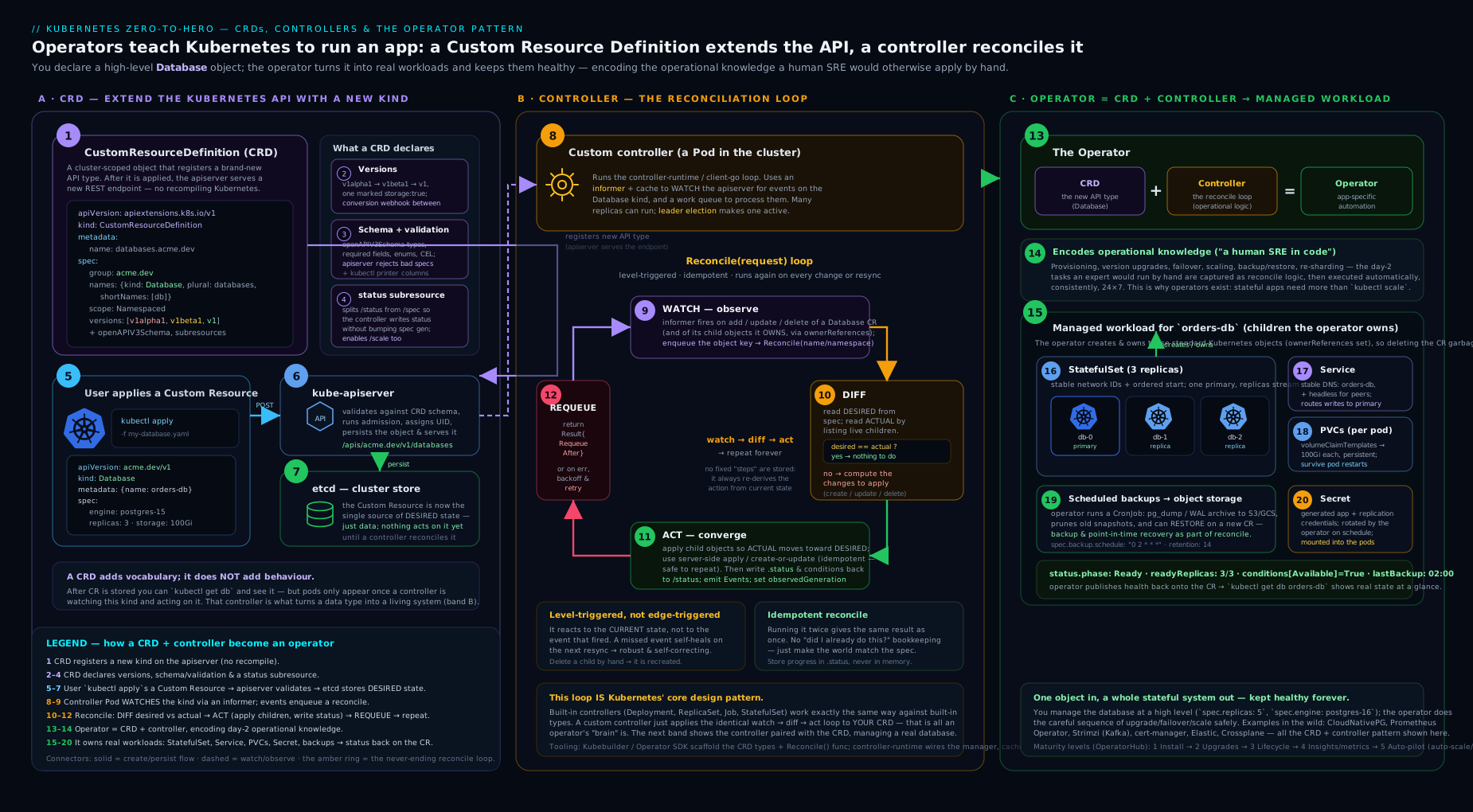
The diagram traces the full path: a user applys a custom resource; the API server validates it against the CRD’s structural schema, defaults and CEL rules, and persists the storage version to etcd; the controller’s informer receives the watch event and enqueues the key on the work queue; a worker runs reconcile, which diffs desired (spec) against actual (the owned Deployment/Service/Secret), creates or updates children to converge, and writes observed reality back to the status subresource — looping forever.
Hands-on lab
Free and local. Use kind, minikube or k3d — any cluster works. We will create a CRD with a structural schema, validation, defaulting, subresources and printer columns, prove the API server enforces and defaults it, exercise the status and scale subresources, then clean up. No operator code is required to see the CRD machinery work.
# Create a local cluster (pick one)
kind create cluster --name crd-lab          # or: minikube start  /  k3d cluster create crd-lab
kubectl get nodes
1. Install a CRD
cat <<'EOF' | kubectl apply -f -
apiVersion: apiextensions.k8s.io/v1
kind: CustomResourceDefinition
metadata:
  name: caches.cache.example.com
spec:
  group: cache.example.com
  scope: Namespaced
  names:
    kind: Cache
    plural: caches
    singular: cache
    shortNames: ["ca"]
  versions:
    - name: v1alpha1
      served: true
      storage: true
      schema:
        openAPIV3Schema:
          type: object
          properties:
            spec:
              type: object
              required: ["size"]
              x-kubernetes-validations:
                - rule: "self.maxSize >= self.size"
                  message: "maxSize must be >= size"
              properties:
                size:    { type: integer, minimum: 1, maximum: 9, default: 3 }
                maxSize: { type: integer, minimum: 1, maximum: 9, default: 9 }
                engine:  { type: string, enum: ["redis", "valkey"], default: "redis" }
            status:
              type: object
              properties:
                readyReplicas: { type: integer }
      subresources:
        status: {}
        scale:
          specReplicasPath: .spec.size
          statusReplicasPath: .status.readyReplicas
      additionalPrinterColumns:
        - { name: Engine,  type: string,  jsonPath: .spec.engine }
        - { name: Desired, type: integer, jsonPath: .spec.size }
        - { name: Ready,   type: integer, jsonPath: .status.readyReplicas }
        - { name: Age,     type: date,    jsonPath: .metadata.creationTimestamp }
EOF

kubectl get crd caches.cache.example.com
kubectl api-resources | grep caches            # the API server now knows "caches"
Expected: the CRD shows up, and api-resources lists caches ca cache.example.com/v1alpha1 true Cache.
2. See validation, defaulting and pruning in action
# (a) A valid, minimal CR — watch defaulting fill in engine, maxSize, size
kubectl apply -f - <<'EOF'
apiVersion: cache.example.com/v1alpha1
kind: Cache
metadata: { name: web-cache }
spec: { size: 3 }
EOF
kubectl get cache web-cache -o jsonpath='{.spec}{"\n"}'
# -> {"engine":"redis","maxSize":9,"size":3}   (engine & maxSize were defaulted)

# (b) Violate the schema bound -> rejected by the API server, no webhook involved
kubectl apply -f - <<'EOF'
apiVersion: cache.example.com/v1alpha1
kind: Cache
metadata: { name: too-big }
spec: { size: 99 }
EOF
# -> error: spec.size in body should be less than or equal to 9

# (c) Violate the CEL cross-field rule
kubectl apply -f - <<'EOF'
apiVersion: cache.example.com/v1alpha1
kind: Cache
metadata: { name: bad-bounds }
spec: { size: 5, maxSize: 2 }
EOF
# -> error: maxSize must be >= size

# (d) Pruning: an unknown field is silently dropped on write
kubectl apply -f - <<'EOF'
apiVersion: cache.example.com/v1alpha1
kind: Cache
metadata: { name: typo-cache }
spec: { size: 2, repicas: 4 }   # 'repicas' is a typo, not in the schema
EOF
kubectl get cache typo-cache -o jsonpath='{.spec}{"\n"}'
# -> {"engine":"redis","maxSize":9,"size":2}   ('repicas' was pruned away)
This is the whole value of a structural schema: bad input is rejected, omitted fields are defaulted, and unknown fields are pruned — all by the API server, no controller running yet.
3. Exercise the status and scale subresources
# The status subresource: write status WITHOUT touching spec (controllers do this)
kubectl patch cache web-cache --subresource=status --type=merge \
  -p '{"status":{"readyReplicas":3}}'
kubectl get caches            # printer columns show Engine/Desired/Ready/Age in a native table

# The scale subresource: kubectl scale works on a CRD!
kubectl scale cache/web-cache --replicas=5
kubectl get cache web-cache -o jsonpath='{.spec.size}{"\n"}'   # -> 5

# generation vs observedGeneration intuition: spec change bumps generation
kubectl get cache web-cache -o jsonpath='gen={.metadata.generation}{"\n"}'
Expected: status is set without altering spec; kubectl scale changes .spec.size through the scale subresource; and kubectl get caches renders a tidy table from your printer columns — the resource behaves exactly like a built-in.
Cleanup
kubectl delete cache --all
kubectl delete crd caches.cache.example.com      # deleting the CRD removes ALL its CRs
kind delete cluster --name crd-lab               # or: minikube delete / k3d cluster delete crd-lab
Cost note
Entirely free: a local single-node cluster on your laptop, no cloud resources. The only “cost” is a few hundred MB of RAM for the kind/minikube node while the lab runs.
Common mistakes & troubleshooting
| Symptom | Likely cause | Fix |
|---|---|---|
metadata.name must be spec.plural+"."+spec.group |
CRD metadata.name isn’t <plural>.<group> |
Rename to e.g. caches.cache.example.com. |
| CR applies but my typo’d field “disappears” | Pruning strips fields not in the structural schema | Add the field to the schema; until then unknown fields are silently dropped (this is working as intended). |
Controller’s status writes vanish or fight user edits |
Not using the status subresource; status written via the main endpoint | Add subresources.status: {} and write status via /status; split RBAC accordingly. |
observedGeneration never catches up / spec edits don’t bump generation |
No status subresource (so generation doesn’t track spec) |
Enable the status subresource; only then does generation increment on spec-only changes. |
Reconcile errors with AlreadyExists on the second pass |
Non-idempotent Create instead of create-or-update |
Get-then-create-or-update, or server-side apply; drive to target, don’t apply deltas. |
| Child objects aren’t cleaned up when the CR is deleted | Missing ownerReferences on children |
Set the CR as owner of each child so the garbage collector cascades the delete. |
Reads in v1 of a v1alpha1-stored object return wrong/empty fields |
conversion: None but the versions differ structurally |
Implement a conversion webhook; None only works when versions are schema-compatible. |
Can’t change scope / a stored version won’t drop |
Scope is immutable; old version still in status.storedVersions |
Recreate the CRD for scope; run a storage-version migration before removing a served/stored version. |
Best practices
- Start the API at
v1alpha1. You will get the schema wrong the first time; an alpha version sets that expectation and frees you to iterate. Graduate tov1beta1/v1only once the shape is stable. - Make the schema structural and strict. Type every field, set sensible
defaults, addenum/bounds, and push cross-field logic into CEL (x-kubernetes-validations) so you avoid a validating webhook entirely where possible. - Always use the status subresource for anything with a controller. Model
statuswith conditions (type/status/reason/message/observedGeneration) — it is the idiomatic, tool-friendly health contract. - Write reconcile to be idempotent and level-triggered. Fetch fresh, diff against reality, drive to target, never depend on event content. Test the “called repeatedly with no change → no churn” property.
- Use
ownerReferencesfor declarative cleanup instead of writing deletion code for owned resources; add a finalizer only when you must clean up something Kubernetes’ GC cannot (external systems). - Surface intent with
additionalPrinterColumnssokubectl getfeels native, and addshortNames/categoriesfor ergonomics. - Scope RBAC tightly. A controller should have only the verbs/kinds it touches (and
updateon<plural>/statusseparately) — see the RBAC fundamentals. - Run a single active controller via leader election (controller-runtime gives this for free) so two replicas don’t reconcile the same object and fight.
Security notes
- The controller’s ServiceAccount is a privilege boundary. An operator that manages workloads cluster-wide often needs broad RBAC; treat its ServiceAccount token as sensitive and grant the least set of verbs/kinds it needs. A compromised operator with
*on*is a cluster takeover. - Validate untrusted input in the schema, not just the controller. CEL rules and structural validation run in the API server before anything is stored, so they protect every consumer, including other controllers. Don’t rely on your reconcile loop as the only gate.
- Conversion and admission webhooks are attack surface and availability risk. They sit in the write path; an outage (or a
failurePolicy: Failwebhook that is down) can block writes to the whole kind. Run them HA, secure their TLS, and prefer CEL over webhooks where it suffices to shrink this surface. - CRDs are cluster-scoped definitions. Anyone who can create/modify a CRD can change validation for all instances cluster-wide — restrict
create/update/deleteoncustomresourcedefinitionsto platform admins. - Beware
x-kubernetes-preserve-unknown-fields. Opting a subtree out of pruning stores arbitrary user JSON unvalidated; only do it where you genuinely need free-form data, and never on a path you later trust blindly.
Interview & exam questions
-
What is the difference between a CRD and a CR? A CustomResourceDefinition is the registration/schema of a new kind (one per kind, itself an
apiextensions.k8s.io/v1object). A custom resource is an instance of that kind (many per CRD). The CRD defines the type; CRs are the data. -
Define the operator pattern in one sentence. An operator is a custom controller plus the CRDs it manages, packaged to encode the operational knowledge of running a specific application — automating what a skilled human operator would do (install, upgrade, back up, fail over) behind a declarative API.
-
Explain level-triggered vs edge-triggered reconciliation. Why does Kubernetes choose level-triggered? Edge-triggered reacts to transitions (on-create/on-update events); level-triggered reacts to the current state. Kubernetes chooses level-triggered because events get coalesced, dropped, reordered or replayed in distributed systems, so logic that depends on seeing each transition will corrupt state. Reconcile fetches fresh state and converges, giving the same result regardless of how many events it saw — which is why reconcile receives only a name, not a diff.
-
Why must a reconcile function be idempotent, and how do you achieve it? Because it runs an unpredictable number of times (events, periodic resyncs, error requeues). Achieve it with create-or-update (or server-side apply) instead of blind
Create, by driving to a target rather than applying deltas, by recomputing status convergently, and by usingownerReferencesso cleanup is declarative. Litmus test: looping reconcile with no spec change should reach a fixed point and stop. -
What problem does the status subresource solve, and what does enabling it change? It separates user-owned
specfrom controller-ownedstatus. Enabling it gives a dedicated/statusendpoint (so RBAC and writes don’t cross), makes main-resource updates ignorestatusand vice-versa (no clobbering), and makesmetadata.generationincrement only onspecchanges — enabling theobservedGenerationpattern. -
What does the scale subresource enable beyond
kubectl scale? By mappingspecReplicasPath/statusReplicasPath, the CRD implements the generic/scaleinterface, so a HorizontalPodAutoscaler can target and autoscale your custom resource exactly as it would a Deployment. -
When do you need a conversion webhook? Whenever you serve multiple versions that are not structurally compatible — fields renamed, moved, split or merged. With
conversion: Nonethe API server only swaps theapiVersionstring, so it requires schema-compatible versions. A webhook translates objects between versions on every cross-version read/write. -
There can be only one
storage: trueversion. How do you safely retire an old version? Stop serving new writes in the old version, then run a storage-version migration (re-write all stored objects into the new storage version) so nothing remains on disk in the old form (track viastatus.storedVersions), and only then drop the old version fromserved/storage. Removing it prematurely orphans stored objects. -
What are informers and work queues, and why not just poll the API server? An informer keeps a single watch and a local cache of a kind, so reconciles read from memory and the API server isn’t hammered. A work queue deduplicates and rate-limits keys: handlers enqueue object keys, workers dequeue and reconcile, giving coalescing, exponential backoff and per-key single-worker concurrency. Polling would not scale and would lose the dedup/backoff guarantees.
-
Walk through the operator capability levels.
- Basic Install, 2) Seamless Upgrades, 3) Full Lifecycle (backups/restore/scaling/failure-recovery), 4) Deep Insights (metrics/alerts/health), 5) Auto Pilot (auto-scale/tune/heal). Most production operators sit at level 3; level 5 is rare.
-
When would you choose a Helm chart over an operator? When you only need to install and template an app with configurable values and there are no non-trivial day-2 operations. A chart has no controller to run, secure and maintain; an operator is justified only when ongoing lifecycle automation (failover, upgrades, backups) outweighs that operational cost.
-
Compare Kubebuilder, Operator SDK and controller-runtime. controller-runtime is the underlying Go library (Manager, Reconciler, cached clients, webhook/leader-election). Kubebuilder scaffolds a Go project on top of it (typed APIs,
controller-gen, RBAC markers,envtest). Operator SDK is a superset that wraps Kubebuilder for Go and adds Helm- and Ansible-based operators (no Go) plus OLM bundle/scorecard tooling. Choose Kubebuilder for Go-native operators, Operator SDK for Helm/Ansible or OperatorHub distribution, controller-runtime directly for maximum control.
Quick check
- What must a CRD’s
metadata.namebe, exactly? - A user applies a CR with a field that isn’t in the structural schema. What happens to that field, and why?
- Which subresource makes a CRD a valid target for a HorizontalPodAutoscaler?
- Your controller is invoked but nothing about the object changed (a periodic resync). What must a correct reconcile do?
- You serve
v1andv1alpha1and they have differently-shapedspecs. What conversion strategy do you need?
Answers: 1) <plural>.<group>, e.g. caches.cache.example.com. 2) It is silently pruned (dropped on write), because a structural schema enables pruning of unknown fields. 3) The scale subresource (it implements the generic /scale interface). 4) Diff desired vs actual, find no gap, and do nothing — reconcile is level-triggered and idempotent, so a no-op event is normal. 5) A conversion webhook (conversion: Webhook); None only works for schema-compatible versions.
Exercise
Design and install a CRD for a WebApp kind in group apps.example.com, namespaced, version v1alpha1, that:
- Has a structural schema with
spec.image(string, required),spec.replicas(integer,minimum: 1,maximum: 10,default: 2) andspec.port(integer,default: 80). - Enforces a CEL rule that
spec.portis in1..65535, and an immutability rule thatspec.image’s registry cannot change after creation is optional but a nice stretch (compareself.imagetooldSelf.imageshape with a transition rule). - Has a status subresource with
status.availableReplicasand astatus.conditionsarray, and a scale subresource mapping.spec.replicas↔.status.availableReplicas. - Shows printer columns for Image, Replicas, Available and Age, plus a
shortNameofwa.
Apply it, then: (a) create a minimal WebApp and confirm defaulting filled replicas/port; (b) prove a replicas: 99 is rejected by the API server; © kubectl scale webapp/<name> --replicas=4 and confirm .spec.replicas changed; (d) kubectl patch --subresource=status to set availableReplicas and confirm it appears in kubectl get wa. Success: all four behaviours work with no controller running — proving you understand exactly what the CRD machinery gives you before any reconcile code exists.
Certification mapping
- CKA (Certified Kubernetes Administrator): the Cluster Architecture, Installation & Configuration domain expects you to understand extension points — CRDs, the controller/operator pattern, and how custom controllers fit the control-plane reconciliation model. You should be able to install a CRD, read its schema/versions/subresources, and explain how a controller reconciles desired vs actual.
- KCNA (Kubernetes and Cloud Native Associate): CRDs, custom controllers and the operator pattern appear conceptually in the Kubernetes Fundamentals and Cloud Native Architecture domains — know what an operator is and why the pattern exists.
- CKAD (Certified Kubernetes Application Developer): while CKAD centres on built-in workloads, recognising and using custom resources (applying a CR, reading its status) is increasingly relevant as platforms ship CRDs developers consume.
Glossary
- CustomResourceDefinition (CRD) — the object that registers a new kind (schema, versions, scope) with the API server; one per kind.
- Custom resource (CR) — an instance of a kind defined by a CRD.
- GVK / GVR — Group-Version-Kind (how an object is typed) and Group-Version-Resource (how it is addressed in the REST path).
- Structural schema — an OpenAPI v3 schema where every field is typed correctly; required for pruning, defaulting and conversion.
- Pruning — automatic removal, on write, of fields not present in the structural schema.
- Defaulting — injection of
default:values from the schema for omitted fields, on write and on read. - CEL validation (
x-kubernetes-validations) — Common Expression Language rules in the CRD for cross-field and transition (immutability) checks, evaluated by the API server without a webhook. - Status subresource — a separate
/statusendpoint splitting user-ownedspecfrom controller-ownedstatus; makesgenerationtrack spec changes. - Scale subresource — maps replica fields so
kubectl scaleand the HPA work against a custom resource. additionalPrinterColumns— fields surfaced in thekubectl gettable for a kind.- Conversion webhook — a service the API server calls to translate objects between served versions when they aren’t schema-compatible.
- Storage version — the single version (
storage: true) every object is persisted as in etcd; changing it requires a storage-version migration. - Controller — a program that watches kinds and drives the world toward their desired state via a reconciliation loop.
- Reconciliation loop — the watch → diff desired vs actual → act → report-status cycle every controller runs.
- Level-triggered — reacting to current state rather than to transitions; the basis of robust reconciliation.
- Idempotent — running an operation N times leaves the same result as running it once.
- Informer — client-go machinery maintaining a cached LIST+WATCH of a kind for cheap reads and periodic resyncs.
- Work queue — a rate-limited, deduplicating queue of object keys that feeds reconcile workers.
- ownerReferences / garbage collection — declaring a parent CR as owner of child objects so Kubernetes cascades their deletion.
- Finalizer — a key on an object that blocks deletion until a controller performs external cleanup, then removes the key.
- Operator — a CRD plus a custom controller that encodes the operational knowledge of running a specific application.
- Capability levels — the 1–5 operator maturity scale (Basic Install → Auto Pilot).
- controller-runtime / Kubebuilder / Operator SDK — the Go library, its Go scaffolder, and the Helm/Ansible/OLM superset for building operators.
Next steps
- Build one for real, in Go, end to end: Building a Kubernetes Operator with Kubebuilder: CRDs, Reconciliation & Production Hardening.
- Go deeper on API evolution: Extending the Kubernetes API: Aggregated API Servers, CRD Conversion Webhooks, and Versioning Strategy.
- See a production operator manage state: Running Stateful PostgreSQL on Kubernetes: StatefulSets, Operators, Automated Failover, and Point-in-Time Recovery.
- Understand the control plane your controller talks to: Kubernetes Cluster Architecture & the Control Plane, In Depth.
- Continue the Architecture track with the networking internals: Kubernetes Networking Internals, In Depth: The Network Model, CNI, IPAM & the Datapath.