You have a handful of Services running inside a cluster, each one a stable internal address in front of some Pods. Now the real question arrives: how does traffic from a browser on the public internet reach the right Service? You could give every Service its own cloud load balancer, but that is one public IP — and one monthly bill — per app, with no shared TLS, no path routing, and no single front door. Ingress exists to solve exactly this: one entry point that routes HTTP and HTTPS traffic to many Services based on the hostname and URL path, terminating TLS once, in front of everything.
Ingress trips up newcomers because it has an unusual shape. The Ingress object you write is just a set of routing rules — a piece of configuration. On its own it does nothing at all. Something has to read those rules and actually do the proxying, and that something is an Ingress controller (NGINX, Traefik, HAProxy, a cloud load-balancer controller, and others). Kubernetes ships with the Ingress API but no controller — you install one yourself. Get that mental model right and the rest falls into place.
This lesson covers Ingress exhaustively: every field of the resource, every pathType, how IngressClass selects a controller, how TLS termination and cert-manager fit together, and the handful of annotations you will actually reach for. Then it covers the Gateway API — the newer, role-oriented, more expressive standard that the project positions as Ingress’s long-term successor — so you know which one to choose for new work. You will install a controller on a free local cluster, route two apps behind one address, and add TLS, all on your laptop.
Learning objectives
By the end of this lesson you can:
- Explain why a
LoadBalancerService is not enough for multiple HTTP apps, and what Ingress adds (host/path routing, shared TLS, one entry point). - Describe the Ingress controller model and why you must install a controller before any
Ingressresource has any effect. - Write a complete
Ingressresource and explain every field:ingressClassName,rules,host,http.paths,path,pathType,backend.service, anddefaultBackend. - Use the three
pathTypevalues —Exact,Prefix,ImplementationSpecific— correctly, and predict which rule wins when several match. - Configure
IngressClass(including the default class) and understand how it binds an Ingress to a specific controller. - Set up TLS termination with a
kubernetes.io/tlsSecret and SNI, and explain howcert-managerautomates certificates. - Use the most common controller annotations (rewrite, redirect, body size, rate limit, auth) and know why they are non-portable.
- Explain the Gateway API (
GatewayClass,Gateway,HTTPRoute), its role separation, and when to choose it over Ingress.
Prerequisites & where this fits
You need a working local cluster and basic comfort with kubectl, plus an understanding of Services — especially ClusterIP and LoadBalancer — and label selectors, since Ingress routes to Services. If Services are still hazy, do Kubernetes Services & Networking, In Depth first; for the absolute basics of Pods and Deployments see Pods, ReplicaSets, Deployments & Services: The Core Objects. This is the edge-routing lesson of the Kubernetes Zero-to-Hero course: it sits just after storage and just before RBAC, and it is the foundation for everything user-facing — public APIs, web frontends, multi-tenant routing, and TLS at the edge.
Core concepts: Ingress vs Service, and the controller model
Start from what a Service already gives you and what it does not.
A ClusterIP Service is internal only — perfect for Pod-to-Pod traffic, useless for the public internet. A NodePort opens a high port (30000–32767) on every node — crude, ugly URLs, not for production. A LoadBalancer Service asks your cloud for a real external load balancer with a public IP — but it is Layer 4 (TCP/UDP): it forwards a port to one Service and knows nothing about HTTP. It cannot read the Host header, cannot route by URL path, and cannot terminate TLS for many hostnames. So “ten public apps” becomes “ten cloud load balancers, ten IPs, ten bills, ten places to manage certificates.”
Ingress is the Layer 7 (HTTP/HTTPS) answer. One Ingress controller sits behind a single LoadBalancer Service (or host network), and routes intelligently:
- by hostname —
shop.example.comandapi.example.comshare one IP, go to different Services (this is name-based virtual hosting, using TLS SNI and the HTTPHostheader); - by URL path —
/to the web app,/apito the API,/staticto a cache; - with TLS terminated once, at the edge, for all of those hostnames.
Here is the part that confuses everyone, stated plainly:
The
Ingressresource is just rules — data in etcd. It does nothing by itself. An Ingress controller is a real Pod (usually a reverse proxy like NGINX) that watches allIngressresources and reconfigures itself to actually route traffic. Kubernetes does not include a controller. A freshly installed cluster has the Ingress API but no controller, so yourIngressobjects sit inert until you install one.
The flow end to end: Client → DNS → cloud LoadBalancer (one public IP) → Ingress controller Pod → (reads your Ingress rules) → ClusterIP Service → Pods. The controller is the only piece doing HTTP work; the Ingress object only tells it what to do.
There are many controllers, and the annotations and exact behaviour differ between them — a critical, often-missed fact. ingress-nginx (the community NGINX controller, the most common default) is not the same as NGINX Inc.'s commercial nginx-ingress; their annotations differ. Other popular controllers include Traefik, HAProxy, Contour (Envoy-based), and cloud-native ones like the AWS Load Balancer Controller, GKE Ingress, and Azure Application Gateway Ingress Controller (AGIC). The core Ingress fields are portable; the annotations are not.
The Ingress resource: every field
A minimal but complete Ingress (apiVersion networking.k8s.io/v1, stable since Kubernetes 1.19):
apiVersion: networking.k8s.io/v1
kind: Ingress
metadata:
  name: shop-ingress
  namespace: web
spec:
  ingressClassName: nginx          # which controller handles this Ingress
  defaultBackend:                  # optional: catches anything no rule matches
    service:
      name: fallback
      port:
        number: 80
  rules:
  - host: shop.example.com         # optional; omit to match any host
    http:
      paths:
      - path: /
        pathType: Prefix
        backend:
          service:
            name: shop-frontend
            port:
              number: 80
      - path: /api
        pathType: Prefix
        backend:
          service:
            name: shop-api
            port:
              number: 8080
The full field matrix — what every key does:
| Field | What it does | Values | Default | When to set | Gotcha |
|---|---|---|---|---|---|
spec.ingressClassName |
Names the IngressClass (and thus the controller) that should serve this Ingress | A string matching an IngressClass name |
None (falls back to default class, if any) | Almost always set it explicitly | If unset and there is no default class, no controller picks it up and nothing happens |
spec.defaultBackend |
Where to send requests that match no rule | A service (name + port) or a resource ref |
Controller’s own default (often a 404 page) | When you want a custom catch-all/landing page | Per-Ingress default backends are honoured inconsistently across controllers; many use the controller-wide one |
spec.rules[] |
The list of host-based routing rules | Array | Empty (then only defaultBackend applies) |
The heart of every real Ingress | An empty rules with no default backend routes nothing |
rules[].host |
The HTTP hostname this rule matches (virtual host) | FQDN, or wildcard like *.example.com |
Omitted = match all hosts | One rule per public hostname | Wildcards match one label only: *.example.com matches a.example.com, not a.b.example.com or bare example.com |
rules[].http.paths[] |
The path rules within a host | Array (at least one) | — | Always | Order in the file does not decide precedence — longest match does (see pathType) |
paths[].path |
The URL path to match | A path string, e.g. /, /api |
— (required) | Always | With Prefix, /api matches /api and /api/... but not /apil (element-wise, not string prefix) |
paths[].pathType |
How path is matched |
Exact, Prefix, ImplementationSpecific |
Required (no default) | Always — pick deliberately | Older extensions/v1beta1 had no pathType; on networking.k8s.io/v1 it is mandatory |
paths[].backend.service.name |
The Service to route matched traffic to | A Service name in the same namespace | — | Always (unless using resource) |
Must be in the same namespace as the Ingress — Ingress is namespaced and cannot point cross-namespace |
paths[].backend.service.port.number / .name |
The Service port (by number or named port) | Port number, or a named port | — | Always | Use name if your Service names its ports; use number otherwise — not both |
paths[].backend.resource |
Route to a non-Service object (e.g. a storage/object backend via a custom resource) | A TypedLocalObjectReference |
— | Rarely (e.g. static assets via a CRD) | Mutually exclusive with backend.service; controller-dependent |
spec.tls[] |
TLS termination config (see TLS section) | Array of {hosts, secretName} |
None (HTTP only) | Whenever you serve HTTPS | The Secret must exist, be type kubernetes.io/tls, and live in the same namespace |
metadata.annotations |
Controller-specific behaviour (rewrite, auth, limits…) | Key/value strings | None | For anything beyond basic routing | Not portable — nginx.ingress.kubernetes.io/* means nothing to Traefik |
status.loadBalancer.ingress[] |
Read-only: the external IP/hostname the controller published | Filled by the controller | — | You read it, never set it | Stays empty until a controller adopts the Ingress and a LoadBalancer is provisioned |
Two structural rules worth memorising: an Ingress is namespaced, and its backends must be Services in the same namespace — you cannot route from an Ingress in team-a to a Service in team-b. And an Ingress can have defaultBackend only, rules only, or both; with neither, it does nothing.
pathType: Exact vs Prefix vs ImplementationSpecific
pathType is mandatory on networking.k8s.io/v1 and decides how path is compared to the incoming request. Get this wrong and traffic silently goes to the wrong place.
pathType |
Matching rule | Example path |
Matches | Does NOT match | When to use |
|---|---|---|---|---|---|
Exact |
The URL path must equal path exactly, case-sensitive |
/api |
/api |
/api/, /api/v1, /Api |
A single specific endpoint; health-check URLs |
Prefix |
Split both into path elements (by /); match element-by-element |
/api |
/api, /api/, /api/v1, /api/v1/users |
/apifoo, /apis |
The default choice for “this service owns this subtree” |
ImplementationSpecific |
Whatever the controller decides — often regex/glob | /api/.* (nginx) |
controller-defined | controller-defined | Only when you need controller-native features (regex paths) |
The element-wise subtlety of Prefix is the classic exam trap. path: /api with Prefix matches /api and /api/anything, but it does not match /apifoo, because matching is per path segment, not raw string prefix. A trailing-slash request /api/ does match. The special path / with Prefix matches everything — the catch-all root.
Precedence when multiple paths match: the controller picks the longest matching path, and Exact is preferred over Prefix at equal length. So given / (Prefix) and /api (Prefix), a request to /api/v1 goes to the /api backend because it is the longer match. Order in the YAML is irrelevant. With ImplementationSpecific, precedence is whatever the controller defines (ingress-nginx, for instance, has its own ordering and a canary/priority system via annotations).
A wildcard host also affects precedence: a request is matched against the most specific host first. api.example.com (exact host) beats *.example.com (wildcard host) for api.example.com.
IngressClass: binding an Ingress to a controller
Before IngressClass, you chose a controller with the annotation kubernetes.io/ingress.class. That is deprecated. The modern mechanism is the IngressClass resource plus spec.ingressClassName on the Ingress.
apiVersion: networking.k8s.io/v1
kind: IngressClass
metadata:
  name: nginx
  annotations:
    ingressclass.kubernetes.io/is-default-class: "true"   # makes this the default
spec:
  controller: k8s.io/ingress-nginx       # which controller implements this class
  # parameters:                          # optional: controller-wide config object
  #   apiGroup: k8s.example.com
  #   kind: IngressNginxParams
  #   name: nginx-global
| Field | What it does | Values | Default | When to set | Gotcha |
|---|---|---|---|---|---|
metadata.name |
The class name you reference in ingressClassName |
A string | — | Always | Must match exactly what Ingresses put in ingressClassName |
spec.controller |
Identifies which controller owns this class | A controller string, e.g. k8s.io/ingress-nginx, traefik.io/ingress-controller |
— | Set by the controller’s install | Immutable after creation — to change controllers, make a new class |
annotation is-default-class |
Marks this class as the cluster default | "true" / absent |
No default | Set on at most one class | If two classes claim default, behaviour is undefined — keep it to one |
spec.parameters |
Points to a controller-specific config object (scope Cluster or Namespace) |
A typed reference | None | For controllers that read global config from a CRD | Schema is entirely controller-defined |
How selection works, in order: (1) if the Ingress sets spec.ingressClassName, the controller owning that class serves it; (2) if it is unset, the default IngressClass (the one annotated is-default-class: "true") serves it; (3) if it is unset and there is no default, nothing serves it — the single most common “my Ingress does nothing” cause. You can run multiple controllers in one cluster (e.g. an internal-only NGINX and an external one) by giving each its own class and labelling Ingresses accordingly.
TLS: terminating HTTPS at the edge
To serve HTTPS, you give the Ingress a TLS Secret and list the hostnames it covers. The controller then terminates TLS (decrypts) at the edge and forwards plain HTTP to your Service inside the cluster.
spec:
  tls:
  - hosts:
    - shop.example.com
    - www.example.com
    secretName: shop-tls          # a Secret of type kubernetes.io/tls
  rules:
  - host: shop.example.com
    http:
      paths:
      - path: /
        pathType: Prefix
        backend:
          service: { name: shop-frontend, port: { number: 80 } }
The Secret must be type kubernetes.io/tls with two keys, tls.crt and tls.key:
kubectl create secret tls shop-tls \
  --cert=tls.crt --key=tls.key -n web
| TLS concept | What it means | Detail / gotcha |
|---|---|---|
spec.tls[].hosts |
The hostnames this certificate serves | Should match the cert’s SAN entries and the rules[].host; mismatch ⇒ browser warning |
spec.tls[].secretName |
The kubernetes.io/tls Secret holding cert + key |
Must be in the same namespace as the Ingress; controller reads it live |
| SNI (Server Name Indication) | TLS extension carrying the hostname in the handshake | Lets one IP serve many certs — the controller picks the right cert per hostname. This is what makes name-based HTTPS virtual hosting possible |
| Termination | TLS is decrypted at the controller, not the Pod | Pod-to-controller traffic is plain HTTP unless you configure re-encryption/mTLS (controller-specific) |
| Default certificate | A fallback cert for requests whose host has no matching tls entry |
Often a self-signed “Kubernetes Ingress Controller Fake Certificate” — seeing it means your TLS host didn’t match |
| Passthrough | TLS is not terminated; bytes pass straight to the Pod | Not a core Ingress feature; ingress-nginx supports it via ssl-passthrough annotation, with caveats |
cert-manager: automating certificates
Hand-managing certificates does not scale. cert-manager is the de-facto add-on that issues and auto-renews TLS certificates from issuers like Let’s Encrypt (free, ACME). The pattern:
- Install cert-manager (a set of controllers + CRDs).
- Create an
Issuer(namespaced) orClusterIssuer(cluster-wide) describing the ACME server and a solver (HTTP-01 via your Ingress, or DNS-01). - Annotate the Ingress with
cert-manager.io/cluster-issuer: letsencrypt-prod. - cert-manager watches the Ingress, performs the ACME challenge, and creates the
kubernetes.io/tlsSecret named inspec.tls[].secretNamefor you — then renews it automatically before expiry.
metadata:
  annotations:
    cert-manager.io/cluster-issuer: letsencrypt-prod
spec:
  tls:
  - hosts: [shop.example.com]
    secretName: shop-tls       # cert-manager creates and renews this Secret
You write the Ingress and the annotation; cert-manager fills in the Secret. This is the standard production approach for free, auto-renewing TLS.
Annotations: the useful (non-portable) ones
Anything the core Ingress API can’t express lives in annotations, which are specific to your controller. The examples below are ingress-nginx; Traefik, HAProxy and the cloud controllers use different keys. This non-portability is a deliberate trade-off and a frequent gotcha.
| Need | ingress-nginx annotation | What it does | Gotcha |
|---|---|---|---|
| Rewrite the path before forwarding | nginx.ingress.kubernetes.io/rewrite-target: /$2 |
Strip/transform the URL (often with a regex capture group in path) |
Needs use-regex / a capture-group path; easy to misconfigure |
| Force HTTP → HTTPS | nginx.ingress.kubernetes.io/ssl-redirect: "true" |
Redirect plaintext to TLS (on by default when a TLS block exists) | force-ssl-redirect is needed if no TLS block but you still want redirect |
| Max request body size | nginx.ingress.kubernetes.io/proxy-body-size: 50m |
Raise upload limit (default ~1m) | Symptom of the default is mysterious 413 errors on uploads |
| Rate limiting | nginx.ingress.kubernetes.io/limit-rps: "10" |
Requests per second per client IP | Coarse; for real quotas use a gateway/API manager |
| Basic auth | nginx.ingress.kubernetes.io/auth-type: basic + auth-secret |
Username/password gate at the edge | Stores creds in a Secret; not SSO |
| External auth (forward-auth) | nginx.ingress.kubernetes.io/auth-url: https://auth.example.com/verify |
Delegate auth to an external service (OIDC/OAuth2 proxy) | Adds a hop per request |
| Sticky sessions | nginx.ingress.kubernetes.io/affinity: cookie |
Cookie-based session affinity | Defeats even load spreading |
| Backend protocol | nginx.ingress.kubernetes.io/backend-protocol: HTTPS |
Talk to the Pod over HTTPS/gRPC | For re-encryption or gRPC backends |
| Custom timeouts | nginx.ingress.kubernetes.io/proxy-read-timeout: "120" |
Lengthen slow-backend timeouts | Default ~60s causes 504 on long requests |
The annotation lock-in trap. A wall of
nginx.ingress.kubernetes.io/*annotations means your routing is tied to ingress-nginx. Migrating controllers later means rewriting all of them. This pain — config smuggled into opaque, vendor-specific annotation strings — is precisely the problem the Gateway API was designed to fix.
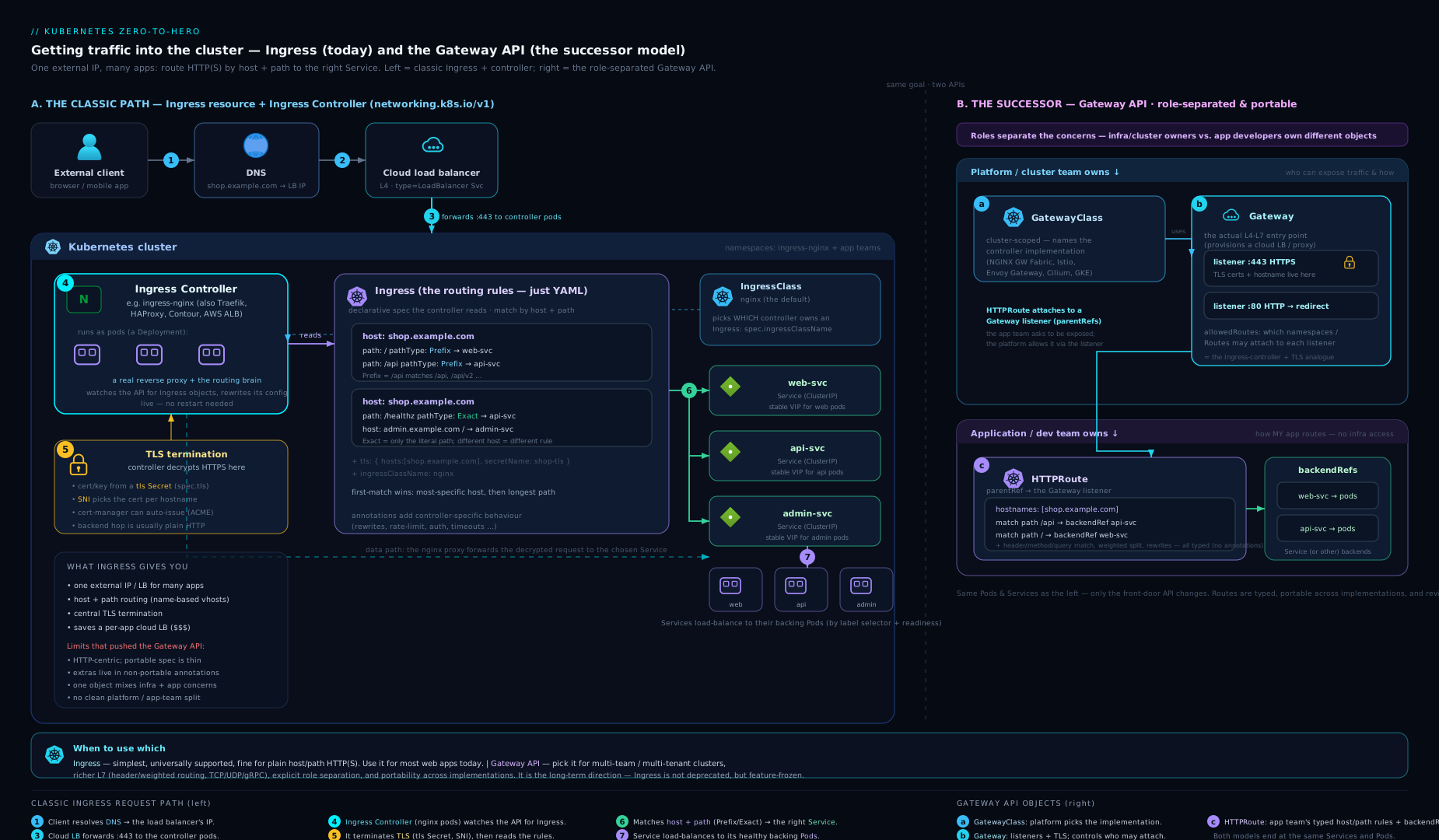
The diagram contrasts the two models: on the left, a client reaches one LoadBalancer and Ingress controller that fans out by host/path to Services; on the right, the Gateway API’s GatewayClass → Gateway → HTTPRoute chain shows the same traffic split across infrastructure-owned and app-owned objects.
The Gateway API: Ingress’s successor
The Gateway API is a newer, official Kubernetes networking standard (under the gateway.networking.k8s.io group, GA for HTTP since v1.0 in late 2023) designed to replace Ingress for new work. It keeps the same job — get external traffic to Services — but fixes Ingress’s three structural weaknesses: it is role-oriented, expressive without annotations, and extensible (HTTP, gRPC, TCP, TLS, UDP). Ingress is not deprecated and remains supported, but the project steers new, advanced use cases to the Gateway API.
It splits the one Ingress object into several resources owned by different roles — the central design idea:
| Resource | Owned by (persona) | What it represents | Analogue |
|---|---|---|---|
GatewayClass |
Infrastructure provider / cluster admin | The type of gateway, backed by a controller (like a StorageClass for networking) | IngressClass |
Gateway |
Cluster operator | An actual deployed load balancer / listener — IP, ports, protocols, TLS, allowed routes | The LB + controller that an Ingress implies |
HTTPRoute |
Application developer | The routing rules — hosts, paths, headers, methods, backends, traffic splitting | The rules inside an Ingress |
TLSRoute / TCPRoute / GRPCRoute / UDPRoute |
App developer | Routing for non-HTTP protocols | (No Ingress equivalent) |
ReferenceGrant |
Namespace owner | Explicitly permits cross-namespace references (e.g. a Route in ns A targeting a Service/Gateway in ns B) | (Ingress cannot cross namespaces at all) |
A minimal Gateway + HTTPRoute:
apiVersion: gateway.networking.k8s.io/v1
kind: Gateway
metadata:
  name: prod-gateway
  namespace: infra
spec:
  gatewayClassName: nginx              # which GatewayClass (controller)
  listeners:
  - name: https
    protocol: HTTPS
    port: 443
    tls:
      mode: Terminate
      certificateRefs:
      - name: shop-tls                 # the kubernetes.io/tls Secret
    allowedRoutes:
      namespaces:
        from: Selector                 # which namespaces may attach Routes
        selector:
          matchLabels: { team: web }
---
apiVersion: gateway.networking.k8s.io/v1
kind: HTTPRoute
metadata:
  name: shop-route
  namespace: web
spec:
  parentRefs:
  - name: prod-gateway                 # attach to the Gateway above
    namespace: infra
  hostnames: ["shop.example.com"]
  rules:
  - matches:
    - path: { type: PathPrefix, value: /api }
      headers:                         # match on headers — no annotations needed
      - name: x-canary
        value: "true"
    backendRefs:
    - name: shop-api
      port: 8080
      weight: 90                       # built-in traffic splitting
    - name: shop-api-canary
      port: 8080
      weight: 10
Why the role separation matters: the platform team owns the Gateway (the shared, security-sensitive entry point — IPs, certificates, which namespaces may attach), while each app team owns its own HTTPRoute in its own namespace. The Gateway controls who may attach via allowedRoutes; cross-namespace links require an explicit ReferenceGrant. Capabilities that needed proprietary annotations in Ingress — header/method matching, request mirroring, weighted traffic splitting, header rewrites, redirects, request/response header modification — are first-class, typed, portable fields here.
When to use which
| Situation | Recommended | Why |
|---|---|---|
| Simple host/path routing, existing setup | Ingress | Mature, ubiquitous, every controller supports it; don’t migrate for nothing |
| Brand-new platform, advanced routing | Gateway API | Portable header/traffic-split features, clean role separation |
| Multi-team / multi-tenant cluster | Gateway API | Platform owns Gateway; teams own HTTPRoute; explicit cross-ns grants |
| Canary / blue-green by weight or header | Gateway API | Built-in weight and header matching — no annotation hacks |
| Non-HTTP (raw TCP/UDP/TLS) routing | Gateway API | TCPRoute/UDPRoute/TLSRoute; Ingress is HTTP-only |
| Heavy reliance on existing nginx annotations | Ingress (for now) | Migration means re-expressing every annotation as Gateway fields |
The honest summary: Ingress is the present and is going nowhere soon; the Gateway API is the future and the right default for new, non-trivial routing. Many controllers (ingress-nginx, Traefik, Contour/Envoy Gateway, cloud controllers) already implement both.
Hands-on lab
You will install the ingress-nginx controller on a local cluster, route two apps behind one address by path, then add TLS — all free, no cloud.
1. Create a cluster with an ingress-ready port mapping (kind)
kind needs explicit port mapping so the controller is reachable from your laptop:
cat <<'EOF' | kind create cluster --name ingress-lab --config=-
kind: Cluster
apiVersion: kind.x-k8s.io/v1alpha4
nodes:
- role: control-plane
  kubeadmConfigPatches:
  - |
    kind: InitConfiguration
    nodeRegistration:
      kubeletExtraArgs:
        node-labels: "ingress-ready=true"
  extraPortMappings:
  - containerPort: 80
    hostPort: 80
    protocol: TCP
  - containerPort: 443
    hostPort: 443
    protocol: TCP
EOF
(On minikube instead: minikube start then minikube addons enable ingress — it installs ingress-nginx for you; skip step 2.)
2. Install the ingress-nginx controller
kubectl apply -f https://raw.githubusercontent.com/kubernetes/ingress-nginx/main/deploy/static/provider/kind/deploy.yaml

# Wait until the controller is ready
kubectl wait --namespace ingress-nginx \
  --for=condition=ready pod \
  --selector=app.kubernetes.io/component=controller \
  --timeout=120s
Confirm the IngressClass was created:
kubectl get ingressclass
# NAME    CONTROLLER             PARAMETERS   AGE
# nginx   k8s.io/ingress-nginx   <none>       30s
3. Deploy two tiny apps + Services
kubectl create deployment web   --image=hashicorp/http-echo --replicas=1 -- /http-echo -text="hello from WEB"
kubectl create deployment apiapp --image=hashicorp/http-echo --replicas=1 -- /http-echo -text="hello from API"

kubectl expose deployment web    --port=80 --target-port=5678
kubectl expose deployment apiapp --port=80 --target-port=5678
kubectl wait --for=condition=available deployment/web deployment/apiapp --timeout=60s
4. Create the Ingress (path routing, one host)
cat <<'EOF' | kubectl apply -f -
apiVersion: networking.k8s.io/v1
kind: Ingress
metadata:
  name: demo
  annotations:
    nginx.ingress.kubernetes.io/rewrite-target: /
spec:
  ingressClassName: nginx
  rules:
  - host: demo.localdev.me        # resolves to 127.0.0.1 automatically
    http:
      paths:
      - path: /api
        pathType: Prefix
        backend:
          service: { name: apiapp, port: { number: 80 } }
      - path: /
        pathType: Prefix
        backend:
          service: { name: web, port: { number: 80 } }
EOF
5. Test routing
curl http://demo.localdev.me/        # -> hello from WEB
curl http://demo.localdev.me/api     # -> hello from API
*.localdev.me is a public DNS name that resolves to 127.0.0.1, so no /etc/hosts edit is needed. The /api request hits the longer-matching /api Prefix rule; everything else falls to /.
6. Inspect and validate
kubectl get ingress demo            # ADDRESS should populate (localhost)
kubectl describe ingress demo       # see rules, backends, and any events
kubectl describe is your first debugging stop — it shows the parsed rules, the resolved backends, and warning events (e.g. a missing Service).
7. Add TLS (self-signed, for the lab)
openssl req -x509 -nodes -days 365 -newkey rsa:2048 \
  -keyout tls.key -out tls.crt \
  -subj "/CN=demo.localdev.me" -addext "subjectAltName=DNS:demo.localdev.me"

kubectl create secret tls demo-tls --cert=tls.crt --key=tls.key

kubectl patch ingress demo --type merge -p \
  '{"spec":{"tls":[{"hosts":["demo.localdev.me"],"secretName":"demo-tls"}]}}'

curl -k https://demo.localdev.me/    # -k accepts the self-signed cert -> hello from WEB
In production you would replace this self-signed Secret with a cert-manager ClusterIssuer + the cert-manager.io/cluster-issuer annotation, and the Secret would be created and renewed for you.
Cleanup
kind delete cluster --name ingress-lab
# (minikube: minikube delete)
rm -f tls.key tls.crt
Cost note: entirely free — kind/minikube and the controller run in local containers. No cloud load balancer is provisioned, so there is no bill. In a real cloud, the controller’s one LoadBalancer Service is the cost, shared across all your Ingresses — which is the whole economic point of Ingress.
Common mistakes & troubleshooting
| Symptom | Likely cause | Fix |
|---|---|---|
Ingress created but ADDRESS stays empty and nothing routes |
No controller installed, or ingressClassName set to a class no controller owns, or no default class |
Install a controller; set ingressClassName to the real class (kubectl get ingressclass) |
404 Not Found from “nginx” on every path |
Request Host doesn’t match any rules[].host, or no rule/path matches and no default backend |
Match the host exactly, or add a host-less rule / defaultBackend |
/apifoo unexpectedly 404s under a /api Prefix |
Prefix matches path elements, not raw string prefixes |
Use the correct path; add an explicit rule for the other path |
| Browser shows “Fake Certificate” / cert warning | TLS host didn’t match a spec.tls[].hosts entry, so the controller served its default cert |
Ensure tls.hosts, rules.host, and the cert SAN all agree |
413 Request Entity Too Large on uploads |
Default body-size limit (~1m on nginx) | nginx.ingress.kubernetes.io/proxy-body-size: 50m |
504 Gateway Time-out on slow endpoints |
Default proxy read timeout (~60s) | Raise proxy-read-timeout / proxy-send-timeout |
| Two Ingresses for the same host conflict | Overlapping host/path across Ingresses | Consolidate, or use distinct paths; check controller merge behaviour |
| Annotation has no effect | Wrong controller prefix (e.g. nginx.* on Traefik) or typo |
Use your controller’s annotation namespace; verify spelling |
Backend Service “not found” in describe |
Service in a different namespace, wrong name, or wrong port | Ingress backends must be same-namespace; fix name/port |
Best practices
- Always set
ingressClassNameexplicitly. Relying on an implicit default is the top cause of “my Ingress does nothing” and breaks the moment the default changes. - Use
Prefixfor subtrees,Exactfor single endpoints. Reach forImplementationSpecificonly when you genuinely need controller-native regex — and document it. - One hostname, one purpose. Keep host/path layouts predictable; avoid deep overlapping prefixes that make precedence hard to reason about.
- Automate TLS with cert-manager + a
ClusterIssuer. Never hand-rotate production certs; let ACME renew them. - Pin the controller version and watch its CHANGELOG. ingress-nginx in particular has had behaviour and security-relevant changes; upgrade deliberately.
- Keep annotations minimal and reviewed. Each one is controller lock-in; capture intent in comments so a future migration is feasible.
- For new, multi-team, or advanced routing, start on the Gateway API. Role separation and typed traffic-splitting beat annotation sprawl.
- Run a custom
defaultBackendso unmatched traffic gets a friendly, monitored 404 rather than the controller’s generic page.
Security notes
- TLS Secrets are sensitive. They hold private keys. Lock down RBAC on Secrets in the Ingress namespace; prefer cert-manager-issued, short-lived certs over long-lived static ones.
- Treat the Ingress controller as your edge. It is internet-facing — keep it patched, restrict the
LoadBalancersource ranges where possible, and front it with a WAF / DDoS protection for public workloads. - Beware annotation-based features that execute config. Some controllers historically allowed snippet annotations (raw nginx config) that became injection vectors; ingress-nginx now restricts these. Disable snippet annotations unless you truly need them, and never let untrusted users create Ingresses with them.
- Enforce who can create Ingresses. In multi-tenant clusters, an Ingress is a way to expose services publicly — gate it with RBAC and admission policies (e.g. require an allow-listed host suffix).
- Validate cross-namespace exposure. Ingress can’t cross namespaces (a safety feature); the Gateway API can, but only via an explicit
ReferenceGrant— review those grants like firewall rules. - Redirect HTTP to HTTPS and enable HSTS. Don’t serve sensitive apps over plaintext; most controllers redirect automatically once a TLS block exists.
Interview & exam questions
-
Why isn’t a
LoadBalancerService enough for ten public web apps? It is Layer 4: one LB/IP per Service, noHost/path routing, no shared TLS. You’d pay for ten load balancers. Ingress gives one Layer-7 entry point routing by host and path with shared TLS. -
What’s the relationship between an
Ingressresource and an Ingress controller? The resource is just rules (data); it does nothing alone. The controller is a running proxy that watches Ingress resources and reconfigures itself to route traffic. Kubernetes ships the API but no controller — you install one. -
Explain the three
pathTypevalues.Exact= the path must equal exactly.Prefix= match by path elements (so/apicovers/apiand/api/xbut not/apifoo).ImplementationSpecific= the controller decides (often regex). Onnetworking.k8s.io/v1,pathTypeis mandatory. -
Given
/(Prefix) and/api(Prefix), where does/api/v1go, and why? To the/apibackend — controllers pick the longest matching path; YAML order is irrelevant. -
How does an Ingress select its controller, and what’s the most common reason “nothing happens”? Via
spec.ingressClassName→ anIngressClass→ a controller; if unset, the default class is used. IfingressClassNameis unset and there’s no default class, no controller adopts it. (The oldkubernetes.io/ingress.classannotation is deprecated.) -
How does one IP serve HTTPS for many hostnames? SNI — the client sends the hostname in the TLS handshake, so the controller selects the right certificate per host. That enables name-based HTTPS virtual hosting behind a single IP.
-
What must a TLS Secret for Ingress look like, and where must it live? Type
kubernetes.io/tlswith keystls.crtandtls.key, in the same namespace as the Ingress. -
What does cert-manager do for Ingress? It watches annotated Ingresses, performs ACME (e.g. Let’s Encrypt) challenges, and creates and auto-renews the
kubernetes.io/tlsSecret named inspec.tls, giving free, automatic certificates. -
Why are Ingress annotations a portability risk? They’re controller-specific (
nginx.ingress.kubernetes.io/*is meaningless to Traefik). Heavy annotation use locks you to one controller and complicates migration. -
What problems does the Gateway API solve over Ingress? Role separation (
GatewayClass/Gateway/HTTPRouteowned by different personas), typed/portable features (header & method matching, weighted traffic splitting, rewrites) instead of annotations, multi-protocol support (TCP/UDP/TLS/gRPC), and controlled cross-namespace routing viaReferenceGrant. -
Map the Gateway API objects to their Ingress equivalents.
GatewayClass≈IngressClass;Gateway≈ the LB+controller an Ingress implies;HTTPRoute≈ therulesin an Ingress.ReferenceGranthas no Ingress equivalent (Ingress can’t cross namespaces). -
Is Ingress deprecated now that the Gateway API is GA? No. Ingress is stable and widely supported; the Gateway API is the recommended path for new and advanced use cases. Many controllers implement both.
Quick check
- True or false: applying an
Ingresswith no controller installed will start routing traffic. - Which
pathTypematches by URL path elements:Exact,Prefix, orImplementationSpecific? - With rules
/(Prefix) and/shop(Prefix), which backend serves/shop/cart? - What two keys must a
kubernetes.io/tlsSecret contain? - In the Gateway API, which object does an application developer typically own?
Answers
- False. The Ingress is inert until an Ingress controller is installed to read and act on it.
Prefix— element-wise matching (so/api≠/apifoo).- The
/shopbackend — longest matching path wins, regardless of YAML order. tls.crtandtls.key.- The
HTTPRoute(the routing rules); the platform team owns theGateway, the provider owns theGatewayClass.
Exercise
On a fresh local cluster:
- Install ingress-nginx and deploy three Services:
web,api, andadmin. - Create a single Ingress on host
app.localdev.methat routes/→web,/api→api(Prefix), and/admin→admin(useExacton/adminand observe that/admin/then misses — explain why). - Add a custom
defaultBackendthat serves a “not found” Service, and verify an unmatched path hits it. - Add TLS with a self-signed cert and force an HTTP→HTTPS redirect via the appropriate annotation; confirm with
curl -kvL. - Stretch: re-express the same routing using the Gateway API — install Envoy Gateway (or your controller’s Gateway implementation), create a
Gatewayin aninfranamespace and anHTTPRoutein the app namespace, attach them withparentRefs, and add a 90/10 weighted split betweenapiand a newapi-v2. Note which features needed annotations in Ingress but are native fields in the Gateway API.
Certification mapping
- CKAD — Application Environment, Configuration & Security / Services & Networking: expose applications, configure Ingress rules,
pathType, TLS Secrets, and choose Service vs Ingress. Expect to write a workingIngressquickly under time pressure. - CKA — Services & Networking (~20% of the exam): Ingress and Ingress controllers,
IngressClass, troubleshooting why an Ingress isn’t routing, and (increasingly) familiarity with the Gateway API objects. - CKS — Cluster Setup / Minimize Microservice Vulnerabilities: securing the edge — TLS termination, restricting snippet annotations, RBAC on Secrets, and admission control over who may create Ingresses.
Glossary
- Ingress — A namespaced Kubernetes object holding HTTP/HTTPS routing rules; inert without a controller.
- Ingress controller — A running reverse proxy (NGINX, Traefik, Envoy/Contour, cloud LB controllers…) that watches
Ingressresources and actually routes traffic. Not bundled with Kubernetes. - IngressClass — A resource binding an Ingress (via
ingressClassName) to a specific controller; one may be marked the cluster default. - pathType — How a rule’s
pathis matched:Exact,Prefix(element-wise), orImplementationSpecific. - defaultBackend — Where requests matching no rule are sent.
- SNI (Server Name Indication) — TLS extension carrying the hostname in the handshake, enabling one IP to serve many certificates.
- TLS termination — Decrypting HTTPS at the controller; traffic to Pods is plain HTTP unless re-encrypted.
- cert-manager — Add-on that issues and auto-renews TLS certificates (e.g. from Let’s Encrypt via ACME) and populates the TLS Secret.
- Name-based virtual hosting — Serving multiple hostnames on one IP, distinguished by the
Hostheader (and SNI for HTTPS). - Gateway API — The newer
gateway.networking.k8s.iostandard (GatewayClass/Gateway/HTTPRoute…) positioned as Ingress’s role-oriented, more expressive successor. - GatewayClass / Gateway / HTTPRoute — Provider-owned type / operator-owned deployed listener / developer-owned routing rules, respectively.
- ReferenceGrant — A Gateway API object that explicitly permits a cross-namespace reference.
Next steps
- Lock down who and what can talk to your workloads: Kubernetes RBAC & Service Accounts, In Depth.
- Revisit the layer beneath Ingress — Service types, EndpointSlices and DNS: Kubernetes Services & Networking, In Depth.
- See how stateful apps that sit behind Ingress get durable storage: Kubernetes Storage, In Depth: Volumes, PV, PVC & StorageClass.
- For the day-one mental model of Services and Deployments that Ingress builds on: Pods, ReplicaSets, Deployments & Services: The Core Objects.