So far in this course you have run workloads that are meant to stay up forever: a Deployment keeps a fixed number of identical Pods alive, restarting them whenever they die. That is exactly right for a web server or an API — but a huge amount of real work is not like that. Sometimes you need to run a task once, until it finishes: a database migration, a backup, a batch import, a one-off report. Sometimes you need to run that task on a schedule — every night at 02:00, every five minutes, on the first of the month. And sometimes you need exactly the opposite of “a fixed number of Pods”: you need one Pod on every node — a log collector, a metrics agent, a storage driver — that automatically appears on new nodes and disappears when nodes leave.
Kubernetes has three workload controllers built for precisely these shapes:
- Job — runs Pods until a set number of them complete successfully, then stops. The right tool for run-to-completion batch work.
- CronJob — creates Jobs on a repeating cron schedule. The right tool for scheduled batch work.
- DaemonSet — ensures a copy of a Pod runs on every (matching) node. The right tool for per-node agents.
This lesson covers all three exhaustively — every field, what it does, what values it takes, its default, when to set it, and the gotcha that bites people in production. It is long on purpose: by the end you will understand these three objects well enough to design batch and infrastructure workloads with confidence and to answer the exam questions that probe them. Everything targets Kubernetes v1.30+, where the newer features (completionMode: Indexed, podFailurePolicy, the .spec.suspend field, the timeZone field on CronJobs, and native sidecar containers) are stable or beta-on-by-default.
Learning objectives
By the end of this lesson you can:
- Explain what a Job is, how
completionsandparallelisminteract, and the difference between NonIndexed and Indexed completion modes. - Control Job failure handling with
backoffLimit,activeDeadlineSeconds,restartPolicy, and a Pod failure policy — and clean up finished Jobs automatically withttlSecondsAfterFinished. - Write a CronJob with a correct cron
scheduleandtimeZone, and choose the right concurrencyPolicy (Allow,Forbid,Replace). - Understand CronJob safety valves:
startingDeadlineSeconds,successfulJobsHistoryLimit,failedJobsHistoryLimit, andsuspend. - Deploy a DaemonSet, target it at a subset of nodes, tolerate control-plane taints, and roll it out with RollingUpdate vs OnDelete.
- Choose correctly between Job, CronJob, DaemonSet, Deployment and StatefulSet for a given requirement.
Prerequisites & where this fits
You need a local cluster and basic comfort with kubectl and a Pod spec. If you have not set up a cluster yet, do the lab in What Is Kubernetes? Control Plane, Nodes, etcd & the kubelet — it walks you through a free local cluster with kind or minikube. Because all three controllers wrap a Pod template, it helps to have met Pods and their fields (containers, restartPolicy, probes, resources) in Pods, ReplicaSets, Deployments & Services: The Core Objects. Knowing how a Deployment owns a ReplicaSet which owns Pods gives you the contrast that makes Jobs and DaemonSets click.
This is Lesson 11 of the Kubernetes Zero-to-Hero course (Foundation tier). It follows the RBAC & Service Accounts fundamentals lesson and leads into advanced scheduling — affinity, topology spread, taints and preemption, which builds directly on the node-targeting ideas you meet here with DaemonSets.
Core concepts: controllers, run-to-completion vs run-forever, and the Pod template
Every workload in Kubernetes is managed by a controller — a control-loop running in the controller manager that constantly compares desired state (what you declared) with actual state (what exists) and acts to close the gap. A Deployment’s controller says “I always want 3 Pods up”; if one dies, it makes another. The three objects in this lesson are controllers too, but with different goals:
| Controller | Desired state it enforces | Stops when… | Pod restartPolicy allowed |
|---|---|---|---|
| Deployment (via ReplicaSet) | N identical Pods are always running | never (you delete it) | Always only |
| Job | A target number of Pods complete successfully | the target is met | Never or OnFailure |
| CronJob | Jobs are created on a schedule | you delete/suspend it | (inherited by the Jobs it creates) |
| DaemonSet | One Pod runs on every matching node | never (you delete it) | Always (default) |
That restartPolicy column is the single most important mental model for batch work. A Deployment’s Pods run a long-lived process that should never exit on its own — so the only sensible policy is Always (Kubernetes restarts the container if it ever stops). A Job’s Pods run a process that is meant to exit — so Always is forbidden (it would restart a task that already finished). We will return to this repeatedly.
All three objects embed a Pod template under .spec.template — the same Pod spec you already know (containers, env, volumes, resources, probes). The controller stamps out Pods from that template. So you are not learning a new way to describe a Pod; you are learning three new wrappers that decide how many Pods, when, and where.
One more shared idea: labels, selectors and ownerReferences. Each controller adds labels to the Pods it creates and watches for Pods matching a selector, and each created object carries an ownerReference back to its controller. This is what lets kubectl delete job my-job garbage-collect the Pods it owns, and what links a CronJob → its Jobs → their Pods. For Jobs you almost never write the selector yourself — the Job controller generates a guaranteed-unique one for you (this is the controller-uid label). Do not set .spec.selector on a Job manually unless you truly know what you are doing; getting it wrong makes a Job adopt or fight over the wrong Pods.
Jobs: run-to-completion work
A Job runs one or more Pods and tracks how many have completed successfully. When enough have succeeded, the Job is marked Complete and stops creating Pods. If a Pod fails, the Job (by default) makes a new one, up to a retry budget. This is the foundation for every batch task in Kubernetes — and CronJobs are just Jobs on a timer, so understanding Jobs deeply gets you most of the way through this whole lesson.
Here is the smallest useful Job:
apiVersion: batch/v1
kind: Job
metadata:
  name: pi
spec:
  template:
    spec:
      restartPolicy: Never        # required for Jobs: Never or OnFailure
      containers:
        - name: pi
          image: perl:5.34
          command: ["perl", "-Mbignum=bpi", "-wle", "print bpi(2000)"]
  backoffLimit: 4                  # give up after 4 failed retries
Apply it and watch:
kubectl apply -f pi.yaml
kubectl get job pi -w
# NAME   STATUS     COMPLETIONS   DURATION   AGE
# pi     Complete   1/1           7s         9s
kubectl logs job/pi               # prints 2000 digits of pi
The Job spec, field by field
This is the matrix to internalise. Every field below lives under .spec of a batch/v1 Job.
| Field | What it does | Values | Default | When to set | Gotcha |
|---|---|---|---|---|---|
template |
The Pod template the Job stamps out. Same as any Pod spec. | a Pod template | required | always | The template’s restartPolicy must be Never or OnFailure — Always is rejected. |
template.spec.restartPolicy |
What the kubelet does if the container in a Pod exits non-zero. | Never, OnFailure |
(none — you must set it) | always | OnFailure restarts the container in place (Pod stays, restart count climbs); Never lets the Pod fail and the Job makes a new Pod. See the deep dive below. |
completions |
How many Pods must succeed for the Job to be Complete. |
integer ≥ 0 | 1 |
parallel/indexed batch | With Indexed mode, also sets the number of indexes (0…completions-1). |
parallelism |
How many Pods may run at the same time. | integer ≥ 0 | 1 |
to speed up batch work | Setting it to 0 pauses the Job (no new Pods) without deleting it. |
completionMode |
How completions are counted and indexed. | NonIndexed, Indexed |
NonIndexed |
partitioned/SPMD work | Indexed gives each Pod a unique index via the JOB_COMPLETION_INDEX env var and a hostname suffix. |
backoffLimit |
How many Pod failures to tolerate before marking the Job Failed. |
integer ≥ 0 | 6 |
always (tune it) | Counts failures across retries; once exceeded the Job stops and existing Pods are terminated. With OnFailure it counts container restarts; with Never it counts Pod failures. |
backoffLimitPerIndex |
(Indexed Jobs) failure budget per index instead of for the whole Job. | integer | unset | indexed jobs where one bad index shouldn’t kill all | Requires completionMode: Indexed. Pair with maxFailedIndexes. |
maxFailedIndexes |
(Indexed Jobs) how many indexes may fail before the whole Job fails. | integer | unset | indexed jobs | Lets the Job finish the good indexes even if some are doomed. |
activeDeadlineSeconds |
Wall-clock time budget for the whole Job once it starts. | integer (seconds) | unset (no limit) | any job that could hang | On expiry the Job is Failed with reason DeadlineExceeded and all Pods are killed — this overrides backoffLimit (a hard stop regardless of retries). |
ttlSecondsAfterFinished |
Auto-delete the Job (and its Pods) this many seconds after it finishes. | integer (seconds) | unset (kept forever) | almost always | 0 deletes immediately on completion; without it, finished Jobs pile up and clutter the namespace. |
podFailurePolicy |
Rules to react to specific failures (exit codes, conditions) instead of blindly retrying. | list of rules | unset | production batch | Requires restartPolicy: Never. Lets you fail fast on a non-retryable error or ignore a disruption. See below. |
suspend |
Pause the Job: terminate running Pods and create none until un-suspended. | true, false |
false |
queueing / scheduled start | Suspending an active Job deletes its running Pods (their work is lost). Resuming resets the start time. |
selector |
Label selector matching the Pods this Job manages. | label selector | auto-generated | almost never | Leave it unset. Setting it wrong causes the Job to adopt foreign Pods. To override you must also set manualSelector: true. |
manualSelector |
Opt out of the auto-generated, collision-free selector. | true, false |
false |
legacy/advanced only | Footgun. Only for migrating very old Jobs. |
podReplacementPolicy |
When to create a replacement Pod: as soon as the old one is Failed, or only once it’s fully Terminating-then-gone. |
TerminatingOrFailed, Failed |
TerminatingOrFailed (or Failed if a failure policy is set) |
strict at-most-one work | Failed avoids briefly running two Pods for the same index. |
completions and parallelism: the three Job patterns
These two numbers together define the shape of your batch work. There are three classic patterns:
| Pattern | completions |
parallelism |
Behaviour | Use for |
|---|---|---|---|---|
| Single Job | 1 (default) |
1 (default) |
One Pod runs once; succeed → done. | A migration, a one-off report. |
| Fixed completion count | N | M (≤ N) | Run until N Pods succeed, up to M at a time. | Process N work items where any Pod can take the next item from a queue. |
| Work queue | unset (leave default but…) | M | Pods coordinate via an external queue; Job completes when any Pod exits 0 and no others are running, OR when completions is met. |
A shared queue where Pods pull tasks until it’s empty. |
A worked example — process 12 items, 4 at a time:
apiVersion: batch/v1
kind: Job
metadata:
  name: import
spec:
  completions: 12     # 12 successful Pods = done
  parallelism: 4      # at most 4 Pods running concurrently
  backoffLimit: 6
  template:
    spec:
      restartPolicy: Never
      containers:
        - name: worker
          image: ghcr.io/example/importer:1.2
The Job controller keeps 4 Pods running; each time one succeeds it starts another, until 12 have succeeded. If a Pod fails it counts toward backoffLimit and is replaced.
Indexed Jobs: giving each Pod a number
With completionMode: Indexed, the Job hands each Pod a unique index from 0 to completions-1. Each index must succeed exactly once for the Job to complete. Kubernetes exposes the index three ways: the JOB_COMPLETION_INDEX environment variable, an annotation (batch.kubernetes.io/job-completion-index), and — if you set a subdomain and a headless Service — a stable hostname suffix (<job>-<index>). This is how you partition a dataset deterministically (Pod 0 handles shard 0, Pod 1 shard 1) or run SPMD-style workloads (MPI, distributed training) where each worker needs a rank.
apiVersion: batch/v1
kind: Job
metadata:
  name: indexed-shard
spec:
  completions: 5
  parallelism: 5
  completionMode: Indexed       # <-- each Pod gets index 0..4
  template:
    spec:
      restartPolicy: Never
      containers:
        - name: shard
          image: busybox:1.36
          command:
            - sh
            - -c
            - 'echo "processing shard $JOB_COMPLETION_INDEX"; sleep 3'
Contrast with the default NonIndexed mode, where Pods are interchangeable and “completed” just means “this many succeeded, regardless of which Pod did what.” Use NonIndexed for a homogeneous work-queue; use Indexed when which unit of work a Pod does matters.
restartPolicy: Never vs OnFailure (the field people get wrong)
Both are legal for a Job, but they behave very differently, and backoffLimit counts different things in each case:
OnFailure— when the container exits non-zero, the kubelet restarts the container inside the same Pod. The Pod object survives; you see itsRESTARTScount climb.backoffLimithere limits the container restart count. Good when retries are cheap and you want to keep the same Pod (and its node-local scratch).Never— when the container exits non-zero, the Pod is markedFailedand stays around; the Job controller creates a brand-new Pod.backoffLimithere limits the number of failed Pods. This is the modepodFailurePolicyrequires, and it gives you per-attempt Pods you can inspect after the fact.
A subtle gotcha with Never: failed Pods are not automatically deleted (so you can read their logs), which means a flapping Job can leave a litter of Failed Pods until ttlSecondsAfterFinished or you clean up. With OnFailure you instead get one Pod with a high restart count.
backoffLimit and the back-off timer
Retries are not instant. After each failure the Job controller waits with exponential back-off, starting at 10 seconds and doubling up to a cap of 6 minutes (10s, 20s, 40s, …, 360s). So a Job with backoffLimit: 6 that keeps failing can take many minutes to give up — budget for that. Once the limit is exceeded the Job’s .status.conditions gains a Failed condition with reason BackoffLimitExceeded, and any still-running Pods are terminated.
activeDeadlineSeconds: the hard stop
backoffLimit bounds failures; activeDeadlineSeconds bounds time. It is a wall-clock budget for the entire Job measured from when it starts running. If the deadline passes — even if the Job is making progress, even if backoffLimit is not exhausted — the Job is terminated with reason DeadlineExceeded. This is your safety net against a task that hangs forever (a stuck network call, an infinite loop). Note there is also a template.spec.activeDeadlineSeconds that bounds an individual Pod; the Job-level one bounds the whole Job. Set the Job-level one for “this batch must not run longer than an hour, full stop.”
ttlSecondsAfterFinished: clean up after yourself
By default, a finished Job (and the Pods it created) stays in the cluster forever so you can inspect it. In any real environment that means thousands of stale Jobs accumulating, slowing down kubectl get, and eventually pressuring etcd. The TTL-after-finished controller fixes this: set ttlSecondsAfterFinished and the Job is deleted that many seconds after it reaches Complete or Failed. Setting it to 0 deletes the Job the moment it finishes. A common production default is something like ttlSecondsAfterFinished: 86400 (keep finished Jobs for a day so you can debug failures, then auto-clean). CronJob history limits (below) are a separate, complementary mechanism.
Pod failure policy: react to why a Pod failed
By default a Job treats every Pod failure the same — count it, back off, retry — until backoffLimit. But not all failures are equal. An exit code 42 might mean “bad input, will never succeed — stop now”; a DisruptionTarget condition means “the node was drained — that’s not the app’s fault, don’t count it.” podFailurePolicy (stable since v1.31, requires restartPolicy: Never) lets you encode exactly that:
apiVersion: batch/v1
kind: Job
metadata:
  name: smart-retry
spec:
  backoffLimit: 6
  podFailurePolicy:
    rules:
      - action: FailJob            # non-retryable error -> fail the whole Job now
        onExitCodes:
          containerName: main
          operator: In
          values: [42]
      - action: Ignore             # node disruption -> don't count toward backoffLimit
        onPodConditions:
          - type: DisruptionTarget
  template:
    spec:
      restartPolicy: Never
      containers:
        - name: main
          image: ghcr.io/example/batch:1.0
The action for a matched rule is one of:
action |
Effect |
|---|---|
FailJob |
Fail the entire Job immediately, skipping remaining retries. Use for non-retryable errors. |
Ignore |
The failure does not count toward backoffLimit. Use for infrastructure disruptions (preemption, drains, spot eviction). |
Count |
Count it toward backoffLimit (the default behaviour, stated explicitly). |
FailIndex |
(Indexed Jobs) fail just this index, not the whole Job. Needs backoffLimitPerIndex. |
This is the difference between a robust production batch system and one that wastes 30 minutes retrying an error that can never succeed, or that fails a perfectly good Job because a node happened to be drained.
Job status: how to read it
kubectl describe job <name> shows the fields that tell you what’s happening:
.status.active— Pods currently running..status.succeeded— Pods that completed successfully..status.failed— Pods that failed..status.startTime/.status.completionTime— wall-clock bounds..status.conditions—CompleteorFailed(with a reason likeBackoffLimitExceeded,DeadlineExceeded)..status.completedIndexes— (Indexed) which indexes are done, as a compact range string like0-2,4.
CronJobs: Jobs on a schedule
A CronJob does one thing: on a repeating schedule, it creates a Job. Everything you just learned about Jobs applies to the Jobs a CronJob spawns — you write the Job spec under .spec.jobTemplate. The CronJob adds the when (a cron expression and time zone) and the what-if-they-overlap safety controls.
apiVersion: batch/v1
kind: CronJob
metadata:
  name: nightly-backup
spec:
  schedule: "0 2 * * *"            # every day at 02:00
  timeZone: "Asia/Kolkata"        # interpret the schedule in IST (v1.27+ stable)
  concurrencyPolicy: Forbid       # never run two backups at once
  startingDeadlineSeconds: 300    # if we miss the slot, only start within 5 min
  successfulJobsHistoryLimit: 3
  failedJobsHistoryLimit: 1
  jobTemplate:                    # <-- a full Job spec lives here
    spec:
      backoffLimit: 2
      ttlSecondsAfterFinished: 3600
      template:
        spec:
          restartPolicy: Never
          containers:
            - name: backup
              image: ghcr.io/example/pg-backup:1.0
The CronJob spec, field by field
| Field | What it does | Values | Default | When to set | Gotcha |
|---|---|---|---|---|---|
schedule |
The cron expression defining when Jobs are created. | standard 5-field cron, or macros like @daily |
required | always | Five fields: minute hour day-of-month month day-of-week. See the cron syntax below. |
timeZone |
The IANA time zone in which schedule is interpreted. |
e.g. Asia/Kolkata, UTC, Etc/UTC |
the kube-controller-manager’s time zone (historically UTC) | always, for clarity | Stable since v1.27. Without it your “02:00” is in the controller’s zone, which surprises people. Use a valid IANA name (not IST/PST abbreviations). |
concurrencyPolicy |
What to do when it’s time to run but the previous Job hasn’t finished. | Allow, Forbid, Replace |
Allow |
overlapping/long jobs | See the table below — the most consequential CronJob field. |
startingDeadlineSeconds |
If the controller misses a scheduled time (it was down, or concurrencyPolicy: Forbid blocked it), how late may it still start that run? |
integer (seconds) | unset (no deadline) | always recommended | If unset and the controller is down past the slot, a run can be skipped silently. If set too low, transient delays drop runs. Do not set it absurdly high — the controller only counts 100 missed schedules before giving up and logging an error. |
suspend |
Stop creating new Jobs (running ones continue). | true, false |
false |
maintenance / disable | Suspending does not stop a Job already running — only future scheduling. Toggling back on does not “catch up” missed runs. |
successfulJobsHistoryLimit |
How many completed Jobs to keep for inspection. | integer ≥ 0 | 3 |
tune for retention | 0 deletes successful Jobs immediately (you lose their logs/history). |
failedJobsHistoryLimit |
How many failed Jobs to keep. | integer ≥ 0 | 1 |
tune for retention | Keep at least 1 so you can debug the last failure. |
jobTemplate |
The Job that gets created on each tick — a complete Job spec. | a Job template | required | always | Everything from the Job section applies here (backoffLimit, ttl, restartPolicy, podFailurePolicy). |
Cron syntax, in full
The schedule uses standard cron — five space-separated fields:
┌───────────── minute        (0 - 59)
│ ┌───────────── hour        (0 - 23)
│ │ ┌───────────── day of month (1 - 31)
│ │ │ ┌───────────── month   (1 - 12)
│ │ │ │ ┌───────────── day of week (0 - 6, Sunday = 0; 7 also = Sunday)
│ │ │ │ │
* * * * *
The operators in each field:
| Operator | Meaning | Example | Reads as |
|---|---|---|---|
* |
every value | * * * * * |
every minute |
, |
list | 0 0,12 * * * |
at 00:00 and 12:00 |
- |
range | 0 9-17 * * * |
every hour from 09:00 to 17:00 |
/ |
step | */5 * * * * |
every 5 minutes |
| combo | mix | 0 8-18/2 * * 1-5 |
every 2 hours, 08:00–18:00, Mon–Fri |
Common schedules to memorise: */5 * * * * (every 5 min), 0 * * * * (hourly, on the hour), 0 0 * * * (daily at midnight), 0 0 * * 0 (weekly, Sunday midnight), 0 0 1 * * (monthly, 1st at midnight). Kubernetes also accepts the macros @yearly/@annually, @monthly, @weekly, @daily/@midnight, @hourly. A non-standard but supported extension lets you write @every 1h30m. Use crontab.guru to sanity-check an expression — a wrong field is the single most common CronJob bug.
A classic exam trap: day-of-month and day-of-week are OR-ed, not AND-ed, when both are restricted. 0 0 13 * 5 means “at midnight on the 13th of the month or any Friday,” not “Friday the 13th.”
concurrencyPolicy: the field that matters most
What happens when a new run is due but the previous Job is still running? This is the question that decides whether your nightly backup quietly piles up ten overlapping copies and exhausts the cluster.
| Policy | Behaviour | When to use | Risk if wrong |
|---|---|---|---|
Allow (default) |
Start the new Job regardless; multiple runs may overlap. | Jobs that are short, idempotent, and safe to run concurrently. | A slow job (or a backlog) spawns many overlapping Pods → resource exhaustion, duplicate side-effects. |
Forbid |
If the previous Job is still running, skip this run (and count it as a missed schedule for startingDeadlineSeconds). |
Jobs that must never overlap (backups, anything that writes shared state). | If a job routinely overruns its interval, runs get skipped — watch for that. |
Replace |
Cancel the still-running previous Job and start the new one. | “Only the latest matters” jobs (e.g. a periodic full-refresh where a stale run is pointless). | The killed Job’s work is lost mid-flight; not safe for jobs with side-effects you can’t interrupt. |
For almost any job that writes to shared state, Forbid is the safe default — pair it with a sensible startingDeadlineSeconds so a brief overrun doesn’t silently drop the next several runs.
startingDeadlineSeconds and missed schedules
The CronJob controller wakes up periodically and asks “are there scheduled times I haven’t acted on yet?” If it was down, or Forbid blocked a slot, time may have passed. startingDeadlineSeconds says how late a missed run may still be started. If a scheduled time is older than that deadline, it’s skipped. With the field unset, there is effectively no deadline — but there is a separate hard limit: if the controller finds more than 100 missed schedules since it last succeeded (e.g. the CronJob was suspended for a long time, or the deadline is huge), it stops trying and records the event FailedNeedsStart rather than firing a flood of Jobs. The practical guidance: always set startingDeadlineSeconds to a value larger than your controller’s poll interval but smaller than your schedule interval (e.g. 100–300s for an hourly job).
CronJob history and cleanup
A CronJob keeps the last successfulJobsHistoryLimit (default 3) successful Jobs and failedJobsHistoryLimit (default 1) failed Jobs, deleting older ones — including their Pods. This is separate from a Job’s own ttlSecondsAfterFinished. Use both: history limits cap how many Job objects the CronJob retains; the Job-level TTL cleans Pods promptly even within a retained Job. Setting a history limit to 0 deletes that category immediately and is occasionally what you want for very high-frequency CronJobs that would otherwise generate churn.
CronJob status and suspension
kubectl get cronjob shows LAST SCHEDULE (when it last fired) and ACTIVE (how many Jobs are running right now). To temporarily stop a CronJob without deleting it — for a maintenance window, say — set spec.suspend: true (or kubectl patch cronjob nightly-backup -p '{"spec":{"suspend":true}}'). Running Jobs continue; no new ones are created. Crucially, un-suspending does not back-fill missed runs — it simply resumes future scheduling.
DaemonSets: one Pod per node
A DaemonSet ensures that a copy of a Pod runs on every node (or every node matching a selector). When a new node joins the cluster, the DaemonSet controller automatically adds the Pod there; when a node leaves, that Pod is garbage-collected. There is no replicas field — the desired count is “the number of matching nodes,” and the controller tracks it for you. This is the workload type for node-level infrastructure: log collectors (Fluent Bit), metrics agents (node-exporter), CNI network plugins (Calico, Cilium), CSI storage drivers, and security agents.
apiVersion: apps/v1
kind: DaemonSet
metadata:
  name: node-logger
  labels:
    app: node-logger
spec:
  selector:
    matchLabels:
      app: node-logger
  updateStrategy:
    type: RollingUpdate
    rollingUpdate:
      maxUnavailable: 1
  template:
    metadata:
      labels:
        app: node-logger
    spec:
      tolerations:
        - operator: Exists          # tolerate ALL taints -> run on every node incl. control-plane
      containers:
        - name: logger
          image: fluent/fluent-bit:3.0
          resources:
            requests: { cpu: 50m, memory: 64Mi }
            limits:   { memory: 128Mi }
          volumeMounts:
            - name: varlog
              mountPath: /var/log
              readOnly: true
      volumes:
        - name: varlog
          hostPath:
            path: /var/log
The DaemonSet spec, field by field
| Field | What it does | Values | Default | When to set | Gotcha |
|---|---|---|---|---|---|
selector |
Label selector identifying the DaemonSet’s Pods. Must match template.metadata.labels. |
label selector | required | always | Unlike a Job, you must set this, and it is immutable after creation. |
template |
The Pod template run on each node. | a Pod template | required | always | restartPolicy defaults to (and must be) Always — these are long-lived agents. |
template.spec.nodeSelector |
Restrict the DaemonSet to nodes carrying these labels. | map of node labels | unset (= all nodes) | targeting a node subset | e.g. kubernetes.io/os: linux to skip Windows nodes; or a custom label like gpu: "true". |
template.spec.affinity.nodeAffinity |
A richer way to target nodes (expressions, in/not-in). | node affinity rules | unset | complex targeting | Use instead of nodeSelector when you need OR / NotIn logic. |
template.spec.tolerations |
Lets the Pod schedule onto tainted nodes (control-plane, dedicated pools). | list of tolerations | (some added automatically — see below) | running on control-plane / tainted nodes | Without a matching toleration the DaemonSet skips tainted nodes. operator: Exists with no key tolerates everything. |
updateStrategy.type |
How to roll out a changed Pod template. | RollingUpdate, OnDelete |
RollingUpdate |
always consider it | See the rollout section below. |
updateStrategy.rollingUpdate.maxUnavailable |
During a rolling update, how many node Pods may be down at once. | integer or % |
1 |
tune blast radius | Higher = faster rollout, more nodes briefly without the agent. |
updateStrategy.rollingUpdate.maxSurge |
Allow a new Pod to start on a node before the old one is gone (brief double-run per node). | integer or % |
0 |
zero-downtime agents | Stable since v1.25. With maxSurge > 0, maxUnavailable must be 0. Needs the agent to tolerate two copies briefly. |
minReadySeconds |
How long a new Pod must be Ready before it’s considered available (gates the rollout pace). |
integer (seconds) | 0 |
flaky agents | Slows a rollout so a crash-looping new version doesn’t take out every node at once. |
revisionHistoryLimit |
How many old ControllerRevision objects to keep for rollback. |
integer | 10 |
rarely change | Lets kubectl rollout undo daemonset/... work. |
How DaemonSets are scheduled (and why they ignore some rules)
Modern DaemonSets are scheduled by the default scheduler (using node affinity the DaemonSet controller injects from your nodeSelector/affinity), not by a special path. Two consequences worth knowing:
- DaemonSet Pods tolerate many node conditions automatically. The controller adds tolerations for taints like
node.kubernetes.io/not-ready,unreachable,disk-pressure,memory-pressure,pid-pressure, andunschedulableso that an agent keeps running on a node that’s having trouble — exactly when you most want your logging/monitoring agent present. You do not need to add these yourself. - To run on control-plane nodes you still need to tolerate their taint. Control-plane nodes carry
node-role.kubernetes.io/control-plane:NoSchedule. A monitoring DaemonSet that must cover control-plane nodes needs either a specific toleration for that taint or a blankettolerations: [{operator: Exists}].
nodeName is not set by you — the controller targets nodes via affinity. And note that DaemonSet Pods are not evicted by node-pressure the way ordinary Pods are; they’re treated as critical to the node.
Targeting a subset of nodes
You rarely want literally every node. Two common patterns:
# Only Linux nodes (skip Windows):
template:
  spec:
    nodeSelector:
      kubernetes.io/os: linux

# Only GPU nodes (using a custom label you applied to those nodes):
template:
  spec:
    nodeSelector:
      hardware: gpu
Apply the matching label to nodes with kubectl label node <node> hardware=gpu. Add or remove the label later and the DaemonSet adds/removes the Pod on that node automatically.
Rolling out DaemonSet changes: RollingUpdate vs OnDelete
When you change the Pod template (a new image, say), the update strategy decides what happens:
| Strategy | Behaviour | When to use |
|---|---|---|
RollingUpdate (default) |
Automatically delete old Pods and create new ones, node by node, respecting maxUnavailable/maxSurge. |
Almost always — controlled, automatic, observable with kubectl rollout status. |
OnDelete |
Do nothing on a template change; the new template is only applied to a node when you manually delete that node’s old Pod. | Sensitive agents (CNI, storage drivers) where you want to choose exactly when each node is touched, often draining first. |
For RollingUpdate, track and control it just like a Deployment:
kubectl rollout status daemonset/node-logger
kubectl rollout history daemonset/node-logger
kubectl rollout undo daemonset/node-logger          # roll back to previous revision
maxUnavailable: 1 means one node loses its agent at a time during the rollout; raise it (or use a percentage) for a faster rollout at the cost of more nodes briefly missing the agent. Use maxSurge when the agent must never be absent and can tolerate a momentary second copy on the node.
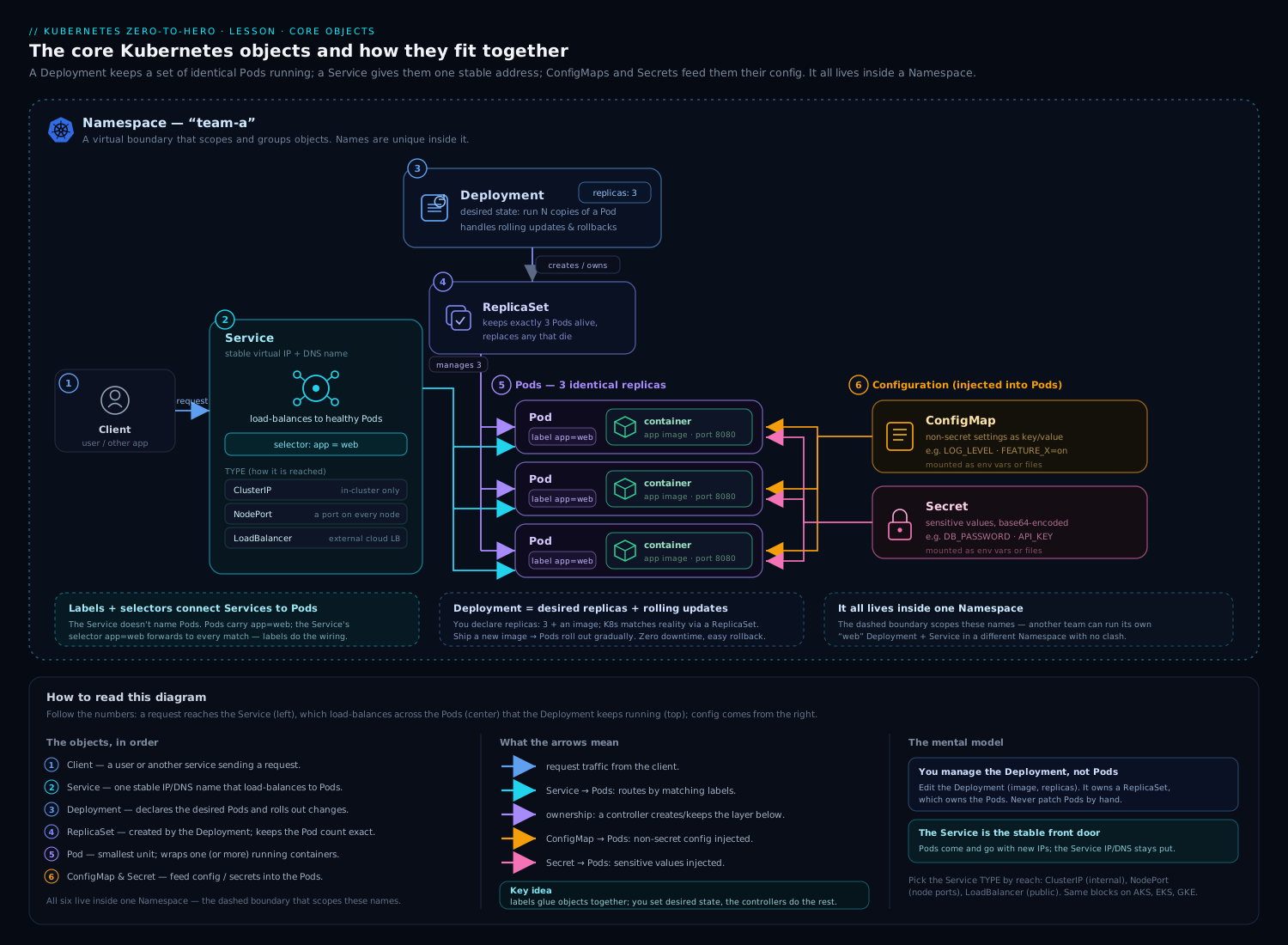
The diagram above places Jobs, CronJobs and DaemonSets alongside the other core objects — notice that all three are controllers wrapping a Pod template, just like a Deployment, but each enforces a different notion of “desired state”: a count of completions (Job), a schedule (CronJob), or one Pod per node (DaemonSet).
When to use each (and when not to)
This decision table is the heart of the lesson — and a guaranteed interview question:
| You need… | Use | Not | Why |
|---|---|---|---|
| A long-running service (web/API) | Deployment | Job | Jobs stop when done; Deployments stay up and self-heal. |
| A task that runs once and exits | Job | Deployment | A Deployment would restart the “finished” task forever. |
| That task on a repeating schedule | CronJob | a Job + external cron | CronJob is native, observable, and handles concurrency/history. |
| One agent on every node | DaemonSet | Deployment with many replicas | DaemonSet auto-scales with nodes and pins exactly one per node. |
| Stable identity + per-Pod storage (databases) | StatefulSet | Deployment/Job | StatefulSets give stable names, ordered rollout, and per-Pod volumes. |
| Batch work where each Pod needs a fixed rank/shard | Indexed Job | NonIndexed Job | Indexed assigns each Pod a deterministic index. |
Two sharp contrasts beginners blur:
- Job vs Deployment: a Deployment’s Pods must never exit (
restartPolicy: Always); a Job’s Pods are meant to exit (Never/OnFailure). If you find yourself running a batch script inside a Deployment and watching it restart endlessly, you wanted a Job. - DaemonSet vs Deployment: a Deployment with
replicas: Ngives you N Pods placed wherever the scheduler likes (possibly several on one node, none on another). A DaemonSet gives you exactly one per matching node, tracking node count automatically. “An agent on every node” is a DaemonSet, full stop.
Hands-on lab
Free, on your laptop, using kind (or minikube). We will run a Job, an Indexed Job, a CronJob, and a DaemonSet, then clean up.
1. Create a cluster (with two worker nodes so the DaemonSet is interesting):
cat <<'EOF' | kind create cluster --name batch-lab --config -
kind: Cluster
apiVersion: kind.x-k8s.io/v1alpha4
nodes:
  - role: control-plane
  - role: worker
  - role: worker
EOF

kubectl get nodes
# expect: 1 control-plane + 2 workers, all Ready
2. A simple Job — fixed completions with parallelism:
cat <<'EOF' | kubectl apply -f -
apiVersion: batch/v1
kind: Job
metadata:
  name: hello-batch
spec:
  completions: 6
  parallelism: 2
  backoffLimit: 4
  ttlSecondsAfterFinished: 120
  template:
    spec:
      restartPolicy: Never
      containers:
        - name: hello
          image: busybox:1.36
          command: ["sh", "-c", "echo done on $(hostname); sleep 2"]
EOF

kubectl get job hello-batch -w
# COMPLETIONS climbs 0/6 -> 6/6, two Pods at a time
kubectl get pods -l batch.kubernetes.io/job-name=hello-batch
kubectl logs -l batch.kubernetes.io/job-name=hello-batch --tail=1
Validation: kubectl get job hello-batch -o jsonpath='{.status.succeeded}' prints 6. After ~2 minutes the Job auto-deletes (thanks to the TTL) — re-run kubectl get job hello-batch and it’s gone.
3. An Indexed Job — each Pod gets a unique index:
cat <<'EOF' | kubectl apply -f -
apiVersion: batch/v1
kind: Job
metadata:
  name: indexed-demo
spec:
  completions: 4
  parallelism: 4
  completionMode: Indexed
  template:
    spec:
      restartPolicy: Never
      containers:
        - name: shard
          image: busybox:1.36
          command: ["sh", "-c", "echo shard $JOB_COMPLETION_INDEX; sleep 2"]
EOF

kubectl wait --for=condition=complete job/indexed-demo --timeout=60s
kubectl logs -l batch.kubernetes.io/job-name=indexed-demo --prefix=true | sort
# four lines: shard 0, shard 1, shard 2, shard 3 (each Pod saw a distinct index)
kubectl get job indexed-demo -o jsonpath='{.status.completedIndexes}{"\n"}'
# -> 0-3
4. A CronJob — runs every minute, never overlaps:
cat <<'EOF' | kubectl apply -f -
apiVersion: batch/v1
kind: CronJob
metadata:
  name: ping
spec:
  schedule: "*/1 * * * *"
  timeZone: "Etc/UTC"
  concurrencyPolicy: Forbid
  startingDeadlineSeconds: 30
  successfulJobsHistoryLimit: 2
  failedJobsHistoryLimit: 1
  jobTemplate:
    spec:
      ttlSecondsAfterFinished: 90
      template:
        spec:
          restartPolicy: Never
          containers:
            - name: ping
              image: busybox:1.36
              command: ["sh", "-c", "date; echo tick"]
EOF

kubectl get cronjob ping
# note LAST SCHEDULE updates each minute
# wait ~2 minutes, then:
kubectl get jobs -l batch.kubernetes.io/cronjob-name=ping
kubectl logs -l batch.kubernetes.io/cronjob-name=ping --tail=2

# suspend it so it stops firing:
kubectl patch cronjob ping -p '{"spec":{"suspend":true}}'
kubectl get cronjob ping -o jsonpath='{.spec.suspend}{"\n"}'   # -> true
5. A DaemonSet — one Pod per node:
cat <<'EOF' | kubectl apply -f -
apiVersion: apps/v1
kind: DaemonSet
metadata:
  name: hello-ds
spec:
  selector:
    matchLabels: { app: hello-ds }
  updateStrategy:
    type: RollingUpdate
    rollingUpdate: { maxUnavailable: 1 }
  template:
    metadata:
      labels: { app: hello-ds }
    spec:
      tolerations:
        - operator: Exists          # also land on the control-plane node
      containers:
        - name: pause
          image: registry.k8s.io/pause:3.9
EOF

kubectl get daemonset hello-ds
# DESIRED CURRENT READY = 3 (one per node, control-plane included)
kubectl get pods -l app=hello-ds -o wide
# one Pod on each of the 3 nodes
Now watch a rolling update — change the image and observe node-by-node replacement:
kubectl set image daemonset/hello-ds pause=registry.k8s.io/pause:3.10
kubectl rollout status daemonset/hello-ds
kubectl rollout history daemonset/hello-ds
Validation: kubectl get ds hello-ds -o jsonpath='{.status.numberReady}' equals the node count (3). Remove the control-plane toleration and re-apply, and the DESIRED count drops to 2 (the control-plane taint now excludes it).
Cleanup:
kubectl delete cronjob ping
kubectl delete daemonset hello-ds
kubectl delete job hello-batch indexed-demo --ignore-not-found
kind delete cluster --name batch-lab
Cost note: entirely free — kind runs the whole cluster in local Docker containers on your machine. Nothing is provisioned in any cloud, so there is no bill. The only resource consumed is your laptop’s CPU/RAM while the cluster is up; deleting the kind cluster reclaims it.
Common mistakes & troubleshooting
| Symptom | Likely cause | Fix |
|---|---|---|
Job "x" is invalid: spec.template.spec.restartPolicy: Unsupported value: "Always" |
Left the default Deployment-style restartPolicy. |
Set restartPolicy: Never or OnFailure in the Job’s Pod template. |
| Job never completes, Pods keep restarting with rising RESTARTS | restartPolicy: OnFailure plus a container that always exits non-zero. |
Fix the command, or switch to Never to get discrete failed Pods you can inspect, and check backoffLimit. |
| Finished Jobs/Pods pile up forever | No ttlSecondsAfterFinished; for CronJobs, history limits too high. |
Set ttlSecondsAfterFinished on the Job template and tune successfulJobsHistoryLimit/failedJobsHistoryLimit. |
| CronJob “runs at the wrong time” | Schedule interpreted in the controller’s zone, or a bad cron field. | Set timeZone explicitly; verify the expression on crontab.guru; remember DOM/DOW are OR-ed. |
| CronJob skips runs unexpectedly | concurrencyPolicy: Forbid and the previous Job overran the interval, or startingDeadlineSeconds too small. |
Make the Job faster, lengthen the interval, or raise startingDeadlineSeconds. |
| CronJob silently stopped firing | Controller was down long enough to miss >100 schedules. | Re-check startingDeadlineSeconds; recreate or un-suspend; look for the FailedNeedsStart event. |
| DaemonSet has fewer Pods than nodes | Nodes are tainted (e.g. control-plane) and the Pod has no matching toleration, or a nodeSelector excludes them. |
Add the right tolerations/nodeSelector; check kubectl describe ds events for FailedScheduling. |
| DaemonSet image change doesn’t roll out | updateStrategy.type: OnDelete. |
Delete the old Pods manually, or switch to RollingUpdate. |
kubectl logs job/x shows nothing |
The Pod failed before producing output, or logs are on a deleted Pod. | Use kubectl get pods -l batch.kubernetes.io/job-name=x and kubectl describe the failed Pod; consider restartPolicy: Never to keep failed Pods. |
Best practices
- Always set
ttlSecondsAfterFinishedon Jobs (and on CronJobjobTemplates). Without it, finished objects accumulate and eventually pressure etcd. A day’s retention plus a TTL is a sane default. - Always set
backoffLimitandactiveDeadlineSecondsto bound failures and time. A batch job with neither can retry for many minutes or hang indefinitely. - Set CPU/memory
requestsandlimitson batch Pods. A parallel Job or a per-node DaemonSet without resource requests can starve your real workloads — and DaemonSet Pods run on every node, so a small leak is multiplied by node count. - Pick
concurrencyPolicydeliberately. DefaultAllowplus a slow job is how clusters get buried in overlapping Pods. UseForbidfor anything touching shared state. - Always set
timeZoneon CronJobs. Relying on the controller’s zone is a portability and clarity trap. - Use
podFailurePolicyfor production batch:FailJobon non-retryable exit codes,Ignorefor disruptions (spot eviction, drains) so node maintenance doesn’t waste your retry budget. - Make batch jobs idempotent. Pods can be retried, replaced, or (with
Replace) interrupted — running the same task twice must be safe. - Use Indexed Jobs for partitioned work instead of inventing your own index via env vars or a queue — it’s built-in, deterministic, and survives retries.
- For DaemonSets, prefer
RollingUpdatewith a smallmaxUnavailableso an agent regression takes out one node at a time; reserveOnDeletefor CNI/CSI where you want manual, drained rollouts. - Use the well-known labels Kubernetes adds —
batch.kubernetes.io/job-name,batch.kubernetes.io/cronjob-name— to select Pods, rather than hand-rolling your own.
Security notes
- DaemonSets often need elevated access (hostPath mounts,
hostNetwork,hostPID, privileged containers) to do node-level work — and they run on every node, so a compromised DaemonSet Pod is a cluster-wide foothold. Grant the minimum: read-onlyhostPathwhere possible, drop capabilities, set a restrictivesecurityContext, and avoidprivileged: trueunless the agent genuinely requires it. - Scope ServiceAccount permissions tightly. A DaemonSet or batch Job rarely needs broad RBAC. Give each its own ServiceAccount with only the verbs it needs (see the RBAC fundamentals lesson), and set
automountServiceAccountToken: falseif the Pod doesn’t call the API at all. - Batch Jobs frequently handle secrets (database credentials for a migration, cloud keys for a backup). Mount them from a
Secret, never bake them into the image or thecommand, and prefer short-lived/projected tokens. - Apply Pod Security Standards. Batch and agent Pods should meet at least the
baseline, ideallyrestricted, profile — non-root, no privilege escalation, read-only root filesystem where feasible. - A CronJob is an automatic, recurring execution path. Treat its image and
commandas production code: pin image digests, scan them, and review changes — a poisoned CronJob image runs on your schedule, unattended. - Set resource limits to contain blast radius. An unbounded parallel Job or a leaky DaemonSet can become an accidental (or deliberate) denial-of-service across the cluster.
Interview & exam questions
-
What is the difference between
completionsandparallelismin a Job?completionsis how many Pods must succeed for the Job to finish;parallelismis how many Pods may run concurrently. Withcompletions: 12, parallelism: 4, the controller keeps 4 running until 12 have succeeded. -
When would you choose
restartPolicy: NeveroverOnFailurefor a Job? UseNeverwhen you want each attempt as a separate, inspectable Pod (failed Pods stick around) and when you needpodFailurePolicy(which requiresNever). UseOnFailurewhen retries are cheap and you’re happy to restart the container in place and watch the restart count. NotebackoffLimitcounts Pod failures underNeverand container restarts underOnFailure. -
A Job is making progress but you need it to stop after one hour no matter what — which field?
activeDeadlineSeconds: 3600. It’s a wall-clock hard stop that overridesbackoffLimit; on expiry the Job isFailedwith reasonDeadlineExceeded. -
What does
completionMode: Indexedgive you? A unique index (0…completions-1) per Pod, exposed viaJOB_COMPLETION_INDEX, an annotation, and a hostname suffix. Each index must succeed once. It’s for partitioned/sharded or SPMD work where which unit a Pod processes matters. -
How do you stop finished Jobs from accumulating?
ttlSecondsAfterFinishedon the Job deletes it (and its Pods) N seconds after completion. For CronJobs, also tunesuccessfulJobsHistoryLimit/failedJobsHistoryLimit. -
Explain the three
concurrencyPolicyvalues for a CronJob.Allow(default) lets runs overlap;Forbidskips a new run if the previous is still going;Replacecancels the running one and starts the new.Forbidis the safe default for state-mutating jobs. -
A CronJob’s
scheduleis"0 0 13 * 5"— when does it run? Midnight on the 13th of every month or every Friday — day-of-month and day-of-week are OR-ed when both are restricted, not “Friday the 13th.” -
What does
startingDeadlineSecondsdo, and what happens if a CronJob misses too many schedules? It bounds how late a missed run may still start; older misses are skipped. If more than 100 schedules are missed since the last success, the controller stops trying and emitsFailedNeedsStartrather than firing a flood of Jobs. -
Why does a DaemonSet have no
replicasfield? Its desired count is the number of matching nodes. The controller runs exactly one Pod per matching node and adjusts automatically as nodes join or leave. -
How do you make a DaemonSet run on control-plane nodes? Add a toleration for
node-role.kubernetes.io/control-plane:NoSchedule(or a blankettolerations: [{operator: Exists}]). The controller already tolerates not-ready/pressure taints automatically, but not that one. -
RollingUpdatevsOnDeletefor a DaemonSet?RollingUpdate(default) replaces Pods node-by-node automatically, honouringmaxUnavailable/maxSurge.OnDeleteapplies the new template only when you manually delete a node’s old Pod — used for CNI/CSI agents where you want to control (and drain) each node yourself. -
You need an agent on every node — DaemonSet or a Deployment with
replicasequal to the node count? DaemonSet. A Deployment doesn’t guarantee one-per-node (the scheduler could stack several on one node) and doesn’t track node count as nodes scale.
Quick check
- True or false: a Job’s Pod template may use
restartPolicy: Always. - Which CronJob field ensures two runs never overlap, skipping the new one if the old is still running?
- What environment variable does an Indexed Job set in each Pod?
- Which field auto-deletes a finished Job after a set time?
- What’s the default
updateStrategy.typefor a DaemonSet?
Answers
- False. A Job’s Pod template must use
NeverorOnFailure;Alwaysis rejected because the task is meant to terminate. concurrencyPolicy: Forbid.JOB_COMPLETION_INDEX(also available as the annotationbatch.kubernetes.io/job-completion-index).ttlSecondsAfterFinished.RollingUpdate(withmaxUnavailable: 1by default).
Exercise
Build a small “scheduled, resilient backup” workload on a local kind cluster:
- Create a CronJob named
db-backupthat runs every 2 minutes intimeZone: Etc/UTC, withconcurrencyPolicy: Forbid,startingDeadlineSeconds: 60,successfulJobsHistoryLimit: 2, andfailedJobsHistoryLimit: 2. - Its
jobTemplateshould userestartPolicy: Never,backoffLimit: 2,activeDeadlineSeconds: 30, andttlSecondsAfterFinished: 120. The container can bebusyboxrunningsh -c "date; echo backing up; sleep 5". - Add a
podFailurePolicythat doesFailJobon exit code1(simulate a non-retryable error) — then temporarily change the command tosh -c "exit 1"and confirm the Job fails immediately without exhaustingbackoffLimit. - Separately, deploy a DaemonSet
node-agentusing thepauseimage that runs on worker nodes only (usenodeSelector: { node-role.kubernetes.io/worker: "" }or label your workers) and does aRollingUpdatewithmaxUnavailable: 1. Verify the Pod count equals the worker count. - Roll the DaemonSet’s image forward with
kubectl set image, watchkubectl rollout status, thenkubectl rollout undoit. - Clean up with
kind delete cluster.
Success criteria: the CronJob fires on schedule and keeps only the configured history; the failing variant fails fast via the failure policy; the DaemonSet lands exactly one Pod per worker node and rolls out/back cleanly.
Certification mapping
- CKAD — Application Design and Build explicitly covers “understand Jobs and CronJobs.” Expect to write a Job with
completions/parallelism, a CronJob with a correctschedule, and to reason aboutrestartPolicy,backoffLimit, andactiveDeadlineSecondsunder time pressure. Knowingkubectl create job --from=cronjob/<name>to trigger a CronJob run on demand is a handy exam trick. - CKA — Workloads & Scheduling includes DaemonSets and understanding the different workload resources. You should deploy and update a DaemonSet, target nodes with selectors/tolerations, and explain how DaemonSets schedule onto tainted nodes.
- Both exams reward fluency with the imperative generators:
kubectl create job pi --image=perl -- perl -e ...,kubectl create cronjob hi --image=busybox --schedule="*/1 * * * *" -- echo hi, andkubectl create job --from=cronjob/<name> <manual-run>.
Glossary
- Job — a controller that runs Pods until a target number complete successfully, then stops.
- CronJob — a controller that creates Jobs on a repeating cron schedule.
- DaemonSet — a controller that runs one Pod on every (matching) node, tracking node membership automatically.
- Run-to-completion — a workload that is expected to finish and exit (vs run-forever services).
- completions — the number of Pods that must succeed for a Job to be
Complete. - parallelism — the maximum number of a Job’s Pods running at once.
- completionMode —
NonIndexed(interchangeable Pods) orIndexed(each Pod gets a unique index). - backoffLimit — how many failures a Job tolerates before being marked
Failed. - activeDeadlineSeconds — a wall-clock time limit for a Job (or Pod); a hard stop overriding retries.
- ttlSecondsAfterFinished — auto-delete delay for a finished Job and its Pods.
- podFailurePolicy — rules to react to specific Pod failures (fail fast, ignore disruptions).
- concurrencyPolicy — CronJob behaviour on overlap:
Allow,Forbid, orReplace. - startingDeadlineSeconds — how late a missed CronJob run may still be started.
- suspend — pause a Job (terminate its Pods) or a CronJob (stop creating Jobs) without deleting it.
- updateStrategy — how a DaemonSet rolls out template changes:
RollingUpdateorOnDelete. - maxUnavailable / maxSurge — DaemonSet rollout knobs for how many node Pods may be down / how many may briefly double up.
- toleration — permission for a Pod to schedule onto a node carrying a matching taint (e.g. control-plane).
- ownerReference — the link from a child object (Pod, Job) to its controller, enabling garbage collection.
Next steps
You now have the three batch and infrastructure workload controllers in your toolkit. The natural next topic is where Pods land and how to shape that placement deliberately — node and pod affinity, topology spread constraints, taints and tolerations (which you met here for DaemonSets), and priority-based preemption. Continue with Advanced Kubernetes Scheduling: Affinity, Topology Spread Constraints, Taints, and Priority-Based Preemption. If you skipped it, the prior lesson on RBAC & Service Accounts is what you’ll lean on to scope the ServiceAccounts your Jobs and DaemonSets run as.