In a nutshell
Most of the time you use Ansible’s modules — ansible.builtin.copy, ansible.builtin.service, ansible.builtin.package. This lesson is about building your own: a small Python program that manages one thing — a device, an internal API, a bespoke resource — and behaves exactly like a built-in, with typed inputs, a safe dry-run, and honest reporting of whether it changed anything.
The mental model: a good custom module is a thermostat, not a light switch. A light switch fires every time you flip it; it never checks the current state. A thermostat reads the room first, compares it to the temperature you asked for, and switches the heating on only if there is a gap — if the room is already right, it does nothing and says so. Your module works the same way: read the current state, compare it to what was requested, change the system only on drift, and report changed=true only when you actually did something. That one discipline — idempotency — is what separates a real module from a script that blindly re-runs.
And you never run a module yourself or print() its output. Ansible ships your code to the target, runs it there, and reads back one line of JSON. That JSON — changed, msg, an optional diff, plus your results — is the module’s entire interface: get it right and register, when, loops, handlers, --check, and --diff all work for free. The rest of the lesson makes each of those pieces exact, then hands you a complete, runnable module.
Level: Advanced · Time: ~35 min
Ansible ships with thousands of modules — ansible.builtin.copy, ansible.builtin.service, community.general.ufw, amazon.aws.ec2_instance — and for the overwhelming majority of automation you will never need to write your own. But eventually you hit the wall: an internal REST API nobody has wrapped, a bespoke appliance with its own CLI, a licence server that speaks a proprietary protocol, a domain-specific resource your platform team owns. You could drive it with ansible.builtin.command or ansible.builtin.uri and a pile of register, changed_when, and failed_when glue — and that is the right first move for a one-off. But the moment that glue is copy-pasted into three playbooks, lies about changed, breaks under --check, and produces unreadable output, you have outgrown the shell-out. The clean answer is a custom module: a small Python program that takes typed parameters, talks to the thing, reports back in Ansible’s structured JSON contract, is idempotent, and honours check mode — a first-class citizen that looks and behaves exactly like the built-ins.
A module is a peculiar kind of program. You do not run it yourself; Ansible runs it on the managed node (or, for connection: local and many cloud modules, on the control node acting as the target). Ansible serialises your task’s parameters to JSON, ships your module’s code to the target, executes it with the Python interpreter found there, and reads a single line of JSON from its stdout. That JSON — changed, an optional failed, plus whatever facts and results you choose to return — is the module’s entire interface to the rest of Ansible. Get the contract right and your module composes with register, when, --check, --diff, loops, and handlers for free. Get it wrong and nothing downstream behaves. This lesson is about getting it exactly right.
This is the exhaustive version. By the end you will know when a module is the correct tool versus a role, a command/shell call, or a script; the full anatomy of a module file; AnsibleModule and every key of argument_spec — type, required, default, choices, no_log, aliases, elements, options (sub-specs), fallback, deprecated_aliases, and the apply_defaults behaviour — plus the cross-argument constraints mutually_exclusive, required_together, required_one_of, required_if, and required_by, and supports_check_mode; the return contract (module.exit_json(changed=…, **result), module.fail_json(msg=…), the conventional keys, the diff dict, returning ansible_facts, module.warn()/module.deprecate()); how to build genuine idempotency (read current state → compare to desired → change only on drift → report the truthful changed) and how to honour module.check_mode; the three placement options (library/, a role’s library/, a collection’s plugins/modules/) and the search precedence; the three documentation blocks — DOCUMENTATION, EXAMPLES, RETURN — that feed ansible-doc; module_utils for shared code and how to import it correctly; how to debug a module locally; and how to test it (sanity + unit). Everything uses FQCN and reflects current ansible-core 2.17+ / Ansible 10+ (2026). We finish with a complete, working worked module — a line-in-a-JSON-config manager — that you can drop into library/ and run for free against localhost.
Learning objectives
After working through this lesson you will be able to:
- Decide correctly when to write a module versus reach for a role,
ansible.builtin.command/shell,ansible.builtin.script, oransible.builtin.uri. - Lay out a module file and instantiate
AnsibleModulewith a completeargument_spec, using every relevant key (type,required,default,choices,no_log,aliases,elements, sub-options,fallback,deprecated_aliases). - Enforce cross-argument rules —
mutually_exclusive,required_together,required_one_of,required_if,required_by— and declaresupports_check_mode. - Return results through the module contract —
exit_json/fail_json, the meaning ofchanged, thediffstructure, returningansible_facts, andwarn/deprecate. - Implement true idempotency (gather current state, compare, act only on drift) and make the module behave correctly under
--checkby honouringmodule.check_mode. - Place a module in
library/, a role’slibrary/, or a collection’splugins/modules/, and explain the discovery precedence. - Write the
DOCUMENTATION,EXAMPLES, andRETURNYAML blocks soansible-docandansible-doc --snippetwork, and share code viamodule_utils. - Debug a module locally and run sanity and unit tests against it.
Prerequisites & where this fits
You should be fluent with everything up to the Developing tier of this course: writing playbooks, using register to capture results, the changed_when/failed_when overrides (which exist precisely because command/shell cannot judge change for themselves), roles (your module may live inside one), and collections (the production home for a module — see the roles & collections lesson). You also need working Python 3 — modules are Python programs, though the Python here is deliberately plain (standard library, a try/except, a dictionary or two). You do not need to be a Python expert; the AnsibleModule helper does the heavy lifting of argument parsing, type-checking, and JSON I/O. In the Ansible Zero-to-Hero ladder this is the first Developing lesson — the step from using Ansible’s building blocks to building new ones. It follows the debugging lesson (you will lean on --check, --diff, and -vvv to develop a module) and leads directly into Ansible plugins (filter/lookup/callback/connection — code that, unlike modules, runs on the control node). The distinction between a module (runs on the target, does a unit of work, reports changed) and a plugin (runs on the control node, extends Ansible itself) is the spine of the whole Developing tier, so fix it now. Everything in this lesson is free — the lab runs against localhost.
Core concepts
Six ideas carry the lesson; internalise them before the code.
A module is a program Ansible runs on the target, not on the control node. When a task invokes your module, Ansible takes the module’s Python source plus a small bundle of module_utils, packages it (the “AnsiBallZ” wrapper), copies it to the managed node’s temp directory, runs it with the target’s Python interpreter (the one resolved by ansible_python_interpreter), then deletes it. Your module reads its parameters from a file Ansible wrote next to it and prints exactly one JSON object to stdout. This is the opposite of a plugin (filter, lookup, callback, connection), which runs inside the Ansible process on the control node. If your code needs the target’s filesystem, packages, services, or local CLI — it is a module. If it transforms data for the playbook or hooks Ansible’s own behaviour — it is a plugin.
The return JSON is the entire interface. Ansible does not inspect your module’s exit code in any nuanced way, nor parse free text. It reads one JSON document. The keys it understands are changed (did this task alter the system?), failed (did it error?), msg (human-readable message), ansible_facts (variables to inject into the host), diff (before/after for --diff), warnings, deprecations, and invocation (echo of the parameters, added for you). Every other key you return becomes available under the task’s registered variable. Get this contract right and register, when, loops, handlers (changed drives notify), --check, and --diff all work automatically.
changed must be the truth. The single most important value your module returns is changed. It must be true only if the module actually altered the managed system on this run, and false if the system was already in the desired state. This is what makes Ansible declarative: a second run of the same play reports changed=0 because nothing needed doing. A module that always returns changed=true is a bug — it breaks the idempotence test, fires handlers needlessly, and lies in reports. The discipline is: read the current state, compare it with the requested state, and set changed based on whether they differed.
Check mode is a contract, not a freebie. When the user runs --check (dry run), Ansible sets module.check_mode = True. Your module must then predict what it would do — compute the would-be changed — without making any change. You opt in by declaring supports_check_mode=True; if you do not, Ansible skips your module entirely under --check (it shows skipping rather than risk an unsafe write). Supporting check mode well is a hallmark of a production-grade module and is explicitly graded on EX374.
Idempotency lives in your code. Built-in modules feel idempotent because their authors wrote the read-compare-change logic. Nothing about AnsibleModule makes your module idempotent automatically — if you just “do the thing” every time and return changed=true, you have written a glorified command. Idempotency is the differentiator between a real module and a shell-out, and implementing it is most of the work.
A module is documented in-band. A proper module carries three YAML strings in the file itself — DOCUMENTATION, EXAMPLES, RETURN — which ansible-doc <module> renders. This is not optional polish: the sanity tests enforce it, ansible-doc and IDE plugins read it, and it is part of the collection contract. You write the docs in the module, beside the code they describe.
Keep these terms straight, because the rest of the lesson uses them precisely.
| Term | Meaning |
|---|---|
| Module | A program Ansible ships to and runs on the target; does a unit of work; returns one JSON object with changed. |
| Plugin | Code that runs on the control node, extending Ansible itself (filter, lookup, callback, connection, …) — the next lesson. |
AnsibleModule |
The helper class (from ansible.module_utils.basic import AnsibleModule) that parses params, type-checks, handles JSON I/O, and provides exit_json/fail_json/check_mode. |
argument_spec |
The dict declaring each parameter your module accepts — its type, default, choices, and validation rules. |
| The contract | The set of JSON keys Ansible understands (changed, failed, msg, ansible_facts, diff, …). |
check_mode |
Dry-run flag (module.check_mode); when True, predict changes without making them. |
| Idempotency | The property that running the module twice changes the system at most once; you implement it. |
| AnsiBallZ | Ansible’s wrapper that bundles your module + module_utils into one executable payload for the target. |
When to write a module (versus role, command, script, or uri)
Writing a module is real engineering — Python, documentation, tests, a release in a collection. Reach for it deliberately. This decision table is the first thing an EX374 examiner (and a sensible architect) wants you to get right.
| Need | Best tool | Why |
|---|---|---|
| Compose existing modules into a reusable, parameterised unit of automation | A role | A role orchestrates tasks; it does not do new low-level work. Most “I need something custom” is actually a role. |
Run a one-off external command, idempotency handled by creates/changed_when |
ansible.builtin.command (or shell if you need pipes/redirection) |
Fast, no code. Pair with creates:/removes: and changed_when: to fake idempotency for simple cases. |
| Copy and execute a local script on the target | ansible.builtin.script |
Ships and runs a script; good for legacy installers. No structured output or real idempotency, though. |
| Talk to a generic HTTP/REST API for a few calls | ansible.builtin.uri |
Handles HTTP verbs, auth, JSON bodies, status assertions — often enough without writing code. |
Manage a resource (API, appliance, CLI) idempotently, with typed inputs, used repeatedly, with clean --check/--diff and readable output |
A custom module | The only option that gives true idempotency, type validation, check-mode prediction, structured returns, and ansible-doc. |
| Transform data, generate values, or hook Ansible’s behaviour (output formatting, inventory, connection) | A plugin (next lesson) | Runs on the control node; modules cannot do this. |
The litmus test: “Am I managing the state of a resource on a target, repeatedly, where re-running should be a no-op?” If yes — and command/uri glue is getting ugly or unreliable — write a module. If you are merely arranging existing modules, write a role. If you are transforming data for the playbook, write a plugin.
Module anatomy: the file from top to bottom
A module is a single .py file with a fixed, conventional shape. Here is the skeleton every module follows; we will fill each region in the sections that follow.
#!/usr/bin/python
# -*- coding: utf-8 -*-

# Copyright: (c) 2026, Vinod H <h.vinod@example.com>
# GNU General Public License v3.0+ (see COPYING or https://www.gnu.org/licenses/gpl-3.0.txt)

from __future__ import absolute_import, division, print_function
__metaclass__ = type

DOCUMENTATION = r'''
---
module: my_module
short_description: One-line summary
# ... full YAML, see the documentation-blocks section
'''

EXAMPLES = r'''
- name: Use the module
  namespace.collection.my_module:
    name: example
    state: present
'''

RETURN = r'''
changed:
  description: Whether the module made a change.
  type: bool
  returned: always
'''

from ansible.module_utils.basic import AnsibleModule
# (other imports: standard library, then module_utils)


def run_module():
    # 1. Declare the interface
    argument_spec = dict(
        name=dict(type='str', required=True),
        state=dict(type='str', default='present', choices=['present', 'absent']),
    )

    # 2. Instantiate the helper
    module = AnsibleModule(
        argument_spec=argument_spec,
        supports_check_mode=True,
    )

    # 3. Pull validated params
    name = module.params['name']
    state = module.params['state']

    # 4. Build the result skeleton
    result = dict(changed=False)

    # 5. Read current state, compare, act idempotently (honouring check_mode)
    #    ... the real logic ...

    # 6. Return success
    module.exit_json(**result)


def main():
    run_module()


if __name__ == '__main__':
    main()
Several conventions here are load-bearing, not decoration:
| Element | Why it matters |
|---|---|
#!/usr/bin/python shebang |
Convention; the actual interpreter used on the target is ansible_python_interpreter. Keep the line — sanity tests expect it. |
from __future__ import … + __metaclass__ = type |
Required boilerplate the sanity tests enforce (Python 2/3 hygiene legacy; still mandated for collection modules). |
DOCUMENTATION/EXAMPLES/RETURN as module-level strings |
Must be top-level assignments (not inside functions) so ansible-doc can extract them by parsing the file without importing it. Use raw strings (r'''…''') so backslashes in regexes survive. |
| Imports after the doc strings | So the doc extractor sees the docs first; also avoids import side-effects before docs are read. Import AnsibleModule first, then stdlib, then your module_utils. |
run_module() / main() split |
Convention that makes the module importable for unit tests without executing — tests call run_module with mocked args; the if __name__ == '__main__' guard runs it only when executed by Ansible. |
module.exit_json(**result) at the end |
The only correct way to finish successfully — it prints the JSON and sys.exit(0)s. Never print() or return your result. |
AnsibleModule and the complete argument_spec
AnsibleModule is the heart of every module. You import it, hand it your argument_spec (and the cross-argument rules), and it: parses the JSON parameters Ansible passed, type-checks and coerces each one, applies defaults, enforces required/choices/mutual-exclusion rules (failing cleanly with a good msg if violated), strips no_log values from logs, and exposes the clean values on module.params. It also gives you module.check_mode, module.exit_json(), module.fail_json(), module.warn(), module.run_command(), and a pile of filesystem helpers.
module = AnsibleModule(
    argument_spec=argument_spec,
    supports_check_mode=True,
    mutually_exclusive=[('content', 'src')],
    required_one_of=[('content', 'src')],
    required_if=[('state', 'present', ('name',))],
    required_together=[('username', 'password')],
    required_by={'auth_token': ('endpoint',)},
)
Per-argument keys
Each entry in argument_spec is a dict describing one parameter. This is the complete reference table — memorise it; every key here appears on the EX374 syllabus.
| Key | What it does | Values / example | Default | Gotcha |
|---|---|---|---|---|
type |
Declares and coerces the parameter’s type | 'str', 'int', 'float', 'bool', 'list', 'dict', 'path', 'raw', 'json', 'bytes', 'bits' |
'str' if omitted |
Always set it. 'path' expands ~ and env vars; 'bool' accepts yes/no/true/false/1/0; 'list' accepts a CSV string or a list. |
required |
Caller must supply it | True / False |
False |
Mutually exclusive with default — a required param has no default. |
default |
Value used when caller omits it | any matching the type | None |
Use it to express the common case; document the default in DOCUMENTATION. |
choices |
Restrict to an enumerated set | ['present', 'absent', 'latest'] |
none | AnsibleModule rejects anything else with a clear error. Ideal for state. |
no_log |
Scrub the value from output, -v logs, and invocation |
True / False |
False (but auto-True if the name looks secret, e.g. password) |
Set no_log=True on every secret. Conversely set no_log=False to silence the false-positive warning on a non-secret named like *_token that is actually safe. |
aliases |
Alternative parameter names | ['pkg', 'package'] |
none | Lets you rename a param without breaking callers; module.params uses the canonical name. |
elements |
Type of each item in a type='list' |
'str', 'int', 'dict', … |
none | Required for validated lists. With elements='dict', add options= to validate each dict’s sub-keys. |
options |
A nested argument_spec for type='dict' (or list of dicts) |
a dict of sub-arguments | none | Enables full validation of structured input (suboptions). The cross-arg rules can be applied per-suboption too. |
apply_defaults |
For a type='dict' with options: apply sub-defaults even when the dict itself is omitted |
True / False |
False |
Use when you want suboption defaults to materialise without the caller passing the parent. |
fallback |
Pull a value from elsewhere if the caller omits it | (env_fallback, ['MY_API_TOKEN']) |
none | The standard pattern for “read from an environment variable if not given” — from ansible.module_utils.basic import env_fallback. |
deprecated_aliases |
Mark an alias as deprecated with a removal version/date | [dict(name='old', version='3.0.0')] |
none | Emits a deprecation warning when the old name is used; pairs with collection deprecation policy. |
removed_in_version/removed_at_date |
Mark the whole option as scheduled for removal | '4.0.0' / '2027-01-01' |
none | Warns the user the option is going away; part of clean deprecation. |
A worked argument_spec showing the common keys together:
argument_spec = dict(
    path=dict(type='path', required=True),
    key=dict(type='str', required=True),
    value=dict(type='raw'),                       # accept any JSON type
    state=dict(type='str', default='present',
               choices=['present', 'absent']),
    backup=dict(type='bool', default=False),
    mode=dict(type='str'),                         # file mode, e.g. "0644"
    api_token=dict(type='str', no_log=True,
                   fallback=(env_fallback, ['MY_API_TOKEN'])),
    tags=dict(type='list', elements='str', default=[]),
    owner=dict(type='dict', options=dict(           # nested sub-spec
        name=dict(type='str', required=True),
        team=dict(type='str', default='platform'),
    )),
    pkg=dict(type='str', aliases=['package', 'name']),
)
The cross-argument constraints
Beyond per-argument rules, AnsibleModule enforces relationships between arguments. You pass these as lists of tuples (or a dict for required_by) to the constructor; violations fail the task cleanly before your logic runs. This is the second half of the validation story and a frequent exam question.
| Constraint | Meaning | Form |
|---|---|---|
mutually_exclusive |
At most one of these may be set | [('content', 'src'), ('a', 'b', 'c')] |
required_together |
If any one is set, all must be set | [('username', 'password')] |
required_one_of |
At least one of these must be set | [('content', 'src')] |
required_if |
If param X equals value V, then the listed params are required | [('state', 'present', ('name', 'value'))] — optional 4th element True means “require any one of them” |
required_by |
If param X is set, the listed params become required | {'auth_token': ('endpoint',)} |
These compose: a typical “create a thing” module declares state with choices, then required_if=[('state','present',('name',))] so name is mandatory only when creating, and mutually_exclusive=[('content','src')] so the caller picks one content source. Declaring the rules here means you never write if not module.params['name']: module.fail_json(...) by hand — AnsibleModule does it, with consistent error messages.
supports_check_mode and other constructor flags
| Flag | Effect | Default |
|---|---|---|
supports_check_mode |
Declares your module can run safely under --check. If False, Ansible skips the task in check mode. |
False (so set it True once you honour check_mode). |
bypass_checks |
Skip required/choices/cross-arg validation (rare; for special meta-modules) | False |
add_file_common_args |
Inject the standard file args (mode, owner, group, seuser, setype, attributes, …) into your spec so you can manage file attributes with the same helpers copy uses |
False |
add_file_common_args=True is the idiomatic way to give your module the same mode/owner/group controls as the file modules — Ansible adds those to your argument_spec and you apply them with module.set_fs_attributes_if_different(file_args, changed). The worked module below uses it.
The return contract: exit_json, fail_json, and the keys Ansible understands
When your module is done, it must end with exactly one of two calls. Both serialise a JSON object to stdout and exit — you never print() or return results yourself.
# Success — print the result JSON and exit(0)
module.exit_json(changed=True, msg="Created", item={"id": 42}, diff=diff)

# Failure — print {"failed": true, "msg": ...} and exit(1)
module.fail_json(msg="API returned 500", status=500, body=text)
exit_json(**result) is the success path; fail_json(msg=…, **extra) is the failure path (msg is required on failure — always give a useful one). Both accept arbitrary extra keys, which flow back to the play.
The keys Ansible interprets specially
| Return key | Meaning | Notes |
|---|---|---|
changed |
Did the module alter the system this run? | The most important key — drives idempotence, --check reporting, and notify/handlers. Default False if you omit it from exit_json. |
failed |
Did the task fail? | Set automatically to True by fail_json; you rarely set it by hand on success. |
msg |
Human-readable message | Required by fail_json. Optional but recommended on success. |
ansible_facts |
A dict of variables to inject into the host’s facts | These become first-class variables (no register needed) for the rest of the play. The way a module “sets facts”. |
diff |
Before/after for --diff |
A dict {'before': …, 'after': …} (text) or {'before_header':…, 'after_header':…, 'before':…, 'after':…}. Shown only with --diff. |
warnings |
List of warnings | Better added via module.warn("…"), which appends here for you. |
deprecations |
List of deprecation notices | Better added via module.deprecate("…", version="4.0.0"). |
invocation |
Echo of the module + parameters | Added for you by AnsibleModule, with no_log values scrubbed. Do not set it yourself. |
| anything else | Any other key | Becomes available under the task’s registered variable — this is how you return your results (IDs, output, the resource you managed). |
A subtle but important point: whatever extra keys you return are your module’s public output API. Document them in the RETURN block, keep their names and types stable across releases, and put your real result under clearly-named keys (e.g. record, output, path) rather than dumping a bag of internals. Returning ansible_facts versus a plain key is a deliberate choice: use ansible_facts when the value should become an ambient host variable (like a discovered version); use a plain key (consumed via register) when it is the result of this task that the next task will reference.
module.warn(message) surfaces a non-fatal warning in the output (and the warnings list). module.deprecate(message, version=…, date=…, collection_name=…) records a deprecation. Use both rather than building the lists by hand — they integrate with Ansible’s display and --diff/JSON output.
Idempotency and check_mode: the part that makes it a real module
This is the core skill. A module that always acts is not a module — it is command with extra steps. Genuine idempotency follows a fixed four-step shape, and check-mode support is woven through it.
The idempotency algorithm:
- Read the current state of the resource (read the file, query the API, inspect the service). This is a read-only operation and is always safe to do, even in check mode.
- Compute the desired state from the parameters.
- Compare. If current already equals desired, set
changed=Falseand return — do nothing. This is the path a re-run takes; it is what produceschanged=0on the second run. - If they differ, and not in check mode, make the change, then set
changed=True. If in check mode, setchanged=Truebut skip the actual write — you are predicting, not doing.
In code, the pattern is unmistakable:
result = dict(changed=False)

current = read_current_state(module)          # step 1 — read-only, always safe
desired = build_desired_state(module.params)  # step 2

if current == desired:                         # step 3 — already converged
    module.exit_json(**result)                 # changed stays False

# step 4 — drift detected
result['changed'] = True
result['diff'] = {'before': to_text(current), 'after': to_text(desired)}

if module.check_mode:                           # predict only
    module.exit_json(**result)                  # changed=True, no write performed

apply_change(module, desired)                   # the only mutating call in the module
module.exit_json(**result)
Three rules make this correct:
- Never mutate before the
check_modegate. All reads happen first; the single mutating call sits after theif module.check_mode: module.exit_json(...)guard. If any write can happen before that guard,--checkis unsafe and yoursupports_check_mode=Trueis a lie. changedreflects reality, even in check mode. Under--checkyou still setchanged=Truewhen you would have changed something — that is the whole point of a dry run (it tells the operator “this run would change 3 things”). You just do not perform the write.- Build the
difffrom current vs desired, so--diffshows exactly what would change. Thediffis computed the same way in check mode and real mode.
The absent direction follows the same shape mirrored: read current; if the resource is already gone, changed=False; if it exists, changed=True and (unless check mode) delete it.
This table summarises module behaviour across the run modes:
| Scenario | Normal run | --check run |
--diff run |
|---|---|---|---|
| Already in desired state | changed=False, no write |
changed=False, no write |
shows empty/no diff |
| Drift exists | changed=True, writes |
changed=True, no write (prediction) |
shows before/after |
supports_check_mode=False |
runs normally | task skipped entirely | n/a unless module returns diff |
| Error talking to resource | fail_json |
fail_json (read still happens) |
n/a |
Module placement: library/, role library/, collection plugins/modules/
A module is discovered by filename = module name (minus .py) on Ansible’s module search path. There are three places to put one, in increasing order of “production-ready”, and a clear precedence between them.
| Location | Scope | When to use | Precedence |
|---|---|---|---|
library/ next to your playbook (or set by library / ANSIBLE_LIBRARY in ansible.cfg) |
The whole project | Quick development, project-local modules, the lab in this lesson | Adjacent library/ is searched first — overrides everything, even built-ins of the same name |
A role’s library/ (roles/<role>/library/) |
That role (and the play using it) | A module that logically belongs to one role and ships with it | Auto-added to the search path while that role runs |
A collection’s plugins/modules/ (<ns>/<coll>/plugins/modules/) |
Anywhere, addressed by FQCN ns.coll.module |
The production home — versioned, documented, testable, distributable via Galaxy/Automation Hub | Resolved by FQCN; the modern, recommended distribution path |
Precedence in one sentence: an adjacent library/ module wins over a role library/ module, which wins over a collection module, which wins over the built-in of the same name — local development overrides always take priority, which is exactly what you want while iterating. For anything you intend to share or keep, the collection (plugins/modules/my_module.py, called as namespace.collection.my_module) is the right home; it gives you a stable FQCN, room for module_utils and tests, and a release process. Use a bare library/ for prototyping and for genuinely project-private one-offs.
A note on module_utils placement that mirrors this: project-level shared code goes in a module_utils/ directory beside library/; collection shared code goes in plugins/module_utils/ and is imported as ansible_collections.<ns>.<coll>.plugins.module_utils.<name>.
DOCUMENTATION, EXAMPLES, and RETURN: the three YAML blocks
These three top-level strings turn a script into a documented module. ansible-doc my_module parses them (without importing the module) to render help; ansible-doc --snippet my_module builds a task stub from DOCUMENTATION; the sanity tests validate them against a schema. Write them carefully — they are the user-facing spec.
DOCUMENTATION
Describes the module and every option. The key fields:
| Field | Purpose |
|---|---|
module |
The module name (must match the filename). |
short_description |
One line, no trailing full stop, imperative. |
version_added |
The collection version (or ansible-core version) that introduced the module. |
description |
A list of paragraphs explaining what it does. |
options |
A map of every parameter, each with description, type, required, default, choices, aliases, elements, and (for dict options) nested suboptions. Must mirror the argument_spec exactly — the sanity tests check this. |
notes |
Caveats, requirements, platform notes. |
requirements |
External libraries or binaries the module needs (e.g. python >= 3.8, requests). |
author |
Name (@github_handle). |
extends_documentation_fragment |
Pull in shared doc fragments (e.g. ansible.builtin.files for the file-attribute options when you use add_file_common_args). |
attributes |
Declares capabilities like check_mode and diff_mode support and platform — the modern, machine-readable way to advertise check-mode support. |
DOCUMENTATION: r'''
---
module: json_config
short_description: Manage a key in a JSON configuration file idempotently
version_added: "1.0.0"
description:
  - Ensures a given key in a JSON file is present with a value, or absent.
  - Idempotent and supports check mode and diff.
options:
  path:
    description: Absolute path to the JSON file. Created if missing.
    type: path
    required: true
  key:
    description: The top-level key to manage.
    type: str
    required: true
  value:
    description: The desired value for O(key). Required when O(state=present).
    type: raw
  state:
    description: Whether the key should be V(present) or V(absent).
    type: str
    choices: [present, absent]
    default: present
  backup:
    description: Create a timestamped backup before changing the file.
    type: bool
    default: false
attributes:
  check_mode:
    support: full
  diff_mode:
    support: full
author:
  - Vinod H (@kloudvin)
'''
(The O(...), V(...), C(...), R(...) macros are the current Ansible documentation markup for option names, values, code, and links — preferred over the older I()/C() style and validated by the sanity tests.)
EXAMPLES
A YAML list of runnable example tasks, using the FQCN. These are copy-paste fodder for users and are also schema-checked.
EXAMPLES: r'''
- name: Ensure a feature flag is enabled
  kloudvin.platform.json_config:
    path: /etc/myapp/config.json
    key: feature_x_enabled
    value: true
    state: present

- name: Remove a deprecated setting, with a backup
  kloudvin.platform.json_config:
    path: /etc/myapp/config.json
    key: legacy_mode
    state: absent
    backup: true
'''
RETURN
Documents every key your module returns (beyond the universal ones). Each entry gives description, type, returned (when it appears — always, on success, changed, etc.), and a sample.
RETURN: r'''
changed:
  description: Whether the file was modified.
  type: bool
  returned: always
  sample: true
path:
  description: The path that was managed.
  type: str
  returned: always
  sample: /etc/myapp/config.json
diff:
  description: Before/after of the file content.
  type: dict
  returned: when changed and --diff
'''
Together these three blocks mean ansible-doc kloudvin.platform.json_config produces full, accurate help — the same experience as a built-in module — and the sanity tests pass.
module_utils: sharing code across modules
When you write more than one module they will share code — an API client, auth handling, a to_native helper, common argument fragments. That shared Python belongs in module_utils, not copy-pasted into each module. Crucially, module_utils is also the only extra code Ansible bundles and ships to the target alongside your module (via AnsiBallZ) — so anything your module imports from module_utils just works on the managed node, whereas an arbitrary third-party import would not be shipped.
| Placement | Import path | Scope |
|---|---|---|
Project: module_utils/<name>.py (beside library/, path set in ansible.cfg) |
from ansible.module_utils.<name> import … |
Project-local modules |
Collection: plugins/module_utils/<name>.py |
from ansible_collections.<ns>.<coll>.plugins.module_utils.<name> import … |
Any module in the collection (the production pattern) |
| Built-in shared utils | from ansible.module_utils.basic import AnsibleModule etc. |
Always available (this is where AnsibleModule, env_fallback, to_native/to_text live via ansible.module_utils.common.text.converters) |
A tiny example — a shared client in module_utils/myapi.py:
# module_utils/myapi.py
from __future__ import absolute_import, division, print_function
__metaclass__ = type


class MyApiClient(object):
    def __init__(self, module, endpoint, token):
        self.module = module
        self.endpoint = endpoint
        self.token = token

    def get(self, resource):
        # use module.run_command or open_url; raise/return as needed
        ...
…imported and used in a module:
from ansible.module_utils.basic import AnsibleModule
from ansible.module_utils.myapi import MyApiClient   # project-level import
# (collection: from ansible_collections.kloudvin.platform.plugins.module_utils.myapi import MyApiClient)
Two rules: (1) keep the from __future__ … / __metaclass__ boilerplate in module_utils files too (sanity tests check them), and (2) only import from the standard library and from module_utils inside a module — anything else will not be shipped to the target and will fail with ImportError there. If your module genuinely needs a third-party library (e.g. requests), guard the import and fail_json with a helpful message if it is missing:
try:
    import requests
    HAS_REQUESTS = True
except ImportError:
    HAS_REQUESTS = False
# ...
if not HAS_REQUESTS:
    module.fail_json(msg="The 'requests' library is required. Install it on the target.")
The complete worked module
Here is the whole thing — a real, idempotent, check-mode-aware module that manages one top-level key in a JSON file. It uses only the standard library (so it ships and runs anywhere Ansible runs), demonstrates the full argument_spec, the cross-argument rules, the read-compare-change idempotency loop, check-mode prediction, the diff dict, file-attribute handling via add_file_common_args, a backup, and the three documentation blocks. Drop it in library/json_config.py and the lab below runs it.
#!/usr/bin/python
# -*- coding: utf-8 -*-

# Copyright: (c) 2026, Vinod H (@kloudvin)
# GNU General Public License v3.0+ (see https://www.gnu.org/licenses/gpl-3.0.txt)

from __future__ import absolute_import, division, print_function
__metaclass__ = type

DOCUMENTATION = r'''
---
module: json_config
short_description: Manage a top-level key in a JSON configuration file idempotently
version_added: "1.0.0"
description:
  - Ensures a top-level key in a JSON file is present with a given value, or absent.
  - Reads the current file, compares against the desired state, and only writes on drift.
  - Fully idempotent; supports check mode and diff; can manage file attributes and take a backup.
options:
  path:
    description: Absolute path to the JSON file. Created (with an empty object) if missing and O(state=present).
    type: path
    required: true
  key:
    description: The top-level key to manage.
    type: str
    required: true
  value:
    description: Desired value for O(key). Required when O(state=present). May be any JSON type.
    type: raw
  state:
    description: Whether O(key) should be V(present) or V(absent).
    type: str
    choices: [present, absent]
    default: present
  backup:
    description: Create a timestamped C(.bak) copy before modifying the file.
    type: bool
    default: false
extends_documentation_fragment:
  - ansible.builtin.files
attributes:
  check_mode:
    support: full
  diff_mode:
    support: full
author:
  - Vinod H (@kloudvin)
'''

EXAMPLES = r'''
- name: Enable a feature flag
  kloudvin.platform.json_config:
    path: /etc/myapp/config.json
    key: feature_x_enabled
    value: true
    state: present
    mode: "0644"

- name: Remove a deprecated setting with a backup
  kloudvin.platform.json_config:
    path: /etc/myapp/config.json
    key: legacy_mode
    state: absent
    backup: true
'''

RETURN = r'''
changed:
  description: Whether the file was modified.
  type: bool
  returned: always
  sample: true
path:
  description: The path that was managed.
  type: str
  returned: always
  sample: /etc/myapp/config.json
backup_file:
  description: Path of the backup, if one was taken.
  type: str
  returned: when backup is true and a change was made
  sample: /etc/myapp/config.json.2026-06-15@10:00:00~
'''

import json
import os

from ansible.module_utils.basic import AnsibleModule
from ansible.module_utils.common.text.converters import to_native


def read_config(module, path):
    """Read and parse the JSON file; return a dict. Missing file => empty dict."""
    if not os.path.exists(path):
        return {}
    try:
        with open(path, 'r') as fh:
            data = json.load(fh)
    except ValueError as exc:
        module.fail_json(msg="File %s is not valid JSON: %s" % (path, to_native(exc)))
    except (IOError, OSError) as exc:
        module.fail_json(msg="Could not read %s: %s" % (path, to_native(exc)))
    if not isinstance(data, dict):
        module.fail_json(msg="Top level of %s must be a JSON object" % path)
    return data


def write_config(module, path, data):
    """Atomically write the dict back as pretty JSON, preserving Ansible's temp-file semantics."""
    tmp = module.tmpdir and os.path.join(module.tmpdir, 'json_config.tmp') or (path + '.tmp')
    try:
        with open(tmp, 'w') as fh:
            json.dump(data, fh, indent=2, sort_keys=True)
            fh.write('\n')
    except (IOError, OSError) as exc:
        module.fail_json(msg="Could not write temp file: %s" % to_native(exc))
    module.atomic_move(tmp, path)


def run_module():
    argument_spec = dict(
        path=dict(type='path', required=True),
        key=dict(type='str', required=True),
        value=dict(type='raw'),
        state=dict(type='str', default='present', choices=['present', 'absent']),
        backup=dict(type='bool', default=False),
    )

    module = AnsibleModule(
        argument_spec=argument_spec,
        supports_check_mode=True,                       # we honour check_mode below
        add_file_common_args=True,                      # gives us mode/owner/group/etc.
        required_if=[('state', 'present', ('value',))],  # value mandatory when creating
    )

    path = module.params['path']
    key = module.params['key']
    value = module.params['value']
    state = module.params['state']
    backup = module.params['backup']

    result = dict(changed=False, path=path)

    # 1. READ current state (always safe, even in check mode)
    current = read_config(module, path)
    existed = key in current

    # 2/3. COMPARE current vs desired
    if state == 'present':
        needs_change = (not existed) or (current.get(key) != value)
    else:  # absent
        needs_change = existed

    if not needs_change:
        module.exit_json(**result)                      # already converged: changed stays False

    # Build the desired dict and a diff for --diff
    desired = dict(current)
    if state == 'present':
        desired[key] = value
    else:
        desired.pop(key, None)

    result['changed'] = True
    if module._diff:
        result['diff'] = {
            'before': json.dumps(current, indent=2, sort_keys=True) + '\n',
            'after': json.dumps(desired, indent=2, sort_keys=True) + '\n',
        }

    # 4. ACT — but only past the check-mode gate
    if module.check_mode:
        module.exit_json(**result)                      # predict only; no write

    if backup and os.path.exists(path):
        result['backup_file'] = module.backup_local(path)

    write_config(module, path, desired)

    # Apply file attributes (mode/owner/group/…) the same way copy does, and fold into changed
    file_args = module.load_file_common_arguments(module.params)
    result['changed'] = module.set_fs_attributes_if_different(file_args, result['changed'])

    module.exit_json(**result)


def main():
    run_module()


if __name__ == '__main__':
    main()
Walk through what makes this a real module and not a shell-out: the argument_spec types and validates every input (with required_if making value mandatory only for present); add_file_common_args plus set_fs_attributes_if_different give it the same mode/owner/group controls as copy; the read → compare → (return unchanged | act) structure makes it idempotent so a second run reports changed=False; the module.check_mode gate sits before any write, so --check is genuinely safe; the diff (built only when module._diff is set) makes --diff show exactly what would change; module.atomic_move and module.backup_local reuse Ansible’s safe-write and backup helpers; and the three doc blocks make ansible-doc work. Notice there is no print() and no return of results — every exit goes through exit_json/fail_json.
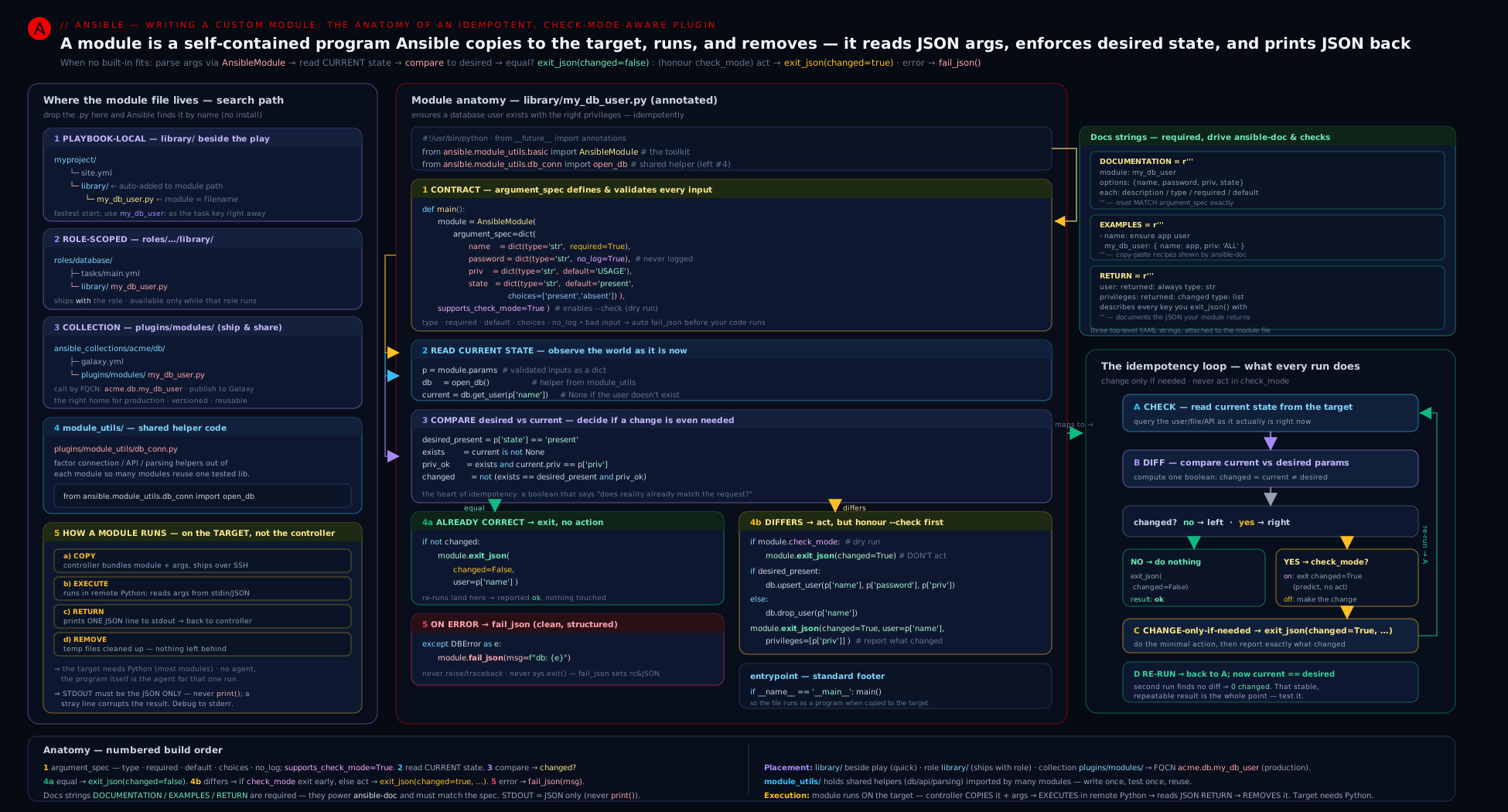
The diagram traces the full round trip: how a task’s parameters become a packaged payload, how the module validates and runs on the target, where the check-mode gate and the read-compare-change loop sit, and how the single JSON return flows back to drive register, --diff, and handlers on the control node.
Hands-on lab
You will write the worked module to library/, then drive it from a playbook to prove idempotency, check mode, and diff — entirely on localhost, cost ₹0.
1. Project layout
Create a working directory and drop the module in library/ (copy the complete worked module above into library/json_config.py):
mkdir -p ~/ansible-module-lab/library
cd ~/ansible-module-lab
# create library/json_config.py with the worked module's contents (your editor)
Add a minimal ansible.cfg so the local library/ is on the path (it is by default when adjacent, but being explicit helps):
# ansible.cfg
[defaults]
inventory = localhost,
library = ./library
host_key_checking = False
2. Confirm Ansible sees the module and its docs
ansible-doc -M ./library json_config
Expected: the rendered help — short description, the path/key/value/state/backup options, the file-attribute options (from the doc fragment), and check_mode/diff support. If ansible-doc errors, your DOCUMENTATION YAML is malformed — fix it before going further (this is exactly how the doc block earns its keep).
Generate a task snippet:
ansible-doc -M ./library --snippet json_config
3. A playbook that exercises every behaviour
Create play.yml:
---
- name: Exercise the custom json_config module
  hosts: localhost
  gather_facts: false
  vars:
    cfg: /tmp/myapp.json
  tasks:
    - name: First run — create the key (should report CHANGED)
      json_config:
        path: "{{ cfg }}"
        key: feature_x_enabled
        value: true
        state: present
        mode: "0644"
      register: first

    - name: Second run — identical (should report OK, changed=false)
      json_config:
        path: "{{ cfg }}"
        key: feature_x_enabled
        value: true
        state: present
        mode: "0644"
      register: second

    - name: Assert idempotency
      ansible.builtin.assert:
        that:
          - first.changed | bool
          - not (second.changed | bool)
        success_msg: "Idempotent: first run changed, second did not."

    - name: Show the managed path the module returned
      ansible.builtin.debug:
        var: second.path
4. Run it and read the results
ansible-playbook play.yml
Expected: the first task is changed (yellow), the second is ok (green), and the assert passes — proof of idempotency. Inspect the file:
cat /tmp/myapp.json
# {
#   "feature_x_enabled": true
# }
5. Prove check mode and diff
Run again, changing the value, in check + diff mode:
ansible-playbook play.yml --check --diff -e '{"_unused":0}' \
  --extra-vars 'cfg=/tmp/myapp.json'
Now flip the value to test prediction without writing — edit the first task’s value: true to value: false and run:
ansible-playbook play.yml --check --diff
cat /tmp/myapp.json     # STILL shows true — check mode wrote nothing
Expected: the play reports the task as changed and --diff prints a before/after showing true → false, but the file on disk is unchanged — exactly the contract: predict, do not act. Run the same without --check and the file updates and a re-run goes green again.
6. Validation checklist
ansible-doc -M ./library json_configrenders full help → the doc blocks are valid.- First run
changed, second runok→ idempotency works. --check --diffshows the diff but leaves/tmp/myapp.jsonuntouched → check mode is honoured.registeredsecond.pathprints the path → the extra return key flows back to the play.
7. Cleanup
rm -rf ~/ansible-module-lab /tmp/myapp.json /tmp/myapp.json.*~
Cost note: ₹0. Everything ran against localhost with ansible-core; no cloud resources, no managed nodes, nothing to deallocate.
Going deeper
The lesson so far builds a correct module. This is the professional layer on top: how a module actually reaches the target, how to debug one on the wire, how to test it the way a collection maintainer must, and the escape hatch — an action plugin — for work a module physically cannot do.
How the module reaches the target (and how to debug it there)
When a task runs, Ansible builds an AnsiBallZ payload: a self-extracting Python zip holding your module, the module_utils it imports, and a small bootstrap. That payload is copied to ~/.ansible/tmp/... on the target, executed by whatever interpreter discovery resolved (ansible_python_interpreter, default auto — Ansible probes the managed node for a sensible python3), then deleted. The module reads its arguments from a file the bootstrap wrote, not from a human-typed command line.
Two levers make that machinery visible when a module misbehaves:
# Keep the exploded payload on the target instead of deleting it:
ANSIBLE_KEEP_REMOTE_FILES=1 ansible-playbook play.yml -vvv
# The -vvv output prints the remote AnsiBallZ path, whose wrapper supports:
python ~/.ansible/tmp/ansible-tmp-*/AnsiballZ_json_config.py explode   # unpack to ./debug_dir/
python ~/.ansible/tmp/ansible-tmp-*/AnsiballZ_json_config.py execute   # run the unpacked copy
explode unpacks the module, its module_utils, and the exact args file into an editable debug_dir/ — the fastest way to step through a failing module with the real arguments it was called with. For a pure-Python module you can also drive it straight from an args file (this is what Ansible’s own hacking/test-module.py does):
printf '%s' '{"ANSIBLE_MODULE_ARGS": {"path": "/tmp/t.json", "key": "k", "value": 1, "_ansible_check_mode": true}}' > /tmp/args.json
python library/json_config.py /tmp/args.json     # prints the module's JSON to stdout
The _ansible_* keys (_ansible_check_mode, _ansible_diff, _ansible_verbosity, _ansible_no_log, …) are the internal parameters Ansible injects; AnsibleModule reads them to populate module.check_mode, module._diff, and the rest. Flipping _ansible_check_mode by hand is exactly how you exercise the dry-run path outside a playbook.
Sanity and unit tests
A module you intend to ship must pass ansible-test sanity — the schema/style gate. It checks that the three doc blocks exist and validate, that DOCUMENTATION.options matches the argument_spec, that the __future__/__metaclass__ boilerplate and shebang are present, that you use no bare print(), that examples use FQCN, and more. It runs from a collection layout:
# from the collection root, e.g. .../ansible_collections/kloudvin/platform/
ansible-test sanity --docker default plugins/modules/json_config.py
Unit tests exercise your logic with no target at all, using pytest. The idiom mocks exit_json/fail_json (which normally sys.exit) so they raise catchable exceptions, feeds arguments through set_module_args, and asserts on the result dict:
# tests/unit/plugins/modules/test_json_config.py
import json
import pytest
from unittest.mock import patch
from ansible.module_utils import basic
from ansible.module_utils.common.text.converters import to_bytes
from ansible_collections.kloudvin.platform.plugins.modules import json_config


class AnsibleExitJson(Exception):
    pass


class AnsibleFailJson(Exception):
    pass


def set_module_args(args):
    basic._ANSIBLE_ARGS = to_bytes(json.dumps({'ANSIBLE_MODULE_ARGS': args}))


def exit_json(*args, **kwargs):
    raise AnsibleExitJson(kwargs)


def fail_json(*args, **kwargs):
    raise AnsibleFailJson(kwargs)


def test_creates_key_reports_changed(tmp_path):
    set_module_args({'path': str(tmp_path / 'c.json'), 'key': 'k', 'value': 1, 'state': 'present'})
    with patch.multiple(basic.AnsibleModule, exit_json=exit_json, fail_json=fail_json):
        with pytest.raises(AnsibleExitJson) as result:
            json_config.main()
    assert result.value.args[0]['changed'] is True


def test_second_run_is_idempotent(tmp_path):
    cfg = tmp_path / 'c.json'
    cfg.write_text('{"k": 1}')
    set_module_args({'path': str(cfg), 'key': 'k', 'value': 1, 'state': 'present'})
    with patch.multiple(basic.AnsibleModule, exit_json=exit_json, fail_json=fail_json):
        with pytest.raises(AnsibleExitJson) as result:
            json_config.main()
    assert result.value.args[0]['changed'] is False   # already converged
Run them with ansible-test units --docker default in a collection, or pytest directly if your import paths resolve. Those two tests are the idempotence acceptance test — first run changes, second run is a no-op — now automated and running in CI without a managed node.
When a module is not enough: action plugins
A module runs on the target and only sees what it was shipped. Some jobs need controller-side work first — reading a file from the control node, rendering a Jinja2 template, resolving a lookup — before anything runs on the target. That controller-side half is an action plugin (plugins/action/<name>.py): it runs inside the Ansible process, does the local work, then typically calls self._execute_module(module_name=..., module_args=..., task_vars=...) to invoke the matching module on the target. ansible.builtin.template, copy, and assemble are all built this way — a thin action plugin on the controller feeding a module on the target. You rarely need one, but when your module’s inputs must be computed from control-node state, this is the supported pattern (and it sits squarely on the EX374 “plugins and modules” objective). The next lesson covers the plugin side in full.
Common beginner mistakes
These are misconceptions about the model, not symptoms to look up — the troubleshooting table below is the symptom -> fix reference; this is the “why you were thinking about it wrong.”
- “I’ll
print()the result, or print for debugging.” The wrong model treats a module like a normal script whose output is text for a human. A module’s stdout is a typed channel carrying exactly one JSON object; anything else you write there corrupts the contract and Ansible reports “Unexpected output.” Right model: the module speaks JSON to Ansible, not text to a person — return data viaexit_json(key=...), surface notes viamodule.warn(), and debug with-vvvor the AnsiBallZexploderoute. - “
AnsibleModulemakes my module idempotent.” It does not.AnsibleModulevalidates inputs; it knows nothing about the resource you manage. If your code does the work unconditionally and returnschanged=True, you have built a shell-out with a schema. Right model: idempotency is your logic — read current state, compare, act only on drift. The helper cannot do that for you, because only you know what “already in the desired state” means for your resource. - “I set
supports_check_mode=True, so check mode works.” The flag is a promise, not an implementation. Declaring it without gating your writes means--checkwill happily make real changes — the worst outcome, because operators trust a dry run. Right model: the flag and theif module.check_mode: module.exit_json(...)guard before any mutation are two halves of one contract; ship them together or not at all. - “The parameter is called
password, so Ansible will obviously hide it.” Only names that look secret get auto-no_log, and you should never lean on that heuristic. A credential namedapi_key,secret, orclient_credentialthat you forgot to mark leaks into-voutput and theinvocationecho. Right model: explicitly setno_log=Trueon every secret argument — treat it as part of declaring the parameter, not an afterthought. - “
changed=Truejust means the task ran.” Beginners returnchanged=Truewhenever the module reaches the end successfully. Butchangedmeans “I altered the managed system on this run” — nothing more, nothing less. Returning it unconditionally fires handlers needlessly, breaks the idempotence test, and makes every report noisy. Right model:changedis computed from the read-vs-desired comparison, and a converged system yieldschanged=Falseeven though the task ran fine. - “
fail_jsonis likeraise; I’ll add a message later.”fail_jsonrequiresmsg, and that message is the operator’s only clue when the task goes red at 3 a.m. Skipping it (or writingmsg="error") throws away the one affordance a failure has. Right model: everyfail_jsoncarries a specific, actionablemsg("File %s is not valid JSON: %s"), with machine-readable context in extra keys. - “I need
requests, so I’ll justimport requestsat the top.” The wrong model assumes the target has your control node’s Python environment. Only the standard library andmodule_utilsare shipped in the AnsiBallZ payload; a bare third-party import raisesImportErroron the managed node. Right model: guard the import (try/except ImportError,HAS_REQUESTS) andfail_jsonwith an install hint, or vendor the code intomodule_utils.
Common mistakes & troubleshooting
| Symptom | Cause | Fix |
|---|---|---|
Module always reports changed=true, breaks the idempotence test, fires handlers every run |
No read-compare step — the module just acts every time | Implement the read current → compare → return unchanged if equal loop; set changed from the comparison, not unconditionally |
Task is skipped under --check (shows skipping) |
supports_check_mode not set (defaults to False) |
Add supports_check_mode=True to AnsibleModule(...) and actually honour module.check_mode (gate the write) |
--check made a real change |
A mutating call runs before the if module.check_mode: gate |
Move all reads first; ensure the single write sits after the check-mode exit |
ansible-doc errors or shows nothing |
DOCUMENTATION YAML malformed, not a top-level string, or options don’t match argument_spec |
Validate the YAML; keep the three blocks as module-level r'''…''' strings; mirror the argument_spec exactly |
ImportError on the target for a library you imported |
Only stdlib and module_utils are shipped; third-party imports are not |
Vendor the code into module_utils, or guard the import (HAS_X) and fail_json with an install hint |
module not found though the file exists |
Wrong search path or filename ≠ module name | Put it in adjacent library/ (or set library/ANSIBLE_LIBRARY); name the file <module>.py; for collections call by FQCN |
Secret value leaked into -v output / invocation |
Missing no_log=True on the secret parameter |
Add no_log=True to that arg in argument_spec; never print() secrets or include them in msg |
fail_json raises TypeError about missing msg |
fail_json called without the required msg |
Always pass msg="…" to fail_json; put extra context in additional keys |
print() debugging breaks the module (“Unexpected output” / JSON parse error) |
Anything on stdout besides the final JSON corrupts the contract | Never print(); use module.warn(), module.debug(), -vvv, or module.exit_json(..., debug=...) |
| Changes lost or partial file on crash | Non-atomic write | Use module.atomic_move(tmp, dest) (write temp, then move) — never write the destination in place |
Best practices
- Idempotency is the spec, not a feature. Always read-compare-change; a re-run of any module must report
changed=False. Treat the idempotence test (run twice, second runchanged=0) as the acceptance criterion. - Support check mode and diff, and advertise it in the
attributes:doc block. Gate all writes behind thecheck_modeguard; build a meaningfuldiff. - Validate at the edge with
argument_spec. Usetype,choices,required,no_log, and the cross-argument rules (required_if,mutually_exclusive, …) soAnsibleModulerejects bad input with clean messages — never hand-roll validation you can declare. - Exit only through
exit_json/fail_json. Noprint(), nosys.exit(), noreturnof results. Pass a usefulmsgtofail_json. - Use Ansible’s helpers:
module.run_command()for shelling out (it handles quoting, env, and returns rc/stdout/stderr),module.atomic_move()for safe writes,module.backup_local()for backups,add_file_common_args+set_fs_attributes_if_differentfor file attributes,env_fallbackfor env-var defaults. - Import only stdlib and
module_utils. Put shared code inmodule_utils; guard genuinely-needed third-party libraries and fail cleanly if absent. - Write all three doc blocks and keep
DOCUMENTATION.optionsin lockstep withargument_spec. Document every return key inRETURN— those keys are your public API; keep them stable. - Ship modules in a collection (
plugins/modules/, called by FQCN) once they outgrow a one-off; uselibrary/only for prototyping and truly project-private modules. - Keep modules single-purpose and stateless between runs — they read the world, converge one resource, and report. Orchestration belongs in roles/playbooks, not inside a module.
Security notes
- Scrub secrets with
no_log=Trueon every credential/token/password argument.AnsibleModulethen removes the value from-voutput, theinvocationecho, and logs. Never include a secret inmsg, a returned key, or aprint(). - Prefer
module.run_command([...] , ...)with an argument list over a shell string — passing a list avoids shell interpolation and command-injection from untrusted parameters. Avoiduse_unsafe_shell=True. - Validate and constrain inputs (
choices,type='path', explicit checks) so a malicious or fat-fingered parameter cannot make the module do something dangerous (path traversal, writing outside an expected directory). - Write atomically and back up (
atomic_move,backup_local) so a failure cannot leave a half-written config or destroy the previous good file. - Honour
no_logon whole tasks too: a caller can setno_log: trueon the task; your module should not defeat that by echoing inputs. Returning the secret in a key would surface it underregister— do not. - Mind
check_modefor read safety: even your read path should avoid side effects (don’t create resources “to inspect them”); a--checkrun must be safe to run against production. - Pin and review
module_utilsyou import — shared code runs with the module’s privileges on the target. Treat it as part of your trusted computing base, especially in a shared collection.
Interview & exam questions
- Where does a module run, and how does that differ from a plugin? A module runs on the managed node (or the control node acting as target for local connections): Ansible bundles it via AnsiBallZ, ships it, runs it with the target’s Python, and reads one JSON line from stdout. A plugin runs in the Ansible process on the control node, extending Ansible itself (filter, lookup, callback, connection). “Does work on the target → module; transforms data/hooks Ansible → plugin.”
- What is the module’s return contract, and which keys does Ansible interpret specially? The module prints one JSON object. Ansible specially understands
changed,failed,msg,ansible_facts,diff,warnings,deprecations, andinvocation; every other key flows back under the task’sregister. You finish withmodule.exit_json(**result)(success) ormodule.fail_json(msg=…)(failure) — neverprint()/return. - How do you make a module idempotent? Read the current state, compare it to the desired state from the params, and act only if they differ, setting
changedfrom the comparison. If already converged, returnchanged=False. This is what makes a second run reportchanged=0. - What does
supports_check_mode=Truedo, and what must you also do? It tells Ansible the module is safe under--check(without it, the task is skipped in check mode). You must also honourmodule.check_mode: compute the would-bechangedand build thediff, but gate every write behindif module.check_mode: module.exit_json(...)so nothing is actually changed. - List five
argument_speckeys and what each does.type(declare/coerce the type),required(must be supplied),default(value when omitted),choices(enumerated valid values),no_log(scrub from output/logs); plusaliases,elements(item type for lists),options(nested sub-spec for dicts), andfallback(e.g.env_fallback). - Name the cross-argument constraints and give an example use.
mutually_exclusive(at most one — e.g.content/src),required_together(all-or-none —username/password),required_one_of(at least one —content/src),required_if(X==V ⇒ others required —state==present ⇒ name),required_by(X set ⇒ others required —auth_token ⇒ endpoint). They letAnsibleModulevalidate relationships so you don’t hand-code the checks. - What are the three documentation blocks and why are they top-level strings?
DOCUMENTATION(the module + every option),EXAMPLES(runnable FQCN tasks), andRETURN(every returned key). They are module-level assignments (raw strings) soansible-doccan extract them by parsing the file without importing it; the sanity tests validate them, andDOCUMENTATION.optionsmust mirrorargument_spec. - Where can a module live, and what is the precedence? Adjacent
library/(project-wide; searched first, overrides built-ins), a role’slibrary/(while that role runs), and a collection’splugins/modules/(production, addressed by FQCN). Locallibrary/wins over rolelibrary/wins over collection wins over built-in — local overrides take priority. - What is
module_utilsfor, and what is special about it? Shared Python imported by modules. It is the only extra code AnsiBallZ ships to the target alongside the module, so imports frommodule_utilswork on the managed node (arbitrary third-party imports do not). Project:module_utils/<name>.py→from ansible.module_utils.<name> import …; collection:plugins/module_utils/→from ansible_collections.<ns>.<coll>.plugins.module_utils.<name> import …. - How do you return a value that becomes a host variable versus one consumed by
register? Return it underansible_factsto inject it as an ambient host variable (noregisterneeded); return it under any other key to expose it through the task’s **register**ed result. Useansible_factsfor discovered/ambient state, a plain key for this task’s result. - How should a module shell out, and why does it matter for security? Use
module.run_command([...] )with an argument list (not a shell string) — it handles quoting/env, returns(rc, stdout, stderr), and avoids shell injection from untrusted params. Avoiduse_unsafe_shell=True. For secrets, setno_log=Trueso values are scrubbed. - You added
print("debug")and the module breaks with a JSON error — why? The return contract requires only the final JSON on stdout. Any extra stdout corrupts it. Usemodule.warn(),module.debug(),-vvv, or return adebugkey viaexit_jsoninstead ofprint().
Quick check
- After your module determines the system is already in the desired state, what value must
changedbe, and what does that prove on a second run? - Which constructor flag must you set so
--checkdoes not skip your module, and what must you do in the code to back it up? - Name the two methods a module must use to finish — one for success, one for failure — and the one argument the failure method requires.
- You import
requestsat the top of a module and it works on the control node but fails on the target. Why, and what is the fix? - Which return key turns a value into an ambient host variable that the rest of the play can use without
register?
Answers
changed=False— and a second, identical run reportingchanged=0is the proof of idempotency. Setchangedfrom the read-vs-desired comparison, never unconditionally.supports_check_mode=TrueinAnsibleModule(...). You must also honourmodule.check_mode: gate every mutating call behindif module.check_mode: module.exit_json(**result)so check mode predicts (changed=Trueif it would change) but never writes.module.exit_json(**result)for success andmodule.fail_json(msg=…)for failure;fail_jsonrequiresmsg. Neverprint()orreturnresults.- Ansible ships only the standard library and
module_utilsto the target (via AnsiBallZ); arbitrary third-party imports are not bundled, sorequestsis absent on the managed node. Fix: vendor the needed code intomodule_utils, or guard the import (try/except ImportError,HAS_REQUESTS) andfail_jsonwith an install hint. ansible_facts— returning a dict underansible_factsinjects those keys as host variables for the rest of the play (noregisterneeded).
Practice challenges
Six graded exercises that build on the worked json_config module. Each runs on localhost for INR 0. Do them in order — they escalate from a one-line argument_spec tweak to an automated unit test. Try each before opening the solution.
1 - Beginner: add a secret argument that never leaks. Add an api_token parameter to json_config that is scrubbed from all output and can also be supplied by the MY_API_TOKEN environment variable. Run the play with -vvv and confirm the value never appears.
<details> <summary>Solution</summary>
from ansible.module_utils.basic import AnsibleModule, env_fallback
# ...
argument_spec = dict(
    # ...existing keys...
    api_token=dict(type='str', no_log=True,
                   fallback=(env_fallback, ['MY_API_TOKEN'])),
)
Add a matching api_token: entry to DOCUMENTATION.options (type: str), then run ansible-playbook play.yml -vvv — the value is shown as VALUE_SPECIFIED_IN_NO_LOG_PARAMETER.
Why: no_log=True removes the value from -v output and the invocation echo; fallback=(env_fallback, [...]) lets an environment variable supply it when the task omits it.
</details>
2 - Beginner: prove that “always changed” is a bug. Temporarily insert result['changed'] = True just before the final module.exit_json(**result), run ansible-playbook play.yml twice, and watch the idempotency assert fail. Then revert it.
<details> <summary>Solution</summary>
With the forced line, the second run reports changed and the assertion not (second.changed | bool) fails — because changed no longer reflects reality. Remove the line so changed is set only by the read-vs-desired comparison.
Why: the idempotence acceptance test is “run twice, second run changed=0”; hard-coding changed=True breaks it and would fire handlers on every run.
</details>
3 - Intermediate: add a validated format choice. Add a format parameter with choices=['pretty', 'compact'] (default pretty) controlling whether the file is written pretty-printed or compact. Pass format: fancy and read the error.
<details> <summary>Solution</summary>
argument_spec = dict(
    # ...
    format=dict(type='str', default='pretty', choices=['pretty', 'compact']),
)
# in write_config, pick the json.dump kwargs from module.params['format']
ansible-playbook play.yml -e format=fancy fails before your logic runs with value of format must be one of: pretty, compact, got: fancy.
Why: choices makes AnsibleModule validate the input at the edge and reject bad values with a clean message — you never hand-write that check. Make sure formatting alone does not flip changed: compare the parsed data, not the serialized text.
</details>
4 - Intermediate: full diff and check-mode safety for deletion. Confirm the absent path builds a diff and is safe under --check: run --check --diff against a file that has the key, verify the diff shows the key being removed, and confirm the file is untouched afterwards.
<details> <summary>Solution</summary>
The worked module already builds diff from current vs desired (where desired pops the key) and gates the write behind if module.check_mode: module.exit_json(**result). So:
ansible-playbook delete.yml --check --diff   # shows the "feature_x_enabled" line being removed
cat /tmp/myapp.json                          # key still present — check mode wrote nothing
Why: removal is the same read -> compare -> gate loop mirrored — the single check_mode guard before the write makes both directions safe under --check.
</details>
5 - Advanced: extract the helpers into module_utils. Move read_config and write_config into module_utils/json_state.py (keeping the from __future__/__metaclass__ boilerplate), import them in the module, and prove the play still runs.
<details> <summary>Solution</summary>
# module_utils/json_state.py
from __future__ import absolute_import, division, print_function
__metaclass__ = type
import json, os
# ... read_config / write_config moved here (they take `module` as first arg) ...
# library/json_config.py
from ansible.module_utils.basic import AnsibleModule
from ansible.module_utils.json_state import read_config, write_config
Set module_utils = ./module_utils under [defaults] in ansible.cfg if it is not found, then re-run ansible-playbook play.yml — identical behaviour.
Why: module_utils is the only extra code AnsiBallZ bundles and ships to the target alongside the module, so the import resolves on the managed node — this is exactly the collection pattern (plugins/module_utils/), rehearsed locally.
</details>
6 - Advanced: write a pytest unit test for the contract. Write a unit test that drives json_config.main() with mocked exit_json/fail_json and asserts first-run changed=True, second-run changed=False. Run it with pytest.
<details> <summary>Solution</summary>
Use the set_module_args + mocked-exit pattern from Going deeper (the AnsibleExitJson/AnsibleFailJson helpers, patch.multiple(basic.AnsibleModule, ...), then assert on result.value.args[0]['changed']). The first test seeds an empty dir; the second pre-writes {"k": 1} so the module finds the key already converged.
pytest tests/unit/plugins/modules/test_json_config.py -q # representative: 2 passed
Why: this encodes the idempotence contract — first run changes, second run is a no-op — as an automated test that needs no managed node, exactly what ansible-test units runs in CI.
</details>
Exercise
Extend the worked json_config module into a small but production-shaped piece of work (cost ₹0, all on localhost). (a) Add a new parameter present_only_if_absent of type='bool' default false; when true and state: present, the module must not overwrite an existing key (it should report changed=False if the key already exists with any value) — implement this with the read-compare logic, not a post-hoc check. (b) Add a value validation: if state: present and the existing value is a dict but the new value is a scalar, fail_json with a clear message — and prove the message is helpful by triggering it. © Add full diff output for the absent path and confirm --diff shows the key being removed. (d) Move the read_config/write_config helpers into module_utils/json_state.py and import them, proving the module still runs (this exercises the module_utils shipping mechanism). (e) Write a second playbook that runs the module twice with --check and uses ansible.builtin.assert to prove the file on disk never changed in check mode. (f) Run ansible-doc -M ./library json_config after every change and keep DOCUMENTATION.options in sync with the argument_spec — note in one sentence what ansible-doc does when they drift. (g) Clean up. In two sentences, explain why the new behaviour belongs in the read-compare step (so changed stays truthful and check mode keeps working) rather than being bolted on after the write.
Certification mapping
- EX374 (Red Hat Certified Specialist in Developing Automation with Ansible Automation Platform) — “Create Ansible plugins and modules”: this lesson maps directly. Expect to write a module with a correct
argument_spec(types,required,choices,no_log, cross-argument rules), make it idempotent, support check mode (supports_check_mode+ honouringmodule.check_mode), return results viaexit_json/fail_json, write theDOCUMENTATION/EXAMPLES/RETURNblocks, and place it correctly (collectionplugins/modules/, addressed by FQCN). Knowingmodule_utilsand the build/test flow is part of the objective. - EX374 — “Manage content collections”: modules in production live in a collection (
plugins/modules/,plugins/module_utils/), versioned and distributed — the placement and FQCN material here is the entry point to that objective. - RHCE (EX294): writing modules is not an RHCE objective, but RHCE-level fluency with idempotency,
changed_when/failed_when,register, and--check/--diffis the prerequisite mindset — this lesson formalises those into the module contract. - Beyond the exams: the same skills underpin building plugins (next lesson — control-node code) and shipping collections and execution environments, which is how platform teams package and distribute custom automation in Automation Platform (AAP).
Glossary
- Module — a program Ansible ships to and runs on the target; performs a unit of work and returns a single JSON object with
changed. - Plugin — code that runs on the control node, extending Ansible itself (filter, lookup, callback, connection, …); the subject of the next lesson.
AnsibleModule— the helper class (ansible.module_utils.basic) that parses/validates parameters, handles JSON I/O, and providesexit_json,fail_json,check_mode,run_command, and filesystem helpers.argument_spec— the dict declaring each parameter (type,required,default,choices,no_log,aliases,elements,options,fallback, …).- Cross-argument rules — relationship constraints passed to
AnsibleModule:mutually_exclusive,required_together,required_one_of,required_if,required_by. exit_json/fail_json— the only correct ways to finish a module: print the result JSON and exit (0 for success; 1 with requiredmsgfor failure).changed— the boolean stating whether the module altered the system this run; drives idempotence,--checkreporting, andnotify/handlers.ansible_facts— a returned dict whose keys are injected as host variables for the rest of the play (noregisterneeded).diff— a returned{'before':…, 'after':…}dict shown under--diff.check_mode— dry-run flag (module.check_mode); whenTrue, predict changes (changed=Trueif it would change) without making them; enabled viasupports_check_mode=True.- Idempotency — the property that running a module twice changes the system at most once; implemented by the read → compare → change-only-on-drift loop.
module_utils— shared Python imported by modules; the only extra code AnsiBallZ ships to the target alongside the module.- AnsiBallZ — Ansible’s wrapper that bundles the module plus its
module_utilsinto one executable payload for the managed node. DOCUMENTATION/EXAMPLES/RETURN— the three top-level YAML strings that document the module; parsed byansible-docand validated by the sanity tests.library/— a directory (adjacent to a playbook or set inansible.cfg) where project-local modules live; searched first, overriding built-ins.- FQCN — Fully-Qualified Collection Name (
namespace.collection.module); the way a module shipped in a collection is addressed. no_log—argument_specflag that scrubs a parameter’s value from output,-vlogs, and theinvocationecho; set it on every secret.- Sanity tests —
ansible-test sanity: schema/style checks (doc presence,__future__/__metaclass__boilerplate, FQCN, no-print, doc-vs-spec match) that a collection module must pass. - AnsiBallZ
explode/execute— debug subcommands on the wrapper left on the target byANSIBLE_KEEP_REMOTE_FILES=1:explodeunpacks the module +module_utils+ args into an editabledebug_dir/;executeruns that unpacked copy. ANSIBLE_KEEP_REMOTE_FILES— environment variable that stops Ansible deleting the shipped module on the target, enabling theexplode/executedebug workflow.- Interpreter discovery — how Ansible chooses the target’s Python to run the payload (
ansible_python_interpreter, defaultauto, which probes the managed node for a suitablepython3). _ansible_*parameters — internal keys Ansible injects alongside your args (_ansible_check_mode,_ansible_diff,_ansible_verbosity, …) thatAnsibleModulereads to populatemodule.check_mode,module._diff, and friends.ansible-test— the collection test runner:ansible-test sanity(the schema/style gate) andansible-test units(the pytest-based unit-test runner), typically run with--docker default.- Unit test (
set_module_argspattern) — apytesttest that drivesmain()with mockedexit_json/fail_json(made to raise) and arguments injected viaset_module_args, asserting on the returned dict — no managed node required. - Action plugin — controller-side code (
plugins/action/<name>.py) that runs inside the Ansible process, does local work (templating, reading control-node files), then typically calls the matching module on the target viaself._execute_module(...); howtemplate/copyare built.
Next steps
You can now write a real, idempotent, check-mode-aware custom module end to end — choosing a module over a role/command/script/uri; instantiating AnsibleModule with a complete argument_spec and the cross-argument rules; returning results through the exit_json/fail_json contract (changed, diff, ansible_facts); implementing the read → compare → change-only-on-drift loop and honouring module.check_mode; placing the module in library/, a role’s library/, or a collection’s plugins/modules/; writing the DOCUMENTATION/EXAMPLES/RETURN blocks; and sharing code via module_utils, with debugging and sanity/unit testing on the side. The natural next move is the other half of “developing Ansible”: Ansible plugins, in depth — filter, lookup, callback, and connection plugins, the code that (unlike modules) runs on the control node and extends Ansible itself, with worked filter and lookup examples. From there, package what you have built: revisit roles & collections to bundle your module and module_utils into a versioned, FQCN-addressed collection ready for Galaxy or Automation Hub.