In a nutshell
Before the depth below, here is the whole lesson in plain language. When you write a document, a spell-checker underlines the typos, and a proofreader catches the sentences that are spelled perfectly but still wrong — the “their/there” slips, the paragraph that contradicts the one before it. Linting Ansible is exactly that, for playbooks. yamllint is the spell-checker: it reads the file and flags the mechanical stuff — a mis-indented line, a line that runs too long, a stray trailing space, a yes where it wanted true. ansible-lint is the proofreader: it understands Ansible, so it flags things that parse fine but are still wrong — a bare copy: that should be ansible.builtin.copy:, a command that will fire on every single run, a state: latest that quietly upgrades packages behind your back.
Then there is one check that is not about style at all: the idempotence test. The whole promise of Ansible is that a playbook describes how a machine should end up, not a list of commands to fire. Here is how you prove it — run the playbook twice. The first run does the work; the second run, against a machine that is already correct, should change nothing (changed=0). If the second run keeps “changing” things that are already done, your playbook is really a script wearing a costume, and this test takes the costume off.
The last piece is making all of it automatic. You do not want to remember to run the checks — you want them to run themselves: on your own machine before a commit (pre-commit) and on the server before a merge (CI), so broken automation simply cannot reach the shared branch. Spell-check, proofread, prove-it-runs-clean-twice — wired so they happen without anyone asking. That is the entire lesson; everything below is the detail.
Level: Advanced · Time: ~40 min
A playbook that runs is not the same as a playbook that is correct. It can be syntactically valid, finish green, and still be a liability: a command task that re-runs every time and reports changed on a converged host, a bare package name that breaks the moment two collections both define one, a hard-coded password sitting in plain YAML, an ignore_errors: true swallowing a real failure, two-space-here-four-space-there indentation that the next reviewer cannot read. Linting and testing are how you catch all of that before it reaches a host — and, just as importantly, before it reaches a code review where a human has to notice it by eye. This is the discipline that turns “automation that happened to work on my laptop” into “automation a team trusts in production.”
There are four gates, and they run cheapest-first. yamllint checks that the file is well-formed YAML and stylistically consistent — indentation, line length, trailing spaces, the infamous yes/no truthy trap. ansible-lint checks that the Ansible is correct and idiomatic — hundreds of rules grouped into profiles (min → basic → safety → shared → production) that codify community best practice, from “use FQCNs” to “never ignore_errors silently” to “this command should be a module.” ansible-playbook --syntax-check parses the play graph without touching a host. And the idempotence test — the single most important behavioural test in all of Ansible — runs your playbook twice and demands the second run report zero changed: the proof that your automation describes a desired state and not a script that fires every time. Above these sits Molecule (full converge-and-verify against real containers) and integration tests, which the Molecule lesson covers in depth — here we wire the foundation and defer the scenario detail to it.
This lesson is the exhaustive version. By the end you will know every yamllint rule worth caring about and how to tune it with a .yamllint file; the full ansible-lint picture — installation, the rule/tag taxonomy, the five profiles and exactly what each adds, the --fix/transform auto-remediation, the three list controls skip_list/warn_list/enable_list, the .ansible-lint config, inline # noqa suppressions, and writing a custom rule; the idempotence test end to end (what it proves, what breaks it, and how changed_when/creates fix it); --syntax-check; the Ansible testing pyramid; and how to wire all of it into CI with pre-commit, a GitHub Actions matrix and GitLab CI. Every option gets the same treatment — what it is · the choices · the default · when to use it · the trade-off · the gotcha — and everything reflects current ansible-core 2.17+ / ansible-lint 24+ / yamllint 1.35+ (2026), with FQCNs throughout.
Learning objectives
By the end of this lesson you can:
- Run and configure yamllint — understand each rule, write a
.yamllint, and fix thetruthy,line-length,indentation, andoctal-valuestraps. - Install and run ansible-lint, read its output, and target a profile (
min/basic/safety/shared/production) appropriate to your maturity. - Use
ansible-lint --fixto auto-remediate, and control rules withskip_list,warn_list,enable_list, inline# noqa, and a project.ansible-lintfile. - Explain and execute the idempotence test — the second-run-zero-changed gold standard — and fix the classic breakers with
changed_when,creates/removes, andcheck_mode. - Run
ansible-playbook --syntax-checkand place every gate correctly in the Ansible testing pyramid (lint → syntax → idempotence → Molecule → integration). - Wire all gates into CI: a pre-commit config, a GitHub Actions matrix, and a GitLab CI pipeline — failing the build on lint, syntax, or idempotence regressions.
- Write a minimal custom ansible-lint rule and know when a custom rule (vs
skip_list) is the right tool.
Prerequisites & where this fits
You should be comfortable writing a playbook (a play with hosts, become, tasks, handlers), addressing modules by FQCN (ansible.builtin.copy, not copy), and the idea of idempotence from the fundamentals lesson — that a well-written task converges to a desired state and does nothing on a second run. Familiarity with roles helps, because lint and idempotence are most valuable applied to reusable roles. In the Ansible Zero-to-Hero programme this is the Testing tier’s foundation: it builds on Ansible roles & collections (the thing you are linting and testing) and pairs with idempotent collections with Molecule testing (the full container-based test harness that sits one rung above these gates). It leads into debugging Ansible — because when a gate fails, you need check mode, --diff, and the debugger to find out why. Think of this lesson as installing the smoke detectors and tripwires; Molecule is the full fire drill.
Core concepts
Hold four mental models throughout.
1. Static analysis vs behavioural testing. yamllint, ansible-lint, and --syntax-check are static — they read your files and judge them without running them against a host. They are instant, deterministic, and free. The idempotence test and Molecule are behavioural — they actually execute the automation and observe what it does. Static analysis catches how it is written; behavioural testing catches what it does. You need both: a playbook can be perfectly linted and still be non-idempotent.
2. The cheapest gate fails first. Order matters. yamllint (milliseconds) → ansible-lint (seconds) → --syntax-check (seconds) → idempotence (minutes) → Molecule (minutes, needs containers) → integration (slow, needs real infra). Run them in that order in CI so a contributor who left a trailing space learns in two seconds, not after a ten-minute Molecule matrix. This ordering is the testing pyramid.
3. Lint encodes opinion; you choose how strict. ansible-lint is not one fixed ruleset — it is a graduated set of profiles. A brand-new repo might start at basic (fix the egregious stuff) and ratchet up to production (the full discipline: FQCNs, no silent failures, named tasks, no latest packages). The profile is the policy. Picking and committing to a profile is a deliberate engineering decision, not a default to accept blindly.
4. The idempotence test is the load-bearing one. Of every gate here, the idempotence test is the one that proves the defining property of Ansible. Linters check style and idiom; the idempotence test checks the thing that makes Ansible Ansible. A green idempotence run (second pass = 0 changed) is the single strongest signal that your automation is declarative. Memorise what breaks it (next-to-always: command/shell without changed_when or creates) because that is the most common real-world bug and a guaranteed interview question.
Keep these terms straight: lint (static style/correctness check), idempotence (a second run changes nothing), profile (a named ansible-lint strictness tier), rule (one check, with an ID and tags), transform/--fix (auto-remediation), gate (a CI step that fails the build), and the pyramid (lint → syntax → idempotence → Molecule → integration, cheap-to-expensive).
yamllint: every rule and the .yamllint config
yamllint is a generic YAML linter (not Ansible-specific). It catches malformed and stylistically inconsistent YAML before ansible-lint even looks at the semantics. ansible-lint actually runs yamllint internally (the yaml rule) using your .yamllint if present, so configuring yamllint well is the foundation of the whole stack. Install it with pip install yamllint and run yamllint . to check a whole tree, or yamllint playbook.yml for one file. Output is file:line:col [level] message (rule-id); --format parsable is the machine form, --strict turns warnings into a non-zero exit (the CI setting).
Every yamllint check is a rule with three possible settings: enable (on, default config), disable (off), or a mapping of options (e.g. max:, level:). The rules that matter for Ansible:
| Rule | What it checks | Key options | The Ansible gotcha |
|---|---|---|---|
line-length |
Maximum characters per line | max (default 80), allow-non-breakable-words, level |
80 is brutal for Ansible (long module args, URLs). Most teams set max: 120 or 160, or level: warning. |
indentation |
Consistent indent width, list-item indent | spaces (int or consistent), indent-sequences (true/false/consistent/whatever), check-multi-line-strings |
The classic clash: whether list items under a key are indented or flush. Pick one and set indent-sequences explicitly. |
truthy |
Only allow real booleans | allowed-values (default ['true','false']), check-keys |
The big one. yes/no/on/off/Yes/True are flagged. Ansible historically used yes/no; modern style is lowercase true/false. |
trailing-spaces |
No whitespace at end of line | level |
Invisible, noisy in diffs; always fix. |
new-line-at-end-of-file |
File ends with \n |
level |
POSIX text-file convention; trivial and always-on. |
comments |
Spacing around # |
require-starting-space, min-spaces-from-content (default 2), ignore-shebangs |
#comment (no space) and inline comments too close to code are flagged. |
comments-indentation |
Comments align with surrounding code | level |
A comment indented oddly trips this; tidy it. |
document-start |
File begins with --- |
present (true/false) |
Ansible convention is --- present. Default requires it; set present: false to forbid it. |
document-end |
File ends with ... |
present |
Usually present: false — Ansible files don’t use .... |
empty-lines |
Limit consecutive blank lines | max (2), max-start, max-end |
Two-plus blank lines mid-file is flagged. |
empty-values |
Forbid key: with no value |
forbid-in-block-mappings, forbid-in-flow-mappings |
Off by default; catches key: typos where you forgot the value. |
octal-values |
Forbid ambiguous octal numbers | forbid-implicit-octal, forbid-explicit-octal |
File modes! mode: 0644 is implicit octal — yamllint flags it; the fix is the string mode: "0644" (which is what Ansible wants anyway). |
key-duplicates |
No duplicate keys in a mapping | forbid-duplicated-merge-keys |
Catches a copy-paste where you defined tasks: (or a var) twice — silent data loss otherwise. |
key-ordering |
Keys sorted alphabetically | (off by default) | Usually left off — Ansible task keys read better in logical order (name first). |
brackets/braces |
Spacing inside [ ] / { } |
min-spaces-inside, max-spaces-inside |
Affects flow-style lists/dicts and Jinja {{ }} spacing expectations. |
colons/commas/hyphens |
Spacing around :, ,, - |
max-spaces-before/after |
Enforces key: value (one space) and - item (one space after hyphen). |
float-values |
Restrict float forms (.inf, .nan, leading zero) |
several forbid-* |
Off by default; rarely relevant to Ansible. |
quoted-strings |
Enforce a quoting policy | quote-type (any/single/double), required (true/false/only-when-needed) |
Off by default. Useful to standardise on only-when-needed so you only quote when you must. |
anchors |
Validate YAML anchors/aliases | forbid-undeclared-aliases, forbid-duplicated-anchors |
Catches a *alias with no matching &anchor. |
yamllint ships three built-in presets you can extends: — default (all rules at sensible levels), relaxed (looser line-length, many rules warning-not-error), and disable (everything off, then opt in). Start from default and override.
A real .yamllint (place at repo root) tuned for Ansible:
---
# .yamllint — Ansible-tuned
extends: default

rules:
  line-length:
    max: 160
    level: warning            # long lines warn, don't fail the build
  truthy:
    allowed-values: ["true", "false"]   # force lowercase booleans
    check-keys: false                    # don't flag keys like `when:`
  indentation:
    spaces: 2
    indent-sequences: true    # list items indented under their key
  comments:
    min-spaces-from-content: 1
  comments-indentation: disable
  octal-values:
    forbid-implicit-octal: true   # ban mode: 0644 (use "0644")
    forbid-explicit-octal: true
  document-start:
    present: true             # require the leading ---

ignore: |
  .github/
  molecule/*/converge.yml
  collections/
Notes on the config that trip people up: level: warning on a rule means it prints but does not cause a non-zero exit unless you pass --strict — so in CI decide consciously whether --strict is on. The ignore: block (a gitignore-style glob list) is how you exclude vendored collections/ and generated files; yamllint also reads .gitignore if you set yaml-files/ignore-from-file: .gitignore. The truthy: check-keys: false line is important: without it, yamllint complains about keys named true/false/yes and even false-positives on some Ansible directives — turning key-checking off keeps it focused on values. yamllint discovers config in this order: -c <file> flag → .yamllint/.yamllint.yaml/.yamllint.yml in the working dir up the tree → $YAMLLINT_CONFIG_FILE → ~/.config/yamllint/config.
You can also suppress a single line inline with a comment — # yamllint disable-line rule:line-length on the line above (or # yamllint disable rule:truthy … # yamllint enable rule:truthy to bracket a block) — but prefer fixing over suppressing.
ansible-lint: install, run, and read the output
ansible-lint is the Ansible-aware linter. Where yamllint sees text, ansible-lint understands tasks, plays, roles, and collections and flags Ansible-specific problems. Install it into the same virtualenv as ansible-core (it imports Ansible internals, so versions must match): pip install ansible-lint. Verify with ansible-lint --version — it prints its own version and the ansible-core it bound to, which must agree with the one running your plays.
Run it by pointing at files, directories, a role, or nothing (auto-discovery):
ansible-lint                      # auto-detect playbooks/roles in the repo
ansible-lint site.yml            # one playbook (and everything it imports)
ansible-lint roles/webserver/    # a single role
ansible-lint --profile production # apply a named strictness profile
ansible-lint -v                   # verbose (show which files were scanned)
The output for each finding is dense and worth decoding:
WARNING  Listing 3 violation(s) that are fatal
yaml[line-length]: Line too long (171 > 160 characters)
site.yml:14

fqcn[action-core]: Use FQCN for builtin module actions (copy).
roles/web/tasks/main.yml:8 Task/Handler: Copy index page

risky-file-permissions: File permissions unset or incorrect.
roles/web/tasks/main.yml:8 Task/Handler: Copy index page
Each line is <rule-id>[<sub-tag>]: <message> then <file>:<line> and the offending task name. The rule ID (fqcn, risky-file-permissions, yaml) is what you reference in skip_list/warn_list and # noqa. ansible-lint groups output into “fatal” (fails the run, exit code 2) and “warnings” (printed, exit 0 unless promoted). Useful flags:
| Flag | What it does |
|---|---|
--profile <name> |
Run the named profile (min/basic/safety/shared/production). |
-q / -qq |
Quieter output; -qq suppresses the rule-listing summary. |
-p / --parseable |
One finding per line, file:line:col: [id] msg — for editors/CI. |
-f <format> |
Output format: rich (default), plain, json, codeclimate, sarif, pep8, md. sarif feeds GitHub code-scanning. |
--fix / --fix=<tags> |
Auto-apply transforms (see below). |
-x <tag/id> |
Skip these rules/tags for this run (one-off skip_list). |
-w <tag/id> |
Warn (don’t fail) on these for this run. |
--enable-list <id> |
Turn on rules that are opt-in (e.g. opt-in tagged rules like no-log-password). |
-l / --list-rules |
Print every rule with its ID, tags, version, and description. |
-L / --list-tags |
Print all tags and which rules carry them. |
--nocolor |
Disable ANSI colour (CI logs). |
-c <file> |
Use a specific config file instead of auto-discovered .ansible-lint. |
--offline |
Don’t try to install referenced roles/collections (CI determinism). |
--write |
(alias behaviour for transforms in some versions) — prefer --fix. |
--version |
Print ansible-lint + bound ansible-core versions. |
--generate-ignore |
Write a .ansible-lint-ignore baseline of current violations (adopt-on-legacy). |
ansible-lint -L (list rules) is the canonical reference — run it once and skim; there are well over a hundred rules. The high-value ones every Ansible engineer should recognise:
| Rule ID | Tags | What it flags | Why it matters |
|---|---|---|---|
fqcn |
formatting, production |
Bare module names (copy: instead of ansible.builtin.copy:) |
Ambiguity when collections collide; the #1 production rule. |
name |
idiom |
Unnamed plays/tasks, or names not starting with a capital | Unnamed tasks are unreadable in output and un---start-at-task-able. |
risky-file-permissions |
unpredictability |
file/copy/template with no mode: |
Without mode, the result depends on umask — non-deterministic. |
risky-shell-pipe |
command-shell |
shell with a pipe but no pipefail / set -o pipefail |
A failing first command in a pipe goes unnoticed. |
command-instead-of-module |
command-shell, idiom |
command/shell doing what a module does (yum, systemctl, git) |
Modules are idempotent; raw commands usually aren’t. |
command-instead-of-shell |
command-shell |
shell used where command suffices (no shell features) |
command is safer (no shell injection surface). |
no-changed-when |
command-shell, idempotency |
command/shell with no changed_when |
The idempotence killer — flags exactly what breaks the two-run test. |
ignore-errors |
unpredictability |
ignore_errors: true (without a register/conditional) |
Silently swallows failures; use failed_when instead. |
risky-octal / yaml[octal-values] |
formatting |
mode: 0644 implicit octal |
Use the string "0644". |
package-latest |
idempotency |
state: latest on a package |
Non-deterministic; a re-run may upgrade and report changed. |
no-free-form |
syntax, production |
Free-form/key=value module args |
The structured form is clearer and lint-able. |
var-naming |
idiom |
Vars not snake_case, or shadowing Ansible/Python names | Prevents collisions and unreadable names. |
no-handler |
idiom |
A task using when: x.changed that should be a handler |
Handlers are the idiomatic restart mechanism. |
risky-jinja / jinja |
formatting |
Jinja spacing/format issues ({{x}} vs {{ x }}) |
Consistency; some forms are bugs. |
no-log-password |
opt-in, security |
A task handling a password without no_log: true |
Secrets leak into logs; opt-in because it has false positives. |
partial-become |
unpredictability |
become_user without become: true |
The privilege escalation silently doesn’t happen. |
key-order |
formatting |
Task keys out of recommended order (name first, when/tags near end) |
Readability; --fix can reorder them. |
deprecated-module / deprecated-command-syntax |
deprecations |
Modules/syntax removed in newer ansible-core | Future-proofs against upgrades. |
schema |
core |
Invalid structure against the JSON schema (meta, requirements, vars files) | Catches malformed meta/main.yml, galaxy.yml, requirements.yml. |
load-failure / syntax-check |
core |
A file ansible-lint (or ansible-core) couldn’t parse | A hard error — fix before anything else lints. |
Every rule carries one or more tags (formatting, idempotency, command-shell, production, security, deprecations, opt-in, core, …). Tags are how you skip/warn in bulk: -x command-shell skips all command/shell rules at once; --profile production is really “enable every rule tagged up to the production tier.” Run ansible-lint -L and -T (list tags) to see the full taxonomy for your installed version.
ansible-lint profiles: min → basic → safety → shared → production
Profiles are ansible-lint’s headline feature: graduated strictness tiers, each a superset of the one before. You pick the tier that matches your maturity and ratchet up over time. ansible-lint --profile <name> runs everything up to and including that tier; rules above it are not applied (or only warn). This is the policy knob.
| Profile | What it adds (cumulative) | Who it’s for | Example rules it enforces |
|---|---|---|---|
min |
Only the things that make a file parse at all — load failures, syntax errors, internal errors. | Brand-new or badly broken repos; the absolute floor. | load-failure, internal-error, parser-error, syntax-check |
basic |
+ Style and obvious idiom: deprecations, wrong YAML, unnamed tasks, free-form args. Everything above plus the “obviously wrong” set. | Most repos starting their linting journey. | + yaml, name[*], no-free-form, deprecated-*, key-order |
safety |
+ Rules that prevent unsafe behaviour: no ignore_errors, no risky octal, FQCN, no command-when-module-exists. |
Repos that run against real hosts and must not silently misbehave. | + command-instead-of-module, fqcn, risky-octal, ignore-errors |
shared |
+ Rules needed before you publish content for others (Galaxy/Automation Hub): metadata, role naming, no-changed-when, etc. | Roles/collections you distribute to other teams. | + meta-*, role-name, no-changed-when, schema |
production |
+ The strictest set, suitable for Automation Platform (AAP) certified content: no latest packages, full idempotency rules, no risky shell, partial-become, etc. | Production / certified / regulated automation. | + package-latest, risky-shell-pipe, partial-become, risky-file-permissions, all idempotency rules |
The practical workflow: a legacy repo starts at --profile basic, you fix what it finds, commit profile: basic to .ansible-lint, then schedule a ticket to move to safety, then shared/production. Each promotion surfaces a new batch of findings to clear. Running ansible-lint --profile production on a clean codebase and getting zero violations is the gold standard for shareable Ansible — and exactly what Red Hat’s certified-content pipeline requires.
A subtle but important behaviour: when you set a profile, ansible-lint shows you how many rules separate you from the next tier (“You are 4 rules away from the ‘shared’ profile”). This is deliberate — it turns “improve quality” into a concrete, finite checklist.
ansible-lint --fix (transforms): auto-remediation
Many rules are not just detectors — they ship a transform that can rewrite the file to fix the violation. ansible-lint --fix applies them in place. This is the fastest way to bring a legacy repo up to standard.
ansible-lint --fix                 # apply every available transform
ansible-lint --fix=all             # explicit "all"
ansible-lint --fix=fqcn,yaml       # only these rules' transforms
ansible-lint --fix=yaml[octal-values]  # a specific sub-tag
What transforms can do today: add FQCNs (copy: → ansible.builtin.copy:), reorder task keys into the recommended order (name first), fix many yaml style issues by re-running yamllint’s formatter, quote implicit-octal modes, convert some key=value free-form to structured args, and add # noqa where configured. The mechanism: ansible-lint parses to an internal model, applies the rule’s transform, and writes the file back — preserving comments and most formatting via a round-trip YAML library. Always run --fix on a clean git tree and review the diff (git diff) before committing — transforms are good but not infallible, and you want to see exactly what changed. Not every rule has a transform; the ones without are still reported and must be fixed by hand. The brief’s headline: --fix is for mechanical fixes (FQCNs, ordering, quoting); it does not and cannot make a non-idempotent command task idempotent — that requires human judgement (a changed_when you write).
Controlling rules: skip_list, warn_list, enable_list, # noqa
You will not want every rule firing everywhere. ansible-lint gives four levers, from blunt to surgical.
| Lever | Scope | Effect | When to use |
|---|---|---|---|
skip_list |
Project (.ansible-lint) or -x |
Rule is not run at all — invisible. | A rule genuinely doesn’t apply to your repo, ever. |
warn_list |
Project or -w |
Rule runs and prints but does not fail the build (exit 0). | A rule you’re working toward but can’t enforce yet — surface without blocking. |
enable_list |
Project or --enable-list |
Turn on rules that are off by default (opt-in tag, experimental). |
Opt-in security rules like no-log-password. |
# noqa |
Single task/line | Suppress a specific rule on this one task. | A justified one-off exception (with a comment explaining why). |
A representative .ansible-lint showing all four:
---
# .ansible-lint — project config
profile: production            # the strictness tier (the policy)

exclude_paths:                 # don't lint these at all
  - .github/
  - collections/              # vendored content
  - molecule/*/files/
  - .cache/

skip_list:                     # never run these rules
  - yaml[line-length]         # we handle length in .yamllint as a warning

warn_list:                     # run, print, but don't fail (yet)
  - experimental              # all experimental-tagged rules
  - no-changed-when           # working toward it; warn for now

enable_list:                   # turn on opt-in rules
  - no-log-password           # security: flag unprotected passwords

# Load custom rules from this directory (see below)
rulesdir:
  - ./.ansible-lint-rules/

# Mock modules/roles ansible-lint can't resolve (avoids load-failure)
mock_modules:
  - my_company.internal.special_module
mock_roles:
  - my_company.internal.base

# Treat warnings as the only output, never auto-install
offline: true
use_default_rules: true        # keep built-ins AND add rulesdir ones
Inline suppression — the surgical tool — goes on the task, with the rule ID:
- name: Run a one-off reporting script that has no on/off state
  ansible.builtin.command: /opt/app/generate-report.sh
  changed_when: false
  # The script is read-only telemetry; there is genuinely nothing to detect.
  tags: [reporting]  # noqa: no-changed-when
The discipline: every # noqa and every skip_list entry should have a comment explaining why. A suppression without justification is technical debt that the next person can’t evaluate. Prefer warn_list over skip_list while you’re improving — warn_list keeps the violation visible so it doesn’t rot, whereas skip_list hides it entirely. And prefer fixing over suppressing: changed_when: false on the task above is the real fix; the # noqa only silences the (now-incorrect) warning if a rule still mis-fires.
ansible-lint discovers its config the same way other tools do: -c <file> → .ansible-lint/.config/ansible-lint.yml in the project, walking up. The .ansible-lint-ignore file (generated by --generate-ignore) is a separate baseline mechanism: it lists currently-existing violations as <file> <rule-id> lines so a legacy repo can adopt strict linting for new code while grandfathering the old — new violations fail, baselined ones are tolerated. It’s the pragmatic on-ramp for a big existing codebase.
Writing a custom ansible-lint rule
When a built-in rule doesn’t cover a house policy — “every task must have a tags: entry,” “no task may use our deprecated internal module,” “all become must specify become_method: sudo” — you write a custom rule. Point rulesdir: at a directory of Python files; each defines a class subclassing AnsibleLintRule. A minimal example that forbids a banned module:
# .ansible-lint-rules/no_banned_module.py
from ansiblelint.rules import AnsibleLintRule

class NoBannedModuleRule(AnsibleLintRule):
    id = "no-banned-module"
    shortdesc = "Do not use the deprecated internal 'legacy_deploy' module"
    description = (
        "The legacy_deploy module is being retired; use "
        "my_company.platform.deploy instead."
    )
    severity = "HIGH"
    tags = ["deprecations", "experimental"]
    version_added = "v1.0.0"

    def matchtask(self, task, file=None):
        # Return True (or a string message) to flag the task.
        return task["action"]["__ansible_module__"] == "legacy_deploy"
The two hooks you’ll use most: matchtask(self, task, file) (called per task; inspect task["action"]["__ansible_module__"] for the module name and the task’s args) and matchplay(self, file, data) (called per play, for play-level checks). Return a truthy value or a message string to raise the violation. Drop the file in .ansible-lint-rules/, list that dir under rulesdir: in .ansible-lint, keep use_default_rules: true so the built-ins still run, and the rule fires like any other (skippable, warn-able, # noqa-able by its id). Test it with ansible-lint -L (it should appear in the list) and against a fixture playbook. Custom rules are the right tool for organisation-specific policy; for general best practice, the built-in rules almost certainly already have you covered, so reach for a custom rule only when no built-in fits.
–syntax-check: parsing without running
ansible-playbook --syntax-check <playbook> parses the entire play graph — the playbook, every import_playbook, import_tasks/import_role, and the roles they pull in — and reports structural errors without connecting to a single host. It catches: undefined/misspelled directives, malformed task structure, missing required module args that are statically knowable, broken imports, and bad role references. What it does not catch: anything dynamic (an include_tasks resolved at runtime, a when that’s only wrong on certain hosts, a template that fails to render with real data, or whether a task is idempotent). It’s the structural gate between yamllint (text) and behavioural testing (execution):
ansible-playbook --syntax-check site.yml
ansible-playbook --syntax-check -i inventory site.yml   # if imports depend on inventory
A clean run prints playbook: site.yml and exits 0; a failure prints the parse error with file and line and exits non-zero. It is fast, needs no hosts, and belongs in CI right after the linters. Note ansible-lint already runs a syntax-check internally (the syntax-check rule / load-failure), so if you lint you partly cover this — but keeping an explicit --syntax-check step is cheap insurance and the form RHCE expects you to know.
The idempotence test: the gold standard
This is the most important test in Ansible, and the one most likely to be asked about. Idempotence means: running the same playbook a second time, against an already-converged host, changes nothing. The test is mechanical and unforgiving — run the playbook twice and assert the second run reports changed=0 in the play recap:
# First run: converges the host (changes expected)
ansible-playbook -i inventory site.yml

# Second run: must report ZERO changed
ansible-playbook -i inventory site.yml | tee second-run.log
# PLAY RECAP
# host1 : ok=12  changed=0  unreachable=0  failed=0  skipped=2 ...
#                       ^^^^^^^^^ this MUST be 0
Why it’s the gold standard: idempotence is the defining promise of configuration management. A playbook that’s idempotent describes a desired state — you can run it on a schedule, after a partial failure, or to remediate drift, and it only touches what’s actually wrong. A non-idempotent playbook is really a script that fires every time, which means you can’t tell real drift from noise, every run shows spurious “changes,” and handlers (which trigger on changed) fire when they shouldn’t — restarting services for no reason. Molecule’s test sequence has a dedicated idempotence step that does exactly this assertion; the Molecule lesson wires it into the full create → converge → idempotence → verify → destroy matrix. Here, the manual two-run-and-check is the principle you must internalise.
What breaks idempotence — and the fix. This table is the heart of the lesson and a guaranteed interview topic:
| Breaker | Why the second run shows changed |
The fix |
|---|---|---|
command/shell with no changed_when |
These modules always report changed — they have no concept of “already done.” |
Add changed_when: (an expression that’s false when nothing changed, or based on the command’s output/rc), or changed_when: false for read-only commands. |
command/shell that does re-do work |
The command itself re-runs the action every time (e.g. re-clones, re-writes). | Add creates: / removes: so the task is skipped when the target already exists/is gone — or replace with the proper module. |
state: latest on a package |
A new upstream version makes the second run upgrade → changed. |
Use state: present (idempotent) and manage versions deliberately; reserve latest for explicit patching plays. |
get_url/uri without a guard |
Re-downloads/re-posts every run. | get_url with dest: is idempotent on the file; for uri/POST add creates/a check or make the endpoint idempotent. |
template/copy with volatile content |
A timestamp, random value, or lookup('pipe', 'date') in the template makes the rendered content differ each run. |
Remove volatile content, or set changed_when based on a stable comparison; never put now()/random into managed files. |
lineinfile with a non-anchored regexp |
Matches/rewrites a slightly different line each time. | Anchor the regexp precisely so it matches the already-applied line and makes no change. |
file with state: touch |
touch updates mtime every run → always changed. |
Use state: file/present if you only need existence; reserve touch for when you truly want the mtime bumped. |
| A handler with a side effect that re-triggers | A task wrongly reports changed, firing a handler each run. |
Fix the underlying task’s idempotence first; handlers are a symptom, not the cause. |
The dominant case by far is the first row. The mental rule: every command/shell task must answer the question “how does Ansible know whether this changed anything?” — and the answer is always changed_when (compute it from rc/stdout) or creates/removes (skip when already done). ansible-lint’s no-changed-when rule flags exactly this, which is why lint and the idempotence test are complementary: lint predicts the idempotence failure statically; the two-run test proves it behaviourally. A worked, correct example:
- name: Initialise the database only once (idempotent via creates)
  ansible.builtin.command: /opt/app/init-db.sh
  args:
    creates: /var/lib/app/.initialised   # skip if this marker exists
  become: true

- name: Check cluster health (read-only — never a change)
  ansible.builtin.command: /usr/local/bin/cluster-health --json
  register: health
  changed_when: false                    # reporting only; nothing changes
  failed_when: health.rc not in [0, 2]   # 2 = "degraded but expected"

- name: Apply a config and report changed only when the tool says so
  ansible.builtin.command: /usr/local/bin/apply-config --diff
  register: applied
  changed_when: "'No changes' not in applied.stdout"   # parse the tool's own output
(There is a subtlety with check mode: command/shell are skipped under --check by default unless check_mode: false is set, which is why --check is not a substitute for the real two-run idempotence test — covered in the debugging lesson.)
The Ansible testing pyramid
Put every gate in its place. From the base (cheap, fast, run-on-every-keystroke) to the apex (slow, thorough, run-in-CI/pre-merge):
| Layer | Tool | What it proves | Speed | Needs hosts? |
|---|---|---|---|---|
| 1. Lint (YAML) | yamllint |
File is well-formed, consistent YAML | ms | No |
| 2. Lint (Ansible) | ansible-lint --profile production |
Ansible is correct & idiomatic (FQCN, no silent fails, idempotency predictors) | sec | No |
| 3. Syntax | ansible-playbook --syntax-check |
The play graph parses (imports, roles, structure) | sec | No |
| 4. Idempotence | two runs, second = changed=0 |
The automation is genuinely declarative | min | Yes (or container) |
| 5. Molecule | molecule test |
Converge + verify against real distros, full matrix | min | Yes (containers) |
| 6. Integration / E2E | real infra + smoke tests | It works end-to-end on real targets | slow | Yes (real infra) |
The pyramid’s logic is fast feedback at the bottom, high confidence at the top, and fail-first ordering. A contributor runs layers 1–3 locally in seconds (via pre-commit) before they ever push; CI runs 1–4 on every PR; Molecule (5) runs on every PR or nightly depending on cost; integration (6) runs pre-release. The Molecule lesson owns layers 5–6 in depth — it shows the molecule.yml scenario, drivers (docker/podman), the verify step with Ansible asserts or testinfra, and the multi-distro matrix. This lesson owns layers 1–4: the gates that catch the most bugs for the least cost.
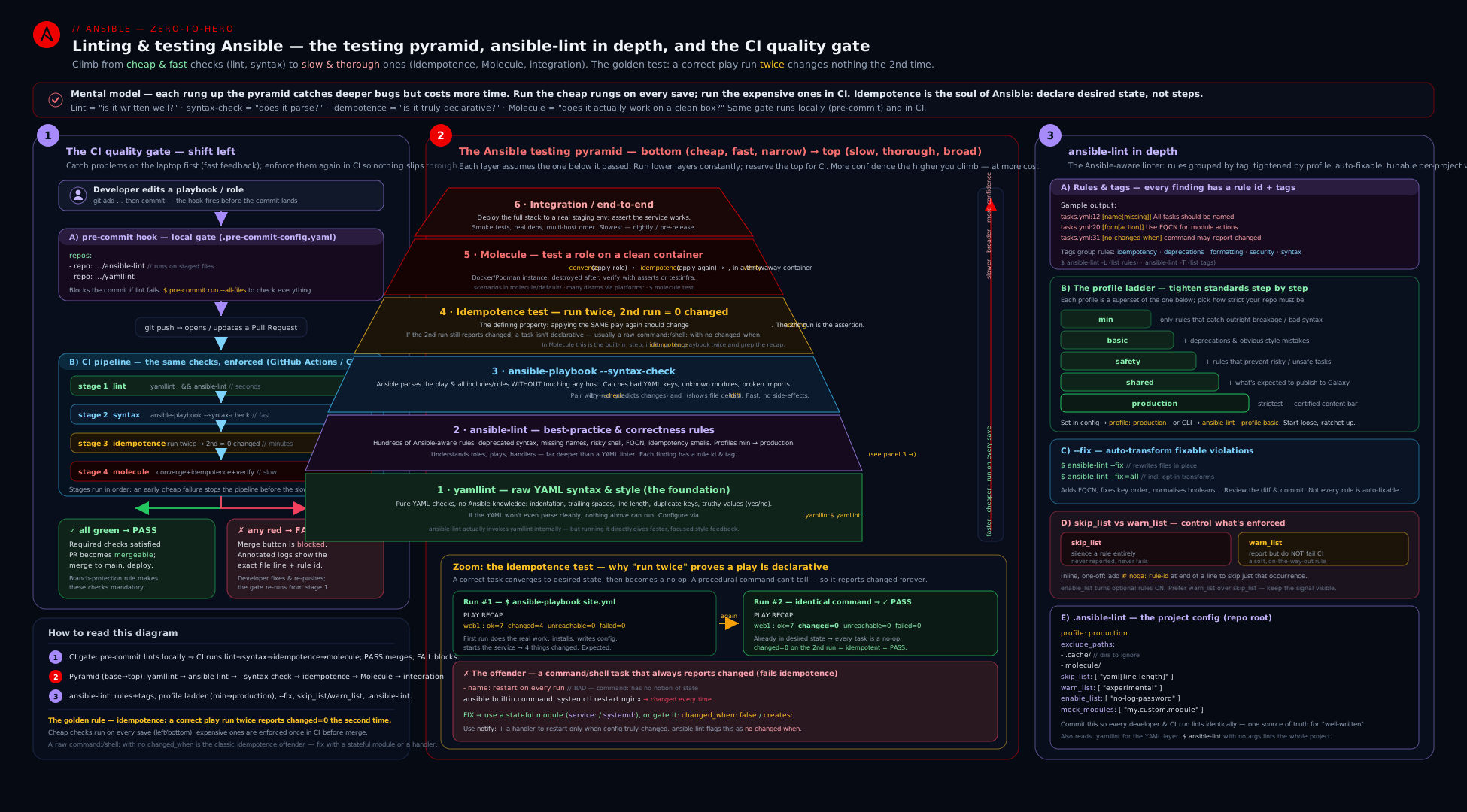
The diagram stacks the gates cheapest-first: yamllint and ansible-lint read the files statically, --syntax-check parses the play graph, the idempotence test runs the playbook twice and asserts the second recap shows changed=0, and Molecule/integration sit at the apex — with pre-commit catching layers 1–3 on the developer’s machine and the CI matrix (GitHub Actions / GitLab) re-running everything on every push so nothing un-gated reaches main.
Wiring it into CI: pre-commit, GitHub Actions, GitLab
A gate only works if it runs automatically. Two enforcement points: pre-commit (developer’s machine, before the commit even lands) and CI (the server, before merge). Use both — pre-commit for instant local feedback, CI as the authoritative gate that can’t be skipped.
pre-commit
pre-commit runs hooks on staged files at git commit time. Both yamllint and ansible-lint ship official hooks. Create .pre-commit-config.yaml:
---
# .pre-commit-config.yaml
repos:
  - repo: https://github.com/adrienverge/yamllint
    rev: v1.35.1
    hooks:
      - id: yamllint
        args: [--strict, -c, .yamllint]

  - repo: https://github.com/ansible/ansible-lint
    rev: v24.12.2
    hooks:
      - id: ansible-lint
        # ansible-lint reads .ansible-lint automatically;
        # pass extra deps so the hook env can resolve your collections:
        additional_dependencies:
          - ansible-core>=2.17

  - repo: https://github.com/pre-commit/pre-commit-hooks
    rev: v5.0.0
    hooks:
      - id: trailing-whitespace
      - id: end-of-file-fixer
      - id: check-yaml          # basic YAML parse (belt-and-braces)
Install once per clone with pre-commit install (wires the git hook); run on the whole repo with pre-commit run --all-files. Now every commit is linted locally; a developer can’t even create a commit that fails yamllint or ansible-lint (without --no-verify, which CI then catches). Pin rev: to a tag for reproducibility and bump it deliberately. The additional_dependencies line is the common gotcha: the ansible-lint hook runs in its own isolated virtualenv, so it needs ansible-core (and any collections your content imports) listed there or it’ll fail to resolve modules.
GitHub Actions
A matrix workflow that runs all four gates, plus Molecule, on every push and PR. Save as .github/workflows/ci.yml:
---
name: Ansible CI
on:
  push:
    branches: [main]
  pull_request:

jobs:
  lint:
    runs-on: ubuntu-latest
    steps:
      - uses: actions/checkout@v4
      - uses: actions/setup-python@v5
        with:
          python-version: "3.12"
      - name: Install linters
        run: pip install "ansible-core>=2.17" ansible-lint yamllint
      - name: Install collection deps
        run: ansible-galaxy collection install -r requirements.yml
      - name: yamllint
        run: yamllint --strict -c .yamllint .
      - name: ansible-lint
        run: ansible-lint --profile production -f sarif | tee lint.sarif
      - name: syntax-check
        run: ansible-playbook --syntax-check site.yml

  idempotence:
    runs-on: ubuntu-latest
    steps:
      - uses: actions/checkout@v4
      - uses: actions/setup-python@v5
        with:
          python-version: "3.12"
      - run: pip install "ansible-core>=2.17"
      - name: First run (converge)
        run: ansible-playbook -i inventory.localhost site.yml
      - name: Second run must be idempotent
        run: |
          ansible-playbook -i inventory.localhost site.yml | tee run2.log
          grep -q 'changed=0.*failed=0' run2.log \
            || { echo "::error::Not idempotent — second run changed something"; exit 1; }

  molecule:
    runs-on: ubuntu-latest
    strategy:
      matrix:
        distro: [ubuntu2404, rockylinux9, debian12]   # the matrix lives here
      fail-fast: false
    steps:
      - uses: actions/checkout@v4
      - uses: actions/setup-python@v5
        with:
          python-version: "3.12"
      - run: pip install "ansible-core>=2.17" molecule molecule-plugins[docker]
      - name: Molecule test
        run: molecule test
        env:
          MOLECULE_DISTRO: ${{ matrix.distro }}
The shape to notice: lint and syntax are one fast job; idempotence is its own job doing the explicit two-run-and-grep; Molecule is a matrix over distros so the same role is tested on Ubuntu, Rocky, and Debian in parallel (fail-fast: false so one distro’s failure doesn’t cancel the others). The grep -q 'changed=0' line is the literal CI implementation of the idempotence gate — the build fails if the second recap shows any change. ansible-lint’s -f sarif output can be uploaded to GitHub code-scanning (github/codeql-action/upload-sarif) so findings appear inline on the PR. The Molecule job’s matrix and molecule.yml belong to the Molecule lesson; here it’s shown only to place it correctly in the pipeline.
GitLab CI
The same gates as GitLab stages. Save as .gitlab-ci.yml:
---
stages: [lint, syntax, idempotence, molecule]

default:
  image: python:3.12
  before_script:
    - pip install "ansible-core>=2.17" ansible-lint yamllint
    - ansible-galaxy collection install -r requirements.yml

yamllint:
  stage: lint
  script: yamllint --strict -c .yamllint .

ansible-lint:
  stage: lint
  script: ansible-lint --profile production --nocolor

syntax-check:
  stage: syntax
  script: ansible-playbook --syntax-check site.yml

idempotence:
  stage: idempotence
  script:
    - ansible-playbook -i inventory.localhost site.yml
    - ansible-playbook -i inventory.localhost site.yml | tee run2.log
    - grep -q 'changed=0.*failed=0' run2.log || (echo "Not idempotent"; exit 1)

molecule:
  stage: molecule
  image: docker:27
  services: [docker:27-dind]
  parallel:
    matrix:
      - DISTRO: [ubuntu2404, rockylinux9, debian12]
  script:
    - pip install molecule "molecule-plugins[docker]"
    - molecule test
GitLab stages run sequentially (lint → syntax → idempotence → molecule), so a yamllint failure stops the pipeline before the expensive Molecule stage ever starts — the pyramid’s fail-first ordering, enforced by stage order. parallel:matrix: is GitLab’s equivalent of the GitHub matrix for the multi-distro Molecule run (Molecule needs Docker-in-Docker, hence the dind service).
Hands-on lab
Free, on localhost plus a throwaway container — total cost ₹0. You’ll lint a deliberately-bad playbook, fix it with --fix and by hand, then prove idempotence by running twice.
Step 1 — set up an isolated environment.
mkdir -p ~/lint-lab && cd ~/lint-lab
python3 -m venv .venv && source .venv/bin/activate
pip install "ansible-core>=2.17" ansible-lint yamllint
ansible-lint --version    # confirm ansible-lint + bound ansible-core
Step 2 — write a deliberately bad playbook (bad.yml):
- hosts: localhost
  connection: local
  tasks:
    - copy:
        src: hello.txt
        dest: /tmp/hello.txt
    - shell: echo "hello $(date)" > /tmp/stamp.txt
    - name: install
      ansible.builtin.package:
        name: tree
        state: latest
Create the source file: echo "hi" > hello.txt.
This file has, deliberately: no ---, no play name, a bare copy (no FQCN, no mode), a shell with no changed_when and volatile $(date) content, a lowercase task name, and state: latest.
Step 3 — run the linters and read every finding.
yamllint bad.yml
ansible-lint --profile production bad.yml
Expected (abbreviated) — yamllint flags missing document-start; ansible-lint flags name[play] (unnamed play), name[casing] (lowercase “install”), fqcn[action-core] (bare copy), risky-file-permissions (no mode), no-changed-when (the shell), command-instead-of-shell or risky-shell-pipe, and package-latest. Validation: you should see roughly 6–8 distinct rule IDs and a non-zero exit code (echo $? → 2).
Step 4 — auto-fix the mechanical issues.
cp bad.yml bad.yml.orig          # keep the before
ansible-lint --fix bad.yml
diff bad.yml.orig bad.yml        # review exactly what --fix changed
--fix will add ---, add FQCNs (ansible.builtin.copy, ansible.builtin.shell), and reorder keys. Validation: the diff shows FQCNs added and --- inserted; fqcn and some yaml/name findings disappear on a re-lint.
Step 5 — fix by hand what --fix can’t. Edit bad.yml to add a play name, capitalise the task name, add mode: "0644" to the copy, change state: latest to state: present, and fix the non-idempotent shell. Final, clean version:
---
- name: Lint-lab demonstration play
  hosts: localhost
  connection: local
  tasks:
    - name: Copy the hello file
      ansible.builtin.copy:
        src: hello.txt
        dest: /tmp/hello.txt
        mode: "0644"

    - name: Write a stamp file only once (idempotent via creates)
      ansible.builtin.command: /bin/sh -c 'echo "hello" > /tmp/stamp.txt'
      args:
        creates: /tmp/stamp.txt

    - name: Install tree
      ansible.builtin.package:
        name: tree
        state: present
Step 6 — re-lint until clean.
yamllint bad.yml && ansible-lint --profile production bad.yml && echo "CLEAN"
ansible-playbook --syntax-check bad.yml
Validation: both linters exit 0 and you see CLEAN; --syntax-check prints playbook: bad.yml.
Step 7 — prove idempotence (the gold standard).
ansible-playbook bad.yml                       # run 1: changes expected
ansible-playbook bad.yml | tee run2.log        # run 2: must be changed=0
grep 'changed=0' run2.log && echo "IDEMPOTENT" || echo "NOT IDEMPOTENT"
Validation: the second PLAY RECAP shows changed=0 and you see IDEMPOTENT. (Contrast: revert the command task to the original volatile shell: echo "hello $(date)" and re-run — the second run now shows changed=1, demonstrating exactly what the test catches.)
Step 8 — optional: container target. Lint and idempotence don’t need a remote host, but to feel the two-run test against a real OS, run the same playbook into a throwaway container with the community.docker connection (or Molecule, per the Molecule lesson). For this lab, localhost suffices.
Cleanup:
deactivate
rm -rf ~/lint-lab /tmp/hello.txt /tmp/stamp.txt
Cost note: everything ran in a local virtualenv on your own machine — ₹0. No cloud, no managed nodes, no licences. The CI examples run on free-tier GitHub Actions / GitLab minutes.
Practice challenges
Six graded exercises, beginner to advanced. Each runs free on localhost in the lab virtualenv. Try each before opening its solution.
1 (beginner) — Make one task lint-clean. yamllint flags two things here and ansible-lint flags one. Rewrite the task so all three pass.
- name: create app dir
  ansible.builtin.file:
    path: /etc/app
    state: directory
    mode: 0755
    recurse: yes
<details><summary>Solution</summary>
- name: Create app directory
  ansible.builtin.file:
    path: /etc/app
    state: directory
    mode: "0755"
    recurse: true
Why: quoting mode dodges the octal-values rule, true satisfies truthy (no bare yes), and a capitalised, descriptive name satisfies name[casing].
</details>
2 (beginner) — Split the findings by who fixes them. A task has four findings: fqcn (bare copy:), key-order (keys out of recommended order), name[missing] (no name:), and no-changed-when (a command with no changed_when). Which two can ansible-lint --fix remediate for you, and which two must you fix by hand?
<details><summary>Solution</summary>
--fix handles fqcn (adds ansible.builtin.) and key-order (reorders keys) — both mechanical. You must supply the name: yourself (only a human knows what the task means) and write the changed_when yourself (only a human knows when the command actually changed something).
Why: transforms are for deterministic rewrites; anything needing meaning or judgement is left to you. </details>
3 (intermediate) — Make a command idempotent, two ways. This task reports changed on every run and breaks the two-run test. Give one behavioural fix and the better structural fix.
- name: Apply firewall rules
  ansible.builtin.command: /usr/local/bin/fw-apply --port 443
<details><summary>Solution</summary>
# Way A — teach command the truth by parsing its own output
- name: Apply firewall rules
  ansible.builtin.command: /usr/local/bin/fw-apply --port 443
  register: fw
  changed_when: "'rules updated' in fw.stdout"

# Way B — the real fix: use the idempotent module that already knows
- name: Open the HTTPS port permanently
  ansible.posix.firewalld:
    port: 443/tcp
    permanent: true
    state: enabled
Why: command/shell always report changed because they have no notion of “already done”; changed_when supplies that notion, but the proper module (ansible.posix.firewalld) has it built in.
</details>
4 (intermediate) — Author a policy-grade .ansible-lint. Enforce the production profile, keep no-changed-when visible but non-blocking while a legacy repo migrates, turn on the opt-in password rule, and never lint the vendored collections/ directory.
<details><summary>Solution</summary>
---
# .ansible-lint
profile: production
exclude_paths:
  - collections/          # vendored content — not ours to lint
  - .cache/
warn_list:
  - no-changed-when       # migrating; surface it without failing the build
enable_list:
  - no-log-password       # opt-in security rule
offline: true             # deterministic: never auto-fetch at lint time
Why: warn_list (not skip_list) keeps the violation reported, so the debt stays visible while you burn it down.
</details>
5 (advanced) — Harden the idempotence gate. The CI examples assert idempotence with grep -q 'changed=0'. Show why that is fragile for a multi-host run and write a correct assertion.
<details><summary>Solution</summary>
ansible-playbook -i inventory site.yml | tee run2.log
# Correct: FAIL if ANY host reports a non-zero changed count
if grep -Eq 'changed=[1-9][0-9]*' run2.log; then
  echo "Not idempotent — a host changed on run 2"; exit 1
fi
echo "IDEMPOTENT"
Why: grep 'changed=0' passes as long as one host reports zero (and changed=0 is even a substring of changed=05); asserting the absence of any changed=<non-zero> is what actually proves every host was stable.
</details>
6 (advanced) — Write a house-policy custom rule. Built-in rules do not enforce “every task must carry at least one tag.” Write a custom ansible-lint rule that flags any tag-less task, and wire it into .ansible-lint.
<details><summary>Solution</summary>
# .ansible-lint-rules/require_task_tags.py
from ansiblelint.rules import AnsibleLintRule


class RequireTaskTagsRule(AnsibleLintRule):
    id = "require-task-tags"
    shortdesc = "Every task must carry at least one tag"
    description = "House policy: untagged tasks cannot be selectively run or skipped."
    severity = "MEDIUM"
    tags = ["idiom", "experimental"]
    version_added = "v1.0.0"

    def matchtask(self, task, file=None):
        # A truthy return flags the task; missing/empty tags => flag it.
        return not task.get("tags")
# .ansible-lint
rulesdir:
  - ./.ansible-lint-rules/
use_default_rules: true    # keep every built-in rule running too
Why: a custom rule plugs into the same matchtask loop as the built-ins; use_default_rules: true ensures your rule adds to rather than replaces the standard set.
</details>
Common beginner mistakes
These are misconceptions, not symptoms — the wrong mental model, and the right one to replace it with. (For symptom → cause → fix, see the troubleshooting table below.)
| The belief (wrong) | Why it’s wrong | The right mental model |
|---|---|---|
| “It lints clean, so the playbook is correct.” | Lint is static — it judges how the code is written, never what it does. A perfectly-linted playbook can still be non-idempotent, hit the wrong host, or render a broken template. | Green lint proves well-formed and idiomatic; only the idempotence test (and Molecule) prove behaviour. Necessary, not sufficient. |
“This rule is annoying — I’ll skip_list it.” |
skip_list hides the violation forever; the next person can’t even see there was a problem, and the debt compounds silently. |
Fix it. If you truly can’t yet, use warn_list (stays visible) or an inline # noqa with a justifying comment — never a silent skip. |
| “It ran twice without an error, so it’s idempotent.” | Idempotence has nothing to do with errors — a command task can succeed and report changed on every run. Two green runs prove nothing. |
Idempotence is specifically changed=0 on the second run. Read the PLAY RECAP’s changed count, not the exit code. |
“--check mode is the idempotence test.” |
--check predicts changes without applying them, and command/shell are skipped under check by default — so it can’t observe their (non-)idempotence at all. |
The real test is two actual runs. --check is a preview tool: complementary, not a substitute. |
“--fix will make my playbook idempotent.” |
Transforms only do mechanical rewrites (FQCN, key order, quoting). No transform can invent the changed_when that makes a command idempotent. |
--fix for style; you write changed_when/creates for behaviour. |
| “I only need one linter.” | yamllint and ansible-lint overlap only on YAML style. ansible-lint understands Ansible (FQCN, idempotency, handlers); yamllint catches text issues before semantics matter. | Run both — ansible-lint even calls yamllint internally, but a tuned .yamllint is still the foundation. |
“state: latest keeps servers up to date, which is good.” |
It also makes the play non-idempotent — a new upstream release means the next run upgrades and reports changed, firing handlers and hiding real drift. |
Use state: present to converge; do upgrades in a separate, deliberate patching play you run on purpose. |
Common mistakes & troubleshooting
| Symptom | Cause | Fix |
|---|---|---|
ansible-lint errors Unable to load module / load-failure |
The collection/role the content uses isn’t installed in ansible-lint’s environment | ansible-galaxy collection install -r requirements.yml in the same venv; or add it to mock_modules/mock_roles in .ansible-lint. |
yamllint flags mode: 0644 as octal-values |
Implicit octal number, not a string | Quote it: mode: "0644" (which is what Ansible wants regardless). |
Everything is flagged truthy |
You used yes/no/on/off |
Switch to lowercase true/false, or set truthy: allowed-values if you must keep the old style (not recommended). |
line-length failures everywhere |
yamllint default max: 80 is too tight for Ansible |
Set max: 120/160 and/or level: warning in .yamllint. |
| ansible-lint and ansible-playbook disagree / version errors | ansible-lint bound to a different ansible-core than your runtime |
Install both in the same virtualenv; check ansible-lint --version shows the right core. |
Second run shows changed despite a “correct”-looking playbook |
A command/shell with no changed_when, a state: latest, or volatile template content |
Add changed_when/creates, switch to state: present, remove now()/random from templates. |
| pre-commit ansible-lint hook can’t find your modules | The hook runs in its own isolated venv | List ansible-core (and collections) under the hook’s additional_dependencies. |
--fix changed more than expected / reformatted a file |
A transform also ran yamllint’s formatter | Run --fix on a clean tree and review git diff; scope it with --fix=fqcn,name to limit blast radius. |
# noqa doesn’t suppress the rule |
Wrong rule ID, or it’s on the wrong line/task | Use the exact ID from the output (# noqa: no-changed-when); put it on the task, not a child key. |
| CI passes locally but fails in pipeline | Different ansible-lint version, or missing --offline/collections |
Pin versions in CI, install collections, add --offline for determinism. |
Best practices
- Run the cheapest gate first. yamllint → ansible-lint →
--syntax-check→ idempotence → Molecule. Fail fast; don’t make a contributor wait ten minutes to learn about a trailing space. - Commit a
.yamllintand a.ansible-lintto every repo. The config is the policy. An uncommitted, machine-specific lint setup isn’t a gate — it’s a suggestion. - Pick a profile and ratchet up. Start at
basicif you must, but put aprofile:in.ansible-lintand schedule the climb toproduction. Usewarn_list(notskip_list) for rules you’re working toward. - FQCNs everywhere. It’s the top production rule,
--fixdoes it for you, and it’s the single biggest readability/correctness win. There is no good reason to ship bare module names in 2026. - Every
command/shellneedschanged_whenorcreates. This is the idempotence discipline in one sentence. If you can’t answer “how does Ansible know this changed?”, the task is broken. - Treat the idempotence test as non-negotiable in CI. The two-run-
grepis four lines of YAML and catches the most damaging class of bug. Never merge content that fails it. - Use
--fixfor the mechanical, humans for the behavioural. Auto-fix FQCNs, ordering, quoting; never expect--fixto make a script idempotent. - Justify every suppression. A
# noqaorskip_listentry without a comment is debt. Prefer fixing. - Enforce both locally (pre-commit) and centrally (CI). Pre-commit gives instant feedback; CI is the authoritative, unskippable gate.
- Pin tool versions (
rev:in pre-commit,>=pins in CI) so lint results are reproducible and a tool upgrade is a deliberate, reviewable event. - Use
.ansible-lint-ignoreto adopt strictness on legacy code — grandfather existing violations, fail on new ones.
Security notes
no-log-passwordis an opt-in security rule — turn it on. Add it toenable_list. It flags tasks handling passwords withoutno_log: true, the single most common way secrets leak into CI logs and the play recap.ignore_errors: trueis a security smell, not just a quality one. It can hide a failed security task (a firewall rule that didn’t apply, a permission that didn’t tighten) while the play still reports green. ansible-lint’signore-errorsrule catches it; usefailed_whenwith an explicit condition instead.- Lint is part of supply-chain hygiene.
ansible-lintvalidatesrequirements.yml/meta/main.ymlschemas (theschemarule) anddeprecated-modulewarns when you depend on something being removed — both reduce the chance of pulling in or shipping broken/unmaintained content. - Keep secrets out of the files you lint and the logs CI produces. Linters read your files in plain text and CI prints output; a password in a
defaults/main.ymlis exposed to both. Use Ansible Vault (see the Vault lesson) andno_log, and make sure CI never echoes decrypted vars (--nocolordoesn’t hide values —no_logdoes). risky-file-permissionsandrisky-shell-pipeare security rules in disguise. A file created with the wrong umask-derived mode can be world-readable; a shell pipe withoutpipefailcan mask a failedcurl | sh. Thesafety/productionprofiles enforce both — another reason to run the strict profile.- Run linters in CI from a pinned, minimal environment. A compromised or floating linter version could itself be a vector; pin
rev:/versions and prefer--offlineso CI doesn’t fetch arbitrary roles/collections at lint time.
Going deeper
Everything above is enough to gate a real repository. This section is for the reader who wants to know how the machinery works — the internals that explain the behaviour, and the sharp edges that only appear at scale.
How ansible-lint reads your project
ansible-lint does not grep your YAML — it loads each file through ansible-core’s own parser (the same one ansible-playbook uses) and builds an internal object called a Lintable. Every Lintable is tagged with a kind — playbook, tasks, handlers, vars, meta, requirements, galaxy, role, and so on — inferred from its path and content. The kind decides which rules even apply: a meta/main.yml is checked against the metadata schema, a tasks/ file against task rules, a galaxy.yml against the collection schema. When the heuristic guesses wrong (an unconventional layout, or a vars file it reads as a playbook), correct it explicitly with a kinds: map in .ansible-lint:
kinds:
  - playbook: "deploy/*.yml"
  - vars: "config/**/*.yml"
For each Lintable, ansible-lint walks the parsed structure and calls every enabled rule’s match hooks — matchtask (per task), matchplay (per play), matchdir/matchyaml (file- and line-level) — the very hooks you implemented in the custom rule earlier. The set of rules that actually run is (built-ins + your rulesdir), filtered by the active profile, minus skip_list, with warn_list/enable_list adjusting severity. That is why a custom rule “just works” like a built-in: it plugs into the identical match loop.
Output formats and exit codes (for machines, not humans)
The default rich output is for your terminal; CI wants something a machine reads. The -f flag is the switch:
-f <format> |
Consumer | What you do with it |
|---|---|---|
sarif |
GitHub code-scanning | Upload via github/codeql-action/upload-sarif; findings annotate the PR diff inline. |
codeclimate |
GitLab Code Quality | Emit as a codequality report artifact; GitLab shows findings on the MR widget. |
json |
Custom tooling | Parse programmatically for dashboards or bespoke gates. |
pep8 / plain |
grep, editors, quickfix | One finding per line, file:line: [id] msg. |
Exit codes are the other half of CI integration: 0 means no violations, 2 means violations were found (fail the build), and other non-zero codes signal an internal or usage error — a genuinely different failure you should not treat as “lint found something.” The --strict flag changes the contract: it makes warnings — including everything in your warn_list — return non-zero too, which is how you run a “no warnings allowed” pipeline once the warn-list is burned down.
A robust idempotence gate (past the naive grep)
The CI snippets earlier assert idempotence with grep -q 'changed=0'. That is fine for a single-host run, but it has two failure modes worth understanding:
- Multi-host false pass. With several hosts the recap has one line each, and
grep 'changed=0'succeeds if any host reportschanged=0— so a run wherehost1is stable buthost2changed still “passes.” - Substring match.
changed=0is a substring ofchanged=05; a plain match can be fooled by the digits that follow.
The correct assertion is the absence of any non-zero changed count, not the presence of a zero one:
ansible-playbook -i inventory site.yml | tee run2.log
if grep -Eq 'changed=[1-9][0-9]*' run2.log; then
  echo "::error::Not idempotent — a host reported changes on run 2"; exit 1
fi
echo "IDEMPOTENT"
For a fully structured result, switch the run to a JSON stdout callback (for example the json callback shipped in ansible.posix) and parse the stats object — every host’s changed integer, with no string-matching at all. This is essentially what Molecule’s idempotence step does internally, one more reason the Molecule lesson sits one rung above these gates.
Determinism: caching, offline, and version binding
Lint results must be reproducible — the same code must lint the same way on your laptop and in CI, today and next month. Three levers control that:
| Lever | What it does | Why it matters in CI |
|---|---|---|
--offline |
Forbids ansible-lint from auto-installing referenced roles/collections at lint time | Stops the network from changing your result (or breaking the build when a Galaxy fetch fails). Install deps in an explicit prior step instead. |
| Version pinning | Pin ansible-core, ansible-lint, yamllint (and pre-commit rev:s) |
A tool upgrade adds or retimes rules; an unpinned bump can turn a green pipeline red with no code change. Pin, then bump deliberately. |
mock_modules / mock_roles |
Tell ansible-lint a module/role exists without installing it | Lets you lint content that references internal modules the CI box can’t fetch — avoids a spurious load-failure. |
ansible-lint caches resolved collections and roles under ~/.cache/ansible-lint; a stale cache is an occasional culprit when local and CI results diverge — clearing it (or running --offline against a freshly-installed environment) is the tie-breaker. And the binding you must never forget: ansible-lint imports ansible-core’s own internals, so ansible-lint --version prints the core it bound to — if that differs from the core running your plays, lint and runtime can legitimately disagree. Keep both in one virtualenv.
yamllint inside ansible-lint
A frequent surprise: ansible-lint runs yamllint for you. Its yaml rule delegates to the yamllint library, reading your .yamllint if present (and a built-in default otherwise). So yaml[line-length], yaml[truthy], and yaml[octal-values] in ansible-lint’s output are yamllint findings, surfaced under ansible-lint’s namespace. Two consequences: (1) a single .yamllint configures both tools — tune it once; (2) if you run yamllint and ansible-lint in the same pipeline you may see the same YAML issue reported twice. That double-reporting is harmless (both fail the build, which is what you want), but if it bothers you, the usual choice is to keep yamllint as the fast standalone gate and add yaml to ansible-lint’s warn_list so it does not also fail there.
Interview & exam questions
- What is the difference between yamllint and ansible-lint, and do you need both?
yamllintis a generic YAML linter — it checks the file is well-formed and stylistically consistent (indentation, line length, trailing spaces,truthy).ansible-lintis Ansible-aware — it understands tasks/plays/roles and flags Ansible-specific issues (FQCN, idempotency predictors, no silent failures). You need both; ansible-lint even runs yamllint internally (theyamlrule) using your.yamllint. - What is the idempotence test and why is it the gold standard? Run the playbook twice against a converged host; the second run must report
changed=0. It proves the automation describes a desired state (declarative) rather than being a script that fires every time. It’s the defining property of configuration management — schedulable, drift-correcting, safe to re-run. - What most commonly breaks idempotence, and how do you fix it? A
command/shelltask with nochanged_when— those modules always reportchanged. Fix withchanged_when:(compute fromrc/stdout, orfalsefor read-only) orcreates:/removes:to skip when already done. Also:state: latest(usepresent) and volatile template content (removenow()/random). - Explain ansible-lint profiles. Name them in order. Graduated strictness tiers, each a superset:
min(parse-at-all) →basic(style/idiom/deprecations) →safety(no unsafe behaviour — FQCN, noignore_errors) →shared(publishable — metadata, role naming,no-changed-when) →production(strictest — nolatest, full idempotency, certified-content grade). You pick one with--profileand ratchet up. - What does
ansible-lint --fixdo and what can’t it do? It applies transforms — auto-rewrites for mechanical issues (add FQCNs, reorder keys, quote octal modes, fix manyyamlissues). It cannot make a non-idempotent task idempotent (that’s achanged_whenonly a human can write) or fix anything requiring judgement. Always review thegit diff. - Compare
skip_list,warn_list, andenable_list.skip_list— rule doesn’t run (invisible).warn_list— rule runs and prints but doesn’t fail the build (for rules you’re working toward).enable_list— turns on opt-in rules (e.g.no-log-password). Preferwarn_listoverskip_listwhile improving so violations stay visible. - How do you suppress one rule on one task, and what’s the discipline? An inline
# noqa: <rule-id>comment on the task. The discipline: always add a comment justifying it — an unjustified suppression is technical debt. Prefer fixing the underlying issue. - What does
--syntax-checkcatch and not catch? It parses the play graph (playbook, imports, roles, structure) without contacting hosts — catches malformed tasks, bad directives, broken imports. It does not catch dynamic problems (include_tasksresolved at runtime), per-hostwhenbugs, template-render failures, or non-idempotence. - Describe the Ansible testing pyramid. Cheap-to-expensive, fail-first: yamllint → ansible-lint →
--syntax-check→ idempotence (two-run) → Molecule → integration. Static gates at the base (ms/sec, no hosts), behavioural at the top (min, needs containers/infra). Run 1–3 in pre-commit, 1–4 on every PR, Molecule per-PR/nightly. - How do you enforce these gates so they can’t be bypassed? Two points: pre-commit (local, instant —
yamllint/ansible-linthooks at commit time) and CI (authoritative, unskippable — a GitHub Actions/GitLab pipeline that fails the build on any gate). Pre-commit can be skipped with--no-verify, so CI is the real gate; pre-commit is the fast feedback loop. - Why does the ansible-lint pre-commit hook need
additional_dependencies? The hook runs in its own isolated virtualenv, separate from your project’s. It needsansible-core(and any collections your content imports) listed underadditional_dependenciesor it can’t resolve modules and fails withload-failure. - How would you adopt strict linting on a large legacy repo without fixing everything first? Use
ansible-lint --generate-ignoreto write a.ansible-lint-ignorebaseline of current violations — new code is held to the strict profile while existing violations are grandfathered. Then burn down the baseline over time. Pair withwarn_listfor rules you’re transitioning.
Quick check
- After a playbook run, which exact number in the
PLAY RECAPmust be zero on the second run to prove idempotence? - Name the five ansible-lint profiles in order from least to most strict.
- Which ansible-lint rule statically predicts the most common idempotence failure, and what task type does it flag?
- You want a rule to print but not fail the build while you work toward it. Which list do you put it in?
- What’s the correct, lint-clean way to write a file mode in a task — and why does
mode: 0644get flagged?
Answers
changed— the second run’s recap must showchanged=0(withfailed=0,unreachable=0).min→basic→safety→shared→production.no-changed-when— it flagscommand/shelltasks that have nochanged_when(those modules always reportchanged, breaking the two-run test).warn_list— it runs and prints the finding but doesn’t fail the build (unlikeskip_list, which hides it, or normal enforcement, which fails).- Write it as a quoted string:
mode: "0644". Bare0644is an implicit octal number, which yamllint’soctal-valuesrule flags (and Ansible expects the string form anyway).
Exercise
Working entirely on localhost (cost ₹0), build a small, fully-gated role and prove every layer. (a) ansible-galaxy role init a role webfile that templates an index.html (using ansible_managed, no volatile content) and creates a marker file via a command with creates:. (b) Author a repo-root .yamllint (line-length 160 as a warning, lowercase-only truthy, ban implicit octal) and a .ansible-lint (profile: production, enable_list: [no-log-password], an exclude_paths for collections/). © Run yamllint --strict . and ansible-lint --profile production and fix every finding — use ansible-lint --fix for the mechanical ones and record (in a comment) which two findings you had to fix by hand. (d) Deliberately introduce a state: latest and a shell without changed_when, run the idempotence test (two runs), capture the changed=N from the second recap, then fix both and show the second run is now changed=0. (e) Add a .pre-commit-config.yaml wiring the yamllint and ansible-lint hooks (with additional_dependencies: [ansible-core>=2.17]) and run pre-commit run --all-files. (f) Add a .github/workflows/ci.yml with a lint job and an idempotence job whose second step greps for changed=0 and fails otherwise. (g) Clean up. In three sentences, explain: why the idempotence test is behavioural where lint is static, why you put no-changed-when work in warn_list (if you did) rather than skip_list, and which single change moved your second-run recap from changed>0 to changed=0.
Certification mapping
- RHCE (EX294) — “Understand core components of Ansible” & writing correct playbooks: the exam grades whether your playbooks work and are well-formed.
--syntax-check, FQCN usage, and writing idempotent tasks (thechanged_when/createsdiscipline) map directly to how your submissions are evaluated — a task that isn’t idempotent or uses a rawcommandwhere a module exists is exactly what loses marks. Practisingansible-lintagainst your own answers is the fastest way to self-grade. - RHCE (EX294) — idempotence: the defining expectation. Every task you write on the exam should pass the two-run-
changed=0test; know how to fix thecommand/shellbreakers cold. - RHCE (EX294) —
ansible-navigator/syntax tooling: knowingansible-playbook --syntax-checkand reading lint/parse errors supports the “create and run playbooks” objectives. - EX374 (Automation Platform): the
productionprofile is effectively the bar for certified content on Automation Hub; ansible-lint, signed collections, and CI gating are core to the AAP content-development workflow. Wiring lint + idempotence into a pipeline is exactly the EX374 mindset. - Beyond Red Hat: these gates (lint, syntax, idempotence, Molecule) are the de-facto industry standard for any Ansible role published to Galaxy and for any team’s internal CI — the single most transferable skill in this tier.
Glossary
- Lint — static analysis of source files for style and correctness, without executing them.
yamllint— a generic YAML linter (indentation, line length,truthy, octal, trailing spaces); configured via.yamllint.ansible-lint— the Ansible-aware linter; checks tasks/plays/roles against hundreds of rules grouped into profiles.- Rule — one ansible-lint check, identified by an ID (e.g.
fqcn,no-changed-when) and carrying one or more tags. - Tag — a category on a rule (
formatting,idempotency,command-shell,production,security,opt-in, …) used to skip/warn in bulk. - Profile — a graduated ansible-lint strictness tier:
min→basic→safety→shared→production, each a superset of the last. - Transform /
--fix— ansible-lint auto-remediation that rewrites files to fix mechanical violations (FQCNs, key order, octal quoting). skip_list— rules ansible-lint does not run at all.warn_list— rules that print but don’t fail the build.enable_list— opt-in rules turned on (e.g.no-log-password).# noqa: <rule-id>— inline comment suppressing a specific rule on a single task..ansible-lint-ignore— a generated baseline of existing violations to grandfather legacy code while enforcing strictness on new code.- Idempotence — the property that running a playbook a second time against a converged host changes nothing (
changed=0). - The idempotence test — run twice; the second
PLAY RECAPmust showchanged=0— the gold-standard behavioural test. changed_when— a task directive that defines when a task counts aschanged; the fix for non-idempotentcommand/shell.creates/removes—command/shellargs that skip the task when a target path already exists / is already gone (idempotency guards).--syntax-check—ansible-playbookmode that parses the play graph (imports, roles, structure) without contacting hosts.- Testing pyramid — the cheap-to-expensive gate ordering: lint → syntax → idempotence → Molecule → integration.
- pre-commit — a git-hook framework that runs lint hooks on staged files at commit time (local enforcement).
- CI gate — a pipeline step (GitHub Actions / GitLab) that fails the build on a lint, syntax, or idempotence regression (central enforcement).
Lintable— ansible-lint’s internal object for one file, tagged with a kind that decides which rules apply to it.- Kind — ansible-lint’s classification of a file (
playbook,tasks,meta,vars, …); override the auto-detection withkinds:in.ansible-lint. - Match hook — a rule method (
matchtask,matchplay,matchyaml) ansible-lint calls while walking a parsed file; custom rules implement the same hooks. - SARIF — a JSON findings format ansible-lint emits with
-f sarif, uploaded to GitHub code-scanning to annotate a PR inline. - codeclimate — the findings format (
-f codeclimate) GitLab reads to populate its Code Quality merge-request widget. --strict— makes a linter exit non-zero on warnings too (both yamllint and ansible-lint support it); the “no warnings allowed” setting.--offline— ansible-lint mode that refuses to fetch roles/collections at lint time, for deterministic CI.mock_modules/mock_roles—.ansible-lintlists that tell ansible-lint a module/role exists without installing it, avoiding a falseload-failure.- Check mode (
--check) — a preview run that predicts changes without applying them; a complement to, never a substitute for, the two-run idempotence test. --no-verify— thegit commitflag that skips pre-commit hooks — precisely why CI must re-run the gates as the authoritative check.
Next steps
You can now gate Ansible end to end — yamllint (every rule, the .yamllint), ansible-lint (the rule/tag taxonomy, the five profiles, --fix, skip_list/warn_list/enable_list, .ansible-lint, # noqa, custom rules), the idempotence test (two runs, changed=0, and the command/shell breakers), --syntax-check, the testing pyramid, and full CI wiring with pre-commit, GitHub Actions, and GitLab. The natural next move is debugging — because when a gate fails you need to find out why: read Debugging Ansible, In Depth for check mode, --diff, the playbook debugger, verbosity levels, and ansible-console. To take testing all the way up the pyramid — converging and verifying your roles against real containers across a distro matrix — study engineering idempotent Ansible collections with Molecule testing, which owns the create → converge → idempotence → verify → destroy sequence these gates feed into. And to remind yourself what you’re linting and testing, revisit Ansible roles & collections, In Depth.