In a nutshell
Ansible has two kinds of code you write, and they live in two different places. A module travels out to the machine you’re configuring and runs there. A plugin stays home, running inside the ansible-playbook process on your own laptop or control node, quietly doing the supporting work — reshaping data, fetching values, formatting the output you watch scroll by, even providing the very connection that carries a module to the target. You have used plugins for years without noticing: every | default(...) in a template is a filter plugin, every lookup('env', ...) is a lookup plugin, the coloured PLAY RECAP is a callback plugin, and SSH itself is a connection plugin. This lesson is about that hidden layer — and how to write your own.
Think of Ansible as a delivery company. The parcels are modules: they get driven out to each address (the managed node) and opened there. Everything else happens back at the depot on the control node — and none of that staff ever leaves the building. The clerk who fills in address labels from your raw data is a filter. The runner who fetches a document out of the depot’s own filing cabinet is a lookup. The dispatcher reading every delivery’s status over the radio is a callback. The van and driver that physically carry a parcel to the door are a connection. Learn to hire and train that depot staff, and Ansible stops being a tool you merely consume and becomes one you extend.
The single idea to hold onto: modules run on the target; plugins run on the controller. Ask of any piece of code, “where does this execute and what can it touch?” — a module touches the managed node’s filesystem and environment; a plugin touches the control node’s. Get that right and every confusing behaviour in this subject becomes obvious.
Level: Advanced · Time: ~35 min
If you have used Ansible for any length of time you have already used dozens of plugins without noticing — every | default(...) in a template, every lookup('env', ...) in a variable, the coloured task output scrolling past your terminal, the very SSH connection that carried your modules to the target. All of those are plugins. Yet most engineers stop at “I write playbooks and the occasional module” and never learn the layer underneath, which is a shame, because the plugin system is where Ansible stops being a tool you consume and becomes a tool you extend. The moment you need a data transformation no built-in filter offers, a way to pull secrets from a source Ansible doesn’t know about, output formatted for a system that ingests your CI logs, or a connection method for some appliance that speaks neither SSH nor WinRM, the answer is a plugin.
This lesson is the deep dive on that whole system. By the end you will understand the architectural line that separates modules (which are copied to and executed on the managed node) from plugins (which run in the Ansible process on the control node) — the single most clarifying idea in the entire subject. You will know every plugin type Ansible defines, as a reference table you will return to: action, become, cache, callback, cliconf, connection, filter, httpapi, inventory, lookup, netconf, shell, strategy, terminal, test, and vars. You will write a real filter plugin (a FilterModule whose filters() method returns a dict of names to functions) and a real lookup plugin (a LookupBase subclass whose run() method receives terms and variables), and learn the lookup versus query distinction from the author’s side. You will see how callback plugins hook the events of a run (and the rule that only one stdout callback may be active), how connection plugins and inventory plugins work (and why a YAML inventory file with a plugin: key has quietly replaced the old executable inventory scripts), and exactly how Ansible discovers plugins across ansible.cfg, role directories, and collections — with the precedence order spelled out. Everything targets current Ansible (ansible-core 2.17+ / 2.18, 2026) and uses FQCN — ansible.builtin.ssh, ansible.builtin.profile_tasks, community.general.dig — throughout. We finish with a free, local lab in which you write, install, and run your own filter and lookup plugins against localhost.
Learning objectives
After working through this lesson you will be able to:
- Explain the module/plugin split — modules execute on the managed node, plugins execute in the controller process — and place each plugin type on the correct side of that line.
- Recite and use the full plugin-type table (action, become, cache, callback, cliconf, connection, filter, httpapi, inventory, lookup, netconf, shell, strategy, terminal, test, vars) and say what each one is responsible for.
- Write a filter plugin: a
FilterModuleclass with afilters()method returning a{ "name": callable }dict, place it correctly, and call it by FQCN from a template. - Write a lookup plugin: a
LookupBasesubclass implementingrun(self, terms, variables, **kwargs), return a list, read documented options withself.get_option(), and understand why callers chooselookupvsquery. - Describe how callback plugins hook a run’s events (
v2_runner_on_ok,v2_playbook_on_stats, …), the difference between stdout, aggregate, and notification callbacks, and the rule that exactly onestdout_callbackis active while other callbacks are turned on viacallbacks_enabled. - Describe connection plugins (ssh, paramiko_ssh, local, winrm, psrp, and container connections) and inventory plugins (the
plugin:+*.ymlmodel,auto,constructed, cloud inventories) and contrast inventory plugins with legacy inventory scripts. - Configure plugin discovery & precedence: the
ansible.cfg*_pluginspath settings, the adjacent-to-playbook directories, rolelibrary/filter_plugins/lookup_pluginsdirs, and collectionplugins/<type>/— and predict which copy wins when names collide.
Prerequisites & where this fits
This is an Advanced, Developing-tier lesson, and it assumes the foundations are already in place. You should be comfortable writing playbooks with plays, tasks and become; defining and referencing variables and facts; and using Jinja2 — the filter and lookup catalogue from Ansible Jinja2 Templating, In Depth is the consumer view of two of the plugin types you are about to learn to author. It pairs most closely with Writing Custom Ansible Modules, In Depth: a module and a plugin are both Python you ship with your automation, but they run in opposite places and follow completely different contracts, and knowing both is what makes you dangerous on the Red Hat Certified Specialist in Developing Automation with Ansible (EX374) exam, to which this lesson maps directly. You will also lean on your understanding of ansible.cfg and of collections (FQCN, plugins/ layout). All you need installed is ansible-core (ansible --version); the entire lab runs against localhost with the local connection and costs nothing.
Core concepts
Three ideas carry the whole lesson. Fix them before anything else.
Modules run on the target; plugins run on the controller. This is the distinction. A module (ansible.builtin.copy, your own custom module) is a self-contained program that Ansible copies to the managed node and executes there, in that host’s Python (or as a binary), returning JSON. A plugin is Python that loads into and runs inside the ansible/ansible-playbook process on the control node — it never travels to the target. A filter transforms data while Jinja2 renders on the controller; a lookup reads a file on your machine; a callback reacts to events as the controller emits them; a connection plugin is the very thing that carries a module to the target. So when you ask “where does this code execute and what can it touch?”, the answer for a module is “the managed node, that host’s filesystem and environment” and for a plugin is “the control node, its filesystem, its environment, the in-memory run state”. Get this right and every confusing behaviour (“why did lookup('file') read the wrong file?”) becomes obvious.
There is a plugin type for nearly every extension point in Ansible. Ansible is, internally, an engine wired together out of plugins. Choosing what to connect to a host with is a connection plugin; how to escalate privilege is a become plugin; how to lay out a command line for that host’s shell is a shell plugin; how to order and parallelise tasks is a strategy plugin; where the inventory comes from is an inventory plugin; how facts are cached between runs is a cache plugin; how a network device’s CLI is driven is a cliconf/terminal/netconf/httpapi plugin. You will mostly write filters, lookups, and the occasional callback — but knowing the full set tells you where to reach when the built-ins fall short, and the type list is itself an exam favourite.
Plugins are loaded by name, discovered along a search path, and resolved by precedence. Ansible finds a plugin of a given type by searching, in order, a set of directories — collection plugin dirs, adjacent-to-playbook directories, role plugin dirs, the configured *_plugins paths in ansible.cfg, and finally the bundled ansible.builtin plugins. When two plugins share a short name, the first one found wins, which is how you override a built-in and also how you accidentally shadow one. In modern Ansible the safe, unambiguous way to refer to a plugin is by its FQCN (namespace.collection.name), and ansible.builtin.<name> always denotes the bundled one regardless of what is on the path.
A few terms you will meet throughout:
| Term | Meaning |
|---|---|
| Plugin | Python that runs inside the controller process to extend Ansible at a defined extension point (filter, lookup, callback, connection, …). |
| Module | A program copied to and run on the managed node, returning JSON. (Different contract; see the custom-modules lesson.) |
| Plugin type | One of Ansible’s defined categories (filter, lookup, callback, connection, become, cache, strategy, shell, vars, inventory, action, test, cliconf, httpapi, netconf, terminal). |
| FQCN | Fully-Qualified Collection Name: namespace.collection.plugin, e.g. ansible.builtin.ssh, community.general.dig. The unambiguous way to name a plugin. |
stdout_callback |
The single callback that owns what you see on screen during a run. Exactly one is active. |
callbacks_enabled |
The config list of additional (aggregate/notification) callbacks to switch on alongside the stdout one. |
| Discovery path | The ordered set of directories Ansible searches to find a plugin of a given type. |
The full plugin-type table
This is the reference. Every extension point in Ansible is one of these types; each is loaded from a same-named directory inside a collection (plugins/<type>/) and from the corresponding *_plugins path in ansible.cfg. Note one quirk worth memorising: most types live under plugins/<typename>/, but module code lives under plugins/modules/, module utilities under plugins/module_utils/, and filter/test plugins are unusual in that one file can define many (a FilterModule/TestModule exporting a dict), whereas most other types are one-plugin-per-file.
| Type | What it does | Runs on | Author’s base / entry point | Collection dir | You’ll write one? |
|---|---|---|---|---|---|
| action | The controller-side half of a module: pre-processes args, can run code locally, then (usually) invokes the real module. ansible.builtin.template/copy/fetch are action plugins. |
Controller | subclass ActionBase, implement run() |
plugins/action/ |
Occasionally |
| become | How privilege is escalated on the target (sudo, su, doas, runas, pbrun, pfexec, machinectl, …). | Controller (builds the command) | subclass BecomeBase |
plugins/become/ |
Rarely |
| cache | Where gathered facts are stored between runs (jsonfile, redis, memcached, memory). |
Controller | subclass BaseCacheModule |
plugins/cache/ |
Rarely |
| callback | Reacts to events during a run — printing output, writing logs, sending notifications, recording timing. | Controller | subclass CallbackBase, implement v2_* hooks |
plugins/callback/ |
Sometimes |
| cliconf | Abstracts sending/receiving config to a network device CLI (per-platform). | Controller | subclass CliconfBase |
plugins/cliconf/ |
Network only |
| connection | Transports modules to and runs them on the target (ssh, paramiko_ssh, local, winrm, psrp, docker/community.docker.docker, kubectl). |
Controller | subclass ConnectionBase |
plugins/connection/ |
Rarely |
| filter | A Jinja2 transformation applied with | (default, combine, map, …). One file exports many via FilterModule.filters(). |
Controller | class FilterModule with filters() |
plugins/filter/ |
Often |
| httpapi | Talks to a device/service over its HTTP(S) API (network/appliance automation). | Controller | subclass HttpApiBase |
plugins/httpapi/ |
Network only |
| inventory | Sources hosts and groups — from a file, a cloud API, etc. The modern replacement for inventory scripts. | Controller | subclass BaseInventoryPlugin (often + Constructable, Cacheable) |
plugins/inventory/ |
Sometimes |
| lookup | Pulls external data into a play (file, env, password, a database, a secrets store). Returns a list. | Controller | subclass LookupBase with run() |
plugins/lookup/ |
Often |
| netconf | Drives network devices over the NETCONF protocol. | Controller | subclass NetconfBase |
plugins/netconf/ |
Network only |
| shell | How commands are assembled for the target’s shell (sh, bash, powershell, csh, fish). |
Controller (formats for target) | subclass ShellBase |
plugins/shell/ |
Rarely |
| strategy | Orchestrates how tasks run across hosts — linear (default), free, host_pinned, debug. |
Controller | subclass StrategyBase |
plugins/strategy/ |
Rarely |
| terminal | Handles terminal-level concerns (prompts, paging) for network CLI sessions; partners with cliconf. |
Controller | subclass TerminalBase |
plugins/terminal/ |
Network only |
| test | A Jinja2 yes/no test applied with is (defined, match, even). One file exports many via TestModule.tests(). |
Controller | class TestModule with tests() |
plugins/test/ |
Sometimes |
| vars | Injects variables automatically (e.g. host_group_vars loads host_vars//group_vars/). |
Controller | subclass BaseVarsPlugin |
plugins/vars/ |
Rarely |
Two members of the broader ecosystem that are not in the type list but are worth naming so you don’t confuse them: module code (plugins/modules/) — runs on the target, covered in the custom-modules lesson — and module_utils (plugins/module_utils/) — shared Python imported by modules, also shipped on the target. Everything in the table above, by contrast, executes only on the control node.
Filter plugins: writing one
A filter is a Python function exposed to Jinja2 under a name, callable with the pipe — value | yourfilter(arg). You author filters by writing a file containing a class named exactly FilterModule with a method filters(self) that returns a dictionary mapping filter names to the callables that implement them. The first positional argument each callable receives is the value to the left of the pipe; any (args) after the filter name become further positional/keyword arguments.
Here is a complete, runnable filter file defining three filters:
# filter_plugins/kv_filters.py   (or plugins/filter/kv_filters.py in a collection)
from __future__ import annotations

DOCUMENTATION = r"""
name: to_env
short_description: Render a dict as KEY=value lines for an env file
description:
  - Turns a mapping into newline-separated C(KEY=value) pairs.
options:
  _input:
    description: The dictionary to render.
    type: dict
    required: true
"""

def to_env(data):
    """{'A': 1, 'B': 'x'} -> 'A=1\nB=x'"""
    if not isinstance(data, dict):
        raise TypeError("to_env expects a dict, got %s" % type(data).__name__)
    return "\n".join("%s=%s" % (k, v) for k, v in data.items())

def shout(value, suffix="!"):
    """'hello' | community.demo.shout('!!') -> 'HELLO!!'"""
    return str(value).upper() + suffix

def mask(value, keep=4, char="*"):
    """Mask all but the last `keep` characters of a secret-ish string."""
    s = str(value)
    if len(s) <= keep:
        return char * len(s)
    return char * (len(s) - keep) + s[-keep:]

class FilterModule(object):
    """Ansible looks for this exact class name."""
    def filters(self):
        return {
            "to_env": to_env,
            "shout": shout,
            "mask": mask,
        }
Place that file in filter_plugins/ next to your playbook (or in a role’s filter_plugins/, or a collection’s plugins/filter/) and call it:
- ansible.builtin.debug:
    msg: "{{ {'PORT': 8080, 'ENV': 'prod'} | to_env }}"
# -> "PORT=8080\nENV=prod"

- ansible.builtin.debug:
    msg: "{{ 'deploy' | shout('!!') }}"          # -> "DEPLOY!!"

- ansible.builtin.debug:
    msg: "{{ 'sk-1234567890' | mask }}"          # -> "********7890"
The rules and gotchas that matter when writing filters:
| Concern | Rule |
|---|---|
| Class name | Must be exactly FilterModule; the method must be filters() returning a dict. |
| First argument | Is the piped value (left of |); subsequent args come from (…) after the name. |
| Return type | Whatever the filter logically produces — string, list, dict, number, bool. Filters must not mutate their input; return a new value. |
| Many per file | Unlike most plugin types, one file can export many filters — just add more keys to the dict. |
| Errors | Raise AnsibleFilterError (from ansible.errors) for clean, contextual failures rather than bare exceptions. |
| Naming | Call by FQCN in a collection (community.demo.shout); a short name works for adjacent/role filters but can collide with built-ins. |
| Docs | Add DOCUMENTATION/EXAMPLES/RETURN (with an _input option) so ansible-doc -t filter community.demo.shout works. |
The same shape, with the class renamed TestModule and the method tests(), defines test plugins — functions that return a boolean and are invoked with is (value is yourtest). Filters transform; tests answer yes/no.
Lookup plugins: writing one
A lookup pulls external data into a play from the control node. You author one by subclassing LookupBase (from ansible.plugins.lookup) and implementing run(self, terms, variables, **kwargs), which must return a list. terms is the list of positional arguments the caller passed (lookup('community.demo.reverse_lines', 'a.txt', 'b.txt') → terms == ['a.txt', 'b.txt']); variables is the current variable context; named options (encoding=...) arrive in kwargs and, if you declare them in DOCUMENTATION, are best read with self.set_options() + self.get_option().
A complete lookup that reads files on the control node and returns their lines reversed:
# lookup_plugins/reverse_lines.py  (or plugins/lookup/reverse_lines.py)
from __future__ import annotations

DOCUMENTATION = r"""
name: reverse_lines
short_description: Return the lines of one or more files, reversed
description:
  - Reads each given path on the B(control node) and returns its lines in reverse order.
options:
  _terms:
    description: One or more file paths to read.
    type: list
    elements: str
    required: true
  encoding:
    description: Text encoding to read the file with.
    type: str
    default: utf-8
"""

from ansible.errors import AnsibleError
from ansible.plugins.lookup import LookupBase

class LookupModule(LookupBase):     # the class MUST be named LookupModule
    def run(self, terms, variables=None, **kwargs):
        self.set_options(var_options=variables, direct=kwargs)
        encoding = self.get_option("encoding")
        ret = []
        for term in terms:
            try:
                with open(term, "r", encoding=encoding) as fh:
                    lines = fh.read().splitlines()
            except OSError as e:
                raise AnsibleError("reverse_lines: cannot read %s: %s" % (term, e))
            ret.append("\n".join(reversed(lines)))   # one result per term
        return ret                                   # ALWAYS a list
Call it two ways — and the difference is the heart of the topic:
# lookup(): joins multiple results into ONE comma-separated string
- ansible.builtin.debug:
    msg: "{{ lookup('community.demo.reverse_lines', 'a.txt') }}"

# query() / q(): returns the real LIST — use this for loops
- ansible.builtin.debug:
    msg: "{{ item }}"
  loop: "{{ query('community.demo.reverse_lines', 'a.txt', 'b.txt') }}"
run() always returns a list; what differs is what the caller does with it. lookup() flattens that list into a single comma-joined string (handy in a scalar value, wrong for a loop); query() (alias q()) hands back the list untouched. As the author you simply return one element per logical result and let the caller pick. The author-side rules:
| Concern | Rule |
|---|---|
| Class name | Must be exactly LookupModule, subclassing LookupBase. |
| Entry point | run(self, terms, variables=None, **kwargs) — must return a list. |
terms |
The positional args (a list), in order. |
variables |
The current variable context (host/play vars), for resolving things yourself. |
| Options | Declare in DOCUMENTATION, then self.set_options(var_options=variables, direct=kwargs) and read with self.get_option('name'). |
| Where it runs | Control node, at templating time, every time the expression is evaluated. It never touches the target. |
| Errors | Raise AnsibleError; for “skip this term” semantics, support an option rather than swallowing silently. |
| Secrets | Callers should wrap secret-returning lookups with no_log: true; document that. |
| Templating helper | Use self._templar / self.find_file_in_search_path() to honour Ansible’s file-search and templating where relevant. |
Real-world lookups in the wild include ansible.builtin.file, ansible.builtin.env, ansible.builtin.pipe, ansible.builtin.password, ansible.builtin.first_found, ansible.builtin.url, and community ones such as community.general.dig (DNS), community.hashi_vault.hashi_vault (Vault), and the cloud secret-manager lookups (amazon.aws.aws_secret, azure.azcollection.azure_keyvault_secret) — every one of them just a LookupModule.run() returning a list.
Callback plugins: hooking the events of a run
A callback plugin receives a stream of events as a play runs and decides what to do with them — print them, colourise them, write them to a file, time them, post to Slack, emit JUnit XML for CI. You author one by subclassing CallbackBase (from ansible.plugins.callback) and implementing the v2_* hook methods for the events you care about; you also set class attributes declaring the plugin’s CALLBACK_VERSION, CALLBACK_TYPE, and CALLBACK_NAME.
The events arrive as well-named methods — implement only the ones you need:
| Hook | Fires when… |
|---|---|
v2_playbook_on_start |
The playbook begins. |
v2_playbook_on_play_start |
Each play begins. |
v2_playbook_on_task_start |
Each task begins. |
v2_runner_on_ok |
A task succeeds on a host (result._result has the data). |
v2_runner_on_failed |
A task fails on a host. |
v2_runner_on_skipped |
A task is skipped on a host. |
v2_runner_on_unreachable |
A host is unreachable. |
v2_runner_item_on_ok / _on_failed / _on_skipped |
Per-item, inside a loop. |
v2_playbook_on_handler_task_start |
A handler runs. |
v2_playbook_on_stats |
End of the run — the PLAY RECAP; stats has per-host counts. |
The crucial operational rule is the three callback flavours and how they are enabled, set by CALLBACK_TYPE:
CALLBACK_TYPE |
Purpose | How many active | How enabled |
|---|---|---|---|
stdout |
Owns the on-screen output of the run (default, minimal, oneline, yaml, dense, debug). |
Exactly one | stdout_callback = <name> in ansible.cfg (or ANSIBLE_STDOUT_CALLBACK) |
aggregate |
Adds extra behaviour without owning the screen — timing, profiling, recap helpers (profile_tasks, timer, profile_roles, cgroup_perf_recap). |
Many | listed in callbacks_enabled (or ANSIBLE_CALLBACKS_ENABLED) |
notification |
Sends results elsewhere — logs, files, chat, CI (log_plays, tree, junit, mail, say, community.general.slack). |
Many | listed in callbacks_enabled |
So you pick a single stdout_callback to control how the run looks, and you switch on any number of aggregate/notification callbacks via callbacks_enabled:
# ansible.cfg
[defaults]
stdout_callback = ansible.builtin.yaml          # the ONE screen callback
callbacks_enabled = ansible.builtin.profile_tasks, ansible.builtin.timer
That gives you YAML-formatted output plus a per-task timing report and a total run timer. One subtlety: by default only stdout callbacks load for ad-hoc ansible commands; to let aggregate/notification callbacks fire for ad-hoc runs too, set bin_ansible_callbacks = true. Community/third-party callbacks must also be adopted into callbacks_enabled by FQCN. A minimal worked callback that just times the whole run:
# callback_plugins/runtimer.py  (or plugins/callback/runtimer.py)
from __future__ import annotations
import time
from ansible.plugins.callback import CallbackBase

class CallbackModule(CallbackBase):          # class MUST be CallbackModule
    CALLBACK_VERSION = 2.0
    CALLBACK_TYPE = "aggregate"              # adds behaviour; doesn't own stdout
    CALLBACK_NAME = "community.demo.runtimer"
    CALLBACK_NEEDS_ENABLED = True            # must be listed in callbacks_enabled

    def v2_playbook_on_start(self, playbook):
        self._t0 = time.time()

    def v2_playbook_on_stats(self, stats):
        self._display.display("Total run time: %.1fs" % (time.time() - self._t0))
Connection & inventory plugins
Connection plugins
A connection plugin is the transport: it is the thing that takes a module, gets it onto the target, runs it, and brings the result back. You select one with the ansible_connection variable (or connection: on a play, or -c on the CLI). The built-ins:
| Connection plugin (FQCN) | Transport | Use for |
|---|---|---|
ansible.builtin.ssh |
The OpenSSH client binary | The default for Linux/Unix — fast, uses ControlPersist multiplexing. |
ansible.builtin.paramiko_ssh |
SSH via the paramiko Python library | When the OpenSSH binary is unavailable or you need its specific behaviour. |
ansible.builtin.local |
Runs on the control node | localhost, delegate_to: localhost, control-node tasks. |
ansible.builtin.winrm |
WinRM | Windows targets (classic). |
ansible.builtin.psrp |
PowerShell Remoting over HTTP(S) | Windows targets (often faster/more capable than winrm). |
community.docker.docker |
docker exec |
Managing inside a running container, no SSH. |
community.general.chroot / jail / zone |
chroot / BSD jail / Solaris zone | Local container-like contexts. |
kubernetes.core.kubectl |
kubectl exec |
Managing inside a Kubernetes pod. |
Writing one means subclassing ConnectionBase and implementing _connect(), exec_command(), put_file(), fetch_file(), and close() — rare, but it is exactly how you’d automate an appliance that speaks some bespoke transport. The everyday point: connection: local (the local plugin) is why delegate_to: localhost and control-node lookups work, and choosing psrp over winrm, or ssh pipelining settings, is a connection-plugin tuning decision.
Inventory plugins (and why they replaced scripts)
An inventory plugin produces the hosts, groups, and variables Ansible acts on. Historically you wrote an executable inventory script that dumped a particular JSON shape on --list; that still works for backward compatibility via the ansible.builtin.script inventory plugin, but it is legacy. The modern, recommended approach is a YAML configuration file whose first key is plugin:, naming the inventory plugin to run — declarative, cacheable, and consistent:
# inventory.aws_ec2.yml  -> use with: ansible-inventory -i inventory.aws_ec2.yml --graph
plugin: amazon.aws.aws_ec2
regions:
  - ap-south-1
keyed_groups:
  - key: tags.Environment
    prefix: env
filters:
  instance-state-name: running
The plugins you’ll meet:
| Inventory plugin (FQCN) | Sources hosts from… |
|---|---|
ansible.builtin.ini |
A static INI inventory ([web] … groups). |
ansible.builtin.yaml |
A static YAML inventory. |
ansible.builtin.toml |
A static TOML inventory. |
ansible.builtin.host_list / advanced_host_list |
A comma list on the CLI (-i host1,host2,). |
ansible.builtin.script |
A legacy executable inventory script (back-compat). |
ansible.builtin.constructed |
Builds groups/vars from Jinja2 on top of an existing inventory (compose, keyed_groups, groups). |
ansible.builtin.auto |
The dispatcher: reads a *.yml’s plugin: key and loads that plugin. Enabled by default. |
amazon.aws.aws_ec2, azure.azcollection.azure_rm, google.cloud.gcp_compute |
Live cloud inventories. |
community.general.proxmox, … |
Various platforms. |
Two configuration essentials. First, an inventory plugin only runs if it is in the enable_plugins list under [inventory] in ansible.cfg (the default list includes host_list, script, auto, yaml, ini, toml — note auto is what dispatches your cloud *.yml, so cloud plugins work as long as auto is enabled and the collection is installed). Second, the *.yml filename often must match a recognised suffix (e.g. *.aws_ec2.yml) for auto to pick the right plugin. Writing your own inventory plugin means subclassing BaseInventoryPlugin (commonly mixing in Constructable and Cacheable) and implementing verify_file() and parse(); the payoff over a script is free caching, the constructed-style compose/keyed_groups, and proper option/DOCUMENTATION handling.
Plugin discovery paths & precedence
When you reference a plugin, Ansible searches for it across a fixed set of locations, and the first match wins. Knowing the order lets you deliberately override a built-in — and diagnose accidental shadowing. The search order, highest precedence first:
- A collection, when you use the FQCN (
namespace.collection.name) — Ansible loads exactly that collection’splugins/<type>/file. (ansible.builtin.<name>always resolves to the bundled plugin.) - A directory adjacent to the playbook named for the type — e.g.
filter_plugins/,lookup_plugins/,callback_plugins/,connection_plugins/,library/(for modules), sitting beside the playbook you run. - Inside a role that is currently in scope — the role’s
filter_plugins/,lookup_plugins/,library/, etc. (loaded when the role is used). - The configured
*_pluginspaths inansible.cfg(and the matchingANSIBLE_*_PLUGINSenv vars) — see the table below. - The bundled
ansible.builtinplugins shipped with ansible-core (the lowest precedence, the fallback).
The ansible.cfg settings that define location 4, by type:
ansible.cfg key (under [defaults]) |
Env var | Plugin type | Historic default path |
|---|---|---|---|
filter_plugins |
ANSIBLE_FILTER_PLUGINS |
filter | ~/.ansible/plugins/filter:/usr/share/ansible/plugins/filter |
test_plugins |
ANSIBLE_TEST_PLUGINS |
test | …/plugins/test |
lookup_plugins |
ANSIBLE_LOOKUP_PLUGINS |
lookup | …/plugins/lookup |
callback_plugins |
ANSIBLE_CALLBACK_PLUGINS |
callback | …/plugins/callback |
connection_plugins |
ANSIBLE_CONNECTION_PLUGINS |
connection | …/plugins/connection |
action_plugins |
ANSIBLE_ACTION_PLUGINS |
action | …/plugins/action |
inventory_plugins |
ANSIBLE_INVENTORY_PLUGINS |
inventory | …/plugins/inventory |
vars_plugins |
ANSIBLE_VARS_PLUGINS |
vars | …/plugins/vars |
cache_plugins |
ANSIBLE_CACHE_PLUGINS |
cache | …/plugins/cache |
strategy_plugins |
ANSIBLE_STRATEGY_PLUGINS |
strategy | …/plugins/strategy |
library |
ANSIBLE_LIBRARY |
module | ~/.ansible/plugins/modules:/usr/share/ansible/plugins/modules |
module_utils |
ANSIBLE_MODULE_UTILS |
module_utils | …/plugins/module_utils |
Three practical consequences. First, the adjacent and role directories use the legacy plural names (filter_plugins/, lookup_plugins/, callback_plugins/, library/), whereas collections use the singular type name (plugins/filter/, plugins/lookup/, plugins/callback/, plugins/modules/) — a constant source of confusion. Second, because the first match wins, dropping a filter_plugins/json_query.py next to your playbook will override a built-in or collection filter of the same short name — powerful but a footgun, which is why FQCN exists. Third, the canonical way to verify what is actually loadable is ansible-doc: ansible-doc -t filter -l, ansible-doc -t lookup -l, ansible-doc -t callback -l, and ansible-doc -t filter community.demo.shout to read a specific one’s docs — if it shows up there, Ansible can find it.
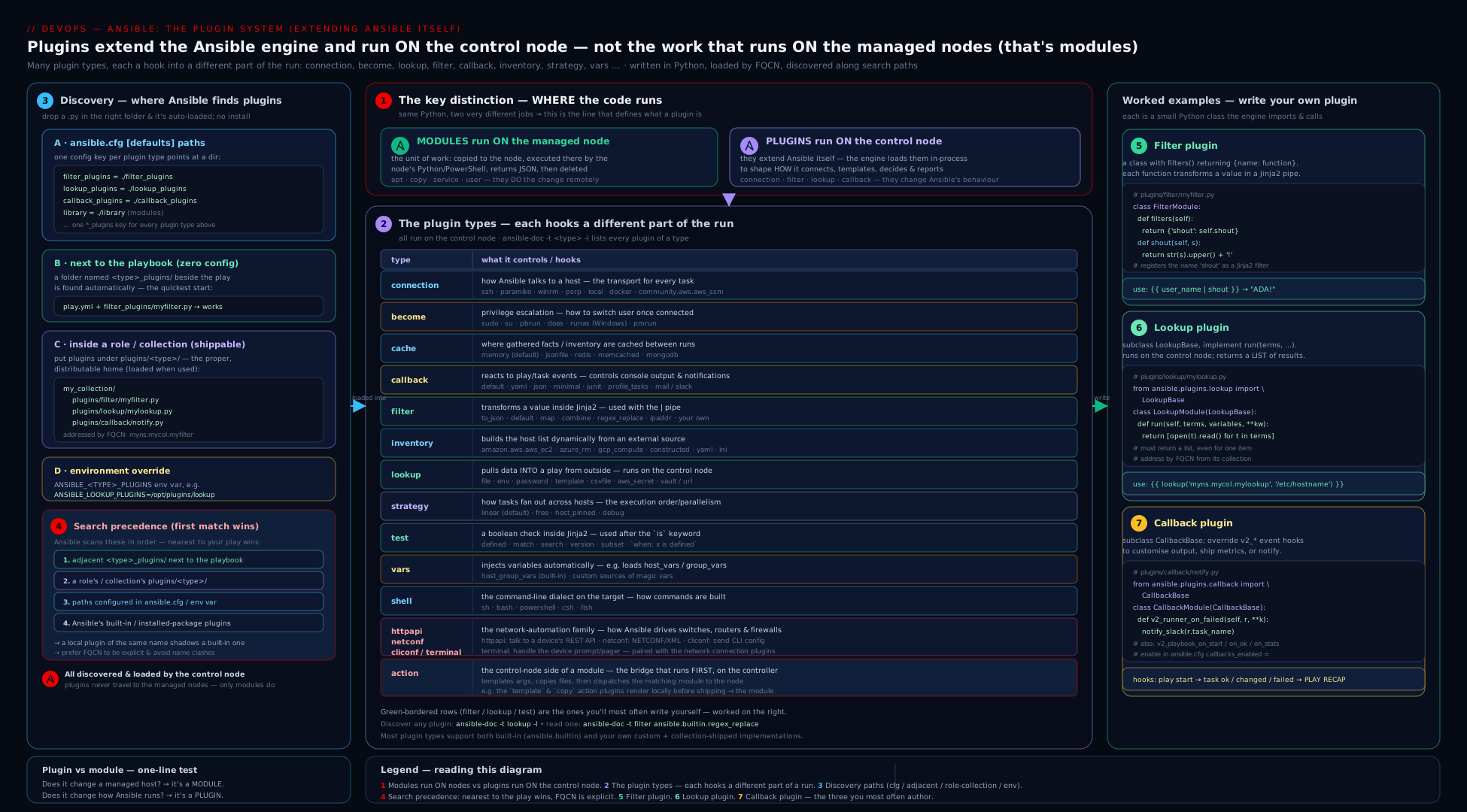
The diagram contrasts modules being shipped to and executed on the managed node against the plugin types (filter, lookup, callback, connection, inventory, …) all running inside the controller process, and traces the discovery search order from a collection’s plugins/<type>/ through adjacent and role directories and the configured *_plugins paths down to bundled ansible.builtin.
Going deeper
The sections above give you the contracts; this one is the machinery behind them — the parts that explain why the contracts are shaped the way they are, and the failure modes only an author hits. None of it is required to use plugins, but all of it separates someone who copies a FilterModule from someone who reasons about the plugin system.
Every plugin type has its own loader, and resolution is memoised. Inside ansible.plugins.loader there is one PluginLoader instance per type — filter_loader, lookup_loader, connection_loader, callback_loader, strategy_loader, and so on. Each builds its ordered search path once (collections, adjacent dirs, role dirs, the *_plugins config paths, then bundled) and then caches what it resolves. Two consequences follow. First, “first match wins” is not a fresh per-call scan but a memoised lookup: the initial resolution of a short name is the one you keep for the whole run, which is why dropping a new plugin file mid-run has no effect. Second — a distinction that trips people — collections are found via ANSIBLE_COLLECTIONS_PATH, not the *_plugins paths. Those filter_plugins/lookup_plugins settings only govern the legacy adjacent and global directories; a plugin shipped inside a collection is located because its collection is on the collections path and you named it by FQCN. “I set filter_plugins but my collection filter still isn’t found” is this confusion in the wild.
Filters and tests live inside the Jinja2 environment; lookups do not. When Ansible builds its templating Environment, it injects every filter into Environment.filters and every test into Environment.tests. They are ordinary Jinja constructs, evaluated inline wherever a template renders, with no run context handed to them — which is exactly why the purity rule is not a style preference but a structural necessity. A filter may be invoked many times, in unpredictable order, during a single templating pass, so any I/O or mutation it performs is unbounded and unrepeatable. A lookup, by contrast, is not a Jinja filter at all: lookup, query, and q are special functions Ansible adds to the templating namespace that call into lookup_loader and hand your run() the variables context. That extra context, and the fact that a lookup is a deliberate call rather than an inline transform, is what makes I/O legitimate there.
A lookup re-runs on every evaluation. Because the call is embedded in a template expression, it fires each time that expression is templated — put {{ lookup('community.hashi_vault.hashi_vault', ...) }} directly in a variable referenced inside a loop and you may hit Vault once per iteration. Capture the value once with ansible.builtin.set_fact (optionally cacheable: true) when it should be stable for the run. Two author-facing kwargs every lookup gets for free are worth knowing: wantlist=True (return the list rather than a joined string — the programmatic equivalent of query) and errors='ignore'|'warn'|'strict' (how a failure inside run() surfaces; strict is the default). Design your run() to raise AnsibleError cleanly and let the caller choose leniency with errors=, instead of swallowing failures yourself.
Return real Python types, not pre-stringified text. Author filters to build and return the genuine list/dict/int, never its string form — whether the caller ultimately sees the real object or a rendered string is governed by Jinja2 native templating, which recent ansible-core enables, and returning the real object is correct either way: a caller that wants to index or loop over your result then can. Raise AnsibleFilterError (from ansible.errors) rather than a bare TypeError so failures carry Ansible’s context:
from ansible.errors import AnsibleFilterError

def pluck(records, key):
    if not isinstance(records, list):
        raise AnsibleFilterError("pluck: expected a list, got %r" % type(records).__name__)
    return [record[key] for record in records]     # a real list flows back to the caller
Callbacks are ordered by the strategy, and they must respect no_log. The active strategy invokes your v2_* hooks as results arrive; under strategy: linear that order is predictable, but under strategy: free results from different hosts interleave, so a callback that accumulates state cannot assume host ordering. Reach for v2_on_any when you want a catch-all, and prefer the inherited self._dump_results(result._result) helper over formatting result._result yourself — _dump_results honours no_log and _ansible_no_log, whereas reading the raw result dict directly bypasses secret censorship and is a classic way to leak a hidden value into logs or chat. A custom stdout callback that only wants to tweak formatting should subclass the built-in ansible.plugins.callback.default CallbackModule and override selectively, inheriting the recap and per-task rendering rather than reimplementing them. Callbacks may also declare DOCUMENTATION options and read them with self.get_option() after set_options(), exactly like lookups.
Connection plugins carry real performance levers. The default ssh plugin uses OpenSSH ControlPersist multiplexing — one authenticated socket reused across tasks — and, when pipelining = true (and the target’s sudoers doesn’t force requiretty), pipelining streams the module straight into the remote interpreter over that open session instead of copying a temp file and executing it as a separate step, cutting round-trips dramatically. meta: reset_connection tears down and re-establishes the connection mid-play (needed after, say, you add the very user you then want to connect as). Network connection plugins (ansible.netcommon.network_cli, httpapi, netconf) are persistent: they run in a background ansible-connection process that holds the device session open across tasks, which is why network automation feels different from the fire-and-forget SSH model. None of this is visible in the playbook — it is all connection-plugin behaviour you tune through variables and ansible.cfg.
Hands-on lab
You will write, install, and run your own filter plugin and your own lookup plugin — entirely free and local, targeting localhost with the local connection, so there is no cloud and no cost. You only need ansible-core (ansible --version).
1. Create the lab layout. Make a plugin-lab/ directory containing an ansible.cfg, a filter_plugins/ dir, a lookup_plugins/ dir, a sample data file, and a playbook.
plugin-lab/ansible.cfg:
[defaults]
inventory = localhost,
filter_plugins = ./filter_plugins
lookup_plugins = ./lookup_plugins
stdout_callback = ansible.builtin.yaml
callbacks_enabled = ansible.builtin.profile_tasks, ansible.builtin.timer
retry_files_enabled = false
plugin-lab/filter_plugins/kv_filters.py — paste the filter file from the “Filter plugins” section above (the one defining to_env, shout, mask).
plugin-lab/lookup_plugins/reverse_lines.py — paste the lookup file from the “Lookup plugins” section above.
plugin-lab/sample.txt:
first line
second line
third line
plugin-lab/play.yml:
- name: Exercise a custom filter and a custom lookup
  hosts: localhost
  connection: local           # the ansible.builtin.local connection plugin
  gather_facts: false
  tasks:
    - name: Use the custom 'to_env' and 'mask' filters
      ansible.builtin.debug:
        msg: "{{ {'PORT': 8080, 'ENV': 'prod', 'SECRET': 'sk-12345678'} | to_env }}"

    - name: Use the custom 'shout' filter with an argument
      ansible.builtin.debug:
        msg: "{{ 'deploy' | shout('!!') }}"

    - name: lookup() joins results into one string
      ansible.builtin.debug:
        msg: "{{ lookup('reverse_lines', 'sample.txt') }}"

    - name: query() returns a real list (drive a loop)
      ansible.builtin.debug:
        msg: "reversed file -> {{ item }}"
      loop: "{{ query('reverse_lines', 'sample.txt') }}"
2. Confirm Ansible can see your plugins. From inside plugin-lab/:
ansible-doc -t filter -l | grep -E 'to_env|shout|mask'
ansible-doc -t lookup -l | grep reverse_lines
Both should list your plugins (proving discovery via the *_plugins paths worked). ansible-doc -t lookup reverse_lines should print the documentation you wrote.
3. Run it.
ansible-playbook --syntax-check play.yml
ansible-playbook play.yml
Expected: YAML-formatted output (your stdout_callback), a per-task timing block and a total timer at the end (your callbacks_enabled aggregate callbacks), the to_env task printing PORT=8080\nENV=prod\nSECRET=sk-12345678, shout printing DEPLOY!!, the lookup task printing the three lines reversed as one string, and the query loop iterating that same reversed content.
4. Prove the lookup vs query difference. Add a second file sample2.txt, then change the loop task to query('reverse_lines', 'sample.txt', 'sample2.txt') and re-run — the loop now iterates two elements (one per file). Switch it to lookup('reverse_lines', 'sample.txt', 'sample2.txt') in a debug.msg and you’ll see the two results comma-joined into one string — exactly why query() is the right call for loops.
5. Demonstrate precedence/shadowing. Add a mask filter to a second file filter_plugins/aaa_override.py (same FilterModule/filters() shape) that returns "OVERRIDDEN", re-run, and observe which one wins (first found along the path). Delete it afterwards. This is the override footgun in miniature — and the reason production code uses FQCN inside collections.
Validation. You have authored a filter plugin and a lookup plugin, made Ansible discover them via ansible.cfg paths, confirmed them with ansible-doc, exercised lookup vs query, and switched stdout/aggregate callbacks on — the whole plugin system in one directory.
Cleanup.
# just delete the lab directory
rm -rf plugin-lab
Cost note. Everything ran against localhost with the local connection — no cloud resources, no remote hosts, ₹0.
Practice challenges
Six exercises escalating from beginner to advanced. Try each before opening the solution; every answer ends with the one idea it is meant to lock in. They assume a localhost/connection: local playbook like the lab’s.
1. (Beginner) Prove where a lookup runs. Write a single debug task that prints your control node’s USER environment variable, and state which machine’s environment it read from.
<details> <summary>Solution</summary>
- ansible.builtin.debug:
    msg: "Running as {{ lookup('ansible.builtin.env', 'USER') }} on the control node"
It read the control node’s environment — never the target’s.
Why: lookups always execute controller-side, at templating time; that is the whole reason lookup('file', ...) reads your filesystem.
</details>
2. (Beginner) See lookup vs query return shapes. Using ansible.builtin.fileglob, print the matches as one string with lookup(), then iterate matches with a loop: driven by query().
<details> <summary>Solution</summary>
- ansible.builtin.debug:
    msg: "joined: {{ lookup('ansible.builtin.fileglob', '/etc/hosts', '/etc/hostname') }}"

- ansible.builtin.debug:
    msg: "one match: {{ item }}"
  loop: "{{ query('ansible.builtin.fileglob', '/etc/*') }}"
Why: lookup() flattens the list into a comma-joined string; query() returns the real list a loop: needs.
</details>
3. (Intermediate) Write a pure filter. Author a pluck filter that, given a list of dicts and a key, returns a new list of that key’s values without mutating the input. Call it as {{ servers | pluck('name') }}.
<details> <summary>Solution</summary>
# filter_plugins/collection_filters.py
from ansible.errors import AnsibleFilterError

def pluck(records, key):
    if not isinstance(records, list):
        raise AnsibleFilterError("pluck: first argument must be a list")
    return [record[key] for record in records]   # new list; input untouched

class FilterModule:
    def filters(self):
        return {"pluck": pluck}
Why: a filter must be pure — build and return a new value, never mutate what was piped in, because Jinja may call it many times per render. </details>
4. (Intermediate) Configure callbacks. In ansible.cfg, make runs print YAML output and also show per-role timing plus a total run timer. Name the command that proves the aggregate callbacks are loadable.
<details> <summary>Solution</summary>
[defaults]
stdout_callback = ansible.builtin.yaml
callbacks_enabled = ansible.builtin.profile_roles, ansible.builtin.timer
Verify with ansible-doc -t callback -l | grep -E 'profile_roles|timer', then run any playbook.
Why: exactly one stdout_callback owns the screen; aggregate callbacks are additive and switched on only through callbacks_enabled.
</details>
5. (Advanced) Lookup with a documented option. Write an env_default lookup that takes one or more environment-variable names plus a default option, returning each variable’s value or the default. Call query('env_default', 'EDITOR', default='vim').
<details> <summary>Solution</summary>
# lookup_plugins/env_default.py
import os
from ansible.plugins.lookup import LookupBase

DOCUMENTATION = r"""
name: env_default
short_description: Read control-node environment variables with a fallback
description:
  - Returns each named variable's value from the control node's environment,
    or a configured default when it is unset.
options:
  _terms:
    description: One or more environment variable names.
    type: list
    elements: str
    required: true
  default:
    description: Value returned when a variable is unset.
    type: str
    default: ""
"""

class LookupModule(LookupBase):
    def run(self, terms, variables=None, **kwargs):
        self.set_options(var_options=variables, direct=kwargs)
        default = self.get_option("default")
        return [os.environ.get(name, default) for name in terms]
Why: an option only exists if you declare it in DOCUMENTATION and read it via set_options() + get_option() — never reach into raw kwargs.
</details>
6. (Advanced) Reproduce shadowing, then defeat it with FQCN. Drop a filter_plugins/regex_search.py that shadows the built-in regex_search short name and returns "SHADOWED". Show the adjacent file wins, then call the real built-in without removing your file.
<details> <summary>Solution</summary>
# filter_plugins/regex_search.py
class FilterModule:
    def filters(self):
        return {"regex_search": lambda *args, **kwargs: "SHADOWED"}
- ansible.builtin.debug:
    msg: "{{ 'abc123' | regex_search('[0-9]+') }}"                 # -> SHADOWED (adjacent wins)
- ansible.builtin.debug:
    msg: "{{ 'abc123' | ansible.builtin.regex_search('[0-9]+') }}" # -> 123 (FQCN pins the built-in)
Why: short names resolve first-match-wins, so an adjacent file silently overrides a built-in; FQCN names the exact implementation and removes the ambiguity — which is why shipped code always uses it. </details>
Common mistakes & troubleshooting
| Symptom | Cause | Fix |
|---|---|---|
template error … 'myfilter' is undefined |
The filter file isn’t on a discovery path, or the class isn’t named FilterModule |
Put it in filter_plugins/ (adjacent/role) or plugins/filter/ (collection); confirm the class is FilterModule with a filters() dict; check ansible-doc -t filter -l. |
Lookup returns one comma-joined blob into a loop: |
You used lookup() (which flattens) where you needed a list |
Use query()/q(), or lookup(..., wantlist=true). |
lookup('file', …) reads the wrong file (your machine, not the target) |
Lookups run on the control node, always | To read a file on the target use ansible.builtin.slurp/fetch; lookups are controller-only by design. |
| Callback “doesn’t fire” | It’s an aggregate/notification callback not listed in callbacks_enabled (or it needs CALLBACK_NEEDS_ENABLED) |
Add it by name to callbacks_enabled; for ad-hoc ansible, also set bin_ansible_callbacks = true. |
| Two custom stdout callbacks, only one shows | Only one stdout_callback can be active |
Pick a single stdout_callback; make extras aggregate/notification and enable via callbacks_enabled. |
A cloud inventory *.yml is ignored |
The auto inventory plugin isn’t enabled, the collection isn’t installed, or the filename suffix isn’t recognised |
Ensure auto is in [inventory] enable_plugins, install the collection, name the file with the expected suffix (e.g. *.aws_ec2.yml). |
lookup option encoding ignored |
You didn’t call self.set_options() / declare it in DOCUMENTATION |
Declare the option, call self.set_options(var_options=variables, direct=kwargs), read self.get_option('encoding'). |
| A built-in filter/lookup behaves unexpectedly | A same-named plugin adjacent to the playbook or in a role shadows it (first match wins) | Reference the built-in by FQCN (ansible.builtin.…); remove or rename the shadowing file. |
| Lookup raises an ugly Python traceback | You let a bare exception escape run() |
Catch and raise AnsibleError(...) for a clean, contextual message. |
| Filter mutates a list passed in and “leaks” changes | Filters must be pure | Return a new value; never modify the input in place. |
Common beginner mistakes
These are mental-model errors — the wrong picture in your head — as opposed to the symptom-level table above. Fix the model and the symptoms stop appearing.
- “A filter and a lookup are basically the same — I’ll use whichever.” They sit on opposite sides of a line: a filter transforms data you already have and must be pure (no I/O), while a lookup reaches out and fetches data (a file, an env var, a secret) from the control node. Using a lookup to reshape a variable, or trying to make a filter read a file, is fighting the design. Ask “am I transforming or fetching?” and the choice makes itself.
- “
lookup('file', '/etc/app.conf')reads that file on the host I’m configuring.” No — every lookup runs on the control node, at templating time. It reads your/etc/app.conf, not the target’s. To read a file that lives on the managed node, use theansible.builtin.slurpmodule (orfetch), which actually executes there. - “My custom plugin gets shipped to the target like a module.” Plugins never leave the controller. A
filter,lookup,callback, orconnectionplugin executes inside theansible-playbookprocess; only modules (andmodule_utils) are copied to and run on the managed node. - “I’ll write two stdout callbacks for richer output.” Exactly one
stdout_callbackis active — it owns the screen. Anything extra must be an aggregate or notification callback switched on viacallbacks_enabled; a second stdout callback is simply ignored. - “
queryandlookupare aliases.” They call the samerun(), butlookup()flattens the result into a comma-joined string whilequery()(andq()) returns the real list. Feed aloop:fromquery(); uselookup()only where you genuinely want a scalar string. - “The class can be named anything as long as the file is in the right folder.” The class name is a hard contract Ansible looks up by exact string:
FilterModule(withfilters()),TestModule(tests()),LookupModule(subclassLookupBase,run()),CallbackModule(subclassCallbackBase). Rename it and Ansible silently finds nothing. - “Putting the plugin file next to my playbook is enough — any folder name works.” It must sit in a directory Ansible actually searches, spelled exactly: the plural legacy names
filter_plugins/,lookup_plugins/,callback_plugins/,library/(adjacent or in a role), a configured*_pluginspath, or a collection’s singularplugins/filter/,plugins/lookup/,plugins/callback/. A folder calledfilters/ormy_plugins/is invisible.
Best practices
- Reach for the cheapest extension first. A built-in filter/lookup beats a custom one; a custom filter/lookup beats a custom module when the work is controller-side data shaping or fetching. Write a plugin only when nothing existing fits.
- Always name plugins by FQCN in shipped code — package them in a collection (
plugins/filter/,plugins/lookup/, …) and callnamespace.collection.name. It eliminates shadowing ambiguity entirely. - Document every plugin with
DOCUMENTATION/EXAMPLES/RETURN(and_input/_termsfor filters/lookups) soansible-docworks and reviewers can read it. - Keep filters pure — no I/O, no mutation, deterministic output for the same input. Side-effecting “filters” are a trap; if you need I/O, that’s a lookup or a module.
- Return clean errors — raise
AnsibleFilterError/AnsibleError(not bare exceptions) so failures show context, not a traceback. - Use
set_options()/get_option()for lookup/connection/callback configuration instead of poking at raw kwargs — it gives you typing, defaults, and env/var resolution for free. - One stdout callback, many aggregate/notification ones. Choose
stdout_callbackdeliberately (yamlfor humans,json/junitfor machines/CI) and addprofile_tasks/timerviacallbacks_enabledfor visibility. - Prefer inventory plugins over inventory scripts — the
plugin:+*.ymlmodel gives you caching,constructedgroups, and option validation that scripts never had. - Verify discovery with
ansible-doc -t <type> -lbefore debugging behaviour — if it isn’t listed, it isn’t loadable, and the problem is the path/class name, not your logic.
Security notes
Because plugins execute in the controller process with the controller’s privileges, they are a more sensitive trust boundary than modules. Treat any third-party plugin (especially callback and vars plugins, which can load and run automatically) the way you’d treat any code you execute on your automation host — review it before enabling it, and pin collection versions. Lookups and the pipe/url family read your control node’s filesystem, environment, and network, so a malicious or careless lookup can exfiltrate local secrets; keep the control node’s filesystem and ANSIBLE_* environment trusted, and never debug-print the output of a secrets lookup. When you write a secrets-fetching lookup (Vault, a cloud secret manager), document that callers must set no_log: true on tasks that use it, and remember that -vvvv/ANSIBLE_DEBUG=1 can defeat no_log — so never run secret-bearing plays at maximum verbosity. Callback plugins see every task result, including data a task tried to hide; a logging/notification callback can leak secrets into CI logs or chat, so audit what your callbacks emit and honour no_log. Finally, the first-match-wins discovery order means a plugin dropped adjacent to a playbook silently overrides a trusted built-in — review the filter_plugins/, lookup_plugins/, callback_plugins/, and library/ directories of any repository before you run its playbooks, and prefer FQCN so you always know which implementation runs.
Interview & exam questions
1. What is the fundamental difference between a module and a plugin in Ansible?
A module is copied to and executed on the managed node, returning JSON; a plugin runs inside the ansible/ansible-playbook process on the control node and never travels to the target. Filters, lookups, callbacks, connection, inventory, become, cache, strategy, shell, and vars are all plugins; the thing you notify or package-install is a module.
2. Name as many plugin types as you can and what each does. action (controller-side half of a module), become (privilege escalation), cache (fact storage), callback (event reactions/output), cliconf (network CLI config), connection (transport), filter (Jinja2 transforms), httpapi (device HTTP API), inventory (host sources), lookup (pull external data in), netconf (NETCONF), shell (target shell command assembly), strategy (task orchestration — linear/free), terminal (network terminal handling), test (Jinja2 yes/no), vars (auto-inject variables).
3. How do you write a filter plugin?
Create a file with a class named exactly FilterModule whose filters() method returns a dict mapping filter names to callables. The first argument each callable receives is the piped value; subsequent args come from (…). One file can define many filters. Place it in filter_plugins/ (adjacent/role) or plugins/filter/ (collection).
4. How do you write a lookup plugin, and what must run() return?
Subclass LookupBase in a class named LookupModule and implement run(self, terms, variables, **kwargs), which must return a list. terms are the positional args; declare options in DOCUMENTATION and read them with self.set_options() + self.get_option().
5. lookup vs query — what’s the difference and which do you use in a loop?
run() always returns a list. lookup() flattens it into a single comma-joined string; query() (alias q()) returns the list as-is. Use query() for loop: sources (or lookup(..., wantlist=true)).
6. Where does a lookup execute, and what’s the consequence for lookup('file', ...)?
On the control node, at templating time, every evaluation. So lookup('file', '/etc/x') reads your machine’s /etc/x, not the target’s — to read a file on the target you use slurp/fetch.
7. Explain the three callback flavours and how each is enabled.
stdout owns the on-screen output — exactly one active, set with stdout_callback. aggregate adds behaviour (timing/profiling) and notification sends results elsewhere (logs/chat/CI) — any number active, switched on by listing them in callbacks_enabled. For ad-hoc ansible, aggregate/notification callbacks also need bin_ansible_callbacks = true.
8. What’s the difference between an inventory plugin and an inventory script?
A script is a legacy executable that dumps a fixed JSON shape on --list (supported via the script plugin for back-compat). An inventory plugin is configured by a declarative *.yml with a plugin: key, gets caching and constructed-style compose/keyed_groups, and validates options — the modern, recommended approach.
9. What is the plugin discovery precedence order?
Highest first: (1) a collection via FQCN, (2) a directory adjacent to the playbook (filter_plugins/, lookup_plugins/, library/, …), (3) a role’s plugin dirs, (4) the configured *_plugins paths in ansible.cfg, (5) the bundled ansible.builtin plugins. First match wins, which is why FQCN prevents accidental shadowing.
10. Why do adjacent/role plugin directories use plural names but collections use singular?
Legacy locations use filter_plugins/, lookup_plugins/, callback_plugins/, library/ (modules); collections standardise on the singular type name under plugins/ — plugins/filter/, plugins/lookup/, plugins/callback/, plugins/modules/. It’s a historical inconsistency you simply memorise.
11. How would you confirm Ansible can actually load a custom plugin you wrote?
Run ansible-doc -t <type> -l (e.g. ansible-doc -t filter -l) and look for it; ansible-doc -t lookup yourname prints its docs. If it’s listed there, discovery worked; if not, the path or the class name (FilterModule/LookupModule/CallbackModule) is wrong.
12. From a security standpoint, why are plugins more sensitive than modules? Plugins run in the controller process with its privileges and access to the control node’s filesystem, environment, and network — so a malicious lookup/callback/vars plugin can read local secrets or leak task data into logs. The first-match-wins path also lets an adjacent file silently override a trusted built-in, so review a repo’s plugin dirs and pin collection versions before running its playbooks.
Quick check
- A module runs on the ____ ; a plugin runs on the ____.
- What exact class name and method define a filter plugin? A lookup plugin’s class name and entry-point method?
- You need a real list from a lookup to drive a
loop:. Which function do you call? - How many
stdout_callbackplugins can be active at once, and how do you enable an aggregate callback likeprofile_tasks? - Two
filter_plugins/files both define amaskfilter. Which one is used?
Answers
- A module runs on the managed node (target); a plugin runs on the control node (controller process).
- A filter plugin: class
FilterModulewith methodfilters()returning a dict. A lookup plugin: classLookupModule(subclass ofLookupBase) withrun(self, terms, variables, **kwargs)returning a list. query()(aliasq()), orlookup(..., wantlist=true). Plainlookup()returns a comma-joined string.- Exactly one
stdout_callback. Enable an aggregate callback by adding it tocallbacks_enabledinansible.cfg(and setbin_ansible_callbacks = trueto have it fire for ad-hocansibletoo). - The first one found along the discovery path wins (e.g. the file that sorts/loads first) — which is exactly why production code names plugins by FQCN inside a collection.
Exercise
Extend the lab into a small, well-documented plugin set.
- Add a filter
to_age(epoch)tokv_filters.pythat converts a Unix timestamp into a human string like"3d 4h ago", and call it from the playbook. Give it aDOCUMENTATIONblock and confirmansible-doc -t filter to_agerenders. - Add an option to your
reverse_lineslookup —limit: int— that returns only the first N reversed lines per file. Declare it inDOCUMENTATION, read it withself.get_option('limit'), and provequery('reverse_lines', 'sample.txt', limit=2)honours it. - Write a test plugin file (
TestModulewith atests()dict) exposing a testis_private_ipthat returnstruefor RFC-1918 addresses, and use it in awhen:(when: some_ip is is_private_ip). - Write a tiny notification callback (
CALLBACK_TYPE = "notification",CALLBACK_NEEDS_ENABLED = True) that appends one line per failed task tofailures.logviav2_runner_on_failed; enable it incallbacks_enabledand force a failure to test it. - Finally, restructure all of the above into a collection skeleton (
namespace/demo/plugins/filter/,plugins/lookup/,plugins/test/,plugins/callback/), install it, and call everything by FQCN (namespace.demo.shout,query('namespace.demo.reverse_lines', …)). Write two sentences on why FQCN removes the shadowing risk you saw in lab step 5.
This mirrors the EX374 expectation that you can author and package plugins, not just consume them.
Certification mapping
This lesson maps to the Red Hat Certified Specialist in Developing Automation with Ansible Automation Platform (EX374) exam, the advanced developer credential that goes beyond the RHCE’s playbook-authoring focus. EX374 objectives this lesson covers include develop custom plugins (writing and packaging filter, lookup, and other plugins), work with custom filters and lookups (the FilterModule.filters() and LookupBase.run() contracts, lookup vs query), manage content collections (where plugins live — plugins/<type>/ — and how FQCN resolves them), and the broader theme of extending Ansible’s behaviour with custom code. It complements Writing Custom Ansible Modules, In Depth (the other half of “Ansible code you write” — modules run on the target, plugins on the controller) and the Jinja2 lesson, which is the consumer view of the filters and lookups you now know how to author. While plugin internals are not on the RHCE EX294, the filter/lookup/inventory usage there is everyday RHCE territory, so this knowledge reinforces both exams.
Glossary
- Plugin — Python that runs inside the controller process to extend Ansible at a defined extension point (filter, lookup, callback, connection, become, cache, strategy, shell, vars, inventory, action, test, cliconf, httpapi, netconf, terminal).
- Module — A program copied to and executed on the managed node, returning JSON (a different contract from a plugin).
- Filter plugin — A
FilterModuleclass whosefilters()method returns{name: callable}; invoked with|in Jinja2 to transform a value. - Test plugin — A
TestModuleclass whosetests()returns{name: callable}; invoked withisto answer a yes/no question. - Lookup plugin — A
LookupModule(LookupBase)whoserun(terms, variables, **kwargs)returns a list, pulling external data into a play from the control node. lookup()/query()(q()) — Caller-side functions for lookups;lookup()joins results into one string,query()returns the list (use for loops).wantlist— Thelookup()keyword (wantlist=true) that makes it return the list rather than a joined string — the programmatic equivalent ofquery().- Callback plugin — A
CallbackModule(CallbackBase)implementingv2_*hooks to react to run events; flavoured stdout (one active), aggregate, or notification. v2_*hooks — The callback event methods (v2_playbook_on_start,v2_runner_on_ok,v2_playbook_on_stats, …) invoked as a run progresses;v2_on_anycatches them all.CALLBACK_TYPE— The class attribute that declares a callback’s flavour (stdout/aggregate/notification) and therefore how it is enabled.stdout_callback— The single callback that owns on-screen output (default,yaml,minimal,json, …).callbacks_enabled— The config list of additional aggregate/notification callbacks to switch on (profile_tasks,timer,junit, …).bin_ansible_callbacks— Config that lets aggregate/notification callbacks also fire for ad-hocansiblecommands (off by default).- Connection plugin — The transport that carries and runs modules on a host (
ssh,paramiko_ssh,local,winrm,psrp, container connections). - Pipelining — An SSH-connection optimisation that streams the module into the remote interpreter over the open session instead of copying a temp file, cutting round-trips.
- ControlPersist — OpenSSH multiplexing used by the
sshplugin to reuse one authenticated socket across tasks. - Inventory plugin — Sources hosts/groups; configured by a
*.ymlwith aplugin:key (auto,constructed,ini, cloud plugins) — the modern replacement for inventory scripts. - Inventory script — A legacy executable that emits inventory JSON on
--list; run via thescriptinventory plugin for back-compat. enable_plugins— The[inventory]list inansible.cfgnaming which inventory plugins are allowed to run (autodispatches cloud*.ymlfiles).- FQCN — Fully-Qualified Collection Name (
namespace.collection.plugin); the unambiguous way to name a plugin and avoid shadowing. PluginLoader— The per-type loader (filter_loader,lookup_loader,connection_loader, …) insideansible.plugins.loaderthat builds the search path and memoises resolved plugins.- Discovery path / precedence — The ordered directories Ansible searches for a plugin (collection → adjacent → role →
*_pluginsconfig →ansible.builtin); first match wins. *_pluginspaths —ansible.cfgsettings (filter_plugins,lookup_plugins,callback_plugins, …) andANSIBLE_*_PLUGINSenv vars naming where to look for each plugin type (the legacy dirs — collections are found viaANSIBLE_COLLECTIONS_PATH).set_options()/get_option()— The option-reading contract for lookup/callback/connection/inventory plugins, backed by the plugin’sDOCUMENTATION, giving typing, defaults, and env/var resolution.AnsibleFilterError/AnsibleError— Exceptions (fromansible.errors) a plugin raises for clean, contextual failures instead of leaking a bare Python traceback.no_log— The task directive that suppresses sensitive output; lookups should document it and callbacks must honour it (via_dump_results) so secrets don’t leak.
Next steps
You now understand Ansible’s plugin system end to end: the controller-side execution model, every plugin type, how to author filters and lookups (and the lookup/query distinction), how callbacks hook a run and why only one stdout callback may be active, what connection and inventory plugins do, and exactly how Ansible discovers and prioritises plugins. The natural next move is to package the modules and plugins you write into distributable, versioned units and give them a portable runtime. Continue with Building Ansible Collections & Execution Environments, In Depth: galaxy.yml, ansible-builder & EEs, which takes the plugins/<type>/ layout you just learned and wraps it into a publishable collection plus a container image that carries ansible-core, your collections, and their Python/system dependencies. To revisit the other half of Ansible code you write — the part that runs on the target — see Writing Custom Ansible Modules, In Depth, and for the consumer view of the filters, tests, and lookups you can now author yourself, Ansible Jinja2 Templating, In Depth.