Argo CD ships knowing four templating tools. Point it at a directory and its repo-server will render plain YAML as-is, run kustomize build on a kustomization.yaml, run helm template on a Chart.yaml, or evaluate a .jsonnet file — with zero configuration from you. For most teams, most of the time, that is enough.
Then a team adopts cdk8s and writes their manifests in TypeScript. Or ytt from the Carvel suite, because they want a real templating language with schemas. Or Tanka (jsonnet with libsonnet + Grafana’s opinionated wrapper), Timoni (CUE-based modules), helmfile (a declarative wrapper over many Helm releases), or a sops-decrypt step that has to run before the manifests are usable. None of these is a tool Argo CD knows. And Argo CD deploys the rendered output of your repo, not the repo — so if it cannot render your source, it cannot deploy it.
A Config Management Plugin (CMP) is the escape hatch. It teaches Argo CD to render any tool: you give the repo-server a sidecar container that holds your tool and a small plugin.yaml that says “when you see a source like this, run this command, and whatever it prints to stdout is the manifests.” That is the whole idea. This lesson builds one from first principles — the sidecar architecture, the plugin.yaml spec field by field, four worked examples (jsonnet, cdk8s, ytt, sops), and the two things that will bite you: security (a plugin runs arbitrary code inside your control plane’s trust domain) and the honest alternative (often you should just render in CI and commit plain YAML).
One currency note up front, because it invalidates most of the blog posts you will find: the old plugin model is gone. For years you defined plugins inline in the argocd-cm ConfigMap under a configManagementPlugins key, and they ran inside the repo-server container. That was deprecated in Argo CD 2.4 and removed in 2.8. On Argo CD 2.13+/3.x there is no configManagementPlugins field at all. Modern CMP is a sidecar, always. If a tutorial edits argocd-cm to add a plugin, it is describing a version you cannot run.
Why this matters
The pull-based GitOps model has one hard requirement that is easy to forget: the desired state has to be plain Kubernetes manifests by the time the controller applies it. Git can hold anything — TypeScript, CUE, jsonnet, encrypted blobs — but the application-controller only knows how to apply Deployment, Service, ConfigMap, and friends. Something has to turn your source into that. In Argo CD, that something is always the repo-server, and the repo-server only speaks four dialects natively.
So the moment your team’s chosen tool is not one of those four, you hit a wall: argocd app create succeeds, but the app sits at ComparisonError or Unknown because the repo-server looked at your directory, found no kustomization.yaml, no Chart.yaml, no plain YAML it could parse, and gave up. You cannot “just add a flag.” You have to extend the renderer. That is what a CMP does, and it is the only supported way to do it.
The mental model to hold for the entire lesson is a single sentence: a CMP is a contract where Argo CD hands your tool a checked-out copy of the repo and trusts whatever your tool prints to stdout as the manifests to deploy. Everything else — discovery, init, parameters, the sidecar, the socket — is plumbing around that one exchange. Get the contract right (your command runs, it prints clean YAML, and nothing else) and CMP is boring and reliable. Get it wrong (the command logs a warning to stdout, or exits non-zero, or matches the wrong apps) and you get a class of failures that look like Argo CD bugs but are entirely your plugin’s doing.
And because that command is your code running with the repo-server’s privileges, a CMP is also the single most security-sensitive extension point in Argo CD. Most of this lesson’s weight sits on two sections — wiring it correctly and locking it down — for exactly that reason.
What the repo-server already renders — and where it stops
Before you reach for a plugin, be certain you actually need one. The repo-server auto-detects the tool from what the source path contains — you do not configure this, it just happens. The detection order and triggers:
| The source path contains… | Repo-server runs… | You configure it via | Plugin needed? |
|---|---|---|---|
A Chart.yaml |
helm template (server-side render, not helm install) |
spec.source.helm |
No |
A kustomization.yaml |
kustomize build |
spec.source.kustomize |
No |
A .jsonnet file (as the app path) |
the built-in Jsonnet VM | spec.source.directory.jsonnet |
No |
Plain .yaml / .json manifests |
nothing — reads them directly (optionally recursed) | spec.source.directory |
No |
| Anything else (cdk8s, ytt, CUE, …) | nothing — it cannot render it | a Config Management Plugin | Yes |
Two of those deserve their own lessons and get them: Helm with Argo CD explains why Argo CD runs helm template rather than helm install (no Tiller, no release object, helm list is empty by design), and Kustomize with Argo CD covers bases, overlays and image overrides. If your source is a Helm chart or a Kustomize overlay, stop — you do not need this lesson’s machinery. A plugin that re-implements what the built-in already does is pure operational cost: another image to patch, another attack surface, another thing that slows every reconcile.
The tools that genuinely do need a CMP are the long tail of the Kubernetes templating ecosystem. Here are the ones you will actually meet, and what their CMP has to do:
| Tool | What it is | init step (dependencies) |
generate command (the render) |
Discovery marker |
|---|---|---|---|---|
| jsonnet + jsonnet-bundler | Data-templating language + vendored libs | jb install |
jsonnet -J vendor main.jsonnet |
jsonnetfile.json |
| Tanka | Grafana’s opinionated jsonnet framework | jb install |
tk show --dangerous-allow-redirect . |
spec.json / jsonnetfile.json |
| cdk8s | Manifests written in TypeScript/Python/Go | npm ci |
cdk8s synth then emit dist/*.k8s.yaml |
cdk8s.yaml |
| ytt (Carvel) | YAML templating with a real schema | vendir sync (if used) |
ytt -f . |
**/*.ytt.yaml (convention) |
| Timoni | CUE-based module packaging | (none, or timoni mod vendor) |
timoni build <name> . |
timoni.cue / values.cue |
| helmfile | Declarative wrapper over many Helm releases | (chart pulls) | helmfile template |
helmfile.yaml |
| sops / helm-secrets | Decrypt-before-render for secrets | (none) | sops --decrypt … piped into the tool |
*.enc.yaml (convention) |
Notice the shape is identical across all of them: an optional init to fetch dependencies, a generate that runs the tool and prints YAML, and a discovery marker file that tells Argo CD “this plugin handles this app.” That regularity is not an accident — it is the plugin.yaml schema, which we will now dissect.
The CMP v2 sidecar model
Here is the architecture in one paragraph, then we will slow down. Your plugin lives in a sidecar container that you add to the argocd-repo-server Deployment. That sidecar runs a binary called argocd-cmp-server, which reads your plugin.yaml and exposes the plugin over a Unix domain socket in a volume shared with the repo-server. When the repo-server needs to render a source and no native tool matches (or an app names your plugin explicitly), it does not shell out itself — it calls the sidecar over that socket, streams it the checked-out repo files, and reads back the manifests your generate command printed. The repo-server stays a thin orchestrator; the sidecar does the tool-specific work in its own filesystem and its own image.
Walk the render left to right and the pieces fall into place:
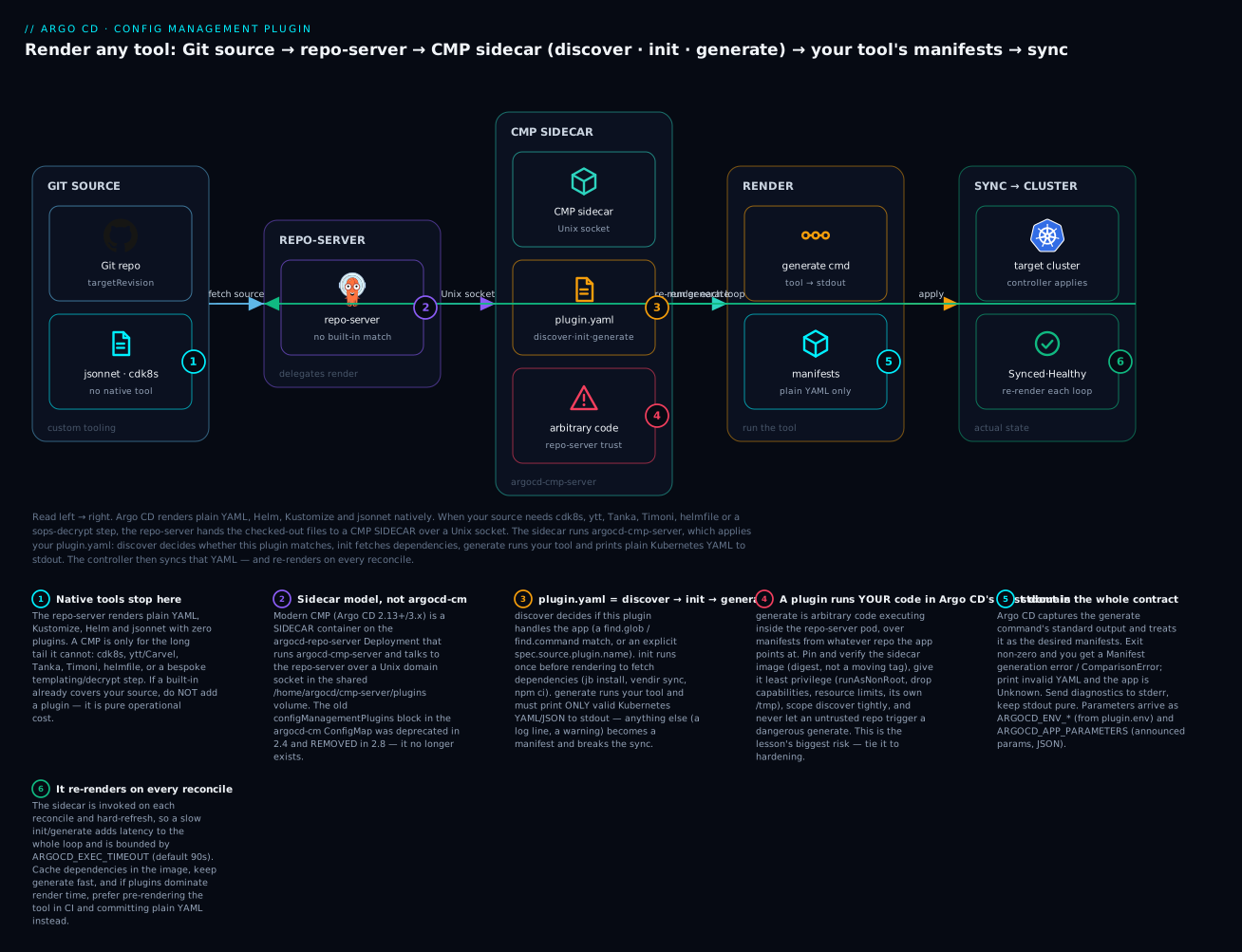
The badges mark the load-bearing facts: native tools stop at jsonnet (1), so a CMP is only for the long tail; it is a sidecar, not argocd-cm (2); the plugin.yaml is three phases — discover, init, generate (3); that generate is arbitrary code in Argo CD’s trust domain (4), the biggest risk in the lesson; stdout is the entire contract (5); and it re-renders on every reconcile (6), so a slow plugin taxes the whole loop.
Why a sidecar and not “just run the tool in the repo-server”? Three reasons, all of which the old in-repo-server model failed:
- Isolation. Your tool’s dependencies (a Node runtime for cdk8s, a JVM, a pile of jsonnet libs) do not pollute the repo-server image. If your plugin’s toolchain has a CVE, you patch your sidecar, not Argo CD’s core.
- Version independence. The sidecar image is yours to pin and upgrade on your own schedule.
- A clean privilege boundary. The sidecar can run as a locked-down non-root user with its own resource limits and its own
/tmp, so a runaway or malicious render is contained.
The two components talk over a small set of well-known paths. Memorise these — every wiring bug is a wrong path:
| Path | Volume | Owner | Purpose |
|---|---|---|---|
/var/run/argocd/argocd-cmp-server |
var-files (emptyDir, shared) |
repo-server writes, sidecar runs | The binary — the repo-server’s copyutil init container copies it here so the sidecar’s version matches the repo-server’s |
/home/argocd/cmp-server/plugins |
plugins (emptyDir, shared) |
sidecar creates socket, repo-server dials it | The Unix socket directory; each sidecar creates <plugin-name>.sock here |
/home/argocd/cmp-server/config/plugin.yaml |
cmp-plugin (ConfigMap) |
you mount it read-only | The plugin definition the sidecar reads on start |
/tmp |
cmp-tmp (emptyDir, not shared with repo-server) |
sidecar only | The sidecar’s scratch space; keeping it separate blunts path-traversal attacks |
The single most elegant detail here is the shared binary. You do not bake argocd-cmp-server into your image. The repo-server’s own init container copies its copy of the binary into the shared var-files volume, and your sidecar runs it via command: [/var/run/argocd/argocd-cmp-server]. That guarantees the CMP server binary is always the exact version of your Argo CD install — upgrade Argo CD and the sidecar’s server logic upgrades with it, while your tool stays put. Your image only needs your tool (jsonnet, cdk8s, ytt) plus the argocd user (UID 999). If the architecture of the repo-server itself is fuzzy, the Argo CD Architecture lesson opens that box.
The version history matters because the internet is full of stale instructions:
| Argo CD version | CMP model | How plugins were defined |
|---|---|---|
| ≤ 2.3 | In-repo-server (v1) | configManagementPlugins key in the argocd-cm ConfigMap |
| 2.4 – 2.7 | Sidecar (v2) available; v1 deprecated | Both; argocd-cm style warned |
| 2.8+ | Sidecar (v2) only | argocd-cm configManagementPlugins removed — sidecar + plugin.yaml |
| 2.13 / 3.x (this course) | Sidecar (v2) | Sidecar + plugin.yaml mounted from a ConfigMap |
If you are ever handed a cluster where “the plugin stopped working after an upgrade,” the first thing to check is whether someone defined it the old way in argocd-cm; on a modern version that block is silently ignored, and the app renders nothing.
The plugin.yaml spec, field by field
The plugin definition is a Kubernetes-style object — apiVersion: argoproj.io/v1alpha1, kind: ConfigManagementPlugin — but note it is not a CRD you apply to the cluster. It is a plain YAML document that the sidecar reads from a file. You ship it by embedding it in a ConfigMap and mounting that ConfigMap into the sidecar at /home/argocd/cmp-server/config/plugin.yaml. Here is a complete, real example for a jsonnet/Tanka plugin, every field populated:
apiVersion: argoproj.io/v1alpha1
kind: ConfigManagementPlugin
metadata:
  # The plugin's base name. Combined with spec.version to form the reference
  # name an Application uses: here, "jsonnet-tanka-v1.0".
  name: jsonnet-tanka
spec:
  # Optional. If set, Applications must reference "<metadata.name>-<version>".
  version: v1.0
  # Runs ONCE before generate, in the app source directory. Use it to fetch
  # dependencies so generate stays deterministic and offline-ish.
  init:
    command: [sh, -c]
    args: ["jb install"]
  # The heart. Runs in the app source directory on every render. Standard output
  # must be ONLY valid Kubernetes manifests (YAML or JSON, "---" separated).
  generate:
    command: [sh, -c]
    args: ["jsonnet -J vendor environments/${ARGOCD_ENV_ENVIRONMENT}/main.jsonnet"]
  # How Argo CD decides this plugin handles a repo when no plugin name is given.
  discover:
    find:
      # Runs in the repo root. MATCHES only if it exits 0 AND prints to stdout.
      command: [sh, -c, "find . -name 'jsonnetfile.json'"]
      # A glob shorthand that does the same job as the find command above.
      glob: "**/jsonnetfile.json"
    # A top-level glob; if it matches a file, the plugin may handle the repo.
    fileName: "jsonnetfile.json"
  # What the UI shows and lets users set on the Application.
  parameters:
    static:
      - name: environment
        title: Environment
        tooltip: Which environments/<name> directory to render
        required: true
        itemType: ""
        collectionType: ""
        string: dev
    dynamic:
      command: [sh, -c, "echo '[]'"]
  # If true, files keep their original mode — DANGEROUS (executable files in a
  # repo could be run). Leave false unless you fully trust every source repo.
  preserveFileMode: false
The top-level fields, and exactly what each controls:
| Field | Required | What it does | Gotcha |
|---|---|---|---|
metadata.name |
Yes | The plugin’s base name | Must be unique across sidecars on the repo-server |
spec.version |
No | Appended as -<version> to the reference name |
If set, an app naming just metadata.name will not match |
spec.init |
No | Command run once before generate, for dependencies |
Failures here surface as generation errors; keep it idempotent |
spec.generate |
Yes | The command that prints manifests to stdout | The only required behaviour: valid k8s YAML on stdout, nothing else |
spec.discover |
No | How the plugin auto-matches a repo | Omit it entirely and the plugin only runs when named — the safest default |
spec.parameters |
No | UI-announced parameters (static + dynamic) | Cosmetic + delivery; does not by itself change what generate does |
spec.preserveFileMode |
No (default false) |
Keep original file permissions | Setting true on untrusted repos is a remote-code-execution vector |
discover — the matching rules, precisely. Discovery answers one question: for an Application that did not name a plugin, does this plugin handle it? You have three levers, and the matching semantics are strict:
discover field |
Matches when… | Use it for |
|---|---|---|
find.command |
The command, run in the repo root, exits 0 AND writes non-empty stdout | Complex conditions (multiple files, content checks) |
find.glob |
The glob matches any file anywhere in the tree | The common case — “this repo contains a jsonnetfile.json” |
fileName |
The glob matches a file at the top level of the repo | Simple “marker file in the root” checks |
(omit discover) |
Never auto-matches — the app must set spec.source.plugin.name |
The most secure setup; no accidental matches |
Two facts about discovery that prevent most “wrong app” incidents. First, a find.command must do both things — exit zero and print output; a command that exits 0 but prints nothing does not match, which is exactly how you write a precise condition. Second, discovery only runs when no native tool matches and the app names no plugin; if the repo has a kustomization.yaml, Kustomize wins and your plugin is never consulted. That ordering is your friend and occasionally your surprise.
generate — the stdout contract. This is where teams lose hours, so be exact:
| Rule | Why | Failure signature if broken |
|---|---|---|
| stdout must be only manifests | Argo CD parses stdout as the desired state | Failed to unmarshal … error converting YAML to JSON |
Multiple objects: separate with --- |
Standard multi-doc YAML | Only the first object deploys, or a parse error |
| Diagnostics go to stderr, never stdout | A log line on stdout becomes a “manifest” | Bogus object, or unmarshal failure |
| Exit 0 on success | Non-zero aborts the render | Manifest generation error … exit status 1 → ComparisonError |
| Runs in the app source directory | Relative paths in your command resolve there | “file not found” when you assumed repo root |
parameters — announce, don’t compute. The static list declares parameters the UI renders on the Application (a text box, a checkbox, an array editor). The dynamic.command can compute parameter announcements at render time (e.g. list the environments found in the repo). Setting a parameter in the UI or in the Application does not magically reach your generate command — you have to consume it, which is the subject of a later section. The static parameter schema:
| Parameter field | Meaning |
|---|---|
name |
The parameter key |
title |
Human label shown in the UI |
tooltip |
Hover help text |
required |
If true, the UI flags it as must-set |
itemType |
Hint for the value type (e.g. "", string) |
collectionType |
"" (scalar), array, or map |
string / array / map |
The default value, by collection type |
Wiring a CMP: image, ConfigMap, sidecar patch, Application
Four artifacts turn a plugin.yaml into a working renderer: a sidecar image with your tool, a ConfigMap holding the plugin.yaml, a patch that adds the sidecar to the repo-server, and an Application that uses it. We build all four for the jsonnet plugin above.
1. The sidecar image
Your image needs your tool and the argocd user (UID 999) — and nothing else, because the CMP server binary is shared in from the repo-server. Keep it minimal; every package is attack surface that runs in your control plane.
# jsonnet-cmp.Dockerfile — a minimal CMP sidecar for jsonnet + jsonnet-bundler
FROM golang:1.23-alpine AS build
RUN go install github.com/google/go-jsonnet/cmd/jsonnet@v0.20.0 \
 && go install github.com/jsonnet-bundler/jsonnet-bundler/cmd/jb@v0.6.0

FROM alpine:3.20
# The argocd user must exist as UID 999 to match the sidecar securityContext.
RUN addgroup -g 999 argocd && adduser -u 999 -G argocd -D -H argocd
COPY --from=build /go/bin/jsonnet /go/bin/jb /usr/local/bin/
USER 999
# No ENTRYPOINT: the sidecar's command is overridden to the shared cmp-server binary.
A few build-time considerations worth a table, because these are the choices that make an image safe or sloppy:
| Choice | Do | Why |
|---|---|---|
| Base image | Minimal (alpine, distroless, chainguard) |
Fewer packages, fewer CVEs in your control plane |
| Tool version | Pin exact versions (@v0.20.0) |
Reproducible renders; no surprise upgrades |
| User | Create UID 999, USER 999 |
Matches runAsUser: 999; never run the sidecar as root |
argocd-cmp-server |
Do not install it | It is shared from the repo-server’s var-files volume |
| Reference in cluster | Pin by digest (@sha256:…) |
A moving tag is a supply-chain hole (see Security) |
2. The ConfigMap holding plugin.yaml
The sidecar reads its plugin definition from a file, so you deliver the plugin.yaml as a ConfigMap and mount one key as that file:
apiVersion: v1
kind: ConfigMap
metadata:
  name: cmp-plugin-jsonnet
  namespace: argocd
data:
  plugin.yaml: |
    apiVersion: argoproj.io/v1alpha1
    kind: ConfigManagementPlugin
    metadata:
      name: jsonnet-tanka
    spec:
      version: v1.0
      init:
        command: [sh, -c]
        args: ["jb install"]
      generate:
        command: [sh, -c]
        args: ["jsonnet -J vendor environments/${ARGOCD_ENV_ENVIRONMENT}/main.jsonnet"]
      discover:
        find:
          glob: "**/jsonnetfile.json"
3. The repo-server sidecar patch
This is a strategic-merge patch that adds the sidecar container and its two extra volumes (cmp-plugin-jsonnet for the ConfigMap, cmp-tmp for scratch). The var-files and plugins volumes already exist on every default repo-server — you reuse them, you do not redefine them.
# Apply with: kubectl patch deploy argocd-repo-server -n argocd \
#   --type strategic --patch-file repo-server-cmp-patch.yaml
apiVersion: apps/v1
kind: Deployment
metadata:
  name: argocd-repo-server
  namespace: argocd
spec:
  template:
    spec:
      containers:
        - name: jsonnet-cmp
          command: [/var/run/argocd/argocd-cmp-server]   # shared-in binary
          image: registry.example.com/argocd/jsonnet-cmp@sha256:<digest>
          securityContext:
            runAsNonRoot: true
            runAsUser: 999
            allowPrivilegeEscalation: false
            readOnlyRootFilesystem: true
            capabilities:
              drop: [ALL]
          resources:
            requests: { cpu: 50m, memory: 64Mi }
            limits:   { cpu: "1", memory: 512Mi }
          volumeMounts:
            - { mountPath: /var/run/argocd, name: var-files }
            - { mountPath: /home/argocd/cmp-server/plugins, name: plugins }
            - mountPath: /home/argocd/cmp-server/config/plugin.yaml
              subPath: plugin.yaml
              name: cmp-plugin-jsonnet
            - { mountPath: /tmp, name: cmp-tmp }
      volumes:
        - name: cmp-plugin-jsonnet
          configMap: { name: cmp-plugin-jsonnet }
        - name: cmp-tmp
          emptyDir: {}
The mounts, one line each, because getting one wrong is the most common wiring bug:
| Mount | Path | Must be right because… |
|---|---|---|
var-files |
/var/run/argocd |
Without it, command: [/var/run/argocd/argocd-cmp-server] is “file not found” |
plugins |
/home/argocd/cmp-server/plugins |
The socket lives here; without it the repo-server can’t dial the sidecar |
cmp-plugin-jsonnet |
/home/argocd/cmp-server/config/plugin.yaml (+ subPath) |
The sidecar reads its definition here; wrong path = “no plugin” |
cmp-tmp |
/tmp |
Separate from the repo-server’s /tmp; scratch + isolation |
One plugin per sidecar. Each sidecar hosts exactly one
plugin.yaml. To support jsonnet and cdk8s and ytt, you add three sidecar containers, each with its own image, ConfigMap and socket. This keeps toolchains isolated but means the repo-server pod grows a container per tool — a real cost to weigh against pre-rendering in CI.
If you install Argo CD with the Helm chart, you do not hand-write this patch — you set repoServer.extraContainers and repoServer.volumes/volumeMounts to the same effect. The mechanics are identical; the chart just templates them.
4. The Application that uses it
Two ways to bind an app to the plugin. Named — explicit, auditable, and the mode you should prefer in production:
apiVersion: argoproj.io/v1alpha1
kind: Application
metadata:
  name: store-frontend
  namespace: argocd
spec:
  project: default
  source:
    repoURL: https://github.com/acme/store-config.git
    targetRevision: main
    path: apps/frontend
    plugin:
      name: jsonnet-tanka-v1.0        # <metadata.name>-<spec.version>
      env:
        - name: ENVIRONMENT           # becomes ARGOCD_ENV_ENVIRONMENT
          value: prod
      parameters:
        - name: environment
          string: prod
        - name: extra-labels
          array: [team-checkout, tier-1]
  destination:
    server: https://kubernetes.default.svc
    namespace: frontend
  syncPolicy:
    automated: { prune: true, selfHeal: true }
Discovery — no plugin name; the repo-server runs each sidecar’s discover and the first match wins. You simply omit the plugin field, and because apps/inventory contains a jsonnetfile.json (and no kustomization.yaml/Chart.yaml), the jsonnet plugin’s discover.find.glob matches:
apiVersion: argoproj.io/v1alpha1
kind: Application
metadata:
  name: store-inventory
  namespace: argocd
spec:
  project: default
  source:
    repoURL: https://github.com/acme/store-config.git
    targetRevision: main
    path: apps/inventory        # no `plugin:` block — matched by discovery
  destination:
    server: https://kubernetes.default.svc
    namespace: inventory
The spec.source.plugin fields you can set:
| Field | Type | Purpose |
|---|---|---|
plugin.name |
string | Bind to a specific plugin (<name> or <name>-<version>); skips discovery |
plugin.env |
list of {name, value} |
Passed to commands as ARGOCD_ENV_<name> |
plugin.parameters |
list of {name, string | array | map} |
The structured params; delivered as ARGOCD_APP_PARAMETERS (JSON) |
Named vs discovery — how to choose: name the plugin in production. Discovery is convenient (drop a repo, it just works) but it is implicit — a repo that happens to contain a matching marker file gets rendered by your plugin whether you intended it or not, which is both a correctness and a security concern. Naming makes the binding explicit and reviewable in the Application manifest, and it lets you omit discover from the plugin.yaml entirely (the most locked-down configuration).
The sidecar image registry is a per-cloud edge
The one genuinely cloud-specific decision here is where the sidecar image lives and how the repo-server pulls it. The repo-server pod pulls your custom image like any other, so it needs registry access — and each cloud has its own registry and its own “no long-lived pull secret” path via workload identity:
| Cloud | Registry | Cleanest pull auth (no static secret) | Fallback |
|---|---|---|---|
| Azure (AKS) | Azure Container Registry (ACR) | Attach ACR to AKS (az aks update --attach-acr) so the kubelet identity pulls |
imagePullSecrets with an ACR token |
| AWS (EKS) | Elastic Container Registry (ECR) | The node IAM role’s AmazonEC2ContainerRegistryReadOnly, or Pod Identity / IRSA for the puller |
ECR credential helper / imagePullSecrets |
| Google (GKE) | Artifact Registry | Grant the node service account roles/artifactregistry.reader |
imagePullSecrets with a JSON key |
Two rules that hold on all three clouds. Pin the image by digest, not a tag — a :latest (or even :1.0.0) that someone can overwrite means an attacker who controls the registry controls code execution in your control plane. And keep the sidecar image in a registry you control (a mirror), not pulled straight from a public source at reconcile time, so a public-registry outage or a hijacked upstream tag cannot break or poison your renders.
Worked examples: jsonnet, cdk8s, ytt, sops
Four plugins, four real toolchains. Each shows only its plugin.yaml (you already have the ConfigMap/patch/Application shape) plus representative output. All four plugin.yaml documents below are schema-validated — they parse and carry the real field names — but nothing here was run against a live cluster; the output blocks are labelled representative and show the shape you should expect, not a captured session.
jsonnet + Tanka
Covered above. The essence: init runs jb install to vendor libraries, generate runs jsonnet with -J vendor so imports resolve, and the environment is selected via ARGOCD_ENV_ENVIRONMENT. Representative generate stdout for the frontend app:
# representative — what `jsonnet ... main.jsonnet` prints to stdout
apiVersion: v1
kind: ConfigMap
metadata:
  name: store-frontend
  namespace: frontend
data:
  environment: prod
---
apiVersion: apps/v1
kind: Deployment
metadata:
  name: frontend
  namespace: frontend
spec:
  replicas: 3
  selector: { matchLabels: { app: frontend } }
  template:
    metadata: { labels: { app: frontend } }
    spec:
      containers:
        - name: web
          image: registry.example.com/store/frontend:1.8.2
cdk8s (synthesize to YAML)
cdk8s authors manifests in a real programming language and synthesizes them to YAML in a dist/ directory. The CMP has to install the project’s dependencies, run the synth, then cat the output to stdout:
apiVersion: argoproj.io/v1alpha1
kind: ConfigManagementPlugin
metadata:
  name: cdk8s
spec:
  version: v2
  init:
    command: [sh, -c, "npm ci --no-audit --no-fund"]
  generate:
    command: [sh, -c, "npx cdk8s synth -o dist >/dev/null && cat dist/*.k8s.yaml"]
  discover:
    fileName: "cdk8s.yaml"        # every cdk8s project has this at the root
The >/dev/null on cdk8s synth matters: cdk8s prints progress to stdout, and if that leaked into your manifest stream it would corrupt the render. You send the tool’s chatter to /dev/null (or stderr) and cat only the synthesized files. This is the single most common cdk8s-CMP mistake.
ytt (Carvel)
ytt renders a directory of templated YAML to stdout directly — the friendliest tool for a CMP, because its normal output already is the manifest stream:
apiVersion: argoproj.io/v1alpha1
kind: ConfigManagementPlugin
metadata:
  name: ytt
spec:
  version: v1
  init:
    command: [sh, -c, "vendir sync >/dev/null 2>&1 || true"]   # only if vendir is used
  generate:
    command: [sh, -c, "ytt -f . --data-value environment=${ARGOCD_ENV_ENVIRONMENT:-dev}"]
  discover:
    find:
      glob: "**/*.ytt.yaml"     # a naming convention you adopt for ytt sources
Two nice touches: ytt --data-value threads the environment straight from ARGOCD_ENV_ENVIRONMENT, and the shell default :-dev means a missing env var renders dev instead of an error. Because ytt has no universal marker file, teams adopt a convention (a *.ytt.yaml suffix, or a config/ directory) and discover on it — a reminder that discovery is only as precise as the convention behind it.
sops-decrypt (the secrets tie-in)
A CMP is a natural home for decrypt-before-render: the source holds sops-encrypted files, and the plugin decrypts them at render time so plaintext never touches Git or an intermediate artifact. This is one legitimate answer in the Secrets in GitOps lesson’s toolbox:
apiVersion: argoproj.io/v1alpha1
kind: ConfigManagementPlugin
metadata:
  name: sops
spec:
  version: v1
  generate:
    command:
      - sh
      - -c
      - |
        # Decrypt every *.enc.yaml and stream the plaintext manifests to stdout.
        # sops resolves the data key via the cloud KMS the sidecar has access to.
        for f in $(find . -name '*.enc.yaml'); do
          sops --decrypt "$f"
          echo '---'
        done
  discover:
    find:
      glob: "**/*.enc.yaml"
The sops example drags in a real cloud edge: sops does not hold the encryption key — a cloud KMS does, and the sidecar needs an identity that can call “decrypt” on it. That identity is per-cloud, and it is exactly the workload-identity plumbing from the platform lessons:
| Cloud | Key backend | Identity the sidecar uses to decrypt | sops config points at |
|---|---|---|---|
| Azure (AKS) | Azure Key Vault key | Azure Workload Identity federated to the repo-server ServiceAccount | azure_keyvault: URL in .sops.yaml |
| AWS (EKS) | AWS KMS key | IRSA or EKS Pod Identity on the repo-server ServiceAccount | kms: ARN in .sops.yaml |
| Google (GKE) | Cloud KMS key | GKE Workload Identity on the repo-server ServiceAccount | gcp_kms: resource ID in .sops.yaml |
This has a sharp security consequence, and it is the crux of why decrypt-in-CMP is powerful and dangerous: the repo-server (via the sidecar) now holds a credential that can decrypt your secrets. Anyone who can make the repo-server render a malicious generate — or exfiltrate its environment — can decrypt. Scope the KMS permission to only the keys this plugin needs, and read the Security section next as though your job depends on it, because with a decrypt-capable plugin it does.
Here is how the four compare at a glance:
| Plugin | init |
generate (abridged) |
Discovery | Output cleanliness risk |
|---|---|---|---|---|
| jsonnet/Tanka | jb install |
jsonnet -J vendor … |
jsonnetfile.json |
Low (jsonnet prints only JSON) |
| cdk8s | npm ci |
cdk8s synth → cat dist/*.k8s.yaml |
cdk8s.yaml |
High — must silence synth chatter |
| ytt | vendir sync (opt.) |
ytt -f . |
**/*.ytt.yaml |
Low (ytt output is the manifests) |
| sops | (none) | sops --decrypt per file |
**/*.enc.yaml |
Medium — decrypt errors must not print junk |
Passing parameters and environment
Your generate command runs in a controlled environment, and Argo CD injects a specific set of variables. Knowing them is the difference between a plugin that adapts per-app and one that hard-codes everything. The variables the repo-server always provides:
| Variable | Value | Typical use in generate |
|---|---|---|
ARGOCD_APP_NAME |
The Application’s name | Label/annotate rendered objects; namespacing |
ARGOCD_APP_NAMESPACE |
The destination namespace | Stamp metadata.namespace on output |
ARGOCD_APP_SOURCE_PATH |
The spec.source.path |
Rarely needed — you already run in this dir |
ARGOCD_APP_SOURCE_REPO_URL |
The repo URL | Provenance annotations |
ARGOCD_APP_REVISION |
The resolved revision (SHA) | Stamp the built commit into an annotation |
ARGOCD_APP_SOURCE_TARGET_REVISION |
The requested targetRevision |
Branch/tag-aware rendering |
KUBE_VERSION |
Target cluster’s Kubernetes version | Emit version-appropriate apiVersions |
KUBE_API_VERSIONS |
Available API groups/versions | Feature-gate objects (like Helm’s .Capabilities) |
ARGOCD_ENV_<KEY> |
Your spec.source.plugin.env entries |
Your knobs — environment, region, image tag |
ARGOCD_APP_PARAMETERS |
JSON of spec.source.plugin.parameters |
Structured/announced parameters |
There are three ways to feed data into a plugin, and mixing them up is a common source of “my override isn’t taking”:
| Mechanism | Set in the Application via | Reaches generate as |
Best for |
|---|---|---|---|
| Plugin env | spec.source.plugin.env: [{name, value}] |
ARGOCD_ENV_<name> env var |
Simple string knobs — the workhorse |
| Announced parameters | spec.source.plugin.parameters: [{name, string/array/map}] |
ARGOCD_APP_PARAMETERS (a JSON array) |
UI-visible, typed params (arrays, maps) |
| Discovery / files | Files in the repo | Read directly by your command | The source itself; per-directory config |
The ARGOCD_ENV_ prefix is a security feature, not a nuisance. User-supplied env is namespaced under ARGOCD_ENV_ precisely so an Application author cannot set PATH, LD_PRELOAD, or HOME and hijack your generate command. That is why spec.source.plugin.env with name: ENVIRONMENT shows up as ARGOCD_ENV_ENVIRONMENT, never as a bare ENVIRONMENT. Never try to defeat this by re-exporting the unprefixed name in your generate script — you would be re-opening the exact hole the prefix closes.
For announced parameters, the value arrives as JSON in ARGOCD_APP_PARAMETERS, so a plugin that consumes them parses that JSON (with jq, say). Most real plugins keep it simple and use plugin.env → ARGOCD_ENV_* for anything they need in the command, reserving announced parameters for what genuinely benefits from a typed UI control. Start with env; reach for announced parameters only when the UX payoff is real.
Security: a plugin runs arbitrary code in the repo-server’s trust domain
Read this section twice. A CMP is the most dangerous thing you can add to Argo CD, because generate is arbitrary code executing inside the repo-server pod, over content from whatever repository an Application points at. The repo-server holds repository credentials, can reach the cluster network, and — if you added a decrypt plugin — a KMS decrypt key. A plugin that renders untrusted input, or an image an attacker can swap, converts all of that into their capability. This is the same threat model the Hardening Argo CD lesson treats in full; here we cover the plugin-specific surface.
The concrete risks and their mitigations:
| Risk | How it bites | Mitigation |
|---|---|---|
| Malicious image | A poisoned or hijacked sidecar image runs code in your control plane | Build the image yourself, store in your registry, pin by digest, scan it |
| Supply-chain in the tool | A compromised jsonnet lib / npm dep executes during init/generate |
Vendor and pin dependencies; run init offline where possible; review lockfiles |
| Untrusted repo → RCE | An app points at a repo whose files your generate executes |
Restrict which repos/projects may use the plugin; never preserveFileMode: true |
| Discovery too broad | A glob matches repos you did not intend, rendering them with your tool | Tighten discover, or omit it and name the plugin explicitly |
| Over-privileged sidecar | A container escape reaches cluster or cloud creds | runAsNonRoot, drop all capabilities, readOnlyRootFilesystem, resource limits |
| Credential exposure | generate prints env or a decrypted secret to logs |
Keep stdout to manifests, stderr minimal; scope KMS keys tightly |
| Resource exhaustion | A heavy render starves the repo-server | CPU/memory limits on the sidecar; ARGOCD_EXEC_TIMEOUT |
Discovery scope is worth its own decision, because “which apps can this plugin touch” is a security property, ordered here from safest to riskiest:
| Discovery setup | Blast radius | When to use |
|---|---|---|
Omit discover; name the plugin |
Only apps that explicitly name it | Production default — explicit, reviewable, no surprises |
fileName (top-level marker) |
Repos with that file in root | Trusted, well-conventioned monorepos |
find.glob (anywhere in tree) |
Any repo containing a match, anywhere | Convenience; audit which repos qualify |
find.command (custom) |
Whatever your script allows | Only if you truly need content-based matching — easy to get wrong |
Beyond the plugin config, three guardrails belong in every serious install. Gate which projects may use plugins — an AppProject restricts sourceRepos, so a plugin bound to a locked-down project cannot be pointed at an arbitrary repo. Run the sidecar as a hardened container — the securityContext in the patch above (runAsNonRoot, drop: [ALL], readOnlyRootFilesystem, allowPrivilegeEscalation: false) is not optional decoration; it is the containment boundary if your tool is exploited. And treat the sidecar image as production code — same signing, scanning, and pinning you apply to anything that runs with cluster reach. The uncomfortable truth: adding a CMP widens your control plane’s trust boundary to include your tool, its dependencies, and everyone who can influence the repos it renders. If you cannot own that, prefer the CI alternative below.
Performance: the sidecar adds render time to every reconcile
A CMP is not free at runtime. The repo-server invokes it on every manifest generation — each reconcile, each --hard-refresh, each UI diff that misses the cache — and init + generate run each time (subject to caching). A plugin that runs npm ci and a full synth on every render can turn a sub-second reconcile into a multi-second one, and at fleet scale that latency compounds. The knobs that matter:
| Knob | Where | Effect |
|---|---|---|
ARGOCD_EXEC_TIMEOUT |
repo-server env (default 90s) |
Hard cap on how long init/generate may run before the render fails |
--parallelismlimit / reposerver.parallelism.limit |
repo-server flag / argocd-cmd-params-cm |
Caps concurrent manifest generations so plugins don’t stampede |
| Manifest cache (Redis) | automatic | A repeated render (same repo+revision+params) is served from cache, skipping the plugin |
| Image warm-up | your image | Bake dependencies into the image so init is a no-op, not a network fetch |
Sidecar resources |
the patch | Right-size CPU/memory; a throttled sidecar makes every render slow |
The highest-leverage optimisation is to do expensive work at build time, not render time. Vendor jsonnet libs and cdk8s node_modules into the sidecar image so init becomes trivial or unnecessary. Keep generate deterministic and offline — a plugin that phones out to a registry on every render is both slow and a reliability liability (that registry is now on your reconcile critical path). If you have sharded the controller and tuned the repo-server for a monorepo and plugins are still your bottleneck, that is the signal to consider pre-rendering instead — which is the next section.
CMP vs just pre-rendering in CI
Here is the honest alternative that a lot of CMP tutorials skip: you may not need a plugin at all. Instead of teaching Argo CD to run your tool, run the tool in CI, commit the plain YAML it produces to a Git branch or directory, and point a completely ordinary Argo CD Application at that plain YAML. No sidecar, no plugin.yaml, no custom image in your control plane. This is the “rendered manifests” pattern, and for many teams it is simply better.
The trade-off, laid out fairly:
| Dimension | CMP (render in Argo CD) | Pre-render in CI (commit plain YAML) |
|---|---|---|
| Control-plane complexity | High — sidecar, image, ConfigMap, patch | None — vanilla Application on plain YAML |
| Security surface | Wide — your tool runs in the trust domain | Narrow — tool runs in CI, not the control plane |
| What review sees | The source (jsonnet/TS) — diff can be opaque | The literal manifests that will run — exact diff |
| Reconcile latency | Plugin runs every render | Fast — repo-server just reads YAML |
| “What runs” certainty | Re-rendered each loop; can drift with tool version | Byte-for-byte what CI produced |
| UI live-diff / manual sync | Native, first-class | Native, first-class |
| Extra moving part | The sidecar | A CI render+commit step (and a bot to run it) |
| Rollback | git revert the source |
git revert the rendered YAML |
When to prefer each:
| Prefer CMP when… | Prefer CI pre-render when… |
|---|---|
| You need Argo CD’s live diff against source, not rendered output | An auditable, exact “this is what deploys” diff matters (regulated fleets) |
| The tool is fast and dependency-light | The tool is heavy (Node, JVM) or slow to run |
| You want app teams to drop a repo and have it “just render” | You want a narrow control-plane trust boundary |
| A decrypt/step must happen at Argo CD render time | You already have a mature CI that can render and commit |
| The rendered output is large/noisy and you’d rather not commit it | You want reconciles to stay sub-second at fleet scale |
My default for a platform team: reach for CI pre-render first, and add a CMP only when a real requirement forces render-time execution — most often a decrypt step, or a tool whose output genuinely must be diffed as source. A CMP is a powerful tool and sometimes exactly right; it is also a standing liability in your most privileged component. Choose it on purpose, not by momentum.
Hands-on lab
We will build a complete CMP end to end at the configuration level — a deliberately tiny custom tool (envsubst, which substitutes ${VARS} in a template) so the focus stays on the CMP mechanics, not the tool. You will write the plugin.yaml, the ConfigMap, the sidecar patch, and the Application, and validate the manifests locally. Because CMP renders happen inside the repo-server and this course machine has no cluster, the render output below is representative and labelled — but every manifest you write is real and schema-checked, and the flow is exactly what runs on a live Argo CD 2.13+/3.x.
No cloud resources are created in this lab and nothing bills. The only “run” is a local YAML validation. Steps 5–6 show the representative render and sync so you know what a live run would print.
Step 1 — The custom source. Our “tool” is envsubst, present in most base images via GNU gettext. Imagine an app repo directory apps/hello/ containing a template and a values marker:
# apps/hello/manifest.tmpl.yaml — the source the plugin will render
apiVersion: v1
kind: ConfigMap
metadata:
  name: hello
  namespace: ${ARGOCD_APP_NAMESPACE}
data:
  greeting: "Hello from ${ARGOCD_ENV_WHO}"
  app: "${ARGOCD_APP_NAME}"
  replicas: "${ARGOCD_ENV_REPLICAS}"
What just happened: This is plain-ish YAML with ${...} placeholders — Argo CD’s built-in tools cannot render it, so it needs a plugin. Notice it references both Argo-provided (ARGOCD_APP_NAMESPACE, ARGOCD_APP_NAME) and user-provided (ARGOCD_ENV_WHO, ARGOCD_ENV_REPLICAS) variables.
Step 2 — The plugin.yaml. A minimal plugin: no init (envsubst has no deps), a one-line generate, a tight discover, and one announced parameter.
# plugin.yaml
apiVersion: argoproj.io/v1alpha1
kind: ConfigManagementPlugin
metadata:
  name: envsubst
spec:
  version: v1
  generate:
    command: [sh, -c, "envsubst < manifest.tmpl.yaml"]
  discover:
    find:
      glob: "**/manifest.tmpl.yaml"
  parameters:
    static:
      - name: replicas
        title: Replica count
        string: "2"
What just happened: discover.find.glob matches any repo containing a manifest.tmpl.yaml; generate runs envsubst on that file and prints the substituted YAML to stdout — the whole contract in one line.
Step 3 — Wrap it in a ConfigMap and patch the repo-server. The ConfigMap carries plugin.yaml; the patch adds a hardened sidecar. Any image with envsubst works (e.g. a small debian/alpine with gettext), pinned by digest in real life.
# cmp-envsubst.yaml
apiVersion: v1
kind: ConfigMap
metadata: { name: cmp-plugin-envsubst, namespace: argocd }
data:
  plugin.yaml: |
    apiVersion: argoproj.io/v1alpha1
    kind: ConfigManagementPlugin
    metadata: { name: envsubst }
    spec:
      version: v1
      generate:
        command: [sh, -c, "envsubst < manifest.tmpl.yaml"]
      discover:
        find: { glob: "**/manifest.tmpl.yaml" }
# repo-server-envsubst-patch.yaml  (kubectl patch --type strategic --patch-file …)
apiVersion: apps/v1
kind: Deployment
metadata: { name: argocd-repo-server, namespace: argocd }
spec:
  template:
    spec:
      containers:
        - name: envsubst-cmp
          command: [/var/run/argocd/argocd-cmp-server]
          image: registry.example.com/argocd/envsubst-cmp@sha256:<digest>
          securityContext:
            runAsNonRoot: true
            runAsUser: 999
            allowPrivilegeEscalation: false
            readOnlyRootFilesystem: true
            capabilities: { drop: [ALL] }
          resources:
            requests: { cpu: 25m, memory: 32Mi }
            limits:   { cpu: 250m, memory: 128Mi }
          volumeMounts:
            - { mountPath: /var/run/argocd, name: var-files }
            - { mountPath: /home/argocd/cmp-server/plugins, name: plugins }
            - { mountPath: /home/argocd/cmp-server/config/plugin.yaml, subPath: plugin.yaml, name: cmp-plugin-envsubst }
            - { mountPath: /tmp, name: cmp-tmp }
      volumes:
        - { name: cmp-plugin-envsubst, configMap: { name: cmp-plugin-envsubst } }
        - { name: cmp-tmp, emptyDir: {} }
What just happened: You have declared a sidecar that runs the shared argocd-cmp-server binary, reads your plugin.yaml, and speaks to the repo-server over the plugins socket volume — hardened to non-root, no capabilities, read-only root FS, bounded resources.
Step 4 — The Application. Bind it by name and pass the two user variables via plugin.env:
apiVersion: argoproj.io/v1alpha1
kind: Application
metadata: { name: hello-cmp, namespace: argocd }
spec:
  project: default
  source:
    repoURL: https://github.com/acme/store-config.git
    targetRevision: main
    path: apps/hello
    plugin:
      name: envsubst-v1
      env:
        - { name: WHO, value: "platform team" }     # → ARGOCD_ENV_WHO
        - { name: REPLICAS, value: "3" }            # → ARGOCD_ENV_REPLICAS
  destination: { server: https://kubernetes.default.svc, namespace: hello }
  syncPolicy: { automated: { prune: true, selfHeal: true } }
Step 5 — Validate the manifests locally (this actually runs). You do not need a cluster to prove your YAML is well-formed and shaped right. With pip install pyyaml:
# Validate that plugin.yaml + Application parse and carry the real fields.
python3 - <<'PY'
import yaml, sys
plugin = yaml.safe_load(open('plugin.yaml'))
assert plugin['kind'] == 'ConfigManagementPlugin'
assert plugin['spec']['generate']['command'][0] == 'sh'
assert plugin['spec']['discover']['find']['glob'] == '**/manifest.tmpl.yaml'
print("plugin.yaml OK:", plugin['metadata']['name'])
PY
# plugin.yaml OK: envsubst
What just happened: You confirmed the plugin definition parses and uses the correct ConfigManagementPlugin fields (spec.generate.command, spec.discover.find.glob) before it ever reaches a cluster — the cheapest possible correctness check.
Step 6 — The representative render + sync. On a live cluster you would apply the ConfigMap and patch, wait for the repo-server to roll, then argocd app create/sync. The repo-server logs would show the plugin matching, and argocd app manifests hello-cmp would print the rendered output:
# representative repo-server log (sidecar matched via discovery/name)
level=info msg="Generating manifests with CMP" plugin=envsubst-v1 app=hello-cmp
level=info msg="CMP manifest generation successful" app=hello-cmp objects=1
# representative — `argocd app manifests hello-cmp`  (envsubst has substituted the vars)
apiVersion: v1
kind: ConfigMap
metadata:
  name: hello
  namespace: hello
data:
  greeting: "Hello from platform team"    # ARGOCD_ENV_WHO
  app: "hello-cmp"                          # ARGOCD_APP_NAME
  replicas: "3"                             # ARGOCD_ENV_REPLICAS
# representative — what a live sync would report
argocd app get hello-cmp
# Name:            hello-cmp
# Source:          apps/hello  (plugin: envsubst-v1)
# Sync Status:     Synced to main (…)
# Health Status:   Healthy
What just happened: The repo-server delegated to the envsubst sidecar, generate printed the substituted ConfigMap to stdout, and the controller synced that plain manifest — with ${ARGOCD_APP_NAME} and the ARGOCD_ENV_* variables resolved exactly as the tables predicted.
Step 7 — Teardown. Because the only real change to a live cluster is the repo-server patch and the ConfigMap, teardown is clean and reversible:
# Remove the Application (no cluster resources leak — prune handles the rest)
kubectl delete application hello-cmp -n argocd
# Remove the sidecar: re-apply the repo-server without the extra container,
# or strip it with a JSON patch on the container/volume you added.
kubectl -n argocd rollout undo deploy/argocd-repo-server   # if the patch was the last change
# Remove the plugin config
kubectl delete configmap cmp-plugin-envsubst -n argocd
# Local files
rm -f plugin.yaml cmp-envsubst.yaml repo-server-envsubst-patch.yaml
What just happened: The sidecar is just a container on a Deployment and the plugin is just a ConfigMap, so removing a CMP is undoing a patch and deleting a ConfigMap — no CRDs to clean up, no cluster-scoped residue.
Common mistakes and troubleshooting
CMP failures cluster into a handful of causes, and almost all of them announce themselves in the repo-server or sidecar logs (kubectl -n argocd logs deploy/argocd-repo-server -c <sidecar-name>). Keep this table close.
| Symptom | Likely cause | Fix |
|---|---|---|
App is Unknown/ComparisonError, “no plugin found” |
Discovery matched nothing and no plugin.name set |
Add spec.source.plugin.name, or fix discover.find.glob/fileName to match the source |
plugin … not found (named plugin) |
Name mismatch — forgot the -<version> suffix |
Reference <metadata.name>-<spec.version> exactly (e.g. envsubst-v1) |
generate “succeeds” but app has 0 objects / parse error |
Tool wrote logs/progress to stdout | Send chatter to stderr or /dev/null; keep stdout pure manifests (cdk8s synth >/dev/null) |
error converting YAML to JSON / unmarshal error |
generate printed invalid or non-YAML output |
Run the exact command in the sidecar (kubectl exec) and inspect stdout |
Manifest generation error … exit status 1 |
generate or init exited non-zero |
Check sidecar logs; reproduce the command; fix the tool invocation |
| Sidecar crashloops / “exec format” / “not found” | Image lacks the tool, or var-files not mounted |
Verify the tool is on PATH in the image and /var/run/argocd is mounted |
| Plugin config ignored, app renders nothing | plugin.yaml mounted at the wrong path |
Mount at /home/argocd/cmp-server/config/plugin.yaml with subPath: plugin.yaml |
| “Worked before the upgrade,” now nothing | Using the removed argocd-cm configManagementPlugins |
Migrate to the sidecar model — argocd-cm plugins are gone since 2.8 |
Parameters/env not visible in generate |
Used a bare name, or read the wrong var | User env is ARGOCD_ENV_<NAME>; announced params are JSON in ARGOCD_APP_PARAMETERS |
Renders time out (context deadline exceeded) |
Heavy init/generate exceeds ARGOCD_EXEC_TIMEOUT |
Bake deps into the image; raise ARGOCD_EXEC_TIMEOUT; cap --parallelismlimit |
| Plugin runs on apps it shouldn’t | discover glob too broad (security + correctness) |
Narrow the glob, use fileName (top-level), or omit discover and name the plugin |
Three gotchas cause the most lost hours, so they get extra words:
1. Stdout is sacred — the cdk8s trap. Tools that print progress, timing, or warnings to stdout will corrupt your manifest stream, and the failure is baffling because the tool “worked.” cdk8s is the classic offender: cdk8s synth prints to stdout and writes files to dist/. Your generate must silence the synth (>/dev/null) and cat only the output files. When a render produces a weird “object” that looks like a log line, the answer is almost always “something leaked to stdout.” Reproduce by exec-ing into the sidecar and running the exact generate command, piping stdout through a YAML linter.
2. The name suffix. If plugin.yaml sets spec.version: v1, the reference name is <metadata.name>-v1, not <metadata.name>. An Application that names just envsubst when the plugin is envsubst-v1 fails with “plugin not found,” and people stare at a config that looks correct. Either include the suffix in every Application, or drop spec.version (then the name is just metadata.name) — but be consistent.
3. The removed argocd-cm model. This is the single biggest time-sink because the internet is full of it. If you inherited an Argo CD and a plugin “silently does nothing,” check whether it was defined the old way in the argocd-cm ConfigMap under configManagementPlugins. On 2.8+ that field is ignored entirely — no error, no warning, just no plugin. The fix is the whole sidecar migration in this lesson. Any instructions that edit argocd-cm to add a plugin are describing a version you are not running.
Cheat-sheet
The plugin.yaml (ConfigManagementPlugin) fields:
| Field | Purpose |
|---|---|
metadata.name |
Plugin base name; reference is <name> or <name>-<version> |
spec.version |
Optional; appended to the reference name |
spec.init.command / .args |
Pre-render dependency step (jb install, npm ci) |
spec.generate.command / .args |
The render — prints k8s YAML to stdout only |
spec.discover.find.command |
Auto-match if it exits 0 and prints output |
spec.discover.find.glob |
Auto-match if this glob matches anywhere in the tree |
spec.discover.fileName |
Auto-match if this glob matches a top-level file |
spec.parameters.static[] |
UI-announced params (name,title,string/array/map) |
spec.parameters.dynamic.command |
Compute param announcements at render time |
spec.preserveFileMode |
Keep file modes (default false; true is dangerous) |
The sidecar wiring (paths + commands):
| Thing | Value |
|---|---|
| Sidecar entrypoint | command: [/var/run/argocd/argocd-cmp-server] |
| Shared binary | /var/run/argocd/argocd-cmp-server (from var-files) |
| Socket dir | /home/argocd/cmp-server/plugins (plugins volume) |
| Plugin config | /home/argocd/cmp-server/config/plugin.yaml (subPath: plugin.yaml) |
Sidecar /tmp |
cmp-tmp emptyDir (separate from repo-server) |
| SecurityContext | runAsNonRoot, runAsUser: 999, drop: [ALL], readOnlyRootFilesystem |
| Patch command | kubectl patch deploy argocd-repo-server -n argocd --type strategic --patch-file … |
| Sidecar logs | kubectl -n argocd logs deploy/argocd-repo-server -c <sidecar> |
| Force re-render | argocd app get <app> --hard-refresh |
| See rendered output | argocd app manifests <app> |
| Debug the command | kubectl -n argocd exec -it deploy/argocd-repo-server -c <sidecar> -- sh |
Bind an Application to a plugin:
| Goal | Manifest |
|---|---|
| Name a plugin | spec.source.plugin.name: <name>-<version> |
| Discovery (auto) | Omit spec.source.plugin; rely on discover |
| Pass a knob | spec.source.plugin.env: [{name: X, value: y}] → ARGOCD_ENV_X |
| Typed/UI param | spec.source.plugin.parameters: [{name, string/array/map}] |
Interview and exam questions
Q: Argo CD renders four tools natively. Name them, and say when you need a CMP.
A: Plain YAML, Kustomize (kustomization.yaml → kustomize build), Helm (Chart.yaml → helm template), and jsonnet. You need a Config Management Plugin only for tools outside that set — cdk8s, ytt/Carvel, Tanka, Timoni, helmfile, or a bespoke/decrypt step. If a built-in already renders your source, a plugin is pure cost.
Q: What is the modern CMP architecture, and what changed from the old model?
A: A CMP is a sidecar container on the argocd-repo-server Deployment running argocd-cmp-server, driven by a plugin.yaml mounted from a ConfigMap, communicating with the repo-server over a Unix socket. The old model defined plugins inline in the argocd-cm ConfigMap under configManagementPlugins and ran them inside the repo-server; that was deprecated in 2.4 and removed in 2.8. On 2.13+/3.x, sidecar is the only option.
Q: Walk through the three phases of a plugin.yaml.
A: discover decides whether the plugin handles a repo (via find.command, find.glob, or top-level fileName) when no plugin is named; init runs once before rendering to fetch dependencies (e.g. jb install, npm ci); generate runs the tool and must print only valid Kubernetes YAML/JSON to stdout. generate is the only required field.
Q: Why is the sidecar’s command [/var/run/argocd/argocd-cmp-server] instead of a binary in your image?
A: The repo-server’s init container copies its own argocd-cmp-server binary into the shared var-files emptyDir at /var/run/argocd, and the sidecar runs that. This guarantees the CMP server logic always matches the Argo CD version, so your image only needs your tool and never has to track Argo CD releases.
Q: An app using your CMP shows objects that look like log lines, or fails with an unmarshal error. What happened?
A: The generate command wrote non-manifest output to stdout — a progress message, a warning, a banner. Argo CD parses all of stdout as manifests. Fix: send diagnostics to stderr or /dev/null (the classic is cdk8s synth >/dev/null && cat dist/*.k8s.yaml) so stdout is pure YAML.
Q: How do you pass an environment name into a plugin, and why is it ARGOCD_ENV_ENVIRONMENT and not ENVIRONMENT?
A: Set spec.source.plugin.env: [{name: ENVIRONMENT, value: prod}] on the Application; it arrives in generate as ARGOCD_ENV_ENVIRONMENT. The ARGOCD_ENV_ prefix is a security control: it prevents an Application author from setting sensitive process variables like PATH or LD_PRELOAD and hijacking the render.
Q: Why is a CMP a security-sensitive component, and how do you contain it?
A: generate is arbitrary code running inside the repo-server pod — which holds repo credentials, cluster network access, and possibly a KMS decrypt key — over content from whatever repo an app points at. Contain it: pin the sidecar image by digest and build it yourself, run it runAsNonRoot/UID 999 with drop: [ALL] and readOnlyRootFilesystem, set resource limits, scope discover tightly (or omit it and name the plugin), and restrict which projects/repos may use it.
Q: When should you not use a CMP, and use CI pre-rendering instead? A: When you want a narrow control-plane trust boundary, an exact “this is what deploys” diff for audit, sub-second reconciles at fleet scale, or the tool is heavy/slow. Run the tool in CI, commit plain YAML, and point a vanilla Application at it. Prefer a CMP when render-time execution is genuinely required (e.g. a decrypt step) or you specifically want Argo CD’s live diff against source.
Q: How does discovery decide a plugin matches, exactly?
A: For an app with no plugin.name, and only when no native tool matches, the repo-server asks each sidecar’s discover. A find.command matches only if it exits 0 and writes non-empty stdout; find.glob matches if the glob hits any file in the tree; fileName matches a top-level file. Omitting discover means the plugin never auto-matches and must be named — the safest setup.
Q: You added a plugin with spec.version: v1.0 and the app reports “plugin not found,” but the config looks right. Why?
A: With a version set, the reference name is <metadata.name>-v1.0, not <metadata.name>. The Application’s spec.source.plugin.name must include the suffix. Either add it everywhere or drop spec.version so the name is just metadata.name.
Q (platform scenario): A team wants sops-encrypted secrets decrypted at render time on EKS. What are the moving parts and the risk?
A: A sops CMP whose generate runs sops --decrypt on *.enc.yaml; the sidecar needs an identity (IRSA or EKS Pod Identity on the repo-server ServiceAccount) allowed to Decrypt on the specific AWS KMS key referenced in .sops.yaml. The risk: the repo-server now holds a decrypt capability, so anyone who can trigger a malicious render or read its environment can decrypt. Scope the KMS grant to only the needed keys, name the plugin (don’t auto-discover), and harden the sidecar.
Q: Why does a CMP affect performance, and how do you keep it fast?
A: The plugin runs on every render (each reconcile, hard-refresh, or cache miss), so init+generate latency taxes the whole loop and is bounded by ARGOCD_EXEC_TIMEOUT (default 90s). Keep it fast: bake dependencies into the image so init is a no-op, keep generate deterministic and offline, right-size sidecar resources, and cap repo-server concurrency with --parallelismlimit.
Key takeaways
- A CMP teaches Argo CD to render any tool. The repo-server natively handles plain YAML, Kustomize, Helm and jsonnet; a Config Management Plugin covers everything else — cdk8s, ytt, Tanka, Timoni, helmfile, sops. If a built-in already renders your source, do not add a plugin.
- Modern CMP is a sidecar, always. It runs
argocd-cmp-serveralongside the repo-server, driven by aplugin.yamlmounted from a ConfigMap and talking over a Unix socket. The oldconfigManagementPlugins-in-argocd-cmmodel was removed in 2.8 — ignore any tutorial that uses it. plugin.yamlis three phases: discover → init → generate. Discovery matches the app (find.glob/find.command/fileName), init fetches dependencies, and generate runs the tool.generatemust print only valid Kubernetes YAML to stdout — that is the entire contract.- Wiring is four artifacts: a minimal sidecar image with your tool (UID 999, no
argocd-cmp-server— it’s shared in via/var/run/argocd), a ConfigMap of theplugin.yaml, a repo-server patch (mountplugin.yamlat/home/argocd/cmp-server/config/plugin.yaml), and an Application that names the plugin or matches by discovery. - Pass knobs as
ARGOCD_ENV_*(viaspec.source.plugin.env) and read Argo-provided context (ARGOCD_APP_NAME,KUBE_VERSION, …). TheARGOCD_ENV_prefix is a security boundary, not a formality. - A plugin runs arbitrary code in your control plane’s trust domain. Pin the image by digest, build it yourself, harden the sidecar (
runAsNonRoot,drop: [ALL], read-only root, limits), scope discovery tightly or name the plugin, and restrict which projects may use it. The cloud edge — pulling the image (ACR/ECR/Artifact Registry) and any KMS decrypt (Key Vault/KMS/KMS) — must ride workload identity, not static secrets. - It re-renders every reconcile, so keep
init/generatefast and offline; a slow plugin taxes the whole loop within theARGOCD_EXEC_TIMEOUTbudget. - Often you should pre-render in CI instead. Running the tool in CI and committing plain YAML gives a narrower trust boundary, an exact audit diff, and faster reconciles. Reach for a CMP only when render-time execution is genuinely required.