Most disaster-recovery lessons start by scaring you. This one starts by calming you down, because the single most important fact about recovering Argo CD is that it is far less scary than recovering a database — and understanding why changes every decision you make about HA and backups.
Here is the fact. Argo CD is, for practical purposes, stateless and rebuildable from Git. Its whole job is to reconcile a desired state that lives in your Git repositories into your clusters. That desired state — the manifests, the Helm values, the Kustomize overlays — is not inside Argo CD. It is in Git, versioned and replicated, already backed up by every clone and every mirror. And Argo CD’s control plane is not in the data path: it watches Git and nudges clusters toward it, but no user request to your running application ever passes through the application-controller. So if Argo CD falls over — or the entire cluster hosting it burns down — the Deployments it manages keep serving traffic. You lose reconciliation, drift correction, and the ability to ship new changes, but you do not lose your apps.
That does not make DR free. There is a small, specific set of state that is not in your app Git repos, and if you lose it your rebuilt Argo CD comes up blind — unable to reach its clusters, unable to authenticate a single engineer, unable to prove that the app it sees is the app that is running. This lesson is about exactly that: what that state is, how to keep Argo CD highly available so you rarely need to rebuild, how to back up the irreplaceable bits, and how to rebuild the entire control plane on a brand-new cluster and have it re-adopt every running app without redeploying a thing. If you have worked through cluster bootstrapping — where Terraform creates the cluster and installs Argo CD, then hands off — you already know the rebuild machinery; DR is that machinery pointed at a fresh cluster in anger.
Why this matters
Teams over-engineer Argo CD DR because they reason about it like a stateful application. A database is authoritative — lose it and its backups and the data is gone, because the database is the source of truth — so people carry that fear to Argo CD and imagine they must snapshot etcd, replicate Redis, and quiesce the controller before every backup. Almost none of that is true, and the mismatch wastes both money and confidence.
Argo CD inverts the database model. Git is authoritative; Argo CD is a cache and a reconciler on top of it. The desired state is in Git, the live state is in your clusters’ own etcd, and Argo CD’s Redis is a cache it regenerates by re-cloning the repos and re-listing the clusters. The only genuinely unique state it holds is a short list of connection and identity facts: how to reach each managed cluster, how to authenticate to each Git repo, who your users are, and how they map to permissions. Everything else it can rebuild.
The second load-bearing idea is the control plane / data path split, and it is the reason your on-call rotation can sleep. Argo CD’s components — the application-controller, repo-server, API server, ApplicationSet controller, whose roles you met in Argo CD Architecture: Components, the Repo-Server & the Controller — form a control plane that decides what should exist and makes it so. But a running Pod’s traffic flows through the cluster’s own kube-proxy, ingress, and mesh — never through Argo CD. Pull the entire Argo CD namespace and your checkout service still takes orders. That is categorically unlike an API gateway or a mesh sidecar, which is in the data path and whose failure is an immediate outage.
| Property | A database (e.g. Postgres) | Argo CD |
|---|---|---|
| Source of truth | The database itself | Git (Argo CD only reconciles it) |
| In the data path of live traffic? | Yes — queries hit it | No — it is a control plane |
| If it dies, do running apps break? | Yes, immediately | No — workloads keep serving |
| Unique, irreplaceable state | All your rows | A short list: cluster/repo creds, RBAC/SSO, local accounts |
| Recovery model | Restore a consistent snapshot | Rebuild and re-point at Git |
| Realistic RPO target | Seconds to minutes | Minutes to hours (only the small state) |
Hold that table in your head for the rest of the lesson. It tells you where to spend effort (HA so you rarely rebuild; a small, well-encrypted backup of the connection/identity state) and where not to (heroic etcd snapshots and Redis replication for data that is disposable). DR done right for Argo CD is cheap, fast, and boring — which is exactly what you want at 3 a.m.
The insight that shapes everything: Argo CD is (mostly) stateless
Let us make “mostly stateless” precise, because the “mostly” is where the whole lesson lives. Walk through everything Argo CD knows and ask one question of each — if I deleted the entire Argo CD namespace right now, could I get this back without a backup? — and the answers sort into three piles that come back for free, plus one short list that does not:
| Pile | What’s in it | Recoverable without a backup? |
|---|---|---|
| In Git already | Desired manifests; the App/AppSet/Project CRs if declarative | Yes — Git is the copy |
| In the clusters | Live state of every workload (each cluster’s own etcd) | Yes — never Argo CD’s to lose |
| Pure cache | Redis: computed manifests, resource trees, sync history | Yes — regenerated on demand |
| The short list | Cluster creds, repo creds, RBAC/SSO config, local accounts/tokens | No — this is your backup scope |
Every item in that last row is a credential or an access-control fact — the plumbing that lets a fresh Argo CD reach your repos and clusters and let the right humans in. That short list is your entire backup scope, and the next section enumerates it precisely.
Hence a best practice to adopt before you need DR: define your Application, ApplicationSet, and AppProject objects declaratively and commit them to Git. Apps created by clicking around the UI or one-off argocd app create commands exist only in the cluster’s etcd — lose the cluster, lose them. Living in a platform-gitops repo as an app-of-apps, the CRs are in Git too, and recovering them is just re-applying one root object. The declarative discipline you adopt for review and reproducibility also becomes your control-plane backup — not a coincidence, just the GitOps model doing its job.
Now the failure view, the one your incident commander cares about:
| Failure | What stops | What keeps working | Urgency |
|---|---|---|---|
argocd-server down |
UI, CLI, API, SSO login | Controller still reconciles; apps serve | Low — cosmetic to end users |
application-controller down |
Drift correction, self-heal, new syncs | Every running workload; the API/UI | Medium — you are “flying blind” |
repo-server down |
New manifest generation | Already-synced apps; live traffic | Medium |
| Redis lost/wiped | Nothing permanent | Everything — cache repopulates | Low — brief churn only |
| Entire Argo CD cluster gone | All of the above at once | Every managed workload on every spoke | Rebuild, not outage |
The bottom row is the disaster this lesson’s runbook targets, and the right-hand column is why it is survivable. When the hub is gone, your fleet is un-managed but up — you have minutes to an hour to rebuild before the lack of reconciliation bites (a drift no one corrects, a deploy no one can ship). A data-path component’s “gone” means “outage now”; Argo CD hands you a recovery window measured in coffee, not lost revenue per second.
The one way to squander this forgiveness is to put Argo CD in the data path by accident — say, having it host the only copy of a config a running app reads live, or coupling app health to the controller. Keep the boundary clean: Argo CD reconciles; it never serves. If a workload depends on Argo CD being up, you have designed a data-path dependency into a control plane and thrown away its single best property.
What state actually matters: the backup scope
If the backup scope is “credentials and access-control facts,” let us name every object precisely, because a DR plan that misses one of these is a DR plan that fails at the worst moment. Everything below lives in the argocd namespace as either a ConfigMap or a Secret, or as a custom resource.
The cluster Secrets — the critical, sensitive bit
When you register a spoke cluster (cluster registration has its own lesson), Argo CD stores the connection as a Secret labeled argocd.argoproj.io/secret-type: cluster — the only thing that lets the hub reach that spoke. It is a credential, so it is not in your app Git repos; lose it and the rebuilt hub sees the Application objects but cannot connect to the cluster they target, parking every one in Unknown/Failed with a connection error.
apiVersion: v1
kind: Secret
metadata:
  name: prod-eks-cluster
  namespace: argocd
  labels:
    argocd.argoproj.io/secret-type: cluster   # this label is what makes it a "cluster"
type: Opaque
stringData:
  name: prod-eks
  server: https://ABCD1234.gr7.us-east-1.eks.amazonaws.com
  config: |
    {
      "execProviderConfig": {
        "apiVersion": "client.authentication.k8s.io/v1beta1",
        "command": "aws",
        "args": ["eks", "get-token", "--cluster-name", "prod-eks"]
      },
      "tlsClientConfig": { "caData": "<base64-CA>" }
    }
The config blob carries the auth method — an exec plugin, a bearer token, or client certs. That is genuine secret material, and it is per cloud: AKS spokes use kubelogin, EKS use aws eks get-token, GKE use gke-gcloud-auth-plugin. Back up these Secrets, and make sure the rebuilt hub image actually contains the exec-plugin binaries, or the restored Secret will still fail to authenticate.
The full backup scope, in one table
This is the centerpiece of the lesson — the “what to back up vs what’s already in Git vs what’s disposable” table. Print it; it is your DR checklist.
| State | Kubernetes object | In your app Git? | Back it up? | How it comes back on rebuild |
|---|---|---|---|---|
| App / AppSet / Project CRs | argoproj.io CRDs in argocd ns |
Yes, if declarative (ideal) | Git is the backup; export as belt-and-braces | Re-applied by the root app-of-apps |
| Cluster credentials | Secret secret-type: cluster |
No — sensitive | Yes — critical | Restore (sealed / secret store / import) |
| Repo credentials | Secret secret-type: repository / repo-creds |
No — sensitive | Yes | Restore or re-materialize via ESO |
| RBAC policy | argocd-rbac-cm ConfigMap |
Should be (self-managed) | Git + export | Re-applied from Git / import |
| Server config, resource customizations | argocd-cm ConfigMap |
Should be | Git + export | Re-applied from Git / import |
| Server signing key, OIDC client secret, TLS | argocd-secret Secret |
No — sensitive | Yes | Restore, or regenerate + reconfigure SSO |
| Local accounts + bcrypt hashes | argocd-cm + argocd-secret |
Partially | Yes if relied on | Restore or recreate |
API tokens (accounts.*) |
argocd-secret |
No | Yes if relied on | Restore, or reissue (rotate) |
| Known hosts / TLS certs for repos | argocd-ssh-known-hosts-cm, argocd-tls-certs-cm |
Should be | Git + export | Re-applied from Git / import |
| Redis cache (manifests, trees, app state) | redis / redis-ha Pods |
No | No — disposable | Fresh Redis, warms from Git + clusters |
| Sync history / operation state | Redis + object .status |
No | No — disposable | Lost; harmless |
Three columns, one lesson: the middle column is what Git already protects, the right column is what comes back for free, and the rows where “In your app Git?” is No and “Back it up?” is Yes are your entire DR responsibility — a handful of objects, all in the argocd namespace, all captured by one command. Each maps to a preferred restore source:
| Sensitive object | Primary restore source | Fallback |
|---|---|---|
| Cluster Secrets | Sealed Secrets in Git, or ESO from the cloud secret store | Encrypted argocd admin export |
| Repo credentials | ESO / Sealed Secrets | Encrypted export |
argocd-secret (server key, OIDC secret) |
Cloud secret store / Sealed Secret | Regenerate key + reconfigure SSO |
argocd-cm / argocd-rbac-cm |
Git (self-managed config) | Export snapshot |
Why Redis is genuinely disposable
The last two rows deserve a word, because “disposable” makes people nervous. Redis stores only computed data — rendered manifests, the resource tree, cached diffs, some operation state — every byte of it derivable. Delete Redis and repo-server recomputes manifests, the controller re-lists clusters, and the cache refills. The official docs are blunt: Redis is “a disposable cache and can be safely rebuilt without service disruption.” So you never snapshot it, never restore it, and never panic when it is empty after a rebuild — losing it costs a brief reconcile churn, not one byte of data.
The nuance that trips people:
argocd admin exportdoes include the sensitive Secrets — the cluster creds, repo creds, andargocd-secret— in plaintext. That is what makes it a complete backup, and it is also what makes the export file itself a secret. A backup that is onekubectl applyaway from restoring your whole control plane is also one leaked S3 object away from handing an attacker every spoke credential you own. Treat the export like the crown-jewel secret it is: encrypt it in transit and at rest, restrict who can read it, and never, ever commit it raw to Git.
HA topology: engineer it so you rarely rebuild
The best disaster recovery is the disaster that never escalates. HA keeps Argo CD serving through node failures, zone outages, and rolling upgrades, so a single dead Pod is a non-event instead of the start of a runbook — the same install from Installing Argo CD: Helm, Manifests, HA & First Login, wired for redundancy. The HA manifests live at manifests/ha/install.yaml (cluster-scoped) and manifests/ha/namespace-install.yaml (namespace-scoped), and the Helm chart’s redis-ha.enabled=true produces the same topology. The difference from the default install is redundancy on every tier plus a real, quorum-based Redis.
# Install HA Argo CD from the upstream manifests (pin to a release, not stable, in prod)
kubectl create namespace argocd
kubectl apply -n argocd -f https://raw.githubusercontent.com/argoproj/argo-cd/v2.13.3/manifests/ha/install.yaml
# NOTE: the HA install schedules 3 redis + 3 haproxy + multi-replica components with
# pod anti-affinity, so it needs at least 3 schedulable nodes across zones.
What “HA” actually changes, component by component
| Component | Default | HA | Stateful? | If one replica dies |
|---|---|---|---|---|
application-controller |
1 | N shards (StatefulSet) via ARGOCD_CONTROLLER_REPLICAS |
No (state in Git + cache) | Other shards cover; reconcile continues |
argocd-server (API/UI) |
1 | ≥3 via ARGOCD_API_SERVER_REPLICAS |
Stateless | UI/API stay up; no login blip |
repo-server |
1 | ≥2 | Stateless (ephemeral clones) | Manifest generation load-balances |
applicationset-controller |
1 | 1-2 (leader-elected) | Stateless | Failover; generation pauses briefly |
notifications-controller |
1 | 1 | Stateless | Notifications pause; harmless |
redis |
1 standalone | redis-ha: 3 servers + 3 Sentinels + 3 HAProxy |
Cache only (disposable) | Sentinel promotes a new master |
dex (SSO) |
1 | 1 | Stateless | SSO login blips; local admin unaffected |
The application-controller is the interesting one: it is a StatefulSet that shards, not a Deployment that merely replicates. Each replica owns a subset of your managed clusters, so scaling it both spreads load and removes the single-controller point of failure. Raise the replica count and set the matching env var so each shard knows the total:
# argocd-application-controller StatefulSet (excerpt) — HA + sharding
spec:
  replicas: 3
  template:
    spec:
      containers:
        - name: argocd-application-controller
          env:
            - name: ARGOCD_CONTROLLER_REPLICAS   # MUST match spec.replicas
              value: "3"
            # sharding strategy: legacy | round-robin | consistent-hashing
            - name: ARGOCD_CONTROLLER_SHARDING_ALGORITHM
              value: "round-robin"
The deeper treatment of why and how to shard — monorepo pressure, repo-server parallelism, the reconcile budget — is its own topic in Scaling Argo CD: Sharding, the Repo-Server & Monorepo Performance. For DR you need only the HA-relevant fact: a single controller replica is a single point of failure for reconciliation (not for your apps, which keep running), so production runs at least two shards.
--sharding-method / algorithm |
How clusters map to shards | Status | When to pick it |
|---|---|---|---|
legacy |
Hash of cluster UID modulo replica count | Default | Small, stable fleets |
round-robin |
Even index-based assignment | Newer | You want even shard load |
consistent-hashing |
Bounded-load consistent hash | Newer | Fleets that add/remove clusters often (minimal reshuffle) |
Redis HA: the one stateful-ish tier, and what losing it means
Redis is the only component with anything resembling a data plane, so HA treats it specially. The redis-ha topology runs three Redis servers (one master, two replicas) each paired with a Sentinel for automatic failover, fronted by three HAProxy Pods that always route clients to the current master. Argo CD’s components connect to HAProxy, not to Redis directly, so a master failover is transparent — Sentinel promotes a replica, HAProxy re-points, and the controller never notices.
| Redis HA piece | Count | Role | Failure behavior |
|---|---|---|---|
redis-ha-server (StatefulSet) |
3 | Master + 2 replicas | Sentinel promotes a replica on master loss |
| Sentinel (sidecar in each server Pod) | 3 | Quorum-based failover election | Needs 2 of 3 for quorum |
redis-ha-haproxy (Deployment) |
3 | Route clients to current master | Any one can serve; clients retry |
The crucial DR framing: losing Redis — even the whole redis-ha set — is not data loss, only cache loss. Worst case, the cold cache produces a short reconcile burst and slightly slower UI until it warms; apps do not restart and no backup is consulted. The only Redis failure that hurts is a quorum loss — if two of three Sentinels are unreachable (a bad two-node drain), failover cannot elect a master and reconciliation stalls until quorum returns. That is a HA availability bug, not a DR data-loss event; the fix is the quorum-aware disruption budget, next.
| Redis event | Impact | What to do |
|---|---|---|
One redis-ha-server Pod dies |
None — Sentinel keeps quorum, HAProxy re-routes | Nothing; it reschedules |
| Master fails | Sub-second failover, brief reconnect | Nothing; Sentinel promotes a replica |
| Entire Redis wiped/lost | Cold cache → brief reconcile churn | Nothing to restore — it warms from Git + clusters |
| Quorum lost (2 of 3 down) | Reconciliation stalls; no failover possible | Restore a Pod fast; fix the PDB / zone spread |
PodDisruptionBudgets and anti-affinity: surviving maintenance
HA replicas are worthless if a routine node drain schedules them all onto one node and then evicts that node. Two mechanisms prevent it. Pod anti-affinity (baked into the HA manifests) spreads replicas across nodes and zones. PodDisruptionBudgets cap how many replicas a voluntary disruption (a drain, a cluster upgrade) may take down at once. Without PDBs, kubectl drain will happily evict every argocd-server replica simultaneously and take your control plane down during a maintenance window you scheduled yourself.
# Representative PDBs — values illustrate intent; the HA manifests ship equivalents.
apiVersion: policy/v1
kind: PodDisruptionBudget
metadata:
  name: argocd-server
  namespace: argocd
spec:
  minAvailable: 1                      # keep the API/UI reachable during a drain
  selector:
    matchLabels:
      app.kubernetes.io/name: argocd-server
---
apiVersion: policy/v1
kind: PodDisruptionBudget
metadata:
  name: argocd-redis-ha-server
  namespace: argocd
spec:
  minAvailable: 2                      # PRESERVE Redis Sentinel quorum (2 of 3)
  selector:
    matchLabels:
      app.kubernetes.io/name: argocd-redis-ha
| Component | PDB field | Representative value | Why this value |
|---|---|---|---|
argocd-server |
minAvailable |
1 (of ≥3) | Keep the API/UI answering during a drain |
repo-server |
maxUnavailable |
1 | Keep manifest-generation capacity |
redis-ha-server |
minAvailable |
2 (of 3) | Never break Sentinel quorum |
redis-ha-haproxy |
minAvailable |
1 | Always keep one routing proxy |
The redis-ha-server PDB with minAvailable: 2 matters most and is the one people get wrong: set it to 1 (or omit it) and a two-node drain can take two Redis Pods, break quorum, and stall reconciliation cluster-wide — a self-inflicted incident during planned maintenance. It is the direct fix for the “HA Redis quorum lost” symptom below.
Multi-AZ and the cloud edges
HA within one zone survives a node failure; HA across zones survives a zone failure — the outage that actually shows up on a cloud status page. Spreading the control plane across zones is where the three clouds differ.
| Concern | AKS | EKS | GKE |
|---|---|---|---|
| Node spread across zones | System node pool spanning Availability Zones | Managed node group across 3 AZ subnets | Regional cluster (nodes in 3 zones) |
| Satisfying pod anti-affinity | ≥3 nodes across ≥2-3 zones | ≥3 nodes across AZs | Regional → 3 zones automatically |
| Managed control-plane HA | AKS control plane (uptime SLA tier) | EKS control plane is multi-AZ by default | GKE regional control plane (3 replicas) |
| Zone-loss survival | Pods reschedule in surviving zones | Pods reschedule in surviving AZs | Pods reschedule in surviving zones |
The rule is identical everywhere — at least three nodes across two, ideally three, zones so anti-affinity places one replica per zone — only the knob differs: an AZ-aware node pool on AKS/EKS, a regional cluster on GKE. Put the hub on a regional/multi-AZ cluster and a zone outage becomes a rescheduling event, not a rebuild.
Backup: argocd admin export, the sensitive Secrets, and Git
You now know the scope. Backing it up is, satisfyingly, one command: argocd admin export walks the argocd namespace and writes a single YAML stream of the config ConfigMaps (argocd-cm, argocd-rbac-cm, known-hosts, TLS certs), the Argo CD Secrets (argocd-secret plus your cluster and repo creds), and every Application, ApplicationSet, and AppProject. One file, the entire control-plane state.
# Export ALL Argo CD state to a file. Talks to the Kubernetes API via your kubeconfig,
# NOT to argocd-server — so it works even when the API/UI is down.
argocd admin export -n argocd -o argocd-backup.yaml
# equivalently, the default out ("-") streams to stdout:
argocd admin export -n argocd > argocd-backup.yaml

# See what you captured — the kinds present prove the scope:
grep '^kind:' argocd-backup.yaml | sort | uniq -c
#   14 kind: Application
#    3 kind: AppProject
#    2 kind: ApplicationSet
#    6 kind: ConfigMap
#    9 kind: Secret          <-- cluster creds, repo creds, argocd-secret (PLAINTEXT)
Two properties make this command the backbone of Argo CD DR, and both are easy to miss:
| Property | Detail | Why it matters for DR |
|---|---|---|
Talks to the Kubernetes API, not argocd-server |
Uses your kubeconfig / in-cluster SA, reads objects directly | Works when the Argo CD API/UI is down — exactly when you need a backup |
| Captures the sensitive Secrets | isArgoCDSecret() matches cluster/repo/argocd-secret |
A complete restore is possible from this one file — and the file is a secret |
The real flags you will use (current for 2.13+/3.x):
| Flag | Purpose |
|---|---|
-o, --out |
Output file; default - (stdout). -o backup.yaml writes a file |
-n, --namespace |
The Argo CD namespace. Always set it (see the silent-empty gotcha below) |
--application-namespaces |
Also export apps from these namespace globs (apps-in-any-namespace mode) |
--applicationset-namespaces |
Also export ApplicationSets from these namespace globs |
The nastiest export gotcha, straight from the docs:
argocd admin exportwill not fail if you run it against the wrong namespace. Point it atdefaultinstead ofargocdand it cheerfully writes a nearly empty file and exits 0. Your backup “succeeds” every night and contains nothing. Always pass-n argocdexplicitly, and — this is the important part — verify the output, e.g. assert a minimumkind:count, so an empty backup fails loudly instead of silently.
A backup CronJob
A backup you run by hand is a backup you forget. Schedule the export as an in-cluster CronJob that streams to encrypted object storage. Running inside the cluster, argocd admin export uses the ServiceAccount token as its kubeconfig automatically — you just need RBAC to read the objects.
# 1. A ServiceAccount + Role: read the ConfigMaps, Secrets, and Argo CD CRs.
apiVersion: v1
kind: ServiceAccount
metadata:
  name: argocd-backup
  namespace: argocd
---
apiVersion: rbac.authorization.k8s.io/v1
kind: Role
metadata:
  name: argocd-backup
  namespace: argocd
rules:
  - apiGroups: [""]
    resources: ["configmaps", "secrets"]
    verbs: ["get", "list"]
  - apiGroups: ["argoproj.io"]
    resources: ["applications", "applicationsets", "appprojects"]
    verbs: ["get", "list"]
---
apiVersion: rbac.authorization.k8s.io/v1
kind: RoleBinding
metadata:
  name: argocd-backup
  namespace: argocd
roleRef:
  apiGroup: rbac.authorization.k8s.io
  kind: Role
  name: argocd-backup
subjects:
  - kind: ServiceAccount
    name: argocd-backup
    namespace: argocd
# 2. The CronJob: export → gzip → encrypted object store, every 6 hours.
apiVersion: batch/v1
kind: CronJob
metadata:
  name: argocd-backup
  namespace: argocd
spec:
  schedule: "0 */6 * * *"          # every 6h → 6h worst-case RPO for the small state
  concurrencyPolicy: Forbid
  successfulJobsHistoryLimit: 3
  failedJobsHistoryLimit: 3
  jobTemplate:
    spec:
      backoffLimit: 2
      template:
        spec:
          serviceAccountName: argocd-backup   # IRSA/WI-annotated for the object store
          restartPolicy: OnFailure
          containers:
            - name: backup
              image: quay.io/argoproj/argocd:v2.13.3   # MATCH your Argo CD version
              command: ["/bin/sh", "-c"]
              args:
                - |
                  set -euo pipefail
                  ts=$(date +%Y-%m-%dT%H%M%SZ)
                  argocd admin export -n argocd \
                    | gzip \
                    | aws s3 cp - "s3://acme-argocd-backups/${ts}.yaml.gz" \
                        --sse aws:kms --sse-kms-key-id "$KMS_KEY_ID"
The --sse aws:kms is not optional decoration. The export contains plaintext cluster and repo credentials, so it must be encrypted at rest (KMS/CMK) as well as in transit. The CronJob’s ServiceAccount uses workload identity — never a static key — to reach the store, exactly as you set up when bootstrapping. Per cloud:
| Concern | AKS | EKS | GKE |
|---|---|---|---|
| Object store | Azure Blob container | S3 bucket | GCS bucket |
| Upload command | az storage blob upload |
aws s3 cp |
gcloud storage cp / gsutil cp |
| Encryption at rest | SSE + optional CMK (Key Vault) | SSE-KMS | Google-managed or CMEK |
| CronJob identity (no static creds) | Azure Workload Identity → Blob | IRSA / Pod Identity → S3 | Workload Identity → GCS |
| Cross-region durability | GRS / RA-GRS | Cross-Region Replication | Multi-region bucket |
Store the backup in a different region (or at least a different blast radius) from the Argo CD cluster — a backup that lives only in the hub’s region is one a regional outage takes with it. Cross-region replication is cheap for a few kilobytes of nightly YAML and removes the “the DR backup was in the datacenter that burned” failure mode.
Git is the primary backup; the export is the belt
Keep the hierarchy straight. Git is the primary backup of your app desired state and — if you are declarative — of the control-plane CRs. The argocd admin export is the belt-and-braces snapshot of the small sensitive state Git deliberately does not hold (cluster creds, argocd-secret). If you follow GitOps discipline fully, the only thing the export adds over Git is the credentials — which is why some teams skip full exports and instead back up just the sensitive Secrets (Sealed Secrets in Git, or the cloud secret store via ESO) and rebuild the rest from Git. Both are valid; pick by how much you value a one-command identical restore versus a fully-declarative rebuild.
| Backup strategy | What you store | Restore path | Trade-off |
|---|---|---|---|
| Full nightly export | The whole argocd admin export YAML (encrypted) |
argocd admin import |
One-command identical restore; the file is a crown-jewel secret |
| Git + sealed secrets | CRs & config in Git; creds as Sealed Secrets/ESO | Apply root app + Sealed Secrets | Fully declarative, nothing sensitive in plaintext; more moving parts |
| Hybrid (recommended) | Git for everything declarative and an encrypted export as a snapshot | Rebuild from Git; export as fallback | Belt and braces; slightly more to manage |
Restore: argocd admin import versus rebuilding from Git
There are two ways to bring the state back, and the choice is a philosophy, not a mechanic: import a snapshot, or rebuild from Git and re-adopt. Knowing both — and when each is right — is the core skill of Argo CD DR.
Here is the whole model in one picture. Read it left to right: Git holds the desired state (the primary backup) and a small backed-up state holds the sensitive credentials the app repos deliberately omit; a disaster destroys the hub while the workloads keep serving off the data path; you rebuild Argo CD on a fresh cluster and restore that small state; then you apply the one root Application and Argo CD re-adopts every running app from Git — the argocd app diff coming back empty is the proof that recovery caused no redeploy.
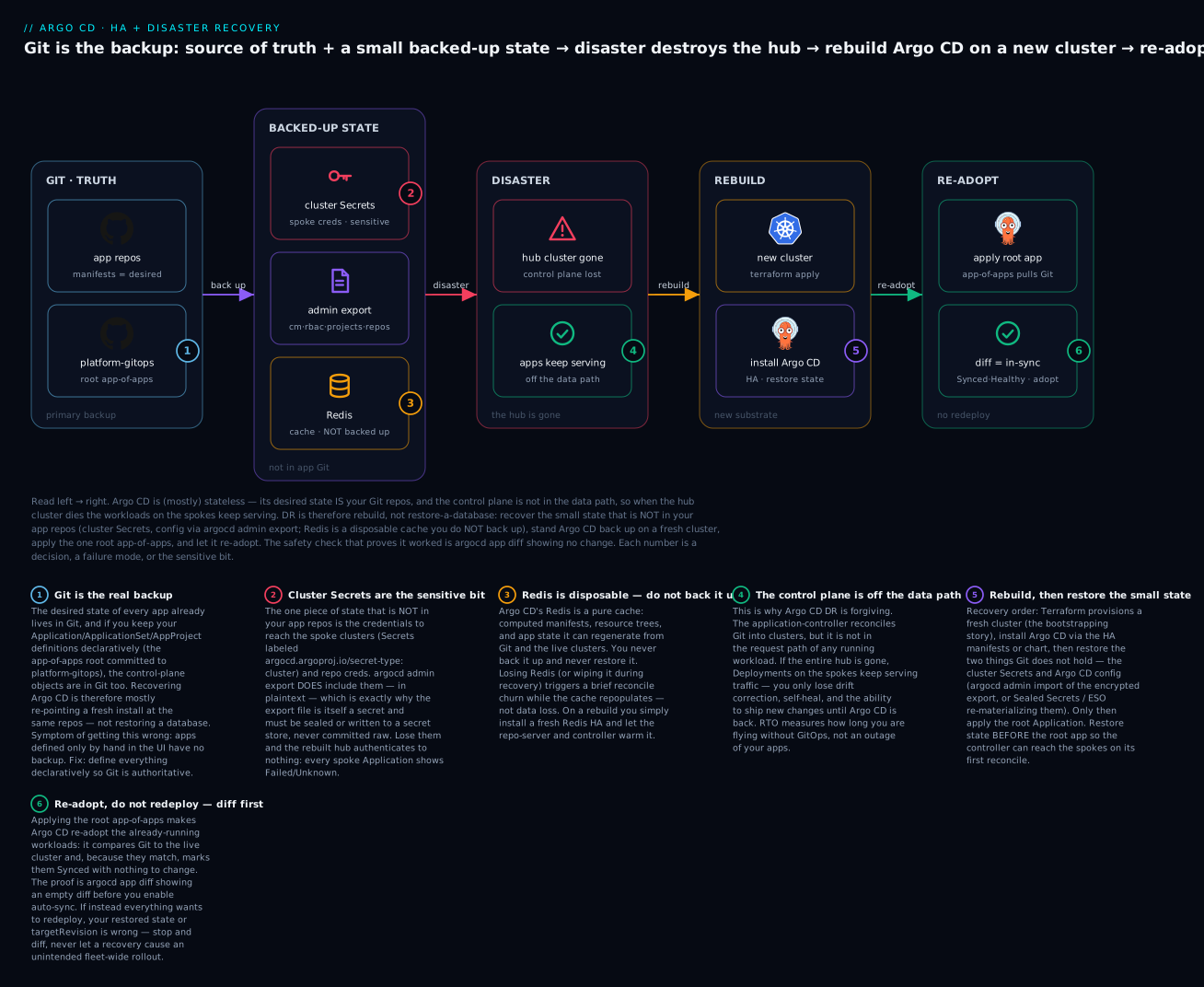
The badges mark the decisions that make or break a recovery: Git is the real backup (1); the cluster Secrets are the sensitive bit that is not in your app repos (2); Redis is a disposable cache you never back up (3); the control plane is off the data path, which is why your apps keep serving through the disaster (4); you rebuild first and restore the small state before applying the root app (5); and you diff before you sync so recovery re-adopts instead of redeploying (6).
argocd admin import
Import is the mirror of export: it reads the YAML stream and creates/updates the objects in a target namespace. Like export, it talks to the Kubernetes API, not to argocd-server, so you can restore into a cluster whose Argo CD is freshly installed and not yet fully up.
# Restore everything from the encrypted backup into a fresh Argo CD.
# The "-" means "read the manifest stream from stdin".
gunzip -c argocd-backup.yaml.gz | argocd admin import -n argocd -

# What it does: upserts the ConfigMaps, Secrets, and CRs from the file. After this,
# the fresh Argo CD has your projects, apps, cluster creds, and RBAC — as of the backup.
Import restores an exact point-in-time snapshot: whatever apps, projects, and config existed when the export ran. That is its strength (a fast, identical rebuild) and its weakness (it can resurrect an app you deleted after the backup, and it is only as fresh as the last export — its RPO is your backup interval).
Rebuild-from-Git: the cleaner, GitOps-native path
The alternative is to not import the CRs at all. You install Argo CD, restore only the sensitive state Git does not hold (cluster Secrets, argocd-secret, repo creds), and apply your root app-of-apps — the same bootstrap seed Terraform plants when it hands a fresh cluster off. Argo CD reads the platform-gitops repo, recreates every child Application/ApplicationSet from Git, and reconciles. The control-plane CRs come back from Git — current, reviewed, identical to what you run day to day — not from a snapshot that may be hours stale.
# Rebuild-from-Git: restore ONLY the sensitive state, then let Git recreate the CRs.
# 1. Cluster + repo creds + argocd-secret (from Sealed Secrets, ESO, or a scoped import):
kubectl apply -n argocd -f sealed-cluster-secrets.yaml    # decrypts in-cluster
# 2. Seed the one root Application; it pulls the whole platform from Git:
kubectl apply -n argocd -f bootstrap/root-app.yaml
# 3. Argo CD recreates every child app FROM GIT and reconciles.
| Dimension | argocd admin import |
Rebuild-from-Git (app-of-apps) |
|---|---|---|
| What it restores | Snapshot: apps, projects, appsets, config, and secrets | Apps/projects/appsets from Git; you re-supply secrets |
| Source of truth on restore | The export YAML (point-in-time) | Git (current) |
| Staleness / RPO for app defs | As old as the last export | ~zero — Git is live |
| Secrets | Included in the file | Restored separately (Sealed/ESO) |
| Can resurrect stale/deleted apps? | Yes — a footgun | No — only what’s in Git now |
| Ties to bootstrapping | Standalone | Reuses your existing bootstrap seed |
| Best for | Fast identical rebuild; forensic snapshot | The recommended GitOps-native recovery |
For most teams the answer is rebuild-from-Git for the CRs, plus a targeted restore of the sensitive Secrets — the best of both. Git gives current, reviewed app definitions with zero staleness; the Secret restore (or ESO) covers the one thing Git does not hold. Keep the full export as a forensic snapshot and break-glass fallback, not your primary path.
The re-adoption safety check: diff, then sync
Both paths converge on the single most important safety step in Argo CD DR — the one that separates a clean recovery from a self-inflicted fleet-wide outage. When the hub was lost but the spoke workloads kept running, your rebuilt Argo CD must re-adopt those live workloads — recognize that what Git says should exist already exists and is correct — and mark them Synced with nothing to change. It must not “restore” them by redeploying: redeploying every app across your fleet during an incident is its own incident.
The proof that re-adoption will be clean is argocd app diff returning empty before you let auto-sync run:
# BEFORE enabling auto-sync, diff the restored app against the live (surviving) cluster.
argocd app diff guestbook
# (no output) === an empty diff: Git matches live. Re-adoption is safe; nothing redeploys.

# If instead you see a full diff wanting to recreate everything, STOP — do not sync.
# Something is wrong: wrong targetRevision, wrong cluster Secret, or the live workloads
# are actually gone. Investigate before letting the controller act.
The operational discipline: install and restore with auto-sync disabled, run argocd app diff on a representative sample, confirm the diffs are empty (Git matches the surviving live state), then enable automated sync — turning “did my recovery just redeploy the fleet?” from a prayer into a checked precondition.
The DR runbook: the cluster hosting Argo CD is gone
Now assemble it into the procedure you run when the pager goes off. The scenario is the worst realistic one: the entire cluster hosting Argo CD is gone — a botched upgrade, a deleted cluster, a lost region — while the spoke clusters with your workloads stay up and serving. Your job: rebuild the control plane and re-adopt the fleet without touching the running apps.
| Step | Action | Command / artifact | Verify before proceeding |
|---|---|---|---|
| 0 | Declare scope. Confirm workloads still serving; this is a control-plane rebuild, not an app outage | Check spoke ingress / synthetic probes | Apps answering → you have time |
| 1 | Provision a fresh cluster (the substrate) | terraform apply (your substrate/bootstrap module) |
kubectl get nodes → ≥3 across zones |
| 2 | Install Argo CD (HA), auto-sync OFF | kubectl apply -k manifests/ha or Helm |
kubectl get pods -n argocd all Running |
| 3 | Restore the small state — cluster Secrets, repo creds, argocd-secret, config |
Sealed Secrets / ESO, or a scoped argocd admin import |
argocd cluster list shows the spokes |
| 4 | Apply the one root Application | kubectl apply -f bootstrap/root-app.yaml |
root app appears |
| 5 | Diff before sync on a sample of apps | argocd app diff <app> |
Empty diff = safe to adopt |
| 6 | Enable auto-sync; confirm re-adoption | argocd app set <app> --sync-policy automated |
Synced/Healthy, pods not restarted |
| 7 | Restore backups + point DNS/ingress to the new hub UI | Update the Argo CD ingress record | Engineers can log in via SSO |
The ordering is not cosmetic. Restore the cluster Secrets (step 3) before the root app (step 4), or the controller’s first reconcile hits every spoke Application with no credential and floods you with Failed/Unknown that masks whether recovery is working. And diff before sync (5 before 6) is the guardrail that keeps re-adoption from becoming redeployment. Run the steps in order and the fleet returns Synced/Healthy with not a single Pod restarted — the workloads never stopped; you just gave them their manager back.
# Steps 5-6 in practice: prove no redeploy, then hand control back to the controller.
argocd app list -o name | while read app; do
  echo "== $app =="; argocd app diff "$app" || true   # want: empty diffs
done
# All empty? Then re-enable automation fleet-wide:
argocd app list -o name | xargs -I{} argocd app set {} --sync-policy automated
RTO, RPO, and what DR does not cover
Set expectations honestly — “Argo CD DR” and “application DR” are different projects, and conflating them causes bad promises.
| Metric | Argo CD control plane | Your app workloads |
|---|---|---|
| What an “outage” means | No new deploys, no drift correction | Actual user-facing downtime |
| Realistic RTO | 15-60 min to rebuild + re-adopt (much of it Terraform) | Separate — the app’s own DR plan |
| RPO | ≈ backup cadence for the small state; ~0 for app defs (Git is live) | The app’s data DR (DB snapshots, etc.) |
| Data-loss risk | None if Git + the sensitive Secrets are recoverable | Depends entirely on the app’s storage DR |
Two honest caveats. First, Argo CD’s RTO is dominated by cluster provisioning, not by anything Argo-specific — argocd admin import takes seconds; standing up a fresh AKS/EKS/GKE cluster and its identity takes most of the window. How much you pre-build decides the number:
| Standby posture | What’s pre-built | Rebuild time | Idle cost |
|---|---|---|---|
| Cold | Nothing — Terraform from scratch | 30-60 min (provisioning dominates) | ~zero |
| Pilot light | Cluster module ready; backups staged | 10-20 min | low |
| Warm standby | A second cluster with Argo CD already installed, idle | 2-5 min (import + diff) | a full idle cluster |
Pre-baking a warm standby (or a fast, tested Terraform module) shrinks RTO — the same skill as bootstrapping. Second, and most important: DR for Argo CD is not DR for your applications. If a stateful app loses its database, Argo CD redeploys the app’s manifests but cannot restore its data — that is the app team’s backup/restore, separate from anything here. Argo CD guarantees your desired configuration comes back; it promises nothing about your application state. Keep the two runbooks separate.
Testing DR: the game day
A DR plan you have never executed is a hypothesis, not a plan. The only way to trust the runbook above is to run it on a schedule — a game day — against a throwaway environment.
| Game-day drill | What you inject | What you are validating |
|---|---|---|
| Backup integrity | Restore last night’s export into a scratch cluster | The backup is non-empty and importable |
| Redis wipe | kubectl delete pod -l app.kubernetes.io/name=argocd-redis-ha |
Cache rebuilds; no data loss; brief churn only |
| Controller loss | Delete/scale the controller StatefulSet to 0 | Apps keep serving; reconcile resumes on restore |
| Full hub loss | Delete the entire argocd namespace, then run the runbook |
End-to-end rebuild + re-adopt with empty diffs |
| Secret loss | Rebuild without restoring cluster Secrets | You feel the “can’t reach spokes” failure safely |
Run the “full hub loss” drill at least quarterly and time it — that measured number is your real RTO, not the one in a wiki. The most valuable game day is the one where you deliberately forget the cluster Secrets, watch every spoke app go Unknown, and burn “restore Secrets before the root app” into muscle memory before it happens for real.
Hands-on lab
You will back up a running Argo CD, inspect what the backup contains, schedule it, then simulate the disaster — destroy the control plane while the workload keeps running — and rebuild it, proving with argocd app diff that recovery re-adopts rather than redeploys. It runs on a free local kind cluster. The commands and manifests are real and schema-correct for Argo CD 2.13+/3.x; the outputs are representative — nothing was run against a live cluster, so treat them as the shape to expect, not a transcript.
This lab is free — kind runs in Docker on your laptop, no cloud spend. Prerequisites:
kind,kubectl, and theargocdCLI. New to installing Argo CD? Start with Installing Argo CD: Helm, Manifests, HA & First Login.
Step 1 — A cluster with Argo CD and one managed app. Give yourself real state to back up: an app Argo CD manages, running in its own namespace.
kind create cluster --name argo-dr           # free, local
kubectl create namespace argocd
kubectl apply -n argocd -f https://raw.githubusercontent.com/argoproj/argo-cd/v2.13.3/manifests/install.yaml
kubectl -n argocd rollout status deploy/argocd-server --timeout=180s

# A managed app with a distinct namespace so we can watch it survive the "disaster":
argocd login --core                          # talk to the API via kubeconfig (no server LB needed)
argocd app create guestbook \
  --repo https://github.com/argoproj/argocd-example-apps.git \
  --path guestbook --dest-server https://kubernetes.default.svc \
  --dest-namespace guestbook --sync-policy automated --auto-prune --self-heal
argocd app sync guestbook
What just happened: you have a real Argo CD managing guestbook, whose Pods run in the guestbook namespace. That namespace is your stand-in for a “surviving spoke” — it will keep running when we destroy the control plane.
Step 2 — Back up, and inspect the scope. Run the export and look at what it captured.
argocd admin export -n argocd -o argocd-backup.yaml
grep '^kind:' argocd-backup.yaml | sort | uniq -c
#    1 kind: Application        <-- guestbook is in the backup
#    6 kind: ConfigMap          <-- argocd-cm, argocd-rbac-cm, known-hosts, tls-certs, ...
#    5 kind: Secret             <-- argocd-secret + repo/cluster creds (PLAINTEXT)
What just happened: one command captured the control-plane state — the Application, config ConfigMaps, and Secrets. The Secret count is the tell: your backup holds plaintext credentials, which is why you encrypt it in production. The scope matches the “what to back up” table — apps, config, secrets; no Redis, because it is disposable.
Step 3 — Schedule it (and make an empty backup fail loudly). Apply the backup ServiceAccount/Role/CronJob from the Backup section. Add a guard so a wrong-namespace or empty export cannot pass silently.
# A verification you can bake into the CronJob's script — refuse to ship an empty backup:
n=$(grep -c '^kind:' argocd-backup.yaml)
if [ "$n" -lt 5 ]; then echo "BACKUP LOOKS EMPTY ($n objects) — failing"; exit 1; fi
echo "backup OK: $n objects"
# backup OK: 12 objects
What just happened: you turned the silent “export the wrong namespace and get an empty file” failure into a loud one. In the real CronJob this guard sits between argocd admin export and the upload, so a broken backup pages you instead of pretending to succeed.
Step 4 — Simulate the disaster. Destroy the control plane — delete the entire argocd namespace — but leave the workload running. This is the “hub is gone, spokes survive” scenario in miniature.
kubectl delete namespace argocd              # Argo CD is GONE
kubectl get pods -n guestbook                # ...but the workload is untouched:
# NAME                            READY   STATUS    RESTARTS   AGE
# guestbook-ui-6b5f...            1/1     Running   0          14m   <-- still serving
What just happened: you proved the thesis of the whole lesson on your own laptop. Argo CD is gone, yet guestbook keeps running with RESTARTS 0 — the control plane is not in the data path. You have lost reconciliation, not the app.
Step 5 — Rebuild the control plane. Reinstall Argo CD into the fresh (empty) namespace, restore the state from the backup, and — critically — do not sync yet.
# Reinstall Argo CD into the fresh namespace exactly as in Step 1, then restore:
argocd admin import -n argocd - < argocd-backup.yaml   # "-" reads the stream from stdin
kubectl get applications -n argocd
# NAME        SYNC STATUS   HEALTH STATUS
# guestbook   OutOfSync     Missing      <-- Argo CD sees the app spec but hasn't reconciled yet
What just happened: the rebuilt Argo CD has the guestbook Application back from the backup. It may briefly show OutOfSync/Unknown until it re-lists the live cluster — that is the controller catching up, not a problem. In a multi-cluster setup this is also where you would confirm the restored cluster Secrets are present so the hub can reach its spokes.
Step 6 — Prove re-adoption, not redeploy. This is the payoff. Diff the restored app against the still-running workload before allowing any sync.
argocd app diff guestbook
# (no output)   <-- EMPTY diff: Git matches the live, surviving workload.

argocd app get guestbook
# Name:  guestbook    Sync Status:  Synced      Health Status:  Healthy
kubectl get pods -n guestbook
# guestbook-ui-6b5f...  1/1  Running  0  20m     <-- RESTARTS still 0: never redeployed
What just happened: the empty diff proves Git matches what is already running, so Argo CD re-adopts the live Pods and marks the app Synced/Healthy without recreating anything. RESTARTS 0 and the unchanged age are the receipt: recovery restored management of the app, not the app itself — the entire promise of Argo CD DR, demonstrated end to end.
Step 7 — Teardown. Free the local resources.
kind delete cluster --name argo-dr           # removes the whole thing; zero cost anyway
rm -f argocd-backup.yaml
What just happened: kind clusters are local and ephemeral, so teardown is one command with nothing billable to leak — unlike a cloud DR drill, where you would also confirm no orphaned load balancers or disks remain.
Common mistakes and troubleshooting
Every row here is a real failure mode with a real Argo CD symptom. The nastiest three get extra prose after the table.
| Symptom | Cause | Fix |
|---|---|---|
Rebuilt hub: every spoke app Unknown/Failed, “connection refused”/auth error |
Lost the cluster Secrets — no credentials to reach the spokes | Restore the secret-type: cluster Secrets before applying the root app; back them up in the first place |
After a Redis restart, a burst of Progressing/reconcile activity |
Cold cache repopulating — expected, not data loss | Wait it out; nothing to restore. Ensure redis-ha for fewer restarts |
argocd admin import overwrote a newer app / resurrected a deleted one |
Import applies a point-in-time snapshot verbatim | Prefer rebuild-from-Git for CRs; import only sensitive Secrets; keep exports fresh |
| Recovery redeployed every app across the fleet | Synced before diffing; targetRevision or restored state wrong |
Install with auto-sync off, argocd app diff until empty, then enable automated |
| Reconciliation stalls cluster-wide; Redis “read-only”/no master | Sentinel quorum lost (2 of 3 Redis Pods down) | minAvailable: 2 PDB on redis-ha-server; spread across zones; restore quorum |
kubectl drain during maintenance took the whole control plane down |
No PodDisruptionBudgets — all replicas evicted at once | Apply PDBs (server minAvailable: 1, redis minAvailable: 2); anti-affinity |
| Restore succeeds but SSO login broken; apps fine | The backup/restore missed argocd-secret (OIDC client secret, server key) |
Back up argocd-secret; or reconfigure SSO + regenerate the server key post-restore |
| Rebuild-from-Git: apps come back but can’t reach any cluster | The cluster creds are (correctly) not in Git; you only restored Git | Re-materialize cluster Secrets via Sealed Secrets/ESO alongside the root app |
Single application-controller; a node loss froze all reconciliation |
One controller replica = SPOF for reconciliation | Run HA: ≥2 shards, ARGOCD_CONTROLLER_REPLICAS set, StatefulSet |
| Nightly backup “succeeds” but the file is nearly empty | argocd admin export ran against the wrong namespace (it does not error) |
Always pass -n argocd; assert a minimum object count or fail the job |
| Export uploaded but readable by too many principals | Export contains plaintext creds; lax bucket/KMS policy | Encrypt (KMS/CMK), lock the bucket policy, treat the file as a top secret |
1. “Restore redeployed everything” is the incident-during-an-incident. The instinct is to install Argo CD with auto-sync on and let it “fix” everything — but your workloads are already running on the surviving spokes; there is nothing to fix, only to re-adopt. If the restored state has a wrong targetRevision, or a cluster Secret points at a cluster whose live state you can’t read, an eager controller reads “I can’t confirm this matches” as “recreate it” — a fleet-wide rollout in the middle of a disaster. The discipline is non-negotiable: auto-sync off, argocd app diff until empty, then automation on. An empty diff is your written permission to let the controller act; being in a hurry is exactly when it saves you.
2. Losing the cluster Secrets is the failure that hides in plain sight. Teams back up the Application CRs (or keep them in Git) and feel safe, then find during a rebuild that the hub sees every app but can reach no cluster — the one thing that was neither in Git nor in the “obvious” backup was the credential to the spokes. The cluster Secrets matter most precisely because GitOps discipline does not protect them: they are sensitive, so they are (correctly) never in your app repos. Back them up explicitly — Sealed Secrets in Git, the cloud secret store via ESO, or inside the encrypted export — and rehearse restoring them first, before the root app.
3. Redis panic during recovery wastes your window. When you rebuild and Redis comes up empty, the UI is slow, apps flicker Progressing, and the reconcile queue spikes — and an operator who does not know Redis is disposable starts hunting for a backup that does not and should not exist. There is nothing to restore. The cache is supposed to be cold after a rebuild; it warms within minutes as repo-server recomputes manifests and the controller re-lists clusters. Spend your recovery window on what actually needs you — the cluster Secrets, the diff check — not a phantom Redis restore.
Cheat-sheet
The backup scope as a decision rule you can apply to any piece of Argo CD state:
| If the state is… | It is… | So you… |
|---|---|---|
| Desired manifests / (declarative) CRs | In Git already | Rely on Git; no separate backup |
| A cluster or repo credential | Sensitive, not in app Git | Back it up (Sealed/ESO/encrypted export) |
argocd-cm / argocd-rbac-cm config |
Should be in Git (self-managed) | Keep in Git; export as a snapshot |
argocd-secret (server key, OIDC secret) |
Sensitive | Back it up; or regenerate + reconfigure |
| Redis (any of it) | A disposable cache | Do nothing — never back up, never restore |
The commands that do the work:
| Command | What it does |
|---|---|
argocd admin export -n argocd -o backup.yaml |
Dump all Argo CD state (CRs + config + secrets) to a file |
argocd admin export -n argocd | gzip | <upload> |
Stream an encrypted backup to object storage (the CronJob) |
grep -c '^kind:' backup.yaml |
Sanity-check the backup is non-empty (guard against wrong-ns) |
argocd admin import -n argocd - < backup.yaml |
Restore all state from the snapshot (reads stdin) |
argocd app diff <app> |
The safety check — empty output = safe to re-adopt |
argocd app set <app> --sync-policy automated |
Re-enable auto-sync after diffs confirm no redeploy |
argocd cluster list |
Confirm the restored cluster Secrets can reach the spokes |
kubectl apply -k manifests/ha |
Install the HA control plane (redis-ha, sharded controller, PDBs) |
The HA + DR knobs:
| Knob | Purpose |
|---|---|
ARGOCD_CONTROLLER_REPLICAS |
Number of controller shards (match StatefulSet replicas) |
ARGOCD_API_SERVER_REPLICAS |
argocd-server replica count for API/UI HA |
--sharding-method / ARGOCD_CONTROLLER_SHARDING_ALGORITHM |
legacy | round-robin | consistent-hashing |
redis-ha PDB minAvailable: 2 |
Preserve Sentinel quorum through node drains |
argocd-server PDB minAvailable: 1 |
Keep the API/UI up through maintenance |
The DR runbook, condensed to what you type when the hub is gone:
| # | Do | Prove |
|---|---|---|
| 1 | terraform apply a fresh cluster |
kubectl get nodes |
| 2 | Install Argo CD HA, auto-sync off | pods Running |
| 3 | Restore cluster Secrets + argocd-secret |
argocd cluster list |
| 4 | kubectl apply the root app-of-apps |
root appears |
| 5 | argocd app diff <app> |
empty diff |
| 6 | Re-enable automated sync |
Synced/Healthy, no restarts |
Interview and exam questions
Q: Why is disaster recovery for Argo CD fundamentally easier than for a database? A: Because Argo CD is not the source of truth and is not in the data path. Its desired state lives in Git (already backed up and replicated), the live state lives in the target clusters’ etcd, and its Redis is a disposable cache. The only unique state it holds is a small set of credentials and access-control config. So recovery is a rebuild (reinstall and re-point at Git), not a restore of authoritative data — and because the control plane isn’t in the request path, running workloads keep serving while you rebuild.
Q: If the entire cluster hosting Argo CD is destroyed, what happens to the applications it manages? A: They keep running. Argo CD is a control plane, not a data-plane component — no user traffic flows through it. When it’s gone you lose reconciliation, drift correction/self-heal, and the ability to ship new changes, but every already-running Deployment on every spoke keeps serving. You have a recovery window (typically minutes to an hour) before the lack of reconciliation actually bites.
Q: What state must you explicitly back up, given that Git already holds your manifests?
A: The state that is not in your app Git repos, all of which is sensitive: the cluster Secrets (secret-type: cluster — credentials to reach the spokes), repo credentials (secret-type: repository), and argocd-secret (server signing key, OIDC client secret, TLS). If you keep your Application/ApplicationSet/AppProject CRs and argocd-cm/argocd-rbac-cm declaratively in Git, those are covered too; if not, back them up as well. Redis is never backed up — it’s disposable.
Q: What does argocd admin export capture, and why is the resulting file sensitive?
A: It exports the whole Argo CD control-plane state from the namespace via the Kubernetes API: the config ConfigMaps, argocd-secret, the cluster/repo Secrets, and all Application/ApplicationSet/AppProject CRs. It’s sensitive because it includes those Secrets in plaintext — a complete backup is also a complete credential dump, so it must be encrypted in transit and at rest and never committed to Git raw.
Q: A colleague set up a nightly argocd admin export CronJob and it reports success every night, but the restore test found the backups empty. What likely happened?
A: The export ran against the wrong namespace. argocd admin export does not error if it finds nothing in the target namespace — point it at default instead of argocd and it writes a near-empty file and exits 0. Fix: always pass -n argocd, and add a guard that asserts a minimum object count (grep -c '^kind:') so an empty backup fails the job loudly.
Q: Explain the difference between argocd admin import and rebuilding from Git, and when you’d choose each.
A: import restores an exact point-in-time snapshot including secrets — fast and identical, but only as fresh as the last export and able to resurrect apps you deleted afterward. Rebuild-from-Git installs Argo CD, restores only the sensitive Secrets, and applies the root app-of-apps so the CRs come back from Git — current, reviewed, no staleness — but you must re-materialize the secrets separately. Most teams rebuild the CRs from Git and do a targeted restore of the sensitive Secrets, keeping a full export as a break-glass fallback.
Q: During recovery, how do you make sure Argo CD re-adopts running workloads instead of redeploying them?
A: Install and restore with auto-sync disabled, then run argocd app diff on the restored apps against the surviving live clusters. An empty diff proves Git matches what’s already running, so Argo CD will mark the apps Synced and adopt the existing Pods with nothing to change. Only after diffs are empty do you re-enable automated sync. Skipping the diff risks a fleet-wide redeploy in the middle of an incident.
Q: What is the correct order of the DR runbook steps, and why does ordering matter? A: Provision the cluster → install Argo CD (HA, auto-sync off) → restore cluster Secrets/config → apply the root Application → diff → enable auto-sync. Restoring the cluster Secrets before the root app matters because otherwise the controller’s first reconcile hits every spoke app with no credential and floods you with failures. Diffing before enabling sync matters because it’s the guardrail that turns re-adoption into a checked precondition rather than a fleet-wide redeploy.
Q: What does losing Redis cost you, and what should you do about it?
A: Nothing permanent. Redis is a disposable cache of computed manifests, resource trees, and app state that Argo CD regenerates from Git and the live clusters. Losing or wiping it causes a brief reconcile churn while the cache warms — not data loss — so you never back it up or restore it. The only Redis failure that hurts is a Sentinel quorum loss (2 of 3 down), which stalls reconciliation; prevent it with a minAvailable: 2 PDB and zone spread.
Q: How does the application-controller achieve HA, and what’s the single-replica risk?
A: The controller runs as a StatefulSet that shards its managed clusters across replicas; you scale replicas and set ARGOCD_CONTROLLER_REPLICAS to match, choosing a --sharding-method (legacy/round-robin/consistent-hashing). A single controller replica is a single point of failure for reconciliation — if its node dies, drift correction and new syncs stop until it reschedules (your apps keep running regardless). Production runs at least two shards.
Q: What are realistic RTO and RPO for Argo CD, and what does its DR explicitly not cover? A: RTO is typically 15-60 minutes, dominated by provisioning the fresh cluster (the import/apply itself is seconds); shrink it with a warm standby or fast Terraform. RPO is roughly your backup cadence for the small sensitive state and near-zero for app definitions since Git is live. It does not cover application data — if a stateful app loses its database, Argo CD redeploys the app’s manifests but cannot restore its data; that’s the app team’s separate DR.
Key takeaways
- Argo CD is mostly stateless and rebuildable from Git. Its desired state is your Git repos, live state is in the clusters, and Redis is a disposable cache. Recovery is a rebuild and re-point, not a database restore — which is why it’s forgiving.
- The control plane is not in the data path. If Argo CD (or its whole cluster) dies, running workloads keep serving; you lose reconciliation, drift correction, and new deploys until it’s back. That gives you a recovery window, not an outage.
- Back up only the small state that is not in your app repos: the cluster Secrets (credentials to spokes — the critical bit), repo creds, and
argocd-secret. Everything else is in Git (if you’re declarative) or disposable (Redis). argocd admin exportcaptures the whole control plane — CRs, config, and the sensitive Secrets in plaintext — via the Kubernetes API, so it works even whenargocd-serveris down. That also makes the export file itself a secret: encrypt it, and pass-n argocd(a wrong namespace silently produces an empty backup).- HA so you rarely rebuild: sharded controller (
ARGOCD_CONTROLLER_REPLICAS), ≥3argocd-server, redis-ha (3 servers + Sentinel + HAProxy), PodDisruptionBudgets (redis minAvailable: 2for quorum), anti-affinity, and multi-AZ/regional placement. - Restore by rebuilding from Git for the CRs and doing a targeted restore of the sensitive Secrets — the GitOps-native path with zero staleness — keeping a full
argocd admin importas a break-glass fallback. - Re-adopt, don’t redeploy:
diffbefore you sync. Install with auto-sync off, confirmargocd app diffis empty (Git matches the surviving live workloads), then enable automation. An empty diff is your permission to hand control back. - Argo CD DR ≠ application DR. Its realistic RTO (15-60 min) is dominated by cluster provisioning and it guarantees your desired config comes back — never your application data, which is the app team’s separate responsibility. Test the whole runbook with quarterly game days; the measured time is your real RTO.