Every other lesson in this course made Argo CD more powerful. This one is about the bill that power comes with. A single Argo CD instance is, by design, the most privileged thing on your platform: it holds credentials to every cluster it manages, it can apply any manifest to any of them, and it does so continuously and automatically without a human clicking approve. That is the whole point of GitOps — and it is also the reason Argo CD is the single most valuable box for an attacker to own. Compromise one developer’s laptop and you get one blast radius. Compromise Argo CD and you get cluster-admin on the entire fleet.
So the security question is not “is Argo CD secure?” It is “when someone gets a foothold — a leaked token, an RCE in a dependency, an over-broad RBAC grant, a malicious pull request — how much do they get, and what stops them from getting more?” The answer is defense in depth: no single control is trusted to be perfect, so you stack independent layers, each of which an attacker must defeat separately. This lesson builds those layers from the inside out — least-privilege RBAC (both Argo’s own and the reconcile RBAC on target clusters), network isolation of the argocd namespace, supply-chain verification of the images and commits Argo deploys, admission control as a backstop on what it applies, a hardened install, and a patch posture — and every one of them is a real, schema-correct manifest you can apply. Everything targets Argo CD 2.13+/3.x on Kubernetes 1.29+.
There is no cluster attached to this lesson, so every command output is labelled representative — it shows the shape to expect, not a live run. Every manifest is schema-correct with real fields and real ports. Secrets are always placeholders; never commit the real thing.
Why this matters: the threat model
Before you harden anything, you have to be honest about what you are protecting and from whom. Threat modelling for Argo CD comes down to one uncomfortable fact: the application-controller connects out to every managed cluster with credentials that, by default, are cluster-admin. Those credentials live in Kubernetes Secrets in the argocd namespace. The api-server holds a signing key that mints session tokens. The repo-server holds (or can reach) your Git and registry credentials. Put together, the argocd namespace is a credential vault with a deploy button wired to production.
Walk an attacker through what each foothold yields, and the case for hardening writes itself:
| If an attacker gains… | They can immediately… | Because… |
|---|---|---|
| A valid Argo CD session/API token with broad RBAC | Sync any Application, create new ones, exec into pods, read live manifests | Argo RBAC gates the API; a */* grant is the whole estate |
Read access to the argocd namespace Secrets |
Steal every managed cluster’s bearer token / kubeconfig and argocd-secret |
Cluster creds and the server signing key live there as Secrets |
| Code execution in the repo-server | Read Git/registry creds, tamper with rendered manifests, SSRF internal endpoints | It clones repos and runs Helm/Kustomize/plugins with those creds |
| Code execution in the application-controller | Apply arbitrary manifests to every managed cluster | It already holds cluster-admin-equivalent tokens to all of them |
| Write access to a synced Git repo (or a merged PR) | Deploy anything Argo will apply — a privileged pod, a backdoor DaemonSet | Argo faithfully reconciles whatever Git says; Git is the control plane |
The admin account password |
Full god-mode, bypassing SSO/MFA/conditional-access | The local admin never touches your IdP |
Notice the pattern: several of these do not require breaking Argo CD’s code at all. A leaked token, a readable Secret, or a poisoned commit are configuration and access failures, and they are far more common than a zero-day. That shapes the priority order. The controls below are ranked roughly by return on effort — RBAC and secret hygiene first (they stop the common cases), then network isolation and supply-chain verification (they contain the rarer, nastier ones).
One surface hides in plain sight: Config Management Plugins run inside the repo-server to render non-standard manifests, which means they are attacker-influenced code execution in the most credential-rich pod — audit which plugins are installed and treat them like any other supply-chain dependency (the mechanics are in Config Management Plugins). The components differ sharply in how much standing privilege each carries, which is exactly what makes some far more attractive to compromise than others:
| Component | Standing privilege it carries | Attractiveness as a target |
|---|---|---|
application-controller |
Cluster-admin-equivalent token to every managed cluster | Highest — one compromise = apply to the whole fleet |
repo-server |
Git/registry credentials; runs Helm/Kustomize/plugins (code exec) | High — credentials plus an RCE surface via plugins |
argocd-server |
Session-signing key; brokers all API access | High — forge sessions, drive every operation |
redis |
Cache of desired/live state, unauthenticated by default | Medium — poison the cache to influence what the controller reconciles |
dex-server |
OIDC broker to your IdP | Medium — an identity path with limited standing credentials |
It also reframes the pull model as a security feature. Because Argo CD pulls from Git rather than CI pushing to the cluster, your CI system never needs cluster credentials — there is no long-lived kubeconfig in a pipeline to steal. The trade is that the trust now concentrates in Argo CD and in Git. Harden those two and you have hardened the deployment path; leave either soft and the pull model just relocates the risk.
Here is the defense-in-depth picture the rest of the lesson builds. Read it left to right: an attacker or an over-privileged insider hits the identity gate first, then the network-isolated Argo CD core (the high-value target that holds the credentials), then admission verification of what gets deployed, and finally the scoped reconcile permissions on each target cluster. Every badge marks a control that must be defeated independently.
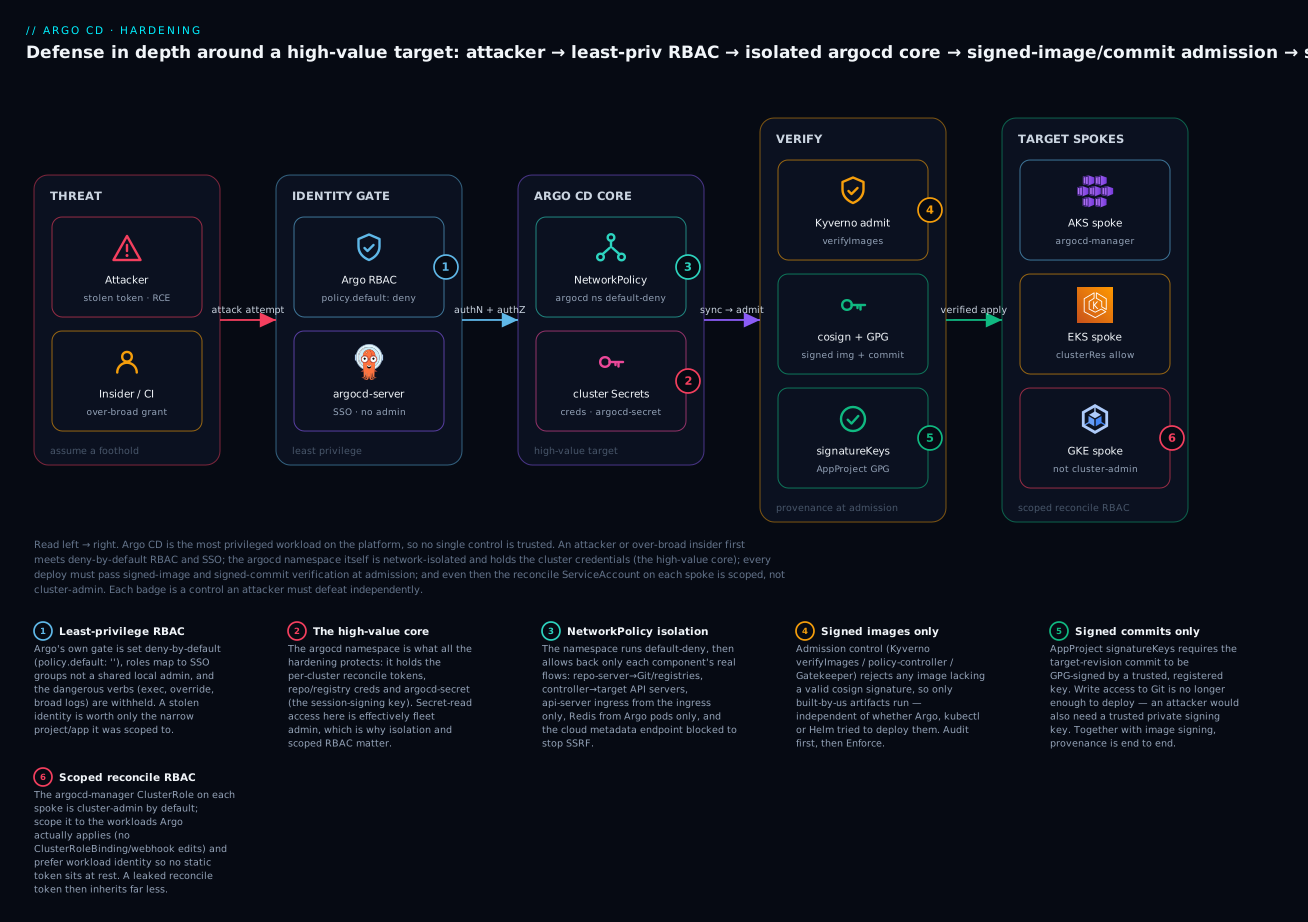
The legend calls out the six load-bearing controls: deny-by-default RBAC with no shared admin (1), the high-value core you are protecting (2), NetworkPolicy isolation of the namespace (3), admission-enforced image verification (4), GPG-verified commits (5), and a reconcile ServiceAccount that is not cluster-admin (6). Lose any one and the others still stand — that is the entire design goal.
Least privilege I: Argo CD’s own RBAC
Argo CD ships its own authorization layer, entirely separate from Kubernetes RBAC, enforced by argocd-server against the argocd-rbac-cm ConfigMap. The full model — p and g lines, project roles, tokens, SSO group mapping — is the subject of the dedicated Argo CD RBAC lesson. Here we care about one thing: configuring it so that a stolen identity is worth as little as possible.
The foundational decision is the fallback policy. Out of the box policy.default is role:readonly, meaning any authenticated identity that matches no explicit rule can still read every Application, cluster, and repo in the system. For a hardened install you flip this to deny-by-default by setting it to the empty string, then grant back only what each group needs:
apiVersion: v1
kind: ConfigMap
metadata:
  name: argocd-rbac-cm
  namespace: argocd
  labels:
    app.kubernetes.io/part-of: argocd
data:
  # Empty string = deny. An identity matching no rule below gets nothing.
  policy.default: ''
  scopes: '[groups]'
  policy.csv: |
    # Platform team: full admin, mapped from an SSO group (never a shared local login)
    g, acme:platform-admins, role:admin

    # A tenant team: scoped to its own project, sync + read only
    p, role:team-a, applications, get, team-a/*, allow
    p, role:team-a, applications, sync, team-a/*, allow
    p, role:team-a, logs, get, team-a/*, allow
    g, acme:team-a-engineers, role:team-a

    # Auditor: read apps and logs everywhere, but explicitly DENY exec — deny always wins
    p, role:auditor, applications, get, */*, allow
    p, role:auditor, logs, get, */*, allow
    p, role:auditor, exec, create, */*, deny
    g, acme:security-auditors, role:auditor
Three grants in that file are the ones that most often get handed out too freely, and each is a real privilege escalation if it is:
| Argo resource / action | What it actually allows | Hardening stance |
|---|---|---|
exec / create |
Open an interactive shell inside a running pod on a managed cluster via the Argo UI/API | Deny by default; requires exec.enabled: "true" in argocd-cm to exist at all — leave it off unless needed |
logs / get |
Read pod logs across managed clusters (may contain tokens, PII) | Scope to the team’s own project, not */* |
applications / override |
Sync while overriding the desired state — deploy something not in Git | Grant to almost no one; it defeats the audit trail |
applications / delete |
Delete Applications (and, with cascade, their live resources) | Platform-only; tenants get sync, not delete |
applications / action/* |
Run resource actions (restart a Deployment, etc.) | Grant per-team only where a runbook needs it |
clusters / create,update |
Register or re-point managed clusters | Platform-only — this is how you’d add an attacker’s cluster |
The exec resource deserves special attention because it is the cleanest pivot from “I have Argo access” to “I have a shell on your production nodes.” It only works if exec.enabled is "true" in argocd-cm, so the strongest posture is to leave that feature disabled entirely and turn it on only for the rare break-glass case, gated behind an explicit allow for one group.
Two rules govern the fallback and the evaluation, and both matter for hardening:
policy.default value |
Meaning | Use when |
|---|---|---|
role:readonly |
Unmatched identities can read everything | Default install; too loose for multi-tenant/regulated |
role:'' (empty) |
Unmatched identities get nothing (deny-by-default) | Hardened install — the recommended posture |
role:admin |
Unmatched identities get everything | Never. This is a misconfiguration, not an option |
The other rule is that deny beats allow beats the fallback. That ordering is why the auditor above can be given a broad read grant and still be guaranteed never to exec — the explicit deny cannot be undone by any stray allow. Use that property deliberately: put hard denies on the dangerous verbs for read-mostly roles rather than hoping you never accidentally grant them.
Finally, identity hygiene sits underneath all of this. Map roles to SSO groups, not local accounts, so that offboarding in your IdP instantly revokes Argo access and every action is attributable to a real person — the mechanics for Entra ID, Cognito/IAM Identity Center and Google Workspace are covered in the SSO lesson. The local admin account should be disabled once SSO works (covered under hardening the install below), because it is the one identity that sails straight past your IdP’s MFA and conditional access.
Least privilege II: the reconcile RBAC on target clusters
Argo CD’s own RBAC decides who may ask Argo to do something. A completely separate — and more dangerous — question is what Argo itself is permitted to do on each managed cluster. That is governed by the ServiceAccount and ClusterRole that argocd cluster add creates, and by default it is wide open.
When you register an external cluster, Argo CD creates a ServiceAccount named argocd-manager in kube-system, binds it to a ClusterRole named argocd-manager-role, and stores that SA’s bearer token in a Secret back in the argocd namespace. The default ClusterRole is, verbatim, cluster-admin:
# The DEFAULT argocd-manager-role created by `argocd cluster add` — effectively cluster-admin
apiVersion: rbac.authorization.k8s.io/v1
kind: ClusterRole
metadata:
  name: argocd-manager-role
rules:
  - apiGroups: ['*']
    resources: ['*']
    verbs: ['*']
  - nonResourceURLs: ['*']
    verbs: ['*']
This is the token an attacker gets by reading one Secret in the argocd namespace, and it is cluster-admin on the target cluster, not the Argo cluster. Scoping it down is one of the highest-value hardening steps most teams skip. The pragmatic middle ground is to keep the reconcile SA broad enough to manage what each cluster actually runs, but strip the verbs and resources it never legitimately needs:
# A scoped reconcile role — manage workloads and their config, but no privilege-escalation surface
apiVersion: rbac.authorization.k8s.io/v1
kind: ClusterRole
metadata:
  name: argocd-manager-role
rules:
  # Core workload + config resources Argo actually applies
  - apiGroups: ["", "apps", "batch", "networking.k8s.io", "policy", "autoscaling"]
    resources:
      ["deployments", "statefulsets", "daemonsets", "replicasets", "pods",
       "services", "configmaps", "secrets", "jobs", "cronjobs",
       "ingresses", "networkpolicies", "horizontalpodautoscalers",
       "poddisruptionbudgets", "serviceaccounts"]
    verbs: ["get", "list", "watch", "create", "update", "patch", "delete"]
  # Namespaces: create/label, but not delete arbitrary ones
  - apiGroups: [""]
    resources: ["namespaces"]
    verbs: ["get", "list", "watch", "create", "update", "patch"]
  # CRDs the platform genuinely manages via Argo (name them; don't wildcard)
  - apiGroups: ["cert-manager.io", "monitoring.coreos.com"]
    resources: ["*"]
    verbs: ["get", "list", "watch", "create", "update", "patch", "delete"]
The point is not this exact list — it is that you enumerate what Argo manages on a given cluster instead of granting */*/*. What you deliberately leave out is the escalation surface: binding ClusterRoles to itself, editing ValidatingWebhookConfigurations, creating ClusterRoleBindings, touching kube-system DaemonSets. If the reconcile token leaks, the attacker inherits exactly this list and no more.
The tighter, per-tenant control lives on the AppProject, whose clusterResourceWhitelist and namespaceResourceWhitelist are enforced by the application-controller before a manifest is sent to the cluster. Even if the reconcile SA could create a ClusterRole, an AppProject with an empty clusterResourceWhitelist refuses the sync:
| Control | Where it lives | Enforced by | Stops |
|---|---|---|---|
Scoped argocd-manager-role |
Target cluster (ClusterRole) |
Target cluster’s API server | What the reconcile token can do if stolen |
clusterResourceWhitelist: [] |
AppProject in argocd ns |
Argo application-controller | Any app in the project creating cluster-scoped resources |
namespaceResourceBlacklist |
AppProject |
Argo application-controller | E.g. an app editing ResourceQuota or LimitRange |
destinations (server + namespace) |
AppProject |
Argo application-controller | Deploying outside the team’s allowed cluster/namespace |
Use both layers. The AppProject whitelist is the first gate (a violating sync is rejected fast, with a clear message), and the scoped ClusterRole is the backstop for the case where the AppProject itself is misconfigured or bypassed.
The mechanics of how that reconcile SA and its token are created differ across the clouds, and the difference matters for how you protect the credential:
| AKS | EKS | GKE | |
|---|---|---|---|
| Managed control-plane auth | Entra ID / AAD or local admin kubeconfig |
IAM via aws-auth/access entries |
Google IAM + gke-gcloud-auth-plugin |
What argocd cluster add stores |
argocd-manager SA bearer token |
SA bearer token (or an exec plugin that mints AWS tokens) |
SA bearer token (or an exec plugin using Workload Identity) |
| Stronger alternative to a static token | Entra Workload ID federation to the SA | IRSA / EKS Pod Identity — no static token at rest | Workload Identity Federation — no static token at rest |
| Where you scope the token’s power | argocd-manager-role ClusterRole |
argocd-manager-role ClusterRole |
argocd-manager-role ClusterRole |
Wherever the cloud offers workload-identity federation (Entra Workload ID, EKS Pod Identity/IRSA, GKE Workload Identity), prefer it: it removes the long-lived bearer token from the argocd namespace entirely, so there is no static credential to steal from a readable Secret — the controller exchanges a short-lived, audience-scoped token at reconcile time instead. Registering these clusters and the connectivity involved is covered in the multi-cluster and hub-spoke lessons; here the security takeaway is singular: the reconcile identity should be as narrow as the workloads demand and, where possible, not a static secret.
Secrets posture in the argocd namespace
The argocd namespace holds three classes of secret, and all three are attacker gold: the per-cluster reconcile credentials (*-cluster Secrets), the repository/registry credentials (*-repo Secrets), and argocd-secret itself, which contains the server’s session-signing key and the bcrypt hash of the admin password. Anyone who can read Secrets in this namespace can impersonate the platform.
| Secret (label / name) | Contains | If it leaks | Mitigation |
|---|---|---|---|
argocd.argoproj.io/secret-type: cluster |
Target-cluster API URL + bearer token / TLS client cert | Cluster-admin on a managed cluster | Scope argocd-manager-role; prefer workload identity; restrict Secret reads |
argocd.argoproj.io/secret-type: repository |
Git/registry username+token or SSH key | Push malicious commits / pull private code | Use deploy keys with least scope; rotate; store in a manager via ESO |
argocd-secret |
Server signing key, admin bcrypt hash, TLS keys |
Forge sessions, offline-crack admin | Restrict reads to argocd-server; rotate the signing key on suspicion |
Two rules follow. First, nothing plaintext in Git — the same discipline the whole platform follows applies doubly to Argo’s own config; the four mainstream approaches (Sealed Secrets, External Secrets Operator, SOPS, Vault) and their cloud backends are compared in the secrets lesson, and Argo’s cluster/repo Secrets are exactly the kind of thing to source from a cloud secret manager rather than hand-craft. Second, restrict who can read these Secrets with Kubernetes RBAC on the argocd namespace — a surprising number of clusters grant broad get secrets to CI ServiceAccounts or a shared “developer” ClusterRole, which quietly hands out the keys to the fleet. Audit kubectl auth can-i get secrets -n argocd --as ... for every non-platform identity and rotate anything that has been over-exposed.
NetworkPolicy: isolating the argocd namespace
By default, every pod in a Kubernetes cluster can talk to every other pod. That means a compromised workload anywhere on the Argo CD cluster can reach the api-server, Redis, and the repo-server directly — and Redis in particular is a soft target, because Argo CD’s cache is unauthenticated by default and a writer to it can influence what the controller believes the desired state is. NetworkPolicy fixes this by moving the argocd namespace to default-deny and then allowing back only the specific flows each component needs.
Start by mapping the real traffic. This matrix is the whole design; the manifests just encode it. Ports are the documented Argo CD component ports:
Component (app.kubernetes.io/name) |
Accepts ingress from | Makes egress to | Key ports |
|---|---|---|---|
argocd-server (api-server) |
Ingress controller (UI/CLI/gRPC); Prometheus (metrics) | repo-server, redis, dex, local kube-API, target cluster APIs (logs/exec), OIDC IdP | in 8080, 8083; out 8081, 6379, 5556/5557, 443/6443 |
argocd-repo-server |
server, application-controller, applicationset-controller | Git (HTTPS/SSH), Helm/OCI registries, redis, DNS | in 8081, 8084; out 443, 22, 6379 |
argocd-application-controller |
Prometheus (metrics) | repo-server, redis, local kube-API, target cluster APIs | in 8082; out 8081, 6379, 443/6443 |
argocd-redis |
server, repo-server, application-controller, applicationset-controller | (none / DNS) | in 6379 |
argocd-dex-server |
server | upstream OIDC IdP (HTTPS), DNS | in 5556/5557; out 443 |
argocd-applicationset-controller |
SCM webhooks via ingress (metrics: Prometheus) | repo-server, local kube-API, SCM APIs (GitHub/GitLab), DNS | in 7000; out 8081, 443 |
Now the manifests, built up in layers. First, the foundation: deny all ingress and egress in the namespace. Nothing works after this until you add allowances back — which is exactly the posture you want.
apiVersion: networking.k8s.io/v1
kind: NetworkPolicy
metadata:
  name: default-deny-all
  namespace: argocd
spec:
  podSelector: {}                 # every pod in the namespace
  policyTypes: [Ingress, Egress]  # deny both directions
  # No ingress/egress rules = deny everything
Because that also blocks DNS, the very next policy must allow every Argo pod to resolve names via kube-dns/CoreDNS — forgetting this is the number-one reason a freshly locked-down namespace “breaks everything,” since repo-server can’t resolve github.com and the controller can’t resolve an API server hostname:
apiVersion: networking.k8s.io/v1
kind: NetworkPolicy
metadata:
  name: allow-dns-egress
  namespace: argocd
spec:
  podSelector: {}
  policyTypes: [Egress]
  egress:
    - to:
        - namespaceSelector:
            matchLabels:
              kubernetes.io/metadata.name: kube-system
          podSelector:
            matchLabels:
              k8s-app: kube-dns
      ports:
        - { protocol: UDP, port: 53 }
        - { protocol: TCP, port: 53 }
Redis is the highest-value internal target, so lock it to only the Argo components on port 6379 and give it no egress at all:
apiVersion: networking.k8s.io/v1
kind: NetworkPolicy
metadata:
  name: allow-redis
  namespace: argocd
spec:
  podSelector:
    matchLabels:
      app.kubernetes.io/name: argocd-redis
  policyTypes: [Ingress]
  ingress:
    - from:
        - podSelector:
            matchLabels:
              app.kubernetes.io/part-of: argocd   # only sibling Argo pods
      ports:
        - { protocol: TCP, port: 6379 }
The repo-server needs the internet on the way out — Git over HTTPS/SSH and Helm/OCI registries — but should accept connections only from the three Argo components that call it, on 8081:
apiVersion: networking.k8s.io/v1
kind: NetworkPolicy
metadata:
  name: allow-repo-server
  namespace: argocd
spec:
  podSelector:
    matchLabels:
      app.kubernetes.io/name: argocd-repo-server
  policyTypes: [Ingress, Egress]
  ingress:
    - from:
        - podSelector:
            matchLabels:
              app.kubernetes.io/part-of: argocd
      ports:
        - { protocol: TCP, port: 8081 }
  egress:
    - to:                                  # Git + Helm/OCI registries (HTTPS/SSH)
        - ipBlock:
            cidr: 0.0.0.0/0
            except: ["169.254.169.254/32"] # block the cloud metadata endpoint (anti-SSRF)
      ports:
        - { protocol: TCP, port: 443 }
        - { protocol: TCP, port: 22 }
    - to:                                  # Redis cache
        - podSelector:
            matchLabels:
              app.kubernetes.io/name: argocd-redis
      ports:
        - { protocol: TCP, port: 6379 }
The except: 169.254.169.254/32 is a deliberate anti-SSRF measure: it stops a repo-server compromise (or a malicious plugin/manifest) from reaching the cloud instance-metadata service to steal node credentials — a real escalation path on all three clouds. Where you can enumerate your Git/registry egress by CIDR, tighten 0.0.0.0/0 to those ranges; the open block above is the honest starting point when you can’t.
The api-server accepts external traffic, so it is the one component with ingress from outside the namespace — but only from the ingress controller, never the whole cluster:
apiVersion: networking.k8s.io/v1
kind: NetworkPolicy
metadata:
  name: allow-argocd-server
  namespace: argocd
spec:
  podSelector:
    matchLabels:
      app.kubernetes.io/name: argocd-server
  policyTypes: [Ingress, Egress]
  ingress:
    - from:                               # only the ingress controller reaches the UI/API
        - namespaceSelector:
            matchLabels:
              kubernetes.io/metadata.name: ingress-nginx
      ports:
        - { protocol: TCP, port: 8080 }
  egress:
    - to:                                 # internal dependencies
        - podSelector:
            matchExpressions:
              - key: app.kubernetes.io/name
                operator: In
                values: [argocd-repo-server, argocd-redis, argocd-dex-server]
    - to:                                 # target cluster API servers (logs/exec/live state)
        - ipBlock:
            cidr: 0.0.0.0/0
      ports:
        - { protocol: TCP, port: 443 }
        - { protocol: TCP, port: 6443 }
The application-controller is the one that reaches every managed cluster, and its egress is the hardest to constrain because target API servers are arbitrary endpoints. This is where a per-cloud CIDR list earns its keep — replace the open 0.0.0.0/0 with the actual control-plane ranges:
apiVersion: networking.k8s.io/v1
kind: NetworkPolicy
metadata:
  name: allow-application-controller
  namespace: argocd
spec:
  podSelector:
    matchLabels:
      app.kubernetes.io/name: argocd-application-controller
  policyTypes: [Egress]
  egress:
    - to:
        - podSelector:
            matchExpressions:
              - key: app.kubernetes.io/name
                operator: In
                values: [argocd-repo-server, argocd-redis]
    - to:
        - ipBlock:
            cidr: 10.0.0.0/8        # example: your managed-cluster API-server CIDRs
      ports:
        - { protocol: TCP, port: 443 }
        - { protocol: TCP, port: 6443 }
Nailing that CIDR down is cloud-specific:
| Cloud | Target API-server endpoint to allow in controller egress |
|---|---|
| AKS | Public: the cluster FQDN’s IP; private cluster: the private endpoint subnet CIDR in your VNet |
| EKS | The EKS endpoint’s ENIs — the cluster subnet CIDRs (or the public endpoint IP if public access is on) |
| GKE | The control-plane authorized-network / private control-plane CIDR you configured at cluster creation |
Applied together, these policies mean a compromised pod elsewhere on the Argo cluster can no longer even open a socket to Redis or the api-server, the repo-server can’t be used to hit the metadata service, and each component can reach only what its job requires. Verify the posture with a representative probe:
# Representative output — no cluster is attached; this shows the shape to expect.
kubectl get networkpolicy -n argocd
# NAME                            POD-SELECTOR                                        AGE
# default-deny-all                <none>                                              1m
# allow-dns-egress                <none>                                              1m
# allow-redis                     app.kubernetes.io/name=argocd-redis                 1m
# allow-repo-server               app.kubernetes.io/name=argocd-repo-server           1m
# allow-argocd-server             app.kubernetes.io/name=argocd-server                1m
# allow-application-controller    app.kubernetes.io/name=argocd-application-controller 1m

# From a test pod in another namespace, Redis should now be UNREACHABLE:
kubectl run probe --rm -it --image=busybox -n default -- \
  timeout 3 nc -zv argocd-redis.argocd.svc 6379
# representative: nc: argocd-redis.argocd.svc (10.x.x.x:6379): Connection timed out
NetworkPolicy is only enforced if your CNI supports it. Calico, Cilium and Azure NPM do; some default CNIs silently ignore policies, which means you think you are isolated and you are not. On AKS confirm a network policy engine is enabled on the cluster; on EKS the Amazon VPC CNI enforces policy only when explicitly turned on; on GKE enable dataplane V2 (Cilium) or the network-policy add-on. Test with the
ncprobe above — a policy that isn’t enforced is worse than none, because it gives false confidence.
The AppProject as a guardrail
The AppProject is Argo CD’s built-in multi-tenancy fence, and every field on it is a security control enforced by the application-controller before anything reaches a cluster. For hardening, four fields do the heavy lifting, and a fifth (signatureKeys, below) enforces signed commits:
apiVersion: argoproj.io/v1alpha1
kind: AppProject
metadata:
  name: team-a
  namespace: argocd
spec:
  sourceRepos:
    - https://github.com/acme/team-a-config.git   # only vetted repos
  destinations:
    - server: https://team-a-prod.example.com
      namespace: 'team-a-*'                        # only their namespaces
  clusterResourceWhitelist: []                     # deny ALL cluster-scoped resources
  namespaceResourceBlacklist:
    - { group: '', kind: ResourceQuota }
    - { group: '', kind: LimitRange }
  syncWindows:
    - kind: deny
      schedule: '0 0 * * FRI'                      # change freeze
      duration: 72h
      applications: ['*']
| AppProject field | Guardrail it provides |
|---|---|
sourceRepos |
An app in this project can only deploy from listed Git repos — a poisoned unknown repo is rejected |
destinations |
Restricts which cluster + namespace the project may deploy to — no lateral move into another team |
clusterResourceWhitelist: [] |
Blocks all cluster-scoped kinds (ClusterRole, CRD, …) — the classic escape hatch |
namespaceResourceBlacklist |
Denies specific namespaced kinds even inside allowed namespaces |
syncWindows (kind: deny) |
Refuses syncs during a change freeze — limits the window an attacker can push through |
An empty clusterResourceWhitelist plus a namespace-scoped destinations glob is, per app, the single most effective containment you can apply: a compromised or fat-fingered repo in that project cannot create a ClusterRoleBinding, cannot escape its namespaces, and cannot deploy to another team’s cluster — the sync is refused with a clear is not permitted in project error before a manifest is applied.
Supply chain: verifying the images and commits you deploy
Everything so far controls who can make Argo act and where it can act. This section controls what it is allowed to deploy — because a perfectly authorized sync of a backdoored image is still a breach. Two independent signatures matter: the image (did this container come from our build system, unmodified?) and the Git commit (was this desired state written by someone we trust?).
Signed images via admission control
Argo CD applies manifests; it does not, by itself, verify the images inside them. That verification belongs at the cluster’s admission layer, so that only signed images run no matter how they got there — via Argo, kubectl, or anything else. The de-facto standard is cosign (Sigstore): your CI signs each image after building it, and an admission controller rejects any pod whose image isn’t validly signed.
# In CI, after building — sign the image with a key (or keyless via OIDC).
cosign generate-key-pair                       # produces cosign.key / cosign.pub (once)
cosign sign --key cosign.key ghcr.io/acme/web@sha256:<digest>
# Representative: "Pushing signature to: ghcr.io/acme/web"
The enforcement side is an admission policy. Using Kyverno (a verifyImages rule), any Pod whose image matches the reference glob must carry a signature made by the trusted public key, or admission fails:
apiVersion: kyverno.io/v1
kind: ClusterPolicy
metadata:
  name: verify-image-signatures
spec:
  validationFailureAction: Enforce      # block, don't just audit
  webhookTimeoutSeconds: 30
  rules:
    - name: verify-acme-signature
      match:
        any:
          - resources:
              kinds: [Pod]
      verifyImages:
        - imageReferences:
            - "ghcr.io/acme/*"
          mutateDigest: true            # pin the resolved digest into the pod spec
          verifyDigest: true
          required: true
          attestors:
            - count: 1
              entries:
                - keys:
                    publicKeys: |-
                      -----BEGIN PUBLIC KEY-----
                      MFkwEwYHKoZIzj0CAQYIKoZIzj0DAQcDQgAE_PLACEHOLDER_PUBLIC_KEY_
                      -----END PUBLIC KEY-----
For teams doing keyless signing (no private key to manage — identity is a short-lived OIDC certificate from Fulcio, logged in Rekor), the same rule takes a keyless attestor instead, which is often the stronger posture because there is no signing key to leak:
attestors:
  - entries:
      - keyless:
          issuer: "https://token.actions.githubusercontent.com"
          subject: "https://github.com/acme/web/.github/workflows/build.yml@refs/heads/main"
          rekor:
            url: https://rekor.sigstore.dev
The verifyImages fields are worth knowing precisely, because a subtly wrong one fails open (nothing is actually verified) rather than closed:
verifyImages field |
What it does | Hardened value |
|---|---|---|
imageReferences |
Glob(s) of images this rule applies to | Your registries only — a too-narrow glob silently skips images |
required |
Fail admission if no matching signature is found | true — without it an unsigned image can slip through |
verifyDigest |
Require the image be referenced/resolved by digest | true — pins exactly what was signed |
mutateDigest |
Rewrite the tag to the verified digest in the pod spec | true — prevents tag→different-image swaps after admission |
attestors[].count |
How many independent signatures must match | 1+ (raise for dual-control) |
attestors[].entries[].keys.publicKeys |
Trusted cosign public key(s) | The CI signer’s key |
attestors[].entries[].keyless |
Fulcio/Rekor identity (issuer, subject) |
Scope subject to the exact workflow, not * |
You have three mainstream enforcement engines and two signing formats; pick per your ecosystem:
| Engine | How it verifies images | Notes |
|---|---|---|
Kyverno verifyImages |
Cosign (key or keyless) + Notation; digest mutation built in | Most common; one tool for images and general policy |
| Sigstore policy-controller | Cosign-native ClusterImagePolicy |
Purpose-built for Sigstore; tight cosign integration |
| OPA Gatekeeper | External-data provider calling cosign/ratify | Powerful but more moving parts for image checks |
| Signing format | Trust root | Best for |
|---|---|---|
| cosign — key | A public key you distribute | Simple start; you must protect and rotate the private key |
| cosign — keyless | Fulcio cert + Rekor transparency log, scoped by OIDC identity | No key at rest; ties signature to a CI identity/workflow |
| Notation (Notary v2) | X.509 trust store / CA | Registry-native (ACR, ECR support it); enterprise PKI shops |
Match the imageReferences to your cloud registry so nothing unsigned or off-registry runs: *.azurecr.io/* on AKS, *.dkr.ecr.*.amazonaws.com/* on EKS, *-docker.pkg.dev/* on GKE. The image-promotion mechanics behind those registries live in the image-updater lesson; the security rule here is that the admission gate, not Argo, is what guarantees provenance.
Signed commits via AppProject signatureKeys
The other half of provenance is Git. Argo CD can require that the commit it syncs be GPG-signed by a trusted key, enforced natively on the AppProject. First you register the trusted public keys with Argo (via argocd gpg add or the argocd-gpg-keys-cm ConfigMap), then you list their key IDs on the project:
apiVersion: argoproj.io/v1alpha1
kind: AppProject
metadata:
  name: team-a
  namespace: argocd
spec:
  sourceRepos: ['https://github.com/acme/team-a-config.git']
  destinations:
    - { server: https://team-a-prod.example.com, namespace: 'team-a-*' }
  signatureKeys:
    - keyID: 4AEE18F83AFDEB23        # long GPG key ID of a trusted signer
    - keyID: ABAF11C65A2970B130ABE3C4
With this set, Argo CD refuses to sync any targetRevision whose tip commit is not signed by one of the listed keys — a pushed-but-unsigned commit (or one signed by a key you don’t trust) leaves the app OutOfSync and blocked, with a signature verification failed condition. This closes the “attacker with write access to the repo” path from the threat model: writing to Git is no longer enough; they also need a trusted private signing key.
| Requirement for signed commits to work | Detail |
|---|---|
| Keys registered in Argo | argocd gpg add --from key.asc, or the argocd-gpg-keys-cm ConfigMap |
signatureKeys on the AppProject |
One or more keyID entries (long GPG key IDs) |
| Commits actually signed | git commit -S, or platform-enforced signed commits/tags |
| Applies to | The commit at the resolved targetRevision (branch tip / tag / SHA) |
Signed commits and signed images are complementary: the first proves who authored the desired state, the second proves what artifact runs. Require both and provenance is end-to-end from author to running container.
Admission control as defense in depth
Signed images are one admission policy; the broader principle is that the cluster should re-check what Argo deploys even though Argo applied it. Argo CD is trusted, but “trusted” is not “infallible” — a legitimate sync of a misconfigured or malicious manifest should still be caught by an independent policy engine. This is defense in depth: two systems (GitOps and admission) that would both have to fail for a bad workload to run.
The Pod Security Standards are the free baseline — label the namespace and the API server enforces it with no extra components:
apiVersion: v1
kind: Namespace
metadata:
  name: team-a-prod
  labels:
    pod-security.kubernetes.io/enforce: restricted   # block privileged/hostPath/etc.
    pod-security.kubernetes.io/enforce-version: latest
The three PSS levels give you a dial, and for anything running Argo-deployed workloads you want the strictest that still runs:
| PSS level | Allows | Use for |
|---|---|---|
privileged |
Everything — no restrictions | Only trusted infra namespaces that genuinely need it |
baseline |
Blocks the known-bad (hostPath, privileged, host namespaces) | A minimum bar for general workloads |
restricted |
Baseline + must run non-root, drop caps, seccomp, no privilege escalation | Application namespaces — the target for tenant workloads |
For anything richer than PSS — required labels, allowed registries, no :latest tags — a policy engine like Kyverno or Gatekeeper does the work. A Kyverno policy that blocks privileged containers:
apiVersion: kyverno.io/v1
kind: ClusterPolicy
metadata:
  name: disallow-privileged-containers
spec:
  validationFailureAction: Enforce
  background: true
  rules:
    - name: no-privileged
      match:
        any:
          - resources: { kinds: [Pod] }
      validate:
        message: "Privileged containers are not allowed."
        pattern:
          spec:
            =(securityContext):
              =(privileged): "false"
            containers:
              - =(securityContext):
                  =(privileged): "false"
And one that restricts images to your approved registries (a real cloud edge — name all three so multi-cloud apps pass):
apiVersion: kyverno.io/v1
kind: ClusterPolicy
metadata:
  name: restrict-image-registries
spec:
  validationFailureAction: Enforce
  rules:
    - name: allowed-registries
      match:
        any:
          - resources: { kinds: [Pod] }
      validate:
        message: "Images must come from an approved registry."
        pattern:
          spec:
            containers:
              - image: "ghcr.io/acme/* | *.azurecr.io/* | *.dkr.ecr.*.amazonaws.com/* | *-docker.pkg.dev/*"
| Admission policy | What it catches | Why it matters even with Argo |
|---|---|---|
PSS restricted (namespace label) |
Privileged pods, host namespaces, hostPath, running as root | Zero extra components; catches the worst pod-level escapes |
| Disallow-privileged (Kyverno/Gatekeeper) | securityContext.privileged: true |
A privileged pod is a node-takeover primitive |
| Restrict registries | Images from unapproved sources | Blocks a poisoned public image even if committed to Git |
Require signatures (verifyImages) |
Unsigned / tampered images | Provenance guarantee independent of the deploy path |
Disallow :latest / require digests |
Mutable tags | Makes “what runs” reproducible and auditable |
| Require owner/team labels | Unlabelled workloads | Attribution and blast-radius scoping |
A subtle interaction to plan for: if admission control mutates a resource (e.g. Kyverno pins a digest, or an injector adds a sidecar), Argo CD will see the live object diverge from Git and may report OutOfSync. The fix is the same ignoreDifferences you’d use for any admission mutation, scoped to the field the policy touches — never disable the policy to make Argo happy.
Hardening the install itself
Beyond RBAC and network, the Argo CD workloads and their configuration have their own hardening surface. Most of it is toggles in two ConfigMaps (argocd-cm, argocd-cmd-params-cm) plus pod securityContext. The upstream manifests already set sane pod defaults; your job is to confirm them and to close the config-level foot-guns.
The pod security context every Argo component should run with — non-root, no privilege escalation, all capabilities dropped, read-only root filesystem, seccomp on:
# Applied to each Argo CD Deployment/StatefulSet (values shown for the Helm chart / a kustomize patch)
securityContext:                 # pod level
  runAsNonRoot: true
  seccompProfile:
    type: RuntimeDefault
containers:
  - name: argocd-repo-server
    securityContext:             # container level
      runAsNonRoot: true
      allowPrivilegeEscalation: false
      readOnlyRootFilesystem: true
      capabilities:
        drop: [ALL]
Each field in that context closes a specific escalation path:
securityContext field |
Hardened value | What it prevents |
|---|---|---|
runAsNonRoot |
true |
Container can’t run as UID 0 — no root inside the pod |
allowPrivilegeEscalation |
false |
A process can’t gain more privileges than its parent (setuid, etc.) |
readOnlyRootFilesystem |
true |
Attacker can’t write a payload to the container filesystem |
capabilities.drop |
[ALL] |
Removes every Linux capability; add back only if truly needed |
seccompProfile.type |
RuntimeDefault |
Blocks dangerous syscalls via the runtime’s seccomp filter |
The configuration toggles that most change your exposure:
| Setting | Where | Hardened value | Why |
|---|---|---|---|
admin.enabled |
argocd-cm |
"false" (after SSO works) |
Kills the shared local god-account that bypasses your IdP |
users.anonymous.enabled |
argocd-cm |
"false" |
Anonymous access should never be on in production |
exec.enabled |
argocd-cm |
"false" unless required |
Disables the in-pod web terminal feature entirely |
server.insecure |
argocd-cmd-params-cm |
"false" |
--insecure serves the API over plain HTTP — never in prod |
server.disable.auth |
argocd-cmd-params-cm |
"false" |
Turning auth off is a full bypass; must stay off |
| Dex server | deployment | remove if unused | If you use direct oidc.config, the dex-server is dead code — delete it |
| TLS to repo-server / Redis | cmd-params / chart |
enabled | Internal gRPC should be TLS; Redis auth+TLS in HA |
The --insecure flag is the most common self-inflicted wound: teams set it to terminate TLS at an ingress and forget that it also means the api-server itself speaks plaintext HTTP, so anything on the pod network can sniff sessions and tokens. Terminate TLS at the ingress and keep Argo’s own TLS on (or use the ingress-to-Argo mTLS path); never run the server with insecure: true reachable from an untrusted network.
Disabling the admin account is the capstone of the identity work: once SSO groups map to roles and a platform group has role:admin, the local admin is pure liability — it’s the credential most likely to be shared, least likely to have MFA, and the first thing an attacker tries. Turn it off:
# Confirm SSO admin access works FIRST, then disable the local admin account.
kubectl -n argocd patch configmap argocd-cm --type merge \
  -p '{"data":{"admin.enabled":"false"}}'
# Representative: configmap/argocd-cm patched
# argocd-server picks up the change; the admin login form now rejects the local account.
CVE and patch posture
Argo CD is widely deployed and actively researched, which means it gets its share of CVEs — and given the blast radius, an unpatched Argo CD is a standing invitation. You do not need to memorize individual CVEs; you need to recognize the recurring classes so you can gauge severity fast, and you need a process that gets patches applied before a proof-of-concept is public.
| Vulnerability class | What it looks like | Why it’s severe here | Example |
|---|---|---|---|
| Auth bypass / token flaws | Improper JWT/audience validation, session handling | Direct path to the API with elevated rights | JWT audience validation issue (CVE-2023-22482) |
| Path traversal (repo-server) | Crafted Helm/paths escaping the repo dir | Read files outside the repo, incl. other apps’ values | App-of-apps path traversal (CVE-2022-24348) |
| SSRF / metadata access | Repo-server or a plugin fetching attacker URLs | Reach cloud metadata / internal services | Anti-SSRF is why we block 169.254.169.254 above |
| DoS | Unbounded requests exhausting the server/controller | Take the deploy plane offline during an incident | Multiple 2024-era advisories |
| Privilege escalation via RBAC/project bugs | A scoped identity doing more than intended | Tenant escapes its project | Periodic project-scoping fixes |
The posture that keeps you ahead of these:
| Practice | Detail |
|---|---|
| Subscribe to advisories | Watch GitHub Security Advisories for argoproj/argo-cd; follow release notes |
| Patch on the supported minor | Argo CD backports fixes to recent minors — run a supported version and take patch releases promptly |
| Pin by digest, scan the image | Deploy the argocd image by digest and scan it (Trivy/Grype) in CI |
| Test upgrades in non-prod | The controller/CRDs occasionally change behavior across minors — validate on a staging Argo first |
| Track your version | argocd version / the server version endpoint; alert when you drift off supported |
# Representative — check the running versions against the latest supported release.
argocd version --short
# argocd: v2.13.3+abc1234
# argocd-server: v2.13.3+abc1234
Audit: who synced what
Hardening without audit is half a control — you also need to answer “who did that, and when?” after the fact. Argo CD gives you three complementary trails:
| Audit source | What it shows | How to read it |
|---|---|---|
Kubernetes Events in argocd |
Sync started/succeeded/failed, health changes | kubectl get events -n argocd --sort-by=.lastTimestamp |
argocd-server access logs |
Every API call with the authenticated identity | Ship the server pod logs (JSON) to your SIEM |
| App sync history | Who triggered each sync and to which revision | argocd app history <app> |
# Representative — the sync history ties each deploy to a revision (and, with SSO, a person).
argocd app history team-a-web
# ID  DATE                 REVISION
# 3   2026-07-15 09:14:02  main (9f2a1c0)
# 2   2026-07-14 17:40:11  main (7bde334)
The security-relevant move is to centralize these logs off the cluster. If an attacker gets into the argocd namespace, the first thing they’ll want to do is delete the evidence; logs shipped to a SIEM in real time are outside their reach. Alert on the high-signal events: a sync outside a change window, an override action, a new cluster registration, admin-account logins, and repeated auth failures.
Hands-on lab
This lab hardens an Argo CD install at the config level — no cloud resources, no bill. It applies a default-deny plus per-component NetworkPolicy set, flips RBAC to deny-by-default with scoped roles, enforces signed images with a Kyverno verifyImages policy, and requires GPG-signed commits on an AppProject. Everything here is kubectl apply against an existing Argo CD in the argocd namespace (a local kind/minikube install is fine). Each step shows the manifest, a representative result, and what just happened.
⚠️ Two prerequisites are needed for full effect but are optional to learn the steps: a CNI that enforces NetworkPolicy (Calico/Cilium/Azure NPM — otherwise the policies are inert), and Kyverno installed (
kubectl create -f https://github.com/kyverno/kyverno/releases/latest/download/install.yamlon a real cluster) for step 3. On a policy-less CNI the manifests still apply cleanly; they just won’t block traffic.
Step 1 — Isolate the namespace (default-deny + DNS + Redis lock).
Apply the three foundation policies from the NetworkPolicy section (default-deny-all, allow-dns-egress, allow-redis), then the per-component allowances (allow-repo-server, allow-argocd-server, allow-application-controller). Save them into one file and apply:
kubectl apply -f netpol-argocd.yaml
# Representative:
# networkpolicy.networking.k8s.io/default-deny-all created
# networkpolicy.networking.k8s.io/allow-dns-egress created
# networkpolicy.networking.k8s.io/allow-redis created
# networkpolicy.networking.k8s.io/allow-repo-server created
# networkpolicy.networking.k8s.io/allow-argocd-server created
# networkpolicy.networking.k8s.io/allow-application-controller created

# Prove Redis is now unreachable from outside argocd:
kubectl run probe --rm -it --image=busybox -n default -- \
  timeout 3 nc -zv argocd-redis.argocd.svc 6379
# representative: Connection timed out   <-- isolation working
What just happened: the namespace moved to deny-by-default, then you allowed back exactly the flows the traffic matrix requires. A compromised pod elsewhere can no longer reach Redis or the api-server. Immediately confirm Argo itself still works (argocd app list) — if a component broke, you cut a flow it needed; see troubleshooting.
Step 2 — Deny-by-default RBAC with scoped roles.
kubectl apply -f argocd-rbac-cm.yaml   # the deny-by-default ConfigMap from earlier
# Representative: configmap/argocd-rbac-cm configured

# Prove a grant OFFLINE — no cluster action needed:
argocd admin settings rbac can role:team-a sync applications team-a/web \
  --policy-file argocd-rbac-cm.yaml
# representative: Yes
argocd admin settings rbac can role:team-a sync applications team-b/web \
  --policy-file argocd-rbac-cm.yaml
# representative: No
What just happened: policy.default: '' means any identity matching no rule now gets nothing, and argocd admin settings rbac can let you prove the team-a role can sync its own app but not team-b’s — before anyone tries it live. That offline check is the fastest way to validate least privilege.
Step 3 — Require signed images (Kyverno verifyImages).
kubectl apply -f verify-image-signatures.yaml   # the ClusterPolicy from earlier
# Representative: clusterpolicy.kyverno.io/verify-image-signatures created

# An unsigned image is now refused at admission:
kubectl run bad --image=ghcr.io/acme/web:unsigned -n team-a-prod
# representative:
# Error from server: admission webhook "mutate.kyverno.svc-fail" denied the request:
#   ... failed to verify image ghcr.io/acme/web:unsigned: no matching signatures
What just happened: the admission webhook now blocks any ghcr.io/acme/* image lacking a valid cosign signature — regardless of whether Argo, kubectl, or a Helm chart tried to run it. Provenance is enforced at the cluster boundary, independent of the deploy path.
Step 4 — Require GPG-signed commits on an AppProject.
# Register the trusted public key, then set signatureKeys on the project.
argocd gpg add --from ./trusted-signer.pub
# representative: Added GPG public key 4AEE18F83AFDEB23

kubectl apply -f appproject-team-a.yaml   # the AppProject with signatureKeys from earlier
# Representative: appproject.argoproj.io/team-a configured

# A sync of an unsigned commit is now blocked:
argocd app sync team-a-web
# representative:
# FATA[0001] rpc error: code = FailedPrecondition desc = ... commit is not signed
#   with a trusted GPG key
What just happened: Argo now refuses to sync any commit at the target revision unless it’s GPG-signed by a registered, trusted key. An attacker with push access to the repo can no longer make Argo deploy — they’d also need a trusted private key. Combined with step 3, provenance is end-to-end: trusted author → signed commit → signed image → running pod.
Step 5 — Teardown.
kubectl delete -f netpol-argocd.yaml
kubectl delete clusterpolicy verify-image-signatures disallow-privileged-containers restrict-image-registries --ignore-not-found
kubectl delete appproject team-a -n argocd --ignore-not-found
# Restore the default RBAC if you changed a shared install:
kubectl -n argocd patch configmap argocd-rbac-cm --type merge \
  -p '{"data":{"policy.default":"role:readonly"}}'
# Representative: each resource "deleted" / configmap patched
What just happened: you removed the lab’s policies and restored the permissive default so a shared cluster isn’t left in a half-hardened state. In a real rollout you would keep these — the teardown exists so the lab is safe to run against a borrowed install.
Common mistakes and troubleshooting
Hardening breaks things loudly, which is good — a locked-down component fails visibly rather than leaking quietly. The table maps the symptoms you’ll actually see to their cause and fix:
| Symptom | Cause | Fix |
|---|---|---|
Apps go ComparisonError, repo-server logs failed to get repo/DNS errors |
NetworkPolicy blocked repo-server egress to Git (or DNS) | Add allow-dns-egress; ensure repo-server egress allows 443/22 to Git |
Every app Unknown; controller logs dial tcp ... i/o timeout to an API server |
NetworkPolicy blocked controller egress to a target cluster API | Widen the controller-egress ipBlock to the cluster’s API-server CIDR |
| UI/CLI unreachable after applying policies | api-server ingress didn’t allow your ingress controller’s namespace | Fix the namespaceSelector in allow-argocd-server to match the real ingress ns |
| NetworkPolicies applied but nothing is actually blocked | CNI doesn’t enforce NetworkPolicy | Enable Calico/Cilium/Azure NPM / EKS policy / GKE dataplane V2; retest with nc |
A stolen argocd-manager token = cluster-admin on a spoke |
argocd-manager-role left as default */*/* |
Replace with a scoped ClusterRole; prefer workload identity over static token |
admin login still works months after SSO rollout |
admin.enabled never set to "false" |
Patch argocd-cm to disable admin once SSO is confirmed |
| Sessions/tokens sniffable; UI on plain HTTP | server.insecure: "true" / --insecure reachable from untrusted net |
Set server.insecure: "false"; terminate TLS at ingress and keep Argo TLS |
| A legit image is rejected at admission | verifyImages key/policy wrong, or image genuinely unsigned |
Confirm the public key matches the signer; verify the CI signing step ran |
A legit deploy blocked: commit is not signed with a trusted GPG key |
Signer’s key not registered, or commit unsigned | argocd gpg add the correct public key; ensure git commit -S in the pipeline |
Half your workloads suddenly OutOfSync after enabling admission |
Kyverno mutation (digest pinning) diverges live from Git | Scope ignoreDifferences to the mutated field — don’t disable the policy |
| Kyverno policy blocks far more than intended | imageReferences/match too broad, Enforce from day one |
Start validationFailureAction: Audit, scope match/refs, then flip to Enforce |
Any developer can get secrets -n argocd |
Over-broad Kubernetes RBAC on the namespace | Restrict Secret reads; audit kubectl auth can-i get secrets -n argocd --as ... |
Three failure modes cause the most pain and deserve extra words:
1. The silent CNI. You apply a beautiful set of NetworkPolicies, see them in kubectl get networkpolicy, and assume you’re isolated. If the CNI doesn’t enforce policy, you are not — and you now have false confidence, which is worse than no policy. Always prove enforcement with an actual denied connection (the nc probe). On EKS specifically, the VPC CNI enforces policy only when you turn the feature on; a default EKS cluster ignores NetworkPolicy entirely.
2. Too-tight, too-fast. The temptation is to lock everything down at once, then spend the afternoon discovering which flow you cut when apps go Unknown and ComparisonError. Roll out network isolation in order: default-deny, then DNS, then add components back one at a time, checking argocd app list after each. The controller-to-target-API egress is the flow people forget, because it’s the one that reaches outside the cluster.
3. Enforce-from-zero on admission. Setting validationFailureAction: Enforce on a broad policy before you know what’s running is how you block a 2 a.m. deploy of something legitimate. Run new admission policies in Audit first, read the policy reports to see what would have been blocked, tune the match/references, and only then flip to Enforce. The same applies to verifyImages — audit until every legitimate image is signed, then enforce.
Cheat-sheet
The whole lesson as one defense-in-depth map — each layer is independent, so an attacker must defeat them separately:
| Layer | Primary control | What it stops | Enforced by |
|---|---|---|---|
| Identity | Deny-by-default Argo RBAC, SSO, no shared admin | A stolen identity doing more than its scope | argocd-server |
| Reconcile | Scoped argocd-manager-role, workload identity |
A leaked reconcile token being cluster-admin | Target cluster API server |
| Network | Default-deny + per-component NetworkPolicy | Lateral movement to Redis/api-server/metadata | CNI (Calico/Cilium/NPM) |
| Guardrail | AppProject repos/destinations/whitelists | An app escaping its project/namespace | Argo application-controller |
| Provenance | Signed images + signed commits | Poisoned image or unauthored commit deploying | Admission + AppProject signatureKeys |
| Admission | PSS restricted + Kyverno/Gatekeeper policies |
Privileged/off-registry pods, even via Argo | Admission webhooks |
| Install | No --insecure, TLS, hardened pods, patched |
Plaintext sniffing, container escape, known CVEs | Config + platform |
| Audit | Events/logs/history to a SIEM | Undetected or unattributable actions | External SIEM |
The hardening checklist — treat unchecked boxes as open risk:
| Layer | Control | Done when |
|---|---|---|
| RBAC (Argo) | policy.default: '' (deny-by-default) |
Unmatched identities get nothing |
| RBAC (Argo) | Roles mapped to SSO groups; admin.enabled: "false" |
No shared local login |
| RBAC (Argo) | exec/override/broad logs restricted |
Only platform holds the dangerous verbs |
| Reconcile RBAC | argocd-manager-role scoped (not */*/*) |
Stolen token ≠ cluster-admin |
| Reconcile RBAC | Workload identity where available | No static cluster token at rest |
| Network | Default-deny + per-component NetworkPolicy | nc probe to Redis times out |
| Network | Metadata endpoint blocked in egress | 169.254.169.254 unreachable from pods |
| Guardrails | AppProject clusterResourceWhitelist: [] + scoped destinations |
Violating sync is refused |
| Supply chain | verifyImages in Enforce |
Unsigned image rejected at admission |
| Supply chain | AppProject signatureKeys set |
Unsigned commit blocks the sync |
| Admission | PSS restricted + no-privileged/registry policies |
Privileged/off-registry pod refused |
| Install | server.insecure: false, TLS on, dex removed if unused |
No plaintext API surface |
| Patch | Supported version, advisories watched, image scanned | Not drifting off support |
| Audit | Events/logs/history shipped to a SIEM | Evidence survives a namespace compromise |
The NetworkPolicy skeleton — the shape you copy for every namespace you isolate:
# 1) deny all, 2) allow DNS, 3) allow ONLY the specific flows each pod needs
apiVersion: networking.k8s.io/v1
kind: NetworkPolicy
metadata: { name: default-deny-all, namespace: <ns> }
spec:
  podSelector: {}
  policyTypes: [Ingress, Egress]
---
apiVersion: networking.k8s.io/v1
kind: NetworkPolicy
metadata: { name: allow-<component>, namespace: <ns> }
spec:
  podSelector: { matchLabels: { app.kubernetes.io/name: <component> } }
  policyTypes: [Ingress, Egress]
  ingress: [ { from: [ { podSelector: { matchLabels: { app.kubernetes.io/part-of: argocd } } } ], ports: [ { protocol: TCP, port: <p> } ] } ]
  egress:  [ { to:   [ { podSelector: { matchLabels: { app.kubernetes.io/name: <dep> } } } ], ports: [ { protocol: TCP, port: <p> } ] } ]
The command / field quick reference:
| Command / field | What it does |
|---|---|
argocd admin settings rbac can <sub> <action> <res> <obj> |
Prove an RBAC grant offline, no cluster |
policy.default: '' (argocd-rbac-cm) |
Deny-by-default fallback |
exec.enabled: "false" (argocd-cm) |
Disable the in-pod web terminal feature |
admin.enabled: "false" (argocd-cm) |
Disable the local admin account |
server.insecure: "false" (argocd-cmd-params-cm) |
Keep the API on TLS |
spec.clusterResourceWhitelist: [] (AppProject) |
Block all cluster-scoped resources |
spec.signatureKeys[].keyID (AppProject) |
Require GPG-signed commits |
argocd gpg add --from key.asc |
Register a trusted commit-signing key |
verifyImages (Kyverno ClusterPolicy) |
Require signed container images |
cosign sign --key cosign.key <img@digest> |
Sign an image in CI |
kubectl auth can-i get secrets -n argocd --as <id> |
Audit who can read Argo’s secrets |
argocd app history <app> |
See who synced what, to which revision |
Interview and exam questions
Q: Why is Argo CD considered a high-value target, and what does an attacker gain by compromising it?
A: Because it holds credentials to every managed cluster and can apply any manifest to all of them automatically. Compromise yields cluster-admin-equivalent reach across the fleet: deploy anything anywhere, read the cluster reconcile tokens and argocd-secret from the argocd namespace, exec into pods, and pivot into cloud metadata via the repo-server. It concentrates the platform’s deployment trust, so its blast radius is the whole estate, not one cluster.
Q: What’s the difference between Argo CD’s own RBAC and the reconcile RBAC on target clusters, and why harden both?
A: Argo’s own RBAC (argocd-rbac-cm, enforced by argocd-server) decides who may ask Argo to sync/create/exec. The reconcile RBAC is the argocd-manager ServiceAccount/ClusterRole on each target cluster that decides what Argo itself may do there — cluster-admin by default. The first stops a stolen Argo identity from acting; the second limits what the reconcile token can do if the Secret holding it leaks. They’re independent gates, so both must be tight.
Q: How do you set Argo CD RBAC to deny-by-default, and why isn’t the shipped default good enough?
A: Set policy.default: '' (empty string) in argocd-rbac-cm, then grant back scoped roles. The shipped default is role:readonly, so any authenticated identity that matches no rule can still read every app, cluster and repo — information disclosure and reconnaissance. Empty-string fallback means an unmatched identity gets nothing.
Q: Walk through a default-deny NetworkPolicy strategy for the argocd namespace. What’s the first thing that breaks and why?
A: Apply a podSelector: {} policy with policyTypes: [Ingress, Egress] and no rules to deny everything, then add back per-component flows. The first thing that breaks is DNS — the default-deny blocks egress to kube-dns, so repo-server can’t resolve Git hosts and the controller can’t resolve API-server names. You immediately add an allow-dns-egress policy (UDP/TCP 53 to kube-system/k8s-app: kube-dns), then repo-server egress to Git/registries, controller egress to target APIs, and Redis ingress restricted to Argo pods only.
Q: The argocd-manager ClusterRole is cluster-admin by default. How do you scope it down and what do you deliberately leave out?
A: Replace the apiGroups/resources/verbs: ['*'] rules with an enumerated list of the workload and config kinds Argo actually applies (Deployments, Services, ConfigMaps, the CRDs you manage, etc.). You deliberately omit the escalation surface: creating ClusterRoleBindings, editing webhook configurations, touching kube-system. Then back it with an AppProject clusterResourceWhitelist: [] so the controller refuses cluster-scoped resources before they’re sent.
Q: How do you ensure only signed images run, and why isn’t Argo CD the right place to enforce it?
A: Sign images in CI with cosign (key or keyless), then enforce at the cluster’s admission layer — e.g. a Kyverno verifyImages ClusterPolicy in Enforce that requires a valid signature from your trusted key for matching image references. Argo CD applies manifests but doesn’t verify image contents, and admission control catches unsigned images no matter how they arrive (Argo, kubectl, Helm), giving a provenance guarantee independent of the deploy path.
Q: What does signatureKeys on an AppProject do, and which threat does it close?
A: It requires the commit at the app’s target revision to be GPG-signed by one of the listed trusted key IDs (registered via argocd gpg add). It closes the “attacker with write access to the Git repo” path: pushing or merging a commit is no longer sufficient to make Argo deploy — the attacker would also need a trusted private signing key. Unsigned commits leave the app blocked with a signature-verification failure.
Q: Why keep admission policies (no-privileged, restrict-registries) even though Argo CD applied the manifests? A: Defense in depth. “Argo applied it” only means the sync was authorized, not that the manifest is safe — a legitimate sync of a misconfigured or malicious manifest should still be caught. Admission control is an independent policy engine that both would have to fail for a bad workload to run, and it also guards non-Argo deploy paths.
Q: What are the dangers of running argocd-server with --insecure, and what’s the correct TLS posture?
A: --insecure (or server.insecure: "true") makes the api-server speak plain HTTP, so anything on the pod network can sniff session tokens and credentials. The correct posture is TLS end to end: terminate TLS at the ingress and keep Argo’s own TLS on (or use ingress-to-Argo mTLS), never exposing the plaintext server to an untrusted network. Also disable anonymous access and, after SSO, the local admin.
Q: You’re told to reduce Argo CD’s CVE exposure. What classes of vulnerability matter most here and what’s the process?
A: The high-impact classes are auth/token bypass (direct API access), path traversal in the repo-server (reading outside a repo), SSRF (reaching cloud metadata/internal services), DoS (taking the deploy plane offline), and RBAC/project-scoping bugs (tenant escape). Process: watch GitHub Security Advisories for argoproj/argo-cd, run a supported minor and take patch releases promptly, pin the argocd image by digest and scan it, and validate upgrades in a staging Argo before prod.
Q: An attacker with read access to the argocd namespace — how far can they get, and what limits it?
A: They can read the per-cluster reconcile tokens (cluster-admin on spokes), repo/registry credentials, and argocd-secret (session-signing key + admin hash) — potentially the whole fleet. Limits: scope argocd-manager-role so a stolen token isn’t cluster-admin; use workload identity so there’s no static token at rest; restrict Kubernetes RBAC so few identities can get secrets -n argocd; and rotate anything exposed. It underscores that Secret-read access to that namespace is effectively fleet admin.
Q: How would you prove your least-privilege RBAC is correct before shipping it, with no cluster?
A: Use argocd admin settings rbac can <subject> <action> <resource> <object> --policy-file <file>. It evaluates the policy offline and returns Yes/No, so you can assert that role:team-a can sync team-a/* and cannot sync team-b/* before the policy ever reaches a live server — turning RBAC review into a testable check.
Key takeaways
- Argo CD is the highest-value target on your platform — it has cluster-admin-equivalent reach into every managed cluster and holds the credentials to get there. Threat-model it as such: assume a foothold and design so no single control failure is game-over.
- Least privilege is two separate jobs. Argo’s own RBAC (
policy.default: '', scoped SSO-mapped roles, restrictedexec/override/logs, no shared admin) controls who may drive Argo; theargocd-managerClusterRole on each target cluster controls what Argo may do there — scope it down from its cluster-admin default and prefer workload identity over static tokens. - Move the
argocdnamespace to default-deny and add flows back component by component. DNS breaks first; Redis and the metadata endpoint are the highest-value things to lock; and none of it means anything unless your CNI actually enforces NetworkPolicy — prove it with a denied connection. - Verify provenance end to end. Enforce signed images at admission (Kyverno
verifyImageswith cosign) and signed commits at the AppProject (signatureKeys+ GPG) — the first proves what runs, the second proves who authored it, and together they defeat both a poisoned image and a poisoned commit. - Admission control is defense in depth on what Argo deploys — PSS
restricted, no-privileged, approved-registries — because “Argo applied it” means authorized, not safe. Roll new policies out inAuditbeforeEnforce. - Harden the install and keep it patched. Disable the local admin after SSO, never run
--insecureon an untrusted network, drop capabilities and run read-only-root non-root pods, remove dex if unused — and treat an unpatched Argo CD (auth-bypass/path-traversal/SSRF/DoS CVE classes) as a standing incident. - Audit outside the blast radius. Ship sync events, server access logs and app history to a SIEM so the record survives a namespace compromise, and alert on the high-signal actions: off-window syncs,
override, new cluster registrations, and admin logins.