Every Argo CD incident starts the same way: a badge turns red, someone pings the platform channel, and the next thirty minutes decide whether this is a two-minute fix or a two-hour goose chase. The difference is almost never knowledge of some obscure flag. It is method. The engineer who fixes it fast doesn’t know more Argo CD trivia than you — they refuse to guess. They read the state, read the events, read the component logs, and isolate the failing layer before they touch anything.
The engineer who burns the afternoon does the opposite. They see OutOfSync, assume the repository is broken, and start rotating credentials — while the real cause is an HPA quietly rewriting replicas. Or they see a red health badge, assume Argo CD “broke the deploy,” and reinstall the controller — while the real cause is a typo in their own image tag that Argo CD applied perfectly. Guessing sends you to the wrong half of the system, and the wrong half of the system is a big place.
This lesson is the systematic debugging playbook for the four states you will meet most: OutOfSync, Degraded, Unknown, and the ComparisonError condition behind Unknown. We build the diagnostic method first — a decision tree you can run in your head — then go deep on each failure class, always answering the same three questions: what does this state actually mean, which single command confirms the cause, and which component do I blame? Every state, error string, and command here is real for Argo CD 2.13+/3.x on Kubernetes 1.29+; the console output is representative and labelled as such, because the shape of the output — not one captured transcript — is what you learn to read. Part 2 of this playbook covers sync-time failures — SyncFailed, hook failures, stuck operations, and pruning disasters — in Troubleshooting Argo CD Part 2.
Why this matters
Argo CD is a distributed system with several moving parts, and a red badge is a symptom, not a diagnosis. The same OutOfSync badge can mean “a commit hasn’t synced yet,” “someone ran kubectl edit,” or “a controller is fighting the diff forever.” The same Unknown can mean “the repo is down,” “the Helm chart won’t render,” or “the repo-server pod is OOMKilling.” You cannot fix a symptom; you can only fix the specific cause behind it, and the whole skill is getting from symptom to cause quickly and without thrashing.
The trap is that Argo CD’s states are reassuringly specific-looking. Degraded sounds like Argo CD is degraded. OutOfSync sounds like a sync problem. Both readings are usually wrong: Degraded almost always means your workload failed, and a perpetual OutOfSync usually means another controller — not Argo CD, not your Git — owns a field. The words point you at Argo CD; the causes live somewhere else. A method that forces you to read the evidence instead of trusting the label is the only reliable defence.
This lesson leans hard on one earlier idea: the two independent status axes from Sync Status & Health Assessment. That lesson taught you what Synced/OutOfSync/Unknown and Healthy/Progressing/Degraded mean. This one turns that model into a debugging tool: given a combination, where do you look, what do you run, and who is at fault? If the two-axes idea is fuzzy, skim that lesson first — everything below assumes you can already say, without thinking, “sync is the diff against Git; health is whether the resources work.”
The one-sentence discipline for the whole lesson: read the state, then the events, then the component logs — and name the layer before you touch it. If you can’t yet name which of the three components (application-controller, repo-server, or your own workload) is at fault, you have not finished diagnosing, and any change you make is a guess.
The diagnostic method: read, don’t guess
Before any specific failure class, internalise the loop. Every Argo CD problem yields to the same four-layer read, from cheapest and most general to deepest and most specific. You almost never need all four — most incidents are solved at layer 1 or 2 — but doing them in order is what stops you from thrashing.
| Layer | The question it answers | The tool | What it reveals |
|---|---|---|---|
| 1. Read the state | Which axis is red, and on which resource? | argocd app get <app> |
The two app-level verdicts and the per-resource tree with STATUS/HEALTH/MESSAGE — the single most information-dense command |
| 2. Read the diff / conditions | Why does live differ from Git, or why couldn’t it compare? | argocd app diff <app>, the Conditions: block |
The exact drifting field, or the ComparisonError string naming the render/repo failure |
| 3. Read the events | What did Kubernetes itself say about a failing resource? | kubectl describe, kubectl get events, argocd app logs <app> |
The kubelet/controller reason: ImagePullBackOff, FailedScheduling, a failing probe |
| 4. Read the component logs | Which Argo CD component is erroring, and with what? | kubectl -n argocd logs <component> |
The repo-server’s clone/render error, the controller’s reconcile error — the ground truth |
The order encodes a principle: start where the answer is most likely and cheapest, and only descend when the layer above doesn’t resolve it. Ninety percent of incidents are named at layer 1 (the resource tree points straight at the broken child) or layer 2 (the diff or the ComparisonError string). You reach for component logs (layer 4) only when the app-level and Kubernetes-level views don’t explain it — a repo-server that won’t render, a controller that isn’t reconciling. Jumping straight to kubectl logs on the repo-server for a Degraded app is the classic rookie move: the repo-server had nothing to do with it, and you’ll read a thousand lines of irrelevant gRPC chatter.
The second half of the method is isolation: once you know which axis is red, you know which layer can possibly be responsible, which slashes the search space before you run a single deep command.
| If the red axis is… | It can only be caused by… | It is almost never… | So look at… |
|---|---|---|---|
| Sync = OutOfSync | A real diff: un-synced commit, drift, or a controller owning a field | A repo/render failure (that’s Unknown), or your app crashing (that’s health) |
argocd app diff first |
| Sync = Unknown | The repo-server couldn’t clone/render/compare | Your running pods; the target cluster’s workloads | repo-server logs + the ComparisonError |
| Health = Degraded | Your workload failing (image, probe, resources) | Argo CD itself; your repo | The resource tree + kubectl describe/logs |
| Health = Progressing (stuck) | A resource not reaching ready: bad image/probe, or an LB with no address | A sync problem — sync may be perfectly Synced |
The Progressing child in the tree |
| The app object is gone | The Application/ApplicationSet was deleted or never generated |
A resource-level issue | controller / applicationset-controller logs |
The whole method collapses into one picture — the decision tree you run from any red badge. Read it left to right: you see a red symptom, you read the state first rather than guessing, that read routes you to the one probe that fits the symptom, the probe isolates the component to blame, and the component determines the fix.
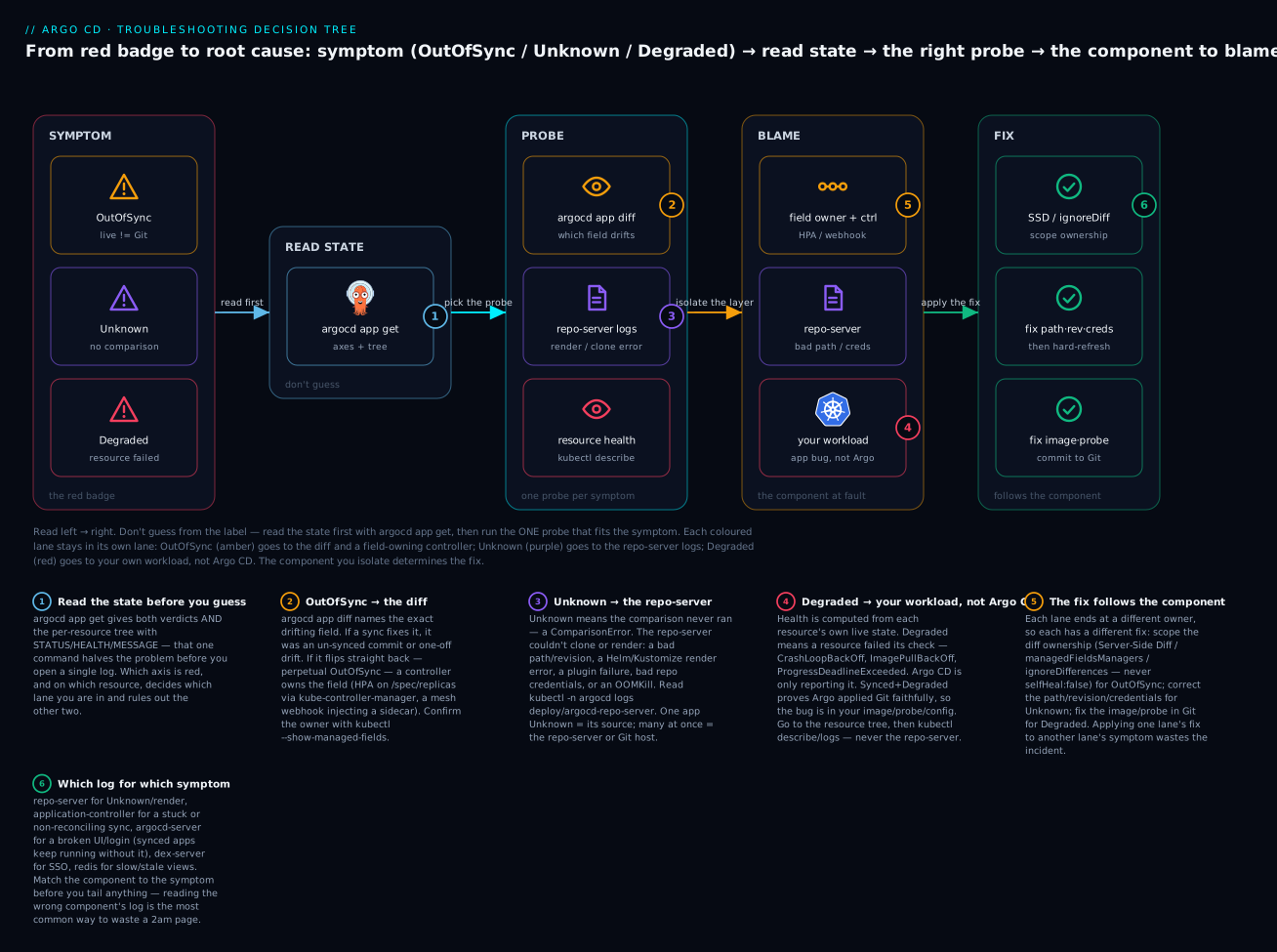
The badges mark the load-bearing moves: read the state before you guess (1); an unexplained OutOfSync goes to argocd app diff (2); Unknown/ComparisonError goes to the repo-server logs (3); a Degraded resource is your workload’s bug, not Argo CD’s (4); the fix follows the component you isolated (5); and the application-controller owns the diff verdict while the repo-server owns rendering (6). The three coloured lanes — amber for the OutOfSync path, purple for Unknown, red for Degraded — never cross: each symptom has its own probe, its own component, and its own fix, which is exactly why guessing across lanes wastes the incident.
The state matrix, now for debugging
The sync/health lesson taught the two axes as a concept. Here we weaponise them: a lookup table from (sync, health) to “what it means and where to look.” Keep this open during an incident and layer 1 of the method becomes mechanical.
First, re-read the two axes with a debugging lens — what each value tells you about where the fault can be:
| Sync value | Debugging meaning | What it is NOT |
|---|---|---|
Synced |
Live matches rendered Git. Argo CD did its job on the sync axis. | Not a promise the app works — check health separately |
OutOfSync |
Live differs from rendered Git — a real, computed diff exists | Not “the app is down”; not a repo failure (that’s Unknown) |
Unknown |
Argo CD couldn’t run the comparison — a ComparisonError |
Never your pods’ fault; it’s the source/repo-server side |
| Health value | Debugging meaning | Where the fix lives |
|---|---|---|
Healthy |
Every assessed resource is working | Nowhere on the health axis |
Progressing |
Converging — or stuck trying (bad image, LB with no address) | The Progressing child; wait, or fix its readiness |
Degraded |
A resource failed its own health check | Your manifest/image/config — not Argo CD |
Missing |
Declared in Git, not present live | Blocked apply: RBAC, admission, missing namespace, pending wave |
Suspended |
Intentionally paused (CronJob suspend, paused Rollout) |
Nowhere — it’s deliberate |
Unknown |
A health check ran and errored (usually a Lua script) | The custom health check in argocd-cm, not the resource |
Now the payload — the combination lookup. This is the “this state means → look here” table the whole method hangs on:
| Sync | Health | What the combination means | Look here first |
|---|---|---|---|
Synced |
Healthy |
Live matches Git and everything works — the only rest state | Nothing; this is the goal |
Synced |
Progressing |
Applied correctly; resources still converging (rollout, LB provisioning) | Wait; if stuck past its deadline, the Progressing child in the tree |
Synced |
Degraded |
Argo CD applied Git faithfully; a resource is failing | The resource tree → kubectl describe/logs. Your bug, not Argo CD’s |
Synced |
Missing |
A declared resource isn’t live despite a clean sync | Events on that resource: RBAC, admission webhook, missing namespace, later sync wave |
Synced |
Suspended |
A resource is intentionally paused | Confirm it’s deliberate; nothing to fix |
Synced |
Unknown (health) |
A per-kind (Lua) health check errored | The custom health check in argocd-cm; controller logs for the Lua error |
OutOfSync |
Healthy |
App runs fine but live ≠ Git — drift or an un-synced commit | argocd app diff; then sync or revert. If it won’t stay Synced, a controller owns a field |
OutOfSync |
Progressing |
A sync is in flight — new manifests applied, not settled | Usually nothing; wait for it to converge |
OutOfSync |
Degraded |
Two problems at once: a diff and a failing resource | argocd app diff for the drift and the resource tree for the failure |
OutOfSync |
Missing |
A resource in Git was never applied | Events + Conditions: failed apply, RBAC, admission, or a pending wave (Part 2) |
OutOfSync (perpetual, flapping) |
Healthy |
A controller rewrites a field every reconcile | argocd app diff → the field → the diffing fix ladder |
Unknown |
any | The comparison itself failed — a ComparisonError |
The Conditions: string + repo-server logs. Never the target cluster |
| (app object absent) | — | The Application was deleted, or an ApplicationSet didn’t generate it |
controller / applicationset-controller logs |
Two rows deserve to be memorised because they are the two most misdiagnosed states in all of Argo CD. Synced + Degraded is the one that ends careers-worth of wasted afternoons: the big green Synced is so reassuring that people hunt everywhere except their own manifest — but Synced is proof Argo CD did exactly what Git said, so a broken result means the bug is in what you committed. And Unknown is the one people escalate to “Argo CD is down” — but Unknown is a narrow, specific failure of the comparison (the repo-server couldn’t render or reach the source), and it never implicates your running pods.
Finally, tie each verdict to the component that produces it — because the component is what you’ll eventually read logs from. This mapping comes straight from the Argo CD architecture:
| Verdict | Produced by | When it’s wrong, read logs from |
|---|---|---|
The sync diff (Synced/OutOfSync) |
application-controller (compares) + repo-server (renders desired) | controller for the verdict; repo-server for what it rendered |
Unknown / ComparisonError |
repo-server (clone + render) | repo-server |
| The health verdict | application-controller (runs per-kind checks) | controller for a health-check (Lua) error; the workload for a genuine Degraded |
| “App not reconciling at all” | application-controller (the reconcile loop) | application-controller |
| UI/login broken, apps still running | argocd-server (API/UI) | argocd-server |
Perpetual OutOfSync: the causes catalogue and the fix ladder
An OutOfSync that a sync fixes is not a problem — you sync, it goes green, done. The pathological case is perpetual OutOfSync: the app flips back to OutOfSync seconds after every sync, no Git change involved, and with selfHeal on it flaps visibly every reconcile. This is the single most common Argo CD support ticket, and the diagnosis is always the same shape: a field exists on the live object that isn’t in your rendered manifest, and something keeps putting it back.
The full mechanics, the three selection tools, and the lab that reproduces it live in the dedicated Diffing & Drift lesson. Here, the troubleshooting cut: recognise the actor from the symptom in the diff, then climb the fix ladder. Start by naming the culprit — these are the offenders you’ll actually meet, ranked by ticket volume:
| Cause | What mutates the object | Field(s) that drift | The command that confirms it |
|---|---|---|---|
| HPA owns replicas | A HorizontalPodAutoscaler via the scale subresource |
/spec/replicas |
kubectl get deploy <d> --show-managed-fields -o yaml → manager: kube-controller-manager, subresource: scale |
| Mesh sidecar injection | Istio/Linkerd/OSM mutating webhook | A whole istio-proxy/linkerd-proxy container, init container, volumes |
argocd app diff shows an entire container present live, absent in Git |
| Defaulting webhook | A custom or platform mutating admission webhook | securityContext, env, annotations you never wrote |
kubectl get mutatingwebhookconfigurations; diff shows small added fields |
| Server-side defaults | The API server on create | protocol: TCP, revisionHistoryLimit, strategy defaults |
Defaulted fields show as “added” in live in argocd app diff |
| cert-manager / CA injector | cert-manager ca-injector |
/data/ca.crt in a Secret, caBundle in a webhook config |
A Secret/webhook config eternally OutOfSync on one key |
| Metadata / annotation churn | An operator writing bookkeeping annotations | /metadata/annotations/* (reconcile timestamps, revisions) |
The same annotation value changes on every argocd app diff |
| Cloud LB controller | The cloud’s Service/Ingress controller | /spec/loadBalancerClass, finalizers, status annotations |
Finalizers/annotations appear on a Service/Ingress you didn’t set |
| CRD conversion/defaulting webhook | The CRD’s own webhook | Fields the CRD defaults on admission | A custom resource never reaches Synced on the same fields |
The tell that distinguishes perpetual OutOfSync from an ordinary un-synced commit: you sync, it goes green, then it goes yellow again with nothing in Git changed. An un-synced commit stays Synced after you sync it; a controller-owned field can’t stay Synced because the controller writes it right back. argocd app diff shows you the field; --show-managed-fields shows you the owner. Once you have both, climb the ladder — reach for the highest rung that fixes it, because each rung down is more manual and more brittle:
| Rung | Tool | Fixes | Reach for it when |
|---|---|---|---|
| 1 | ServerSideDiff=true (sync option) |
Webhooks, server defaults, GKE Autopilot resource rewrites, CRD defaulting | Almost always first — the API server dry-run accounts for defaults/webhooks, so injected fields match on both sides with zero per-field rules |
| 2 | managedFieldsManagers: [<manager>] |
Everything one controller owns — HPA via kube-controller-manager |
A named controller owns fields SSD doesn’t reproduce (notably the HPA scale subresource); self-maintaining as that controller evolves |
| 3 | ignoreDifferences + jsonPointers/jqPathExpressions |
One exact field, or one list element by name | You need surgical scope, or you also need RespectIgnoreDifferences=true so the sync write leaves the field alone |
| ✗ | selfHeal: false |
Nothing — it hides all drift | Never. It doesn’t fix the diff; it blinds you to every real change GitOps exists to catch |
The most important line in that table is the last one. When an app flaps, the tempting one-liner is to disable self-heal — and it’s wrong every time. The flap is a signal that the diff is wrong about ownership; turning off self-heal silences the smoke detector while the app stays OutOfSync and every genuine kubectl edit in prod now goes uncorrected. Fix the diff (rungs 1–3) and leave self-heal doing its job on every other field.
The perpetual-OutOfSync reflex, in three commands:
argocd app diff <app>(which field?),kubectl get <kind> <name> --show-managed-fields -o yaml | grep -A6 managedFields(which owner?), then the highest ladder rung that covers it. If you find yourself typingselfHeal: false, stop — you’ve mistaken the smoke detector for the fire.
Unknown and ComparisonError: the repo-server couldn’t render
Unknown sync status is categorically different from OutOfSync. OutOfSync means Argo CD ran the comparison and found a difference. Unknown means Argo CD could not run the comparison at all — and that failure is recorded as a ComparisonError condition. Because the comparison begins with the repo-server cloning your repo and rendering manifests, Unknown almost always means the repo-server failed, and the error string tells you exactly how.
Read the condition first. It’s right there in argocd app get:
# The Conditions block names the ComparisonError verbatim
argocd app get payments-api
# (representative output)
Name:            argocd/payments-api
Sync Status:     Unknown
Health Status:   Healthy
CONDITIONS:
  TYPE             MESSAGE                                                        LAST TRANSITION
  ComparisonError  rpc error: code = Unknown desc = failed to generate           2026-07-15T09:14:22Z
                   manifests in deploy/overlays/prod: app path does not exist
The MESSAGE is the whole diagnosis. Here it says app path does not exist — the path in your Application source points at a directory that isn’t in the repo at that revision. No amount of poking at pods or clusters will help; the fix is the path or targetRevision. Learn to map the common ComparisonError strings to their cause:
| Cause | Representative ComparisonError string |
Confirm it | Fix |
|---|---|---|---|
| Bad path | failed to generate manifests in <path>: app path does not exist |
argocd app get conditions; repo-server log |
Correct spec.source.path (or the directory in the repo) |
| Bad revision | Unable to resolve '<rev>' to a commit SHA / revision ... not found |
git ls-remote <repo> <rev> |
Point targetRevision at a real branch/tag/SHA |
| Bad repoURL / repo down | rpc error: code = Unavailable desc = ... connection refused / failed to list refs |
argocd repo list; try the URL from a repo-server shell |
Fix the URL; restore the Git host; check egress |
| Repo auth | rpc error: code = Unknown desc = authentication required / Unauthenticated |
argocd repo get <repo> shows connection state |
Fix/rotate the repo credential Secret |
| Helm render error | helm template . failed ... Error: template: <chart>:23:18: executing ... nil pointer evaluating interface {}.tag |
Repo-server log; run helm template locally |
Fix the chart/values (a missing value, bad {{ }}) |
| Kustomize render error | Error: accumulating resources: ... evalsymlink failure on '...': no such file or directory |
Repo-server log; run kustomize build locally |
Fix the kustomization.yaml / a referenced file |
| Plugin (CMP) failure | rpc error: code = Unknown desc = plugin sidecar failed ... / non-zero plugin exit |
Repo-server + the CMP sidecar logs | Fix the plugin config/command; check the sidecar is up |
| Repo-server OOM/crash | Sporadic Unavailable/ComparisonError that clears then returns |
kubectl -n argocd get pod → OOMKilled, restarts |
Raise repo-server memory limits / add replicas |
When the ComparisonError names a render failure (Helm, Kustomize, a plugin), the ground truth is in the repo-server logs. This is the one component whose logs you’ll read most in troubleshooting, so learn to read them:
# The repo-server renders manifests — its log is the source of truth for Unknown/ComparisonError
kubectl -n argocd logs deploy/argocd-repo-server --tail=200 | grep -iE "error|failed|panic"
# (representative repo-server error line, structured logging)
level=error msg="finished unary call with code Unknown"
  error="`helm template ...` failed exit status 1: Error: template: web/templates/deployment.yaml:23:18:
  executing \"web/templates/deployment.yaml\" at <.Values.image.tag>: nil pointer evaluating interface {}.tag"
  grpc.method=GenerateManifest grpc.service=repository.RepoServerService
Two fields orient you instantly: grpc.method=GenerateManifest tells you this is the render path (as opposed to ResolveRevision for revision lookups or listing refs for repo access), and the quoted error= is the raw tool failure — here a Helm template dereferencing a nil .Values.image.tag. That is a values problem in your chart, reproducible offline with helm template, and it has nothing to do with the cluster. The failure modes a repo-server can be in:
| Repo-server failure mode | Signal | Where you see it |
|---|---|---|
| Render error (Helm/Kustomize/plugin) | App is Unknown with a ComparisonError naming the tool |
ComparisonError string + GenerateManifest error line |
| Repo unreachable / auth | Unavailable / authentication required; multiple apps go Unknown at once |
ResolveRevision/list-refs errors; argocd repo get |
| OOMKilled | Intermittent Unknown that recovers, then recurs under load |
kubectl -n argocd get pod restarts + OOMKilled; memory metrics |
| Slow / timing out | ComparisonError: context deadline exceeded on big monorepos |
GenerateManifest timeouts; repo-server CPU saturation |
| Plugin sidecar down | Only plugin-built apps go Unknown |
CMP sidecar container not ready; sidecar logs |
The heuristic that saves the most time: if one app is Unknown, suspect that app’s source (path, revision, chart, values). If many apps go Unknown at once, suspect the repo-server itself (OOM, a repo host outage, a bad credential shared across apps). One-app-Unknown is a config bug; all-apps-Unknown is an infrastructure bug, and they send you to completely different fixes.
Degraded: your app’s own bug, not Argo CD’s
Degraded is the most emotionally misread state, because a red heart on the Argo CD dashboard feels like Argo CD broke. It didn’t. Health is computed by inspecting each resource’s own live state against a per-kind rule — a Deployment’s available replicas, a Pod’s phase, a Job’s completion. When health is Degraded, Argo CD is a thermometer reporting a fever, not the cause of the fever. And when the app is Synced + Degraded, the point is sharper still: Argo CD applied exactly what Git contained, so the failing result is in what you committed.
The diagnosis flows straight down the resource tree. argocd app get gives you the app rollup and the per-resource breakdown, and the MESSAGE column usually names the cause outright:
argocd app get payments-api
# (representative output — Synced but Degraded)
Sync Status:     Synced to main (a1b2c3d)
Health Status:   Degraded

GROUP  KIND        NAMESPACE  NAME         STATUS  HEALTH     MESSAGE
       Service     payments   api          Synced  Healthy    service/api created
apps   Deployment  payments   api          Synced  Degraded   Deployment "api" exceeded its progress deadline
       Pod         payments   api-7c9-xh2  Synced  Degraded   Back-off pulling image "registry.example.com/api:v9.9.9-typo"
Read it as a drill-down. The app is Synced/Degraded; the tree says the Service is fine but the Deployment hit ProgressDeadlineExceeded because its Pod can’t pull registry.example.com/api:v9.9.9-typo. The worst-child rollup landed the whole app on Degraded, and the MESSAGE hands you the cause: a bad image tag. The fix is in Git (correct the tag), not in Argo CD. The per-kind rules that produce Degraded are worth knowing so you recognise the cause from the message:
| Kind | What flips it to Degraded |
Confirm with |
|---|---|---|
| Deployment | ProgressDeadlineExceeded (pods never became ready within progressDeadlineSeconds, default 600s) |
kubectl describe deploy <d> → the Progressing condition reason |
| Pod | CrashLoopBackOff, ImagePullBackOff/ErrImagePull |
kubectl describe pod <p>; argocd app logs <app> or kubectl logs <p> --previous |
| ReplicaSet | ReplicaFailure condition (e.g. quota/PSA denial) |
kubectl describe rs <rs> → events |
| StatefulSet | Update stuck; pods never ready | kubectl describe sts <s>; check PVCs |
| Job | Failed condition (backoff limit exceeded) |
kubectl describe job <j>; the pod’s logs |
| PVC | Phase Lost (bound volume gone) |
kubectl describe pvc <p>; the StorageClass/provisioner |
| HPA | Can’t fetch metrics (AbleToScale/ScalingActive false) |
kubectl describe hpa <h>; metrics-server health |
| Custom resource (CRD) | A Lua health check returned Degraded from its .status |
argocd app get MESSAGE; the operator’s logs |
When the MESSAGE column isn’t enough — a crash loop whose reason is in the application’s own output — descend to layer 3 (events and logs). Three tools, in rough order of how deep they take you:
| Tool | Shows you | When to reach for it |
|---|---|---|
argocd app get <app> (tree) |
Per-resource HEALTH + a one-line MESSAGE | Always first — names the failing child |
kubectl describe <kind>/<name> |
The resource’s events — scheduling, pulls, probe failures, admission denials | The MESSAGE points at the resource but not the why |
kubectl logs <pod> / argocd app logs <app> |
The application’s own stdout/stderr | A CrashLoopBackOff whose reason is inside the app (bad config, failed migration, panic) |
The events are where “the pod is Degraded” becomes “the pod can’t reach its database because the ConfigMap has the wrong host.” A representative describe for the image case above:
kubectl -n payments describe pod api-7c9-xh2
# (representative Events section)
Events:
  Type     Reason     Age                 From     Message
  ----     ------     ----                ----     -------
  Normal   Scheduled  2m                  default-scheduler  Successfully assigned payments/api-7c9-xh2 to node-1
  Normal   Pulling    2m (x4 over 2m)     kubelet  Pulling image "registry.example.com/api:v9.9.9-typo"
  Warning  Failed     2m (x4 over 2m)     kubelet  Failed to pull image "...": not found: manifest unknown
  Warning  Failed     2m (x4 over 2m)     kubelet  Error: ErrImagePull
  Warning  Failed     40s (x6 over 2m)    kubelet  Error: ImagePullBackOff
manifest unknown from the registry confirms the tag doesn’t exist — a Git-side typo, fixed by a commit. Note what you did not do: you never touched the repo-server, the controller, or Argo CD config, because health problems don’t live there. This is the discipline the whole lesson is built to instil — the red badge is on the workload lane, so you stayed in the workload lane.
Connectivity failures: repo, cluster, and auth
A distinct failure family has nothing to do with your manifests: Argo CD can’t reach something. There are exactly three network relationships that can break, and they surface as different states, so knowing which relationship failed tells you which state you’ll see and which fix applies.
| Relationship | Who talks to whom | Failure surfaces as | The gRPC/error code |
|---|---|---|---|
| Argo CD → Git repo | repo-server clones the source | Unknown + ComparisonError |
Unavailable (down), Unauthenticated/authentication required (creds) |
| Argo CD → target cluster | application-controller reads/applies live state | Unknown health / “failed to load live state”; sync fails |
i/o timeout, Unauthorized, Unauthenticated |
| Internal (controller → repo-server / → Redis) | components over gRPC | ComparisonError/stale views; slow reconcile |
Unavailable desc = ... connection refused |
Read the error code, not just the message — the code localises the failure:
| Symptom / error string | Layer at fault | Fix |
|---|---|---|
rpc error: code = Unavailable desc = ... transport: ... connect: connection refused |
repo-server down, or controller→repo-server path | kubectl -n argocd get pod on repo-server; restart; check the Service |
ComparisonError: ... failed to list refs: authentication required |
Repo credentials (bad/expired token, wrong username) | Update the repo Secret; re-argocd repo add with a valid token |
x509: certificate signed by unknown authority (on repo access) |
Repo TLS trust (self-hosted Git with a private CA) | Add the CA to Argo CD’s repo TLS config / argocd-tls-certs-cm |
Failed to load live state: ... Unable to connect to the server: dial tcp <ip>:443: i/o timeout |
Argo CD → target cluster network (often a private control plane) | Open the network path (peering/VPN/private endpoint); check the cluster Secret’s server URL |
Failed to load live state: ... Unauthorized / the server has asked for the client to provide credentials |
Target-cluster auth — expired/invalid cluster credential | Refresh the cluster credential in its Secret (see the per-cloud table) |
Many apps go Unknown simultaneously |
repo-server or a shared repo host | Infrastructure, not per-app: repo-server health, Git host status |
The repo side is cloud-neutral — a Git host is a Git host. The cluster side is where a genuine cloud edge appears, because Argo CD authenticates to each managed control plane differently, and the failure signatures differ. Argo CD stores per-cluster credentials in a Secret (labelled argocd.argoproj.io/secret-type: cluster) — a bearer token, client cert, or an execProviderConfig that mints short-lived tokens. When the controller suddenly can’t reach a cluster it synced yesterday, this is the table to reach for:
| Cloud | How the controller authenticates to the cluster | Classic failure | Fix |
|---|---|---|---|
| AKS | Entra ID (AAD) token or a kubelogin/execProviderConfig credential; managed identity for the controller |
Unauthorized after a token/role change; i/o timeout for a private AKS API server |
Re-issue the cluster credential; for private clusters, ensure a network path (peering/private endpoint) from Argo CD |
| EKS | aws eks get-token/aws-iam-authenticator via an execProviderConfig; IRSA or EKS Pod Identity for the controller’s role |
You must be logged in to the server (Unauthorized) — the IAM identity isn’t mapped, or the token expired (15-min TTL) |
Map the controller role in the cluster’s access config (EKS access entries / aws-auth); confirm IRSA/Pod Identity is attached |
| GKE | gke-gcloud-auth-plugin/execProviderConfig; Workload Identity for the controller |
Unauthorized/403 when the Google IAM binding is missing; i/o timeout for a private GKE control plane |
Grant the controller’s identity container.developer/appropriate role; add authorized-network/PSC access for private control planes |
The one-line rule for the cloud edge: i/o timeout is a network problem (no path to the API server — usually a private control plane), while Unauthorized/Unauthenticated is a credentials problem (expired token, unmapped identity). They look similar in a dashboard and have completely different fixes, and the error string is what tells them apart. The full mechanics of registering clusters and rotating their credentials belong to the multi-cluster registration material; here, recognise the signature and know which knob to turn.
Cache staleness: when the truth is stale, not wrong
Occasionally the state Argo CD shows you is simply old. Argo CD caches two expensive things in Redis: the rendered manifests (keyed by repo/revision/path, so it doesn’t re-run helm template every three minutes) and the live cluster state (so the UI is fast). When a cache entry is stale, you get a confusing class of symptom: the app shows OutOfSync for a change you already reverted, or Synced against a commit you know you changed, or a diff that doesn’t match reality. The cache is an optimisation, never a source of truth — Git and the live cluster are authoritative — so the fix is always “invalidate the cache and recompute.”
The refresh spectrum, from lightest to heaviest, matters because each level invalidates a different cache:
| Action | What it invalidates | Use it when |
|---|---|---|
argocd app get <app> --refresh |
Re-compares against the latest Git, but may reuse the cached render | You pushed a commit and want Argo CD to notice it now instead of at the next poll |
argocd app get <app> --hard-refresh |
Invalidates the manifest cache and re-renders from scratch | You changed something the render depends on (a chart, a plugin, argocd-cm) and the diff looks stale |
| Restart the repo-server | Drops the repo-server’s in-process caches | Renders look wrong fleet-wide after a plugin/config change |
Flush Redis / restart argocd-redis |
Drops all cached renders and live state; everything rebuilds from Git + clusters | Redis is corrupted or wedged; views are stale everywhere |
--hard-refresh is the one to know: it’s the correct response to “I edited argocd-cm (a health check, an ignoreDifferences rule) and the app doesn’t reflect it,” because those inputs feed the cached render. And because Redis holds no source-of-truth data, restarting or flushing it is safe — you lose speed for a minute while caches rebuild, never data:
| Redis symptom | Cause | Impact | Fix |
|---|---|---|---|
| UI slow, spinners, stale badges everywhere | argocd-redis down or unreachable |
Degraded UX; controller logs failed to save/get ... cache |
Restart argocd-redis; confirm the controller/server reconnect |
NOAUTH Authentication required in component logs |
Redis auth secret rotated but components not restarted | Components can’t use the cache | Restart the components to pick up the new argocd-redis secret |
| Diffs/renders stale after a config change | Cached manifests outlived the change | Wrong OutOfSync/Synced verdicts |
--hard-refresh the affected app(s), or restart the repo-server |
| Everything rebuilds slowly after a Redis restart | Cold cache repopulating | Temporary latency, no data loss | Wait; Git and the live cluster are the source of truth |
If a state looks impossible — OutOfSync on a field you reverted, Synced on a commit you changed, a diff that contradicts
kubectl get— suspect the cache before you suspect a bug.argocd app get <app> --hard-refreshre-renders from scratch and resolves the large majority of “Argo CD is showing me something that isn’t true” reports.
The essential tools: which command, which log, which component
You’ve now met every tool in context. This section is the consolidated reference — the toolbox, and the map from symptom to the component whose logs actually help. Start with the command toolbox, ordered by how often a real incident uses it:
| Command | The question it answers |
|---|---|
argocd app get <app> |
The two verdicts + the per-resource tree with STATUS/HEALTH/MESSAGE — layer 1, always first |
argocd app diff <app> |
Exactly which field differs between rendered Git and live (the meaning of OutOfSync) |
argocd app get <app> --refresh / --hard-refresh |
Re-compare against latest Git / re-render ignoring caches |
argocd app manifests <app> |
The fully rendered desired manifests — what Argo CD will apply |
argocd app history <app> |
Past syncs with revisions — “what changed since it worked?” |
argocd app logs <app> |
The application’s workload logs, without leaving the Argo CLI |
argocd app resources <app> |
The managed resources and their per-resource statuses |
argocd repo get <repo> / argocd repo list |
Repo connection state and last error (for Unknown/auth) |
argocd cluster list |
Registered clusters and their connection state |
kubectl -n argocd logs <component> |
The ground-truth error from a specific Argo CD component |
kubectl describe <kind>/<name> |
The Kubernetes events behind a Degraded/Missing resource |
The single most valuable reference in this whole lesson is the which-log-for-which-symptom map. Reading the wrong component’s logs is the most common way to waste time after you’ve already identified the symptom — this table stops that:
| Symptom | Blame this component | Log command |
|---|---|---|
Unknown / ComparisonError / render error |
repo-server | kubectl -n argocd logs deploy/argocd-repo-server |
| App won’t reconcile; stuck; sync never starts | application-controller | kubectl -n argocd logs statefulset/argocd-application-controller |
Unexplained OutOfSync (after checking the diff) |
application-controller (diff) | controller logs; argocd app diff first |
Degraded resource |
not Argo CD — your workload | kubectl describe/logs the resource; argocd app logs <app> |
| UI/login down but synced apps keep running | argocd-server | kubectl -n argocd logs deploy/argocd-server |
| SSO login fails (local admin still works) | dex-server | kubectl -n argocd logs deploy/argocd-dex-server |
| Everything slow / stale views | redis (+ controller cache) | kubectl -n argocd logs deploy/argocd-redis; controller cache errors |
An ApplicationSet didn’t generate an app |
applicationset-controller | kubectl -n argocd logs deploy/argocd-applicationset-controller |
Finally, argocd admin — the operator-side subcommands that answer questions the app-level CLI can’t, indispensable when the problem is Argo CD’s own configuration or its cluster-level bookkeeping:
argocd admin command |
What it’s for |
|---|---|
argocd admin settings validate |
Validate argocd-cm/argocd-rbac-cm — catches a malformed health check or RBAC rule before it breaks reconciliation |
argocd admin settings resource-overrides health <resource.yaml> |
Test a custom Lua health check against a real resource, offline — debug a Degraded/Unknown health verdict |
argocd admin cluster stats |
Per-cluster resource counts and shard assignment — is one shard/controller overloaded? |
argocd admin app get-reconcile-results |
Dump the controller’s reconcile results — deep diff/health debugging |
argocd admin redis-initial-password |
Recover the Redis password when components log NOAUTH |
argocd admin export / import |
Back up / restore Argo CD state (control-plane recovery, its own lesson) |
Walk a real OutOfSync to root cause
Method beats memorisation, so here is the method run end to end on a realistic incident — including the wrong guess it prevents. The alert: payments-api has been OutOfSync for an hour and re-syncing doesn’t fix it. The tempting guess (“the repo credentials expired”) is plausible and wrong, and the method is what saves you from chasing it.
Layer 1 — read the state. Never open a log before this.
argocd app get payments-api
# (representative output)
Sync Status:     OutOfSync from main (a1b2c3d)
Health Status:   Healthy
CONDITIONS:      <none>

GROUP  KIND        NAMESPACE  NAME  STATUS     HEALTH   MESSAGE
apps   Deployment  payments   api   OutOfSync  Healthy  deployment.apps/api configured
Two facts already kill the “repo credentials” guess. First, the sync status is OutOfSync, not Unknown — Argo CD ran the comparison and found a real diff, so the repo-server reached and rendered the source fine (a credential failure would be Unknown + ComparisonError). Second, there are no conditions. And health is Healthy, so nothing is crashing. This is a pure diff problem on one Deployment, and the app is running fine — which also means it’s not urgent in the way a crash loop would be. Isolation done: the fault is on the sync axis, the diff itself.
Layer 2 — read the diff. What field actually differs?
argocd app diff payments-api
# (representative output)
===== apps/Deployment payments/api ======
5c5
<   replicas: 6      # live: the cluster has 6
---
>   replicas: 2      # desired: Git says 2
The < line is live, the > line is Git. The only difference is replicas — live has 6, Git says 2. Nothing else drifted. And critically, you didn’t put 6 anywhere. Something is writing replicas on the live Deployment. This is the perpetual-OutOfSync fingerprint: a single field, owned by not-you, that a sync can’t hold because it’s rewritten immediately.
Layer 3/4 — find the owner. Ask Kubernetes who last wrote that field.
kubectl -n payments get deploy api --show-managed-fields -o yaml | grep -A6 managedFields
# (representative output)
  managedFields:
  - manager: kube-controller-manager
    operation: Update
    subresource: scale
    fieldsV1:
      f:spec:
        f:replicas: {}
There it is: manager: kube-controller-manager, subresource: scale. An HPA is scaling the Deployment to 6 through the scale subresource, and kube-controller-manager is the field-manager on record. Confirm the HPA exists (kubectl -n payments get hpa), and the root cause is nailed: the app declares replicas: 2 in Git, an HPA owns the real replica count, and the two disagree permanently. With selfHeal on, this would visibly flap; here it just sits OutOfSync.
The fix — the right ladder rung. Server-Side Diff (rung 1) doesn’t reproduce the HPA’s scale-subresource write, so the correct, self-maintaining fix is rung 2, managedFieldsManagers:
# On the Application spec — stop diffing whatever kube-controller-manager owns
spec:
  ignoreDifferences:
    - group: apps
      kind: Deployment
      name: api
      managedFieldsManagers:
        - kube-controller-manager
Commit it (the Application is itself in Git), let it sync, and argocd app get reads Synced/Healthy — stably, no flap. Total elapsed: three commands to root cause, one small config change to fix. The “repo credentials” guess would have had you rotating tokens, re-adding the repo, and restarting the repo-server — three fixes for a problem in none of those places. That is the entire value of the method: OutOfSync (not Unknown) plus no conditions ruled out the repo in the first ten seconds, and argocd app diff named the field in the next ten.
| Method step | Command | What it told us | What it ruled out |
|---|---|---|---|
| Read the state | argocd app get |
OutOfSync (not Unknown), Healthy, no conditions |
Repo/render failure; a crashing workload |
| Read the diff | argocd app diff |
Only /spec/replicas differs; live 6 vs Git 2 |
Any other drifted field; a broad problem |
| Find the owner | kubectl ... --show-managed-fields |
kube-controller-manager, subresource: scale |
Human kubectl edit; a webhook |
| Apply the fix | edit the Application | managedFieldsManagers → stable Synced |
selfHeal: false and every other dead end |
Hands-on lab: diagnostic drills
This lab is deliberately analysis-level and needs no live cluster — troubleshooting is a reading skill, and these drills train the read. You are handed four broken apps, each as the representative output you’d actually see, and your job is to run the method in your head: name the red axis, predict the confirming command, identify the component to blame, and state the fix. Work each one before reading the resolution. (If you want to reproduce the states for real, the Diffing lesson has a full kind-based lab for the HPA case — nothing here provisions anything, so there is nothing to tear down.)
Drill 1 — perpetual OutOfSync. You’re handed:
# argocd app get shop-web  (representative)
Sync Status:     OutOfSync from main (7f3a1e0)
Health Status:   Healthy
CONDITIONS:      <none>

# argocd app diff shop-web  (representative)
===== apps/Deployment shop/web ======
5c5
<   replicas: 4
---
>   replicas: 2
Diagnose: Red axis is sync, and it’s OutOfSync with no conditions and Healthy — so the repo rendered fine and nothing is crashing. The diff shows a single field, replicas, live (4) ≠ Git (2), and you didn’t write 4. Confirming command: kubectl get deploy web --show-managed-fields -o yaml | grep -A6 managedFields → expect kube-controller-manager/subresource: scale. Component to blame: an HPA (not Argo CD, not the repo). Fix: climb the ladder — managedFieldsManagers: [kube-controller-manager] (rung 2), not selfHeal: false.
Drill 2 — ComparisonError from a bad path. You’re handed:
# argocd app get billing  (representative)
Sync Status:     Unknown
Health Status:   Healthy
CONDITIONS:
  TYPE             MESSAGE
  ComparisonError  rpc error: code = Unknown desc = failed to generate manifests
                   in deploy/overlays/production: app path does not exist
Diagnose: Red axis is sync = Unknown, which means the comparison never ran — a ComparisonError. You don’t touch pods or clusters for Unknown. The message names it: app path does not exist for deploy/overlays/production. Confirming command: kubectl -n argocd logs deploy/argocd-repo-server | grep GenerateManifest, and check the repo — the directory is probably deploy/overlays/prod, not production, or the folder was moved. Component to blame: the repo-server (rendering), driven by a wrong spec.source.path or targetRevision. Fix: correct the path (or the revision) on the Application; hard-refresh.
Drill 3 — Degraded from a bad image. You’re handed:
# argocd app get orders  (representative)
Sync Status:     Synced to main (c4d5e6f)
Health Status:   Degraded

GROUP  KIND        NAMESPACE  NAME         STATUS  HEALTH     MESSAGE
apps   Deployment  orders     api          Synced  Degraded   Deployment "api" exceeded its progress deadline
       Pod         orders     api-5b8-qk9  Synced  Degraded   Back-off pulling image "ghcr.io/acme/orders:v2.4.O"
Diagnose: Red axis is health = Degraded, and sync is Synced — the career-saver combination. Synced proves Argo CD applied exactly what Git said, so the bug is in the commit. The MESSAGE shows an image pull backing off on tag v2.4.O — note the letter O where a zero 0 belongs. Confirming command: kubectl -n orders describe pod api-5b8-qk9 → expect ErrImagePull/manifest unknown. Component to blame: your workload (a typo’d image tag), not Argo CD. Fix: correct the tag to v2.4.0 in Git, commit, sync. You never open a repo-server or controller log — health problems aren’t there.
Drill 4 — Unknown from a repo-auth failure. You’re handed:
# argocd app get analytics  (representative)
Sync Status:     Unknown
Health Status:   Healthy
CONDITIONS:
  TYPE             MESSAGE
  ComparisonError  rpc error: code = Unknown desc = failed to list refs:
                   authentication required
Diagnose: Red axis is sync = Unknown again, but the message is different: failed to list refs: authentication required — Argo CD couldn’t even list the repo’s refs, so this is repo access/credentials, one step earlier than a render error. Confirming command: argocd repo get https://git.acme.com/analytics.git (expect a failed connection state), and kubectl -n argocd logs deploy/argocd-repo-server | grep -i "authentication required". Component to blame: the repo-server, failing on a bad/expired credential (rotated token, wrong username, revoked deploy key). Fix: update the repository Secret (re-argocd repo add with a valid token); if many repos failed at once, suspect an org-wide token/SSO change rather than one app.
Now the pattern across all four — the whole point of the drills is that the method is identical every time, only the lane changes:
| Drill | Red axis / state | Confirming command | Component to blame | Fix |
|---|---|---|---|---|
| 1 | Sync · perpetual OutOfSync |
--show-managed-fields → kube-controller-manager |
An HPA (not Argo CD) | managedFieldsManagers, not selfHeal:false |
| 2 | Sync · Unknown/ComparisonError |
repo-server log GenerateManifest |
repo-server (bad path/revision) | Correct path/targetRevision |
| 3 | Health · Synced+Degraded |
kubectl describe pod → ErrImagePull |
Your workload (typo’d tag) | Fix the image tag in Git |
| 4 | Sync · Unknown/auth |
argocd repo get; log authentication required |
repo-server (bad credential) | Rotate the repo Secret |
If you can look at each block, name the axis, and predict the confirming command before reading the resolution, you have the skill this lesson exists to build. The states change; the four-layer read does not.
Common mistakes and troubleshooting
This is the reference table the lesson is built around — every state and failure class, its likely cause, the one command that confirms it, and the fix. Keep it open during real incidents.
| Symptom | Likely cause | Command that confirms it | Fix |
|---|---|---|---|
OutOfSync, but a sync makes it Synced and it stays |
An un-synced commit, or one-off drift | argocd app diff shows the field(s); it’s empty after sync |
Sync it (or enable automated sync) |
Perpetual OutOfSync; goes green then yellow with no Git change |
A controller owns a field (HPA replicas, injected sidecar, defaulter) |
argocd app diff + kubectl ... --show-managed-fields |
Ladder: ServerSideDiff → managedFieldsManagers → ignoreDifferences. Never selfHeal:false |
Synced + Degraded |
Your workload failed (bad image, crash loop, failing probe) — Argo applied Git faithfully | argocd app get tree → kubectl describe/logs the child |
Fix the manifest/image in Git |
Stuck Progressing, never Healthy |
Readiness never met (bad image/probe) or a LoadBalancer with no address |
Find the Progressing child in the tree; kubectl describe |
Fix readiness; a Deployment flips to Degraded after progressDeadlineSeconds, exposing the reason |
Unknown sync + ComparisonError: app path does not exist |
spec.source.path (or the repo layout at that revision) is wrong |
argocd app get conditions; repo-server GenerateManifest log |
Correct path/targetRevision; hard-refresh |
Unknown + Helm/Kustomize render error in the condition |
A chart/values or kustomization.yaml error |
Repo-server log; run helm template/kustomize build locally |
Fix the source; verify offline before committing |
Unknown + authentication required/Unauthenticated on the repo |
Bad/expired repo credential | argocd repo get <repo> (failed state); repo-server log |
Update the repo Secret; re-add with a valid token |
Many apps go Unknown at once |
repo-server OOM/crash, or a Git host outage | kubectl -n argocd get pod (repo-server restarts/OOMKilled) |
Raise repo-server memory/replicas; wait out the host |
Failed to load live state: ... i/o timeout |
No network path to the target cluster API (often a private control plane) | argocd cluster list (failed); the cluster Secret’s server URL |
Open the network path (peering/VPN/authorized networks) |
Failed to load live state: ... Unauthorized |
Expired/unmapped cluster credential | argocd cluster list; cloud IAM/access config |
Refresh the cluster credential; map the controller identity (per-cloud) |
| A state looks impossible (OutOfSync on a reverted field) | Stale manifest/live cache in Redis | argocd app get <app> --hard-refresh resolves it |
Hard-refresh; if fleet-wide, restart repo-server / Redis |
| UI/login broken but apps keep syncing | argocd-server (API/UI) down — the controller reconciles without it |
kubectl -n argocd get pod on argocd-server |
Restart argocd-server; check its logs/ingress |
SSO login fails, local admin still works |
argocd-dex-server or OIDC misconfig |
kubectl -n argocd logs deploy/argocd-dex-server |
Fix the connector/OIDC config; restart Dex |
Health is Unknown on one resource |
A custom Lua health check errored (indexed a nil field) | argocd app get MESSAGE; argocd admin settings resource-overrides health |
Guard obj.status in the Lua; hard-refresh |
A resource is Missing and won’t appear |
Blocked apply: RBAC, admission webhook, missing namespace, pending wave | kubectl get events; the app Conditions |
Fix the blocker; CreateNamespace=true or pre-create the ns (Part 2 for waves) |
Three gotchas cost the most hours, and each is a failure of method, not knowledge:
1. Trusting the label instead of reading the evidence. Degraded reads like “Argo CD is degraded”; OutOfSync reads like “a sync problem.” Both readings send you to the wrong lane. The fix is mechanical: before forming any hypothesis, run argocd app get and ask which axis is red and which resource. Synced/Degraded is your workload; Unknown is the repo-server; perpetual OutOfSync is another controller. The label is a symptom; the tree is the evidence.
2. Reading the wrong component’s logs. Once people learn kubectl -n argocd logs exists, they run it for everything — including Degraded apps, where the repo-server and controller are entirely innocent and you’ll scroll a thousand irrelevant gRPC lines. Use the which-log-for-which-symptom map: Unknown → repo-server, stuck reconcile → controller, Degraded → not Argo CD at all (kubectl describe/logs the workload), UI down → server, SSO → Dex. Match the component to the symptom before you tail anything.
3. Reaching for selfHeal: false to stop a flap. It’s the most tempting wrong fix in Argo CD. Disabling self-heal doesn’t make the app Synced — it’s still OutOfSync — and it switches off drift correction for every field, so the next real out-of-band change in prod goes silently uncorrected. A flap is a diagnosis: the diff is wrong about who owns a field. Fix the diff (Server-Side Diff, managed fields, or a scoped pointer) and keep self-heal protecting everything else.
Cheat-sheet
Bookmark this. It compresses the whole method into three lookups: the decision tree, the component map, and the state matrix — plus the commands that drive them.
The diagnostic decision tree (run it top to bottom):
| You see… | Run this probe | Likely component | Typical fix |
|---|---|---|---|
OutOfSync (perpetual/flapping) |
argocd app diff + --show-managed-fields |
A field-owning controller (HPA/webhook) | ServerSideDiff → managedFieldsManagers → ignoreDifferences |
OutOfSync (one-off) |
argocd app diff |
Un-synced commit / drift | Sync, or revert the drift |
Unknown / ComparisonError |
argocd app get conditions + repo-server log |
repo-server | Fix path/revision/creds/render |
Synced + Degraded |
argocd app get tree → kubectl describe/logs |
Your workload | Fix image/probe/config in Git |
Stuck Progressing |
The Progressing child in the tree | Workload readiness (or LB address) | Fix readiness; wait for progressDeadline to expose it |
i/o timeout / Unauthorized on live state |
argocd cluster list |
Target cluster network/auth | Open the path / refresh the credential |
| Impossible-looking state | argocd app get --hard-refresh |
Stale Redis cache | Hard-refresh; restart repo-server/Redis |
Which log for which component:
| Symptom | Component | Log command |
|---|---|---|
Unknown / render error |
repo-server | kubectl -n argocd logs deploy/argocd-repo-server |
| Stuck reconcile / no sync | application-controller | kubectl -n argocd logs statefulset/argocd-application-controller |
Degraded resource |
the workload, not Argo CD | kubectl describe/logs; argocd app logs <app> |
| UI/login down | argocd-server | kubectl -n argocd logs deploy/argocd-server |
| SSO login fails | dex-server | kubectl -n argocd logs deploy/argocd-dex-server |
| Slow/stale everywhere | redis | kubectl -n argocd logs deploy/argocd-redis |
| ApplicationSet didn’t generate | applicationset-controller | kubectl -n argocd logs deploy/argocd-applicationset-controller |
The state matrix, condensed:
| Sync | Health | Verdict / where to look |
|---|---|---|
Synced |
Healthy |
Ship it |
Synced |
Degraded |
Your bug — resource tree + kubectl logs, not Argo CD |
Synced |
Progressing |
Wait; if stuck, the Progressing child |
Synced |
Missing |
Blocked apply — events, RBAC, admission, waves |
OutOfSync |
Healthy |
Diff, then sync; if perpetual, a field owner |
OutOfSync |
Degraded |
Two problems — diff and the failing child |
Unknown |
any | ComparisonError — repo-server, never your pods |
Diagnostic commands, the short list:
| Command | Does |
|---|---|
argocd app get <app> |
State + per-resource tree (layer 1, always first) |
argocd app diff <app> |
The exact drifting field |
argocd app get <app> --hard-refresh |
Re-render ignoring caches (stale state) |
argocd app manifests <app> |
What Argo CD will actually apply |
argocd app history <app> |
Past syncs — “what changed since it worked?” |
kubectl get <kind> <name> --show-managed-fields -o yaml |
Which field-manager owns a field |
kubectl -n argocd logs deploy/argocd-repo-server |
Ground truth for Unknown/render |
argocd admin settings validate |
Validate argocd-cm/RBAC config |
argocd admin settings resource-overrides health <r.yaml> |
Test a Lua health check offline |
Interview and exam questions
Q: An app is OutOfSync and re-syncing doesn’t fix it. Walk me through your diagnosis without guessing.
A: Layer 1, argocd app get: confirm it’s OutOfSync (not Unknown) and note the conditions and health — OutOfSync with no conditions means the repo rendered fine and it’s a real diff. Layer 2, argocd app diff: find the exact field that differs. If a field is present in live but not desired and I didn’t write it, a controller owns it. Layer 3, kubectl get <kind> <name> --show-managed-fields -o yaml: read the field-manager — kube-controller-manager/subresource: scale means an HPA. Then the highest fitting ladder rung: Server-Side Diff for webhooks/defaults, managedFieldsManagers for a whole controller, a scoped jsonPointers for one field. Never selfHeal: false.
Q: What is the precise difference between OutOfSync and Unknown, and why does it change where you look?
A: OutOfSync means Argo CD ran the comparison and found a difference — so the repo-server successfully cloned and rendered, and the fault is a real diff (drift or a field owner). Unknown means Argo CD couldn’t run the comparison — a ComparisonError — so the repo-server failed to clone/render/reach the source. OutOfSync sends you to argocd app diff; Unknown sends you to the ComparisonError string and the repo-server logs. They’re opposite halves of the system.
Q: An app is Synced but Degraded. Whose problem is it and where do you look?
A: It’s your problem, not Argo CD’s. Synced proves Argo CD applied exactly what Git contains; Degraded means a live resource failed its own health check. Open the resource tree in argocd app get, find the Degraded child, read its MESSAGE, then kubectl describe/logs it. Common causes: a typo’d image tag (ImagePullBackOff), a crash loop, a failing readiness probe, or ProgressDeadlineExceeded. You never touch the repo-server or controller — health problems don’t live there.
Q: You see ComparisonError: failed to generate manifests in <path>: app path does not exist. What failed, and what’s the fix?
A: The repo-server cloned the repo but couldn’t find the directory named in spec.source.path at targetRevision — the path is wrong, or the repo layout changed at that revision. Confirm in the repo-server logs (GenerateManifest), fix the path or targetRevision, and hard-refresh. It has nothing to do with the target cluster or your pods.
Q: Three apps go Unknown simultaneously. How does that change your hypothesis versus one app going Unknown?
A: One app Unknown is almost always that app’s source — a bad path, revision, chart, or values. Many apps Unknown at once points at shared infrastructure: the repo-server (OOMKilled, crashing) or the Git host (outage), or a credential shared across repos that just expired. So one-app-Unknown → check that app’s config; all-apps-Unknown → kubectl -n argocd get pod for repo-server restarts and check the Git host. Same state, completely different root cause and fix.
Q: What does --hard-refresh do that a normal --refresh doesn’t, and when do you need it?
A: --refresh re-compares against the latest Git but may reuse the cached render; --hard-refresh invalidates the manifest cache and re-renders from scratch. You need --hard-refresh when you changed something the render depends on — a Helm chart, a plugin, or argocd-cm (a health check or ignoreDifferences rule) — and the app still shows the pre-change diff. It’s also the first thing to try when a state looks impossible, because that’s usually a stale cache.
Q: An app was healthy yesterday; today the controller can’t reach its cluster with dial tcp <ip>:443: i/o timeout. Is that auth or network, and how do you know?
A: Network. i/o timeout means there’s no path to the API server — commonly a private control plane (private AKS/EKS/GKE) that lost its route, or a firewall/peering change. An auth failure would say Unauthorized/Unauthenticated or “asked for credentials.” The error code discriminates: timeout → open the network path (peering, VPN, authorized networks); unauthorized → refresh the cluster credential or fix the IAM mapping.
Q: Why is selfHeal: false the wrong response to a flapping app, and what’s the right one?
A: The flap means the diff is wrong about which fields Argo CD owns — a controller (usually an HPA) rewrites a field every reconcile, and self-heal reverts it, so they war. selfHeal: false doesn’t make the app Synced (it’s still OutOfSync) and it disables drift correction for every field, so real prod drift now goes uncorrected and unnoticed. The right fix scopes the diff: ServerSideDiff for webhooks/defaults, managedFieldsManagers: [kube-controller-manager] for the HPA, or a scoped jsonPointers — leaving self-heal protecting everything else.
Q: A resource shows blank health and the app reads Healthy, but you’re not sure the resource works. What’s happening?
A: Argo CD has no health check for that resource kind (a custom CRD), so it forms no opinion and excludes the resource from the app’s health rollup — the app looks Healthy because the resource is invisible to the calculation, not because it’s confirmed working. Add a Lua health check under resource.customizations.health.<group>_<kind> in argocd-cm, and test it offline with argocd admin settings resource-overrides health. If the Lua itself errors, that resource goes health Unknown — a different failure from a genuine Degraded.
Q: Health status Unknown versus sync status Unknown — same thing?
A: No, and conflating them wastes time. Sync Unknown is a ComparisonError — the repo-server couldn’t render/compare, so look at the source and repo-server. Health Unknown means a per-kind health check ran and errored — almost always a custom Lua script indexing a nil field — so look at that health check in argocd-cm, not the repo. Same word, opposite components.
Q (scenario): A junior engineer says “Argo CD broke our deploy, it’s showing red, I’m going to reinstall it.” The app is Synced/Degraded. How do you coach them?
A: Reframe the two axes. Synced proves Argo CD did its job — the cluster matches Git — so it didn’t “break” anything and reinstalling it changes nothing. The red is on the health axis: a resource is failing because of what’s in Git. Walk them to the resource tree in argocd app get, read the failing child’s MESSAGE, then kubectl logs/describe. The fix is in their manifest or image; Argo CD is correctly reporting reality. Reinstalling the controller is the reflex the method exists to prevent.
Q (scenario): You’ve been paged for a Degraded app at 2am. What are the first two commands, and what would make you escalate to reading Argo CD component logs?
A: argocd app get <app> to find the Degraded child and its MESSAGE, then kubectl describe/logs that resource for the Kubernetes-level reason. For a Degraded app I would not read Argo CD component logs at all — health failures are the workload’s, and the repo-server/controller are innocent. I’d only descend to kubectl -n argocd logs if the symptom were Unknown (repo-server) or a stuck/non-reconciling app (controller). Reading component logs for a Degraded app is the classic wrong turn.
Key takeaways
- Method beats memorisation: read the state, read the events, read the component logs, isolate the layer — in that order. Most incidents are solved at layer 1 (
argocd app get) or layer 2 (argocd app diff/ theComparisonError); you descend to component logs only when the layers above don’t explain it. - Name the red axis first, because it names the possible causes. Sync
OutOfSync= a real diff (drift or a field owner); syncUnknown= the repo-server couldn’t compare; healthDegraded= your workload failed. Each lane has its own probe, component, and fix, and they never cross. Synced+Degradedis your bug, not Argo CD’s.Syncedproves Argo CD applied exactly what Git said, so a broken result is in the commit — go straight to the resource tree andkubectl logs, never to the repo-server or controller.Unknownis aComparisonError, and the string is the diagnosis. Bad path, bad revision, a Helm/Kustomize render error, repo auth, or an OOMKilled repo-server — one appUnknownis that app’s source; many appsUnknownat once is the repo-server or Git host.- Perpetual
OutOfSyncmeans another controller owns a field you never set. Confirm the field withargocd app diffand the owner with--show-managed-fields, then climb the ladder —ServerSideDiff→managedFieldsManagers→ignoreDifferences— and never reach forselfHeal: false. - The cloud edge is the target-cluster connection, and the error code discriminates it:
i/o timeoutis a network problem (a private control plane with no path — AKS/EKS/GKE alike),Unauthorized/Unauthenticatedis a credentials problem (expired token, unmapped IAM identity). - When a state looks impossible, suspect the cache before a bug. Redis holds no source of truth, so
--hard-refresh(or restarting repo-server/Redis) is safe and resolves most “Argo CD is showing me something untrue” reports. - Read the right component’s logs: repo-server for
Unknown/render, application-controller for a stuck reconcile, argocd-server for UI/login, Dex for SSO — and forDegraded, not Argo CD at all. Sync-time failures (SyncFailed, hooks, pruning, stuck operations) are the domain of Part 2.