There are two kinds of Argo CD problem. The first kind is loud but harmless: an app sits OutOfSync, a health check reads Degraded, a repo shows Unknown. You lose sleep but not data, and Troubleshooting Argo CD Part 1 is the field guide for those — reading the status, the comparison, the health assessment. This lesson is the second kind: the failures that happen while Argo CD is actively changing your cluster, and the ones where the recovery move itself can make things worse. A sync that fails halfway. A migration Job that takes the whole deploy down. An operation that hangs on Running and will not let go. A resource stuck Terminating behind a finalizer nobody can explain. And the one every platform engineer eventually meets and never forgets: a manifest removed from Git, prune enabled, and a production PersistentVolumeClaim — or an entire namespace — gone.
The mental model that ties all of this together is one sentence: a sync is an operation with a lifecycle, not an instant. When you press Sync, Argo CD starts an operation that moves through phases, applies resources in waves, runs your hooks, prunes what you deleted, and only then settles. Every failure here is a specific place that operation can break — loudly (a SyncFailed), silently (a hang on Running), or catastrophically (a prune) — and every recovery is a specific move: read the sync result, terminate-op the hang, patch away a finalizer, or re-assert Git. The ugliest truth of GitOps disaster recovery threads through all of them: Git holds your desired state, not your data. Re-syncing a pruned PVC gives you a brand-new empty volume, not the bytes back — and knowing exactly where that line falls separates a five-minute recovery from an unrecoverable outage.
Everything here targets Argo CD 2.13+ / 3.x on Kubernetes 1.29+. Argo CD itself is cloud-neutral, but the blast radius of a prune is not — a deleted PVC hits a different disk on AKS, EKS and GKE, and a deleted Service of type LoadBalancer deprovisions a real, billable cloud load balancer. Where the edge is cloud-specific, all three clouds get a column.
Why this matters
The failures in Part 1 cost you a red icon in the UI. The failures in this lesson cost you an incident channel. The difference is that a sync operation mutates the live cluster — it creates, patches, and deletes real objects — so when it goes wrong it does not just misreport state, it changes state, sometimes irreversibly. A prune that fires against the wrong path does not show you a warning icon; it issues a DELETE to the apiserver, the apiserver honours it, and if that object was a dynamically-provisioned PVC on a Delete reclaim policy, the CSI driver tears down the underlying cloud disk seconds later. There is no icon to un-click.
The place learners hit this is predictably the worst possible moment: a routine refactor. Someone moves a directory, renames an app, or merges a branch that dropped a file, and an automated Application with prune: true faithfully deletes everything that “disappeared” from Git — because from Argo CD’s point of view, you told it to. The same evening, a PreSync database migration that passed in staging fails in prod on a subtly different dataset, the sync halts at wave 1, and the new pods never roll. Or a sync simply stops — phase Running, no error, no progress — because a hook is waiting on something that will never happen, and nothing else in that app can sync until you cancel the operation by hand.
The mental model to carry through every section: read the operation, then decide the move. Argo CD records exactly what it tried, on which resource, and what the apiserver said back, in the operationState of the Application. Most of the panic in these incidents comes from not reading that record — re-syncing blindly or force-deleting something turns a recoverable problem into a data-loss one. The engineers who stay calm run argocd app get first, read the failed resource and its message, and only then act, because the message almost always names both the problem and the fix.
The anatomy of a sync operation
Before any specific failure, you need the state machine. When a sync starts — manually, by automation, or by a webhook — Argo CD creates an operation and tracks it in status.operationState on the Application. That operation has a phase, and the phase is the single most important field you will read all lesson:
Operation phase |
Meaning | What you do |
|---|---|---|
Running |
The operation is in progress — applying resources, waiting on waves/hooks | Wait; if it never leaves Running, it is stuck (see terminate) |
Succeeded |
All resources applied, all waves healthy, all hooks passed | Nothing — this is the goal |
Failed |
A resource or hook failed to apply/complete; the operation stopped | Read the failed resource + message, fix, re-sync |
Error |
Argo CD itself errored running the operation (not a resource error) | Often transient/infra; read controller logs, retry |
Terminating |
Someone cancelled the operation (terminate-op) and it is winding down |
Wait for it to clear, then diagnose and re-sync |
Do not confuse the operation phase with the two statuses you learned in Part 1. They answer different questions, and reading the wrong one sends you down the wrong path:
| Field | Question it answers | Example values |
|---|---|---|
operationState.phase |
Did the last sync attempt succeed? | Running, Succeeded, Failed, Error, Terminating |
Sync status |
Does live match Git right now? | Synced, OutOfSync, Unknown |
Health status |
Are the live resources actually working? | Healthy, Progressing, Degraded, Suspended, Missing |
| Resource-level sync | Did this one resource apply? | Synced, OutOfSync, SyncFailed |
Inside a running or finished operation, Argo CD records a sync result — a per-resource list of what it tried and what happened. This is where a SyncFailed lives, and reading it is the core skill of this lesson. You surface it with argocd app get:
# The operation, the result, and the per-resource status in one view
argocd app get payments --show-operation
# ---- representative output (abridged, formatted) ----
Name:               argocd/payments
Sync Status:        OutOfSync from main (a1b2c3d)
Health Status:      Missing

Operation:          Sync
Sync Revision:      a1b2c3d...
Phase:              Failed
Message:            one or more objects failed to apply, reason: Deployment.apps
                    "payments" is invalid: spec.selector: Invalid value:
                    field is immutable

GROUP  KIND        NAMESPACE  NAME      STATUS      HOOK  MESSAGE
apps   Deployment  payments   payments  SyncFailed        field is immutable
""     Service     payments   payments  Synced
""     ConfigMap   payments   payments  Synced
That block tells you everything: the operation Phase: Failed, the top-level Message, and crucially the one resource whose STATUS is SyncFailed with its own MESSAGE. Two resources synced fine; one — the Deployment — was rejected. You now know precisely what to fix. The equivalent raw view, useful in scripts and when the CLI truncates, is the operationState in the object itself:
# Pull the machine-readable operation state (great for jq and CI gates)
kubectl -n argocd get application payments -o jsonpath='{.status.operationState.phase}'
# Failed

# The full per-resource sync result
kubectl -n argocd get application payments \
  -o jsonpath='{.status.operationState.syncResult.resources[*].message}'
Each entry in that sync result carries the fields you read, filter, and alert on:
syncResult.resources[] field |
Meaning |
|---|---|
group / kind / namespace / name |
Which object this row describes |
status |
Synced, SyncFailed, OutOfSync, PruneSkipped |
message |
The verbatim apiserver reason — the fix is usually right here |
hookPhase |
For hooks: Running, Succeeded, Failed |
syncPhase |
PreSync, Sync, PostSync, SyncFail |
The diagram below is the whole lesson on one page: the sync operation on the left, the three ways it breaks in the middle (a loud failure, a hang, or the red prune disaster), the recovery move for each, and the sober truth on the right that recovering the object is not the same as recovering the data.
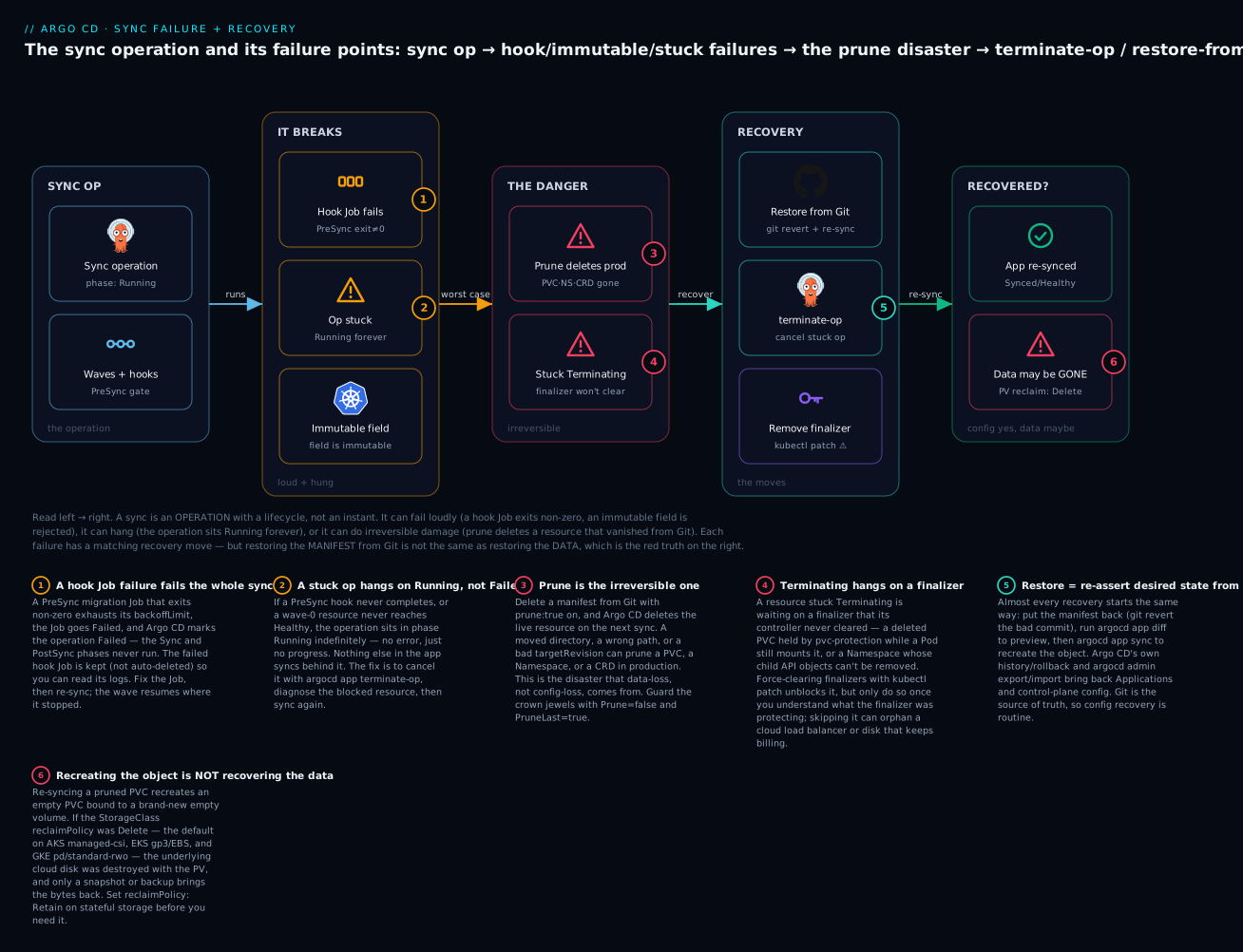
The badges mark the decisions that matter: a failed hook fails the whole sync (1); a stuck op hangs on Running with no error and needs terminate-op (2); prune is the irreversible one (3); a Terminating resource is waiting on a finalizer (4); recovery almost always starts by re-asserting Git (5); and recreating an object is not recovering its data (6). Hold that last one in your teeth — it is the difference between a config outage and a data outage.
SyncFailed: reading the failed resource and its message
SyncFailed is a resource-level status: Argo CD sent the object to the apiserver (or to server-side apply) and the apiserver rejected it. This is distinct from OutOfSync (live differs from Git, but nothing was attempted) and from ComparisonError (Argo could not even compute the diff — repo unreachable, template render failure — covered in Part 1). SyncFailed means the attempt happened and was refused, and the refusal reason is almost always a verbatim apiserver error that names the fix.
Your entire diagnostic loop is: find the resource with STATUS: SyncFailed, read its MESSAGE, and match it to a cause. Here is the table you will come back to. Every message in it is a real apiserver or Argo CD string, lightly trimmed:
SyncFailed message (representative) |
Root cause | Fix |
|---|---|---|
field is immutable / spec.selector: Invalid value: ...: field is immutable |
You changed a field Kubernetes forbids updating in place | Add Replace=true sync option, or delete + re-sync the resource ⚠️ |
Service "x" is invalid: spec.clusterIP: Invalid value: ...: may not change once set |
Same class — clusterIP is immutable |
Remove clusterIP from the manifest, or Replace=true |
application destination server ... is not permitted in project 'X' |
The AppProject does not allow this destination cluster/namespace |
Widen the project’s destinations, or fix the app’s destination |
Resource :ClusterRole is not permitted in project X |
clusterResourceWhitelist / namespaceResourceBlacklist denies this kind |
Add the kind to the project whitelist (deliberately), or drop the resource |
admission webhook "validate.kyverno.svc" denied the request: ... |
A validating/mutating webhook (Kyverno, Gatekeeper, OPA) rejected the object | Fix the manifest to satisfy the policy, or amend the policy |
Internal error occurred: failed calling webhook ...: context deadline exceeded |
The webhook backend is down or unreachable, so the apiserver fails closed | Restore the webhook service; consider failurePolicy review |
namespaces "foo" not found |
Target namespace does not exist and Argo was not told to create it | Add CreateNamespace=true, or a Namespace manifest in an earlier wave |
unable to recognize "...": no matches for kind "Rollout" in version "argoproj.io/v1alpha1" |
The CRD is missing (or in the same sync, not yet registered) | Install CRD first (earlier wave) or add SkipDryRunOnMissingResource=true |
... is forbidden: User "system:serviceaccount:argocd:..." cannot create resource ... |
The credentials for the target cluster lack RBAC for this kind | Grant the Argo CD service account/role the missing RBAC on that cluster |
error validating data: ValidationError(Deployment.spec): unknown field ... |
Schema/dry-run validation failed — a typo’d or unknown field | Fix the manifest; only use Validate=false if the field is a known CRD gap |
The order in patch list ... doesn't match $setElementOrder |
Strategic-merge patch conflict on a list (often env vars/ports) | Switch to ServerSideApply=true, or clean the list ordering |
metadata.annotations: Too long: must have at most 262144 bytes |
The last-applied-configuration annotation blew the size limit |
Use ServerSideApply=true (no giant annotation) |
Several of those fixes are sync options — flags that change how Argo CD applies a resource, set per-app under syncPolicy.syncOptions or per-resource via the argocd.argoproj.io/sync-options annotation. They are the single most useful lever for apply-time failures:
| Sync option | What it changes | Fixes |
|---|---|---|
Replace=true |
kubectl replace (delete+recreate) instead of apply/patch |
Immutable-field rejections (⚠️ not on stateful data) |
ServerSideApply=true |
Server-side apply instead of client-side | List-merge conflicts, the 262144-byte annotation limit |
CreateNamespace=true |
Creates the destination namespace if absent | namespaces "x" not found |
SkipDryRunOnMissingResource=true |
Skips client dry-run when the CRD isn’t registered yet | no matches for kind when CRD + CR are in one sync |
Validate=false |
Disables kubectl schema validation |
A known CRD schema gap (use sparingly) |
PruneLast=true |
Prunes only after all applies succeed and are healthy | Ordering bugs that delete a still-referenced resource |
Prune=false |
Never prunes this resource | Protecting crown-jewel PVCs/namespaces |
Three of the failure causes deserve real attention because they are the ones that recur and the ones where the fix has teeth.
The immutable-field failure. Certain fields are fixed at creation and Kubernetes will reject an in-place update forever. The usual suspects: a Deployment/StatefulSet/Job spec.selector, a Service spec.clusterIP, a PersistentVolumeClaim’s storageClassName or a shrink of its size, and most of a StatefulSet’s spec beyond replicas/template/updateStrategy. Argo CD applies with a patch by default, the apiserver says field is immutable, and the resource sits SyncFailed on every sync. There are exactly two ways forward, and the safe one depends entirely on what the resource is:
| Field changed | What Replace=true does |
Data-loss risk |
|---|---|---|
Deployment.spec.selector |
Deletes + recreates the Deployment; pods reschedule | Low — brief downtime, no persistent data |
Service.spec.clusterIP |
Recreates the Service; new ClusterIP | Low — but the VIP changes (DNS/clients re-resolve) |
StatefulSet.spec (immutable parts) |
Deletes + recreates the StatefulSet | ⚠️ Medium — verify PVCs are retained, not orphaned |
PersistentVolumeClaim size/class |
Deletes + recreates the PVC | ⚠️ HIGH — a recreated PVC binds a NEW empty volume |
Set Replace=true per-app or, more safely, scoped to exactly the object that needs it:
# Per-resource opt-in — safest, scoped to exactly the object that needs it
metadata:
  annotations:
    argocd.argoproj.io/sync-options: Replace=true
⚠️ Never blanket
Replace=trueon an app containing aPersistentVolumeClaimor a data-bearingStatefulSet.Replacedeletes then recreates, and a recreated PVC provisions a brand-new empty volume — “fixing” an immutable-field error with a blindReplaceon stateful storage is how you turn a red icon into a restore-from-backup. For stateful objects, change the resource’s name instead (create new, migrate, delete the old deliberately), or plan a maintenance window.
The project-denied failure. Argo CD’s AppProject is a hard boundary. If a project’s destinations, clusterResourceWhitelist, or namespaceResourceWhitelist does not permit what the app is syncing, the sync fails before touching the cluster with a not permitted in project message — the project stopped a fat-fingered or compromised app from escaping its lane. This is a policy failure, not a Kubernetes one: no edit to the manifest will satisfy it. You fix it deliberately in the AppProject (widen destinations/whitelists) or by correcting the app’s destination — never by reflexively granting '*'.
The webhook-rejected failure. When a validating/mutating admission webhook (Kyverno, Gatekeeper/OPA, a mesh injector, cert-manager) rejects an apply, the message is a verbatim admission webhook "..." denied the request: <reason> — a policy telling you no, so read the reason and satisfy it. The nastier cousin, failed calling webhook ...: context deadline exceeded, means the webhook backend is down and the apiserver is failing closed; Argo CD stays SyncFailed until the webhook service is healthy again. The fix is to restore the webhook (or review its failurePolicy/namespaceSelector if it chronically blocks a namespace Argo owns), not to keep re-syncing.
Hook failures: when a PreSync Job takes the whole sync down with it
Resource hooks — covered in depth in Sync Waves & Resource Hooks — let you run a resource (almost always a Job) at a defined point in the sync. The classic is a PreSync database migration that must complete before the new pods roll. That coupling is exactly what makes hooks a failure amplifier: a failed PreSync hook fails the entire sync, and the Sync and PostSync phases never run. Your new version does not deploy, not because the Deployment was wrong, but because a migration Job exited non-zero.
The hook lifecycle maps onto the operation like this:
| Hook phase | Runs when | If it fails |
|---|---|---|
PreSync |
Before the main sync wave | Operation → Failed; Sync + PostSync skipped |
Sync |
Alongside the main resources (respects waves) | Operation → Failed; PostSync skipped |
PostSync |
After all resources are Healthy | Operation → Failed; app is deployed but post-checks failed |
SyncFail |
Only when the sync operation fails | Runs your cleanup/rollback logic |
Skip |
Never applied (marker to exclude a resource) | n/a |
And the delete policy governs what happens to the hook’s Job afterward — this is where a “why do I have 40 completed Jobs?” surprise comes from:
hook-delete-policy |
The hook Job is deleted… | Use it for |
|---|---|---|
BeforeHookCreation (default) |
Right before the next sync creates a new one | Keeping the last run visible for debugging |
HookSucceeded |
Immediately after it succeeds | Migrations you never need to inspect on success |
HookFailed |
Immediately after it fails | Rare — you usually want the failed Job kept |
Four hook failure modes cause almost every incident:
| Symptom | Cause | Fix |
|---|---|---|
Sync Failed, PreSync Job Failed, new pods never rolled |
Migration Job exited non-zero (bad SQL, missing grant, data mismatch) | Read kubectl logs job/<hook>, fix, argocd app sync --retry |
Sync stuck Running for an hour, Job still Active |
Hook never completes — waits on a lock, a dependency, an interactive prompt | argocd app terminate-op, fix the Job, re-sync |
Dozens of Completed hook Jobs piled up |
Hook uses generateName (unique name each run) so BeforeHookCreation can’t GC it |
Set hook-delete-policy: HookSucceeded, or use a stable name |
| Re-running the sync corrupts data | Migration is not idempotent — re-applies an already-applied change | Make migrations idempotent (guard with IF NOT EXISTS / versioned tools) |
The non-idempotent migration is the subtle killer. Argo CD may retry a hook, and you will certainly re-sync after a partial failure. If the Job does ALTER TABLE ... ADD COLUMN with no existence guard, the first run succeeds; a later unrelated failure makes you re-sync, and the second run errors on “column already exists” — or worse, a data-mutating step runs twice. In a reconcile loop your hook will run more than once, so a GitOps-correct migration is idempotent by construction: a versioned tool that tracks applied versions, or guards like ADD COLUMN IF NOT EXISTS.
When a hook wedges, the operation message reads waiting for completion of hook batch/Job/db-migrate and the Job sits Running 0/1 for minutes — the signature of a sync gated on a hook (Drill 1 in the lab walks the exact diagnosis). The smoking gun is always in kubectl logs job/<hook>; once the logs tell you why it is stuck, cancel the operation (next section) and fix the root cause. Re-syncing on top of a stuck operation does nothing — Argo CD will not start a new operation while one is Running.
Stuck operations: terminating ops, finalizers, and things that will not die
A stuck operation is a sync whose phase stays Running with no forward progress: a hook that never completes, a wave-0 resource that never reaches Healthy, or a rare controller wedge. The tell is always the same — Phase: Running, an unchanging Message, and minutes or hours on the clock. Because Argo CD runs one operation per app at a time, a stuck op blocks every other change to that app. You cannot sync past it; you have to cancel it.
Terminating a running operation
argocd app terminate-op cancels the in-flight operation. It does not roll anything back or delete anything — it stops Argo CD waiting, sets the phase to Terminating, and lets the operation wind down so you can diagnose and re-sync cleanly.
# Cancel the stuck operation
argocd app terminate-op payments
# representative: application 'payments' operation terminating

# Confirm it cleared
argocd app get payments --show-operation | grep Phase
# Phase:  Terminating   -> then the operation clears and you can sync again
| Way to terminate | How | When to reach for it |
|---|---|---|
| CLI | argocd app terminate-op <app> |
Scripts, on-call, the default |
| UI | App view → the running sync’s Terminate button | When you are already looking at it |
kubectl (last resort) |
Patch .operation off the Application ⚠️ |
Only if the API server is fine but the CLI/UI cannot reach it |
⚠️ The
kubectlroute — removing the.operationfield from theApplicationwith a patch — is a genuine last resort. It bypasses Argo CD’s own cleanup, and if the controller is mid-apply you can leave partial state behind. Preferterminate-op; use the patch only when the API server is healthy but Argo’s own endpoints are not, and expect to runargocd app getafterward to reconcile what actually landed.
After terminating, you are back to a diagnosable state. Read the resource that was blocking (the hook Job, the unhealthy wave-0 pod), fix it, and argocd app sync again. The terminate is never the fix — it is what lets you fix.
A resource stuck Terminating
Different failure, often confused with the above. Here the sync is fine but a resource you tried to delete (via prune, or because you removed the app) hangs in Terminating state forever. Kubernetes will not remove an object while it still has finalizers — entries under metadata.finalizers that a controller is supposed to clear once its cleanup is done. If that controller is gone, broken, or blocked, the finalizer never clears and the object is wedged.
# A PVC that will not die
kubectl -n payments get pvc data-postgres-0
# NAME              STATUS        VOLUME   CAPACITY   AGE
# data-postgres-0   Terminating   pvc-...  20Gi       9d

# WHY it is stuck — read the finalizers before you touch anything
kubectl -n payments get pvc data-postgres-0 -o jsonpath='{.metadata.finalizers}'
# ["kubernetes.io/pvc-protection"]
The common finalizers and what they protect:
| Finalizer | On | It is waiting for | Force-removing it means |
|---|---|---|---|
kubernetes.io/pvc-protection |
PVC | No pod is still mounting the PVC | You may detach a volume a running pod uses ⚠️ |
kubernetes.io/pv-protection |
PV | The bound PVC is gone | Usually safe once the PVC is truly gone |
finalizers.kubernetes.io/... (namespace spec.finalizers: [kubernetes]) |
Namespace | All child API objects deleted | You orphan whatever could not be deleted ⚠️ |
resources-finalizer.argocd.argoproj.io |
Application | Argo to cascade-delete managed resources | Deleting the app orphans its workloads (not always bad) |
Controller-specific (e.g. <db-operator>/finalizer) |
A custom resource | The operator to run teardown (snapshot, deregister) | You skip real cleanup — leaked cloud objects ⚠️ |
The safe procedure is diagnose first, patch last. A PVC stuck on pvc-protection is usually waiting because a pod still mounts it — the correct fix is to delete the pod, not the finalizer. Only when you have confirmed the protecting condition is genuinely satisfied (or the controller is gone for good) do you force-clear:
# LAST RESORT — force-remove finalizers so Kubernetes can delete the object
kubectl -n payments patch pvc data-postgres-0 \
  --type=merge -p '{"metadata":{"finalizers":null}}'
⚠️ Force-clearing a finalizer tells Kubernetes “the cleanup this finalizer represents is done” — whether or not it is. On a PVC still mounted by a pod, you can force a detach and corrupt a filesystem; on a namespace, you orphan every child the controllers could not delete; on an operator-managed resource, you skip teardown and leak the cloud thing it manages (a disk, a load balancer, a DNS record that keeps billing). Never patch a finalizer to
nulluntil you have read what it protects and confirmed that protection is no longer needed.
The stuck-namespace variant is common enough to name. A Namespace in Terminating is blocked because at least one API object in it could not be finalized. The right fix is to find and delete that object; the force route uses the finalize subresource, and it orphans anything left behind:
# Find what is still in the terminating namespace (the real fix targets these)
kubectl api-resources --verbs=list --namespaced -o name \
  | xargs -n1 kubectl get --show-kind --ignore-not-found -n stuck-ns

# Force route (orphans stragglers) — clear spec.finalizers via the finalize API ⚠️
kubectl get namespace stuck-ns -o json \
  | jq '.spec.finalizers=[]' \
  | kubectl replace --raw /api/v1/namespaces/stuck-ns/finalize -f -
A Rollout paused (not stuck — waiting)
One “stuck” report is not a failure at all. If you use Argo Rollouts, a canary that reaches a pause: {} step with no duration stops and waits for a human. Argo CD’s health check for a paused Rollout returns Suspended, the app may read Progressing/Suspended, and the sync will not complete the wave until you promote it. This is by design, not a wedge. The fix is not terminate-op; it is a decision:
| Rollout status | Argo CD health | Your move |
|---|---|---|
Progressing |
Progressing |
Wait — the canary is advancing through its steps |
Paused |
Suspended |
Decide: promote to continue, or abort to roll back |
Degraded |
Degraded |
Analysis failed — investigate, likely abort |
Healthy |
Healthy |
Done — fully promoted to stable |
# It is paused on purpose, waiting for you to promote (or abort)
kubectl argo rollouts get rollout payments -n payments   # STATUS: Paused
kubectl argo rollouts promote payments -n payments        # continue the canary
# or:  kubectl argo rollouts abort payments -n payments    # roll back to stable
Pruning disasters: the section people need most
This is the one. Everything above costs you time; a bad prune can cost you data. Prune means: when a resource that existed in Git disappears from it, Argo CD deletes it from the cluster — the correct, desirable behaviour of GitOps, since Git is the source of truth. The disaster is that Argo CD cannot tell “the human deliberately deleted this manifest” from “a refactor moved a directory, a merge dropped a file, or targetRevision now points where the file does not exist.” Either way the resource vanished from desired state, so it prunes it — and if that was a production PersistentVolumeClaim, Namespace, or CustomResourceDefinition, you now have an incident.
The trigger is almost never “someone deleted a PVC manifest on purpose”:
| How the resource “disappeared” from Git | The prune that follows |
|---|---|
| A directory was renamed/moved during a refactor | Every resource under the old path is pruned |
| A bad merge dropped a file | That resource is pruned |
targetRevision changed to a branch/tag where the file is absent |
Everything only-present-on-the-old-revision is pruned |
| A Kustomize/Helm change stopped rendering a resource | The no-longer-rendered resource is pruned |
An ApplicationSet generator produced fewer results |
Whole apps are deleted, cascading to their resources |
A wrong path typo points at an near-empty directory |
Almost everything is pruned as “removed” |
Blast radius: why a namespace or a PVC is the nightmare
Not all prunes are equal. Pruning a Deployment is a shrug — re-sync from Git and the pods come back. Pruning stateful or container resources is where data dies:
| Pruned resource | Immediate effect | Recoverable? |
|---|---|---|
Deployment / Service / ConfigMap |
Pods stop / VIP gone / config gone | ✅ Yes — re-sync from Git |
PersistentVolumeClaim |
PV unbinds; cloud disk deleted if reclaim=Delete | ⚠️ Data only from a snapshot/backup |
Namespace |
Cascading delete of EVERYTHING in it | ⚠️ Catastrophic — PVCs, LBs, secrets, all of it |
CustomResourceDefinition |
Cascading delete of every CR of that kind | ⚠️ Catastrophic — deletes all instances cluster-wide |
Secret (e.g. a TLS cert, a DB credential) |
Apps lose auth; cert-manager may re-issue | Partial — re-issue or restore from a secret store |
Service type LoadBalancer |
The cloud load balancer is deprovisioned | ✅ Recreated on re-sync — but the public IP changes |
Two are five-alarm fires. A pruned Namespace triggers Kubernetes’ cascading delete — the apiserver removes every object in it: Deployments, StatefulSets, Services (deprovisioning cloud LBs), and PVCs (destroying cloud disks on a Delete reclaim policy). One pruned namespace wipes an application’s entire state in seconds. A pruned CRD is worse in a different way: it cascades to every custom resource of that kind cluster-wide, so pruning one CRD can delete every Certificate, every Rollout, or every database an operator manages — regardless of namespace or app.
The cloud-specific truth: your PV reclaim policy decides if data survives
This is the reality that turns a recoverable prune into an unrecoverable one — and it differs by cloud only in the name of the disk that dies. A dynamically-provisioned PV inherits its reclaimPolicy from its StorageClass, and the default StorageClass on all three clouds uses reclaimPolicy: Delete. So deleting the PVC deletes the PV, which tells the CSI driver to delete the cloud disk, which destroys the bytes:
| Cloud | Default StorageClass | CSI driver | Default reclaimPolicy |
What dies when the PVC is pruned |
|---|---|---|---|---|
| AKS | managed-csi / managed-csi-premium |
Azure Disk CSI (disk.csi.azure.com) |
Delete |
The Azure Managed Disk is deleted |
| EKS | gp2 (legacy) / gp3 via EBS CSI |
EBS CSI (ebs.csi.aws.com) |
Delete |
The EBS volume is deleted |
| GKE | standard-rwo / premium-rwo |
PD CSI (pd.csi.storage.gke.io) |
Delete |
The Persistent Disk is deleted |
The prevention is one line, set before you ever need it, on any StorageClass backing stateful data:
# A StorageClass whose volumes SURVIVE a PVC deletion (data outlives the claim)
apiVersion: storage.k8s.io/v1
kind: StorageClass
metadata:
  name: retained-ssd
provisioner: disk.csi.azure.com     # EKS: ebs.csi.aws.com · GKE: pd.csi.storage.gke.io
reclaimPolicy: Retain               # <-- the PV (and cloud disk) is kept, not deleted
volumeBindingMode: WaitForFirstConsumer
The three policy values and what each does to your data:
reclaimPolicy |
On PVC delete, the PV… | Data |
|---|---|---|
Delete (the cloud default) |
is deleted; the CSI driver deletes the cloud disk | ⚠️ Gone |
Retain |
is kept as Released; the cloud disk is preserved |
✅ Recoverable (manual re-bind) |
Recycle (deprecated) |
is scrubbed and made Available |
n/a — removed from Kubernetes |
reclaimPolicy: Retain is the single most important pre-disaster setting for stateful workloads under GitOps: a pruned PVC leaves an orphaned but intact PV and cloud disk you can re-bind a new PVC to manually.
Prevention: five guardrails, in order of strength
You prevent prune disasters with layered defence, not one setting. From “protects a single crown-jewel resource” to “protects a whole environment”:
| Guardrail | Scope | What it does |
|---|---|---|
Prune=false annotation |
One resource | Argo CD never prunes this object even if it leaves Git |
reclaimPolicy: Retain |
One StorageClass | The cloud disk survives even if the PVC is pruned |
syncPolicy.syncOptions: PruneLast=true |
One app | Prunes only after everything else applied and is healthy |
Sync windows (deny) on the AppProject |
Many apps | Freezes syncs (and prunes) during protected hours |
argocd app diff / --dry-run before sync |
Every manual sync | Shows you what would be pruned before it happens |
The per-resource opt-out is your seatbelt for anything stateful:
# This PVC will never be pruned by Argo CD, even if its manifest leaves Git
apiVersion: v1
kind: PersistentVolumeClaim
metadata:
  name: data-postgres
  annotations:
    argocd.argoproj.io/sync-options: Prune=false
And for automated apps — where no human sees the sync before it runs — PruneLast=true plus the right posture on syncPolicy.automated (covered in Sync Policies: Automated, Self-Heal & Prune) is the difference between “caught it” and “explained it in the postmortem”:
spec:
  syncPolicy:
    automated:
      prune: true
      selfHeal: true
    syncOptions:
      - PruneLast=true       # apply + heal first; delete only if all that succeeded
# The habit that prevents the disaster: PREVIEW what a sync will prune
argocd app diff payments
# ...lines beginning with '-' under a resource are what would be DELETED...

# Or a full dry run of the sync, applying nothing
argocd app sync payments --dry-run
If an argocd app diff shows a resource you did not mean to delete — stop. That is the moment the disaster is free to prevent and expensive to recover. The classic near-miss is exactly this: an engineer diffs before a refactor sync, sees - PersistentVolumeClaim data-postgres, and realises the moved directory took the PVC’s manifest with it.
Recovery: the runbook when the prune already fired
Prevention failed and the resource is gone. Work this runbook top to bottom — and read the ⚠️ on every destructive-adjacent step, because the wrong recovery move (a blind re-sync, a Replace) can finish off data that was still recoverable.
Step 1 — Freeze. Stop automation before it prunes again or self-heals over your investigation.
# Turn OFF automated sync so nothing else changes while you assess ⚠️
argocd app set payments --sync-policy none
⚠️ Do this first. If the app is automated and you start editing Git or the cluster, self-heal and prune can fight you — reverting a manual PV re-bind, or re-pruning a resource you just recreated. Freeze the loop, then work.
Step 2 — Assess what was actually deleted, and whether the DATA still exists. This is the fork in the road. The manifest is trivially recoverable from Git; the data depends entirely on the reclaim policy and any backup.
# Did the underlying PV (and cloud disk) survive? Look for a Released/Available PV
kubectl get pv | grep -i 'released\|available'
# pvc-8f...   20Gi   RWO   Retain   Released   payments/data-postgres   retained-ssd
# ^ reclaimPolicy Retain + STATUS Released == the disk is still there, data recoverable

# If reclaimPolicy was Delete, the PV is GONE — check your snapshot/backup instead
kubectl get volumesnapshot -A          # if you use CSI snapshots
A PV’s STATUS tells you instantly whether data recovery is even on the table:
PV STATUS |
Meaning | Recovery implication |
|---|---|---|
Bound |
Claimed by a live PVC | Normal — in use |
Available |
Free, unclaimed | Ready to be bound |
Released |
Its PVC was deleted, but the PV (and disk) remains | ✅ Retain worked — re-bindable, data intact |
Failed |
Reclaim failed | Investigate the CSI driver |
| (no PV at all) | The PV was deleted with the PVC | ⚠️ Delete reclaim — disk gone, go to backups |
Step 3 — Restore desired state from Git. Whatever the data situation, get the config back by re-asserting Git. If the prune came from a bad commit, revert it:
# The clean, auditable fix: revert the commit that removed the manifest
git revert <bad-commit-sha>
git push
# Then preview and re-create the objects
argocd app diff payments
argocd app sync payments
Step 4 — Recover the data, by case. The manifest is back but points at an empty volume; now you deal with the bytes:
| Situation after the prune | Data recovery move |
|---|---|
reclaimPolicy: Retain, PV Released |
Clear the PV’s claimRef, re-bind a new PVC to the existing PV ⚠️ |
reclaimPolicy: Delete, CSI snapshot exists |
Restore a new PVC dataSource from the VolumeSnapshot |
reclaimPolicy: Delete, external backup (Velero, pgdump) |
Restore from the backup into a fresh PVC |
reclaimPolicy: Delete, no snapshot, no backup |
⚠️ The data is gone. Nothing recreates it. Declare the loss |
⚠️ Re-binding a
ReleasedPV means editing itsclaimRefso a new PVC can claim it. Do this carefully and only against the correct PV — patching the wrong PV’sclaimRef, or letting an automated app re-provision before you bind, can lose the very volume you were trying to save. Freeze automation (Step 1), identify the PV by its capacity and old claim name, then bind deliberately.
Step 5 — Re-enable automation only after you have verified recovery. Turn the loop back on once the app is Synced/Healthy and the data is confirmed present, not before.
argocd app set payments --sync-policy automated
argocd app get payments   # expect Synced / Healthy, and verify the data by hand
The non-negotiable takeaway of this section: Argo CD recovers your configuration, not your data. Re-syncing from Git recreates the PVC object; it does not put your database back. Only a retained PV, a CSI snapshot, or an external backup does — all set up before the prune. For stateful workloads under GitOps, reclaimPolicy: Retain and a real backup (see Argo CD HA & Disaster Recovery) are not optional.
Finalizers and deletion order
Finalizers govern deletion order in Argo CD, and getting the model right prevents both stuck deletions and orphaned resources. The one you set on purpose is the Application finalizer, resources-finalizer.argocd.argoproj.io. Its presence changes what happens when you delete the Application itself:
metadata:
  finalizers:
    - resources-finalizer.argocd.argoproj.io   # cascade: delete the app's resources too
| App has the finalizer? | kubectl delete application / argocd app delete does |
Result |
|---|---|---|
| Yes (cascade) | Deletes the Application and everything it manages | Clean teardown — but ⚠️ this is a full prune of the app’s resources |
No (non-cascade, --cascade=false) |
Deletes only the Application object |
Workloads keep running, now orphaned (unmanaged) |
Both are legitimate, and both are traps if you pick wrong. Deleting an app with the finalizer is a deliberate whole-app prune — every ⚠️ from the pruning section applies, including the PVC and namespace blast radius. Deleting it without (--cascade=false) leaves workloads running but unmanaged: what you want when migrating an app to another Argo CD instance or decommissioning the control plane, and a mess if you did it by accident.
When Argo does cascade, the deletion order is: delete the managed resources, wait for their finalizers to clear, then remove the Application. So a single stuck child finalizer (a pvc-protection on a mounted volume) hangs the whole app deletion — when an app delete hangs, look at the child resource still Terminating, not the Application.
Orphaning cuts both ways. --cascade=false orphans on purpose; but force-removing the app’s finalizer (kubectl patch application ... finalizers:null) to “unstick” a delete also orphans — it removes the app object and leaves every workload running and unmanaged, which looks like success and is actually a slow leak you must later re-adopt or delete by hand.
Out-of-order waves and ApplicationSet mass-deletes
A wave stuck on an unhealthy resource
Sync waves apply resources in ordered groups, and — crucially — Argo CD waits for each wave to become Healthy before starting the next. That gate is the feature (your database comes up before the app that needs it) and the failure mode (if a wave-0 resource never goes Healthy, wave 1 never starts, and the sync sits Running forever). This looks identical to a stuck hook: Phase: Running, a message naming the resource it is waiting on.
argocd app get platform --show-operation | grep Message
# Message:  waiting for healthy state of apps/StatefulSet/postgres

# The wave-0 resource that never became Healthy is the whole story
kubectl -n data get statefulset postgres
# NAME       READY   AGE
# postgres   0/3     22m         <- never reached readiness; wave 1 is blocked behind it
kubectl -n data describe pod postgres-0 | tail -20
# ... 0/1 nodes are available: 3 Insufficient memory ...   <- the real cause
The fix is never to fight the wave mechanism — it is to fix the resource the wave is correctly waiting on (here, the StatefulSet cannot schedule). If a resource legitimately never reports Healthy (a Job you forgot has no completion, a custom resource with no health check), either give it a health check, move it out of the blocking wave, or annotate it so Argo does not gate on it. terminate-op cancels the stuck sync so you can act, but the wave will re-block on the next sync until the resource can actually go Healthy.
An ApplicationSet that deletes many apps at once
The most dangerous single object in Argo CD is a misconfigured ApplicationSet generator, because it can delete dozens of Applications at once — and each deletion cascades to that app’s resources. The mechanism: an ApplicationSet’s generator produces a set of parameters, one Application per result. If the generator suddenly produces fewer results — a cluster Secret was mislabeled so the cluster generator no longer matches it, a Git directory was renamed so the git generator no longer finds it, a List generator entry was dropped — the ApplicationSet controller sees those Applications as no-longer-desired and deletes them. If those Applications carry the cascade finalizer, their workloads go too.
| Trigger | Effect | Recovery |
|---|---|---|
| Cluster generator: a cluster Secret loses its matching label | Every app for that cluster is deleted | Restore the label; apps regenerate |
| Git generator: a directory is renamed/removed | Every app from that directory is deleted | git revert the rename; apps regenerate |
| List/Matrix generator: an entry is dropped | Those apps are deleted | Restore the entry in Git |
| A generator errors and returns empty (usually safe) | Argo keeps last-known-good; apps preserved | Fix the generator; no deletion should occur |
The recovery is the same shape as any prune: git revert the change that shrank the generator’s output, and the ApplicationSet controller regenerates the Applications, which re-adopt their resources. The danger is when the deleted Applications had the cascade finalizer and the underlying workloads were pruned before you noticed — then you are back in the pruning-disaster runbook (data from backup, not from Git). Two settings blunt the whole class of failure:
spec:
  # Do not let the ApplicationSet DELETE Applications automatically ⚠️
  syncPolicy:
    applicationsSync: create-update    # create + update, but never delete
    preserveResourcesOnDeletion: true  # if an App IS removed, keep its resources
applicationsSync: create-update (or create-only) lets the controller create and update Applications but never delete them, so a mislabeled cluster or moved directory can no longer wipe apps — a human deletes them deliberately. preserveResourcesOnDeletion: true is the second seatbelt: if an App is removed, its resources are kept, not pruned. For any ApplicationSet fanning out production apps, treat both as defaults.
The recovery toolkit
Across every failure above, the same handful of tools do the recovering. Know them cold.
| Tool | Command | Recovers |
|---|---|---|
| Preview a sync | argocd app diff <app> |
Nothing yet — shows what a sync would change/prune |
| Deploy history | argocd app history <app> |
The list of previous synced revisions to roll back to |
| Roll back | argocd app rollback <app> <id> |
The app to a previous known-good revision ⚠️ |
| Revert in Git | git revert <sha> + sync |
The source of truth (the real, auditable fix) |
| Control-plane export | argocd admin export -n argocd > backup.yaml |
A backup of Applications, Projects, and Argo config |
| Control-plane import | argocd admin import -n argocd - < backup.yaml |
Argo CD’s own objects after a control-plane loss |
argocd app history + rollback is Argo CD’s built-in time machine — for config, not data:
argocd app history payments
# ID  DATE                            REVISION
# 0   2026-07-14 09:12:03 +0000 UTC   a1b2c3d (v1.4.0)
# 1   2026-07-15 11:40:55 +0000 UTC   e4f5g6h (v1.5.0)   <- the bad one
# 2   2026-07-15 14:02:19 +0000 UTC   a1b2c3d (v1.4.0)   <- rolled back

# Roll back to the last good deployment
argocd app rollback payments 0
⚠️
argocd app rollbackis refused (or immediately undone) while automated sync is on — auto-sync would just roll you forward to Git’s HEAD again. Disable automation first (argocd app set <app> --sync-policy none), roll back, verify, and remember that rollback changes the cluster but not Git: your repo still has the bad revision, so the durable fix is always a matchinggit revert. Rollback is the fast stop-the-bleeding move; the Git revert is the cure.
git revert is the GitOps-native cure and the one to prefer whenever you can push a commit: it fixes the source of truth, leaves an audit trail, and works whether or not automation is on.
argocd admin export/import recovers the control plane — the Applications, AppProjects, and Argo CD config that are not in your app repos. It captures that and nothing else:
argocd admin export includes |
It does NOT include |
|---|---|
Application + ApplicationSet objects |
Your app manifests (those live in Git) |
AppProject definitions |
Your application data (PVs, databases) |
| Cluster Secrets, repo creds, RBAC/SSO config | The target clusters’ running workloads |
argocd-cm / argocd-rbac-cm config |
— |
If someone deletes an AppProject or the Argo CD namespace is lost, a scheduled argocd admin export brings the definitions back — it belongs in your toolkit alongside git revert because Git holds your apps’ desired state but not Argo CD’s own config. It is covered end-to-end in Argo CD HA & Disaster Recovery.
The habit that ties the toolkit together: argocd app diff before every re-sync during an incident. After any recovery edit — a revert, a manifest restore, a project widen — preview the sync before you run it. During an incident your mental model of the cluster is stale and stressed; the diff is the ground truth of what your next sync will do, and it is the last place to catch a second mistake before it lands.
Hands-on lab
These are disaster drills, done at config-and-analysis level so you can rehearse the moves without a live blast radius. Each drill is the real command sequence and representative output (labelled as such — these are not captured from a live run), the ⚠️ where the move is destructive, and a “what just happened” so the reasoning sticks. Run the read-only inspection commands against any Argo CD you have; treat the destructive ones as a script you read and understand before you ever need them in anger. The safest place to actually execute them is a throwaway kind/minikube cluster with a demo app — nothing here should be first-attempted in production.
Drill 1 — A stuck sync → terminate-op
Scenario: a PreSync hook is wedged; the operation has been Running for 15 minutes and nothing else can sync.
# 1. Confirm it is genuinely stuck (Running, unchanging message, minutes old)
argocd app get payments --show-operation | grep -E 'Phase|Message'
# Phase:    Running
# Message:  waiting for completion of hook batch/Job/db-migrate

# 2. Read WHY before cancelling — the hook's own logs
kubectl -n payments logs job/db-migrate --tail=15
# waiting for advisory lock on 'schema_migrations' ...   (representative)

# 3. Cancel the stuck operation
argocd app terminate-op payments
# application 'payments' operation terminating   (representative)

# 4. Fix the root cause (release the lock / fix the Job), then re-sync
argocd app sync payments
⚠️
terminate-opcancels the operation; it does not undo what already applied. After terminating, runargocd app getto see what landed before the cancel, so your re-sync starts from a known state.
What just happened: Argo CD runs one operation per app, so a wedged hook froze the whole app. Terminating fixed nothing — it unblocked you. Diagnose (Step 2) before you cancel, or the re-sync in Step 4 just re-wedges.
Drill 2 — A finalizer-stuck resource → safe force-removal
Scenario: you deleted an app and a PVC is stuck Terminating behind pvc-protection.
# 1. See the stuck resource and, critically, WHICH finalizer holds it
kubectl -n payments get pvc data-cache -o \
  custom-columns=NAME:.metadata.name,STATUS:.status.phase,FINALIZERS:.metadata.finalizers
# NAME         STATUS        FINALIZERS
# data-cache   Terminating   [kubernetes.io/pvc-protection]

# 2. Diagnose the PROTECTING condition — is a pod still mounting it?
kubectl -n payments get pods -o json \
  | jq -r '.items[] | select(.spec.volumes[]?.persistentVolumeClaim.claimName=="data-cache") | .metadata.name'
# (empty output == no pod mounts it == the protection is satisfied)

# 3. Only now, force-clear the finalizer  ⚠️
kubectl -n payments patch pvc data-cache --type=merge -p '{"metadata":{"finalizers":null}}'
⚠️ Step 2 is the whole drill.
pvc-protectionexists to stop you detaching a volume a pod is using. If Step 2 had listed a pod, the correct fix was to delete that pod — not the finalizer. Patching the finalizer while a pod mounts the PVC can corrupt the filesystem. Force-clear only after you have proven the protecting condition is gone.
What just happened: the finalizer was not a bug — it was Kubernetes protecting a volume. You proved the protection was moot (no mounting pod), then cleared it. The rule: a finalizer is a promise that cleanup will run; force-removing it breaks that promise, so first confirm the cleanup is already done or truly impossible.
Drill 3 — A prune-deleted resource → recover from Git, and the data-loss reality
Scenario: a refactor moved a directory; the automated app pruned a production PVC. This drill rehearses the runbook.
# 1. FREEZE automation before anything else changes  ⚠️
argocd app set payments --sync-policy none

# 2. Assess: did the underlying disk survive the prune?
kubectl get pv | grep payments
# pvc-8f2...  20Gi  RWO  Retain  Released  payments/data-postgres  retained-ssd
#                        ^Retain ^Released  == disk still exists, data recoverable
# (if you see NO such PV and reclaimPolicy was Delete, the disk is GONE -> go to backups)

# 3. Restore the CONFIG from Git (revert the commit that dropped the manifest)
git revert <bad-commit-sha> && git push
argocd app diff payments          # PREVIEW: confirm the PVC is coming back, nothing else pruned
argocd app sync payments          # recreate the objects

# 4. Recover the DATA (only possible because reclaimPolicy was Retain)
#    Clear the old PV's claimRef so the fresh PVC can bind to the EXISTING disk  ⚠️
kubectl patch pv pvc-8f2... --type=merge -p '{"spec":{"claimRef":null}}'

# 5. Verify, THEN re-enable automation
argocd app get payments           # Synced / Healthy
argocd app set payments --sync-policy automated
⚠️ Two destructive-adjacent steps. Step 1: if you skip the freeze, self-heal can re-prune or fight your PV re-bind. Step 4: patch the
claimRefon the correct PV only — identify it by capacity and the old claim name; the wrong PV loses different data.
What just happened: the config came back from Git in seconds (Step 3) — that part is always easy. The data came back only because someone earlier set reclaimPolicy: Retain (Step 4). Re-run this drill imagining reclaimPolicy: Delete: Steps 1–3 are identical, but Step 4 cannot exist — the disk died with the PV, and your only path is a backup. That contrast is the entire point of the pruning section.
Drill 4 — A failed PreSync hook → fix and retry
Scenario: a database migration Job failed; the sync is Failed and the new version never rolled.
# 1. Read the operation — one hook resource failed
argocd app get payments --show-operation | grep -A2 Hook
# GROUP  KIND  NAMESPACE  NAME        STATUS  HOOK     MESSAGE
# batch  Job   payments   db-migrate  Failed  PreSync  job failed BackoffLimitExceeded

# 2. The failure reason is ALWAYS in the hook pod's logs
kubectl -n payments logs job/db-migrate --tail=20
# ERROR: relation "orders" does not exist (SQLSTATE 42P01)   (representative)

# 3. Fix the migration in Git (make it idempotent / fix the ordering), commit, push
#    then retry the sync — the wave resumes from where it failed
argocd app sync payments --retry-limit 2
⚠️ Before you re-run a data-mutating migration, confirm it is idempotent. A non-idempotent migration that partially applied can corrupt on the second run. If unsure, inspect the DB state the first run left behind before retrying.
What just happened: the Deployment was fine — a PreSync hook exiting non-zero failed the whole sync, so the new pods never rolled (the coupling is the feature: no migration, no new code). You read the failed hook’s logs, fixed the migration in Git, and re-synced. The failed Job was kept (not auto-deleted) precisely so you could read those logs.
Teardown
No cloud resources are created by the read-only steps. If you rehearsed the destructive commands on a throwaway cluster, delete it entirely so nothing lingers:
kind delete cluster --name argocd-drills # or: minikube delete
What just happened: the state-mutating drills (patching finalizers, clearing claimRef, force-finalizing namespaces) are exactly the ones you never want to first attempt in production — a disposable cluster is where you build the muscle memory so the real incident is a rehearsal.
Common mistakes and troubleshooting
The table below is the operational-failure companion to Part 1’s status table. Every symptom is a real Argo CD/Kubernetes state or message.
| Symptom | Cause | Fix |
|---|---|---|
Resource SyncFailed: field is immutable |
Changed an immutable field (selector, clusterIP, PVC class/size) |
Replace=true for stateless; rename/migrate for stateful ⚠️ |
SyncFailed: ... is not permitted in project |
AppProject denies the destination or resource kind |
Widen the project deliberately, or fix the app’s destination/kind |
SyncFailed: admission webhook ... denied the request |
A policy controller (Kyverno/Gatekeeper) rejected the object | Satisfy the policy in the manifest, or amend the policy |
SyncFailed: failed calling webhook ...: context deadline exceeded |
The webhook backend is down; apiserver fails closed | Restore the webhook service; review its failurePolicy |
SyncFailed: Job "db-migrate" ... BackoffLimitExceeded |
A PreSync hook Job failed; the whole sync failed with it | Read kubectl logs job/<hook>, fix, argocd app sync --retry |
Operation Running forever, waiting for completion of hook |
A hook Job never completes (lock, dependency, bad command) | argocd app terminate-op, fix the Job, re-sync |
Operation Running forever, waiting for healthy state of ... |
A wave-N resource never reaches Healthy; later waves blocked | Fix that resource (scheduling, readiness); it is the real cause |
Resource stuck Terminating behind a finalizer |
The controller that clears the finalizer is gone/blocked | Diagnose the protecting condition; force-clear only if truly satisfied ⚠️ |
Namespace stuck Terminating |
A child API object could not be finalized | Find + delete the child; force via /finalize orphans stragglers ⚠️ |
| A prod PVC/Namespace vanished after a Git refactor | prune: true deleted a resource that left Git (moved dir, bad path) |
Freeze; git revert; re-sync; recover DATA from retained PV/backup ⚠️ |
| Dozens of apps deleted at once | An ApplicationSet generator returned fewer results (mislabel, rename) | git revert the change; set applicationsSync: create-update |
Rollout Suspended, sync will not complete |
A canary paused on a manual step — not a failure | kubectl argo rollouts promote <ro> (or abort) |
Replace=true on a PVC created a new empty volume |
Replace deletes+recreates; the recreated PVC bound a fresh disk |
Restore data from snapshot/backup; never Replace stateful storage ⚠️ |
argocd app rollback does nothing / re-syncs forward |
Automated sync is on; it rolls you back to Git HEAD | Disable auto-sync, rollback, then git revert for the durable fix |
App delete hangs in Terminating |
The app’s cascade finalizer waits on a stuck child resource | Fix the child (its finalizer); do not force the app finalizer blindly ⚠️ |
Three gotchas cause the most damage in practice, and they are worth spelling out beyond the table.
1. Re-syncing on top of a stuck operation does nothing — and hides the problem. Argo CD runs one operation per app. If an operation is Running (stuck), pressing Sync again is a no-op — the request queues behind the wedged one. Engineers who don’t know this hammer Sync, see nothing happen, and escalate, when the fix was to terminate-op first. Check operationState.phase before you re-sync; if it is Running and stale, cancel it, don’t pile on.
2. “Restore from Git” restores config, and people assume it restored data. The most expensive misconception in GitOps operations. After a prune deletes a PVC, git revert + sync recreates the PVC object and the app goes green — everyone relaxes because the UI is healthy. But the recreated PVC bound a new empty volume; the database is empty. Green means config matches Git, not data is intact. Always verify data explicitly after recovering a stateful resource, and know beforehand whether your reclaim policy even makes recovery possible.
3. Force-clearing a finalizer to “unstick” a delete leaks cloud resources. When a namespace or operator-managed resource hangs in Terminating, the tempting fix is to null the finalizers and move on. But the finalizer was a controller’s promise to run teardown — deregister a load balancer, delete a disk, remove a DNS record. Skip it and that cloud object is orphaned: it keeps existing and billing, with no Kubernetes object pointing at it. The clean fix is to make the controller’s cleanup succeed; force-clearing trades a stuck object for a silent leak, so follow it with a sweep of the cloud console for orphaned LBs, disks, and IPs.
Cheat-sheet
The commands and settings for reading, cancelling, recovering, and — most importantly — not causing an operational failure.
| Command / setting | What it does |
|---|---|
argocd app get <app> --show-operation |
The operation phase, message, and per-resource sync result |
kubectl -n argocd get app <app> -o jsonpath='{.status.operationState.phase}' |
Machine-readable operation phase (for CI gates) |
argocd app terminate-op <app> |
Cancel a stuck/running sync operation |
argocd app diff <app> |
Preview what a sync would change/prune — run before every incident sync |
argocd app sync <app> --dry-run |
Full dry run; applies nothing |
argocd app sync <app> --retry-limit N |
Re-sync after fixing a failed hook/resource |
argocd app history <app> |
List previous synced revisions (rollback targets) |
argocd app rollback <app> <id> |
Roll the cluster back to a prior revision (auto-sync must be off) ⚠️ |
argocd app set <app> --sync-policy none |
Freeze automation — first move in any recovery ⚠️ |
argocd admin export -n argocd > backup.yaml |
Back up Applications, Projects, Argo config |
git revert <sha> |
The durable, auditable recovery — fix the source of truth |
kubectl argo rollouts promote <ro> |
Continue a paused canary (not a stuck op) |
argocd.argoproj.io/sync-options: Prune=false |
Never prune this resource — put it on crown-jewel PVCs/namespaces |
argocd.argoproj.io/sync-options: Replace=true |
Delete+recreate for immutable-field changes (never on stateful data) ⚠️ |
syncOptions: [PruneLast=true] |
Prune only after apply+heal succeed |
reclaimPolicy: Retain (StorageClass) |
Keep the cloud disk when the PVC is deleted — set before you need it |
applicationsSync: create-update (ApplicationSet) |
Controller may create/update Apps but never delete them |
preserveResourcesOnDeletion: true (ApplicationSet) |
Keep resources if an App is removed |
The prune-safety checklist — run through it before enabling prune on any production app, and again before any sync that follows a Git refactor:
| ✅ Check | Why |
|---|---|
Stateful resources carry Prune=false |
A moved manifest can never delete the PVC |
StorageClass for data uses reclaimPolicy: Retain |
A pruned/deleted PVC leaves the disk intact |
PruneLast=true is set on automated apps |
Deletes happen only after applies succeed |
| A real backup exists (Velero / CSI snapshots / DB dumps) | The only thing that recovers data, not config |
You ran argocd app diff before this sync |
You saw the deletions before they happened |
| Deny sync windows protect prod change-freeze hours | No surprise prunes during protected time |
ApplicationSets use create-update + preserveResourcesOnDeletion |
A bad generator cannot mass-delete apps/resources |
Interview and exam questions
Q: What is the difference between a resource being OutOfSync and SyncFailed?
A: OutOfSync means the live state differs from Git but nothing was attempted — it is a comparison result. SyncFailed means Argo CD tried to apply the resource and the apiserver rejected it — it is an operation result, and the resource’s message carries the verbatim rejection reason (immutable field, webhook denial, project denial, RBAC). OutOfSync is “I would change this”; SyncFailed is “I tried and was refused.”
Q: A sync has been stuck on operation phase Running for 30 minutes with no error. What do you do?
A: It is a stuck operation, not a failed one. Read the operation message (argocd app get --show-operation) — it will name what it is waiting on, almost always a hook Job that never completes or a wave resource that never goes Healthy. Diagnose that resource (its logs/events), then argocd app terminate-op to cancel the wedged operation, fix the root cause, and re-sync. Re-syncing without terminating does nothing — Argo runs one operation per app.
Q: You changed a Deployment’s spec.selector and the resource is now SyncFailed: field is immutable. How do you fix it, and how does the answer change if it were a PersistentVolumeClaim?
A: For the Deployment, add Replace=true (as a sync option/annotation) so Argo CD delete-and-recreates it, or delete it and re-sync — brief pod downtime, no data risk. For a PVC, Replace=true is dangerous: deleting and recreating a PVC binds a brand-new empty volume, so you would lose the data. The safe path for stateful resources is to create a new resource under a different name and migrate, or plan an explicit maintenance window — never blind-Replace a PVC.
Q: Explain exactly how a routine directory rename in the config repo can delete a production database.
A: With prune: true, Argo CD deletes any resource that disappears from Git. A directory rename makes every manifest under the old path “disappear”, so Argo prunes those resources. If a pruned PVC’s StorageClass had reclaimPolicy: Delete (the default on AKS/EKS/GKE), deleting the PVC deletes the PV, which tells the CSI driver to delete the underlying cloud disk — destroying the data. The rename never touched the database on purpose; prune plus a Delete reclaim policy turned a refactor into data loss.
Q: After a prune deletes a PVC, you git revert and re-sync. The app goes Synced/Healthy. Is the data back?
A: No — and assuming yes is the classic, expensive mistake. git revert + sync restores the configuration: it recreates the PVC object, which binds a new empty volume, and the app reports healthy because live now matches Git. The data returns only if the PV was Retain (re-bind the existing disk) or you restore from a CSI snapshot or external backup. Green means config matches Git, not that bytes are intact; always verify data explicitly.
Q: A resource is stuck Terminating behind kubernetes.io/pvc-protection. Walk through the safe fix.
A: Do not immediately null the finalizer. pvc-protection blocks deletion while a pod still mounts the PVC, so first check whether any pod references it. If one does, the correct fix is to delete that pod — the finalizer clears itself. Only if no pod mounts it (the protection is satisfied) but it is still stuck do you force-clear with kubectl patch ... finalizers:null. Force-clearing while a pod mounts the volume can corrupt the filesystem.
Q: What is the resources-finalizer.argocd.argoproj.io finalizer, and what happens if you remove it to unstick an app deletion?
A: It is the Application-level finalizer that makes deleting an Application cascade to deleting all the resources it manages. If a child resource’s finalizer is stuck, the app deletion hangs behind it. Force-removing the app’s finalizer removes the Application object but leaves every workload running and unmanaged — you have orphaned the resources. That is sometimes what you want (migrating between Argo instances), but if done accidentally it is a silent leak; you must then re-adopt or manually delete those resources.
Q: A PreSync migration hook fails. Why doesn’t the new application version deploy, and what is the retry hazard? A: A failed PreSync hook fails the entire sync operation — the Sync and PostSync phases never run — so the new Deployment is never applied. That coupling is intentional: no successful migration, no new code against a mismatched schema. The retry hazard is non-idempotent migrations: if the migration partially applied and you re-sync, a non-idempotent step can error (“already exists”) or, worse, mutate data twice. Migrations under GitOps must be idempotent because the reconcile loop will run them more than once.
Q: How can a single ApplicationSet delete dozens of apps, and how do you prevent it?
A: An ApplicationSet renders one Application per generator result. If the generator suddenly yields fewer results — a cluster Secret loses its matching label, a Git directory is renamed, a List entry is dropped — the controller treats those Applications as no-longer-desired and deletes them, cascading to their resources if they carry the finalizer. Prevent it with applicationsSync: create-update (the controller may create/update but never delete Applications) and preserveResourcesOnDeletion: true (keep resources even if an App is removed). Recover a mass-delete by git revert-ing the change that shrank the generator.
Q: When would you use argocd app rollback versus git revert?
A: rollback is the fast, stop-the-bleeding move — it re-applies a previous synced revision to the cluster immediately, but it does not change Git and is refused/undone while automated sync is on. git revert is the durable, auditable cure — it fixes the source of truth so the change is permanent and reviewed, and it works with automation on. In an incident you often rollback first (with auto-sync disabled) to restore service in seconds, then git-revert to make it stick and re-enable automation.
Q: What does argocd admin export recover that git revert cannot?
A: git revert recovers your applications’ desired state, because that lives in Git. But Argo CD’s own configuration — the Application and AppProject objects, cluster Secrets, RBAC/SSO config, local accounts — is not in your app repos. argocd admin export backs those up, and argocd admin import restores them after a control-plane loss (a deleted project, a lost argocd namespace, a rebuilt cluster). Git covers workloads; the admin export covers the control plane.
Q (scenario): Prod alerts fire: an app is Synced but every pod is SyncFailed: namespaces "payments" not found, right after a refactor. Diagnose and fix.
A: The namespace was pruned or removed from Git and the app was not told to recreate it. Confirm with argocd app get --show-operation (the message names the missing namespace). Short term: add CreateNamespace=true to the app’s sync options, or restore the Namespace manifest in an earlier sync wave, then sync. But first check what else the refactor pruned — a deleted namespace cascades, so verify the PVCs and Services in it survived (and their data) before celebrating a green icon.
Key takeaways
- A sync is an operation with a lifecycle. Read
operationState.phasefirst —Failedmeans a resource/hook was rejected (read its message),Runningforever means a stuck op (terminate it),Terminatingmeans someone cancelled it. Ninety percent of panic is not reading the operation before acting. SyncFailedis a resource that the apiserver refused, and the message names the fix —field is immutable,not permitted in project,admission webhook ... denied,namespaces not found, RBACforbidden. Match the message to the cause; do not blind-retry.- A failed PreSync hook fails the whole sync. A migration Job exiting non-zero blocks the deploy; a hook that never completes hangs the operation. Make migrations idempotent — the reconcile loop will run them more than once.
- Terminate stuck operations with
argocd app terminate-op; it unblocks, it does not fix. Diagnose the blocking hook/resource first, then cancel, then re-sync. - A resource stuck
Terminatingis waiting on a finalizer. Diagnose what the finalizer protects before force-clearing it — a wrongly-cleared finalizer corrupts a mounted volume or leaks a billing cloud load balancer/disk. - Prune is the irreversible failure. A moved directory or bad path can delete a PVC, a Namespace (cascading to everything in it), or a CRD (cascading to every CR of that kind). Prevent with
Prune=false,PruneLast=true,reclaimPolicy: Retain, sync windows, andargocd app diffbefore every sync. - Restoring from Git restores configuration, not data. Re-syncing a pruned PVC recreates an empty volume; the bytes come back only from a retained PV, a CSI snapshot, or a backup — all of which must exist before the disaster. On AKS, EKS and GKE the default reclaim policy is
Delete, so the cloud disk dies with the PVC unless you changed it. - Freeze automation first (
--sync-policy none), recover, verify, then re-enable. During recovery,argocd app diffbefore every re-sync — it is the last place to catch a second mistake before it lands.