A GitOps controller that reconciles silently is a controller nobody trusts. The whole promise of Argo CD is that it drives your clusters to match Git on its own — which is exactly why the dangerous failures are the quiet ones. A sync fails at 02:00 and sits OutOfSync until the morning standup. An app slides to Degraded after a bad image tag and stays there because no human happened to be looking at the right project in the UI. The reconcile loop did its job and reported the result faithfully — to a dashboard nobody was watching.
Notifications close that gap. They turn Argo CD’s internal state transitions — sync succeeded, sync failed, health degraded, deploy finished — into messages that arrive where your team already lives: a Slack channel, a Microsoft Teams channel, PagerDuty, an internal change-management system. This lesson teaches the notification engine from first principles: the four building blocks (triggers, templates, services, subscriptions), the exact ConfigMap and Secret schema, and three delivery paths — Slack, Teams, and a generic webhook you can point at anything. Then you’ll build the one alert every platform needs first — on-sync-failed to Slack — end to end, and test it with argocd admin notifications without touching a live cluster.
Everything here targets Argo CD 2.13+ and 3.x, where notifications ship inside Argo CD. If you followed an old blog that told you to kubectl apply a separate argocd-notifications project, that era is over — more on why in a moment.
Why this matters
There are three questions a delivery platform must answer without a human staring at a screen, and notifications answer all three:
- Did the thing I just shipped actually land? A merge to
mainshould end in a message that says “checkout v1.8.2 is Synced and Healthy on prod-eu,” not in you refreshing the UI for five minutes. - Did something break that I didn’t touch? Self-heal reverting drift, a node going away, an image that fails its readiness probe — these degrade an app with no commit from you. You want to hear about it in seconds, not discover it in a customer ticket. And when you run progressive delivery, the automation may already be reacting: a failed canary analysis can trigger an automatic rollback (see Rollouts: Analysis, Metrics & Auto-Rollback) — a notification is how the humans learn what the automation already did.
- Did an automated action fail? Automated sync with
pruneandselfHealis powerful precisely because it acts without you. When it can’t act — aSyncFailed, a hook that errored — that silence is the most important signal in the system.
The naive alternative is to point a generic Prometheus alert at Argo CD’s metrics and call it done. Metrics are essential for continuous signals — sync latency creeping up, reconcile queue depth, controller saturation — and the companion lesson Observability: Metrics with Prometheus & Grafana covers that surface in depth. But metrics are the wrong tool for discrete events. “Application payments transitioned to Degraded at 02:14 on cluster prod-eu, here is the deep link” is an event with rich context attached to one specific object. Notifications are event-shaped; metrics are rate-shaped. A mature platform runs both.
The mental model to hold for the rest of the lesson is a four-part pipeline, and it maps to four English question words:
| Question | Building block | What it decides | Lives in |
|---|---|---|---|
| WHEN | Trigger | The condition that fires a notification (a when expression) |
argocd-notifications-cm (trigger.<name>) |
| WHAT | Template | The message body and its per-service formatting | argocd-notifications-cm (template.<name>) |
| WHERE | Service (notifier) | The delivery channel — Slack, Teams, webhook, email… | argocd-notifications-cm (service.<type>) + secret |
| WHO | Subscription | Which recipient gets which trigger on which app | Annotation on the Application/AppProject, or subscriptions in the cm |
Get those four words straight and every manifest in this lesson slots into place. When a notification misbehaves, you debug it by asking which of the four is wrong: is the trigger not matching, the template rendering blank, the service unauthenticated, or the subscription pointed at the wrong object?
The notifications controller: built in, not a separate install
Argo CD Notifications began life as argocd-notifications, a standalone project under argoproj-labs. It was folded into Argo CD proper in the 2.3 release, and on any 2.13+/3.x install it is simply there — a Deployment named argocd-notifications-controller running in the argocd namespace alongside the application-controller, repo-server, and API server. You do not install it separately. You do not manage a second Helm release. You configure it by editing two objects that already exist (empty) in a standard install.
| Component | Kind | Name | Job |
|---|---|---|---|
| Notifications controller | Deployment |
argocd-notifications-controller |
Watches Application objects, evaluates triggers, renders templates, calls services |
| Config | ConfigMap |
argocd-notifications-cm |
Holds all triggers, templates, service definitions, defaults, and context |
| Credentials | Secret |
argocd-notifications-secret |
Holds tokens, webhook URLs, passwords — referenced from the cm as $key |
| CLI | subcommand | argocd admin notifications |
Renders/tests triggers and templates locally or against a cluster |
The controller is a single-purpose reconciler. It runs an informer on Application resources in the namespaces Argo CD manages; when an app’s status changes, it evaluates every configured trigger against that app, and for each trigger that fires and has a matching subscription, it renders the trigger’s template and hands the result to the service. It writes a small bookkeeping annotation back onto the app (notified.notifications.argoproj.io) so it knows what it has already sent — that annotation is the machinery behind oncePer, which we’ll get to.
Two things follow from “it watches Application status.” First, notifications are event-driven, not scheduled — nothing fires on a timer; something fires when the observed state changes. Second, the quality of your notifications is bounded by the quality of Argo CD’s state assessment underneath them. A trigger that keys off Degraded is only as good as the health check that produces Degraded in the first place, which is the subject of Sync Status & Health Assessment. Notifications don’t compute health; they react to it.
Everything the controller reads out of argocd-notifications-cm is one of a small set of key prefixes. Learn these six and you can read any team’s config at a glance:
| ConfigMap key | Purpose | Example key |
|---|---|---|
service.<type>[.<name>] |
Define a notifier and how to reach it | service.slack, service.webhook.cmdb |
template.<name> |
Define a reusable message body | template.app-sync-failed |
trigger.<name> |
Define a condition (when) that sends templates |
trigger.on-sync-failed |
defaultTriggers |
Triggers applied to a subscription when none is named | defaultTriggers: | - on-sync-failed |
context |
Shared values every template can read (e.g. the UI URL) | context: | argocdUrl: https://... |
subscriptions |
Default, cluster-wide subscriptions (the alternative to per-app annotations) | subscriptions: | - recipients: [...] |
The four building blocks in one pipeline
Before the details, see the whole thing as one left-to-right flow. An Application changes state; a trigger’s when decides whether that change is worth a notification; oncePer stops it re-firing on every reconcile; the matched template renders a message from the app’s data; a service delivers it using a secret; and a subscription decides which channel or person actually receives it.
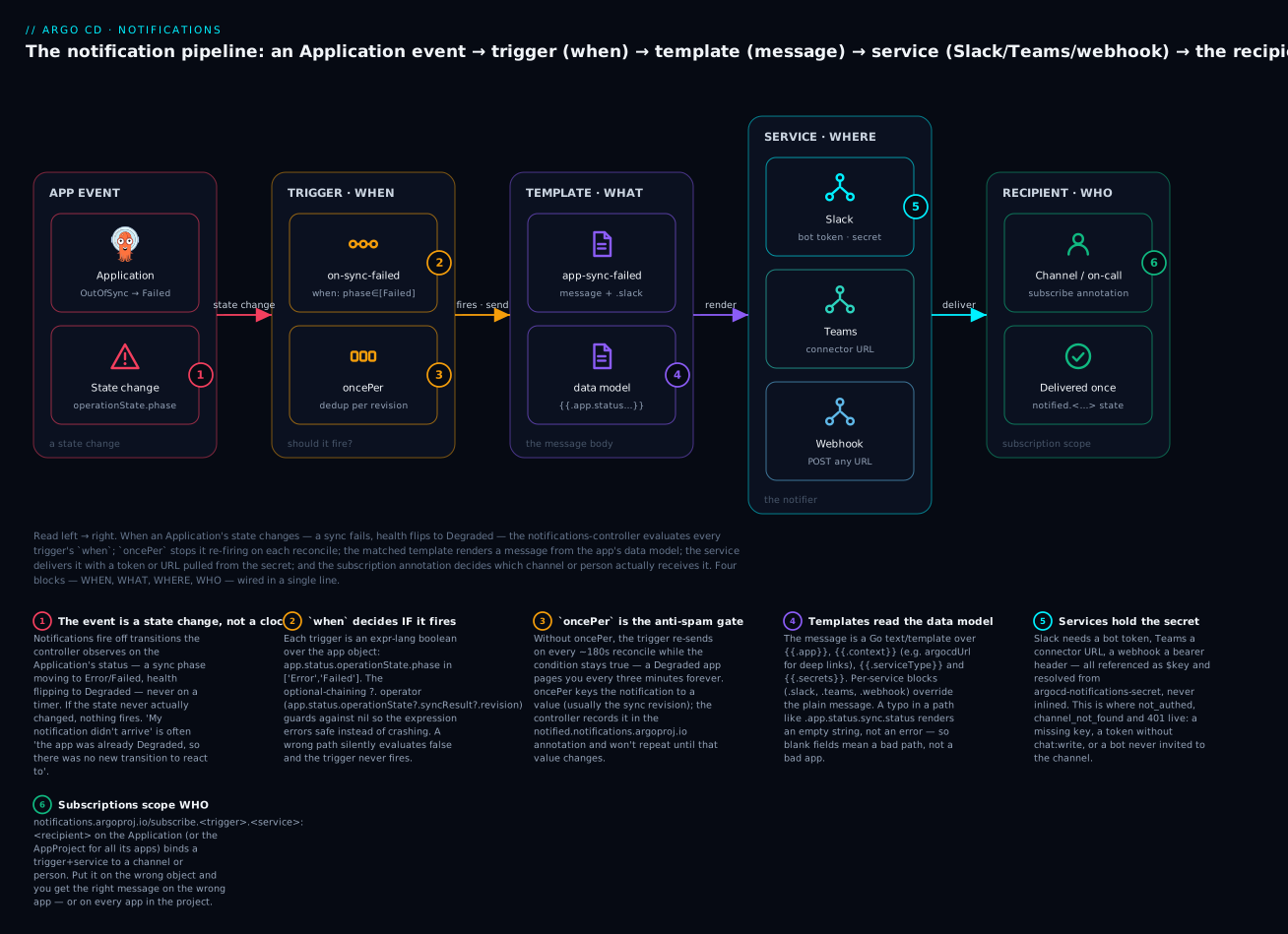
The badges mark the six places this pipeline goes wrong in practice: the event has to be a real transition (1); the when expression has to actually match, nil-safe (2); oncePer has to be present or you spam yourself (3); template paths have to be exact or fields render blank (4); the service has to be authenticated from the secret (5); and the subscription has to be on the right object (6). The rest of this lesson walks the pipeline one block at a time, then assembles the canonical on-sync-failed → Slack alert that runs the length of it.
Triggers — deciding WHEN
A trigger is a named list of conditions. Each condition has a when (a boolean expression), a send (the templates to render), and optionally a oncePer (a de-duplication key). Argo CD ships a catalog of triggers you can enable by name; here are the ones that matter, reproduced with their exact built-in definitions so you can see the real expressions:
| Trigger | when expression (built-in) |
oncePer |
Sends |
|---|---|---|---|
on-sync-failed |
app.status.operationState != nil and app.status.operationState.phase in ['Error', 'Failed'] |
app.status.operationState?.syncResult?.revision |
app-sync-failed |
on-sync-succeeded |
app.status.operationState != nil and app.status.operationState.phase in ['Succeeded'] |
app.status.operationState?.syncResult?.revision |
app-sync-succeeded |
on-health-degraded |
app.status.health.status == 'Degraded' |
app.status.operationState?.syncResult?.revision |
app-health-degraded |
on-sync-running |
app.status.operationState != nil and app.status.operationState.phase in ['Running'] |
app.status.operationState?.syncResult?.revision |
app-sync-running |
on-sync-status-unknown |
app.status.sync.status == 'Unknown' |
app.status.operationState?.syncResult?.revision |
app-sync-status-unknown |
on-deployed |
app.status.operationState.phase in ['Succeeded'] and app.status.health.status == 'Healthy' |
app.status.sync.revision |
app-deployed |
Read three things out of that table. First, several triggers guard with app.status.operationState != nil before touching operationState.phase — because a brand-new app has no operation yet, and dereferencing a nil field would error. Second, the ?. in app.status.operationState?.syncResult?.revision is the optional-chaining operator of the expression language: if any link is nil, the whole thing evaluates to nil instead of crashing. Third, note the semantic difference between on-sync-succeeded (fires when the sync operation succeeded) and on-deployed (fires when the sync succeeded and the app is Healthy, keyed oncePer the sync revision). on-deployed is the “it’s actually live and working” signal; on-sync-succeeded is the “the apply finished” signal. Alert on the wrong one and you’ll page people before the pods are ready.
The when expression is written in expr, a small, safe expression language. You’ll only ever need a handful of its features:
| Construct | Meaning | Example in a when |
|---|---|---|
==, != |
Equality | app.status.sync.status == 'OutOfSync' |
in [...] |
Membership | app.status.operationState.phase in ['Error','Failed'] |
and, or, not |
Boolean logic | ... and app.status.health.status == 'Degraded' |
?. |
Nil-safe field access | app.status.operationState?.syncResult?.revision |
!= nil |
Existence guard | app.status.operationState != nil |
matches |
Regex match | app.metadata.name matches '^prod-' |
oncePer — the anti-spam mechanism
Here is the single most important operational fact about triggers: a when condition stays true for as long as the state is true. An app that is Degraded is Degraded on this reconcile, the next reconcile ~180 seconds later, and every reconcile after that until someone fixes it. Without protection, on-health-degraded would deliver the same alert every three minutes, all night. oncePer is the fix. It computes a value per notification and tells the controller “only send again when this value changes”:
# A custom "degraded" trigger that alerts once per bad revision, not once per reconcile
trigger.on-health-degraded: |
  - when: app.status.health.status == 'Degraded'
    oncePer: app.status.sync.revision
    send: [app-health-degraded]
With oncePer: app.status.sync.revision, the app can sit Degraded for an hour and you get one message. Push a new commit (a fix, or another bad one), the revision changes, and you’re eligible for exactly one more. The controller records the last-sent value in the app’s notified.notifications.argoproj.io annotation; the de-dup is stateful and survives controller restarts because the state lives on the app object, not in the controller’s memory.
oncePer value |
You get one notification per… | Good for |
|---|---|---|
app.status.sync.revision |
Git revision (commit SHA) | Degraded/failed alerts — one per bad deploy |
app.status.operationState?.syncResult?.revision |
Synced revision | Sync-outcome alerts (the catalog default) |
| (omitted) | Every reconcile the condition is true | Almost never what you want for a persistent state |
Omitting oncePer is occasionally correct — for a truly edge-triggered condition that can’t stay true — but treat a missing oncePer on a state trigger (Degraded, OutOfSync) as a bug. It is the number-one cause of “Argo CD spammed our channel 400 times.”
Custom triggers and defaultTriggers
You are not limited to the catalog. A custom trigger is just another trigger.<name> key. This one alerts only for production apps that have drifted out of sync:
trigger.on-prod-outofsync: |
  - when: app.status.sync.status == 'OutOfSync' and app.metadata.labels.env == 'prod'
    oncePer: app.status.sync.revision
    send: [app-sync-status-unknown]
defaultTriggers lets a subscription omit the trigger name and inherit a standard set — handy when you want every subscribed app to get the same baseline without repeating yourself:
defaultTriggers: |
  - on-sync-failed
  - on-health-degraded
Templates — deciding WHAT
A template is the message. It is a Go text/template rendered against a data model — the Application object plus some context. The plain message field is the fallback text every service can use; per-service blocks (slack, teams, email, webhook) override it with channel-specific formatting.
Start with the data model, because every template variable comes from here:
| Variable | What it is | Example path |
|---|---|---|
.app |
The entire Application object (spec + status) |
{{.app.metadata.name}}, {{.app.status.sync.status}} |
.context |
Shared values from the cm’s context key |
{{.context.argocdUrl}} |
.serviceType |
The service currently rendering (slack, teams, email…) |
{{if eq .serviceType "slack"}}…{{end}} |
.recipient |
The recipient string from the subscription | {{.recipient}} |
.secrets |
Values from argocd-notifications-secret |
{{.secrets.myApiKey}} |
.notificationType |
Alias of the service type in some contexts | — |
The .app object is the workhorse, and a few paths do most of the work. Get these exactly right — a typo renders an empty string, never an error:
| Path | Value | Use in a message |
|---|---|---|
.app.metadata.name |
Application name | Subject / title |
.app.spec.source.repoURL |
Git repo URL (single-source apps) | “which repo” |
.app.status.sync.status |
Synced / OutOfSync / Unknown |
Sync state |
.app.status.sync.revision |
Current Git SHA | Which commit |
.app.status.health.status |
Healthy / Degraded / Progressing… |
Health state |
.app.status.operationState.phase |
Running / Succeeded / Failed / Error |
Sync outcome |
.app.status.operationState.message |
The failure message | Why it failed |
.app.spec.destination.server |
Target cluster API URL | Which cluster |
.app.spec.destination.namespace |
Target namespace | Where |
Multi-source gotcha: apps that use
spec.sources(a list) instead ofspec.source(a single object) will render.app.spec.source.repoURLas blank. For multi-source apps, index the list:{{ (index .app.spec.sources 0).repoURL }}.
The template body can call functions — the engine registers the sprig library plus a few notification-specific helpers. The most useful ones:
| Function / helper | Does | Example |
|---|---|---|
.context.argocdUrl |
The Argo CD base URL (from cm context) |
Build deep links |
time (Go time) |
Format/parse timestamps | {{ (call .time.Parse .app.status.operationState.finishedAt) }} |
| sprig string funcs | upper, trunc, default, replace… |
{{ .app.status.sync.revision | trunc 7 }} |
.app.status.operationState.syncResult.resources |
The per-resource sync results | Loop over changed resources |
{{if eq .serviceType "slack"}}…{{end}} |
Branch on the delivering service | Slack emoji vs plain email |
That last one is the pattern the built-in templates use to render one message differently per channel. Here is the shape of the built-in app-sync-failed message — note how it emits a Slack :exclamation: emoji only when Slack is the service, and builds a deep link from .context.argocdUrl:
template.app-sync-failed: |
  message: |
    {{if eq .serviceType "slack"}}:exclamation:{{end}} The sync operation of application {{.app.metadata.name}}
    has failed at {{.app.status.operationState.finishedAt}} with the following error:
    {{.app.status.operationState.message}}
    Sync operation details: {{.context.argocdUrl}}/applications/{{.app.metadata.name}}?operation=true
Here are the per-service blocks a template can carry. You pick the ones for the channels you actually use; a single template can hold all of them at once:
| Template block | Overrides for | Key fields |
|---|---|---|
message |
All services (fallback) | Plain text body |
email |
subject, body |
|
slack |
Slack | attachments (JSON), blocks (JSON), groupingKey, notifyBroadcast, deliveryPolicy |
teams |
Microsoft Teams | title, text, summary, themeColor, facts (JSON), sections (JSON), potentialAction (JSON) |
webhook.<name> |
A named webhook service | method, path, body |
Services and subscriptions — WHERE and WHO
A service (Argo CD calls them notifiers) is a delivery channel. It is defined once in the cm and reads its credentials from the secret. Argo CD ships a broad catalog; you’ll meet most of them here:
| Service key | Delivers to | Credential (in secret) | Subscription recipient is a… |
|---|---|---|---|
service.slack |
Slack (bot token API) | token: $slack-token |
Channel name (platform-alerts) |
service.teams |
Microsoft Teams | recipientUrls: {name: $url} |
Named connector (payments-channel) |
service.webhook.<name> |
Any HTTP endpoint | headers/basicAuth via $… |
The service name (recipient often "") |
service.email |
SMTP email | username/password: $… |
Email address |
service.grafana |
Grafana annotations | apiKey: $grafana-apikey |
A Grafana tag |
service.telegram |
Telegram | token: $telegram-token |
Chat ID |
service.pagerduty |
PagerDuty (Events API) | serviceKeys / token via $… |
A service key name |
service.opsgenie |
Opsgenie alerts | apiKeys via $… |
An Opsgenie recipient |
service.googlechat |
Google Chat | webhooks: {space: $url} |
A space name |
Every service follows the same rule: the secret value is never inlined. You write $slack-token in the cm and Argo CD looks up the key slack-token in argocd-notifications-secret. This is what keeps a plaintext bot token out of your GitOps repo — the cm is safe to commit; the secret is not.
A subscription is the wiring that says “send this trigger, delivered by this service, to this recipient.” There are three ways to declare one, and they compose:
| Form | Where | Scope | Shape |
|---|---|---|---|
| Per-app annotation | On the Application |
That one app | notifications.argoproj.io/subscribe.<trigger>.<service>: <recipient> |
| Per-project annotation | On the AppProject |
Every app in the project | same annotation, on the project |
| Default subscription | subscriptions key in the cm |
Cluster-wide (optionally label-filtered) | a recipients + triggers list |
The annotation form is the one you’ll use most. On an Application:
apiVersion: argoproj.io/v1alpha1
kind: Application
metadata:
  name: checkout
  namespace: argocd
  annotations:
    # subscribe.<trigger>.<service>: <recipient>
    notifications.argoproj.io/subscribe.on-sync-failed.slack: platform-alerts
    notifications.argoproj.io/subscribe.on-health-degraded.slack: platform-alerts
spec:
  # ...
Two recipients for the same trigger+service? Separate them with a semicolon: platform-alerts;payments-oncall. Want every app in a project to alert without annotating each one? Put the same annotation on the AppProject. Want a fleet-wide default with a label filter? Use the cm’s subscriptions key with a selector:
subscriptions: |
  - recipients:
      - slack:platform-alerts
    triggers:
      - on-sync-failed
      - on-health-degraded
  - recipients:
      - slack:payments-oncall
    triggers:
      - on-health-degraded
    selector: team=payments        # only apps labelled team=payments
The subscription’s scope is where “the wrong app got paged” bugs live: an annotation on the AppProject fans out to every app in it, and a cm subscriptions entry without a selector fans out to the whole cluster. When in doubt, subscribe on the individual Application and widen deliberately.
The on-sync-failed alert, end to end (Slack)
This is the single most valuable notification a platform can have, so we’ll build it completely: secret, service, template, trigger, subscription — the full length of the pipeline. Slack first because it’s the most common; Teams and webhook variants follow in the next section.
Step 1 — Create a Slack bot and store its token
In Slack, create an app, add the bot OAuth scopes, install it to the workspace, copy the bot token (xoxb-…), and invite the bot into every channel you’ll notify. That last step is the one everyone forgets, and it produces channel_not_found even when the token is perfect.
| Requirement | Value | Why |
|---|---|---|
| OAuth scope | chat:write |
Minimum scope to post messages |
| OAuth scope (optional) | chat:write.customize |
Needed to override username/icon per message |
| Token type | Bot token xoxb-… |
User tokens work but bots are correct for automation |
| Channel membership | /invite @your-bot in each channel |
A bot can’t post to a channel it isn’t in |
The token goes into the secret — never the cm, never Git in plaintext:
apiVersion: v1
kind: Secret
metadata:
  name: argocd-notifications-secret
  namespace: argocd
  labels:
    app.kubernetes.io/part-of: argocd
type: Opaque
stringData:
  slack-token: xoxb-REPLACE-WITH-YOUR-BOT-TOKEN   # ⚠️ placeholder — never commit a real token
⚠️ In a real GitOps repo you would not commit this file at all. Source the token from your cloud secret store via External Secrets Operator, or seal it — see Managing Secrets: Sealed Secrets, ESO, SOPS & Vault and the per-cloud table later in this lesson.
Step 2 — Define the Slack service and shared context
apiVersion: v1
kind: ConfigMap
metadata:
  name: argocd-notifications-cm
  namespace: argocd
  labels:
    app.kubernetes.io/part-of: argocd
data:
  # WHERE: the Slack notifier reads its token from the secret
  service.slack: |
    token: $slack-token
    username: argocd-bot          # optional; needs chat:write.customize
    icon: ":argo:"                # optional

  # Shared values every template can read — the UI base URL for deep links
  context: |
    argocdUrl: https://argocd.example.com
Step 3 — Write the template (WHAT)
A good failure message answers “which app, which cluster, what state, and take me there.” The plain message covers non-Slack services; the slack.attachments block gives Slack a coloured, structured card:
  template.app-sync-failed: |
    message: |
      {{if eq .serviceType "slack"}}:exclamation:{{end}} Sync FAILED — {{.app.metadata.name}}
      Cluster: {{.app.spec.destination.server}}
      Phase: {{.app.status.operationState.phase}} — {{.app.status.operationState.message}}
      Open: {{.context.argocdUrl}}/applications/{{.app.metadata.name}}?operation=true
    slack:
      attachments: |
        [{
          "title": "{{.app.metadata.name}} — sync failed",
          "title_link": "{{.context.argocdUrl}}/applications/{{.app.metadata.name}}?operation=true",
          "color": "#E96D76",
          "fields": [
            { "title": "Sync Status",  "value": "{{.app.status.sync.status}}",              "short": true },
            { "title": "Phase",        "value": "{{.app.status.operationState.phase}}",      "short": true },
            { "title": "Repository",   "value": "{{.app.spec.source.repoURL}}",              "short": false },
            { "title": "Revision",     "value": "{{.app.status.sync.revision}}",             "short": true }
          ]
        }]
Step 4 — Confirm the trigger (WHEN)
The catalog on-sync-failed already does what we want, but declaring it explicitly documents intent and lets you tune oncePer:
  trigger.on-sync-failed: |
    - when: app.status.operationState != nil and app.status.operationState.phase in ['Error', 'Failed']
      oncePer: app.status.operationState.syncResult.revision
      send: [app-sync-failed]
Step 5 — Subscribe an Application (WHO)
apiVersion: argoproj.io/v1alpha1
kind: Application
metadata:
  name: checkout
  namespace: argocd
  annotations:
    notifications.argoproj.io/subscribe.on-sync-failed.slack: platform-alerts
spec:
  project: default
  source:
    repoURL: https://github.com/acme/app-config.git
    targetRevision: main
    path: apps/checkout
  destination:
    server: https://kubernetes.default.svc
    namespace: checkout
  syncPolicy:
    automated:
      prune: true
      selfHeal: true
That’s the whole pipeline. Apply the cm, secret, and app, and the moment checkout’s sync operation enters Failed, the controller renders app-sync-failed and posts it to #platform-alerts — once per failed revision. Because the notification tells you the automated sync failed, it pairs directly with Sync Policies: Automated, Self-Heal & Prune: auto-sync is safe to leave on precisely because its failures are no longer silent.
Step 6 — Test it without waiting for a real failure
You don’t have to break an app to prove the wiring. The argocd admin notifications CLI renders and delivers a template against a real app’s current state:
# Render app-sync-failed for the 'checkout' app and deliver to Slack channel platform-alerts.
# This uses the live cm + secret in the argocd namespace.
argocd admin notifications template notify app-sync-failed checkout \
  --recipient slack:platform-alerts
Representative result — the command exits 0 and a card lands in Slack. A rendered payload looks like this (labelled representative; formatting is what Slack shows):
[ representative Slack message ]
❗ checkout — sync failed
Sync Status: OutOfSync   Phase: Failed
Repository: https://github.com/acme/app-config.git
Revision: 4f2a9c1
→ title links to https://argocd.example.com/applications/checkout?operation=true
You can also ask whether a trigger would fire against an app right now:
# Evaluate the on-sync-failed trigger against checkout's current state.
argocd admin notifications trigger run on-sync-failed checkout
[ representative output ]
NAME             CONDITION                                                              TRIGGERED
on-sync-failed   app.status.operationState != nil and ...phase in ['Error','Failed']   false
false here is correct — a Synced/Healthy app should not fire the failure trigger. Break something (a bad image tag) and the same command returns true. This is how you develop triggers and templates without a cluster full of deliberately broken apps.
Microsoft Teams and generic webhooks
Slack is one delivery path. The same trigger and template feed Teams and any HTTP endpoint just by adding a service and a per-service template block.
Microsoft Teams
Teams historically receives Argo CD notifications through an Incoming Webhook connector — a per-channel URL that accepts an Office 365 MessageCard. You store the URL in the secret and map it to a name in service.teams:
  service.teams: |
    recipientUrls:
      payments-channel: $teams-payments-url
# in argocd-notifications-secret
stringData:
  teams-payments-url: https://REPLACE.webhook.office.com/webhookb2/xxxx-xxxx  # ⚠️ placeholder
Add a teams block to the template. Teams cards are built from facts (labelled key/values), a themeColor, and potentialAction buttons:
  template.app-sync-failed: |
    teams:
      themeColor: "#E96D76"
      title: "Sync FAILED — {{.app.metadata.name}}"
      text: "The sync of {{.app.metadata.name}} failed at {{.app.status.operationState.finishedAt}}."
      summary: "Argo CD sync failed for {{.app.metadata.name}}"
      facts: |
        [
          { "name": "Sync Status", "value": "{{.app.status.sync.status}}" },
          { "name": "Phase",       "value": "{{.app.status.operationState.phase}}" },
          { "name": "Repository",  "value": "{{.app.spec.source.repoURL}}" }
        ]
      potentialAction: |
        [{
          "@type": "OpenUri",
          "name": "Open in Argo CD",
          "targets": [
            { "os": "default", "uri": "{{.context.argocdUrl}}/applications/{{.app.metadata.name}}" }
          ]
        }]
Subscribe to the named connector, not to a raw URL:
notifications.argoproj.io/subscribe.on-sync-failed.teams: payments-channel
⚠️ Currency — the connector is being retired. Microsoft is deprecating Office 365 Incoming Webhook connectors; they stop working on 31 March 2026. The forward path is Teams Workflows (Power Automate), which issues a new webhook URL that accepts an Adaptive Card. Operationally, most teams keep using the
service.teamsconnector config with a Workflows-issued URL, or switch to the generic webhook service (below) posting an Adaptive Card payload. Check Microsoft’s current guidance before standing up a new Teams integration, and don’t build anything new on a bare Office 365 connector.
Generic webhook — wire into anything
The generic webhook is the escape hatch: it POSTs (or any method) to a URL you control, with headers and a body you define. Use it for an internal change-management system, a CMDB, a Lambda/Cloud Function, an incident tool without a first-class notifier — anything that speaks HTTP.
Define the service once. Auth travels in a header sourced from the secret; the retry knobs bound how hard it tries:
  service.webhook.internal-cmdb: |
    url: https://cmdb.internal.example.com/api/deployments
    headers:
      - name: Content-Type
        value: application/json
      - name: Authorization
        value: Bearer $cmdb-webhook-token     # resolved from the secret
    insecureSkipVerify: false                  # true only for internal self-signed TLS
    retryWaitMin: 1s
    retryWaitMax: 5s
    retryMax: 3
The template supplies the request shape under a webhook.<name> block — method, an optional path appended to the service url, and a body:
  template.app-sync-failed: |
    webhook:
      internal-cmdb:
        method: POST
        body: |
          {
            "event": "argocd.sync.failed",
            "app": "{{.app.metadata.name}}",
            "cluster": "{{.app.spec.destination.server}}",
            "namespace": "{{.app.spec.destination.namespace}}",
            "syncStatus": "{{.app.status.sync.status}}",
            "phase": "{{.app.status.operationState.phase}}",
            "revision": "{{.app.status.sync.revision}}",
            "message": {{ .app.status.operationState.message | toRawJson }}
          }
Note {{ .app.status.operationState.message | toRawJson }} — piping a free-text field through toRawJson (a sprig function) safely quotes and escapes it so a stray " in the error message can’t produce invalid JSON. That one habit prevents a whole class of “the webhook returned 400” failures.
The webhook subscription names the service; the recipient is usually empty because the URL is fixed in the service config:
notifications.argoproj.io/subscribe.on-sync-failed.internal-cmdb: ""
| Field | Where | Purpose |
|---|---|---|
url |
service.webhook.<name> |
Base endpoint |
headers[] |
service.webhook.<name> |
Auth + content type; values may be $secret-key |
basicAuth |
service.webhook.<name> |
username/password if the endpoint uses basic auth |
insecureSkipVerify |
service.webhook.<name> |
Skip TLS verify (internal self-signed only) |
retryWaitMin/Max, retryMax |
service.webhook.<name> |
Backoff + attempt cap |
method |
template … webhook.<name> |
POST/PUT/PATCH… |
path |
template … webhook.<name> |
Appended to url (templated) |
body |
template … webhook.<name> |
The request body (templated JSON) |
Where the token lives: the notifications secret across AKS, EKS, GKE
Notifications themselves are cloud-neutral — the controller, triggers, templates, and subscriptions are identical whether you run on AKS, EKS, or GKE. The one genuine cloud edge is where the Slack token, Teams URL, and webhook credentials come from. Committing argocd-notifications-secret to Git in plaintext is a rotation and leak liability; the right pattern is to keep the secret’s values in your cloud secret store and project them into the Kubernetes secret with External Secrets Operator (ESO) (or seal them). The mechanics differ per cloud:
| AKS | EKS | GKE | |
|---|---|---|---|
| Secret store | Azure Key Vault | AWS Secrets Manager | Google Secret Manager |
| Workload identity | Microsoft Entra Workload Identity (federated) | IAM Roles for Service Accounts (IRSA) or EKS Pod Identity | Workload Identity Federation |
ESO SecretStore provider |
azurekv |
aws (secretsManager) |
gcpsm |
| What it writes | argocd-notifications-secret |
argocd-notifications-secret |
argocd-notifications-secret |
| Alternative | Key Vault CSI driver | Secrets Manager CSI / Sealed Secrets | Secret Manager CSI / Sealed Secrets |
The ESO object is the same shape everywhere; only the secretStoreRef and the remote keys change. This ExternalSecret assembles the Argo CD notifications secret from three entries in your cloud store:
apiVersion: external-secrets.io/v1
kind: ExternalSecret
metadata:
  name: argocd-notifications-secret
  namespace: argocd
spec:
  refreshInterval: 1h
  secretStoreRef:
    name: cloud-secret-store        # points at azurekv / aws / gcpsm
    kind: SecretStore
  target:
    name: argocd-notifications-secret   # the exact name the controller reads
    creationPolicy: Owner
    template:
      metadata:
        labels:
          app.kubernetes.io/part-of: argocd
  data:
    - secretKey: slack-token
      remoteRef:
        key: argocd/slack-bot-token
    - secretKey: teams-payments-url
      remoteRef:
        key: argocd/teams-payments-url
    - secretKey: cmdb-webhook-token
      remoteRef:
        key: argocd/cmdb-webhook-token
The payoff: rotating a leaked Slack token is a change in Key Vault / Secrets Manager / Secret Manager, and ESO re-projects it within refreshInterval — no Git commit, no plaintext token anywhere in your repo. The deeper treatment of all four secret strategies (ESO, Sealed Secrets, SOPS, Vault) lives in Managing Secrets: Sealed Secrets, ESO, SOPS & Vault.
Hands-on lab
This lab wires on-sync-failed → Slack end to end at the config level and tests it with argocd admin notifications — no live failure required. You need kubectl context on a cluster running Argo CD 2.13+/3.x (a free local kind/minikube install is fine) and a Slack bot token. Every credential below is a placeholder.
⚠️ Never commit a real token. The secret in Step 2 is applied directly with
kubectl, not stored in Git. In production, use the ESO pattern above.
Step 1 — Confirm the controller is running.
kubectl -n argocd get deploy argocd-notifications-controller
[ representative output ]
NAME                             READY   UP-TO-DATE   AVAILABLE   AGE
argocd-notifications-controller  1/1     1            1           42d
What just happened: the notifications controller ships with Argo CD; if it’s 1/1 you have nothing to install.
Step 2 — Load the Slack token into the secret.
kubectl -n argocd patch secret argocd-notifications-secret \
  --type merge \
  -p '{"stringData":{"slack-token":"xoxb-REPLACE-WITH-YOUR-BOT-TOKEN"}}'
What just happened: you added the slack-token key the cm will reference as $slack-token. patch --type merge leaves any existing keys intact.
Step 3 — Configure the service, context, template, and trigger. Save as notifications-cm.yaml and apply:
apiVersion: v1
kind: ConfigMap
metadata:
  name: argocd-notifications-cm
  namespace: argocd
  labels:
    app.kubernetes.io/part-of: argocd
data:
  service.slack: |
    token: $slack-token
  context: |
    argocdUrl: https://argocd.example.com
  template.app-sync-failed: |
    message: |
      {{if eq .serviceType "slack"}}:exclamation:{{end}} Sync FAILED — {{.app.metadata.name}} ({{.app.status.operationState.phase}})
      {{.context.argocdUrl}}/applications/{{.app.metadata.name}}?operation=true
    slack:
      attachments: |
        [{
          "title": "{{.app.metadata.name}} — sync failed",
          "title_link": "{{.context.argocdUrl}}/applications/{{.app.metadata.name}}?operation=true",
          "color": "#E96D76",
          "fields": [
            { "title": "Sync Status", "value": "{{.app.status.sync.status}}", "short": true },
            { "title": "Revision",    "value": "{{.app.status.sync.revision}}", "short": true }
          ]
        }]
  trigger.on-sync-failed: |
    - when: app.status.operationState != nil and app.status.operationState.phase in ['Error', 'Failed']
      oncePer: app.status.operationState.syncResult.revision
      send: [app-sync-failed]
kubectl apply -f notifications-cm.yaml
What just happened: one apply installed WHERE (service.slack), WHAT (template.app-sync-failed), and WHEN (trigger.on-sync-failed), plus the shared argocdUrl for deep links.
Step 4 — Subscribe an app (WHO).
kubectl -n argocd annotate application checkout \
  notifications.argoproj.io/subscribe.on-sync-failed.slack=platform-alerts --overwrite
What just happened: you bound the on-sync-failed trigger, delivered by Slack, to #platform-alerts for the checkout app only.
Step 5 — Validate the config parses, from files, with no cluster calls.
kubectl -n argocd get cm argocd-notifications-cm -o yaml > cm.yaml
argocd admin notifications trigger get \
  --config-map ./cm.yaml --secret :empty
[ representative output ]
NAME             ENABLED
on-sync-failed   true
What just happened: --secret :empty tells the CLI to parse without needing real credentials, so you can lint triggers/templates in CI before they ever hit a cluster.
Step 6 — Test-fire the notification against the live app.
argocd admin notifications template notify app-sync-failed checkout \
  --recipient slack:platform-alerts
What just happened: the CLI rendered app-sync-failed from checkout’s current state and delivered it to Slack. A card in #platform-alerts proves all four blocks are wired. If it errors, jump to troubleshooting — the error names which block failed (not_authed = service/secret; empty fields = template path; channel_not_found = bot not in channel).
Step 7 — Watch the controller do it for real (optional). Change checkout to an image tag that will never pull, commit, let it sync and fail, and tail the controller:
kubectl -n argocd logs deploy/argocd-notifications-controller --tail=20
[ representative output ]
level=info msg="Trigger on-sync-failed result: [{[app-sync-failed] true}]" app=argocd/checkout
level=info msg="Notification about condition 'on-sync-failed.[0]' was sent" app=argocd/checkout recipient=slack:platform-alerts
What just happened: the controller observed the Failed transition, evaluated the trigger to true, and sent exactly one message. Fix the tag and it will not re-notify for that same failed revision — oncePer at work.
Teardown.
# Remove the subscription
kubectl -n argocd annotate application checkout \
  notifications.argoproj.io/subscribe.on-sync-failed.slack-

# Blank the token (or delete/rotate it in Slack)
kubectl -n argocd patch secret argocd-notifications-secret \
  --type merge -p '{"stringData":{"slack-token":""}}'

# Optionally reset the cm to its shipped (empty) state
kubectl -n argocd get cm argocd-notifications-cm -o yaml   # inspect before editing
Leaving the cm in place is harmless (no subscriptions means no traffic), but always revoke or rotate the Slack token if it was a real one.
Common mistakes and troubleshooting
Every notification bug is a break in one of the four blocks. This table is organised by symptom; the “block” column tells you where to look first.
| Symptom | Block | Cause | Fix |
|---|---|---|---|
| No notification ever fires | Trigger / Subscription | when never matches, or no subscription on the app |
argocd admin notifications trigger run <trigger> <app> — if false, the state didn’t match; confirm the subscribe.<trigger>.<service> annotation exists |
| Channel spammed every ~3 minutes | Trigger | Missing oncePer on a persistent-state trigger |
Add oncePer: app.status.sync.revision so it fires once per revision, not per reconcile |
Slack not_authed / invalid_auth |
Service | Bad/missing slack-token, or $slack-token key mismatch |
Verify the secret key name equals the $ref; re-issue the bot token with chat:write |
Slack channel_not_found |
Service | Bot not invited to the channel, or wrong channel name | /invite @your-bot into the channel; use the channel name without # |
Teams webhook returns 400 |
Service / Template | Malformed card JSON, or a retired Office 365 connector URL | Validate facts/potentialAction JSON; move to a Teams Workflows URL (connectors retire 31 Mar 2026) |
| A template field is blank | Template | Wrong .app.status... path, or multi-source app |
Paths render empty on typo — check against a real app’s YAML; for multi-source use (index .app.spec.sources 0).repoURL |
Generic webhook 401/403 |
Service | Auth header not sent or secret ref unresolved | Confirm the Authorization header value is Bearer $key and key exists in the secret |
| Right message, wrong/too many apps | Subscription | Annotation on the AppProject or a selector-less cm subscription |
Move the subscription to the specific Application, or add a selector |
| Config change ignored | Controller | Controller hasn’t reloaded, or bad YAML in the cm | kubectl -n argocd logs deploy/argocd-notifications-controller for parse errors; rollout restart the controller |
Webhook 400 on valid endpoint |
Template | Unescaped free text broke the JSON body | Pipe text fields through ` |
| Rate-limited / dropped messages | Service | Too many messages to one Slack channel/Teams connector | Add oncePer, use groupingKey to thread, or fan out to more channels |
Three of these deserve extra words, because they burn the most hours:
1. “It never fires” is almost always the trigger or the subscription, never the template. People rewrite the template message when the real problem is that when evaluated false (the app was Progressing, not Failed, when they looked) or the subscription annotation has a typo (subscribe.on-sync-fail.slack instead of on-sync-failed). Debug in order: run argocd admin notifications trigger run <trigger> <app> to prove the condition; then kubectl get app <app> -o yaml | grep subscribe to prove the subscription. Only touch the template once you’ve seen the trigger return true and the subscription is correct.
2. Spam is a oncePer bug, and it’s a state-vs-event confusion. A trigger’s when describes a state (Degraded), and states persist. The controller re-evaluates every reconcile (~180s by default), so a persistent bad state without oncePer re-sends forever. The mental correction: you don’t want a message while the app is degraded; you want a message when it becomes degraded. oncePer: app.status.sync.revision encodes exactly that — one alert per bad revision. If you genuinely want a reminder every N minutes, that’s a Prometheus for: alert on the metric, not a notification.
3. Secret references are string-exact and silent on failure. $slack-token in the cm resolves to the key slack-token in argocd-notifications-secret. If the secret key is slackToken, slack_token, or lives in the wrong secret, the reference resolves to empty and the service fails to authenticate with a generic error — the controller does not tell you “key not found.” When any service returns an auth error, verify the exact key name in the secret first: kubectl -n argocd get secret argocd-notifications-secret -o jsonpath='{.data}' | tr ',' '\n'.
Cheat-sheet
Everything you reach for, in one place.
The four blocks → the ConfigMap/annotation keys
| Block | Key | Minimal example |
|---|---|---|
| WHEN (trigger) | trigger.<name> |
when: ... \n send: [tmpl] \n oncePer: app.status.sync.revision |
| WHAT (template) | template.<name> |
message: | ... (+ slack:/teams:/webhook.<n>:) |
| WHERE (service) | service.<type>[.<name>] |
service.slack: | token: $slack-token |
| WHO (subscription) | annotation | notifications.argoproj.io/subscribe.<trigger>.<service>: <recipient> |
Built-in triggers
| Trigger | Fires when |
|---|---|
on-sync-failed |
Sync operation phase is Error/Failed |
on-sync-succeeded |
Sync operation phase is Succeeded |
on-deployed |
Synced and Healthy (once per revision) |
on-health-degraded |
Health is Degraded |
on-sync-running |
Sync operation is Running |
on-sync-status-unknown |
Sync status is Unknown |
Most-used template variables
| Variable | Value |
|---|---|
{{.app.metadata.name}} |
App name |
{{.app.status.sync.status}} |
Synced/OutOfSync/Unknown |
{{.app.status.health.status}} |
Healthy/Degraded/Progressing |
{{.app.status.operationState.phase}} |
Succeeded/Failed/Error/Running |
{{.app.status.operationState.message}} |
Failure detail |
{{.app.status.sync.revision}} |
Git SHA |
{{.app.spec.destination.server}} |
Target cluster |
{{.context.argocdUrl}} |
UI base URL (for deep links) |
{{.serviceType}} |
The delivering service (branch per channel) |
Service configs (in the cm; secrets via $key)
| Service | Minimal config |
|---|---|
| Slack | service.slack: | token: $slack-token |
| Teams | service.teams: | recipientUrls: {chan: $teams-url} |
| Webhook | service.webhook.x: | url: https://... \n headers: [...] |
service.email: | host: ... \n port: 465 \n username: $u \n password: $p |
CLI (argocd admin notifications)
| Command | Does |
|---|---|
template notify <tmpl> <app> --recipient <svc>:<r> |
Render + deliver a template for an app |
trigger run <trigger> <app> |
Evaluate a trigger’s when against an app |
trigger get --config-map ./cm.yaml --secret :empty |
List/lint triggers from files (no cluster) |
template get |
Show configured templates |
kubectl -n argocd logs deploy/argocd-notifications-controller |
See what actually fired |
Subscription forms
| Goal | Do |
|---|---|
| One app | Annotate the Application |
| All apps in a project | Annotate the AppProject |
| Fleet-wide (filtered) | cm subscriptions: with a selector |
| Two recipients | chan-a;chan-b in the annotation value |
Interview and exam questions
Q: What are the four building blocks of an Argo CD notification, and what does each decide?
A: Triggers (WHEN — a when condition on the app’s state), templates (WHAT — the message body and per-service formatting), services/notifiers (WHERE — Slack, Teams, webhook, email…), and subscriptions (WHO — which recipient gets which trigger on which app, via a subscribe.<trigger>.<service> annotation or a cm subscriptions entry). Debugging a broken notification means identifying which of the four is wrong.
Q: Do you install argocd-notifications separately in current Argo CD?
A: No. It was a standalone argoproj-labs project but was merged into Argo CD in 2.3. On 2.13+/3.x it’s the built-in argocd-notifications-controller Deployment; you configure it through the existing argocd-notifications-cm ConfigMap and argocd-notifications-secret.
Q: Your Slack channel got 400 identical “degraded” messages overnight. What happened and how do you fix it?
A: The on-health-degraded trigger has no oncePer, so it re-sent on every ~180-second reconcile while the app stayed Degraded. States persist; the controller re-evaluates each cycle. Add oncePer: app.status.sync.revision so it fires once per revision. The conceptual fix is realising you want an edge (became degraded), not a level (is degraded) — levels belong to Prometheus for: alerts, not notifications.
Q: What’s the difference between on-sync-succeeded and on-deployed?
A: on-sync-succeeded fires when the sync operation finished (phase == Succeeded). on-deployed additionally requires the app to be Healthy and is keyed oncePer the sync revision — it’s the “actually live and passing health checks” signal. Alerting on on-sync-succeeded can page people before pods are ready; on-deployed waits for health.
Q: A template field renders as an empty string. Why, and how do you find the bug?
A: A wrong path in a Go template renders empty rather than erroring — e.g. .app.spec.source.repoURL on a multi-source app (which uses spec.sources, a list), or a simple typo. Compare the path against a real kubectl get app <name> -o yaml, and for multi-source use (index .app.spec.sources 0).repoURL. Test with argocd admin notifications template notify before shipping.
Q: How does a secret get referenced by a service, and what’s the classic failure?
A: The cm uses $key (e.g. token: $slack-token) and the controller resolves key from argocd-notifications-secret. The classic failure is a name mismatch — the secret key is slackToken but the cm says $slack-token — which resolves to empty and yields a generic auth error with no “key not found” hint. Verify the exact key name in the secret first.
Q: How do you test a notification without breaking an application?
A: argocd admin notifications template notify <template> <app> --recipient <service>:<recipient> renders the template against the app’s live state and delivers it; argocd admin notifications trigger run <trigger> <app> reports whether the when matches right now. You can also lint from files with --config-map ./cm.yaml --secret :empty, which is CI-friendly.
Q: You need to alert on production apps only. Two ways to scope that?
A: (1) A custom trigger whose when includes a label check: ... and app.metadata.labels.env == 'prod'. (2) A cm subscriptions entry with a selector: env=prod, or per-app annotations only on prod apps. Scoping at the subscription keeps triggers generic; scoping in the trigger keeps the condition self-documenting.
Q: What is .serviceType used for in a template?
A: It names the service currently rendering the message, so one template can format per channel — e.g. {{if eq .serviceType "slack"}}:exclamation:{{end}} emits a Slack emoji but nothing for email. It’s how the built-in templates keep a single body that renders sensibly on Slack, Teams, and email.
Q: Why prefer a bot token over an incoming webhook for Slack, and what scope does it need?
A: A bot token (xoxb-…) with chat:write posts through the Slack API, supports multiple channels from one config, and gives structured attachments/blocks; a webhook is bound to a single channel. The catch is the bot must be invited to each channel or you get channel_not_found. chat:write.customize is needed only to override username/icon.
Q: A Teams integration you built last year suddenly returns 400. Most likely cause in 2026? A: The Office 365 Incoming Webhook connector it used has been retired (connectors stop working 31 March 2026). Move to a Teams Workflows (Power Automate) URL that accepts an Adaptive Card, or post an Adaptive Card via the generic webhook service. It’s an infrastructure deprecation, not a template bug.
Q: Where would you store the Slack token in a real GitOps setup, and why not in Git?
A: In the cloud secret store — Azure Key Vault (AKS), AWS Secrets Manager (EKS), or Google Secret Manager (GKE) — projected into argocd-notifications-secret by External Secrets Operator (or sealed with Sealed Secrets). Plaintext in Git can’t be rotated without a commit and leaks permanently in history; ESO makes rotation a change in the store with no repo change.
Key takeaways
- Notifications turn silent reconcile results into events your team actually sees. They complement metrics (continuous signals) by carrying rich, per-object context for discrete transitions like
FailedandDegraded. - Four blocks, four question words: triggers (WHEN), templates (WHAT), services (WHERE), subscriptions (WHO). Every bug is a break in one of them — diagnose by asking which.
- It’s built in. On Argo CD 2.13+/3.x the
argocd-notifications-controlleralready runs; you configureargocd-notifications-cmandargocd-notifications-secret, you don’t install a separate project. oncePeris not optional on state triggers. Awhenover a persistent state (Degraded,OutOfSync) withoutoncePerspams every reconcile; key it toapp.status.sync.revisionfor one alert per revision.- Secrets are referenced, never inlined.
$slack-tokenresolves fromargocd-notifications-secret; keep the cm in Git and source the secret from your cloud store via ESO or seal it. The only real cloud edge here is where the token lives — Key Vault, Secrets Manager, or Secret Manager. - Slack needs a bot invited to the channel; Teams connectors are being retired (31 Mar 2026 → Workflows); the generic webhook wires Argo CD into anything that speaks HTTP, with
| toRawJsonto keep free text from breaking the body. - Test without breaking anything:
argocd admin notifications template notifyandtrigger runrender and evaluate against a live app, and--secret :emptylets you lint the config from files in CI.