In a nutshell
Think of API Gateway as the receptionist and security desk for your backend. Every visitor — an HTTP or WebSocket request — walks up to one front door. The receptionist checks their ID (authorization), makes sure nobody storms in faster than the building allows (throttling), optionally rewrites their paperwork into the format the back office expects (mapping), walks the request to the right department (integration — a Lambda function, an HTTP service, another AWS service, or a private server inside your VPC), and hands the reply back out front. You never hire, house, or patch the receptionist; AWS runs the desk and it scales from zero to millions of visitors on its own.
The one idea that unlocks everything else: there are three different front doors wearing the same uniform. A REST API is the deluxe desk with every feature — and the highest price. An HTTP API is the fast, cheap express lane for the common case: take a request, proxy it to Lambda, done. A WebSocket API keeps the door propped open so the building can call you back — chat, live dashboards, notifications. Almost every “API Gateway is confusing” moment is really just not knowing which of the three you are standing at.
If you are brand new, hold onto three sentences and the rest is detail hung on them. Nothing you configure is live until you deploy it to a stage — a named copy of the API such as dev or prod. An API key is a name tag, not a lock — it meters and rate-limits a caller, it does not prove who they are. And a proxy integration means your code owns the whole request and the whole response shape — get that shape wrong and the caller sees a 502. Everything below hangs off those three hooks.
Level: Intermediate · Time: ~50 min · Prerequisites: an AWS account, AWS CLI v2, and a working grasp of IAM (see the AWS Lambda deep dive — Lambda is the most common backend). After this you can pick the right API type on sight, wire any integration, secure a route with the correct authorizer, and reason about throttling, caching, cost, private access, and the deploy-to-stage lifecycle like an operator.
Amazon API Gateway is the front door for your APIs on AWS. It is a fully managed service that takes an HTTP (or WebSocket) request from the internet, authenticates and authorises it, throttles it, optionally transforms it, routes it to a backend — a Lambda function, an HTTP service, another AWS service, a private VPC resource — and shapes the response on the way back out. You never run a server, patch a reverse proxy, or wire up your own rate limiter; you describe routes and integrations, and API Gateway handles the undifferentiated heavy lifting of being an API front end at scale.
That convenience hides a service with real depth, and most of the confusion engineers carry about API Gateway comes from not knowing which of its three distinct API types they are using. There is the original REST API (the most feature-complete and the most expensive), the newer HTTP API (cheaper, faster, deliberately simpler), and the WebSocket API (for stateful, bidirectional, real-time connections). They share a name and a console but differ in their feature sets, their pricing, their authorizers, and even the request shape your backend sees. Pick the wrong one and you will either pay for features you do not use or discover, mid-project, that the type you chose cannot do request validation or AWS-service integrations.
This lesson is the exhaustive version. We will fix the core concepts, then compare the three API types in a single table you can return to, then walk every integration type, then stages, deployments, stage variables, and canary releases, then all four authorizer types, then request/response mapping and validation, throttling and usage plans and API keys, caching, CORS, custom domains, and finally logging and metrics. By the end you will be able to design and operate a production API on AWS and answer the questions every certification exam and interviewer asks about it.
Learning objectives
By the end of this lesson you will be able to:
- Choose correctly between REST, HTTP, and WebSocket APIs from their feature, performance, and cost trade-offs.
- Wire up every integration type — Lambda proxy vs non-proxy, HTTP, AWS service, mock, and VPC Link / PrivateLink to private backends.
- Manage stages and deployments, parameterise them with stage variables, and ship safely with canary releases.
- Secure an API with the right authorizer: IAM (SigV4), Cognito user pools, a Lambda (custom) authorizer, or a native JWT authorizer (HTTP APIs).
- Transform requests and responses with mapping templates, and reject bad input early with request validation.
- Protect a backend with throttling, usage plans, and API keys, and add caching to cut latency and cost.
- Configure CORS correctly, attach a custom domain with an ACM certificate, and turn on access logs, execution logs, metrics, and X-Ray tracing.
Prerequisites & where this fits
You need an AWS account, the AWS CLI v2 configured (aws configure), and a working grasp of IAM — every authorizer, every AWS-service integration, and the SigV4 auth option are gated by IAM. It helps to have read the companion AWS Lambda deep dive, because Lambda is the most common API Gateway backend and the Lambda proxy integration is the default starting point for most serverless APIs. This is a Serverless lesson in the AWS Zero-to-Hero course, sitting between the Lambda deep dive (the compute behind your routes) and the upcoming containers lessons (aws-ecs-ecr-fundamentals-task-definitions-services-fargate), since API Gateway also fronts containerised backends through an HTTP integration or a private VPC Link.
Core concepts: the request lifecycle and key terms
Before the settings, fix the mental model. A request arriving at API Gateway flows through a pipeline, and naming the stages makes everything else click into place.
- Method request — the inbound request as the client sent it: HTTP method, path, headers, query string, body. This is where authorization, request validation, and API-key checks happen first.
- Integration request — API Gateway maps the method request to whatever the backend expects. For a proxy integration this is a pass-through; for a non-proxy integration you transform it with a mapping template.
- The integration (backend) — Lambda, an HTTP endpoint, an AWS service action, a mock, or a private resource reached over VPC Link.
- Integration response — the backend’s raw response, optionally transformed and its status code remapped.
- Method response — what the client finally receives.
A handful of terms recur throughout and are worth defining once, properly.
- Resource — a path in your API’s URL tree (e.g.
/orders,/orders/{orderId}). Resources nest to form the path hierarchy. - Method — an HTTP verb (
GET,POST,ANY, …) on a resource. A resource + method pair is the unit you configure: it has a method request, an integration, and a method response. - Route (HTTP and WebSocket APIs) — the newer term for a method+path combination, written like
GET /ordersor, for WebSockets, a route key such as$connect,$disconnect,$default, or a customsendMessage. - Integration — the binding from a method/route to a backend, with its type and settings.
- Stage — a named, deployed snapshot of your API (e.g.
dev,prod) with its own URL, settings, throttling, caching, logging, and stage variables. Nothing your API does is live until it is deployed to a stage. - Deployment — an immutable snapshot of the API’s configuration that you push to a stage. Editing the API does not change a stage until you redeploy.
- Endpoint type — where the API is reachable: Regional (the modern default), Edge-optimized (fronted by CloudFront for global clients — REST only), or Private (reachable only from inside a VPC via an interface endpoint — REST only).
The single most common beginner surprise is the deploy gap: you change a method, test it, and nothing happens — because edits live in the API definition but only become live when deployed to a stage. HTTP APIs soften this with auto-deploy on the $default stage; REST APIs always require an explicit deployment.
The three API types: REST vs HTTP vs WebSocket
This is the decision that shapes everything else, so make it first and make it deliberately.
- REST API — the original, most feature-complete type. It has request/response mapping templates, request validation, API keys and usage plans, caching, edge-optimized and private endpoints, AWS WAF integration, mock integrations, and the widest authorizer set. It is also the most expensive and slightly higher latency.
- HTTP API — a newer, leaner type built for lower cost (~70% cheaper) and lower latency. It is optimised for the common case — proxying to Lambda or an HTTP backend with JWT/OIDC or IAM auth, built-in CORS, and automatic deployments. It deliberately omits the heavyweight features (mapping templates, request validation, caching, API-key usage plans, AWS service integrations).
- WebSocket API — for stateful, bidirectional, real-time communication (chat, live dashboards, multiplayer, notifications). The client opens a persistent connection; the server can push messages to connected clients via a callback URL. Routing is by route key selected from the message body.
Use this table as your reference.
| Capability | REST API | HTTP API | WebSocket API |
|---|---|---|---|
| Primary use | Full-featured request/response APIs | Lean, low-latency proxy APIs | Real-time bidirectional connections |
| Relative cost | Highest | ~70% cheaper than REST | Per-message + connection-minutes |
| Latency | Slightly higher | Lowest | Persistent connection |
| Integrations | Lambda (proxy/non-proxy), HTTP, AWS service, mock, VPC Link (NLB) | Lambda (proxy), HTTP proxy, private (ALB/NLB/Cloud Map) | Lambda, HTTP, AWS service, mock |
| Authorizers | IAM, Cognito, Lambda (request/token), API keys | IAM, JWT/OIDC, Lambda | IAM, Lambda (on $connect) |
| Mapping templates (VTL) | Yes | No (parameter mapping only) | Yes |
| Request validation | Yes | No | No |
| Caching | Yes | No | No |
| API keys + usage plans | Yes | No (throttling only) | No |
| Endpoint types | Regional, Edge-optimized, Private | Regional only | Regional only |
| AWS WAF | Yes | No (use CloudFront/ALB in front) | No |
| Private integration transport | VPC Link to NLB | VPC Link to ALB/NLB/Cloud Map | — |
| Auto-deploy | No (explicit deployments) | Yes ($default stage) |
No |
| OpenAPI import/export | Yes | Yes | No |
The practical rule of thumb: default to HTTP API for a new serverless app proxying to Lambda — it is cheaper, faster, and has built-in JWT auth and CORS. Reach for REST API when you need its exclusive features: request validation, mapping templates, API-key usage plans, caching, edge-optimized or private endpoints, AWS service integrations, or WAF. Use a WebSocket API when the interaction is genuinely real-time and bidirectional.
Integrations: every type
An integration binds a method/route to a backend. Getting the type right — and understanding proxy vs non-proxy — is where most of the day-to-day work lives.
| Integration type | What it connects to | Proxy? | Available on | When to use |
|---|---|---|---|---|
| Lambda proxy | A Lambda function; the whole request is passed through and the function shapes the whole response | Yes | REST, HTTP | The serverless default — least config, most flexibility in code |
| Lambda (non-proxy) custom | A Lambda function via mapping templates that transform request and response | No | REST | When you must reshape input/output in the gateway, not the function |
| HTTP proxy | Any public HTTP(S) endpoint, passed through | Yes | REST, HTTP | Front an existing HTTP service or microservice |
| HTTP (non-proxy) custom | An HTTP endpoint via mapping templates | No | REST | Transform to/from a legacy HTTP backend |
| AWS service | A direct AWS API action (e.g. SQS:SendMessage, DynamoDB:PutItem, StepFunctions:StartExecution) — no Lambda needed |
No (mapping) | REST | Lambda-less “service proxy” patterns; lowest cost/latency for simple writes |
| Mock | Nothing — API Gateway returns a canned response | n/a | REST, WS | CORS preflight responses, stubbing an API before the backend exists, health endpoints |
| VPC Link (private) | A resource inside a VPC (private microservice) via PrivateLink | Proxy or custom | REST (→NLB), HTTP (→ALB/NLB/Cloud Map) | Expose a private/internal backend without making it public |
Proxy vs non-proxy — the distinction to internalise
This is the most-probed integration concept.
- Proxy integration: API Gateway passes the entire request to the backend (method, path, headers, query string, body, stage variables, request context) as a single event, and expects the backend to return a specifically shaped response (for Lambda: a JSON object with
statusCode,headers,body, and optionallyisBase64Encoded). There are no mapping templates — your code owns the parsing and the response shape. This is the fastest to set up and the most common. - Non-proxy (custom) integration: you control the transformation explicitly with Velocity Template Language (VTL) mapping templates — selecting fields, renaming them, setting headers, and remapping status codes — so the backend receives exactly what it expects and the client receives exactly what you choose. More work, more control, and the only way to do AWS-service and mock integrations.
The classic Lambda-proxy gotcha: returning a bare object (e.g. {"message":"hi"}) instead of the required {"statusCode":200,"body":"{\"message\":\"hi\"}"} shape — which surfaces to the client as a 502 Bad Gateway (“Internal server error”) because API Gateway could not parse the response. With proxy integrations, the response contract is on you.
Integration timeout and other settings
Every integration has an integration timeout: default 29 seconds, and historically the maximum was also 29 s for REST/HTTP APIs (you can now request higher REST limits, but treat ~29 s as the design ceiling — APIs are for synchronous, fast calls; offload long work to Step Functions or async patterns). Other per-integration settings include content handling (passthrough/convert to binary/convert to text), payload format version (HTTP API Lambda integrations default to 2.0, which differs in event shape from the REST 1.0 format — a frequent migration trap), and TLS settings for HTTP integrations.
Stages, deployments, stage variables & canary releases
Nothing your API does is live until it is deployed to a stage — this is the operational heart of API Gateway.
- A deployment is an immutable snapshot of the API’s configuration. You create one and associate it with a stage.
- A stage (
dev,test,prod, …) is a named, addressable instance of that deployment with its own URL (https://{api-id}.execute-api.{region}.amazonaws.com/{stage}) and its own settings: throttling, caching, logging/metrics levels, X-Ray, WAF association (REST), client-certificate, and stage variables.
Stage variables
A stage variable is a name/value pair attached to a stage that you reference at runtime as ${stageVariables.name}. They let one API definition behave differently per stage without code changes. Two high-value uses:
- Point a stage at a different backend — e.g. set the Lambda alias or function via a stage variable so
prodinvokesmyFn:prodanddevinvokesmyFn:devfrom the same integration definition. - Pass configuration into mapping templates or to the backend (e.g. a feature flag, an endpoint URL, a table name).
A worked example: set the integration URI to arn:...:function:${stageVariables.lambdaAlias} and define lambdaAlias=prod on the prod stage and lambdaAlias=dev on the dev stage. (Remember to grant API Gateway permission to invoke each aliased function.)
Canary releases
A canary release lets you shift a percentage of traffic on a stage to a new deployment while the rest stays on the current one — the gateway-level equivalent of a Lambda weighted alias.
# Create a canary on the prod stage sending 10% of traffic to a new deployment
aws apigateway update-stage \
  --rest-api-id abc123 --stage-name prod \
  --patch-operations \
    op=replace,path=/canarySettings/percentTraffic,value=10.0 \
    op=replace,path=/canarySettings/deploymentId,value=dep456
You watch the canary’s separate CloudWatch metrics, then promote (point the whole stage at the new deployment) or roll back (delete the canary). Canary settings also support stage-variable overrides and a use-stage-cache toggle so the canary can share or bypass the production cache.
Authorizers: every type
Authorization is where API Gateway earns its keep. There are four mechanisms; pick by where your identities live.
| Authorizer | How it works | API types | When to use | Caching |
|---|---|---|---|---|
| IAM (SigV4) | Caller signs the request with AWS credentials; gateway checks IAM policy (execute-api:Invoke) |
REST, HTTP, WS | Service-to-service, internal tools, callers that already have IAM creds | n/a |
| Cognito user pool | Gateway validates a Cognito-issued JWT (ID/access token) against a user pool | REST | Apps with a Cognito user directory | Token TTL |
| Lambda authorizer (custom) | Your Lambda inspects the token/request and returns an IAM policy (allow/deny) + optional context | REST, HTTP, WS | Any custom auth (third-party OIDC, opaque tokens, header/IP rules) | Yes, by token/identity (configurable TTL) |
| JWT authorizer | Gateway natively validates an OIDC/OAuth2 JWT against an issuer + audience — no Lambda | HTTP only | OAuth2/OIDC providers (Cognito, Auth0, Okta, Entra ID) | Built-in |
IAM authorization (SigV4)
Set the method’s authorization type to AWS_IAM. The caller must sign the request with SigV4 using credentials whose IAM policy allows execute-api:Invoke on the API’s ARN. This is the natural choice for service-to-service calls and internal tooling, and it composes with resource policies on the API to allow specific accounts, VPCs (aws:SourceVpc), or IP ranges. No tokens to manage — the AWS signature is the credential.
Cognito user pool authorizer (REST)
You select a Cognito user pool; clients authenticate against it and send the resulting JWT in the Authorization header. API Gateway validates the token’s signature, expiry, and (optionally) the requested scopes before the request reaches your backend. Ideal when you have already adopted Cognito for sign-up/sign-in. The token’s claims are available to your integration via $context.authorizer.claims.*.
Lambda authorizer (custom — REST, HTTP, WebSocket)
The most flexible option: a Lambda function you write receives the incoming request (or just a token) and returns an IAM policy document that allows or denies the call, plus an optional context object of key/values passed downstream. Two flavours:
- TOKEN authorizer — receives only a single header token (e.g.
Authorization: Bearer ...); simplest when auth is purely a bearer token. - REQUEST authorizer — receives the full request (headers, query string, path, stage variables, source IP); use when the decision depends on more than one input.
Results are cached by an identity source (the token value) for a configurable TTL (default 300 s, set to 0 to disable) — crucial for performance and cost, since otherwise the authorizer runs on every call. A return of Deny yields 403 Forbidden; an authorizer error or an unrecognised token yields 401 Unauthorized. Use a Lambda authorizer for third-party OIDC, opaque/reference tokens, HMAC-signed webhooks, IP allow-lists, or any bespoke rule.
JWT authorizer (HTTP APIs only)
HTTP APIs include a native JWT authorizer — no Lambda required. You configure the issuer URL (the OIDC provider’s /.well-known/openid-configuration) and the allowed audience(s); API Gateway validates the token’s signature (via the issuer’s JWKS), exp/nbf, issuer, and audience, and can enforce scopes per route. This is the cleanest, cheapest way to protect an HTTP API with an OAuth2/OIDC provider (Cognito, Auth0, Okta, Microsoft Entra ID). Claims are exposed as $context.authorizer.jwt.claims.*.
A note on resource policies (REST): independent of the authorizer, a REST API can carry a resource policy that allows or denies invocation based on source IP, source VPC/VPC endpoint, or AWS account/principal — the mechanism behind private APIs and account-restricted APIs. Authorizer (who you are) and resource policy (where the call may come from) are evaluated together.
Request & response mapping and validation (REST)
These are REST-API exclusives and a major reason to choose REST over HTTP.
Mapping templates (VTL)
In a non-proxy integration, mapping templates written in Velocity Template Language (VTL) transform the request before it hits the backend and the response before it returns to the client. You can pull values from the path ($input.params('id')), the body ($input.path('$.field') / $util.parseJson(...)), headers, query string, stage variables, and the request context ($context.identity.sourceIp, $context.requestId). They are selected by Content-Type (e.g. a template for application/json).
A minimal request template that forwards a renamed field and injects the caller’s IP:
{
  "orderId": "$input.params('id')",
  "payload": $input.json('$.body'),
  "sourceIp": "$context.identity.sourceIp"
}
Integration responses then map backend status codes to method-response status codes (e.g. a backend “ITEM_NOT_FOUND” → HTTP 404) using regex selection patterns on the error, and a response template reshapes the body. This is how you keep a clean public contract over a messy backend without writing transformation code in the function.
Request validation
API Gateway can reject invalid requests at the edge — before they cost you a Lambda invocation — by validating against a model (a JSON Schema attached to the API) and/or required parameters. A request validator checks one or both of:
- Body — conforms to the attached JSON Schema model (required fields, types, formats).
- Parameters — required query-string parameters and headers are present.
Invalid requests get a 400 Bad Request without ever invoking the backend. This is a cheap, high-leverage protection — turn it on for any write endpoint with a known payload shape.
Throttling, usage plans & API keys
API Gateway protects your backend (and your bill) with layered rate limiting.
Throttling levels
Throttling uses a token-bucket model with a steady-state rate (requests/second) and a burst (bucket size for momentary spikes). It applies at several levels, evaluated from broadest to narrowest:
| Level | Scope | Notes |
|---|---|---|
| Account | All APIs in the Region | A default 10,000 req/s rate and 5,000 burst per Region (soft limit, raisable) |
| Stage | A whole stage | Default stage-level rate/burst limits |
| Method / route | A single method or route | Override limits for a hot or sensitive endpoint |
| Usage plan (per key) | A specific API key | Per-client rate/burst and quota (see below) |
When a request exceeds a limit, API Gateway returns 429 Too Many Requests with a Retry-After hint — clients should back off and retry.
API keys and usage plans (REST)
An API key is a token a client sends in the x-api-key header to identify itself. Crucially, an API key is not authentication — it identifies a caller for metering and throttling, not for proving identity (use an authorizer for that). To enforce limits, you attach keys to a usage plan:
- A usage plan defines a throttle (rate + burst) and a quota (e.g. 1,000,000 requests per month) and is associated with one or more API stages.
- You add API keys to the plan; each key then gets that plan’s per-key throttle and quota.
This is the standard pattern for tiered API products (free vs paid tiers with different limits) and for giving each partner their own quota. HTTP APIs do not support API-key usage plans — only route/stage throttling — which is one reason a metered, multi-tenant public API often stays on REST.
Caching (REST)
A REST API stage can enable a dedicated cache that stores integration responses keyed by the request, so repeated identical reads return instantly without hitting the backend.
| Setting | What it does | Detail |
|---|---|---|
| Cache capacity | Size of the cache | 0.5 GB up to 237 GB — larger holds more entries |
| Default TTL | How long entries live | 300 s default; 0 disables; max 3600 s |
| Per-method override | Enable/disable or change TTL per method | Cache only safe, cacheable reads |
| Cache key parameters | Which path/query/header params form the key | Without these, all calls to a method share one entry |
| Encrypt cache data | Encrypt cached responses at rest | Turn on for sensitive payloads |
| Cache invalidation | Clients with Cache-Control: max-age=0 can bust the cache |
Gate this with the InvalidateCache IAM permission so only authorised callers can flush |
Caching cuts both latency and backend cost for read-heavy endpoints, but it is not free — you pay an hourly rate for the cache capacity regardless of hit rate, so size it to the working set and only cache idempotent reads. HTTP and WebSocket APIs have no built-in cache (put CloudFront in front if you need edge caching).
CORS (Cross-Origin Resource Sharing)
If a browser on https://app.example.com calls your API on a different origin, the browser enforces CORS: for “non-simple” requests it first sends a preflight OPTIONS request, and your API must answer with the right Access-Control-Allow-* headers or the browser blocks the call.
- HTTP API — CORS is a first-class configuration: set allowed origins, methods, headers, exposed headers, max-age, and credentials on the API and the gateway handles preflight automatically. This is far simpler than REST.
- REST API — you enable CORS per resource, which creates a mock-integration
OPTIONSmethod returning theAccess-Control-Allow-*headers, and you must also returnAccess-Control-Allow-Originon your actual method’s responses (for proxy integrations, your Lambda must include that header in its response).
The two evergreen CORS gotchas: (1) with a Lambda proxy integration on a REST API, the gateway’s “Enable CORS” only handles the OPTIONS preflight — your function still has to add Access-Control-Allow-Origin to the real response; and (2) a 5xx error never carries CORS headers, so a backend bug masquerades as a “CORS error” in the browser console. Check the actual status before blaming CORS.
Custom domains & TLS
Out of the box your API lives at an ugly https://{api-id}.execute-api... URL. A custom domain name maps a friendly name (api.example.com) to one or more APIs and stages.
- Certificate — you attach an ACM TLS certificate. For an edge-optimized custom domain (REST) the certificate must be in us-east-1 (CloudFront’s region); for a regional custom domain it must be in the API’s own Region. This us-east-1 requirement is a classic trip-wire.
- TLS / security policy — choose the minimum TLS version (TLS 1.2 is the modern default).
- API mappings (base path mappings) — map URL base paths to specific APIs/stages, so
api.example.com/orders→ orders APIprodandapi.example.com/users→ users APIprodbehind one domain. - DNS — create a Route 53 alias (or CNAME) from your domain to the API Gateway target hostname.
- Mutual TLS (mTLS) — custom domains can require client certificates (mTLS) for B2B/partner APIs that must authenticate the caller’s certificate.
Logging, metrics & tracing
Operability is configured per stage.
- CloudWatch metrics —
Count,4XXError,5XXError,Latency(end-to-end) andIntegrationLatency(backend only — the difference between the two tells you whether slowness is yours or the gateway’s), plusCacheHitCount/CacheMissCount. Enable detailed (per-method) metrics for granular dashboards. - Access logs — one structured line per request to a CloudWatch Logs group, with a customisable format using
$contextvariables (request ID, source IP, status, latency, integration status, authorizer principal, WAF result). This is your audit and analytics feed. - Execution logs — verbose, per-request internal tracing (INFO/ERROR) showing mapping, authorizer, and integration steps — invaluable for debugging, but can log request/response data, so keep it off or scrubbed in production for sensitive APIs.
- AWS X-Ray — enable active tracing to see the request flow through API Gateway into Lambda and onward, with latency at each hop.
- AWS WAF (REST and via CloudFront/ALB for HTTP) — attach a Web ACL to the stage for managed rules, rate-based rules, and SQL-injection/XSS protection.
API Gateway architecture
The diagram below ties the pieces together: clients on the left hit the API’s edge, where authorization, throttling, and (for REST) request validation and caching sit; the request then flows through the integration to a backend — Lambda, an HTTP service, an AWS service, or a private VPC resource over VPC Link — and the response shapes on the way back out per stage.
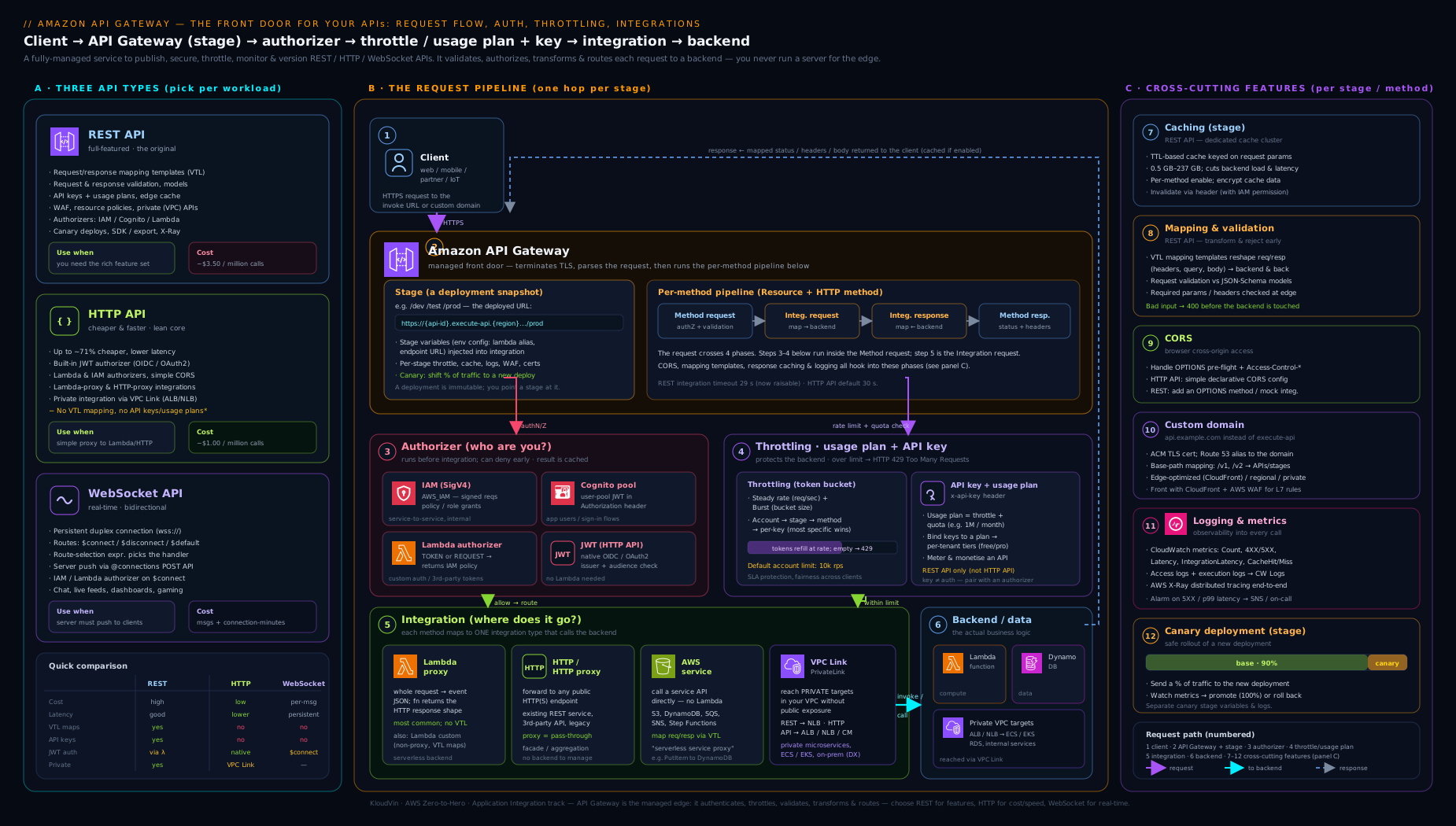
Trace one path through it. A browser calls GET /orders on the prod stage; the JWT authorizer validates the token; the stage throttle admits the request; a cache miss falls through to a Lambda proxy integration that returns the orders; API Gateway caches the response and returns it with the right CORS header. Now contrast that with a partner calling POST /events with an API key: the usage plan meters and rate-limits the key, request validation rejects a malformed body with a 400 before any backend runs, and a valid body goes straight to an AWS-service integration that pushes to SQS — no Lambda at all.
Hands-on lab
You will build a tiny HTTP API fronting a Lambda function, deploy it, call it, then add a JWT-style consideration and clean up. Everything here is within the AWS Free Tier — API Gateway’s free tier includes 1 million HTTP-API calls per month for 12 months, and the Lambda calls fall under Lambda’s free tier.
Run these as an administrator (not the root user). Replace the account ID
111122223333with your own and use AWS CLI v2.
Step 1 — Create an execution role and a trivial Lambda backend.
cat > trust.json <<'EOF'
{ "Version": "2012-10-17",
  "Statement": [{ "Effect": "Allow",
    "Principal": { "Service": "lambda.amazonaws.com" },
    "Action": "sts:AssumeRole" }] }
EOF

aws iam create-role --role-name lab-apigw-role \
  --assume-role-policy-document file://trust.json

aws iam attach-role-policy --role-name lab-apigw-role \
  --policy-arn arn:aws:iam::aws:policy/service-role/AWSLambdaBasicExecutionRole

cat > app.py <<'EOF'
import json
def handler(event, context):
    # HTTP API payload format 2.0: method/path live under requestContext.http
    name = (event.get("queryStringParameters") or {}).get("name", "world")
    return {
        "statusCode": 200,
        "headers": {"content-type": "application/json"},
        "body": json.dumps({"message": f"hello, {name}"})
    }
EOF
zip function.zip app.py

aws lambda create-function --function-name lab-apigw-fn \
  --runtime python3.13 --handler app.handler --architectures arm64 \
  --role arn:aws:iam::111122223333:role/lab-apigw-role \
  --zip-file fileb://function.zip
Step 2 — Create an HTTP API with a Lambda proxy integration (one command).
# The quick-create form wires a $default route + integration + auto-deployed $default stage
aws apigatewayv2 create-api \
  --name lab-http-api \
  --protocol-type HTTP \
  --target arn:aws:lambda:us-east-1:111122223333:function:lab-apigw-fn
Note the returned ApiId and ApiEndpoint.
Step 3 — Grant API Gateway permission to invoke the function.
aws lambda add-permission --function-name lab-apigw-fn \
  --statement-id apigw-invoke --action lambda:InvokeFunction \
  --principal apigateway.amazonaws.com \
  --source-arn "arn:aws:execute-api:us-east-1:111122223333:<ApiId>/*/*"
Step 4 — Call the API.
curl "https://<ApiId>.execute-api.us-east-1.amazonaws.com/?name=Vinod"
Expected output: {"message": "hello, Vinod"}. Because HTTP APIs auto-deploy to $default, there was no separate deployment step — contrast this with a REST API, which would need aws apigateway create-deployment.
Step 5 — Add stage-level throttling and turn on access logs (post-creation config).
# Lower the default-stage throttle to prove it works (1 req/s, burst 2)
aws apigatewayv2 update-stage --api-id <ApiId> --stage-name '$default' \
  --default-route-settings ThrottlingRateLimit=1,ThrottlingBurstLimit=2

# Hammer it to see 429s appear
for i in $(seq 1 10); do \
  curl -s -o /dev/null -w "%{http_code}\n" \
  "https://<ApiId>.execute-api.us-east-1.amazonaws.com/?name=x"; done
Expected output: a mix of 200 and 429 — the throttle is rejecting the burst, exactly as designed.
Step 6 — Validation checklist.
aws apigatewayv2 get-api --api-id <ApiId>showsProtocolType: HTTPand the auto-deploy$defaultstage.aws apigatewayv2 get-routes --api-id <ApiId>lists the$defaultroute bound to the Lambda integration.- The throttled loop in Step 5 returns at least one
429.
Cleanup (so nothing lingers):
aws apigatewayv2 delete-api --api-id <ApiId>
aws lambda delete-function --function-name lab-apigw-fn
aws iam detach-role-policy --role-name lab-apigw-role \
  --policy-arn arn:aws:iam::aws:policy/service-role/AWSLambdaBasicExecutionRole
aws iam delete-role --role-name lab-apigw-role
rm -f app.py function.zip trust.json
Cost note: at this scale the lab is effectively free — a handful of HTTP-API calls and Lambda invocations sit comfortably inside both free tiers. The two ways an API Gateway setup actually costs money are (1) leaving a REST API cache enabled (it bills per hour for the provisioned capacity regardless of traffic) and (2) high request volume on a REST API (~3.5× the price of HTTP) — neither of which this lab creates. Deleting the API and function removes any footprint.
Going deeper
The sections above are enough to design and run an API. This one is for the reader who wants the internals — the exact shapes, the JSON, the gotchas that only bite in production, and the decisions that sit one level above “REST or HTTP”.
The two payload formats (1.0 vs 2.0) — the copy-paste trap
An HTTP API and a REST API do not hand your Lambda the same event. REST proxy integrations use payload format version 1.0; HTTP API Lambda integrations default to 2.0. The differences are small, silent, and exactly the kind that make a function that “worked in the other API” throw KeyError in this one.
| Format 1.0 (REST proxy) | Format 2.0 (HTTP API default) | |
|---|---|---|
| HTTP method | event.httpMethod |
event.requestContext.http.method |
| Path | event.path |
event.rawPath (+ event.routeKey) |
| Multi-value headers | event.multiValueHeaders |
event.headers (comma-joined) |
| Multi-value query | event.multiValueQueryStringParameters |
event.queryStringParameters (comma-joined) |
| Cookies | inside headers | dedicated event.cookies array |
| Source IP | event.requestContext.identity.sourceIp |
event.requestContext.http.sourceIp |
The subtler half is the response contract. With format 1.0 (and therefore all REST proxy integrations), your function must return the full object — { "statusCode": 200, "headers": {...}, "body": "<string>" } — or API Gateway cannot build a response and the caller gets a 502. With format 2.0, API Gateway is more forgiving: if the function returns a value without a statusCode, the gateway assumes 200, treats the return value as the JSON body, and sets content-type: application/json. So the famous “bare object → 502” gotcha is a 1.0/REST behaviour, not a universal law — but relying on the 2.0 shortcut makes a function non-portable, so returning the explicit object everywhere is the safer habit. You can also force payloadFormatVersion=1.0 on an HTTP API integration to reuse a REST-shaped handler unchanged.
Lambda authorizer internals — the actual JSON and the caching trap
A Lambda authorizer does not return “allow” or “deny” — it returns an IAM policy document that API Gateway then evaluates. For a REST (or HTTP with full response) authorizer the shape is:
{
  "principalId": "user-42",
  "policyDocument": {
    "Version": "2012-10-17",
    "Statement": [{
      "Action": "execute-api:Invoke",
      "Effect": "Allow",
      "Resource": "arn:aws:execute-api:us-east-1:123456789012:abc123def/prod/GET/orders"
    }]
  },
  "context": { "tenant": "acme", "role": "reader" },
  "usageIdentifierKey": "optional-api-key-for-metering"
}
context values flow to the backend as $context.authorizer.<key> (proxy integrations see them under event.requestContext.authorizer). The caching trap is the part that surprises people: when the authorizer’s result TTL is greater than 0, API Gateway caches the returned policy keyed by the identity source (the token). If your policy names one specific method ARN and the same token is then used against a different method, the cached policy is reused and may not match — producing a confusing 403. The fix is to return a wildcard resource (arn:...:abc123def/prod/*/*) when caching is on, or narrow the cache/TTL deliberately. HTTP APIs add a lighter option: set enableSimpleResponses = true (with authorizer payload format 2.0) and return just { "isAuthorized": true, "context": {...} } — no policy document at all.
A Deny result surfaces as 403 Forbidden; an authorizer that errors or returns an unparseable result yields 401 Unauthorized. Both are worth alarming on separately.
WebSocket APIs, end to end
The lesson introduced route keys; here is the whole loop. A WebSocket API has three reserved routes — $connect (the handshake, where you authorize and can reject with a non-200), $disconnect (best-effort cleanup, not guaranteed to fire), and $default (the catch-all for messages that match no custom route) — plus any custom routes you define (sendMessage, join, …). Which route a message hits is decided by the route selection expression, $request.body.action by default: a client sends {"action":"sendMessage","data":"hi"} and the sendMessage route runs. Authorization happens once, on $connect (IAM or a Lambda REQUEST authorizer) — there is no per-message authorizer, so long-lived sessions need their own token-refresh discipline.
The piece beginners miss is how the server pushes back. You do not “return” a message to the client from your Lambda; you call the @connections callback API against the connection you want to reach:
# Push a payload to one connected client (needs execute-api:ManageConnections on the ARN)
aws apigatewaymanagementapi post-to-connection \
  --connection-id "$CONNECTION_ID" \
  --data '{"type":"tick","price":42}' \
  --endpoint-url "https://abc123def.execute-api.us-east-1.amazonaws.com/prod"
The --endpoint-url is the API’s own stage URL, not the default apigatewaymanagementapi endpoint — a very common first mistake. Store each connectionId (from event.requestContext.connectionId on $connect) in something like DynamoDB, fan out by iterating stored IDs, and treat a 410 Gone from post-to-connection as “this client vanished — delete the stored ID.” The backend role needs execute-api:ManageConnections on arn:aws:execute-api:<region>:<acct>:<api-id>/<stage>/POST/@connections/*.
Private REST APIs and resource policies — the network gate in JSON
An authorizer answers “who are you?”; a resource policy answers “where may the call come from?” — and they are ANDed together. A private API is the headline use: set the endpoint type to PRIVATE, create an interface VPC endpoint for the com.amazonaws.<region>.execute-api service (with private DNS enabled), and attach a resource policy that refuses anything not arriving through your VPC endpoint:
{
  "Version": "2012-10-17",
  "Statement": [{
    "Effect": "Deny",
    "Principal": "*",
    "Action": "execute-api:Invoke",
    "Resource": "arn:aws:execute-api:us-east-1:123456789012:abc123def/*",
    "Condition": { "StringNotEquals": { "aws:SourceVpce": "vpce-0abc123def456" } }
  }]
}
The same mechanism, with aws:SourceIp or aws:PrincipalOrgID or an account list, is how you build IP-allow-listed or org-only public APIs. Two facts save hours: a resource policy change on a REST API needs a redeployment to take effect, and an explicit Deny here beats any Allow from an authorizer — the network gate wins.
REST vs HTTP vs AppSync vs ALB — the decision one level up
Not every “API in front of Lambda” should be API Gateway at all. Widen the choice:
| REST API | HTTP API | AWS AppSync | ALB → Lambda | |
|---|---|---|---|---|
| Style | REST, full-featured | REST, lean | Managed GraphQL | HTTP routing rules |
| Best at | API products (keys, quotas, validation, caching, WAF, private/edge) | Cheap, fast Lambda/HTTP proxy with JWT/CORS | Client-shaped queries, real-time subscriptions, stitching many data sources | Simple path/host routing at high volume, mixed EC2/ECS/Lambda targets |
| Auth | IAM, Cognito, Lambda, keys | IAM, JWT/OIDC, Lambda | API key, IAM, Cognito, OIDC, Lambda | Offloaded (Cognito on ALB / OIDC / your own) |
| Per-request pricing | Highest | ~70% cheaper | Per query/resolver + real-time | LCU-based, no per-request gateway fee |
| Reach for it when | You need validation, mapping, usage plans, caching, edge/private, or WAF-on-the-API | Most new serverless HTTP apps | The frontend wants exactly the fields it asks for, plus live updates | You already run an ALB and want cheap Lambda routing without API-management features |
The trap is reaching for REST’s power on an app that only needs HTTP’s speed, or bolting request-shaping onto REST when the frontend really wanted GraphQL (AppSync) or when a plain ALB with a Lambda target would route the traffic for a fraction of the per-request cost — at the price of losing usage plans, validation, native JWT, and caching.
Choosing an endpoint type — edge, regional, or private
The three endpoint types are not a quality ladder; they answer where the API is reachable, and each has a real cost. Edge-optimized (REST only) fronts the API with CloudFront POPs so the TLS handshake and first byte happen close to a globally scattered audience — but it adds a CloudFront hop, forces the ACM certificate into us-east-1, and does nothing for callers already in your Region. Regional is the modern default: lowest overhead for in-Region clients, and the right base when you want to put your own CloudFront or WAF in front and control the cache behaviours yourself — it is also the only way to get edge behaviour for an HTTP API, which has no edge-optimized mode of its own. Private (REST only) publishes the API exclusively inside your VPC through an interface endpoint plus a resource policy, with no public surface at all. Rule of thumb: regional by default; edge only when a genuinely global browser audience measurably benefits and you accept the us-east-1 cert quirk; private whenever the only legitimate caller is another internal service. Switching an existing REST API between types is a real change — it alters the hostname and, for private, the whole reachability model — so decide before you hand out the URL.
Direct AWS-service integrations — a Lambda-less write
REST APIs can call an AWS API directly, with no function in between — the cheapest, lowest-latency path for a simple write. The integration request is a non-proxy mapping template that builds the target service’s request, and the integration runs under an IAM role you attach as its credentials. Pushing a message straight to SQS on POST /events needs three things: integration type AWS, a request template, and a Content-Type: application/x-www-form-urlencoded integration header:
## Integration request template -> SQS SendMessage (no Lambda)
Action=SendMessage&MessageBody=$util.urlEncode($input.body)
The integration URI points at the queue (arn:aws:apigateway:us-east-1:sqs:path/123456789012/orders-queue) and the integration credentials are a role whose policy allows exactly sqs:SendMessage on that one queue — least privilege, no compute to patch or scale. The identical shape does dynamodb:PutItem, states:StartExecution, or kinesis:PutRecord. The trade-off: every bit of request/response shaping lives in VTL, which is powerful but awkward to unit-test, so reserve service integrations for genuinely simple, high-volume paths and reach for Lambda the moment the logic branches.
Reading the two latencies (and a real access-log format)
The single most useful operability habit is watching Latency (end-to-end — gateway plus backend) against IntegrationLatency (backend only). If the two track together, your backend is the slow part; if Latency sits well above IntegrationLatency, the gateway layer is adding time — a slow Lambda authorizer, a heavy mapping template, or TLS negotiation. Make that queryable with a structured access log; a production-friendly JSON format string on the stage:
{ "requestId":"$context.requestId", "ip":"$context.identity.sourceIp",
  "method":"$context.httpMethod", "path":"$context.resourcePath",
  "status":"$context.status", "latency":"$context.responseLatency",
  "integLatency":"$context.integrationLatency",
  "principal":"$context.authorizer.principalId", "waf":"$context.wafResponseCode" }
Ship that to CloudWatch Logs and you can slice p99 latency, 4XX/5XX rates, and authorizer failures per route with Logs Insights — without turning on execution logs, which can capture full request/response bodies and belong off (or scrubbed) in production. When a call fails at the gateway itself, $context.error.message and $context.error.responseType name the reason.
Economics, quotas, and mTLS — the operational fine print
The cost gap is not a rounding error. Representative US-region list prices (always verify current pricing — these change): REST ≈ $3.50 per million requests; HTTP ≈ $1.00 per million (the ~70% saving); WebSocket ≈ $1.00 per million messages plus $0.25 per million connection-minutes; the optional REST cache bills per hour by capacity (roughly $0.02/hr at 0.5 GB up to several dollars/hr at 237 GB) regardless of hit rate; data transfer out is extra. The two ways a bill quietly balloons are an idle cache left switched on and high volume left on REST when HTTP would do.
A few quotas worth committing to memory (most are soft and raisable via Service Quotas): the default account throttle of 10,000 req/s steady, 5,000 burst per Region; the 29 s integration timeout design ceiling (higher REST/HTTP limits are now grantable on request, but design for fast synchronous calls and offload long work to Step Functions); a 10 MB REST payload limit; and roughly 300 resources/routes and 10 stages per API by default. Finally, mutual TLS (mTLS) for partner APIs: you upload a truststore — a PEM bundle of the CA certificates you trust — to S3 and point the custom domain’s mutualTlsAuthentication.truststoreUri (with an optional truststoreVersion) at it. mTLS is available only on regional custom domains, and the verified client-certificate fields show up as $context.identity.clientCert.* in access logs and to Lambda authorizers, so you can make fine-grained decisions on the presented cert.
Practice challenges
Work these in order — they climb from “make it respond” to “lock it to a VPC.” Each has a worked solution; try it before you open it. Account IDs and API IDs are placeholders.
1 (Beginner) — Fix the 502. A Lambda behind a REST proxy integration returns return {"message": "hi"} and every call gives 502 Bad Gateway. Change the function so the caller gets a real 200 with that JSON.
<details><summary>Solution</summary>
def handler(event, context):
    import json
    return {
        "statusCode": 200,
        "headers": {"content-type": "application/json"},
        "body": json.dumps({"message": "hi"})
    }
Why: a REST proxy integration (payload format 1.0) requires the full {statusCode, headers, body} object with body as a string; a bare object cannot be parsed, so the gateway emits a 502.
</details>
2 (Beginner) — Make an edit go live. You changed a method on a REST API and tested the stage URL, but it still serves the old behaviour. Push the change to the prod stage from the CLI.
<details><summary>Solution</summary>
aws apigateway create-deployment \
  --rest-api-id abc123def --stage-name prod \
  --description "Ship method change"
Why: REST API edits live in the API definition and only become live when deployed to a stage — HTTP APIs auto-deploy to $default, REST APIs never do.
</details>
3 (Intermediate) — One integration, per-stage backends. Make prod invoke orders:prod and dev invoke orders:dev without duplicating the integration.
<details><summary>Solution</summary>
Set the integration URI to reference a stage variable, then define the variable per stage:
# Integration URI uses the variable:
#   arn:aws:apigateway:us-east-1:lambda:path/2015-03-31/functions/
#   arn:aws:lambda:us-east-1:123456789012:function:orders:${stageVariables.alias}/invocations
aws apigateway update-stage --rest-api-id abc123def --stage-name prod \
  --patch-operations op=replace,path=/variables/alias,value=prod
# ...and value=dev on the dev stage. Grant invoke on each alias:
aws lambda add-permission --function-name orders:prod --qualifier prod \
  --statement-id apigw-prod --action lambda:InvokeFunction \
  --principal apigateway.amazonaws.com \
  --source-arn "arn:aws:execute-api:us-east-1:123456789012:abc123def/*/*/*"
Why: a stage variable (${stageVariables.alias}) parameterises one API definition per stage; remember each aliased function needs its own invoke permission.
</details>
4 (Intermediate) — Reject bad input before Lambda runs. On a REST POST /events, make a body missing the required type field return 400 without ever invoking the backend.
<details><summary>Solution</summary>
# 1) A JSON Schema model
aws apigateway create-model --rest-api-id abc123def --name EventModel \
  --content-type application/json --schema '{
    "$schema":"http://json-schema.org/draft-04/schema#","type":"object",
    "required":["type"],"properties":{"type":{"type":"string"}}}'
# 2) A validator that checks the body
aws apigateway create-request-validator --rest-api-id abc123def \
  --name body-only --validate-request-body
# 3) Attach both to the method (validator id + model from the calls above)
aws apigateway update-method --rest-api-id abc123def \
  --resource-id r1a2b3 --http-method POST \
  --patch-operations \
    op=replace,path=/requestValidatorId,value=val123 \
    op=replace,path=/requestModels/application~1json,value=EventModel
Why: attaching a model + request validator makes API Gateway reject a malformed body with 400 at the edge — no Lambda invocation, no cost. (~1 is the JSON-Pointer escape for the / in application/json.)
</details>
5 (Advanced) — Push to a WebSocket client. From a Lambda, send {"type":"tick"} to a connected client whose connectionId you stored on $connect. Name the IAM permission it needs and the one error you must handle.
<details><summary>Solution</summary>
import boto3
def push(connection_id, api_id, region, stage):
    client = boto3.client("apigatewaymanagementapi",
        endpoint_url=f"https://{api_id}.execute-api.{region}.amazonaws.com/{stage}")
    try:
        client.post_to_connection(ConnectionId=connection_id,
                                  Data=b'{"type":"tick"}')
    except client.exceptions.GoneException:
        pass  # 410 -> client disconnected; delete the stored connectionId
Why: server push uses the @connections callback against the stage endpoint URL; the role needs execute-api:ManageConnections, and a 410 Gone means the connection is dead and its stored ID should be pruned.
</details>
6 (Advanced) — Lock a REST API to one VPC. Make an API reachable only through the interface VPC endpoint vpce-0abc123def456, and nowhere else.
<details><summary>Solution</summary>
# 1) Endpoint type PRIVATE (on create or via patch), then attach the policy:
aws apigateway update-rest-api --rest-api-id abc123def --patch-operations \
  op=replace,path=/policy,value='{"Version":"2012-10-17","Statement":[{"Effect":"Deny","Principal":"*","Action":"execute-api:Invoke","Resource":"arn:aws:execute-api:us-east-1:123456789012:abc123def/*","Condition":{"StringNotEquals":{"aws:SourceVpce":"vpce-0abc123def456"}}}]}'
aws apigateway create-deployment --rest-api-id abc123def --stage-name prod
Plus: create the com.amazonaws.us-east-1.execute-api interface endpoint with private DNS enabled.
Why: a resource policy keyed on aws:SourceVpce is the network gate for private APIs; it is ANDed with the authorizer, an explicit Deny wins, and the change needs a redeploy to take effect.
</details>
Common mistakes & troubleshooting
| Symptom | Likely cause | Fix |
|---|---|---|
| Edits to the API have no effect | Not deployed to the stage (REST), or testing the wrong stage URL | create-deployment to the stage; for HTTP APIs confirm auto-deploy/$default |
| 502 Bad Gateway / “Internal server error” | Lambda proxy returned the wrong shape (not {statusCode, body}) or threw |
Return the required proxy response object; check execution logs / function logs |
| 403 Missing Authentication Token | Wrong path/method, or the route doesn’t exist | Verify the resource/route and method; check the full stage-prefixed URL |
| 401/403 on every call | Authorizer denying, token expired, or wrong issuer/audience (JWT) | Inspect the authorizer config and token claims; check authorizer cache TTL |
| “CORS error” in the browser | Missing Access-Control-Allow-Origin on the real response, or a 5xx (errors carry no CORS headers) |
Add the header in the Lambda (proxy) or method response; fix the underlying 5xx first |
| 429 Too Many Requests | Hit a stage/method/usage-plan throttle or the account limit | Raise the relevant throttle/quota; have clients honour Retry-After |
| HTTP-API Lambda gets an unexpected event shape | Payload format 2.0 differs from REST’s 1.0 (method/path under requestContext.http) |
Code to the 2.0 shape, or pin the integration to format 1.0 |
| Private/VPC backend returns errors via API | Misconfigured VPC Link / target group / security group | Check the VPC Link, the NLB/ALB target health, and SG rules to the backend |
| Custom domain TLS fails on an edge-optimized API | ACM certificate not in us-east-1 | Issue/import the cert in us-east-1 (edge) or the API’s Region (regional) |
Common beginner mistakes
These are misconceptions, not error messages — the wrong mental model that leads you to build the wrong thing. (The symptom→cause→fix table above is for when something is already broken.)
-
“An API key secures my API.” It does not. An API key is a name tag for metering and throttling, sent in
x-api-key, and anyone who has it can use it — it proves nothing about identity. Right model: an API key answers “which caller is this, and what is their quota?”; an authorizer answers “are they allowed in?” You almost always need both, and never the key alone on a route that matters. -
“I saved my change, so it’s live.” On a REST API, edits sit in the definition until you deploy to a stage — the single most common “why isn’t my change working” moment. Right model: think edit → deploy → stage. HTTP APIs hide this by auto-deploying to
$default, which is exactly why the habit fails to transfer when you move to REST. -
“HTTP API is just a cheaper REST API.” It is cheaper and faster, but it is not a strict subset with a discount — it deliberately drops mapping templates, request validation, per-key usage plans, caching, AWS-service integrations, edge/private endpoints, and WAF-on-the-API. Right model: choose by the features you need, not by price; if you need any of those, HTTP cannot do it and you stay on REST.
-
“My function returns the JSON, so the client gets the JSON.” With a proxy integration on REST (format 1.0) you must return the
{statusCode, headers, body}wrapper withbodyas a string, or the caller gets a502. Right model: in proxy mode your code owns the entire HTTP response — status, headers, and body — not just the payload. -
“It’s a CORS problem.” Often it is not. A
5xxresponse carries no CORS headers, so a plain backend crash shows up in the browser console as a “CORS error.” Right model: check the real status code first; only if it is a 2xx/4xx with a missing header is it truly CORS — and then remember that on a REST proxy integration the “Enable CORS” button only wires theOPTIONSpreflight; your Lambda still has to addAccess-Control-Allow-Originto the actual response. -
“Caching is free performance.” The REST stage cache bills per hour for its provisioned capacity whether or not anything hits it, and caching a non-idempotent endpoint serves stale or wrong data. Right model: cache only idempotent reads, size the cache to the working set, and set cache-key parameters so different requests do not collide on one entry.
-
“
$defaultis one thing.” On an HTTP API there are two unrelated$defaults: the$defaultroute (the catch-all that handles any method/path with no explicit route) and the$defaultstage (the auto-deployed stage that serves the API at its bareexecute-apiURL with no stage-name path segment). Right model: one is routing, the other is deployment — a request can hit the$defaultroute on any stage, and the$defaultstage can serve any route. -
“The authorizer runs on every request, so it’s always fresh.” With a non-zero TTL, API Gateway caches the authorizer’s result by identity — so a permissions change may not take effect until the cache expires, and an over-broad cached policy can authorize a method you did not intend. Right model: understand the cache key and TTL; return a wildcard resource when caching, or lower the TTL when freshness matters.
Best practices
- Choose the API type first, deliberately. Default to HTTP API for serverless Lambda proxies; use REST only for its exclusive features (validation, mapping, API-key usage plans, caching, edge/private endpoints, AWS-service integrations, WAF).
- Validate at the edge. On REST APIs, attach a model and request validator so malformed requests are rejected with a 400 before they cost a backend invocation.
- Use stages and stage variables to keep one API definition across
dev/prod, and ship risky changes with a canary release. - Throttle and meter deliberately — set method/stage throttles, and put public, monetised APIs behind usage plans + API keys; never rely on API keys as authentication.
- Cache idempotent reads on REST stages with a sensible TTL and cache-key parameters; size the cache to the working set so you are not paying for idle capacity.
- Prefer the native JWT authorizer (HTTP) or Cognito (REST) over a custom Lambda authorizer when your IdP fits, and cache Lambda-authorizer results to cut cost and latency.
- Front the API with a custom domain + ACM + Route 53, enforce TLS 1.2+, and add WAF for public APIs.
- Turn on access logs and detailed metrics for every production stage, and watch
IntegrationLatencyvsLatencyto locate slowness; keep verbose execution logs off (or scrubbed) in production. - Keep calls short — design for the ~29 s integration ceiling; offload long-running work to Step Functions or asynchronous patterns.
Security notes
- Always require authorization on non-public routes — IAM (SigV4) for service-to-service, Cognito/JWT for user-facing apps, or a Lambda authorizer for bespoke rules. An open route is open to the whole internet.
- API keys ≠ authentication. They identify a caller for metering only; pair them with a real authorizer.
- Lock down where calls can originate with a REST resource policy (source VPC, VPC endpoint, account, or IP range), and use private APIs for internal-only services.
- Use least-privilege IAM for AWS-service integrations and for the Lambda execution role behind the API — grant only the exact actions/resources used.
- Attach AWS WAF to public REST stages (or CloudFront/ALB in front of HTTP APIs) for managed, rate-based, and injection rules, and consider Shield for DDoS-sensitive APIs.
- Protect private backends with VPC Link / PrivateLink so internal services never get a public endpoint.
- Mind the logs — execution logging can capture request/response bodies; keep it off or redact sensitive fields, and encrypt the cache when it holds sensitive responses.
- Enforce modern TLS (1.2+) on custom domains and consider mutual TLS for partner/B2B APIs.
Interview & exam questions
-
When would you choose an HTTP API over a REST API, and vice versa? Choose HTTP API for cost (~70% cheaper) and low latency when you mostly proxy to Lambda/HTTP with JWT/IAM auth and built-in CORS. Choose REST API when you need its exclusive features: request validation, mapping templates, API-key usage plans, caching, edge-optimized or private endpoints, AWS-service integrations, or WAF.
-
Explain the difference between a Lambda proxy and a non-proxy integration. Proxy passes the whole request to the function as one event and expects a specifically shaped response (
statusCode,headers,body); your code owns parsing and response shaping, with no mapping templates. Non-proxy (custom) uses VTL mapping templates in the gateway to transform request and response — more control, more setup, and the only way to do AWS-service and mock integrations. -
A Lambda-backed API returns 502 Bad Gateway. Why? The proxy integration’s Lambda returned the wrong shape (a bare object instead of
{statusCode, body, headers}) or threw an unhandled error, so API Gateway could not build a response. Fix the function to return the required proxy response object. -
Name the four authorizer options and when to use each. IAM/SigV4 (service-to-service, callers with AWS creds); Cognito user pool (REST apps with a Cognito directory); Lambda authorizer (custom logic — third-party OIDC, opaque tokens, header/IP rules; REST/HTTP/WS); JWT authorizer (HTTP-only native OIDC/OAuth2 validation against an issuer + audience, no Lambda).
-
Is an API key authentication? How do you enforce per-client limits? No — an API key only identifies a caller for metering/throttling, not authentication. Enforce per-client limits by attaching the key to a usage plan that defines a throttle (rate + burst) and a quota, associated with API stages.
-
Why might changes to your API not be live, and how do you fix it? Edits live in the API definition but only go live when deployed to a stage. REST APIs need an explicit deployment; HTTP APIs auto-deploy to
$default. Deploy (or check you are calling the right stage URL). -
What is a stage variable and give a concrete use. A name/value pair on a stage referenced at runtime as
${stageVariables.x}. A common use is pointing each stage at a different Lambda alias/function (soprod→myFn:prod,dev→myFn:dev) from one integration definition, or passing per-stage config into mapping templates. -
How do canary releases work in API Gateway? A stage can send a configurable percentage of traffic to a new deployment while the rest stays on the current one, with separate metrics. You watch the canary, then promote (whole stage to the new deployment) or roll back (delete the canary). It is the gateway-level analogue of a weighted Lambda alias.
-
Someone reports a “CORS error” — how do you diagnose it? First check the real status: a 5xx never carries CORS headers, so a backend bug looks like CORS. If it is genuinely CORS, ensure the preflight
OPTIONSreturnsAccess-Control-Allow-*and the actual response includesAccess-Control-Allow-Origin— for a REST proxy integration that header must come from your Lambda, not just the gateway’s “Enable CORS”. -
How do you expose a private backend in a VPC through API Gateway? With a VPC Link / PrivateLink integration: REST APIs link to a Network Load Balancer; HTTP APIs can link to an ALB, NLB, or Cloud Map service. The backend stays private (no public endpoint) and API Gateway reaches it over the VPC link.
-
What does the API Gateway cache cost and when should you use it? A REST stage cache bills per hour for the provisioned capacity (0.5–237 GB) regardless of hit rate, with a TTL up to 3600 s. Use it for idempotent, read-heavy endpoints where the latency/backend-cost savings outweigh the hourly charge; size it to the working set. HTTP/WebSocket APIs have no built-in cache.
-
What is special about WebSocket APIs compared with REST/HTTP? They maintain a stateful, bidirectional connection: clients connect once (
$connect), messages are routed by a route key selected from the body (e.g.$default,sendMessage), and the server can push to connected clients via the connection’s callback URL. Authorization happens on$connect(IAM or Lambda). Use them for real-time apps (chat, live dashboards, notifications). -
For a custom domain on an edge-optimized REST API, where must the ACM certificate live? In us-east-1 (CloudFront’s region), because edge-optimized endpoints are fronted by CloudFront. A regional custom domain instead needs the certificate in the API’s own Region.
Quick check
- Which API type is the cheapest and lowest-latency for a simple Lambda proxy?
- What response shape must a Lambda proxy integration return?
- True or false: an API key authenticates the caller.
- Which authorizer is native to HTTP APIs and needs no Lambda?
- Why might a freshly edited REST API still serve the old behaviour?
Answers
- The HTTP API — roughly 70% cheaper than REST and the lowest latency.
- A JSON object with at least
statusCodeandbody(plus optionalheadersandisBase64Encoded); returning a bare object causes a 502. - False. An API key only identifies a caller for metering/throttling; pair it with a real authorizer for authentication.
- The JWT authorizer — validates an OIDC/OAuth2 token against an issuer and audience.
- Edits are not live until deployed to the stage; REST requires an explicit deployment (HTTP APIs auto-deploy to
$default).
Exercise
Build a small metered, secured REST API and exercise its signature features:
- Create a REST API with a
POST /eventsresource backed by a Lambda proxy integration; attach a JSON-Schema model and a request validator so a malformed body returns a 400 without invoking Lambda. - Add a Cognito (or Lambda) authorizer to require a valid token, and confirm an unauthenticated call returns 401/403.
- Create a usage plan with a throttle (e.g. 5 req/s, burst 10) and a small quota, generate an API key, associate both with the stage, and prove that exceeding the quota/throttle returns 429.
- Add a
GET /events/{id}resource, enable the stage cache with cache-key parameters on{id}and a 60 s TTL, and observeCacheHitCountrise on repeated reads. - Deploy a change behind a canary at 10% traffic, watch the canary metrics, then promote it. Bonus: attach a custom domain with an ACM certificate and a Route 53 alias, and turn on access logs to capture each request.
Certification mapping
| Exam | Objective area this supports |
|---|---|
| DVA-C02 (Developer – Associate) | Development with AWS services — building REST/HTTP/WebSocket APIs, Lambda proxy vs non-proxy integrations, mapping templates, request validation, stages and stage variables, authorizers (IAM/Cognito/Lambda/JWT), API keys and usage plans; deployment with canary releases. |
| SAA-C03 (Solutions Architect – Associate) | Design secure, resilient, cost-optimised architectures — choosing API type, securing APIs (authorizers, resource policies, WAF, private APIs/VPC Link), throttling and caching for scale and cost, and custom domains/edge vs regional vs private endpoints. |
| SOA-C02 (SysOps Administrator – Associate) | Monitoring and reliability — CloudWatch metrics (Latency vs IntegrationLatency, 4XX/5XX), access and execution logs, throttling alarms, and stage-level operational settings. |
Glossary
-
API Gateway — AWS’s managed front door that authenticates, throttles, transforms, and routes API requests to backends.
-
REST API — the original, most feature-complete API type (mapping templates, validation, API keys/usage plans, caching, edge/private endpoints, WAF).
-
HTTP API — the leaner, cheaper, lower-latency API type optimised for Lambda/HTTP proxying with JWT/IAM auth and built-in CORS.
-
WebSocket API — an API type for stateful, bidirectional, real-time connections routed by route key, with server-side push.
-
Resource / method — a path in the API tree / an HTTP verb on that path; together the unit you configure (REST).
-
Route / route key — the HTTP/WebSocket-API term for a method+path / the selector (e.g.
$connect,$default) that picks a WebSocket integration. -
Integration — the binding from a method/route to a backend (Lambda, HTTP, AWS service, mock, VPC Link).
-
Proxy integration — passes the whole request to the backend and expects a specific response shape; no mapping templates.
-
Non-proxy (custom) integration — transforms request/response with VTL mapping templates.
-
Stage — a named, deployed, addressable instance of an API with its own URL and settings (throttle, cache, logging, stage variables).
-
Deployment — an immutable snapshot of the API config pushed to a stage; REST needs it explicitly, HTTP auto-deploys.
-
Stage variable — a name/value pair on a stage referenced at runtime (e.g. to target a per-stage Lambda alias).
-
Canary release — shifting a percentage of stage traffic to a new deployment, with separate metrics, before promoting or rolling back.
-
Authorizer — the component that authorises a request: IAM (SigV4), Cognito, Lambda (custom), or JWT (HTTP).
-
Lambda authorizer — a function returning an IAM policy (allow/deny) plus context; TOKEN or REQUEST type; results cacheable by identity.
-
JWT authorizer — HTTP-API-native OIDC/OAuth2 token validation against an issuer and audience.
-
Mapping template (VTL) — a Velocity template that transforms request/response in a non-proxy integration (REST).
-
Request validator / model — edge validation of body (JSON Schema) and required parameters, rejecting bad input with a 400.
-
Usage plan — a throttle (rate + burst) and quota associated with stages and applied per API key (REST).
-
API key — a caller-identifying token (
x-api-key) for metering/throttling — not authentication. -
Throttling — token-bucket rate (req/s) + burst limiting at account/stage/method/usage-plan levels; excess returns 429.
-
Stage cache — a per-stage REST cache of integration responses, billed per hour by capacity, keyed by chosen parameters.
-
VPC Link / PrivateLink — private integration to a VPC backend (REST→NLB; HTTP→ALB/NLB/Cloud Map) without a public endpoint.
-
Custom domain — a friendly hostname mapped to APIs/stages with an ACM certificate and base-path (API) mappings; supports mTLS.
-
Endpoint type — Regional (default), Edge-optimized (CloudFront-fronted; REST), or Private (VPC-only; REST).
-
Integration latency vs latency — backend-only time vs end-to-end time; their gap localises slowness.
-
Payload format version (1.0 / 2.0) — the event/response shape a Lambda integration sees; REST proxy uses 1.0 (full
{statusCode, body}object required), HTTP APIs default to 2.0 (method/path underrequestContext.http, and a bare return is auto-wrapped as a 200). -
@connections API / connection ID — the WebSocket callback (
post-to-connection,execute-api:ManageConnections) that pushes a message to a storedconnectionId, called against the API’s stage URL; a410 Gonemeans that client disconnected. -
Route selection expression — the rule (default
$request.body.action) that picks which WebSocket route a message runs. -
Resource policy — a JSON policy on a REST API that allows/denies invocation by source IP, VPC endpoint (
aws:SourceVpce), account, or org; ANDed with the authorizer and the mechanism behind private APIs (needs a redeploy to take effect). -
SigV4 (Signature Version 4) — the AWS request-signing scheme used by IAM authorization; the signature made from the caller’s credentials is the credential, checked against
execute-api:Invoke. -
Mutual TLS (mTLS) / truststore — client-certificate authentication on a regional custom domain, where the trusted CA bundle (the truststore) lives in S3 and the verified cert appears as
$context.identity.clientCert.*. -
AppSync — AWS’s managed GraphQL service; an alternative to API Gateway when the client wants exactly the fields it asks for plus real-time subscriptions and multiple stitched data sources.
Next steps
Continue the course with Amazon ECS & ECR, In Depth: Task Definitions, Services, Fargate vs EC2 & the Registry — since API Gateway also fronts containerised backends through an HTTP integration or a private VPC Link, the natural next step is learning how to run those containers. Build on this lesson with:
- AWS Lambda, In Depth: Runtimes, Triggers, Layers, Concurrency & Every Setting — the compute behind your routes; API Gateway is one of Lambda’s most common triggers, and the Lambda proxy integration is the serverless default.
- SQS & SNS: Fan-out, FIFO Ordering, DLQs & Poison-Message Handling — the messaging backbone for the asynchronous and AWS-service-integration patterns that keep APIs fast and resilient.
- AWS Step Functions: Distributed Orchestration & Error-Handling Patterns — for the long-running, multi-step workflows that outgrow API Gateway’s synchronous ~29 s ceiling.