In a nutshell
The one-line version: this lesson turns one master video file into streams that play smoothly on every device, at every connection speed, and only for people who are allowed to watch — and it does that with managed AWS services so you never hand-build a video player pipeline yourself.
Think of it like a restaurant kitchen. The master file you upload is the raw ingredient delivered to the back door (Amazon S3, the “source” bucket) — high quality, but not something you’d put straight on a plate. AWS Elemental MediaConvert is the prep kitchen: it takes that one ingredient and portions it into small, consistent pieces at several sizes (a “bitrate ladder” — tiny for a phone on 3G, large for a 4K TV). AWS Elemental MediaPackage is the plating station that assembles a dish to order in whatever style each table wants (HLS for Apple devices, DASH for the web and Android) from the same prepped pieces — so you cook once and serve many. Amazon CloudFront is the army of waiters stationed near every table on Earth, keeping popular dishes ready so nobody waits. And the signed cookie is the reservation slip on the table: the waiters glance at it on every trip, and it expires when the meal is over — so a stranger who photographed someone else’s slip yesterday can’t get served today.
Why should a beginner care? Because “streaming” looks like “drop a file on a CDN and share the link,” and that demo works — right up until real viewers arrive on real networks with real paywalls. One bitrate buffers on hotel Wi-Fi. A plain MP4 won’t play on an iPhone. An open CloudFront link is public forever. The five-stage pipeline in this lesson — ingest → transcode → package → deliver → entitle — is the thing that makes all four of those problems disappear, and its shape is identical whether you have 5 titles or 50,000. Learn the shape once and the scale is just dials.
Level: Advanced (but this on-ramp is beginner-friendly) · Time: ~40 min read · Cost to follow along: reading-only; a real build costs a few dollars of transcode per title plus pay-per-byte delivery.
Before this lesson, it helps to know: what S3 is (object storage in buckets), roughly what a CDN does (caches content near users), and that Lambda runs small snippets of code in response to events. If any of those is fuzzy, skim the S3 and CloudFront deep-dive lessons first — this lesson leans on both.
After this lesson you will be able to:
- Explain the five stages of a VOD pipeline and why each one exists (not just what it’s called).
- Read an adaptive-bitrate ladder and say which rung a given viewer gets and why.
- Choose correctly between signed cookies and signed URLs for streaming — and explain the 403 you get when you pick wrong.
- Describe how MediaPackage serves HLS and DASH from one stored copy, and when you can drop it entirely.
- Estimate the cost per minute of content and name the levers that actually move the delivery bill.
- Say precisely how DRM differs from a signed URL, and where Rekognition, Transcribe, and OpenSearch fit for moderation, captions, and search.
- Contrast this file-based VOD pipeline with live streaming (MediaLive / IVS).
Video-on-demand on AWS goes wrong in a very recognisable way. A team uploads an MP4 to S3, slaps CloudFront in front of it, hands the URL to the app, and ships. It works in the demo. Then reality arrives: a viewer on hotel Wi-Fi gets endless buffering because there is exactly one bitrate, an iPhone refuses to play because the file isn’t fragmented for HLS, the content team discovers anyone who once had the link can share it forever, and the first DMCA email lands because there is no entitlement on the asset at all. None of that is CloudFront’s fault. It is the absence of an architecture — a deliberate separation between the mezzanine source, the transcode tier that produces an adaptive ladder, the packaging layer that speaks HLS and DASH, the edge that delivers globally, and the entitlement layer that decides who may watch what. This article is that architecture, built end to end on AWS Elemental MediaConvert, Amazon S3, AWS Elemental MediaPackage, Amazon CloudFront, and CloudFront signed URLs/cookies.
The single most important idea here is that a VOD asset is not a file you serve; it is a pipeline output you protect. One uploaded mezzanine becomes an adaptive ladder of renditions, those renditions become time-aligned segments and manifests, those segments are cached at the edge, and every request for them is gated by a short-lived, cryptographically signed token tied to a viewer’s entitlement. Get that pipeline right and the system is boring in the best way: a phone, a 4K TV, and a laptop on bad Wi-Fi each get the best stream their connection can sustain; nothing playable leaks; and you can re-package or re-secure the whole catalogue without ever asking a creator to re-upload.
The business scenario
Picture an organisation that has video but no reliable, secure, scalable way to deliver it to a screen. This is the same shape at 5 titles and at 50,000.
The early version: a content owner — a training company, a sports league, a media startup, a university, a corporate comms team — has a library of source files sitting in a drive or a bucket. Today they “stream” by handing out a direct download link or embedding a single-bitrate file. It plays acceptably on the office network and falls apart everywhere else. There is no quality adaptation, no device coverage, no access control, and no telemetry — they cannot even tell whether anyone watched to the end.
Then the requirements that a static file structurally cannot satisfy start arriving, and they are the requirements the business actually cares about:
- Subscription media / OTT: “We’re launching a paid streaming service. A viewer on a 4K TV and a viewer on a train must both get a watchable stream, playback must start in under two seconds, and a non-subscriber — or someone whose trial expired ten minutes ago — must not be able to play, even if they captured a URL yesterday.”
- Corporate / training (LMS): “All-hands recordings and compliance courses must play only for logged-in employees, never appear on the public internet, and we need to prove who completed which module.”
- Sports / events: “We post match replays. Traffic is spiky — near-zero between events, then a million views in an hour after the final whistle. It has to scale to that with zero pre-provisioning and not bankrupt us at idle.”
- Education / publishing: “Lectures are licensed per-institution. Geography and entitlement matter; a paywalled lecture cannot be hotlinked into someone else’s site.”
Every one of these shares the same structural requirements, and they are the requirements that define the architecture: one source file must be turned into a device-agnostic, bandwidth-adaptive set of streams, delivered globally with low start-up latency, and every byte of it must be gated by a verifiable entitlement that expires. Adaptive bitrate (ABR) is non-negotiable — without a ladder of renditions and a manifest, the player cannot downshift on a bad connection or upshift on a good one. Packaging is non-negotiable — Apple devices want HLS, much of the web and Android want DASH, and you do not want to store the catalogue twice. Entitlement is non-negotiable — an open CloudFront URL is a public URL forever.
The scale-invariance is why this belongs in an architecture center. A five-title startup runs this with on-demand MediaConvert jobs, a single S3 bucket, MediaPackage VOD packaging, one CloudFront distribution, and a CloudFront key group for signing. A global OTT platform runs the identical topology with thousands of concurrent MediaConvert jobs across queues, multi-Region S3 with replication, MediaPackage at fleet scale, CloudFront with hundreds of edge locations and Origin Shield, and DRM layered on top of the same signed-URL gate. The shape — mezzanine → transcode → package → edge → entitlement — never changes. Only the dials move.
The promise to the business: a source file becomes a secure, adaptive, globally playable stream; idle costs almost nothing and peaks absorb themselves; and the entire catalogue can be re-encoded or re-secured without going back to the creators.
Architecture overview
The architecture is a content-preparation pipeline feeding a protected delivery edge. Read it as two halves joined by S3 — an asynchronous ingest-and-prepare path, and a synchronous request-and-deliver path — with an entitlement service straddling the boundary.
Stage 1 — Mezzanine ingest (S3). A source (“mezzanine”) file lands in a private S3 source bucket — uploaded by a CMS, a multipart upload from a desktop tool, or pushed from on-prem. This is the high-quality master: a ProRes, a high-bitrate H.264/H.265 MP4, whatever the creator produced. The bucket is private (Block Public Access on), encrypted, and the arrival of an object is the trigger for everything downstream. Nothing here is ever served to viewers directly.
Stage 2 — Transcode into an adaptive ladder (MediaConvert). An S3 ObjectCreated event (via EventBridge → Lambda, or Step Functions) submits an AWS Elemental MediaConvert job. MediaConvert is the file-based, broadcast-grade transcoder: from the one mezzanine it produces a bitrate ladder — e.g. 240p, 360p, 480p, 720p, 1080p, 2160p — each at a target bitrate, plus audio renditions and extracted captions/thumbnails. Crucially, it produces segmented output (fragmented MP4 / CMAF or TS) with aligned segment boundaries and a manifest, which is what makes adaptive streaming possible: the player can switch renditions at any segment boundary. The job writes all of this to a private S3 packaged/output bucket. MediaConvert can emit HLS and DASH directly; in this reference we deliberately have it emit a CMAF/fMP4 ladder and let MediaPackage do the protocol packaging, so we store one set of media and serve many protocols.
Stage 3 — Just-in-time packaging (MediaPackage VOD). The transcoded ladder in S3 is registered as a MediaPackage VOD asset against a packaging group/configuration. MediaPackage repackages the stored CMAF segments just-in-time into whatever protocol the requesting player needs — HLS for Apple, DASH for the web/Android, CMAF, even Microsoft Smooth — from a single stored copy. It is also where content protection is centralised: MediaPackage can apply encryption and integrate with a DRM provider (via AWS Elemental MediaPackage + SPEKE) so the same asset can be served clear, AES-encrypted, or full-DRM (Widevine/PlayReady/FairPlay) without re-transcoding. MediaPackage becomes the origin for the edge.
Stage 4 — Global delivery (CloudFront). Amazon CloudFront sits in front of MediaPackage as the CDN. It caches manifests and segments at edge locations close to viewers, so a popular title is served from the edge rather than hammering the origin, and start-up latency is low worldwide. CloudFront connects to the MediaPackage origin securely (origin access + a shared secret header), and Origin Shield can be enabled to give MediaPackage a single consolidated caching layer and a higher offload ratio. CloudFront is also where the entitlement check is enforced at the edge.
Stage 5 — Entitlement (CloudFront signed URLs / signed cookies). This is the gate. The viewer’s player never gets a bare CloudFront URL. Instead, after the app authenticates the user and confirms their entitlement (active subscription, valid license, allowed geography), a small entitlement service (API Gateway + Lambda, or your app backend) mints a CloudFront signed URL (for a single manifest/file) or, more commonly for HLS/DASH, a signed cookie (which covers the manifest and all the segment requests that follow). The signature is produced with a private key whose public key is registered in a CloudFront key group; the distribution requires signed requests, so CloudFront itself rejects any request without a valid, unexpired signature at the edge, before it ever reaches MediaPackage. The token is short-lived (minutes to a session) and can be scoped by URL path and even by IP. No valid signature, no playback — full stop.
The end-to-end data path, following one title from upload to a viewer pressing play:
- Ingest: a producer uploads
lecture-attention.movto the private S3 source bucket. TheObjectCreatedevent fires. - Prepare: EventBridge routes the event to a Lambda that submits a MediaConvert job using a saved job template (the ladder definition). MediaConvert transcodes the master into a CMAF ladder (240p→1080p), extracts captions and a thumbnail, and writes segments + a base manifest to the private output bucket. On
COMPLETE, MediaConvert emits an EventBridge event. - Register: a second Lambda, triggered by the MediaConvert
COMPLETEevent, creates a MediaPackage VOD asset pointing at the S3 output, associated with the packaging group, and records the asset’s playback endpoint URLs (HLS + DASH) in the catalogue database (DynamoDB). The title is now “publishable.” - Watch — entitlement: a logged-in subscriber opens the title. The app calls the entitlement service, which checks the subscription/license/geo, then returns a signed cookie (or signed URL) plus the CloudFront playback URL for the title.
- Watch — delivery: the player requests the HLS/DASH manifest from CloudFront with the signed cookie attached. CloudFront validates the signature against the key group at the edge; if valid and unexpired, it serves the manifest — from cache if warm, otherwise it fetches from the MediaPackage origin (which just-in-time packages from the stored CMAF in S3) and caches the result.
- Watch — adaptation: the player reads the manifest, sees the ladder, and begins pulling segments — each segment request also carries the signed cookie and is also validated at the edge. As the viewer’s bandwidth changes, the player switches rendition at segment boundaries; on a train it drops to 360p, on fibre it climbs to 1080p, all from the same manifest.
- Expire: the cookie expires at the end of the entitlement window. A captured URL or a copied cookie is useless minutes later. If the user’s subscription lapses mid-session, the next cookie refresh is denied and playback stops at the boundary.
The diagram, in words. Picture two horizontal bands joined in the middle by an S3 cylinder. On the left band (ingest/prepare, asynchronous): a producer/CMS uploads into a private S3 “source” bucket; an EventBridge clock-spark fires into a Lambda, which arrows into a large MediaConvert box (drawn with a stacked “ladder” icon — 240p…2160p); MediaConvert arrows down into a private S3 “packaged” bucket holding CMAF segments + manifest. A second Lambda (triggered by MediaConvert’s complete event) arrows into a MediaPackage VOD box, registering the asset and writing endpoint URLs into a DynamoDB catalogue. On the right band (deliver, synchronous): a viewer/player on the far right; between the player and the system sits an API Gateway → Lambda “entitlement” box wired to Cognito/IdP and the DynamoDB catalogue; the entitlement box hands back a signed cookie/URL. The player then arrows into a CloudFront cloud (edge locations, optional Origin Shield), which has a lock badge labelled “key group — verify signature at edge” on its inbound side, and arrows back to MediaPackage as its origin; MediaPackage reads from the S3 “packaged” bucket. Cross-cutting boxes underneath everything — IAM, KMS, CloudWatch, WAF (on CloudFront), AWS Organizations/SCP — touch every tier. The defining visual: a one-way prepare pipeline on the left, a protected delivery edge on the right, and a signed-token gate stamped on CloudFront’s front door.
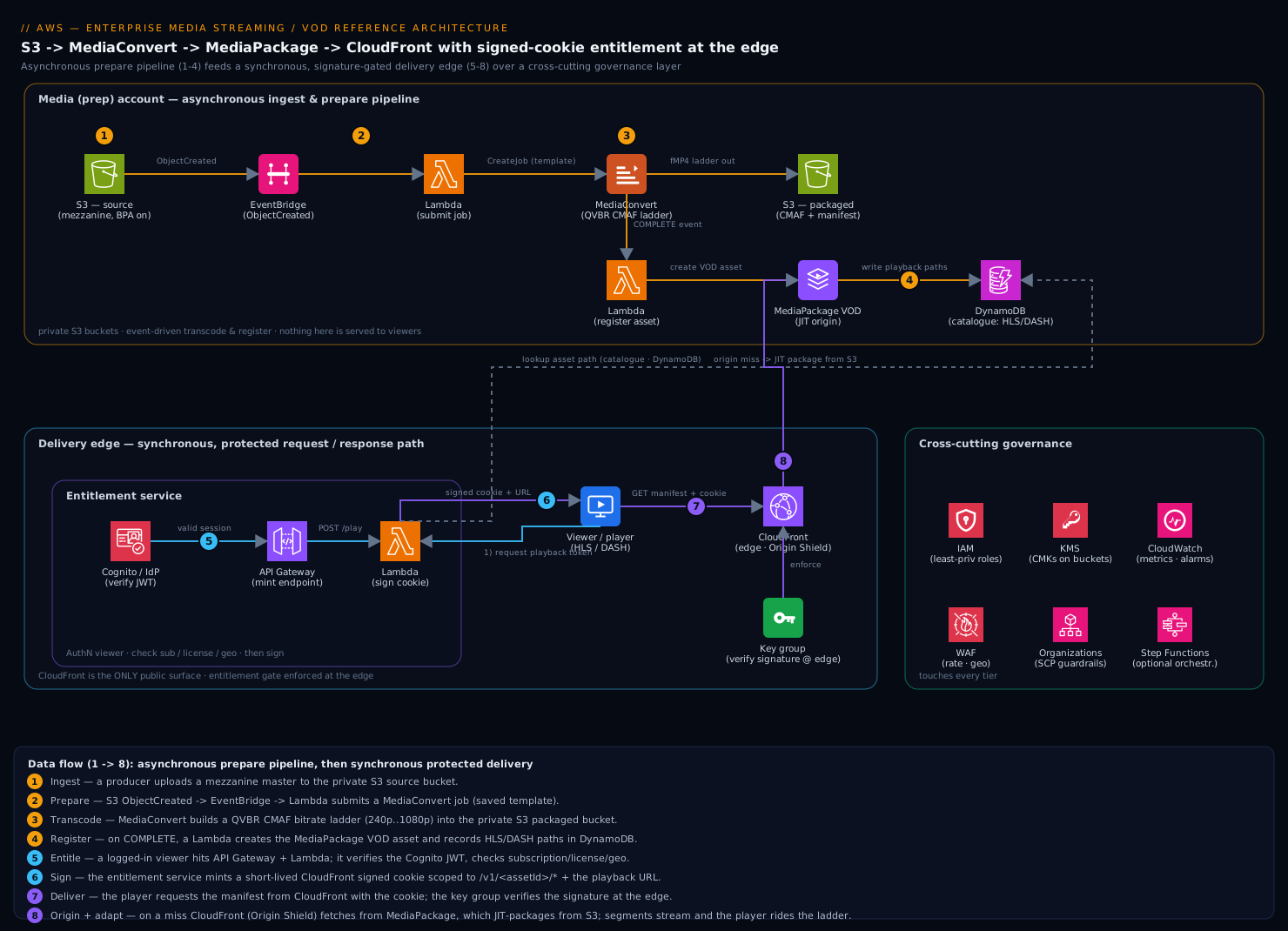
Component breakdown
| Component | AWS service | Role in the pipeline | Key configuration choices |
|---|---|---|---|
| Mezzanine source | Amazon S3 (source bucket) | Private master/mezzanine store; arrival triggers the pipeline | Block Public Access on; SSE-KMS; multipart upload for large masters; EventBridge ObjectCreated notifications enabled; lifecycle to Glacier for cold masters. |
| Transcoder | AWS Elemental MediaConvert | One mezzanine → an adaptive bitrate ladder of segmented renditions + captions + thumbnails | Job templates + output presets define the ladder; QVBR rate control for quality-per-bit; CMAF/fMP4 output with aligned GOP/segment boundaries; on-demand vs reserved queues; accelerated transcoding for long-form. |
| Packaged store | Amazon S3 (output bucket) | Holds the stored CMAF segments + base manifest that MediaPackage repackages from | Private; SSE-KMS; lifecycle/Intelligent-Tiering; partitioned by asset id; the durable packaged copy. |
| Just-in-time packager / origin | AWS Elemental MediaPackage (VOD) | Repackages stored CMAF → HLS/DASH/CMAF on demand from one copy; central content protection point | Packaging group/configuration per protocol; SPEKE + DRM provider for Widevine/PlayReady/FairPlay or AES-128; the CDN origin. |
| Edge / CDN | Amazon CloudFront | Global caching delivery of manifests + segments; enforces the signature at the edge | Origin access + secret header to MediaPackage; Origin Shield for high offload; cache policy tuned for manifests (short TTL) vs segments (long TTL); field-level/HTTPS-only; WAF attached. |
| Entitlement (signing) | CloudFront signed URLs / signed cookies + key group | The gate: mints short-lived signed tokens tied to a viewer’s entitlement; CloudFront verifies them | Signed cookies for HLS/DASH (cover manifest + all segments); signed URL for single files; key group (public key) on the distribution; trusted key groups, not the legacy account-wide trusted signer. |
| Entitlement (logic) | API Gateway + Lambda, Cognito/IdP, DynamoDB | AuthN the viewer, check subscription/license/geo, then sign | Verify session/JWT; look up entitlement + catalogue; set short expiry; optionally bind to viewer IP; rate-limit the mint endpoint. |
| Orchestration | Amazon EventBridge, AWS Lambda, optional Step Functions | Event-drive the asynchronous pipeline (S3 → transcode → register) | EventBridge rules on S3 + MediaConvert state changes; Step Functions for multi-step/ret‑heavy workflows; DLQs on the Lambdas. |
| Cross-cutting | IAM, KMS, CloudWatch, WAF | Identity, encryption, observability, edge protection | Least-privilege roles per stage; CMKs on both buckets; CloudWatch + CloudFront real-time logs; WAF rate-based + geo rules. |
A few component-level decisions carry disproportionate weight:
Signed cookies — not signed URLs — are usually the right gate for streaming. A VOD stream is not one request; it is a manifest request followed by hundreds of segment requests. A signed URL authorises a single file, so you would have to sign every segment — impossible, since the segment list lives inside the manifest the player parses at runtime. A signed cookie authorises a path (e.g. /v1/asset-1234/*) for a time window, so the manifest and every segment under it are covered by one token the player attaches automatically. Reach for signed URLs only for the rare single-file case (a downloadable MP4, a one-off); reach for signed cookies for adaptive streaming. This single choice is the difference between an entitlement gate that works and one that falls apart at the first segment.
Why MediaConvert emits CMAF and MediaPackage does the protocol packaging — instead of MediaConvert emitting HLS+DASH directly. MediaConvert can output HLS and DASH straight to S3, and for the simplest catalogues that is a perfectly valid, lower-cost topology (CloudFront → S3, no MediaPackage). But you then store and manage two packaged copies (HLS and DASH), you re-run jobs to add a protocol or change segment duration, and DRM/encryption is baked into the stored output. By emitting a single CMAF/fMP4 ladder and letting MediaPackage package just-in-time, you store the media once, serve every protocol from it, add or change packaging without re-transcoding, and centralise content protection/DRM at the packager. The reference favours the MediaPackage path because the moment you need multi-protocol + DRM + agility, it pays for itself; the “MediaConvert-direct-to-S3” path is the right de-scope for small, clear-content catalogues (covered in “When to use it”).
QVBR is the rate-control choice that quietly saves the most money. MediaConvert’s Quality-Defined Variable Bitrate targets a perceptual quality level and spends bits only where the content needs them — a static talking-head rendition uses far fewer bytes than a fast-motion sports clip at the same visual quality. Compared to fixed CBR, QVBR typically cuts storage and egress for the same quality, and egress (CloudFront) is the dominant cost in VOD. Define the ladder with QVBR + a max-bitrate cap per rendition and you get the best quality-per-byte without hand-tuning every title.
Origin Shield is the difference between a calm origin and a melted one at peak. Without it, every CloudFront edge location that gets a cache miss goes back to MediaPackage independently — so a viral title can hit the packager from dozens of edges at once. Origin Shield inserts a single consolidating cache between the edges and MediaPackage: misses collapse to one origin fetch, MediaPackage packages each segment once, and offload ratio climbs sharply. For spiky VOD (sports replays, launches) this is the cheap insurance that keeps the origin from being the bottleneck precisely when traffic spikes.
The bitrate ladder, made concrete
The word “ladder” gets used a lot above without ever showing one, so here is a real, five-rung ABR ladder — the shape a training company or the “Stagelight” example below would actually ship. Each rung is one rendition MediaConvert produces from the single mezzanine; together they are the menu the player chooses from at runtime.
| Rung | Resolution | Codec | QVBR max bitrate (video) | Audio | When the player picks it |
|---|---|---|---|---|---|
| 1 | 426×240 (240p) | H.264 | ~0.4 Mbps | AAC 96 kbps | Deep fallback — 2G/3G, congested Wi-Fi; “playing, not buffering” beats “sharp.” |
| 2 | 640×360 (360p) | H.264 | ~0.8 Mbps | AAC 128 kbps | Poor mobile / a train losing signal. |
| 3 | 854×480 (480p) | H.264 | ~1.4 Mbps | AAC 128 kbps | Standard-def; typical mobile data. |
| 4 | 1280×720 (720p) | H.264 | ~3.0 Mbps | AAC 128 kbps | HD — where a large share of sessions live on decent broadband. |
| 5 | 1920×1080 (1080p) | H.264 | ~5.5 Mbps | AAC 192 kbps | Full HD on fibre / a good home connection. |
Read the numbers as caps, not fixed sizes. Because the ladder uses QVBR (Quality-Defined Variable Bitrate), each rung targets a perceptual quality level and spends bits only where the picture needs them — the “~5.5 Mbps” 1080p rung might actually use 2.5 Mbps on a static talking-head interview and only approach the cap during fast motion. That is the money-saver from the article body, shown in one column: you pay for the cap only when the content earns it.
Why more than one rung at all? Because the viewer’s bandwidth is not a number you know — it is a number that changes mid-play. The player measures throughput continuously and, at each segment boundary, decides whether to step up or down. On a commuter train dropping to rung 2 (0.8 Mbps) keeps the picture moving where rung 5 (5.5 Mbps) would stall and rebuffer. That single behaviour — graceful downshift instead of a spinning wheel — is the entire reason adaptive streaming exists, and it is impossible with a single-bitrate file.
Why the ~2× spacing between rungs? Rungs spaced too closely waste storage and egress (you store near-duplicate renditions the player rarely bothers switching between); spaced too far apart they produce a jarring, visible quality jump when the player switches. Roughly doubling the bitrate each step up is the industry rule of thumb (it mirrors Apple’s HLS authoring guidance) because a ~2× change is where a switch is both worth making and not jarring.
Why cap the top rung to your audience? Every high-bitrate byte is paid for twice — once in storage forever, and again in egress on every single view forever. Stagelight dropped the 4K rung after analytics showed <1% of sessions on 4K-capable screens; that is not a quality compromise, it is deleting a cost nobody was buying. Cap the ladder to the screens and connections your viewers actually have.
Two boundary details that make the ladder actually switchable:
- GOP / keyframe alignment. A player can only switch renditions at a point where a segment starts with a keyframe (an IDR frame — a full picture that doesn’t depend on other frames). MediaConvert is configured to align GOP length to segment length across every rung, so rung 2’s segment 47 starts at the exact same timestamp and keyframe as rung 5’s segment 47. Misalign them and switches either fail or glitch.
- Segment duration. Shorter segments (2 s) mean faster start-up and finer adaptation but more requests and per-request overhead; longer segments (6 s) mean higher compression efficiency and fewer requests but coarser adaptation. 4-second segments are the common VOD default (Stagelight used 4 s); 2 s is reserved for low-latency needs.
If hand-designing the ladder feels like a lot, MediaConvert’s Automated ABR will generate an optimised ladder for you (it analyses the source and picks the rungs and bitrates), and per-title encoding goes further — tailoring the ladder per asset so a simple screencast gets a lean ladder while a fast-motion sports clip gets a richer one, at matched quality. Start with a hand-tuned ladder to understand the levers; graduate to Automated ABR to stop hand-tuning 8,000 titles.
Implementation guidance
Region, accounts, and isolation. Put the media pipeline (S3 buckets, MediaConvert, MediaPackage) in the account that owns the workload, in a Region close to your editorial team and audience. In a multi-account org (AWS Organizations / Control Tower), keep delivery concerns — CloudFront, WAF, the entitlement service — cleanly separated from content prep, and consider a dedicated media account so the (large, sensitive) mezzanine and packaged buckets are governed apart from app workloads. CloudFront is global; the key-pair/private key used for signing is a secret and belongs in Secrets Manager / Parameter Store (SecureString), never in code or a public bucket.
Infrastructure as Code (Terraform sketch). Everything here is declarative; do not click jobs, packaging groups, or distributions into existence. The core resources and the wiring people most often get wrong:
# 1. Private buckets: mezzanine source (triggers pipeline) and packaged output.
resource "aws_s3_bucket" "source"   { bucket = "vod-source-${var.env}" }
resource "aws_s3_bucket" "packaged" { bucket = "vod-packaged-${var.env}" }

resource "aws_s3_bucket_public_access_block" "source" {
  bucket                  = aws_s3_bucket.source.id
  block_public_acls       = true
  block_public_policy     = true
  ignore_public_acls      = true
  restrict_public_buckets = true
}
resource "aws_s3_bucket_notification" "source_events" {
  bucket      = aws_s3_bucket.source.id
  eventbridge = true                       # drive transcode off ObjectCreated via EventBridge
}

# 2. MediaConvert queue (use a RESERVED queue for steady volume; on-demand otherwise).
resource "aws_media_convert_queue" "vod" {
  name         = "vod-${var.env}"
  pricing_plan = "ON_DEMAND"
}
# (The ladder itself lives in a MediaConvert *job template* — CMAF/fMP4 outputs,
#  QVBR rate control, aligned segment duration, captions + thumbnails — referenced
#  by the orchestration Lambda when it submits each job.)

# 3. MediaPackage VOD packaging group + HLS/DASH configs (just-in-time, from one CMAF copy).
resource "aws_media_packagev2_channel_group" "vod" { name = "vod-${var.env}" }
# packaging_configuration(s) attach HLS and DASH (and DRM via SPEKE) to the group.

# 4. CloudFront key group — the public half of the signing key pair.
resource "aws_cloudfront_public_key" "signing" {
  name        = "vod-signing-${var.env}"
  encoded_key = file("${path.module}/keys/vod_signing_public.pem")
}
resource "aws_cloudfront_key_group" "signing" {
  name  = "vod-keys-${var.env}"
  items = [aws_cloudfront_public_key.signing.id]
}

# 5. CloudFront distribution: MediaPackage origin + Origin Shield + REQUIRE signed requests.
resource "aws_cloudfront_distribution" "vod" {
  enabled         = true
  is_ipv6_enabled = true

  origin {
    origin_id   = "mediapackage"
    domain_name = var.mediapackage_endpoint_host
    custom_origin_config {
      origin_protocol_policy = "https-only"
      http_port              = 80
      https_port             = 443
      origin_ssl_protocols   = ["TLSv1.2"]
    }
    custom_header {                                   # shared secret: only CF may hit the origin
      name  = "X-Origin-Secret"
      value = var.origin_secret
    }
    origin_shield {
      enabled              = true                     # consolidate misses; protect MediaPackage
      origin_shield_region = var.region
    }
  }

  default_cache_behavior {
    target_origin_id       = "mediapackage"
    viewer_protocol_policy = "redirect-to-https"
    allowed_methods        = ["GET", "HEAD", "OPTIONS"]
    cached_methods         = ["GET", "HEAD"]
    trusted_key_groups     = [aws_cloudfront_key_group.signing.id]  # <-- the gate
    cache_policy_id        = var.caching_optimized_policy_id
    compress               = true
  }

  restrictions { geo_restriction { restriction_type = "none" } }
  viewer_certificate { cloudfront_default_certificate = true }
  web_acl_id = var.waf_acl_arn
}
The high-value, frequently-missed lines: trusted_key_groups on the cache behaviour is what makes CloudFront reject any unsigned/expired request at the edge — omit it and your “secure” distribution is wide open. The custom_header shared secret (validated on the MediaPackage side) stops anyone from bypassing CloudFront and hitting the origin directly. origin_shield is the offload/scale lever for spiky catalogues. And the cache policy must distinguish manifests (short TTL, so a re-published title updates quickly) from segments (long/immutable TTL — segments never change, so cache them hard). The MediaConvert ladder lives in a job template referenced at submit time, so editorial can evolve the ladder without code changes.
The signing flow (entitlement Lambda, conceptual). The mint endpoint is small and is the security crux:
POST /play/{assetId}      (Authorization: Bearer <viewer JWT>)
  1. Verify the JWT (Cognito/IdP). Reject if invalid/expired.
  2. Look up entitlement: active subscription? license to THIS asset? allowed geo?  -> else 403
  3. Look up the asset's CloudFront playback path from the catalogue (DynamoDB).
  4. Build a CloudFront SIGNED COOKIE with a custom policy:
       Resource:  https://cdn.example.com/v1/<assetId>/*     (path-scoped: manifest + all segments)
       DateLessThan: now + 5 min  (short window; refreshed while the session is entitled)
       (optional) IpAddress: <viewer IP /32 or CIDR>
     Sign with the PRIVATE key (Secrets Manager); key id matches the CloudFront key group.
  5. Return Set-Cookie (CloudFront-Policy / -Signature / -Key-Pair-Id) + the playback URL.
The player then loads the manifest URL with credentials, and the browser attaches the cookie to the manifest and every segment under /v1/<assetId>/* automatically — one token, whole stream. The window is short on purpose: a leaked cookie dies in minutes, and a lapsed subscription is denied at the next refresh.
Networking and identity wiring.
- CloudFront is the only public surface. S3 buckets and MediaPackage are never public. CloudFront reaches MediaPackage over HTTPS with the shared-secret header; MediaPackage reads the packaged S3 bucket via its service role. Block Public Access stays on for both buckets.
- Least-privilege IAM, one role per stage. The orchestration Lambda gets
mediaconvert:CreateJob+iam:PassRolefor the MediaConvert role (which getss3:GetObjecton source,s3:PutObjecton output, andkmson both). The register Lambda gets the MediaPackage create-asset permissions. The MediaConvert and MediaPackage service roles are distinct and scoped to exactly their buckets/keys. The entitlement Lambda getssecretsmanager:GetSecretValueon the signing key only and read on the catalogue table — and nothing that touches the media buckets. - KMS CMKs on both buckets; the MediaConvert and MediaPackage roles need explicit
kms:Decrypt/GenerateDataKeygrants — a forgotten KMS grant is the most common “the job submitted but failed reading the input” error. - WAF on CloudFront with a rate-based rule on the mint and playback paths (a single IP requesting thousands of tokens is an abuse signal) and geo rules where licensing requires them. Bot Control if scraping is a concern.
Schema/catalogue discipline. Keep a catalogue (DynamoDB) keyed by asset_id recording: source key, MediaConvert job id + status, MediaPackage asset id, the CloudFront playback paths for HLS and DASH, DRM flag, and publish state. The entitlement Lambda reads it; the app reads it; the register Lambda writes it. The playback URL handed to clients is always a CloudFront path under a per-asset prefix (/v1/<assetId>/...) so signed-cookie scoping is clean.
Enterprise considerations
Security & Zero Trust. The model is defence in layers, with the edge as the gate. (1) Entitlement at the edge: CloudFront with trusted key groups rejects every unsigned/expired request before it reaches the origin — the network is never trusted, every request carries a verifiable, short-lived token. (2) Private origins: both S3 buckets and MediaPackage are non-public; CloudFront authenticates to MediaPackage with a rotated shared secret; Block Public Access is enforced org-wide via SCP so nobody can accidentally expose a mezzanine. (3) Encryption everywhere: TLS in transit (HTTPS-only on the distribution and origin), KMS CMKs at rest on both buckets. (4) Content protection by tier: for premium content, layer DRM (Widevine/PlayReady/FairPlay via MediaPackage + SPEKE) on top of signed URLs — the signed token controls access to the stream, DRM controls use of the decrypted content (output protection, license rules); for most enterprise/training content, signed cookies + AES is sufficient. (5) Secret hygiene: the signing private key lives in Secrets Manager with rotation; the key group lets you rotate keys with zero downtime by registering the new public key alongside the old. (6) Abuse controls: WAF rate-limits token minting and playback; the mint endpoint requires a valid session. The throughline: no bare URLs, no public origins, short-lived tokens, and DRM where the content value warrants it.
Cost optimization. In VOD, CloudFront egress is almost always the dominant line item, so the levers target bytes delivered and bytes stored:
- QVBR + a sane ladder. QVBR spends bits only where quality needs them, and not putting a 4K rung on content nobody watches in 4K is free money. Cap the top rung to your real audience; every avoided high-bitrate byte is saved egress and storage forever.
- Maximise CloudFront offload. A high cache-hit ratio is the single biggest egress saver — long/immutable TTLs on segments (they never change), Origin Shield to collapse origin fetches, and CloudFront price classes if you can exclude the most expensive geographies. Cache hits are cheaper than origin fetches and spare MediaPackage’s per-request packaging cost.
- MediaConvert queue choice. On-demand for spiky/low volume; reserved queues (RTS) for predictable steady throughput cut per-minute transcode cost substantially. Use accelerated transcoding judiciously — it speeds long-form but costs more per minute.
- Store once. The CMAF-once + MediaPackage-JIT topology avoids storing HLS and DASH copies; S3 Intelligent-Tiering on the packaged bucket and Glacier on cold mezzanines trim the storage tail.
- Right-size the pipeline, not the edge. Transcode is a one-time cost per title; delivery is forever. Spend engineering effort on cache-hit ratio and ladder design before micro-optimising transcode.
Worked example: what a minute of content actually costs
The cost bullets above say “egress dominates” — here is the arithmetic that proves it, so the levers stop being abstract. VOD cost splits into three buckets with wildly different shapes: transcode (one-time, per title), storage (per month, per title), and delivery/egress (recurring, per hour watched). The numbers below are representative us-east-1 figures to show the method and the ratios — always confirm current pricing, which varies by Region, tier, and commitment.
Take one 60-minute title, the 5-rung ladder above, and a viewer watching the whole thing at an average sustained 3 Mbps (a realistic blend across rungs):
| Bucket | How it’s billed | Worked figure (representative) | Shape |
|---|---|---|---|
| Transcode (MediaConvert) | per output-minute, summed across rungs, once | ~$6 one-time for the whole ladder of a 60-min title | Paid once, ever. |
| Storage (S3) | per GB-month | ~5 GB packaged ladder + ~8 GB mezzanine ≈ 13 GB × $0.023 ≈ $0.30/month | Pennies; mezzanine → Glacier makes it fractions of a penny. |
| Delivery (CloudFront egress) | per GB delivered to viewers | 3 Mbps × 3600 s ÷ 8 = 1.35 GB/viewing-hour × ~$0.085 ≈ $0.115 per hour watched | Recurring, per view, forever. |
Now scale only the delivery row, because that is the one that grows. One thousand viewers each watching that hour = 1,000 × 1.35 GB = 1,350 GB ≈ ~$115 at representative retail. Ten thousand viewer-hours ≈ $1,150. The transcode ($6) and storage ($0.30/mo) are rounding errors next to it — and crucially, delivery scales with hours watched, not with catalogue size. A 100,000-title library nobody watches costs almost nothing to deliver; a single viral title watched a million hours costs real money.
That is why the cost levers in the article all target the GB-per-hour or the fetch, not the transcode:
- Shave the ladder. Dropping the 1080p cap from 5.5 to 4.5 Mbps, or removing an unwatched 4K rung, cuts GB-per-hour on every future view. This is the single highest-leverage cost decision because it compounds across every stream forever.
- Raise cache-hit ratio. Egress to the viewer is billed regardless, but a cache miss adds an origin fetch and a MediaPackage just-in-time packaging charge on top. Long immutable TTLs on segments + Origin Shield push hit ratio toward the high 90s so the origin barely moves during a spike.
- Commit and tier. CloudFront committed-use / private pricing drops the per-GB rate well below the ~$0.085 retail figure at scale, and price classes exclude the most expensive edge geographies if your audience doesn’t need them.
- Don’t over-invest in transcode. It’s a one-time few dollars per title. Spend engineering effort on hit ratio and ladder design (which are forever) before micro-optimising a cost you pay once.
The punchline for a beginner: a minute of content is cheap to prepare and store; a minute watched is what you actually pay for, over and over. Design the ladder and the cache for the minute watched.
Scalability. Each half scales on its own axis. Ingest/transcode is embarrassingly parallel — MediaConvert runs many jobs concurrently (bounded by queue limits you can raise), so a catalogue backfill is “submit 10,000 jobs and wait,” not a capacity problem. Delivery scales with CloudFront, which is built for internet-scale fan-out; the spiky-traffic problem (a replay going viral) is absorbed by the edge + Origin Shield so MediaPackage packages each hot segment once regardless of how many viewers request it. The entitlement service scales as a normal stateless Lambda behind API Gateway. The governing question for “is the origin protected at peak?” is CloudFront cache-hit ratio and MediaPackage request rate — if hit ratio is high, a million concurrent viewers of one title cost the origin almost nothing.
Reliability & DR (RTO/RPO). Durability lives in S3: the mezzanine and packaged buckets are 11-nines durable, and the mezzanine is the true source of truth — if the packaged output or even MediaPackage assets are lost, you re-run the pipeline from the mezzanine and rebuild, so RPO for derived assets is effectively zero as long as masters are retained. For Regional DR, replicate the mezzanine (and optionally packaged) buckets with S3 Cross-Region Replication, and stand up MediaConvert/MediaPackage in the second Region; CloudFront is global and can failover between origins (an Origin Group) so a Regional origin outage fails over with no client change — RTO in minutes for delivery. Pin concrete numbers: delivery-tier failover RTO in minutes (CloudFront origin failover); full asset re-prepare RTO in the low hours per title via the pipeline; data-loss RPO ≈ 0 while masters are retained (CRR closes the Regional gap). The DLQs on the orchestration Lambdas guarantee a single failed transcode never silently strands a title — it lands in the DLQ for re-drive.
Observability. Watch the right signals per stage: MediaConvert job state changes (errored/complete via EventBridge), job duration, and queue depth (backlog = under-provisioned queue); MediaPackage request count and 4xx/5xx (origin health); CloudFront cache-hit ratio (the cost-and-scale canary), 4xx (a spike in 403s often means signing is broken or a key rotation went wrong), origin latency, and real-time logs for delivery analytics; the entitlement Lambda’s error rate and 403 rate (denied-entitlement vs bug). Wire CloudWatch alarms on cache-hit-ratio dropping, CloudFront 5xx rising, and MediaConvert errored jobs as the highest-signal pages. For playback quality (rebuffering, start-up time, errors) measured from the client, use CloudFront real-time logs joined with player-side QoE beacons — origin metrics alone don’t tell you what the viewer experienced.
Governance. Tag every resource by content-classification, owner, cost-center, and env. Enforce org-wide guardrails with SCPs: no public S3 buckets, no CloudFront distribution without WAF, no unencrypted media buckets. Content lifecycle is policy: mezzanine retention (keep masters → you can always rebuild), packaged-asset lifecycle, and takedown/expiry (an unpublish flag in the catalogue + cookie expiry removes access). Manage signing-key rotation and DRM-license policy centrally. Keep the MediaConvert job templates and MediaPackage packaging configs in version control so the ladder and protocols are auditable, reproducible artifacts — not console clicks.
Reference enterprise example
Stagelight is a fictional mid-market streaming startup: a niche sports-and-fitness VOD service with a catalogue of ~8,000 titles (match replays, training programmes, documentaries), ~120,000 subscribers, and brutally spiky traffic — a few thousand concurrent viewers most of the day, spiking to ~90,000 concurrent in the hour after a marquee event posts. Their MVP was a single 1080p MP4 per title behind CloudFront with public URLs. Buffering complaints flooded support, iPhone playback was flaky, and finance discovered (via a Reddit thread) that paywalled replays were being hotlinked freely. The board wanted adaptive playback, sub-two-second start, and real entitlement — without a per-event ops scramble.
What they built. They stood up the reference exactly as above:
- Ingest: producers upload masters (high-bitrate H.264/ProRes) to a private S3 source bucket with Block Public Access on and SSE-KMS.
ObjectCreated→ EventBridge → a small Lambda submits a MediaConvert job. - Transcode: a MediaConvert job template produces a QVBR CMAF ladder — 240p, 360p, 480p, 720p, 1080p (no 4K rung; their content and audience didn’t justify it, saving egress on every stream) — plus AAC audio, WebVTT captions, and a poster thumbnail, with 4-second aligned segments, written to a private S3 packaged bucket. Steady backfill volume justified a reserved (RTS) queue; ad-hoc new titles use on-demand.
- Package: on MediaConvert
COMPLETE, a register Lambda creates a MediaPackage VOD asset in the packaging group (HLS + DASH configs) and writes the CloudFront playback paths into a DynamoDB catalogue. One CMAF copy serves both Apple (HLS) and web/Android (DASH); adding DASH later required zero re-transcoding. - Deliver: a CloudFront distribution fronts MediaPackage with a shared-secret origin header, Origin Shield enabled in their primary Region, long immutable TTLs on segments and short TTLs on manifests, and WAF with a rate-based rule on the mint and playback paths.
- Entitle: an API Gateway + Lambda mint endpoint verifies the subscriber’s Cognito JWT, checks the active subscription and licence, and returns a CloudFront signed cookie scoped to
/v1/<assetId>/*with a 5-minute expiry, refreshed while the session stays entitled. The signing private key lives in Secrets Manager; the public key is in a CloudFront key group, and the distribution requirestrusted_key_groups.
The decisions that mattered. They explicitly chose signed cookies over signed URLs after a first cut tried to sign the manifest URL alone and every segment request came back 403 — the cookie, path-scoped to the whole asset, fixed it in one change. They chose the MediaPackage JIT path over MediaConvert-direct-HLS specifically so they could add DASH (and later evaluate DRM) without re-encoding 8,000 titles — a one-line packaging-config change instead of a multi-week, multi-thousand-dollar re-transcode. They dropped the 4K rung after analytics showed <1% of sessions on 4K-capable screens, trimming both storage and the egress bill. And they turned on Origin Shield after a load test of the post-event spike showed MediaPackage taking direct hits from dozens of edges at once; Shield collapsed those to single origin fetches and pushed cache-hit ratio past 96% during the spike.
The event that proved it. Three months in, a marquee fight replay posted at 22:00. Concurrency went from ~3,000 to ~88,000 in twelve minutes. CloudFront absorbed it: cache-hit ratio held at ~97%, so MediaPackage packaged each hot segment once and served the rest from cache/Shield; the origin barely moved. Start-up time stayed under two seconds at the p95, and players on poor connections silently rode the ladder down to 360p instead of buffering. Meanwhile the hotlinking simply stopped working — a copied URL without a fresh signed cookie returned 403 at the edge in milliseconds. No pre-provisioning, no 2 a.m. scaling call.
The outcome. Playback quality complaints fell by roughly 80%; device coverage went from “iPhone is flaky” to “plays everywhere”; paywall leakage went to effectively zero. Steady-state cost landed around $4,200/month dominated by CloudFront egress (~$2,600), with MediaPackage (~$500), MediaConvert reserved + on-demand (~$700), S3 (~$250), and the entitlement/Lambda/WAF/DynamoDB tier (~$150) — and crucially, idle cost between events is a few hundred dollars because transcode is one-time and delivery is pay-per-byte. The entire pipeline is ~700 lines of Terraform plus two small Lambdas and a job template; nobody hand-rolls ABR ladders, manifests, multi-protocol packaging, or token verification, because MediaConvert, MediaPackage, and CloudFront own all of it.
When to use it
Use this architecture when you must deliver pre-recorded video to many viewers, on many devices, with adaptive quality, low start-up latency, and real entitlement — and you want idle cost near zero while peaks absorb themselves. The sweet spot: subscription OTT and media, corporate comms and LMS/training, sports/event replays, education and e-learning, publishing, and any “this video must play well everywhere and only for people allowed to watch it” problem. It shines because content prep and delivery scale and fail independently, because CloudFront + Origin Shield turn viral spikes into a non-event, and because the signed-token gate keeps a paywalled catalogue genuinely paywalled.
Trade-offs to go in with eyes open. This is a multi-service media pipeline — MediaConvert ladders, MediaPackage packaging configs, CloudFront cache/signing behaviour, and key management each carry a learning curve; budget for that expertise. There is a real prepare latency: a freshly uploaded title isn’t instantly playable — it must transcode and register first (minutes to longer for long-form), so plan publish workflows around it. And egress can be expensive at scale — VOD economics live and die on cache-hit ratio and ladder discipline, so cost is something you engineer, not something that just happens.
Anti-patterns to avoid. Do not serve a single-bitrate file and call it streaming — without an ABR ladder + manifest, players cannot adapt and bad-network viewers just buffer. Do not use signed URLs for adaptive streaming — you cannot sign segments the manifest references at runtime; use signed cookies path-scoped to the asset. Do not leave the CloudFront distribution without trusted_key_groups thinking the app “won’t share the URL” — an open CloudFront URL is public forever. Do not make S3 or MediaPackage public to “simplify” — CloudFront is the only public surface, full stop. Do not store HLS and DASH as separate transcoded copies when MediaPackage can package both from one CMAF ladder. Do not skip Origin Shield for spiky catalogues — without it a viral title hammers the origin from every edge at once. And do not put a 4K (or even 1080p) top rung on content/audience that never uses it — every high-bitrate byte is paid for in storage and egress forever.
Alternatives, and when they win.
- MediaConvert → S3 → CloudFront (drop MediaPackage) when your catalogue is clear content, single-or-dual protocol, and stable — MediaConvert outputs HLS (and/or DASH) straight to S3, CloudFront serves it, and you sign with the same key-group gate. Simpler and cheaper; you give up just-in-time multi-protocol agility and centralised DRM. The right de-scope for many training/internal-comms libraries.
- Amazon IVS instead of this entire stack when your need is interactive live streaming (low-latency live, chat, real-time) rather than VOD — IVS is purpose-built for live; this reference is the file-based VOD answer. (For live-to-VOD, IVS can auto-record to S3, which then feeds this pipeline.)
- MediaLive + MediaPackage (live) when you ingest live broadcast feeds; MediaConvert is file/VOD, MediaLive is the live encoder. Many platforms run both — MediaLive for the live event, this pipeline for the replay.
- A third-party online video platform (OVP) — Mux, Brightcove, JW Player, Vimeo OTT — when you want player + analytics + DRM + delivery as one managed product and would rather not own the AWS plumbing. They win on time-to-market and bundled QoE analytics; you trade cost control, deep customisation, and data ownership. Choose by whether video delivery is core to your business (own it on AWS) or a feature of it (buy an OVP).
- DRM (Widevine/PlayReady/FairPlay via MediaPackage + SPEKE) layered onto this reference — not an alternative but an upgrade — when content licensing mandates hardware-backed protection (premium studio/sports rights). Signed cookies alone control access; DRM controls use (output protection, license rules). Add it when the rights holders require it; for most enterprise content, signed cookies + AES is enough.
The decision rule in one line: if you have a library of pre-recorded video that must play adaptively on every device, scale to spikes without pre-provisioning, and stay genuinely gated to entitled viewers, this S3 → MediaConvert → MediaPackage → CloudFront pipeline with signed cookies is the AWS-native answer, and the retained mezzanine underneath it is what lets you rebuild or re-secure the whole catalogue without ever asking a creator to upload again.
Going deeper
The article gave you the working architecture. This section is for the reader who has to operate it — the internals, the sharp edges, and the decisions that only bite in production.
What CMAF actually is — “store once, package many,” concretely
The whole “store one copy, serve every protocol” claim rests on one format choice: CMAF (Common Media Application Format). Under the hood CMAF is just fragmented MP4 (fMP4) — the same ISO base media boxes as a regular .mp4, but split into an initialization segment (codec/setup info, no pixels) plus a sequence of small media segments (a few seconds of audio or video each). A manifest is a text index pointing at those segments.
The trick is that HLS and DASH can both index the same fMP4 segments. HLS uses playlists: a master .m3u8 that lists the ladder rungs, and one media .m3u8 per rung listing that rung’s segments with #EXTINF durations. DASH uses a single .mpd (an XML “media presentation description”) with AdaptationSets and Representations. Historically HLS required MPEG-TS segments and DASH required fMP4, which is exactly why teams used to store two copies. CMAF is the industry agreement that lets one set of fMP4 segments be described by both an .m3u8 and an .mpd. That is what MediaPackage exploits: it holds one CMAF ladder and generates whichever text manifest the requesting player asks for — the pixels are never duplicated. Add Common Encryption (CENC) and that same single copy can even carry the signaling for three different DRMs at once (below).
So “store once, package many” is not marketing — it is a direct consequence of CMAF + CENC. When someone proposes storing separate HLS and DASH renditions, they are proposing to un-do the one property the whole topology is built on.
The signed-cookie handshake, request by request
The article said “signed cookies, not signed URLs.” Here is what the browser and CloudFront are actually exchanging.
A CloudFront signed cookie is three cookies set together:
CloudFront-Policy— a base64 policy document stating what is authorised (a resource pattern) and until when (DateLessThan), optionally from where (IpAddress).CloudFront-Signature— an RSA signature of that policy, made with your private signing key.CloudFront-Key-Pair-Id— the id telling CloudFront which public key in the key group to verify against.
There are two policy flavours. A canned policy is compact but can only authorise a single, exact URL with an expiry — useless for streaming, where the segment list isn’t known until the player parses the manifest. A custom policy authorises a wildcard resource (https://cdn.example.com/v1/<assetId>/*) plus optional IP scoping — which is exactly why streaming needs custom-policy cookies: one token covers the manifest and every segment beneath it, and the browser attaches all three cookies automatically to each subrequest under that path.
Three details that trip people up:
- The CDN domain must match. Cookies are attached only to requests on the domain that set them (and honour
Secure,HttpOnlywhere set, andSameSite). If your manifest is oncdn.example.combut a segment URL resolves to a different host, the cookies won’t ride along and you get a 403 on segments only. Player fetches that need cookies must also be credentialed (fetch(..., {credentials:'include'})/withCredentials), which drags CORS into it — CloudFront must returnAccess-Control-Allow-Credentials: trueand a specific origin. - Clock skew is a silent 403. The policy’s
DateLessThanis absolute epoch time. If the signer’s clock is off, tokens expire early or are rejected as future-dated. Keep signer time synced. - Key rotation is zero-downtime because it’s a key group. A key group holds multiple public keys. To rotate: register the new public key alongside the old, switch the signer to the new private key, wait out the old tokens’ short expiry, then retire the old public key. No distribution downtime, no invalidation. This is why the article insists on trusted key groups, not the legacy account-wide trusted-signer, which rotates far more painfully. The private key itself belongs in Secrets Manager with rotation — see the Secrets Manager & Parameter Store deep dive for the rotation mechanics.
An alternative to signed cookies worth knowing: CloudFront Functions or Lambda@Edge can verify a JWT (or run custom auth) at the edge instead. That trades CloudFront’s built-in signature check for your own code — more flexible (verify your token, enforce your rules), more to own and pay for per request. Signed cookies are the right default; edge functions are for when your entitlement logic can’t be expressed as “signed path + expiry.”
OAC vs. the shared-secret origin — two different origin-protection models
A common confusion: “why does the Terraform use a secret header for the origin instead of OAC?” Because there are two origin types here and they are protected differently.
- CloudFront → S3 (the de-scoped “MediaConvert straight to S3” path) uses Origin Access Control (OAC) — the modern successor to the legacy OAI. CloudFront signs each origin request with SigV4; the S3 bucket policy allows only that CloudFront distribution and nothing else, so the bucket stays private with no public access. This is the right tool when S3 is the origin. The CloudFront deep dive lesson covers OAC end to end.
- CloudFront → MediaPackage is a custom origin (an HTTPS endpoint, not an S3 bucket), so OAC’s S3-bucket-policy mechanism doesn’t apply. You protect it with a shared-secret custom header (the
X-Origin-Secretin the Terraform): CloudFront injects it on every origin request and MediaPackage is configured to reject any request lacking the current secret — so nobody can bypass the CDN (and its signing gate) by hitting the MediaPackage endpoint directly. Rotate that secret periodically.
Getting this distinction right is what keeps the origin genuinely private under both topologies. It also clarifies the de-scope decision: if you drop MediaPackage and serve MediaConvert’s HLS/DASH straight from S3 via CloudFront, you switch from shared-secret to OAC — and you keep the same signed-cookie gate on the viewer side.
DRM and SPEKE — access vs. use
Signed cookies and DRM are often conflated; they solve orthogonal problems.
- A signed cookie controls access to the bytes — can this request fetch this segment right now? If it passes, CloudFront hands over the (possibly encrypted) segment.
- DRM controls use of the decrypted content — even after the bytes arrive, can this device actually decrypt and render them, and under what rules (output protection over HDMI, screen-record blocking, license expiry, offline-download limits)?
Mechanically, DRM in this pipeline works through SPEKE (Secure Packager and Encoder Key Exchange) — AWS’s standard API between MediaPackage and a DRM key provider. The provider can be a third party (EZDRM, Axinom, BuyDRM, Irdeto, etc.) or self-managed; MediaPackage calls it over SPEKE to get content keys and the per-DRM signaling. With CENC (Common Encryption) the same encrypted CMAF asset carries signaling for all three major systems at once:
- FairPlay — Apple (Safari, iOS, tvOS).
- Widevine — Chrome, Firefox, Android.
- PlayReady — Edge, Windows, Xbox, many smart TVs.
The runtime license flow: the player reads the manifest, sees DRM signaling, and requests a license from the DRM license server (presenting a device certificate); the server returns the content key wrapped for that device; the device decrypts inside a secure media pipeline, hardware-backed on capable hardware. One encrypt, three DRMs, no re-transcode — again because of CMAF + CENC.
Crucially, DRM does not replace the signed cookie. You typically keep both: the cookie stops unauthorised fetching and distribution of the encrypted segments and the manifest; DRM stops unauthorised playback of anything that does leak. For most enterprise/training content, AES-128 “clear-key” encryption (also via MediaPackage) plus signed cookies is enough — reserve full studio DRM for content whose rights holders mandate hardware-backed protection.
Thumbnails, QC, and Rekognition — turning a file into a catalogue entry
Transcoding produces the streams; it doesn’t produce a product. Several services turn the raw asset into something searchable, moderated, and browsable:
- Thumbnails & posters. MediaConvert can emit frame-capture outputs at intervals — used for the scrubbing filmstrip, poster art, and animated previews — in the same job as the ladder.
- Automated QC. MediaConvert validates and will fail on corrupt or unsupported input, and its QVBR pass gives consistent perceptual quality; for deeper QC (black frames, silence, freeze detection) teams add analysis steps.
- Content moderation. Amazon Rekognition Video scans for explicit, violent, or otherwise unsafe content and returns confidence-scored labels — wire it into the register step so a title is held from publish (or human-reviewed) when moderation flags fire. This is how you avoid the DMCA/brand-safety incident the article opened with.
- Auto-metadata & chapters. Rekognition also does label, celebrity, and on-screen text detection plus shot/segment detection, which auto-tags the catalogue and derives chapter markers.
- Transcripts & captions. Amazon Transcribe turns speech into text for auto-generated captions and a full searchable transcript (below). Human review still matters for accuracy and compliance.
Bundled, this is the Media2Cloud pattern (see the reference solutions below): ingest not only transcodes but understands the content.
Metadata, search, and the AWS reference solutions
DynamoDB is the operational catalogue, not the search engine. It gives millisecond lookups by asset_id for the entitlement Lambda and the app — exactly the access pattern it’s built for. But “find every documentary that mentions ‘deadlift’ in the transcript, is rated all-ages, and is licensed in Germany” is a search query, not a key lookup. For that, index titles, transcripts, and Rekognition labels into Amazon OpenSearch Service and query there, keeping DynamoDB as the source of truth for playback paths and entitlement state. This DynamoDB-plus-OpenSearch split (operational store + search index) is a standard pairing.
You don’t have to wire all of this from scratch. AWS publishes two reference solutions worth knowing as skeletons:
- “Video on Demand on AWS” — a CloudFormation solution that stands up the core S3 → MediaConvert → MediaPackage → CloudFront pipeline with a Step Functions workflow and a DynamoDB catalogue. It’s the article’s architecture, deployable, as a starting point.
- “Media2Cloud” — adds the content-understanding layer (Rekognition, Transcribe, Comprehend, a searchable catalogue and web UI) on top of ingest.
Treat them as reference designs and learning tools — read them to see the wiring, then adapt (IAM scoping, your catalogue schema, your ladder) rather than running them verbatim in production.
Captions and subtitles — accessibility is not optional
Captions are frequently a legal requirement (accessibility law, broadcaster obligations), not a nice-to-have. The formats you’ll meet:
- WebVTT — the sidecar format HLS/DASH players consume; usually what you deliver.
- CEA-608/708 — captions embedded in the video stream (legacy broadcast); MediaConvert can extract, pass through, or convert these.
- IMSC / TTML / SRT — other authoring/interchange formats MediaConvert can ingest and convert.
The pipeline pattern: MediaConvert extracts or converts existing captions into WebVTT alongside the ladder; for content that arrives without captions, Transcribe generates a first draft that a human corrects. Signal the caption tracks in the manifest so the player exposes a captions menu.
Failure modes, quotas, and version caveats
The things that page you at 2 a.m.:
- The 403 debugging tree. A 403 at the edge is the gate working — the question is why the token failed. Walk it in order: (1) distribution missing
trusted_key_groups→ everything 403s or nothing does; (2) manifest OK but segments 403 → you signed a URL not a path-scoped cookie, or the cookie’s wildcard doesn’t cover the segment path, or the segment host differs from the manifest host; (3) everything 403 including manifest → expired policy (clock skew), wrongKey-Pair-Id, or cookies not attached (missingwithCredentials/CORS). Fix the first match; don’t shotgun. - KMS grant omitted. “The job submitted but failed reading the input” is almost always the MediaConvert role lacking
kms:Decrypt/GenerateDataKeyon the source bucket’s CMK. Encryption on the buckets is only as usable as the role grants — see the S3 encryption & storage-class deep dive for the SSE-KMS bucket setup. - MediaConvert concurrency quotas. On-demand queues have a default concurrent-job limit; a catalogue backfill that submits 10,000 jobs will queue, not fail — raise the quota, or buy guaranteed throughput with reserved (RTS) slots. Watch queue depth as the backlog signal.
- Prepare latency is real. A freshly uploaded title is not instantly playable — long-form or 4K transcode takes minutes to longer. Accelerated transcoding speeds long-form at higher per-minute cost. Design publish workflows (and any “go live at 9am” promises) around this window.
- MediaPackage v1 vs v2. AWS shipped a newer MediaPackage v2 with a different API/endpoint model; the Terraform provider distinguishes them (
aws_media_packagev2_*resources for v2, the older resources for v1). Pick deliberately and don’t mix them in one flow. - ACM certs for CloudFront live in us-east-1. A custom domain on the distribution needs its ACM certificate in us-east-1 regardless of where your media pipeline runs — a classic first-deploy snag.
- The cache TTL split is operational, not cosmetic. Manifests need short TTLs (a re-published title or updated ladder must propagate) while segments are immutable and want long TTLs. Get this backwards and you either serve stale manifests for hours or destroy your hit ratio by re-fetching immutable segments.
VOD vs. live — MediaConvert, MediaLive, and IVS
This entire lesson is file-based VOD: a complete file goes in, a ladder comes out, viewers watch later. Live is a different front half sharing the same delivery edge:
- AWS Elemental MediaConvert — file transcoder. Whole asset in, ladder out. This lesson.
- AWS Elemental MediaLive — live encoder. A continuous feed (RTMP/SRT/etc.) in, a live ABR stream out, almost always paired with MediaPackage (live) for DVR/time-shift and the same CloudFront + signing edge.
- Amazon IVS (Interactive Video Service) — a managed low-latency live product bundling ingest, transcode, global delivery, and a player (plus chat) — the fastest path to interactive live (think Twitch-style) without assembling MediaLive + MediaPackage yourself.
The bridge between them is live-to-VOD: IVS can auto-record a live stream to S3, and MediaLive/MediaPackage can archive one — and that recording then feeds this VOD pipeline for the on-demand replay. Many real platforms run both: MediaLive/IVS for the live event, this S3 → MediaConvert → MediaPackage → CloudFront pipeline for every replay afterward. The delivery edge (CloudFront + signed cookies) is identical; only the encoder in front changes.
Practice challenges
Six exercises, escalating from “read the architecture” to “change it under a new requirement.” Try each before opening the solution. They assume the ladder table and the Terraform/signing sketches above.
1. (Beginner) Pick the rung. A viewer’s connection settles at a sustained 1.2 Mbps. Using the five-rung ladder, which rung does the player land on, and why doesn’t it just play 1080p since the file “is 1080p”?
<details><summary>Solution</summary>
The player settles on rung 3 (480p, ~1.4 Mbps cap) or drops to rung 2 (360p, ~0.8 Mbps) if 1.2 Mbps isn’t reliably above the rung-3 cap plus headroom. It cannot sustain rung 5 (1080p, ~5.5 Mbps) because pulling 5.5 Mbps of segments over a 1.2 Mbps pipe means segments arrive slower than they play → the buffer drains → rebuffering. There is no single “1080p file”; there are five renditions and the player chooses per segment based on measured throughput.
Why: adaptive streaming trades resolution for continuity — a playing 480p beats a buffering 1080p. </details>
2. (Beginner) Lock the source bucket but keep the trigger. What two settings must the mezzanine source bucket have so it (a) can never be public yet (b) still kicks off transcoding on upload?
<details><summary>Solution</summary>
(a) Block Public Access fully on (block_public_acls, block_public_policy, ignore_public_acls, restrict_public_buckets all true) plus SSE-KMS; (b) EventBridge notifications enabled on the bucket (eventbridge = true) so ObjectCreated events route to the orchestration Lambda. Private and event-driven are not in tension — Block Public Access governs viewer reachability; EventBridge is an internal control-plane signal.
Why: the source bucket is never served to viewers, so locking it down costs nothing and the pipeline still starts itself. </details>
3. (Intermediate) The manifest plays but every segment 403s. A first implementation signs the manifest URL and playback of the manifest works, but every segment request returns 403. Diagnose and give the one-line fix.
<details><summary>Solution</summary>
They used a signed URL (or a canned-policy cookie) that authorises a single URL — the manifest — but the segments are separate URLs the player discovers at runtime and cannot be individually pre-signed. Fix: issue a custom-policy signed cookie scoped to the whole asset path, e.g. Resource: https://cdn.example.com/v1/<assetId>/*, so the manifest and every segment beneath it are covered by one token the browser attaches automatically.
Why: a stream is one manifest request plus hundreds of segment requests; only a path-scoped cookie covers all of them. </details>
4. (Intermediate) Cache TTLs. Write the cache-behaviour TTL strategy for manifests vs segments and justify each in one line.
<details><summary>Solution</summary>
Manifests: short TTL (seconds to a couple of minutes) — a re-published title or a changed ladder must propagate quickly, and manifests are tiny so re-fetching them is cheap. Segments: long/immutable TTL (hours to days, ideally immutable) — a given segment’s bytes never change, so cache them hard to maximise hit ratio and minimise origin fetches + MediaPackage packaging charges.
Why: manifests are the mutable index (freshness matters); segments are immutable content (offload matters). Backwards = stale streams or a wrecked cache-hit ratio. </details>
5. (Advanced) Size the delivery bill. Estimate monthly CloudFront egress cost for 200,000 viewing-hours/month at an average 3 Mbps, using the representative ~$0.085/GB retail rate, then name the two highest-leverage ways to cut it.
<details><summary>Solution</summary>
Per viewing-hour: 3 Mbps × 3600 s ÷ 8 = 1.35 GB. Monthly: 200,000 × 1.35 GB = 270,000 GB. Cost ≈ 270,000 × $0.085 ≈ ~$22,950/month at retail (real bills are lower via committed/private pricing and volume tiers). Two biggest levers: (1) shave GB-per-hour — lower the top-rung cap / drop unwatched high rungs, cutting cost on every view forever; (2) CloudFront committed-use pricing — at this volume the negotiated per-GB rate is well under retail. (Cache-hit ratio protects the origin side but doesn’t reduce viewer egress.)
Why: delivery scales with hours watched, so the levers that shrink bytes-per-hour or the per-GB rate dominate — transcode and storage are noise at this scale. </details>
6. (Advanced) A rights holder mandates hardware DRM. Premium titles must now use hardware-backed DRM. What changes in the pipeline — and, importantly, what does not change (no re-transcode of 8,000 titles)?
<details><summary>Solution</summary>
Changes: add a SPEKE-compliant DRM key provider and enable encryption in the MediaPackage packaging configuration, using CENC so one encrypted asset signals Widevine + PlayReady + FairPlay; the manifest now carries DRM signaling and the player fetches a license from the DRM license server before playback. Unchanged: the MediaConvert CMAF ladder, the S3 stored copy, CloudFront and the signed-cookie gate, and the catalogue — because CENC encrypts the existing CMAF at the packaging layer, you do not re-transcode. Signed cookies still gate access; DRM adds control over use.
Why: CMAF + CENC is exactly what lets you layer DRM as a packaging-config change instead of a multi-thousand-dollar re-encode. </details>
Common beginner mistakes
These are misconceptions — wrong mental models that produce confident-but-broken designs. (They’re distinct from the architectural anti-patterns listed under “When to use it,” which assume you already have the right model.)
“The manifest is the video.” It isn’t. The manifest (.m3u8 / .mpd) is a text index — a list of segment URLs and durations. The actual pixels live in the segments. Right model: the player downloads the index first, then pulls segments; if the manifest loads but playback fails, your problem is in the segments (or their auth), not the index.
“CloudFront caches, so I only need to authorise the first request.” Caching and authorisation are unrelated. Every segment is a separate HTTP request that CloudFront’s signature gate checks individually, whether or not the bytes come from cache. Right model: authorise a path with a signed cookie so all those independent requests carry one token — caching decides where the bytes come from, signing decides whether this request is allowed.
“I can delete the mezzanine after transcoding to save space.” This is the expensive one. The master is your only source of truth — lose it and any future re-encode (new ladder, new codec, added DRM, a fixed segment duration) becomes “ask the creator to re-upload.” Right model: the mezzanine is sacred; tier it to Glacier for pennies, never delete it. Storage is cheap; a lost master is a re-shoot.
“MediaConvert and MediaLive are basically the same service.” They solve opposite problems. MediaConvert is file-based (a whole asset in, a ladder out — VOD). MediaLive is a live encoder (a continuous feed in, a live stream out). Right model: choose by input type — a finished file is MediaConvert; a camera/feed is MediaLive (or IVS).
“A signed URL and DRM do the same job.” They’re orthogonal. A signed cookie/URL controls access — may this request fetch these bytes? DRM controls use — may this device decrypt and render them, and under what rules? Right model: signing gates the fetch; DRM governs the decrypted content. Premium content often needs both; most enterprise content needs only signing (+ AES).
“A 403 means my code is broken.” Frequently a 403 means the gate is working — it’s rejecting a request with no valid token (expired, wrong scope, cookies not attached, clock skew). Right model: treat 403 as “default-deny fired” and check token freshness and scope before touching application logic. Walk the 403 tree in the Going-deeper section.
“More rungs — and definitely a 4K rung — mean a better product.” Unused high rungs are pure cost: every high-bitrate byte is paid for in storage forever and in egress on every view that touches it, for viewers who often can’t even see the difference. Right model: cap the ladder to the screens and connections your audience actually has; check analytics before adding a rung, not after the bill arrives.
Glossary
Mezzanine / master — The high-quality source file the creator produced (ProRes, high-bitrate H.264/H.265). Never served to viewers; it’s the input to transcoding and the only thing you need to rebuild everything else.
ABR (Adaptive Bitrate) — Streaming where the player switches between multiple quality renditions in real time based on measured bandwidth, so a stream degrades gracefully instead of buffering.
Bitrate ladder / rendition / rung — The set of renditions produced from one master (e.g. 240p→1080p). Each rung is one rendition at a target resolution and bitrate; the “ladder” is the whole set the player climbs up and down.
Segment / chunk — A few seconds of media (audio or video) in its own file, the unit the player downloads and the point at which it can switch rungs.
Manifest (playlist / MPD) — The text index listing segments and rungs. HLS uses .m3u8 playlists (a master plus one per rung); DASH uses a single .mpd XML document.
HLS — HTTP Live Streaming, Apple’s protocol (Safari, iOS, tvOS). Uses .m3u8 manifests.
DASH — Dynamic Adaptive Streaming over HTTP, the open standard used widely on web/Android. Uses an .mpd manifest.
CMAF — Common Media Application Format: fragmented-MP4 segments that both HLS and DASH can index, enabling “store once, serve every protocol.”
fMP4 (fragmented MP4) — MP4 split into an initialization segment plus many media segments; the container CMAF is built on.
GOP / keyframe / IDR — Group of Pictures; a keyframe (IDR frame) is a self-contained full picture that starts a GOP. Segment boundaries are aligned to keyframes so players can switch rungs cleanly.
QVBR — Quality-Defined Variable Bitrate: MediaConvert rate control that targets a perceptual quality level and spends bits only where the picture needs them, capped per rung. Saves storage and egress at matched quality.
Per-title / Automated ABR encoding — Analysing each asset to tailor its ladder (rungs and bitrates) instead of applying one fixed ladder to everything.
AWS Elemental MediaConvert — File-based, broadcast-grade transcoder: one master in, a segmented ABR ladder (plus captions/thumbnails) out. Configured via job templates + output presets.
AWS Elemental MediaPackage (VOD) — Just-in-time packager and CDN origin: repackages one stored CMAF ladder into HLS/DASH/CMAF on demand and applies encryption/DRM.
Just-in-time (JIT) packaging — Generating the requested protocol’s manifest/segments at request time from a single stored copy, instead of pre-storing every protocol.
Origin — The source CloudFront fetches from on a cache miss (here, MediaPackage; or S3 in the de-scoped path).
Origin Shield — An extra consolidating cache layer between edge locations and the origin, so many edge misses collapse into one origin fetch — critical for spiky traffic.
CloudFront — AWS’s CDN: caches manifests and segments at edge locations worldwide and enforces the signed-request gate at the edge.
Signed URL — A time-limited token authorising a single URL. Right for one-off single-file downloads; wrong for streaming.
Signed cookie — A time-limited token authorising a path (wildcard). Covers a manifest and all its segments with one token the browser attaches automatically — the correct gate for adaptive streaming.
Key group / trusted key groups — The CloudFront construct holding the public signing key(s); trusted_key_groups on a cache behaviour makes CloudFront reject unsigned/expired requests. Supports zero-downtime key rotation. Preferred over the legacy account-wide trusted signer.
Canned vs. custom policy — Signed-token policy types: canned authorises one exact URL; custom authorises a wildcard resource plus optional IP/time scoping (what streaming needs).
OAC / OAI — Origin Access Control (and its legacy predecessor, Origin Access Identity): how CloudFront authenticates to an S3 origin so the bucket stays private. Not used for the MediaPackage custom origin (a shared-secret header is used there instead).
DRM (Digital Rights Management) — Controls use of decrypted content (output protection, license rules, offline limits). Widevine (Chrome/Android), PlayReady (Windows/Xbox/TVs), FairPlay (Apple).
SPEKE — Secure Packager and Encoder Key Exchange: AWS’s standard API between MediaPackage and a DRM key provider.
CENC (Common Encryption) — Encryption scheme letting one encrypted CMAF asset carry signaling for Widevine, PlayReady, and FairPlay at once — encrypt once, serve three DRMs.
AES-128 / clear key — Lighter encryption (via MediaPackage) that scrambles the segments without full studio-DRM machinery; sufficient for much enterprise/training content when paired with signed cookies.
Cache-hit ratio / offload — The share of requests served from CloudFront cache rather than the origin. High hit ratio = lower cost and a protected origin; the key cost-and-scale metric in VOD.
TTL (Time To Live) — How long a cached object is considered fresh. Manifests get short TTLs (freshness); segments get long/immutable TTLs (offload).
WebVTT / CEA-608/708 / IMSC — Caption formats: WebVTT is the sidecar HLS/DASH players consume; CEA-608/708 are embedded broadcast captions; IMSC/TTML are XML authoring formats. MediaConvert converts among them.
Amazon Rekognition — Vision service for content moderation (flag unsafe content) and metadata (labels, celebrities, text, shot detection) to auto-tag the catalogue.
Amazon Transcribe — Speech-to-text for auto-generated captions and searchable transcripts.
Media2Cloud / “Video on Demand on AWS” — AWS reference solutions: the latter deploys the core S3→MediaConvert→MediaPackage→CloudFront pipeline; Media2Cloud adds content-understanding (Rekognition/Transcribe/Comprehend + search).
Egress — Bytes delivered out to viewers (CloudFront data transfer) — usually the dominant VOD cost, billed per hour watched.
RTS (Reserved Transcode Slots) — MediaConvert reserved-queue capacity that guarantees throughput and cuts per-minute cost for steady volume (vs. pay-per-use on-demand queues).
EventBridge / Step Functions — The orchestration layer: EventBridge routes S3 and MediaConvert state-change events to Lambdas; Step Functions coordinates multi-step, retry-heavy workflows.
Block Public Access / SSE-KMS — S3 controls: Block Public Access prevents any public exposure of a bucket; SSE-KMS encrypts objects at rest with a KMS customer-managed key.
MediaLive / Amazon IVS — Live counterparts: MediaLive is the live encoder (usually with MediaPackage live); IVS is the managed low-latency interactive-live product. Both can record to S3 to feed this VOD pipeline (live-to-VOD).