In a nutshell
Imagine a busy restaurant. Out front, a host (the load balancer) greets every guest and walks them to whichever table is free — never seating two people at once, never sending anyone to a table that’s being cleaned. In the middle, interchangeable waiters (the application servers) take the orders; any waiter can serve any table, so if one goes home mid-shift another picks up without the guest noticing. In the back, the kitchen and pantry (the database and the cache) hold everything that must not be lost — and there’s a second chef standing by to take over the instant the head chef steps away. That is a three-tier web application: a tier that greets and routes, a tier that does the work, and a tier that remembers — each able to fail, or be replaced, without shutting the restaurant.
“Three-tier” just names those three layers: presentation (what routes and serves requests), application (your code, running your business logic), and data (the durable store, with a fast cache in front of it). Almost every web app you’ve ever used is shaped this way. The hard part isn’t drawing the three boxes — everyone draws them — it’s making each box survive the failure of the machine underneath it. This lesson is the resilient version: no single server, in any tier, that the whole system depends on.
The one idea that makes it all work: the middle tier keeps nothing. No login session, no shopping cart, no “remember me” — none of it lives in an app server’s memory. It all lives in the data tier (a database for durable facts, a cache for fast or temporary state). Because the app servers remember nothing, the platform is free to kill them, add more, replace them during a deploy, or lose a whole datacenter’s worth of them — and every user’s next click is still served, correctly, by some other server. Everything else in this lesson — the load balancer, auto scaling, the multi-datacenter database — is downstream of that single decision.
If you’re new, read the sections in order and lean on the Glossary at the end for any unfamiliar term. If you’re experienced, skim to Going deeper for failover mechanics, connection-storm handling, the auto-scaling control loop, cross-AZ cost, and the DNS-caching foot-gun that quietly turns a 90-second database failover into a 20-minute outage.
Level: Beginner-friendly on-ramp to an Advanced reference architecture · Time: ~35 min
Before this helps, it helps to know: what a server, a database, and an HTTP request are; that AWS runs in Regions, each made of several isolated Availability Zones (AZs) — think of AZs as independent datacenters a few miles apart; and the rough idea of a VPC (your own private network inside AWS). New to those? The VPC and load-balancing basics are covered in the foundational lessons of this course. After this lesson you’ll be able to: (1) explain what each tier does and why the middle one must be stateless; (2) trace a single request from DNS all the way to the database and back; (3) point to every place a single failure could hurt — and say why this design survives it; (4) read the Terraform and know what each block actually buys you; (5) reason about health-check timing, database failover, and auto-scaling lag well enough to tune them; and (6) tell a real availability control apart from a comforting decoration.
The three-tier web app is the most-deployed and most-misbuilt architecture on the planet. Almost everyone draws the same three boxes — web, app, database — and almost everyone then quietly couples them: the app servers keep session state in memory so they can never be replaced without logging users out, the database is a single instance because “we’ll add a replica later,” credentials live in environment variables baked into the AMI, and the whole thing sits in one Availability Zone because the demo worked. It runs fine until an AZ blips, a deploy needs to scale, or the single database reboots — and then it is down, and the post-mortem says “we always meant to make it resilient.” This reference architecture is the version that is resilient by construction: a public Application Load Balancer spreading traffic across multiple AZs, a stateless application tier on ECS Fargate that the platform can kill and replace at will, EC2/ECS Auto Scaling that tracks real demand, Amazon RDS in a Multi-AZ deployment with automatic failover, and Amazon ElastiCache so that session and hot-read load never touches the database. It scales down to a single team running one product and up to a regulated enterprise running a fleet of these behind one platform — the diagram is the same; what changes is the instance sizes, the number of accounts, and the strictness of the guardrails, not the shape.
This article follows the format of the major architecture centers — the scenario, the end-to-end request and data path, a component-by-component breakdown, concrete implementation and Terraform wiring, the enterprise concerns (security, cost, reliability, observability, governance), a named worked example with real monthly numbers, and an honest section on when not to build this.
The business scenario
Picture a product that has graduated from “it runs on one box” to “it cannot be down.” It might be a Series-A SaaS company’s customer portal, a retailer’s storefront, an insurer’s quote-and-bind app, or an internal HR system that 40,000 employees use on Monday morning. The technology underneath is almost always the same shape — a load balancer, some application servers, a relational database — and the shape of the pain is the same at both ends of the size range:
- A single point of failure that everyone knows about and nobody has fixed. There is one database instance. When it patches, reboots, or its host degrades, the application is down — and “the database is the app” because there is no read replica, no standby, and no cache to soften the blow. The business has now had two outages traced to the same single instance and wants it to stop.
- Sessions are sticky, so the app tier is a pet. The application keeps user sessions in process memory, so the load balancer must pin each user to one server. That single decision poisons everything downstream: you cannot deploy without logging people out, you cannot scale in without dropping sessions, and a single instance failure takes its users with it. The “stateless web tier” on the diagram is a lie the moment session state lives in RAM.
- Scaling is manual and always late. Capacity is a fixed fleet someone sized for last quarter. A marketing email or a Monday-morning login storm saturates it; an engineer SSHes in to add instances after the incident has already started. Off-peak, the same fleet runs at 8% utilization, paying full price to do nothing.
- Deploys are scary and the AMI is a snowflake. New versions go out by building an AMI by hand, or by SSHing in and pulling code. Rollback is “rebuild the old AMI.” Two instances drift apart over time, and “is prod actually running the version we think it is?” has no confident answer.
- Secrets and blast radius are an afterthought. The database password is an environment variable in the launch template, the security groups allow
0.0.0.0/0on the database port “temporarily,” and the app servers have an IAM role that can read every bucket in the account. An auditor asking “what can a compromised web server reach?” gets a long, uncomfortable pause.
The problem this architecture solves is precise: serve a stateful web application with no single point of failure, a genuinely stateless and disposable application tier, demand-tracking elasticity, a managed database that fails over automatically, and a cache that protects both the database and the user experience — all behind least-privilege identity and network boundaries, deployed as code, for a cost that tracks load. The non-goals matter too. This is not a globally-distributed, multi-region, active-active system (that is a heavier, more expensive article, and most apps do not need it). It is not a microservices platform with a service mesh (also a different article). It is the smallest coherent architecture that makes one important web application highly available within a region, elastic, and operable — the workhorse that the fancier patterns are usually an over-reaction to.
Architecture overview
The organizing idea is separation of failure domains and separation of state. The three tiers — load balancing/edge, stateless compute, and stateful data — each live in their own subnet tier and their own security boundary, every tier is spread across at least two (ideally three) Availability Zones, and all durable state is pushed down to managed services (RDS, ElastiCache) so that the compute tier in the middle owns nothing it would be sad to lose. That single discipline — the app tier is stateless, the data tier is managed and multi-AZ — is what turns “three boxes” into “resilient three tiers.”
The whole thing sits inside one VPC with a conventional three-subnet-tier layout, replicated across AZs: a public subnet tier (just the load balancer and NAT), a private application subnet tier (the Fargate tasks, with no public IPs), and a private data subnet tier (RDS and ElastiCache, reachable from nowhere but the app tier).
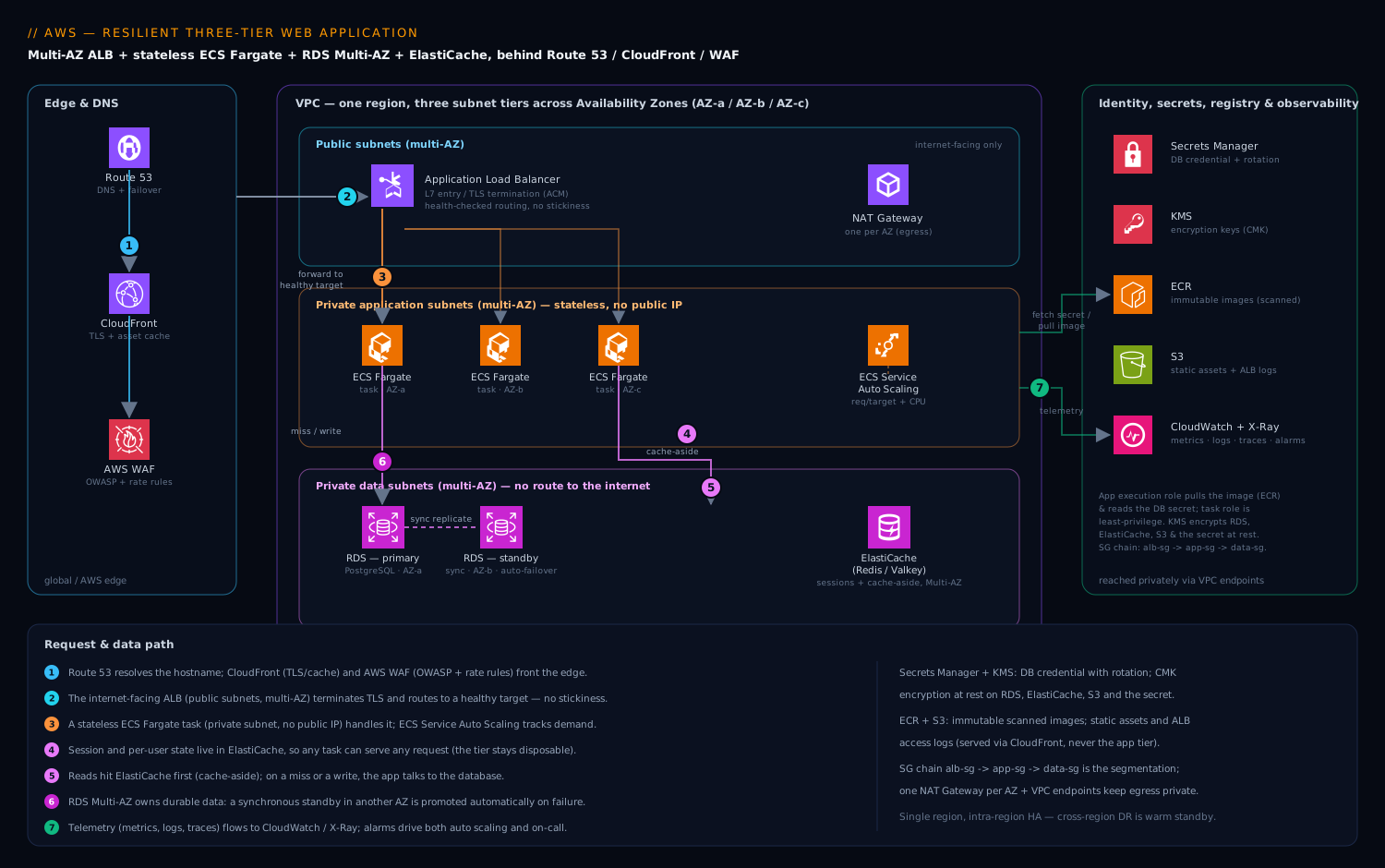
The request path, end to end, for a user hitting the application:
- A client resolves the application hostname via Amazon Route 53 to the Application Load Balancer (ALB). In front of the ALB sits AWS WAF (OWASP managed rule groups, rate-based rules, bot control) and, for a public internet app, optionally Amazon CloudFront for TLS termination at the edge and caching of static assets. TLS certificates come from AWS Certificate Manager (ACM) and are attached to the ALB’s HTTPS listener; HTTP is redirected to HTTPS.
- The ALB lives in the public subnets across multiple AZs and is the only internet-facing component. It terminates TLS, evaluates listener rules (host/path routing), and forwards each request to a healthy target chosen from its target group — without sticky sessions, because the app tier is stateless. The ALB’s health checks continuously probe each task’s
/healthz; an unhealthy task is taken out of rotation automatically, and an unhealthy AZ simply stops receiving traffic. - The target is an ECS Fargate task running the application container in a private application subnet with no public IP. ECS spreads tasks across AZs; ECS Service Auto Scaling (target-tracking on ALB request-count-per-target and/or CPU/memory) adds and removes tasks as load changes, and the ALB registers/deregisters them automatically. The task has a least-privilege IAM task role — it can reach exactly the AWS APIs it needs and nothing else.
- The application handles the request without keeping any user state in its own memory. Session data, user carts, feature flags, and other per-user context live in Amazon ElastiCache (Redis/Valkey), reached over the private data subnets. Because state is external, any task can serve any user’s next request — which is precisely what lets the platform kill, replace, scale, and deploy tasks freely.
- For data the cache can serve, the app reads from ElastiCache first (cache-aside): hot product data, rendered fragments, rate-limit counters, idempotency keys. On a cache miss, or for any write, the app talks to the database.
- The database is Amazon RDS (PostgreSQL or MySQL) in a Multi-AZ deployment in the private data subnets. The application connects through the cluster/primary endpoint; RDS keeps a synchronous standby in another AZ and, on a primary failure, fails over automatically by repointing that DNS endpoint to the promoted standby — the app reconnects and continues. Read replicas (optional) take read-heavy traffic off the primary via a separate reader endpoint. The database credential is never in the app’s config: the task fetches it at startup from AWS Secrets Manager (or uses RDS IAM authentication for a passwordless token), over a private path.
- Telemetry flows out continuously: the ALB, ECS tasks, RDS, and ElastiCache publish metrics to Amazon CloudWatch; the application and the ALB access logs stream to CloudWatch Logs (and the ALB logs to S3); AWS X-Ray (or OpenTelemetry via the ADOT collector) traces requests across the tiers; and CloudWatch alarms drive both auto scaling and on-call alerting.
The data and deployment path, briefly, because resilience includes how state and code move:
- Static assets (JS/CSS/images, user uploads) live in Amazon S3, served through CloudFront with Origin Access Control — they never touch the app tier, which keeps the compute tier truly stateless and cheap.
- Code ships as an immutable container image in Amazon ECR, built and scanned in CI; a deploy is “register a new task definition revision and let ECS do a rolling (or blue/green via CodeDeploy) update” — old tasks drain, new tasks come up healthy, and rollback is “point back to the previous task definition.” There is no AMI to bake and no SSH.
The mental model: the ALB spreads traffic across AZs and hides unhealthy targets; Fargate runs a stateless, disposable app tier that Auto Scaling sizes to demand; ElastiCache holds the session and hot-read state so the tier can stay stateless and the database stays unburdened; and RDS Multi-AZ owns the durable data and fails over on its own. No single instance, in any tier, is something the system depends on.
How the load balancer actually decides a target is healthy — and how it lets one go
Two mechanisms in that request path deserve to be understood as numbers, not just arrows, because they decide how fast a failure is hidden and how gracefully a healthy task leaves. Both are tunable in the same Terraform target group shown later in this article.
Health checks: how long until a dead target stops receiving traffic. The ALB probes each target’s health-check path on a fixed interval and flips a target’s state only after a run of consecutive identical results. The detection time for a task that has just died is therefore not one probe — it is roughly unhealthy_threshold × interval (plus up to one timeout). With the values this article uses in its target group — interval = 15, unhealthy_threshold = 3 — a task that stops responding keeps receiving traffic for up to ~45 seconds before the ALB pulls it out of rotation. Tighten to interval = 10, unhealthy_threshold = 2 and detection drops to ~20 s; tighten too far and you start marking healthy-but-briefly-slow tasks as dead (a garbage-collection pause, a cold cache, a momentary dependency stall) and flapping them in and out — which is its own kind of outage. The mirror knob, healthy_threshold, decides how many good probes a new or recovered task needs before it receives traffic; set it too low and you route users to a task that is still warming up its connection pools and JIT.
The health-check path matters as much as the timing. A good /healthz returns 200 only when the task can genuinely serve — ideally after a shallow dependency check (can I reach the cache and the database?) — but must not itself be so heavy, or so eager to fail on a slow dependency, that one wobbly downstream turns the entire fleet unhealthy at once and takes the site down harder than the original blip would have. A common production split is a cheap liveness signal (“am I running?”, used by the orchestrator to restart a wedged task) and a slightly deeper readiness signal (“can I serve a request right now?”, used by the ALB to route). Keep the ALB’s check on readiness and keep it honest but lightweight.
Connection draining (deregistration delay): how a task leaves without dropping requests. When a task is removed — a scale-in, a deploy, or a failed health check — you do not want its in-flight requests severed. The ALB’s deregistration delay (deregistration_delay = 30 in this article) is the connection-draining window: on deregister, the ALB immediately stops routing new requests to that target but holds existing connections open for up to the delay so in-flight work can finish, then closes them. For a typical web app whose requests complete in well under a second, 30 s is generous; for long uploads, streamed responses, or slow report endpoints, raise it (the range is 0–3600 s) so you are not truncating real work. Draining only helps if the application cooperates with its own shutdown: ECS sends the container a SIGTERM, waits stopTimeout (default 30 s, up to 120 s on Fargate), then SIGKILLs it — so the app should trap SIGTERM, stop accepting new work, finish what it is already holding, and exit before the kill lands. Align the two windows — deregistration delay ≥ the app’s real drain time, and stopTimeout ≥ that too — and a deploy or scale-in is invisible to users; leave them mismatched and every single deploy quietly sheds a handful of requests. (The full menu of ALB/NLB/GWLB knobs is its own topic: the Elastic Load Balancing deep dive.)
Component breakdown
| Component | AWS service | What it does | Key configuration choices |
|---|---|---|---|
| DNS & edge | Route 53 + CloudFront | Hostname resolution; global TLS/cache edge | Route 53 alias record to CloudFront/ALB; health-check-based failover records for DR; CloudFront for static-asset caching and TLS at the edge; HTTP→HTTPS redirect |
| Web Application Firewall | AWS WAF | Filters malicious requests at the edge | AWS Managed Rules (Core/OWASP, Known-Bad-Inputs, IP reputation); rate-based rule per IP; optional Bot Control; associate to CloudFront and/or ALB |
| Load balancer | Application Load Balancer (ALB) | L7 entry, TLS termination, health-checked routing across AZs | Internet-facing, in ≥2 public subnets/AZs; HTTPS listener with ACM cert + modern TLS policy; deletion protection + access logs to S3; no stickiness (stateless app); deregistration delay tuned for graceful drain |
| Compute (app tier) | Amazon ECS on AWS Fargate | Runs the stateless application containers | Tasks in private subnets, no public IP; awsvpc networking (each task its own ENI + security group); spread across AZs; task role (app perms) separate from execution role (pull image, read secrets); rolling or blue/green (CodeDeploy) deploys; Fargate platform version pinned |
| Elasticity | ECS Service Auto Scaling (Application Auto Scaling) | Adds/removes tasks to track demand | Target-tracking on ALBRequestCountPerTarget (primary) + CPU/memory; sensible min/max task count; scale-in cooldown > scale-out; optional scheduled scaling for known peaks; Fargate Spot capacity provider for a fraction of tasks |
| Database | Amazon RDS (PostgreSQL/MySQL), Multi-AZ | Durable relational store with automatic failover | Multi-AZ (standby in another AZ, synchronous replication, automatic failover); storage-encrypted (KMS); automated backups + PITR; deletion protection; enhanced monitoring + Performance Insights; read replicas for read scale; credentials in Secrets Manager or IAM auth; gp3 storage; managed minor-version upgrades in a maintenance window |
| Cache / session store | Amazon ElastiCache (Redis/Valkey) | Session store + cache-aside hot data | Multi-AZ with automatic failover, ≥1 replica per shard; cluster mode for horizontal scale; encryption in transit + at rest, AUTH/RBAC; TTLs on session keys; subnet group in data subnets only |
| Network | Amazon VPC | Isolated network, three subnet tiers × AZs | 3 subnet tiers (public / app / data) across ≥2 AZs; NAT Gateway per AZ for app-tier egress; security groups as the primary firewall (ALB→app→data, each referencing the prior SG); VPC endpoints (ECR, S3, Secrets Manager, CloudWatch) so traffic stays on the AWS network |
| Secrets & keys | AWS Secrets Manager + KMS | Stores DB credentials; manages encryption keys | Secrets Manager with automatic rotation for the DB credential (Lambda rotation), or RDS IAM auth for no stored password at all; KMS CMKs for RDS, ElastiCache, S3, secrets; least-privilege key policies |
| Static assets / logs | Amazon S3 | User uploads, static site assets, ALB/audit logs | CloudFront + Origin Access Control for assets (bucket stays private); versioning + lifecycle for logs; SSE-KMS; Block Public Access on |
| CI/CD | ECR + CodePipeline/CodeBuild (or GitHub Actions) + CodeDeploy | Build, scan, ship immutable images | ECR image scanning (enhanced/Inspector) + immutable tags; task-definition-per-revision; blue/green via CodeDeploy with ALB test listener for safe cutover |
| Observability | CloudWatch + X-Ray | Metrics, logs, traces, alarms, dashboards | Container Insights on the ECS cluster; RDS Performance Insights; ALB/app access logs; X-Ray / ADOT tracing; alarms drive scaling and paging; dashboards as code |
A few choices deserve the “why,” because they are exactly where the textbook three-tier diagram quietly betrays you.
Why the app tier must be stateless — and why that means ElastiCache, not stickiness. The single most consequential decision in this whole architecture is that an application task holds no user state. The lazy alternative is ALB sticky sessions, which pin a user to one task so in-memory session state “works.” It is a trap: stickiness means a task you remove (to deploy, to scale in, or because it died) takes its users’ sessions with it, your traffic is unevenly distributed, and an AZ failure logs out everyone who was pinned there. Externalizing session state to ElastiCache breaks that coupling completely — any task can serve any request, so the platform is free to kill, replace, scale, and rebalance tasks at will, which is the entire source of the architecture’s resilience and elasticity. If you remember one thing: state in the cache is what makes the compute tier disposable, and a disposable compute tier is what makes the system resilient.
Why RDS Multi-AZ rather than a read replica you promote manually. People conflate two different things. A read replica scales reads (asynchronous, can lag, must be promoted by hand on failure — minutes of human-in-the-loop downtime). A Multi-AZ deployment is for availability: a synchronously-replicated standby that RDS promotes automatically, repointing the endpoint DNS, typically in 60–120 seconds, with no human and no data loss (RPO ≈ 0 for committed transactions). You want both for different reasons — Multi-AZ for HA, replicas for read scale — and you must not substitute one for the other. The “Multi-AZ DB cluster” variant (two readable standbys) lowers failover time further and gives you reader endpoints too, at higher cost. Crucially, the application should connect through the endpoint name and use a connection pool that reconnects on failure, so the failover is a brief blip, not an outage.
Why ECS Fargate over EC2 Auto Scaling Groups (and where ASGs still win). Both can run a stateless app tier behind an ALB. Fargate removes the EC2 layer entirely — no AMIs to patch, no node Auto Scaling Group to manage, no SSH, per-task isolation with its own ENI and security group, and you pay per-task vCPU/memory by the second. EC2 with an Auto Scaling Group wins when you need a specific instance type or GPU, want maximum cost control via Reserved/Savings-Plan-backed instances at steady high utilization, or run software that assumes a host. For the typical resilient web app, Fargate’s operational simplicity is worth the modest per-unit premium; this article uses it as the default and notes the ASG alternative where it matters. Either way the pattern — stateless tasks/instances, ALB target group, target-tracking auto scaling across AZs — is identical.
Why security groups that reference each other, not CIDRs. The data tier’s security group should allow the database port from the app tier’s security group, not from a subnet CIDR and certainly not from 0.0.0.0/0. Referencing the source SG means the rule says “only the application may reach the database,” it stays correct as IPs change, and it makes the blast radius legible: a compromised web request can reach the app SG, the app can reach the data SG, and nothing else. This SG-chaining (ALB-SG → app-SG → data-SG) is the network segmentation.
RDS Multi-AZ failover, step by step — what those “60–120 seconds” actually are
“Multi-AZ fails over automatically” is the headline; the mechanism is worth knowing, because your application — not RDS — decides whether that failover is a blip or an outage. In a classic Multi-AZ instance deployment, RDS keeps a standby in a second AZ and replicates to it synchronously: every committed write is on both disks before the client is told “done,” which is exactly why the recovery-point objective is effectively zero committed data lost. The standby is not readable — it exists only to take over. When RDS detects a primary failure (a host or storage fault, an AZ event, or an operator action such as a reboot-with-failover or an instance-class change), it:
- Stops the failed primary and promotes the standby to primary.
- Repoints the DB endpoint’s DNS record (a CNAME) from the old primary’s address to the newly-promoted instance — the endpoint name your app connects to never changes, only what it resolves to.
- Brings up a fresh standby in the background to restore redundancy.
Steps 1–2 are where the ~60–120 seconds go. The catch is step 2: it is DNS. Your application only sees the new primary once it re-resolves that name and reconnects — so a connection pool that clings to its old TCP sockets, or a runtime that caches DNS aggressively (the JVM’s default resolver is the classic offender), can turn a 90-second infrastructure failover into a multi-minute application outage while every query fires at an IP that no longer answers. The fixes are concrete: connect through the endpoint DNS name (never a resolved IP), run a pool that detects broken connections and reconnects with a short validation query, keep the client’s DNS-cache TTL low, and — under many concurrent clients — front the database with RDS Proxy, which holds client connections steady across a failover and can cut the failover-perceived downtime substantially. The newer Multi-AZ DB cluster topology (one writer plus two readable standbys across three AZs) fails over faster (typically ~35 s) and hands you a reader endpoint too, at roughly the cost of the extra node. Either way, hold on to the division of labour from the component table: Multi-AZ is for availability; read replicas are for read scale — the standby will never serve a read, and a read replica will not fail over for you. (Engine-by-engine detail lives in the RDS & Aurora deep dive.)
The single-point-of-failure audit — walk every box and ask “what if this one dies?”
Resilience is not a feeling; it is the result of asking, for every component, “if exactly this one thing fails, is the application down?” — and then having pushed every “yes” you can afford down to “no.” Run the audit across this architecture:
| Component | If one instance dies… | SPOF? | Why — or what saves it |
|---|---|---|---|
| Route 53 | — | No | Global, anycast, managed DNS on a 100% availability SLA; not a box you run |
| CloudFront / WAF | one edge POP fails | No | Global edge network; requests re-route to other points of presence |
| ALB | one node fails | No | AWS runs multiple redundant nodes per AZ; the ALB is a managed multi-AZ fleet, not a single box |
| NAT Gateway | its AZ’s NAT fails | Only if shared | One NAT per AZ removes it; a single shared NAT is a real SPOF for all app-tier egress |
| Fargate task | one task dies | No | The service holds desired_count; ECS restarts it; the ALB had already drained it |
| A whole AZ of tasks | one AZ goes dark | No | Tasks spread across AZs; the ALB stops using the dead AZ; Auto Scaling backfills in the survivors |
| RDS primary | the primary fails | Only if single-AZ | Multi-AZ promotes the synchronous standby automatically (~60–120 s, RPO≈0) |
| ElastiCache node | the primary node fails | Only if no replica | A Multi-AZ replication group promotes a replica; a lone node is a SPOF and a database thundering-herd risk |
| Secrets Manager / KMS / ECR / S3 | — | No | Regional, highly-available managed services |
| The Region | a region-wide outage | Yes — by design | This is a single-region design; a region loss needs the warm-standby DR posture (cross-region replica/snapshots + IaC) described later |
The pattern is stark: every “Only if…” row is a configuration choice — single-AZ RDS, a shared NAT, a replica-less cache — and each is precisely one of the anti-patterns this architecture exists to forbid. The only single point of failure you deliberately keep is the Region, and you retire even that with cross-region DR when the business case justifies the cost. That is the whole game: turn every “yes” you can afford into a “no,” and be explicit about the one “yes” you chose to keep.
Implementation guidance
Provision in layers, each with its own Terraform stack and state, so the long-lived network and the shorter-lived app can evolve independently. Terraform is the common choice on AWS (the AWS CDK or CloudFormation are equally valid; on multi-cloud teams Terraform wins). The layering matters more than the tool:
- Layer 0 — Network & shared (platform). VPC, three subnet tiers across AZs, route tables, NAT Gateway per AZ, Internet Gateway, VPC endpoints (S3 gateway endpoint; interface endpoints for ECR, Secrets Manager, CloudWatch, ECS), Route 53 zone, ACM certificate. Long-lived; changes rarely.
- Layer 1 — Data tier (platform/DBA). RDS Multi-AZ instance/cluster, ElastiCache replication group, their subnet groups and security groups, KMS keys, the Secrets Manager secret + rotation. Stateful; treat with care (
prevent_destroy). - Layer 2 — App tier (app team). ECS cluster, task definition, service, target group, ALB + listeners, WAF web ACL, Application Auto Scaling policies, IAM task/execution roles. Shorter-lived; deploys often.
- Layer 3 — Edge & DNS. CloudFront distribution, S3 asset bucket + OAC, Route 53 alias/failover records. Often co-owned.
A representative Terraform skeleton for the load-balanced, auto-scaled Fargate app tier (Layer 2) — note the stateless target group (no stickiness), the AZ-spread service, and the target-tracking policy on request-count:
# --- ALB across the PUBLIC subnets in every AZ ---
resource "aws_lb" "app" {
  name                       = "web-prod-alb"
  load_balancer_type         = "application"
  internal                   = false
  subnets                    = aws_subnet.public[*].id   # one per AZ
  security_groups            = [aws_security_group.alb.id]
  enable_deletion_protection = true
  drop_invalid_header_fields = true
  access_logs {
    bucket  = aws_s3_bucket.lb_logs.id
    enabled = true
  }
}

resource "aws_lb_target_group" "app" {
  name        = "web-prod-tg"
  port        = 8080
  protocol    = "HTTP"
  target_type = "ip"            # awsvpc / Fargate registers task ENIs
  vpc_id      = aws_vpc.this.id
  deregistration_delay = 30     # graceful drain on scale-in / deploy
  health_check {
    path                = "/healthz"
    healthy_threshold   = 3
    unhealthy_threshold = 3
    interval            = 15
    matcher             = "200"
  }
  # NOTE: no stickiness block — the app tier is stateless (state in ElastiCache)
}

resource "aws_lb_listener" "https" {
  load_balancer_arn = aws_lb.app.arn
  port              = 443
  protocol          = "HTTPS"
  ssl_policy        = "ELBSecurityPolicy-TLS13-1-2-2021-06"
  certificate_arn   = aws_acm_certificate.app.arn
  default_action { type = "forward"  target_group_arn = aws_lb_target_group.app.arn }
}

# --- ECS Fargate service: tasks in PRIVATE app subnets, spread across AZs ---
resource "aws_ecs_service" "app" {
  name            = "web-prod"
  cluster         = aws_ecs_cluster.this.id
  task_definition = aws_ecs_task_definition.app.arn
  desired_count   = 3
  launch_type     = "FARGATE"
  network_configuration {
    subnets          = aws_subnet.app[*].id          # private, no public IP
    security_groups  = [aws_security_group.app.id]
    assign_public_ip = false
  }
  load_balancer {
    target_group_arn = aws_lb_target_group.app.arn
    container_name   = "web"
    container_port   = 8080
  }
  deployment_controller { type = "ECS" }             # or CODE_DEPLOY for blue/green
  deployment_circuit_breaker { enable = true  rollback = true }
}

# --- Auto Scaling: track requests-per-target (primary), 3..20 tasks ---
resource "aws_appautoscaling_target" "app" {
  service_namespace  = "ecs"
  resource_id        = "service/${aws_ecs_cluster.this.name}/${aws_ecs_service.app.name}"
  scalable_dimension = "ecs:service:DesiredCount"
  min_capacity       = 3
  max_capacity       = 20
}

resource "aws_appautoscaling_policy" "rps" {
  name               = "track-requests-per-target"
  policy_type        = "TargetTrackingScaling"
  resource_id        = aws_appautoscaling_target.app.resource_id
  scalable_dimension = aws_appautoscaling_target.app.scalable_dimension
  service_namespace  = "ecs"
  target_tracking_scaling_policy_configuration {
    predefined_metric_specification {
      predefined_metric_type = "ALBRequestCountPerTarget"
      resource_label         = "${aws_lb.app.arn_suffix}/${aws_lb_target_group.app.arn_suffix}"
    }
    target_value       = 1000   # requests/target; scale out above this
    scale_in_cooldown  = 300
    scale_out_cooldown = 60
  }
}
The data tier (Layer 1) is where Multi-AZ and “no password in the app” earn their keep:
resource "aws_db_instance" "app" {
  identifier              = "web-prod-db"
  engine                  = "postgres"
  engine_version          = "16"
  instance_class          = "db.r6g.large"
  allocated_storage       = 100
  storage_type            = "gp3"
  multi_az                = true                 # synchronous standby + auto-failover
  db_subnet_group_name    = aws_db_subnet_group.data.name
  vpc_security_group_ids  = [aws_security_group.data.id]
  storage_encrypted       = true
  kms_key_id              = aws_kms_key.rds.arn
  backup_retention_period = 14                   # PITR window
  deletion_protection     = true
  performance_insights_enabled          = true
  iam_database_authentication_enabled   = true   # passwordless token option
  # username/password sourced from Secrets Manager (see manage_master_user_password)
  manage_master_user_password           = true   # RDS-managed secret + rotation
  auto_minor_version_upgrade            = true
  lifecycle { prevent_destroy = true }
}

resource "aws_elasticache_replication_group" "sessions" {
  replication_group_id       = "web-prod-cache"
  description                = "session + cache-aside"
  engine                     = "valkey"
  node_type                  = "cache.r7g.large"
  num_node_groups            = 1
  replicas_per_node_group    = 2
  automatic_failover_enabled = true              # promote a replica on AZ loss
  multi_az_enabled           = true
  subnet_group_name          = aws_elasticache_subnet_group.data.name
  security_group_ids         = [aws_security_group.data.id]
  at_rest_encryption_enabled = true
  transit_encryption_enabled = true
}
Networking and identity wiring, the load-bearing rules:
- Three subnet tiers, every tier in every AZ. Public subnets hold only the ALB and the NAT Gateways. The app subnets hold the Fargate task ENIs (no public IP, egress via the per-AZ NAT or, better, VPC endpoints). The data subnets hold RDS and ElastiCache and have no route to the internet at all. Use one NAT Gateway per AZ so a single AZ’s failure cannot take out egress for the others (a shared single NAT is a sneaky single point of failure people leave in).
- Security groups chain, default-deny.
alb-sgallows 443 from the internet (or only from CloudFront’s managed prefix list).app-sgallows the app port fromalb-sgonly.data-sgallows 5432/6379 fromapp-sgonly. Nothing references a CIDR for east-west traffic; nothing allows0.0.0.0/0inbound except the ALB. That chain is your microsegmentation. - VPC endpoints keep traffic private and cut NAT cost. Add a gateway endpoint for S3 and interface endpoints for ECR (api + dkr), Secrets Manager, CloudWatch Logs, and ECS. Now image pulls, secret fetches, and log shipping never traverse the NAT/Internet — lower latency, lower data-transfer cost, smaller attack surface.
- Identity is task-scoped and secret-less. The ECS execution role can pull from ECR and read the one secret the container needs; the task role grants the application exactly the AWS APIs it uses (e.g.,
s3:GetObjecton one bucket prefix,kms:Decrypton one key) — not account-wide access. Prefer RDS IAM authentication (the task requests a short-lived auth token via its task role) so there is no database password anywhere; where a password is unavoidable, source it from Secrets Manager with rotation, never an environment variable in the task definition. - Connect through endpoints, pool, and reconnect. The app uses the RDS endpoint DNS name (never a hardcoded IP) and a connection pool (e.g., PgBouncer/RDS Proxy) configured to re-resolve and reconnect on error, so a 90-second Multi-AZ failover surfaces as a brief retry, not a crash. RDS Proxy is worth adding for connection multiplexing and even faster failover handling under many concurrent tasks.
Deployment: ship an immutable image to ECR (scanned by Inspector), register a new task-definition revision, and let ECS do a rolling update with the deployment circuit breaker on (auto-rollback if new tasks fail health checks), or a blue/green deploy via CodeDeploy with an ALB test listener for a zero-downtime cutover you validate before shifting production traffic. There is no AMI and no SSH — rollback is selecting the previous task definition.
Enterprise considerations
Security and Zero Trust. Apply Zero Trust at each tier. Network: the only public component is the ALB (ideally only reachable from CloudFront’s prefix list); the app tier has no public IP; the data tier has no internet route; security groups chain ALB→app→data and deny everything else. Identity: the app runs under a least-privilege task role, the database uses IAM auth or a rotated Secrets Manager credential (no password in config), and human access to the database is via short-lived credentials, not a shared root login. Edge: AWS WAF with managed OWASP, known-bad-inputs, and IP-reputation rule groups plus a rate-based rule blunts L7 attacks and credential-stuffing; AWS Shield Standard is automatic and Shield Advanced is available for DDoS-sensitive apps. Data: encryption at rest (KMS CMKs) on RDS, ElastiCache, S3, and secrets, and encryption in transit everywhere (TLS at the ALB, TLS to RDS, transit encryption on ElastiCache). Posture: turn on GuardDuty (threat detection on VPC flow logs, DNS, and CloudTrail), Security Hub (CIS/AWS Foundational benchmark scoring), and Inspector (image and instance CVEs), and treat findings as a backlog. The blast radius of a compromised web request is now bounded by exactly three security-group hops and one narrowly-scoped IAM role.
Cost optimization (FinOps). Elasticity is the headline lever: target-tracking Auto Scaling means you stop paying for the off-peak fleet that the static estate ran at 8% utilization — capacity tracks load. Beyond that: (1) Fargate Spot for a fraction of the tasks (interruptible web capacity at up to ~70% off — keep a Fargate-on-demand floor for the baseline so a Spot reclaim never drops you below safe capacity); (2) Compute Savings Plans for the steady-state Fargate baseline and Reserved Instances for the long-lived RDS and ElastiCache nodes (these run 24×7, so 1- or 3-year reservations cut 30–60%); (3) gp3 storage (cheaper and independently tunable IOPS vs gp2) and right-sized instance classes guided by Performance Insights and Compute Optimizer; (4) VPC endpoints + CloudFront/S3 for static assets to slash NAT and data-transfer charges (data transfer is the line item teams forget); (5) scheduled scaling to shrink non-prod overnight and weekends; (6) per-team cost allocation tags and a CloudWatch + Cost Explorer showback so each service sees its own bill. The cache itself is a cost optimizer: every read it serves is an RDS query you did not run, which lets the database be smaller.
Scalability. Independent axes: the app tier scales horizontally via ECS Service Auto Scaling on request-count and CPU (seconds to minutes, scale-to-floor not zero for a always-on web app); the database read path scales by adding read replicas behind a reader endpoint (and by leaning on the cache); the cache scales by enabling cluster mode and adding shards; writes scale vertically (bigger RDS instance) and via RDS Proxy to multiplex connections — and when single-writer RDS becomes the ceiling, Aurora (separated storage, up to 15 low-lag replicas, faster failover) is the next step without changing the architecture’s shape. Design every request to be servable by any task (stateless), and keep transactions short so the database stays the part you scale last, not first.
Reliability and DR (RTO/RPO). Inside the region this architecture is HA by design: the ALB and Fargate tasks span multiple AZs, RDS Multi-AZ fails over automatically in ~60–120 seconds (RPO ≈ 0 for committed transactions**)**, ElastiCache Multi-AZ promotes a replica on node/AZ loss, and one NAT Gateway per AZ removes the shared-egress SPOF — losing an entire AZ degrades capacity but does not cause an outage, and Auto Scaling backfills the lost tasks in the surviving AZs. Region loss is the harder case and a deliberate trade-off: this is a single-region design, so cross-region DR is warm standby or backup-and-restore, not active-active. The pragmatic posture: cross-region automated backups / RDS snapshot copy and read replica in a second region for the data (your RPO is the replica lag — seconds to low minutes — or the snapshot cadence for backup-restore); Terraform + the ECR image to stand up the app tier in the DR region (your RTO is “promote the cross-region replica + terraform apply the app stack + flip the Route 53 health-check failover record” — realistically 15–45 minutes warm, hours cold). Geo-replicate (or copy) the ECR image and Secrets to the DR region. The reliability discipline that makes this real is rehearsal: run an AZ-failure game day (kill an AZ’s tasks, force an RDS failover) on a schedule and confirm the blip is a blip — and a region game day at least annually.
Observability. Three signals plus the load balancer’s view. Metrics: Container Insights for ECS task/cluster CPU/memory and task counts; the ALB’s TargetResponseTime, HTTPCode_Target_5XX, RequestCount, HealthyHostCount, and RejectedConnectionCount; RDS CPU, connections, replica lag, freeable memory, and read/write latency; ElastiCache evictions, hit-rate, and CPU. Logs: application logs and ALB access logs to CloudWatch Logs / S3 (queried with Logs Insights / Athena). Traces: X-Ray / ADOT stitch a request across ALB → task → cache → database so you can see which tier a slow request spent its time in. Alarms do double duty — they drive Auto Scaling and page on-call. Alert on SLOs and symptoms (5XX rate, p99 latency, HealthyHostCount dropping, RDS replica lag, cache hit-rate collapse), not raw CPU; a cache hit-rate that falls off a cliff is an early warning that the database is about to be hammered.
Governance. Enforce, do not document. Land this in an AWS Organizations member account governed by Control Tower, with Service Control Policies denying the obvious foot-guns (no public RDS, no 0.0.0.0/0 on database ports, no disabling encryption, region restrictions). AWS Config rules (or conformance packs) continuously assert the invariants — rds-multi-az-support, rds-storage-encrypted, elasticache-redis-cluster-automatic-backup, alb-http-to-https-redirection, vpc-sg-open-only-to-authorized-ports — and report drift. IAM Identity Center governs human access via groups and short-lived sessions. And the infrastructure-as-code repo’s PR history is your change-management record — every production change is a reviewed, attributed, revertable commit, which is exactly what an auditor wants and exactly what “SSH in and edit the AMI” never provides.
Reference enterprise example
Larkfield Outfitters is a (fictional) mid-market direct-to-consumer outdoor-gear retailer running its storefront and account portal on AWS — roughly 180,000 daily active shoppers, spiky around weekend sales and a brutal Black-Friday peak, run by one platform team and three product squads. They started on a pair of hand-built EC2 instances behind a classic load balancer with a single MySQL box. Two incidents in one quarter forced the rebuild: a database reboot during a patch window took the entire site down for 22 minutes, and a flash-sale login storm saturated the fixed two-instance fleet while an engineer scrambled to launch more by hand. A PCI assessment also flagged the plaintext database password baked into the launch template and a database security group open to the whole VPC.
What they built. One VPC in us-east-1 spanning three AZs, three subnet tiers (public/app/data). The app — a containerized Node storefront and a Java account service — runs on ECS Fargate in the private app subnets, stateless, behind an internet-facing ALB across the three public AZs, with CloudFront + WAF (OWASP + a rate-based rule at 2,000 req/5-min/IP) in front and ACM TLS. They deleted ALB stickiness and moved all session state to ElastiCache (Valkey, Multi-AZ, 1 primary + 2 replicas), which doubled as the cache-aside store for the product catalog and rendered category fragments. The database became RDS PostgreSQL db.r6g.xlarge Multi-AZ with two read replicas behind a reader endpoint for the read-heavy catalog and order-history pages, storage encrypted with a KMS CMK, 14-day PITR, and the master credential managed and rotated by RDS in Secrets Manager — the PCI password finding closed itself, and the account service uses RDS IAM auth for token-based, passwordless connections. ECS Service Auto Scaling target-tracks ALBRequestCountPerTarget at 1,000, floor 4 tasks, ceiling 40, with scheduled scaling to pre-warm to 12 tasks before each weekend sale and a Fargate Spot capacity provider carrying ~40% of tasks above the on-demand floor. One NAT Gateway per AZ plus S3 gateway and ECR/Secrets/CloudWatch interface endpoints cut their data-transfer bill and kept image pulls private. Static assets and uploads moved to S3 behind CloudFront with OAC. Deploys went to blue/green via CodeDeploy with the deployment circuit breaker on.
The numbers and decisions. Roughly $5,200/month all-in at their normal weekday load: ~$1,500 Fargate (with a 1-year Compute Savings Plan on the baseline and Spot carrying the burst), ~$1,450 RDS (Multi-AZ primary + 2 replicas, on 1-year Reserved Instances), ~$520 ElastiCache (reserved nodes), ~$430 ALB + data processing, ~$520 CloudFront + WAF, ~$380 NAT + the rest. Black-Friday week roughly 2.4×'d the Fargate and ALB lines as Auto Scaling rode demand to 40 tasks and then scaled back down on Monday — they paid for the peak only while it happened. They debated EC2 Auto Scaling Groups vs Fargate and chose Fargate to delete AMI-patching toil for a team of four; they debated Aurora vs RDS PostgreSQL and chose RDS Multi-AZ for now, with Aurora noted as the upgrade path if the single writer becomes the ceiling. They debated keeping stickiness “to avoid a session-store rewrite” and rejected it outright — externalizing sessions to ElastiCache was the keystone that made every other resilience property possible.
The outcome. The database reboot that caused the 22-minute outage became a non-event: a routine RDS minor-version upgrade now triggers a ~70-second Multi-AZ failover that surfaces as a brief retry blip (the connection pool reconnects to the same endpoint) — they verified it in a game day by forcing a failover during business hours and measured 78 seconds to full recovery with zero committed-data loss. The flash-sale meltdown stopped recurring: a Monday-morning login storm now scales the app tier from 4 to 19 tasks in under three minutes automatically, and the cache absorbs the read storm so RDS CPU barely moves (catalog hit-rate ~94%). They ran an AZ-failure game day — terminated every task in one AZ and pulled its NAT — and the site stayed up on the surviving two AZs while Auto Scaling backfilled the lost tasks in ~90 seconds. For region DR they keep a cross-region read replica in us-west-2 and the ECR image + Terraform ready; a rehearsed failover (promote replica, terraform apply the app stack, flip the Route 53 failover record) measured an RTO of ~28 minutes with an RPO under 30 seconds (replica lag). The PCI assessor’s “credentials in config” and “database network exposure” findings were both closed — by Secrets Manager/IAM auth and the SG chain respectively. Net: an application that no longer has a single instance it depends on, that pays for capacity only when it is used, and that a four-person platform team can actually operate — for a bit over $5k/month at steady state.
When to use it
Use this architecture when you run an important, stateful web or API application that must be highly available within a region and elastic with demand — a customer portal, a storefront, a SaaS app, a line-of-business system — and you want it built on managed services with as little undifferentiated operational toil as possible. It is the correct default for “make our web app resilient and scalable” at essentially any size: it scales down to one squad running one product on small instances and up to a regulated enterprise running a fleet of these behind Organizations/Control Tower; the diagram is the same, only the sizes, account count, and guardrail strictness change. The prerequisites are modest: the app must be (or be made) stateless, with its durable state in RDS and its session/hot-read state in ElastiCache.
Trade-offs to accept going in. This is a single-region, intra-region-HA design. It survives instance and AZ failures gracefully and cheaply; surviving a region failure requires the warm-standby DR posture described above (cross-region replica/snapshots + IaC), which is real work you must build and rehearse — it is not active-active multi-region, and pretending otherwise is the most common way these architectures disappoint. You are also accepting the cost of a synchronous standby and replicas/cache nodes running 24×7 (mitigated by reservations) as the price of the availability they buy.
Anti-patterns that quietly defeat the design:
- Sticky sessions to dodge externalizing state. The single most common failure. Stickiness re-couples users to a task and re-introduces every problem the architecture exists to remove — you cannot deploy or scale without dropping sessions, and an AZ loss logs out everyone pinned there. State goes in ElastiCache; the app tier stays stateless. No exceptions.
- A single-AZ database “to start.” RDS without Multi-AZ means a routine patch, reboot, or host degradation is a full outage — the exact failure this pattern is built to eliminate. Multi-AZ from day one for anything that matters; a read replica is not a substitute for the synchronous standby.
- One NAT Gateway shared across AZs. A money-saving “optimization” that re-introduces a single point of failure for all app-tier egress — if that NAT’s AZ fails, every AZ loses egress. One NAT per AZ (or VPC endpoints to avoid NAT for AWS traffic).
- The database password in the task definition / launch template. A plaintext credential in config is the credential-leak path the architecture is meant to remove. Use RDS IAM auth, or Secrets Manager with rotation — never an environment variable.
- Security groups open to
0.0.0.0/0(or a whole CIDR) on the data tier. This erases the segmentation that bounds your blast radius. Chain SGs by reference (ALB→app→data); only the ALB faces the internet. - A cache used as a database, or with no failover. Putting durable data only in ElastiCache (no RDS of record) means a node loss is data loss; running a single cache node with no replica means a node loss is an outage and a thundering herd onto RDS. Cache is for speed and sessions with TTLs; RDS is the source of truth; run the cache Multi-AZ.
- Hand-baked AMIs and SSH deploys. Mutable, drifting hosts make “what is actually running?” unanswerable and rollback slow. Immutable images in ECR, task-definition revisions, blue/green or rolling deploys with auto-rollback.
Alternatives, in increasing capability and operational cost: (1) A fully serverless app — API Gateway/CloudFront + Lambda + DynamoDB — when your workload fits an event/request model and you want zero server (and zero cache/DB) operations and scale-to-zero economics; the right choice for spiky or low-baseline apps, but a poorer fit for long-lived connections, heavy relational joins, or “lift-and-shift a stateful web app.” (2) AWS App Runner / Elastic Beanstalk — a managed, opinionated wrapper over roughly this same pattern for teams that want even less to configure and can live with less control. (3) This article — ALB + Fargate Auto Scaling + RDS Multi-AZ + ElastiCache — the workhorse default for a resilient, elastic, stateful web app in one region. (4) The same shape with Aurora instead of RDS — when single-writer RDS or failover speed becomes the constraint and you want up to 15 low-lag replicas and faster failover. (5) Active-active multi-region (Route 53 latency/failover routing, Aurora Global Database or DynamoDB Global Tables) — when an entire-region outage is unacceptable and you will pay the substantial complexity and cost of running everywhere at once. Pick the lowest tier that meets your availability and statefulness requirements; most teams reach for multi-region when intra-region HA plus a rehearsed warm standby would have done, and pay for global complexity they did not need. The architecture you can actually operate and rehearse beats the one you merely drew.
Going deeper
The core lesson gets you an architecture that works. This section is for the failure modes and cost lines that separate one that keeps working under load, under a bad deploy, and at the end of the month when the bill arrives. None of it changes the shape of the diagram — it changes whether the shape survives contact with production.
Connection storms, max_connections, and why RDS Proxy exists
A relational database is not an infinitely-parallel thing: every open connection costs memory and a backend process/thread, so RDS caps concurrent connections roughly in proportion to instance memory (PostgreSQL’s default is a formula on DBInstanceClassMemory, MySQL’s max_connections similarly scales). A db.r6g.large might comfortably field a few hundred connections, not tens of thousands. Now do the arithmetic the app tier forces on you: 20 Fargate tasks × a pool of 20 connections each = 400 connections at idle, before a single burst — and the instant Auto Scaling doubles the task count, or a Multi-AZ failover makes every task reconnect at once, you get a connection storm that the database answers with too many connections, which fails health checks, which scales more tasks, which opens more connections. The spiral is real and it is sudden.
Two disciplines tame it. First, pool deliberately: size each task’s pool small (the database, not the app, is the scarce resource), cap total connections to well under the engine ceiling, and set sane idle timeouts. Second, put RDS Proxy between the tasks and the database. The proxy maintains a warm pool to the database and multiplexes many client connections onto few backend ones, so a fleet of 40 tasks can present 40× the client connections without 40× the backend load; it also holds client connections steady through a failover (trimming perceived downtime) and can enforce IAM auth and pull the credential from Secrets Manager itself. It is close to mandatory when the app tier is Lambda (each concurrent invocation is a would-be connection) and very often worth it for a large Fargate fleet. (Full mechanics: RDS Proxy — pooling, failover & IAM auth.)
Cache stampede, cold caches, and the consistency you’re actually buying
The cache is a load-bearing part of the availability story, not just a speed-up — which means its failure modes are availability failure modes. Three to design for:
- Stampede / thundering herd. With plain cache-aside, when a hot key expires, every concurrent request misses at the same instant and they all hit the database together — a self-inflicted spike right on your most popular data. Mitigations: request coalescing (single-flight — the first miss recomputes, the rest wait on it), a short lock-and-refresh on the key, TTL jitter (randomize expiries so keys don’t all die on the same second), and probabilistic early expiration (refresh a hot key slightly before it expires). Even negative caching (cache “not found” briefly) stops a missing key from hammering the DB on every lookup.
- Cold cache. After an ElastiCache failover, a node replacement, or a deploy that changed key formats, the cache is empty and every read is a miss until it refills — the database briefly sees full, un-cached load. Size the database to survive a cold-cache moment, or pre-warm critical keys, or ramp traffic; do not assume the 94%-hit-rate steady state is the load the DB must handle.
- Consistency. Cache-aside is eventually consistent by construction: a write updates the database, and the cache is either invalidated or left to its TTL. Decide the invalidation story explicitly (delete-on-write is simplest and safest; write-through couples the two and can mask DB errors), and treat every cached value as possibly stale up to its TTL. The database is the source of truth; the cache is a fast, disposable, occasionally-wrong copy — and the TTL is the backstop that bounds how wrong.
The auto-scaling control loop — cooldowns, lag, and Spot
Target-tracking scaling is a thermostat, not a light switch. You name a target value for a metric (here, ALBRequestCountPerTarget), and Application Auto Scaling manages hidden CloudWatch alarms that add or remove tasks to hold the fleet near that number. Three consequences follow that beginners miss. It lags. The metric is aggregated over a period (≈1 minute) and the alarm needs a couple of data points, so from “traffic spiked” to “new tasks in service” is realistically 2–4 minutes, not seconds — which is why you choose a target_value with headroom below saturation (scale while there’s slack, not once you’re already overloaded) and why the floor is never zero for an always-on web app: the running tasks must absorb the burst during the lag, and survive losing an AZ, all on their own. It scales out fast and in slow, on purpose: a short scale_out_cooldown reacts to load quickly, a long scale_in_cooldown removes capacity cautiously so a brief dip doesn’t strip tasks you’ll need 90 seconds later. Known peaks beat reactive scaling: for a Monday login storm or a Black-Friday sale, add scheduled scaling to pre-warm capacity before the wave, rather than chasing it up the curve.
On cost, mix capacity: a Fargate Spot capacity provider carries a fraction of tasks at up to ~70% off, but Spot capacity can be reclaimed with a two-minute warning (a SIGTERM you must drain gracefully, exactly like a scale-in), so keep an on-demand base count as the floor and let Spot take the burst via the provider’s base/weight strategy. Graviton (ARM64) Fargate is another lever — cheaper per vCPU for the same throughput if your image is multi-arch. (Production sizing, networking, and deploy detail: ECS Fargate in production.)
The cross-AZ data-transfer bill nobody costs upfront
Spreading three tiers across three AZs is what buys the availability — and it is also a line item. Traffic that crosses an AZ boundary inside a Region is billed inter-AZ data transfer (about $0.01/GB in each direction), and this architecture crosses AZ boundaries constantly: the ALB fans requests to tasks in every AZ, and those tasks talk to an RDS primary and a cache primary that live in one AZ at a time. Two clarifications that save arguments: the ALB’s own cross-zone load balancing is on by default and free for ALB (it is the NLB that charges for cross-zone), so you do not pay for the ALB spreading traffic — you pay for the application’s east-west chatter, task→database and task→cache, when it crosses zones. You cannot (and should not) eliminate it — pinning everything into one AZ would throw away the availability you built — but you manage it: keep chatty request/response payloads lean, lean on the cache (a cache hit in the same AZ is cheaper and faster than a cross-AZ DB round trip), and use VPC endpoints so image pulls, secret fetches, and log shipping ride the AWS network instead of the NAT (NAT processing is its own per-GB charge on top). Model it before it surprises you: at scale, inter-AZ transfer and NAT are routinely a bigger bill than the compute.
The two IAM roles everyone conflates: execution role vs task role
ECS tasks carry two roles and mixing them up is the most common Fargate IAM bug. The execution role is used by the Fargate agent on your behalf, before and around your code: to pull the image from ECR, to fetch the secrets you told the task definition to inject as environment variables, and to ship logs to CloudWatch. The task role is assumed by your application code at runtime for the AWS APIs it calls — s3:GetObject on one bucket prefix, kms:Decrypt on one key, a rds-db:connect token for IAM database auth. They fail differently: a missing execution-role permission means the task won’t even start (image pull or secret fetch fails); a missing task-role permission means the task runs fine but a specific API call returns AccessDenied. Scope both to least privilege and to this service — the task role especially should never be the account-wide “can read every bucket” grant the pre-rebuild snowflake had, because it is precisely the credential a compromised request would try to use.
Safe deploys: the circuit breaker, blue/green, and alarm-driven rollback
Statelessness makes deploys possible; two features make them safe. On a plain ECS rolling update, enable the deployment circuit breaker (enable = true, rollback = true in the service): ECS watches whether the new task set reaches a steady, healthy state, and if the new revision keeps failing health checks it halts the rollout and rolls back to the last good task definition instead of grinding the whole service down one bad task at a time. When you want to validate before you cut over, use blue/green via CodeDeploy: it stands up the new “green” task set alongside “blue,” lets you smoke-test it through the ALB’s test listener, then shifts production traffic all-at-once, or as a canary/linear ramp, watching CloudWatch alarms and auto-rolling-back if error rate or latency crosses a threshold — with a bake window before the old set is torn down so a slow-burn regression still triggers a rollback. Rollback in both models is “point back to the previous task definition,” in seconds, with no AMI to rebuild — the payoff of immutable images.
Where TLS ends, and the WAF you actually have to tune
TLS termination is a choice with a gap beginners miss. You typically terminate at CloudFront and/or the ALB (with an ACM certificate) — but the leg from the ALB to the task can be plain HTTP inside the VPC unless you configure the target group and listener to re-encrypt to an HTTPS backend. For most apps, TLS to the ALB plus a private VPC is fine; for PCI/HIPAA-style requirements you re-encrypt end-to-end so nothing is ever plaintext on the wire, even internally (and the ALB can enforce mTLS for client-certificate use cases). WAF is not fire-and-forget either: each web ACL has a capacity budget in WCUs (default max 1500, raisable by quota) that your rules must fit; a rate-based rule counts requests per source IP over a rolling 5-minute window (re-evaluated frequently, not exactly every 5 minutes) and blocks above the limit; and you should roll managed rule groups out in Count mode first to measure false positives on your traffic before switching them to Block — an over-eager WAF that blocks legitimate logins is an outage you caused.
Practice challenges
Work these top to bottom — they escalate from “read the diagram” to “reason about failover timing and cost.” Try each before opening the solution; the one-line why is the part worth remembering.
1. (Beginner) Spot the single points of failure. A team ships this: one ALB; Fargate tasks in a single private subnet in one AZ; one NAT Gateway; RDS without Multi-AZ; a single ElastiCache node; ALB stickiness on. List every single point of failure and the one-line fix for each.
<details><summary>Solution</summary>
Four SPOFs (plus one coupling): (a) tasks in one AZ → spread the service across ≥2 AZs’ private subnets; (b) single NAT Gateway → one NAT per AZ; © single-AZ RDS → enable Multi-AZ; (d) single cache node → a Multi-AZ replication group with ≥1 replica and automatic_failover_enabled. The coupling: stickiness on re-pins users to a task → turn it off and move session state to ElastiCache. The ALB itself is not a SPOF (managed, multi-AZ).
Why: a SPOF is any single component whose failure takes the app down — resilience means every “one of these” is actually “at least two, across AZs.” </details>
2. (Beginner) Write the security-group chain. Express the three rules that let the internet reach the ALB, the ALB reach the app, and the app reach the database — without any CIDR for the east-west hops.
<details><summary>Solution</summary>
# alb-sg: internet → ALB on 443 (the ONLY 0.0.0.0/0 inbound)
ingress { from_port = 443  to_port = 443  protocol = "tcp"  cidr_blocks = ["0.0.0.0/0"] }

# app-sg: ALB → app on 8080, by SG reference (not a CIDR)
ingress { from_port = 8080 to_port = 8080 protocol = "tcp"  security_groups = [aws_security_group.alb.id] }

# data-sg: app → DB on 5432, by SG reference
ingress { from_port = 5432 to_port = 5432 protocol = "tcp"  security_groups = [aws_security_group.app.id] }
Why: referencing the source SG says “only the app may reach the DB” and stays correct as IPs churn — that chain is the network segmentation; a CIDR rule silently widens the blast radius. </details>
3. (Intermediate) Health-check timing. A target group has interval = 30, unhealthy_threshold = 5, timeout = 10. How long, worst case, before a dead task stops receiving traffic? Retune it for ~20 s detection without inviting flaps, and name the constraint on timeout.
<details><summary>Solution</summary>
Worst case ≈ unhealthy_threshold × interval (+ up to one timeout) = 5 × 30 = 150 s (up to ~160 s). Retune to interval = 10, unhealthy_threshold = 2 → ~20 s. Constraint: timeout must be less than interval (e.g. timeout = 5), and don’t drop the threshold to 1 or you’ll evict tasks on a single transient blip.
Why: detection latency is threshold × interval, not one probe — you trade faster detection against false-positive flapping, so tune both knobs together.
</details>
4. (Intermediate) De-stick a sticky app. An app keeps sessions in process memory and relies on ALB stickiness. List the three concrete changes that make the app tier genuinely stateless.
<details><summary>Solution</summary>
(1) Turn off ALB stickiness (remove the target-group stickiness block). (2) Move session state to ElastiCache (Redis/Valkey) keyed by a signed session-id cookie, with a TTL. (3) Ensure any task can serve any request — no in-memory user state, no local-disk uploads (push those to S3); read/write session from the cache on each request.
Why: once no task holds user state, the platform can kill, replace, scale, and rebalance tasks freely — externalized state is what makes the tier disposable, which is what makes it resilient. </details>
5. (Advanced) Choose a scaling target and a floor. Load testing shows one task saturates near 1,600 ALBRequestCountPerTarget (at ~85% CPU). The architecture sets target_value = 1000 with min_capacity = 3. Justify the 1,000 (not ~1,500) and the floor of 3 (not 1).
<details><summary>Solution</summary>
target_value = 1000 leaves ~40% headroom below saturation so the fleet absorbs a spike during the 2–4 minute scale-out lag instead of overloading before new tasks arrive; a target near 1,600 means you’re already saturated by the time scaling reacts. min_capacity = 3 (≥ the AZ count) keeps live capacity to ride the scale-out lag and survive losing an AZ — a floor of 1 means a single task failure is an outage and there’s nothing to absorb the burst.
Why: target-tracking is a lagging thermostat, so you scale on headroom, and the floor must independently survive both the lag and an AZ loss — never scale a web tier to zero. </details>
6. (Advanced) The failover that lasted 6 minutes. RDS reported an 80-second Multi-AZ failover, but users saw ~6 minutes of 5xx. The app is JVM-based behind a connection pool. Diagnose the gap and give two fixes.
<details><summary>Solution</summary>
The 80 s is infrastructure time; the extra minutes are the application not following the DNS repoint — the pool kept old TCP connections to the dead primary’s IP, and/or the JVM cached the DNS resolution (its default TTL is long), so every query hit an address that no longer answered. Fixes (any two): lower the JVM DNS TTL (networkaddress.cache.ttl to a few seconds); configure the pool to validate + evict + reconnect broken connections; connect via the endpoint name (never a resolved IP); or front the DB with RDS Proxy to hold connections steady across failover.
Why: Multi-AZ failover is a DNS repoint — the app only recovers when it re-resolves and reconnects, so failover-perceived downtime is an application-config property, not an RDS one. </details>
Common beginner mistakes
These are mental-model errors — the wrong picture in your head — as distinct from the architectural anti-patterns listed under “When to use it.” Each is something people believe until production teaches them otherwise.
- “Multi-AZ gives me read scaling.” No. The Multi-AZ standby is not readable — it sits idle purely to take over on failover. Reads scale with read replicas (a separate feature, behind a reader endpoint). Right model: Multi-AZ = availability; read replicas = read throughput. They solve different problems and you often want both.
- “More replicas will speed up my writes.” No. Every write still goes to the single primary; replicas only offload reads. Right model: to scale writes you go up (bigger instance), add RDS Proxy to multiplex connections, shard, or move to Aurora — replicas never help the write path.
- “Auto Scaling reacts instantly, so I can run a floor of one.” No. The metric aggregates over ~1 minute and the alarm needs a couple of data points, so new tasks arrive 2–4 minutes after the spike. Right model: the running fleet must absorb the burst during that lag and survive an AZ loss — so keep a floor ≥ the AZ count and never scale a web tier to zero.
- “The RDS endpoint is basically an IP I can cache.” No. The endpoint is a DNS name whose target changes on failover. Caching the resolved IP (a JVM default, an over-eager pool) means you keep hammering the dead instance. Right model: connect by name, keep DNS TTL short, and reconnect on error — the whole point of Multi-AZ is that the name outlives the instance.
- “TLS terminates at the ALB, so the traffic is encrypted end-to-end.” Not necessarily. The ALB→task leg can be plain HTTP inside the VPC unless you re-encrypt to an HTTPS backend. Right model: decide deliberately — TLS-to-ALB + private VPC is fine for many apps; regulated data wants end-to-end re-encryption.
- “Cross-AZ and cross-region traffic is free — it’s all inside AWS.” No. Inter-AZ data transfer is billed (~$0.01/GB each way), NAT processing is billed per GB, and cross-region replication is billed too. Right model: the AZ spread that buys availability has a data-transfer cost — lean on the cache and VPC endpoints, and model the transfer bill; at scale it can beat the compute bill.
- “ElastiCache is just a faster database, so I can store data only there.” No. A cache is volatile — a node loss or eviction drops whatever wasn’t also in the database. Right model: RDS is the source of truth; the cache is a fast, disposable, occasionally-stale copy with a TTL. Anything that must survive a node failure lives in RDS.
- “Health checks failing means my app is broken.” Often it means the check is wrong: too-aggressive
interval/threshold, atimeoutshorter than a legitimately slow dependency, a/healthzthat fails the whole task when one downstream is slow, or a startup grace period too short so the ALB kills tasks mid-warm-up. Right model: a health check is a tunable contract — make it report readiness honestly and lightly before blaming the app. - “The execution role and the task role are the same thing.” No. The execution role lets Fargate pull the image and fetch secrets before your code runs; the task role is what your application uses for its own AWS calls. Right model: image-pull/secret failures ⇒ fix the execution role; runtime
AccessDenied⇒ fix the task role — and scope both to least privilege.
Glossary
- Three-tier architecture — a web app split into three layers: presentation (routing/edge), application (your business logic), and data (durable store + cache). Each is its own failure and security boundary.
- Availability Zone (AZ) — one or more physically-isolated datacenters within a Region. Spreading across ≥2 AZs is how the app survives losing a whole datacenter.
- VPC (Virtual Private Cloud) — your private, isolated network inside AWS, carved into subnets across AZs.
- Subnet tier — a role-based group of subnets: public (ALB + NAT), private app (tasks, no public IP), private data (RDS/cache, no internet route).
- Stateless — an app tier that keeps no per-user state in its own memory, so any instance can serve any request and any instance is disposable.
- ALB (Application Load Balancer) — the L7 entry point; terminates TLS and routes each request to a healthy target across AZs.
- Health check — the ALB’s periodic probe (
/healthz); a target is pulled afterunhealthy_thresholdconsecutive failures. - Deregistration delay / connection draining — the window the ALB keeps a departing target’s in-flight requests alive (stops sending new ones) before closing connections.
- ECS / Fargate — Amazon’s container orchestrator (ECS) and its serverless compute mode (Fargate) that runs tasks with no EC2 hosts to patch.
- Task / task definition / service — a running container group (task), its immutable blueprint (task definition revision), and the controller that keeps N tasks healthy (service).
- Auto Scaling (target tracking) — adds/removes tasks to hold a metric (e.g.
ALBRequestCountPerTarget) near a target value; lags by minutes. - RDS — managed relational database (PostgreSQL/MySQL/…); AWS runs backups, patching, and replication.
- Multi-AZ — an RDS deployment with a synchronous standby in another AZ that RDS promotes automatically on failure (~60–120 s, RPO≈0). The standby is not readable.
- Read replica — an asynchronous copy that serves reads (scales read throughput); must be promoted manually — not a failover mechanism.
- Failover — automatic promotion of a standby/replica to primary, with the endpoint DNS repointed to it.
- RTO / RPO — Recovery Time Objective (how long to recover) and Recovery Point Objective (how much data you can lose).
- RDS Proxy — a managed pool between app and database that multiplexes connections, smooths failover, and can enforce IAM auth.
- ElastiCache — managed Redis/Valkey; here the session store and cache-aside layer in front of RDS.
- Cache-aside — read the cache first; on a miss, read the DB and populate the cache; writes go to the DB and invalidate the key.
- TTL (time to live) — expiry on a cached/session key; the backstop that bounds how stale a cached value can be.
- Security group (SG) — a stateful instance-level firewall; chained here ALB→app→data by referencing the source SG, not a CIDR.
- NAT Gateway — gives private subnets outbound internet; run one per AZ to avoid a shared SPOF.
- VPC endpoint — a private path to AWS services (S3 gateway; interface endpoints for ECR, Secrets Manager, CloudWatch) that avoids the NAT/internet.
- Secrets Manager — stores/rotates credentials (e.g. the DB password) so nothing sits in config or environment variables.
- KMS / CMK — Key Management Service and its customer-managed keys used to encrypt RDS, ElastiCache, S3, and secrets at rest.
- IAM task role vs execution role — the task role is what your app code uses for AWS calls; the execution role is what Fargate uses to pull the image and fetch secrets before your code runs.
- WAF — Web Application Firewall at the edge (managed OWASP rules + a rate-based rule); tune in Count mode before Block.
- CloudFront / OAC — the CDN edge (TLS + static-asset caching); Origin Access Control keeps the S3 asset bucket private.
- ECR — the container image registry; deploys ship an immutable image here, scanned before release.
- SPOF (single point of failure) — any one component whose failure takes the whole app down; the design’s job is to have none you didn’t choose.