In a nutshell
Level: Intermediate · Time: ~72 min
Picture a secure apartment block where none of the flats has a street-facing door. To visit anyone you walk up to a single staffed lobby desk, the concierge checks you against the building’s guest list, and only then does the lift take you to the right floor — and a camera logs the whole visit. Azure Bastion is that lobby desk for your virtual machines. The VMs lose their “street door” (their public IP and open 3389/22), the concierge is a managed service that checks every visitor against Microsoft Entra (the guest list), and the connection is brokered over one guarded entrance — HTTPS on port 443 — instead of dozens of exposed management ports scattered across the estate.
Why a beginner should care: the number-one way attackers get a foothold in a cloud estate is an internet-facing RDP or SSH port getting brute-forced or hit by a fresh CVE. The old fix was a jump box — one hardened VM you connect to first — but that is still a street door you own, patch, and answer for in every audit. Bastion removes the door entirely. Your VMs become private-only; the only thing on the internet is the concierge desk on 443 (and on the Premium tier, even that can be made private). Access becomes an identity decision you can govern with MFA and just-in-time elevation, and every session lands in an audit log you can query.
This lesson is a table-dense working reference, so the beginner’s job is to build the mental model first, then keep the tables open as a lookup. The three ideas that make everything else click: (1) Bastion lives inside your network in a special subnet and reaches VMs by their private address — so the VM needs no public IP; (2) the tier you pick (Developer → Basic → Standard → Premium) is a one-way ratchet that unlocks features, and the day-to-day engineering ones start at Standard; (3) Bastion shrinks the attack surface but does not turn the knobs for you — identity, the subnet’s firewall rules, and link hygiene are still yours to set.
Before you start, you want to be comfortable with what a virtual network, a subnet, an NSG (the subnet’s firewall), and a public IP are — if any of those are fuzzy, the Prerequisites section below names the earlier lessons to read first. You should be able to open Azure Cloud Shell and run an az command, and you should know that RBAC is just “who is allowed to do what.”
After this lesson you will be able to, in plain terms: choose the right Bastion tier on purpose (and know why you can’t take it back); lay down the mandatory AzureBastionSubnet correctly; connect from your own terminal with real ssh/scp/mstsc instead of a browser canvas; hand a vendor a safe, time-boxed link with no Azure account; record and audit sessions for a compliance auditor; and retire your old jump boxes without locking yourself out. The precise, exam-aligned version of those goals is in Learning objectives next — this box is just the map.
Every public IP on a workload VM is an open invitation to the internet’s background noise of credential-stuffing bots and CVE scanners. The traditional answer was a jump box: one hardened VM with a public IP and RDP/SSH behind an NSG and a VPN — still an internet-facing host you patch, monitor, and explain to your auditor. Azure Bastion removes it. It is a managed, agentless PaaS service that brokers RDP and SSH over TLS 443, so your VMs need no public IP, no inbound 3389/22 from the internet, and no agent inside the guest. The Bastion host lives in a dedicated subnet inside your VNet, reaches your VMs over their private IPs, and presents the session either as an HTML5 canvas in the portal or — far more usefully at scale — as a native mstsc/OpenSSH session tunnelled through the broker.
This guide goes past the portal “Connect” button into the part that matters in production: native client tunneling for scp/Ansible/full RDP, shareable links for third parties with no Azure account, session recording for PCI/HIPAA/SOC 2 evidence, IP-based connections for on-prem and peered targets, hub-and-spoke reuse so one host serves the whole estate, and the methodical decommissioning of your legacy jump boxes. Because Bastion is a security control you operate, not a one-time deploy, the SKUs, subnet rules, NSG flows, RBAC roles, error codes, limits and cost levers are all laid out as scannable tables — read the prose once, then keep the tables open when you are sizing a host, debugging a hung session, or answering a QSA.
By the end you will know exactly which SKU to deploy and why you cannot downgrade it, how to size AzureBastionSubnet and the scale units so 200 operators connect during a release window, how to wire native tunneling and prove it with scp, how to gate every session behind Conditional Access and PIM, and how to read BastionAuditLogs to close the loop with your auditor. Knowing which knob fixes a hung connection in ninety seconds is what separates a controlled cutover from a week of “the vendor still can’t get in.”
What problem this solves
Remote administrative access is the single richest target in any estate. A workload VM with a public IP and an NSG rule allowing 3389 from Any (or even from a “corporate range” that turns out to be a /8) is permanently exposed to password-spray and to whatever RDP/SSH CVE is current that quarter. The classic mitigation — a jump box behind a VPN — does not remove the exposure, it relocates it onto one box you now own end to end: you patch its OS, rotate its credentials, monitor its logins, size its public IP, and answer for it in every audit. And a jump box is still an interactive host an attacker can pivot from once they are on it.
What breaks without Bastion: an on-call engineer cuts a “temporary” NSG hole and public IP for a vendor and forgets to close it; a contractor’s laptop with a cached SSH key walks out the door and the key is still trusted; an auditor asks “show me who RDP’d into the cardholder-data box last Tuesday and what they did,” and there is no recording, only a Windows Security log on the box itself (which the same admin could clear). Meanwhile the management ports stay open 24/7 because closing them breaks access, so the attack surface is permanent.
Who hits this: every team running IaaS VMs that need interactive administration — which is most of them. It bites hardest on regulated estates (PCI-DSS, HIPAA, SOC 2, ISO 27001) that mandate no public IPs on in-scope hosts and recorded admin sessions; on hub-and-spoke platforms where per-VNet jump boxes multiply cost and operational surface; and on hybrid shops that need the same broker to reach on-prem servers over ExpressRoute. Bastion’s promise is concrete: zero public IPs on workloads, zero inbound management ports from the internet, identity-governed access, and an immutable session ledger — provided you pick the right SKU and turn the right knobs, which is exactly what defaults will not do for you.
To frame the field before the deep dive, here is every access pattern Bastion replaces or enables, the pain it removes, and the SKU floor it needs:
| Access pattern | Pain it removes | Bastion feature | Minimum SKU |
|---|---|---|---|
| RDP/SSH from the portal (HTML5) | Public IP + open 3389/22 on the VM |
Browser connect over TLS 443 | Basic |
Terminal-native SSH / scp / Ansible |
HTML5 canvas can’t run real tooling | Native client tunneling | Standard |
Full mstsc RDP (multi-monitor, drives) |
Browser RDP is a limited canvas | az network bastion rdp / tunnel |
Standard |
| Third-party access (no Azure account) | Temporary public IP + NSG hole for a vendor | Shareable links | Standard |
| Reach on-prem / peered private-IP hosts | Separate jump box per network | IP-based connection | Standard |
| Recorded admin sessions for audit | No tamper-evident session evidence | Session recording | Premium |
| No public IP on the Bastion host itself | The broker is itself internet-facing | Private-only deployment | Premium |
Learning objectives
By the end of this article you can:
- Choose between the Developer, Basic, Standard, and Premium SKUs deliberately, and explain why you can only upgrade — never downgrade — and what each tier actually unlocks.
- Lay down a correct
AzureBastionSubnet(/26minimum, exact name, nothing else in it) with a Standard Static public IP and zone-redundant scale units sized to peak concurrency. - Wire native client tunneling for SSH, RDP, and
scp/file transfer, and explain the difference betweenaz network bastion ssh,tunnel, andrdp. - Issue and revoke shareable links as time-boxed grants, and enable IP-based connections to reach on-prem and peered targets the same broker.
- Stand up session recording to an immutable, CMK-encrypted storage account and stream
BastionAuditLogsto Log Analytics, then query the connection ledger in KQL. - Centralise one Bastion in a hub across peered spokes with the correct peering flags, and explain why the second (transitive) peering hop does not work.
- Harden the host with the mandatory NSG flow set, Conditional Access, least-privilege RBAC, and PIM, and pair it with Defender for Cloud JIT so ports open only to the broker subnet.
- Right-size the bill and decommission legacy jump boxes methodically, stripping their public IPs only after Bastion access is proven.
Prerequisites & where this fits
You should already understand Azure networking fundamentals: a virtual network is an address space carved into subnets, traffic between subnets and peered VNets is governed by NSGs and route tables, and a VM reaches the world through a public IP (or, increasingly, should not). If those words are fuzzy, read Azure Virtual Network Deep Dive: Every Setting and Azure Virtual Network basics: subnets, NSGs, peering first. You should be comfortable running az in Cloud Shell, reading JSON output, and you should know what a managed identity and an RBAC role assignment are at a basic level.
This sits in the Security / secure-access track of the Azure Zero-to-Hero program. It is downstream of VNet design and upstream of the broader Azure Zero Trust multilayer security model, of which “no public IPs, identity-governed access” is a pillar. It pairs tightly with Microsoft Entra Conditional Access at scale (which gates native sessions), PIM for Azure resources (which makes even the connect right just-in-time), and Azure Monitor & Application Insights for observability (where the audit ledger lands). If you also need outbound egress control off those now-public-IP-less VMs, Azure NAT Gateway for deterministic egress is the complement.
A quick map of which layer owns what, so you call the right person when a session won’t land:
| Layer | What lives here | Who usually owns it | Failure it can cause |
|---|---|---|---|
| Identity (Entra) | RBAC, Conditional Access, PIM | Identity team | Connect denied; CA blocks the session |
| Bastion host | SKU, scale units, tunneling flag | Platform / network | Native subcommands fail; concurrency capped |
AzureBastionSubnet + NSG |
Subnet size, the mandatory flow set | Network team | Silent break of 443/4443 or egress |
| VNet peering | allowForwardedTraffic, transitivity |
Network team | Spoke VM unreachable from hub host |
| Target VM | Private IP, guest firewall, local creds | App / VM team | RDP/SSH refused inside the guest |
| Storage + Key Vault | Recording container, CMK, immutability | Platform / security | Recordings not written or tamperable |
Core concepts
Six mental models make every later decision obvious.
Bastion is a broker inside your VNet, not a gateway at its edge. The Bastion host is a set of managed VMs (Microsoft calls each a scale unit or instance) that live in a dedicated subnet named exactly AzureBastionSubnet. A client reaches Bastion over TLS 443 — from the portal or, with tunneling, from the local CLI — and Bastion reaches the target VM over its private IP using ordinary 3389/22 from inside the VNet. Because the broker is in the VNet, the target needs no public IP and no internet-facing port; the only public surface is Bastion’s own 443 (and even that disappears with the private-only Premium deployment).
The SKU is a one-way ratchet. Bastion has four tiers — Developer, Basic, Standard, Premium — and each adds features the one below lacks. You can upgrade in place (Basic→Standard→Premium) but you cannot downgrade; to go down a tier you delete and redeploy. Pick deliberately, because the gaps are large: native tunneling, shareable links, custom ports, file transfer and IP-based connections all start at Standard, and session recording and private-only deployment are Premium-only.
The subnet name and size are load-bearing, not cosmetic. The platform keys off the literal name AzureBastionSubnet — call it anything else and Bastion will not deploy. The minimum size for any Bastion created on or after 2 November 2021 is /26; a /27 is rejected, and a grandfathered /27 cannot scale host instances. The subnet holds nothing else: no NICs, no NAT gateway, no other resource. NSGs and route tables are supported on it, but the address space is Bastion’s alone.
Host scaling is how Bastion serves concurrency. Each scale unit handles roughly 20 concurrent RDP or 40 concurrent SSH sessions. Basic is fixed at 2 instances; Standard and Premium let you set 2–50. You size to peak concurrency, not VM count — a release window with 200 simultaneous operators wants ~10 instances, which is the real reason the subnet must be /26. Scale units and zone redundancy (pinning instances across zones 1/2/3) are chosen at deploy time; zones are immutable afterward, scale units you can adjust on Standard/Premium.
Native client tunneling is what makes Bastion usable for engineers. The browser HTML5 session is fine for a one-off click. For anyone who lives in a terminal, runs scp, drives Ansible, or wants a real mstsc session, the native client path (az network bastion ssh | tunnel | rdp) opens a local connection that tunnels through the broker. It requires Standard+ with the tunneling flag explicitly enabled — --enable-tunneling true — or the subcommands fail even on the right SKU.
Bastion shrinks the attack surface but is not a free pass. It removes public IPs and open ports, but the right to connect is still an RBAC outcome you must grant least-privilege, native sessions still authenticate through Entra (so Conditional Access applies), the subnet still needs a precise NSG flow set or it breaks silently, and a shareable link left standing is a standing exposure. Bastion replaces the jump box’s risks with a smaller, governable set — but only if you turn the knobs.
The vocabulary in one table
Before the deep sections, pin every moving part. The glossary repeats these for lookup; this is the mental model side by side:
| Concept | One-line definition | Where it lives | Why it matters |
|---|---|---|---|
| Bastion host | Managed broker for RDP/SSH over TLS | AzureBastionSubnet in your VNet |
The thing you deploy; SKU-gated |
| Scale unit (instance) | One managed VM behind the host | In the subnet | Concurrency: ~20 RDP / ~40 SSH each |
AzureBastionSubnet |
The mandatory dedicated subnet | In the VNet | Exact name + /26; nothing else in it |
| SKU tier | Developer / Basic / Standard / Premium | Host property | One-way upgrade; gates every feature |
| Native client tunneling | Local CLI session through the broker | Client + host | Real scp/ssh/mstsc; Standard+ |
| Shareable link | URL to one VM, no Azure account | Host feature | Vendor access; auth = VM’s own creds |
| IP-based connection | Reach a target by private IP | Host feature | On-prem / peered hosts; Standard+ |
| Session recording | Video of the RDP/SSH session | Premium → your storage | Tamper-evident audit evidence |
BastionAuditLogs |
Diagnostic log of each connection | Log Analytics | The who/when/what ledger |
| JIT VM access | Defender opens ports time-boxed | NSG via Defender | Ports open only to the broker subnet |
| Private-only | Bastion host with no public IP | Premium property | Removes the last public surface |
| Forwarded traffic | Peering flag letting brokered traffic transit | Peering config | Required for hub-and-spoke reach |
1. Pick the SKU before you touch a subnet
The SKU decides which features exist and you cannot downgrade later — only upgrade. Choose deliberately; the gaps between the four tiers are large, and discovering a missing feature mid-engagement (no native SSH, no file copy, no shareable link) means a delete-and-redeploy under pressure.
The full feature matrix, every row:
| Feature | Developer | Basic | Standard | Premium |
|---|---|---|---|---|
| Cost model | Free (shared) | Hourly + data | Hourly + data | Hourly + data |
| Dedicated deployment | No (shared fabric) | Yes | Yes | Yes |
AzureBastionSubnet required |
No | Yes | Yes | Yes |
| VNet peering reach (hub-spoke) | No | Yes | Yes | Yes |
| Concurrent connections | 1 | Fixed | Scales | Scales |
| Host scaling (instances) | No | Fixed (2) | 2–50 | 2–50 |
| Zone redundancy | No | Yes | Yes | Yes |
Native client (tunnel/ssh/rdp) |
No | No | Yes | Yes |
| Custom inbound ports | No | No | Yes | Yes |
| File transfer (upload/download) | No | No | Yes | Yes |
| Shareable links | No | No | Yes | Yes |
| IP-based connection | No | No | Yes | Yes |
| Kerberos authentication | No | No | Yes | Yes |
| Private-only deployment (no public IP) | No | No | No | Yes |
| Session recording | No | No | No | Yes |
| Upgrade path | redeploy | →Standard/Premium | →Premium | terminal |
The practical read on each tier — what it is for and the trap it sets:
| Tier | Use it for | The trap |
|---|---|---|
| Developer | Personal dev/test convenience; free | One concurrent connection; no peering → cannot serve hub-and-spoke; shared fabric |
| Basic | Browser-only RDP/SSH on a single VNet | No native client, no file copy, no shareable links — you hit the wall the first real day |
| Standard | The platform baseline | Lacks session recording and private-only — fine until an auditor or a private-only mandate appears |
| Premium | Regulated estates needing recording / private-only | Highest hourly rate; overkill if you owe no session audit trail |
The decision in one table — match your requirement to the floor SKU:
| If you need… | Smallest SKU | Why |
|---|---|---|
| A free sandbox, one VNet, one session | Developer | Shared fabric, no peering, single connection |
| Browser RDP/SSH, dedicated host, one VNet | Basic | Dedicated but feature-bare |
Native ssh/scp/mstsc, custom ports, file copy |
Standard | All the day-to-day engineering features live here |
| Shareable links for vendors | Standard | First tier with the feature |
| Reach on-prem / peered private IPs | Standard | IP-based connection |
| Recorded sessions for PCI/HIPAA/SOC 2 | Premium | Session recording is Premium-only |
| No public IP on the Bastion host itself | Premium | Private-only deployment is Premium-only |
| Hub-and-spoke serving many spokes | Standard (Premium if recording) | Peering reach starts at Basic; features at Standard |
The practical rule: for a centralized, shared Bastion in a hub, deploy Standard at minimum and Premium if you owe anyone a session audit trail or a private-only host. Developer is a personal convenience, not platform infrastructure; Basic I rarely deploy because the first request for a native SSH session or a file copy strands you.
2. Subnet design, host scaling, and zones
Bastion (every SKU except Developer) requires a dedicated subnet named exactly AzureBastionSubnet. This is not a convention you may vary — the platform keys off the literal string. The rules people get wrong, each with its consequence:
| Rule | Requirement | What breaks if you ignore it |
|---|---|---|
| Subnet name | Exactly AzureBastionSubnet |
Deployment fails / Bastion not offered for the subnet |
| Subnet size | /26 or larger (post 2 Nov 2021) |
/27 rejected; grandfathered /27 can’t scale instances |
| Subnet contents | Bastion only — no NICs, NAT GW, other resources | Conflicts; Bastion deploy refused |
| NSG | Supported, but must allow the required flow set | Over-zealous NSG silently breaks 443/4443 |
| Route table | Tolerated; don’t force-tunnel Bastion’s own egress | A 0.0.0.0/0 UDR to an NVA can blackhole the control plane |
| Public IP | Standard SKU, Static allocation | Dynamic / Basic-SKU IP rejected |
| Delegation | None required | — |
Lay the network down with the /26 subnet and a Standard, Static public IP — Bastion will not accept a Dynamic or Basic-SKU IP:
RG=rg-hub-network
LOC=eastus
VNET=vnet-hub
BASTION=bastion-hub

# Dedicated /26 subnet — the name is mandatory and case-sensitive
az network vnet subnet create \
  --resource-group "$RG" \
  --vnet-name "$VNET" \
  --name AzureBastionSubnet \
  --address-prefixes 10.0.255.0/26

# Standard SKU, Static allocation, zone-redundant — all required/recommended
az network public-ip create \
  --resource-group "$RG" \
  --name pip-bastion-hub \
  --sku Standard \
  --allocation-method Static \
  --zone 1 2 3
resource bastionSubnet 'Microsoft.Network/virtualNetworks/subnets@2023-11-01' = {
  parent: vnet
  name: 'AzureBastionSubnet'   // exact name — platform requirement
  properties: {
    addressPrefix: '10.0.255.0/26'   // /26 minimum
  }
}

resource bastionPip 'Microsoft.Network/publicIPAddresses@2023-11-01' = {
  name: 'pip-bastion-hub'
  location: location
  sku: { name: 'Standard' }                 // Standard required
  zones: [ '1', '2', '3' ]                   // zone-redundant
  properties: { publicIPAllocationMethod: 'Static' }   // Static required
}
Host scaling is how Bastion handles concurrency. Each scale unit is a managed VM behind the service. Basic is fixed at two; Standard and Premium let you set 2 to 50. Size to peak concurrency, not VM count. The sizing reference — pick the smallest instance count that covers your peak:
| Scale units | ~Concurrent RDP | ~Concurrent SSH | Subnet draw | Typical use |
|---|---|---|---|---|
| 2 (Basic / Standard floor) | ~40 | ~80 | small | Small team, single VNet |
| 4 | ~80 | ~160 | small | Mid platform, a few spokes |
| 8 | ~160 | ~320 | moderate | Regional hub, release windows |
| 10 | ~200 | ~400 | moderate | 200-operator release; the /26 payoff |
| 20 | ~400 | ~800 | larger | Large estate, many spokes |
| 50 (max) | ~1,000 | ~2,000 | largest | Very large multi-spoke estate |
az network bastion create \
  --resource-group "$RG" \
  --name "$BASTION" \
  --vnet-name "$VNET" \
  --public-ip-address pip-bastion-hub \
  --sku Standard \
  --scale-units 4 \
  --location "$LOC" \
  --zone 1 2 3 \
  --enable-tunneling true
--enable-tunneling true is the switch that turns on native client support. Without it, the tunnel/ssh/rdp subcommands in the next step fail even on a Standard SKU. The create-time flags that are immutable versus mutable — get the immutable ones right the first time:
| Property | Set at | Mutable later? | Notes |
|---|---|---|---|
| SKU tier | Create | Upgrade only | Basic→Standard→Premium; no downgrade |
| Availability zones | Create | No | Cannot re-zone a live Bastion |
| Scale units | Create | Yes (Std/Prem) | 2–50; raise/lower as concurrency changes |
--enable-tunneling |
Create or update | Yes | Required for native client |
--enable-ip-connect |
Create or update | Yes | Required for IP-based connection |
--enable-kerberos |
Create or update | Yes | For AD-joined target auth |
| Public IP | Create | Replaceable | Standard + Static only |
Zone redundancy is set at deployment and immutable afterward — you cannot re-zone a live Bastion. In supported regions, pin instances across zones 1, 2, and 3 so a single zone failure does not sever all remote access during an incident, which is precisely when you need it most. If you skip zones and the region has a zonal event, your break-glass path is gone at the worst possible moment.
3. Native client tunneling for SSH, RDP, and file transfer
The browser experience is fine for a one-off. For engineers who live in a terminal, want scp, run Ansible, or need an RDP session richer than an HTML5 canvas, native client tunneling is what makes Bastion usable day to day. It requires Standard SKU or higher with tunneling enabled. There are three relevant subcommands, and the distinction matters — pick the right one:
| Subcommand | What it does | Auth options | Best for | SKU |
|---|---|---|---|---|
az network bastion ssh |
Interactive SSH straight to a Linux VM | AAD, ssh-key, password |
Quick terminal session, no local port | Standard+ |
az network bastion tunnel |
Raw local TCP tunnel to any target port | n/a (transport only) | scp, DB clients, full RDP, anything |
Standard+ |
az network bastion rdp |
Launches native mstsc to a Windows VM |
Windows creds | Native Windows RDP experience | Standard+ |
The --auth-type values for ssh, with their trade-offs:
--auth-type |
Extra flags | What governs access | Trade-off |
|---|---|---|---|
AAD |
none | Entra RBAC + Conditional Access | No keys to manage; needs the AAD login extension on the VM and the VM login role |
ssh-key |
--username, --ssh-key |
The key file | Familiar; key can walk out on a laptop |
password |
--username |
Local credential | Simplest; weakest; avoid in prod |
az network bastion ssh opens an interactive SSH session straight to a Linux VM by its resource ID — no public IP, no local port wrangling:
az network bastion ssh \
  --name "$BASTION" \
  --resource-group "$RG" \
  --target-resource-id "/subscriptions/<sub>/resourceGroups/rg-app/providers/Microsoft.Compute/virtualMachines/vm-linux-01" \
  --auth-type AAD
--auth-type AAD (Microsoft Entra login) is my default — access is governed by RBAC and Conditional Access instead of a key file that walks out the door on a laptop. It requires the AADSSHLoginForLinux VM extension and the Virtual Machine User Login role on the target.
az network bastion tunnel is the workhorse. It opens a raw local TCP tunnel to an arbitrary port on the target that you point any client at — real scp, a database client over the same broker, or a full RDP client:
# Open a local tunnel: localhost:50022 -> VM:22 through Bastion
az network bastion tunnel \
  --name "$BASTION" \
  --resource-group "$RG" \
  --target-resource-id "/subscriptions/<sub>/resourceGroups/rg-app/providers/Microsoft.Compute/virtualMachines/vm-linux-01" \
  --resource-port 22 \
  --port 50022
With that tunnel up, every ordinary tool just works against localhost:50022:
# In a second terminal — standard OpenSSH, standard scp, no Bastion awareness
ssh -p 50022 azureuser@127.0.0.1
scp -P 50022 ./deploy.tar.gz azureuser@127.0.0.1:/tmp/

# RDP example: tunnel 3389, then point mstsc at the local port
az network bastion tunnel -n "$BASTION" -g "$RG" \
  --target-resource-id "<vm-windows-id>" --resource-port 3389 --port 53389
# then: mstsc /v:localhost:53389
Common tunnel targets and the local-port convention people use — the tunnel is protocol-agnostic, so anything TCP works:
| Target service | --resource-port |
Typical local --port |
Client you point at it |
|---|---|---|---|
| SSH | 22 | 50022 | ssh -p 50022 user@127.0.0.1 |
| RDP | 3389 | 53389 | mstsc /v:localhost:53389 |
| SQL Server | 1433 | 51433 | sqlcmd -S 127.0.0.1,51433 |
| PostgreSQL | 5432 | 55432 | psql -h 127.0.0.1 -p 55432 |
| WinRM (HTTPS) | 5986 | 55986 | PowerShell remoting |
| Custom app/admin | any | any | any TCP client |
For Windows users who want the native RDP experience without managing a tunnel, az network bastion rdp launches mstsc directly:
az network bastion rdp `
  --name $Bastion `
  --resource-group $RG `
  --target-resource-id "<vm-windows-id>"
The tunnel runs only as long as the CLI process lives. For automation, background it and capture the PID so a pipeline step can tear it down deterministically rather than leaking an open broker session.
The native-client prerequisites people miss — verify all of these before debugging a “tunnel won’t open”:
| Prerequisite | Check / fix | Symptom if missing |
|---|---|---|
| SKU is Standard+ | az network bastion show --query sku.name |
Subcommand errors “not supported on this SKU” |
| Tunneling enabled | --query enableTunneling is true |
Subcommand errors even on Standard |
| Azure CLI ≥ 2.32 + SSH extension | az extension add --name ssh |
az network bastion ssh not found |
| RBAC: Reader on Bastion + VM, NIC action | Role assignments | “Authorization failed” before connect |
| NSG allows the flow set | Section 7 table | Connect hangs / times out |
For --auth-type AAD |
AADSSHLogin extension + VM User Login role | Falls back / auth fails |
4. Shareable links and IP-based connections
Two Standard-and-up features cover the awkward access scenarios that NSG rules cannot. They look similar but solve different problems — one is about who (a person with no Azure account), the other about what (a target that isn’t an Azure VM resource):
| Feature | Solves | Auth against | Target identified by | Lifecycle risk |
|---|---|---|---|---|
| Shareable link | Third party with no Azure account | The target VM’s own creds | VM resource ID | A standing link = standing exposure |
| IP-based connection | Non-Azure / peered private-IP host | Whatever the host uses | Private IP address | Reaches anything routable from the subnet |
Shareable links generate a URL that lets a user connect to a specific VM via RDP/SSH without an Azure account or portal access. They authenticate against the target VM’s own credentials (local username/password or key), not against Entra. This is the sane answer to “the vendor needs to RDP into the staging box for two days” — far better than cutting a temporary public IP and an NSG hole. Create the link scoped to one VM:
az network bastion create-shareable-link \
  --name "$BASTION" \
  --resource-group "$RG" \
  --vm-id "/subscriptions/<sub>/resourceGroups/rg-app/providers/Microsoft.Compute/virtualMachines/vm-staging-01"
When the engagement ends, revoke it — do not let it rot:
az network bastion delete-shareable-link \
  --name "$BASTION" --resource-group "$RG" \
  --vm-id "<vm-staging-01-id>"

# List standing links so you can audit and prune them on a schedule
az network bastion list-shareable-link \
  --name "$BASTION" --resource-group "$RG" -o table
The shareable-link governance rules — treat every link as a time-boxed grant:
| Concern | Practice |
|---|---|
| Scope | One link per VM; never a blanket grant |
| Duration | Time-box with a calendar reminder or automation that deletes on schedule |
| Auth | The target VM’s own credentials — keep those strong and rotated |
| Audit | BastionAuditLogs records link sessions; review them |
| Revocation | delete-shareable-link the moment the engagement ends |
| Inventory | list-shareable-link periodically; prune anything stale |
IP-based connections let Bastion reach a target by private IP rather than Azure resource ID. That unlocks non-Azure targets reachable over the same network fabric — on-premises servers across ExpressRoute/VPN, or VMs in a peered VNet — so the same broker serves your hybrid estate. Enable the feature on the host first:
az network bastion update \
  --name "$BASTION" --resource-group "$RG" \
  --enable-ip-connect true

# Then connect to a private IP (e.g. an on-prem host over ExpressRoute)
az network bastion ssh \
  --name "$BASTION" --resource-group "$RG" \
  --target-ip-address 10.50.4.20 \
  --auth-type ssh-key --username opsadmin --ssh-key ~/.ssh/onprem_ed25519
What IP-based connection can and cannot reach — the routability rule:
| Target | Reachable by IP-connect? | Condition |
|---|---|---|
| VM in the same VNet | Yes | Routable from AzureBastionSubnet |
| VM in a directly peered spoke | Yes | Peering with forwarded traffic allowed |
| On-prem host over ExpressRoute/VPN | Yes | Route exists hub→on-prem; no NSG drop |
| Host in a VNet peered only to a spoke | No | Peering is non-transitive (Section 6) |
| Public internet host | No | Bastion brokers private targets only |
5. Session recording, audit logging, and Just-in-Time
Session recording (Premium only) captures the graphical RDP/SSH session as video. On disconnect, recordings land in a blob container in your storage account via a SAS URL, and you replay them from the Bastion Session Recording blade. This is the artifact auditors ask for in PCI/HIPAA/SOC 2 estates: who connected to which host, when, and what they did on screen. Point it at an immutable, customer-managed-key storage account so the evidence cannot be tampered with after the fact.
What session recording captures and how to harden the destination:
| Aspect | Detail | Hardening |
|---|---|---|
| What’s captured | Graphical RDP/SSH session as video | — |
| Where it lands | Blob container in your storage account | Lock down with private endpoint + RBAC |
| Delivery | SAS URL on disconnect | Short SAS lifetime; least-privilege |
| Tamper evidence | Blob immutability (WORM) policy | Time-based retention lock |
| Encryption | Customer-managed keys (CMK) in Key Vault | Rotate the key; restrict KV access |
| Replay | Bastion Session Recording blade | RBAC-gate who can replay |
| Gap | SSH text sessions captured as screen video, not keystroke log | Pair with guest-side auditd/transcript if you need text |
For audit logging, every Bastion session emits a diagnostic event. Stream BastionAuditLogs to Log Analytics and you have the connection ledger:
az monitor diagnostic-settings create \
  --name diag-bastion \
  --resource "/subscriptions/<sub>/resourceGroups/$RG/providers/Microsoft.Network/bastionHosts/$BASTION" \
  --logs '[{"category":"BastionAuditLogs","enabled":true}]' \
  --workspace "/subscriptions/<sub>/resourceGroups/rg-monitor/providers/Microsoft.OperationalInsights/workspaces/law-platform"
resource bastionDiag 'Microsoft.Insights/diagnosticSettings@2021-05-01-preview' = {
  name: 'diag-bastion'
  scope: bastion
  properties: {
    workspaceId: lawId
    logs: [ { category: 'BastionAuditLogs', enabled: true } ]
  }
}
Now you can ask real questions in KQL — for example, every session in the last day with source IP, target, and protocol:
BastionAuditLogs
| where TimeGenerated > ago(1d)
| extend p = parse_json(Properties)
| project TimeGenerated,
          UserName       = tostring(p.userName),
          ClientIp       = tostring(p.clientIpAddress),
          TargetVm       = tostring(p.targetVMIPAddress),
          Protocol       = tostring(p.protocol),
          Message        = tostring(p.message)
| order by TimeGenerated desc
The audit questions you’ll actually ask, and the one query shape for each:
| Question | Filter / aggregation |
|---|---|
| Who connected in the last 24h? | summarize by UserName, TargetVm |
| Which targets are hit most? | `summarize count() by TargetVm |
| Any connections from an unexpected source IP? | where ClientIp !in (<known ranges>) |
| RDP vs SSH split | summarize count() by Protocol |
| Off-hours access (e.g. 00:00–05:00 UTC) | where hourofday(TimeGenerated) between (0 .. 5) |
| Failed / disconnected sessions | where Message has_any ("failed","disconnect") |
Just-in-Time (JIT) VM access is complementary, and the pairing is the point. JIT (a Microsoft Defender for Cloud feature) keeps the VM’s management ports closed in the NSG and opens them only for an approved, time-boxed request from a specific source. Because Bastion connects from inside the VNet (its scale units sit in AzureBastionSubnet), your JIT rule grants that subnet rather than an engineer’s roaming public IP — so the port opens just-in-time and only to the broker, never to the internet.
# Request JIT access; the allowed source is the Bastion subnet range, not a public IP
az security jit-policy initiate \
  --resource-group rg-app \
  --location "$LOC" \
  --name default \
  --vm-id "/subscriptions/<sub>/resourceGroups/rg-app/providers/Microsoft.Compute/virtualMachines/vm-linux-01" \
  --ports '[{"number":22,"duration":"PT2H","allowedSourceAddressPrefix":"10.0.255.0/26"}]'
The Bastion + JIT pairing, knob by knob:
| JIT field | Value with Bastion | Why |
|---|---|---|
allowedSourceAddressPrefix |
The AzureBastionSubnet CIDR (e.g. 10.0.255.0/26) |
Opens the port to the broker, never a roaming IP |
number |
22 (SSH) / 3389 (RDP) | The management port the NSG keeps shut by default |
duration |
PT1H–PT2H typical |
Time-box; auto-closes after |
| Approval | Defender request (optionally with approver) | Adds a human gate to access |
| NSG default | Deny 22/3389 inbound |
Ports closed until JIT opens them |
6. Hub-and-spoke reuse with peering and centralized Bastion
You do not deploy a Bastion per VNet — that multiplies cost and operational surface for no benefit. Deploy one Bastion in the hub and let peered spokes ride it. Because Standard/Premium honour VNet peering, a centralized host reaches VMs in every directly connected spoke.
Per-spoke versus centralized, side by side:
| Dimension | Bastion per spoke | One Bastion in the hub |
|---|---|---|
| Hosts to operate | N | 1 |
| Hourly + scale-unit cost | N × | 1 × |
AzureBastionSubnets to manage |
N | 1 |
| NSG flow sets to maintain | N | 1 |
| Audit/log streams | N | 1 (central) |
| Reach | Each VNet only | All directly peered spokes |
| Recommended | No | Yes |
Two requirements make the centralized model work:
| Requirement | Setting | If missing |
|---|---|---|
| Peering both directions | --allow-vnet-access true on both sides |
Spoke unreachable |
| Forwarded traffic allowed | --allow-forwarded-traffic true on both sides |
Brokered traffic dropped transiting the hub |
| No NSG drop hub→spoke | Allow brokered 22/3389 from the subnet |
Connect times out |
| Direct (single-hop) peering | Spoke peered to the hub, not via another spoke | Non-transitive: Bastion can’t reach it |
# Hub <-> spoke peering, both directions, forwarded traffic allowed
az network vnet peering create \
  --name hub-to-spoke-app \
  --resource-group rg-hub-network \
  --vnet-name vnet-hub \
  --remote-vnet "/subscriptions/<sub>/resourceGroups/rg-spoke-app/providers/Microsoft.Network/virtualNetworks/vnet-spoke-app" \
  --allow-vnet-access true \
  --allow-forwarded-traffic true

az network vnet peering create \
  --name spoke-app-to-hub \
  --resource-group rg-spoke-app \
  --vnet-name vnet-spoke-app \
  --remote-vnet "/subscriptions/<sub>/resourceGroups/rg-hub-network/providers/Microsoft.Network/virtualNetworks/vnet-hub" \
  --allow-vnet-access true \
  --allow-forwarded-traffic true
One caveat worth flagging loudly: Bastion does not traverse a second hop. Peering is non-transitive — if a spoke is peered to the hub but the actual VM lives in a VNet peered only to that spoke, Bastion will not reach it. The reachability matrix:
| Topology | Bastion in hub reaches it? | Fix if no |
|---|---|---|
| VM in the hub VNet | Yes | — |
| VM in a spoke directly peered to the hub | Yes | — |
| VM in a spoke peered only to another spoke | No | Peer that spoke directly to the hub |
| VM behind a VNet peered to a spoke (2nd hop) | No | Direct hub peering, or use Virtual WAN routing |
| On-prem host over ExpressRoute from hub | Yes (IP-connect) | Ensure route + no NSG drop |
Connect spokes to the hub directly, or for a genuinely meshed estate, move to Hub-spoke vs Virtual WAN enterprise topology where the managed hub handles the routing.
7. Hardening: NSGs, Conditional Access, and RBAC
Bastion shrinks the attack surface, but it is not a free pass. Three layers, each with its own table.
NSG on AzureBastionSubnet
Bastion requires a specific set of flows, and an over-zealous NSG will silently break it — the session simply hangs with no obvious error. The mandatory flow set, exhaustively:
| Direction | Priority (suggested) | Source | Source port | Destination | Dest port | Why |
|---|---|---|---|---|---|---|
| Inbound | 120 | Internet |
* | AzureBastionSubnet |
443 | HTTPS from clients + control plane |
| Inbound | 130 | GatewayManager |
* | AzureBastionSubnet |
443, 4443 | Control-plane management |
| Inbound | 140 | AzureLoadBalancer |
* | AzureBastionSubnet |
443 | Health probes |
| Inbound | 150 | VirtualNetwork |
* | AzureBastionSubnet |
8080, 5701 | Data-plane between instances |
| Outbound | 100 | AzureBastionSubnet |
* | VirtualNetwork |
22, 3389 | Reach target VMs |
| Outbound | 110 | AzureBastionSubnet |
* | AzureCloud |
443 | Dependencies (diagnostics, etc.) |
| Outbound | 120 | AzureBastionSubnet |
* | VirtualNetwork |
8080, 5701 | Data-plane between instances |
| Outbound | 130 | AzureBastionSubnet |
* | Internet |
80 | Session/cert validation |
az network nsg rule create -g "$RG" --nsg-name nsg-bastion \
  --name Allow-HTTPS-Inbound --priority 120 --direction Inbound --access Allow \
  --protocol Tcp --source-address-prefixes Internet \
  --destination-port-ranges 443 --destination-address-prefixes '*'

az network nsg rule create -g "$RG" --nsg-name nsg-bastion \
  --name Allow-GatewayManager-Inbound --priority 130 --direction Inbound --access Allow \
  --protocol Tcp --source-address-prefixes GatewayManager \
  --destination-port-ranges 443 4443 --destination-address-prefixes '*'

az network nsg rule create -g "$RG" --nsg-name nsg-bastion \
  --name Allow-SshRdp-Outbound --priority 100 --direction Outbound --access Allow \
  --protocol Tcp --source-address-prefixes '*' \
  --destination-port-ranges 22 3389 --destination-address-prefixes VirtualNetwork
The NSG failure modes — match the symptom to the missing rule:
| Symptom | Missing / wrong rule | Confirm | Fix |
|---|---|---|---|
| Portal “Connect” hangs, never loads | Inbound 443 from Internet blocked |
NSG effective rules | Allow 443 inbound from Internet |
| Deploy succeeds but no sessions work | Inbound 443/4443 from GatewayManager blocked |
Effective rules | Allow GatewayManager 443,4443 |
| Sessions drop intermittently | Inter-instance 8080/5701 blocked | Effective rules | Allow VirtualNetwork 8080,5701 both ways |
| Connects to portal, can’t reach VM | Outbound 22/3389 to VirtualNetwork blocked |
Effective rules | Allow outbound 22,3389 to VirtualNetwork |
| Flaky after a UDR change | 0.0.0.0/0 route to an NVA blackholes egress | az network nic show-effective-route-table |
Exempt Bastion egress from force-tunnel |
Conditional Access
Native client and Entra-based SSH authenticate through Microsoft Entra ID, which means Conditional Access applies. Require MFA and a compliant device on the Azure management surface and you have gated every native Bastion session behind your phishing-resistant posture — without touching a single VM. What CA can enforce on the session path:
| CA control | Effect on Bastion session | Notes |
|---|---|---|
| Require MFA | Native/AAD session needs MFA | Gates the management plane |
| Require compliant / hybrid-joined device | Block sessions from unmanaged laptops | Strong control for admin access |
| Block legacy auth | Removes weak auth paths | Baseline hygiene |
| Named locations / IP ranges | Restrict where sessions originate | Combine with phishing-resistant MFA |
| Sign-in risk (Identity Protection) | Step-up or block risky sessions | Needs Entra ID P2 |
| Session controls (sign-in frequency) | Re-auth for long sessions | Limits stale-session risk |
RBAC
The ability to connect is an RBAC outcome. A user needs Reader on the Bastion, Reader on the VM, and the relevant data-plane action on the NIC; for Entra SSH/RDP they also need the VM login role. The least-privilege role set:
| Action the user needs | Role / permission | Scope | Don’t over-grant |
|---|---|---|---|
| See and use Bastion | Reader |
Bastion resource | — |
| See the target VM | Reader |
VM | — |
| Connect through the NIC | …/virtualNetworks/subnets/... + NIC read action (custom connect role) |
RG / VM | Not Contributor |
| SSH/RDP as a user (Entra) | Virtual Machine User Login |
VM | Prefer over Admin Login |
| SSH/RDP as an admin (Entra) | Virtual Machine Administrator Login |
VM | Only where truly needed |
| Manage shareable links | Bastion write actions | Bastion | Restrict to platform team |
Scope Reader plus a custom connect role at the resource-group level; do not hand out Virtual Machine Administrator Login where Virtual Machine User Login will do. Grant the login role through PIM so even the connect right is itself just-in-time — see PIM for Azure resources. For the broader access model this sits inside, Microsoft Entra RBAC governance deep dive is the parent.
8. Cost optimization and decommissioning the jump boxes
Bastion bills an hourly host rate plus scale-unit and data charges (the first 5 GB/month of outbound is free). The cost levers — pull these before you pay for headroom you don’t use:
| Lever | Action | Effect |
|---|---|---|
| One host in a hub | Replace N per-spoke hosts with 1 centralized | N× → 1× hourly + scale-unit |
| Right-size scale units | Set --scale-units to observed peak concurrency |
Stop paying for idle instances |
| Developer SKU for sandboxes | Use the free tier where peering isn’t needed | Genuinely free |
| Kill workload public IPs | Strip standing public IPs once Bastion proven | Removes billed IPs and attack surface |
| Delete jump-box VMs | Decommission the compute you no longer run | Removes 24/7 VM + IP cost |
| Standard over Premium | Drop to Standard if you owe no recording/private-only | Lower hourly rate |
The wins, in prose: one Premium host in a hub is cheaper and safer than N Basic hosts across spokes — and the N jump-box VMs you delete were each costing compute 24/7 plus their public IPs. Right-size scale units — do not run 50 instances for a team of five; set --scale-units to observed peak concurrency. Developer SKU for sandboxes that do not need peering reach is genuinely free. And kill the public IPs — every standing public IP on a workload is a billed resource and an attack surface.
Decommission a legacy jump box methodically — the order matters so you can roll back if something was missed:
| Step | Action | Why this order |
|---|---|---|
| 1 | Stand up Bastion (right SKU, subnet, NSG, scale units) | The replacement must exist first |
| 2 | Grant RBAC + (optionally) Entra VM login to users | They can’t cut over without access |
| 3 | Cut users over to Bastion for daily access | Prove the new path under real use |
| 4 | Confirm BastionAuditLogs shows them connecting |
Evidence the path works before you remove the old one |
| 5 | Remove the jump box’s NSG inbound rules | Close the internet path |
| 6 | Dissociate the public IP from the VM NIC | Reversible if you missed a workflow |
| 7 | Delete the public IP, then the jump-box VM | Final cleanup once proven |
# Strip the public IP off a VM NIC once Bastion access is proven
az network nic ip-config update \
  --resource-group rg-app --nic-name nic-jumpbox-01 \
  --name ipconfig1 --remove publicIpAddress

az network public-ip delete -g rg-app --name pip-jumpbox-01
Going deeper
The eight sections above are the what and the how. This section is the why underneath — the broker’s internals, its scaling and failure envelope, the Terraform the CLI examples above skip, the authentication corners (Kerberos, custom ports, DNS), and an honest comparison with the other ways to reach a private VM. Read it once and the earlier tables stop looking like a list of flags and start looking like consequences of one design.
How the broker actually moves your bytes
A Bastion session is two independent legs, never one wire end-to-end. The first leg is client→Bastion on TLS 443 (from the browser, or from the native-client tunnel). The second leg is Bastion→VM on ordinary 3389/22, originating inside the VNet from the scale units in AzureBastionSubnet. The two legs are stitched in the middle by the host. That single fact explains almost every rule in this guide: the VM needs no public IP because leg two starts inside the network; the NSG needs both an inbound 443 set and an outbound 22/3389 set because the two legs are governed separately; and RBAC is checked before either leg opens because the broker asks Entra “is this principal allowed?” first.
The browser (HTML5) path and the native-client path differ in what happens on leg one. In the browser, Bastion runs a remoting gateway: it terminates real RDP/SSH on the VM side and re-encodes the screen as a canvas your browser can paint — a protocol translation. That translation is exactly why the browser session has no drive redirection, no multi-monitor, and cannot carry scp or an Ansible SSH transport: those live below the canvas. The native tunnel (az network bastion tunnel) does the opposite — it is a transparent TCP relay. Your local ssh, scp, sqlcmd, or mstsc speaks its real protocol end-to-end through the tunnel; Bastion just moves the bytes. So “use the native client for real work” is not a preference, it is a property of where the protocol is spoken.
Lifecycle, timeouts, and the maintenance you don’t control
Bastion is a managed PaaS, which means Microsoft patches and upgrades the host underneath live sessions. Treat a session as resumable, not permanent: a platform update or a transient network blip can drop it, and long-running work should be able to reconnect. Bastion also enforces an idle timeout — an inactive session is torn down, which is a security feature, not a bug. The operational consequences: background a long-lived tunnel process and capture its PID so a pipeline can restart it deterministically; do not pin an unattended migration to a single interactive session; and deploy zone-redundant so a zonal event or a rolling upgrade never severs all remote access at once — because the moment you most need Bastion is during an incident, which is exactly when a non-redundant host is most likely to be mid-upgrade.
The scaling envelope — and why there is no autoscale
The “~20 concurrent RDP / ~40 concurrent SSH per scale unit” figure is a capacity-planning heuristic, not a hard quota — a session dragging a multi-monitor RDP with clipboard redirection weighs more than an idle SSH shell. The trap that surprises teams: Bastion does not autoscale. --scale-units is a value you set (2–50 on Standard/Premium), and it does not move on its own with load. That has two consequences. First, you must pre-scale before a known spike — a release window with 200 operators wants its ~10 instances provisioned ahead of time, then scaled back after, or you pay for idle instances the rest of the month. Second, the subnet must be sized for your maximum instance count on day one, because you cannot grow AzureBastionSubnet in place — which is the real reason the /26 floor exists and the standing advice is “lay it at /26 even for a small team.” Raising scale units is an online operation, but it takes minutes to land, so it is a planned action, not an incident-time reflex.
Terraform: the IaC leg the examples above skip
The examples earlier are az and Bicep. In a azurerm-based estate the resource is azurerm_bastion_host, and every feature gate the SKU tables describe maps to a boolean argument — which is the cleanest place to see the SKU model, because setting a Premium-only flag on a Standard host fails the plan:
# Pin the provider — azurerm v4 requires an explicit subscription_id and
# tightened several defaults; the bastion schema itself is stable 3.x -> 4.x.
terraform {
  required_providers {
    azurerm = { source = "hashicorp/azurerm", version = "~> 4.0" }
  }
}

resource "azurerm_bastion_host" "hub" {
  name                = "bastion-hub"
  location            = azurerm_resource_group.hub.location
  resource_group_name = azurerm_resource_group.hub.name

  sku         = "Standard"   # Developer | Basic | Standard | Premium
  scale_units = 4            # 2-50; Standard/Premium only (Basic is fixed at 2)

  # Feature gates — each mirrors a row in the SKU matrix (Standard+ unless noted)
  copy_paste_enabled     = true
  file_copy_enabled      = true
  ip_connect_enabled     = true
  shareable_link_enabled = true
  tunneling_enabled      = true    # the most-forgotten flag; native client needs it
  kerberos_enabled       = false
  # session_recording_enabled = true   # Premium only; provider support tracks the
                                        # Premium GA — verify in your azurerm version

  ip_configuration {
    name                 = "ipconf"
    subnet_id            = azurerm_subnet.bastion.id      # must be AzureBastionSubnet, /26+
    public_ip_address_id = azurerm_public_ip.bastion.id   # Standard SKU + Static allocation
  }
}
Two caveats the schema will not narrate: the Developer SKU is configured differently — it takes a virtual_network_id instead of an ip_configuration block and cannot set scale_units — and a private-only Premium host (no public IP) is a portal/CLI configuration whose Terraform support tracks provider versions, so confirm it in your pinned azurerm before you encode it rather than assuming a flag exists.
Authentication corners: Kerberos, custom ports, DNS
Three real-world edges the earlier sections only touch:
| Feature | What it unlocks | Gate / caveat |
|---|---|---|
Kerberos (--enable-kerberos / kerberos_enabled) |
Integrated Windows auth to AD DS-joined targets through the broker — no separate local credential | Standard+; needs the target domain-joined and DNS resolving the DC |
| Custom inbound ports | Reach an admin service on a non-3389/22 port (an appliance UI, an alternate SSH port) |
Standard+; the native tunnel’s --resource-port is already arbitrary, this is for the browser/portal path |
| Global VNet peering | One hub host reaching spokes in other regions | Standard/Premium honour global peering; still single-hop (non-transitive) |
| Name resolution | — | Connecting by IP (IP-connect) gives up friendly DNS — you resolve the name yourself, so keep an inventory or use private DNS zones |
The DNS point bites hybrid teams: IP-based connection is powerful precisely because it ignores Azure resource IDs, but that also means it ignores Azure-integrated name resolution — pair it with a real private DNS story (Azure Private Endpoints & private DNS at scale) so operators connect to db01.corp.internal, not a memorised 10.50.4.20.
Bastion versus the other ways in — the honest comparison
Bastion is not the only path to a private VM, and picking it deliberately means knowing what it beats and where it is overkill:
| Approach | Removes the VM’s public IP? | Identity-gated per session? | Session recording? | When it wins |
|---|---|---|---|---|
| Azure Bastion | Yes | Yes (Entra + CA on native/AAD) | Yes (Premium) | Regulated / hub-spoke estates wanting no public IPs and an audit ledger |
| Azure Firewall DNAT | No — port-forwards a public IP to the VM | No (network-layer only) | No | You already run Azure Firewall and want cheap reuse, exposure acceptable |
| Point-to-Site VPN + private IP | Yes (VM stays private) | Weakly (VPN auth, not per-RDP) | No | Small teams already on a VPN; no per-session governance need |
| Defender JIT alone | No | Approval-gated, not session-gated | No | Cheap time-boxing when a public IP is acceptable |
| Global Secure Access / Entra Private Access | Yes (connector brokers) | Yes (Entra ZTNA) | Limited | Estates standardising on Microsoft ZTNA for all private apps |
The line that catches the most people is JIT alone. Just-in-Time access opens a management port on the VM’s own public IP to your source address for a fixed window — it controls when the port is open, but the public IP still exists the rest of the time and the whole time. It is Bastion that removes the public IP; JIT is what keeps the internal port shut between brokered sessions. That is why the strong pattern in this guide is not “Bastion or JIT” but “Bastion and JIT”: Bastion decides whether a public IP exists (no), JIT decides when the private port opens (only to the broker subnet, only when approved).
For a genuinely meshed, multi-region estate where the non-transitive single hop becomes a constant tax, the answer is to let a managed hub own the routing — Azure Virtual WAN global network architecture — rather than hand-peering every spoke to reach one Bastion.
Version and preview watch-list
Keep these current when you build: the Developer and Premium SKUs are both generally available, and Developer in particular has gained capabilities release over release — confirm its current limits (peering reach, concurrency, host scaling) against the live docs before you rely on it for anything past a personal sandbox. Native client subcommands need a recent Azure CLI plus the ssh extension (az extension add --name ssh); an old CLI is a common “command not found.” And flag preview-versus-GA on anything new before you put it on a compliance-critical path — a preview feature carries no production SLA, which matters most for the break-glass access Bastion often is.
Architecture at a glance
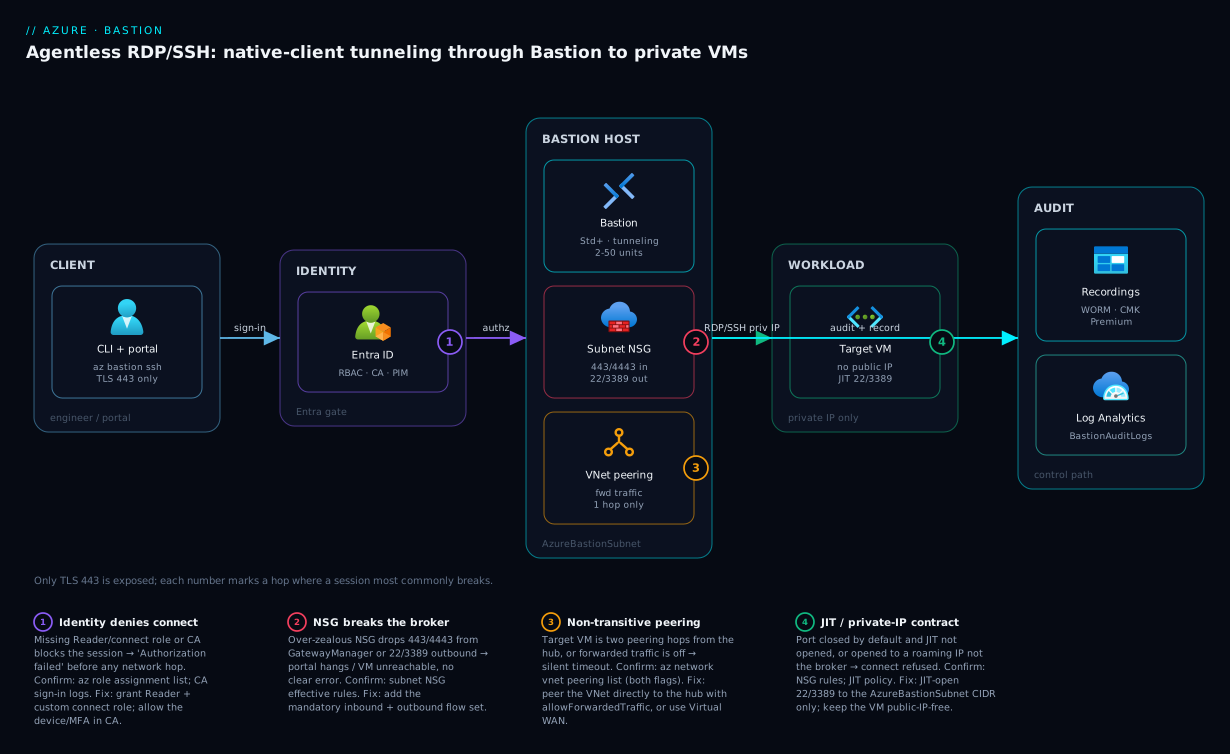
The diagram traces a native-client connection as it actually flows, left to right, and marks the four hops where a session most commonly breaks. Read it this way: an engineer’s CLI (or the portal) opens a session over TLS 443 — the only inbound surface — which is gated first by Microsoft Entra (RBAC, Conditional Access, PIM) before anything reaches the network. The request lands on the Bastion host in AzureBastionSubnet (/26, Standard SKU, tunneling on, scale units sized to concurrency), whose NSG must permit the precise 443/4443 inbound and 22/3389 outbound flow set or the session hangs silently. From the subnet, Bastion brokers over the VM’s private IP — across VNet peering (forwarded-traffic on, single hop only) when the target is a spoke — to the workload VM, which now carries no public IP and keeps 22/3389 shut except when Defender JIT opens them to the broker subnet alone. The control path also fans to storage (session recordings, immutable + CMK on Premium) and Log Analytics (BastionAuditLogs), which is how the loop closes with your auditor.
The numbered badges sit on the failure-prone hops: an Entra/RBAC denial before connect, the NSG flow set that breaks the broker, the non-transitive peering hop that strands a spoke VM, and the JIT/private-IP contract on the target. The legend narrates each as symptom · how to confirm · fix — the same method as the rest of this guide: localise the break to a hop, confirm with the named command, apply the fix. The first question on any hung session is always “did identity allow it, and does the NSG let the broker through?”
Real-world scenario
A payments platform team I worked with — call them Meridian Pay — ran a hub-and-spoke estate across three regions with roughly 400 VMs, and PCI-DSS forced two hard constraints: no workload VM may carry a public IP, and every interactive admin session must be recorded and retained. Their interim state was four per-region jump boxes — internet-facing, RDP open behind NSGs, each on a Standard_D2s_v5 costing ~₹9,000/month plus its public IP — and the QSA flagged them as in-scope cardholder-data-environment (CDE) ingress with no session evidence. Twelve jump boxes across three regions, twelve public IPs, twelve hosts to patch, and a finding that would not close.
We collapsed all four jump boxes per region into a single Premium Bastion in each regional hub (Premium for the session-recording requirement) with --scale-units 8 to cover ~120 concurrent operators per region during a release window. The spokes were already peered to the hub, so the only networking change was confirming --allow-forwarded-traffic true on both sides of each peering — no new subnets beyond the three AzureBastionSubnet /26s in the hubs. Session recordings were written to a storage account with a time-based immutability (WORM) policy and customer-managed keys, satisfying the tamper-evidence requirement, and BastionAuditLogs streamed to a central Log Analytics workspace gave the QSA the connection ledger they wanted, queryable by user, target and time.
The sharp edge was that the QSA also required admin ports stay closed except during approved access — recording alone was not enough. We wired Defender for Cloud JIT so the NSG kept 22/3389 shut, and the JIT grant opened them only to the hub’s AzureBastionSubnet range, never to a public source. Because Bastion brokers from inside the VNet, the source prefix on the JIT rule was the subnet, not an engineer’s roaming IP:
az security jit-policy initiate \
  --resource-group rg-spoke-payments --location eastus --name default \
  --vm-id "/subscriptions/<sub>/resourceGroups/rg-spoke-payments/providers/Microsoft.Compute/virtualMachines/vm-pay-07" \
  --ports '[{"number":3389,"duration":"PT1H","allowedSourceAddressPrefix":"10.0.255.0/26"}]'
One non-transitive-peering trap nearly bit them: a late-discovered “analytics” VNet was peered only to the payments spoke, not the hub, so the hub Bastion could not reach its two VMs — sessions just timed out with no error. The fix was a direct hub↔analytics peering with forwarded traffic, after which the host reached them immediately. The lesson went on the runbook: “If a VM is two peering hops from the hub, Bastion can’t see it — peer it directly.”
The net result: zero public IPs on workloads, ports closed by default and opened just-in-time to the broker subnet alone, full session video retained immutably, and twelve internet-facing jump boxes deleted across three regions. The CDE-ingress finding closed at the next assessment, the standing public-IP cost went with it, and the monthly spend dropped — three Premium Bastions cost meaningfully less than twelve always-on jump-box VMs plus their IPs and the patching toil around them. The before/after:
| Dimension | Before (jump boxes) | After (Bastion) |
|---|---|---|
| Internet-facing hosts | 12 (4 × 3 regions) | 0 |
| Public IPs on the access path | 12 | 0 (Premium private-only) |
| Workload public IPs | several | 0 |
| Admin port exposure | 3389 open behind NSG 24/7 |
Closed; JIT opens to broker subnet only |
| Session evidence | None (host-local logs) | Immutable CMK video + central audit log |
| Hosts to patch | 12 | 3 (managed PaaS) |
| QSA finding | Open (CDE ingress) | Closed |
Advantages and disadvantages
Bastion’s managed-broker-inside-the-VNet model both removes a class of risk and introduces a few sharp edges. Weigh it honestly:
| Advantages (why this model helps you) | Disadvantages (why it bites) |
|---|---|
No public IP or open 3389/22 on workloads — the whole exposure class disappears |
The Bastion host itself is a public surface on 443 unless you pay for Premium private-only |
| Agentless and managed — Microsoft patches the broker, not you | You give up the simplicity (and the cost) of a single VM you fully control |
Native client tunneling runs real scp/Ansible/mstsc — not just an HTML5 canvas |
Tunneling needs Standard+ and an explicit flag and the SSH CLI extension — easy to miss |
| Shareable links grant vendor access with no Azure account or NSG hole | A standing shareable link is a standing exposure; you must time-box and revoke |
| Sessions authenticate through Entra → Conditional Access + PIM apply estate-wide | The SKU is a one-way ratchet; a wrong choice means delete-and-redeploy |
| Premium records sessions to immutable CMK storage for audit | Recording is graphical video, not a keystroke/text log — pair with guest auditing for text |
| One host in a hub serves all directly-peered spokes | Peering is non-transitive — a second hop strands the target with a silent timeout |
BastionAuditLogs gives a central, queryable connection ledger |
Defaults are unsafe: tunneling off, no NSG tuning, broad RBAC — you must turn the knobs |
The model is right for any estate that wants no public IPs on workloads and identity-governed, auditable admin access — which is most regulated and most security-mature shops. It is overkill for a single throwaway dev VNet where the free Developer SKU or even a short-lived jump box suffices. The disadvantages are all manageable, but only if you know they exist: the SKU ratchet, the explicit tunneling flag, the NSG flow set, the non-transitive hop, and the standing-link risk are exactly the things defaults will not handle for you.
Hands-on lab
Stand up a Standard Bastion, connect to a Linux VM with native tunneling, prove scp works, then tear it all down. Free-tier-friendly where possible (the VM is a small B1s; Bastion Standard bills hourly, so delete at the end). Run in Cloud Shell (Bash).
Step 1 — Variables and resource group.
RG=rg-bastion-lab
LOC=eastus
VNET=vnet-lab
BASTION=bastion-lab
VM=vm-linux-lab
az group create -n $RG -l $LOC -o table
Step 2 — VNet with a workload subnet and the mandatory AzureBastionSubnet (/26).
az network vnet create -g $RG -n $VNET --address-prefixes 10.0.0.0/16 \
  --subnet-name snet-workload --subnet-prefixes 10.0.1.0/24 -o table

az network vnet subnet create -g $RG --vnet-name $VNET \
  --name AzureBastionSubnet --address-prefixes 10.0.255.0/26 -o table
Expected: the VNet plus two subnets; the Bastion subnet named exactly AzureBastionSubnet.
Step 3 — A Linux VM with NO public IP (the whole point).
az vm create -g $RG -n $VM --image Ubuntu2204 --size Standard_B1s \
  --vnet-name $VNET --subnet snet-workload \
  --public-ip-address "" \
  --admin-username azureuser --generate-ssh-keys -o table
--public-ip-address "" ensures the VM is private-only. Expected: a VM with a private IP and "publicIpAddress": "".
Step 4 — Standard public IP for Bastion (Static), then the Bastion host with tunneling on.
az network public-ip create -g $RG -n pip-bastion-lab \
  --sku Standard --allocation-method Static -o table

az network bastion create -g $RG -n $BASTION \
  --vnet-name $VNET --public-ip-address pip-bastion-lab \
  --sku Standard --scale-units 2 --enable-tunneling true -o table
Bastion takes ~5–10 minutes to provision. Expected when done: "sku": {"name": "Standard"}, "enableTunneling": true.
Step 5 — Open a native tunnel and prove scp through the broker.
# In one terminal: localhost:50022 -> VM:22 through Bastion (leave it running)
VMID=$(az vm show -g $RG -n $VM --query id -o tsv)
az network bastion tunnel -n $BASTION -g $RG \
  --target-resource-id "$VMID" --resource-port 22 --port 50022
# In a second Cloud Shell tab: standard ssh + scp, no public IP anywhere
ssh -p 50022 azureuser@127.0.0.1 'hostname && echo connected-via-bastion'
echo "hello from bastion" > /tmp/proof.txt
scp -P 50022 /tmp/proof.txt azureuser@127.0.0.1:/tmp/proof.txt
ssh -p 50022 azureuser@127.0.0.1 'cat /tmp/proof.txt'
Expected: the VM hostname prints, connected-via-bastion, and hello from bastion round-trips back — a file copied to a VM that has no public IP and no inbound 22 from the internet.
Step 6 — Turn on the audit ledger (optional but instructive).
LAW=$(az monitor log-analytics workspace create -g $RG -n law-bastion-lab --query id -o tsv)
az monitor diagnostic-settings create --name diag-bastion \
  --resource $(az network bastion show -g $RG -n $BASTION --query id -o tsv) \
  --logs '[{"category":"BastionAuditLogs","enabled":true}]' \
  --workspace "$LAW"
# Reconnect once, wait a few minutes, then query BastionAuditLogs in the workspace.
Step 7 — Teardown (do this — Bastion bills hourly).
az group delete -n $RG --yes --no-wait
The lab teardown checklist, so nothing is left billing:
| Resource | Bills while it exists? | Removed by group delete? |
|---|---|---|
| Bastion host (Standard) | Yes (hourly + scale units) | Yes |
| Public IP (Standard) | Yes (hourly) | Yes |
Linux VM (B1s) |
Yes (compute) | Yes |
| VNet + subnets | No | Yes |
| Log Analytics workspace | Yes (ingestion/retention) | Yes |
Practice challenges
Work these in order — they climb from a two-command sanity check to authoring the IaC for a regulated host. Every ID is a placeholder; nothing here needs a live subscription to reason about, though the commands are real and schema-correct. Peek at the solution only after you have written your own answer.
Challenge 1 — Is this even a valid Bastion subnet? (Beginner). You inherited a VNet and someone claims Bastion “won’t deploy.” Before touching anything else, write the one command that tells you whether the subnet meets the two hard rules.
<details> <summary>Solution</summary>
az network vnet subnet show \
  --resource-group "$RG" --vnet-name "$VNET" \
  --name AzureBastionSubnet \
  --query "{name:name, prefix:addressPrefix}" -o json
If the command errors, the subnet isn’t named AzureBastionSubnet (rule one). If prefix is a /27 or smaller, it’s too small (rule two — /26 minimum). Both are delete-and-recreate fixes.
Why: the exact name and the /26 floor are the two deploy blockers, and both are visible in one query before you waste time anywhere else.
</details>
Challenge 2 — Prove native tunneling will work (Beginner). A colleague’s az network bastion ssh “just errors.” Without connecting to anything, show the two host properties that must both be true.
<details> <summary>Solution</summary>
az network bastion show -g "$RG" -n "$BASTION" \
  --query "{sku:sku.name, tunneling:enableTunneling}" -o json
You need sku to be Standard or Premium and tunneling to be true. If the SKU is right but tunneling is false, fix it in place: az network bastion update -g "$RG" -n "$BASTION" --enable-tunneling true (and locally, az extension add --name ssh).
Why: native client needs Standard+ and the explicit tunneling flag — the single most common “right SKU, still broken” cause.
</details>
Challenge 3 — Tunnel a database, not just SSH (Intermediate). A private VM runs SQL Server on 1433 with no public IP. Open a tunnel and connect a local sqlcmd through Bastion, using the local-port convention.
<details> <summary>Solution</summary>
# Terminal 1 — raw TCP tunnel: localhost:51433 -> VM:1433 (leave running)
az network bastion tunnel -n "$BASTION" -g "$RG" \
  --target-resource-id "/subscriptions/<sub>/resourceGroups/rg-data/providers/Microsoft.Compute/virtualMachines/vm-sql-01" \
  --resource-port 1433 --port 51433

# Terminal 2 — any ordinary TCP client, pointed at the local port
sqlcmd -S 127.0.0.1,51433 -U sqladmin -P '<placeholder>'
Why: tunnel is protocol-agnostic — it moves raw TCP, so any port (DB, WinRM, an appliance UI) works, not just 22/3389. ssh and rdp are just conveniences layered on the same relay.
</details>
Challenge 4 — Reach an on-prem host by IP (Intermediate). Your hub connects to the datacentre over ExpressRoute. Make the same Bastion reach an on-prem Linux server at 10.50.4.20 that is not an Azure resource at all.
<details> <summary>Solution</summary>
# Enable IP-based connection on the host (idempotent; needs Standard+)
az network bastion update -n "$BASTION" -g "$RG" --enable-ip-connect true

# Connect by private IP instead of a resource ID
az network bastion ssh -n "$BASTION" -g "$RG" \
  --target-ip-address 10.50.4.20 \
  --auth-type ssh-key --username opsadmin --ssh-key ~/.ssh/onprem_ed25519
Why: IP-based connection reaches anything routable from AzureBastionSubnet — peered spokes and on-prem over ExpressRoute/VPN — so one broker serves the hybrid estate, provided a route exists and no NSG drops it.
</details>
Challenge 5 — Turn the audit log into a detection (Advanced). From BastionAuditLogs, write a KQL query that surfaces RDP sessions started off-hours (00:00–05:00 UTC) from a client IP outside your corporate range 203.0.113.0/24.
<details> <summary>Solution</summary>
BastionAuditLogs
| where TimeGenerated > ago(7d)
| extend p = parse_json(Properties)
| extend Protocol = tostring(p.protocol),
         ClientIp = tostring(p.clientIpAddress),
         UserName = tostring(p.userName),
         TargetVm = tostring(p.targetVMIPAddress)
| where Protocol =~ "RDP"
| where hourofday(TimeGenerated) between (0 .. 5)
| where not(ipv4_is_in_range(ClientIp, "203.0.113.0/24"))
| project TimeGenerated, UserName, ClientIp, TargetVm
| order by TimeGenerated asc
Why: the audit ledger is only evidence until you query it — off-hours plus an unexpected source is a cheap, high-signal anomaly rule you can promote to an alert. (Representative field names; confirm against your own log rows.)
</details>
Challenge 6 — Author the regulated host in Terraform (Advanced). Write the azurerm_bastion_host for a Premium, zone-redundant host with tunneling and session recording enabled, wired to a Standard/Static public IP. Note the one gate that makes the recording flag legal.
<details> <summary>Solution</summary>
resource "azurerm_public_ip" "bastion" {
  name                = "pip-bastion-hub"
  location            = azurerm_resource_group.hub.location
  resource_group_name = azurerm_resource_group.hub.name
  sku                 = "Standard"          # Standard required
  allocation_method   = "Static"            # Static required
  zones               = ["1", "2", "3"]     # zone-redundant
}

resource "azurerm_bastion_host" "hub" {
  name                = "bastion-hub"
  location            = azurerm_resource_group.hub.location
  resource_group_name = azurerm_resource_group.hub.name
  sku                 = "Premium"            # <- the gate: recording is Premium-only
  scale_units         = 8
  tunneling_enabled   = true
  session_recording_enabled = true          # legal ONLY because sku = Premium

  ip_configuration {
    name                 = "ipconf"
    subnet_id            = azurerm_subnet.bastion.id
    public_ip_address_id = azurerm_public_ip.bastion.id
  }
}
Why: session_recording_enabled is a one-line flag, but it is Premium-gated — the SKU is the real decision, and it is a one-way ratchet, so you commit to the Premium hourly rate up front. (For a fully private-only host, drop the public IP per the Premium private-only option and confirm your azurerm version supports it.)
</details>
Common mistakes & troubleshooting
The failure modes that actually page you, as a symptom→root-cause→confirm→fix playbook. Scan the matrix, then read the detail for whichever row matches.
| # | Symptom | Root cause | Confirm (exact command / portal path) | Fix |
|---|---|---|---|---|
| 1 | Bastion won’t deploy | Subnet not named AzureBastionSubnet or smaller than /26 |
az network vnet subnet show -n AzureBastionSubnet --query addressPrefix |
Recreate subnet: exact name, /26+ |
| 2 | “Connect” hangs in the portal | NSG blocks inbound 443 from Internet/GatewayManager |
NSG effective rules on the subnet | Add the mandatory inbound flow set (Section 7) |
| 3 | az network bastion ssh/tunnel errors |
Tunneling not enabled, or SKU is Basic | az network bastion show --query "{sku:sku.name,tun:enableTunneling}" |
--enable-tunneling true on Standard+ |
| 4 | Portal works, but can’t reach the VM | NSG blocks outbound 22/3389 to VirtualNetwork |
Effective rules; az network nic show-effective-route-table |
Allow outbound 22/3389 to VirtualNetwork |
| 5 | Spoke VM unreachable, times out | Non-transitive peering (2nd hop) or no forwarded traffic | az network vnet peering list — check both flags |
Direct hub peering + --allow-forwarded-traffic true |
| 6 | “Authorization failed” before connect | Missing RBAC (Reader on Bastion/VM or NIC action) | az role assignment list --assignee <user> |
Grant Reader + custom connect role |
| 7 | Entra SSH fails, key prompt instead | Missing AADSSHLogin extension or VM login role | az vm extension list; check role assignments |
Install extension + grant VM User Login |
| 8 | Shareable link 404s / won’t connect | Link revoked, or VM’s local creds wrong | az network bastion list-shareable-link |
Recreate link; verify the VM’s local credentials |
| 9 | No BastionAuditLogs rows |
Diagnostic setting missing or wrong category | az monitor diagnostic-settings list --resource <bastion-id> |
Create setting with BastionAuditLogs enabled |
| 10 | Session recording empty (Premium) | Storage target misconfigured / SAS/permission issue | Session Recording blade; storage container | Fix storage target, identity, container access |
| 11 | Sessions drop randomly mid-work | Inter-instance 8080/5701 blocked, or zone event |
Effective rules; Resource Health | Allow VirtualNetwork 8080/5701; deploy zonal |
| 12 | Flaky right after a routing change | 0.0.0.0/0 UDR to an NVA blackholes Bastion egress |
az network nic show-effective-route-table |
Exempt Bastion egress from force-tunnel |
Mistake 1 — The subnet is wrong
The single most common deploy blocker. The subnet must be named exactly AzureBastionSubnet and be /26 or larger. A typo’d name, a /27, or other resources in the subnet all stop the deploy.
Confirm. az network vnet subnet show -g $RG --vnet-name $VNET -n AzureBastionSubnet --query addressPrefix -o tsv — if this errors, the name is wrong; if it returns a /27 or smaller, the size is wrong. Fix: recreate the subnet with the exact name and /26. You cannot grow a /27 in place into a usable Bastion subnet; delete and recreate.
Mistake 2 — The NSG silently breaks the broker
Bastion needs the precise inbound flow set (443 from Internet, 443/4443 from GatewayManager, probes from AzureLoadBalancer, inter-instance 8080/5701 from VirtualNetwork). An NSG that allows less leaves sessions hanging with no clear error.
Confirm. On the subnet’s NSG, check effective rules (portal: subnet → NSG → Effective rules), or az network nsg rule list. Fix: add the mandatory inbound and outbound rules from Section 7. The give-away is that deploy succeeded but no session ever lands — control-plane flows (GatewayManager 443/4443) are blocked.
Mistake 3 — Native subcommands fail on the right-looking host
az network bastion ssh/tunnel/rdp need Standard+ and the tunneling flag and the Azure CLI SSH extension. People deploy Standard, forget --enable-tunneling true, and the subcommands error.
Confirm. az network bastion show -g $RG -n $BASTION --query "{sku:sku.name, tunneling:enableTunneling}" -o json — you want Standard/Premium and true. Fix: az network bastion update -g $RG -n $BASTION --enable-tunneling true and az extension add --name ssh.
Mistake 5 — The non-transitive peering hop
A spoke peered to the hub is reachable; a VM two hops away (in a VNet peered only to a spoke) is not — and it fails as a silent timeout, which sends people hunting the wrong layer for an hour.
Confirm. az network vnet peering list -g <rg> --vnet-name <vnet> -o table — verify the target’s VNet is peered directly to the hub and both sides have allowForwardedTraffic: true. Fix: create a direct hub↔target peering with forwarded traffic, or move meshed routing to Virtual WAN.
Mistake 9 — The audit ledger is empty
BastionAuditLogs only flow if a diagnostic setting routes them. No setting, no rows — and you discover this when the auditor asks for evidence you never captured.
Confirm. az monitor diagnostic-settings list --resource $(az network bastion show -g $RG -n $BASTION --query id -o tsv) -o json. Fix: create the setting with the BastionAuditLogs category enabled (Section 5), then reconnect once and wait a few minutes for ingestion.
Common beginner mistakes
These are not error messages — they are wrong models that lead people to build the right thing incorrectly. The troubleshooting matrix above fixes a broken session; this table fixes a broken mental picture before you deploy. Each row is the belief, why it misleads, and the model that actually holds.
| The belief (what beginners assume) | Why it’s wrong | The right mental model |
|---|---|---|
| “Bastion gives each VM its own secure public endpoint.” | Bastion is the only thing with a public surface (its 443). Your VMs get no public IP at all. |
One guarded door for the whole estate; the VMs sit privately behind it and are never addressed from the internet. |
| “Deploying Bastion closed my VM’s open ports.” | Bastion does not touch the VM’s NSG. If 3389 was open to Internet, it is still open — Bastion just removes the need for it. |
Bastion removes the reason to expose ports; you must still close them (and pair with JIT) — it is additive protection, not automatic. |
| “The browser session is Bastion; I’ll use it for everything.” | The HTML5 canvas can’t run scp, Ansible, multi-monitor RDP, or drive redirection — those live below the canvas. |
Browser = a quick, click-through convenience. Native client tunneling = real engineering work. Different tools, same broker. |
| “I’ll start on Basic and turn on the features I need later.” | Native client, file copy, shareable links, and IP-connect don’t exist on Basic — you discover this mid-incident, and Developer→anything needs a delete-and-redeploy. | Pick the SKU by the features you’ll need within the year. Standard is the working baseline; the ratchet only goes up. |
| “One Bastion per VNet is the clean, isolated design.” | It multiplies hosts, subnets, NSGs, audit streams, and cost for zero security gain — peering already lets one host serve many spokes. | One broker in the hub; directly-peered spokes ride it. Isolation comes from RBAC and NSGs, not from duplicating the broker. |
“AzureBastionSubnet is just a name convention I can tidy up.” |
The platform keys off that literal string; rename it and Bastion refuses to deploy. The /26 floor is equally load-bearing. |
The subnet name and size are platform constants, not style choices — get them exact on day one. |
| “A shareable link is a safe, temporary thing.” | It authenticates against the VM’s own local credentials (not Entra), and it lives until you explicitly delete it — a standing link is standing exposure. | Treat every link as a time-boxed credential you issued: scope it to one VM, put a revocation reminder on it, and prune the inventory. |
| “Turning on JIT means my VM has no public IP anymore.” | JIT opens a port on the VM’s existing public IP to your source for a window — the public IP never left. | JIT controls when a port opens; Bastion controls whether a public IP exists. You want both: Bastion (no IP) + JIT (port shut between brokered sessions). |
The thread running through all eight: Bastion is a control you operate, not a switch that secures the estate the moment it exists. It changes what is possible (private-only VMs, identity-gated access, an audit ledger) but leaves the decisions — SKU, subnet, NSG, RBAC, link hygiene, JIT pairing — to you. Beginners who internalise that stop expecting defaults to be safe and start turning the knobs the rest of this lesson lays out.
Best practices
- Pick the SKU deliberately and once. Standard is the platform baseline; go Premium only for session recording or private-only. Remember it is a one-way upgrade — get it right before you build around it.
- Subnet
/26, exact name, nothing else. LayAzureBastionSubnetat/26from day one so scale units have room; never co-locate other resources. - Deploy zone-redundant. Pin instances across zones 1/2/3 where supported; zones are immutable, and a zonal event must not sever your break-glass access.
- Enable tunneling at create time. Set
--enable-tunneling trueso nativessh/tunnel/rdpwork — the single most-forgotten flag. - Size scale units to peak concurrency, not VM count. ~20 RDP / ~40 SSH per unit; right-size and stop paying for idle instances.
- One host in a hub, not one per VNet. Centralize in the hub, peer spokes directly with forwarded traffic, and never rely on a transitive second hop.
- Tune the NSG to the exact flow set. Allow precisely the required
443/4443/8080/5701inbound and22/3389/443/80outbound — no more, no less. - Authenticate with Entra where you can. Prefer
--auth-type AADso Conditional Access and PIM govern the session and there are no SSH keys to leak. - Time-box every shareable link. Scope per-VM, set a revocation reminder or automation, and audit standing links regularly.
- Pair Bastion with Defender JIT. Keep
22/3389closed in the NSG and open them just-in-time to theAzureBastionSubnetrange only. - Stream
BastionAuditLogsand (Premium) record sessions. Send the ledger to Log Analytics and write recordings to immutable, CMK-encrypted storage. - Decommission jump boxes in order. Prove Bastion access in the audit log before you dissociate and delete any public IP, so a rollback is always possible.
Security notes
Bastion is itself a security control, so harden it as one. Network isolation: the broker lives in the VNet and reaches targets over private IPs — strip every workload public IP and keep 22/3389 shut, opening them only via JIT to the broker subnet; on Premium, run the host private-only so even 443 is not internet-facing. Identity is the real perimeter: the right to connect is RBAC, so grant least privilege (Reader + a custom connect role, Virtual Machine User Login over Admin Login), put the login role behind PIM, and gate native sessions with Conditional Access requiring MFA and a compliant device. Encryption and evidence: Bastion brokers RDP/SSH over TLS, and on Premium session recordings should land in storage with a time-based immutability (WORM) policy and customer-managed keys so the audit trail cannot be altered after the fact. Least exposure for third parties: prefer time-boxed shareable links over any public-IP/NSG hole, scope them to one VM, and revoke on completion. Audit everything: BastionAuditLogs to a central workspace gives the who/when/what ledger; alert on off-hours or unexpected-source connections. This fits the broader Azure Zero Trust multilayer security model — “no public IPs, identity-governed, audited access” is precisely the network-and-access pillar of Zero Trust.
The security-control checklist, each with its lever:
| Control objective | Bastion lever | Verify with |
|---|---|---|
| No public IP on workloads | Private-IP brokering; strip VM IPs | az network nic ip-config show |
| No public IP on the broker | Premium private-only deployment | Bastion config |
| Management ports closed by default | Defender JIT to subnet range | NSG rules; JIT policy |
| Least-privilege connect | Reader + custom role; VM User Login | az role assignment list |
| Just-in-time elevation | PIM on the VM login role | PIM blade |
| Phishing-resistant session access | Conditional Access (MFA + compliant device) | CA policy |
| Tamper-evident session evidence | Premium recording + WORM + CMK | Storage immutability policy |
| Central audit ledger | BastionAuditLogs to Log Analytics |
Diagnostic settings |
Cost & sizing
Bastion bills three things: an hourly host rate (per SKU), a per-scale-unit hourly rate above the included instances, and outbound data (first 5 GB/month free). The host runs 24/7 once deployed — it does not auto-pause — so the dominant lever is do you need a host at all in this VNet, answered by centralizing in the hub. What drives the bill:
| Cost driver | Scales with | Lever to control it |
|---|---|---|
| Hourly host rate | SKU tier (Basic < Standard < Premium) | Use the lowest SKU that meets requirements |
| Scale-unit hours | --scale-units above the included count |
Right-size to peak concurrency |
| Outbound data | GB transferred (after 5 GB free) | Usually negligible for admin sessions |
| Number of hosts | One per VNet vs one per hub | Centralize: one host serves all spokes |
| Workload public IPs (saved) | IPs you delete | Stripping them reduces cost |
Rough figures (illustrative; check the Azure pricing calculator for your region). The right-sizing rule: pick the SKU by feature need and the scale units by peak concurrent sessions ÷ ~20 (RDP) or ÷ ~40 (SSH), then round up by one for headroom.
| Scenario | SKU | Scale units | Rough order of monthly cost | Note |
|---|---|---|---|---|
| Personal dev sandbox | Developer | n/a | Free | No peering; single session |
| Small team, one VNet, browser-only | Basic | 2 (fixed) | Low (≈ a small VM) | No native client |
| Platform baseline, a few spokes | Standard | 2–4 | Moderate | Native client, links, IP-connect |
| Regional hub, release windows | Standard/Premium | 8 | Higher (Premium adds recording) | ~160 concurrent RDP |
| Regulated estate, recorded sessions | Premium | 8–10 | Highest host rate + storage | WORM + CMK storage adds a little |
The savings side is easy to forget and often net-positive: deleting N jump-box VMs (each a 24/7 D2s-class VM plus its public IP) and stripping workload public IPs frequently outweighs the Bastion host cost, especially when one centralized host replaces several jump boxes. Free-tier note: the Developer SKU is genuinely free but cannot traverse peering — it is a sandbox tool, not platform infrastructure. For the broader picture of right-sizing shared platform services, see Azure FinOps & cost management at scale.
Interview & exam questions
Q1. Why does an Azure Bastion deployment require a subnet named exactly AzureBastionSubnet, and what’s the minimum size?
The platform identifies the subnet by that literal name — it will not deploy into a differently named subnet. The minimum size for any Bastion created on or after 2 November 2021 is /26; smaller (e.g. /27) is rejected, and a grandfathered /27 cannot scale host instances. Maps to AZ-700 / AZ-500 networking objectives.
Q2. You deployed Standard Bastion but az network bastion ssh fails. What’s the most likely cause?
Tunneling is not enabled. Native client subcommands need Standard+ and --enable-tunneling true (plus the Azure CLI SSH extension). Set the flag with az network bastion update --enable-tunneling true and confirm enableTunneling: true.
Q3. Can you downgrade a Bastion from Premium to Standard? No. SKU changes are upgrade-only (Basic→Standard→Premium). To move to a lower tier you must delete and redeploy. This is why the SKU choice must be deliberate up front.
Q4. A vendor with no Azure account needs RDP to one staging VM for two days. What’s the right Bastion feature, and what does it authenticate against?
A shareable link (Standard+), scoped to that one VM. It authenticates against the target VM’s own credentials (local username/password or key), not Entra. Time-box it and revoke with delete-shareable-link when the engagement ends.
Q5. Your hub Bastion can’t reach a VM in a spoke. The spoke is peered, but only to another spoke. Why does it fail, and how do you fix it?
VNet peering is non-transitive — Bastion does not traverse a second hop. The VM’s VNet must be peered directly to the hub (with allowForwardedTraffic on both sides), or you move meshed routing to Virtual WAN. The failure presents as a silent timeout.
Q6. How do you keep a VM’s management ports closed yet still let Bastion connect?
Pair Bastion with Defender for Cloud JIT: the NSG denies 22/3389 by default, and the JIT grant opens them time-boxed to the AzureBastionSubnet CIDR only — never a roaming public IP — because Bastion brokers from inside the VNet.
Q7. Which SKU is required for session recording, and where do recordings land? Premium. On disconnect, recordings are written as video to a blob container in your storage account via a SAS URL; you replay them from the Session Recording blade. Harden the storage with a WORM immutability policy and customer-managed keys.
Q8. What’s the minimum RBAC for a user to connect to a VM through Bastion?
Reader on the Bastion, Reader on the VM, and the NIC data-plane action (typically via a custom connect role). For Entra-based SSH/RDP, add Virtual Machine User Login (or Administrator Login only where truly needed). Prefer granting the login role through PIM.
Q9. How does native client tunneling differ from the browser session, and which command gives a raw TCP tunnel?
The browser is an HTML5 canvas; native tunneling opens a local connection through the broker for real scp/Ansible/mstsc. az network bastion tunnel gives a raw local TCP tunnel to any target port that any client can use; ssh and rdp are higher-level conveniences.
Q10. Why is “one Bastion per VNet” an anti-pattern, and what’s the alternative?
It multiplies hourly cost, subnets, NSGs, and audit streams for no benefit. Deploy one host in the hub; because Standard/Premium honour peering, it reaches VMs in every directly-peered spoke. Confirm --allow-forwarded-traffic true on both sides of each peering.
Q11. Which NSG flows are mandatory on AzureBastionSubnet?
Inbound: 443 from Internet, 443/4443 from GatewayManager, 443 from AzureLoadBalancer, and 8080/5701 from VirtualNetwork. Outbound: 22/3389 to VirtualNetwork, 443 to AzureCloud, 8080/5701 to VirtualNetwork, and 80 to Internet. Missing the GatewayManager flow is the classic silent break.
Q12. How do native Bastion sessions inherit your organization’s MFA posture without touching the VMs? Native client and Entra-based SSH/RDP authenticate through Microsoft Entra ID, so Conditional Access applies to the management plane — require MFA and a compliant device once, and every native Bastion session is gated, with no per-VM changes. Maps to SC-300 / AZ-500.
Quick check
- What is the exact required name and minimum size of the Bastion subnet?
- Which SKU is the floor for native client tunneling, shareable links, and IP-based connections?
- Why does a VM two peering hops from the hub fail to connect through a hub Bastion?
- When you pair Bastion with Defender JIT, what source prefix does the JIT rule grant?
- Which SKU is required for session recording, and how should the destination storage be hardened?
Answers
AzureBastionSubnet,/26or larger. The platform keys off the literal name;/27is rejected (and a grandfathered/27can’t scale instances).- Standard. Native tunneling, custom ports, file transfer, shareable links, and IP-based connection all start at Standard; Basic has none of them.
- VNet peering is non-transitive — Bastion doesn’t traverse a second hop. Peer that VNet directly to the hub (with forwarded traffic), or use Virtual WAN routing.
- The
AzureBastionSubnetCIDR (e.g.10.0.255.0/26), because Bastion brokers from inside the VNet — never an engineer’s roaming public IP. - Premium. Write recordings to a storage account with a time-based immutability (WORM) policy and customer-managed keys (CMK) so the evidence is tamper-evident.
Glossary
- Azure Bastion — A managed, agentless PaaS service that brokers RDP/SSH to your VMs over TLS 443, so the VMs need no public IP or inbound management ports.
AzureBastionSubnet— The mandatory, exactly-named,/26-minimum dedicated subnet the Bastion host lives in; holds nothing else.- Scale unit (instance) — One managed VM behind the Bastion service; each handles ~20 concurrent RDP or ~40 concurrent SSH sessions.
- SKU tier — Developer / Basic / Standard / Premium; an upgrade-only ratchet that gates which features exist.
- Native client tunneling — Connecting from the local CLI (
az network bastion ssh/tunnel/rdp) through the broker so realscp/Ansible/mstscwork; Standard+, requires--enable-tunneling. - Shareable link — A URL granting RDP/SSH to one specific VM without an Azure account; authenticates against the target VM’s own credentials.
- IP-based connection — Reaching a target by its private IP (on-prem over ExpressRoute, or peered VMs) rather than by Azure resource ID; Standard+.
- Session recording — Premium-only capture of the graphical RDP/SSH session as video, written to your storage account for audit.
BastionAuditLogs— The diagnostic log category recording each connection (user, source IP, target, protocol); stream it to Log Analytics.- JIT (Just-in-Time) VM access — A Defender for Cloud feature that keeps management ports closed and opens them time-boxed to a specified source — with Bastion, the broker subnet.
- Private-only deployment — A Premium configuration where the Bastion host itself has no public IP, removing the last internet-facing surface.
- Forwarded traffic — A VNet-peering flag (
allowForwardedTraffic) that lets brokered RDP/SSH transit the hub to reach a spoke. - Non-transitive peering — The property that VNet peering does not chain: A↔B and B↔C does not give A↔C; Bastion cannot reach a target two hops away.
- Customer-managed key (CMK) — Encryption with a key you own in Key Vault, used here on the recording storage so evidence stays under your control.
- Jump box (classic bastion host) — The legacy pattern Bastion replaces: a hardened, internet-facing VM you connect to first, then hop onward — still a public host you patch, monitor, and answer for in audits.
- Break-glass access — The emergency administrative path you rely on during an incident; the reason to deploy Bastion zone-redundant, so a zonal event or rolling upgrade never severs all remote access at once.
- Idle timeout — The inactivity limit after which Bastion tears down a session; a security feature, so long-running work must be able to reconnect rather than assume a permanent session.
- HTML5 gateway (protocol translation) — The browser-session path, where Bastion terminates real RDP/SSH and re-encodes the screen as a canvas — which is why it lacks
scp, multi-monitor, and drive redirection, and why native tunneling exists. - Manual scale units — Bastion does not autoscale;
--scale-unitsis a value you set (2–50) and must pre-provision before a known spike, then scale back — the reason to sizeAzureBastionSubnetfor your maximum up front. - Kerberos authentication — Integrated Windows auth to AD DS-joined targets through the broker (Standard+), so operators reach domain-joined VMs without a separate local credential.
- Custom inbound port — A Standard+ capability to connect to an admin service on a port other than
3389/22(an appliance UI, an alternate SSH port). - Global VNet peering — Cross-region peering that Standard/Premium Bastion can traverse to reach spokes in other regions — still single-hop (non-transitive).
- DNAT (Destination NAT) — The Azure Firewall alternative: port-forward a public IP to a private VM; cheaper if you already run Firewall, but it keeps a public port and offers no per-session identity gating or recording.
- Global Secure Access / Entra Private Access — Microsoft’s ZTNA offering that brokers access to private apps (including RDP/SSH) through connectors; an emerging alternative to Bastion for estates standardising on Entra ZTNA.
azurerm_bastion_host— The Terraform resource for Bastion; its boolean arguments (tunneling_enabled,ip_connect_enabled,session_recording_enabled, …) mirror the SKU feature matrix and fail the plan if set above the chosen tier.
Next steps
- Lock down the network this lives in with Azure Virtual Network Deep Dive: Every Setting and choose your topology with Hub-spoke vs Virtual WAN enterprise topology.
- Gate every session behind identity: Microsoft Entra Conditional Access at scale and PIM for Azure resources.
- Put Bastion in context with the Azure Zero Trust multilayer security model and harden posture with Defender for Cloud CSPM & secure score.
- Wire the audit ledger and alerting through Azure Monitor & Application Insights for observability.
- Control egress off your now-public-IP-less VMs with Azure NAT Gateway for deterministic egress.