In a nutshell
Picture a records office with hundreds of filing cabinets and one rule that decides which cabinet each new document goes into. In Azure Cosmos DB that rule is the partition key, each cabinet is a logical partition, and the clerk who staffs a bank of cabinets is a physical partition. Two hard facts govern everything downstream: one cabinet holds at most 20 GB, and one clerk can process at most 10,000 requests per second. Pick a filing rule that funnels most documents into the same cabinet — say “file by country” when 60% of your customers sit in one country — and that cabinet overflows while its single clerk is swamped, even though dozens of other clerks stand idle nearby. Hiring more clerks (buying more RU/s) does nothing, because the new clerks are assigned to other cabinets. That one picture explains almost every Cosmos DB cost and latency surprise you will ever hit.
The currency those clerks bill in is the Request Unit (RU) — Cosmos’s normalized price for one unit of work. A small read costs about 1 RU; a write or a query costs more; a query that forgets to name the cabinet forces every clerk to search, and you pay the sum of their bills. You rent capacity as RU/s, and the whole craft of running Cosmos well is two moves: (1) choose a filing rule that spreads work evenly across cabinets, and (2) make each operation cost as few RU as possible. Get both right and the database scales smoothly to any budget you can pay; get the filing rule wrong and you hit a wall that no amount of money moves — because the wall is per cabinet, not per account.
Level: Intermediate → Expert (with a beginner-friendly on-ramp) · Time: ~75 min read + ~20 min optional hands-on lab
Prerequisites (one-line version — a fuller list follows below): you can create a resource in the Azure portal or Cloud Shell, read JSON output, and follow a simple SQL-style WHERE clause. Every Cosmos-specific term is defined as it appears.
After this you will be able to pick a partition key you can defend in a design review; read the real RU cost of any operation instead of guessing; and tell a hot-partition incident (one cabinet on fire) apart from genuine under-provisioning (every clerk maxed out) within about ninety seconds of opening the dashboard. The rest of the article turns each of those into a repeatable procedure, with the exact metrics, commands, and lookup tables to keep open while the dashboard is red.
Most Cosmos DB cost and latency incidents trace back to one decision made early and never revisited: the partition key. Get it right and the container scales horizontally and predictably to any throughput you can pay for. Get it wrong and you hit a wall no amount of RU/s can buy past, because a single physical partition tops out at 10,000 RU/s regardless of what you provision on the container. The cruel part is that the symptom — HTTP 429 under load while the container sits at 30% utilization — looks like an under-provisioning problem, so the reflex is to throw RU/s at it, which does nothing and burns money. This is a working guide to choosing the key, measuring and shrinking RU consumption, tuning the indexing policy, detecting a hot partition with partition-scoped metrics, and repairing a container that is already skewed in production.
Azure Cosmos DB for NoSQL is the globally distributed, horizontally partitioned document database where you trade a fixed schema and joins for predictable single-digit-millisecond latency at any scale — if your partitioning is sound. The whole model rests on one mechanism: Cosmos hashes your partition key, maps each key value to a logical partition, and packs logical partitions onto physical partitions it provisions behind the scenes. Every performance property — and every failure — is downstream of how evenly that hash spreads your traffic. This article treats the partition key, the Request Unit (RU), the indexing policy and the throughput mode as one coupled system, because in production they are.
By the end you will stop guessing. When 429s spike you will know within ninety seconds whether you face a genuinely under-provisioned container, a single hot logical partition saturating one physical partition’s 10,000 RU/s, a cross-partition fan-out query billing you the sum of every partition, an index write-tax from indexing properties you never query, or an autoscale break-even you got wrong. Because this is a reference you will return to mid-incident, the partition limits, RU costs, indexing knobs, throughput modes and the hot-partition playbook are all laid out as scannable tables — read the prose once, then keep the tables open when the dashboard is red.
What problem this solves
Cosmos DB hides enormous machinery so you can write a document and read it back in single-digit milliseconds anywhere on earth. That abstraction is a gift until your partitioning is wrong, then it becomes a wall you cannot climb with the throughput slider. The bare 429 Too Many Requests tells you almost nothing about which of five distinct causes you hit, and the container-level “Total Request Units” chart actively lies — it shows healthy average utilization while one physical partition is on fire.
What breaks without this knowledge: an on-call engineer doubles the provisioned RU/s (masking nothing — the hot partition is still capped at 10,000 RU/s), or migrates to a “bigger” account (no such thing helps a single saturated key), or files a support ticket and waits while checkout writes fail during a sale. Meanwhile the actual cause — a partition key like /merchantId that worked for hundreds of balanced tenants until one whale arrived, or a query that omits the key and fans out to every partition, or an indexing policy that indexes a 40-field document on every write — sits there, perfectly diagnosable, ignored.
Who hits this: every team running Cosmos DB at scale. It bites hardest on multi-tenant SaaS (power-law tenant distributions blow past a single tenant’s 20 GB / 10,000 RU/s ceiling), event/telemetry ingestion (monotonic /date keys create an append hot spot on the “current” partition), write-heavy workloads (default full-property indexing inflates every write), and anyone who picked a low-cardinality key like /status or /region early and cannot change it in place. The fix is almost never “more RU/s” — it’s “spread the key, align the query, trim the index, and migrate if the key itself is wrong.”
To frame the whole field before the deep dive, here is every symptom class this article covers, the question it forces, and the one place to look first:
| Symptom class | What Cosmos is telling you | First question to ask | First place to look | Most common single cause |
|---|---|---|---|---|
| 429 under load, container <50% util | “one partition is saturated” | Is it one physical partition or all of them? | Metrics → NormalizedRUConsumption (Max) split by PhysicalPartitionId | Hot logical partition on a capped physical partition |
| A query costs hundreds of RU | “you fanned out” | Did the query supply the partition key? | Data Explorer → Query Stats → Request Charge | Cross-partition query (no PK in WHERE) |
| Writes suddenly expensive | “you index everything” | How many paths does the policy index? | Container → Settings → Indexing Policy | Default policy indexes every property |
| Bill is high for the load | “you pay for idle headroom” | What is the average utilization? | Metrics → Total Request Units vs provisioned | Manual throughput below ~66% util, or over-provisioned |
| Cannot fix the key in place | “the key is permanent” | Is the key itself wrong, or just skewed? | az cosmosdb sql container show → partitionKey |
Wrong PK chosen at creation; needs migration |
Learning objectives
By the end of this article you can:
- Distinguish a logical partition from a physical partition and explain the 20 GB and 10,000 RU/s ceilings that derive every hot-partition incident.
- Evaluate any candidate partition key against cardinality, read alignment and write spread, and pick the right one (or a synthetic / hierarchical key) instead of the obvious-but-wrong one.
- Measure real RU cost from
x-ms-request-charge/ Data Explorer Query Stats instead of guessing, and read what drives a read, a write, a query and a stronger consistency level up. - Tune an indexing policy to exclude
/*and include only queried paths, add composite indexes forfilter + ORDER BY, and cut write RU 30–50% on wide documents. - Detect a hot partition with NormalizedRUConsumption (Max) split by
PhysicalPartitionIdplus 429-by-PartitionKeyRangeId, and confirm it with the three-signal triad. - Choose between manual and autoscale throughput from the ~66%-utilization break-even, and explain why neither saves you from a single saturated key.
- Repair a skewed container with hierarchical partition keys, synthetic keys, or a change-feed migration to a correctly-keyed new container — with no maintenance window.
- Map the moving parts to DP-420 and AZ-204 exam objectives and answer the partition/RU questions cleanly.
Prerequisites & where this fits
You should already understand the Cosmos DB basics: an account holds databases, which hold containers (the unit of partitioning and throughput), which hold items (JSON documents). You should know how to run az in Cloud Shell, read JSON output, and that Cosmos exposes multiple APIs (NoSQL, MongoDB, Cassandra, Gremlin, Table) — this article is the NoSQL (formerly SQL/Core) API, though the partitioning mechanics apply broadly. Familiarity with JSON, basic SQL-like query syntax, and HTTP status codes helps.
This sits in the Data platform track. It assumes the modeling fundamentals (the Database Selection 101: SQL vs NoSQL — When to Use What decision is upstream of it) and the non-relational concepts from DP-900: Non-Relational Data and Analytics on Azure. It pairs tightly with Cosmos DB Multi-Region Writes & Conflict Resolution (global distribution layered on top of the partitioning you design here) and with Azure Monitor & Application Insights for Observability, because the hot-partition detection in this article lives in Azure Monitor metrics and Log Analytics. If you ingest a firehose into Cosmos, Event Hubs, Kafka Capture & Stream Analytics is usually the upstream.
A quick map of which layer owns what during a throughput incident, so you reason about the right tier fast:
| Layer | What lives here | What you control | Failure classes it can cause |
|---|---|---|---|
| Client / SDK | Connection mode, retry policy, request charge | Direct vs gateway; max retries | Silent 429 retry masking; under-read of cost |
| Routing (gateway / address cache) | PK hash → physical partition map | Nothing directly (derived) | Cross-partition fan-out when PK omitted |
| Logical partition | All items for one PK value | The partition key choice | 20 GB / 10,000 RU/s ceiling per key value |
| Physical partition (PKRange) | Compute + storage unit | Count is derived, not chosen | Hot partition at 100% while others idle |
| Indexing policy | Which paths are indexed | included / excluded / composite | Write-RU inflation; missing-index scans |
| Throughput (container/db) | Manual or autoscale RU/s | Mode, ceiling, distribution | Over-provisioned bill; aggregate throttling |
Core concepts
Five mental models make every later diagnosis obvious.
There are two layers of partitioning, and conflating them is the root mistake. A logical partition is the set of all items sharing one partition key value; a physical partition is the compute-and-storage unit Cosmos provisions and onto which it hashes logical partitions. You choose the key (and thus the logical partitioning); Cosmos derives the physical partition count. Every ceiling lives on one of these two layers, and “I gave it more RU/s and it still throttles” is always a confusion between them.
The two numbers to internalize: 20 GB and 10,000 RU/s. A logical partition is hard-capped at 20 GB of storage (raw data plus index) — a ceiling you cannot raise. A physical partition serves up to 10,000 RU/s of throughput and up to 50 GB of storage. Because a logical partition never spans more than one physical partition, a single hot key value can never exceed 10,000 RU/s, no matter what you provision on the container. Internalize this one rule and most incidents explain themselves.
The physical partition count is derived, not chosen. Cosmos takes the maximum of two requirements — throughput and storage — and provisions that many physical partitions:
physical partitions = ceil( max(
    provisioned_RU / 10000,
    total_storage_GB / 50
))
Two consequences explain most throughput tickets: (1) provisioning 100,000 RU/s on a container with one hot key does nothing for that key, because it cannot be split across physical partitions; and (2) throughput is distributed evenly across physical partitions — provision 60,000 RU/s across 6 physical partitions and each gets exactly 10,000 RU/s, even if 5 are idle and 1 is on fire.
The Request Unit is the universal currency. A Request Unit (RU) is Cosmos’s normalized cost for throughput: a 1 KB point read by id costs roughly 1 RU; writes, queries, larger documents and stronger consistency cost more. You provision RU/s (per second), and every operation debits the bucket. Stop estimating the moment you can read the real cost: every response carries x-ms-request-charge and Data Explorer shows it in Query Stats. The single highest-leverage RU optimization after the partition key is the indexing policy — because writes pay to maintain the index.
You cannot change a partition key in place. The partition key is effectively permanent — you migrate to a new container, never alter it on an existing one. This makes the choice the decision to over-invest in, and it makes every real repair a data movement (synthetic key, hierarchical key, or change-feed migration). Plan the escape hatch up front; you will eventually need it.
The vocabulary in one table
Before the deep sections, pin down every moving part. The glossary at the end repeats these for lookup; this table is the mental model side by side:
| Concept | One-line definition | Where it lives | Why it matters to RU/throttling |
|---|---|---|---|
| Logical partition | All items sharing one PK value | Derived from your key | Capped at 20 GB / 10,000 RU/s |
| Physical partition (PKRange) | Compute+storage unit Cosmos provisions | Behind the scenes | The 10,000 RU/s ceiling lives here |
| Partition key | The property Cosmos hashes to place items | Container definition (/path) |
Wrong choice → hot partition; permanent |
| Request Unit (RU) | Normalized throughput cost per operation | Per request (x-ms-request-charge) |
The currency you provision and burn |
| Cross-partition query | A query without the PK in the filter | Query execution | Fans out, bills the sum of all partitions |
| Hierarchical PK | Up to 3-level subpartitioning (ver 2) | Container definition | Spreads a whale key without losing locality |
| Synthetic key | Computed PK combining fields/buckets | Stamped on each item | Spreads low-cardinality keys; loses read locality |
| Indexing policy | Which paths are indexed + composites | Container definition (JSON) | Inflates write RU if too broad |
| Composite index | Multi-path index for filter + ORDER BY |
Indexing policy | Makes sort+filter queries cheap/possible |
| Autoscale | Throughput scaling 10–100% of a max | Container/db throughput | 1.5× rate; absorbs aggregate spikes only |
| NormalizedRUConsumption | % of provisioned RU used by hottest partition | Azure Monitor metric | The single best hot-partition signal |
| Change feed | Ordered log of inserts/updates | Per container | The production-safe re-partition mechanism |
The RU & partition limits reference
Before the per-topic detail, here is the lookup table you scan first: the hard numbers that bound every Cosmos design. The non-obvious ones are the per-logical-partition 20 GB ceiling (independent of physical partition size) and the fact that throughput is per container but spent per physical partition.
| Limit / quantity | Value | Scope | Can you raise it? | What hitting it looks like |
|---|---|---|---|---|
| Storage per logical partition | 20 GB | One PK value | No (hard ceiling) | Writes for that key value rejected at 20 GB |
| Storage per physical partition | ~50 GB (larger on newer accounts) | One PKRange | Platform-managed | Triggers a partition split |
| Throughput per physical partition | 10,000 RU/s | One PKRange | No | 429 on a hot key while container idles |
| Min RU/s per container (manual) | 400 RU/s | Container | n/a | — |
| Min RU/s per database (shared) | 400 RU/s | Database | n/a | Shared across all containers in the db |
| Autoscale floor | 10% of max | Container/db | n/a | Scales no lower than max/10 |
| Autoscale step | Instant 10–100% of max | Container/db | n/a | Billed for highest RU/s reached per hour |
| Max RU/s (request, raise via support) | 1,000,000+ | Account | Yes (quota) | Provisioning blocked at default cap |
| Point read (1 KB, by id+PK) | ~1 RU | Per request | n/a | Cheapest possible op |
| Create (1 KB, default index) | ~5 RU | Per request | n/a | Index maintenance is most of it |
| Partition key path levels (hierarchical) | Up to 3 | Container | Set at creation only | Cannot retrofit onto a single-key container |
| Partition key value max length | 2 KB | Per item | No | Long synthetic keys risk this |
| Item (document) max size | 2 MB | Per item | No | Large docs inflate read/write RU |
| Burst capacity draw | Up to ~3,000 RU/s | Per physical partition | Platform-managed | Smooths short bursts on cool partitions only |
Three reading notes that save the most time:
| Distinction | The trap | How to tell them apart |
|---|---|---|
| Provisioned RU/s vs available-per-partition | “I provisioned 100k, why 429?” | Provisioned RU/s ÷ physical partition count = per-partition budget; a hot key only ever gets one partition’s slice |
| 20 GB (logical) vs 50 GB (physical) ceiling | Assuming the bigger number protects you | A single key value caps at 20 GB regardless of the 50 GB physical size; the physical limit only triggers splits |
| 429 from throttle vs 429 from rate-limit-on-metadata | Both are 429 | Data-plane 429 carries x-ms-retry-after-ms and a partition; control-plane 429 (too many container ops) is a different fix |
Logical vs physical partitions, and the 20 GB ceiling
Cosmos DB has two layers of partitioning, and conflating them is the root of most design mistakes.
A logical partition is the set of all items sharing one partition key value. If your key is /tenantId, every document for tenant-42 lives in one logical partition. Its hard constraints:
- 20 GB of storage (raw data plus index). This is a ceiling you cannot raise.
- All items with that key value are co-located — which is what makes single-partition queries and transactional batch operations cheap.
A physical partition is the actual compute-and-storage unit Cosmos provisions behind the scenes. Cosmos hashes the partition key value and maps each logical partition onto exactly one physical partition. Its constraints:
- Up to ~50 GB of storage per physical partition (newer accounts support larger; treat 50 GB as the planning number).
- Up to 10,000 RU/s of throughput per physical partition.
The number of physical partitions is derived, not chosen — the maximum of the two requirements shown in the formula above. Two consequences explain most “I gave it 50,000 RU/s and it’s still throttling” tickets:
- A single hot logical partition cannot exceed 10,000 RU/s, because it cannot be split across physical partitions. Provisioning 100,000 RU/s on the container does nothing for one key value receiving all the traffic.
- Throughput is distributed evenly across physical partitions. If you provision 60,000 RU/s and Cosmos created 6 physical partitions, each gets 10,000 RU/s — even if 5 are idle and 1 is on fire.
The single most important number to internalize: 10,000 RU/s per physical partition, and a logical partition never spans more than one physical partition. Every hot-partition incident is some violation of this rule.
The two layers side by side, every property that differs:
| Property | Logical partition | Physical partition (PKRange) |
|---|---|---|
| Defined by | One partition key value | A hash range Cosmos owns |
| You control it | Yes — via the key choice | No — count is derived |
| Storage ceiling | 20 GB (hard) | ~50 GB (split trigger) |
| Throughput ceiling | Bounded by its physical partition | 10,000 RU/s |
| Can be split | No — one key value is atomic | Yes — Cosmos splits at limits |
| Spans multiple of the other | No (1 logical → 1 physical) | Yes (many logical → 1 physical) |
| Visible in metrics as | PartitionKey statistics | PhysicalPartitionId / PartitionKeyRangeId |
| Fixing skew here means | Re-key (spread the value) | Cannot target directly |
What forces Cosmos to add physical partitions (a split), and what it means for you:
| Trigger | Threshold | Effect | Your visible signal |
|---|---|---|---|
| Storage growth | Physical partition nears ~50 GB | Split into two; logical partitions redistributed | Physical partition count rises |
| Throughput growth | Provisioned RU/s ÷ 10,000 increases | More physical partitions provisioned | Per-partition RU budget shrinks per partition |
| Manual RU increase past a 10k multiple | e.g. 50k → 60k | New physical partition added | Brief background data movement |
| One logical partition too large | A single key exceeds 20 GB | No split possible — writes rejected | 413/storage error on that key value |
Choosing a partition key
The partition key is effectively permanent — you can only migrate to a new container, never change it in place — so this is the decision to over-invest in. Evaluate every candidate against three properties.
Cardinality. You want many distinct values so Cosmos can spread data across many logical (and therefore physical) partitions. /userId in a system with millions of users is excellent. /country is terrible: a few hundred values, wildly skewed toward your largest markets, each capped at 20 GB and 10,000 RU/s.
Access pattern alignment. The key should match how you read. If 90% of queries filter by customerId, partitioning on /customerId turns those into single-partition queries that touch one physical partition for a fraction of a fan-out’s cost. A query that omits the partition key becomes a cross-partition query, which fans out to every physical partition and bills you for the sum.
Write distribution. Hot logical partitions are usually write problems. Avoid keys that funnel writes:
- Monotonic keys like
/dateor an incrementing ID concentrate every new write into the “current” partition — the classic append hot spot. - Status-like keys (
/statuswith valuesactive/closed) skew because most live traffic hits one value.
The heuristic I apply, in order of preference:
| Candidate key | Cardinality | Read alignment | Write spread | Verdict |
|---|---|---|---|---|
/id (item id) |
Very high | Point reads only | Excellent | Great if you only do point reads |
/userId, /deviceId |
High | Per-entity queries | Even | Usually the right answer |
/tenantId |
Medium | Per-tenant queries | Skewed | Good only if tenants are balanced |
/date, /createdOn |
High | Range queries | Monotonic hot spot | Avoid as sole key |
/status, /region |
Low | Filtered scans | Skewed | Avoid |
When no single field is both high-cardinality and read-aligned, build a synthetic key by concatenating fields, or reach for hierarchical partition keys (covered below). The scoring rubric I score candidates on, so the choice is defensible in review:
| Property | Why it matters | Good signal | Bad signal | How to measure before you commit |
|---|---|---|---|---|
| Cardinality | Spreads data across many partitions | Millions of distinct values | Tens to hundreds | SELECT DISTINCT VALUE c.key count, or domain knowledge |
| Read alignment | Avoids fan-out on hot queries | Top queries filter on it | Top queries omit it | Profile the top 5 queries’ WHERE clauses |
| Write spread | Avoids append hot spots | Writes land on many values | Writes funnel to “current”/“active” | Histogram writes by candidate value over a day |
| Value stability | Item never moves partitions | Immutable (userId) | Mutable (status) | A key whose value changes = rewrite the item |
| Max value size | Stays under 2 KB | Short ids | Long concatenations | Check synthetic-key length |
The anti-patterns, named, with what actually goes wrong:
| Anti-pattern | Why it seems fine | What breaks | Better choice |
|---|---|---|---|
/date or timestamp |
“We query by time range” | All today’s writes hit one partition | High-card entity key + range index; or bucketed synthetic |
/status (active/closed) |
“Most queries filter status” | 95% of traffic on active value |
A high-card key; filter status with an index |
/country or /region |
“Reads are regional” | A few values, badly skewed | /userId; keep region as a filter |
A single big-tenant /tenantId |
“Queries are tenant-scoped” | Whale tenant caps at 20 GB / 10k RU/s | Hierarchical /tenantId then /deviceId |
/id for query workloads |
“Highest cardinality” | Every non-point query fans out | Key on what you actually filter by |
A boolean (/isActive) |
“Simple” | Cardinality of 2 → 2 partitions max | Never; cardinality far too low |
Estimating and measuring RU/s
A Request Unit is Cosmos DB’s normalized currency for throughput: a 1 KB point read by id costs roughly 1 RU. Writes, queries, and larger documents cost more. Two activities matter — estimating up front, and measuring in production.
Measure, do not guess. Every response carries the real cost in the x-ms-request-charge header. Stop estimating the moment you can issue a real query against real data.
# Read the request charge for a query using the REST surface via az rest is awkward;
# in practice you read the header from your SDK. With the .NET SDK:
#   response.RequestCharge  ->  double, RUs consumed
# With the Python SDK, the charge is on the client after the call:
#   client.client_connection.last_response_headers['x-ms-request-charge']
In the Data Explorer Query Stats tab, every query shows its Request Charge and Retrieved document count. A query reporting 2.8 RU is fine; one reporting 850 RU on a small container is doing a cross-partition scan or fighting the indexing policy.
For sizing before you have data, the official Cosmos DB capacity calculator translates item size, read/write rates, and consistency level into a baseline RU/s. Rules of thumb worth carrying:
- A 1 KB point read is ~1 RU; a 1 KB create is ~5 RU at default indexing.
- Stronger consistency costs more on reads: Strong and Bounded Staleness reads cost roughly 2× the equivalent Session/Eventual read.
- Indexing every property inflates write cost. Writes pay to maintain the index; trimming it is the highest-leverage write optimization.
When throttled, Cosmos returns HTTP 429 with an x-ms-retry-after-ms header. The SDKs retry automatically up to a configurable limit, but sustained 429s mean you are either under-provisioned overall or — far more often — hammering one physical partition. The per-operation RU costs worth memorizing as a baseline (default indexing, 1 KB item unless noted):
| Operation | Approx RU cost | What drives it | How to reduce |
|---|---|---|---|
| Point read (by id + PK) | ~1 RU | Item size | Keep items small; read by id+PK |
| Create (insert) | ~5 RU | Index maintenance, item size | Trim indexing policy |
| Replace / upsert | ~5–10 RU | Re-index changed paths, item size | Trim index; patch instead of replace |
| Patch (partial update) | ~2–5 RU | Only changed paths re-indexed | Prefer over full replace for small edits |
| Delete | ~5 RU | Index cleanup | — |
| Single-partition query (indexed) | low single digits → tens | Result count, paths touched | Composite index; SELECT fewer fields |
| Cross-partition query | sum across partitions | Number of physical partitions | Add PK to WHERE; redesign key |
| Query without an index (scan) | very high | Documents scanned | Index the filtered/sorted path |
ORDER BY without composite index |
high or fails | Sort over scan | Add the composite index |
How consistency level and item size move the read cost — both are levers you set:
| Factor | Cheaper end | Costlier end | Multiplier (rough) | Notes |
|---|---|---|---|---|
| Consistency (reads) | Eventual / Session | Bounded Staleness / Strong | ~2× | Strong also limits multi-region writes |
| Item size | 1 KB | 100 KB | grows with KB read/written | RU scales ~linearly with bytes processed |
| Indexing on writes | Lean (few paths) | Default (all paths) | up to ~2× write RU | The biggest write lever |
| Query projection | SELECT c.id, c.name |
SELECT * |
modest | Less data materialized = fewer RU |
| Result page size | Smaller pages | Large pages | per-page | Tune MaxItemCount to avoid big pages |
The 429 retry behavior, and the knobs that govern it:
| Aspect | Default | Where set | What to know |
|---|---|---|---|
| Auto-retry on 429 | Enabled | SDK (RetryOptions) |
SDK honors x-ms-retry-after-ms |
| Max retry attempts | 9 (varies by SDK) | MaxRetryAttemptsOnRateLimitedRequests |
Raise for spiky aggregate load |
| Max retry wait time | 30 s (varies) | MaxRetryWaitTimeOnRateLimitedRequests |
Cap so callers don’t hang |
| After retries exhausted | 429 surfaces to your code | Your error handling | Sustained 429 = re-key or re-provision |
x-ms-retry-after-ms |
Server-supplied | Response header | Honor it; don’t tight-loop |
Hierarchical partition keys for skewed tenants
Multi-tenant systems almost always want to partition by /tenantId for query locality, but real tenant distributions are power-law: a handful of tenants generate most of the data and traffic. A single big tenant blows past 20 GB or saturates its 10,000 RU/s, and /tenantId traps you.
Hierarchical partition keys (also called subpartitioning) solve this by letting you define up to three levels. Cosmos uses the full path to place items, but can still route a query that supplies only a prefix to the right physical partitions.
Define the hierarchy at container creation:
az cosmosdb sql container create \
  --account-name cosmos-platform-prod \
  --resource-group rg-data-platform \
  --database-name events \
  --name telemetry \
  --partition-key-path "/tenantId" "/deviceId" "/sessionId" \
  --partition-key-version 2 \
  --throughput 10000
Now the effective partitioning is tenantId -> deviceId -> sessionId. A whale tenant’s data is spread across many deviceId sub-partitions and is no longer confined to a single logical partition or its 20 GB / 10,000 RU/s ceiling. Crucially, queries keep their efficiency depending on how much of the prefix they supply:
-- Single physical partition: full key supplied
SELECT * FROM c WHERE c.tenantId = 'acme' AND c.deviceId = 'dev-9' AND c.sessionId = 's-1'

-- Targeted subset: prefix supplied, Cosmos routes to the relevant physical partitions
SELECT * FROM c WHERE c.tenantId = 'acme'

-- Full cross-partition fan-out: prefix NOT supplied
SELECT * FROM c WHERE c.deviceId = 'dev-9'
The middle query is the payoff: you get tenant-scoped reads without ever creating a 20 GB-capped, throughput-capped logical partition for acme. Note that hierarchical keys must be enabled at creation time with partition key version 2; you cannot retrofit them onto an existing single-key container without migrating. In Bicep:
resource telemetry 'Microsoft.DocumentDB/databaseAccounts/sqlDatabases/containers@2024-05-15' = {
  name: 'telemetry'
  parent: eventsDb
  properties: {
    resource: {
      id: 'telemetry'
      partitionKey: {
        paths: [ '/tenantId', '/deviceId', '/sessionId' ]
        kind: 'MultiHash'      // hierarchical
        version: 2
      }
    }
    options: { throughput: 10000 }
  }
}
How much of the prefix you supply determines the cost — this is the whole reason hierarchical keys beat synthetic keys for multi-tenant reads:
| Query supplies | Routing | RU profile | Use it for |
|---|---|---|---|
Full key (tenantId+deviceId+sessionId) |
One physical partition | Cheapest, single-partition | Point-ish lookups within a session |
First two levels (tenantId+deviceId) |
The partitions holding that device | Targeted, low | Per-device reads |
Prefix only (tenantId) |
Partitions holding that tenant | Tenant-scoped, no full fan-out | The common multi-tenant read |
A non-prefix level (deviceId only) |
All partitions | Full cross-partition fan-out | Avoid; redesign or add tenant filter |
Hierarchical vs synthetic vs single key for the multi-tenant case, decided:
| Approach | Whale tenant spread | Tenant-scoped read locality | Retrofit onto existing container | Verdict for multi-tenant |
|---|---|---|---|---|
Single /tenantId |
None (capped) | Excellent | n/a | Fails on the first whale |
Synthetic /tenantId-bucket |
Good (buckets) | Lost (fan across buckets) | Possible (re-stamp on migrate) | Only if point reads dominate |
Hierarchical /tenantId → /deviceId |
Excellent | Excellent (prefix routes) | No (creation-time only) | The default choice |
Indexing policy tuning
By default Cosmos DB indexes every property of every document — ad hoc queries are fast on day one, writes are needlessly expensive forever. On write-heavy containers this is the single biggest RU lever after the partition key.
The strategy: index only what you filter, sort, or join on; exclude the rest. Path precedence is resolved by longest match, so the robust pattern is exclude everything, then include the specific paths you query.
{
  "indexingMode": "consistent",
  "automatic": true,
  "includedPaths": [
    { "path": "/customerId/?" },
    { "path": "/status/?" },
    { "path": "/createdOn/?" }
  ],
  "excludedPaths": [
    { "path": "/*" },
    { "path": "/_etag/?" }
  ],
  "compositeIndexes": [
    [
      { "path": "/customerId", "order": "ascending" },
      { "path": "/createdOn", "order": "descending" }
    ]
  ]
}
Two things to understand precisely:
- The
/?suffix means “index the scalar value at this path.” The/*wildcard underexcludedPathsexcludes everything beneath root, which combined with the explicitincludedPathsgives a tight allowlist. - Composite indexes are required for efficient queries that filter on one property and
ORDER BYanother, orORDER BYtwo properties.WHERE c.customerId = @id ORDER BY c.createdOn DESCis far cheaper — or only possible without a full scan — with the composite index above. Property order and sort direction must match the query (or be its exact reverse).
Apply a policy update with the CLI; index transformation runs online in the background:
az cosmosdb sql container update \
  --account-name cosmos-platform-prod \
  --resource-group rg-data-platform \
  --database-name orders \
  --name orders \
  --idx @indexing-policy.json
Trimming a wide-open policy down to a handful of indexed paths routinely cuts create/upsert cost by 30–50% on documents with many properties, because the write no longer maintains dozens of index entries it will never serve a query from. The indexing-policy knobs, end to end:
| Setting | Values | Default | When to change | Trade-off / gotcha |
|---|---|---|---|---|
indexingMode |
consistent / lazy / none |
consistent |
none for write-only staging; never lazy (deprecated) |
none = no index queries; lazy removed |
automatic |
true / false |
true |
Rarely change | false requires per-item index hints |
includedPaths |
list of /path/? |
/* (all) |
Always, to trim writes | Forgetting a queried path → scan |
excludedPaths |
list of /path/* |
/_etag/? |
Add /* to exclude all, then include |
Order matters: longest match wins |
compositeIndexes |
arrays of {path,order} |
none | For filter + ORDER BY, multi-ORDER BY |
Order + direction must match query |
spatialIndexes |
geometry types | none | Geospatial queries | Only for GeoJSON paths |
| Vector index (preview) | flat / quantizedFlat / diskANN | none | Vector search workloads | Adds storage + write cost |
Which index a query needs — match the query shape to the index type:
| Query shape | Index required | Without it |
|---|---|---|
WHERE c.x = @v (equality) |
Range index on /x (default include) |
Full scan, very high RU |
WHERE c.x > @v (range) |
Range index on /x |
Full scan |
ORDER BY c.x |
Range index on /x |
Fails or scans |
WHERE c.x = @v ORDER BY c.y |
Composite (x, y) |
Scans / very expensive |
ORDER BY c.x, c.y |
Composite (x, y) |
Fails |
WHERE ST_DISTANCE(...) |
Spatial index | Not supported |
WHERE ARRAY_CONTAINS(c.tags, @t) |
Range index on /tags/[]/? |
Scan |
What the write actually pays to maintain — why trimming matters on wide documents:
| Document shape | Indexed paths (default) | Indexed paths (lean) | Approx write-RU change |
|---|---|---|---|
| 5 simple fields | 5 | 3 | ~10–15% lower |
| 40 fields, flat | 40 | 4 | ~30–50% lower |
Nested + large blob (lineItems) |
All, incl. blob subtree | Exclude blob; index 4 paths | 40%+ lower; smaller index storage |
| Array of 100 tags | Each element indexed | Index only if queried | Large saving if tags unqueried |
Detecting hot partitions
A hot partition is invisible at the container level — average RU consumption looks healthy while one physical partition sits at 100% throwing 429s. You detect it with partition-scoped metrics, not aggregates.
The key metric is Normalized RU Consumption: the percentage of provisioned RU/s used by the hottest partition in each window. Pinned near 100% while container-level utilization sits at 30% means a hot partition by definition.
In Azure Monitor / Metrics, chart it like this:
// Azure Monitor metric, split by physical partition.
// Metric: NormalizedRUConsumption
// Aggregation: Max
// Split (filter) by: PhysicalPartitionId
//
// In the Metrics blade:
//   Metric        = Normalized RU Consumption
//   Aggregation   = Max
//   Apply splitting on dimension "PhysicalPartitionId"
For log-based analysis, query the throttled requests in Log Analytics if diagnostic settings are routing DataPlaneRequests:
CDBDataPlaneRequests
| where TimeGenerated > ago(1h)
| where StatusCode == 429
| summarize Throttled = count() by PartitionKeyRangeId, bin(TimeGenerated, 5m)
| order by Throttled desc
A single PartitionKeyRangeId dominating the 429 count is the signature of a hot partition. Cross-reference it with PartitionKeyStatistics (available via the SDK’s GetPartitionKeyRangesAsync and storage metrics) to see which key values carry the most data. The triad to confirm a hot partition:
- Normalized RU Consumption (Max) near 100% on one
PhysicalPartitionId. - 429s concentrated on one
PartitionKeyRangeId. - Container-level RU utilization comfortably below provisioned.
The signals and exactly where each lives — open these in order during an incident:
| Signal | Metric / source | Aggregation / filter | What confirms a hot partition |
|---|---|---|---|
| Hottest-partition pressure | NormalizedRUConsumption | Max, split by PhysicalPartitionId |
One partition near 100% |
| Throttle concentration | CDBDataPlaneRequests (Log Analytics) | count by PartitionKeyRangeId |
One range dominates 429s |
| Container is not the problem | Total Request Units / Provisioned | Average | Overall util well below 100% |
| Data skew | PartitionKeyStatistics | SizeInKB by partition key | One key value far larger |
| Request charge per query | Query Stats / x-ms-request-charge |
per request | Hundreds of RU = fan-out/scan |
| 429 rate trend | Total Requests by StatusCode 429 | count over time | Rising 429 under load |
Reading the metric combinations — the decision table for the dashboard:
| If you see… | It’s probably… | Do this |
|---|---|---|
| Max NRU ~100% on one partition, container at 30% | A hot logical partition | Re-key: hierarchical or synthetic; not more RU/s |
| All partitions near 100%, container at 100% | Genuine under-provisioning | Raise RU/s (or autoscale max) |
| One query at 500+ RU, low NRU otherwise | Cross-partition fan-out or scan | Add PK to WHERE; add the missing index |
| High write RU, NRU spread evenly | Over-broad indexing | Trim index policy; exclude /* |
| 429 only during a known spike, brief | Aggregate burst | Autoscale or burst capacity absorbs it |
| Steady 429 climbing over weeks | Data/traffic growth past provisioning | Re-provision and/or re-evaluate key |
Remediation: re-partitioning, synthetic keys, migration
You cannot change a partition key in place. Every real fix moves data to a better-keyed container, but the right approach depends on the failure mode.
Synthetic / composite keys address low cardinality. If you were forced onto /status or /region, redefine the key as a computed field on each document that combines a high-cardinality value with the natural one:
# Stamp a synthetic partition key on write to spread load.
# Combine a meaningful prefix with a bucketed suffix for high cardinality.
import hashlib

def synthetic_pk(tenant_id: str, entity_id: str, buckets: int = 100) -> str:
    suffix = int(hashlib.sha256(entity_id.encode()).hexdigest(), 16) % buckets
    return f"{tenant_id}-{suffix:03d}"

doc["pk"] = synthetic_pk(doc["tenantId"], doc["id"])
# Container partition key path is "/pk".
# Reads for a tenant must now fan across the 100 buckets, so prefer this only
# when point reads dominate, or use hierarchical keys instead for query locality.
The trade-off is explicit: synthetic suffixes spread writes well but turn tenant-scoped reads into a fan-out across the buckets. When you need both write spread and read locality, hierarchical partition keys are the better tool — the default for the multi-tenant case.
Container migration is the path when the key itself is wrong. There is no in-place repartition; you create a new container with the correct key (or hierarchy and indexing policy) and copy the data:
- Change feed is the production-safe mechanism. Stand up the new container, run an Azure Function or self-hosted change-feed processor to drain the source’s change feed into the destination, then cut writes over once it has caught up — a live, resumable backfill with no maintenance window.
- For one-shot bulk copies, the Azure Cosmos DB Spark connector or desktop Data Migration tool moves data quickly, but you still need the change feed to capture writes that land during the copy.
Always provision the destination with high RU/s during the backfill (bulk ingestion is throughput-bound) and dial it back once steady-state. The remediation options matched to the failure mode:
| Failure mode | Right remediation | Why | Effort / risk |
|---|---|---|---|
Low-cardinality key (/status), point reads dominate |
Synthetic bucketed key | Spreads writes; point reads still cheap | Re-stamp on migrate; loses range locality |
Skewed multi-tenant (/tenantId), need locality |
Hierarchical PK (new container) | Spreads whales, keeps prefix reads | Creation-time only → migration |
| Wrong key entirely | New container, correct key | No in-place change exists | Change-feed migration |
| Over-broad index, key is fine | Trim indexing policy (in place) | No migration needed | Online index transform |
| Genuine under-provisioning | Raise RU/s or autoscale | All partitions hot | Cost; instant |
Monotonic /date hot spot |
High-card key + range index, or bucketed date | Removes append hot spot | Migration |
The migration mechanisms compared, so you pick the right tool:
| Mechanism | Live writes captured? | Resumable | Throughput | Best for |
|---|---|---|---|---|
| Change-feed processor (Function) | Yes | Yes | Tune dest RU/s high | Zero-downtime production cutover |
| Cosmos DB Spark connector | No (snapshot) | Per job | Very high | Bulk one-shot copy + separate change feed |
| Data Migration tool (desktop) | No | No | Moderate | Small/dev datasets |
| Bulk executor SDK | No | App-managed | High | Custom backfill pipelines |
| Azure Data Factory copy | No (snapshot) | Per pipeline | High | Scheduled bulk + change feed for delta |
The cutover runbook as a checklist of phases:
| Phase | Action | Confirm before next phase |
|---|---|---|
| 1. Provision | New container, correct PK/hierarchy + lean index, high RU/s | az cosmosdb sql container show shows the new key |
| 2. Backfill | Start change-feed processor draining source → dest | Dest item count approaching source |
| 3. Catch up | Let the processor reach the live tail | Lag near zero (estimator) |
| 4. Dual-write or flag | Route reads/writes via a feature flag | New container serving correctly |
| 5. Cut over | Flip writes to the new container | No errors on new container |
| 6. Decommission | Lower dest RU/s; retire source after a safety window | Source quiet; rollback window passed |
Autoscale vs manual throughput
The throughput mode shapes both your bill and your resilience to spikes.
Manual throughput pins a fixed RU/s. You pay for that ceiling 24/7 whether you use it or not — correct only for steady, predictable workloads you can size tightly.
Autoscale sets a maximum and instantly scales between 10% and 100% of it based on load, billing per hour for the highest RU/s reached that hour. Autoscale costs 1.5× the manual rate per RU, so the break-even is roughly 66% average utilization: below that, autoscale is cheaper because you avoid paying for idle headroom; above it, a well-sized manual setting wins.
# Create a container with autoscale: max 40,000 RU/s, floor is automatically 4,000 (10%)
az cosmosdb sql container create \
  --account-name cosmos-platform-prod \
  --resource-group rg-data-platform \
  --database-name orders \
  --name orders \
  --partition-key-path "/customerId" \
  --max-throughput 40000

# Convert an existing manual container to autoscale
az cosmosdb sql container throughput migrate \
  --account-name cosmos-platform-prod \
  --resource-group rg-data-platform \
  --database-name orders \
  --name orders \
  --throughput-type autoscale
Two operational nuances:
- Autoscale does not save you from a hot partition. The 10,000 RU/s per-physical-partition cap applies to autoscale exactly as to manual. Autoscale absorbs aggregate spikes; it does nothing for a single saturated key.
- Burst capacity lets a physical partition temporarily exceed its provisioned share by drawing on idle RU/s accumulated over the prior 5 minutes (up to ~3,000 RU/s). It smooths short bursts on otherwise-cool partitions, but it is a buffer, not a fix for sustained skew.
Manual vs autoscale, every axis that decides it:
| Axis | Manual | Autoscale |
|---|---|---|
| Rate per RU/s | 1× | 1.5× |
| Scaling | Fixed; you change it | Instant 10–100% of max |
| Floor | The value you set | 10% of max (max ÷ 10) |
| Billing granularity | Per hour at the set value | Per hour at the peak RU/s that hour |
| Break-even vs the other | Above ~66% avg util | Below ~66% avg util |
| Best for | Steady, predictable load | Spiky / unpredictable / dev |
| Saves you from a hot partition? | No | No |
| Risk | Throttle on unexpected spike | Surprise bill if peak is high |
Throughput provisioning scope — where you attach RU/s changes everything:
| Scope | How RU/s is shared | When to use | Gotcha |
|---|---|---|---|
| Dedicated (per container) | This container only | Predictable, isolated workloads | Pay per container minimum (400 RU/s) |
| Shared (database-level) | Split across all containers in the db | Many small, low-traffic containers | One busy container can starve others; max ~25 containers practical |
| Autoscale (either scope) | 10–100% of max | Variable load | 1.5× rate |
| Serverless (account mode) | Pay per RU consumed, no provisioning | Spiky/dev, low steady traffic | Per-container RU/s and storage caps; not for sustained high throughput |
The decision table for picking a mode:
| If your workload is… | Provisioning mode | Why |
|---|---|---|
| Steady ~24/7 above 66% util | Manual, dedicated | Cheapest per RU at high util |
| Spiky with idle troughs | Autoscale, dedicated | Avoid paying for idle headroom |
| Many tiny containers | Shared (database) throughput | Pool a 400 RU/s floor |
| Dev/test, intermittent | Serverless | Pay only for what you use |
| Unknown / new | Autoscale | Safe default until you measure util |
Going deeper
Everything above is the design surface you control. This section is the machinery beneath it and the newer levers that quietly rewrite the cost math — the parts that separate someone who can pass DP-420 from someone who runs Cosmos at scale without 2 a.m. surprises.
What the hash actually does, and what a “split” really is
Cosmos does not store your key values in sorted ranges; it feeds each value through a hash function onto a fixed, evenly-distributed hash space, then carves that space into contiguous hash ranges, one per physical partition (PKRange). This is why two adjacent-looking key values (cust-1000, cust-1001) usually land on different physical partitions, and why there is no efficient range scan across key values — the hash deliberately destroys ordering to buy even spread.
A split happens when a physical partition crosses ~50 GB of storage, or when you raise provisioned RU/s past another 10,000-RU/s multiple. Cosmos halves that PKRange’s hash range and migrates roughly half its logical partitions to a new PKRange. Splits are online and run in the background, but two side effects bite: the per-partition RU budget shrinks the instant a new partition appears (60,000 RU/s over 5 partitions = 12,000 each; over 6 = 10,000 each), and a container that ballooned to many partitions during a one-off spike keeps them afterward.
That last problem is what partition merge (now GA, opt-in per account) fixes: it collapses under-utilised PKRanges back together, raising each survivor’s RU budget and lifting the per-partition minimum floor. Merge is the tool for a container that was briefly scaled to 200,000 RU/s, spawned 20 physical partitions, and now runs at 20,000 RU/s spread across those same 20 partitions — each starved to 1,000 RU/s. Enable it deliberately; it has SDK-version and account prerequisites.
| Event | Trigger | Effect on partition count | Effect on per-partition RU |
|---|---|---|---|
| Split | Storage ~50 GB, or RU/s past a 10k multiple | Rises (one PKRange → two) | Drops (budget divided further) |
| Merge (GA, opt-in) | Manual/managed, over-partitioned container | Falls (two PKRanges → one) | Rises (budget recombined) |
| No-op | One logical partition too hot or too large | Unchanged (a single key can’t split) | Still capped at 10,000 RU/s |
The bottom row is the whole lesson restated: splits and merges move physical partitions; neither can rescue a single logical partition, because one key value is atomic.
TTL: bounded storage without a purge job
Telemetry, sessions, and event data are the workloads most likely to blow past the 20 GB logical-partition ceiling — and the ones that least need old rows kept. Time to Live (TTL) expires items automatically so you never write a delete job. It has two layers:
| Setting | Value | Meaning |
|---|---|---|
Container DefaultTimeToLive |
null |
TTL off; nothing expires |
Container DefaultTimeToLive |
-1 |
TTL on, no default; only items carrying their own ttl expire |
Container DefaultTimeToLive |
N (seconds) |
Every item expires N seconds after its last write, unless it sets its own ttl |
Item ttl |
N / -1 |
Per-item override of the container default |
The nuance that matters operationally: TTL deletion is background and best-effort, and it spends RU — it draws on whatever throughput is left after your live traffic. Under sustained RU pressure, expired items linger (still billed for storage, though no longer returned by queries once past expiry) until the engine has spare RU to reap them. So TTL bounds storage given enough headroom; it is not an instant purge and it is not free. It is, however, the cleanest way to keep a /deviceId or /sessionId logical partition comfortably under the 20 GB wall.
The change feed, and what it actually costs
The change feed is the backbone of the zero-downtime migration in this article, yet teams routinely forget it is a billed read workload. Two facts change how you budget it:
- It runs in one of two modes. Latest-version (the default, formerly “incremental”) emits the current state of each changed item and does not surface deletes. All-versions-and-deletes (full-fidelity) emits intermediate versions and deletes / TTL-expirations, but requires continuous backup and a retention window. If a migration must not miss a delete, you need full-fidelity — or a soft-delete + TTL convention on the source.
- It costs RU twice. Reading the feed consumes RU on the monitored container, and the change-feed processor writes leases and checkpoints to a separate lease container, which has its own RU/s (often the surprise line item). Size both; a busy feed with an under-provisioned lease container throttles itself.
Zero-RU reads: the integrated cache
The single largest read-side cost lever the core article does not cover is the integrated cache. Provision a dedicated gateway (dedicated compute nodes, billed per hour) and point reads and queries served from cache cost 0 RU — not “cheap”, zero. The constraints are precise: requests must use gateway connection mode, run at session or eventual consistency (strong and bounded staleness bypass the cache for correctness), and freshness is bounded by MaxIntegratedCacheStaleness. For a read-heavy, staleness-tolerant workload — product catalogs, feature config, reference data — the fixed dedicated-gateway fee routinely costs far less than the RU/s it removes.
Governing the RU a job may spend: throughput control
A backfill, a Spark analytics run, or a change-feed drain sharing a container with live OLTP can quietly starve production of RU. Throughput control is the client-side governor: the Java SDK and the Cosmos Spark connector (ThroughputControlGroupConfig), and now the .NET SDK, let you cap a client or named group to a percentage or an absolute RU/s, coordinated through a small control container so multiple clients honour one shared budget. Its server-side complement is priority-based execution — tag requests High or Low, and under throttling Cosmos sheds Low first, protecting checkout writes while a report waits its turn. Together they let one container safely serve both tiers.
Read-path and write-path micro-levers
The last few percent, worth knowing because they compound across millions of operations:
| Lever | What it does | When it pays |
|---|---|---|
| Point read (id + PK) | Bypasses the query engine and index entirely — a direct key-value lookup at a flat ~1 RU | Always prefer it over SELECT * FROM c WHERE c.id=@id, which still engages the query engine |
EnableContentResponseOnWrite = false |
Suppresses the returned document body on writes | High-volume writers and backfills — cuts payload size and latency |
Bulk mode (AllowBulkExecution) |
Coalesces many concurrent operations into fewer physical requests | Migrations and mass ingestion |
| Analytical store + Synapse Link | Auto-synced columnar replica queried by Synapse / Fabric at no RU on the transactional container | The real fix for “an analytical scan is eating my OLTP RU” — offload it entirely |
The analytical-store row deserves emphasis. When the pressure is a reporting query that legitimately must scan across partitions, the answer is usually not a cleverer partition key — it is to stop running analytics against the transactional store at all. Azure Synapse Link keeps a column-oriented copy in sync automatically and bills separately, so the fan-out never touches your provisioned RU/s. Design the transactional key for your OLTP reads, and send the dashboards to the analytical store.
Architecture at a glance
The diagram traces a request as it actually flows through Cosmos DB, then maps each throughput failure onto the exact hop where it bites. Read it left to right. An app with the SDK issues a query or write in direct mode (ports 10250–10256) and reads back the real x-ms-request-charge. The request reaches the gateway / control plane, which hashes the partition key and consults its address cache to map the logical key value to a physical partition (PKRange) — badge 2 lands here, because a query that omits the partition key cannot be routed and instead fans out to every partition. In the physical partitions zone you can see the whole disease: one hot PKRange pinned at 100% Normalized RU and returning 429 with retry-after, sitting right next to a cool PKRange below 30% with idle headroom it cannot lend. Badge 1 marks the hot partition; badge 3 marks the trap of provisioning more RU/s, which splits evenly and never rescues the one saturated key.
The index + throughput zone shows the two container-level levers — the indexing policy (exclude /*, include only queried paths, add composites) carries badge 4, the write-RU tax; and autoscale (max 40k, 10–100%, 1.5× the manual rate) which absorbs aggregate spikes but not a hot key. Finally the repartition path is the escape hatch you design up front: because there is no in-place key change (badge 5), you stand up a new container with the right key and a lean index, drain the source’s change feed with a Function at high backfill RU/s, and cut writes over behind a flag. The whole method is on the diagram: localize the symptom to a hop, read the badge, run the named confirm, apply the fix — and notice that “more RU/s” only ever helps the one case (badge 3’s opposite: all partitions genuinely hot).
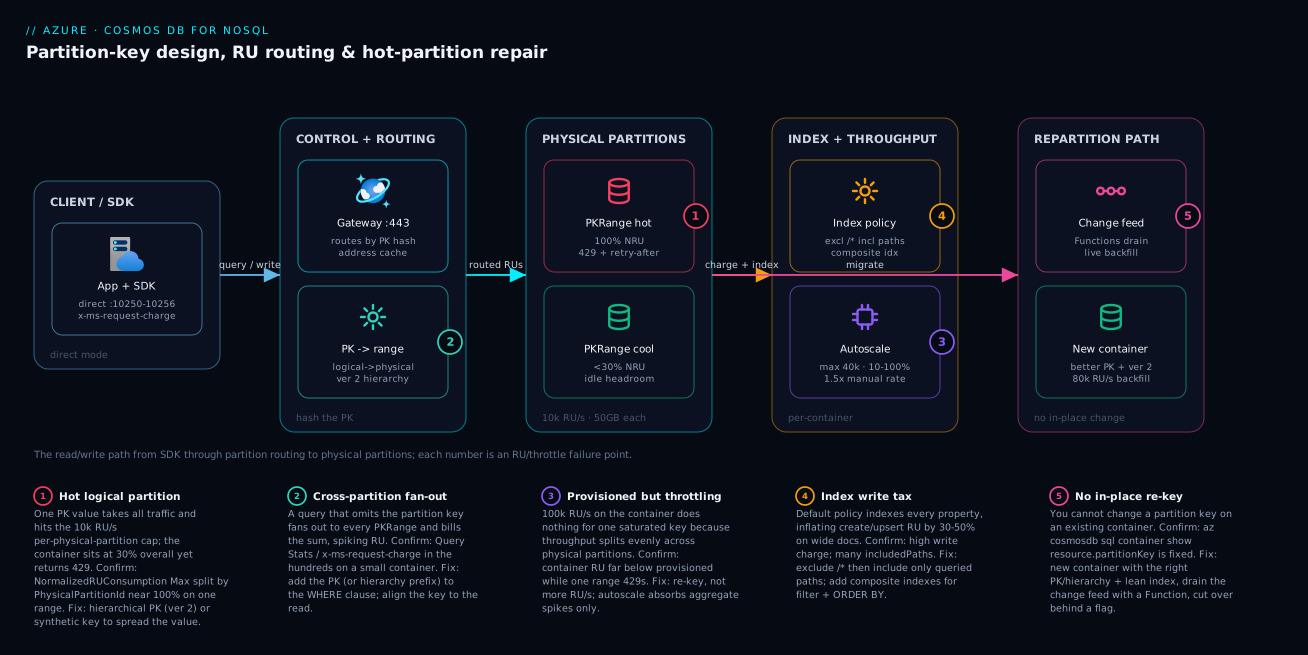
Real-world scenario
Lumio Commerce, a SaaS marketplace platform, runs its order-management service on Azure Cosmos DB for NoSQL: a transactions container partitioned on /merchantId — reasonable, since nearly every query is merchant-scoped (WHERE c.merchantId = @id AND c.createdOn > @since). It is provisioned at autoscale max 50,000 RU/s in Central India, holds ~600 GB across thousands of mid-size merchants, and costs about ₹95,000/month. The platform team is five engineers; the design held up beautifully for two years.
The incident began on a Friday. Lumio had onboarded a marketplace customer — a single large retailer — whose Black Friday traffic was roughly 40× their next-largest merchant. At 18:02 the order-service dashboard lit up with HTTP 429 on checkout writes: about 9% failing, climbing to 28% by 18:15. The on-call engineer’s reflex: raise the autoscale max from 50,000 to 100,000 RU/s. The 429 rate did not move. Second reflex: open a support ticket assuming a platform issue. Forty minutes in, checkout revenue for the whale merchant was visibly dropping and the bridge was full.
The breakthrough came from the right metric. Container-level Total Request Units showed overall utilization at ~22% — the container was nowhere near its ceiling. But NormalizedRUConsumption with Max aggregation, split by PhysicalPartitionId, showed exactly one physical partition pinned at 100%, and CDBDataPlaneRequests in Log Analytics showed the 429s concentrated on a single PartitionKeyRangeId. That was the whole story: all of the whale merchant’s traffic hashed to one logical partition (merchantId = 'bigretail'), which lives on one physical partition, which is capped at 10,000 RU/s — and no amount of container-level RU/s can split one key value across partitions. The 100,000 RU/s did nothing because the constraint was per-partition, not aggregate.
The constraint was unmovable in place: you cannot change a partition key on an existing container, a single logical partition cannot be split, and they could not take a maintenance window during the holiday peak. The fix was a migration to hierarchical partition keys, /merchantId then /orderId. They created a new container with partition key version 2, set a tight indexing policy (excluding the large lineItems blob they never filtered on — a 30-field document trimmed to four indexed paths), provisioned 80,000 RU/s for the backfill, and drained the source’s change feed into it with an Azure Function so the copy was live and resumable. They cut writes over behind a feature flag once the processor caught up, then dropped to autoscale max 50,000.
az cosmosdb sql container create \
  --account-name cosmos-orders-prod \
  --resource-group rg-orders \
  --database-name commerce \
  --name transactions_v2 \
  --partition-key-path "/merchantId" "/orderId" \
  --partition-key-version 2 \
  --idx @lean-indexing.json \
  --max-throughput 80000
The whale merchant’s orders now spread across thousands of orderId sub-partitions instead of one logical partition; the per-partition ceiling stopped binding, and merchant-scoped reads stayed single-partition because queries still supplied the /merchantId prefix. The next sale ran at the same load with zero sustained 429s, checkout write p99 fell from seconds-of-retry to ~12 ms, and steady-state RU spend actually dropped because the lean index cut write cost on a container doing millions of order writes a day — Lumio landed at ₹88,000/month, below where they started. The lesson on the wall: “A 429 with the container at 22% is a partition problem, not a provisioning problem. Split the key by PhysicalPartitionId before you touch the RU slider.”
The incident as a timeline, because the order of moves is the lesson:
| Time | Symptom | Action taken | Effect | What it should have been |
|---|---|---|---|---|
| 18:02 | 429 at 9%, climbing | (alert fires) | — | Ask: is one partition hot or all of them? |
| 18:05 | 429 at 15% | Raise autoscale max 50k → 100k | No change | Don’t raise RU/s blind |
| 18:12 | 429 at 22% | Open support ticket | Waiting | Read NRU split by PhysicalPartitionId |
| 18:42 | Still climbing | Chart NRU (Max) by PhysicalPartitionId | One partition at 100%, rest <30% | The breakthrough |
| 18:50 | Root cause found | Confirm 429 by PartitionKeyRangeId | One range dominates | — |
| 19:10 | Mitigated path chosen | New container, hierarchical /merchantId→/orderId, change feed |
Backfill running | Correct fix |
| +cutover | Fixed | Flip writes behind flag; drop to 50k | 0 sustained 429, p99 12 ms, ₹88k | The fix is the key, not the RU/s |
Advantages and disadvantages
The hash-partitioned, RU-metered model both causes this class of problem and makes it diagnosable. Weigh it honestly:
| Advantages (why this model helps you) | Disadvantages (why it bites) |
|---|---|
| Horizontal scale is automatic — Cosmos adds physical partitions transparently as data/throughput grow | The partition key is permanent; a wrong choice means a migration, not a config change |
Every operation reports its exact RU cost (x-ms-request-charge) — you rarely lack cost data |
Container-level metrics hide hot partitions; you must split by PhysicalPartitionId to see the truth |
| Single-partition queries are predictably cheap and fast at any scale | A query that omits the key silently fans out and bills the sum of every partition |
| RU/s is one knob; autoscale handles aggregate spikes automatically | Neither more RU/s nor autoscale rescues a single saturated logical partition |
| Indexing is automatic and queries are fast on day one | Default full-property indexing taxes every write forever until you trim it |
| Hierarchical keys and the change feed give a zero-downtime repair path | Hierarchical keys are creation-time only — you cannot retrofit without migrating |
| 20 GB / 10,000 RU/s ceilings are explicit and documented | They are easy to design past accidentally with a low-cardinality or monotonic key |
The model is right for high-scale, low-latency, globally distributed document workloads where you can design the access pattern up front and key to it. It bites hardest on skewed multi-tenant data (whale tenants), monotonic ingestion (append hot spots), and write-heavy containers left on the default index. Every disadvantage is manageable — but only if you know it exists before you pick the key, which is the point of this article.
Hands-on lab
Create a container, measure real RU cost, reproduce an expensive cross-partition query, fix it with the partition key and a trimmed index, and tear it down — all free-tier-friendly (Cosmos DB offers a free tier: the first 1,000 RU/s and 25 GB are free per account). Run in Cloud Shell (Bash).
Step 1 — Variables and resource group.
RG=rg-cosmos-lab
LOC=centralindia
ACCT=cosmoslab$RANDOM     # globally-unique account name
DB=shop
CONT=orders
az group create -n $RG -l $LOC -o table
Step 2 — Create a free-tier account (first 1000 RU/s + 25 GB free).
az cosmosdb create -n $ACCT -g $RG \
  --default-consistency-level Session \
  --enable-free-tier true -o table
az cosmosdb sql database create -a $ACCT -g $RG -n $DB -o table
Expected: an account row and a database. Free tier means this lab costs ₹0 if you stay under the free RU/s and delete promptly.
Step 3 — Create a container keyed on /customerId with 400 RU/s.
az cosmosdb sql container create -a $ACCT -g $RG -d $DB -n $CONT \
  --partition-key-path "/customerId" --throughput 400 -o table
Step 4 — Insert a few items and read the request charge. In Data Explorer (portal), open the container, New Item, and insert:
{ "id": "o-1", "customerId": "cust-7", "status": "active", "createdOn": "2026-06-01", "total": 4200 }
Open the Query Stats tab and run a single-partition query — note the Request Charge (single digits):
SELECT * FROM c WHERE c.customerId = "cust-7"
Step 5 — Reproduce an expensive cross-partition query. Run a query that omits the partition key and watch the charge climb (it fans out):
SELECT * FROM c WHERE c.status = "active"
Compare the two Request Charges in Query Stats: the keyed query touches one partition; the status query fans out. On a small lab container the gap is modest, but the mechanism is the point — at scale this is the difference between 3 RU and 800 RU.
Step 6 — Trim the indexing policy and confirm. Replace the container’s index policy (Data Explorer → Settings → Indexing Policy) with an allowlist:
{
  "indexingMode": "consistent",
  "automatic": true,
  "includedPaths": [ { "path": "/customerId/?" }, { "path": "/status/?" } ],
  "excludedPaths": [ { "path": "/*" } ]
}
Save (transformation runs online). Confirm the key and throughput from the CLI:
az cosmosdb sql container show -a $ACCT -g $RG -d $DB -n $CONT \
  --query "resource.{pk:partitionKey.paths, indexMode:indexingPolicy.indexingMode}" -o json
az cosmosdb sql container throughput show -a $ACCT -g $RG -d $DB -n $CONT \
  --query "resource.throughput" -o tsv
Expected: pk is ["/customerId"], indexMode is consistent, throughput 400.
Validation checklist. You created a keyed container on free tier, read the real RU charge from Query Stats, saw a keyed query stay single-partition while a non-keyed one fanned out, and trimmed the index to an allowlist. No application code required — exactly the point. The lab steps mapped to what each proves:
| Step | What you did | What it proves | Real-world analogue |
|---|---|---|---|
| 4 | Read Request Charge on a keyed query | RU cost is measurable, not guessed | Profiling the top queries |
| 5 | Run a query without the PK | Omitting the key fans out and costs more | The cross-partition tax in prod |
| 6 | Exclude /*, include 2 paths |
A lean index cuts write cost | The biggest write optimization |
| — | az cosmosdb sql container show |
The key is fixed and inspectable | Confirming a design post-deploy |
Cleanup (avoid lingering charges).
az group delete -n $RG --yes --no-wait
Cost note. On free tier this lab is ₹0 if you stay within 1,000 RU/s and delete the resource group. Without free tier, a 400 RU/s container is a few rupees per hour; deleting the group stops everything.
Practice challenges
Work these top to bottom; they escalate from reading a cost to designing a zero-downtime repair. Each solution names the why in one line so the principle sticks. No live account is needed — reason them on paper, then confirm in the lab above.
1. Beginner — spot the fan-out. A container is keyed on /id. A teammate runs SELECT * FROM c WHERE c.customerId = @cid and it costs 240 RU on a container that should answer in single digits. Why, and where do you confirm the real cost in under a minute?
<details><summary>Solution</summary>
The query filters on customerId, but the partition key is /id, so the partition key is absent from the WHERE — Cosmos cannot route the query and fans it out to every physical partition, billing the sum. Confirm in Data Explorer → Query Stats → Request Charge (and Retrieved document count). The fix is to key on what you actually filter by (/customerId), or add the partition key to the filter.
Why: a partition key not present in the WHERE clause always means a cross-partition fan-out.
</details>
2. Beginner — count the partitions. A container is provisioned 45,000 RU/s (manual) and holds 120 GB. How many physical partitions will Cosmos provision, and what RU/s budget does each get?
<details><summary>Solution</summary>
ceil( max(45000 / 10000, 120 / 50) ) = ceil( max(4.5, 2.4) ) = ceil(4.5) = 5 physical partitions. Throughput divides evenly: 45,000 / 5 = 9,000 RU/s each. Storage alone needs only 3 partitions, but throughput needs 5, and Cosmos takes the maximum of the two.
Why: physical-partition count is ceil(max(throughput requirement, storage requirement)), and RU/s is shared evenly across the result.
</details>
3. Intermediate — rescue a low-cardinality key. You inherited a container keyed on /status (active / closed) and writes throttle on active. You cannot re-key today. Propose a synthetic key that spreads writes, and state its cost.
<details><summary>Solution</summary>
Stamp a computed key that combines the value with a hashed bucket, e.g. pk = f"{status}-{sha256(id) % 20:02d}", giving 40 distinct values instead of 2. Writes now spread across 40 logical partitions. The cost: a query for all active items must now fan out across the 20 active-* buckets, so status-scoped reads get more expensive.
Why: bucketing trades read locality for write spread — use it only when point reads dominate; otherwise prefer a hierarchical key. </details>
4. Intermediate — index for a sorted query. A container is queried only by WHERE c.deviceId = @d ORDER BY c.ts DESC. Write the leanest indexing policy that serves it.
<details><summary>Solution</summary>
{
  "indexingMode": "consistent",
  "automatic": true,
  "includedPaths": [ { "path": "/deviceId/?" } ],
  "excludedPaths": [ { "path": "/*" } ],
  "compositeIndexes": [
    [ { "path": "/deviceId", "order": "ascending" },
      { "path": "/ts", "order": "descending" } ]
  ]
}
Exclude everything, include only deviceId, and add a composite (deviceId ASC, ts DESC) so the filter-plus-sort runs without a scan.
Why: a query that filters on one path and ORDER BYs another needs a composite index whose paths and directions match the query (or its exact reverse).
</details>
5. Advanced — confirm and fix a whale tenant. A multi-tenant container keyed on /tenantId throws sustained 429 while overall utilization sits at 20%. Give the exact metric (aggregation + split) that confirms the diagnosis, the fix, and the single creation-time constraint on that fix.
<details><summary>Solution</summary>
Confirm with NormalizedRUConsumption, aggregation Max, split by PhysicalPartitionId — one partition pinned near 100% while the rest idle, corroborated by 429s concentrated on one PartitionKeyRangeId. Fix by migrating to hierarchical partition keys (/tenantId → /entityId, kind: MultiHash, version 2) so the whale spreads across sub-partitions while prefix queries keep tenant locality. The constraint: hierarchical keys are set at container creation only — you cannot retrofit them, so this requires a change-feed migration to a new container.
Why: the hottest-partition Max is the only honest signal; hierarchical keys spread a skewed value without losing prefix-scoped reads, but only if designed in at creation. </details>
6. Advanced — a safe backfill on a shared account. You must copy 500 GB into a new, correctly-keyed container while the source container keeps serving live OLTP on the same account, and you must not lose writes that land during the copy. Outline the throughput, capture, and governance choices.
<details><summary>Solution</summary>
Provision the destination high (e.g. 80,000 RU/s) and use bulk mode (AllowBulkExecution) for the copy; drain the source’s change feed with a processor so writes during the copy are captured live and resumably, then cut over behind a feature flag and drop the destination RU/s afterward. Crucially, wrap the backfill client in a throughput control group so it cannot starve the live OLTP sharing the account (and/or tag the OLTP requests High via priority-based execution). Budget RU for the lease container too.
Why: bulk + change feed give a zero-downtime, resumable migration; throughput control is what stops the migration from becoming its own outage on a shared budget. </details>
Common mistakes & troubleshooting
This is the playbook — the part you bookmark. First as a scannable table you can read when the dashboard is red, then the same entries with the full confirm-command detail underneath.
| # | Symptom | Root cause | Confirm (exact cmd / portal path) | Fix |
|---|---|---|---|---|
| 1 | 429 under load, container utilization <50% | Hot logical partition saturating one physical partition’s 10k RU/s | Metrics → NormalizedRUConsumption Max split by PhysicalPartitionId near 100% on one |
Re-key: hierarchical (ver 2) or synthetic; not more RU/s |
| 2 | A query costs hundreds of RU on a small container | Cross-partition fan-out (PK omitted) or missing index | Data Explorer → Query Stats → Request Charge; check WHERE has the PK | Add PK to WHERE; align key to read; add index |
| 3 | Raised provisioned RU/s, still throttling on one key | Throughput splits evenly; one key can’t exceed 10k RU/s | Container RU far below provisioned while one PartitionKeyRangeId 429s |
Re-key, not re-provision; hierarchical PK |
| 4 | Writes suddenly expensive (high create/upsert RU) | Default policy indexes every property | Container → Indexing Policy shows /* included; high write charge |
Exclude /*, include queried paths only |
| 5 | ORDER BY query is very expensive or fails |
No composite index for filter + ORDER BY |
Query Stats high RU; policy has no matching composite | Add composite (filterPath, sortPath) matching direction |
| 6 | Writes for one key fail at ~20 GB | Logical partition hit the 20 GB ceiling | PartitionKeyStatistics shows one key near 20 GB | Re-key to spread that value (hierarchical/synthetic) |
| 7 | Cannot change the partition key | Key is permanent on an existing container | az cosmosdb sql container show → partitionKey fixed |
New container + change-feed migration |
| 8 | Autoscale bill higher than expected | <66% util but on autoscale’s 1.5× rate | Metrics: avg util low; throughput type autoscale | Switch to manual if steady above 66% util |
| 9 | Monotonic ingestion hot spot | /date/incrementing key funnels writes to “current” |
429 + NRU on the newest partition only | High-card key + range index, or bucketed date key |
| 10 | Tenant-scoped reads got slow after a “fix” | Synthetic bucketed key destroyed read locality | Reads now fan across buckets; higher RU | Use hierarchical PK instead for locality |
| 11 | SDK shows no 429 but latency spikes under load | SDK silently retrying 429 with backoff | x-ms-request-charge fine, but retry count high |
Read retry metrics; treat as hot partition |
| 12 | Stronger consistency doubled read cost | Strong/Bounded Staleness ~2× read RU | Account consistency level; compare RU by level | Use Session/Eventual where correctness allows |
The expanded form, with the full reasoning for the entries that bite hardest:
1. 429 under load while container utilization sits below 50%.
Root cause: A hot logical partition — one key value taking the traffic — saturating its single physical partition’s 10,000 RU/s cap.
Confirm: Metrics → NormalizedRUConsumption, aggregation Max, split on dimension PhysicalPartitionId: one partition near 100% while others idle. Corroborate with 429s concentrated on one PartitionKeyRangeId in CDBDataPlaneRequests.
Fix: Spread the key — hierarchical partition keys (version 2) for multi-tenant locality, or a synthetic bucketed key if point reads dominate. Raising provisioned RU/s does nothing for a single key.
2. A query reports hundreds of RU on a small container.
Root cause: A cross-partition query (the partition key is not in the WHERE) fanning out to every physical partition, or a missing index forcing a scan.
Confirm: Data Explorer → Query Stats → Request Charge (hundreds) and Retrieved document count; check whether the query supplies the partition key and whether the filtered/sorted path is indexed.
Fix: Add the partition key (or the hierarchical prefix) to the filter; index the filtered path; project fewer fields. If the access pattern fundamentally omits the key, the key is wrong.
3. You raised provisioned RU/s and it still throttles on one key.
Root cause: Throughput is distributed evenly across physical partitions; a single logical partition can never exceed 10,000 RU/s, so container-level RU/s is irrelevant to one hot key.
Confirm: Container Total Request Units far below provisioned while one PartitionKeyRangeId dominates 429s.
Fix: Re-key (hierarchical/synthetic) and migrate; do not keep buying RU/s.
4. Create/upsert RU is unexpectedly high.
Root cause: The default indexing policy indexes every property, so each write maintains dozens of index entries — most never serve a query.
Confirm: Container → Settings → Indexing Policy shows includedPaths of /*; write x-ms-request-charge is high on wide documents.
Fix: Exclude /* and include only queried paths; the transform runs online. Expect 30–50% lower write RU on 40-field documents.
5. An ORDER BY query is very expensive or fails outright.
Root cause: No composite index for a query that filters on one path and sorts on another (or sorts on two paths).
Confirm: Query Stats shows high RU; the indexing policy has no compositeIndexes entry matching the query’s paths and directions.
Fix: Add a composite index (filterPath ASC, sortPath DESC) matching the query (or its exact reverse).
6. Writes for one key value start failing around 20 GB.
Root cause: That logical partition hit the 20 GB ceiling — a hard limit per key value you cannot raise.
Confirm: PartitionKeyStatistics (SDK / storage metrics) shows one key value’s SizeInKB near 20 GB.
Fix: Re-key to spread that value across more logical partitions (hierarchical or synthetic) via migration.
7. You cannot change the partition key.
Root cause: The partition key is permanent on an existing container by design.
Confirm: az cosmosdb sql container show --query "resource.partitionKey" returns the fixed key; there is no update path for it.
Fix: Create a new container with the correct key and drain the change feed into it; cut over behind a flag.
8. The autoscale bill is higher than the load seems to justify. Root cause: Autoscale costs 1.5× the manual rate, so below ~66% average utilization you pay a premium for elasticity you may not need. Confirm: Metrics show low average utilization while throughput type is autoscale. Fix: For steady workloads above ~66% util, switch to manual at a tightly sized RU/s.
9. A monotonic key creates an append hot spot.
Root cause: /date or an incrementing id funnels every new write into the “current” partition.
Confirm: NRU and 429s concentrate on the newest partition only.
Fix: Use a high-cardinality key and a range index for time queries, or a bucketed synthetic key that spreads the write across N buckets.
10. Tenant reads got slower after a hot-partition “fix”. Root cause: A synthetic bucketed key spread writes but turned tenant-scoped reads into a fan-out across the buckets. Confirm: Reads that were single-partition now touch many partitions; per-query RU rose. Fix: Use hierarchical partition keys (prefix routing keeps tenant reads local) instead of bucketing when you need read locality.
11. The SDK shows no 429 but latency spikes under load.
Root cause: The SDK is silently retrying 429s with backoff (default up to 9 attempts), so callers see latency instead of errors.
Confirm: x-ms-request-charge looks fine but retry/latency telemetry is high; check CDBDataPlaneRequests for the underlying 429s.
Fix: Treat it as a hot partition (re-key); tune retry options so the masking is visible in your metrics.
12. Reads cost twice what you expected. Root cause: Strong or Bounded Staleness consistency costs roughly 2× the RU of Session/Eventual on reads. Confirm: Check the account’s default consistency level; compare RU for the same read at different levels. Fix: Use Session (the default) or Eventual where the workload tolerates it; reserve Strong for the operations that truly need it.
Common beginner mistakes
These are conceptual traps — wrong mental models, not red-dashboard symptoms (those live in the troubleshooting playbook above). Each one quietly steers a design toward the wall before a single 429 ever fires.
| Misconception | Why it’s wrong | The right mental model |
|---|---|---|
| “429 means under-provisioned — add RU/s.” | RU/s divides evenly across physical partitions, and one logical partition caps at 10,000 RU/s. More RU/s never raises that ceiling for a single hot key. | 429 with the container cool is a placement problem. Split the key (hierarchical / synthetic); don’t buy throughput. |
| “The partition key is just an index; I’ll change it later.” | It is the physical placement rule, hashed at write time, and it is immutable on an existing container. | Treat the key like a table’s primary storage layout: decide it once, and design a change-feed escape hatch up front. |
“Highest cardinality wins, so key on /id.” |
/id spreads perfectly but appears in almost no query filter, so every non-point query fans out. |
A good key is high-cardinality and read-aligned and write-spread — all three, weighed in that order. |
| “Cross-partition queries are fine; Cosmos is fast.” | You are billed the sum of every partition the query touches; a 3-RU query becomes 800 RU at scale. | Put the key (or hierarchical prefix) in the WHERE; if the workload is genuinely analytical, offload it to the analytical store. |
| “Indexing is automatic, so leave the default.” | The default indexes every path, and every write pays to maintain every index entry — most of them serving no query. | Exclude /*, include only what you filter or sort on; it is the biggest write-RU lever after the key. |
| “Autoscale means I never think about throughput.” | Autoscale costs 1.5× per RU and still caps each physical partition at 10,000 RU/s — it absorbs aggregate spikes only. | Autoscale is elasticity for uneven total load at a premium; it is not protection from a hot key or a substitute for sizing. |
“A point read and SELECT * WHERE id=@id are the same.” |
The SELECT engages the query engine and index; the point-read API is a direct key-value lookup. |
Use the SDK point-read (id + partition key together) for the flat ~1 RU path whenever you know both. |
| “We’re under 50 GB, so partitioning is fine.” | 50 GB is the physical partition size; a single logical partition (one key value) is capped at 20 GB. | Watch per-key size (PartitionKeyStatistics), not just total storage — one whale key hits 20 GB while the container looks half-empty. |
The thread through all eight: Cosmos’s ceilings live on the logical partition (one key value), and the fixes live in the key and the index — never in the throughput slider.
Best practices
- Pick the key for cardinality, read alignment, and write spread — in that order of scrutiny. The obvious key (
/tenantId,/status,/date) is often the wrong one; profile your top five queries before you commit. - Default to hierarchical partition keys for multi-tenant data. Power-law tenant distributions are the norm, not the exception;
/tenantId→/entityIdspreads whales while keeping prefix reads local. Set it at creation — you cannot retrofit it. - Measure RU, never estimate past first data. Read
x-ms-request-charge/ Data Explorer Query Stats on every hot query; a query in the hundreds of RU is a design bug, not a fact of life. - Always put the partition key in the
WHEREclause of high-volume queries. Omitting it fans out to every partition and bills the sum. Align the key to the read so this is natural. - Exclude
/*and include only queried paths. Default full-property indexing is the biggest write tax; trim it and add composite indexes forfilter + ORDER BY. This is the highest-leverage write optimization after the key. - Detect hot partitions with
NormalizedRUConsumption(Max) split byPhysicalPartitionId. Container-level utilization lies; the per-partition Max is the only honest signal. - Choose throughput mode by the ~66% break-even. Autoscale below it (avoid paying for idle), manual above it (avoid the 1.5× premium). Re-evaluate as the load shape changes.
- Never answer a hot-partition 429 with more RU/s. Throughput splits evenly; one key caps at 10,000 RU/s regardless. Re-key instead.
- Design the migration escape hatch up front. Document a change-feed re-partition path so that when the key needs to change, it is a runbook, not a research project.
- Provision high RU/s for backfills, then dial back. Bulk ingestion is throughput-bound; size the destination generously during a migration and reduce it at steady state.
- Keep items small and consistency as weak as correctness allows. RU scales with bytes processed and roughly doubles for Strong reads; both are levers you control.
The metrics and alerts worth wiring before the next incident — leading indicators, not the lagging “writes failing”:
| Alert on | Signal | Threshold (starting point) | Why it’s leading |
|---|---|---|---|
| Hottest partition | NormalizedRUConsumption (Max) | > 90% for 5 min | Catches a hot partition before sustained 429 |
| Throttle rate | Total Requests, StatusCode 429 | > 1% of requests | The symptom; alert but treat as confirmation |
| Per-query cost creep | x-ms-request-charge p95 (app telemetry) |
> your budget per query | Catches a fan-out before it dominates |
| Container utilization | Total RU / Provisioned | > 80% sustained | Distinguishes genuine under-provisioning |
| Logical partition size | PartitionKeyStatistics max | > 15 GB on one key | Warns before the 20 GB hard ceiling |
| Autoscale peak | Max RU/s reached per hour | near the configured max | Bill spike / consider raising max |
Security notes
- Use managed identity and RBAC, not keys, for the data plane. Cosmos supports Microsoft Entra ID authentication with data-plane RBAC roles (
Cosmos DB Built-in Data Reader/Data Contributor). Assign the app’s managed identity a least-privilege role instead of distributing the account’s primary keys, which grant full control and cannot be scoped. - Disable key-based auth where you can. With Entra auth in place, set
disableLocalAuth: trueso the powerful primary/secondary keys cannot be used at all — eliminating the highest-value secret to leak. - Lock the network path. Use Private Endpoints so the account is reachable only from your VNet, and disable public network access. See Azure Private Endpoint vs Service Endpoint for the routing choice; combine with IP firewall rules for any remaining public access.
- Store any remaining secrets in Key Vault. If you must use connection strings (e.g. for a legacy SDK), keep them in Azure Key Vault referenced by managed identity, never in app settings or code. See Azure Key Vault: Secrets, Keys & Certificates.
- Encryption is on by default; bring your own key if required. Data is encrypted at rest with service-managed keys; for regulatory needs configure customer-managed keys (CMK) via Key Vault.
- Scope data-plane RBAC to the right resource. Entra data-plane roles can be scoped to an account, database, or container — grant a service access only to the containers it needs, not the whole account.
- Audit with diagnostic logs. Route
DataPlaneRequestsand control-plane logs to Log Analytics; the sameCDBDataPlaneRequeststable you use for hot-partition detection is your access audit trail.
The security controls and what each one buys you — secure and resilient pull together here:
| Control | Setting / mechanism | Secures against | Also helps |
|---|---|---|---|
| Entra data-plane RBAC | Built-in Data Reader/Contributor + MI | Key sprawl; over-broad access | Per-container least privilege |
| Disable local auth | disableLocalAuth: true |
Leaked primary/secondary keys | Forces identity-based access |
| Private Endpoint | Private link + no public access | Exfiltration over the public internet | Stable private DNS routing |
| IP firewall | ipRules allowlist |
Unscoped public reachability | Restricts any residual public path |
| Customer-managed keys | CMK via Key Vault | Regulatory key-control gaps | Key rotation governance |
| Diagnostic logs | DataPlaneRequests → Log Analytics |
Undetected access / abuse | Doubles as hot-partition telemetry |
Cost & sizing
The bill drivers and how they interact with the design:
- Provisioned RU/s dominates the bill — you pay per 100 RU/s per hour regardless of how much you use (manual) or up to the hourly peak (autoscale). Right-sizing throughput and trimming per-operation RU (lean index, small items, weaker consistency) are the two levers that move the number.
- Manual vs autoscale is the ~66% break-even. Autoscale’s 1.5× rate is worth it for spiky/idle workloads (you avoid paying for headroom); above ~66% average utilization a tightly sized manual setting is cheaper. Getting this wrong is a common, silent overspend.
- Storage is billed per GB-month (data + index), so a lean index also shrinks storage cost, not just write RU. Excluding a large unqueried blob subtree cuts both.
- The free tier gives the first 1,000 RU/s and 25 GB free per account — enough for dev/test and small production. Serverless mode bills per RU consumed with no provisioning floor, ideal for intermittent workloads.
- Multi-region and stronger consistency add cost: each additional region multiplies provisioned RU/s (and write regions for multi-write), and Strong/Bounded Staleness reads cost ~2× — design distribution and consistency deliberately. See Cosmos DB Multi-Region Writes & Conflict Resolution.
A rough monthly picture for a single-region production container, before any multi-region multiplier:
| Configuration | What you pay for | Rough INR / month | When it fits | Watch-out |
|---|---|---|---|---|
| Free tier (≤1,000 RU/s, ≤25 GB) | Nothing (one per account) | ₹0 | Dev/test, small prod | One free-tier account per subscription |
| Serverless | Per RU consumed + storage | Pennies → low ₹ for spiky | Intermittent, low steady load | Per-container caps; not for sustained high RU |
| Manual 10,000 RU/s | Fixed 24/7 throughput | ~₹35,000–45,000 | Steady load above ~66% util | Pay even when idle |
| Autoscale max 10,000 RU/s | Hourly peak, 1.5× rate, floor 1,000 | ~₹5,000 (idle) → ₹50,000+ (peak) | Spiky / unpredictable | Surprise bill if peak is high |
| Storage 100 GB | Data + index per GB | ~₹2,000 | Any | Lean index reduces this |
| + each extra region | Replicated RU/s + storage | ×(regions) of the above | Global reads / DR | Multi-write multiplies write RU |
Sizing heuristics worth carrying:
| Question | Heuristic |
|---|---|
| Manual or autoscale? | Autoscale if avg util < 66% or load is spiky; else manual |
| What max RU/s for autoscale? | Set max to your measured peak; floor is auto (max ÷ 10) |
| Dedicated or shared throughput? | Shared (db-level) for many tiny containers; dedicated for predictable busy ones |
| Index everything? | No — exclude /*, include queried paths; saves write RU + storage |
| Stronger consistency? | Only where correctness needs it; it ~doubles read RU |
| How many physical partitions will I get? | ceil(max(provisionedRU/10000, storageGB/50)) |
Interview & exam questions
1. A container is throwing 429 while its overall RU utilization is only 25%. What’s happening and how do you confirm? A hot logical partition — one key value taking the traffic — has saturated its single physical partition’s 10,000 RU/s cap; container-level utilization is low because the other partitions are idle. Confirm with NormalizedRUConsumption, aggregation Max, split by PhysicalPartitionId (one near 100%), and 429s concentrated on one PartitionKeyRangeId. The fix is to re-key (hierarchical/synthetic), not to add RU/s.
2. Why does provisioning more RU/s not fix a hot partition? Throughput is distributed evenly across physical partitions, and a single logical partition can never span more than one physical partition — so it is capped at 10,000 RU/s no matter what the container is provisioned to. Adding RU/s helps only when all partitions are genuinely hot (true under-provisioning).
3. What are the two hard ceilings every partition design must respect? A logical partition caps at 20 GB of storage (a single key value cannot exceed it), and a physical partition serves at most 10,000 RU/s. Because a logical partition lives on exactly one physical partition, a single key value is bounded by both — the root of every hot-partition incident.
4. How do you choose a partition key? Evaluate candidates on cardinality (many distinct values to spread across partitions), read alignment (the key appears in your highest-volume query filters, avoiding cross-partition fan-out), and write spread (no monotonic or status-like funnelling). The best key is high-cardinality and in the filter of most reads; when none exists, use a synthetic or hierarchical key.
5. What is a cross-partition query and why is it expensive? A query that does not include the partition key in its filter; Cosmos cannot route it to one partition, so it fans out to every physical partition and bills you the sum of their charges. Confirm via Query Stats Request Charge. Fix by adding the partition key (or hierarchical prefix) to the WHERE.
6. When do hierarchical partition keys help, and what’s the catch? They help multi-tenant / skewed workloads: defining up to three levels (e.g. /tenantId → /deviceId) spreads a whale tenant across many sub-partitions while a query supplying the prefix still routes to the right partitions (read locality preserved). The catch: they must be set at container creation with partition key version 2 — you cannot retrofit them without migrating.
7. How do you cut write RU without changing the partition key? Trim the indexing policy: exclude /* and include only the paths you filter, sort, or join on, then add composite indexes for filter + ORDER BY. On wide documents this cuts create/upsert RU by 30–50% because the write stops maintaining index entries no query uses. The transform runs online.
8. Manual vs autoscale — how do you decide? Autoscale costs 1.5× the manual rate but scales 10–100% of a max and bills the hourly peak. The break-even is roughly 66% average utilization: below it, autoscale is cheaper (no paying for idle headroom); above it, a tightly sized manual setting wins. Neither rescues a single hot partition.
9. You must change a partition key that’s wrong. What’s the production-safe path? There is no in-place repartition. Create a new container with the correct key (and a lean index), provision high RU/s for the backfill, drain the source’s change feed with an Azure Function (live, resumable, no maintenance window), and cut writes over behind a feature flag once the processor catches up. Then dial throughput back.
10. What does the x-ms-request-charge header tell you, and why does it matter? It reports the exact RU cost of that operation. It matters because you should measure, not estimate — a query reporting hundreds of RU is doing a cross-partition fan-out or fighting the index, which you can fix; a single-partition point read should be ~1 RU. Reading it on your top queries is the fastest cost optimization.
11. How does consistency level affect cost? Strong and Bounded Staleness reads cost roughly 2× the RU of Session or Eventual reads (and Strong constrains multi-region write topologies). Use the weakest level your correctness allows — Session (the default) suits most workloads — and reserve Strong for the operations that truly need it.
12. What is burst capacity and when does it save you? Burst capacity lets a physical partition temporarily exceed its provisioned share by drawing on idle RU/s accumulated over the prior ~5 minutes (up to ~3,000 RU/s). It smooths short bursts on otherwise-cool partitions — it is a buffer, not a fix for a sustained hot partition or chronic under-provisioning.
These map to DP-420 (Designing and Implementing Cloud-Native Applications Using Microsoft Azure Cosmos DB) — partitioning, throughput, indexing, change feed, consistency — and to AZ-204 (Developer Associate) — develop solutions that use Azure Cosmos DB (partition keys, request units, consistency). A compact cert-mapping for revision:
| Question theme | Primary cert | Exam objective area |
|---|---|---|
| Logical vs physical partitions, ceilings | DP-420 | Design and implement data distribution |
| Partition-key selection, synthetic/hierarchical | DP-420 | Design a data model; partitioning |
| RU measurement, cost, consistency | DP-420 / AZ-204 | Optimize and maintain; consistency |
| Indexing policy, composite indexes | DP-420 | Optimize Cosmos DB performance |
| Autoscale vs manual, throughput | DP-420 / AZ-204 | Provision throughput; cost |
| Change feed, migration | DP-420 | Integrate with the change feed |
Quick check
- A container returns 429 while its container-level RU utilization is 25%. What is the cause, and which metric (with what aggregation and split) confirms it?
- You provision 100,000 RU/s and one key still throttles. Why doesn’t the extra throughput help?
- True or false: you can change a container’s partition key in place as long as you do it during a maintenance window.
- A query reports 850 RU on a small container. Name the two most likely causes and the one place you’d look to confirm.
- Your multi-tenant app keys on
/tenantIdand one whale tenant just blew past 10,000 RU/s. What is the recommended fix, and what’s the one constraint on applying it?
Answers
- A hot logical partition — one key value taking the traffic — has saturated its single physical partition’s 10,000 RU/s cap; the container looks underused because the other partitions are idle. Confirm with NormalizedRUConsumption, aggregation Max, split by
PhysicalPartitionId(one near 100%), corroborated by 429s on onePartitionKeyRangeId. - Throughput is distributed evenly across physical partitions, and a single logical partition lives on exactly one physical partition, capped at 10,000 RU/s. Container-level RU/s never raises that per-partition ceiling for one key value — only a better key spreads the load.
- False. The partition key is permanent on an existing container; there is no in-place change, maintenance window or not. You create a new container with the correct key and migrate (change feed), then cut over.
- Cross-partition fan-out (the query omits the partition key, so it bills the sum of all partitions) or a missing index (forcing a scan). Confirm in Data Explorer → Query Stats → Request Charge and Retrieved document count, and check whether the query supplies the PK and whether the filtered path is indexed.
- Migrate to hierarchical partition keys (e.g.
/tenantId→/orderId) so the whale spreads across many sub-partitions while prefix queries keep tenant read locality. The constraint: hierarchical keys must be set at container creation with partition key version 2 — you cannot retrofit them, so it requires a change-feed migration to a new container.
Glossary
-
Logical partition — the set of all items sharing one partition key value; hard-capped at 20 GB of storage and bounded by its physical partition’s throughput.
-
Physical partition (PKRange) — the compute-and-storage unit Cosmos provisions and onto which it hashes logical partitions; serves up to 10,000 RU/s and ~50 GB. Count is derived, not chosen.
-
Partition key — the property (
/path) Cosmos hashes to place each item; effectively permanent on a container. -
Request Unit (RU) — Cosmos’s normalized currency for throughput; a 1 KB point read by id is ~1 RU, writes and queries cost more.
-
x-ms-request-charge— the response header reporting the exact RU cost of an operation; the source of truth for cost. -
Cross-partition query — a query whose filter omits the partition key; it fans out to every physical partition and bills the sum.
-
Hierarchical partition key (subpartitioning) — up to three key levels (version 2) that spread a skewed value across sub-partitions while prefix queries stay local; set at creation only.
-
Synthetic key — a computed partition key (e.g. value + hashed bucket) stamped on each item to raise cardinality; spreads writes but can lose read locality.
-
Indexing policy — the container JSON declaring which paths are indexed (
includedPaths/excludedPaths) and any composite indexes; over-broad indexing inflates write RU. -
Composite index — a multi-path index required for efficient
filter + ORDER BYor multi-ORDER BYqueries; order and direction must match the query. -
NormalizedRUConsumption — the Azure Monitor metric giving the percentage of provisioned RU/s used by the hottest partition; the best hot-partition signal when read with Max aggregation split by
PhysicalPartitionId. -
PartitionKeyRangeId — the identifier of a physical partition’s key range as seen in data-plane logs; a single one dominating 429s signals a hot partition.
-
Autoscale — throughput mode scaling instantly between 10% and 100% of a configured max, billed at the hourly peak and 1.5× the manual rate.
-
Burst capacity — temporary headroom letting a physical partition exceed its share by drawing on idle RU/s accrued over ~5 minutes (up to ~3,000 RU/s); a buffer, not a fix.
-
Change feed — the ordered log of inserts/updates per container; the production-safe mechanism for live, resumable re-partition migrations.
-
HTTP 429 (Too Many Requests) — the throttling response carrying
x-ms-retry-after-ms; sustained 429 means under-provisioning or, more often, a hot partition. -
Partition split — Cosmos halving a physical partition’s hash range into two PKRanges when it nears ~50 GB or crosses a 10,000-RU/s multiple; online and background, but it shrinks each partition’s RU budget.
-
Partition merge — the GA, opt-in inverse of a split: collapsing under-utilised PKRanges to reduce partition count and recombine per-partition RU budget on an over-partitioned container.
-
Time to Live (TTL) — automatic, best-effort background expiry of items, set as a container
DefaultTimeToLive(null/-1/ seconds) and overridable per item; it spends leftover RU and bounds a logical partition’s storage without a purge job. -
Integrated cache — a zero-RU cache for point reads and queries served by a provisioned dedicated gateway; requires gateway mode and session/eventual consistency, with freshness bounded by
MaxIntegratedCacheStaleness. -
Dedicated gateway — dedicated compute nodes (billed per hour) that host the integrated cache, sitting between the SDK and the backend physical partitions.
-
Throughput control — a client-side RU governor (Java / Spark
ThroughputControlGroupConfig, and .NET) that caps a client or named group to a share of a container’s RU/s so a backfill or analytics job cannot starve live traffic. -
Priority-based execution — request-level
High/Lowtagging; under throttling Cosmos shedsLowrequests first, protecting latency-critical operations. -
Serverless — an account capacity mode that bills per RU consumed with no provisioned floor, suited to intermittent or low-steady workloads; subject to per-container RU and storage caps.
-
Provisioned throughput — the mode where you reserve RU/s (manual at a fixed value, or autoscale between 10% and 100% of a max) and pay for the reservation regardless of use.
-
Shared (database) throughput — RU/s provisioned on a database and split across all its containers; economical for many small containers, but one busy container can starve the rest.
-
MultiHash / partition key version 2 — the container setting that enables hierarchical (multi-level) partition keys; must be chosen at creation and cannot be retrofitted.
-
Analytical store (Azure Synapse Link) — an auto-synced columnar replica of a container, queryable by Synapse / Fabric at no RU cost to the transactional container; the HTAP path for offloading heavy analytical scans.
-
Point read — a direct item lookup by
idand partition key that bypasses the query engine and index for a flat ~1 RU cost; the cheapest possible operation.
Next steps
You can now design a partition key, measure and shrink RU, detect a hot partition, and repair a skewed container. Build outward:
- Next: Cosmos DB Multi-Region Writes & Conflict Resolution — layer global distribution and multi-write conflict handling on top of the partitioning you designed here.
- Related: Database Selection 101: SQL vs NoSQL — When to Use What — the decision upstream of ever choosing Cosmos DB at all.
- Related: Azure Monitor & Application Insights for Observability — go deep on the metrics and KQL that power the hot-partition detection in this article.
- Related: Event Hubs, Kafka Capture & Stream Analytics: Throughput & Scaling — the ingestion firehose that usually feeds a Cosmos container.
- Related: Troubleshooting Azure SQL Database: Connectivity, Timeouts, Throttling & Blocking — the relational counterpart when a workload argues for SQL over NoSQL.