In a nutshell
Imagine your company (a PaaS service — a storage account, a Key Vault) sits inside your office building (your virtual network). A private endpoint installs a private internal phone extension for that company right in your building: a real jack on the wall with an internal number. The trouble is that everyone’s phonebook — the SDK default, the connection string, the TLS certificate — still lists the company’s public 1-800 number. Dial the name and the call goes out through the public switchboard, even though the extension is three metres away. Private DNS is the phonebook edit that makes dialling the name ring the internal extension instead. The private IP was never the hard part; the name is.
Now scale that to a corporate campus of forty buildings (spokes). You do not want each building keeping its own phonebook copy — they drift, and one stale entry sends a call out the front door while thirty-nine stay internal. Instead you keep one master phonebook at head office (the connectivity subscription), hand every building a read-only link to it, and post a standing rule (Azure Policy) that every new extension is auto-listed in the master. On-prem staff dialling in from home need a switchboard operator (the DNS Private Resolver) they can forward calls through, because they can’t reach the building’s internal directory. That whole system — one central phonebook, links everywhere, policy-enforced, plus an operator for outsiders — is this lesson.
Level: Intermediate → Expert · Time: ~68 min read
Before you start, you should be comfortable with VNets, subnets and hub-and-spoke peering, know what “public network access disabled” does to a PaaS resource, and read basic DNS (A record, CNAME, FQDN, conditional forwarder). By the end you will be able to: (1) trace any “the app can’t reach the storage account” ticket to the exact broken hop in seconds; (2) stand up one central privatelink.* zone, link it to every spoke, and let policy keep it that way; and (3) extend the same design to on-prem clients and to services you publish yourself. The formal objectives and prerequisites are spelled out in the two sections just below — this is only the plain-language map.
One private endpoint is easy. Three hundred of them across forty spokes, with on-prem clients that also need to resolve them, is an architecture problem. A private endpoint projects a private NIC for a PaaS resource — a storage account, a Key Vault, an Azure SQL server — into your virtual network and gives it a private IP. The catch is never the IP; it is the name. Your application still connects to the public FQDN baked into its SDK, connection string and TLS certificate, and unless your DNS quietly rewrites that name to the private IP, the traffic leaves over the internet path (or is rejected by the PaaS firewall) and the private endpoint you paid for is never used. Get the DNS design wrong early and you inherit zone sprawl, split-brain resolution, and a steady drip of “the app can’t reach the storage account” tickets that are never an application bug.
This is how to centralize it correctly the first time. We treat private-endpoint name resolution as one mechanism — public FQDN → privatelink.* CNAME → a private A record you host → the endpoint’s private IP — and then we make that mechanism work for hundreds of endpoints, dozens of spokes, and two client populations (in-Azure and on-prem) without copying a single zone more than once. You will host one copy of each privatelink.* zone in the connectivity subscription, project it into every spoke with a VNet link, let Azure Policy auto-bind every new endpoint to it, deploy the Azure DNS Private Resolver so on-prem can forward into Azure, and wire conditional forwarders in both directions. Every configuration carries an az command and a Bicep or Terraform snippet, and because this is a reference you will keep open during a rollout or an incident, the zone names, the failure modes, the limits and the resolution playbook are all laid out as scannable tables.
By the end you will stop guessing at 02:14 when a spoke suddenly resolves a public IP. You will know whether a VNet lost its link, a zone group was never created, a DNS-proxy NVA was rebuilt without its zone links, an on-prem forwarder points at the wrong place, or a leftover local zone is causing split-brain — and you will have the exact nslookup and az ... list to confirm which within ninety seconds. Read the prose once; keep the tables open the rest of the time.
What problem this solves
Private endpoints exist to keep PaaS traffic off the public internet — for compliance (“no public exposure of customer data”), for egress control (everything traverses the hub firewall), and to eliminate the data-exfiltration surface of a public storage endpoint. The networking is the easy 20%. The DNS is the 80% that silently fails, because resolution failures don’t throw — they succeed, returning the wrong (public) answer, and the application connects to the internet endpoint it was always going to connect to. Nothing errors until the PaaS firewall denies the public IP, or until an auditor notices traffic on the public path, or until a regional outage takes the public endpoint down while everyone assumed they were private.
What breaks without a deliberate design: forty spokes each grow their own copy of privatelink.blob.core.windows.net, records drift independently, and a redeploy in spoke 12 silently bypasses its zone group so that one account resolves public while thirty-nine resolve private. On-prem clients — which can never reach Azure’s internal resolver at 168.63.129.16 — get the public IP for everything and nobody notices until a partner integration fails. A DNS-proxy firewall in the hub becomes an undocumented single point of failure for all private resolution, and the day someone rebuilds it from a clean template, every spoke resolves public at the same instant.
Who hits this: every regulated or security-conscious team running PaaS behind private endpoints at landing-zone scale — banks, insurers, healthcare, government. It bites hardest where there are many spokes (record drift, missing links), hybrid connectivity (on-prem can’t see Azure DNS), a DNS-proxy NVA (single point of failure), and services with non-obvious zone names (Key Vault’s vaultcore, AKS’s regional zone, Azure Monitor’s set of five zones). The fix is never “add another zone per spoke” — it is “host one copy centrally, link it everywhere, and let policy enforce it.”
To frame the whole field before the deep dive, here is every failure class this article covers, the question it forces, and the first place to look:
| Failure class | What actually happens | First question to ask | First place to look | Most common single cause |
|---|---|---|---|---|
| Spoke resolves public IP | App connects to internet endpoint or is firewall-denied | Is this VNet linked to the central zone? | az network private-dns link vnet list |
VNet has no link to the zone |
| No A record at all | FQDN returns only the public IP, no private | Does the endpoint have a zone group? | dns-zone-group list on the PE |
Missing/incorrect zone group |
| On-prem resolves public | Datacenter clients never get the private IP | Does on-prem forward to the resolver inbound IP? | nslookup from on-prem |
Missing conditional forwarder |
| Split-brain (random IP) | Same FQDN returns private or public unpredictably | Is there a leftover local zone? | Per-spoke zone inventory | Spoke-local zone + central link both present |
| All spokes go public at once | Estate-wide private resolution dies | Did the DNS-proxy VNet lose its links? | Links on the NVA/firewall VNet | Proxy VNet rebuilt without zone links |
| Wrong zone, no resolution | Record written into a zone nobody queries | Is the zone name exactly right for this service? | Zone-name reference table | Regional/special suffix mismatch |
Learning objectives
By the end of this article you can:
- Explain the full private-endpoint resolution chain (public FQDN →
privatelink.*CNAME → private A record → endpoint IP) and name the exact hop at which any failure occurs. - Bind a private endpoint to a centrally-hosted Private DNS zone with a zone group — and explain why manual A records are an anti-pattern at scale.
- Host one copy of each
privatelink.*zone in the connectivity subscription and project it into every spoke with resolution-only VNet links, inaz, Bicep and Terraform. - Enforce auto-binding with an Azure DeployIfNotExists policy at the landing-zone management group, including a remediation task to backfill pre-existing endpoints.
- Deploy the Azure DNS Private Resolver with delegated inbound and outbound
/28subnets, and wire conditional forwarding for on-prem→Azure and Azure→on-prem resolution. - Pick the correct Private DNS zone name for any service — including the regional (AKS), multi-zone (Azure Monitor / AMPLS) and oddly-suffixed (Key Vault
vaultcore) cases — without guessing. - Diagnose any “the app can’t reach the PaaS resource” ticket as a specific resolution failure and confirm the root cause with one
nslookupand oneaz ... list.
Prerequisites & where this fits
You should already understand the building blocks: a virtual network (VNet) with subnets, VNet peering in a hub-and-spoke topology, what a PaaS firewall (“public network access disabled”) does, and the basics of DNS (A records, CNAMEs, FQDNs, conditional forwarding). You should be comfortable running az in Cloud Shell, reading JSON output, and recognising a private (RFC 1918) address versus a public one. Familiarity with Azure Policy and either Bicep or Terraform lets you take the governance and IaC sections directly to production.
This sits in the Networking & Connectivity track, downstream of the fundamentals and upstream of the landing-zone work. It assumes the VNet mechanics from the Azure Virtual Network basics: subnets, NSGs, peering and the deeper options in the Azure VNet deep dive: every setting. It builds directly on Private Endpoint vs Service Endpoint (why private endpoints, not service endpoints, are the modern default) and Private Link and Private DNS for PaaS (the single-endpoint version of this story). The hybrid half — the Private Resolver and conditional forwarding — is covered standalone in Azure DNS Private Resolver: hybrid conditional forwarding. It slots into the Azure landing zone: network topology and connectivity design, and the governance section leans on Azure Policy as code. When the PaaS firewall denies a public IP, the symptom often surfaces in Troubleshooting storage 403s: firewall, private endpoint, RBAC, SAS.
A quick map of who owns what during a resolution incident, so you escalate to the right team fast:
| Layer | What lives here | Who usually owns it | Failure classes it can cause |
|---|---|---|---|
| Application / SDK | The hard-coded public FQDN, connection string | App / dev team | None directly — it always uses the public name |
| Spoke VNet + endpoint | The private endpoint NIC, snet-pe, the zone group |
Spoke / workload team | Missing zone group, unlinked VNet |
| Central Private DNS | The one copy of each zone, all VNet links, DINE policy | Connectivity / platform | Missing link, wrong zone name, orphaned records |
| DNS-proxy NVA (if any) | Firewall doing DNS proxy for the spokes | Network / security | Estate-wide failure if its VNet loses links |
| DNS Private Resolver | Inbound/outbound endpoints, forwarding rulesets | Connectivity / platform | On-prem cannot resolve into Azure |
| On-prem DNS | Conditional forwarders to the inbound endpoint | On-prem AD / infra | On-prem resolves public; reverse path broken |
Core concepts
Six mental models make every later decision obvious.
The name is the whole problem — the IP is trivial. A private endpoint always has a private IP the moment it is created. Your app never asks for that IP directly; it asks for mystorageacct.blob.core.windows.net, because that name is in the SDK default, the connection string and the server certificate’s SAN. DNS is the only thing standing between “uses the private endpoint” and “uses the public internet.” Every failure mode in this article is a variation of the client could not see the right private record.
Microsoft pre-builds half the chain; you host the other half. Public Azure DNS already returns a CNAME from the public FQDN to a privatelink.* name — mystorageacct.blob.core.windows.net → mystorageacct.privatelink.blob.core.windows.net. That privatelink.* name resolves to nothing public. Your job is to host the privatelink.blob.core.windows.net Private DNS zone with an A record pointing the endpoint’s privatelink name at its private IP. If the client can see that zone, it follows the CNAME and gets the private IP. If it cannot, the chain dead-ends and the resolver falls back to the public A record.
The default resolver consults every linked zone automatically. Azure’s wire-server resolver lives at the magic, non-routable address 168.63.129.16. Any VM using default DNS in a VNet that is linked to a Private DNS zone will automatically have that zone consulted — no forwarders, no custom DNS, no resolver. So for in-Azure clients, “make this spoke resolve the private IP” reduces to “link this spoke’s VNet to the zone.” That single fact is the backbone of the whole design.
Centralize the zone, link it many times. A Private DNS zone is a global resource that can be linked to up to 1,000 VNets. You therefore host exactly one copy of privatelink.blob.core.windows.net in the connectivity subscription and create one VNet link per spoke. The alternative — one zone per spoke — multiplies every record by the spoke count and creates N independent places for drift. One zone, many links, is non-negotiable at scale.
Zone groups, not hand-written records. A Private DNS zone group is a child object of the private endpoint that tells Azure to manage the A record’s whole lifecycle — write it on creation, update it if the private IP changes, delete it when the endpoint is deleted. A manual A record is correct for exactly as long as nobody redeploys; the first re-creation orphans it. Zone groups can point at a zone in a different subscription, which is precisely how the spoke owns the endpoint while the connectivity subscription owns the zone.
On-prem lives in a different DNS universe. The address 168.63.129.16 is reachable only from inside an Azure VNet. An on-prem server has no path to it, so it can never benefit from a linked zone the way an Azure VM does. To bridge the gap you deploy the Azure DNS Private Resolver (or, historically, DNS-forwarder VMs) which exposes an inbound endpoint — a real private IP, reachable over ExpressRoute/VPN — that on-prem DNS can conditionally forward to. Resolution then happens inside Azure, where the linked zones are visible.
The vocabulary in one table
Before the deep sections, pin down every moving part. The glossary at the end repeats these for lookup; this table is the mental model side by side.
| Concept | One-line definition | Where it lives | Why it matters to resolution |
|---|---|---|---|
| Private endpoint (PE) | A private NIC + IP for a PaaS resource | Spoke subnet (snet-pe) |
The thing whose name must resolve private |
Subresource / group-id |
Which sub-service the PE targets (blob, vault…) | On the PE connection | Wrong one → wrong/no zone, no record |
privatelink.* zone |
The Private DNS zone holding private A records | Connectivity subscription | The half of the chain you host |
| A record | privatelink name → private IP |
In the zone | The answer the client actually needs |
| Zone group | Child object that manages the A record lifecycle | On the PE | Auto-writes/updates/deletes the record |
| VNet link | Binds a zone to a VNet so it’s consulted | On the zone | If absent, that VNet resolves public |
| 168.63.129.16 | Azure’s in-VNet default resolver | Per-VNet (virtual) | Auto-consults all linked zones |
| DINE policy | DeployIfNotExists policy auto-creating zone groups | Management group | Enforces binding without human action |
| DNS Private Resolver | Managed in-Azure DNS forwarder service | Hub VNet | Lets on-prem resolve into Azure |
| Inbound endpoint | Private IP on-prem forwards to | Hub, delegated /28 |
The bridge from on-prem into Azure DNS |
| Outbound endpoint | Source for queries Azure sends out | Hub, delegated /28 |
Lets Azure resolve on-prem names |
| Forwarding ruleset | Domain → on-prem DNS server mappings | Hub | Azure→on-prem conditional forwarding |
| DNS-proxy NVA | Firewall/NVA resolving on the spokes’ behalf | Hub VNet | If unlinked, breaks all resolution |
Resolution paths side by side
The three client populations each take a different route to the same private IP. Knowing which path a given client uses tells you immediately which control to check when it breaks:
| Client | Default DNS it uses | How it reaches the zone | Extra config needed | Breaks if… |
|---|---|---|---|---|
| Spoke VM (Azure default DNS) | 168.63.129.16 | VNet is linked to the central zone | A VNet link | The link is missing |
| Spoke VM (custom DNS → NVA proxy) | NVA in hub | NVA forwards to 168.63.129.16 in its VNet | NVA VNet linked to all zones | The proxy VNet loses its links |
| On-prem host | On-prem DNS | Conditional forwarder → resolver inbound IP | Inbound endpoint + forwarder | The forwarder is missing/wrong |
Why private endpoints break name resolution
A private endpoint projects a NIC for a PaaS resource into your VNet and gives it a private IP. The problem is the name. Your application still connects to the public FQDN — mystorageacct.blob.core.windows.net, myvault.vault.azure.net — because that name is baked into SDKs, connection strings, and certificates.
Resolve that public FQDN with no private DNS in place and you get the public IP. Traffic leaves over the internet path (or is blocked by the firewall on the PaaS resource) and the private endpoint is never used. The fix is the chain Azure builds for you:
mystorageacct.blob.core.windows.net
  -> CNAME mystorageacct.privatelink.blob.core.windows.net
       -> A 10.x.x.x   (only resolvable if you host the privatelink zone)
Microsoft’s public DNS already returns the privatelink.* CNAME. Your job is to host the privatelink.blob.core.windows.net Private DNS zone with an A record pointing the resource’s private endpoint at its private IP. If the client can see that zone, it follows the CNAME to your private A record. If it cannot, it falls through to the public A record. Every failure mode in this article is a variation of “the client could not see the right zone.”
It helps to be precise about what resolves to what at each step, and what a broken answer looks like at that step:
| Step | Name being resolved | Healthy answer | Broken answer | What the broken answer means |
|---|---|---|---|---|
| 1 | acct.blob.core.windows.net |
CNAME → acct.privatelink.blob… |
A → public IP directly | Some custom DNS isn’t returning the CNAME |
| 2 | acct.privatelink.blob.core.windows.net |
A → 10.x.x.x (private) |
NXDOMAIN / public fallthrough | The privatelink zone isn’t visible to this client |
| 3 | The private IP 10.x.x.x |
Reachable on 443 over the VNet | Timeout / reset | Routing/NSG/peering issue, not DNS |
| — | (end) the connection | PaaS sees a private-link source | PaaS firewall denies public source | Resolution returned the public IP |
Two reading notes: a public IP in the answer is always a DNS problem (steps 1–2); a private IP that times out is always a network problem (step 3). Never debug them with the same tool — nslookup settles steps 1–2, Test-NetConnection/nc -vz settles step 3.
Zone groups beat manual A records
You can create the A record by hand. Do not. A Private DNS zone group binds a private endpoint to one or more zones so Azure manages the A record lifecycle for you: it writes the record on creation, updates it if the IP changes, and deletes it when the endpoint is deleted. Manual records rot the moment someone redeploys.
# Create the private endpoint (storage blob example)
az network private-endpoint create \
  --name pe-stblob-app1 \
  --resource-group rg-app1 \
  --vnet-name vnet-spoke-app1 --subnet snet-pe \
  --private-connection-resource-id "$STORAGE_ID" \
  --group-id blob \
  --connection-name conn-stblob-app1

# Bind it to the centralized zone via a zone group
az network private-endpoint dns-zone-group create \
  --resource-group rg-app1 \
  --endpoint-name pe-stblob-app1 \
  --name default \
  --private-dns-zone "$ZONE_ID_BLOB" \
  --zone-name privatelink-blob
The
--private-dns-zonehere is a full resource ID. That ID can point at a zone in a different subscription — which is exactly how we centralize. The spoke owns the endpoint; the connectivity subscription owns the zone.
The --group-id (sometimes subresource) is per service: blob, file, table, queue, dfs for storage; vault for Key Vault; sqlServer for Azure SQL; mariadbServer, postgresqlServer, and so on. One resource can need several — a storage account using blob and file needs two endpoints (or one endpoint with two group IDs) and two zone groups.
Here is the same binding in Bicep, where the zone group is a child resource of the endpoint:
resource pe 'Microsoft.Network/privateEndpoints@2023-11-01' = {
  name: 'pe-stblob-app1'
  location: location
  properties: {
    subnet: { id: peSubnetId }
    privateLinkServiceConnections: [ {
      name: 'conn-stblob-app1'
      properties: {
        privateLinkServiceId: storageId
        groupIds: [ 'blob' ]
      }
    } ]
  }
}

resource zoneGroup 'Microsoft.Network/privateEndpoints/privateDnsZoneGroups@2023-11-01' = {
  parent: pe
  name: 'default'
  properties: {
    privateDnsZoneConfigs: [ {
      name: 'privatelink-blob'
      properties: { privateDnsZoneId: centralBlobZoneId } // ID in the connectivity sub
    } ]
  }
}
The private-endpoint create call has a small set of options that decide whether resolution can even work — get any of these wrong and the zone group has nothing correct to bind to:
| Option | Values | Default | When to change | Trade-off / gotcha |
|---|---|---|---|---|
--group-id |
Service-specific (blob, vault, sqlServer…) |
none (required) | Always set per subresource | Wrong value → wrong/no zone, no record |
--subnet |
A subnet with PE network policies disabled | none (required) | Dedicate a snet-pe per spoke |
Forgetting --disable-private-endpoint-network-policies blocks NIC placement |
--private-connection-resource-id |
The target PaaS resource ID | none (required) | The resource you’re fronting | Must be a resource that supports Private Link |
--connection-name |
Free text | derived | Name it after the consumer | Shows in the approval list on the target |
| Approval mode | Auto / Manual | Auto (same tenant) | Manual for cross-tenant/3rd-party | Auto-approval can expose a resource unintentionally |
--ip-config (static IP) |
Dynamic / static | Dynamic | Pin an IP for firewall rules | Static IPs need lifecycle management |
--edge-zone |
An edge zone name | none | Edge/low-latency placement | Niche; most PEs are regional |
Why the zone group wins, attribute by attribute against the hand-written record:
| Concern | Manual A record | Zone group (managed) |
|---|---|---|
| Created when | You remember to | Automatically with the endpoint |
| IP change (redeploy) | Stale until you fix it | Re-written automatically |
| Endpoint deleted | Record orphaned | Record deleted automatically |
| Cross-subscription | You manage RBAC + scripts | Native via the zone resource ID |
| Multiple subresources | Several records by hand | Multiple configs in one group |
| Drift risk at scale | High — N hand edits | None — Azure owns the lifecycle |
| Policy-enforceable | No clean hook | Yes — DINE creates the group |
A single zone group can hold multiple zone configs, which is how one endpoint with several subresources stays correct:
| Scenario | Endpoints needed | group-id(s) |
Zone group configs | Zones referenced |
|---|---|---|---|---|
| Storage, blob only | 1 | blob |
1 | privatelink.blob.core.windows.net |
| Storage, blob + file | 1 (two group-ids) or 2 | blob, file |
2 | blob zone + file zone |
| Storage, Data Lake (HNS) | 1 | dfs |
1 | privatelink.dfs.core.windows.net |
| Key Vault | 1 | vault |
1 | privatelink.vaultcore.azure.net |
| Azure SQL logical server | 1 | sqlServer |
1 | privatelink.database.windows.net |
| Cosmos DB (multi-region) | 1 + 1/region | Sql |
1 (+ regional records) | privatelink.documents.azure.com |
| Azure Monitor (AMPLS) | 1 (the scope) | azuremonitor |
5 | monitor/oms/ods/agentsvc/blob set |
Centralize zones in the connectivity subscription
The anti-pattern is one set of privatelink.* zones per spoke. With forty spokes you would have forty copies of privatelink.blob.core.windows.net, each a separate place for records to drift. Instead, host one copy of each zone in the connectivity (hub) subscription and project it into every spoke with a VNet link.
HUB_RG="rg-connectivity-dns"

# One zone, hosted centrally
az network private-dns zone create \
  --resource-group $HUB_RG \
  --name privatelink.blob.core.windows.net

# Link every VNet that needs to resolve it.
# registration-enabled=false: this is a resolution-only link.
az network private-dns link vnet create \
  --resource-group $HUB_RG \
  --zone-name privatelink.blob.core.windows.net \
  --name link-spoke-app1 \
  --virtual-network "$SPOKE_APP1_VNET_ID" \
  --registration-enabled false
A VNet’s default resolver (168.63.129.16) automatically consults every Private DNS zone linked to that VNet. So a VM in vnet-spoke-app1 querying the blob FQDN walks: public CNAME to privatelink.*, then the linked central zone returns the private A record. No forwarders, no resolver, no custom DNS on the spoke — for VNet-internal clients. Hybrid clients are the resolver section.
Set registration-enabled false on these links. Auto-registration is for VM hostnames in a single VNet; it has no place in a shared privatelink zone and only one link per zone may have it enabled anyway. The distinction matters enough to tabulate:
| Link attribute | registration-enabled = true |
registration-enabled = false |
|---|---|---|
| Purpose | Auto-register VM hostnames into the zone | Resolution only — read the zone’s records |
| How many per zone | At most one VNet | Up to 999 more (1,000 links total) |
| Use for privatelink zones | Never | Always |
| Writes records? | Yes (VM A records) | No |
| Used by | A private “VM DNS” zone like corp.internal |
Every privatelink.* zone |
The shared-zone topology has hard ceilings you must design against before you hit spoke 200:
| Resource | Limit (per subscription/zone) | What it constrains | Mitigation when approached |
|---|---|---|---|
| VNet links per Private DNS zone | 1,000 | How many spokes can resolve one zone | Split estates by region/zone copy; second connectivity sub |
| Private DNS zones per subscription | 1,000 | How many distinct privatelink.* zones |
Rarely hit — there are ~40 service zones |
| Record sets per zone | 25,000 | How many endpoints share one zone | Comfortable for hundreds of PEs |
| Records per record set | 20 | Multi-IP A records (rarely needed) | One PE = one IP normally |
| Links with registration enabled | 1 per zone | Auto-registration scope | Don’t enable it on privatelink zones |
| Private endpoints per VNet | High (thousands) | PE density per spoke | Spread across spokes by workload |
In Terraform the central-plus-many-links pattern is just a for_each:
locals {
  privatelink_zones = [
    "privatelink.blob.core.windows.net",
    "privatelink.file.core.windows.net",
    "privatelink.vaultcore.azure.net",
    "privatelink.database.windows.net",
  ]
}

resource "azurerm_private_dns_zone" "zones" {
  for_each            = toset(local.privatelink_zones)
  name                = each.value
  resource_group_name = azurerm_resource_group.dns.name
}

# Cartesian product: every zone linked to every spoke VNet
resource "azurerm_private_dns_zone_virtual_network_link" "links" {
  for_each = {
    for pair in setproduct(local.privatelink_zones, keys(var.spoke_vnets)) :
    "${pair[0]}|${pair[1]}" => { zone = pair[0], vnet = pair[1] }
  }
  name                  = "link-${each.value.vnet}"
  resource_group_name   = azurerm_resource_group.dns.name
  private_dns_zone_name = azurerm_private_dns_zone.zones[each.value.zone].name
  virtual_network_id    = var.spoke_vnets[each.value.vnet]
  registration_enabled  = false
}
The centralized model wins decisively over per-spoke zones on every axis that matters at scale:
| Axis | Per-spoke zones (anti-pattern) | Centralized zone + links (this design) |
|---|---|---|
| Copies of each zone | One per spoke (×40) | Exactly one |
| Places a record can drift | N (one per spoke) | One |
| New-spoke onboarding | Create zones + endpoints + records | Add links (one for_each iteration) |
| Cross-team RBAC | Each spoke owns DNS | Connectivity owns DNS centrally |
| Policy enforcement | Hard (target floats) | Easy (one zone ID per service) |
| On-prem resolver target | Ambiguous | One authoritative set of zones |
| Failure blast radius | Per spoke | Centralized — but link discipline critical |
Policy-enforced private DNS
Manual zone groups do not scale across teams. The moment a spoke owner creates an endpoint and forgets the zone group, you have a silent public-resolution bug. Azure Policy with a deployIfNotExists (DINE) effect closes the gap: it watches for new private endpoints and auto-creates the zone group pointing at your central zone.
Microsoft ships built-in DINE policies — search for “Configure private endpoints … to use private DNS zones” in the policy catalog (Microsoft.Authorization/policyDefinitions). There is a service-specific one (e.g. for Blob, Key Vault, SQL) and you typically assign them as an initiative at the landing-zone management group, each parameterized with the central zone’s resource ID.
The shape of the rule, so you know what it is doing:
{
  "if": {
    "allOf": [
      { "field": "type", "equals": "Microsoft.Network/privateEndpoints" },
      {
        "count": {
          "field": "Microsoft.Network/privateEndpoints/privateLinkServiceConnections[*].groupIds[*]",
          "where": { "field": "...groupIds[*]", "equals": "blob" }
        },
        "greaterOrEquals": 1
      }
    ]
  },
  "then": {
    "effect": "deployIfNotExists",
    "details": {
      "type": "Microsoft.Network/privateEndpoints/privateDnsZoneGroups",
      "roleDefinitionIds": [
        "/providers/Microsoft.Authorization/roleDefinitions/4d97b98b-1d4f-4787-a291-c67834d212e7"
      ],
      "deployment": { "properties": { "..." : "ARM template that creates the zone group" } }
    }
  }
}
The role definition ID above is Network Contributor — the DINE managed identity needs it (plus Private DNS Zone Contributor on the zone) to write the zone group and record. Two operational notes: DINE only acts on new resources, so run a remediation task to backfill endpoints that predate the assignment; and because the policy hardcodes the central zone ID, every endpoint of that service across every spoke lands in the same zone automatically. That is the whole point — governance, not goodwill.
Choosing the effect for your private-endpoint governance is itself a decision; here is what each gives you:
| Effect | What it does | Acts on existing? | When to use |
|---|---|---|---|
| DeployIfNotExists | Auto-creates the missing zone group | With remediation task | The default — make every PE correct automatically |
| AuditIfNotExists | Flags PEs lacking a zone group, changes nothing | Yes (reports) | Discovery / pre-enforcement phase |
| Deny | Blocks PE creation that violates a condition | No (prevention) | Forbid PEs in non-approved subnets/subs |
| Modify | Adds/updates a property (e.g. a tag) | With remediation | Tagging, not zone-group creation |
| Disabled | Turns the rule off | n/a | Temporarily during migration |
The two roles the DINE identity needs, and exactly why:
| Role | Scope to grant | What it lets the policy do |
|---|---|---|
| Network Contributor | The endpoint’s subscription / RG | Create the privateDnsZoneGroups child object |
| Private DNS Zone Contributor | The central zone (connectivity sub) | Write the A record into the zone |
DINE remediation has a predictable lifecycle; knowing each stage stops you from “why didn’t it fix it?” confusion:
| Stage | Trigger | What happens | What you do |
|---|---|---|---|
| Assignment created | You assign the initiative | A managed identity is created | Grant it the two roles above |
| New endpoint appears | Spoke owner creates a PE | DINE evaluates and deploys the zone group | Nothing — it’s automatic |
| Existing endpoints | (predate the assignment) | Marked non-compliant, not fixed | Create a remediation task to backfill |
| Compliance drift | Someone deletes a zone group | Flagged non-compliant on next scan | Re-run remediation or let next eval fix |
| Reporting | Continuous | Compliance % in Policy blade | Alert on non-compliant count > 0 |
Create the remediation task to backfill the estate:
az policy remediation create \
  --name remediate-pe-blob-dns \
  --policy-assignment "$ASSIGNMENT_ID" \
  --resource-discovery-mode ReEvaluateCompliance
On-prem and hybrid resolution with the Private Resolver
VNet clients are solved. On-prem clients are not: a server in your datacenter querying mystorageacct.blob.core.windows.net hits its own DNS, gets the public CNAME, and has no way to reach 168.63.129.16 — that address is non-routable outside Azure. You need an in-Azure resolver that on-prem can forward to.
The modern answer is the Azure DNS Private Resolver, a managed service (no DNS VMs to patch). Deploy it in the hub with an inbound endpoint (an IP on-prem forwards to) and an outbound endpoint (for queries Azure sends back out to on-prem).
RESOLVER_RG="rg-connectivity-dns"

az dns-resolver create \
  --name dnspr-hub \
  --resource-group $RESOLVER_RG \
  --location eastus2 \
  --id "$HUB_VNET_ID"

# Inbound: gets a private IP in a dedicated /28 subnet delegated to the resolver
az dns-resolver inbound-endpoint create \
  --dns-resolver-name dnspr-hub \
  --resource-group $RESOLVER_RG \
  --name inbound \
  --location eastus2 \
  --ip-configurations "[{private-ip-allocation-method:Dynamic,subnet:{id:$INBOUND_SUBNET_ID}}]"

# Outbound: needs its own delegated /28 subnet
az dns-resolver outbound-endpoint create \
  --dns-resolver-name dnspr-hub \
  --resource-group $RESOLVER_RG \
  --name outbound \
  --location eastus2 \
  --subnet "$OUTBOUND_SUBNET_ID"
Both endpoints require dedicated subnets delegated to Microsoft.Network/dnsResolvers, minimum /28. Plan IP space for this in the hub up front. The resolver’s pieces, and what each is for:
| Resolver component | What it is | Subnet requirement | Direction | Who talks to it |
|---|---|---|---|---|
| DNS Private Resolver | The managed service object | Lives in the hub VNet | — | Container for the endpoints |
| Inbound endpoint | A private IP that accepts queries | Delegated /28 |
On-prem → Azure | On-prem DNS conditional forwarders |
| Outbound endpoint | Source for queries leaving Azure | Delegated /28 |
Azure → on-prem | Forwarding rulesets attach here |
| Forwarding ruleset | Domain → target-DNS mappings | n/a (logical) | Azure → on-prem | Linked to VNets that should obey it |
| Ruleset VNet link | Applies a ruleset to a VNet | n/a | — | The VNets whose queries it governs |
The Private Resolver vs the legacy DNS-forwarder-VM approach — why the managed service wins for new builds:
| Dimension | DNS Private Resolver (managed) | DNS forwarder VMs (legacy) |
|---|---|---|
| Patching / OS upkeep | None (PaaS) | You patch Windows/BIND |
| High availability | Built-in, zone-resilient | You build it (2+ VMs, LB) |
| Scaling under QPS | Managed (high QPS/endpoint) | Size and scale VMs yourself |
| Conditional forwarding | Native forwarding rulesets | BIND/Windows config files |
| Cost model | Per endpoint-hour + queries | VM compute + management time |
| Subnet need | Two delegated /28s |
A subnet for the VMs |
| When still chosen | New builds, almost always | Legacy estates, exotic DNS needs |
Conditional forwarding rulesets (Azure to on-prem)
When an Azure workload needs to resolve an on-prem name (db01.corp.local), the resolver’s outbound endpoint sends it to your on-prem DNS via a forwarding ruleset. Each rule maps a domain to target DNS servers; link the ruleset to the VNets that should obey it.
az dns-resolver forwarding-ruleset create \
  --name frs-onprem \
  --resource-group $RESOLVER_RG \
  --location eastus2 \
  --outbound-endpoints "[{id:$OUTBOUND_ENDPOINT_ID}]"

az dns-resolver forwarding-rule create \
  --ruleset-name frs-onprem \
  --resource-group $RESOLVER_RG \
  --name rule-corp-local \
  --domain-name "corp.local." \
  --forwarding-rule-state Enabled \
  --target-dns-servers "[{ip-address:10.50.0.10,port:53},{ip-address:10.50.0.11,port:53}]"

az dns-resolver vnet-link create \
  --ruleset-name frs-onprem \
  --resource-group $RESOLVER_RG \
  --name link-hub \
  --virtual-network "$HUB_VNET_ID"
The trailing dot on corp.local. is mandatory — these are fully qualified domain names. A forwarding rule has a small, exact set of fields; getting any of them wrong fails silently:
| Rule field | Example | Meaning | Common mistake |
|---|---|---|---|
domain-name |
corp.local. |
The suffix this rule matches | Missing the trailing dot |
forwarding-rule-state |
Enabled |
Whether the rule is active | Left Disabled after testing |
target-dns-servers |
10.50.0.10:53 |
On-prem DNS to forward to | Pointing at a public resolver |
| Ruleset → outbound endpoint | $OUTBOUND_ENDPOINT_ID |
Which egress the queries use | Forgetting to attach the endpoint |
| Ruleset → VNet link | hub + spokes | Which VNets obey the ruleset | Linking the ruleset to no VNet |
ExpressRoute / VPN inbound resolution (on-prem to Azure)
This is the reverse direction and the one teams forget. For on-prem clients to resolve private endpoints, point a conditional forwarder on your on-prem DNS at the resolver’s inbound endpoint IP, for the public DNS suffixes of the PaaS services.
The subtlety: you forward the public zone names (blob.core.windows.net, vaultcore.azure.net), not the privatelink.* names. On-prem asks for mystorageacct.blob.core.windows.net; the inbound endpoint resolves it inside Azure, where 168.63.129.16 follows the CNAME into your linked privatelink zone and returns the private IP. On-prem never references privatelink directly.
On Windows Server DNS, one forwarder per suffix:
$inbound = "10.10.0.4"   # resolver inbound endpoint IP

"blob.core.windows.net",
"file.core.windows.net",
"vaultcore.azure.net",
"database.windows.net" | ForEach-Object {
  Add-DnsServerConditionalForwarderZone `
    -Name $_ `
    -MasterServers $inbound `
    -ReplicationScope "Forest"
}
Traffic to the inbound endpoint rides your existing ExpressRoute private peering or VPN — the resolver IP is a normal private address in the hub, reachable over the same routes your workloads already use. No public exposure. The direction matrix below is the single thing most teams get backwards — which name you forward, where, and why:
| Direction | Configured where | Forward what | Forward to | Net effect |
|---|---|---|---|---|
| On-prem → Azure PaaS | On-prem DNS (Windows/BIND) | Public suffix (blob.core.windows.net) |
Resolver inbound IP | On-prem gets the private endpoint IP |
| Azure → on-prem | Resolver outbound + ruleset | On-prem suffix (corp.local) |
On-prem DNS servers | Azure workloads resolve internal names |
| In-Azure → Azure PaaS | Nothing (automatic) | — | 168.63.129.16 + linked zone | Spoke VMs already resolve private |
| On-prem → on-prem | On-prem DNS (unchanged) | — | On-prem DNS | Untouched by this design |
A common rollout error is forwarding the wrong name; here is the exact right/wrong list:
| You forward (on-prem) | Correct? | Why |
|---|---|---|
blob.core.windows.net → inbound IP |
Yes | Azure follows the CNAME into the linked privatelink zone |
privatelink.blob.core.windows.net → inbound IP |
No | The privatelink name is internal plumbing; on-prem never asks for it |
*.azure.com → inbound IP |
No | Far too broad; hijacks unrelated resolution |
vaultcore.azure.net → inbound IP |
Yes | Key Vault’s public suffix is vaultcore, not vault |
core.windows.net → inbound IP |
Risky | Catches every storage service; prefer per-service suffixes |
Regional zones and the long zone-name list
The most common rollout bug is using the wrong zone name. Several services use regional or non-obvious zone names, and a few use a different suffix entirely. Get the name wrong and the zone group silently writes records nowhere useful. Reference values you will use constantly:
| Service | Subresource (group-id) |
Private DNS zone name |
|---|---|---|
| Blob storage | blob |
privatelink.blob.core.windows.net |
| File storage | file |
privatelink.file.core.windows.net |
| Queue storage | queue |
privatelink.queue.core.windows.net |
| Table storage | table |
privatelink.table.core.windows.net |
| Data Lake Gen2 (HNS) | dfs |
privatelink.dfs.core.windows.net |
| Key Vault | vault |
privatelink.vaultcore.azure.net |
| Azure SQL DB | sqlServer |
privatelink.database.windows.net |
| SQL Managed Instance | managedInstance |
privatelink.{dnszone}.database.windows.net |
| Cosmos DB (SQL/Core) | Sql |
privatelink.documents.azure.com |
| Cosmos DB (MongoDB) | MongoDB |
privatelink.mongo.cosmos.azure.com |
| PostgreSQL Flexible | postgresqlServer |
privatelink.postgres.database.azure.com |
| App Service / Functions | sites |
privatelink.azurewebsites.net |
| Container Registry | registry |
privatelink.azurecr.io (+ regional data zone) |
| Event Hubs / Service Bus | namespace |
privatelink.servicebus.windows.net |
| AKS API server | management |
privatelink.<region>.azmk8s.io |
| Azure Monitor (AMPLS) | azuremonitor |
privatelink.monitor.azure.com (+ companion set) |
| Azure Cache for Redis | redisCache |
privatelink.redis.cache.windows.net |
| Azure AI Search | searchService |
privatelink.search.windows.net |
| Azure OpenAI / AI Services | account |
privatelink.openai.azure.com / cognitiveservices.azure.com |
| Azure App Configuration | configurationStores |
privatelink.azconfig.io |
| Azure Web PubSub / SignalR | webpubsub / signalr |
privatelink.webpubsub.azure.com / service.signalr.net |
The four traps in that list deserve their own table, because each has burned a real rollout:
| Trap | What people assume | The reality | Consequence if wrong |
|---|---|---|---|
| Key Vault suffix | privatelink.vault.azure.net |
It is vaultcore.azure.net |
Zone never matches; always public |
| AKS regional zone | One global zone | privatelink.<region>.azmk8s.io (per region) |
Wrong region → no API-server resolution |
| Azure Monitor (AMPLS) | One monitor zone |
A set: monitor, oms, ods, agentsvc, plus blob |
Partial telemetry; agents fail silently |
| Container Registry | One azurecr.io zone |
Main zone plus a <region>.data.azurecr.io zone for image pulls |
Logins work, pulls fail |
When you are unsure, the authoritative list is Microsoft’s “Azure Private Endpoint DNS configuration” doc — treat it as the source of truth and do not guess. Sovereign and Government clouds use entirely different suffixes (
*.core.usgovcloudapi.net,*.vaultcore.usgovcloudapi.net, etc.). If you run in those clouds, derive names from that cloud’s documentation. The commercial-vs-sovereign suffix shift is total:
| Service | Commercial (public) | US Government cloud |
|---|---|---|
| Blob | privatelink.blob.core.windows.net |
privatelink.blob.core.usgovcloudapi.net |
| Key Vault | privatelink.vaultcore.azure.net |
privatelink.vaultcore.usgovcloudapi.net |
| Azure SQL | privatelink.database.windows.net |
privatelink.database.usgovcloudapi.net |
| App Service | privatelink.azurewebsites.net |
privatelink.azurewebsites.us |
Architecture at a glance
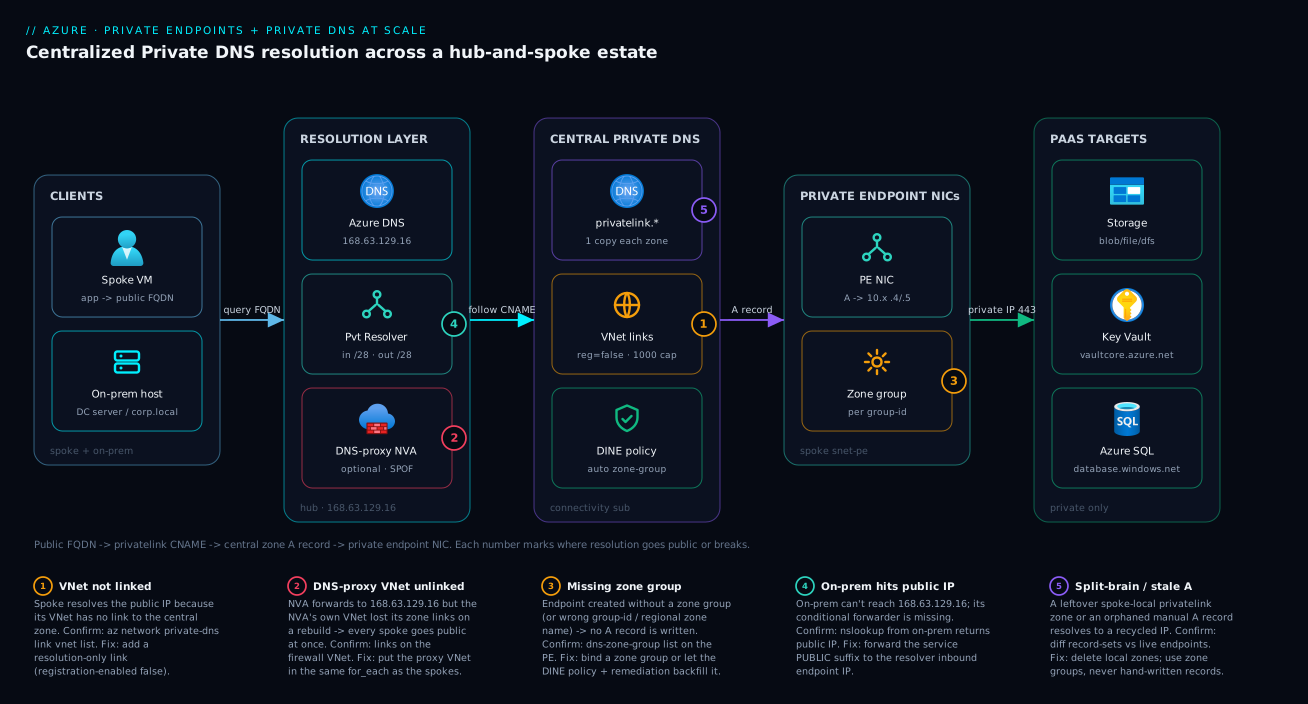
Follow a single request left to right and the whole design falls into place. A spoke VM (top-left) runs an application that connects to mystorageacct.blob.core.windows.net — the public FQDN, because that is what its SDK and connection string contain. It asks its default resolver, which in any VNet is Azure’s wire server at 168.63.129.16 in the resolution layer. Public Azure DNS returns the CNAME to mystorageacct.privatelink.blob.core.windows.net, and because this spoke’s VNet is linked to the central privatelink.blob.core.windows.net zone in the connectivity subscription, the resolver follows that CNAME straight into the central zone and reads the A record — 10.x.x.4, the private IP of the private endpoint NIC sitting in the spoke’s snet-pe. The app then opens TCP 443 to that private IP, and the storage account (with public access disabled) accepts the connection because it arrives over Private Link. No byte of that traffic ever touched the public internet, and the only thing that made it private was a DNS answer.
The on-prem host (bottom-left) takes a longer path to the same answer: it cannot see 168.63.129.16, so its on-prem DNS conditionally forwards the public suffix to the resolver’s inbound endpoint, the query is resolved inside Azure where the linked zones are visible, and the private IP comes back over ExpressRoute or VPN. The numbered badges mark exactly where this breaks in production. Badge 1 is a spoke whose VNet was never linked — it falls through to the public IP. Badge 2 is the estate-killer: a DNS-proxy NVA in the hub that all spokes forward through, whose own VNet lost its zone links on a rebuild, so every spoke goes public at once. Badge 3 is an endpoint created without a zone group, so no A record is ever written. Badge 4 is on-prem missing its conditional forwarder, resolving public for everything. Badge 5 is split-brain — a leftover spoke-local zone or an orphaned manual record returning a stale, recycled IP. The legend narrates each as symptom · confirm · fix; read it as the field guide for the rest of this article.
Going deeper
Everything above is the consumer side of Private Link: you create a private endpoint against Microsoft’s PaaS. Four things the reference tables don’t dwell on decide how this behaves in a mature estate — the mirror-image provider side, what an endpoint’s NIC subnet is actually allowed to do now, the approval state machine, and why a correct link can still return a public answer for ten seconds.
The other half: Private Link service (you as the provider)
A private endpoint connects you to someone else’s service. A Private Link service (PLS) is how you publish your own service so other teams — or other tenants entirely — create private endpoints against it, never touching a public IP. The one hard constraint: your service must sit behind a Standard Load Balancer (Basic is not supported). You attach the PLS to the LB’s frontend, Azure mints a globally-unique alias of the form myservice.<guid>.<region>.azure.privatelinkservice, and you hand that alias to consumers.
# Illustrative — publish a service behind a Standard LB (IDs are placeholders)
az network private-link-service create \
  --name pls-payments \
  --resource-group rg-connectivity \
  --lb-name lb-payments-std \
  --lb-frontend-ip-configs feip-payments \
  --subnet snet-pls-nat \
  --location eastus2 \
  --visibility "$ALLOWED_SUB_IDS" \
  --auto-approval "$AUTOAPPROVE_SUB_IDS"
Three provider-side facts routinely surprise people:
| Provider concern | The reality | Why it bites |
|---|---|---|
| LB SKU | Must be Standard; Basic LB cannot front a PLS | Whole design blocks at “create the LB” if you picked Basic |
| NAT subnet | PLS source-NATs consumer traffic from a dedicated subnet with privateLinkServiceNetworkPolicies = Disabled |
Note: this is a different property from the endpoint’s privateEndpointNetworkPolicies |
| Client IP | Your backend sees a NATed IP by default; enable TCP Proxy protocol v2 to receive the real client IP | Allow-lists and audit logs on the backend see the NAT IP unless you turn on proxy v2 |
--visibility controls which subscriptions can even see the alias; --auto-approval lists subscriptions whose endpoint connections are approved without a human. Everything you learned about privatelink.* zones applies symmetrically: a consumer of your PLS still needs a Private DNS zone (often a custom zone you tell them to host, since the alias has no Microsoft-owned privatelink name) mapping your service’s FQDN to the endpoint IP in their VNet.
Concretely, because there is no privatelink.<service> name to reuse, you agree an FQDN out of band — say payments.svc.contoso.internal — the consumer hosts that zone (or a delegation of it) in their connectivity subscription, and their endpoint’s zone group writes the A record into it exactly as for a Microsoft service. The differences from the PaaS story are only that you own the target, you run the approval queue, and the zone name is yours to choose rather than Microsoft’s to dictate. That freedom is also a footgun: two teams that each invent data.internal for different aliases create a silent collision the instant a VNet can see both zones. Treat PLS FQDNs as a namespace you govern centrally — the same discipline you apply to the privatelink.* set — and pin --visibility to the exact consumer subscriptions rather than leaving the alias discoverable estate-wide.
NSGs and route tables on a private-endpoint subnet — the rule changed
The lab disables network policies with --disable-private-endpoint-network-policies true, and for years that was mandatory because NSGs and UDRs were simply not honoured on a private-endpoint NIC. That is no longer the whole story. NSG support and UDR support on private-endpoint subnets are now GA, exposed through the subnet property privateEndpointNetworkPolicies, which takes four values rather than a boolean:
| Value | NSG applies to PE? | Route table applies to PE? | Use when |
|---|---|---|---|
Disabled |
No | No | Legacy default; the historical requirement |
NetworkSecurityGroupEnabled |
Yes | No | You want to filter traffic to the endpoint with an NSG |
RouteTableEnabled |
No | Yes | You must force endpoint-bound traffic through an NVA/firewall |
Enabled |
Yes | Yes | Full control — filter and route |
# Filter and route a PE subnet (newer granular flag)
az network vnet subnet update -g rg-app1 --vnet-name vnet-spoke-app1 -n snet-pe \
  --private-endpoint-network-policies Enabled
Two caveats worth internalising. First, historically a private endpoint bypassed NSGs on its own subnet — so an NSG that looks like it restricts a PE may have been silently ignored on an older subnet left at Disabled; flip the policy to a ...Enabled value for the rule to take effect. Second, this is about traffic reaching the endpoint NIC; it does not change name resolution. A tightly-filtered PE with a missing zone group still resolves public — network policy and DNS are orthogonal controls, and you need both. NSG mechanics themselves are covered in Virtual Network basics: subnets, NSGs, peering.
The approval state machine
Every endpoint connection carries a privateLinkServiceConnectionState.status, and it is a small state machine, not a boolean:
| Status | Meaning | How you reach it |
|---|---|---|
| Approved | Traffic flows | Auto-approval (you have RBAC on the target, same tenant) or an owner approved it |
| Pending | NIC exists, no traffic | Manual request (--manual-request true) awaiting the resource owner |
| Rejected | NIC exists, permanently refused | Owner rejected; the endpoint stays but never carries traffic |
| Disconnected | Provider removed the service/PLS | The far side deleted the target; clean up the stale endpoint |
Cross-tenant and third-party connections are always manual: the consumer references the target by resource ID or PLS alias with --manual-request true, and the provider approves out of band.
# Provider approves a pending connection (illustrative)
az network private-endpoint-connection list --id "$TARGET_RESOURCE_ID" -o table
az network private-endpoint-connection approve --id "$PE_CONNECTION_ID" \
  --description "Approved for payments team"
A Pending connection is a common “it deployed but nothing works” cause that is not DNS: the A record may even exist, but the far side never approved, so 443 is refused at the service. Check the connection state before you touch a single zone.
Custom DNS on the VNet changes everything
The automatic “linked zones are consulted for free” behaviour only holds for clients that actually resolve through Azure’s default DNS. The moment you set explicit custom DNS servers on the VNet (its DNS servers → Custom setting), every VM in that VNet sends queries to those servers instead — and unless that chain eventually forwards to 168.63.129.16 from a VNet that is itself linked to the zone, the privatelink zone is never consulted and the client gets the public IP. This is the DNS-proxy-NVA failure generalised: linked zones are visible only from where the query reaches the wire server. Two safe patterns — leave pure-Azure spokes on Azure default DNS and rely on links, or point custom DNS at a resolver/NVA whose own VNet carries every zone link and which forwards unmatched queries back to 168.63.129.16. The trap is a half-configured custom DNS that forwards straight to an on-prem server with no route into the privatelink zones: every endpoint then resolves public, estate-wide.
| VNet DNS setting | Linked zone consulted? | Condition |
|---|---|---|
| Azure default (blank) | Yes, automatically | The VNet is linked to the zone |
| Custom → resolver/NVA in a linked VNet | Yes | That VNet carries the links and forwards to 168.63.129.16 |
| Custom → on-prem DNS only | No | On-prem cannot see 168.63.129.16 → public answer |
Why a correct link can still answer public for a few seconds
Resolution is evaluated in the VNet where the query lands (the reason a DNS-proxy NVA’s own VNet must carry the links). Layered on top of that is caching. Private-endpoint A records are published with a short TTL (about 10 seconds), but the public fall-through answer a client received before you added the link or zone group can already be cached — including a negatively-cached result — on the OS resolver. So immediately after wiring a link you can still see a public IP until the cached entry ages out. During a rollout or incident, flush before you conclude anything: ipconfig /flushdns on Windows, resolvectl flush-caches (or systemd-resolve --flush-caches) on Linux. Treat “it went private after ~30 seconds” as success, not as a flapping bug. When you need to see the whole chain in one call, Resolve-DnsName <fqdn> -Type A on Windows (or dig +noall +answer <fqdn> on Linux) prints the public-name → privatelink CNAME hop and the final address together, so a stale-cache public answer is obvious at a glance. The hybrid, on-prem-facing half of this caching and forwarding story is expanded in Azure DNS Private Resolver: hybrid conditional forwarding.
Real-world scenario
Northwind Mutual, a regulated insurer, ran a Palo Alto NVA in the hub as DNS proxy for all forty spokes. Every spoke’s VNet DNS pointed at the firewall’s internal IP; the firewall, in turn, forwarded to Azure’s default resolver. AKS private clusters resolved fine, storage worked, Key Vault worked — for eight months. Then, during a routine firewall version upgrade, the network team rebuilt the firewall’s VNet from a clean Bicep template to pick up a new subnet layout. Within minutes, every workload in every spoke started failing: storage SDKs threw connection errors, the AKS API server became unreachable from pods, and the on-call channel lit up with “is storage down?” across six unrelated product teams at once.
It was not storage. It was DNS, and the blast radius was total because of the proxy topology. The firewall’s own VNet had been linked to the privatelink zones manually, by an az network private-dns link vnet create someone ran during the original migration — a command that lived in nobody’s IaC. The clean rebuild recreated the firewall VNet with no zone links. So the chain collapsed exactly here: spokes forwarded DNS to the firewall (fine), the firewall forwarded to 168.63.129.16 in the firewall’s own VNet (fine), but that VNet now had zero privatelink zones linked — so the resolver had nothing to follow the CNAME into, and returned the public A record for everything. Forty spokes, hundreds of endpoints, public IPs everywhere, simultaneously. Because the storage and SQL firewalls denied the public source IPs, every connection failed closed. The incident ran ninety minutes before someone ran nslookup mystorageacct.blob.core.windows.net from a spoke VM, saw a public address, and realised it was resolution, not the services.
The fix was twofold. First, move the firewall VNet’s zone links into the same for_each that links the spokes, so the DNS-proxy VNet is never special-cased:
locals {
  dns_resolving_vnets = merge(var.spoke_vnets, {
    "hub-firewall" = var.firewall_vnet_id
  })
}
That single merge feeds the existing setproduct link resource, guaranteeing the proxy VNet gets every zone the spokes get — forever, automatically, on every apply. Second, they added an audit-style Azure Policy on Microsoft.Network/privateDnsZones/virtualNetworkLinks checked against an allowlist, so any link created or deleted outside the pipeline raises a non-compliant flag within minutes, and an alert fires on the count. The deeper lesson Northwind took away: when spokes resolve through a DNS-proxy NVA, that NVA’s VNet is the single point of failure for all private resolution — it must carry the full zone-link set, that set belongs in code, and the one resource you can least afford to manage by hand is the one most likely to be created with a quick az command during a migration nobody documents.
Advantages and disadvantages
The centralized hub-and-spoke private-DNS design is the right default at scale, but it concentrates risk that you must consciously manage.
| Advantages | Disadvantages |
|---|---|
| One copy of each zone — no per-spoke drift | The central zone set is a shared dependency for the whole estate |
| New spoke onboards by adding links (one IaC iteration) | Mis-link or unlink the DNS-proxy VNet and everything breaks at once |
| Policy auto-binds every endpoint — no human step | DINE remediation needs RBAC and a backfill task; existing PEs aren’t auto-fixed |
| Connectivity team owns DNS; spokes just create PEs | Cross-subscription RBAC adds a setup step |
| On-prem resolves into Azure via one managed resolver | Resolver needs two delegated /28s planned in hub IP space up front |
Failures are deterministic and fast to confirm (nslookup) |
Resolution failures succeed with the wrong answer — silent until something denies the public IP |
| Scales to ~1,000 VNet links per zone | Beyond that you split the estate or add a second zone copy |
| Works identically for storage, KV, SQL, AKS, AMPLS | Each service’s zone name must be exactly right (regional/special suffixes) |
When the central model is decisively right: any landing zone with more than a handful of spokes, any regulated workload, any hybrid estate. When you might deviate: a single, isolated VNet with two endpoints and no on-prem clients can host its own zone locally without ceremony — though even then, doing it the central way costs nothing extra and future-proofs the growth. The one thing you never do at scale is the per-spoke-zone anti-pattern; it feels simpler on day one and becomes an unmanageable drift surface by spoke ten.
Hands-on lab
A self-contained walk-through: create a storage account with public access disabled, a spoke VNet, a private endpoint, the central zone, the link, and a zone group — then prove resolution returns a private IP. Run it in a sandbox subscription; the storage account and a small VNet cost pennies for an hour, and teardown removes everything.
1. Variables and resource group.
LOC=eastus2
RG=rg-pe-lab
az group create -n $RG -l $LOC
ACCT="stpelab$RANDOM"
2. Create a VNet with a dedicated private-endpoint subnet.
az network vnet create -g $RG -n vnet-lab --address-prefixes 10.20.0.0/16 \
  --subnet-name snet-pe --subnet-prefixes 10.20.1.0/24
# Disable PE network policies so the endpoint NIC can be placed
az network vnet subnet update -g $RG --vnet-name vnet-lab -n snet-pe \
  --disable-private-endpoint-network-policies true
3. Create a storage account and disable public access.
az storage account create -g $RG -n $ACCT -l $LOC --sku Standard_LRS --kind StorageV2
az storage account update -g $RG -n $ACCT --public-network-access Disabled
STORAGE_ID=$(az storage account show -g $RG -n $ACCT --query id -o tsv)
4. Create the private endpoint for the blob subresource.
az network private-endpoint create -g $RG -n pe-blob \
  --vnet-name vnet-lab --subnet snet-pe \
  --private-connection-resource-id "$STORAGE_ID" \
  --group-id blob --connection-name conn-blob
5. Create the central Private DNS zone and link the VNet. (In production this zone is in the connectivity subscription; here it’s in the same RG for simplicity.)
az network private-dns zone create -g $RG -n privatelink.blob.core.windows.net
az network private-dns link vnet create -g $RG \
  --zone-name privatelink.blob.core.windows.net \
  --name link-lab --virtual-network vnet-lab --registration-enabled false
ZONE_ID=$(az network private-dns zone show -g $RG \
  -n privatelink.blob.core.windows.net --query id -o tsv)
6. Bind the endpoint to the zone with a zone group (lets Azure write and own the A record).
az network private-endpoint dns-zone-group create -g $RG \
  --endpoint-name pe-blob --name default \
  --private-dns-zone "$ZONE_ID" --zone-name privatelink-blob
7. Verify the A record was written automatically.
az network private-dns record-set a list -g $RG \
  --zone-name privatelink.blob.core.windows.net -o table
# Expect an A record for the account name pointing at 10.20.1.x
8. Prove resolution from inside the VNet. Create a tiny VM in the spoke (or use an existing one) and resolve the public FQDN — it must return the private IP:
az vm create -g $RG -n vm-test --image Ubuntu2204 --vnet-name vnet-lab \
  --subnet snet-pe --admin-username azureuser --generate-ssh-keys --size Standard_B1s
az vm run-command invoke -g $RG -n vm-test --command-id RunShellScript \
  --scripts "nslookup ${ACCT}.blob.core.windows.net"
# Expect: canonical name = ...privatelink.blob.core.windows.net ; Address: 10.20.1.x
A public IP here means the zone isn’t linked or the zone group is missing — re-check steps 5 and 6.
9. Teardown.
az group delete -n $RG --yes --no-wait
The lab maps one-to-one onto the production pattern; the only differences at scale are where the zone lives (connectivity subscription), how many links exist (one per spoke via for_each), and who creates the zone group (the DINE policy, not you).
Common mistakes & troubleshooting
Resolution failures are binary and fast to diagnose once you know the playbook. This is the table to keep open during an incident: the symptom you observe, the root cause, the exact command to confirm it, and the fix. Read the prose under it for the non-obvious ones.
| # | Symptom | Root cause | Confirm (exact command / path) | Fix |
|---|---|---|---|---|
| 1 | Spoke nslookup returns a public IP |
This VNet has no link to the central zone | az network private-dns link vnet list -g $HUB_RG --zone-name <zone> (spoke absent) |
Add a resolution-only link (--registration-enabled false) |
| 2 | FQDN returns public; zone is linked | Endpoint has no zone group, so no A record | az network private-endpoint dns-zone-group list -g <rg> --endpoint-name <pe> (empty) |
Create the zone group, or let DINE + remediation backfill |
| 3 | Record exists but points at a wrong/old IP | Manual A record orphaned after redeploy | az network private-dns record-set a list -g $HUB_RG --zone-name <zone> vs PE IP |
Delete the manual record; bind a zone group instead |
| 4 | All spokes resolve public at once | DNS-proxy NVA’s VNet lost its zone links | az network private-dns link vnet list for the firewall VNet (none) |
Re-link the proxy VNet; put it in the spokes’ for_each |
| 5 | On-prem returns public; spoke returns private | On-prem conditional forwarder missing/wrong | nslookup <fqdn> from on-prem; check forwarder targets |
Forward the public suffix to the resolver inbound IP |
| 6 | On-prem forwarder set, still public | Forwarder points at privatelink.* not the public suffix |
Inspect on-prem forwarder zone names | Forward blob.core.windows.net, not privatelink.blob… |
| 7 | Resolution random (private or public) | Split-brain: spoke-local zone + central link both present | List zones in the spoke RG/sub for a duplicate | Delete the spoke-local zone; keep only the central one |
| 8 | Record written but never used | Wrong zone name for the service (regional/special) | Compare zone name to the reference table | Recreate in the correct zone (vaultcore, <region>.azmk8s.io…) |
| 9 | Key Vault resolves public despite a zone | Used vault.azure.net instead of vaultcore.azure.net |
az network private-dns zone list for the exact name |
Create privatelink.vaultcore.azure.net; rebind |
| 10 | AMPLS telemetry partially missing | Only monitor zone created, not the full set |
Check for oms/ods/agentsvc/blob companion zones |
Create all five AMPLS zones and link them |
| 11 | New endpoint not auto-bound | DINE identity lacks RBAC on the zone | Policy compliance shows the deploy failed | Grant Private DNS Zone Contributor on the zone |
| 12 | Old endpoints non-compliant, unfixed | DINE only acts on new resources | Policy assignment shows non-compliant existing PEs | Run a remediation task to backfill |
| 13 | Private IP resolves but connection times out | Not DNS — NSG/UDR/peering/firewall blocks 443 | nc -vz <privateIP> 443 from the spoke |
Fix routing/NSG (see the VNet troubleshooting article) |
| 14 | Storage 403 after going private | Resolution returned public; PaaS firewall denied it | nslookup shows public IP → it’s resolution |
Fix the DNS link/zone group, not the storage ACL |
The non-obvious failures, expanded
The estate-wide failure (row 4) is the one to fear. When spokes use a hub NVA as DNS proxy, that NVA’s VNet must itself be linked to every privatelink zone, because the resolver only consults zones linked to the VNet the query is resolved in. The proxy resolves in its own VNet, so the proxy’s VNet — not the spokes’ — needs the links. Confirm by listing links for the firewall VNet, not the spoke. The fix is to treat the proxy VNet as just another resolving VNet in your IaC, never as a special case (see the real-world scenario).
On-prem forwards the public name, never privatelink (rows 5–6). The whole point of the inbound endpoint is to resolve inside Azure, where 168.63.129.16 will follow the CNAME into the linked privatelink zone. If you forward privatelink.blob.core.windows.net from on-prem, you’ve forwarded the internal plumbing name that on-prem should never reference — and resolution fails. Forward the public suffix (blob.core.windows.net) to the inbound endpoint IP, full stop.
Split-brain is non-deterministic and maddening (row 7). If a spoke still hosts its own privatelink.* zone and is linked to the central one, lookups are answered by whichever the resolver consults first — so the same FQDN returns private sometimes and public other times, often differing between VMs. Pick the central zone, delete the local copies, and add the audit policy from the scenario so a stray local zone is flagged fast.
Orphaned records resolve to recycled IPs (row 3). When a zone group is bypassed or a resource is force-deleted, hand-written A records linger and may resolve to an IP that’s since been reassigned to a different endpoint — a silent cross-wiring. Periodically diff record-sets against live endpoints, and link lists against live VNets; orphans are a real outage source at scale.
The decision table for “is this even a DNS problem?” — run this first, before you touch any zone:
| If you see… | It’s probably… | Do this |
|---|---|---|
nslookup returns a public IP |
A DNS/link/zone-group problem | Work the resolution playbook above |
nslookup returns a private IP but connection fails |
A network problem (NSG/UDR/peering) | nc -vz <ip> 443; fix routing, not DNS |
| Private from spoke, public from on-prem | A conditional-forwarder gap | Fix the on-prem forwarder → inbound IP |
| Private sometimes, public other times | Split-brain (duplicate zones) | Delete the spoke-local zone |
| Everything public, everywhere, suddenly | The proxy VNet lost its links | Re-link the NVA/firewall VNet |
| Public for one service only | Wrong zone name for that service | Check the regional/special-suffix table |
Verify
Resolution is binary and easy to test. From a VM in a spoke, the FQDN must resolve to a private (RFC 1918) address:
nslookup mystorageacct.blob.core.windows.net
# Expect:
#   ...canonical name = mystorageacct.privatelink.blob.core.windows.net
#   Address: 10.x.x.x        <- private. Public IP here = broken.
Confirm the central zone actually holds the record, and audit which VNets are linked:
# Record exists and points at the endpoint's private IP?
az network private-dns record-set a list \
  --resource-group $HUB_RG \
  --zone-name privatelink.blob.core.windows.net -o table

# Which VNets can resolve this zone?
az network private-dns link vnet list \
  --resource-group $HUB_RG \
  --zone-name privatelink.blob.core.windows.net \
  --query "[].{name:name, vnet:virtualNetwork.id, reg:registrationEnabled}" -o table

# Endpoint approved and connected?
az network private-endpoint show \
  --name pe-stblob-app1 --resource-group rg-app1 \
  --query "privateLinkServiceConnections[0].privateLinkServiceConnectionState" -o json
From on-prem, the same nslookup against the public FQDN must also return the private IP — proving the conditional forwarder reaches the inbound endpoint. If on-prem returns the public IP but the spoke returns private, the forwarder or the route to the inbound endpoint is the problem, not the zone. The four-quadrant truth table tells you instantly which half of the design is broken:
| Spoke result | On-prem result | Verdict | Where to look |
|---|---|---|---|
| Private | Private | Healthy end to end | Nothing — you’re done |
| Private | Public | In-Azure good; on-prem forwarder broken | On-prem conditional forwarder → inbound IP |
| Public | Public | Central zone/link broken for everyone | Zone exists? VNet linked? Proxy VNet linked? |
| Public | Private | Rare; spoke link missing but on-prem path resolves | Add the spoke VNet link |
Best practices
Production-grade rules distilled from running this at landing-zone scale:
| # | Practice | Why it matters |
|---|---|---|
| 1 | Host one copy of each privatelink.* zone in the connectivity subscription |
Eliminates per-spoke drift; one source of truth |
| 2 | Link every resolving VNet with registration-enabled false |
Resolution-only; avoids the one-registration-link limit |
| 3 | Bind every endpoint with a zone group, never a manual A record | Azure owns the record lifecycle; no orphans |
| 4 | Enforce binding with a DINE policy at the landing-zone management group | Removes the human “remember the zone group” step |
| 5 | Run a remediation task after assigning the policy | DINE doesn’t fix pre-existing endpoints automatically |
| 6 | Put the DNS-proxy/firewall VNet in the same link for_each as spokes |
Prevents the estate-wide failure on a rebuild |
| 7 | Manage all zone links in IaC; audit-policy any link created out-of-band | The one-off az link is the classic SPOF |
| 8 | Deploy the DNS Private Resolver (not VMs) with two delegated /28s |
Managed, HA, no patching; plan IP space up front |
| 9 | Forward the public suffix from on-prem to the inbound IP — never privatelink.* |
Lets Azure follow the CNAME internally |
| 10 | Verify regional/special zone names (KV vaultcore, AKS region, AMPLS set) against the docs |
Wrong name writes records nowhere useful |
| 11 | Schedule an orphan/link audit (diff records vs endpoints, links vs VNets) | Surfaces drift before a user files a ticket |
| 12 | Test resolution from both a spoke VM and an on-prem host after every change | The four-quadrant table catches half-broken states |
Security notes
Private endpoints exist for security; the DNS layer is where that security quietly succeeds or fails.
| Control | What to do | Why |
|---|---|---|
| Disable public network access on the PaaS resource | --public-network-access Disabled on storage/KV/SQL |
Without this, the public endpoint stays reachable even with a PE |
| Least-privilege on the zone | Grant DINE identity only Private DNS Zone Contributor on the zone | Avoid broad Network Contributor at subscription scope |
| RBAC the connectivity subscription tightly | Only the platform team writes zones/links | DNS is now a shared, estate-wide control plane |
| Audit zone links as code | Deny/audit links created outside the pipeline | A rogue or deleted link silently breaks/leaks resolution |
| Approve PE connections deliberately | Use manual approval for cross-tenant/3rd-party PEs | Auto-approval can expose a resource you didn’t intend |
| Keep the resolver inbound IP private | Reachable only over ExpressRoute/VPN | No public exposure of the DNS bridge |
Don’t forward privatelink.* from on-prem |
Forward only public suffixes | Prevents leaking internal naming and broken resolution |
| Monitor for public-IP regressions | Alert if a known PE FQDN ever resolves public | Catches a dropped link before data takes the public path |
The subtle security failure mode: a resolution bug doesn’t open a port — it sends your “private” PaaS traffic out the public path, where the PaaS firewall denies it (fail-closed, the good case) or, if public access was never disabled, silently allows it (fail-open, the data-exfiltration case). Disabling public network access turns every DNS regression into a loud failure instead of a silent leak.
Cost & sizing
The DNS layer itself is cheap; the cost conversation is mostly about the private endpoints and the resolver. Rough figures (verify current pricing for your region):
| Item | Unit | Rough cost (USD) | Rough cost (INR) | Notes |
|---|---|---|---|---|
| Private DNS zone | Per zone / month | ~$0.50 | ~₹42 | ~40 service zones max — negligible |
| Private DNS queries | Per million queries | ~$0.40 | ~₹33 | Most estates are well within noise |
| VNet link | Per link | Free | Free | Link freely — no per-link charge |
| Private endpoint | Per endpoint / hour | ~$0.01/hr (~$7.30/mo) | ~₹600/mo | The real cost driver at hundreds of PEs |
| PE data processing | Per GB | ~$0.01/GB | ~₹0.83/GB | Inbound + outbound through the PE |
| DNS Private Resolver endpoint | Per endpoint / hour | ~$0.10/hr each | ~₹8/hr each | Two endpoints (in + out) in the hub |
| DNS Private Resolver queries | Per million | ~$0.40 | ~₹33 | Only on-prem-bound/forwarded queries |
Sizing guidance, by estate scale:
| Estate size | Private endpoints | Zones | VNet links | Resolver needed? | Dominant cost |
|---|---|---|---|---|---|
| Single workload | 2–10 | 2–4 | 1–2 | No (in-Azure only) | The endpoints |
| Small landing zone | 20–80 | 5–10 | 5–15 | If hybrid | The endpoints |
| Large landing zone | 200–800 | 10–20 | 40–200 | Yes (hybrid) | The endpoints + resolver |
| Multi-region | 800+ | per-region copies | up to 1,000/zone | Yes, per region | Endpoints + regional resolvers |
The cost levers worth knowing: VNet links are free, so never economize on linking; the private endpoints dominate the bill, so consolidate where a single endpoint with multiple subresources suffices; and the resolver’s two endpoints are a fixed ~$1.40/day in the hub regardless of estate size — a rounding error against hundreds of endpoints. There is no free tier for private endpoints, but the lab in this article runs for well under a dollar in an hour and tears down cleanly.
Practice challenges
Work these in order — each assumes the previous. Commands are illustrative (no live run implied); every ID ($HUB_RG, $SPOKE_APP1_VNET_ID, <sub-id>) is a placeholder. Reveal the solution only after you’ve written your own answer.
1. (Beginner) Confirm the first suspect. A spoke VM’s nslookup mystorageacct.blob.core.windows.net returns a public IP. Name the single most likely cause and the one command that confirms it.
<details><summary>Solution</summary>
az network private-dns link vnet list \
  --resource-group $HUB_RG \
  --zone-name privatelink.blob.core.windows.net -o table
# The spoke's VNet is absent from the list → it has no link.
Why: an unlinked VNet is the number-one cause of a public answer — the resolver never sees the central zone, so it falls through to the public A record. </details>
2. (Beginner) Get the name right. You’re fronting a Key Vault with a private endpoint. State the group-id and the exact Private DNS zone name.
<details><summary>Solution</summary>
group-id = vault; zone = privatelink.vaultcore.azure.net.
Why: Key Vault’s suffix is vaultcore, not vault — the single most common wrong-zone trap; a zone named privatelink.vault.azure.net never matches and the vault always resolves public.
</details>
3. (Intermediate) Onboard a spoke. A new spoke app9 must resolve all central zones. Using the Terraform pattern from the lesson, what is the entire change?
<details><summary>Solution</summary>
Add one entry to the VNet map; the setproduct link resource fans it out to every zone automatically:
spoke_vnets = {
  # ...existing spokes...
  "app9" = "/subscriptions/<sub-id>/.../virtualNetworks/vnet-spoke-app9"
}
Why: onboarding is “add a link,” never “add a zone” — one new map key × N zones is generated by the existing for_each, so there is nothing per-zone to touch.
</details>
4. (Intermediate) Count the objects. One storage account must expose blob and file privately. How many private endpoints, group-ids, zone-group configs and zones are involved?
<details><summary>Solution</summary>
One PE with two group-ids (blob, file) — or two PEs — carrying 2 zone-group configs pointing at 2 zones: privatelink.blob.core.windows.net and privatelink.file.core.windows.net.
Why: each subresource is a distinct name that resolves through its own zone; a single zone group can hold multiple configs, which is how one endpoint stays correct for several subresources. </details>
5. (Advanced) Publish your own service. Another team wants private-only access to your app. Outline the pieces and the one SKU constraint, and say what you hand them.
<details><summary>Solution</summary>
Put the app behind a Standard Load Balancer → create a Private Link service attached to the LB frontend, with a dedicated NAT subnet whose privateLinkServiceNetworkPolicies = Disabled → share the generated alias (myservice.<guid>.<region>.azure.privatelinkservice). The consumer creates a private endpoint against the alias with --manual-request true; you approve the pending connection. They host a Private DNS zone mapping your FQDN to the endpoint IP in their VNet.
Why: Standard LB is mandatory (Basic can’t front a PLS), and the alias-plus-approval handshake is the whole provider/consumer contract — see the Private Link service part of Going deeper. </details>
6. (Advanced) Fix the hybrid gap. In-Azure clients resolve private; on-prem clients resolve public for every service. Give the exact on-prem forwarder direction and the Azure-side resource that must exist.
<details><summary>Solution</summary>
On on-prem DNS, add a conditional forwarder for each public suffix — blob.core.windows.net, vaultcore.azure.net, database.windows.net — pointing at the DNS Private Resolver inbound endpoint IP in the hub. That inbound endpoint (a delegated /28 in the hub) must exist and be reachable over ExpressRoute/VPN.
Why: forward the public suffix, never privatelink.* — Azure follows the public CNAME into the linked privatelink zone internally; forwarding the plumbing name (or missing the resolver entirely) leaves on-prem on the public path.
</details>
Common beginner mistakes
These are mental-model errors, not symptoms — the wrong belief that leads you to build the wrong thing. (The symptom → command → fix playbook lives in Common mistakes & troubleshooting above; this is why beginners reach for the wrong fix in the first place.)
| Misconception | Why it’s wrong | The right mental model |
|---|---|---|
| “It has a private IP now, so it’s private.” | The IP was never the problem; the name still resolves public until DNS is fixed. A PE without a zone group is a NIC nobody dials. | Private endpoint = the IP (trivial). Private DNS = the name (the whole job). |
| “I’ll just add an A record for the account.” | Manual records rot on the next redeploy and orphan on delete — stale or cross-wired IPs at scale. | Bind a zone group so Azure owns the record’s create/update/delete lifecycle. |
“Each spoke needs its own privatelink zone.” |
Forty copies drift independently and produce split-brain resolution. | One central zone, many resolution-only VNet links. Onboarding adds links, not zones. |
“On-prem should forward privatelink.blob.core.windows.net.” |
That’s Azure-internal plumbing on-prem must never name; forwarding it breaks the chain. | Forward the public suffix (blob.core.windows.net) to the resolver inbound IP; Azure follows the CNAME internally. |
| “NSGs don’t work on PE subnets, so I can’t filter them.” | Outdated — NSG and UDR support on PE subnets is GA via privateEndpointNetworkPolicies. |
Set the policy to NetworkSecurityGroupEnabled/Enabled and filter/route the endpoint like any NIC. |
| “Private Endpoint and Private Link service are the same.” | They are opposite ends of one wire. | Endpoint = consumer side (you connect to a service). Private Link service = provider side (you publish a service behind a Standard LB). |
| “I set custom DNS on the VNet, so the links still apply.” | Custom DNS bypasses Azure’s default resolver; linked zones are only consulted where the query reaches 168.63.129.16. | Use Azure default DNS, or forward custom DNS to a resolver/NVA whose VNet carries every zone link. |
Two that deserve a sentence more:
“A linked zone is enough.” A VNet link makes the zone visible; it does not put a record in it. Visibility (the link) and content (the A record, written by the zone group) are two independent things, and a beginner who fixes one while the other is missing sees no change. You need the link and the zone group.
“DNS looks broken — it returned public just now.” Right after you add a link, the client’s OS resolver may still serve a cached public (or negatively-cached) answer for up to the record’s TTL. Flush the cache (ipconfig /flushdns / resolvectl flush-caches) before you declare a fault; “went private after ~30 seconds” is success, not a flap.
Interview & exam questions
Mapped to AZ-700 (Designing and Implementing Azure Networking), AZ-305 (Designing Azure Infrastructure Solutions) and AZ-104.
1. Why does a private endpoint require Private DNS, when it already has a private IP? Because the application connects by the public FQDN (baked into SDKs, connection strings and certificates), not the IP. Without a Private DNS zone holding the private A record, that FQDN resolves to the public IP and the endpoint is bypassed. DNS is the only thing that redirects the name to the private IP.
2. What is the full resolution chain for mystorageacct.blob.core.windows.net with a private endpoint?
Public Azure DNS returns a CNAME to mystorageacct.privatelink.blob.core.windows.net; that name is resolved by your hosted privatelink.blob.core.windows.net zone, which holds an A record to the endpoint’s private IP. If the client can’t see that zone, it falls through to the public A record.
3. Why use a zone group instead of creating the A record manually? A zone group makes Azure manage the record’s entire lifecycle — write on creation, update on IP change, delete on endpoint deletion. Manual records become stale or orphaned the moment a resource is redeployed, and they’re not policy-enforceable.
4. How do you avoid forty copies of the same privatelink zone across forty spokes?
Host one copy in the connectivity subscription and create a VNet link per spoke (registration-enabled false). A VNet’s default resolver consults every linked zone, so one zone serves all spokes with no duplication.
5. What does registration-enabled false mean and why is it required here?
It makes the link resolution-only — the VNet can read the zone’s records but doesn’t auto-register VM hostnames into it. Only one link per zone may have registration enabled, and auto-registration has no place in a shared privatelink zone.
6. How do you enforce that every new endpoint gets the correct zone group automatically? Assign a DeployIfNotExists (DINE) Azure Policy at the landing-zone management group, parameterized with the central zone’s resource ID. It auto-creates the zone group for new endpoints. Pre-existing endpoints need a remediation task.
7. Two RBAC roles the DINE managed identity needs, and why?
Network Contributor (to create the privateDnsZoneGroups child object on the endpoint) and Private DNS Zone Contributor on the central zone (to write the A record). Missing either makes the policy deploy fail.
8. How do on-prem clients resolve a private endpoint, given 168.63.129.16 is unreachable from on-prem?
Deploy the Azure DNS Private Resolver with an inbound endpoint, and configure on-prem conditional forwarders to send the public suffix (e.g. blob.core.windows.net) to that inbound IP. Resolution then happens inside Azure where the linked zones are visible.
9. Which name do you forward from on-prem — the public suffix or the privatelink name?
The public suffix. Azure follows the CNAME into the linked privatelink zone itself; on-prem should never reference the privatelink.* name directly.
10. A storage account behind a private endpoint suddenly returns 403 to an app. First check?
nslookup the FQDN from the app’s host. A public IP means resolution broke (missing link or zone group) and the storage firewall denied the public source — fix the DNS, not the storage ACL. A private IP that times out is a network (NSG/UDR) problem instead.
11. Why is a DNS-proxy NVA in the hub a single point of failure for private resolution? Because the resolver consults only the zones linked to the VNet where the query is resolved — and with a proxy, that’s the NVA’s VNet, not the spokes’. If the NVA’s VNet loses its zone links, every spoke that forwards through it resolves public at once.
12. Name two services with non-obvious Private DNS zone names.
Key Vault uses privatelink.vaultcore.azure.net (not vault.azure.net); AKS private clusters use a regional privatelink.<region>.azmk8s.io; Azure Monitor Private Link Scope needs a set of zones (monitor, oms, ods, agentsvc, blob).
Quick check
- With no Private DNS zone in place, what does
mystorageacct.blob.core.windows.netresolve to from a spoke VM, and what happens to the traffic? - You created a private endpoint but the FQDN still resolves to a public IP, even though the zone is linked. What single object is most likely missing?
- Why must on-prem conditional forwarders target the public suffix (e.g.
vaultcore.azure.net) and notprivatelink.vaultcore.azure.net? - Your estate uses a hub firewall as DNS proxy. After a firewall VNet rebuild, every spoke resolves public. What broke?
- A spoke VM resolves the private IP, but the app still can’t connect on 443. Is this a DNS problem? How do you confirm?
Answers
- The public IP. The traffic leaves over the internet path (or is denied by the PaaS firewall) and the private endpoint is bypassed — DNS is the only thing that would have redirected the name to the private IP.
- The zone group on the private endpoint. Without it, no A record is written into the zone, so even a linked zone has nothing to return — resolution falls through to the public record.
- Because Azure’s resolver follows the public name’s CNAME into the linked
privatelinkzone itself; on-prem should resolve the public name inside Azure and never reference the internalprivatelink.*plumbing. Forwardingprivatelink.*breaks the chain. - The firewall (proxy) VNet lost its zone links. The resolver consults zones linked to the VNet where it resolves — the proxy’s VNet — and a clean rebuild dropped manually-created links, so the resolver had no privatelink zones to follow the CNAME into.
- No — a private IP in the answer means DNS is correct. Confirm with
nc -vz <privateIP> 443from the spoke; a failure points at NSG/UDR/peering/firewall, not the zone.
Glossary
| Term | Definition |
|---|---|
| Private endpoint | A NIC with a private IP that projects a PaaS resource into your VNet via Private Link. |
| Subresource / group-id | The specific sub-service a private endpoint targets (e.g. blob, vault, sqlServer). |
| Private Link | The Azure backbone path that carries traffic to a private endpoint without traversing the internet. |
privatelink.* zone |
The Private DNS zone you host that contains the private A records for endpoints of a service. |
| Private DNS zone | A zone hosted in Azure (not internet-published) resolved by VNet default DNS when linked. |
| A record | The DNS record mapping the privatelink FQDN to the endpoint’s private IP. |
| Zone group | A child object of a private endpoint that makes Azure manage the A record’s lifecycle. |
| VNet link | The binding that makes a Private DNS zone resolvable from a given virtual network. |
| Registration-enabled | A link flag; true auto-registers VM hostnames (one per zone), false is resolution-only. |
| 168.63.129.16 | Azure’s per-VNet wire-server resolver that auto-consults all linked Private DNS zones. |
| DeployIfNotExists (DINE) | An Azure Policy effect that auto-deploys a missing resource (here, the zone group). |
| Remediation task | A Policy job that brings pre-existing non-compliant resources into compliance. |
| DNS Private Resolver | A managed Azure service that forwards DNS between on-prem and Azure without DNS VMs. |
| Inbound endpoint | A private IP on the resolver that on-prem DNS conditionally forwards queries to. |
| Outbound endpoint | The resolver’s egress point for queries Azure forwards out to on-prem DNS. |
| Forwarding ruleset | A set of domain→target-DNS rules applied (via VNet links) to govern Azure→on-prem resolution. |
| Conditional forwarder | An on-prem DNS rule sending a specific suffix to a chosen DNS server (here, the inbound IP). |
| Split-brain DNS | Non-deterministic resolution caused by a name existing in two zones a client can both see. |
| DNS-proxy NVA | A firewall/appliance resolving DNS on the spokes’ behalf; its VNet must carry all zone links. |
| Private Link service (PLS) | The provider-side resource that publishes your own service (behind a Standard Load Balancer) so consumers create private endpoints against it. |
| Service alias | The globally-unique name Azure assigns a Private Link service (<name>.<guid>.<region>.azure.privatelinkservice) that consumers target instead of an IP. |
| PrivateEndpointNetworkPolicies | A subnet property controlling whether NSGs and route tables apply to private-endpoint NICs (Disabled, NetworkSecurityGroupEnabled, RouteTableEnabled, Enabled). |
| Connection state | The approval status of a private-endpoint connection: Approved, Pending, Rejected or Disconnected. |
| Manual approval | The flow (--manual-request true) where a connection stays Pending until the target owner approves it — mandatory cross-tenant/third-party. |
| Standard Load Balancer | The LB SKU required to front a Private Link service; the Basic SKU is not supported. |
| PLS NAT subnet | The dedicated subnet (with privateLinkServiceNetworkPolicies disabled) a Private Link service source-NATs consumer traffic from; original client IP needs TCP Proxy protocol v2. |
| Negative caching | A resolver caching a public/NXDOMAIN answer for the record’s TTL — why a just-added link can still answer public for a few seconds until flushed. |
Next steps
- Go deeper on the hybrid half with Azure DNS Private Resolver: hybrid conditional forwarding — rulesets, both directions, and on-prem integration.
- Cement the why-private-endpoints decision with Private Endpoint vs Service Endpoint and the single-endpoint pattern in Private Link and Private DNS for PaaS.
- Place this design inside the broader topology with Azure landing zone: network topology and connectivity and the Azure VNet deep dive: every setting.
- Operationalize the governance with Azure Policy as code so a new spoke is fully resolvable the moment it is vended.
- When resolution looks fine but connectivity fails, work Troubleshooting VNet connectivity: NSG, UDR, effective routes, Network Watcher and Troubleshooting storage 403s: firewall, private endpoint, RBAC, SAS.