In a nutshell
Imagine a restaurant that trained every new cook from scratch during the dinner rush — handing them a thick binder and hoping they’d read it while orders piled up. That is a Marketplace image plus a boot-time script: every instance rebuilds itself the moment it starts, slowly and a little differently each time. The modern way is to perfect one recipe card, photocopy it, and have new cooks arrive already knowing every dish. That photocopy is a golden image: you bake the box once, and every instance boots from the identical, finished artifact in seconds.
This lesson wires up the four parts of that idea on Azure. Azure Image Builder is the kitchen that bakes the recipe. Azure Compute Gallery is the shelf that stores each numbered copy (version 1.7.0, 1.7.1, …) and ships it to the regions that need it. A VM Scale Set in Flexible orchestration is the dining room full of cooks — a fleet of real VMs that grows and shrinks with demand. And a rolling upgrade, watched by the Application Health extension, is how you swap in a new recipe safely: replace a few cooks, taste-test the batch, and only continue if it’s good — otherwise stop and bring the old cooks back automatically. That last part is the whole point. A bad change halts itself after touching a handful of instances instead of poisoning the entire dining room.
Why a beginner should care: this is the difference between an “upgrade” that means a tense Friday-night teardown and one that Azure performs for you, batch by batch, health-gated, with automatic rollback. Every concept here — immutable versioned artifacts, health as a gate, canary by geography — is a pattern you will reuse far beyond VMs.
Level: Advanced · Time: ~60 min
Before you start, you should be comfortable creating a single Azure VM, reading az ... -o json output, and the ideas of an OS disk, NIC, NSG, and availability zone. If any of that is shaky, the two VM lessons linked in Prerequisites & where this fits below are the on-ramp. You do not need Packer, ARM, or Bicep experience — the lesson introduces each piece as it arrives.
By the end you’ll be able to pick the right orchestration mode for a fleet (and know why the choice is permanent), bake and version a golden image, and configure a health-gated rollout that rolls itself back. The full, precise list is in Learning objectives; the seven numbered sections then build the whole pipeline one resource at a time, and Going deeper, Practice challenges, and Common beginner mistakes below turn reading into recall.
Most teams that run IaaS at scale on Azure are still operating VM Scale Sets the way they did in 2019: Uniform orchestration, a Marketplace image plus a 400-line cloud-init that re-runs on every boot, and “upgrades” that mean tearing the whole set down on a Friday. That model fights you on three fronts. Boot is slow and non-deterministic because you build the box every time it starts. You have no immutable, versioned artifact to roll back to. And you have no safe, health-gated mechanism to push a new image without a maintenance window.
The modern shape fixes all three. Flexible orchestration gives you the placement control of an availability set with the scale machinery of a VMSS. Azure Image Builder bakes a golden image once, in a pipeline, so boot is fast and identical. Azure Compute Gallery versions and replicates that image like any other artifact. And rolling upgrades, gated by the Application Health extension, replace instances batch by batch and stop the moment health regresses. This is the principal-level walkthrough of wiring those four together correctly — every setting, every limit, every failure mode laid out as a table you keep open while you build.
By the end you will stop hand-waving about “we’ll bake an image and roll it out.” You will know which orchestration mode to pick and why it is irreversible, how to scope the build identity so a compromised pipeline cannot wreck your subscription, how replication geography becomes your canary lever, the exact difference between the upgrade policy mode and automatic OS upgrade that everyone conflates, and how to design a health probe that means “can actually serve” rather than “process is up.” The prose explains the mechanism; the tables enumerate every option end to end so you can scan the right one mid-change.
What problem this solves
Running stateful or stateless fleets on raw VMs at scale produces three chronic pains, and Flexible-orchestration-plus-pipeline kills all three. Slow, non-deterministic boot: a Marketplace image plus boot-time configuration means every instance rebuilds itself on start — apt-get upgrade, package installs, hardening scripts — taking 4–6 minutes and varying with mirror health and load. New instances arriving during an autoscale event are the slowest exactly when you need them fastest. No rollback artifact: if the box is assembled at boot, there is nothing immutable to revert to; “rollback” means reverting a script and praying it re-runs cleanly. No safe rollout: pushing a kernel patch or a new agent by re-running cloud-init across the fleet has no health gate — a bad change rolls to 100% of instances before anyone notices.
What breaks without this: a CVE patch ships by re-running configuration management across the set, a script regression slips through, and a third of the fleet comes back unable to reach a downstream (an HSM, a database, a license server). There is no automatic halt and no automatic rollback, so recovery is a frantic manual reimage during an incident bridge. Meanwhile boot latency makes autoscale lag demand, and the lack of an immutable artifact makes every audit (“what exactly was running last Tuesday?”) an archaeology project.
Who hits this: anyone running IaaS fleets — web/app tiers that outgrew App Service, self-hosted CI runners, packaged ISV software that only ships as a VM, GPU inference nodes, regulated workloads that must run a CIS-hardened, monthly-patched base. The fix is not “a better cloud-init”; it is moving configuration left into a baked, versioned image and replacing reboots with health-gated instance replacement.
To frame the whole field before the deep dive, here is every moving part this article wires together, the pain it removes, and where it sits in the flow:
| Building block | Azure resource type | Pain it removes | Where it sits in the pipeline |
|---|---|---|---|
| Flexible orchestration | Microsoft.Compute/virtualMachineScaleSets |
Awkward per-VM ops; opaque instances | The runtime fleet |
| Azure Image Builder | Microsoft.VirtualMachineImages/imageTemplates |
Slow, non-deterministic boot | Build (control plane) |
| Compute Gallery | Microsoft.Compute/galleries |
No immutable, versioned artifact | The artifact registry |
| Application Health extension | VM extension | No health signal for rollout | Gate on the fleet |
| Rolling upgrade policy | upgradePolicy.rollingUpgradePolicy |
No safe, batched rollout | The rollout safety envelope |
| Automatic instance repair | automaticRepairsPolicy |
Stuck-unhealthy instances persist | Continuous remediation |
Learning objectives
By the end of this article you can:
- Choose between Uniform and Flexible orchestration on the real trade-offs, and set fault-domain spreading correctly at creation (it is irreversible).
- Build a golden image with Azure Image Builder, scope its user-assigned managed identity to least privilege, and rebake monthly on a patched base via
version: latest. - Version, replicate and target images in Azure Compute Gallery, using
excludeFromLatestas a kill switch and replication geography as a canary lever. - Distinguish the upgrade policy
mode(Manual/Automatic/Rolling) from automatic OS image upgrade, and configure every field of the rolling upgrade policy safety envelope. - Wire the Application Health extension to a meaningful readiness endpoint and ensure it is the single health source, then pair it with automatic instance repair.
- Configure autoscale with paired out/in rules, predictive scaling, and scale-in protection, and run Spot Priority Mix with a protected regular-instance floor.
- Diagnose a stuck or halted rollout — denied build identity, unreplicated version, excluded version, failing probe, repair loop — with the exact
azcommand that confirms each.
Prerequisites & where this fits
You should already understand the VM fundamentals: what an Azure VM, OS disk, NIC, NSG and availability zone are, and how az works in Cloud Shell with JSON output. Read Azure Virtual Machines: Every Setting That Matters for the per-VM anatomy and Azure VM Availability & Resilience Deep Dive for fault domains, availability zones, and the resilience model that VMSS placement builds on. Familiarity with Azure Load Balancer helps, since a Standard LB usually fronts the set, and Azure Compute: Dedicated Hosts, Spot, Confidential, HPC & Batch covers the Spot mechanics this article uses.
This sits in the Compute track, one level up from single-VM operations. It is the bridge between “I can run a VM” and “I run a self-healing, immutably-versioned fleet.” It pairs with Azure Monitor & Application Insights for Observability (you watch rollouts and health there), Azure Container Registry: Secure Supply Chain (the same supply-chain discipline, for containers), and Azure Key Vault: Secrets, Keys & Certificates (where the build identity and any baked-in secrets are governed).
A quick map of who owns what during a rollout, so you escalate to the right person fast:
| Layer | What lives here | Who usually owns it | Failure classes it can cause |
|---|---|---|---|
| Build identity / RBAC | Managed identity, role scope | Platform / security | Build can’t publish; over-privileged pipeline |
| Image template (AIB) | Source, customizers, distribute | Platform / app | Build fails; broken image shipped |
| Compute Gallery | Definitions, versions, replication | Platform | Version not seen in region; bad latest |
| VMSS model | Orchestration, SKU, upgrade policy | Platform / app | Rollout halts; FD misconfig |
| Health probe (app) | /healthz semantics |
App / dev team | Greenlights broken batch; repair loop |
| Autoscale / Spot | Rules, base count, eviction | Platform / FinOps | Flap; capacity loss on reclamation |
Core concepts
Six mental models make every later decision obvious.
Orchestration mode is the shape of the fleet, chosen once. Uniform treats instances as identical, fungible cattle behind a virtualMachineScaleSets/virtualMachines proxy; Flexible makes each instance a real Microsoft.Compute/virtualMachines resource that happens to be a member. The mode is set at creation and is irreversible. You pick Flexible for operability and Uniform only for very large homogeneous fleets or Service Fabric.
The image is an immutable, versioned artifact — not a recipe run at boot. Azure Image Builder bakes the box once; Compute Gallery stores it as gallery → image definition → image version. The definition is the unchanging contract (OS type, generation, security type, publisher/offer/sku); versions are the artifacts. A rollback is “point at the previous version,” not “revert a script.”
Replication gates regional rollout. A scale set in a region only sees a new image version once that version has finished replicating to that region. This is not a limitation — it is your canary lever: replicate to one region, prove it, then fan out.
Two upgrade knobs, constantly confused. The upgrade-policy mode (Manual/Automatic/Rolling) controls what happens to existing instances when you change the scale set model. Automatic OS image upgrade controls what happens when a new image version appears, and it always uses the rolling-upgrade policy regardless of mode. They are configured separately and mean different things.
A rolling upgrade is only as safe as its health signal. With Flexible orchestration the Application Health extension is required — there is no load-balancer-probe fallback. The platform replaces a batch, waits for the new instances to report healthy via this signal, and proceeds only if they do; otherwise it halts and restores. A probe that checks “process up” instead of “can serve” will happily greenlight a broken batch.
Exactly one health source. A scale set may have one health source. If you configure both an Application Health extension and a Load Balancer health probe, orchestration features (automatic OS upgrade, instance repair) will not work until you remove one.
The vocabulary in one table
Before the deep sections, pin down every moving part side by side. The glossary at the end repeats these for lookup:
| Term | One-line definition | Where it lives | Why it matters |
|---|---|---|---|
| Flexible orchestration | Instances are real VM resources in a set | VMSS model | Operability; default for new fleets |
| Uniform orchestration | Instances proxied behind the set | VMSS model | Max scale ceiling; Service Fabric |
| Fault domain (FD) | Rack-level failure boundary | Placement | Spreading → availability |
platformFaultDomainCount |
How many FDs to spread across | Set at create (irreversible) | 1 = max spread |
| Azure Image Builder (AIB) | Managed Packer that bakes images | imageTemplates resource |
Fast, identical boot |
| Image definition | Immutable contract for an image | Compute Gallery | OS/gen/security type |
| Image version | A concrete baked artifact | Compute Gallery | The thing you roll out |
excludeFromLatest |
Hide a version from latest |
Version publishing profile | Kill switch for a bad bake |
| Replication | Copy a version to target regions | Gallery | Gates regional rollout |
Upgrade policy mode |
Action on model change | VMSS upgrade policy | Manual/Automatic/Rolling |
| Automatic OS upgrade | Action on new image version | automaticOSUpgradePolicy |
Always uses rolling policy |
| Application Health extension | In-guest health probe | VM extension | The rollout gate |
| Automatic instance repair | Replace stuck-unhealthy instances | automaticRepairsPolicy |
Continuous self-heal |
| Spot Priority Mix | Regular floor + Spot above it | VMSS (Flex) | Cost with protected capacity |
1. Uniform vs Flexible orchestration, and fault-domain placement
Uniform orchestration treats instances as identical, fungible cattle managed through a single VMSS model. It is still the right choice for very large, homogeneous fleets (thousands of instances) and for Service Fabric. But it hides the underlying VMs behind a virtualMachineScaleSets/virtualMachines proxy, so per-instance operations and standard VM tooling are awkward.
Flexible orchestration is the default for almost every new workload. Instances are real Microsoft.Compute/virtualMachines resources that happen to be members of a scale set. That means each instance shows up in the portal as a normal VM, takes VM extensions the normal way, can be attached or detached individually, and works with anything that expects a real VM resource. You trade some of Uniform’s raw scale ceiling for operability, and for most fleets that is the correct trade.
Here is the decision laid out attribute by attribute — read your requirements down the rows:
| Attribute | Uniform | Flexible | Which to pick |
|---|---|---|---|
| Instance resource type | VMSS/virtualMachines proxy |
Real Microsoft.Compute/virtualMachines |
Flex for tooling/operability |
| Max instances (typical) | Up to ~1,000 per set | Up to ~1,000 per set (multi-zone) | Either for most fleets |
| Per-instance operations | Awkward (proxy) | Native VM operations | Flex |
| Mixed VM sizes in one set | No | Yes | Flex |
| Spot Priority Mix | No | Yes | Flex |
| Service Fabric support | Yes | No | Uniform for Service Fabric |
| Automatic OS upgrade | GA | Preview | Uniform if you need GA today |
| Default for new workloads | Legacy | Yes | Flex |
| Changeable after create | — | — | No — pick once |
The placement decision that matters on day one is fault-domain spreading. Set it at creation; you cannot change it later.
platformFaultDomainCount |
Behaviour | Use when | Gotcha |
|---|---|---|---|
1 (max spreading) |
Azure spreads instances across as many fault domains as the region allows, best-effort | Default. Best availability for most stateless fleets | Instance FD not guaranteed fixed |
2–3 (fixed spreading) |
Instances pinned across exactly N fault domains; request fails if it cannot satisfy N | Quorum systems that need a known, fixed FD count | Allocation can fail in a constrained region |
5 (legacy max, regional) |
Fixed 5 FDs, regional (non-zonal) deployments | Legacy parity with availability sets | Not valid with zonal --zones |
Microsoft’s own guidance is to use max spreading (platformFaultDomainCount = 1) for most scale sets. It gives the broadest distribution and avoids allocation failures when a region is constrained. Combine that with Availability Zones for the strongest posture. The interaction between zones and FD count is worth one more table, because the combination is what determines your blast radius:
| Zones | FD count | Effective resilience | When to use |
|---|---|---|---|
| None (regional) | 1 (max) |
Spread across racks in one DC | Dev / single-region, cost-sensitive |
| None (regional) | 2–3 (fixed) |
Known FD quorum, one DC | Quorum systems without zones |
1 2 3 (zonal) |
1 (max) |
Spread across 3 AZs + racks | Production default |
1 2 3 (zonal) |
fixed | Rejected by the platform | Not supported together |
LOC=eastus
RG=rg-vmss-prod

az group create --name $RG --location $LOC

# Flexible scale set, zonal + max fault-domain spreading.
# --orchestration-mode flexible and --platform-fault-domain-count 1
# are the two flags that define the shape.
az vmss create \
  --resource-group $RG --name vmss-app \
  --orchestration-mode flexible \
  --zones 1 2 3 \
  --platform-fault-domain-count 1 \
  --instance-count 3 \
  --vm-sku Standard_D2as_v5 \
  --image Ubuntu2204 \
  --upgrade-policy-mode Manual \
  --admin-username azureuser \
  --generate-ssh-keys \
  --single-placement-group false
The Bicep equivalent — this is the form you actually keep in source control, where the irreversible fields are reviewed in a PR:
resource vmss 'Microsoft.Compute/virtualMachineScaleSets@2024-07-01' = {
  name: 'vmss-app'
  location: location
  zones: [ '1', '2', '3' ]
  sku: { name: 'Standard_D2as_v5', capacity: 3 }
  properties: {
    orchestrationMode: 'Flexible'        // irreversible
    platformFaultDomainCount: 1          // max spread; irreversible
    singlePlacementGroup: false
    upgradePolicy: { mode: 'Manual' }    // promote to Rolling only after health is green
  }
}
Create the set in
Manualupgrade mode first. You want to confirm the Application Health extension is reporting green before you ever switch toRolling. Flipping to rolling with a misconfigured health signal is how people brick a fleet.
The flags on az vmss create that carry irreversible or load-bearing decisions deserve their own reference, because getting one wrong means recreating the set:
| Flag | Purpose | Default | Reversible? | Gotcha |
|---|---|---|---|---|
--orchestration-mode |
Flexible vs Uniform | Flexible (new CLI) | No | The whole shape of the fleet |
--platform-fault-domain-count |
FD spreading | varies by region | No | 1 = max spread |
--zones |
Zonal placement | none (regional) | No | Can’t add zones later |
--single-placement-group |
Single vs multiple PGs | true (Uniform) | No | Set false for Flex large sets |
--vm-sku |
Instance size | — | Yes (model update) | Mixed sizes allowed on Flex |
--instance-count |
Initial capacity | — | Yes (autoscale) | Don’t pin if autoscaling |
--upgrade-policy-mode |
Manual/Automatic/Rolling | Manual | Yes | Start Manual |
2. The golden-image pipeline with Azure Image Builder
Azure Image Builder (AIB) is a managed wrapper over HashiCorp Packer. You describe a source image, a set of customizers, and one or more distribution targets in a Microsoft.VirtualMachineImages/imageTemplates resource. AIB spins up a transient build VM in a staging resource group, runs your customizers, generalizes the result, and publishes it to your target — here, a Compute Gallery image version.
First, the identity. AIB runs as a user-assigned managed identity that needs rights to write image versions into your gallery. Grant it a role scoped to the gallery resource group.
IDENTITY=id-aib
az identity create --resource-group $RG --name $IDENTITY
AIB_PRINCIPAL=$(az identity show -g $RG -n $IDENTITY --query principalId -o tsv)
AIB_ID=$(az identity show -g $RG -n $IDENTITY --query id -o tsv)
SUB=$(az account show --query id -o tsv)

# AIB needs to write image versions into the gallery RG.
az role assignment create \
  --assignee-object-id $AIB_PRINCIPAL \
  --assignee-principal-type ServicePrincipal \
  --role "Contributor" \
  --scope /subscriptions/$SUB/resourceGroups/$RG
Contributor on the resource group is the simple path. In a hardened estate, replace it with a custom role that grants only the image-version and disk actions AIB needs, scoped to the gallery and the staging RG. Never grant subscription-level Contributor to a build identity.
The least-privilege custom role for AIB is a small, well-known action set. Enumerate exactly what it needs rather than reaching for Contributor:
| Action | Why AIB needs it | Scope |
|---|---|---|
Microsoft.Compute/galleries/images/versions/write |
Publish the new image version | Gallery RG |
Microsoft.Compute/galleries/images/read |
Read the target image definition | Gallery RG |
Microsoft.Compute/images/write / read |
Manage the intermediate managed image | Staging RG |
Microsoft.Compute/disks/write |
Create the build VM’s disk | Staging RG |
Microsoft.Storage/storageAccounts/blobServices/.../read |
Pull scriptUri customizers from blob |
Script storage |
Microsoft.Network/virtualNetworks/subnets/join/action |
Build inside your VNet (if used) | VNet RG |
The build itself is shaped by the template’s top-level knobs. These govern time, size and cost of every bake — set them deliberately:
| Template field | What it controls | Default / typical | When to change |
|---|---|---|---|
buildTimeoutInMinutes |
Hard cap on the whole build | 0 (→ ~240 max) | Raise for heavy installs; lower to fail fast |
vmProfile.vmSize |
Build VM size | Standard_D1_v2 |
Bigger for faster compiles/installs |
vmProfile.osDiskSizeGB |
Build OS disk size | source size | Raise if customizers need space |
vmProfile.vnetConfig |
Build inside a VNet | none (AIB-managed) | Required to reach private sources |
stagingResourceGroup |
Where the transient build lives | AIB-generated IT_* RG |
Pin it for RBAC/cleanup control |
errorHandling.onCustomizerError |
Cleanup vs keep on failure | cleanup | Keep to debug a failed bake |
Now the template. The two load-bearing sections are source (a PlatformImage) and distribute (a SharedImage pointing at a gallery image definition). Note version: latest on the source — because latest is resolved at build time, you can rerun the same template monthly and always rebake on top of the newest patched base image.
{
  "type": "Microsoft.VirtualMachineImages/imageTemplates",
  "apiVersion": "2024-02-01",
  "location": "eastus",
  "identity": {
    "type": "UserAssigned",
    "userAssignedIdentities": {
      "<AIB_ID resource id>": {}
    }
  },
  "properties": {
    "buildTimeoutInMinutes": 60,
    "vmProfile": {
      "vmSize": "Standard_D2as_v5",
      "osDiskSizeGB": 30
    },
    "source": {
      "type": "PlatformImage",
      "publisher": "Canonical",
      "offer": "0001-com-ubuntu-server-jammy",
      "sku": "22_04-lts-gen2",
      "version": "latest"
    },
    "customize": [
      {
        "type": "Shell",
        "name": "harden-and-install",
        "inline": [
          "set -euo pipefail",
          "sudo apt-get update && sudo apt-get -y upgrade",
          "sudo apt-get -y install nginx jq",
          "sudo systemctl enable nginx",
          "echo 'baked $(date -u +%FT%TZ)' | sudo tee /etc/image-build-stamp"
        ]
      },
      {
        "type": "Shell",
        "name": "cis-baseline",
        "scriptUri": "https://stbuildscripts.blob.core.windows.net/scripts/cis-baseline.sh"
      }
    ],
    "distribute": [
      {
        "type": "SharedImage",
        "galleryImageId": "/subscriptions/<sub>/resourceGroups/rg-vmss-prod/providers/Microsoft.Compute/galleries/galProd/images/ubuntu-app",
        "runOutputName": "ubuntu-app-out",
        "artifactTags": { "source": "aib", "baseline": "cis" },
        "targetRegions": [
          { "name": "eastus", "replicaCount": 3, "storageAccountType": "Standard_ZRS" },
          { "name": "westus3", "replicaCount": 2, "storageAccountType": "Standard_ZRS" }
        ]
      }
    ]
  }
}
AIB supports several customizer types; pick by what the step has to do, not habit. Each has a failure mode worth knowing:
Customizer type |
What it does | Use for | Gotcha |
|---|---|---|---|
Shell (inline) |
Run inline Linux commands | Small installs, hardening | Put set -euo pipefail first |
Shell (scriptUri) |
Run a script from a URL/blob | Reusable baselines (CIS) | Identity needs blob read |
PowerShell |
Run Windows commands/scripts | Windows images | runElevated for admin tasks |
WindowsRestart |
Reboot mid-build | After driver/agent installs | Set a sane restartTimeout |
WindowsUpdate |
Apply Windows Updates | Patch Windows base | Long; raise buildTimeoutInMinutes |
File |
Copy a file onto the image | Config, certs, binaries | Source must be reachable |
Distribution targets are not limited to a gallery; know the options even though SharedImage is the right default:
Distribute type |
Output | When to use | Note |
|---|---|---|---|
SharedImage |
Compute Gallery image version | Default — versioned, replicated | Used by VMSS/auto-OS upgrade |
ManagedImage |
A standalone managed image | Legacy / single-region | No versioning or replication |
VHD |
A VHD in a storage account | Export / off-Azure use | You manage lifecycle yourself |
Deploy the template, then invoke the build. AIB templates are submitted as ARM resources, and the build is a separate Run action.
# Submit the template resource (validates and creates the build pipeline).
az deployment group create \
  --resource-group $RG \
  --template-file aib-ubuntu-app.json

# Kick off the actual image build (long-running).
az image builder run \
  --resource-group $RG \
  --name aib-ubuntu-app

# Watch the build; lastRunStatus.runState goes Running -> Succeeded.
az image builder show \
  --resource-group $RG --name aib-ubuntu-app \
  --query "lastRunStatus" -o jsonc
customizeis fail-fast: if any single customizer fails, the whole build fails. Putset -euo pipefailat the top of every Shell block so a silent error inside a script actually surfaces as a build failure instead of shipping a broken image.
The lastRunStatus.runState values tell you where a build is and what to do next:
runState |
Meaning | Typical duration | Next action |
|---|---|---|---|
Running |
Build VM up, customizers executing | 10–60+ min | Wait; tail customizer logs |
Succeeded |
Version published to the gallery | — | Confirm replication, then roll out |
Failed |
A customizer or distribute step failed | — | Read lastRunStatus.message; keep staging RG to debug |
Canceled |
Build canceled (timeout or manual) | — | Raise buildTimeoutInMinutes; rerun |
PartiallySucceeded |
Some target regions failed | — | Re-run distribute; check region quota |
3. Compute Gallery versioning, replication, and targeting
The Compute Gallery is the registry for your images. The hierarchy is gallery → image definition → image version. The definition is the immutable contract (OS type, generation, security type, publisher/offer/sku triple). Versions are the artifacts AIB writes into it.
GAL=galProd

az sig create --resource-group $RG --gallery-name $GAL

# Image definition. Hyper-V Gen2 + TrustedLaunchSupported is the modern
# default; it lets you boot the image on either Standard or TrustedLaunch VMs.
az sig image-definition create \
  --resource-group $RG --gallery-name $GAL \
  --gallery-image-definition ubuntu-app \
  --publisher kloudvin --offer ubuntu --sku app-jammy \
  --os-type Linux --os-state Generalized \
  --hyper-v-generation V2 \
  --features SecurityType=TrustedLaunchSupported
The image-definition fields are the immutable contract — you cannot change them on an existing definition, so choosing wrong means a new definition. Enumerate them:
| Definition field | Values | Default | Changeable? | Gotcha |
|---|---|---|---|---|
--os-type |
Linux / Windows | — | No | Must match the source |
--os-state |
Generalized / Specialized | Generalized | No | AIB outputs Generalized |
--hyper-v-generation |
V1 / V2 | V1 | No | V2 for TrustedLaunch/CVM |
SecurityType |
Standard / TrustedLaunch / TrustedLaunchSupported / ConfidentialVM(Supported) | Standard | No | *Supported boots on either |
--publisher/--offer/--sku |
Your triple | — | No | The image’s identity; pick a scheme |
--end-of-life-date |
A date | none | Yes | Informational; doesn’t block |
The SecurityType choice is consequential enough to compare head to head — it decides which VM SKUs can boot your image:
SecurityType |
Boots on Standard VMs | Boots on TrustedLaunch VMs | Boots on Confidential VMs | Use when |
|---|---|---|---|---|
Standard |
Yes | No | No | Legacy; avoid for new |
TrustedLaunchSupported |
Yes | Yes | No | Modern default — flexible |
TrustedLaunch |
No | Yes | No | Mandate Secure Boot + vTPM |
ConfidentialVMSupported |
Yes | Yes | Yes | May target CVM SKUs |
A few facts that bite people:
- Replication is what gates regional rollout. A scale set in
westus3only sees a new version once that version has finished replicating towestus3. This is the lever you use to stage rollouts geographically — replicate to a canary region first. storageAccountType: Standard_ZRSfor the replica makes the image version zone-redundant, so a single-zone storage outage cannot block instance creation. Use it for any production gallery in a region with zones.excludeFromLateston a version removes it fromlatestresolution. Automatic OS upgrade will not roll out an excluded version — this is your kill switch for a bad bake.
The version-level publishing knobs control replication, redundancy and rollout eligibility — the levers you actually pull during a release:
| Version field | What it does | Default | When to change | Limit / gotcha |
|---|---|---|---|---|
targetRegions[].name |
Where the version replicates | source region only | Add every consuming region | Region not listed → not visible there |
targetRegions[].replicaCount |
Replicas per region | 1 | 2–3 in high-throughput regions | Up to ~50 per region; more = faster mass-create |
storageAccountType |
Replica redundancy | Standard_LRS |
Standard_ZRS in zoned regions |
ZRS survives one-zone storage outage |
excludeFromLatest |
Hide from latest |
false | Set true to kill a bad version | Auto-OS upgrade skips excluded |
endOfLifeDate |
Mark a version EOL | none | Lifecycle hygiene | Informational; doesn’t block boot |
replicationMode |
Full vs shallow | Full | Shallow for fast test images | Shallow not for production scale-out |
# Promote a known-good version and demote a bad one without deleting it.
az sig image-version update \
  --resource-group $RG --gallery-name $GAL \
  --gallery-image-definition ubuntu-app \
  --gallery-image-version 1.4.0 \
  --set publishingProfile.excludeFromLatest=true
When the scale set should always track the newest version, reference the definition without a version. That /latest-style reference (omit the version segment) is exactly what automatic OS upgrade keys off. The three ways to reference an image from a VMSS, and what each does:
| Reference form | Example tail | Behaviour | Use for |
|---|---|---|---|
| Definition, no version | .../images/ubuntu-app |
Resolves to latest non-excluded version |
Auto-OS upgrade tracking |
| Definition + explicit version | .../images/ubuntu-app/versions/1.7.0 |
Pinned to that exact version | Reproducible / pinned fleets |
latest keyword |
.../versions/latest |
Resolves at create time only | One-off creates, not auto-upgrade |
Gallery replication has real numbers worth keeping in front of you when you plan a large rollout:
| Limit / quantity | Approximate value | Why it matters |
|---|---|---|
| Image versions per definition | Up to ~10,000 | Long retention is fine |
| Replicas per region per version | Up to ~50 | Each replica serves a slice of concurrent creates |
| Target regions per version | Up to ~50 | Global fleets in one version |
| Concurrent instance creates per replica | ~20 (rule of thumb) | Add replicas to mass-create faster |
| Replication time | Minutes to tens of minutes | Gates when a region can roll out |
4. Automatic OS image upgrades and rolling-upgrade health policies
There are two distinct, separately-configured knobs that people constantly conflate:
- Upgrade policy
mode(Manual/Automatic/Rolling) controls what happens to existing instances when you change the scale set model. automaticOSUpgradePolicy.enableAutomaticOSUpgradecontrols what happens when the image publisher (or your gallery) ships a new version. It does not use themode; it always uses the rolling upgrade policy settings.
The three mode values, side by side — this is the table that ends the confusion:
mode |
What it does on a model change | Touches instances when image changes? | Health gate? | Use when |
|---|---|---|---|---|
Manual |
Nothing — you upgrade instances yourself | No | No | Bring-up; full manual control |
Automatic |
Upgrades all instances at once, no batching | No (that’s auto-OS upgrade) | No | Rarely; risky for prod |
Rolling |
Upgrades in health-gated batches | No (that’s auto-OS upgrade) | Yes | Production model changes |
Heads-up on lifecycle: automatic OS image upgrade for VMSS Flex is in preview (it has been GA for Uniform for years). For Flex, the instance image version must be set to
latest, the Application Health extension version on the instance must match the model, and — importantly — MaxSurge cannot be combined with automatic OS upgrade on Flex. Validate it in non-prod and confirm current regional availability before you depend on it in production.
The prerequisites for automatic OS upgrade on Flex are strict; miss one and it silently does nothing. Treat this as a checklist table:
| Prerequisite | Why | How to confirm |
|---|---|---|
Image referenced as latest (no version) |
Upgrade needs a moving target | az vmss show --query virtualMachineProfile.storageProfile.imageReference |
| Application Health extension present | The required health source on Flex | az vmss extension list shows ApplicationHealth* |
| Extension version matches the model | Drift blocks orchestration | az vmss get-instance-view vs model |
| Single health source only | One probe rule | No LB health-probe duplicate configured |
enableAutomaticOSUpgrade=true |
The feature switch | az vmss show --query upgradePolicy.automaticOSUpgradePolicy |
| No MaxSurge | Unsupported with auto-OS on Flex | rollingUpgradePolicy.maxSurge unset/false |
The rolling upgrade policy is the safety envelope. These are the real fields and their meanings:
Field (az flag) |
Meaning | Typical prod value | Gotcha |
|---|---|---|---|
maxBatchInstancePercent (--max-batch-instance-percent) |
Max % of instances upgraded in one batch | 20 | Smaller batch = safer, slower |
maxUnhealthyInstancePercent (--max-unhealthy-instance-percent) |
If more than this % of the whole set is unhealthy, the upgrade halts | 20 | Counts unrelated unhealthy too |
maxUnhealthyUpgradedInstancePercent (--max-unhealthy-upgraded-instance-percent) |
If more than this % of already-upgraded instances go unhealthy, the upgrade is cancelled | 20 | The real rollback trigger |
pauseTimeBetweenBatches (--pause-time-between-batches) |
ISO-8601 soak time between batches, e.g. PT2M |
PT2M–PT5M |
Long enough to catch slow failures |
prioritizeUnhealthyInstances (--prioritize-unhealthy-instances) |
Upgrade already-unhealthy instances first | true | Heals the sick first |
maxSurge (--max-surge) |
Create new instances before deleting old | false on Flex auto-OS | Not with auto-OS on Flex |
rollbackFailedInstancesOnPolicyBreach |
Roll failed instances back on breach | true | Restores previous OS disk |
Set the policy and enable automatic OS upgrade:
# 1) Tighten the rolling envelope and switch to Rolling mode.
az vmss update \
  --resource-group $RG --name vmss-app \
  --set upgradePolicy.mode=Rolling \
  --max-batch-instance-percent 20 \
  --max-unhealthy-instance-percent 20 \
  --max-unhealthy-upgraded-instance-percent 20 \
  --prioritize-unhealthy-instances true \
  --pause-time-between-batches PT2M

# 2) Enable automatic OS image upgrade (keys off the gallery 'latest').
az vmss update \
  --resource-group $RG --name vmss-app \
  --enable-auto-os-upgrade true
In Bicep, the policy lives under upgradePolicy and is reviewed like any other config:
properties: {
  upgradePolicy: {
    mode: 'Rolling'
    rollingUpgradePolicy: {
      maxBatchInstancePercent: 20
      maxUnhealthyInstancePercent: 20
      maxUnhealthyUpgradedInstancePercent: 20
      pauseTimeBetweenBatches: 'PT2M'
      prioritizeUnhealthyInstances: true
    }
    automaticOSUpgradePolicy: {
      enableAutomaticOSUpgrade: true
      disableAutomaticRollback: false
    }
  }
}
The orchestrator never upgrades more than 20% of the set at once, waits for each upgraded instance to report healthy, and restores the previous OS disk if an instance does not recover in time. If overall unhealthy instances cross your threshold mid-flight — even from unrelated maintenance — it stops at the end of the current batch. The conditions that halt or roll back an upgrade, and the exact status you will see, are worth tabulating because they are what you read during an incident:
| Condition | Status / error you see | What the platform does | Your move |
|---|---|---|---|
Upgraded instances exceed maxUnhealthyUpgradedInstancePercent |
MaxUnhealthyUpgradedInstancePercentExceededInRollingUpgrade |
Cancels upgrade; rolls failed instances back | Demote bad version with excludeFromLatest; fix; re-bake |
Whole-set unhealthy exceeds maxUnhealthyInstancePercent |
MaxUnhealthyInstancePercentExceededInRollingUpgrade |
Halts at end of current batch | Resolve unrelated unhealthy; resume |
| Instance won’t report healthy in time | per-instance failure in latest result | Restores previous OS disk for that instance | Check probe semantics + grace period |
| Health extension missing/mismatched | upgrade does not start | No-op | Add/align the extension version |
| Manual cancel | Cancelled |
Stops; leaves mixed versions | Re-run after fix |
5. Application Health extension and graceful instance replacement
A rolling upgrade is only as safe as its health signal. With Flexible orchestration and a rolling policy, the Application Health extension is required — there is no load-balancer-probe fallback the way there is for Uniform. The platform uses this signal to decide whether a freshly-upgraded instance is healthy before touching the next batch.
Critical constraint: a scale set may have exactly one health source. If you have both an Application Health extension and a Load Balancer health probe configured, you must remove one before orchestration features (automatic OS upgrade, instance repair) will work.
Add the extension to the model. It probes a local endpoint your app owns — make that endpoint mean “I can actually serve traffic,” not just “the process is up.”
az vmss extension set \
  --resource-group $RG --vmss-name vmss-app \
  --name ApplicationHealthLinux \
  --publisher Microsoft.ManagedServices \
  --version 2.0 \
  --settings '{
    "protocol": "http",
    "port": 8080,
    "requestPath": "/healthz",
    "intervalInSeconds": 5,
    "numberOfProbes": 1,
    "gracePeriod": 600
  }'

# Make sure the extension change is rolled to existing instances.
az vmss update-instances \
  --resource-group $RG --name vmss-app --instance-ids '*'
Every setting on the extension shapes how fast and how forgivingly it flips an instance unhealthy. Enumerate them — these are the knobs that cause both premature halts and missed-failure greenlights:
| Setting | What it does | Default | Range / values | When to change |
|---|---|---|---|---|
protocol |
Probe protocol | — | http / https / tcp |
https for TLS endpoints; tcp for non-HTTP |
port |
Port probed in-guest | — | 1–65535 | Match your readiness listener |
requestPath |
Path for http/https | — | any path | Point at a real readiness route |
intervalInSeconds |
Probe frequency | 5 | 5–60 | Lower = faster detection, more noise |
numberOfProbes |
Consecutive results to flip state | 1 | 1–24 | Raise to ride transient blips |
gracePeriod |
Grace after boot before counting | 600 | 0–7200 s | Cover boot + warm-up |
intervalInSeconds × numberOfProbes |
Effective detection window | — | derived | This is your real reaction time |
The health states the extension reports, and what each means for orchestration:
| Reported state | Meaning | Effect during rolling upgrade | Effect on instance repair |
|---|---|---|---|
Healthy |
Probe returns success | Batch proceeds | Instance left alone |
Unhealthy |
Probe fails past numberOfProbes |
Counts against thresholds; may halt | Eligible for repair after grace |
Unknown |
No signal yet (within grace) | Waits, doesn’t fail | Not repaired during grace |
| (no extension) | No health source | Auto-OS upgrade won’t run | Repair won’t run |
The HTTP probe contract is specific — design /healthz to the rule, not by guesswork:
| Probe returns… | Instance is… | Include in the check | Never include |
|---|---|---|---|
200 OK |
Healthy / can serve | In-process readiness (config loaded, pools primed) | A slow downstream report query |
2xx other than 200 (http/https) |
Treated as unhealthy | — | Redirects, 204 — return a clean 200 |
| Non-2xx / timeout | Unhealthy | A fast, required-dependency check | An optional cache/search call |
| TCP connect (tcp mode) | Healthy if port accepts | A real listener bound to the port | A port that’s up before the app can serve |
Pair this with automatic instance repair, which uses the same health signal to replace an instance that stays unhealthy outside of any upgrade. The grace period must be long enough to cover boot plus app warm-up, or you will fight a repair loop.
az vmss update \
  --resource-group $RG --name vmss-app \
  --enable-automatic-repairs true \
  --automatic-repairs-grace-period PT30M
Automatic instance repair has its own small set of knobs; the grace period and repair action are the two that bite:
| Setting | What it does | Default | Gotcha |
|---|---|---|---|
enableAutomaticRepairs |
Turn repair on | false | Needs the single health source |
gracePeriod |
Wait after a state change before repairing | PT30M (range ~PT10M–PT90M) |
Too short → repair loop on slow boot |
repairAction |
What “repair” does | Replace |
Reimage / Restart are cheaper but less thorough |
6. Autoscale rules, predictive scaling, and scale-in protection
Scaling is configured against the scale set as the target resource. Build rules on a real saturation signal, and always pair a scale-out rule with a scale-in rule plus a cooldown so you do not flap.
az monitor autoscale create \
  --resource-group $RG \
  --resource vmss-app \
  --resource-type Microsoft.Compute/virtualMachineScaleSets \
  --name autoscale-app \
  --min-count 3 --max-count 30 --count 3

# Scale out on sustained CPU, scale in conservatively.
az monitor autoscale rule create \
  --resource-group $RG --autoscale-name autoscale-app \
  --condition "Percentage CPU > 70 avg 5m" \
  --scale out 2 --cooldown 5

az monitor autoscale rule create \
  --resource-group $RG --autoscale-name autoscale-app \
  --condition "Percentage CPU < 30 avg 10m" \
  --scale in 1 --cooldown 10
The autoscale rule fields determine whether you respond smoothly or flap. Enumerate the dials and their sane production values:
| Rule field | What it controls | Typical out value | Typical in value | Gotcha |
|---|---|---|---|---|
| Metric | The saturation signal | Percentage CPU |
Percentage CPU |
Use a real bottleneck (CPU, queue depth) |
| Operator / threshold | Trigger point | > 70 |
< 30 |
Wide gap avoids oscillation |
| Time aggregation | avg/max/min over window | avg | avg | max reacts to spikes harder |
| Time window | Smoothing period | 5m | 10m | Longer = steadier, slower |
| Scale action | Count / percent change | out 2 |
in 1 |
Out faster than in |
| Cooldown | Wait before next action | 5m | 10m | Must exceed boot + warm-up |
| Min / max / default | Capacity bounds | — | — | Max must clear peak demand |
Pick the metric to the workload — CPU is the default, but it is often the wrong signal:
| Workload | Better scale metric | Why | Source |
|---|---|---|---|
| Web/app tier | Percentage CPU |
Compute-bound request handling | Host metric |
| Queue worker | Queue length / messages | Backlog, not CPU, is the demand | Storage/Service Bus metric |
| Memory-bound service | Available memory (guest) | CPU may be idle while RAM saturates | Guest metric via agent |
| Connection-bound | Active connections / LB metric | Sockets, not CPU, are the ceiling | LB metric |
| Predictable daily shape | Schedule + predictive | Provision ahead of the curve | Recurrence profile |
Two refinements that separate a production config from a demo:
- Predictive autoscale. For workloads with a daily or weekly shape, enable predictive scaling so Azure provisions ahead of a forecasted spike instead of chasing it. Run it in
ForecastOnlyfirst to validate the model against reality, then switch toEnabled. - Scale-in protection. A long-running job on an instance should not be killed by a scale-in event. Apply instance-level protection so autoscale picks a different victim:
az vmss update \
  --resource-group $RG --name vmss-app \
  --instance-id 3 \
  --protect-from-scale-in true \
  --protect-from-scale-set-actions false
The two protection flags are easy to confuse — they protect against different actions:
| Protection flag | Protects against | Leaves allowed | Use for |
|---|---|---|---|
protect-from-scale-in |
Autoscale removing this instance | Manual delete, upgrades, repair | An instance running a long job |
protect-from-scale-set-actions |
Set-wide actions (incl. upgrades) on this instance | Autoscale scale-in (if other flag off) | Pin a special-purpose instance |
Predictive autoscale has two modes; never jump straight to enforcing it:
| Predictive mode | What it does | Risk | When to use |
|---|---|---|---|
ForecastOnly |
Computes and charts a forecast, takes no action | None | First — validate the model |
Enabled |
Provisions ahead of the forecast | Over/under-provision if model is off | After ForecastOnly looks right |
| Disabled | Reactive scaling only | Lags spiky demand | Workloads with no daily shape |
7. Spot instances, eviction handling, and mixed capacity
Flexible orchestration unlocks Spot Priority Mix (GA for Flex), which runs a guaranteed floor of regular VMs alongside Spot VMs in one scale set. You set a base count of regular instances that is never evicted, plus a percentage of regular instances among everything above that base. The rest are Spot, evicted (and optionally deallocated) when Azure reclaims capacity.
# Floor of 3 regular VMs; above that, 50% regular / 50% Spot.
# Eviction policy 'Deallocate' keeps the disk so the instance can return.
az vmss create \
  --resource-group $RG --name vmss-batch \
  --orchestration-mode flexible \
  --platform-fault-domain-count 1 \
  --instance-count 10 \
  --vm-sku Standard_D4as_v5 \
  --image Ubuntu2204 \
  --priority Spot \
  --eviction-policy Deallocate \
  --regular-priority-count 3 \
  --regular-priority-percentage 50 \
  --single-placement-group false
The Spot Priority Mix parameters decide how much guaranteed capacity you keep. Enumerate them and their effect on a 10-instance set:
| Parameter | What it sets | Example (cap 10) | Result |
|---|---|---|---|
regular-priority-count |
Floor of never-evicted regular VMs | 3 | First 3 are always regular |
regular-priority-percentage |
% regular among instances above the floor | 50 | Of the remaining 7, ~3–4 regular |
priority |
Default priority for the set | Spot | Above-floor non-regular are Spot |
eviction-policy |
What happens on reclaim | Deallocate | Disk kept; instance can return |
max-price |
Max hourly price you’ll pay | -1 (any, up to on-demand) | -1 = only evicted by capacity |
Eviction policy is a real fork — pick by whether the instance needs to come back:
eviction-policy |
On reclaim | Disk | Cost while evicted | Use for |
|---|---|---|---|---|
Deallocate |
Stop + deallocate | Kept | Disk storage only | Work that resumes; stateful-ish |
Delete |
Delete the instance | Removed | None | Pure stateless; recreate fresh |
Handle eviction gracefully from inside the instance. Spot eviction is delivered through Azure Scheduled Events on the Instance Metadata Service; poll it and drain on a Preempt signal.
# Poll IMDS for a Preempt event and drain before the 30s window closes.
curl -s -H "Metadata:true" \
  "http://169.254.169.254/metadata/scheduledevents?api-version=2020-07-01" \
  | jq '.Events[] | select(.EventType=="Preempt")'
The Scheduled Events you should handle, and the window you get for each:
EventType |
Trigger | Notice window | What to do |
|---|---|---|---|
Preempt |
Spot eviction | ~30 s | Drain connections, checkpoint, deregister from LB |
Terminate |
Configured VM delete | configurable (e.g. 5–15 min) | Graceful shutdown |
Reboot |
Planned host reboot | minutes | Flush state, expect a restart |
Redeploy |
Host migration | minutes | Re-establish ephemeral state on new host |
Freeze |
Brief host pause | seconds | Tolerate a short stall |
Spot is for interruptible work: batch, CI runners, stateless stream processors, dev. The base regular count is your insurance that core capacity survives a region-wide Spot reclamation. For a tier-1 synchronous API, keep Spot out of the path or set the base high enough to carry full load alone.
Going deeper
The seven sections above build the pipeline. This one covers the mechanics that separate a working fleet from a well-engineered one — the disk, placement, and provisioning internals that rarely appear in a quick-start but decide your boot speed, allocation success, and blast radius.
Ephemeral OS disks — the natural partner of a golden image
By default an instance’s OS disk is a remote managed disk: durable, snapshottable, and one network hop away from the CPU. For a stateless fleet built on a baked image that is often the wrong default. An ephemeral OS disk places the OS disk on storage local to the VM — the SKU’s cache, its temp (resource) disk, or a local NVMe device — instead of remote storage. You pay nothing for the OS disk, boot and reimage are dramatically faster (a reimage resets the box to the baked image in seconds), and there is no remote-disk latency on the hot path. The trade is that the disk is not durable: a stop-deallocate, reimage, or host change wipes it. With a golden image that is a feature, not a bug — the image is the durable copy, and “reset to known-good” is exactly what you want.
storageProfile: {
  osDisk: {
    createOption: 'FromImage'
    caching: 'ReadOnly'
    diffDiskSettings: {
      option: 'Local'         // ephemeral
      placement: 'CacheDisk'  // or 'ResourceDisk' / 'NvmeDisk'
    }
  }
}
The three placements trade capacity against which local device carries the disk — pick by what your SKU actually has:
placement |
Uses | Capacity ceiling | Choose when |
|---|---|---|---|
CacheDisk |
The VM’s cache | Image must fit the cache size | Default; SKU has a large enough cache |
ResourceDisk |
The temp / resource disk | Temp-disk size | Cache too small; SKU has a temp disk |
NvmeDisk |
Local NVMe | NVMe size | Modern SKUs (e.g. _v6) with local NVMe |
Constraints worth knowing before you commit: the image must fit the chosen local device (a too-large OS image simply fails to place), you cannot resize, snapshot, capture, or Azure-Backup an ephemeral OS disk, and any data written to it is gone on reimage. Stateless web/app tiers, CI runners, and inference nodes are the sweet spot; anything that keeps state on the OS disk is not.
Capacity reservations — guaranteeing the scale-out you’ll need
Autoscale is only as good as the capacity available when you call for it. In a constrained region a scale-out can hit an allocation failure — Azure simply has no more of that SKU in that zone right now. An on-demand capacity reservation (Microsoft.Compute/capacityReservationGroups) reserves capacity for a specific VM size in a specific zone ahead of time; you associate the scale set with the reservation group, and scale-out draws from the reserved pool first. You pay for the reserved capacity whether or not it’s running (at the underlying VM rate), so it is insurance, not a discount — reach for it for tier-1 fleets that must be able to grow during an incident, or to pre-stage capacity for a planned failover. It is distinct from a Reserved Instance / savings plan, which is a billing commitment and guarantees nothing about allocation.
Overprovisioning and placement groups — the Uniform-only knobs
Two provisioning behaviours exist only on Uniform orchestration, and knowing they don’t apply to Flex prevents confusion:
| Behaviour | Uniform | Flexible | What it does |
|---|---|---|---|
Overprovisioning (overprovision) |
Yes (default on) | No | Temporarily creates extra instances, keeps the first healthy ones, deletes the rest — raising provisioning success; you’re billed only for the final count |
Single placement group (singlePlacementGroup) |
true caps ~100 |
Always false |
A placement group is an allocation/FD boundary (~100 VMs); false lets a set exceed 100 by spanning multiple groups |
On Flexible, each instance is created with normal VM semantics (which is why per-instance operations work), so there is no overprovisioning step, and singlePlacementGroup is always false — hence the flag in every az vmss create above. If you need the absolute maximum homogeneous scale with overprovisioning, that’s one of the few remaining reasons to choose Uniform.
A related lever is the Proximity Placement Group (PPG): it co-locates instances in the same datacenter for the lowest inter-VM latency (an app tier next to its cache, say). It pulls against zonal spreading — a PPG effectively pins to one zone — so you trade cross-zone resilience for single-digit-millisecond locality. Use it only when latency between tiers is the measured bottleneck.
Model versus instance view — the drift that a rolling upgrade closes
A scale set has a model (the desired configuration) and a set of instances that may or may not match it yet. When you change the model — a new SKU, a new extension setting, a new image reference — existing instances are not touched immediately; each is flagged latestModelApplied: false until it is upgraded. What closes the gap depends on the upgrade mode: Manual waits for you to call az vmss update-instances, Rolling walks the batches with the health gate, Automatic slams them all at once. This is why “I changed the model but nothing happened” is normal on Manual, and why you always check drift after a change:
az vmss list-instances -g $RG -n vmss-app \
  --query "[].{id:instanceId, applied:latestModelApplied}" -o table
MaxSurge and generalized images — two footguns explained
MaxSurge changes a rolling upgrade from upgrade-in-place to create-new-then-delete-old: the platform brings up brand-new instances on the new model, waits for them to report healthy, then removes the old ones — so total serving capacity never dips mid-batch. It needs spare quota (you briefly run above your steady count) and, importantly, cannot be combined with automatic OS upgrade on Flex (still preview) — pick one. Use MaxSurge for capacity-sensitive tiers where losing 20% during a batch is unacceptable; skip it when quota is tight or you depend on auto-OS upgrade.
Generalized vs specialized is the image-state distinction the definition table names but doesn’t explain. A generalized image has machine-specific identity stripped out — Linux via waagent -deprovision, Windows via sysprep — so every VM created from it boots with a fresh hostname, machine SID, and SSH host keys. That is mandatory for fleet scale-out: you cannot have 30 instances all claiming to be the same machine. A specialized image keeps the original machine’s identity and state intact — it’s for lift-and-shifting one specific server, not for a scale set. Azure Image Builder always outputs generalized images for exactly this reason; if you ever see duplicate hostnames across a fleet, a specialized image (or a skipped deprovision step) is the usual culprit. For the disk internals under all of this, see Azure Managed Disks Deep Dive, and for the Spot and specialized-SKU mechanics, Azure Compute: Dedicated Hosts, Spot, Confidential, HPC & Batch.
Architecture at a glance
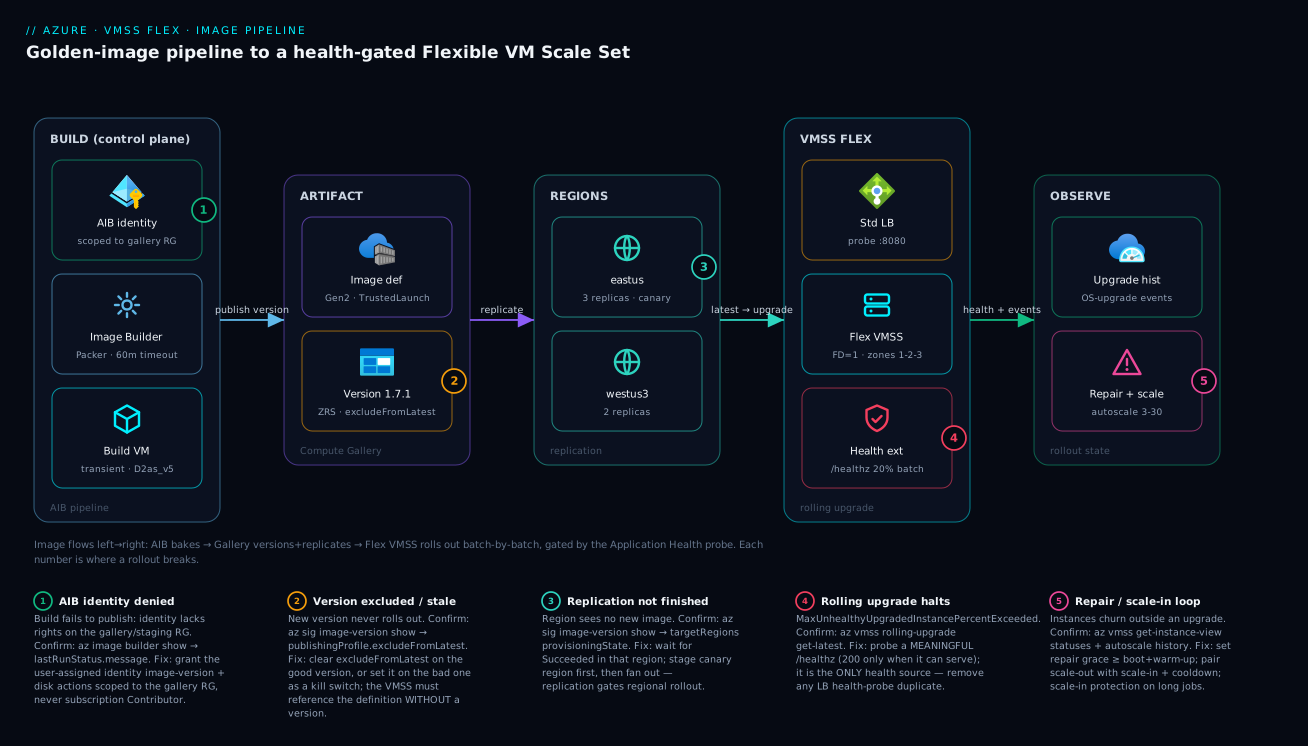
The diagram traces the image as it actually flows, left to right, from a build pipeline to a self-healing fleet. On the far left is the build control plane: the AIB user-assigned identity (scoped to the gallery RG, not the subscription), the Image Builder template that runs Packer with a 60-minute timeout, and the transient build VM that does the work and is then thrown away. AIB publishes the result into the artifact zone — a Compute Gallery image definition (Gen2, TrustedLaunch-supported) holding an immutable image version (1.7.1, ZRS-replicated, with excludeFromLatest available as a kill switch). That version then replicates into the regions zone — eastus as the canary with three replicas, westus3 with two — and only a region that has finished replicating can roll the new image out.
On the right, the VMSS Flex zone is the runtime fleet: a Standard Load Balancer probing port 8080, the Flexible scale set spread across fault domain 1 and zones 1-2-3, and the Application Health extension probing /healthz and gating the rolling upgrade to 20% batches. Everything converges on the observe zone — automatic OS-upgrade history and the repair/autoscale loop (3→30 instances). Read the five numbered badges as the five places a rollout breaks: a denied build identity, an excluded/stale version, unfinished replication, a halted rolling upgrade from a failing probe, and a repair/scale-in loop. The legend narrates each as symptom · confirm command · fix. The mental model is one sentence: the image flows left to right, and each badge is a gate that, misconfigured, stops the flow exactly there.
Real-world scenario
A payments platform team ran a tier-1 authorization service on a Uniform VMSS with a Marketplace Ubuntu image and a 350-line cloud-init. Two problems converged. First, their security team mandated a CIS-hardened, monthly-patched base image with a sub-90-second boot SLO; cloud-init at boot took 4–6 minutes and was non-deterministic under load. Second, a routine kernel CVE patch the previous quarter had been pushed by re-running cloud-init across the fleet, a bad script slipped through, and ~30% of instances came back unable to reach the HSM. There was no health gate and no rollback — the bad config rolled to the entire set before anyone noticed, and recovery was a frantic manual reimage.
They rebuilt on Flexible orchestration with an AIB + Compute Gallery pipeline. The CIS baseline and all packages moved into the image (boot dropped to ~50 seconds). The Application Health extension probed a /ready endpoint that returned 200 only after a successful test connection to the HSM — so “healthy” meant “can actually authorize.” Crucially, they kept maxUnhealthyUpgradedInstancePercent tight and replicated each new gallery version to a single canary region first.
The next CVE patch told the story. A new image version went to the canary region; rolling upgrade replaced the first 20% batch; the new instances failed the HSM connectivity probe; the orchestrator restored their previous OS disks and halted at MaxUnhealthyUpgradedInstancePercentExceededInRollingUpgrade after the first batch. Blast radius: a handful of instances in one region, auto-rolled-back, zero customer impact. The fix (a firewall rule the new baseline had tightened) shipped as 1.7.1; 1.7.0 was demoted with excludeFromLatest rather than deleted.
The health endpoint design was the whole game — a probe that only checks the process would have happily greenlit the broken batch:
az vmss extension set \
  --resource-group rg-pay-prod --vmss-name vmss-authz \
  --name ApplicationHealthLinux \
  --publisher Microsoft.ManagedServices --version 2.0 \
  --settings '{
    "protocol": "https",
    "port": 8443,
    "requestPath": "/ready",
    "intervalInSeconds": 5,
    "gracePeriod": 900
  }'
The before/after, as numbers, because the business case is in the deltas:
| Metric | Before (Uniform + cloud-init) | After (Flex + AIB + Gallery) | Driver of the change |
|---|---|---|---|
| Boot time | 4–6 min, variable | ~50 s, deterministic | Config baked into the image |
| CVE-patch blast radius | ~30% of fleet, all regions | A handful, one canary region | Rolling upgrade + canary replication |
| Rollback time | Manual reimage, ~hours | Automatic, in-flight | OS-disk restore on policy breach |
| “What ran last Tuesday?” | Script archaeology | Image version number | Immutable versioned artifact |
| Health meaning | “Process is up” | “Can reach the HSM” | /ready semantics |
| Customer impact (last patch) | Outage | Zero | The health gate held |
Advantages and disadvantages
The baked-image-plus-health-gated-rollout model both removes the chronic IaaS pains and adds new moving parts you must operate. Weigh it honestly:
| Advantages (why this model helps you) | Disadvantages (why it bites) |
|---|---|
| Boot is fast and identical — config is baked, not run at boot | A build pipeline is now infrastructure you must own and debug |
| Immutable, versioned artifact — rollback is “point at the prior version” | More resources to govern: identity, template, gallery, replication |
| Health-gated rolling upgrade halts and rolls back automatically | A bad health probe greenlights a broken batch — the probe is the whole game |
| Replication geography gives you a built-in canary lever | Replication adds latency before a region can roll out |
| Flexible instances are real VMs — standard tooling just works | Auto-OS upgrade on Flex is preview; constraints (no MaxSurge) apply |
| Automatic instance repair self-heals stuck instances | A too-short repair grace period causes a repair loop |
| Spot Priority Mix cuts cost with a protected regular floor | Spot eviction must be handled in-guest or you lose work |
excludeFromLatest is a clean kill switch for a bad bake |
Forgetting to reference the definition without a version disables auto-upgrade tracking |
The model is right for fleets that need fast, deterministic boot, an audit-grade artifact, and safe rollout — regulated workloads, large web/app tiers, self-hosted runners. It is overkill for a single VM or a tiny static set you rarely change. The disadvantages are all operational discipline, not fundamental flaws: own the pipeline, design the probe honestly, size the grace periods to boot+warm-up, and handle eviction — then the model pays for itself the first time a bad patch halts itself in a canary region.
Hands-on lab
Stand up a Flexible scale set, attach an honest health probe, and watch a rolling change replace instances batch by batch — free-tier-conscious (small SKU, low count; delete at the end). Run in Cloud Shell (Bash).
Step 1 — Variables and resource group.
RG=rg-vmss-lab
LOC=eastus
az group create -n $RG -l $LOC -o table
Step 2 — Create a Flexible scale set, zonal + max FD spread.
az vmss create -g $RG -n vmss-lab \
  --orchestration-mode flexible \
  --zones 1 2 3 --platform-fault-domain-count 1 \
  --instance-count 3 --vm-sku Standard_B2s \
  --image Ubuntu2204 --upgrade-policy-mode Manual \
  --admin-username azureuser --generate-ssh-keys \
  --single-placement-group false -o table
Expected: a scale set with orchestrationMode: Flexible and three instances spread across zones.
Step 3 — Install a tiny health endpoint via custom data, then add the Application Health extension. Use a trivial /healthz on port 8080:
az vmss extension set -g $RG --vmss-name vmss-lab \
  --name ApplicationHealthLinux \
  --publisher Microsoft.ManagedServices --version 2.0 \
  --settings '{"protocol":"http","port":8080,"requestPath":"/healthz","intervalInSeconds":5,"numberOfProbes":1,"gracePeriod":300}'

az vmss update-instances -g $RG -n vmss-lab --instance-ids '*'
Step 4 — Confirm every instance reports a health state, not just a power state.
az vmss get-instance-view -g $RG -n vmss-lab --query "statuses" -o table
# Look for HealthState/Healthy (or Unknown during grace), not only PowerState/running
Step 5 — Switch to Rolling and tighten the envelope.
az vmss update -g $RG -n vmss-lab \
  --set upgradePolicy.mode=Rolling \
  --max-batch-instance-percent 34 \
  --max-unhealthy-instance-percent 34 \
  --max-unhealthy-upgraded-instance-percent 34 \
  --pause-time-between-batches PT1M
Step 6 — Trigger a model change and watch the rolling replacement. Change the SKU to force instance replacement, then watch the rolling-upgrade result:
az vmss update -g $RG -n vmss-lab --set sku.name=Standard_B2ms
az vmss rolling-upgrade get-latest -g $RG -n vmss-lab -o jsonc
# runningStatus.code progresses; failedInstanceCount should stay 0
Expected: instances upgrade in batches of ~1 (34% of 3), pausing a minute between, with failedInstanceCount: 0.
Step 7 — Enable automatic instance repair.
az vmss update -g $RG -n vmss-lab \
  --enable-automatic-repairs true \
  --automatic-repairs-grace-period PT30M
Validation checklist. You created a real Flexible set, attached the required single health source, promoted it to Rolling only after health was green, and observed a health-gated batch replacement with zero failed instances. The steps mapped to what each proves:
| Step | What you did | What it proves | Real-world analogue |
|---|---|---|---|
| 2 | Flexible set, FD=1, zonal | The shape is set once, correctly | Every new production fleet |
| 3 | Add Application Health extension | Flex needs the single health source | Wiring the rollout gate |
| 4 | Read HealthState |
Health ≠ power state | Pre-rollout green check |
| 5 | Promote to Rolling | Tightened envelope before risk | Production model changes |
| 6 | SKU change → batch replace | Rolling upgrade actually batches + gates | A real image/config rollout |
| 7 | Enable repair | Continuous self-heal | Day-2 operations |
Cleanup (avoid lingering charges).
az group delete -n $RG --yes --no-wait
Cost note. Three B2s/B2ms instances for an hour is a few tens of rupees; deleting the resource group stops everything. Keep the count low and delete promptly.
Practice challenges
Work these in order — each builds on the last, escalating from a first scale set to a health-gated, cost-optimised fleet. Try each before opening the solution. All IDs and names are placeholders; nothing here runs live in this lesson, but every command is real and schema-correct against current az and the 2024 API versions. Reuse the RG, GAL, and vmss-app names from the walkthrough.
1. (Beginner) Create the fleet’s shape correctly, the first time. Create a Flexible scale set named vmss-ex with two Standard_B2s instances, spread across zones 1-2-3 with maximum fault-domain spreading, starting in Manual upgrade mode.
<details> <summary>Solution</summary>
az vmss create -g $RG -n vmss-ex \
  --orchestration-mode flexible \
  --zones 1 2 3 --platform-fault-domain-count 1 \
  --instance-count 2 --vm-sku Standard_B2s \
  --image Ubuntu2204 --upgrade-policy-mode Manual \
  --admin-username azureuser --generate-ssh-keys \
  --single-placement-group false -o table
Why: --orchestration-mode, --platform-fault-domain-count, and --zones are all set once and are irreversible — getting the shape right at creation is the entire exercise. Starting in Manual keeps you from rolling anything before health is proven green.
</details>
2. (Beginner) Read back the irreversible fields. Without recreating anything, print the orchestration mode, fault-domain count, and zones of vmss-ex in one command, so you can confirm the shape before building a pipeline on top of it.
<details> <summary>Solution</summary>
az vmss show -g $RG -n vmss-ex \
  --query "{mode:orchestrationMode, fd:properties.platformFaultDomainCount, zones:zones}" -o jsonc
Why: these three values cannot be changed later, so verifying them is a five-second check that saves a full recreate — treat it like confirming a database partition key before you load data. </details>
3. (Intermediate) Attach the required health source. Wire the Application Health extension to an HTTP /healthz endpoint on port 8080, then make sure the change reaches the existing instances.
<details> <summary>Solution</summary>
az vmss extension set -g $RG --vmss-name vmss-ex \
  --name ApplicationHealthLinux \
  --publisher Microsoft.ManagedServices --version 2.0 \
  --settings '{"protocol":"http","port":8080,"requestPath":"/healthz","intervalInSeconds":5,"numberOfProbes":1,"gracePeriod":300}'

az vmss update-instances -g $RG -n vmss-ex --instance-ids '*'
Why: on Flexible orchestration there is no load-balancer-probe fallback, so this extension is the single required health source that every rolling upgrade and instance-repair decision reads; without the update-instances step the extension sits in the model but never reaches the running instances.
</details>
4. (Intermediate) Kill a bad version and track latest. Version 1.4.0 shipped broken. Demote it without deleting it, and confirm the scale set references the definition in the form that lets automatic OS upgrade pick up the next good version.
<details> <summary>Solution</summary>
# Hide the bad version from 'latest' resolution (kill switch, keeps forensics).
az sig image-version update -g $RG --gallery-name $GAL \
  --gallery-image-definition ubuntu-app --gallery-image-version 1.4.0 \
  --set publishingProfile.excludeFromLatest=true

# The image must be referenced WITHOUT a version segment to track latest.
az vmss show -g $RG -n vmss-app \
  --query virtualMachineProfile.storageProfile.imageReference.id -o tsv
# → .../galleries/galProd/images/ubuntu-app   (no /versions/... tail)
Why: excludeFromLatest is the kill switch — auto-OS upgrade skips excluded versions — and it preserves the artifact for comparison; a versionless image reference is what makes latest a moving target the upgrade can follow.
</details>
5. (Advanced) Build the rolling envelope and enable auto-OS upgrade — with the prerequisites checked. Switch vmss-app to Rolling with 20% batches, a 3-minute soak, and a tight upgraded-unhealthy threshold, then enable automatic OS image upgrade. List the Flex prerequisites you must satisfy or the feature silently no-ops.
<details> <summary>Solution</summary>
az vmss update -g $RG -n vmss-app \
  --set upgradePolicy.mode=Rolling \
  --max-batch-instance-percent 20 \
  --max-unhealthy-instance-percent 20 \
  --max-unhealthy-upgraded-instance-percent 10 \
  --prioritize-unhealthy-instances true \
  --pause-time-between-batches PT3M

az vmss update -g $RG -n vmss-app --enable-auto-os-upgrade true
Prerequisites on Flex (all required): image referenced as the definition without a version; Application Health extension present and its version matching the model; exactly one health source (no LB probe as well); no MaxSurge; and enableAutomaticOSUpgrade=true.
Why: automatic OS upgrade on Flex is preview and fail-silent — miss any one prerequisite and it does nothing with no error, so the checklist, not the command, is the real work. The tight max-unhealthy-upgraded-instance-percent is the true rollback trigger for a bad bake.
</details>
6. (Advanced) Cost-optimise with a protected Spot floor. Create vmss-batch for interruptible work: a floor of 4 regular VMs that are never evicted, 50% regular among instances above the floor, Deallocate eviction, and sketch the in-guest drain on a Preempt signal.
<details> <summary>Solution</summary>
az vmss create -g $RG -n vmss-batch \
  --orchestration-mode flexible --platform-fault-domain-count 1 \
  --instance-count 10 --vm-sku Standard_D4as_v5 --image Ubuntu2204 \
  --priority Spot --eviction-policy Deallocate \
  --regular-priority-count 4 --regular-priority-percentage 50 \
  --single-placement-group false -o table

# In-guest: poll IMDS Scheduled Events and drain within the ~30s window.
curl -s -H "Metadata:true" \
  "http://169.254.169.254/metadata/scheduledevents?api-version=2020-07-01" \
  | jq '.Events[] | select(.EventType=="Preempt")'
Why: the regular-priority-count floor is your insurance that core capacity survives a region-wide Spot reclamation, and Deallocate keeps each evicted instance’s disk so work can resume — but none of it is safe unless the guest actually handles the Preempt event and drains before the window closes.
</details>
Common mistakes & troubleshooting
This is the playbook — the part you bookmark. First as a scannable table you can read mid-incident, then the entries that bite hardest expanded with the full confirm path.
| # | Symptom | Root cause | Confirm (exact cmd / portal path) | Fix |
|---|---|---|---|---|
| 1 | AIB build fails immediately, can’t publish | Build identity lacks rights on gallery/staging RG | az image builder show -g $RG -n <tmpl> --query lastRunStatus.message |
Grant the user-assigned identity image-version + disk actions scoped to the RGs |
| 2 | New version exists but a region’s instances don’t get it | Version not finished replicating to that region | az sig image-version show ... --query publishingProfile.targetRegions |
Add the region to targetRegions; wait for Succeeded |
| 3 | New version published but auto-OS upgrade never fires | VMSS references a pinned version, not the definition | az vmss show --query virtualMachineProfile.storageProfile.imageReference |
Reference the definition without a version segment |
| 4 | Rolling upgrade halts after first batch | New instances fail the health probe | az vmss rolling-upgrade get-latest -g $RG -n vmss-app |
Fix the app/baseline; demote bad version with excludeFromLatest; re-bake |
| 5 | Auto-OS upgrade silently does nothing on Flex | Missing prerequisite (no health ext / version mismatch / MaxSurge set) | az vmss show --query upgradePolicy; az vmss extension list |
Add/align Application Health ext; remove MaxSurge; set image to latest |
| 6 | Orchestration features won’t engage at all | Two health sources (extension and LB probe) | Inspect model: extension list + --query ...loadBalancerConfigurations |
Remove one source; keep exactly one |
| 7 | Instances churn/replace constantly outside any upgrade | Repair grace period shorter than boot + warm-up | az vmss get-instance-view + activity log repair events |
Raise --automatic-repairs-grace-period to cover warm-up |
| 8 | Probe shows Unhealthy though the app “works” | Probe returns a non-200 2xx (redirect/204) or wrong port | curl -i http://<instance>:<port><path> from a peer |
Return a clean 200; match port/path to the listener |
| 9 | Rolling upgrade cancels from unrelated maintenance | maxUnhealthyInstancePercent counts all unhealthy |
az vmss rolling-upgrade get-latest (whole-set threshold) |
Resolve the unrelated unhealthy; resume; widen threshold if appropriate |
| 10 | Spot fleet loses too much capacity on a reclaim | Regular floor too low / no eviction handling | az vmss show --query ...spotRestorePolicy / priorityMixPolicy |
Raise regular-priority-count; handle Preempt Scheduled Events |
| 11 | Can’t change FD count / zones after create | Both are set once at creation | az vmss show --query "{fd:platformFaultDomainCount,zones:zones}" |
Recreate the set with the correct values |
| 12 | Build ships a broken image but reports Succeeded | A failing customizer didn’t fail the build | Inspect the customizer log; missing set -euo pipefail |
Add set -euo pipefail; assert post-conditions in the script |
The expanded form for the entries that cause the longest outages:
1. AIB build fails immediately and can’t publish.
Root cause: the user-assigned identity lacks the image-version/disk actions on the gallery and staging resource groups (or you scoped it to the wrong RG).
Confirm: az image builder show -g $RG -n <template> --query lastRunStatus.message returns an authorization error naming the action.
Fix: grant a custom role (or Contributor on the gallery/staging RG only) with galleries/images/versions/write, images/write, disks/write. Never subscription Contributor.
4. Rolling upgrade halts after the first batch.
Root cause: the freshly-upgraded instances fail the Application Health probe — the new image/baseline broke a dependency (a tightened firewall rule, a missing package, a wrong port).
Confirm: az vmss rolling-upgrade get-latest -g $RG -n vmss-app shows MaxUnhealthyUpgradedInstancePercentExceededInRollingUpgrade; the previous OS disks were restored.
Fix: fix the app or baseline; demote the bad version with excludeFromLatest=true; re-bake as a new version. The halt is the system working — the canary held the blast radius.
5. Automatic OS upgrade silently does nothing on Flex.
Root cause: a missing preview prerequisite — the image is pinned to a version instead of latest, the Application Health extension is absent or version-mismatched against the model, or MaxSurge is set (unsupported with auto-OS on Flex).
Confirm: az vmss show --query upgradePolicy.automaticOSUpgradePolicy; az vmss extension list; check the image reference has no version.
Fix: reference the definition without a version, add/align the health extension, remove MaxSurge, then re-enable.
6. Orchestration features won’t engage at all.
Root cause: two health sources configured — both an Application Health extension and a Load Balancer health probe.
Confirm: the model shows a ApplicationHealth* extension and a networkProfile...loadBalancerConfigurations health probe.
Fix: remove one; a scale set may have exactly one health source.
7. Instances churn outside any upgrade.
Root cause: automatic instance repair grace period is shorter than boot plus app warm-up, so an instance is judged unhealthy and replaced before it ever becomes ready — a self-perpetuating loop.
Confirm: az vmss get-instance-view shows repeated repairs; the activity log lists back-to-back repair operations.
Fix: raise --automatic-repairs-grace-period (and the extension gracePeriod) to comfortably exceed boot + warm-up.
Best practices
- Pick Flexible orchestration with
platformFaultDomainCount=1across zones for new fleets, and remember both are irreversible — get them right at creation. - Bake configuration into the image, not into boot. Move packages, hardening and agents into AIB so boot is fast and deterministic; keep cloud-init for tiny, instance-specific bootstrap only.
- Rebake on a schedule from a
version: latestsource so every image rides the newest patched base; don’t let a golden image rot. - Scope the build identity to least privilege — a custom role on the gallery and staging RG, never subscription Contributor.
- Make the gallery definition Gen2 with the right
SecurityType(TrustedLaunchSupportedis the flexible default) and replicate versions asStandard_ZRSin zoned regions. - Reference the gallery definition without a version so the set tracks
latestand auto-OS upgrade has a moving target. - Design the health probe to mean “can serve,” not “process up.” Return a clean
200only when the instance can do real work, and make it the single health source. - Create in
Manual, confirm health green, then promote toRolling. Never flip to rolling with an unverified probe. - Keep
maxUnhealthyUpgradedInstancePercenttight and replicate each new version to a canary region first — that combination auto-rolls-back a bad bake with a tiny blast radius. - Treat auto-OS upgrade on Flex as preview: validate in non-prod, confirm regional availability, and don’t combine it with MaxSurge.
- Size the repair grace period to boot + warm-up to avoid a repair loop, and pair autoscale out/in rules with cooldowns that exceed warm-up.
- Demote bad versions with
excludeFromLatest, don’t delete them — you keep the forensic trail and the ability to compare.
Security notes
- Least-privilege build identity. The AIB user-assigned managed identity should hold only the image-version and disk actions it needs, scoped to the gallery and staging resource groups. A pipeline identity with subscription Contributor is a blast-radius disaster waiting to happen.
- No secrets baked into the image. A generalized image is copied to every instance; anything in it (keys, tokens, connection strings) is now on every box and in the gallery. Inject secrets at boot via managed identity + Azure Key Vault, never bake them.
- Trusted Launch by default. Use Gen2 + Trusted Launch (Secure Boot + vTPM) so the boot chain is measured and tampering is detectable; choose Confidential VM support for memory-encryption-sensitive workloads.
- Lock down the staging resource group. AIB’s transient build VM and intermediate artifacts live there; restrict access and let AIB clean it up, or pin and govern it. Build inside a VNet (
vnetConfig) to reach private sources without exposing the build to the internet. - Sign and scan what goes into the image. Pull
scriptUricustomizers from a controlled, access-restricted storage account; verify the integrity of any binaries the build installs. - Patch at the image, audit at the version. Monthly rebakes from a patched base keep the fleet current; the gallery version number is your audit answer to “exactly what was running.”
- Network-isolate the fleet. Place the VMSS in a subnet behind NSGs and a Load Balancer / Application Gateway; the instances should not be directly internet-reachable unless they must be.
The security controls and what each buys you, secure and resilient pulling in the same direction:
| Control | Mechanism | Secures against | Also prevents |
|---|---|---|---|
| Least-privilege build identity | Custom role on gallery/staging RG | Pipeline compromise → subscription damage | Accidental broad writes |
| No baked secrets | Managed identity + Key Vault at boot | Secret sprawl across every instance | Rotation breaking a baked value |
| Trusted Launch | Gen2 + Secure Boot + vTPM | Boot-chain tampering, rootkits | Unmeasured boot drift |
| Staging RG lockdown | RBAC + VNet build | Build-time exposure | Orphaned build artifacts |
| Controlled script source | Access-restricted blob | Supply-chain injection | Unknown scripts in the image |
| Monthly rebake | version: latest source |
Unpatched CVEs in base | Image rot / drift |
Cost & sizing
The bill drivers and how to right-size them:
- Instance-hours dominate. You pay per running instance: SKU × count × hours. The biggest lever is a sane autoscale
maxand an honestmin— don’t pin 30 instances “just in case.” Use Spot Priority Mix for interruptible work to cut the above-floor cost sharply. - Gallery replication has a real cost. Each replica in each region is stored and billed; more replicas speed mass-create but cost more. Replicate widely only where you actually deploy, and use ZRS where zone-redundancy is worth it.
- AIB build cost is the build VM’s runtime — a
D2as_v5for the length of the build, plus the transient disk. Cheap per build; keepbuildTimeoutInMinutesrealistic so a hung build doesn’t run for hours. - Spot saves 60–90% on eligible capacity but evicts on reclaim; the regular floor is your insurance and the part you pay full price for.
- OS disk choice (Standard SSD vs Premium SSD vs Ephemeral) affects both cost and boot; Ephemeral OS disks are free of disk cost and faster to reimage, ideal for stateless fleets.
A rough monthly picture and what each driver buys:
| Cost driver | What you pay for | Rough INR / month | What it buys | Watch-out |
|---|---|---|---|---|
3× D2as_v5 (baseline) |
Three always-on instances | ~₹18,000–24,000 | The steady-state fleet | Don’t over-set min |
| Autoscale to 30 at peak | Extra instances during spikes | + per-hour at peak only | Demand headroom | max must clear real peak |
| Spot above a floor of 3 | Discounted interruptible capacity | −60–90% on above-floor | Cheap scale for batch | Eviction handling required |
| Gallery replicas (2 regions) | Stored image versions | ~₹1,000–3,000 | Fast multi-region create | More replicas = more cost |
| AIB build (per bake) | Build VM runtime + disk | a few ₹ per build | The golden image | Keep timeout realistic |
| Ephemeral OS disk | (no disk charge) | ₹0 disk | Faster reimage, lower cost | Data is lost on reimage |
For deeper cost governance across many such fleets, see Azure FinOps & Cost Management at Scale.
Common beginner mistakes
These are conceptual traps — wrong mental models rather than broken commands. (For symptom-cause-fix operational failures, use the Common mistakes & troubleshooting playbook above; this table is about the misconception itself.)
| Misconception | Why it’s wrong | The right mental model |
|---|---|---|
| “I’ll pick Flexible now and switch to Uniform (or change the FD count) later if I need to.” | Orchestration mode, platformFaultDomainCount, and zones are set once at creation and cannot be changed. |
They are the shape of the fleet, like a database partition key — decide deliberately up front; changing them means recreating the set. |
“Setting upgradePolicy.mode = Rolling makes new image versions roll out automatically.” |
mode governs only what happens when you change the model. New image versions rolling out is a separate switch, enableAutomaticOSUpgrade. |
Two independent knobs: mode = “how do model changes reach instances”, auto-OS upgrade = “what happens when a new image appears”. |
| “The health probe just needs to prove the process is running.” | A process-up probe happily greenlights a batch that can’t reach its database, HSM, or license server — the exact failure a rollout must catch. | The probe returns 200 only when the instance can do real work. Health means “can serve,” not “is alive.” |
| “Azure Compute Gallery is a different product from Shared Image Gallery.” | It’s the same service, renamed — Shared Image Gallery became Azure Compute Gallery. The az sig (shared-image-gallery) verbs even kept their old name. |
One registry, two names. Don’t go looking for a separate service or a migration. |
| “As soon as Image Builder publishes a version, every region can deploy it.” | A region sees a version only after it has finished replicating there — publishing and regional availability are different events. | Replication is a per-region gate — and your built-in canary lever: replicate to one region, prove it, then fan out. |
“excludeFromLatest deletes the bad version, so I’ve cleaned it up.” |
It only hides the version from latest resolution; the artifact still exists and can still be deployed by explicit reference. |
It’s a kill switch, not a delete — it stops auto-upgrade from shipping the bad bake while preserving the forensic trail. |
| “An ephemeral OS disk is just a cheaper managed disk.” | It lives on local VM storage and is wiped on stop-deallocate, reimage, or host change — there’s no durability, snapshot, or backup. | Local, disposable, fast-to-reset — perfect because the golden image is the durable copy. Stateless fleets only. |
| “More gallery replicas just cost more, so one is always enough.” | Each replica also serves a slice of concurrent instance creates (~20 each), so one replica throttles a large mass-create. | Replicas are both a cost line and a throughput dial — size them to your real per-region deploy footprint. |
Interview & exam questions
1. Uniform vs Flexible orchestration — when do you pick each, and what’s irreversible? Flexible is the default: instances are real Microsoft.Compute/virtualMachines resources, so standard tooling and per-instance ops work, and it unlocks mixed sizes and Spot Priority Mix. Pick Uniform only for very large homogeneous fleets or Service Fabric. The orchestration mode (and platformFaultDomainCount, and zones) is set at creation and cannot be changed — recreating the set is the only way to change it.
2. What does platformFaultDomainCount=1 mean and why is it the recommended default? It requests max spreading — Azure distributes instances across as many fault domains as the region allows, best-effort. It gives the broadest availability and avoids allocation failures in constrained regions. Combine it with Availability Zones for the strongest posture; use a fixed 2–3 only for quorum systems that need a known FD count.
3. Why scope the AIB build identity tightly, and to what? A build identity that can publish images can, if over-privileged, be a subscription-wide compromise vector. Grant a custom role (or Contributor on just the gallery and staging RGs) with the image-version and disk actions AIB needs — galleries/images/versions/write, images/write, disks/write — never subscription Contributor.
4. How does replication gate a regional rollout, and how do you exploit it? A scale set in a region only sees a new image version once it has finished replicating there. You exploit this as a canary lever: replicate a new version to one region first, prove it with a health-gated rolling upgrade, then add the remaining regions to targetRegions to fan out.
5. Distinguish upgrade-policy mode from automatic OS image upgrade. The mode (Manual/Automatic/Rolling) governs what happens to existing instances when you change the scale set model. Automatic OS image upgrade governs what happens when a new image version appears, and it always uses the rolling-upgrade policy regardless of mode. They are configured independently and are constantly conflated.
6. What are the three thresholds in a rolling upgrade policy and which one actually triggers rollback? maxBatchInstancePercent caps batch size; maxUnhealthyInstancePercent halts if too much of the whole set is unhealthy; maxUnhealthyUpgradedInstancePercent cancels and rolls back if too many already-upgraded instances go unhealthy. The last one is the true rollback trigger for a bad bake — keep it tight.
7. Why is the Application Health extension required on Flex, and what’s the “exactly one health source” rule? On Flexible orchestration there is no load-balancer-probe fallback, so the Application Health extension is the required signal that gates rolling upgrades and instance repair. A scale set may have exactly one health source; configuring both the extension and an LB health probe disables orchestration features until you remove one.
8. How should a health probe be designed, and what’s the classic mistake? It must return a clean 200 only when the instance can do real work (e.g. reach its required downstream), not merely when the process is up. The classic mistake is a shallow “process alive” probe that greenlights a broken batch — the payments scenario’s /ready returning 200 only after a successful HSM connection is the correct shape.
9. What causes an automatic instance repair loop and how do you stop it? A repair grace period shorter than boot + warm-up: the instance is judged unhealthy and replaced before it ever becomes ready, repeatedly. Stop it by raising --automatic-repairs-grace-period (and the extension gracePeriod) to comfortably exceed warm-up.
10. Explain Spot Priority Mix and when it’s appropriate. It runs a guaranteed floor of regular VMs (regular-priority-count, never evicted) plus a percentage of regular instances above that floor, with the rest as Spot — evicted on capacity reclaim. It’s appropriate for interruptible work (batch, CI, stateless processors) where the regular floor protects core capacity; keep Spot out of a tier-1 synchronous path or set the floor to carry full load.
11. Why reference the gallery definition without a version, and what’s excludeFromLatest for? Referencing the definition without a version makes the set track latest, which is exactly what automatic OS upgrade keys off. excludeFromLatest removes a version from latest resolution — the kill switch that stops auto-upgrade from rolling out a bad bake, without deleting the version.
12. Why is version: latest on the AIB source useful? Because latest is resolved at build time, the same template rerun monthly always bakes on top of the newest patched base image — so a scheduled rebake keeps the golden image current instead of rotting on an old base.
These map to AZ-104 (Administrator) — deploy and manage Azure compute resources, VM Scale Sets, scaling, and images — and AZ-305 (Solutions Architect Expert) — design infrastructure solutions, compute resilience, and update strategy. The image-supply-chain and identity angles touch AZ-500. A compact cert-mapping for revision:
| Question theme | Primary cert | Exam objective area |
|---|---|---|
| Orchestration mode, FD/zones | AZ-104 | Deploy & manage VM Scale Sets |
| AIB + Compute Gallery pipeline | AZ-104 / AZ-305 | Manage images; design compute |
| Rolling upgrade & health gate | AZ-305 | Design for resilience & updates |
| Autoscale & predictive scaling | AZ-104 | Configure scaling |
| Spot Priority Mix & cost | AZ-305 | Cost-optimized compute design |
| Build identity & Trusted Launch | AZ-500 | Secure compute & supply chain |
Quick check
- You created a Flexible scale set with
platformFaultDomainCount=2and now want max spreading. What’s the only way to change it, and why? - A new gallery image version exists, but instances in
westus3aren’t picking it up whileeastusdid. What’s the most likely cause and how do you confirm? - True or false: setting
upgradePolicy.mode=Rollingis what makes a new image version roll out automatically. - Your rolling upgrade halted with
MaxUnhealthyUpgradedInstancePercentExceededInRollingUpgradeafter the first batch. Is this a failure of the system, and what do you do with the bad version? - Instances are being replaced every few minutes even though no upgrade is running. Name the most likely cause and the fix.
Answers
- Recreate the set.
platformFaultDomainCount(like orchestration mode and zones) is fixed at creation and cannot be changed on an existing scale set; you must deploy a new set withplatformFaultDomainCount=1. - The version hasn’t finished replicating to
westus3(orwestus3isn’t intargetRegions). Confirm withaz sig image-version show ... --query publishingProfile.targetRegionsand check each region’sprovisioningState/regionalReplicaCount; add the region and wait forSucceeded. - False.
mode=Rollinggoverns what happens when you change the model. A new image version rolling out automatically is automatic OS image upgrade (enableAutomaticOSUpgrade=true), which uses the rolling policy but is a separate switch, and requires the definition referenced without a version. - No — it’s the system working as designed. The health gate caught a bad bake, rolled the failed instances back to their previous OS disk, and halted with a tiny blast radius. Demote the bad version with
excludeFromLatest=true(don’t delete it), fix the root cause, and ship a new version. - The automatic-instance-repair grace period is shorter than boot + warm-up, so instances are judged unhealthy and replaced before they become ready — a repair loop. Raise
--automatic-repairs-grace-period(and the extensiongracePeriod) to exceed warm-up.
Glossary
- Flexible orchestration — VMSS mode where instances are real
Microsoft.Compute/virtualMachinesresources that are members of the set; default for new fleets, set once at creation. - Uniform orchestration — legacy VMSS mode where instances are managed behind a
virtualMachineScaleSets/virtualMachinesproxy; for very large homogeneous fleets and Service Fabric. - Fault domain (FD) — a rack-level failure boundary; spreading instances across FDs limits the blast radius of a hardware failure.
platformFaultDomainCount— how many fault domains to spread across;1means max (best-effort broad) spreading. Irreversible.- Azure Image Builder (AIB) — managed service wrapping HashiCorp Packer that bakes a golden image from a source + customizers and publishes it to a target (
Microsoft.VirtualMachineImages/imageTemplates). - Customizer — a build step in an AIB template (
Shell,PowerShell,File,WindowsUpdate,WindowsRestart) run on the transient build VM; fail-fast. - Compute Gallery — the image registry, structured as
gallery → image definition → image version. - Image definition — the immutable contract for an image (OS type, generation, security type, publisher/offer/sku); cannot be changed after creation.
- Image version — a concrete baked artifact (e.g.
1.7.1) that AIB writes into a definition and that a VMSS deploys. excludeFromLatest— a version-level flag removing it fromlatestresolution; the kill switch for a bad bake (auto-OS upgrade skips excluded versions).- Replication — copying an image version to
targetRegions; a region only sees a version after replication finishes, which gates regional rollout. - Upgrade policy
mode—Manual/Automatic/Rolling; governs what happens to existing instances when you change the model. - Automatic OS image upgrade —
enableAutomaticOSUpgrade; rolls out a new image version automatically using the rolling-upgrade policy (preview on Flex). - Rolling upgrade policy — the safety envelope (
maxBatchInstancePercent,maxUnhealthyInstancePercent,maxUnhealthyUpgradedInstancePercent,pauseTimeBetweenBatches) that batches and health-gates an upgrade. - Application Health extension — an in-guest probe (
ApplicationHealthLinux/Windows) that reports instance health; the required single health source on Flex. - Automatic instance repair —
automaticRepairsPolicy; replaces an instance that stays unhealthy outside of an upgrade, using the same health signal. - Spot Priority Mix — a Flex feature running a protected floor of regular VMs plus Spot VMs above it; Spot is evicted on capacity reclaim.
- Scheduled Events — IMDS-delivered notices (
Preempt,Terminate,Reboot,Redeploy,Freeze) that let an instance drain gracefully before an interruption. - Trusted Launch — Gen2 security (Secure Boot + vTPM) that measures the boot chain;
TrustedLaunchSupportedimages boot on both Standard and Trusted Launch VMs. - Ephemeral OS disk — an OS disk placed on storage local to the VM (cache, temp, or NVMe) instead of a remote managed disk; free, fast to boot and reimage, but wiped on deallocate/reimage — ideal for stateless fleets on a golden image.
- Capacity reservation — on-demand reserved compute for a specific VM size in a specific zone (
capacityReservationGroups); guarantees allocation for scale-out, billed whether used or not. Distinct from a Reserved Instance (a billing commitment). - Overprovisioning — a Uniform-only behaviour where Azure creates extra instances during provisioning, keeps the first healthy ones, and deletes the rest to raise success rate; not available on Flexible.
- Placement group — an allocation/fault-domain boundary of roughly 100 VMs;
singlePlacementGroup=false(always so on Flex) lets a set exceed 100 by spanning multiple groups. - Proximity Placement Group (PPG) — co-locates instances in one datacenter for lowest inter-VM latency, at the cost of cross-zone spread.
- Generalized image — an image with machine identity stripped (Linux
waagent -deprovision/ Windowssysprep) so each new VM gets a fresh hostname and SID; required for fleet scale-out and what AIB always outputs. - Specialized image — an image that keeps the original machine’s identity and state; for lift-and-shift of one server, not for a scale set.
- MaxSurge — a rolling-upgrade option that creates new instances before deleting old ones (no capacity dip); needs spare quota and cannot combine with auto-OS upgrade on Flex.
latestModelApplied— a per-instance flag showing whether an instance matches the scale set’s current model;falsemeans the instance is pending an upgrade.- Predictive autoscale — an autoscale mode that forecasts load and provisions ahead of it; run
ForecastOnlyto validate the model before switching toEnabled.
Next steps
You can now run an immutably-versioned, self-healing IaaS fleet with safe rollouts. Build outward:
- Next: Azure VM Availability & Resilience Deep Dive — the fault-domain, zone, and resilience model that VMSS placement builds on.
- Related: Azure Virtual Machines: Every Setting That Matters — the per-VM anatomy under every scale-set instance.
- Related: Azure Compute: Dedicated Hosts, Spot, Confidential, HPC & Batch — go deeper on the Spot, isolation, and specialized-compute options this article touches.
- Related: Azure Load Balancer: Every Option That Matters — the Standard LB that fronts the set and its health-probe model.
- Related: Azure Container Registry: Secure Supply Chain — the same build-once, version, replicate discipline applied to container images.
- Related: Azure Monitor & Application Insights for Observability — where you watch rollouts, health states, and upgrade history.