Most CI systems are a black box bolted to the side of your cluster: a YAML dialect on someone else’s controller, scaling logic you cannot see, provenance that is at best a log line. Tekton inverts that. Every build step is a pod, every pipeline is a custom resource, and the same RBAC, admission, and observability you run for workloads applies to your CI. Once builds are Kubernetes objects, emitting tamper-evident SLSA provenance stops being a pipeline stage and becomes a controller that watches PipelineRun completions. This article builds reusable pipelines from the CRDs up, then wires Tekton Chains so every artifact is signed and every build produces an in-toto attestation without a single extra task.
In a nutshell
Think of a build as an IKEA-style assembly line made of standardized, snap-together stations. Each Task is one labelled station — fetch source, build image, scan — that does exactly one job and can be lifted out and reused on any other line. A Pipeline is the wiring diagram that says which station feeds which, and in what order. A PipelineRun is pressing “go” on a real order: Kubernetes spins up a fresh booth (a pod) for each station, runs it, and tears it down when the ticket is done. And Tekton Chains is a quality inspector standing at the end of the line who, for every finished unit, automatically staples on a signed, tamper-evident certificate listing exactly what went in and how — without anyone adding an “inspection station” to the line.
That last part is the whole point. In Jenkins or GitHub Actions, your pipeline is YAML running on someone else’s engine — you cannot see the scheduler, you cannot apply your cluster’s RBAC to it, and “who built this and from what” is a log line you hope nobody edited. In Tekton the pipeline is a Kubernetes object, so your cluster’s identity, quotas, admission control, and observability wrap around CI the same way they wrap around your apps. Provenance stops being a stage you might forget and becomes a controller that watches every run.
If you have ever wondered how a container image can prove where it came from without you bolting a signing step onto every pipeline, this lesson is that story, built from the ground up: the four core objects, how a run turns into pods, how data flows between stations, how a git push starts the line, and how Chains signs the output for free.
Level: Advanced · Time: ~40 min
Prerequisites. You should be comfortable with core Kubernetes objects (pods, CRDs, kubectl, RBAC, PersistentVolumeClaims) and general CI/CD vocabulary (stages, artifacts, triggers). If pipeline concepts are still fuzzy, skim CI/CD concepts deep dive first. The Chains half of this lesson leans on supply-chain ideas — SBOMs, signing, SLSA — that Securing the software supply chain and Sigstore keyless signing develop in depth; you can follow along here without them, but they make the “why” richer. A running cluster helps but is not required to read along.
After this lesson you can:
- Explain the four core Tekton CRDs (
Task,Pipeline,TaskRun,PipelineRun) and how a run becomes pods. - Compose reusable Tasks from the catalog via Resolvers, and factor a shared step into a reusable
StepAction. - Pass data between Tasks with workspaces (bulk files) and results (small facts), isolating each run with a
volumeClaimTemplate. - Turn a
git pushinto aPipelineRunwith anEventListener,TriggerBinding, andTriggerTemplate. - Install and configure Tekton Chains so every build is signed and carries SLSA provenance with no extra task.
- Verify a signed artifact and its attestation with cosign, and harden the whole thing with least-privilege service accounts and KMS or keyless signing.
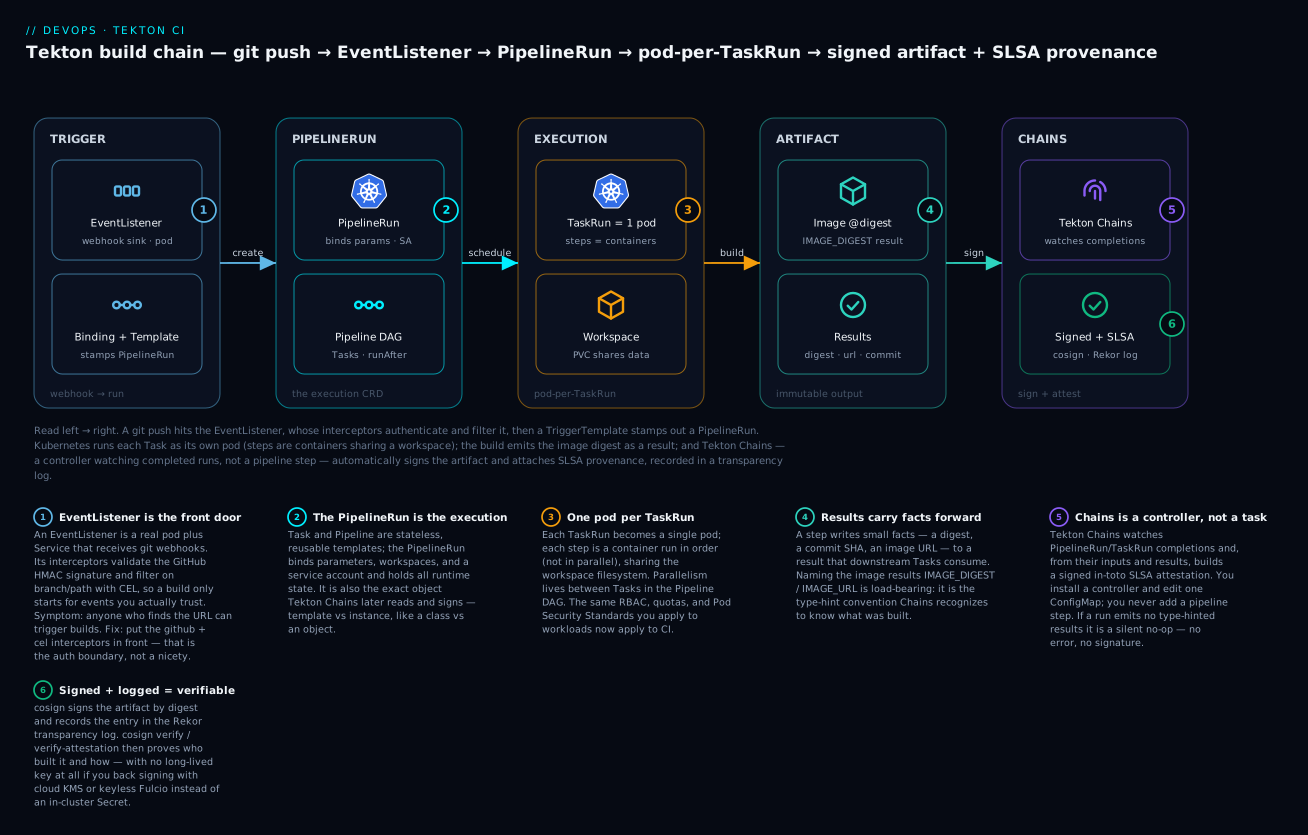
Read it left to right: a git push hits the EventListener, whose interceptors authenticate and filter the event; a TriggerTemplate stamps out a PipelineRun; Kubernetes runs each Task as its own pod (steps are containers sharing a workspace); the build emits the image digest as a result; and Tekton Chains — a controller watching completed runs, not a pipeline step — automatically signs the artifact and records SLSA provenance in a transparency log.
1. The Tekton CRD model: Task, Pipeline, PipelineRun, results
Tekton is four core nouns. A Task is an ordered list of steps, each a container. A Pipeline arranges Tasks into a DAG with explicit ordering and data flow. A PipelineRun (or TaskRun) is the execution — it binds parameters, workspaces, and a service account, and it is the object Chains later signs. Task and Pipeline are reusable templates with zero runtime state; the Run objects hold all instance data.
The single most useful mental model here is template vs instance, exactly like a class versus an object:
| Template (reusable, no state) | Instance (one execution, all state) |
|---|---|
Task — steps for one unit of work |
TaskRun — this run of that Task, with real params/workspaces |
Pipeline — a DAG of Tasks |
PipelineRun — this run of that Pipeline |
You author and version the templates once; every build creates a fresh Run. When something is “in progress” or “failed,” it is always a Run object — never the Task or Pipeline, which just sit there as definitions. This is also why Chains signs Run objects: only the run knows the actual inputs and outputs.
Install the core component and confirm the API is serving:
kubectl apply -f https://storage.googleapis.com/tekton-releases/pipeline/latest/release.yaml

# Wait for the controller and webhook to be Ready
kubectl wait --for=condition=Ready pods --all -n tekton-pipelines --timeout=180s
kubectl api-resources --api-group=tekton.dev
You should see tasks, pipelines, pipelineruns, and taskruns under tekton.dev/v1 — the stable API you should author against. v1beta1 still resolves via conversion but is deprecated.
The two data primitives that make Tasks composable are results and workspaces. A result is a small string a step writes to $(results.<name>.path) that downstream Tasks consume as $(tasks.<task>.results.<name>). Results are for facts — a digest, a tag, a commit SHA — and are capped at roughly 4 KB total per TaskRun when stored in the termination message. A workspace is a shared filesystem (a PVC, emptyDir, Secret, or ConfigMap) mounted across steps and Tasks for bulk data like source trees and caches.
A minimal but real Task that clones a repo and emits the resolved commit as a result:
apiVersion: tekton.dev/v1
kind: Task
metadata:
  name: git-clone-min
spec:
  params:
    - name: url
      type: string
    - name: revision
      type: string
      default: "main"
  workspaces:
    - name: source
      description: Where the repo is checked out
  results:
    - name: commit
      description: The resolved commit SHA
  steps:
    - name: clone
      image: cgr.dev/chainguard/git:latest
      script: |
        #!/usr/bin/env sh
        set -eu
        cd "$(workspaces.source.path)"
        git clone "$(params.url)" .
        git checkout "$(params.revision)"
        git rev-parse HEAD | tr -d '\n' > "$(results.commit.path)"
Every TaskRun is one pod
This is the fact that makes Tekton Tekton: a TaskRun becomes exactly one pod, and each step becomes one container in that pod. The steps run sequentially, not in parallel — Tekton injects its own entrypoint binary into every container and sequences them with wait/post marker files on a shared volume, so step 2 only starts once step 1 writes its “done” marker. All steps share the same workspace mount, so a file the clone step writes is right there for the build step.
Two consequences follow immediately, and both trip up newcomers:
- Parallelism is between Tasks, not between steps. If you want two things to run at once, they are two Tasks in the Pipeline DAG (no
runAfterdependency), each its own pod. Steps inside one Task are always ordered. - The pod’s resource request is the max across steps, not the sum. Because steps run one at a time, Tekton sizes the pod to the largest single step’s request rather than adding them up. A five-step Task each requesting 1Gi does not demand a 5Gi node.
sidecars are the exception to sequencing: they are long-running containers (a Docker daemon, a test database) started before the steps and torn down after, running alongside them for the whole TaskRun. Because every step is a real container in a real pod, your namespace’s RBAC, resource quotas, network policy, and Pod Security Standards apply to CI with zero extra plumbing — the security story later in this lesson is just Kubernetes, not a bolted-on CI feature.
StepActions: reusable steps, the newest primitive
The four nouns above have been stable for years. The newest addition is the StepAction — a reusable step (one container action with its own params and results) that a Task references instead of inlining the image and script. Where catalog Tasks let you reuse a whole Task, StepActions let you reuse a single step, which is far more composable: you assemble a Task from shared step building blocks the way you assemble a Pipeline from Tasks.
A StepAction is self-contained — it declares its own image, script, params, and results:
apiVersion: tekton.dev/v1beta1
kind: StepAction
metadata:
  name: git-clone-step
spec:
  params:
    - name: url
      type: string
    - name: revision
      type: string
      default: "main"
  results:
    - name: commit
      description: The resolved commit SHA
  image: cgr.dev/chainguard/git:latest
  script: |
    #!/usr/bin/env sh
    set -eu
    git clone "$(params.url)" .
    git checkout "$(params.revision)"
    git rev-parse HEAD | tr -d '\n' > "$(step.results.commit.path)"
A Task then points a step at it with ref — that step supplies no image or script of its own, passes params in, and surfaces the StepAction’s result as a Task result:
apiVersion: tekton.dev/v1
kind: Task
metadata:
  name: git-clone-via-stepaction
spec:
  params:
    - name: repo-url
      type: string
  workspaces:
    - name: source
  results:
    - name: commit
      value: $(steps.clone.results.commit)   # surface the step result on the Task
  steps:
    - name: clone
      ref:
        name: git-clone-step
      workingDir: $(workspaces.source.path)
      params:
        - name: url
          value: $(params.repo-url)
Note the two reference forms: inside a StepAction you write $(step.results.commit.path) (singular step), and to surface it at the Task level you write $(steps.clone.results.commit) (plural, keyed by step name). StepActions graduated out of alpha and are enabled by default in current Pipelines releases; they are the direction the ecosystem is moving for fine-grained reuse, so prefer them over copy-pasting steps between Tasks.
2. Reusable Tasks and pulling shared ones from Tekton Hub
You should not hand-write a git-clone Task in production. The community maintains hardened, parameterized Tasks on Tekton Hub. Install the tkn CLI and pull one in:
# Install the official git-clone Task (cluster-scoped, namespaced install)
tkn hub install task git-clone --version 0.9
tkn task list
For supply-chain hygiene, pin a specific catalog version rather than tracking latest, and review the Task source — a Task is arbitrary container execution with whatever service account you bind. The catalog git-clone Task exposes results you rely on downstream: commit, url, and committer-date.
The better pattern for fleet-wide reuse is Tekton Resolvers, which lets a Pipeline reference a Task by remote ref instead of vendoring YAML. The hub and git resolvers are both built in:
# Inside a Pipeline spec, reference a remote Task without copying it locally
- name: fetch-source
  taskRef:
    resolver: hub
    params:
      - name: kind
        value: task
      - name: name
        value: git-clone
      - name: version
        value: "0.9"
  workspaces:
    - name: output
      workspace: shared-data
  params:
    - name: url
      value: $(params.repo-url)
This keeps a single source of truth: bump the version in one Pipeline, not fifty copied manifests. Use the git resolver for your own internal Tasks — point it at a tag or commit in your platform repo so the resolved Task is pinned and auditable.
Catalog caveat (current surface). The original Tekton Hub (
hub.tekton.dev) has been folded into Artifact Hub for discovery — search “Tekton” there to browse the catalog. Thetkn hubCLI and the underlying catalog Git repositories still work, and thehubresolver still resolves; only the discovery front-end moved. When you pin with thegitresolver, point at the catalog repo tag directly so a Hub outage never blocks a build.
3. Sharing data with workspaces, volumes, and result passing
A Pipeline ties Tasks together along two axes: ordering (runAfter or implicit results dependencies) and data (workspaces and results). The pattern below clones into a shared workspace, builds an image with Kaniko, and passes the digest forward as a result so later Tasks — and Chains — can reference the exact artifact.
apiVersion: tekton.dev/v1
kind: Pipeline
metadata:
  name: build-and-push
spec:
  params:
    - name: repo-url
      type: string
    - name: image-ref
      type: string
  workspaces:
    - name: shared-data
    - name: docker-credentials
  tasks:
    - name: fetch-source
      taskRef:
        resolver: hub
        params:
          - name: kind
            value: task
          - name: name
            value: git-clone
          - name: version
            value: "0.9"
      workspaces:
        - name: output
          workspace: shared-data
      params:
        - name: url
          value: $(params.repo-url)
    - name: build-push
      runAfter: ["fetch-source"]
      taskRef:
        resolver: hub
        params:
          - name: kind
            value: task
          - name: name
            value: kaniko
          - name: version
            value: "0.6"
      workspaces:
        - name: source
          workspace: shared-data
        - name: dockerconfig
          workspace: docker-credentials
      params:
        - name: IMAGE
          value: $(params.image-ref)
  results:
    - name: image-digest
      value: $(tasks.build-push.results.IMAGE_DIGEST)
The Pipeline-level results block re-exports a Task result so it appears on the PipelineRun status. This matters for Chains, which keys off Pipeline parameters and results to know what was built. The catalog kaniko Task already writes IMAGE_DIGEST and IMAGE_URL — that is not an accident, it is the convention Chains expects.
For workspace backing, use a volumeClaimTemplate so each PipelineRun gets its own ephemeral PVC garbage-collected with the run, rather than a shared PVC that serializes concurrent builds:
apiVersion: tekton.dev/v1
kind: PipelineRun
metadata:
  generateName: build-and-push-
spec:
  pipelineRef:
    name: build-and-push
  taskRunTemplate:
    serviceAccountName: tekton-builder
  params:
    - name: repo-url
      value: https://github.com/acme/widget-api
    - name: image-ref
      value: registry.acme.io/widget-api:$(context.pipelineRun.uid)
  workspaces:
    - name: shared-data
      volumeClaimTemplate:
        spec:
          accessModes: ["ReadWriteOnce"]
          resources:
            requests:
              storage: 1Gi
    - name: docker-credentials
      secret:
        secretName: registry-creds
Workspace backing types at a glance
A workspace is declared by a Task or Pipeline (a name and a mount point) but backed by the PipelineRun at launch. The backing you choose decides lifetime, isolation, and concurrency — get it wrong and you either serialize every build onto one PVC or lose data between Tasks:
| Backing | Lifetime | Concurrency | Use it for |
|---|---|---|---|
volumeClaimTemplate |
Per PipelineRun, auto-deleted with the run |
Isolated per run — the default you want | Source trees, build caches, anything Tasks share within one run |
persistentVolumeClaim (pre-created, shared) |
Outlives runs | Serializes every run that mounts it | A deliberate cross-run cache you manage and clean yourself |
emptyDir |
Per TaskRun pod only | N/A — not shared across Tasks | Scratch space inside a single Task |
secret |
Mounted read-only for the run | — | Registry credentials, signing keys, tokens |
configMap |
Mounted read-only for the run | — | Non-secret config, CA bundles, templates |
The rule of thumb: reach for volumeClaimTemplate first, because per-run isolation is what lets builds run concurrently without stepping on each other. Only fall back to a shared persistentVolumeClaim when you genuinely want state to survive across runs (a dependency cache, say), and then accept that it becomes a concurrency bottleneck and a thing you must garbage-collect.
4. Triggering pipelines from webhooks with EventListeners
A PipelineRun you apply by hand is a demo; production CI fires on git push. Tekton Triggers turns an inbound webhook into a PipelineRun via three nouns: EventListener (an HTTP sink backed by a pod and Service), TriggerBinding (extracts fields from the payload), and TriggerTemplate (the parameterized object to create). Interceptors sit in front to validate, filter, and enrich.
kubectl apply -f https://storage.googleapis.com/tekton-releases/triggers/latest/release.yaml
kubectl apply -f https://storage.googleapis.com/tekton-releases/triggers/latest/interceptors.yaml
kubectl wait --for=condition=Ready pods --all -n tekton-pipelines --timeout=180s
The wiring below validates the GitHub HMAC signature, fires only on pushes to main, binds the repo URL and commit, and stamps out a PipelineRun:
apiVersion: triggers.tekton.dev/v1beta1
kind: TriggerBinding
metadata:
  name: github-push-binding
spec:
  params:
    - name: repo-url
      value: $(body.repository.clone_url)
    - name: revision
      value: $(body.after)
---
apiVersion: triggers.tekton.dev/v1beta1
kind: TriggerTemplate
metadata:
  name: build-trigger-template
spec:
  params:
    - name: repo-url
    - name: revision
  resourcetemplates:
    - apiVersion: tekton.dev/v1
      kind: PipelineRun
      metadata:
        generateName: build-and-push-
      spec:
        pipelineRef:
          name: build-and-push
        taskRunTemplate:
          serviceAccountName: tekton-builder
        params:
          - name: repo-url
            value: $(tt.params.repo-url)
          - name: image-ref
            value: registry.acme.io/widget-api:$(tt.params.revision)
        workspaces:
          - name: shared-data
            volumeClaimTemplate:
              spec:
                accessModes: ["ReadWriteOnce"]
                resources:
                  requests:
                    storage: 1Gi
          - name: docker-credentials
            secret:
              secretName: registry-creds
---
apiVersion: triggers.tekton.dev/v1beta1
kind: EventListener
metadata:
  name: github-listener
spec:
  serviceAccountName: tekton-triggers-sa
  triggers:
    - name: github-push
      interceptors:
        - ref:
            name: "github"
          params:
            - name: secretRef
              value:
                secretName: github-webhook-secret
                secretKey: secretToken
            - name: eventTypes
              value: ["push"]
        - ref:
            name: "cel"
          params:
            - name: filter
              value: "body.ref == 'refs/heads/main'"
      bindings:
        - ref: github-push-binding
      template:
        ref: build-trigger-template
The github interceptor performs the HMAC check — this is your authentication boundary, so the secret must be a real random token configured identically in the GitHub webhook. The cel interceptor is where branch and path filtering belongs; pushing that logic upstream means you never spin up a pod for an irrelevant event. Expose the EventListener Service (Ingress, or a Route on OpenShift) and register that URL as the webhook target.
5. Generating SLSA provenance automatically with Tekton Chains
Here is the payoff. Tekton Chains is a controller that watches TaskRun and PipelineRun objects; on completion it observes their inputs (parameters), outputs (results), and produced image references, then generates a signed in-toto attestation describing exactly what was built from what. You do not add a task; you install a controller and configure it.
kubectl apply -f https://storage.googleapis.com/tekton-releases/chains/latest/release.yaml
kubectl wait --for=condition=Ready pods --all -n tekton-chains --timeout=180s
Chains is configured entirely through the chains-config ConfigMap in tekton-chains. The defaults are conservative; you want the SLSA provenance format and storage in the OCI registry alongside the image:
kubectl patch configmap chains-config -n tekton-chains -p '{
  "data": {
    "artifacts.taskrun.format": "slsa/v2alpha4",
    "artifacts.taskrun.storage": "oci",
    "artifacts.pipelinerun.format": "slsa/v2alpha4",
    "artifacts.pipelinerun.storage": "oci",
    "artifacts.oci.storage": "oci",
    "artifacts.oci.format": "simplesigning",
    "transparency.enabled": "true"
  }
}'

# Restart the controller to pick up config changes
kubectl rollout restart deployment tekton-chains-controller -n tekton-chains
What each key does:
| Key | Purpose |
|---|---|
artifacts.pipelinerun.format |
Attestation format; slsa/v2alpha4 emits SLSA v1.0 provenance for the whole PipelineRun |
artifacts.pipelinerun.storage |
Where the attestation goes — oci co-locates it with the image; tekton stores it as an annotation on the run |
artifacts.oci.format |
simplesigning produces a cosign-compatible signature over the built image |
transparency.enabled |
Records the signature in a Rekor transparency log for tamper-evidence |
For Chains to recognize what a TaskRun built, the run must expose results it can map to artifacts. With the catalog kaniko Task that means IMAGE_URL and IMAGE_DIGEST; Chains reads those, fetches the image, and signs it. This is why the result naming in step 3 was load-bearing — Chains is convention-driven, and getting the names right is the difference between a signed artifact and a silent no-op.
6. Signing artifacts and attestations with cosign and KMS
Chains needs a key to sign with. For a lab, generate a cosign keypair stored as a Kubernetes Secret in the Chains namespace — Chains looks for a Secret named signing-secrets:
# cosign writes directly to the secret Chains expects
cosign generate-key-pair k8s://tekton-chains/signing-secrets
That populates cosign.key, cosign.pub, and cosign.password inside signing-secrets. A static key on the cluster proves the flow, but in production you do not want a long-lived private key in etcd. Point Chains at a cloud KMS instead, so the private key never leaves the HSM:
kubectl patch configmap chains-config -n tekton-chains -p '{
  "data": {
    "signers.kms.kmsref": "gcpkms://projects/acme-prod/locations/us-central1/keyRings/tekton/cryptoKeys/chains-signer/versions/1"
  }
}'
kubectl rollout restart deployment tekton-chains-controller -n tekton-chains
Chains supports the cosign KMS reference scheme across providers — gcpkms://, awskms://, azurekms://, and hashivault://. The controller’s workload identity (IRSA on EKS, a workload-identity binding on GKE) needs sign and get-public-key permission on that key and nothing more. The fully keyless path also works: set signers.x509.fulcio.enabled and Chains requests a short-lived certificate from Fulcio bound to the controller’s OIDC identity — no key material at all, at the cost of a hard dependency on a Fulcio instance.
7. Securing PipelineRuns: service accounts, pod security, limits
CI is the highest-value target in your cluster — it can push to your registry and often holds cloud credentials. Treat it that way.
Least-privilege service accounts. The builder SA needs registry push and nothing else; the triggers SA needs to create PipelineRuns and read its triggers resources. Keep them split:
apiVersion: v1
kind: ServiceAccount
metadata:
  name: tekton-builder
  namespace: ci
secrets:
  - name: registry-creds
---
apiVersion: rbac.authorization.k8s.io/v1
kind: Role
metadata:
  name: tekton-triggers-createonly
  namespace: ci
rules:
  - apiGroups: ["tekton.dev"]
    resources: ["pipelineruns", "taskruns"]
    verbs: ["create"]
  - apiGroups: ["triggers.tekton.dev"]
    resources: ["eventlisteners", "triggerbindings", "triggertemplates", "triggers", "clusterinterceptors", "interceptors"]
    verbs: ["get", "list", "watch"]
Pod Security and step hardening. Label the CI namespace for the restricted Pod Security Standard. Kaniko historically needed a relaxed profile because it manipulates the filesystem; prefer rootless build tooling (Kaniko rootless mode, or Buildah running unprivileged) so the namespace can stay restricted:
apiVersion: v1
kind: Namespace
metadata:
  name: ci
  labels:
    pod-security.kubernetes.io/enforce: restricted
    pod-security.kubernetes.io/enforce-version: latest
Resource limits. Every step is a container; without limits one runaway build starves the node. Set computeResources so the scheduler can bin-pack and the kubelet can evict fairly:
steps:
  - name: build
    image: gcr.io/kaniko-project/executor:latest
    computeResources:
      requests:
        cpu: "500m"
        memory: 1Gi
      limits:
        cpu: "2"
        memory: 4Gi
A final non-obvious control: enable enforce-nonfalsifiable: true in Chains config. It hashes the TaskRun spec into the provenance, so a run mutated mid-flight (for example by a compromised admission webhook) cannot produce a clean attestation.
8. Sharding executions, pruning runs, and dashboard observability
At fleet scale, three operational facts bite. First, completed PipelineRun and TaskRun objects accumulate in etcd and never leave on their own — you must prune them:
# Imperative cleanup: keep the 50 most recent runs in the ci namespace,
# delete the rest (wrap in a CronJob for unattended pruning)
tkn pipelinerun delete --keep 50 --all -n ci
For declarative pruning under the Tekton Operator, the TektonConfig CR exposes a pruner block (schedule plus keep/keep-since and which resources to prune) — the supported way to bound history without a hand-rolled CronJob.
Second, a single controller pod is a throughput ceiling. Tekton supports HA via leader election with sharded buckets — increase buckets in config-leader-election and scale the controller Deployment so reconciliation is partitioned across replicas:
kubectl patch configmap config-leader-election -n tekton-pipelines \
  -p '{"data":{"buckets":"3"}}'
kubectl scale deployment tekton-pipelines-controller -n tekton-pipelines --replicas=3
Third, observability. Install the Tekton Dashboard for a read-only view of runs, logs, and the DAG, and scrape the controller’s Prometheus metrics for tekton_pipelines_controller_pipelinerun_duration_seconds and reconcile latency:
kubectl apply -f https://storage.googleapis.com/tekton-releases/dashboard/latest/release.yaml
kubectl port-forward -n tekton-pipelines svc/tekton-dashboard 9097:9097
Verify
Run an end-to-end build and prove the artifact is signed and carries provenance.
# 1. Fire a build
kubectl create -f pipelinerun.yaml -n ci
tkn pipelinerun logs --last -f -n ci

# 2. Confirm Chains signed it — the run gets annotated when signing succeeds
kubectl get pipelinerun --sort-by=.metadata.creationTimestamp -n ci -o jsonpath \
  '{range .items[-1:]}{.metadata.annotations.chains\.tekton\.dev/signed}{"\n"}{end}'
# Expect: true

# 3. Verify the image signature with the public key
cosign verify --key k8s://tekton-chains/signing-secrets \
  registry.acme.io/widget-api:<tag>

# 4. Pull and inspect the SLSA provenance attestation
cosign verify-attestation --key k8s://tekton-chains/signing-secrets \
  --type slsaprovenance \
  registry.acme.io/widget-api:<tag> | jq -r '.payload' | base64 -d | jq .
Step 2 returning true is the controller’s receipt that signing completed. Step 4 should print an in-toto statement whose predicate lists the builder ID, the materials (your git URL and resolved commit), and the invocation parameters. With transparency.enabled on, cosign verify-attestation also confirms the Rekor entry exists.
If the
signedannotation never appears, the usual cause is missing or misnamed results: Chains only signs artifacts it can identify, so a Task that does not emitIMAGE_URL/IMAGE_DIGESTproduces an unsigned run with no error. Check the controller logs intekton-chainsforno signable targets found.
Enterprise scenario
A platform team on a regulated payments product needed every production container to carry SLSA Build L2 provenance, but auditors raised a hard objection to the first design: cosign signing keys lived as Kubernetes Secrets, so any cluster-admin (and the etcd backup process) could exfiltrate the private key and forge provenance for a malicious image. The control was theater if the key was reachable.
They re-architected signing to be fully keyless: stood up Fulcio and Rekor instances, bound the Chains controller to a dedicated workload identity with no other permissions, and switched Chains to request short-lived Fulcio certificates instead of a static key — so there was no private key to steal, and every signature anchored to the controller’s OIDC identity plus a transparency-log entry.
kubectl patch configmap chains-config -n tekton-chains -p '{
  "data": {
    "signers.x509.fulcio.enabled": "true",
    "signers.x509.fulcio.address": "https://fulcio.internal.acme.io",
    "signers.x509.fulcio.issuer": "https://oidc.acme.io",
    "signers.x509.fulcio.provider": "spiffe",
    "transparency.enabled": "true",
    "transparency.url": "https://rekor.internal.acme.io"
  }
}'
The audit win was decisive: with no key material anywhere, “who signed this build” was answerable from the certificate identity and “was it tampered with after signing” from Rekor — without trusting a single long-lived secret. The trade-off was operating Fulcio and Rekor as tier-1 services, since a Fulcio outage now blocked production builds; they mitigated that with a regional active-passive deployment and an alert on certificate-issuance latency.
Tekton vs Jenkins and GitHub Actions
The point of Tekton is not that it does something the others cannot; it is where and how it runs. Jenkins runs a controller and agents you operate; GitHub Actions runs YAML on runners GitHub (mostly) operates; Tekton runs your pipeline as Kubernetes objects on your own cluster. That single difference cascades into every row below.
| Dimension | Tekton | Jenkins | GitHub Actions |
|---|---|---|---|
| Where it runs | Your Kubernetes cluster, as CRDs | A controller + agents (VMs/containers) you run | GitHub-hosted or self-hosted runners |
| Pipeline definition | Declarative YAML CRDs (Task/Pipeline) |
Groovy Jenkinsfile (scripted or declarative) |
YAML workflows |
| Execution unit | One pod per TaskRun, one container per step |
An executor slot on an agent | A job on a runner VM |
| Reuse model | Catalog Tasks + Resolvers + StepActions |
Shared libraries + plugins | Reusable workflows + Marketplace actions |
| Scaling & isolation | Kubernetes-native (HPA, RBAC, quotas, admission) | Controller is the bottleneck / SPOF | Managed by GitHub, or your ARC pool |
| Built-in provenance | Tekton Chains signs every run automatically | Plugins / manual scripting | attestations + provenance actions |
| Secrets | K8s Secrets + workspaces + service accounts | Credentials plugin | Encrypted secrets + OIDC |
| Best fit | You already run Kubernetes and want CI as cluster-native objects | Legacy estates; vast plugin ecosystem | Code already on GitHub; low ops overhead |
Read the table as a decision, not a scoreboard. If you do not run Kubernetes, Tekton’s whole value proposition — CI that inherits your cluster’s identity, quotas, and observability — evaporates, and Actions or Jenkins is the saner choice. If you do run Kubernetes at scale and care about supply-chain provenance, Tekton turns “sign every build” from a per-pipeline chore into a controller you install once. For teams on GitHub who want the Tekton signing story without the Tekton control plane, note that GitHub Actions can emit SLSA provenance too — the supply-chain outcome is portable even though the engine is not.
One more honest caveat: Tekton is deliberately low-level. It gives you primitives, not a batteries-included product. Teams that want the polished end-to-end experience typically adopt a distribution on top — Red Hat OpenShift Pipelines, Jenkins X, or an internal platform — rather than raw upstream Tekton. That is a feature (composability) and a cost (you assemble more yourself).
Going deeper
How a TaskRun becomes a pod (entrypoint injection)
When the controller reconciles a TaskRun, it does not just schedule your containers as written. It rewrites each step: the step’s real command is preserved, but Tekton overrides the container command with its own static entrypoint binary (mounted from an init container into a shared /tekton/bin volume). Each step’s entrypoint is told to -wait_file for the previous step’s completion marker and to -post_file its own marker on success. The markers live on a shared emptyDir at /tekton/run. That is the entire mechanism behind “steps run in order in one pod”: there is no orchestrator polling — each container simply blocks on a file until its predecessor writes one.
This design explains several behaviors that otherwise look magical:
- Step ordering survives crashes cleanly. If step 2 fails, it never writes its post-file, so step 3’s entrypoint waits forever — except Tekton also propagates failure markers, so the pod terminates instead of hanging.
onError: continuelets a step fail without failing the Task (the entrypoint records the exit code as a result and proceeds), useful for “run the linter but do not block on it” steps.- Debugging a stuck run means looking at which step container is
Runningand what file its entrypoint is waiting on — the pod’s container statuses are the execution trace.
Workspaces, the Affinity Assistant, and scheduling
A ReadWriteOnce PVC can only mount on one node. So when several Tasks in a Pipeline share a single PVC-backed workspace, Tekton must place all their pods on the same node. It does this with the Affinity Assistant: a placeholder pod that “owns” the PVC, and pod affinity rules that pin the sharing TaskRuns to wherever that placeholder landed. The upside is the shared filesystem just works; the downside is those Tasks are now co-scheduled onto one node and cannot spread across the cluster.
The behavior is governed by the coschedule feature flag (which replaced the older disable-affinity-assistant flag):
apiVersion: v1
kind: ConfigMap
metadata:
  name: feature-flags
  namespace: tekton-pipelines
data:
  coschedule: "workspaces"     # workspaces | pipelineruns | isolate-pipelinerun | disabled
  results-from: "sidecar-logs" # termination-message (default) | sidecar-logs
workspaces (the default) co-schedules only Tasks sharing a workspace; pipelineruns co-schedules the whole PipelineRun onto one node; isolate-pipelinerun additionally forbids two PipelineRuns from sharing a node; disabled turns it off entirely — appropriate when your storage class is ReadWriteMany (NFS, CephFS, EFS) so any node can mount the workspace. The clean way to sidestep the whole question is volumeClaimTemplate, which gives each run its own PVC and lets the scheduler place pods freely.
Results: size limits and where they are stored
By default, a step’s results are written to the container’s termination message, which Kubernetes caps at 4 KB per container. That is fine for a digest or a commit SHA but breaks the moment you try to pass, say, a full SBOM or a large JSON blob through a result — you will see truncation or a failed run. Two escape hatches:
results-from: sidecar-logs(feature flag above) stores results via a sidecar reading step logs instead of the termination message, raising the ceiling well beyond 4 KB.- Pass bulk data through a workspace, not a result. Results are for facts you branch on; files belong on the shared filesystem. If you find yourself stuffing a document into a result, that is the signal to use a workspace instead.
There are also object and array result types (type: object / type: array), which let a Task return structured data — an object result is exactly how the newer artifact type-hinting (*ARTIFACT_OUTPUTS) hands Chains a {uri, digest} pair in one result.
Fan-out with matrix, and finally tasks
Two Pipeline features earn their keep at scale. A matrix on a pipelineTask fans it out into one TaskRun per combination of matrix params — the Tekton equivalent of a build matrix:
tasks:
  - name: test-matrix
    taskRef:
      name: run-tests
    matrix:
      params:
        - name: version
          value: ["1.21", "1.22", "1.23"]
That produces three parallel TaskRuns (three pods), one per version. And a Pipeline’s finally block runs Tasks after the main DAG regardless of success or failure — the place for cleanup, notifications, or always-emit-metrics steps, analogous to a try/finally.
How Chains decides what to sign (type hinting)
Chains does not parse your Dockerfile or watch the registry; it reads the completed run’s results and matches them against naming conventions called type hints. It recognizes an image artifact from a pair of results whose names end in IMAGE_URL and IMAGE_DIGEST (the classic convention the kaniko catalog Task follows), or the newer generic pair *ARTIFACT_URI / *ARTIFACT_DIGEST, or a single object result named *ARTIFACT_OUTPUTS carrying {uri, digest}. Whatever it identifies, it fetches, signs by digest, and attests. Everything downstream — storage backend, signing backend, transparency — is orthogonal configuration:
| Chains axis | Config key prefix | Options |
|---|---|---|
| Attestation format | artifacts.pipelinerun.format |
slsa/v1 (in-toto SLSA v0.2), slsa/v2alpha3, slsa/v2alpha4 (SLSA v1.0), in-toto |
| Storage backend | artifacts.*.storage |
oci, tekton (run annotation), gcs, docdb, grafeas |
| Signing backend | signers.* |
x509 (cosign key Secret), kms, x509.fulcio (keyless) |
| Transparency | transparency.enabled |
Rekor log entry for every signature |
The practical takeaway: if a run is not getting signed, the first thing to check is always the result names, not the Chains config. Chains failing to find a signable target is silent by design (it logs no signable targets found and moves on), so an unsigned run looks identical to a run Chains has not reached yet.
Version and API caveats that bite
- Pipelines is
v1; Triggers is stillv1beta1. It is normal and correct for the same cluster to authortekton.dev/v1PipelineRuns while itsTriggerBinding/TriggerTemplate/EventListeneraretriggers.tekton.dev/v1beta1— Triggers has not graduated tov1. Do not “fix” the Triggers apiVersion tov1; it will not resolve. enable-api-fieldsgates features. Alpha-tier features (some param types, certain workspace and matrix behaviors) requireenable-api-fields: alpha(orbeta) infeature-flags. A manifest that works on one cluster and is rejected on another is usually this flag, not a syntax error.ClusterInterceptorvsInterceptor. The built-ingithub,gitlab,bitbucket,cel, andslackinterceptors are cluster-scopedClusterInterceptors; you can also define namespacedInterceptors for your own webhook logic.- Pipelines as Code (PaC). Hand-wiring
EventListener/Binding/Templateis the low-level path. Pipelines as Code is a higher-level alternative (heavily used in OpenShift Pipelines) where you drop pipeline definitions in a.tekton/directory in your repo and they run in response to pull requests — GitOps-style CI without operating a standing EventListener. Same engine underneath, far less boilerplate. - SLSA format churn. Chains’ SLSA predicate types are versioned (
v0.2underslsa/v1, SLSA v1.0 underslsa/v2alpha*). A verifier asserting onpredicate.buildDefinition.*fields against a run signed with the older flatv0.2schema silently matches nothing — verify with the type that matches the format you configured.
Common beginner mistakes
- “A
Taskand aTaskRunare the same thing.” They are not.Task/Pipelineare stateless, reusable templates;TaskRun/PipelineRunare the executions that bind params, workspaces, and a service account and hold all runtime state — and are the only objects Chains signs. Right model: template vs instance, like a class vs an object. When you want to know why a build failed, you look at theRun, never theTask. - “Steps in a Task run in parallel.” Steps in a single Task run sequentially in one pod, sharing a filesystem. Parallelism lives between Tasks in the Pipeline DAG (Tasks with no
runAfterdependency), each its own pod. Right model: steps are the ordered stages of one pod; Tasks are the parallel units. - “I will just share one big PVC across all my runs.” A shared
ReadWriteOncePVC serializes every run that mounts it and pins them to one node via the Affinity Assistant, quietly killing your build concurrency. Right model:volumeClaimTemplatefor per-run isolation by default; share a PVC only as a deliberate, garbage-collected cross-run cache. - “Once Chains is installed, it signs my builds automatically.” Only if your Task emits the results Chains can identify. A Task that does not surface
IMAGE_URL/IMAGE_DIGEST(or the newer*ARTIFACT_*hints) produces an unsigned run with no error — a silent no-op logged asno signable targets found. Right model: Chains is convention-driven; correct result names are load-bearing, not cosmetic. - “The
githubinterceptor is just optional filtering.” It is your authentication boundary — it validates the HMAC signature proving the webhook actually came from GitHub. Skip it and anyone who discovers the EventListener URL can trigger arbitrary builds with your builder service account. Right model: the interceptor is the webhook’s authN, not a convenience. - “Tracking the
latestcatalog version is fine.” A catalog Task is arbitrary container execution running with whatever SA you bind;latestmeans an upstream change lands in your pipeline unreviewed. Right model: pin the version and review the Task the way you review any dependency — treat thegitresolver’s pinned tag/commit as the audit anchor. - “Completed runs clean up after themselves.” They do not. Every
PipelineRun/TaskRunpersists in etcd until you prune it; thousands of stale runs bloat etcd and slow the API server. Right model: configure theTektonConfigpruner (or atkn ... delete --keepCronJob) from day one. - “A cosign key in a Secret is fine for production.” A private key sitting in etcd is reachable by every cluster-admin and every etcd backup; anyone who gets it can forge provenance indistinguishable from the real thing. Right model: back signing with cloud KMS or keyless Fulcio so there is no long-lived key to steal — the whole audit value collapses if the key is exfiltrable.
Practice challenges
Work these in order; each builds on the last. Solutions are hidden — try first.
1. (Beginner) Confirm the Tekton API is serving. After installing Pipelines, prove the CRDs are registered and note which API version you should author against.
<details> <summary>Solution</summary>
kubectl api-resources --api-group=tekton.dev
# Expect: tasks, pipelines, taskruns, pipelineruns under tekton.dev/v1
Why: tekton.dev/v1 is the stable, GA API; v1beta1 still resolves via conversion but is deprecated, so new manifests should say v1.
</details>
2. (Beginner) Write a minimal Task that emits a result. Author a Task with one param and one result whose single step writes the param (uppercased) to the result path.
<details> <summary>Solution</summary>
apiVersion: tekton.dev/v1
kind: Task
metadata:
  name: shout
spec:
  params:
    - name: word
      type: string
  results:
    - name: loud
      description: The uppercased word
  steps:
    - name: upper
      image: cgr.dev/chainguard/busybox:latest
      script: |
        #!/usr/bin/env sh
        set -eu
        printf '%s' "$(params.word)" | tr '[:lower:]' '[:upper:]' > "$(results.loud.path)"
Why: results are written to $(results.<name>.path) (a file), never echoed to stdout — that file is how a downstream Task reads the value as $(tasks.shout.results.loud).
</details>
3. (Intermediate) Reference a catalog Task by Resolver instead of vendoring it. Inside a Pipeline, pull in git-clone from the hub without copying its YAML into your repo, pinned to a version.
<details> <summary>Solution</summary>
- name: fetch-source
  taskRef:
    resolver: hub
    params:
      - name: kind
        value: task
      - name: name
        value: git-clone
      - name: version
        value: "0.9"
  workspaces:
    - name: output
      workspace: shared-data
  params:
    - name: url
      value: $(params.repo-url)
Why: the hub resolver keeps one source of truth — you bump the version in one Pipeline rather than re-vendoring YAML into fifty repos, and the pinned version makes the resolved Task auditable.
</details>
4. (Intermediate) Turn an inline step into a reusable StepAction. Extract the git-clone logic from Task step form into a standalone StepAction, then reference it from a Task and surface its commit result.
<details> <summary>Solution</summary>
apiVersion: tekton.dev/v1beta1
kind: StepAction
metadata:
  name: git-clone-step
spec:
  params:
    - name: url
      type: string
  results:
    - name: commit
  image: cgr.dev/chainguard/git:latest
  script: |
    #!/usr/bin/env sh
    set -eu
    git clone "$(params.url)" .
    git rev-parse HEAD | tr -d '\n' > "$(step.results.commit.path)"
---
# In the Task:
steps:
  - name: clone
    ref:
      name: git-clone-step
    workingDir: $(workspaces.source.path)
    params:
      - name: url
        value: $(params.repo-url)
# ...and surface it: results[].value: $(steps.clone.results.commit)
Why: a step that uses ref supplies no image/script of its own; the StepAction writes to $(step.results.commit.path) (singular step) and the Task reads it back as $(steps.clone.results.commit) (plural) — step-level reuse instead of copy-paste.
</details>
5. (Advanced) Diagnose an unsigned run. A PipelineRun completes green, but chains.tekton.dev/signed never becomes true and the controller logs show no signable targets found. Name the cause and the fix.
<details> <summary>Solution</summary>
The build Task never emitted results Chains can map to an artifact. Chains identifies images from IMAGE_URL + IMAGE_DIGEST (or the newer *ARTIFACT_URI/*ARTIFACT_DIGEST / *ARTIFACT_OUTPUTS hints). Fix: use the catalog kaniko Task (which writes IMAGE_DIGEST/IMAGE_URL), or add those results to your own Task; re-export them at the Pipeline level so they land on the PipelineRun. If you changed chains-config, kubectl rollout restart deployment tekton-chains-controller -n tekton-chains.
Why: Chains is convention-driven and fails silently when it finds no signable target — an unsigned run looks identical to one it has not reached yet, so the result names are the first thing to check, not the config. </details>
6. (Advanced) Remove the long-lived signing key. Your lab signs with a cosign key in signing-secrets. Reconfigure Chains so there is no static private key in etcd, and make the provenance tamper-evident and non-forgeable.
<details> <summary>Solution</summary>
kubectl patch configmap chains-config -n tekton-chains -p '{
  "data": {
    "signers.kms.kmsref": "gcpkms://projects/acme-prod/locations/global/keyRings/tekton/cryptoKeys/chains-signer/versions/1",
    "transparency.enabled": "true",
    "enforce-nonfalsifiable": "true"
  }
}'
kubectl rollout restart deployment tekton-chains-controller -n tekton-chains
(Or go fully keyless with signers.x509.fulcio.enabled: "true" and a Fulcio address, so there is no key at all.)
Why: KMS keeps the private key in an HSM the controller can use but not read; keyless Fulcio removes the key entirely. transparency.enabled lands each signature in Rekor, and enforce-nonfalsifiable hashes the run spec into the provenance so a mid-flight mutation cannot produce a clean attestation.
</details>
Checklist
Glossary
- Task — a stateless, reusable template: an ordered list of steps (containers) that do one unit of work.
- Pipeline — a stateless template arranging Tasks into a DAG, with ordering (
runAfter) and data flow (workspaces, results). - TaskRun — one execution of a Task; binds params, workspaces, and a service account, becomes exactly one pod, and holds all runtime state.
- PipelineRun — one execution of a Pipeline; the object Tekton Chains reads and signs.
- Step — a single container inside a Task; steps run sequentially in the TaskRun’s pod, sharing its filesystem.
- StepAction — a reusable step (image + script + its own params/results) referenced from a Task step via
ref; the newest, finest-grained reuse primitive. - Sidecar — a long-running container (e.g. a Docker daemon or test DB) that runs alongside the steps of a TaskRun for its whole duration.
- Workspace — a shared filesystem declared by a Task/Pipeline and backed at run time by a PVC,
emptyDir,secret, orconfigMap; for bulk data. - Result — a small string a step writes to
$(results.<name>.path)and downstream Tasks read as$(tasks.<task>.results.<name>); for facts like a digest, capped ~4 KB via the termination message. - Param — a typed input to a Task or Pipeline (
string,array, orobject), referenced as$(params.<name>). - Resolver — a mechanism (
hub,git,bundles,cluster) to reference a remote Task/Pipeline by ref instead of vendoring its YAML. - Tekton Hub / Artifact Hub — the community catalog of shared Tasks; discovery moved to Artifact Hub while the
tkn hubCLI andhubresolver still work. tkn— the official Tekton command-line client (install catalog Tasks, start runs, stream logs).- EventListener — a pod + Service that receives inbound webhooks and turns qualifying events into runs.
- TriggerBinding — extracts fields (repo URL, commit) from a webhook payload into params.
- TriggerTemplate — the parameterized object (usually a
PipelineRun) an EventListener stamps out per event. - Interceptor — logic that runs before the template to validate, filter, or enrich an event; the
githubinterceptor is the HMAC authentication boundary, thecelinterceptor does branch/path filtering. - Pipelines as Code (PaC) — a higher-level alternative to hand-wiring Triggers: pipeline definitions in a repo’s
.tekton/directory run in response to pull requests. - Tekton Chains — a controller that watches completed runs and automatically produces a signed in-toto/SLSA attestation from their inputs and results — no pipeline step required.
- Type hinting — the result-naming convention (
IMAGE_URL/IMAGE_DIGEST, or*ARTIFACT_URI/*ARTIFACT_DIGEST, or*ARTIFACT_OUTPUTS) by which Chains identifies what to sign. - in-toto attestation — a signed statement about an artifact: a
subject(what, by digest), apredicateType(the kind of claim), and apredicate(the claim body). - SLSA provenance — a verifiable record of how and from where an artifact was built (source, commit, builder, parameters); Chains emits it per run.
- simplesigning — the cosign-compatible OCI signature format Chains uses for the built image (
artifacts.oci.format). - cosign — the Sigstore CLI that signs artifacts, attaches attestations, and verifies both; Chains uses its signing and format conventions.
- KMS signing — pointing Chains at a cloud key (
gcpkms://,awskms://,azurekms://,hashivault://) so the private key never leaves the HSM. - Keyless (Fulcio) — signing with a short-lived certificate minted from the controller’s OIDC identity, so there is no standing private key at all.
- Rekor / transparency log — Sigstore’s append-only log that records each signature so tampering is detectable (
transparency.enabled). enforce-nonfalsifiable— a Chains setting that hashes the run spec into the provenance so a run mutated mid-flight cannot produce a clean attestation.volumeClaimTemplate— a workspace backing that gives each PipelineRun its own ephemeral PVC, garbage-collected with the run; the default for per-run isolation.- Affinity Assistant /
coschedule— the mechanism (and feature flag) that co-schedules Tasks sharing aReadWriteOncePVC onto one node; setcoschedule: disabledwithReadWriteManystorage. - entrypoint injection — Tekton rewriting each step’s container to run its own
entrypointbinary, sequencing steps with wait/post marker files. - Leader election /
buckets— Tekton’s HA model: reconciliation is partitioned across controller replicas by increasingbucketsand scaling the Deployment. - Pruner — the
TektonConfigblock (or atkn ... delete --keepjob) that bounds run history so completed runs do not accumulate forever in etcd. - Tekton Dashboard — the read-only web UI for runs, logs, and the pipeline DAG.