In a nutshell
Argo Workflows is a job runner for Kubernetes. You write a job down as a set of steps and the arrows between them — build must finish before test starts, but test and lint can run at the same time — and Argo runs each step as its own short-lived container (a pod), in the right order, retrying the ones that fail and handing the output of one step to the next. That “set of steps with arrows” is a DAG (a directed graph with no loops), and expressing a pipeline as a DAG is what buys you a picture, per-step retries, and free parallelism.
Picture a recipe run by a kitchen. The recipe (a Workflow) lists the steps; some are sequential (chop before you fry), some are parallel (boil the pasta while the sauce simmers). Argo is the head chef reading the recipe: it starts each step in its own pan (pod), waits for the steps a step depends on, passes the finished dish along, and throws the pan out when it is done. Argo Events is the doorbell — it listens for a Git push, a file landing in a bucket, or a scheduled time, and rings the chef to start cooking. Together they replace a fragile Jenkins box and a pile of cron-on-a-VM scripts with one declarative, visible, container-native engine.
If you have ever chained shell scripts with &&, waited on a shared NFS mount to move a build artifact between machines, or found out a nightly job failed only when the morning report came out wrong — Argo is the structured, observable version of all three.
Level: Advanced (with a beginner on-ramp) · Time: ~30 min
What you should already know: what a Kubernetes Pod and CRD are, that a container is an image plus a command, and roughly what a CI pipeline does (build → test → publish). Comfort with YAML helps. If Jenkins is your only pipeline reference, the Jenkins fundamentals lesson is a useful contrast — Argo does the same job the Kubernetes-native way.
After this lesson you can:
- Explain the
Workflow,WorkflowTemplate, andCronWorkflowCRDs and when to reach for each. - Author a CI DAG that builds once and fans out to parallel test and lint steps, passing a build artifact through object storage.
- Choose between
dagandstepsorchestration and between thecontainer,script,resource, andsuspendtemplate types. - Add retries, timeouts, and concurrency caps so a flaky or slow step cannot take down the platform.
- Trigger workflows from a Git push, an S3 object landing, or a schedule with Argo Events.
- Say precisely how Argo Workflows differs from Tekton and from Argo CD.
A data-platform team runs forty nightly batch jobs and a dozen CI pipelines, and the seams are showing. The CI lives in a Jenkins controller that one person understands, the batch jobs are a tangle of cron-on-a-VM scripts with no visible dependency graph, and when the 02:00 ingestion job fails nobody knows until the 06:00 report is wrong. Both workloads are already containerised and the cluster is already there — so the team wants one container-native engine that expresses pipelines as a real DAG, passes artifacts between steps without a shared NFS mount, and reacts to events (a Git push, an S3 object landing, a Kafka message) instead of polling on a timer. This guide stands that up with Argo Workflows (the DAG/CI engine) and Argo Events (the event bus and triggers), wired into the identity, secret, and observability stack a regulated platform actually needs.
Prerequisites
- A Kubernetes cluster, v1.28+, with at least 3 worker nodes and the cluster autoscaler enabled. (Examples assume EKS; the same manifests run on AKS or GKE.)
kubectl(matching the cluster minor version),helmv3.14+, and theargoCLI v3.6+ installed locally.- Cluster-admin for the install, plus permission to create an S3 bucket and an IAM role (for IRSA artifact access on EKS).
- An OIDC identity provider for the UI — this guide uses Okta as the workforce IdP (you can substitute Entra ID); SSO is brokered so engineers log into the Argo UI with corporate credentials, not a shared token.
- HashiCorp Vault reachable in-cluster (for pulling registry and API credentials at run time instead of baking them into manifests).
- A container registry and a Git host with webhook support (GitHub here; GitHub Actions stays as the lightweight outer trigger, with Argo doing the heavy in-cluster DAG work).
Target topology
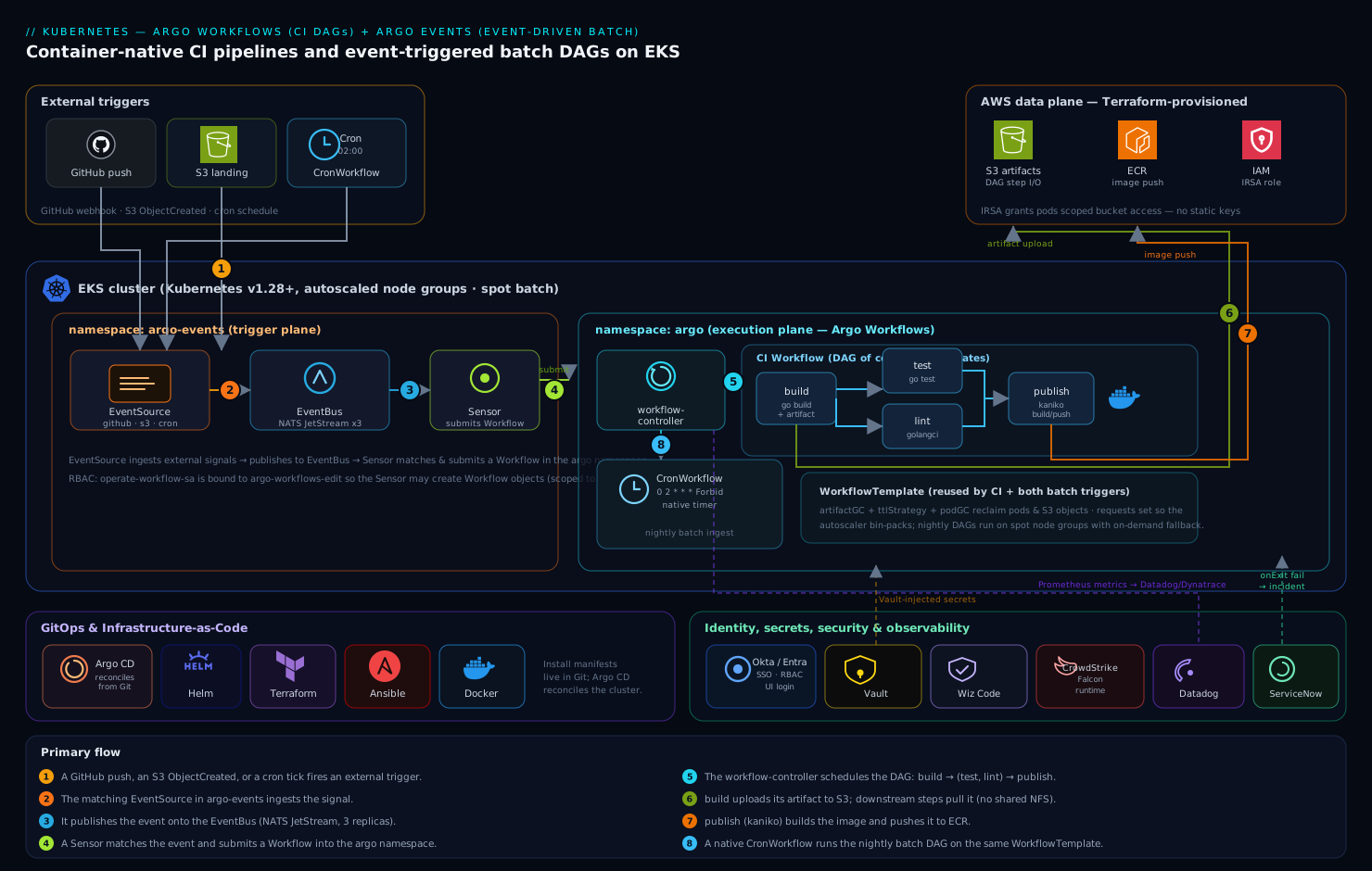
Two cooperating control planes share one cluster. Argo Workflows owns execution: a Workflow is a DAG of templates, each template is a container (a pod), and the workflow-controller schedules steps as their dependencies clear, streaming logs and passing artifacts between steps through an S3 bucket rather than a shared volume. Argo Events owns the trigger side: an EventSource ingests external signals (a GitHub webhook, an S3 ObjectCreated notification, a Kafka topic, or a cron schedule), publishes them onto an EventBus (a NATS JetStream cluster Argo runs for you), and a Sensor matches events and submits a Workflow in response. Around that core sits the operating model: Okta/Entra ID federates UI login, HashiCorp Vault injects run-time secrets, Wiz / Wiz Code scans the manifests and cluster posture, CrowdStrike Falcon watches the workflow pods at runtime, Datadog (or Dynatrace) ingests metrics and traces, and a failed batch DAG auto-raises a ServiceNow incident. Everything below is provisioned declaratively with Argo CD reconciling the install manifests from Git, and the cluster itself is stood up with Terraform (node groups, IAM/IRSA, the S3 bucket) and node-level config applied with Ansible.
Core concepts: Workflows, templates, and the controller
Before the install, learn the vocabulary — six ideas cover ninety percent of what you will write.
The CRDs you author
Everything in Argo is a Kubernetes custom resource, so you create it with kubectl apply or argo submit and inspect it with kubectl get.
| CRD | What it is | Reach for it when |
|---|---|---|
Workflow |
One execution — a DAG that runs once, then finishes. | A single run: “build this commit now.” |
WorkflowTemplate |
A reusable, parameterised definition (namespaced). No run happens until something references it. | You want the pipeline defined once and submitted many times. |
ClusterWorkflowTemplate |
Same, but cluster-scoped so any namespace can use it. | A shared org-wide pipeline library. |
CronWorkflow |
A WorkflowTemplate on a schedule — Argo owns the timer. |
Deterministic nightly/hourly batch runs. |
WorkflowEventBinding |
Maps an incoming event to a workflow submission. | Lightweight event triggers without a full Sensor. |
The pattern that scales: define the pipeline once as a WorkflowTemplate, then Workflows, CronWorkflows, and Argo Events Sensors all reference it with workflowTemplateRef (you will see exactly this in Steps 6–7). One definition, many triggers.
# A reusable definition — nothing runs until it is referenced
apiVersion: argoproj.io/v1alpha1
kind: WorkflowTemplate
metadata:
  name: ci
  namespace: argo
spec:
  entrypoint: ci
  arguments:
    parameters:
      - name: git-sha
        value: main
  templates:
    - name: ci
      dag:
        tasks:
          - name: build
            template: build
    - name: build
      container:
        image: golang:1.23
        command: [sh, -c, "go build ./..."]
Submit a one-off run from it with argo submit --from workflowtemplate/ci -p git-sha=abc123.
Templates: the two that orchestrate, and the types that do work
A template is a reusable unit inside a workflow. There are two orchestration templates that arrange other templates, and several leaf types that actually do something.
dag vs steps — both express “run these, in this order,” but differently:
dag |
steps |
|
|---|---|---|
| Order | Explicit dependencies: [build] per task |
Positional: a list of lists |
| Parallelism | Maximum — anything whose deps are met runs | Everything in one inner list runs together |
| Best for | Complex graphs, fan-in / fan-out | Simple, linear-ish sequences |
steps uses a double-list where the outer list is sequential and each inner list is parallel:
- name: release
  steps:
    - - name: build          # runs first, alone
        template: build
    - - name: unit-test      # unit-test and scan run together...
        template: run
      - name: scan
        template: run
    - - name: publish        # ...then publish, after both finish
        template: publish
The leaf template types — what a single node actually does:
| Type | Does | Output |
|---|---|---|
container |
Runs an image with a command — the workhorse (Step 3). | Files (artifacts), parameters |
script |
Inlines a script (Python, bash, …); the source runs in the image. | stdout captured as outputs.result |
resource |
kubectl-style create/apply/delete of any Kubernetes object; waits on a condition. |
The created object |
suspend |
Pauses the workflow — a manual approval gate or a timed delay. | Resumes on argo resume or a timer |
http |
Makes an HTTP call from the controller (no pod). | Response |
plugin / containerSet / data |
Executor plugins, multi-container nodes, and data sourcing for advanced cases. | Varies |
A script template captures stdout automatically — perfect for computing a value the next step needs:
- name: pick-shard
  script:
    image: python:3.12-slim
    command: [python]
    source: |
      import random
      print(random.choice(["a", "b", "c"]))
A resource template lets a workflow create and wait on another Kubernetes object — here an external Job, blocking until it succeeds:
- name: run-external-job
  resource:
    action: create
    setOwnerReference: true
    successCondition: status.succeeded > 0
    failureCondition: status.failed > 0
    manifest: |
      apiVersion: batch/v1
      kind: Job
      metadata:
        generateName: heavy-job-
      spec:
        template:
          spec:
            restartPolicy: Never
            containers:
              - name: main
                image: busybox:1.36
                command: [sh, -c, "echo work && sleep 5"]
A suspend template is how you build an approval gate into a delivery pipeline:
- name: wait-for-approval
  suspend: {}                 # resumes on: argo resume <wf>  (or the UI button)
- name: cooldown
  suspend:
    duration: "30m"           # auto-resumes after 30 minutes
Data flow: parameters vs artifacts
Two ways data crosses between steps, and mixing them up is the most common beginner error:
- Parameters are small strings (a git SHA, a filename, a flag). They live in the
Workflowobject itself, so keep them small. Ascriptstep’s stdout is available as{{tasks.pick-shard.outputs.result}}; a container writes a file and exposes it viavalueFrom.path. - Artifacts are files and directories (a compiled binary, a
.parquet, a tarball). They are uploaded to object storage (the S3 bucket from Step 1) by the step that produces them and downloaded into the pod of the step that consumes them — no shared volume, which is exactly what lets steps schedule on any node.
# Expose a computed string as an output parameter
- name: compute-tag
  container:
    image: alpine:3.20
    command: [sh, -c, "echo 1.4.2 > /tmp/tag"]
  outputs:
    parameters:
      - name: tag
        valueFrom:
          path: /tmp/tag
Because each step is its own pod on its own node, files can only travel as artifacts. Writing to /shared and hoping the next step sees it is the number-one Argo misconception (see Common beginner mistakes).
The controller and pod-per-step
One deployment — the workflow-controller — watches every Workflow object and drives it forward. For each node in the DAG that is a container, script, or resource, it creates exactly one pod, watches that pod, records the result in the workflow’s status, and unblocks whatever depended on it. That “one pod per step” model is the defining trait of Argo (Tekton, by contrast, runs all of a Task’s steps as containers in one pod). It costs a little pod-startup latency per step but buys you independent images, independent resources, independent retries, and scheduling flexibility per step.
Retries, timeouts, and the UI
Two knobs keep a flaky or runaway step from wrecking a run:
- name: flaky-check
  retryStrategy:
    limit: "3"
    retryPolicy: OnTransientError    # Always | OnFailure | OnError | OnTransientError
    backoff:
      duration: "10s"
      factor: "2"                    # 10s, 20s, 40s...
      maxDuration: "5m"
  activeDeadlineSeconds: 600         # kill this step if it runs longer than 10 min
  container:
    image: curlimages/curl:8.10.1
    command: [sh, -c, "curl -fsS https://flaky.internal/health"]
The Argo UI (the argo-workflows-server, behind SSO from Step 5) renders every workflow as a live DAG: green / running / failed nodes, click a node to stream its logs, download its artifacts, and resubmit or retry a failed run from the exact node that broke. The argo CLI mirrors it: argo submit, list, get, logs, watch, retry, resubmit, stop, terminate, suspend, resume, and cron. Both read the same archived history from Postgres, so a run is inspectable long after its pods are gone.
1. Create the namespaces and the artifact bucket
Keep the two control planes in their own namespaces so RBAC and quotas stay clean. Create the S3 bucket Argo will use for artifact passing and for the workflow archive.
kubectl create namespace argo
kubectl create namespace argo-events

# Artifact + archive bucket (one bucket, prefixes separate the two uses)
aws s3api create-bucket \
  --bucket kv-argo-artifacts-prod \
  --region ap-south-1 \
  --create-bucket-configuration LocationConstraint=ap-south-1
aws s3api put-bucket-versioning \
  --bucket kv-argo-artifacts-prod \
  --versioning-configuration Status=Enabled
# Lifecycle: expire raw step artifacts after 30 days to control cost
aws s3api put-bucket-lifecycle-configuration \
  --bucket kv-argo-artifacts-prod \
  --lifecycle-configuration file:///tmp/artifact-lifecycle.json
On EKS, give the workflow pods bucket access through IRSA (IAM Roles for Service Accounts) rather than long-lived keys. The Terraform module that builds the cluster also emits this role; the trust policy binds it to the argo namespace service account.
# Annotate the SA Argo runs pods under with the IRSA role ARN
kubectl annotate serviceaccount -n argo argo-workflow \
  eks.amazonaws.com/role-arn=arn:aws:iam::123456789012:role/kv-argo-artifacts-irsa
2. Install Argo Workflows
Install via the official Helm chart so values are versioned in Git and reconciled by Argo CD. Pin the chart version — never track a floating tag on a CI control plane.
helm repo add argo https://argoproj.github.io/argo-helm
helm repo update
Write the values file. The key decisions: run in namespaced mode is tempting but for a shared CI platform use the cluster-scoped controller so any team namespace can submit; turn on the workflow archive (Postgres) so history survives controller restarts; and set the default artifact repository to the S3 bucket from Step 1.
# /tmp/argo-wf-values.yaml
crds:
  install: true
  keep: true
controller:
  workflowNamespaces: []          # watch all namespaces (cluster-scoped)
  persistence:
    archive: true
    postgresql:
      host: kv-argo-pg.internal
      database: argo
      tableName: argo_workflows
      userNameSecret: { name: argo-pg, key: username }
      passwordSecret: { name: argo-pg, key: password }
  metricsConfig:
    enabled: true                 # Prometheus endpoint for Datadog/Dynatrace
artifactRepository:
  s3:
    bucket: kv-argo-artifacts-prod
    region: ap-south-1
    endpoint: s3.amazonaws.com
    useSDKCreds: true             # use the IRSA role, no static keys
server:
  authModes: ["sso"]              # UI auth via Okta/Entra, set up in Step 5
helm upgrade --install argo-workflows argo/argo-workflows \
  --namespace argo --version 0.45.0 \
  -f /tmp/argo-wf-values.yaml
Verify the controller and server come up:
kubectl -n argo rollout status deploy/argo-workflows-workflow-controller
kubectl -n argo rollout status deploy/argo-workflows-server
3. Run a first CI DAG with artifact passing
Prove the engine end-to-end before wiring events. This Workflow is a minimal but realistic CI DAG: build → (test, lint in parallel) → publish, where build produces an artifact (the compiled binary) that the downstream steps consume from S3. This is the pattern that replaces the Jenkins job.
# /tmp/ci-dag.yaml
apiVersion: argoproj.io/v1alpha1
kind: Workflow
metadata:
  generateName: ci-build-
  namespace: argo
spec:
  entrypoint: ci
  serviceAccountName: argo-workflow
  artifactGC:
    strategy: OnWorkflowDeletion        # clean S3 artifacts when WF is deleted
  templates:
    - name: ci
      dag:
        tasks:
          - name: build
            template: build
          - name: test
            template: run
            arguments:
              parameters: [{ name: cmd, value: "go test ./..." }]
              artifacts:
                - { name: bin, from: "{{tasks.build.outputs.artifacts.bin}}" }
            dependencies: [build]
          - name: lint
            template: run
            arguments:
              parameters: [{ name: cmd, value: "golangci-lint run" }]
            dependencies: [build]
          - name: publish
            template: publish
            dependencies: [test, lint]   # fan-in: both must pass
    - name: build
      container:
        image: golang:1.23
        command: [sh, -c]
        args: ["go build -o /out/app ./cmd/app"]
      outputs:
        artifacts:
          - name: bin
            path: /out/app                # auto-uploaded to S3
    - name: run
      inputs:
        parameters: [{ name: cmd }]
        artifacts: [{ name: bin, path: /work/app, optional: true }]
      container:
        image: golang:1.23
        command: [sh, -c]
        args: ["{{inputs.parameters.cmd}}"]
    - name: publish
      container:
        image: gcr.io/kaniko-project/executor:latest
        args: ["--dockerfile=Dockerfile", "--destination=registry.internal/app:$(GIT_SHA)"]
Submit and watch the DAG resolve:
argo submit /tmp/ci-dag.yaml --watch
argo logs @latest          # @latest = most recent workflow
The build artifact lands in s3://kv-argo-artifacts-prod/... and is pulled into the test pod automatically — no shared NFS, no kubectl cp. That artifact passing is the whole reason to prefer Argo over chained cron jobs.
4. Install Argo Events and stand up the EventBus
Now the trigger side. Install the controller, then create the EventBus — Argo runs a NATS JetStream cluster as the durable backbone that EventSources publish to and Sensors subscribe from.
helm upgrade --install argo-events argo/argo-events \
  --namespace argo-events --version 2.4.13

# Durable, replicated event backbone
kubectl apply -n argo-events -f - <<'EOF'
apiVersion: argoproj.io/v1alpha1
kind: EventBus
metadata:
  name: default
spec:
  jetstream:
    version: latest
    replicas: 3
    persistence:
      storageClassName: gp3
      volumeSize: 10Gi
EOF
kubectl -n argo-events get statefulset
The Sensor needs RBAC to create Workflow objects in the argo namespace. Bind a service account to the built-in argo-events-sensor role plus workflow-create rights:
kubectl create serviceaccount operate-workflow-sa -n argo-events
kubectl create rolebinding operate-workflow-rb -n argo \
  --clusterrole=argo-workflows-edit \
  --serviceaccount=argo-events:operate-workflow-sa
5. Wire SSO and Vault before exposing anything
Do this before you put the UI or webhooks on the network — an unauthenticated Argo UI can read every pipeline’s logs and secrets.
UI SSO via Okta/Entra. The Argo Server sso auth mode (set in Step 2) federates login to Okta as the workforce IdP — engineers authenticate with corporate credentials and group claims map to RBAC, so only the platform group can delete workflows. Substitute the Entra ID OIDC endpoint to use Entra ID instead. The OIDC client secret is not hardcoded; it is read from a Kubernetes secret that HashiCorp Vault populates via the Vault Agent injector.
# Argo Server SSO block (added to the Helm values, abbreviated)
server:
  sso:
    issuer: https://kloudvin.okta.com
    clientId: { name: argo-sso, key: client-id }
    clientSecret: { name: argo-sso, key: client-secret }   # Vault-injected
    redirectUrl: https://argo.kloudvin.internal/oauth2/callback
    rbac: { enabled: true }
    scopes: [groups]
Run-time secrets via Vault. Workflow pods that push to a registry or call a third-party API pull those credentials from HashiCorp Vault at run time using the Vault Agent sidecar with Kubernetes auth — short-lived leases, nothing sensitive written into a Workflow manifest or a long-lived Secret. Annotate the workflow pod template:
metadata:
  annotations:
    vault.hashicorp.com/agent-inject: "true"
    vault.hashicorp.com/role: "argo-ci"
    vault.hashicorp.com/agent-inject-secret-registry: "secret/data/ci/registry"
Posture scanning. Run Wiz Code in the GitHub Actions PR check over these manifests to catch a misconfiguration (a public bucket, an over-broad RBAC role) before it merges, and let Wiz continuously scan the running cluster for posture drift. Pair that with CrowdStrike Falcon sensors on the node pool so the ephemeral workflow pods themselves get runtime threat detection feeding the SOC.
6. Trigger a CI pipeline from a GitHub push
Create a webhook EventSource and a Sensor that submits the CI DAG on every push to main. The thin outer GitHub Actions job only needs to fire the webhook (or GitHub fires it directly) — the actual build DAG runs in-cluster under Argo.
# github-eventsource.yaml
apiVersion: argoproj.io/v1alpha1
kind: EventSource
metadata:
  name: github
  namespace: argo-events
spec:
  service:
    ports: [{ port: 12000, targetPort: 12000 }]
  github:
    ci:
      repositories:
        - owner: kloudvin
          names: [platform-app]
      webhook:
        endpoint: /push
        port: "12000"
        method: POST
        url: https://events.kloudvin.internal
      events: [push]
      webhookSecret: { name: github-hook, key: secret }   # Vault-injected
      insecure: false
# github-sensor.yaml
apiVersion: argoproj.io/v1alpha1
kind: Sensor
metadata:
  name: github-ci
  namespace: argo-events
spec:
  template:
    serviceAccountName: operate-workflow-sa
  dependencies:
    - name: push
      eventSourceName: github
      eventName: ci
      filters:
        data:
          - path: body.ref
            type: string
            value: ["refs/heads/main"]      # only main
  triggers:
    - template:
        name: launch-ci
        argoWorkflow:
          operation: submit
          source:
            resource:
              apiVersion: argoproj.io/v1alpha1
              kind: Workflow
              metadata: { generateName: ci-, namespace: argo }
              spec:
                entrypoint: ci
                workflowTemplateRef: { name: ci }   # reuse a WorkflowTemplate
Apply both, then register the resulting endpoint as a webhook in the GitHub repo settings (payload URL https://events.kloudvin.internal/push, content type application/json, the shared secret from Vault). A push to main now lands an event on the EventBus and the Sensor submits the DAG automatically.
kubectl apply -f github-eventsource.yaml
kubectl apply -f github-sensor.yaml
7. Trigger an event-driven batch DAG (S3 + cron)
Replace the cron-on-a-VM batch jobs with two triggers: a scheduled DAG for the deterministic nightly run, and an S3 object-landed DAG for “process this file the moment it arrives.” Both reuse the WorkflowTemplate pattern so the pipeline definition lives in one place.
The scheduled run uses Argo’s native CronWorkflow (no external scheduler, the workflow-controller owns the timer):
# nightly-batch.yaml
apiVersion: argoproj.io/v1alpha1
kind: CronWorkflow
metadata:
  name: nightly-ingest
  namespace: argo
spec:
  schedule: "0 2 * * *"                 # 02:00 daily
  timezone: "Asia/Kolkata"
  concurrencyPolicy: "Forbid"           # never overlap runs
  startingDeadlineSeconds: 300
  workflowSpec:
    entrypoint: ingest
    workflowTemplateRef: { name: batch-ingest }
The event-driven run uses an S3 EventSource (S3 bucket notifications → Argo Events) plus a Sensor:
# s3-eventsource.yaml
apiVersion: argoproj.io/v1alpha1
kind: EventSource
metadata: { name: s3-landing, namespace: argo-events }
spec:
  s3:
    inbound:
      bucket: { name: kv-data-landing-prod }
      region: ap-south-1
      events: ["s3:ObjectCreated:*"]
      filter: { prefix: "incoming/", suffix: ".parquet" }
      metadata: { source: landing-zone }
The matching Sensor passes the landed object’s key straight into the batch DAG as a parameter, so the workflow knows exactly which file to process — true event-driven batch, not a poll:
  triggers:
    - template:
        name: process-file
        argoWorkflow:
          operation: submit
          source:
            resource:
              apiVersion: argoproj.io/v1alpha1
              kind: Workflow
              metadata: { generateName: ingest-, namespace: argo }
              spec:
                entrypoint: ingest
                workflowTemplateRef: { name: batch-ingest }
                arguments:
                  parameters: [{ name: object-key, value: "PLACEHOLDER" }]
          parameters:
            - src: { dependencyName: file, dataKey: body.Records.0.s3.object.key }
              dest: spec.arguments.parameters.0.value
8. Observability and ITSM hooks
Point the controller’s Prometheus metrics endpoint at Datadog (or Dynatrace) so you have a dashboard of DAG success rate, queue depth, step duration, and pod pending time — the signals that tell you a batch run is slipping before the downstream report breaks.
# Datadog Agent autodiscovery annotation on the controller pod
ad.datadoghq.com/controller.checks: |
  { "openmetrics": { "instances": [{
    "openmetrics_endpoint": "http://%%host%%:9090/metrics",
    "namespace": "argo", "metrics": ["argo_workflows_*"] }] } }
Wire failure to ServiceNow with a Workflow exit handler (onExit) that fires only on failure and opens an incident through the ServiceNow REST API — so a 02:00 batch failure becomes a ticket on the on-call queue, not a silent log line discovered at 06:00.
onExit: notify
templates:
  - name: notify
    container:
      image: curlimages/curl:8.10.1
      command: [sh, -c]
      args:
        - |
          if [ "{{workflow.status}}" != "Succeeded" ]; then
            curl -s -u "$SNOW_USER:$SNOW_PASS" -X POST \
              https://kloudvin.service-now.com/api/now/table/incident \
              -H 'Content-Type: application/json' \
              -d '{"short_description":"Argo DAG failed: {{workflow.name}}",
                   "urgency":"2","assignment_group":"platform-oncall"}'
          fi
The $SNOW_* credentials are Vault-injected, never inline.
Validation
Run these after each step group; all should pass before you call the platform live.
# Controllers healthy
kubectl -n argo get pods
kubectl -n argo-events get pods,eventbus

# A manual CI DAG goes green end-to-end
argo submit /tmp/ci-dag.yaml --watch
argo list -n argo                       # STATUS = Succeeded

# Artifact actually landed in S3
aws s3 ls s3://kv-argo-artifacts-prod/ --recursive | head

# Event path works: push to main, then confirm a WF was auto-created
git -C platform-app commit --allow-empty -m "trigger" && git push
kubectl -n argo get wf --sort-by=.metadata.creationTimestamp | tail

# CronWorkflow registered and scheduling
argo cron list -n argo

# SSO enforced (should redirect/401, never serve the UI anonymously)
curl -sI https://argo.kloudvin.internal | grep -i location
Rollback / teardown
Argo is declarative, so teardown is clean. Drain in reverse install order — triggers first so nothing fires mid-rollback, then the engine.
# 1. Stop new triggers
kubectl delete sensor,eventsource --all -n argo-events
kubectl delete cronworkflow --all -n argo

# 2. Let in-flight workflows finish, or stop them
argo stop --all -n argo            # graceful; use 'argo terminate' to force

# 3. Remove the control planes (CRDs kept if 'crds.keep: true')
helm uninstall argo-events -n argo-events
helm uninstall argo-workflows -n argo
kubectl delete namespace argo argo-events

# 4. (Optional) drop CRDs and the bucket — irreversible
kubectl get crd -o name | grep argoproj.io | xargs kubectl delete
aws s3 rb s3://kv-argo-artifacts-prod --force
Because the install lives in Git under Argo CD, the real rollback is reverting the commit and letting Argo CD reconcile — the cluster returns to the prior known-good state without anyone running helm by hand.
Common pitfalls
- Artifact repository not configured, so steps can’t pass data. Without the
artifactRepositoryS3 block (Step 2) or with a broken IRSA role,outputs.artifactssilently fail to upload and downstream steps get nothing. Test the bucket round-trip first. - The Sensor service account lacks workflow-create RBAC. The most common “events fire but no workflow appears” cause. Confirm the
operate-workflow-sarolebinding in theargonamespace. - EventBus with one replica. A single-replica NATS loses events on a node failure. Always run 3 JetStream replicas in production.
concurrencyPolicyunset on CronWorkflows. A slow nightly run overlaps the next, doubling load and corrupting state. SetForbid(orReplace).- Unbounded workflow history. Without the archive TTL and a
podGC, completed pods and CRD objects pile up and choke the API server. SetttlStrategyandpodGC: { strategy: OnPodCompletion }on long-lived templates. - Webhook exposed without secret validation. An open
EventSourceendpoint lets anyone trigger your CI. Always setwebhookSecretand terminate TLS at the edge (front the endpoint with Akamai for WAF and TLS if it must face the internet).
Security notes
The threat model for a CI/CD control plane is that it holds the keys to production. Keep the UI behind Okta/Entra ID SSO with group-mapped RBAC (read-only for most, delete rights only for the platform group). Pull every run-time credential from HashiCorp Vault with short leases — registry creds, the GitHub webhook secret, the ServiceNow token — so no secret ever lives in a manifest or a static Secret. Scope the artifact bucket IAM role to exactly the prefixes Argo uses via IRSA, never a wildcard. Gate manifests in PR with Wiz Code and scan the live cluster continuously with Wiz; run CrowdStrike Falcon on the nodes so the short-lived workflow pods still get runtime detection. Keep CRD-level RBAC tight: a Sensor that can create arbitrary resources is a privilege-escalation path, so bind it only to Workflow create in one namespace.
Cost notes
The dominant cost is compute for workflow pods, and Argo’s model makes it controllable. Set CPU/memory requests honestly on every template so the cluster autoscaler bin-packs instead of over-provisioning, and run batch DAGs on spot/Spot-priced node groups with on-demand fallback — interruptible nightly jobs are the ideal spot workload. Apply an S3 lifecycle rule (Step 1) to expire step artifacts after 30 days and enable artifactGC so deleted workflows reclaim their S3 objects. Use podGC and a ttlStrategy to stop dead pods from holding reserved capacity. Replacing an always-on Jenkins controller (and the idle batch VMs) with on-demand, autoscaled pods is itself the biggest saving — you pay for DAG execution, not for an idle scheduler waiting for 02:00.
Going deeper
How the controller actually runs your DAG
The workflow-controller is a single logical process (run 2+ replicas with leader election for HA — only the leader is active). It uses client-go informers to watch Workflow and Pod objects and a rate-limited workqueue to reconcile them: on each change it re-evaluates the DAG, creates pods for newly-runnable nodes, and writes their state into the workflow’s status.nodes map. There is no per-workflow controller — one controller multiplexes thousands of workflows, which is why its --workflow-workers, --qps, and --burst settings matter at scale.
Each step pod is run by the emissary executor (since v3.4 the only executor — the old docker, pns, k8sapi, and kubelet executors were removed). Emissary needs no Docker socket and no elevated privileges: an init container stages the argoexec binary into an emptyDir, that binary wraps your command to capture its exit code and outputs, and a wait sidecar collects outputs.parameters / outputs.artifacts and uploads artifacts to the repository. The practical consequence: your image must declare a runnable command (emissary can’t infer the entrypoint the way the old docker executor could), and outputs are gathered by the sidecar, not by Docker.
Scale limits and the etcd ceiling
Because a workflow’s entire state — one entry per node — lives in the status of a single Workflow object, huge workflows hit etcd’s ~1.5 MB object size limit. Three mitigations, in order:
- The controller gzip-compresses
status.nodesintostatus.compressedNodesautomatically once it grows. - Turn on node-status offload so large status is written to Postgres instead of the object:
controller:
  persistence:
    nodeStatusOffLoad: true
    archive: true
    archiveTTL: 90d
    postgresql:
      host: kv-argo-pg.internal
      database: argo
- Shed completed pods aggressively with
podGCand cap history withttlStrategyso the API server and etcd aren’t buried in finished objects:
spec:
  parallelism: 10                    # at most 10 pods in flight for THIS workflow
  ttlStrategy:
    secondsAfterCompletion: 86400
    secondsAfterSuccess: 3600
    secondsAfterFailure: 259200      # keep failures longer for debugging
  podGC:
    strategy: OnWorkflowSuccess      # keep pods around if the run failed
For very wide jobs, prefer dynamic fan-out over hand-written tasks: withItems iterates a static list, withParam iterates a JSON array produced by a previous step’s outputs.result. One task definition becomes N parallel pods:
- name: fan-out
  template: process
  dependencies: [list-shards]
  arguments:
    parameters: [{ name: shard, value: "{{item}}" }]
  withParam: "{{tasks.list-shards.outputs.result}}"
Concurrency control and caching
spec.parallelism bounds pods within one workflow; to bound concurrency across workflows (say, only one deploy touches prod at a time) use synchronization with a semaphore (a count in a ConfigMap) or a mutex (a lock):
apiVersion: v1
kind: ConfigMap
metadata: { name: argo-limits, namespace: argo }
data: { deploy: "1" }          # semaphore of size 1
---
spec:
  synchronization:
    semaphore:
      configMapKeyRef: { name: argo-limits, key: deploy }
Memoization skips a step entirely when its inputs haven’t changed — cache the result under a key and reuse it within maxAge:
- name: expensive-build
  inputs:
    parameters: [{ name: commit }]
  memoize:
    key: "build-{{inputs.parameters.commit}}"
    maxAge: "1h"
    cache:
      configMap: { name: argo-memo }
  container:
    image: alpine:3.20
    command: [sh, -c, "echo building && sleep 3"]
Artifacts beyond S3, and cleaning them up
The artifact repository is pluggable: S3, GCS, Azure Blob, HDFS, OSS, Artifactory, HTTP, and Git. Swap the s3 block from Step 2 for gcs to run the same DAGs on GKE:
artifactRepository:
  gcs:
    bucket: kv-argo-artifacts
    keyFormat: "{{workflow.name}}/{{pod.name}}"
    serviceAccountKeySecret:
      name: gcs-cred
      key: serviceAccountKey.json
Artifacts outlive pods, so they need their own garbage collection: artifactGC (Step 3’s OnWorkflowDeletion) deletes a workflow’s objects from the bucket when it is cleaned up, and the S3 lifecycle rule from Step 1 is the backstop. Without both, object storage grows forever.
Supply chain and the privilege-escalation surface
A workflow engine that can create pods and (via resource templates) arbitrary Kubernetes objects is a juicy target. The hard rules:
- A
Sensoror workflow service account that can create arbitrary resources is a privilege-escalation path — bind it toWorkflowcreate in one namespace, nevercluster-admin. - Constrain or forbid
resourcetemplates in untrusted namespaces; they are effectivelykubectlinside the cluster. - Sign the images your steps run and verify them at admission (Sigstore/cosign), and pull run-time creds from Vault with short leases rather than baking them into manifests — exactly the Step 5 pattern.
- The emissary executor already avoids the Docker socket; keep pods non-root with a restricted
securityContextso a compromised build step can’t own the node.
Version and API caveats
- The API group is still
argoproj.io/v1alpha1despite Argo Workflows being production-grade for years —v1alpha1is a name, not a maturity signal. - Emissary is the only executor since v3.4; guides that mention setting
containerRuntimeExecutorare stale. - The Helm chart version and the app version differ — chart
argo-workflows 0.45.xinstalls a v3.6 app; always checkappVersion, and pin both. CronWorkflowgainedstopStrategyandwhenexpressions, and Argo addedhooks(lifecycle hooks, a generalisation ofonExit) in recent releases — prefer them over bolting notifications onto every template.
Argo Workflows vs Tekton (and vs Argo CD)
Both Argo Workflows and Tekton are Kubernetes-native, CRD-driven pipeline engines, but they make different bets:
| Argo Workflows | Tekton | |
|---|---|---|
| Unit of work | One pod per step/node | One pod per Task; steps are containers in it |
| Data passing | Artifacts via object storage + parameters | Workspaces (shared PVC/volume) + results |
| Scope | General workflow engine — CI, batch, ETL, ML | CI/CD-focused delivery pipelines |
| Scheduling | CronWorkflow, event triggers, suspend gates |
Triggers via Tekton Triggers; no native cron |
| Fan-out | withItems / withParam, huge DAGs |
matrix on Tasks |
| Supply chain | Pair with Sigstore / Wiz | Tekton Chains built in for provenance |
Rule of thumb: choose Tekton when you want a pure, composable CI/CD system (it underpins OpenShift Pipelines and Jenkins X); choose Argo Workflows when you need general batch/DAG and CI in one engine, especially data and ML pipelines. Neither is Argo CD — a frequent mix-up. Argo CD is GitOps continuous delivery (it reconciles the desired state of running apps from Git); Argo Workflows runs jobs. They share the “Argo” brand and complement each other (Argo CD deploys the very manifests this lesson installs), but they solve different problems.
Practice challenges
Work these in order; each builds on the last. Solutions are hidden — try first. (No cluster? Challenges 1 and 3 lint offline; the rest are ready to argo submit when you have one.)
Challenge 1 — Lint before you submit (beginner)
Save the CI DAG from Step 3 and validate it without a cluster.
<details><summary>Solution</summary>
argo lint /tmp/ci-dag.yaml
# or validate more strictly against the schema:
argo lint --strict /tmp/ci-dag.yaml
Why: argo lint catches a bad field, a missing entrypoint, or a dangling dependencies reference at author time — far cheaper than a failed pod.
</details>
Challenge 2 — A minimal single-step Workflow (beginner)
Write and run a Workflow with one container template that prints hello argo, then read its logs.
<details><summary>Solution</summary>
apiVersion: argoproj.io/v1alpha1
kind: Workflow
metadata: { generateName: hello-, namespace: argo }
spec:
  entrypoint: main
  serviceAccountName: argo-workflow
  templates:
    - name: main
      container:
        image: alpine:3.20
        command: [sh, -c, "echo hello argo"]
argo submit hello.yaml --watch
argo logs @latest
Why: proves the controller, the service account, and log streaming work before you add DAGs, artifacts, or events. </details>
Challenge 3 — Make it reusable (intermediate)
Convert that inline pipeline into a WorkflowTemplate named hello, then submit a run from it.
<details><summary>Solution</summary>
# Change 'kind: Workflow' to 'kind: WorkflowTemplate', add metadata.name: hello, then:
argo template create hello.yaml
argo submit --from workflowtemplate/hello --watch
Why: the definition now lives in one place; Workflows, CronWorkflows, and Sensors all reference it with workflowTemplateRef instead of duplicating YAML.
</details>
Challenge 4 — Survive a flaky step (intermediate)
Add three retries with exponential backoff and a 10-minute hard timeout to a step that curls a flaky endpoint.
<details><summary>Solution</summary>
- name: flaky-check
  retryStrategy:
    limit: "3"
    retryPolicy: OnTransientError
    backoff: { duration: "10s", factor: "2", maxDuration: "5m" }
  activeDeadlineSeconds: 600
  container:
    image: curlimages/curl:8.10.1
    command: [sh, -c, "curl -fsS https://flaky.internal/health"]
Why: OnTransientError retries only transient failures (not a real test failure), backoff avoids hammering the dependency, and activeDeadlineSeconds stops a hung step from pinning a node forever.
</details>
Challenge 5 — Dynamic fan-out (advanced)
Have one step emit a JSON list of shards, then run a parallel pod per shard using withParam.
<details><summary>Solution</summary>
- name: main
  dag:
    tasks:
      - name: list-shards
        template: list-shards
      - name: process
        template: process
        dependencies: [list-shards]
        arguments:
          parameters: [{ name: shard, value: "{{item}}" }]
        withParam: "{{tasks.list-shards.outputs.result}}"
- name: list-shards
  script:
    image: python:3.12-slim
    command: [python]
    source: |
      import json; print(json.dumps(["shard-a", "shard-b", "shard-c"]))
- name: process
  inputs: { parameters: [{ name: shard }] }
  container:
    image: alpine:3.20
    command: [sh, -c, "echo processing {{inputs.parameters.shard}}"]
Why: the shard list is computed at run time, so the DAG width adapts to the data — you don’t rewrite YAML when a fourth shard appears. </details>
Challenge 6 — Global concurrency cap (advanced)
Ensure at most one deploy workflow runs cluster-wide at a time, even if three are submitted at once.
<details><summary>Solution</summary>
apiVersion: v1
kind: ConfigMap
metadata: { name: argo-limits, namespace: argo }
data: { deploy: "1" }
---
# in each deploy Workflow's spec:
spec:
  synchronization:
    semaphore:
      configMapKeyRef: { name: argo-limits, key: deploy }
Submit three and watch two sit Pending on the lock:
for i in 1 2 3; do argo submit deploy.yaml; done
argo list -n argo        # one Running, two Pending (holding for the semaphore)
Why: parallelism only limits pods inside one workflow; a semaphore serialises across separate workflows — the correct tool for “only one prod deploy at a time.”
</details>
Common beginner mistakes
These are conceptual traps (distinct from the operational failures in Common pitfalls above) — the wrong mental model, then the right one.
- “Argo Workflows is the same as Argo CD.” They share a brand, not a job. Argo CD is GitOps delivery — it keeps running apps in sync with Git. Argo Workflows runs pipelines and batch DAGs. Different CRDs (
ApplicationvsWorkflow), different problem. You often use both: Argo CD deploys Argo Workflows. - “Steps share a filesystem, so I’ll just write to a shared path.” Each step is its own pod on its own node with its own filesystem. The only ways data crosses steps are artifacts (files, via object storage) and parameters (small strings). Declare
outputs/inputsexplicitly; nothing is shared implicitly. - “I’ll pass the build artifact as a parameter.” Parameters are small strings stored in the
Workflowobject; a binary bloats etcd or is rejected outright. Files are artifacts. Rule: strings → parameters, files → artifacts. - “One big container is simpler than a DAG.” Collapsing the pipeline into a single script throws away everything the DAG gives you — the visual graph, per-step retries, parallelism, caching, and per-step resources. One job = one template = one pod; let the DAG express order.
- “
dagandstepsare just style choices.” They describe the same idea, butstepsuses positional lists (implicit order) whiledaguses explicitdependencies(maximum parallelism, clearer for fan-in / fan-out). Reach fordagas graphs get non-trivial. - “A fixed
metadata.nameis fine.” Submit twice and the second run collides with the first. UsegenerateName(e.g.ci-) so every submission gets a unique name. - “The controller runs my container with Docker.” There is no Docker socket — the emissary executor runs it. Your image must declare a runnable
command; if it relies on an implicitENTRYPOINT, setcommandexplicitly or the step won’t start.
Glossary
- Workflow — the CRD for one execution: a DAG of templates that runs once and finishes.
- WorkflowTemplate / ClusterWorkflowTemplate — a reusable, parameterised workflow definition (namespaced / cluster-wide) that runs only when referenced.
- CronWorkflow — a WorkflowTemplate the workflow-controller submits on a schedule; no external cron needed.
- WorkflowEventBinding — a lightweight mapping from an incoming event to a workflow submission.
- template — a reusable unit inside a workflow: either an orchestrator (
dag,steps) or a leaf that does work (container,script,resource,suspend,http,plugin). - DAG — directed acyclic graph; the “steps with arrows, no loops” that a pipeline forms.
- entrypoint — the template a workflow starts from.
- node — one executed template instance; for
container/script/resourcetypes it maps to exactly one pod (“pod-per-step”). - artifact — a file or directory passed between steps through object storage (S3/GCS/…), not a shared volume.
- parameter — a small string passed between steps or into a workflow; a
scriptstep’s stdout is available asoutputs.result. - artifact repository — the object store (Step 1’s S3 bucket) Argo uploads artifacts to and downloads them from.
- artifactGC — garbage collection that deletes a workflow’s artifacts from the repository when it is cleaned up.
- podGC — policy for deleting a workflow’s completed pods (
OnPodCompletion,OnWorkflowSuccess, …) to free capacity. - ttlStrategy — how long finished
Workflowobjects are kept before automatic deletion. - retryStrategy — per-step retries:
limit,retryPolicy(Always/OnFailure/OnError/OnTransientError), andbackoff. - activeDeadlineSeconds — a hard timeout for a template or the whole workflow.
- synchronization — cross-workflow concurrency control via a semaphore (a count in a ConfigMap) or a mutex (a lock).
- memoize — cache a step’s result under a key and skip re-running it within
maxAge. - withItems / withParam — fan a single task out into parallel copies over a static list / a JSON list from a prior step.
- workflow-controller — the leader-elected deployment that watches Workflow objects and drives every DAG.
- argoexec / emissary executor — the binary/executor (the only one since v3.4) that wraps each step’s command, needs no Docker socket, and collects outputs.
- workflow archive — completed-run history persisted to Postgres so runs stay inspectable after their pods are gone.
- Argo Events — the companion project that turns external signals into workflow submissions.
- EventSource — ingests an external signal (GitHub webhook, S3 notification, Kafka, cron) into Argo Events.
- EventBus — the durable backbone (a NATS JetStream cluster) EventSources publish to and Sensors read from.
- Sensor — matches events on the EventBus and triggers an action, typically submitting a Workflow.
- exit handler (
onExit) — a template that runs when a workflow ends, used here to open a ServiceNow incident on failure. - IRSA — IAM Roles for Service Accounts (EKS); grants workflow pods scoped S3 access without static keys.