In a nutshell
Confluent for Kubernetes (CFK) is Confluent’s official operator — a specialised controller you install once, which then builds, watches, heals, and upgrades an entire Confluent Platform for you. You never kubectl create a broker by hand. Instead you write down what you want as a handful of custom resources — Kafka, KRaftController, SchemaRegistry, Connect, KsqlDB, ControlCenter — and CFK turns each one into the StatefulSets, Services, ConfigMaps, and TLS certificates that make it real, then keeps reality matching your YAML forever. It is the same operator/CRD pattern taught in Kubernetes CRDs, Controllers & the Operator Pattern, applied to a whole streaming stack.
A good mental model: an operator is like hiring a specialist SRE who only knows one system and never sleeps. You hand them a blueprint (“a three-broker Kafka cluster with Schema Registry, TLS, and RBAC”) and they build it, keep it running, replace failed parts, and roll upgrades — all from that written spec. CFK is that tireless specialist for the entire Confluent Platform.
The distinction that trips people up: Apache Kafka is the open-source engine; Confluent Platform is the enterprise car built around that engine. Confluent Platform is Kafka plus Schema Registry (schema contracts on the wire), Kafka Connect (pre-built integrations), ksqlDB (streaming SQL), Control Center (a management UI), REST Proxy, and enterprise features like fine-grained RBAC, Self-Balancing Clusters, Tiered Storage, and Cluster Linking. There are three common ways to get Kafka onto Kubernetes, and it is worth knowing which one you are reading about:
- Strimzi — the free, CNCF operator for OSS Apache Kafka. Great engine, community ACLs, no Control Center or ksqlDB CRDs. (Covered in the sibling lesson Self-Managed Kafka on Kubernetes with Strimzi.)
- CFK / Confluent Platform — the commercial, self-managed enterprise distribution you run in your own cluster. This lesson.
- Confluent Cloud — the fully-managed SaaS; someone else runs the operator and the brokers, and you just get a bootstrap URL.
CFK exists for exactly the case in the scenario below: you need the whole enterprise platform, but it has to run inside your own regulated cluster, not in someone else’s cloud.
Level: Advanced · Time: ~35 min · You’ll need: comfort with Kubernetes CRDs/operators, StatefulSets, and basic Kafka concepts (topics, partitions, replication).
A retail-logistics company is drowning in point-to-point integrations: the warehouse management system pokes the order service over a brittle REST call, the fraud team scrapes a read replica every five minutes, and the analytics team’s nightly batch is always six hours stale by the time anyone looks at it. The platform team’s mandate is to put a real event backbone in the middle — every parcel scan, every order state change, every inventory delta published once to Apache Kafka and consumed by anyone who needs it, in order, durably, with a schema contract that stops a producer from silently breaking ten downstream consumers. They already run everything on Kubernetes, so a managed cloud Kafka is off the table for the regulated on-prem workloads; they need Kafka in their own cluster, operated like a first-class platform service rather than a pet. This guide walks through deploying that backbone with Confluent for Kubernetes (CFK) — the official Confluent operator — running a three-broker (KRaft) Kafka cluster, Schema Registry, and Kafka Connect, all secured with TLS and RBAC, and slotted into the enterprise’s existing identity, secrets, GitOps, and observability tooling.
Prerequisites
- A Kubernetes cluster, v1.27+, with at least three worker nodes spread across availability zones (so the three KRaft controllers and three brokers land in different failure domains). 16 GiB RAM and 4 vCPU per node is a sane floor for a non-toy cluster.
- A default StorageClass that provisions block storage with
volumeBindingMode: WaitForFirstConsumerandallowVolumeExpansion: true(e.g.gp3on EKS,managed-csion AKS,pd-ssdon GKE). Kafka wants low-latency persistent disks, not NFS. kubectlv1.27+,helmv3.12+, and theconfluentCLI v3+ on your workstation.- A Confluent Platform license (a 30-day trial license ships built in; production needs a license secret). Confluent Platform 7.7 / CFK 2.9 is assumed below.
- A CA you can issue certificates from — here, HashiCorp Vault’s PKI secrets engine acts as the internal CA so every Kafka listener gets a short-lived, auto-renewed TLS cert instead of a hand-rolled self-signed chain.
- An OIDC identity provider for human and CI access — Microsoft Entra ID is the workforce IdP, federated from Okta as the upstream SSO so engineers log into Kafka tooling with the same corporate identity they use everywhere else.
- Cluster-admin on the target namespace, and a Git repository the platform team controls (the operator and all
CRs are delivered through Argo CD, neverkubectl applyby hand in production).
What you’ll be able to do after this
- Explain where CFK sits among Strimzi and Confluent Cloud, and pick the right one for a given constraint (regulated on-prem vs. free OSS vs. zero-ops SaaS).
- Read and write the CFK custom resources —
Kafka,KRaftController,SchemaRegistry,Connect,KsqlDB,ControlCenter,KafkaTopic,Connector,ConfluentRolebinding— and know which Confluent Platform component each one manages. - Deploy a hardened three-broker KRaft cluster with mTLS, RBAC bound to directory groups, declarative topics, and Vault-issued certificates, delivered by GitOps.
- Reason about the enterprise features — Schema Registry compatibility, Self-Balancing Clusters, Tiered Storage, Cluster Linking — and know which ones need a paid license.
- Avoid the classic traps:
Immediate-bound storage,min.insync.replicasequal to RF, treating Control Center as a dependency, and confusing CFK manifests with Strimzi ones.
Target topology
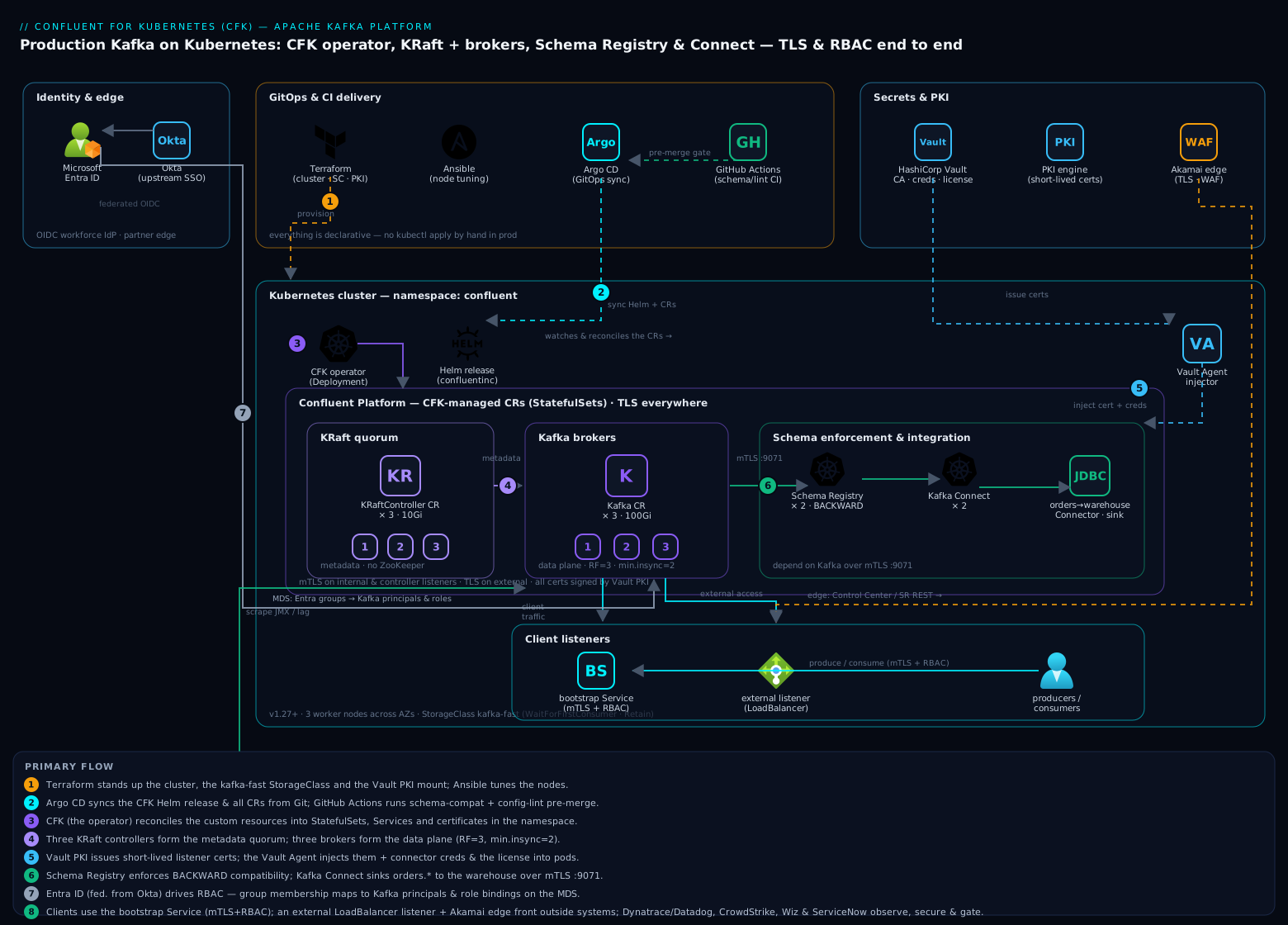
Everything lives in a single namespace, confluent. CFK — the operator — runs as a Deployment and watches a set of custom resources (Kafka, KRaftController, SchemaRegistry, Connect, KafkaTopic, KafkaRestClass, ConfluentRolebinding). You declare what you want as YAML; the operator reconciles brokers, controllers, StatefulSets, Services, and certificates to match. The three KRaft controllers form the metadata quorum (replacing the old ZooKeeper ensemble), the three brokers form the data plane, Schema Registry enforces schema contracts on the wire, and Kafka Connect runs source/sink connectors. Inter-component traffic is mTLS; client traffic is TLS with RBAC. Producers and consumers reach the cluster through a bootstrap Service; external systems reach it through a dedicated external listener.
The supporting cast around the cluster is what turns it from a demo into a platform:
- HashiCorp Vault is the internal CA (PKI engine) and the store for the Connect connector credentials and the license secret — pulled in by the Vault Agent injector so nothing sensitive sits in a plain Kubernetes Secret.
- Microsoft Entra ID (federated from Okta) is the OIDC provider behind RBAC, so a human’s group membership maps to Kafka principals and role bindings.
- Argo CD delivers the operator and every custom resource via GitOps; GitHub Actions runs the schema-compatibility and config-lint checks before a change is allowed to merge.
- Terraform provisions the cluster, node pools, StorageClasses, and Vault PKI mount; Ansible handles any node-level tuning (file-descriptor limits,
vm.max_map_count) the managed node image does not already set. - Dynatrace (or Datadog) scrapes the JMX/Prometheus metrics and the OneAgent gives per-broker and per-topic telemetry; CrowdStrike Falcon runs as a node sensor for runtime threat detection on the Kafka nodes.
- Wiz (and Wiz Code in the pipeline) does posture and IaC scanning so a broker listener never drifts to plaintext or a public LoadBalancer without an alert.
- ServiceNow is the change gate — a new external listener or an RBAC role binding for a third party goes through a change request before Argo CD is allowed to sync it.
- Akamai sits at the edge only for the operator-adjacent HTTP surfaces (the Control Center UI, the Schema Registry REST endpoint when exposed to partners), terminating TLS and providing WAF in front of those.
The Confluent Platform, as a set of CRDs
Before the hands-on steps, it pays to hold the whole platform in your head as one catalogue of custom resources. Installing CFK registers a family of CRDs under the platform.confluent.io/v1beta1 API group. Each kind is a declarative handle on one Confluent Platform component or object; you create the CR, and the operator does the rest. This is the single most important mental shift from running Kafka by hand: there are no broker commands, only desired-state documents.
CRD (kind) |
What you declare | Confluent Platform component | License tier |
|---|---|---|---|
KRaftController |
The metadata quorum (replaces ZooKeeper) | Kafka control plane | Community |
Kafka |
The brokers — the data plane | Confluent Server / Apache Kafka | Community core; enterprise features licensed |
Zookeeper |
Legacy metadata ensemble (pre-KRaft) | ZooKeeper (deprecated) | Community |
SchemaRegistry |
Schema store + compatibility enforcement | Schema Registry | Community |
Connect |
A worker cluster for connectors | Kafka Connect | Community |
Connector |
One connector instance on a Connect cluster | (a connector) | Varies by connector |
KsqlDB |
A streaming-SQL processing cluster | ksqlDB | Community |
ControlCenter |
The web management console | Confluent Control Center | Enterprise |
KafkaRestProxy |
An HTTP → Kafka gateway | REST Proxy | Community |
KafkaTopic |
A declaratively-managed topic | (a topic) | Community |
Schema |
A declaratively-managed subject/schema | (a schema) | Community |
ConfluentRolebinding |
One RBAC role binding | RBAC / Metadata Service | Enterprise |
ClusterLink |
A directional link to another cluster | Cluster Linking | Enterprise |
KafkaRestClass |
Which REST/MDS endpoint + credentials a CR uses | (admin plumbing) | Community |
“Community” here means the source-available Confluent Community License (free to run, even in production; the one restriction is you cannot offer it as a competing managed SaaS), while “Enterprise” means it needs a paid Confluent Platform license after the built-in 30-day trial — a distinction the licensing section below unpacks. Apache Kafka itself is Apache-2.0; cp-server bundles it with Confluent’s commercial add-ons.
The seven “workload” kinds (KRaftController, Kafka, SchemaRegistry, Connect, KsqlDB, ControlCenter, KafkaRestProxy) each become a StatefulSet with per-pod persistent storage, stable network identity, and ordered lifecycle — which is exactly why the StatefulSets deep dive is a prerequisite: a broker’s identity and disk must survive a reschedule, or you lose data. The remaining kinds (KafkaTopic, Schema, Connector, ConfluentRolebinding, ClusterLink) are configuration objects — the operator translates them into REST calls against the running cluster’s admin and Metadata Service APIs rather than into pods. This lesson deploys the first four workloads in steps 4–7; ksqlDB and Control Center come in step 9.
1. Provision the cluster prerequisites with Terraform
Stand up (or reuse) the Kubernetes cluster, a fast StorageClass, and the Vault PKI mount with Terraform so the substrate is reproducible. The Kafka-specific pieces are the StorageClass and the Vault PKI role; the cluster itself is whatever your platform already uses.
# storageclass.tf — fast block storage, expandable, late-bound to the AZ the pod lands in
resource "kubernetes_storage_class" "kafka_fast" {
  metadata { name = "kafka-fast" }
  storage_provisioner    = "ebs.csi.aws.com"
  reclaim_policy         = "Retain"          # never auto-delete broker data
  volume_binding_mode    = "WaitForFirstConsumer"
  allow_volume_expansion = true
  parameters = {
    type       = "gp3"
    iops       = "6000"
    throughput = "250"
    encrypted  = "true"
  }
}

# vault-pki.tf — internal CA that issues short-lived Kafka listener certs
resource "vault_mount" "pki_kafka" {
  path        = "pki_kafka"
  type        = "pki"
  max_lease_ttl_seconds = 7776000            # 90d issuing-CA lifetime
}

resource "vault_pki_secret_backend_role" "kafka" {
  backend          = vault_mount.pki_kafka.path
  name             = "kafka-internal"
  allowed_domains  = ["confluent.svc.cluster.local", "kafka.internal.acme.com"]
  allow_subdomains = true
  max_ttl          = "720h"                  # 30d leaf certs, auto-renewed
  key_type         = "rsa"
  key_bits         = 2048
}
terraform init && terraform apply -auto-approve
kubectl get storageclass kafka-fast   # confirm it exists and is the intended class
Run wiz-code iac scan . in the pipeline at this point — Wiz Code flags an unencrypted volume, a reclaim_policy of Delete on stateful storage, or a public endpoint before any of it reaches the cluster.
2. Install the Confluent for Kubernetes operator
Add the Confluent Helm repo and install CFK into the confluent namespace. The operator is cluster-scoped here so it can manage future namespaces, but the workload runs in confluent.
kubectl create namespace confluent

helm repo add confluentinc https://packages.confluent.io/helm
helm repo update

helm upgrade --install confluent-operator \
  confluentinc/confluent-for-kubernetes \
  --namespace confluent \
  --set namespaced=false \
  --version 0.1149.x          # CFK chart matching CP 7.7

kubectl -n confluent get pods -l app.kubernetes.io/name=confluent-operator
Installing the chart is what registers the CRDs from the catalogue above — confirm they landed before deploying any workload:
kubectl get crds | grep platform.confluent.io   # representative output
# clusterlinks.platform.confluent.io          2026-06-10T09:12:04Z
# confluentrolebindings.platform.confluent.io  2026-06-10T09:12:04Z
# connectors.platform.confluent.io             2026-06-10T09:12:04Z
# connects.platform.confluent.io               2026-06-10T09:12:04Z
# controlcenters.platform.confluent.io         2026-06-10T09:12:04Z
# kafkarestproxies.platform.confluent.io       2026-06-10T09:12:04Z
# kafkas.platform.confluent.io                 2026-06-10T09:12:04Z
# kafkatopics.platform.confluent.io            2026-06-10T09:12:04Z
# kraftcontrollers.platform.confluent.io       2026-06-10T09:12:04Z
# ksqldbs.platform.confluent.io                2026-06-10T09:12:04Z
# schemaregistries.platform.confluent.io       2026-06-10T09:12:04Z
In production you do not run that helm command by hand. The Helm release is declared as an Argo CD Application, and Argo CD reconciles it from Git. The block below is the GitOps source of truth:
# argocd/confluent-operator.yaml
apiVersion: argoproj.io/v1alpha1
kind: Application
metadata:
  name: confluent-operator
  namespace: argocd
spec:
  project: platform
  source:
    repoURL: https://packages.confluent.io/helm
    chart: confluent-for-kubernetes
    targetRevision: 0.1149.x
    helm:
      parameters:
        - { name: namespaced, value: "false" }
  destination:
    server: https://kubernetes.default.svc
    namespace: confluent
  syncPolicy:
    automated: { prune: true, selfHeal: true }
3. Wire TLS certificates from Vault
CFK supports auto-generated certs, but here Vault is the CA so leaf certs are short-lived and centrally revocable. Issue the CA bundle and a server keypair from the Vault PKI role provisioned in step 1, and load them as the cluster’s certificate authority. The confluent CLI’s helper generates the right Secret shape, or use Vault directly:
# Pull the CA chain Vault will sign with
vault read -field=certificate pki_kafka/cert/ca > cacerts.pem

# Create the CA secret CFK uses to auto-generate per-component server certs
kubectl -n confluent create secret generic ca-pair-sslcerts \
  --from-file=ca.crt=cacerts.pem \
  --from-file=ca.key=ca.key      # the issuing CA key, injected via Vault Agent, not on disk
For dynamic per-broker leaf certs, annotate the namespace so the Vault Agent injector mounts a freshly issued cert into each broker pod, and point CFK at that path. The practical payoff: when a cert is 30 days from expiry Vault re-issues it and the agent rotates it in place, so nobody is paged at 2 a.m. for an expired Kafka listener.
4. Deploy the KRaft controllers and the Kafka brokers
This is the core. One KRaftController CR (three replicas) forms the metadata quorum; one Kafka CR (three replicas) is the data plane. Note the explicit TLS config, the storage size bound to the kafka-fast class, anti-affinity across zones, and the resource requests.
# kafka-cluster.yaml
apiVersion: platform.confluent.io/v1beta1
kind: KRaftController
metadata:
  name: kraftcontroller
  namespace: confluent
spec:
  replicas: 3
  image:
    application: confluentinc/cp-server:7.7.0
    init: confluentinc/confluent-init-container:2.9.0
  dataVolumeCapacity: 10Gi
  storageClass: { name: kafka-fast }
  tls:
    secretRef: ca-pair-sslcerts        # signed by Vault PKI
---
apiVersion: platform.confluent.io/v1beta1
kind: Kafka
metadata:
  name: kafka
  namespace: confluent
spec:
  replicas: 3
  image:
    application: confluentinc/cp-server:7.7.0
    init: confluentinc/confluent-init-container:2.9.0
  dataVolumeCapacity: 100Gi
  storageClass: { name: kafka-fast }
  dependencies:
    kRaftController:
      controllerListener:
        tls: { enabled: true }
      clusterRef: { name: kraftcontroller }
  podTemplate:
    resources:
      requests: { cpu: "2", memory: 8Gi }
      limits:   { memory: 8Gi }
    affinity:
      podAntiAffinity:
        requiredDuringSchedulingIgnoredDuringExecution:
          - topologyKey: topology.kubernetes.io/zone
            labelSelector:
              matchLabels: { app: kafka }
  listeners:
    internal:
      authentication: { type: mtls }
      tls: { enabled: true }
    external:
      externalAccess:
        type: loadBalancer
        loadBalancer:
          domain: kafka.internal.acme.com
          bootstrapPrefix: bootstrap
      authentication: { type: mtls }
      tls: { enabled: true }
  configOverrides:
    server:
      - "min.insync.replicas=2"          # with RF=3, tolerate one broker loss
      - "default.replication.factor=3"
      - "auto.create.topics.enable=false"  # topics are declared, never accidental
Apply via Git (kubectl apply -f kafka-cluster.yaml only for a throwaway dev cluster; otherwise commit it and let Argo CD sync):
kubectl apply -f kafka-cluster.yaml
kubectl -n confluent rollout status statefulset/kafka --timeout=600s
kubectl -n confluent get kafka kafka -o jsonpath='{.status.phase}'   # want: RUNNING
The min.insync.replicas=2 with default.replication.factor=3 is the durability contract: a produce with acks=all only succeeds when the leader plus one follower have the record, so a single broker failure never loses an acknowledged write — and auto.create.topics.enable=false means a typo’d topic name fails loudly instead of silently spawning an unmanaged topic.
5. Enable RBAC backed by Entra ID
Kafka RBAC binds principals to roles on resources. The principals come from OIDC — engineers authenticate through Entra ID (federated upstream from Okta), CI/connectors use mTLS principals. CFK configures the Metadata Service (MDS) that issues and validates RBAC tokens. Enable it on the Kafka CR and declare role bindings as ConfluentRolebinding CRs:
# rbac.yaml
apiVersion: platform.confluent.io/v1beta1
kind: ConfluentRolebinding
metadata:
  name: orders-team-developerwrite
  namespace: confluent
spec:
  principal:
    type: group
    name: "kafka-orders-producers"     # an Entra ID security group, surfaced via OIDC
  role: DeveloperWrite
  resourcePatterns:
    - { resourceType: Topic, name: "orders.", patternType: PREFIXED }
---
apiVersion: platform.confluent.io/v1beta1
kind: ConfluentRolebinding
metadata:
  name: analytics-readonly
  namespace: confluent
spec:
  principal: { type: group, name: "kafka-analytics-consumers" }
  role: DeveloperRead
  resourcePatterns:
    - { resourceType: Topic, name: "orders.", patternType: PREFIXED }
    - { resourceType: Group, name: "analytics-", patternType: PREFIXED }
The win here is least privilege by default: the orders team can write to orders.* and nothing else, the analytics team can only read, and because the principal is an Entra ID group, access is granted and revoked by HR/IT group membership — a leaver loses Kafka access the moment they leave the directory group, with no Kafka-side change. Every new third-party role binding routes through a ServiceNow change request before Argo CD is permitted to sync it. This is the same least-privilege discipline as Kubernetes’ own RBAC, applied one layer up at the Kafka principal.
6. Deploy Schema Registry
Schema Registry enforces the schema contract so a producer cannot ship a breaking change that silently corrupts every consumer. It runs as its own CR, depends on Kafka over TLS, and is set to reject incompatible schemas.
# schema-registry.yaml
apiVersion: platform.confluent.io/v1beta1
kind: SchemaRegistry
metadata:
  name: schemaregistry
  namespace: confluent
spec:
  replicas: 2
  image: { application: confluentinc/cp-schema-registry:7.7.0, init: confluentinc/confluent-init-container:2.9.0 }
  dependencies:
    kafka:
      bootstrapEndpoint: kafka.confluent.svc.cluster.local:9071
      authentication: { type: mtls }
      tls: { enabled: true }
  tls: { secretRef: ca-pair-sslcerts }
Set the global compatibility level to BACKWARD (new schema can read old data) so consumers never break, and enforce it in CI — GitHub Actions runs schema-registry-maven-plugin:test-compatibility against the live registry on every PR, so a breaking Avro change fails the build, not production:
kubectl apply -f schema-registry.yaml
kubectl -n confluent rollout status statefulset/schemaregistry --timeout=300s

# Pin global compatibility to BACKWARD via the REST API (through the in-cluster service)
curl -s --cacert cacerts.pem \
  -X PUT https://schemaregistry.confluent.svc.cluster.local:8081/config \
  -H "Content-Type: application/json" \
  -d '{"compatibility": "BACKWARD"}'
7. Deploy Kafka Connect
Kafka Connect runs source and sink connectors — here, a sink that streams orders.* into the analytics warehouse. The connector’s credentials come from Vault (injected, never inline). Deploy the Connect cluster, then register a connector with a Connector CR.
# connect.yaml
apiVersion: platform.confluent.io/v1beta1
kind: Connect
metadata:
  name: connect
  namespace: confluent
spec:
  replicas: 2
  image: { application: confluentinc/cp-server-connect:7.7.0, init: confluentinc/confluent-init-container:2.9.0 }
  dependencies:
    kafka:
      bootstrapEndpoint: kafka.confluent.svc.cluster.local:9071
      authentication: { type: mtls }
      tls: { enabled: true }
  podTemplate:
    podSecurityContext: { fsGroup: 1000, runAsUser: 1000 }
---
apiVersion: platform.confluent.io/v1beta1
kind: Connector
metadata:
  name: orders-to-warehouse
  namespace: confluent
spec:
  class: "io.confluent.connect.jdbc.JdbcSinkConnector"
  taskMax: 3
  connectClusterRef: { name: connect }
  configs:
    topics: "orders.created,orders.shipped"
    connection.url: "${vault:secret/data/connect/warehouse#jdbc_url}"   # resolved by Vault
    insert.mode: "upsert"
    pk.mode: "record_key"
kubectl apply -f connect.yaml
kubectl -n confluent rollout status statefulset/connect --timeout=300s
kubectl -n confluent get connector orders-to-warehouse -o jsonpath='{.status.connectorState}'  # RUNNING
8. Hand the cluster to observability and runtime security
Point Dynatrace (OneAgent on the node pool, plus the JMX/Prometheus extension) or Datadog (the Datadog Agent with the Kafka and Kafka Connect integrations) at the brokers so you get per-broker request latency, under-replicated partition counts, consumer-group lag, and disk-usage trends — the four metrics that predict a Kafka incident before it happens. Deploy CrowdStrike Falcon as a node-level DaemonSet sensor so runtime threats on the Kafka nodes feed the SOC, and let Wiz run continuous posture scanning so an accidental plaintext listener or a public LoadBalancer drift raises an alert immediately.
# Expose broker JMX as Prometheus for the agent to scrape (CFK ships the exporter)
kubectl -n confluent get svc kafka-0-internal -o yaml | grep -A2 metrics
# Confirm Datadog/Dynatrace is reading consumer lag:
kubectl -n confluent exec kafka-0 -- kafka-consumer-groups \
  --bootstrap-server localhost:9071 --describe --group analytics-warehouse \
  --command-config /mnt/sslcerts/client.properties
9. (Optional) Deploy ksqlDB and Control Center
The four workloads above are the durable, always-on core. The last two Confluent Platform components — ksqlDB (a streaming-SQL engine) and Control Center (the web management console) — are optional but complete the platform, and they exist so you can see the two remaining CRDs from the catalogue in action. Deploy them only if you need them; both are additional pods, and Control Center in particular is a licensed, memory-hungry workload (treat it as a tool, never as something the brokers depend on).
ksqlDB lets you write continuous queries over topics as if they were tables — a CREATE STREAM fraud_alerts AS SELECT * FROM orders WHERE amount > 10000 EMIT CHANGES; runs forever, materialising results back into Kafka. It depends on both Kafka and Schema Registry:
# ksqldb.yaml
apiVersion: platform.confluent.io/v1beta1
kind: KsqlDB
metadata:
  name: ksqldb
  namespace: confluent
spec:
  replicas: 2
  image:
    application: confluentinc/cp-ksqldb-server:7.7.0
    init: confluentinc/confluent-init-container:2.9.0
  dataVolumeCapacity: 10Gi
  storageClass: { name: kafka-fast }
  dependencies:
    kafka:
      bootstrapEndpoint: kafka.confluent.svc.cluster.local:9071
      authentication: { type: mtls }
      tls: { enabled: true }
    schemaRegistry:
      url: https://schemaregistry.confluent.svc.cluster.local:8081
      tls: { enabled: true }
  tls: { secretRef: ca-pair-sslcerts }
Control Center is the operational UI — cluster health, topic browsing, consumer-lag charts, connector status, and schema management in one console. It reads from every other component, so its CR names them as dependencies:
# control-center.yaml
apiVersion: platform.confluent.io/v1beta1
kind: ControlCenter
metadata:
  name: controlcenter
  namespace: confluent
spec:
  replicas: 1
  image:
    application: confluentinc/cp-enterprise-control-center:7.7.0
    init: confluentinc/confluent-init-container:2.9.0
  dataVolumeCapacity: 10Gi
  storageClass: { name: kafka-fast }
  dependencies:
    kafka:
      bootstrapEndpoint: kafka.confluent.svc.cluster.local:9071
      authentication: { type: mtls }
      tls: { enabled: true }
    schemaRegistry:
      url: https://schemaregistry.confluent.svc.cluster.local:8081
      tls: { enabled: true }
    connect:
      - name: connect
        url: https://connect.confluent.svc.cluster.local:8083
        tls: { enabled: true }
    ksqldb:
      - name: ksqldb
        url: https://ksqldb.confluent.svc.cluster.local:8088
        tls: { enabled: true }
  tls: { secretRef: ca-pair-sslcerts }
kubectl apply -f ksqldb.yaml -f control-center.yaml
kubectl -n confluent rollout status statefulset/ksqldb --timeout=300s
kubectl -n confluent rollout status statefulset/controlcenter --timeout=300s
# Reach the UI through the Akamai-fronted ingress, not a raw public LoadBalancer
Validation
Walk the data path end to end before declaring success. Use the in-cluster Kafka tooling with a client config that presents an mTLS cert.
# 1. Cluster + components are RUNNING
kubectl -n confluent get kafka,kraftcontroller,schemaregistry,connect

# 2. Create a managed topic (declarative, not auto-created) and confirm RF=3
kubectl apply -f - <<'EOF'
apiVersion: platform.confluent.io/v1beta1
kind: KafkaTopic
metadata: { name: orders.created, namespace: confluent }
spec:
  replicas: 3
  partitions: 12
  configs: { "min.insync.replicas": "2" }
EOF
kubectl -n confluent exec kafka-0 -- kafka-topics \
  --bootstrap-server localhost:9071 --describe --topic orders.created \
  --command-config /mnt/sslcerts/client.properties

# 3. Produce and consume a record over TLS
kubectl -n confluent exec -it kafka-0 -- bash -c \
  'echo "{\"orderId\":\"A-1\"}" | kafka-console-producer \
    --bootstrap-server localhost:9071 --topic orders.created \
    --producer.config /mnt/sslcerts/client.properties'

kubectl -n confluent exec kafka-0 -- kafka-console-consumer \
  --bootstrap-server localhost:9071 --topic orders.created --from-beginning --max-messages 1 \
  --consumer.config /mnt/sslcerts/client.properties

# 4. Register a schema and confirm BACKWARD compatibility is enforced
curl -s --cacert cacerts.pem https://schemaregistry.confluent.svc.cluster.local:8081/config

# 5. Verify RBAC denies an unauthorized principal (should return AuthorizationException)
kafka-topics --bootstrap-server kafka.internal.acme.com:9092 --list \
  --command-config /tmp/unauthorized-client.properties
A green run is: all four CRs RUNNING, orders.created showing ReplicationFactor: 3 and Isr: 3, a record round-tripping, the registry returning BACKWARD, and the unauthorized client being denied.
Rollback and teardown
Because everything is declarative, rollback is a Git revert that Argo CD reconciles. To tear a cluster down by hand, delete the workload CRs first (so the operator drains and removes StatefulSets cleanly), then the operator, then — deliberately and last — the PersistentVolumeClaims, because the Retain reclaim policy keeps broker data even after the PVCs are gone.
# 1. Remove workloads (operator drains brokers gracefully)
kubectl -n confluent delete connector --all
kubectl -n confluent delete connect connect
kubectl -n confluent delete schemaregistry schemaregistry
kubectl -n confluent delete kafka kafka
kubectl -n confluent delete kraftcontroller kraftcontroller

# 2. Remove the operator
helm -n confluent uninstall confluent-operator

# 3. DELIBERATELY remove data last (irreversible)
kubectl -n confluent delete pvc -l app=kafka
kubectl -n confluent delete pvc -l app=kraftcontroller
For a rollback rather than a teardown, git revert the offending commit; Argo CD’s selfHeal re-applies the previous known-good CR set. Never edit a live CR with kubectl edit in production — the next Argo sync will overwrite it and you will have lost the change.
Going deeper
CFK vs. Strimzi vs. Confluent Cloud — choosing the right runway
The three ways to run Kafka differ less in what Kafka does and more in who operates it and what comes bundled. Get this choice wrong and you either pay for enterprise features you never use, or spend months reinventing Schema Registry governance that a licensed platform ships out of the box.
| Dimension | CFK (this lesson) | Strimzi | Confluent Cloud |
|---|---|---|---|
| What it is | Confluent’s official operator for the full Confluent Platform | CNCF/OSS operator for Apache Kafka | Fully-managed Kafka SaaS |
| Who operates it | You, in your own cluster | You, in your own cluster | Confluent |
| Kafka distribution | cp-server (Confluent Server) |
Apache Kafka / Kafka-native | Kora (Confluent’s cloud engine) |
| API group | platform.confluent.io |
kafka.strimzi.io |
none (it’s a SaaS API) |
| Schema Registry / Connect / ksqlDB / Control Center | First-class CRDs, all bundled | Connect + registry as separate/OSS pieces; no C3 or ksqlDB CRD | Managed services |
| Authorization | MDS + fine-grained RBAC (Entra/Okta groups) | ACLs via KafkaUser CR, OAuth |
Managed RBAC |
| Rebalancing | Self-Balancing Clusters (automatic) | Cruise Control (bolt-on) | Elastic, automatic |
| Tiered storage | Confluent Tiered Storage (S3/GCS/Blob) | Apache KIP-405 tiered storage | Built-in, infinite retention |
| Cost model | Commercial license + your infra | Free (Apache-2.0) + your infra | Consumption billing |
| Best when | You need the enterprise platform on-prem/regulated | You want free OSS Kafka on K8s | You want zero-ops managed Kafka |
The practical decision tree: regulated data that cannot leave your cluster and you want the enterprise features → CFK. Cost-sensitive, comfortable operating Kafka yourself, don’t need Control Center or ksqlDB → Strimzi (see the sibling lesson). No appetite to operate Kafka at all and the data can live in a managed cloud → Confluent Cloud. A common enterprise pattern is CFK on-prem for the regulated core plus Confluent Cloud for cloud-native apps, joined by Cluster Linking (below).
The component architecture, in depth
Schema Registry — subjects and compatibility. A subject is a named scope for schema evolution — by default <topic>-value and <topic>-key (the TopicNameStrategy). Each subject has a version history and a compatibility mode that governs which changes are legal:
| Mode | A new schema must be able to… | Who you can upgrade first |
|---|---|---|
BACKWARD (default) |
read data written by the previous schema | consumers first, then producers |
BACKWARD_TRANSITIVE |
read data from all previous schemas | consumers first |
FORWARD |
be read by the previous schema | producers first, then consumers |
FORWARD_TRANSITIVE |
be read by all previous schemas | producers first |
FULL |
both of the above vs. the previous schema | either order |
FULL_TRANSITIVE |
both, vs. all previous schemas | either order |
NONE |
anything (no check) | you’re on your own |
BACKWARD is the sane default because it lets you deploy consumers ahead of producers — add an optional field with a default and old consumers keep working. The registry only enforces this if producers actually use the Avro/Protobuf/JSON-Schema serializers and the subject isn’t set to NONE; a raw byte producer bypasses the whole mechanism. That is why compatibility is enforced twice: in the registry (runtime) and in CI (schema-registry-maven-plugin:test-compatibility, at PR time).
Kafka Connect — workers, connectors, tasks. A Connect cluster is a pool of worker JVMs. A connector is a job definition; the framework splits it into tasks (up to taskMax), and tasks are what actually move data, spread across workers. Source connectors read external systems into Kafka; sink connectors drain Kafka into them. Because tasks share the worker heap, a memory-heavy connector (a JDBC sink batching large rows, an S3 sink buffering partitions) needs worker headroom — undersize the worker and you get OOMKilled tasks that thrash. Rule of thumb: taskMax never usefully exceeds the source’s parallelism (topic partitions for a sink), and worker memory is sized to the fattest connector, not the average.
ksqlDB. A streaming-SQL layer built on Kafka Streams. CREATE STREAM/CREATE TABLE define continuously-updating views; a persistent query runs indefinitely, consuming input topics and producing output topics plus local RocksDB state (hence the dataVolumeCapacity). It is genuinely stateful — losing a ksqlDB node loses its materialised state until it rebuilds from the changelog topics, so replicas and durable storage matter.
Control Center (C3). A management and monitoring UI, not part of the data path. It reads broker metrics, browses topics, shows consumer lag and connector status, and manages schemas. It is heavy (multi-GB heap) and licensed. Nothing produces or consumes through it — if C3 is down, Kafka is completely fine. Many shops skip it entirely and drive everything from Prometheus/Grafana plus the CLI.
REST Proxy. An HTTP gateway (KafkaRestProxy CR) for clients that can’t speak the native Kafka protocol — a serverless function or a legacy app produces/consumes over REST. It trades throughput for reach; native clients are always faster.
Security, in depth
The platform is TLS-everywhere by construction, but the enterprise security story is deeper than transport encryption:
- mTLS authenticates both ends of every internal and controller listener — the certificate’s subject becomes the principal. Client-to-broker traffic can be mTLS or OAuth/OIDC bearer tokens from Entra ID.
- MDS (Metadata Service) is the RBAC brain. It runs on the brokers, validates OIDC tokens against Entra/Okta, and answers “may this principal perform this operation on this resource?”
ConfluentRolebindingCRs are just declarative rows in the MDS role store. Roles are hierarchical and resource-scoped (cluster → topic-prefix → consumer-group), soDeveloperWriteonorders.*is genuinely narrower than a wildcard ACL. - Audit logs in Confluent Platform are themselves Kafka topics (
confluent-audit-log-events), so every authorize decision is a durable, streamable event you can route to a SIEM — the SOC consumes it like any other topic. - Secret management: connector credentials and the license resolve at runtime from Vault (
${vault:...}config providers), never sit in aSecret, and never land in Git. Wiz Code blocks the anti-patterns (plaintext listener, public LoadBalancer) at PR time; Wiz flags drift at runtime.
Scaling, storage, and Self-Balancing Clusters
Adding a broker is a one-line change — bump spec.replicas on the Kafka CR — but a fresh broker joins empty; existing partitions do not move to it on their own. In OSS Kafka you would run Cruise Control to rebalance. Confluent’s answer is Self-Balancing Clusters (SBC), which continuously monitors load and moves replicas automatically when you add/remove brokers or when load skews:
spec:
  replicas: 6
  configOverrides:
    server:
      - "confluent.balancer.enable=true"
      - "confluent.balancer.heal.uneven.load.trigger=ANY_UNEVEN_LOAD"
      - "confluent.balancer.throttle.bytes.per.second=10485760"   # cap rebalance to 10 MB/s
The throttle matters: an unthrottled rebalance can saturate broker network and starve live producers. min.insync.replicas, anti-affinity, and PodDisruptionBudgets still apply — SBC moves replicas, it does not weaken the durability contract. Disks grow in place via allowVolumeExpansion (edit dataVolumeCapacity up; never down), which is why the StorageClass sets it — the expansion only propagates to the filesystem when the CSI driver supports online resize.
Tiered storage
Kafka retention is expensive on gp3. Tiered Storage keeps only a hot window on local disk and offloads older log segments to object storage (S3/GCS/Azure Blob), transparently — consumers still read old offsets, the broker just fetches cold segments from the bucket. It decouples retention from local-disk cost, so “keep 30 days” stops meaning “provision 30 days of SSD”:
spec:
  configOverrides:
    server:
      - "confluent.tier.feature=true"
      - "confluent.tier.enable=true"
      - "confluent.tier.backend=S3"
      - "confluent.tier.s3.bucket=acme-kafka-tier"
      - "confluent.tier.s3.region=us-east-1"
      - "confluent.tier.local.hotset.ms=86400000"   # keep 24h hot locally, tier the rest
The trade-off is read latency on cold data (an object-store fetch is milliseconds-to-seconds slower than a page-cache hit), so tiering suits replay/audit/analytics topics, not latency-critical hot paths.
Cluster Linking and multi-region
Cluster Linking creates a directional mirror between clusters at the broker level — topic data, consumer offsets, and (optionally) ACLs replicate to a destination cluster with byte-for-byte offset preservation, no external MirrorMaker process to babysit. It underpins DR (a warm standby in another region), migration (link, cut over, unlink), and hybrid (on-prem CFK ↔ Confluent Cloud):
# clusterlink.yaml — a DR mirror into this cluster from a source
apiVersion: platform.confluent.io/v1beta1
kind: ClusterLink
metadata:
  name: dr-link
  namespace: confluent
spec:
  destinationKafkaCluster:
    kafkaRestClassRef: { name: destination-rest }
  sourceKafkaCluster:
    bootstrapEndpoint: source-kafka.dr.svc.cluster.local:9071
    kafkaRestClassRef: { name: source-rest }
    tls: { enabled: true }
  configs:
    consumer.offset.sync.enable: "true"   # failover consumers resume at the right offset
    acl.sync.enable: "true"
Because offsets are preserved, a consumer that fails over to the destination resumes exactly where it left off — the property MirrorMaker 2’s offset translation struggles to guarantee. For synchronous multi-region durability (rather than async mirroring), Confluent’s Multi-Region Clusters place observer replicas in a third region; that’s a broker-placement feature layered on the same Kafka CR.
Upgrades via the operator
Upgrading Confluent Platform is a controlled image bump, not a hand-rolled dance. Change the spec.image.application tag (e.g. 7.7.0 → 7.8.0) on each workload CR and commit; the operator performs a rolling restart one pod at a time, waiting for the restarted broker to rejoin the ISR and for under-replicated partitions to clear before touching the next. Order matters — upgrade the operator itself first, then KRaft controllers, then brokers, then the dependent components (Schema Registry, Connect, ksqlDB, Control Center). Because min.insync.replicas=2 holds throughout, produces with acks=all keep succeeding during the roll. This is the payoff of the declarative model: the risky, choreographed part is the operator’s job, and a bad upgrade is a git revert away.
Licensing and cost model
The thing that surprises teams migrating from Strimzi: Confluent Platform is commercial. The bits break down as:
| License | Components | Cost |
|---|---|---|
| Apache 2.0 | Apache Kafka broker core | Free, unrestricted |
| Confluent Community License | Schema Registry, Kafka Connect, ksqlDB, REST Proxy, many connectors | Free to run in production; cannot be offered as a competing SaaS |
| Confluent Enterprise (paid) | RBAC/MDS, Self-Balancing Clusters, Tiered Storage, Cluster Linking, Control Center, cp-server, and CFK itself in production |
License key required after the built-in 30-day trial |
The 30-day trial silently expiring is a classic production incident — the trial license ships inside the images, so a cluster stood up for a POC and quietly promoted to prod stops honoring enterprise features a month later. Provision a real license Secret from day one. On raw infrastructure cost, the dominant line item is persistent disk and always-on broker compute, not the software — which the Cost notes section covers.
Common pitfalls
- Using
volumeBindingMode: Immediatestorage. The PVC binds to a zone before the pod is scheduled, so the broker pod and its disk can land in different zones and the pod never starts. Always useWaitForFirstConsumerfor the broker StorageClass. - Setting
reclaim_policy: Deleteon broker storage. A namespace delete or an over-eager Argo prune then wipes Kafka data permanently. UseRetainand delete PVCs manually as a separate, deliberate step. - Leaving
auto.create.topics.enable=true. A consumer subscribing to a misspelled topic silently creates an unmanaged, single-partition, RF-1 topic that quietly drops data on a broker loss. Disable it and declare topics withKafkaTopicCRs. min.insync.replicasequal to the replication factor. With RF=3 andmin.insync.replicas=3, a single broker reboot blocks allacks=allproduces. Keep it at 2 so you can tolerate one broker down.- Forgetting pod anti-affinity. Without it, the scheduler can stack all three brokers on one node, and a single node failure takes the whole cluster offline. Pin anti-affinity to
topology.kubernetes.io/zone. - Self-signed certs with no rotation. A hand-rolled cert expires unnoticed and the entire cluster’s TLS listeners go dark at once. Letting Vault PKI issue and the agent rotate removes that whole class of 2 a.m. page.
Common beginner mistakes
These are the conceptual traps — misunderstandings about how CFK works — as opposed to the configuration slips in the pitfalls list above.
- “CFK and Strimzi are basically interchangeable.” They are different operators with different API groups (
platform.confluent.iovs.kafka.strimzi.io), different Kafka distributions, and different licensing. A StrimziKafkaCR and a CFKKafkaCR share a name and nothing else — the manifests are not portable, and you run one operator per cluster, not both. Right model: decide which platform you’re on first; every manifest, tool, and doc follows from that choice. - “Schema Registry stops all breaking changes automatically.” It only enforces the configured compatibility level, only for subjects whose producers use the schema-aware serializers, and not at all if the subject is set to
NONE. A producer writing raw bytes sails straight past it. Right model: compatibility is a policy you set (BACKWARDby default) and must also gate in CI — the registry is the runtime backstop, not the only line of defense. - “Connect scales infinitely by adding tasks.” Tasks are capped by the connector’s parallelism (partitions for a sink) and they share the worker heap. Cranking
taskMaxto 50 on a two-worker cluster with 512Mi each just gets you OOMKilled tasks. Right model: size workers to the fattest connector’s memory, and keeptaskMaxat or below the partition count. - “Control Center is required to run Kafka.” C3 is a management UI on the side of the data path, not in it — and it’s a heavy, licensed workload. Treating it as a dependency bloats the platform and invents an outage source that can’t actually take Kafka down. Right model: C3 is optional; brokers, Schema Registry, and Connect run perfectly without it. Prometheus/Grafana plus the CLI cover most teams.
- “It’s open source, like Strimzi.” Confluent Platform is commercial. The images ship a 30-day trial license; RBAC, Self-Balancing, Tiered Storage, Cluster Linking, and Control Center all need a paid license after that. Right model: budget for licensing (or stick to the community components, or use Strimzi) before you promote a POC to production.
Security notes
The cluster is TLS-everywhere by construction: mTLS on the internal and controller listeners, TLS on the external listener, all signed by Vault’s PKI engine so leaf certs are short-lived and revocable. RBAC binds Entra ID groups (federated from Okta) to least-privilege roles, so access follows directory membership and a leaver is de-authorized automatically. Connector secrets and the license live in Vault, injected at runtime, never in a plain Kubernetes Secret or a Git-committed config. Wiz continuously checks posture so a plaintext-listener or public-LoadBalancer drift alarms immediately, and Wiz Code blocks the same misconfigurations in IaC before merge. CrowdStrike Falcon node sensors feed runtime detections to the SOC, and ServiceNow is the documented change gate for any new external listener or third-party role binding. Where a Schema Registry or Control Center surface is exposed to partners, Akamai terminates TLS and provides WAF at the edge.
Cost notes
The dominant cost is persistent disk and the always-on broker compute, not the Kafka software. Size dataVolumeCapacity to real retention — set per-topic retention.ms aggressively (orders events rarely need 7 days) so you are not paying to store data nobody reads, and use gp3 with provisioned IOPS rather than the pricier io2 unless a topic genuinely needs it. Three brokers and three KRaft controllers is the floor for production durability; do not over-provision replicas chasing headroom you can add later with allowVolumeExpansion and broker scale-out. Right-size the podTemplate resource requests to observed usage in Dynatrace/Datadog rather than guessing high, and let the Connect cluster scale taskMax to load instead of running idle workers. Topic compaction (cleanup.policy=compact) on changelog-style topics keeps only the latest value per key and can cut storage for those topics by an order of magnitude. And where retention is long but access is rare, Tiered Storage (above) shifts the cold tail off SSD onto object storage at a fraction of the per-GB price.
Practice challenges
Work these against a scratch cluster (or reason them on paper if you have no cluster). Each escalates; solutions are collapsed — try before you peek.
1. (Beginner) List every CFK CRD the operator registered. After installing the operator, prove the API group is available.
<details> <summary>Solution</summary>
kubectl get crds | grep platform.confluent.io
You should see kafkas, kraftcontrollers, schemaregistries, connects, ksqldbs, controlcenters, kafkarestproxies, kafkatopics, connectors, confluentrolebindings, clusterlinks, and kafkarestclasses. If the list is empty, the Helm install didn’t complete — CRD registration is what the chart does first.
</details>
2. (Beginner) Declare a topic payments.authorized with 6 partitions, RF=3, and min.insync.replicas=2 — declaratively, not with kafka-topics --create.
<details> <summary>Solution</summary>
apiVersion: platform.confluent.io/v1beta1
kind: KafkaTopic
metadata:
  name: payments.authorized
  namespace: confluent
spec:
  replicas: 3          # this is the replication factor
  partitions: 6
  configs:
    min.insync.replicas: "2"
spec.replicas on a KafkaTopic is the replication factor (not pod count). Applying this is how topics should be born — the operator creates it on the cluster and reconciles config drift.
</details>
3. (Intermediate) Grant the Entra group kafka-fraud-readers read-only access to every topic prefixed payments. and nothing else.
<details> <summary>Solution</summary>
apiVersion: platform.confluent.io/v1beta1
kind: ConfluentRolebinding
metadata:
  name: fraud-readonly
  namespace: confluent
spec:
  principal: { type: group, name: "kafka-fraud-readers" }
  role: DeveloperRead
  resourcePatterns:
    - { resourceType: Topic, name: "payments.", patternType: PREFIXED }
DeveloperRead on a PREFIXED topic pattern is least privilege — read, scoped to one prefix. Because the principal is a directory group, membership (and therefore access) is managed in Entra/Okta, not in Kafka.
</details>
4. (Intermediate) Pin subject-level compatibility for orders.created-value to FULL_TRANSITIVE without changing the global default.
<details> <summary>Solution</summary>
curl -s --cacert cacerts.pem \
  -X PUT https://schemaregistry.confluent.svc.cluster.local:8081/config/orders.created-value \
  -H "Content-Type: application/json" \
  -d '{"compatibility": "FULL_TRANSITIVE"}'
The /config/{subject} endpoint overrides the global /config for one subject. FULL_TRANSITIVE means new schemas must be both backward- and forward-compatible against all prior versions — the strictest guarantee, for a topic where producers and consumers upgrade independently.
</details>
5. (Advanced) Turn on Self-Balancing so a newly-added 4th broker actually receives partitions, and throttle the rebalance to 10 MB/s.
<details> <summary>Solution</summary>
spec:
  replicas: 4
  configOverrides:
    server:
      - "confluent.balancer.enable=true"
      - "confluent.balancer.heal.uneven.load.trigger=ANY_UNEVEN_LOAD"
      - "confluent.balancer.throttle.bytes.per.second=10485760"
Without SBC (or Cruise Control), a new broker joins empty and stays empty — bumping replicas adds a pod but not load. ANY_UNEVEN_LOAD tells the balancer to act on skew, and the throttle stops the rebalance from saturating broker network and hurting live producers.
</details>
6. (Advanced) Move a long-retention audit topic off SSD by enabling Tiered Storage to S3, keeping only 24h hot locally.
<details> <summary>Solution</summary>
spec:
  configOverrides:
    server:
      - "confluent.tier.feature=true"
      - "confluent.tier.enable=true"
      - "confluent.tier.backend=S3"
      - "confluent.tier.s3.bucket=acme-kafka-tier"
      - "confluent.tier.s3.region=us-east-1"
      - "confluent.tier.local.hotset.ms=86400000"   # 24h
Old segments offload to the bucket; consumers reading old offsets transparently fetch from S3. Retention (retention.ms) can now be long without provisioning matching local disk — you trade a little cold-read latency for a large storage saving. Remember Tiered Storage is a licensed enterprise feature.
</details>
Glossary
- Confluent for Kubernetes (CFK) — Confluent’s official Kubernetes operator that deploys and manages the Confluent Platform via CRDs. Formerly “Confluent Operator.”
- Confluent Platform — Confluent’s distribution: Apache Kafka plus Schema Registry, Connect, ksqlDB, Control Center, REST Proxy, and enterprise features (RBAC, SBC, Tiered Storage, Cluster Linking).
- Operator — a Kubernetes controller that encodes operational knowledge of a specific application, reconciling custom resources into running workloads.
- CRD / CR — a CustomResourceDefinition registers a new
kind; a custom resource is an instance of it (e.g. aKafkaobject). You edit CRs; the operator acts on them. cp-server— Confluent Server, Confluent’s Kafka broker image (Apache Kafka core plus commercial add-ons like SBC, Tiered Storage, and RBAC).- KRaft /
KRaftController— Kafka Raft; the built-in metadata quorum that replaces ZooKeeper. TheKRaftControllerCR runs that quorum. - MDS (Metadata Service) — the Confluent component that authenticates principals and authorizes RBAC decisions; runs on the brokers.
- RBAC /
ConfluentRolebinding— role-based access control binding a principal (often an Entra/Okta group) to a role on a resource pattern. Each binding is aConfluentRolebindingCR. - Schema Registry — stores schemas and enforces a compatibility contract so producers can’t break consumers.
- Subject — the named scope of schema evolution in the registry, by default
<topic>-key/<topic>-value. - Compatibility level — the rule for legal schema changes:
BACKWARD(default),FORWARD,FULL, their_TRANSITIVEvariants, orNONE. - Avro / Protobuf / JSON Schema — the serialization formats the registry governs; producers use schema-aware serializers to enforce the contract on the wire.
- Kafka Connect — the framework for streaming data between Kafka and external systems via connectors.
- Connector / Task — a connector is a job definition (a
ConnectorCR); it’s split into tasks (up totaskMax) that do the actual data movement across workers. - ksqlDB — a streaming-SQL engine over Kafka; continuous queries produce output topics plus local RocksDB state.
- Control Center (C3) — Confluent’s web management/monitoring UI. Off the data path, heavy, and licensed.
- REST Proxy — an HTTP gateway to Kafka for clients that can’t speak the native protocol (
KafkaRestProxyCR). - Self-Balancing Clusters (SBC) — Confluent’s automatic partition-rebalancer that redistributes replicas when brokers are added/removed or load skews.
- Tiered Storage — offloads old log segments to object storage (S3/GCS/Blob), decoupling retention from local-disk cost.
- Cluster Linking — broker-level directional replication between clusters with offset preservation; used for DR, migration, and hybrid.
- mTLS — mutual TLS; both client and server present certificates, so the connection is encrypted and both ends are authenticated.
- ISR /
min.insync.replicas— the in-sync replica set;min.insync.replicasis the minimum ISR size anacks=allproduce needs to succeed (the durability floor). acks=all— a producer setting requiring the leader plus enough followers (permin.insync.replicas) to persist a record before it’s acknowledged.- Confluent Community License — a source-available license: free to run, even in production, but you can’t offer the software as a competing managed service.