In a nutshell
Apache Flink is a stateful stream-processing engine: it runs a program that never stops, consuming events as they arrive — card swipes, clicks, sensor readings — and continuously updating answers like a running count, a 30-minute moving average, or a “have I seen this card in the last hour?” lookup. The memory it carries between events is its state, and keeping that state correct through crashes, restarts, and version upgrades is the entire game.
The Flink Kubernetes Operator is the piece that makes Flink feel native on Kubernetes. Instead of hand-running clusters, you hand Kubernetes a small YAML object — a FlinkDeployment custom resource — that says “run this job, with this much memory, this state store, this upgrade policy.” The operator is a controller that watches those objects and does the fiddly work for you: starting the cluster, restarting it on failure, taking snapshots at the right moments, and swapping in a new version without losing a byte of state.
Checkpoints and savepoints are those snapshots. A useful analogy: a checkpoint is a video game’s autosave — it happens automatically every few seconds, you never think about it, and if the process crashes the job respawns at the last autosave. A savepoint is you deliberately exporting your save file before installing a big game update or moving to a new machine — on demand, portable, and kept for as long as you want. Checkpoints keep the job alive through failures; savepoints let you upgrade, migrate, or roll back on purpose. This lesson wires both to durable object storage (S3) so that neither a dead pod nor a version bump can ever force a six-hour replay.
Level: Advanced · Time: ~30 min · This is a hands-on lesson, but every term is defined from zero — a total beginner can follow it end to end, and an experienced engineer will still meet the real internals in “Going deeper.”
A payments fraud team runs a stateful streaming job that scores every card authorization against a 30-minute sliding window of velocity features. It has lived on a single hand-rolled Flink session cluster on three VMs for two years, and it has started to hurt: when the JobManager VM rebooted for patching last month the job restarted from scratch, replayed six hours of Kafka, and the fraud model went blind during the replay window — exactly when an attacker would want it blind. Worse, every Flink version bump is a white-knuckle manual savepoint-and-pray, and nobody can tell the auditor where the job state physically lives or who can reach it. The mandate from the platform lead is concrete: move this to Kubernetes, make JobManager failure a non-event, persist state to S3 with point-in-time recovery, and make a version upgrade a reviewable, rollback-able pipeline step. This guide is that migration, done properly with the Flink Kubernetes Operator — a FlinkDeployment with HA, incremental checkpointing to S3, and savepoint-based upgrades that lose nothing.
This is an advanced, hands-on guide. It assumes you are comfortable with kubectl, Helm, and Flink’s checkpoint/savepoint model, and it produces a running production-shaped job, not a toy.
Prerequisites
- A Kubernetes cluster ≥ 1.27 (EKS, GKE, or AKS) with at least 3 worker nodes and the cluster autoscaler enabled. Commands below assume EKS, but only the S3/IAM and DNS bits are cloud-specific.
kubectl,helm≥ 3.12, and theflinkCLI from a matching Flink 1.18 distribution on your workstation.- cert-manager installed in the cluster — the operator’s admission webhook needs it for TLS.
- An S3 bucket (or GCS/ABFS equivalent) for checkpoints, savepoints, and HA metadata, plus an IAM role you can attach to a Kubernetes ServiceAccount via IRSA (IAM Roles for Service Accounts) so pods get S3 credentials with no static keys.
- A Kafka cluster reachable from the cluster (the example job reads
card-authand writesfraud-scores). - HashiCorp Vault reachable in-cluster (used below to inject the Kafka SASL credential, never a Kubernetes Secret in git).
- Cluster-admin for the one-time operator install; namespace-scoped RBAC after that.
After this lesson you will be able to:
- Explain what the Flink Kubernetes Operator, a
FlinkDeployment, a JobManager, and a TaskManager each do — and when to reach for Application vs Session mode. - Stand up a highly available Flink job whose JobManager can die without triggering a full Kafka replay.
- Configure incremental RocksDB checkpointing to S3 and reason about the checkpoint interval-versus-duration trade-off.
- Take a savepoint on demand and drive a zero-data-loss version upgrade through the operator.
- Choose correctly between
savepoint,last-state, andstatelessupgrade modes — and know exactly whystatelesssilently drops state. - Recognise the internals — checkpoint barriers, aligned vs unaligned, two-phase-commit sinks, the operator autoscaler — well enough to tune and debug them.
The moving parts (build the mental model first)
Before provisioning anything, get the vocabulary straight — the rest of the guide leans on these ideas, and every “why” later maps back to one of them.
A Flink job is a graph of operators, spread across slots. Your streaming program compiles into a dataflow graph: sources (read Kafka) → transformations (keyBy, window, aggregate) → sinks (write Kafka or S3). Each node runs at some parallelism — parallelism 6 means six parallel copies of that operator, each handling a slice of the keyed data. Each parallel subtask occupies a task slot on a worker. That’s the whole execution model in one sentence.
JobManager vs TaskManager. A Flink cluster has one logical JobManager (the brain: it schedules work, coordinates checkpoints, and holds the job graph) and one or more TaskManagers (the muscle: they run the operator subtasks and hold the state). In this guide the JobManager runs with two replicas for HA, and the TaskManagers are where the RocksDB state and the real CPU cost live. Sizing the job is mostly sizing the TaskManagers.
The operator and its CRDs. The Flink Kubernetes Operator is a standard Kubernetes controller built on the operator pattern — if that phrase is new, start with CRDs, operators, and the controller pattern. It introduces two custom resources:
FlinkDeployment— describes a whole job-specific Flink cluster (JobManager + TaskManagers + optionally the job). This is what we use.FlinkSessionJob— describes a single job submitted to a long-lived session cluster that was itself declared by aFlinkDeploymentrunning in session mode:
apiVersion: flink.apache.org/v1beta1
kind: FlinkSessionJob
metadata:
  name: ad-hoc-count
  namespace: payments
spec:
  deploymentName: shared-session   # the session-mode FlinkDeployment to submit into
  job:
    jarURI: https://example.internal/jobs/ad-hoc-count.jar
    parallelism: 2
    upgradeMode: stateless
You write the desired state in these objects; the operator reconciles reality to match it, continuously — the same declarative loop every Kubernetes controller runs.
Application mode vs Session mode. This is the first real design choice, and for a stateful production job it is nearly always Application mode.
| Application mode (this guide) | Session mode | |
|---|---|---|
| Clusters | One dedicated cluster per job | One shared cluster, many jobs |
| Isolation | Full — a bad job can’t starve neighbours | Shared JobManager and slots; noisy-neighbour risk |
| CRD shape | FlinkDeployment with a job: block |
FlinkDeployment (session) + one FlinkSessionJob per job |
| Failure blast radius | One job | Every job on the cluster |
| Best for | Production, stateful, isolated jobs | Many small/short jobs, ad-hoc SQL, dev |
Checkpoints vs savepoints. Both are snapshots of state, but they exist for opposite reasons — this is the single most-confused pair in Flink, so pin it down now.
| Checkpoint | Savepoint | |
|---|---|---|
| Triggered by | Flink, automatically on a timer | You (or the operator), on demand |
| Purpose | Fault tolerance / crash recovery | Upgrades, migrations, forks, audits, rollback |
| Owned by | Flink (it prunes old ones) | You (never auto-deleted) |
| Format | Backend-native, usually incremental | Self-contained; canonical (portable) or native |
| Typical lifetime | Seconds to minutes (retain last N) | Weeks to forever — until you delete it |
| Cost to take | Cheap (incremental) | Heavier (full, self-contained) |
State backend vs checkpoint storage — two different things. Flink separates where keyed state lives while the job runs (the state backend) from where snapshots are durably persisted (the checkpoint storage). Two state backends matter:
- HashMapStateBackend — state on the JVM heap. Fastest, but bounded by memory and snapshots are always full. Good for small state.
- EmbeddedRocksDBStateBackend (
state.backend.type: rocksdb) — state in an embedded RocksDB on the TaskManager’s local disk, so state can far exceed RAM and snapshots can be incremental. This is the right default for large keyed state — a 30-minute velocity window across millions of cards is exactly this case.
Whichever backend you pick, the durable copy of a checkpoint or savepoint is written to checkpoint storage — here FileSystemCheckpointStorage pointed at S3, reached with keyless credentials via IRSA (Step 1). Beginners routinely conflate the two; keep them separate in your head — RocksDB is the live working set on local disk, S3 is the durable snapshot.
Target topology
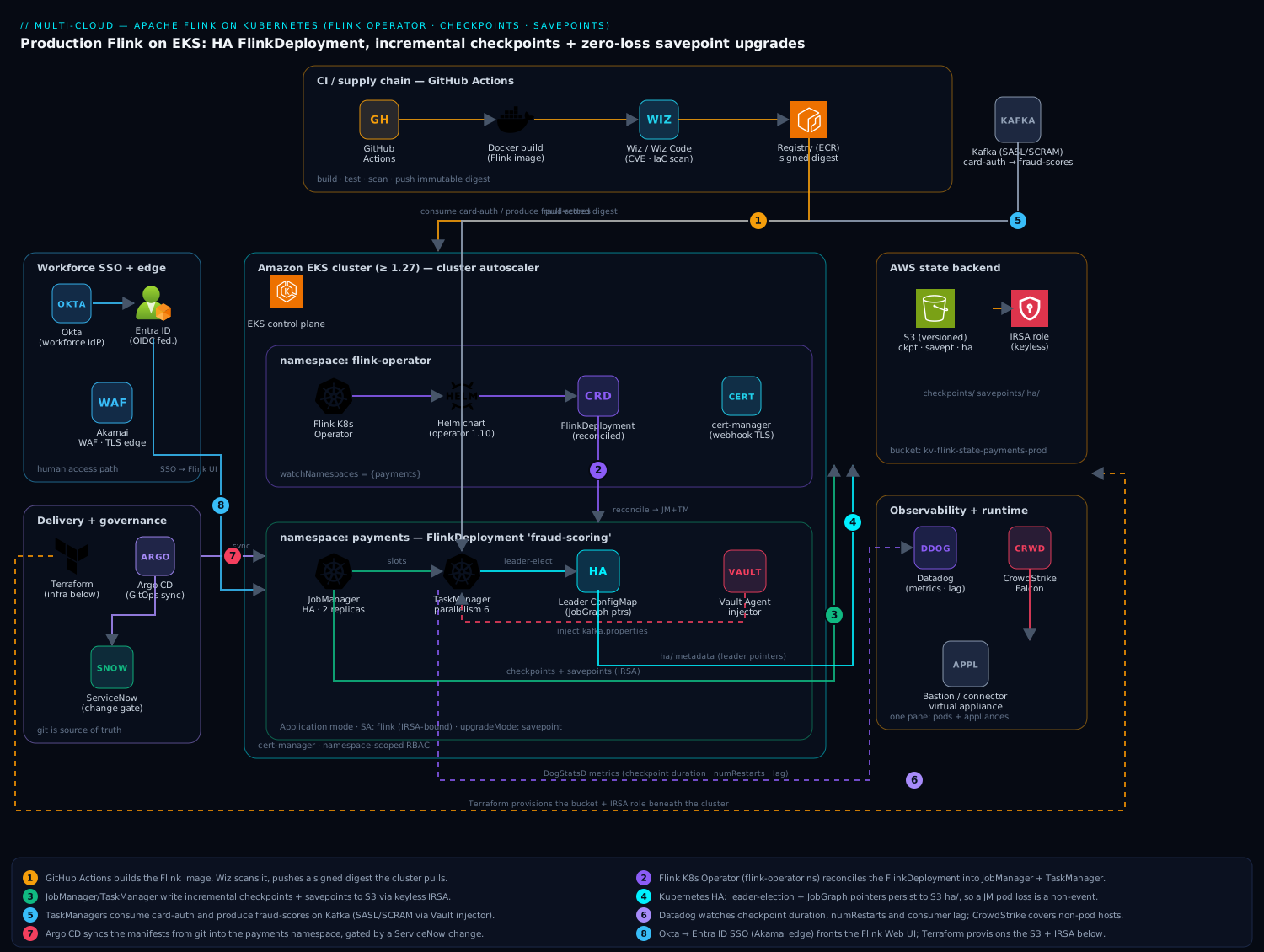
The shape is deliberately boring, which is the point. The Flink Kubernetes Operator runs in its own flink-operator namespace and watches FlinkDeployment/FlinkSessionJob custom resources across the cluster. Each application job is one FlinkDeployment in the payments namespace, which the operator reconciles into a JobManager Deployment and a TaskManager Deployment in Application mode (one cluster per job, fully isolated — no noisy-neighbor session cluster). The JobManager runs in Kubernetes HA mode: leader election and the JobGraph/checkpoint pointers live in a ConfigMap, so a JobManager pod can die and a standby resumes from the last checkpoint with no human in the loop. State durability lives entirely off-cluster in S3 — checkpoints (automatic, frequent, for failure recovery) and savepoints (deliberate, portable, for upgrades) — reached through IRSA so there is not a single AWS key on disk. Identity for the humans who operate it flows from Okta (the workforce IdP) federated to Entra ID, gating both the cluster’s RBAC and the Flink Web UI behind SSO; secrets the job needs (the Kafka SASL/SCRAM password) come from HashiCorp Vault via the Agent injector. Everything is shipped by Argo CD from git, observed by Datadog, and changed through a ServiceNow gate.
1. Provision the S3 state backend and IRSA role
Flink needs one durable object store for three things: checkpoints, savepoints, and HA metadata. Create the bucket with versioning on (so a fat-fingered lifecycle rule cannot vaporize your only savepoint) and lay out clear prefixes.
export REGION=ap-south-1
export BUCKET=kv-flink-state-payments-prod

aws s3api create-bucket \
  --bucket "$BUCKET" --region "$REGION" \
  --create-bucket-configuration LocationConstraint="$REGION"

aws s3api put-bucket-versioning \
  --bucket "$BUCKET" \
  --versioning-configuration Status=Enabled

# Three logical roots the FlinkDeployment will reference
aws s3api put-object --bucket "$BUCKET" --key checkpoints/
aws s3api put-object --bucket "$BUCKET" --key savepoints/
aws s3api put-object --bucket "$BUCKET" --key ha/
Create an IAM policy scoped to this bucket only, then bind it to a Kubernetes ServiceAccount with IRSA. Least privilege matters here: the job identity should never be able to read another team’s state bucket.
cat > /tmp/flink-s3-policy.json <<'JSON'
{
  "Version": "2012-10-17",
  "Statement": [
    { "Effect": "Allow",
      "Action": ["s3:ListBucket"],
      "Resource": "arn:aws:s3:::kv-flink-state-payments-prod" },
    { "Effect": "Allow",
      "Action": ["s3:GetObject","s3:PutObject","s3:DeleteObject"],
      "Resource": "arn:aws:s3:::kv-flink-state-payments-prod/*" }
  ]
}
JSON

aws iam create-policy --policy-name kv-flink-state-payments \
  --policy-document file:///tmp/flink-s3-policy.json

# Create the IRSA-bound ServiceAccount via eksctl (handles the trust policy)
eksctl create iamserviceaccount \
  --cluster kv-prod --namespace payments \
  --name flink \
  --attach-policy-arn arn:aws:iam::<ACCOUNT_ID>:policy/kv-flink-state-payments \
  --approve --region "$REGION"
The flink ServiceAccount in payments now assumes an S3-scoped role automatically — no aws.access-key/secret-key anywhere. (On GKE use Workload Identity to a GCS bucket; on AKS, a federated identity credential to ABFS — the rest of this guide is unchanged.)
2. Install cert-manager and the Flink Kubernetes Operator
The operator’s webhook validates and defaults your CRs, and it needs cert-manager for its serving certificate. Install that first, then the operator from the official Apache Helm chart.
# cert-manager (skip if already present)
helm repo add jetstack https://charts.jetstack.io
helm repo update
helm install cert-manager jetstack/cert-manager \
  --namespace cert-manager --create-namespace \
  --version v1.15.3 --set crds.enabled=true

# Flink Kubernetes Operator 1.10 (supports Flink 1.18/1.19/1.20)
helm repo add flink-operator-repo \
  https://downloads.apache.org/flink/flink-kubernetes-operator-1.10.0/
helm install flink-kubernetes-operator \
  flink-operator-repo/flink-kubernetes-operator \
  --namespace flink-operator --create-namespace \
  --set watchNamespaces='{payments}'
Pinning watchNamespaces keeps the operator from reconciling CRs cluster-wide — important in a shared cluster so the payments operator does not touch another team’s jobs. Confirm it is healthy before going further.
kubectl -n flink-operator get pods
kubectl -n flink-operator logs deploy/flink-kubernetes-operator -c flink-kubernetes-operator | tail -20
kubectl get crd | grep flink
# flinkdeployments.flink.apache.org
# flinksessionjobs.flink.apache.org
3. Build and publish the application image
Application mode bakes your job JAR into an image that extends the official Flink base, with the S3 filesystem plugin enabled. Build it in GitHub Actions (your CI) so the digest is reproducible and signed, and push to your registry.
# Dockerfile
FROM flink:1.18.1-java17

# Enable the S3 filesystem (presto for checkpoints, hadoop also fine)
RUN mkdir -p /opt/flink/plugins/s3-fs-presto && \
    cp /opt/flink/opt/flink-s3-fs-presto-1.18.1.jar \
       /opt/flink/plugins/s3-fs-presto/

# Your shaded job jar
COPY target/fraud-scoring-1.4.0.jar /opt/flink/usrlib/fraud-scoring.jar
docker build -t <REGISTRY>/payments/fraud-scoring:1.4.0 .
docker push <REGISTRY>/payments/fraud-scoring:1.4.0
In a real pipeline this is a GitHub Actions job that builds, runs the Flink job’s unit tests, scans the image with Wiz / Wiz Code (container and IaC scanning — it fails the build on a critical CVE or a misconfigured manifest before anything reaches the cluster), and pushes the immutable tag. The cluster never builds; it only pulls a vetted digest.
4. Wire the Kafka credential through Vault (no Secrets in git)
The job authenticates to Kafka with SASL/SCRAM. That password must not live in a Kubernetes Secret committed to the GitOps repo. Store it in HashiCorp Vault and let the Vault Agent injector mount it into the pods as a file the job reads at startup.
# Put the secret in Vault (one time, by an operator, never in git)
vault kv put secret/payments/kafka \
  username='fraud-scoring' password='<scram-password>'

# Bind a Vault role to the flink ServiceAccount via the Kubernetes auth method
vault write auth/kubernetes/role/flink-payments \
  bound_service_account_names=flink \
  bound_service_account_namespaces=payments \
  policies=payments-kafka-read ttl=1h
You then add vault.hashicorp.com/* annotations to the pod templates (Step 5) so the Agent injects /vault/secrets/kafka.properties. The credential is leased, short-lived, and never written to a Kubernetes Secret or the git repo — which is the whole point.
5. Define the highly available FlinkDeployment
This is the core artifact. One FlinkDeployment describes the whole job-specific cluster: HA, the S3 state backend, checkpoint cadence, resources, and the upgrade strategy. Read every block — the comments explain the why.
# fraud-scoring.yaml
apiVersion: flink.apache.org/v1beta1
kind: FlinkDeployment
metadata:
  name: fraud-scoring
  namespace: payments
spec:
  image: <REGISTRY>/payments/fraud-scoring:1.4.0
  flinkVersion: v1_18
  serviceAccount: flink                 # the IRSA-bound SA from Step 1
  flinkConfiguration:
    # --- High availability: JobManager failure must be a non-event ---
    high-availability.type: kubernetes
    high-availability.storageDir: s3://kv-flink-state-payments-prod/ha/
    kubernetes.jobmanager.replicas: "2"        # active + standby, leader-elected

    # --- State backend + checkpointing to S3 ---
    state.backend.type: rocksdb                # large keyed state spills to disk
    state.backend.incremental: "true"          # only ship changed RocksDB SSTs
    state.checkpoints.dir: s3://kv-flink-state-payments-prod/checkpoints/
    state.savepoints.dir: s3://kv-flink-state-payments-prod/savepoints/
    execution.checkpointing.interval: "30 s"
    execution.checkpointing.mode: EXACTLY_ONCE
    execution.checkpointing.timeout: "10 min"
    execution.checkpointing.min-pause: "10 s"
    execution.checkpointing.max-concurrent-checkpoints: "1"
    execution.checkpointing.externalized-checkpoint-retention: RETAIN_ON_CANCELLATION

    # --- Restart strategy so transient blips self-heal ---
    restart-strategy: exponential-delay
    restart-strategy.exponential-delay.max-backoff: "5 min"

    # --- Metrics out to Datadog via the StatsD/DogStatsD reporter ---
    metrics.reporter.dghttp.factory.class: org.apache.flink.metrics.datadog.DatadogHttpReporterFactory
    metrics.reporter.dghttp.apikey: "${DD_API_KEY}"
    metrics.reporter.dghttp.tags: "service:fraud-scoring,env:prod"

  jobManager:
    resource: { memory: "2048m", cpu: 1 }
    podTemplate:
      metadata:
        annotations:
          vault.hashicorp.com/agent-inject: "true"
          vault.hashicorp.com/role: "flink-payments"
          vault.hashicorp.com/agent-inject-secret-kafka.properties: "secret/payments/kafka"
  taskManager:
    resource: { memory: "4096m", cpu: 2 }
    podTemplate:
      metadata:
        annotations:
          vault.hashicorp.com/agent-inject: "true"
          vault.hashicorp.com/role: "flink-payments"
          vault.hashicorp.com/agent-inject-secret-kafka.properties: "secret/payments/kafka"

  job:
    jarURI: local:///opt/flink/usrlib/fraud-scoring.jar
    parallelism: 6
    upgradeMode: savepoint        # <-- redeploys take a savepoint first (Step 8)
    state: running
The three settings that do the real work: high-availability.type: kubernetes makes JobManager loss survivable; state.backend.incremental: true on RocksDB means a 200 GB keyed state checkpoints in seconds because only changed SST files ship to S3; and upgradeMode: savepoint is what turns a version bump from “stop and replay” into a clean savepoint-restore. Apply it:
kubectl apply -f fraud-scoring.yaml
kubectl -n payments get flinkdeployment fraud-scoring -w
In practice you do not kubectl apply by hand in production — this YAML lives in a git repo that Argo CD syncs to the cluster, so the desired state is auditable and every change is a reviewed pull request. The kubectl apply above is the manual equivalent for a first run. Terraform provisions everything underneath the job (the bucket, IAM/IRSA, the EKS node groups, Vault policies); Argo CD owns everything inside the cluster from that point on.
6. Expose the Flink UI behind SSO
The Flink Web UI shows job graph, checkpoint history, and backpressure — operators need it, but it must not be open. Front it with an ingress that requires authentication, federated from Okta to Entra ID via an OIDC proxy (oauth2-proxy here), so only on-call engineers in the right group reach it and every session is tied to a real identity.
kubectl -n payments port-forward svc/fraud-scoring-rest 8081:8081
# Production: an oauth2-proxy ingress in front of fraud-scoring-rest,
#   OIDC issuer = Entra ID (workforce SSO federated from Okta),
#   allowed group = payments-flink-operators
Edge traffic to the UI and to any externally exposed Flink endpoint terminates at Akamai for TLS, WAF, and bot mitigation before it reaches the ingress — the same perimeter every other KloudVin service sits behind. Hosts that are not the cluster — a bastion or a legacy connector virtual appliance bridging to the on-prem fraud system — are enrolled in CrowdStrike Falcon for runtime threat detection and feed the SOC, and onto the same Datadog account so you have one pane across pods and appliances.
7. Trigger and inspect a manual savepoint
Checkpoints happen automatically every 30 seconds for failure recovery. A savepoint is a deliberate, self-contained, version-portable snapshot you take before an upgrade or for an audit point-in-time. With the operator you do not call the CLI — you patch the CR, and the operator drives Flink.
# Ask the operator to take a savepoint to s3://.../savepoints/
kubectl -n payments patch flinkdeployment fraud-scoring --type merge \
  -p '{"spec":{"job":{"savepointTriggerNonce": 1}}}'

# Watch the operator record it on the resource status
kubectl -n payments get flinkdeployment fraud-scoring \
  -o jsonpath='{.status.jobStatus.savepointInfo.lastSavepoint.location}{"\n"}'
# s3://kv-flink-state-payments-prod/savepoints/savepoint-abc123-...
Bump savepointTriggerNonce to a new integer each time you want a fresh savepoint. The returned S3 path is the exact artifact you would hand an auditor, or restore from in a disaster.
8. Perform a zero-data-loss version upgrade
This is the workflow that the whole migration exists to make safe. Because the job is upgradeMode: savepoint, redeploying with a new image makes the operator do the right dance automatically: take a fresh savepoint, stop the job, start the new image, and restore from that savepoint. No Kafka replay, no blind window.
# Bump the image (and/or job logic) — in GitOps this is a PR edit
kubectl -n payments patch flinkdeployment fraud-scoring --type merge \
  -p '{"spec":{"image":"<REGISTRY>/payments/fraud-scoring:1.5.0"}}'

# Operator sequence (observe it on status.lifecycleState):
#   SUSPENDED(savepoint taken) -> UPGRADING -> DEPLOYED -> STABLE
kubectl -n payments get flinkdeployment fraud-scoring \
  -o jsonpath='{.status.lifecycleState}{"  reconcile="}{.status.reconciliationStatus.state}{"\n"}'
The real production path for this patch is a pull request that Argo CD syncs, gated by a ServiceNow change request — the deploy is blocked until the change ticket is approved, so the auditor sees who authorized the upgrade and when, and an incident auto-raises in ServiceNow if a post-deploy health check fails. Datadog monitors the numRestarts, checkpoint duration, and consumer lag through the cutover; a spike pages on-call. That is the difference between the old “savepoint-and-pray” and a reviewable, observable, rollback-able pipeline step.
Validation
Prove the three properties you came for — running, recoverable, upgrade-safe — before you call it done.
# 1) Job is RUNNING with the expected parallelism
kubectl -n payments get flinkdeployment fraud-scoring \
  -o jsonpath='{.status.jobStatus.state}{"\n"}'        # RUNNING

# 2) Checkpoints are actually completing to S3 (not silently failing)
aws s3 ls s3://kv-flink-state-payments-prod/checkpoints/ --recursive | tail
#   ... expect a fresh chk-<n>/_metadata every ~30s

# 3) HA works: kill the leader JobManager and confirm no full restart
kubectl -n payments delete pod -l component=jobmanager \
  --field-selector status.phase=Running --grace-period=0
# Watch: standby takes leadership, job resumes from last checkpoint.
# numRestarts should NOT jump to a full job restart from offset 0.
kubectl -n payments logs -l component=jobmanager --tail=50 | grep -i "leader\|restored"
The decisive HA test is step 3: deleting the active JobManager must result in the standby resuming from the last checkpoint, not the job replaying from the earliest Kafka offset. If you see a full restart, your high-availability.storageDir is unreachable (usually IRSA not actually attached) — fix that before trusting the cluster.
Rollback / teardown
A bad upgrade rolls back to a known-good savepoint; a full teardown removes the job but, deliberately, keeps the state in S3.
# Roll back to a specific prior savepoint (e.g. after a bad 1.5.0)
kubectl -n payments patch flinkdeployment fraud-scoring --type merge -p '{
  "spec": {
    "image": "<REGISTRY>/payments/fraud-scoring:1.4.0",
    "job": { "initialSavepointPath":
      "s3://kv-flink-state-payments-prod/savepoints/savepoint-abc123-...",
      "upgradeMode": "savepoint" }
  }
}'

# Stop the job but RETAIN externalized state (RETAIN_ON_CANCELLATION did this)
kubectl -n payments delete flinkdeployment fraud-scoring

# Full uninstall of the operator (only when decommissioning the platform)
helm -n flink-operator uninstall flink-kubernetes-operator
helm -n cert-manager uninstall cert-manager
# S3 state survives all of the above — delete it only by intent:
# aws s3 rm s3://kv-flink-state-payments-prod/ --recursive
Never let teardown delete the bucket. Your savepoints are the only thing standing between a bad day and a six-hour Kafka replay; keep them until you have consciously decided the job is gone for good.
Going deeper
Everything above gets the job running. This section is what happens under the hood — the parts you reach for when you are tuning throughput, chasing a checkpoint timeout, or explaining to an auditor why “exactly-once” is actually true.
How a checkpoint actually happens (barriers and alignment)
Flink checkpoints use asynchronous barrier snapshotting, a variant of the Chandy-Lamport distributed-snapshot algorithm. The JobManager’s checkpoint coordinator periodically injects a lightweight marker called a checkpoint barrier into every source. Barriers flow downstream in-band with the data. When an operator has received the barrier for checkpoint n on all of its input channels, it snapshots its state (uploading asynchronously to S3) and forwards the barrier on. When every operator has acknowledged, the coordinator marks checkpoint n complete and writes the _metadata pointer.
That “on all input channels” wait is barrier alignment, and it is where backpressure bites:
- Aligned checkpoints (default) — an operator buffers data from its fast inputs until the barrier arrives on the slow ones. Under heavy backpressure a barrier can crawl through the buffers, so checkpoint duration balloons and can time out.
- Unaligned checkpoints (
execution.checkpointing.unaligned.enabled: true, Flink 1.11+) — the barrier is allowed to overtake in-flight data, and the buffered in-flight records are snapshotted as part of the checkpoint. Checkpoint time decouples from backpressure, at the cost of larger checkpoints (you are now storing in-flight network buffers). A common middle ground isexecution.checkpointing.aligned-checkpoint-timeout: start aligned, and only switch a given checkpoint to unaligned if alignment takes too long.
RocksDB, incremental checkpoints, and local disk
With the RocksDB backend, keyed state lives in on-disk SST files. An incremental checkpoint uploads only the SST files that are new since the last checkpoint, so a 200 GB state can snapshot in seconds because only the delta ships to S3 — this is why state.backend.incremental: true is non-negotiable at scale. The trade-offs to know:
- RocksDB uses Flink managed memory (off-heap) for its block cache and write buffers —
taskmanager.memory.managed.fraction(default 0.4). Starve it and you get disk thrash and slow checkpoints. - Recovery must reassemble state from the chain of incremental SSTs, so a restore can be slower than from a full checkpoint; Flink periodically consolidates to bound that.
- Local recovery (
state.backend.local-recovery: true) keeps a second copy of task state on the pod’s local disk, so a TaskManager restart can rebuild from local disk instead of re-downloading the whole working set from S3. Pair it with a sized, fast local volume (state.backend.rocksdb.localdir) — RocksDB needs real disk, and under-provisioning it is a classic outage.
Savepoints, upgrade modes, and last-state
The operator’s upgradeMode decides how it carries state across a redeploy:
savepoint— take a fresh, self-contained savepoint, stop, start the new image, restore from it. Safest and portable, but it needs a healthy running job to take the savepoint in the first place.last-state— skip the savepoint and restore from the last completed checkpoint recorded in the HA metadata. This works even when the job is crash-looping (you cannot savepoint a dead job), and it is faster because there is no savepoint step — but it requires Kubernetes HA to be enabled, and it restores from a checkpoint, not a fresh snapshot.stateless— carry nothing; redeploy from scratch. Correct only for stateless jobs; on a stateful one it silently drops everything.
Rule of thumb: savepoint for planned upgrades of a healthy job (what this guide does), last-state as the fallback for upgrading or moving a job that will not stay up. Savepoints also have a format (execution.savepoint.format-type: CANONICAL | NATIVE): canonical is portable across state backends and Flink versions; native is faster to write and restore but backend-specific.
JobManager HA and the HA metadata
high-availability.type: kubernetes replaces the old ZooKeeper dependency with two Kubernetes primitives: a Lease/ConfigMap for leader election, and the high-availability.storageDir (S3) for the HA metadata — the JobGraph and pointers to completed checkpoints. With kubernetes.jobmanager.replicas: 2, one JobManager is leader and one is a hot standby. Kill the leader and the standby wins the lease, reads the HA metadata, and resumes the job from the last checkpoint — no replay from offset 0. If that storageDir is unreachable (the usual cause: IRSA not actually attached), HA silently degrades to a full restart, which is exactly why the validation section kills a JobManager on purpose.
End-to-end exactly-once needs two-phase commit
Flink gives exactly-once state consistency for free via checkpoints, but exactly-once output to an external system requires the sink to participate in a two-phase commit (2PC). Flink’s Kafka sink (DeliveryGuarantee.EXACTLY_ONCE) does this with Kafka transactions: on each checkpoint it pre-commits (flushes records inside an open transaction); when the checkpoint completes, the notifyCheckpointComplete callback commits the transaction. A crash before commit aborts the transaction, so no duplicates leak. Two operational gotchas that bite everyone:
- The producer’s
transaction.timeout.msmust exceed your worst-case checkpoint interval plus recovery time, or Kafka aborts the transaction mid-flight and the job gets stuck; the broker’stransaction.max.timeout.msmust allow that value. - Downstream consumers must set
isolation.level=read_committed, or they will read uncommitted (possibly-to-be-aborted) records and you have lost exactly-once at the reader. (Running Kafka on the same cluster? The broker side is covered in Deploy Confluent Platform Kafka with the operator.)
Autoscaling: the operator autoscaler vs reactive mode
There are two distinct ways to make a Flink job elastic:
- The operator’s Job Autoscaler (recommended) — the operator collects Flink’s own metrics (true processing rate, busy time, backlog) and computes an ideal per-operator parallelism, then applies it, either in-place via the Adaptive Scheduler (Flink 1.18+) or through a savepoint-and-restore. Turn it on in
flinkConfiguration:
flinkConfiguration:
  job.autoscaler.enabled: "true"
  job.autoscaler.stabilization.interval: "1m"
  job.autoscaler.metrics.window: "5m"
  job.autoscaler.target.utilization: "0.6"
  job.autoscaler.target.utilization.boundary: "0.2"
  jobmanager.scheduler: adaptive          # enables in-place rescaling on Flink 1.18+
  pipeline.max-parallelism: "120"         # key-group ceiling the autoscaler scales within
- Reactive mode (
scheduler-mode: reactive) — an older, coarser model where the job passively consumes all slots available to it; you scale by adding or removing TaskManagers (for example, an HPA on CPU). It is whole-job, not per-operator, and needs a standalone deployment. The operator autoscaler has largely superseded it for new work.
Watermarks, backpressure, and where time comes from
Two more concepts you meet the moment you tune a windowed job:
- Watermarks are markers Flink injects that assert “no event with a timestamp earlier than T will still arrive.” They drive event-time windows and let the job tolerate out-of-order events (
WatermarkStrategy.forBoundedOutOfOrderness(...)). Set the bound too tight and you drop late events; too loose and windows fire late and hold state longer. - Backpressure is Flink’s built-in flow control: when a downstream operator cannot keep up, credit-based backpressure slows the upstream so buffers do not overflow. The Flink UI shows each operator’s busy/backpressured percentage — a persistently backpressured source is your signal to scale out (or turn on the autoscaler), and, as above, it is what makes aligned checkpoints slow.
Resource tuning: memory and slots
A TaskManager’s memory is carved into framework heap, task heap, managed memory (RocksDB), network buffers, and JVM overhead. The two knobs you will actually turn: taskmanager.memory.process.size (the total the pod requests) and taskmanager.memory.managed.fraction (how much of it RocksDB gets). Parallelism is bounded by total task slots (taskmanager.numberOfTaskSlots × TaskManager count), so raising job.parallelism without adding slots just leaves subtasks unscheduled. Size TaskManagers to the state and throughput, set slots to roughly the vCPU count, and let the cluster autoscaler add nodes only under real load.
Practice challenges
Work these against the manifests above. A couple assume a live cluster, but every solution is runnable and the reasoning stands on its own. Try each before opening the answer.
1. (Beginner) Name the single setting family that makes JobManager failure survivable — and say what breaks without it.
<details> <summary>Show solution</summary>
high-availability.type: kubernetes, together with high-availability.storageDir on S3 and kubernetes.jobmanager.replicas: 2. Without it there is no leader election and no durable HA metadata, so a JobManager restart brings the job up cold and it replays Kafka from the earliest retained offset — the exact blind-window failure this migration exists to kill.
</details>
2. (Beginner) Take a savepoint on demand and print its S3 location.
<details> <summary>Show solution</summary>
kubectl -n payments patch flinkdeployment fraud-scoring --type merge \
  -p '{"spec":{"job":{"savepointTriggerNonce": 2}}}'
kubectl -n payments get flinkdeployment fraud-scoring \
  -o jsonpath='{.status.jobStatus.savepointInfo.lastSavepoint.location}{"\n"}'
Bump the nonce to any new integer to trigger each fresh savepoint. Why it works: the operator (not the CLI) drives the savepoint and records the artifact path on the resource status. </details>
3. (Intermediate) Relax the checkpoint interval from 30 s to 60 s. What do you trade?
<details> <summary>Show solution</summary>
Set execution.checkpointing.interval: "60 s". Trade-off: fewer, cheaper snapshots and less S3 PUT volume, but a larger recovery gap — after a crash the job reprocesses up to ~60 s of events instead of ~30 s. Tune by watching checkpoint duration (not just interval) in Datadog; the interval must comfortably exceed the duration plus min-pause.
</details>
4. (Intermediate) You must upgrade a job that is crash-looping and cannot take a savepoint. Which upgrade mode, and what is the prerequisite?
<details> <summary>Show solution</summary>
Switch to upgradeMode: last-state. It restores from the last completed checkpoint recorded in the HA metadata rather than taking a fresh savepoint, so it works on an unhealthy job — but it requires Kubernetes HA to be enabled (which we have). Move back to savepoint for normal, planned upgrades of a healthy job.
</details>
5. (Advanced) A backpressured job’s checkpoints keep timing out. Change one thing to decouple checkpoint time from backpressure, and state the cost.
<details> <summary>Show solution</summary>
execution.checkpointing.unaligned.enabled: "true"
# optional: stay aligned normally, flip to unaligned only when alignment is slow
execution.checkpointing.aligned-checkpoint-timeout: "30 s"
Unaligned checkpoints let the barrier overtake in-flight data, so checkpoint duration stops tracking backpressure. Cost: larger checkpoints, because in-flight network buffers are now stored in the snapshot. </details>
6. (Advanced) Turn on the operator autoscaler safely. Which extra key must you set, and why?
<details> <summary>Show solution</summary>
job.autoscaler.enabled: "true"
job.autoscaler.target.utilization: "0.6"
jobmanager.scheduler: adaptive
pipeline.max-parallelism: "120"
pipeline.max-parallelism is the one people forget: it fixes the number of key groups, which is the ceiling the autoscaler can scale within and the unit by which state is redistributed on a rescale. Leave it unset and Flink derives it from the initial parallelism, which can cap your scale-up or skew state across subtasks after the job rescales.
</details>
Common pitfalls
- HA storage dir not actually writable. The job “works” but a JobManager restart replays from offset 0. The cause is almost always IRSA not bound (the SA name in the
FlinkDeploymentdoes not match the oneeksctlcreated) so the pod cannot writeha/. Verify withaws sts get-caller-identityfrom inside a TaskManager pod. - Wrong S3 filesystem plugin. Using
flink-s3-fs-hadoopandflink-s3-fs-prestoat once, or neither, givesUnsupportedFileSystemException. Pick one (presto for checkpoints is the common choice) and copy exactly that jar intoplugins/. upgradeMode: statelessleft on by accident. Every redeploy then silently drops state and replays — the exact failure you migrated to escape. For any stateful job it must besavepoint(orlast-stateif you accept restoring from the latest checkpoint instead of a fresh savepoint).- Checkpoints too aggressive for the state size. A 10-second interval on 200 GB of state with
max-concurrent-checkpoints: 1causes checkpoints to overlap and back up. Start at 30 s, watch checkpoint duration in Datadog, and only then tune down. - RocksDB without incremental. Full checkpoints of large keyed state saturate the network and time out.
state.backend.incremental: trueis non-optional at scale. - Operator watching the wrong namespace. If
watchNamespacesdoes not includepayments, yourFlinkDeploymentis accepted by the API server but never reconciled — it just sits there. Check the operator logs.
Common beginner mistakes
These are misconceptions, not just error messages — get the mental model right and most of the errors never happen.
- “Checkpoints and savepoints are basically the same thing.” They solve opposite problems. Checkpoints are Flink’s automatic autosaves for crash recovery, and Flink prunes them; savepoints are your deliberate, portable snapshots for upgrades and rollback that you own and keep. Deleting “old snapshots” to save money and taking out your savepoints is a real way to lose your only clean restore point.
- “The state is safe because it’s in the pod.” State lives in RocksDB on the TaskManager’s local disk while the job runs, but that disk dies with the pod. Durability comes only from checkpoint storage — S3/GCS/ABFS. No durable checkpoint store means the first pod eviction is a data-loss event. If it “worked” in a test with only local storage, you tested the wrong thing.
- “I’ll upgrade by deleting and re-applying the FlinkDeployment.” A delete-then-apply (or
upgradeMode: stateless) drops all state and replays from scratch — the blind window you migrated to escape. Stateful upgrades must go throughsavepoint(orlast-state), which is what makes them zero-data-loss. - “One JobManager is fine — Kubernetes will just restart the pod.” Kubernetes restarting the pod is exactly the problem: without HA there is no leader election and no durable HA metadata, so the fresh JobManager has no idea where the job was and restarts it cold. HA (
type: kubernetes,replicas: 2, a reachablestorageDir) is what turns a JobManager restart into a non-event. - “RocksDB writes to S3, so local disk barely matters.” RocksDB’s working set is entirely on local disk; only checkpoints go to S3. Under-provision the local volume (or use slow disk) and you get compaction stalls, checkpoint timeouts, and pods evicted for disk pressure. Size and speed the local disk to the state, not just the S3 bucket.
Security notes
Identity is end to end: human access to the cluster and the Flink UI federates Okta → Entra ID with SSO and conditional access, scoped by group, so only on-call payments engineers reach the job and every action ties to a named user. The job’s S3 access uses IRSA — a scoped, keyless IAM role on the flink ServiceAccount — so there is no AWS credential on disk to leak, and the policy is locked to this one bucket. The Kafka SASL password is leased from HashiCorp Vault and injected as a short-lived file, never a Kubernetes Secret in git. Images are scanned by Wiz / Wiz Code in CI (container CVEs and manifest misconfigurations) and only signed digests deploy; any non-pod hosts — a bastion or a connector virtual appliance to the on-prem fraud system — carry CrowdStrike Falcon for runtime detection into the SOC. Enable encryption-at-rest on the bucket (SSE-KMS) and TLS on the Kafka and S3 paths; Akamai fronts any externally reachable endpoint with WAF and TLS termination.
Cost notes
The big lever is right-sizing TaskManager memory and CPU to the state and throughput, then letting the cluster autoscaler add nodes only under real load rather than statically provisioning for peak — Application mode’s one-cluster-per-job isolation makes that per-job sizing honest. Incremental checkpointing also directly cuts cost: shipping only changed RocksDB SST files means far less S3 PUT volume and egress than full checkpoints every 30 seconds. Apply an S3 lifecycle policy to expire old externalized checkpoints (but not savepoints, which you keep deliberately) so the bucket does not grow unbounded. Watch checkpoint duration, TaskManager CPU, and S3 request counts in Datadog, and use Flink’s reactive/autoscaler mode to scale parallelism with Kafka lag so you are paying for slots you are actually using. If this job is part of a wider data-platform enablement track for engineers, fold the runbook and the upgrade procedure into Moodle so on-call rotation onboarding is consistent and the savepoint-upgrade dance is documented once, not relearned each incident.
Glossary
- Apache Flink — an engine for stateful stream processing: programs that run continuously over unbounded event streams and remember things between events.
- Stream processing — computing over events as they arrive (not in nightly batches), producing continuously updated results.
- State — the data a streaming job remembers between events (counts, windows, last-seen values). Keeping it correct through failures is the core challenge.
- JobManager — the Flink “brain”: schedules work, coordinates checkpoints, holds the job graph. Runs HA (leader + standby) here.
- TaskManager — a Flink worker: runs operator subtasks and holds their state in task slots.
- Task slot — a unit of parallel execution capacity on a TaskManager; total slots cap a job’s parallelism.
- Parallelism — how many parallel copies of an operator run; each processes a slice of the keyed data.
- Flink Kubernetes Operator — the Kubernetes controller that runs Flink jobs from custom resources and automates HA, checkpoints, and upgrades.
- FlinkDeployment — the custom resource describing a whole job-specific Flink cluster (JobManager + TaskManagers + job).
- FlinkSessionJob — the custom resource describing a single job submitted to a shared, long-lived session cluster.
- Application mode — one dedicated Flink cluster per job (isolated; used here).
- Session mode — one shared cluster running many jobs (efficient for small/ad-hoc jobs, less isolated).
- Checkpoint — an automatic, periodic snapshot of job state for crash recovery; owned and pruned by Flink.
- Savepoint — a manual, self-contained, portable snapshot for upgrades, migration, and rollback; owned by you.
- Checkpoint barrier — a marker Flink injects into the stream to cut a consistent snapshot across all operators.
- Barrier alignment — an operator waiting for the barrier on all inputs before snapshotting; slow under backpressure (aligned) unless you enable unaligned checkpoints.
- Incremental checkpoint — a checkpoint that uploads only the RocksDB files changed since the last one; essential for large state.
- State backend — where keyed state lives while the job runs: HashMap (heap) or EmbeddedRocksDB (local disk).
- Checkpoint storage — where snapshots are durably persisted (here S3 via FileSystemCheckpointStorage); distinct from the state backend.
- RocksDB — the embedded on-disk key-value store Flink uses for large keyed state, enabling incremental snapshots.
- High availability (HA) — a standby JobManager plus durable HA metadata, so a JobManager failure resumes from the last checkpoint instead of replaying.
- HA metadata — the JobGraph and checkpoint pointers Flink stores (in
storageDiron S3) so a new leader can resume. - Exactly-once — a guarantee that each event affects state (and, with 2PC sinks, output) exactly once despite failures.
- Two-phase commit (2PC) — the pre-commit/commit protocol a sink uses (for example Kafka transactions) to make output exactly-once end to end.
- Watermark — a marker asserting no earlier-timestamped event will arrive; drives event-time windows and tolerates out-of-order data.
- Backpressure — Flink’s flow control that slows upstream operators when a downstream one cannot keep up.
- Managed memory — off-heap TaskManager memory Flink hands to RocksDB for caching and write buffers.
- upgradeMode — the operator’s redeploy strategy:
savepoint(fresh savepoint),last-state(last checkpoint via HA), orstateless(drop state). - Reactive mode — a coarse elastic mode where the job consumes all available slots; you scale by adding/removing TaskManagers.
- Autoscaler — the operator’s metrics-driven, per-operator parallelism tuner (supersedes reactive mode for most jobs).
- IRSA — IAM Roles for Service Accounts: keyless AWS credentials granted to a pod’s ServiceAccount, used here for S3.
- Local recovery — keeping a task-local copy of state on disk so a TaskManager restart rebuilds from local disk, not S3.