There is a moment, early in every Linux career, when you catch yourself opening a Python interpreter to answer a question like “which ten IP addresses hit my server the most today?” — and an old hand leans over, types one line at the shell, and has the answer before your editor has finished loading. That line is not magic. It is five tiny programs, each doing one small job, snapped together with pipes. This lesson is how you become the person typing that line.
The tools are old — most predate you by decades — and that is exactly why they are worth learning. grep, sed, and awk are on every Unix system you will ever touch: your laptop, a bare Alpine container, a locked-down production RHEL box with no internet and no package manager. When something breaks at 3 a.m. and all you have is a shell and a log file, these are the tools that are already there. Master them and you carry a data-analysis toolkit in your fingers that needs no installation, no dependencies, and no runtime.
Why this matters
Almost every operational question is really a question about text. Logs are text. Config files are text. /etc/passwd is text. The output of ps, ss, journalctl, kubectl, and git log is text. The entire Unix design philosophy — articulated by Doug McIlroy, who invented the pipe — is: write programs that do one thing well, and write programs to work together, because text streams are a universal interface. Once you internalise that, you stop looking for one giant tool that does everything and start composing small sharp tools that each do one transform.
The wall a beginner hits is treating each command as an island. They grep for a word, read the result with their eyes, retype part of it, run another command, and copy-paste between them. The leap is realising that the output of one command can be the input of the next, live, with no temporary files — and that a handful of these tools cover almost every text job you will ever have. This lesson assumes you already understand streams and pipes; if stdin, stdout, |, > and 2> are not yet second nature, read the sibling lesson Shell Basics: Pipes, Redirection, Globbing & the Environment first — it builds the plumbing that this lesson pours data through.
Here is the mental model for the whole lesson, in one sentence: you filter lines with grep, extract fields with cut or awk, reshape text with sed or tr, and count with sort | uniq -c. Everything else is detail. Get those four verbs — filter, extract, reshape, count — and their tools, and you can answer questions about any text on any Linux box in the world.
A note on distros and portability. Everything here is GNU coreutils / GNU grep / GNU sed / gawk as shipped on Debian, Ubuntu, RHEL, Fedora, and Rocky — the mainstream Linux you will actually run. Where the BSD tools on macOS or the BusyBox tools in a minimal container behave differently (and sed -i is the notorious one), the lesson calls it out explicitly. When a tool has a legacy name that is now deprecated, you will learn the modern form and the reason.
Small tools, one job each: the Unix pipeline philosophy
Before the tools, the doctrine. A pipeline reads left to right, and each stage is one verb applied to a stream of lines. The art is choosing the right tool for each stage — and the four canonical tools have crisp, non-overlapping jobs. Beginners waste enormous effort doing a sed job with awk, or an awk job with a pipe of six greps. This table is the compass; keep it in your head:
| Job | Reach for | Why, in one line |
|---|---|---|
| Find the lines that match a pattern | grep |
Line-oriented filter; blazing fast; never splits fields |
| Edit / replace text in a stream | sed |
The stream editor: substitution, delete, print by address |
| Work with fields / columns + do math | awk |
A field-aware mini-language; the only one that can add a column |
| Cut simple fixed-delimiter columns | cut |
Simplest and fastest when the delimiter is a single clean char |
| Put lines in order | sort |
Lexical or numeric; the mandatory prep step before uniq |
| Count / dedupe adjacent duplicates | uniq |
Collapses runs; almost always paired with sort |
| Translate / delete / squeeze characters | tr |
Character-set surgery: case, whitespace, stripping bytes |
| Count lines / words / bytes | wc |
The tape measure of the shell |
The rule of thumb inside that table: grep finds lines, sed edits lines, awk understands fields, cut grabs simple columns. If you find yourself wanting arithmetic or “the third column”, that is an awk job. If you want “change X to Y everywhere”, that is sed. If you just want “lines containing X”, that is grep.
We will use three realistic datasets throughout so the examples are concrete, not toy. Set them up in your head now:
| Dataset | Shape | What we ask of it |
|---|---|---|
/etc/passwd |
colon-delimited: name:x:UID:GID:GECOS:home:shell |
list users, find login shells, sort by UID |
access.log |
space-delimited web log (Combined Log Format) | count hits per IP, find 404s, sum bytes |
people.csv |
comma-delimited: name,department,salary,city |
sum a column, average, group by department |
A single line of each, so the field positions are burned in:
# /etc/passwd  — fields split on ':'
vinod:x:1000:1000:Vinod H,,,:/home/vinod:/bin/bash
#  $1    $2  $3   $4     $5           $6         $7

# access.log  — fields split on ' '  (Combined Log Format)
203.0.113.7 - - [09/Jul/2026:06:14:02 +0000] "GET /index.html HTTP/1.1" 200 1043 "-" "Mozilla/5.0"
#    $1     $2 $3      $4         $5              $6    $7       $8      $9  $10  ...

# people.csv  — fields split on ','
Asha,Engineering,1450000,Bengaluru
# $1     $2         $3       $4
Notice that in the access log, $9 is the HTTP status code and $10 is the response size in bytes — remember those two, they come up constantly.
grep: finding the lines that matter
grep prints the lines of its input that match a pattern. That is its entire job, and it does it faster than anything else. The name is wonderfully nerdy: it comes from the old ed editor command g/re/p — globally search for a regular expression and print. That etymology is a spoiler: grep’s real power is regular expressions, which get their own section next. First, the mechanics and flags.
# Print every line of /etc/passwd that contains the text "bash"
grep bash /etc/passwd
root:x:0:0:root:/root:/bin/bash
postgres:x:111:117:PostgreSQL administrator,,,:/var/lib/postgresql:/bin/bash
vinod:x:1000:1000:Vinod H,,,:/home/vinod:/bin/bash
deploy:x:1001:1001:Deploy Bot,,,:/home/deploy:/bin/bash
The pattern is the first argument, the file(s) after it. With no file, grep reads stdin — which is how it lives in pipelines (... | grep bash). Now the flags that turn a blunt search into a scalpel:
| Flag | Meaning | Example |
|---|---|---|
-i |
Case-insensitive | grep -i error app.log matches Error, ERROR |
-v |
Invert — print non-matching lines | grep -v nologin /etc/passwd (real login users) |
-n |
Prefix each hit with its line number | grep -n TODO main.c |
-c |
Count matching lines (not matches!) | grep -c bash /etc/passwd → 4 |
-r / -R |
Recurse into directories | grep -r "api_key" ./src |
-w |
Match the pattern as a whole word | grep -w root skips chroot, root_ca |
-o |
Print only the matched part, one per line | grep -o 'HTTP/[0-9.]*' access.log |
-E |
Extended regex (see next section) | grep -E '4[0-9]{2}' |
-A n |
Print n lines after each match | grep -A2 Exception app.log |
-B n |
Print n lines before each match | grep -B2 Exception app.log |
-C n |
Print n lines of context (before + after) | grep -C1 " 500 " access.log |
-l |
List only the filenames that contain a match | grep -rl TODO ./src |
-q |
Quiet — print nothing, just set exit status | grep -q root /etc/passwd && echo yes |
--color=auto |
Highlight the matched text | usually aliased on by default |
A few of these deserve a demonstration because they trip people up. First, -c counts lines, not occurrences. A line with three matches counts once:
# How many lines contain "bash"?  (NOT how many times "bash" appears)
grep -c bash /etc/passwd
4
If you truly want to count occurrences, extract them first with -o (one match per line) and count lines with wc -l:
# Count total occurrences, even multiple per line
grep -o bash /etc/passwd | wc -l
Second, -w (whole word) saves you from substring false-positives. grep root matches chroot and /var/root; grep -w root requires a word boundary on both sides:
# -w: 'root' only when it stands alone, not inside another word
grep -w root /etc/passwd     # matches the root user line
Third, and most important for scripting: grep’s exit status is a boolean you can branch on. This is the single most useful thing grep does in automation.
| Exit status | Meaning | Use it for |
|---|---|---|
0 |
At least one line matched | if grep -q ...; then (the happy path) |
1 |
No line matched (valid, not an error) | the “not found” branch |
2 |
Real error (file missing, bad regex) | genuine failure handling |
# The idiomatic "is this user present?" check — note -q for silence
if grep -q '^deploy:' /etc/passwd; then
  echo "deploy user exists"
else
  echo "no deploy user"
fi
deploy user exists
The grep family: egrep, fgrep, and -P
You will meet three sibling names in old scripts and blog posts. Here is the honest, current state of them:
| Command | Same as | Status | What it does |
|---|---|---|---|
grep |
— | current | Basic Regular Expressions (BRE) by default |
egrep |
grep -E |
deprecated | Extended Regular Expressions (ERE) |
fgrep |
grep -F |
deprecated | Fixed strings — no regex at all, literal match |
grep -P |
— | current, optional | Perl-Compatible Regex (PCRE): \d, lookahead, lazy *? |
Since GNU grep 3.8 (2022), running egrep or fgrep prints warning: egrep is obsolescent; using grep -E. Use grep -E and grep -F instead — they are the portable, future-proof forms. grep -F (fixed strings) is genuinely useful and often forgotten: when your search text contains regex metacharacters you want taken literally, -F is both correct and faster:
# Search for a literal string containing regex-special chars (dots, brackets)
grep -F '192.168.1.1' hosts.txt     # the dots are literal dots, not "any char"
grep -P unlocks the richer Perl regex engine (\d for digits, \b for word boundary, non-greedy quantifiers, lookahead/lookbehind). It is a GNU extension: it exists on Linux but not on macOS’s BSD grep, and some minimal builds omit it. Use it when you need its power, but know it is not universally available.
Regular expressions, taught properly
A regular expression is a small language for describing patterns of text rather than exact strings. This is the concept that multiplies the value of grep, sed, and awk all at once, because all three speak regex. The confusion beginners suffer is almost never about the concept — it is about the fact that there are three dialects, and a pattern that works in one is broken in another. Learn the dialects and the fog clears.
| Dialect | Where it’s the default | Turn it on with |
|---|---|---|
| BRE — Basic Regular Expressions | grep, sed |
(default) |
| ERE — Extended Regular Expressions | awk, egrep |
grep -E, sed -E |
| PCRE — Perl-Compatible | (none by default) | grep -P |
The building blocks are the same everywhere; only the punctuation differs. Here is the core metacharacter table — the one to memorise. The critical column is the last one, which shows the maddening BRE/ERE split:
| Metachar | Means | ERE / PCRE | BRE (basic) |
|---|---|---|---|
. |
Any single character | . |
. |
^ |
Start of line (anchor) | ^ |
^ |
$ |
End of line (anchor) | $ |
$ |
* |
Zero or more of the preceding | * |
* |
[abc] |
One of a, b, or c (a class) | [abc] |
[abc] |
[^abc] |
Any char except a, b, c | [^abc] |
[^abc] |
[a-z] |
Range: any lowercase letter | [a-z] |
[a-z] |
+ |
One or more | + |
\+ |
? |
Zero or one (optional) | ? |
\? |
{n,m} |
Between n and m repetitions | {n,m} |
\{n,m\} |
(…) |
Grouping | (…) |
\(…\) |
| |
Alternation (OR) | a|b |
| is literal — escape the pipe |
\1 |
Backreference to group 1 | \1 |
\1 |
Read that table’s split carefully, because it is the source of 90% of “my regex doesn’t work” pain: in BRE, the characters + ? { } ( ) | are literal until you backslash-escape them; in ERE they are special until you escape them. The practical rule: for anything beyond a trivial pattern, reach for ERE (grep -E, sed -E) so you can write +, ?, (…), and | naturally, without a hedge of backslashes.
Anchors are the next essential. ^ and $ don’t match a character — they match a position. This is how you say “starts with” and “ends with”:
# Lines that START with "root" — anchored, so 'chroot' won't match
grep '^root:' /etc/passwd
root:x:0:0:root:/root:/bin/bash
# Lines that END with "nologin" — service accounts with no login shell
grep 'nologin$' /etc/passwd | wc -l
5
Character classes let you match a set of characters in one position. Beyond the literal [abc] and ranges [a-z], POSIX defines named classes that are locale-aware and clearer than raw ranges — and they are worth using because [a-z] can behave surprisingly under non-C locales:
| POSIX class | Matches | Rough equivalent |
|---|---|---|
[[:digit:]] |
Digits 0-9 | [0-9] |
[[:alpha:]] |
Letters | [A-Za-z] |
[[:alnum:]] |
Letters and digits | [A-Za-z0-9] |
[[:space:]] |
Whitespace (space, tab, newline…) | [ \t] |
[[:upper:]] |
Uppercase letters | [A-Z] |
[[:lower:]] |
Lowercase letters | [a-z] |
[[:punct:]] |
Punctuation | — |
[[:xdigit:]] |
Hex digits | [0-9A-Fa-f] |
Note the double brackets: the class itself is [:digit:], and it must sit inside a bracket expression […], giving [[:digit:]]. A common slip is writing [:digit:] (single brackets), which quietly matches the characters d, i, g, t, and :.
Quantifiers control how many:
| Quantifier | Repetitions of the preceding item |
|---|---|
* |
0 or more (greedy) |
+ |
1 or more |
? |
0 or 1 (makes it optional) |
{3} |
exactly 3 |
{2,} |
2 or more |
{2,5} |
between 2 and 5 |
Put the pieces together and you can describe real things. Here is a pattern for an IPv4 address — a class of digits, quantified, grouped, and repeated — extracted straight out of the log with -o:
# ERE: an octet is 1-3 digits; an IP is that-plus-dot three times, then a final octet
grep -oE '([0-9]{1,3}\.){3}[0-9]{1,3}' access.log | sort -u
192.0.2.15
198.51.100.23
198.51.100.9
203.0.113.42
203.0.113.7
The exact same pattern in BRE is a thicket of backslashes — which is why we prefer -E:
# Identical pattern in BRE (grep default): every + { } ( ) needs escaping
grep -o '\([0-9]\{1,3\}\.\)\{3\}[0-9]\{1,3\}' access.log | sort -u
Groups also enable alternation (OR) and backreferences (refer to what a group captured). Alternation:
# ERE alternation: lines for the root OR vinod user
grep -E '^(root|vinod):' /etc/passwd
A backreference matches the same text again — the classic use is finding doubled words:
# Find a word immediately repeated: \1 must equal what group 1 captured
echo "the the cat sat on on the mat" | grep -oE '\b(\w+) \1\b'
the the
on on
One honest caveat about grep -P/\w/\b: those (\d, \w, \s, \b) are Perl/PCRE shorthands. In plain ERE, \b word-boundary is a GNU extension that usually works, but \w/\d are not portable — use [[:alnum:]] / [[:digit:]] when you need to be sure. When you outgrow line-oriented regex and need real parsing (nested structures, JSON, multi-line records), that is the signal to move up to a proper language — the Shell Scripting Zero-to-Hero course covers scripting-grade awk and jq for exactly that.
cut, sort and uniq: columns and counting
cut — the simplest field extractor
cut pulls columns out of each line. It has two modes: by field (-f) with a delimiter (-d), or by character position (-c).
# Field mode: split on ':', keep field 1 — every username
cut -d: -f1 /etc/passwd
root
daemon
bin
...
vinod
deploy
nobody
# Multiple fields: username (1) and login shell (7), colon-separated
cut -d: -f1,7 /etc/passwd
root:/bin/bash
daemon:/usr/sbin/nologin
...
vinod:/bin/bash
| Flag | Meaning | Example |
|---|---|---|
-d C |
Set the delimiter to character C | cut -d, -f2 |
-f LIST |
Select fields (1, 1,3, 2-4, 3-) |
cut -d: -f1-3 |
-c LIST |
Select character positions | cut -c1-8 |
--complement |
Everything except the selected fields | cut -d: -f2 --complement |
--output-delimiter=S |
Change the output separator | cut -d: -f1,7 --output-delimiter=' ' |
Now cut’s two hard limits, because they are exactly why awk exists and why beginners get burned:
- The delimiter is a single, fixed character.
cutcannot treat “one or more spaces” as one separator. Point it atpsorls -loutput, where columns are padded with variable runs of spaces, and it falls apart:
# This FAILS to reliably grab the PID — columns are space-PADDED, not space-delimited
ps aux | cut -d' ' -f2      # field 2 is often an empty string between double spaces
cutcannot reorder fields. Ask for-f7,1and you still get field 1 then field 7, in file order. It is a projector, not a rearranger.
When you hit either wall — variable whitespace or a need to reorder or compute — switch to awk. For clean single-character delimiters like : in /etc/passwd or , in simple CSV, cut is the right, fast tool.
sort — putting lines in order
sort orders lines. By default it sorts the whole line lexically (dictionary order, byte by byte). The flags redefine what order and by which key:
| Flag | Meaning | Note |
|---|---|---|
-n |
Numeric sort | so 10 comes after 9, not before |
-r |
Reverse the order | biggest first |
-u |
Output unique lines only | dedupe as it sorts |
-k F |
Sort by key field F | pair with -t |
-t C |
Field separator is C | -t: for /etc/passwd |
-h |
Human numeric (2K, 3M, 1G) |
for du -h output |
-b |
Ignore leading blanks | tames padded columns |
-f |
Case-insensitive (fold) | Apple next to apple |
-V |
Version sort | v1.9 before v1.10 |
-o FILE |
Write to FILE (safe in-place) | sort -o f f is OK |
-c |
Check if already sorted | exit status, no output |
The default lexical vs -n numeric distinction is the classic trap. Lexically, "100" sorts before "9" because '1' comes before '9'. Numerically it does not:
# Sort /etc/passwd by UID (field 3), numerically ascending
sort -t: -k3 -n /etc/passwd
root:x:0:0:root:/root:/bin/bash
daemon:x:1:1:daemon:/usr/sbin:/usr/sbin/nologin
bin:x:2:2:bin:/bin:/usr/sbin/nologin
sync:x:4:65534:sync:/bin:/bin/sync
www-data:x:33:33:www-data:/var/www:/usr/sbin/nologin
sshd:x:110:65534::/run/sshd:/usr/sbin/nologin
postgres:x:111:117:PostgreSQL administrator,,,:/var/lib/postgresql:/bin/bash
vinod:x:1000:1000:Vinod H,,,:/home/vinod:/bin/bash
deploy:x:1001:1001:Deploy Bot,,,:/home/deploy:/bin/bash
nobody:x:65534:65534:nobody:/nonexistent:/usr/sbin/nologin
There is a subtle -k gotcha worth knowing now: -k3 means “from the start of field 3 to the end of the line”, not “field 3 only”. If field 3 ties, sort keeps comparing into fields 4, 5, 6… To sort by one field precisely, give a start and end: -k3,3. So the fully-correct “by UID only” form is:
# -k3,3n : sort by field 3 ONLY, numerically — the precise, correct form
sort -t: -k3,3n /etc/passwd
uniq — collapsing adjacent duplicates
uniq removes or counts adjacent duplicate lines. That word — adjacent — is the entire lesson. uniq only ever looks at the line before it; it does not deduplicate globally. Which is why it is almost always preceded by sort.
| Flag | Meaning |
|---|---|
-c |
Prefix each line with its count |
-d |
Print only lines that were duplicated |
-u |
Print only lines that were unique (never repeated) |
-i |
Case-insensitive comparison |
-f N |
Skip (ignore) the first N fields when comparing |
Watch uniq fail on unsorted input, then work on sorted input — this is the mistake, made visible:
# Unsorted: duplicates that aren't neighbours slip through
printf 'apple\nbanana\napple\napple\nbanana\n' | uniq -c
      1 apple
      1 banana
      2 apple
      1 banana
# Sorted first: now every 'apple' is adjacent, so the count is correct
printf 'apple\nbanana\napple\napple\nbanana\n' | sort | uniq -c
      3 apple
      2 banana
That sort | uniq -c pair — count how many times each distinct value appears — is one of the most-used idioms on the entire command line. Add sort -rn after it and you have a ranked frequency table, which is the top-talkers pipeline we build shortly.
tr, wc and the line-joiners: paste, join, comm, column, tee
tr — character-level surgery
tr (translate) operates on characters, not strings or lines. It has three moves: translate one set to another, delete a set, or squeeze runs of a set down to one. A quirk to remember up front: tr reads only stdin — it takes no filename argument, so you always feed it with < or a pipe.
| Mode | Form | Example |
|---|---|---|
| Translate | tr SET1 SET2 |
tr 'a-z' 'A-Z' (upcase) |
| Delete | tr -d SET |
tr -d '\r' (strip carriage returns) |
| Squeeze | tr -s SET |
tr -s ' ' (collapse repeated spaces) |
| Complement | tr -c SET … |
tr -cd '[:alnum:]' (keep only alphanumerics) |
# Uppercase a stream
echo 'hello world' | tr 'a-z' 'A-Z'
HELLO WORLD
# Split $PATH onto one directory per line — translate ':' to newline
echo "$PATH" | tr ':' '\n'
Two workhorse uses you will reach for constantly: converting Windows line endings to Unix by deleting the carriage return (tr -d '\r' < dos.txt > unix.txt), and squeezing the variable-width whitespace in command output so cut can then handle it (tr -s ' ').
wc — the tape measure
wc counts. -l lines, -w words, -c bytes, -m characters. It is the natural end of many pipelines (“…| wc -l” = “how many?”).
| Flag | Counts | Note |
|---|---|---|
-l |
Lines | most common; = number of newlines |
-w |
Words | whitespace-separated tokens |
-c |
Bytes | |
-m |
Characters | differs from -c in multi-byte locales |
-L |
Length of the longest line | handy for finding runaway lines |
One clean habit: wc -l < file prints just the number, while wc -l file also prints the filename. Redirecting with < gives you a bare number that is easier to capture in a script:
wc -l < access.log      # -> 12       (number only)
wc -l   access.log      # -> 12 access.log   (number + name)
The line-joiners: paste, join, comm, column, tee
These come up less often but are exactly right when you need them:
| Tool | Job | Key detail |
|---|---|---|
paste |
Merge files side by side (columns) | paste -d, a.txt b.txt; -s puts all on one line |
join |
Relational join two files on a key | both files must be sorted on the key |
comm |
Compare two sorted files, 3 columns | comm -12 = intersection, -23 = only-in-first |
column |
Align ragged columns into a table | column -t; -s: sets the input separator |
tee |
Write stdout to a file and pass it on | ... | tee out.log | ...; -a appends |
column -t is the one you will use daily to make colon- or comma-salad readable:
# Turn dense passwd fields into an aligned table
cut -d: -f1,3,7 /etc/passwd | column -t -s:
root      0      /bin/bash
daemon    1      /usr/sbin/nologin
bin       2      /usr/sbin/nologin
vinod     1000   /bin/bash
And tee has one indispensable trick: writing to a root-owned file from a non-root pipeline. sudo echo ... > /etc/file fails because the shell opens the file (as you) before sudo runs; sudo tee runs the file-writing program itself as root:
# The correct way to append to a root-owned file from a pipeline
echo 'net.ipv4.ip_forward = 1' | sudo tee -a /etc/sysctl.conf
sed: editing a stream
sed is the stream editor. Where grep decides which lines to keep, sed transforms the lines as they flow past. Its signature move — the one you will use 95% of the time — is substitution: s/pattern/replacement/.
# Replace the FIRST "nologin" on each line with "DISABLED"
sed 's/nologin/DISABLED/' /etc/passwd | head -3
root:x:0:0:root:/root:/bin/bash
daemon:x:1:1:daemon:/usr/sbin:/usr/sbin/DISABLED
bin:x:2:2:bin:/bin:/usr/sbin/DISABLED
The s/// command has flags after the closing slash that change its reach:
| Form | Effect |
|---|---|
s/a/b/ |
Replace the first a on each line |
s/a/b/g |
Global — replace all a on each line |
s/a/b/2 |
Replace only the 2nd occurrence |
s/a/b/gi |
Global and case-insensitive |
s/a/b/g;s/c/d/g |
Two substitutions, semicolon-separated |
sed also selects lines by address — a line number, a range, or a /regex/ — and applies a command only there. This is how you say “on lines 2 to 5” or “on every line that matches”:
| Address | Applies the command to… |
|---|---|
3 |
line 3 only |
2,5 |
lines 2 through 5 |
$ |
the last line |
/regex/ |
every line matching regex |
/start/,/end/ |
from the first start match to the next end |
The other two commands you need are d (delete) and p (print), and p pairs with the crucial -n flag. Normally sed prints every line; -n silences that automatic printing, so -n '…p' prints only what you explicitly ask for — making sed behave like a precise grep or head:
# Print ONLY lines 5 to 8 (like a targeted head/tail)
sed -n '5,8p' access.log
# Delete all blank lines and all comment lines from a config
sed '/^$/d; /^#/d' /etc/ssh/sshd_config
# Extract the username from /etc/passwd — delete from the first ':' to end of line
sed 's/:.*//' /etc/passwd | head -3
root
daemon
bin
In-place editing and the -i.bak safety rule
By default sed writes to stdout and leaves your file untouched — which is safe and good. The -i flag instead edits the file in place, overwriting it. This is powerful and dangerous: a bad regex silently corrupts the file with no undo.
⚠️ sed -i overwrites the original with no backup and no undo. Always test the substitution WITHOUT -i first (so it prints to the screen), and use -i.bak to keep a safety copy.
# GNU sed: edit in place, but save the original as sshd_config.bak first
sudo sed -i.bak 's/^#PermitRootLogin.*/PermitRootLogin no/' /etc/ssh/sshd_config
# A pristine copy now sits at /etc/ssh/sshd_config.bak
Here is a portability landmine that costs people an afternoon: BSD/macOS sed handles -i differently. GNU sed -i.bak (extension attached, no space) makes a .bak file; GNU sed -i (bare) edits with no backup. BSD sed requires an explicit backup-extension argument, even an empty one: sed -i '' 's/…/…/' file. Run GNU’s sed -i '' … on macOS and it treats '' as the script; run BSD’s sed -i 's/…/…/' and it treats your script as the backup extension. The portable habit: always write -i.bak on Linux, and know that macOS wants -i ''.
A few genuinely useful one-liners to keep:
# 1. Strip trailing whitespace from every line
sed 's/[[:space:]]*$//' messy.txt

# 2. Comment out every line that mentions "debug" (prepend a #)
sed '/debug/s/^/#/' app.conf

# 3. Convert Windows line endings to Unix (delete the CR before each newline)
sed 's/\r$//' dos.txt > unix.txt
awk: when you need fields and arithmetic
awk is the heavyweight of the trio — a complete little programming language built for one thing: processing text by field. Where cut sees “column 1 by a fixed delimiter” and grep sees “lines”, awk sees each line as a set of fields $1, $2, … $NF and lets you test them, compute on them, and reshape them. The moment your question involves “the third column if the ninth column is 404” or “the sum of column ten”, you are in awk territory.
The whole model fits in one line: awk runs pattern { action } for every input line. If the pattern is true, the action runs. Omit the pattern and the action runs on every line; omit the action and the default is { print $0 } (print the whole line). That symmetry explains everything:
# No action -> default is "print the whole line": awk as a grep
awk '/nologin/' /etc/passwd            # print lines matching /nologin/

# No pattern -> action runs on every line: print field 1 and field 7
awk -F: '{ print $1, $7 }' /etc/passwd
root /bin/bash
daemon /usr/sbin/nologin
...
$1 is the first field, $NF is the last field (whatever its number), $0 is the entire line. Fields are split on whitespace by default — and crucially, awk treats any run of spaces or tabs as one separator, which is exactly the thing cut cannot do. That is why awk '{print $1}' is the right tool for log files and ps output. To split on something else, set the field separator with -F:
# -F: tells awk the fields are colon-separated (for /etc/passwd)
awk -F: '{ print $3, $1 }' /etc/passwd     # UID then username
awk exposes a handful of built-in variables that carry the state of the scan. These four are the ones you use constantly:
| Variable | Meaning |
|---|---|
NR |
Number of the current record (line number so far) |
NF |
Number of fields on the current line |
FS |
Input field separator (what -F sets) |
OFS |
Output field separator (default: single space) |
$0 |
The entire current line |
$NF |
The last field on the line |
Patterns can be regexes (/404/), field comparisons ($9 == 404), ranges, or arithmetic — this is where awk leaves grep behind:
# Print the request path ($7) for every line whose status ($9) is 404
awk '$9 == 404 { print $7 }' access.log
/favicon.ico
/robots.txt
# Match on a field with a regex: any 4xx status (field 9 starts with '4')
awk '$9 ~ /^4/ { print $1, $9, $7 }' access.log
203.0.113.42 401 /api/login
203.0.113.7 404 /favicon.ico
192.0.2.15 404 /robots.txt
198.51.100.9 403 /admin
BEGIN, END, and aggregation
Two special patterns bookend the scan: BEGIN { } runs once before any input (great for printing a header or setting OFS), and END { } runs once after the last line (great for printing a total). Between them, you accumulate. Summing a column is the canonical example — here, total bytes served ($10):
# Sum the response-size column across the whole log
awk '{ sum += $10 } END { print sum }' access.log
16789
The pattern generalises to counting by key — the shell equivalent of a GROUP BY. Use an associative array (awk arrays are keyed by strings): the array index is the thing you group on, the value is the running count or sum. Count requests per status code:
# Tally how many times each HTTP status appears
awk '{ count[$9]++ } END { for (s in count) print count[s], s }' access.log | sort -rn
6 200
2 404
1 500
1 403
1 401
1 301
That single line is a histogram. Now the same idea on the CSV, doing real arithmetic — total salary per department, skipping the header row with NR > 1:
# Group by department ($2), sum salary ($3); NR>1 skips the header line
awk -F, 'NR > 1 { sum[$2] += $3 } END { for (d in sum) printf "%-12s %d\n", d, sum[d] }' people.csv
Engineering  4325000
Sales        2100000
Marketing    890000
(The order of a for (k in array) loop is unspecified — awk arrays are hashes — so pipe to sort when you need a predictable order.) Two more high-value one-liners to bank:
# Average of a column: accumulate sum and count, divide at the END
awk -F, 'NR > 1 { s += $3; n++ } END { printf "%.0f\n", s/n }' people.csv   # -> 1219167

# Deduplicate WITHOUT sorting — and preserve original order (impossible with uniq!)
awk '!seen[$0]++' access.log
That last one is a gem worth understanding: seen[$0]++ returns the current count of the line (0 the first time, then increments); !0 is true so the first occurrence prints, and every later occurrence yields !positive = false, so it is skipped. Unlike sort | uniq, it keeps the first-seen order and needs no sort.
This is deliberately the shell-fluency slice of awk — patterns, fields, aggregation. awk is a full language (user functions, getline, multi-line records, string functions like split/gsub/substr), and when a one-liner grows past a screen, that is your cue to write it as a script — covered end to end in the Shell Scripting Zero-to-Hero course.
The top-talkers pipeline, end to end
Now assemble everything into the pipeline that started this lesson — “which IPs hit me hardest?” — and watch each tool do its one job. Read it left to right, because that is the order the data flows:
# The canonical "top talkers" one-liner
awk '{ print $1 }' access.log | sort | uniq -c | sort -rn | head
      5 203.0.113.7
      3 198.51.100.23
      2 203.0.113.42
      1 198.51.100.9
      1 192.0.2.15
Five stages, five verbs: awk '{print $1}' extracts the client IP from every line; sort orders them so identical IPs become neighbours; uniq -c counts each adjacent run; the second sort -rn ranks those counts reverse-numerically (busiest first); and head trims to the top 10. No script, no database, no temp files — and it runs in seconds on a 40-million-line log because every stage streams.
The diagram below is that pipeline as a picture — each box a stage, each arrow a pipe, with the badges calling out the four decisions that make it work (filter, extract, why the sort must precede uniq, and the aggregate-then-rank finish):
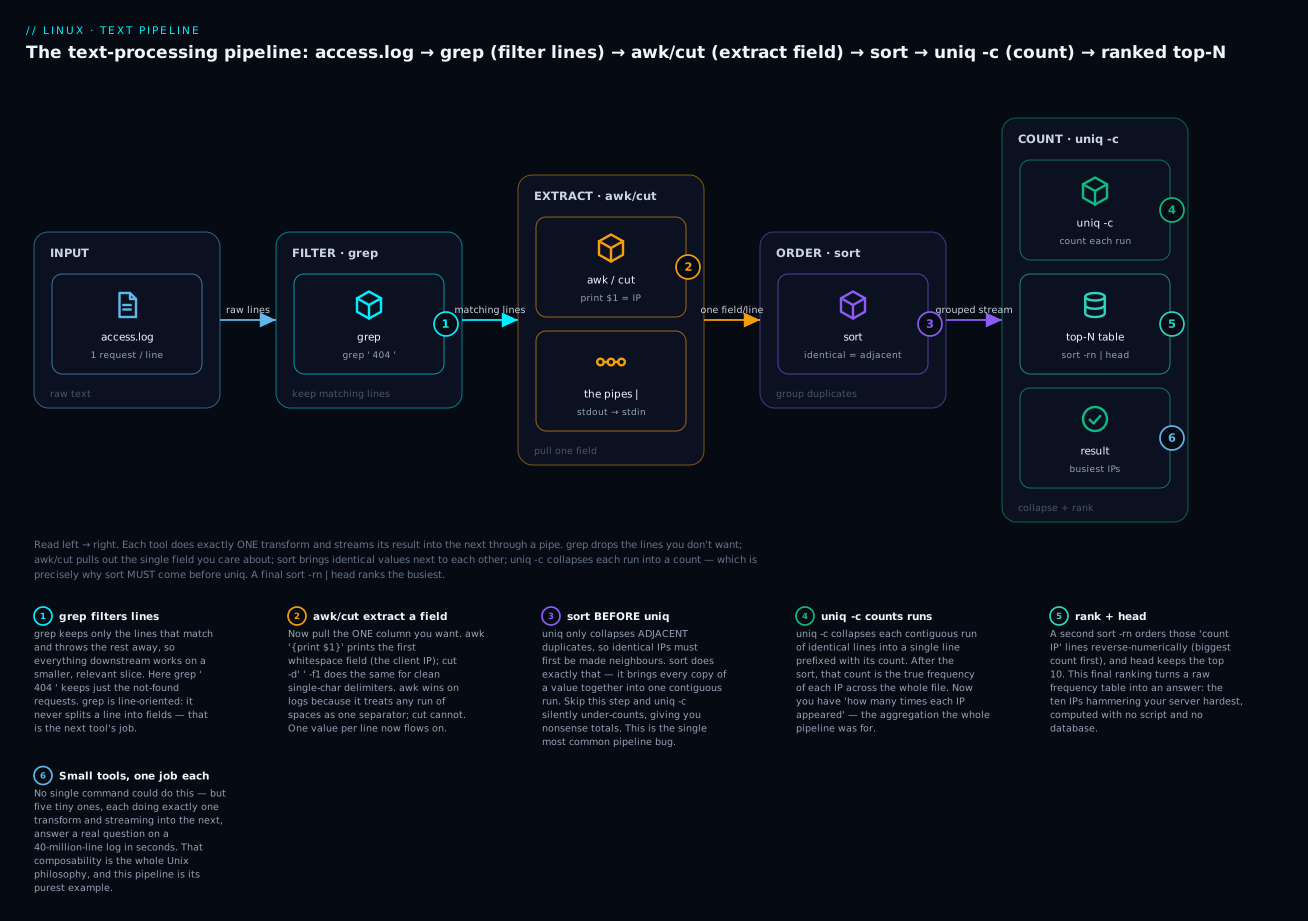
The badge worth tattooing on your memory is number 3: sort before uniq. uniq only collapses adjacent duplicates, so without the sort the counts are silently wrong — the single most common bug in the single most common pipeline. Two variations you will actually type:
# Same result with cut instead of awk (single-space delimiter works here)
cut -d' ' -f1 access.log | sort | uniq -c | sort -rn | head

# Top 5 request PATHS instead of IPs — just change the extracted field ($7)
awk '{ print $7 }' access.log | sort | uniq -c | sort -rn | head -5
Web access logs are exactly the kind of data you meet again when you start centralising and rotating logs; how those logs are produced, rotated, and read live in the sibling lesson Logging: journald, rsyslog & logrotate. And when you just want to page through a file rather than transform it, less and friends from Viewing & Editing Text: cat, less, nano, vim are the right tools — text processing and text viewing are complementary skills.
Hands-on lab
This lab is fully self-contained: it builds its own sample data with heredocs, so you can run it on any Linux VM, WSL, or container without downloading anything. Work top to bottom; each step says what you should see and what just happened.
Step 1 — Build the sample access log.
cat > access.log <<'EOF'
203.0.113.7 - - [09/Jul/2026:06:14:02 +0000] "GET /index.html HTTP/1.1" 200 1043 "-" "Mozilla/5.0"
198.51.100.23 - - [09/Jul/2026:06:14:05 +0000] "GET /login HTTP/1.1" 200 512 "-" "curl/8.5.0"
203.0.113.7 - - [09/Jul/2026:06:14:09 +0000] "GET /style.css HTTP/1.1" 200 8734 "-" "Mozilla/5.0"
203.0.113.42 - - [09/Jul/2026:06:15:11 +0000] "POST /api/login HTTP/1.1" 401 91 "-" "Mozilla/5.0"
203.0.113.7 - - [09/Jul/2026:06:15:44 +0000] "GET /favicon.ico HTTP/1.1" 404 209 "-" "Mozilla/5.0"
192.0.2.15 - - [09/Jul/2026:06:16:02 +0000] "GET /robots.txt HTTP/1.1" 404 209 "-" "Googlebot/2.1"
198.51.100.23 - - [09/Jul/2026:06:16:20 +0000] "GET /dashboard HTTP/1.1" 200 4096 "-" "curl/8.5.0"
203.0.113.7 - - [09/Jul/2026:06:17:01 +0000] "GET /api/data HTTP/1.1" 500 0 "-" "Mozilla/5.0"
203.0.113.42 - - [09/Jul/2026:06:17:33 +0000] "GET /old-page HTTP/1.1" 301 178 "-" "Mozilla/5.0"
198.51.100.23 - - [09/Jul/2026:06:18:05 +0000] "GET /login HTTP/1.1" 200 512 "-" "curl/8.5.0"
203.0.113.7 - - [09/Jul/2026:06:19:52 +0000] "GET /index.html HTTP/1.1" 200 1043 "-" "Mozilla/5.0"
198.51.100.9 - - [09/Jul/2026:06:20:14 +0000] "GET /admin HTTP/1.1" 403 162 "-" "Mozilla/5.0"
EOF
wc -l access.log
You should see 12 access.log. What just happened: the quoted heredoc <<'EOF' wrote 12 log lines verbatim (the quotes stop the shell touching the $ and " inside).
Step 2 — Filter with grep. Find every client error (4xx) request, with line numbers:
grep -nE ' 4[0-9]{2} ' access.log
You should see four lines (the 401, the two 404s, and the 403), each prefixed with its line number. What just happened: -E enabled extended regex, the spaces around 4[0-9]{2} anchored the match to the status field (so the byte count 4096 on another line is not matched), and -n added line numbers.
Step 3 — Count matches, and prove -c counts lines.
grep -c 200 access.log      # lines containing "200"
grep -o 200 access.log | wc -l   # occurrences of "200"
Both print 6 here (each 200 appears once per line). What just happened: you confirmed -c = matching lines, while -o | wc -l = total occurrences — identical only when there is at most one match per line.
Step 4 — Extract a field two ways. Pull the client IP with both cut and awk:
cut -d' ' -f1 access.log | head -3
awk '{ print $1 }' access.log | head -3
Both print the first three IPs. What just happened: here they agree because a single space separates the IP from the next field. On the padded columns of ps aux, only awk would be reliable.
Step 5 — The top-talkers pipeline.
awk '{ print $1 }' access.log | sort | uniq -c | sort -rn
      5 203.0.113.7
      3 198.51.100.23
      2 203.0.113.42
      1 198.51.100.9
      1 192.0.2.15
What just happened: extract IP → sort (group) → uniq -c (count) → sort -rn (rank). 203.0.113.7 is your top talker with 5 hits.
Step 6 — Aggregate with awk. Total bytes served, and a status-code histogram:
awk '{ bytes += $10 } END { print "total bytes:", bytes }' access.log
awk '{ code[$9]++ } END { for (c in code) print code[c], c }' access.log | sort -rn
You should see total bytes: 16789 and a ranked count of status codes (6 × 200, 2 × 404, …). What just happened: bytes += $10 accumulated a running sum printed in END; the array code[$9]++ grouped and counted by status.
Step 7 — Build a CSV and group by key.
cat > people.csv <<'EOF'
name,department,salary,city
Asha,Engineering,1450000,Bengaluru
Ravi,Engineering,1275000,Pune
Meera,Sales,980000,Mumbai
Karthik,Sales,1120000,Bengaluru
Divya,Marketing,890000,Chennai
Farhan,Engineering,1600000,Bengaluru
EOF
awk -F, 'NR>1 { sum[$2] += $3; n[$2]++ } END { for (d in sum) printf "%-12s total=%d  avg=%d\n", d, sum[d], sum[d]/n[d] }' people.csv
Engineering  total=4325000  avg=1441666
Sales        total=2100000  avg=1050000
Marketing    total=890000  avg=890000
What just happened: -F, split on commas, NR>1 skipped the header, and two arrays keyed by department tracked the sum and count so END could print totals and averages — a GROUP BY in one line.
Step 8 — Edit a stream with sed (safely). Redact the last octet of every IP for sharing, previewing first, then in place with a backup:
# Preview only — nothing is written yet
sed -E 's/([0-9]+\.[0-9]+\.[0-9]+)\.[0-9]+/\1.xxx/' access.log | head -3
# Now do it in place, keeping access.log.bak as a safety net
sed -i.bak -E 's/([0-9]+\.[0-9]+\.[0-9]+)\.[0-9]+/\1.xxx/' access.log
head -1 access.log
The first IP becomes 203.0.113.xxx. What just happened: the group \1 captured the first three octets and the replacement dropped the fourth; -i.bak overwrote the file but left the original at access.log.bak.
Step 9 — Clean up.
rm -f access.log access.log.bak people.csv
What just happened: the lab created only these three files; removing them returns your directory to how it started.
Common mistakes and troubleshooting
| Symptom | Cause | Fix |
|---|---|---|
uniq shows duplicates it should have merged |
Input wasn’t sorted — uniq only collapses adjacent lines |
Always sort before uniq: sort f | uniq -c |
grep -c returns a smaller number than expected |
-c counts matching lines, not occurrences |
Count occurrences with grep -o pat f | wc -l |
grep '1+' matches literal 1+, not “one or more 1s” |
grep defaults to BRE, where + is literal |
Use grep -E '1+' (ERE) or escape: grep '1\+' |
cut -d' ' returns empty fields on ps/ls -l |
cut uses a single fixed delimiter; columns are space-padded |
Use awk '{print $2}' (runs of spaces = one separator) |
sort puts 100 before 9 |
Default sort is lexical (dictionary), not numeric | Add -n: sort -n (or -h for 2K/3M sizes) |
sed -i '' errors on Linux / sed -i.bak errors on macOS |
GNU vs BSD sed disagree on the -i backup argument |
Linux: sed -i.bak '…'. macOS/BSD: sed -i '' '…' |
tr 'a-z' 'A-Z' file prints an error |
tr reads stdin only — no filename argument |
Redirect: tr 'a-z' 'A-Z' < file |
cmd file > file empties the file |
Shell truncates > file before cmd reads it |
Write to a temp file, or use sed -i / sponge |
[a-z] matches accented/uppercase letters unexpectedly |
Locale collation reorders the range | Use LC_ALL=C or POSIX classes [[:lower:]] |
awk $10 is wrong on real logs with spaces in the user-agent |
Quoted fields contain spaces, breaking naive field-splitting | Match on stable fields, or use a real log parser |
The three gotchas that bite hardest deserve prose, because they are the ones that cost hours.
The sort-before-uniq law. This is worth stating twice because it is the text-processing rookie error. uniq has a one-line memory: it compares each line only to the one immediately before it. Feed it apple / banana / apple and it sees three different neighbours and merges nothing. Every correct frequency count therefore begins with sort to make identical lines adjacent. If your counts ever look suspiciously fragmented, this is almost always why. (The one exception: awk’s !seen[$0]++, which builds a hash and so needs no sort — but plain uniq always does.)
Regex dialect mismatch. You write a pattern with + or (…) or |, it works in one tool and mysteriously fails in another. The cause is always BRE vs ERE. grep and sed default to basic regex, where + ? { } ( ) | are literal characters; awk, grep -E, and sed -E use extended regex, where those are operators. When a pattern “doesn’t work”, your first diagnostic move is: which dialect am I in, and does this tool need -E? The pragmatic default is to always use -E for anything non-trivial so the metacharacters mean what you expect.
Shell quoting vs regex. Your regex contains *, $, [, \, | — characters the shell also treats specially, and it will mangle them before grep or sed ever sees them. The fix is muscle memory: always wrap a regex in single quotes. grep '^root.*bash$' file protects the whole pattern; without quotes the shell expands * as a glob and $ as a variable, and your pattern silently becomes something else. Single quotes pass the pattern through untouched — make it a reflex.
Cheat-sheet
grep — find lines:
| Command | Does |
|---|---|
grep -i pat f |
case-insensitive |
grep -v pat f |
invert (non-matching lines) |
grep -c pat f |
count matching lines |
grep -n pat f |
show line numbers |
grep -w pat f |
match whole word only |
grep -o pat f |
print only the match |
grep -rl pat dir/ |
list files containing pat |
grep -E 'a|b' f |
extended regex (alternation) |
grep -A2 -B2 pat f |
2 lines of context each side |
grep -q pat f && … |
quiet; branch on exit status |
sed — edit a stream:
| Command | Does |
|---|---|
sed 's/a/b/' f |
replace first a per line |
sed 's/a/b/g' f |
replace all a per line |
sed -n '5,10p' f |
print only lines 5-10 |
sed '/^#/d' f |
delete comment lines |
sed '/^$/d' f |
delete blank lines |
sed -i.bak 's/a/b/g' f |
in place, keep .bak |
sed -E 's/(x)(y)/\2\1/' f |
swap two groups (ERE) |
awk — fields & math:
| Command | Does |
|---|---|
awk '{print $1}' |
first field |
awk '{print $NF}' |
last field |
awk -F: '{print $3}' |
field 3, colon-delimited |
awk '$9==404' |
rows where field 9 is 404 |
awk '{s+=$10} END{print s}' |
sum a column |
awk '{c[$1]++} END{for(k in c)print c[k],k}' |
count by key |
awk 'NR==1' |
first line only |
awk 'END{print NR}' |
line count |
awk '!seen[$0]++' |
dedupe, keep order |
cut / sort / uniq / tr / wc:
| Command | Does |
|---|---|
cut -d: -f1,7 f |
fields 1 and 7, :-delimited |
cut -c1-8 f |
characters 1-8 |
sort -n f / sort -rn f |
numeric / reverse-numeric |
sort -t: -k3,3n f |
by field 3 numerically |
sort -u f |
sort and dedupe |
sort f | uniq -c |
count occurrences of each line |
sort f | uniq -d |
show only duplicated lines |
tr 'a-z' 'A-Z' < f |
uppercase |
tr -d '\r' < f |
strip carriage returns |
tr -s ' ' < f |
squeeze repeated spaces |
wc -l < f |
count lines (number only) |
Regex quick reference:
| Pattern | Matches |
|---|---|
^abc / abc$ |
line starts / ends with abc |
. |
any single char |
[0-9] / [[:digit:]] |
a digit |
[^0-9] |
a non-digit |
a* / a+ / a? |
0+ / 1+ / 0-or-1 a (ERE for + ?) |
a{2,4} |
2 to 4 a (ERE, or \{2,4\} in BRE) |
(cat|dog) |
cat or dog (ERE; in BRE escape the parens and pipe) |
\bword\b |
whole word (GNU/PCRE) |
Interview and exam questions
Q: Why must you usually sort before uniq?
A: Because uniq only collapses adjacent duplicate lines — it compares each line to the one immediately before it, not to the whole file. Sorting brings all identical lines together into one contiguous run so uniq (typically uniq -c) can count or dedupe them correctly. Without the sort, non-adjacent duplicates are missed and counts come out fragmented.
Q: What is the difference between BRE and ERE, and how do you switch to ERE?
A: In Basic Regular Expressions (the default for grep and sed), the metacharacters + ? { } ( ) | are treated literally and must be backslash-escaped to act as operators. In Extended Regular Expressions they are operators by default. Switch to ERE with grep -E / sed -E (or awk, which is always ERE). So grep '1\+' and grep -E '1+' are equivalent.
Q: grep -c returns 4, but you know the word appears 7 times. Explain.
A: -c counts matching lines, not occurrences. If some lines contain the word more than once, the line count is lower than the occurrence count. To count occurrences, use grep -o pattern file | wc -l, which prints each match on its own line and then counts lines.
Q: When does cut fail and awk succeed for extracting a column?
A: cut -d' ' uses a single fixed delimiter, so on output with variable-width whitespace (like ps aux or ls -l, whose columns are space-padded) it returns empty or wrong fields. awk treats any run of whitespace as one separator, so awk '{print $2}' reliably grabs the second column. cut is right only for clean single-character delimiters like : or a simple ,.
Q: Write a one-liner for the top 10 IP addresses in an access log.
A: awk '{print $1}' access.log | sort | uniq -c | sort -rn | head — extract the IP field, sort to group, uniq -c to count, sort -rn to rank by count descending, head for the top 10.
Q: How do you edit a file in place with sed, and why is -i.bak recommended?
A: sed -i 's/old/new/g' file overwrites the file directly. -i.bak (GNU) writes a backup copy to file.bak first, so a bad regex is recoverable — -i alone has no undo. Best practice is to run the substitution without -i first to preview it, then add -i.bak. Note macOS/BSD requires -i '' for no backup.
Q: What do NR and NF mean in awk?
A: NR is the current record (line) number, counting from 1 across the whole input. NF is the number of fields on the current line. So awk 'END{print NR}' prints the total line count, and awk '{print $NF}' prints the last field of each line regardless of how many fields there are.
Q: How do you count how many users on the system use each login shell?
A: awk -F: '{print $7}' /etc/passwd | sort | uniq -c | sort -rn — extract field 7 (the shell) with a colon delimiter, then the standard count-and-rank idiom. Or in pure awk: awk -F: '{c[$7]++} END{for(s in c) print c[s], s}' /etc/passwd.
Q: In a script, how do you check whether a pattern exists in a file without printing anything?
A: grep -q pattern file — -q (quiet) suppresses output and just sets the exit status: 0 if matched, 1 if not. Use it directly in a conditional: if grep -q pattern file; then …; fi.
Q (RHCSA-style): From /etc/passwd, list the usernames of all normal (non-system) accounts — UID 1000 or greater.
A: awk -F: '$3 >= 1000 { print $1 }' /etc/passwd. Note this also catches nobody (UID 65534); to exclude it, add an upper bound: awk -F: '$3 >= 1000 && $3 < 65534 { print $1 }' /etc/passwd.
Q (LFCS-style): Replace every occurrence of http:// with https:// across a config file, keeping a backup.
A: sed -i.bak 's|http://|https://|g' file.conf. Using | as the s delimiter (instead of /) avoids escaping the slashes in the URLs; g makes it global on each line; -i.bak edits in place and leaves file.conf.bak.
Q: What does awk '!seen[$0]++' do, and how is it better than sort -u?
A: It removes duplicate lines while preserving the original order. seen[$0]++ returns the line’s current count (0 the first time, so !0 is true and it prints; non-zero afterwards, so it is skipped). Unlike sort -u, it doesn’t reorder the file and doesn’t require sorting first.
Key takeaways
- The Unix philosophy is small tools, one job each, joined by pipes — filter with
grep, extract withcut/awk, reshape withsed/tr, count withsort | uniq -c. Master those four verbs and you can answer almost any question about text. grepfinds lines,sededits lines,awkunderstands fields,cutgrabs simple columns. Choosing the right tool per stage is most of the skill;grep -q’s exit status is what makes it a scripting building block.- Regular expressions come in three dialects — BRE (grep/sed default), ERE (
-E, awk), PCRE (grep -P). The+ ? { } ( ) |metacharacters are literal in BRE and operators in ERE; default to-Eand always single-quote your pattern so the shell can’t mangle it. uniqonly collapses adjacent duplicates, sosortmust come first — the single most common text-processing bug.sortdefaults to lexical order; add-nfor numbers,-hfor human sizes,-k/-tfor a specific field.awkis the one that does fields and arithmetic:$1..$NF,NR/NF,-F,BEGIN/END, and associative arrays forGROUP BY-style aggregation like summing a column or counting by key.sed -iis destructive — preview the substitution first, use-i.bakfor a safety copy, and remember GNU wants-i.bakwhile BSD/macOS wants-i ''.- The top-talkers pipeline —
awk '{print $1}' log | sort | uniq -c | sort -rn | head— is the template for a thousand real questions: change the extracted field, keep the sort-uniq-sort spine.