Here is the whole idea, before any YAML.
ruff check .          # lint + format
pytest -q             # tests
python -m build       # wheel + sdist
That is a CI pipeline. Not a metaphor for one — literally the commands your Continuous Integration server will run, in that order, on every push. The .yml file you will spend this lesson writing does exactly one important thing: it runs those three commands on a clean machine that is not yours, and refuses the merge if any of them exits non-zero. Everything else — matrices, caches, artifacts, secrets — is plumbing around that sentence.
This reframes the whole subject and kills most of the fear around it. CI is not a separate skill you learn after Python; it is your Python tooling, moved off your laptop. If ruff check . is green in your terminal, it will be green in CI. If it is red on your laptop, CI is not going to save you — it is going to tell everyone. So the fastest way to a green pipeline is to run the pipeline locally first, which is the one principle this entire lesson hangs on.
Why this matters
Three things break on a team without CI, and they break in a specific order.
First, integration. Your code works. Their code works. Merged, it does not — because your rename touched a function eleven files away, or your dependency bump changed a default, and nobody ran the whole suite after the merge. “Continuous Integration” is named for this exact failure: the fix is to integrate continuously, running the full test suite on every proposed change before it lands, on a machine with a clean checkout so “works on my machine” cannot hide. The merge button goes grey until the suite is green. That is the product.
Second, releases become terrifying, so they become rare, so they become huge, so they become even more terrifying. A release you do by hand — bump the version, build the wheel, remember the twine incantation, hope you did not skip a step — is a release you do at 2 a.m. once a quarter with your heart rate up. CD (Continuous Delivery) makes the release boring: the same script every time, triggered by a tag, with no human remembering anything. Boring is the goal. Boring is safe.
Third, quality erodes silently. Without an enforced gate, “we lint our code” means “some of us lint some of our code sometimes.” Standards that are not mechanically enforced are suggestions. A CI gate that fails the build on an unformatted file is worth more than a hundred code-review comments asking people to please run the formatter, because it never gets tired and it never approves anyway.
Notice what CI/CD is not. It is not a tool that finds bugs you did not write a test for — it runs your tests, and a test suite only catches the bugs you thought of. It is not a substitute for running things locally — a pipeline you cannot reproduce on your laptop is a pipeline you cannot debug. And “green” does not mean “correct”; it means “every gate we configured returned zero.” Half of this lesson is about the gap between those two, because that gap is where the expensive mistakes live: the suite that ran zero tests and passed, the wheel that built successfully and was empty, the gate that failed and reported success anyway.
The distinction to hold onto: CI is verification, CD is delivery. CI answers “is this change safe to merge?” CD answers “ship the thing we just verified, the same way every time.” You want both, and you want them to be nothing more exotic than your own commands, pinned and repeatable, run somewhere clean.
The pipeline: your commands on a clean box
A Python pipeline is a sequence of stages, each one a gate. A gate runs a command; if the command exits 0, the pipeline proceeds; if it exits non-zero, the pipeline stops (or is marked failed) and, on a pull request, the merge is blocked. That is the entire control-flow model, and it is worth memorising because every one of the three tools in this lesson implements exactly it, in different syntax.
| Stage | Question it answers | Typical tool | Fails the build when… | Speed |
|---|---|---|---|---|
| Lint / format | Is the code clean and consistent? | ruff, black, flake8 |
A style/lint rule is violated | ~1 s |
| Type-check | Do the types line up? | mypy, pyright |
A type error is found | 1–20 s |
| Test | Does it still behave? | pytest (+ coverage) |
Any test fails, or coverage < floor | 1 s – min |
| Build | Does it package? | python -m build |
The wheel/sdist won’t build | 1–10 s |
| Publish | Ship the artifact | twine, OIDC |
Upload/auth fails, version exists | 2–10 s |
| Deploy | Run it somewhere | docker, cloud CLI |
The rollout fails its health check | seconds – min |
Read that table top to bottom and you have read the whole pipeline. The order is not arbitrary — it is cheapest-and-most-likely-to-fail first. Linting takes a second and catches the most common mistakes, so it goes first; there is no point spinning up a ten-minute test matrix to then reject the change because someone left an unused import. This is the fail-fast principle, and it is the single most important design decision in a pipeline: order your gates cheap → expensive so the fast ones reject bad changes before the slow ones start.
Local-first is not a suggestion
The heart of it: everything CI runs, you must be able to run locally, first. CI is a clean-room re-run, not a different process. Here is the mapping you will build a habit around:
| You run locally… | CI runs… (identical) | Catches |
|---|---|---|
ruff check . |
ruff check . |
Lint errors |
ruff format --check . |
ruff format --check . |
Unformatted code |
mypy src |
mypy src |
Type errors |
pytest -q |
pytest -q |
Behaviour regressions |
python -m build |
python -m build |
Packaging breakage |
twine check dist/* |
twine check dist/* |
Broken package metadata |
The column on the right is the column on the left. When CI is red and your laptop is green, the difference is never magic — it is the clean box: a dependency you have installed but did not declare, a file you did not commit, an environment variable set in your shell. That is precisely the class of bug CI exists to catch, and the fix is always to make your machine look more like the clean box (fresh venv, pinned deps), never to make CI look more like your machine.
Below is the pipeline as a picture: five stages, each a gate, flowing left to right, with the two places things go quietly, dangerously wrong marked in red.
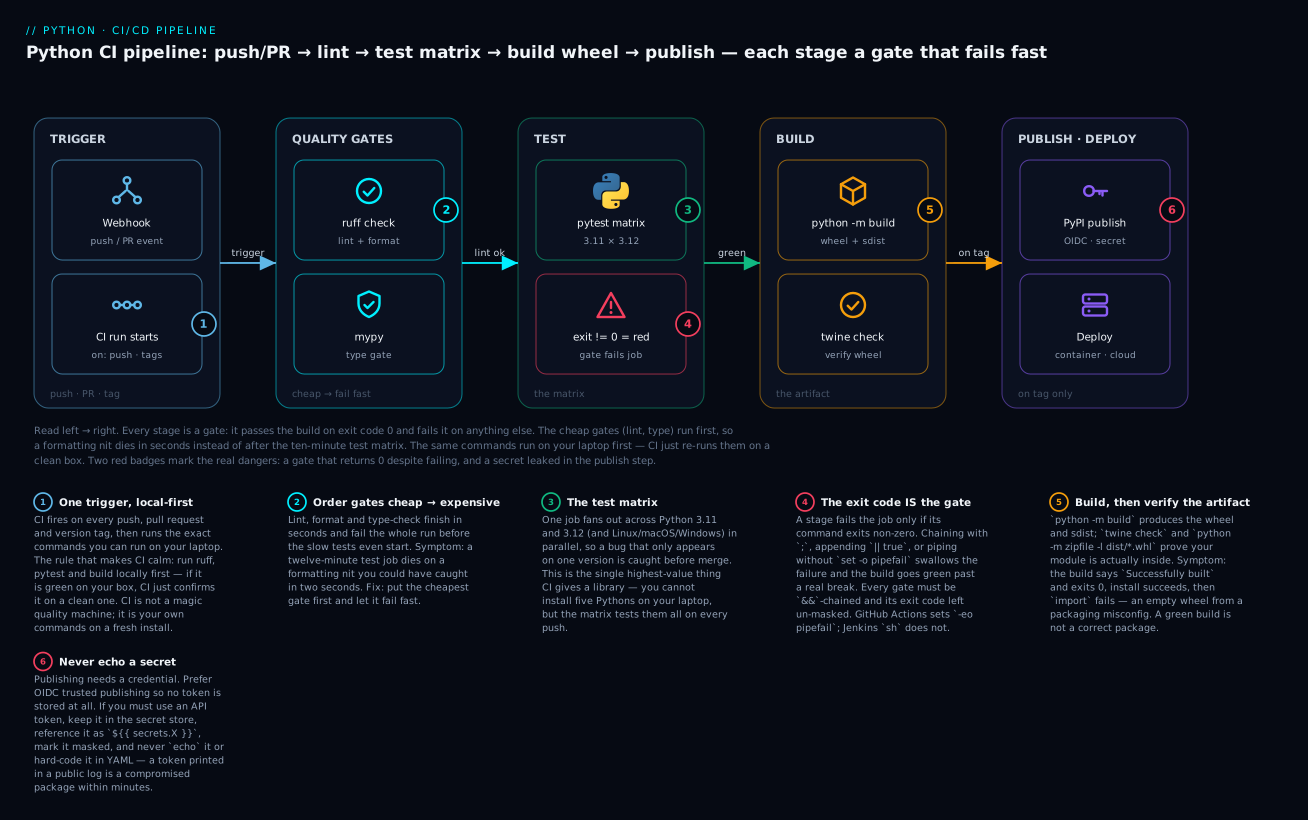
The two red badges are the lessons people learn the hard way. Badge 4: a stage only fails the job if its command exits non-zero, and it is alarmingly easy to write a gate that fails and reports success anyway. Badge 6: the publish step handles a secret, and a secret printed into a log is a secret leaked to everyone who can read the log. We will trigger both on purpose later.
The quality gates, and the exit code that enforces them
Let’s build the real thing. Everything from here uses one tiny package — pipekit, a single function that turns a title into a URL slug — laid out the way a real Python project is structured:
pipekit/
├── pyproject.toml
├── README.md
├── src/
│   └── pipekit/
│       ├── __init__.py
│       └── slug.py
└── tests/
    └── test_slug.py
# src/pipekit/slug.py
"""Turn a title into a URL-safe slug."""

import re

_NON_WORD = re.compile(r"[^a-z0-9]+")


def slugify(text: str, max_len: int = 60) -> str:
    """Lowercase, collapse non-word runs to single hyphens, trim to max_len."""
    if not isinstance(text, str):
        raise TypeError(f"text must be str, got {type(text).__name__}")
    if max_len <= 0:
        raise ValueError(f"max_len must be positive, got {max_len}")
    slug = _NON_WORD.sub("-", text.strip().lower()).strip("-")
    return slug[:max_len].rstrip("-")
Gate 1 — linting and formatting
Linting checks your code for likely mistakes and style violations without running it: unused imports, undefined names, shadowed builtins, mutable default arguments. Formatting is narrower and more absolute — it rewrites whitespace, quotes and line breaks to one canonical style so nobody argues about it in review. Historically these were four tools (flake8 for lint, black for format, isort for import order, pyupgrade for modernisation); today one Rust-based tool, ruff, does all four, fast enough that “lint on every save” is realistic.
| Tool | Role | Speed | Status in 2026 |
|---|---|---|---|
| ruff | Lint and format (Flake8 + isort + pyupgrade + Black-compatible) | Very fast (Rust) | The default; what new projects use |
flake8 |
Lint only (pyflakes + pycodestyle + McCabe) | Moderate | Legacy; ruff is a superset |
black |
Format only, uncompromising | Moderate | Widely used; ruff format is compatible |
isort |
Sort imports | Fast | Subsumed by ruff’s I rules |
pylint |
Deep lint, more opinions, slower | Slow | Still used for its extra checks |
The config lives in pyproject.toml — one file, versioned, so every developer and CI use the identical rules:
[tool.ruff]
line-length = 100
target-version = "py311"

[tool.ruff.lint]
select = ["E", "F", "I", "UP", "B"]   # pycodestyle, pyflakes, isort, pyupgrade, bugbear
Run the gate on clean code and it says so, and — this is the part CI cares about — it exits 0:
ruff check .
All checks passed!
Now introduce two real mistakes — an unused import os and a variable assigned but never used — and watch the gate do its job:
$ ruff check .
F401 [*] `os` imported but unused
 --> src/pipekit/slug.py:3:8
  |
1 | """Turn a title into a URL-safe slug."""
2 |
3 | import os
  |        ^^
4 | import re
  |
help: Remove unused import: `os`

F841 Local variable `default` is assigned to but never used
  --> src/pipekit/slug.py:10:5
   |
 9 | def slugify(text: str, max_len: int = 60) -> str:
10 |     default = "untitled"
   |     ^^^^^^^
help: Remove assignment to unused variable `default`

Found 2 errors.
[*] 1 fixable with the `--fix` option (1 hidden fix can be enabled with the `--unsafe-fixes` option).
Two named rules (F401, F841), the exact lines, a suggested fix — and the crucial detail for CI, invisible above but decisive: the process exited 1. That non-zero exit is what fails the pipeline. Run echo $? after it and you get 1; after the clean run you get 0. The gate is nothing but that number.
Formatting is a separate, even simpler gate. In CI you never reformat (CI should not edit your code); you check whether it would reformat, and fail if it would:
$ ruff format --check .
Would reformat: src/pipekit/slug.py
1 file would be reformatted
Exit 1 again. The fix is ruff format . locally, commit, push. The gate exists so that “please run the formatter” is enforced by a machine, not nagged by a human.
Gate 2 — type-checking
Python is dynamically typed, but type hints let a static checker prove whole categories of bug absent before the code runs. mypy src reads your annotations and flags a str passed where an int is required, a possibly-None value dereferenced, a function that forgets to return. It is a gate like any other: clean → exit 0, error → exit 1. It is optional (many projects add it later) but high-value on a shared codebase, and it is genuinely fast to add: annotate your public functions, run mypy, fix what it finds, wire it in.
Gate 3 — tests and coverage
The heart of the pipeline. pytest runs your suite; exit 0 means every test passed. Our five tests, green:
$ pytest -q
.....                                                                    [100%]
5 passed in 0.01s
Now a test with a wrong expectation — a beginner assuming slugify preserves case — and the gate turns red with pytest’s assertion introspection showing exactly what differed:
$ pytest -q
.....F                                                                   [100%]
=================================== FAILURES ===================================
__________________________ test_preserves_case_WRONG ___________________________

    def test_preserves_case_WRONG():
        # A beginner's wrong expectation: slugify lowercases, it does not keep case.
>       assert slugify("Hello World") == "Hello-World"
E       AssertionError: assert 'hello-world' == 'Hello-World'
E         - Hello-World
E         ? ^     ^
E         + hello-world
E         ? ^     ^

tests/test_slug_wrong.py:6: AssertionError
=========================== short test summary info ============================
FAILED tests/test_slug_wrong.py::test_preserves_case_WRONG - AssertionError: ...
1 failed, 5 passed in 0.01s
1 failed — and the process exits 1. That is the entire mechanism by which a bad test blocks a merge: pytest returns non-zero, the CI step fails, the job fails, the merge button greys out.
pytest’s exit codes carry more information than pass/fail, and one of them is a silent killer you must guard against:
| Exit | Meaning | The trap |
|---|---|---|
0 |
All tests passed | |
1 |
Tests were collected and some failed | The normal red |
2 |
Interrupted (Ctrl-C) | |
3 |
Internal error | |
4 |
Usage / command-line error | A typo’d flag |
5 |
No tests were collected | Looks like nothing broke — but nothing ran |
Exit 5 is the one that bites. Point pytest at the wrong directory, or misname every test file, and it collects zero tests and exits 5:
$ pytest tests/ -q
no tests ran in 0.00s
$ echo $?
5
A naive CI script that only reacts to exit 1 will treat this as “not a failure” and the pipeline goes green having tested nothing. The fix is to treat 5 as a failure (most CI does by default now, but verify), or assert a minimum test count. “CI is green but no tests ran” is one of the most dangerous states a project can be in, precisely because it looks identical to success.
Coverage measures which lines ran. It ties directly to the testing lesson’s central warning: coverage tells you what executed, never whether your assertions were right. In CI it earns its keep as a floor — fail the build if coverage drops below a threshold, so nobody merges a feature with no tests:
$ pytest -q --cov=pipekit --cov-report=term-missing --cov-fail-under=90
Name                      Stmts   Miss  Cover   Missing
-------------------------------------------------------
src/pipekit/__init__.py       3      0   100%
src/pipekit/slug.py           9      1    89%   19
-------------------------------------------------------
TOTAL                        12      1    92%
Required test coverage of 90% reached. Total coverage: 91.67%
5 passed in 0.02s
That exits 0. Raise the bar past what we have and the same command fails the build:
$ pytest -q --cov=pipekit --cov-fail-under=100
FAIL Required test coverage of 100% not reached. Total coverage: 91.67%
Exit 1. ⚠️ Set the floor to protect against regression (say 85–90%), never to 100. A 100% target does not produce correct code; it produces tests written to touch lines, and a culture of # pragma: no cover. The Missing column — here, line 19, the max_len <= 0 guard we never test — is the useful part; the percentage is not.
The exit code IS the gate — and it is easy to break
Every gate above reduces to one fact: the command exited non-zero, so the job failed. Which means the most dangerous bug in all of CI is a gate that fails but reports success — exits 0 when it should have exited 1. The build goes green over a real failure, and nobody looks, because green is trust. Here are the four ways it happens, each one runnable in your own shell right now:
# A. Chained with ';' — the exit code is the LAST command's. Failure hidden.
$ ruff check . ; pytest -q          # if ruff fails, pytest's 0 masks it
$ false ; echo "ran anyway" ; echo $?
ran anyway
0

# B. Chained with '&&' — stops at the first failure. CORRECT.
$ false && echo "skipped" ; echo $?
1

# C. The '|| true' footgun — pins the exit to 0 forever. ALWAYS green.
$ pytest -q || true ; echo $?
0

# D. A pipe without pipefail — the pipe's exit is the LAST stage's.
$ false | tee build.log ; echo $?
0
$ set -o pipefail ; false | tee build.log ; echo $?
1
| Pattern | Exit code | Effect on the job | Verdict |
|---|---|---|---|
gate_a ; gate_b |
Last command’s | gate_a’s failure is hidden |
✗ never chain gates with ; |
gate_a && gate_b |
First failure’s | Fails fast, correctly | ✓ or use separate steps |
gate || true |
Always 0 |
Failure erased | ✗ the classic “why is it always green” |
cmd | tee log (no pipefail) |
Right side’s | Left failure hidden | ✗ add set -o pipefail |
set -euo pipefail then gates |
First failure’s | Fails fast on any error | ✓ the safe default |
There is a per-tool nuance here that matters: GitHub Actions runs multi-line run: blocks with bash --noprofile --norc -eo pipefail by default, so set -e and pipefail are already on — a failing line fails the step. Jenkins sh and some GitLab shells do not, so the ;-chaining and pipe-masking traps are live there unless you add set -euo pipefail yourself. When in doubt, give each gate its own step: one command per step is the surest way to never mask an exit code.
GitHub Actions
GitHub Actions is where most Python projects meet CI, so it is the primary example. A workflow is a YAML file in .github/workflows/; GitHub runs it on the events you name. The vocabulary is small and worth learning exactly.
| Term | Is | Example |
|---|---|---|
| Workflow | One .yml file in .github/workflows/ |
ci.yml |
Event (on) |
What triggers the run | push, pull_request, schedule |
| Job | A group of steps on one runner | test, build, publish |
| Runner | The VM the job runs on | ubuntu-latest |
| Step | One unit of work in a job | “Run pytest” |
run |
A step that runs a shell command | run: pytest -q |
uses |
A step that runs a reusable action | uses: actions/checkout@v4 |
| Action | A packaged, versioned, shareable step | actions/setup-python |
| Matrix | Auto-expand a job over a list of values | python-version: [3.11, 3.12] |
| Artifact | A file uploaded from a run | dist/*.whl |
| Secret | An encrypted value, injected at runtime | ${{ secrets.PYPI_TOKEN }} |
The one distinction beginners trip on is uses vs run. run executes a shell command you wrote. uses pulls in a pre-built action — someone else’s packaged step — and the @v4 is a version pin. actions/checkout@v4 clones your repo (a job starts with an empty runner — nothing is checked out until you say so); actions/setup-python@v5 installs a specific Python and puts it on PATH. You will uses those two in almost every workflow and run everything else.
Here is the complete workflow for pipekit — the exact three-gate sequence from above, on a matrix of Python versions, with a build and a publish job. This is configuration, so it is validated to parse but not executed here; the commands inside it are the ones we ran for real above.
# .github/workflows/ci.yml
name: CI

on:
  push:
    branches: [main]
    tags: ["v*"]
  pull_request:

permissions:
  contents: read           # least privilege by default

concurrency:
  group: ci-${{ github.ref }}
  cancel-in-progress: true # a new push cancels the old run on the same ref

jobs:
  test:
    name: test (py${{ matrix.python-version }} · ${{ matrix.os }})
    runs-on: ${{ matrix.os }}
    strategy:
      fail-fast: false     # let every matrix leg finish, even if one fails
      matrix:
        os: [ubuntu-latest]
        python-version: ["3.11", "3.12"]
    steps:
      - uses: actions/checkout@v4
      - name: Set up Python ${{ matrix.python-version }}
        uses: actions/setup-python@v5
        with:
          python-version: ${{ matrix.python-version }}
          cache: pip        # cache the pip download directory
      - name: Install package + dev deps
        run: |
          python -m pip install --upgrade pip
          pip install -e ".[dev]"
      - name: Lint (ruff)
        run: ruff check .
      - name: Format check (ruff)
        run: ruff format --check .
      - name: Test (pytest + coverage)
        run: pytest -q --cov=pipekit --cov-report=term-missing --cov-fail-under=85

  build:
    needs: test            # only build if every test leg passed
    runs-on: ubuntu-latest
    steps:
      - uses: actions/checkout@v4
      - uses: actions/setup-python@v5
        with:
          python-version: "3.12"
      - name: Build wheel + sdist
        run: |
          python -m pip install --upgrade pip build twine
          python -m build
          twine check dist/*
      - uses: actions/upload-artifact@v4
        with:
          name: dist
          path: dist/*

  publish:
    needs: build
    if: github.event_name == 'push' && startsWith(github.ref, 'refs/tags/v')
    runs-on: ubuntu-latest
    environment: pypi
    permissions:
      id-token: write      # OIDC: mint a short-lived PyPI credential, no stored token
    steps:
      - uses: actions/download-artifact@v4
        with:
          name: dist
          path: dist/
      - name: Publish to PyPI (OIDC, no token)
        uses: pypa/gh-action-pypi-publish@release/v1
Several pieces earn their place, and each is a reusable idea:
actions/setup-python and caching. Setting up Python is one action; the useful options are few:
with: key |
Does | Note |
|---|---|---|
python-version |
Which Python to install | "3.12", or ${{ matrix.python-version }} |
cache |
Cache the package manager’s downloads | pip, poetry, pipenv |
cache-dependency-path |
What to hash for the cache key | e.g. pyproject.toml, requirements*.txt |
allow-prereleases |
Permit 3.14.0-rc etc. |
For testing against the next Python |
check-latest |
Always resolve the newest patch | Slightly slower, always current |
⚠️ Quote your versions: python-version: 3.10 is the number 3.1 in YAML (the trailing zero is dropped), so setup-python installs Python 3.1-ish — actually it fails to find it. Always "3.10" as a string. This is a real, common outage.
The matrix is the killer feature. These four lines —
strategy:
  matrix:
    python-version: ["3.11", "3.12"]
— tell GitHub to run the test job twice, once per version, in parallel, each on its own fresh runner. You cannot install five Pythons side by side on your laptop and run the suite against each; the matrix does it on every push, for free, and catches the bug that only appears on 3.11 or only on Windows before it reaches a user. Expand it and it takes the Cartesian product:
| Matrix | Jobs spawned |
|---|---|
python-version: ["3.11","3.12"] |
2 |
python-version: [...] × os: [ubuntu, macos, windows] |
2 × 3 = 6 |
+ include: [{extra leg}] |
6 + 1 = 7 |
+ exclude: [{one combo}] |
6 − 1 = 5 |
fail-fast: false |
all legs run; you see every failure, not just the first |
⚠️ The matrix trap: you write the matrix but then hardcode the version in the step — python-version: "3.12" instead of ${{ matrix.python-version }} — and now all legs test 3.12 while the report cheerfully shows “py3.11 ✓”. You are testing one version and believing you test two. Always interpolate ${{ matrix.python-version }} into setup-python; sanity-check with a python --version step.
needs builds a DAG. build has needs: test, so it runs only after every matrix leg of test passes; publish has needs: build. This is how you stage a pipeline: cheap gates gate the expensive ones, and a failure anywhere upstream stops everything downstream.
Secrets — the rule with no exceptions. A secret is an encrypted value you set in the repo settings and reference as ${{ secrets.NAME }}. GitHub injects it at runtime and masks it in logs (prints ***). Two absolute rules:
| Rule | Why | Wrong / Right |
|---|---|---|
| Never hard-code a secret in YAML | The YAML is in the repo; the token is now in git history forever | ✗ password: "pypi-AgEIcHl..." ✓ password: ${{ secrets.PYPI_TOKEN }} |
Never echo a secret |
Masking is best-effort; a transformed secret (base64, in a URL) is not masked | ✗ run: echo ${{ secrets.TOKEN }} ✓ pass it via env: and let the tool read it |
| Prefer OIDC over any stored token | No long-lived secret exists to leak | id-token: write + trusted publishing |
Scope permissions: down |
A leaked GITHUB_TOKEN with write is a supply-chain risk |
permissions: contents: read |
⚠️ The echo rule is subtle and costs people their PyPI accounts. GitHub masks the exact secret string, but echo ${TOKEN} | base64 prints an unmasked transformation, and a token in a URL like https://user:${TOKEN}@host may render before masking catches it. The safe habit: never print a secret, ever, for any reason, and if you must debug, print its length, not its value.
Validating the workflow
You cannot run GitHub Actions locally in full, but you can catch the most common break — a YAML syntax error — before you push. The cheapest check is that it parses at all:
python -c "import yaml, sys; yaml.safe_load(open('.github/workflows/ci.yml')); print('parses OK')"
parses OK
That confirms indentation and structure are legal YAML (the error class that fails a run at “startup” with a red X and no logs). ⚠️ It does not confirm the workflow is semantically valid — and there is a famous gotcha it reveals: under the YAML 1.1 rules PyYAML follows, the key on: parses as the boolean True, not the string "on". So safe_load gives you { 'name': ..., True: {...}, 'jobs': {...} }. It still parses; GitHub’s own parser handles on correctly. For real semantic linting (unknown keys, bad uses refs, invalid needs), use a dedicated linter like actionlint. Parse-checking catches indentation; actionlint catches meaning.
GitLab CI
GitLab bundles CI into the same product as the repo. The config is a single .gitlab-ci.yml at the repo root. The model is the same — stages that are gates — with different nouns.
| Keyword | Is | GitHub Actions analogue |
|---|---|---|
stages |
Ordered list of stage names | The job dependency order |
a top-level key (test:) |
A job | A job |
stage: |
Which stage this job belongs to | (implicit via needs) |
image |
The Docker image the job runs in | container: / the runner |
script |
The commands to run | run: |
before_script |
Setup run before script |
A setup step |
rules / only / except |
When the job runs | if: / on: |
cache |
Files kept between runs | actions/cache |
artifacts |
Files kept after the job | upload-artifact |
parallel: matrix |
Fan out over a variable list | strategy.matrix |
Jobs in the same stage run in parallel; stages run in sequence, and a failed stage stops the next — the same gate model, expressed as an ordered stages list. The full parallel to our GitHub workflow:
# .gitlab-ci.yml
stages: [lint, test, build, publish]

default:
  image: python:3.12-slim
  cache:
    key:
      files: [pyproject.toml]   # cache key = hash of deps
    paths: [.cache/pip]
  before_script:
    - python -m pip install --upgrade pip

variables:
  PIP_CACHE_DIR: "$CI_PROJECT_DIR/.cache/pip"

lint:
  stage: lint
  script:
    - pip install ruff
    - ruff check .
    - ruff format --check .

test:
  stage: test
  image: "python:$PY_VERSION"        # the matrix, GitLab-style
  parallel:
    matrix:
      - PY_VERSION: ["3.11", "3.12"]
  script:
    - pip install -e ".[dev]"
    - pytest -q --junitxml=report.xml --cov=pipekit --cov-report=term
  coverage: '/^TOTAL.+?(\d+\%)$/'    # scrape the % for the MR widget
  artifacts:
    when: always
    reports:
      junit: report.xml              # test results render in the MR

build:
  stage: build
  script:
    - pip install build twine
    - python -m build
    - twine check dist/*
  artifacts:
    paths: [dist/]
    expire_in: 1 week

publish:
  stage: publish
  rules:
    - if: '$CI_COMMIT_TAG =~ /^v/'    # tags starting with v only
  script:
    - pip install twine
    # PYPI_TOKEN is a masked, protected CI/CD variable — never echoed.
    - TWINE_USERNAME=__token__ TWINE_PASSWORD="$PYPI_TOKEN" twine upload dist/*
The moving parts that differ from GitHub:
- Everything runs in a container.
image: python:3.12-slimmeans the job starts inside that Docker image — closer to “a clean box” than GitHub’s VM, and trivially reproducible locally withdocker run python:3.12-slim. - The matrix is
parallel: matrix, and here it doubles as choosing the image:image: "python:$PY_VERSION"withPY_VERSION: ["3.11", "3.12"]runs the job inpython:3.11andpython:3.12. - Secrets are CI/CD variables, set in the project settings and marked Masked (hidden in logs) and Protected (available only on protected branches/tags).
$PYPI_TOKENabove is one; the same never-echo rule applies. rules:decides when a job runs.if: '$CI_COMMIT_TAG =~ /^v/'runs the publish job only for version tags — GitLab’s equivalent of the GitHubif:onrefs/tags/v.
GitLab exposes a large set of predefined variables you will reach for constantly:
| Variable | Is |
|---|---|
CI_COMMIT_TAG |
The tag name, if this run is for a tag |
CI_COMMIT_BRANCH |
The branch name |
CI_COMMIT_SHA |
The full commit SHA |
CI_PIPELINE_SOURCE |
push, merge_request_event, schedule, … |
CI_PROJECT_DIR |
The checkout path (use it for cache paths) |
CI_DEFAULT_BRANCH |
Usually main |
This .gitlab-ci.yml parses under the same check (yaml.safe_load) — GitLab additionally offers a “CI Lint” tool in the UI and an API endpoint that validates it semantically against GitLab’s schema, which is the GitLab equivalent of actionlint.
Jenkins
Jenkins is the veteran — self-hosted, plugin-driven, and still everywhere in enterprises with on-prem build fleets and compliance requirements that forbid cloud runners. Modern Jenkins is configured with a declarative Jenkinsfile (Groovy-based, committed to the repo), not the old click-through UI.
| Directive | Is | Analogue |
|---|---|---|
pipeline { } |
The whole pipeline | The workflow |
agent |
Where it runs (a node, a Docker image) | runs-on / image |
stages { } |
The ordered stages | jobs in order |
stage('X') { } |
One stage | A job |
steps { } |
Commands in a stage | steps |
sh '...' |
Run a shell command | run: / script: |
environment { } |
Env vars / bound credentials | env: |
when { } |
Conditional stage execution | if: / rules: |
post { } |
Run after (always/success/failure) | if: always() |
credentials('id') |
Bind a stored secret to a variable | secrets.X |
The same pipeline as a Jenkinsfile:
// Jenkinsfile
pipeline {
    agent { docker { image 'python:3.12-slim' } }

    options {
        timeout(time: 20, unit: 'MINUTES')
        disableConcurrentBuilds()
    }

    stages {
        stage('Setup') {
            steps {
                sh '''
                    python -m venv .venv
                    . .venv/bin/activate
                    pip install --upgrade pip
                    pip install -e ".[dev]"
                '''
            }
        }
        stage('Lint') {
            steps {
                sh '. .venv/bin/activate && ruff check . && ruff format --check .'
            }
        }
        stage('Test') {
            steps {
                sh '. .venv/bin/activate && pytest -q --junitxml=report.xml'
            }
            post {
                always { junit 'report.xml' }   // publish results even on failure
            }
        }
        stage('Build') {
            steps {
                sh '. .venv/bin/activate && pip install build && python -m build'
                archiveArtifacts artifacts: 'dist/*', fingerprint: true
            }
        }
        stage('Publish') {
            when { buildingTag() }              // only on a tag build
            environment {
                PYPI_TOKEN = credentials('pypi-token')   // bound from Jenkins' store
            }
            steps {
                sh '''
                    . .venv/bin/activate
                    pip install twine
                    TWINE_USERNAME=__token__ TWINE_PASSWORD="$PYPI_TOKEN" twine upload dist/*
                '''
            }
        }
    }

    post {
        always { cleanWs() }                    // wipe the workspace after
    }
}
What is genuinely different about Jenkins, and where its traps live:
- The runner is not ephemeral by default. GitHub and GitLab hand you a fresh machine per job; a Jenkins agent is often a long-lived node whose workspace persists between builds. That is why
post { always { cleanWs() } }matters — stale files from the last build are a real “passes on a clean checkout, fails on the agent” source. It is also why the matrix and caching are less turnkey: you manage the fleet. shdoes not run with-eby default, so the exit-code-masking traps from earlier are fully live. Chain gates with&&, or putset -euo pipefailat the top of eachshblock, or use separatestages.credentials('pypi-token')binds a secret from Jenkins’ credential store to an environment variable; Jenkins masks it in the console log. Same never-echo rule.agentcan be a label selecting a physical node, adocker { image }(as here, closest to the others), orkubernetes { }to spin up a pod per build. Matrix builds use amatrix { }block or the older parallel-stages pattern — more manual than a GitHubstrategy.matrix.
Jenkins is not YAML, so there is no yaml.safe_load check; you validate a Jenkinsfile with the Jenkins CLI’s declarative-linter or the “Replay” feature against a real server.
Cross-tool comparison
Same pipeline, three dialects. When you have internalised that they are the same five gates, moving between them is translation, not relearning.
| Dimension | GitHub Actions | GitLab CI | Jenkins |
|---|---|---|---|
| Config file | .github/workflows/*.yml |
.gitlab-ci.yml |
Jenkinsfile |
| Language | YAML | YAML | Groovy (declarative) |
| Hosting | SaaS (GitHub-hosted or self-hosted runners) | SaaS or self-managed | Self-hosted (you run the controller) |
| Runner | Ephemeral VM per job | Ephemeral container per job | Long-lived agent (or Docker/k8s) |
| A “job” is | jobs.<id> on a runner |
a top-level key with a stage: |
a stage { } |
| Run a command | run: |
script: |
sh '...' |
| Reusable step | uses: org/action@v |
include: / extends: |
shared library / plugin |
| Matrix | strategy.matrix (best-in-class) |
parallel: matrix |
matrix { } block (manual-er) |
| Secrets | ${{ secrets.X }}, masked |
Masked/protected CI/CD variables | credentials('id') binding |
| Caching | actions/cache / cache: pip |
cache: with a key |
manual (workspace/plugins) |
| Artifacts | upload/download-artifact |
artifacts: |
archiveArtifacts |
-eo pipefail default? |
Yes (multi-line run) |
shell-dependent | No (sh) |
| Conditional | if: |
rules: / only: |
when { } |
| OIDC to PyPI/cloud | First-class (id-token: write) |
Supported (ID tokens) | via plugin |
| Validate config | actionlint |
UI/API “CI Lint” | declarative-linter |
| Best when | Code is on GitHub; OSS; want the matrix | Code is on GitLab; want built-in registry/DevOps | On-prem, compliance, existing build fleet, exotic hardware |
The honest guidance: use whatever hosts your repo. GitHub repo → GitHub Actions; GitLab repo → GitLab CI. Reach for Jenkins when something forces it — air-gapped networks, hardware that cloud runners cannot provide, a compliance regime that keeps builds on-prem, or a large existing investment. For a new open-source Python library, GitHub Actions is the default, mostly because of that matrix and first-class OIDC publishing.
Packaging and publishing
The build stage turns your source into the two artifacts Python distributes, and the publish stage uploads them. This ties directly to project structure and packaging; here we focus on doing it in a pipeline, safely.
python -m build is the standard, backend-agnostic builder. It reads pyproject.toml, spins up an isolated build environment, and produces both artifacts:
$ python -m build
* Creating isolated environment: venv+pip...
* Installing packages in isolated environment:
  - setuptools>=68
* Getting build dependencies for sdist...
* Building sdist...
* Building wheel from sdist
* Creating isolated environment: venv+pip...
* Getting build dependencies for wheel...
* Building wheel...
Successfully built pipekit-0.1.0.tar.gz and pipekit-0.1.0-py3-none-any.whl
| Artifact | Is | Contains | Install cost |
|---|---|---|---|
sdist (.tar.gz) |
Source distribution | Your source + pyproject.toml + metadata |
Must be built on install |
wheel (.whl) |
Built distribution | Pre-built, ready-to-unzip package | Just unzip — fast |
You publish both: the wheel for fast installs, the sdist as the buildable-from-source fallback. A wheel is a zip, so you can look inside — and you should, because “the build succeeded” does not mean “the wheel has your code in it”:
$ python -m zipfile -l dist/pipekit-0.1.0-py3-none-any.whl
pipekit/__init__.py
pipekit/slug.py
pipekit-0.1.0.dist-info/METADATA
pipekit-0.1.0.dist-info/WHEEL
pipekit-0.1.0.dist-info/top_level.txt
pipekit-0.1.0.dist-info/RECORD
pipekit/__init__.py and pipekit/slug.py are in there — good. Now the failure that ruins releases. Misconfigure package discovery — here, a src/ package with no __init__.py and namespaces = false — and:
$ python -m build
...
Successfully built widget-0.1.0-py3-none-any.whl

$ python -m zipfile -l dist/widget-0.1.0-py3-none-any.whl
widget-0.1.0.dist-info/METADATA
widget-0.1.0.dist-info/WHEEL
widget-0.1.0.dist-info/top_level.txt
widget-0.1.0.dist-info/RECORD
The build exited 0. It said Successfully built. And the wheel contains no Python at all — only metadata. pip install widget will succeed and import widget will fail with ModuleNotFoundError for your users. This is the single most dangerous “green” in packaging, because the build gate passed. The guard is a real gate, not a hope: run twine check and inspect the wheel in CI.
twine check validates the artifacts’ metadata (the part PyPI rejects on):
$ twine check dist/*
Checking dist/pipekit-0.1.0-py3-none-any.whl: PASSED
Checking dist/pipekit-0.1.0.tar.gz: PASSED
Then publishing. There are two ways to authenticate to PyPI, and in 2026 you should strongly prefer the first:
| Method | How | Safety |
|---|---|---|
| OIDC / Trusted Publishing | CI proves its identity to PyPI directly; PyPI mints a short-lived token | ✅ No stored secret exists; nothing to leak; the recommended default |
| API token | A pypi-... token stored as a CI secret, used with twine upload |
⚠️ A long-lived secret that can leak; scope it to one project, rotate it |
Trusted Publishing (OIDC) is why the GitHub publish job has permissions: id-token: write and no token anywhere. You configure the trust once on PyPI (this repo, this workflow, this environment may publish this project), and thereafter CI authenticates with a short-lived, automatically-minted credential. There is no PYPI_TOKEN to leak because there is no token. If you must use a token instead (older setups, non-GitHub CI without OIDC support), it goes in the secret store, is referenced as a variable, is never echoed or hard-coded, and is scoped to the single project.
⚠️ Token safety, stated plainly: a PyPI token printed to a public CI log is a compromised package. An attacker with it can publish a malicious 2.0.0 of your library to every user who runs pip install. This is a supply-chain attack, and it has happened to real projects. OIDC removes the token entirely; if you cannot use OIDC, treat the token like the master key it is.
Versioning decides what 0.1.0 becomes next. You cannot re-publish a version — PyPI rejects a duplicate — so every release needs a new number:
| Scheme | Shape | Bump when |
|---|---|---|
| SemVer | MAJOR.MINOR.PATCH (1.4.2) |
Breaking / feature / fix — the library default |
| CalVer | YYYY.MM (2026.7) |
Time-based; good for apps/tools |
| Dynamic | Derived from the git tag (setuptools-scm) |
Never edit a version by hand; tag v1.4.2 and the build reads it |
The clean release flow ties them together: bump (or tag), and let CI do the rest. git tag v0.2.0 && git push --tags fires the tag-triggered publish job, which builds, checks, and uploads — one command from a human, everything else automated and identical every time. That is CD.
The deploy stage
For a library, “deploy” is “publish to PyPI” — done above. For an application (a web service, an API, a job), deploy means getting the built artifact running somewhere. The CI half ends at a verified artifact; the CD half takes that artifact to production.
| Deploy shape | Build produces | Ship step | Where |
|---|---|---|---|
| Container | A Docker image, tagged with the commit SHA | docker push to a registry |
Kubernetes, ECS, Cloud Run, App Service |
| Serverless | A zip / image | aws lambda update-function-code, gcloud functions deploy |
Lambda, Cloud Functions |
| PaaS | The repo / a container | A push or a CLI deploy | Fly.io, Railway, Render, Heroku-likes |
| Trigger | Nothing new | A signed webhook to a deploy system | Argo CD, Spinnaker, a GitOps controller |
The dominant modern pattern is build a container, push it, then deploy it:
# a deploy job sketch (GitHub Actions) — configuration, conceptual
deploy:
  needs: build
  if: startsWith(github.ref, 'refs/tags/v')
  runs-on: ubuntu-latest
  permissions:
    id-token: write        # OIDC to the cloud, no long-lived cloud keys
  steps:
    - uses: actions/checkout@v4
    - name: Build & push image
      run: |
        docker build -t $REGISTRY/pipekit:${GITHUB_SHA} .
        docker push $REGISTRY/pipekit:${GITHUB_SHA}
    - name: Roll out
      run: kubectl set image deploy/pipekit app=$REGISTRY/pipekit:${GITHUB_SHA}
Two principles carry across every target. Authenticate with OIDC, not stored cloud keys — the same trusted-publishing idea, applied to AWS/GCP/Azure: CI proves its identity and gets short-lived credentials, so there is no long-lived cloud secret to leak. And tag the image with the immutable commit SHA, not latest — so you always know exactly which commit is running and can roll back to a specific one. Deploy connects to real cloud infrastructure, which is its own subject; the CI/CD lesson here is that the deploy stage consumes the verified artifact from the build stage and ships it with short-lived credentials.
Best practices, gathered:
| Practice | Why | How |
|---|---|---|
| Fast feedback | People ignore slow pipelines | Order gates cheap→expensive; fail-fast off only for the matrix; cache deps |
| Pin dependencies | “Works on my machine” is an unpinned dep | Lockfile (uv.lock, requirements.txt with hashes); pin action versions |
| Reproducibility | CI must be re-runnable and boring | Containers or pinned setup-python; no reliance on cwd or ambient state |
| Run it locally first | The pipeline is your commands | ruff, pytest, build before you push |
| Branch protection + required checks | Green-or-no-merge, enforced | Require the test job to pass before merge to main |
| Least-privilege tokens | Limit blast radius of a leak | permissions: contents: read; OIDC over stored tokens |
| One gate = one step | Never mask an exit code | Separate steps, or && chaining, never ; or || true |
| Pin actions to a SHA | A moved tag is a supply-chain risk | uses: actions/checkout@<full-sha> for high-security repos |
Hands-on lab
Build the whole pipeline for pipekit, run every gate locally exactly as CI will, watch each one go red, then wire up the GitHub Actions workflow and validate it. ⚠️ Everything runs in a throwaway virtual environment; nothing here touches a real PyPI or a real deploy.
Step 1 — Scaffold the project. Make the src-layout and a virtual environment.
mkdir -p pipekit/src/pipekit pipekit/tests && cd pipekit
python3.12 -m venv .venv && source .venv/bin/activate    # Windows: .venv\Scripts\activate
python -m pip install --upgrade pip
pip install pytest pytest-cov ruff build twine
What just happened: one clean venv with the exact tools CI will use. From here, your terminal and the CI runner run identical commands.
Step 2 — Write the package.
# src/pipekit/__init__.py
"""pipekit: tiny slug helpers, used to demonstrate a CI pipeline."""
from pipekit.slug import slugify

__version__ = "0.1.0"
__all__ = ["slugify"]
# src/pipekit/slug.py
"""Turn a title into a URL-safe slug."""
import re

_NON_WORD = re.compile(r"[^a-z0-9]+")


def slugify(text: str, max_len: int = 60) -> str:
    if not isinstance(text, str):
        raise TypeError(f"text must be str, got {type(text).__name__}")
    if max_len <= 0:
        raise ValueError(f"max_len must be positive, got {max_len}")
    slug = _NON_WORD.sub("-", text.strip().lower()).strip("-")
    return slug[:max_len].rstrip("-")
Step 3 — pyproject.toml: config for build, tests, and lint in one file.
[project]
name = "pipekit"
version = "0.1.0"
description = "Tiny slug helpers used to demonstrate a CI/CD pipeline."
requires-python = ">=3.11"
readme = "README.md"
license = "MIT"

[project.optional-dependencies]
dev = ["pytest>=8", "pytest-cov", "ruff"]

[build-system]
requires = ["setuptools>=68"]
build-backend = "setuptools.build_meta"

[tool.setuptools.packages.find]
where = ["src"]

[tool.pytest.ini_options]
testpaths = ["tests"]
addopts = "-ra --strict-markers --strict-config"

[tool.ruff]
line-length = 100
target-version = "py311"

[tool.ruff.lint]
select = ["E", "F", "I", "UP", "B"]
echo "# pipekit" > README.md
pip install -e ".[dev]"
What just happened: the editable install puts pipekit on the path so tests import it the way users will — and [tool.setuptools.packages.find] where = ["src"] is the line that keeps your wheel from being empty.
Step 4 — Write tests (a pass and, shortly, a fail).
# tests/test_slug.py
from pipekit import slugify


def test_basic():
    assert slugify("Hello, World!") == "hello-world"


def test_collapses_punctuation_and_spaces():
    assert slugify("Python 3.12 & CI/CD") == "python-3-12-ci-cd"


def test_strips_edges():
    assert slugify("  --Edge--  ") == "edge"


def test_truncates_to_max_len():
    assert slugify("a b c d e f g h", max_len=5) == "a-b-c"


def test_rejects_non_string():
    import pytest
    with pytest.raises(TypeError):
        slugify(123)
Step 5 — Run the three gates locally, green. This is the pipeline.
ruff check . && ruff format --check . && \
  pytest -q --cov=pipekit --cov-report=term-missing --cov-fail-under=85 && \
  python -m build && twine check dist/*
You should see All checks passed!, 5 passed, Successfully built pipekit-0.1.0..., and two PASSED lines. What just happened: every gate CI will run, run once on your machine, &&-chained so the first failure stops the rest — exactly what CI does.
Step 6 — Watch the lint gate go red. Add a bad line to slug.py:
import os # unused — add this at the top
ruff check . ; echo "exit: $?"
F401 [*] `os` imported but unused
 --> src/pipekit/slug.py:2:8
...
Found 1 error.
[*] 1 fixable with the `--fix` option.
exit: 1
What just happened: exit 1. In CI this fails the Lint step and blocks the merge. Fix it: ruff check --fix . removes the import. Re-run — green.
Step 7 — Watch the test gate go red. Add a wrong test to tests/test_slug.py:
def test_preserves_case_WRONG():
    assert slugify("Hello World") == "Hello-World"   # slugify lowercases
pytest -q ; echo "exit: $?"
E       AssertionError: assert 'hello-world' == 'Hello-World'
...
1 failed, 5 passed in 0.01s
exit: 1
What just happened: exit 1, with introspection naming the exact mismatch. Delete the wrong test; green again.
Step 8 — See the two silent killers. First, “no tests ran”:
pytest tests/does_not_exist -q ; echo "exit: $?"
no tests ran in 0.00s
exit: 5
Exit 5, not 1 — a CI script checking only for 1 would call this success. Second, the exit-code mask:
ruff check . || true ; echo "exit: $?" # the '|| true' footgun
Even after you re-add the unused import, this prints exit: 0. What just happened: || true pins the exit to zero, so a broken gate reports success. Never write it in a pipeline.
Step 9 — Prove the empty-wheel trap. In a scratch dir, build a src/ package with no __init__.py and discovery misconfigured:
mkdir -p /tmp/widget/src/widget && cd /tmp/widget
echo 'def hi(): return "hi"' > src/widget/mod.py     # note: no __init__.py
cat > pyproject.toml <<'TOML'
[project]
name = "widget"
version = "0.1.0"
[build-system]
requires = ["setuptools>=68"]
build-backend = "setuptools.build_meta"
[tool.setuptools.packages.find]
where = ["src"]
namespaces = false
TOML
python -m build --wheel >/dev/null 2>&1 ; echo "build exit: $?"
python -m zipfile -l dist/*.whl | grep -c '\.py$'
build exit: 0
0
What just happened: the build succeeded (exit 0) and the wheel contains zero .py files. pip install would work; import widget would not. The lesson: a green build gate is not a correct package — inspect the wheel. (Back in pipekit, python -m zipfile -l dist/*.whl shows pipekit/slug.py present, because where = ["src"] plus a real __init__.py did their job.)
Step 10 — Write the GitHub Actions workflow. Create .github/workflows/ci.yml with the full workflow from the GitHub Actions section above (test matrix on 3.11/3.12, then build, then publish-on-tag).
Step 11 — Validate it parses before pushing.
pip install pyyaml
python -c "import yaml; yaml.safe_load(open('.github/workflows/ci.yml')); print('parses OK')"
parses OK
What just happened: you caught the most common workflow break — a YAML indentation error — without burning a CI run. (Remember: this proves it parses, not that it is semantically valid; actionlint does the latter.)
Step 12 — Wire the GitLab and Jenkins equivalents (optional). Drop in the .gitlab-ci.yml and Jenkinsfile from their sections. Validate the GitLab file the same way (yaml.safe_load); the Jenkinsfile is Groovy, so it is checked by Jenkins’ declarative-linter, not YAML tools.
You now have a package whose every quality gate you have run by hand, seen fail, and understood — and a workflow that runs that exact sequence on a clean box, on two Python versions, on every push, before anyone can merge.
Common mistakes and troubleshooting
| Symptom | Cause | Fix |
|---|---|---|
| “Works on my machine,” red in CI | An installed-but-undeclared dependency; ambient env/state | Pin deps in a lockfile; build in a fresh venv/container; declare everything in pyproject.toml |
| CI green but no tests ran | pytest collected 0 tests and exited 5; the script only checked for 1 |
Treat exit 5 as failure; assert a minimum with --collect-only; fix the testpaths/naming |
| Matrix shows two versions, one is really tested | Hardcoded python-version: "3.12" instead of ${{ matrix.python-version }} |
Interpolate the matrix var; add a python --version step to verify |
| A secret appears in the log | echo’d, or transformed (base64/in a URL) so masking missed it |
Never print a secret; print its length to debug; rotate the leaked one immediately |
| Token hard-coded in YAML | Pasted pypi-... straight into the workflow |
Move to the secret store; reference ${{ secrets.X }}; purge git history; rotate; prefer OIDC |
| Gate fails but job is green | ; chaining, || true, or a pipe without pipefail masked the exit code |
One gate per step; &&-chain; set -euo pipefail; drop || true |
| Cache serves stale/wrong deps | Cache key doesn’t include the dependency file’s hash | Key the cache on hashFiles('pyproject.toml') / GitLab cache.key.files |
| Workflow fails instantly, no logs | YAML indentation/syntax error | python -c "import yaml; yaml.safe_load(open(f))"; then actionlint for meaning |
Version 3.1 not found from setup-python |
python-version: 3.10 parsed as the number 3.1 |
Quote it: "3.10" |
| Build exits 0 but wheel is empty | Package discovery misconfigured (where, missing __init__.py, wrong layout) |
Set [tool.setuptools.packages.find] where = ["src"]; add __init__.py; inspect with zipfile -l |
error: 'source' does not exist |
where = ["source"] points at a directory that isn’t there |
Fix the path to your real source dir (src); a wrong where now errors outright |
twine upload → 400 File already exists |
That version is already on PyPI; you can’t overwrite | Bump the version; tag-driven versioning prevents it (setuptools-scm) |
twine upload → 403 Forbidden |
Wrong/expired token, wrong project scope, name not owned by you | Check the token scope; the project name may be taken — pick another; or use OIDC |
ModuleNotFoundError in CI, fine locally |
Editable install/src on your path but not declared for CI |
pip install -e . in CI too; the src-layout packaging fix |
| Pipeline passes on push, fails on the agent | Jenkins agent workspace not clean between builds | post { always { cleanWs() } }; or use ephemeral docker/kubernetes agents |
| Coverage gate never fails | --cov-fail-under omitted, or set to 0 |
Set a real floor (--cov-fail-under=85) and let it block regressions |
Four of these will cost you an afternoon or your PyPI account.
1. CI green but nothing ran (exit 5). This is worse than a red build, because red gets investigated and this does not. You rename tests/ to test/, or your testpaths points at a directory that no longer matches, and pytest collects zero items and exits 5. A CI step that runs pytest will fail on 5 in modern setups — but a hand-rolled script (pytest || echo "tests done", or one that only branches on exit 1) treats it as success, and now every push is “green” with a suite that tests nothing. The regression that this hides can sit for months. Defend it two ways: never wrap pytest in something that swallows non-1 exits, and add a canary — pytest --collect-only -q | tail -1 should report a plausible count, and you can assert it.
2. The leaked secret. A token is a bearer credential: whoever holds it is you, to PyPI. The leak paths are rarely a literal echo $TOKEN — they are the transformations masking cannot follow. echo "$TOKEN" | base64 prints an unmasked string that decodes to your token. curl https://__token__:$TOKEN@upload.pypi.org/... may render the URL in a log before masking runs. A crash dump or set -x trace prints every variable. The only safe rule is absolute: a secret is never printed, transformed-and-printed, or put in a URL that gets logged. And the structural fix is to not have a token at all — OIDC trusted publishing means there is no long-lived secret in the repo to leak. If a token ever does hit a log, treat it as compromised the instant you notice: revoke it on PyPI, then investigate.
3. The exit code that lied. The pipeline is a chain of exit codes, and every shell feature that changes an exit code is a way to make a failure invisible. The nastiest is || true, usually added to “get past” a flaky step and never removed — it welds that gate to green forever, so it can never fail again, including when it should. Almost as bad is cmd_a ; cmd_b, where ; throws away cmd_a’s exit code and reports only cmd_b’s; and a pipe like pytest | tee log reports tee’s success, not pytest’s failure, unless pipefail is set. The discipline that removes the whole class: one gate per step where the platform lets you (GitHub steps, GitLab script lines that stop on error, Jenkins stages), and set -euo pipefail at the top of any multi-command block. If a gate is genuinely flaky, fix or quarantine the flake — do not paper over it with || true, which disables the gate you are paying to run.
4. The empty wheel. python -m build exiting 0 and printing Successfully built feels like success, and for the build it is — the misconfiguration is that setuptools found no package to include, which is not a build error, just an empty result. The wheel is a valid zip with correct metadata and no code. It uploads fine, installs fine, and fails at import, on your users’ machines, after release. The reason it slips through is that the build gate is green; the reason it is preventable is that the artifact is inspectable. Make the check a real step: twine check dist/* for metadata, and python -m zipfile -l dist/*.whl (or a smoke test — pip install dist/*.whl in a fresh venv, then python -c "import pipekit") to prove the code is inside. A pipeline that publishes should install its own wheel and import it before uploading.
Cheat-sheet
Local gates (run these before every push):
| Command | Gate |
|---|---|
ruff check . |
Lint — exit 1 on any violation |
ruff check --fix . |
Lint and auto-fix the fixable |
ruff format --check . |
Formatting gate (check only, don’t edit) |
ruff format . |
Apply formatting |
mypy src |
Type-check gate |
pytest -q |
Tests — exit 1 on failure, 5 on none collected |
pytest -q --cov=pkg --cov-report=term-missing --cov-fail-under=85 |
Tests + coverage floor |
python -m build |
Build wheel + sdist |
python -m zipfile -l dist/*.whl |
Inspect the wheel — is your code in it? |
twine check dist/* |
Validate package metadata |
pip install dist/*.whl (fresh venv) then import |
Smoke-test the artifact |
python -c "import yaml; yaml.safe_load(open(f))" |
Does the CI YAML parse? |
echo $? |
The exit code — the whole gate |
set -euo pipefail |
Make a shell block fail on any error/pipe failure |
GitHub Actions skeleton:
name: CI
on:
  push: { branches: [main], tags: ["v*"] }
  pull_request:
permissions: { contents: read }
jobs:
  test:
    runs-on: ${{ matrix.os }}
    strategy:
      fail-fast: false
      matrix:
        os: [ubuntu-latest]
        python-version: ["3.11", "3.12"]   # quote versions!
    steps:
      - uses: actions/checkout@v4
      - uses: actions/setup-python@v5
        with: { python-version: "${{ matrix.python-version }}", cache: pip }
      - run: pip install -e ".[dev]"
      - run: ruff check .            # one gate per step — no masked exit codes
      - run: ruff format --check .
      - run: pytest -q --cov=pkg --cov-fail-under=85
| Concept | GitHub | GitLab | Jenkins |
|---|---|---|---|
| Config | .github/workflows/*.yml |
.gitlab-ci.yml |
Jenkinsfile |
| Command | run: |
script: |
sh |
| Reusable step | uses: |
include: |
plugin/lib |
| Matrix | strategy.matrix |
parallel: matrix |
matrix { } |
| Secret ref | ${{ secrets.X }} |
masked variable $X |
credentials('id') |
| Cache | cache: pip |
cache: |
manual |
| Conditional | if: |
rules: |
when { } |
PyPI publish (prefer OIDC):
| Task | Command / config |
|---|---|
| Trusted publish (GH) | permissions: id-token: write + pypa/gh-action-pypi-publish |
| Token publish (fallback) | TWINE_USERNAME=__token__ TWINE_PASSWORD=$PYPI_TOKEN twine upload dist/* |
| ⚠️ Never | hard-code a token in YAML; echo a secret; publish latest |
| Version bump | tag v1.2.3; setuptools-scm reads it — never edit by hand |
Interview and exam questions
Q: What is CI/CD actually for? “It runs tests” is not the whole answer.
A: Three jobs. Integration: run the full suite on every proposed change, on a clean checkout, before merge, so “works on my machine” and cross-change breakage are caught while they are cheap — the merge is blocked until green. Repeatable releases: turn a scary manual release into the same boring script every time, triggered by a tag, so shipping is safe and frequent instead of rare and terrifying. Enforced quality: a gate that fails the build on unformatted or untested code makes standards mechanical instead of a matter of who remembers. The mental model: CI is your own commands (ruff, pytest, build) run on a clean box, and it verifies; CD delivers what CI verified. What it is not: a bug-finder beyond your tests, or a substitute for running things locally.
Q: Explain the local-first principle and why it matters.
A: Everything CI runs, you must be able to run locally first, because CI is those same commands on a clean machine — ruff check . on the runner is ruff check . on your laptop. Two payoffs: the fastest path to a green pipeline is to run the gates locally before pushing, so you never burn a CI cycle on a formatting nit; and when CI is red while your laptop is green, the difference is always the clean box (an undeclared dependency, an uncommitted file, an ambient env var), which is exactly the bug class CI exists to expose. The corollary: a pipeline you cannot reproduce locally is one you cannot debug — never let CI do something you have no local equivalent for.
Q: Every gate reduces to one thing. What, and why does it make “green” dangerous?
A: An exit code. A stage passes the build iff its command exits 0; anything else fails it. That is elegant and it is the danger: a gate that fails but exits 0 reports success, and green is trust, so nobody looks. The ways it happens are all shell-level: cmd_a ; cmd_b reports only cmd_b’s code and hides cmd_a’s failure; cmd || true pins the exit to 0 forever; pytest | tee log reports tee’s success unless set -o pipefail. GitHub Actions runs run: blocks with -eo pipefail so these are mitigated there, but Jenkins sh does not. The fix: one gate per step, &&-chaining, set -euo pipefail, and never || true.
Q: “CI is green but no tests ran.” How does that happen, and how do you prevent it?
A: pytest collected zero tests and exited 5, not 1. A misnamed test file, a wrong testpaths, a renamed tests/ directory — pytest finds nothing and reports “no tests ran.” Modern CI treats exit 5 as failure, but a hand-rolled script that only branches on exit 1 (or wraps pytest in || echo done) reads 5 as success, and the build goes green having tested nothing — hiding regressions for as long as nobody notices. Prevent it: don’t swallow non-1 exit codes; add a canary that asserts a minimum collected count (pytest --collect-only); and keep --strict-config/--strict-markers on so config drift is loud.
Q: What is a test matrix, why is it GitHub Actions’ killer feature, and what’s the classic bug?
A: A matrix expands one job over a list of values — Python versions, OSes — running each combination in parallel on its own fresh runner, taking the Cartesian product (["3.11","3.12"] × [ubuntu, macos, windows] = 6 jobs). It’s the killer feature because you cannot install five Pythons and three OSes on your laptop, but the matrix tests all of them on every push and catches the version- or platform-specific bug before a user hits it. The classic bug: you define the matrix but hardcode python-version: "3.12" in the setup step instead of ${{ matrix.python-version }}, so every leg actually runs 3.12 while the UI labels them 3.11 and 3.12 — you believe you test two versions and test one. Always interpolate the matrix variable and verify with python --version.
Q: uses vs run in GitHub Actions?
A: run: executes a shell command you wrote (run: pytest -q). uses: pulls in a reusable, versioned action — someone’s packaged step — like uses: actions/checkout@v4 (which clones your repo, because a job starts on an empty runner with nothing checked out) or actions/setup-python@v5 (which installs a Python and puts it on PATH). The @v4 is a version pin; for high-security repos, pin to a full commit SHA instead, because a moved tag is a supply-chain risk. Rule of thumb: uses for checkout and language setup and other people’s building blocks; run for your own gates.
Q: You need to publish to PyPI from CI. How do you handle the credential safely?
A: Prefer OIDC trusted publishing: configure PyPI to trust this repo/workflow, give the job permissions: id-token: write, and use pypa/gh-action-pypi-publish — CI authenticates with a short-lived, auto-minted credential and no token is stored anywhere, so there is nothing to leak. If OIDC isn’t available, use a project-scoped API token stored as a CI secret, referenced as ${{ secrets.PYPI_TOKEN }}, and never hard-coded in YAML or echo’d — masking can’t follow a base64’d or in-URL token, so those leak. ⚠️ A leaked token is a compromised package: an attacker can publish a malicious release to everyone who pip installs you. That’s why OIDC (no token) is the 2026 default.
Q: python -m build printed Successfully built and exited 0, but users get ModuleNotFoundError. What happened?
A: The build succeeded and produced an empty wheel — a valid zip with correct metadata and no Python modules — because package discovery was misconfigured (a src/ layout with no __init__.py, a wrong where, or missing [tool.setuptools.packages.find]). setuptools finding no package to include isn’t a build error, so exit stays 0; the wheel uploads and installs fine and fails at import, in production, after release. It slips through because the build gate is green. The fix is to make verification a real gate: twine check dist/* for metadata and python -m zipfile -l dist/*.whl (or install the wheel in a fresh venv and import it) to prove the code is inside. A publishing pipeline should smoke-test its own artifact before upload.
Q: Compare GitHub Actions, GitLab CI, and Jenkins. When do you pick each?
A: Same model — stages that are gates keyed on exit codes — three dialects. GitHub Actions: YAML in .github/workflows/, ephemeral runners, best-in-class matrix, first-class OIDC, run/uses; default when your code is on GitHub, especially OSS. GitLab CI: one .gitlab-ci.yml, everything in a container (very reproducible), parallel: matrix, integrated registry/DevOps; default when your code is on GitLab. Jenkins: self-hosted controller, Groovy Jenkinsfile, long-lived agents, plugin ecosystem; pick it for on-prem/air-gapped/compliance situations, exotic hardware, or an existing build fleet — accepting that you manage the infrastructure and that sh doesn’t fail-fast by default. Guidance: use whatever hosts your repo unless a hard constraint forces Jenkins.
Q (practical): Order these gates and justify: python -m build, pytest, ruff check, pytest --cov.
A: ruff check → pytest (or straight to pytest --cov) → python -m build. The principle is fail fast: cheapest and most-likely-to-fail first. Linting takes ~1s and catches the most common mistakes, so rejecting a bad change there saves the ~minute of the test matrix; there’s no point building a wheel for code that doesn’t lint or pass tests. Run coverage as part of the pytest gate (pytest --cov=pkg --cov-fail-under=85) rather than as a second full run. Build last, because it’s only meaningful for code that already passed lint and tests — and gate publish/deploy behind build with needs:.
Q (practical): A colleague adds ruff check . || true to the pipeline “because it kept failing.” What do you tell them?
A: That it disables the gate entirely. || true forces the command’s exit code to 0, so the Lint step can now never fail — including when the code genuinely is broken. They haven’t fixed the failure; they’ve made it permanently invisible, and worse, they’ve done it to every future failure of that gate too. If ruff is failing, the code has lint errors: run ruff check --fix ., fix the rest, and commit. If a specific rule is wrong for this project, disable that rule in pyproject.toml (ignore = [...]) — a targeted, reviewed decision — not the whole gate. The only thing || true should ever guard is a truly optional, non-gating step, and even then a comment explaining why is mandatory.
Key takeaways
- CI/CD is your own commands on a clean box.
ruff check .,pytest -q,python -m build— the.ymlfile just runs them somewhere fresh and blocks the merge on a non-zero exit. It exists to catch integration breakage before merge, make releases boring and repeatable, and enforce quality mechanically. It is not a bug-finder beyond your tests, and “green” means “every gate returned zero,” not “correct.” - Local-first is the whole discipline. Everything CI runs, run locally first; if it’s green on your laptop it’ll be green in CI, and when it isn’t, the difference is the clean box (an undeclared dep, an uncommitted file) — which is the bug CI is for. A pipeline you can’t reproduce locally is one you can’t debug.
- Every gate is an exit code, and a lying exit code is the worst bug in CI. A stage fails the job iff its command exits non-zero.
;-chaining,|| true, and pipes withoutpipefailmask failures so the build goes green over a real break. One gate per step,&&-chaining,set -euo pipefail; never|| true. GitHub sets-eo pipefail; Jenkinsshdoes not. - Order gates cheap → expensive, and know the silent exit codes. Lint (1s) before the test matrix (minutes) before build;
needs:/stages gate the expensive on the cheap. Watch pytest exit5(“no tests collected” — looks like success, ran nothing) and the coverage floor (--cov-fail-under=85to stop regressions, never100). - GitHub Actions’ matrix is the reason to reach for it. Four lines fan your suite across 3.11/3.12 and every OS in parallel on fresh runners — versions you can’t test on one laptop, checked on every push. Quote your versions (
"3.10", not3.10) and interpolate${{ matrix.python-version }}or you’ll test one version believing you test three. - All three tools are the same five gates in different syntax. GitHub
run/uses/strategy.matrix, GitLabscript/stages/parallel:matrix, Jenkinssh/stages/matrix{}. Learn the model once; pick the tool that hosts your repo, and Jenkins when on-prem/compliance forces it. - Secrets: prefer OIDC, and never print a token. Trusted publishing means no stored secret exists to leak — the 2026 default. If you must use a token, reference it as
${{ secrets.X }}, never hard-code it in YAML, neverechoit (masking can’t follow a base64’d or in-URL token), scope it to one project. A leaked token is a compromised package and a supply-chain attack on your users. - A green build is not a correct package — inspect the artifact.
python -m buildcan exit0and produce an empty wheel from a discovery misconfig; it installs fine and fails atimportin production. Gate it for real:twine check dist/*pluspython -m zipfile -l dist/*.whl, or install the wheel in a fresh venv and import it, before you publish. Version by tag (setuptools-scm); you can never re-publish a version.
Everything in this lesson cashes out the ones before it. The test suite is the gate that matters most, and its exit code is what CI reads; virtual environments are how the runner becomes the same clean box every time; project structure and packaging is why the wheel has your code in it; and the Git and pull-request workflow is where the whole pipeline attaches — the required check on a PR that turns “please run the tests” into “you cannot merge until they pass.” CI/CD is not a new thing to learn so much as the moment all of them start protecting you automatically, on every push, forever, in the time it takes to read a green checkmark.