The cloud-SDKs lesson taught you to call a cloud from Python: boto3.client("ec2").describe_instances() and the data comes back. That is the easy half. This lesson is the other half, and it is the one that actually scares people: how do you write a script that changes infrastructure — deletes a volume, terminates an instance, retags a bucket — and trust it enough to run against production, on a schedule, while you are asleep?
Because here is the difference. A script that reads is harmless; the worst it does is return stale data. A script that writes has a blast radius. The first time someone runs your cleanup tool with AWS_DEFAULT_REGION set to the wrong value, or runs it twice because the first run seemed to hang, or runs it against prod when they meant staging — that is the moment the script either shrugs and does the right thing, or takes down a service. The code that decides which one happens is not clever. It is a handful of boring properties — idempotency, a dry-run default, a confirmation gate, a non-zero exit code, a log line per action — applied without exception.
Everything below targets Python 3.12, and every script was executed for real. Not against a live AWS account — against moto, a library that mocks the AWS APIs entirely in your own process, offline, for free, so you can run a terminate_instances a thousand times and never touch a real resource or a real invoice. The audit tables, the dry-run plans, the “deleted 3/3”, the proof that a second apply is a no-op, the subprocess calls to a real local terraform and git — all captured from actual runs on boto3 1.43.50, moto 5.2.2, Terraform v1.15.8, git 2.50.1.
Why this matters
Think about the last destructive thing you did by hand in a cloud console. You selected a volume, clicked Delete, and a dialog asked you to type the volume ID to confirm. You paused. You checked the ID twice. You clicked. That pause — that friction — is a safety feature, and when you replace the human with a script, you have to rebuild it in code, because the script does not pause and does not check twice. It does exactly what you told it, at machine speed, to every resource that matches, with no dialog.
Picture the concrete failure. You write a script to delete unattached volumes to save money. It works in staging, so you wire it to a nightly cron on a bastion host. Three weeks later someone updates that host’s shell profile and sets AWS_DEFAULT_REGION=eu-west-1 — where production lives. That night the cron fires, the script inherits the new region, finds forty “unattached” volumes (some of which are detached for ninety seconds during a routine failover), and deletes them all. No prompt, no plan, no log, no undo. The script did exactly what it always did; the environment changed underneath it, and nothing in the code cared. Every safeguard in this lesson — a region you must pass explicitly, a dry-run that would have printed the forty victims, a confirmation gate, an account assertion — exists to break that exact chain.
That is the whole subject of this lesson. An ops script is not a toy that “works on my machine” — it is a small, unattended robot with DeleteVolume permissions. The engineering that makes it trustworthy is different in kind from the engineering that makes a web app or a data pipeline correct. A pipeline that is wrong produces a wrong number. An ops script that is wrong produces an outage, or a data-loss incident, or a bill. The stakes are asymmetric, so the defaults are asymmetric: when in doubt, do nothing and print what you would have done.
The good news is that the properties that make a script safe are learnable and few. There are four of them, and the rest of the lesson is really just those four applied to concrete tasks — finding untagged resources, cleaning up orphaned ones, reporting on compliance, and calling out to the IaC tools that own the rest of the picture. Get the four properties into your fingers and you can write automation that a team will actually let near production. Skip them and you will write automation that lives forever in a “DO NOT RUN” file because the one time someone ran it, it hurt.
The ops-script mindset: safe, idempotent, observable, re-runnable
A script that touches infrastructure has to earn four properties that a throwaway script never needs. Learn them as a checklist you run in your head before every --apply.
| Property | What it means | What breaks without it |
|---|---|---|
| Safe | Destructive actions are opt-in, gated, scoped to one region/account, and reversible where possible | One wrong run deletes production; no undo |
| Idempotent | Running it twice equals running it once — no duplicate resources, no double-delete errors | Reruns double-create, or the retry-after-timeout wrecks state |
| Observable | Every action emits a log line (what, which resource, why); output separates data from messages | An unattended cron run fails silently; you find out from the bill |
| Re-runnable | It can resume after a partial failure and reach the same end state | A crash at resource 400/1000 leaves a half-done mess with no safe retry |
These are not independent virtues; they reinforce each other. Idempotency is what makes re-running safe. Observability is what lets you trust an unattended run. Safety is the umbrella. If you internalise one sentence from this lesson, make it this: an ops script’s default behaviour, run with no flags, should be to tell you what it would do and change nothing. Everything else follows from taking that seriously.
Contrast the two scripts a beginner and a professional write for the same task — “delete unattached EBS volumes”:
# The toy. Reads fine, works once, and is a loaded gun.
import boto3
ec2 = boto3.client("ec2")
for v in ec2.describe_volumes()["Volumes"]:
    if v["State"] == "available":
        ec2.delete_volume(VolumeId=v["VolumeId"])   # no region scope, no dry-run,
                                                     # no log, no confirm, no limit
Every property is missing. It runs in whatever region the environment points at (maybe prod). It deletes on the first invocation with no chance to preview. It leaves no record of what it removed. There is no confirmation, no rate-limit awareness, and if delete_volume throws on volume 12 of 300, you have deleted 11 volumes and have no idea which. The professional version is the rest of this lesson — same four API calls, wrapped in the four properties.
The safe ops loop
Before the code, the shape. Every well-behaved ops script — whether it tags, cleans, or audits — walks the same left-to-right path, and each stage exists to protect the one after it.
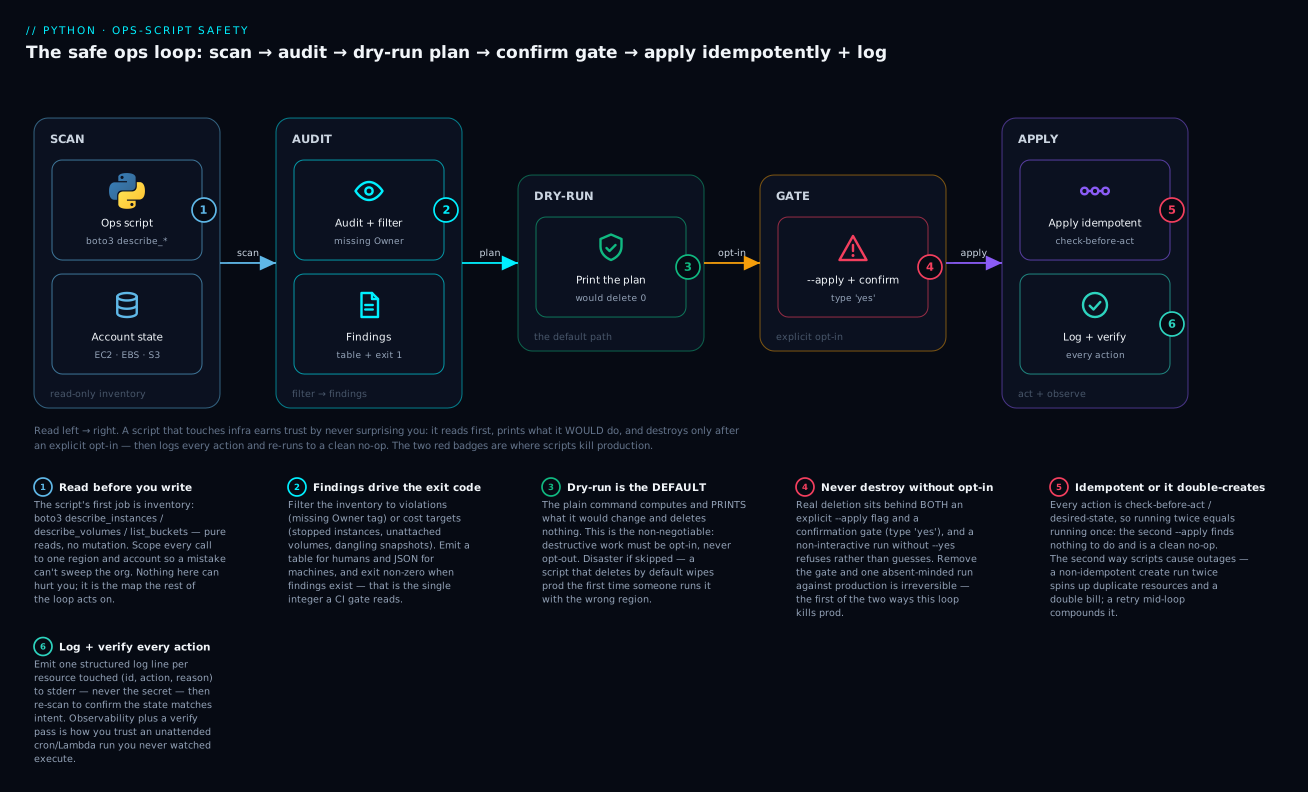
Read it left to right. The script scans the account read-only (1) — pure describe_* calls that cannot hurt anything, scoped to one region. It audits that inventory into findings (2) that set the exit code CI reads. The plain command stops at dry-run (3): it prints the plan and deletes nothing — this is the default, not an option. Real change sits behind a gate (4) — an explicit --apply and a confirmation — and only then does it apply idempotently and log (5, 6), so a second run is a clean no-op and every action left a trace. The two red badges are the two ways scripts kill prod: no dry-run (you deleted before you looked) and not idempotent (the rerun doubled everything). Keep that picture in mind; the code sections below are just its stages, one at a time.
Idempotency: run twice, change once
Idempotency is the single most important property, so it goes first. A function is idempotent if calling it once and calling it a hundred times leave the system in the same state. x = 5 is idempotent; x += 5 is not. In ops terms: you must be able to run your script again — after a timeout, after a crash, after a nervous colleague re-runs it “just in case” — without making things worse.
Why this is not optional: ops scripts get re-run constantly. A network blip makes the first run look hung, so someone Ctrl-Cs and re-runs. A cron job overlaps with its previous invocation. A CI retry fires the same job twice. A partial failure means you have to run again to finish. If “again” means “create a second load balancer” or “crash because the resource already exists”, your script is a liability.
The failure mode is concrete. Here is a non-idempotent create next to an idempotent one, both run twice against moto:
def blind_create(ec2, name):
    """NOT idempotent: creates a new instance every single call."""
    ec2.run_instances(ImageId="ami-123", MinCount=1, MaxCount=1,
                      TagSpecifications=[{"ResourceType": "instance",
                                          "Tags": [{"Key": "Name", "Value": name}]}])

def ensure_instance(ec2, name):
    """Idempotent: check-before-create. Desired state = exactly one 'name'."""
    if count_named(ec2, name) > 0:          # <- the whole difference is this line
        return "exists (no-op)"
    ec2.run_instances(ImageId="ami-123", MinCount=1, MaxCount=1,
                      TagSpecifications=[{"ResourceType": "instance",
                                          "Tags": [{"Key": "Name", "Value": name}]}])
    return "created"
Run each one twice and count what you get:
# NON-IDEMPOTENT blind_create('web'):
  after run 1: web count = 1
  after run 2: web count = 2   <- ran twice, got TWO. Duplicate resource + double bill.

# IDEMPOTENT ensure_instance('api'):
  run 1 -> created | api count = 1
  run 2 -> exists (no-op) | api count = 1  <- ran twice, still ONE. Second run = no-op.
That is the entire idea, and the second run printing exists (no-op) is the property you are after. The blind_create version is how people end up with seven identical NAT gateways and a support ticket asking why the bill tripled.
There are three standard ways to make an operation idempotent, and you reach for a different one depending on the API:
| Pattern | How it works | Use when |
|---|---|---|
| Check-before-act | Query for the resource; act only if the state is wrong | The general case — describe_*, then create/delete/tag as needed |
| Desired-state (converge) | Compute target state, diff against actual, apply only the diff | Config/tag enforcement — “ensure exactly these tags” |
| Provider idempotency token | Pass a ClientToken/PutIfNotExists; the API dedupes for you |
The API supports it — run_instances(ClientToken=...), DynamoDB conditional writes |
The third is worth knowing because clouds build it in. ec2.run_instances(ClientToken="deploy-2026-07-15-api") will return the same instance if you retry with the same token within a few minutes, instead of launching a second one — the API itself is doing the check-before-act for you. DynamoDB has ConditionExpression="attribute_not_exists(pk)", S3 has conditional writes, and most “create” APIs that can be safely retried expose something similar. When the provider offers a token, use it; it is race-free in a way your own check-then-act (which has a window between the check and the act) is not.
For deletes, idempotency has a pleasant shape: deleting something that is already gone should be a no-op, not an error. Some APIs treat it that way natively; some raise a NotFound. The robust pattern is to catch the “already gone” error and treat it as success — which is exactly what makes the cleanup tool below safe to re-run. We will see its second --apply find nothing to do and exit 0.
| Naturally idempotent | Needs help to be idempotent |
|---|---|
PUT / overwrite an object (S3, tags) |
POST / create-new (instances, volumes) |
create_tags (upsert — re-setting a tag is a no-op) |
run_instances without a ClientToken |
Delete-if-exists (catch NotFound) |
Append-to-a-list operations |
| Setting desired state (scale to N) | Incrementing / relative changes (scale by +2) |
Notice create_tags is in the good column: applying Owner=team-web to a resource that already has it changes nothing. That is why tag enforcement is one of the friendliest ops tasks to automate — the remediation is idempotent by construction.
Dry-run: compute the plan, gate the apply
⚠️ This is the non-negotiable. Any script that can destroy or mutate must default to a dry-run that computes and prints exactly what it would do, and touches nothing. The real action is gated behind an explicit --apply (or --yes). If you take one habit from this lesson into your job, take this one.
The reason dry-run matters more than any other single feature: it is the only way to review a destructive action before it happens, at scale. You cannot eyeball 300 volumes. But you can run the tool, read the plan it prints — “would delete these 3, for these reasons” — sanity-check it, and then re-run with --apply. The dry-run is a code review for the blast radius.
The structure is always the same three phases: compute the plan (read-only), print the plan (always), then apply only if opted in. Here is the heart of the cleanup command from the tool we build below:
def cmd_clean(args) -> int:
    ec2, s3 = clients(args.region)
    orphans = find_orphans(full_inventory(ec2, s3))     # 1. compute (read-only)
    log.info("found %d orphaned resource(s) in %s", len(orphans), args.region)

    if not orphans:
        print("nothing to clean up.")
        return 0

    print(render_plan(orphans))                         # 2. print the plan, ALWAYS
    if not args.apply:                                  # 3. gate the action
        print(f"\n[dry-run] {len(orphans)} resource(s) would be deleted. "
              f"Re-run with --apply to act.")
        return 0                                        # default-safe: touched nothing

    if not args.yes and not confirm(f"Delete {len(orphans)} resource(s)?"):
        log.warning("aborted by user; nothing deleted")
        return 2

    deleted = 0
    for r in orphans:                                   # 4. the only destructive path
        try:
            delete_resource(ec2, r)
            log.info("deleted %s %s (%s)", r["kind"], r["id"], r["reason"])
            deleted += 1
        except Exception as e:                          # partial failure: log, continue
            log.error("FAILED to delete %s %s: %s", r["kind"], r["id"], e)
    print(f"deleted {deleted}/{len(orphans)} resource(s).")
    return 0 if deleted == len(orphans) else 1
Four design decisions in that function are load-bearing, and each is a rule:
| Decision | Rule | Why |
|---|---|---|
--apply defaults to False |
Destruction is opt-in, never opt-out | The safe path is the one you get by forgetting a flag |
| The plan prints in both modes | Always show the blast radius before acting | Dry-run and apply differ only in whether they then act |
--yes bypasses the prompt |
Automation needs a way in, humans get the gate | CI/cron can’t answer a prompt; a person should have to |
| Delete loop catches per-item | Partial failure logs and continues | One bad resource shouldn’t abort the other 299 |
The word “plan” is deliberate. This is the same idea Terraform builds its whole workflow around — terraform plan shows you the diff, terraform apply executes it — and you are borrowing it for imperative Python. The dry-run is your plan. We will see it print three resources and delete nothing, then run again with --apply and delete exactly those three.
moto: a mock cloud to rehearse against
You should never rehearse a cleanup script against a real account. You need something that behaves like AWS — same boto3 calls, same responses, same errors — but is fake, offline, and free. That is moto. It patches boto3 at the client level so that inside a mock_aws() context, every AWS call goes to an in-memory simulation of the service. No credentials that work, no network, no cost, no risk.
python3 -m venv .venv
source .venv/bin/activate            # Windows: .venv\Scripts\activate
pip install boto3 moto
The one API you need is mock_aws, usable as a decorator or a context manager. Everything created inside it lives only for the life of the context:
import boto3
from moto import mock_aws

@mock_aws                                     # decorator form (great for pytest)
def test_something():
    ec2 = boto3.client("ec2", region_name="us-east-1")
    ec2.run_instances(ImageId="ami-123", MinCount=1, MaxCount=1)
    assert len(ec2.describe_instances()["Reservations"]) == 1

with mock_aws():                              # context-manager form (great for scripts)
    s3 = boto3.client("s3", region_name="us-east-1")
    s3.create_bucket(Bucket="demo")
| moto essential | Detail | Gotcha |
|---|---|---|
from moto import mock_aws |
moto 5.x unified everything under one name | 4.x had @mock_ec2, @mock_s3 per service — removed in 5.0 |
@mock_aws / with mock_aws(): |
Decorator or context manager | State lives only inside; it resets on exit |
| Fake credentials | Set AWS_ACCESS_KEY_ID etc. to any value |
Prevents boto3 hunting for real creds; moto ignores the values |
region_name= |
Pass it to every client | us-east-1 avoids the S3 LocationConstraint quirk |
| State persists within one context | Same process, same mock_aws() = same account |
This is what lets us prove idempotency in one run |
MOTO_EC2_LOAD_DEFAULT_AMIS=false |
Skip ~40 seeded public AMIs + ~1,180 snapshots | Without it, a snapshot audit drowns in Amazon’s public catalogue |
That last row is a real lesson from building this. moto pre-populates the account with the public AMIs a real AWS region has, and each one is backed by an EBS snapshot — about 1,180 of them. The first time I ran the audit it reported “1,183 resources missing Owner” because it was scanning Amazon’s entire public snapshot catalogue. Setting MOTO_EC2_LOAD_DEFAULT_AMIS=false gives you an empty account that contains only what you seed — which is what you want for a legible demo, and it still lets run_instances launch with any ami-xxxx ID.
Because moto’s state persists for the life of the process, we can seed a messy account and then run our real CLI against it several times in a row — audit, dry-run, apply, apply again — and the mock remembers everything between calls. That is the trick that lets us prove idempotency below, not just claim it.
The point of moto is not testing for its own sake. It is that you can develop and exercise a destructive ops script with total confidence, because the worst case is pytest printing a red line — never a deleted production volume.
The three classic ops scripts
Almost every infrastructure automation task a cloud engineer writes is one of three shapes. We will build all three against a seeded moto account, as one tool called awsops with audit and clean subcommands. First, the seed — a deliberately messy account:
def seed(ec2, s3):
    def tagspec(kind, **tags):
        return [{"ResourceType": kind,
                 "Tags": [{"Key": k, "Value": v} for k, v in tags.items()]}]

    # 2 instances: one tagged + running, one UNTAGGED + stopped (an orphan)
    good = ec2.run_instances(ImageId="ami-12345678", MinCount=1, MaxCount=1,
                             TagSpecifications=tagspec("instance",
                                 Owner="team-payments", Name="api-1"))
    stopped = ec2.run_instances(ImageId="ami-12345678", MinCount=1, MaxCount=1,
                                TagSpecifications=tagspec("instance", Name="old-worker"))
    ec2.stop_instances(InstanceIds=[stopped["Instances"][0]["InstanceId"]])

    # 2 volumes: one attached + tagged, one UNTAGGED + unattached (an orphan)
    attached = ec2.create_volume(AvailabilityZone="us-east-1a", Size=8,
                                 TagSpecifications=tagspec("volume", Owner="team-payments"))
    ec2.attach_volume(VolumeId=attached["VolumeId"],
                      InstanceId=good["Instances"][0]["InstanceId"], Device="/dev/sdf")
    ec2.create_volume(AvailabilityZone="us-east-1a", Size=20)      # untagged, available

    # a snapshot whose source volume we then DELETE -> a dangling orphan
    tmp = ec2.create_volume(AvailabilityZone="us-east-1a", Size=8)
    ec2.create_snapshot(VolumeId=tmp["VolumeId"], Description="nightly-backup")
    ec2.delete_volume(VolumeId=tmp["VolumeId"])                   # snapshot now dangles

    # 2 buckets: one tagged, one UNTAGGED
    s3.create_bucket(Bucket="kloudvin-app-logs")
    s3.put_bucket_tagging(Bucket="kloudvin-app-logs",
                          Tagging={"TagSet": [{"Key": "Owner", "Value": "team-web"}]})
    s3.create_bucket(Bucket="kloudvin-scratch-tmp")               # untagged
| Ops script | What it answers | Core API calls | The risk it manages |
|---|---|---|---|
| Tag audit / enforcement | “What is untagged / mis-tagged?” | describe_*, get_bucket_tagging, create_tags |
Ungoverned resources, unattributable cost |
| Cost / cleanup | “What is orphaned and costing money?” | describe_*, terminate_*, delete_* |
Deleting something still in use |
| Audit / compliance report | “Where are we out of policy?” | describe_* (read-only) + a findings emitter |
False confidence from a stale report |
Script 1: the tag audit (read-only, safe by nature)
The inventory step is pure reads. Note the one real-world wrinkle in scan_buckets: an untagged S3 bucket does not return empty tags — get_bucket_tagging raises NoSuchTagSet. Treating that exception as “no tags” rather than letting it crash is the kind of detail that separates a script that works on your tidy test account from one that survives contact with a real one.
def tags_to_dict(taglist) -> dict:
    return {t["Key"]: t["Value"] for t in (taglist or [])}

def scan_buckets(s3) -> list[dict]:
    out = []
    for b in s3.list_buckets()["Buckets"]:
        name = b["Name"]
        try:
            tagset = s3.get_bucket_tagging(Bucket=name)["TagSet"]
        except s3.exceptions.ClientError as e:
            if e.response["Error"]["Code"] == "NoSuchTagSet":
                tagset = []                          # untagged -> empty, NOT an error
            else:
                raise                                # a real error still propagates
        out.append({"kind": "s3:bucket", "id": name, "state": "-",
                    "tags": tags_to_dict(tagset)})
    return out

def find_untagged(inventory, tag="Owner"):
    return [r for r in inventory if tag not in r["tags"]]
The audit command runs the inventory, filters to violations, prints a table to stdout, logs a summary to stderr, and — critically — exits non-zero when it finds anything, so a CI job can gate on it:
def cmd_audit(args) -> int:
    ec2, s3 = clients(args.region)
    inv = full_inventory(ec2, s3)
    findings = find_untagged(inv)
    log.info("scanned %d resources in %s; %d missing %s",
             len(inv), args.region, len(findings), "Owner")
    print(render_audit(findings))                    # data -> stdout
    return 1 if findings else 0                       # non-zero = CI gate trips
Run it against the seed and you get a real findings table:
$ python -m awsops audit -v
17:21:40 INFO awsops: scanned 9 resources in us-east-1; 6 missing Owner
KIND           ID                       STATE      MISSING
ec2:instance   i-e17c5bef3fadd9b59      stopped    Owner
ec2:volume     vol-e65567b3097cb2779    in-use     Owner
ec2:volume     vol-557a8d727154a4105    in-use     Owner
ec2:volume     vol-a4ee3807f7cc66038    available  Owner
ec2:snapshot   snap-d2c9b766c3ad44843   dangling   Owner
s3:bucket      kloudvin-scratch-tmp     -          Owner
$ echo $?
1
Two things are worth explaining because they teach how real AWS behaves. First, there are two untagged in-use volumes we did not obviously create — those are the root volumes that run_instances auto-attaches to each instance. Real AWS does exactly this, and a real tag audit will surface them; it is a feature, not noise. Second, the log line (17:21:40 INFO ...) went to stderr while the table went to stdout, so awsops audit --json | jq would still work — the CLI-tools lesson covers why that stream discipline is non-negotiable. And the exit code is 1, so awsops audit && deploy will refuse to deploy while untagged resources exist.
Enforcement is the idempotent sequel to auditing: instead of just reporting untagged resources, apply a default Owner tag. Because create_tags is an upsert, the remediation is idempotent for free — running it twice sets the same tag twice, which is one tag:
def enforce_owner(ec2, inventory, default="unassigned"):
    """Idempotent remediation: ensure every EC2 resource has an Owner tag."""
    for r in inventory:
        if r["kind"].startswith("ec2") and "Owner" not in r["tags"]:
            ec2.create_tags(Resources=[r["id"]],
                            Tags=[{"Key": "Owner", "Value": default}])
            log.info("tagged %s Owner=%s", r["id"], default)
Script 2: the cleanup (destructive — the whole safety apparatus lives here)
Cleanup finds orphaned resources — things that cost money but serve nothing — and removes them. The definition of “orphaned” is where judgement lives; get it wrong and you delete something in use. Here are the three safest, most common orphan classes, each detectable with a read-only call:
| Orphan class | Signal | Detection | Why it costs |
|---|---|---|---|
| Stopped instance | State.Name == "stopped" |
describe_instances |
Its EBS volumes still bill while it is off |
| Unattached volume | State == "available" |
describe_volumes |
You pay per GB-month for a disk attached to nothing |
| Dangling snapshot | Source VolumeId no longer exists |
describe_snapshots + volume cross-check |
Snapshot storage for a volume you already deleted |
| Old snapshot | StartTime older than N days |
describe_snapshots |
Accumulated backup storage nobody prunes |
def find_orphans(inventory):
    """Cost/cleanup targets: stopped instances, unattached volumes,
    snapshots whose source volume no longer exists."""
    orphans = []
    for r in inventory:
        if r["kind"] == "ec2:instance" and r["state"] == "stopped":
            orphans.append({**r, "reason": "stopped instance"})
        elif r["kind"] == "ec2:volume" and r["state"] == "available":
            orphans.append({**r, "reason": "unattached volume"})
        elif r["kind"] == "ec2:snapshot" and r["state"] == "dangling":
            orphans.append({**r, "reason": "source volume deleted"})
    return orphans
On “old snapshots”: the age filter is a one-liner —
(datetime.now(timezone.utc) - snap["StartTime"]).days > 30. moto stamps every snapshot’sStartTimeat creation, so in the offline demo they are all zero days old; the dangling-source definition is what we can prove offline. In a real account you would use both. Never delete a snapshot on age alone without checking it is not the newest backup of a live volume — age is a hint, not a verdict.
The delete_resource function is the only place in the tool that destroys anything, which makes it the only place you have to audit for safety:
def delete_resource(ec2, r):
    """⚠️ irreversible. Called only under --apply, after the plan + confirm."""
    if r["kind"] == "ec2:instance":
        ec2.terminate_instances(InstanceIds=[r["id"]])
    elif r["kind"] == "ec2:volume":
        ec2.delete_volume(VolumeId=r["id"])
    elif r["kind"] == "ec2:snapshot":
        ec2.delete_snapshot(SnapshotId=r["id"])
    else:
        raise ValueError(f"refusing to delete unknown kind: {r['kind']}")
That final else is a safety rail: if a future change adds a resource kind to the scanner but not to the deleter, the tool refuses rather than guessing. Now watch the dry-run — the default — compute a plan and delete nothing:
$ python -m awsops clean -v
17:21:40 INFO awsops: found 3 orphaned resource(s) in us-east-1
KIND           ID                       REASON
ec2:instance   i-e17c5bef3fadd9b59      stopped instance
ec2:volume     vol-a4ee3807f7cc66038    unattached volume
ec2:snapshot   snap-d2c9b766c3ad44843   source volume deleted

[dry-run] 3 resource(s) would be deleted. Re-run with --apply to act.
$ echo $?
0
# EC2 resources before dry-run: 7  after: 7  (unchanged: True)
The plan is legible, the exit code is 0 (a dry-run is a success), and the resource count is unchanged — it genuinely touched nothing. Only now, having reviewed the plan, do we opt in with --apply (and --yes to skip the interactive prompt, as a CI run would):
$ python -m awsops clean --apply --yes -v
17:21:40 INFO awsops: found 3 orphaned resource(s) in us-east-1
KIND           ID                       REASON
ec2:instance   i-e17c5bef3fadd9b59      stopped instance
ec2:volume     vol-a4ee3807f7cc66038    unattached volume
ec2:snapshot   snap-d2c9b766c3ad44843   source volume deleted
17:21:40 INFO awsops: deleted ec2:instance i-e17c5bef3fadd9b59 (stopped instance)
17:21:40 INFO awsops: deleted ec2:volume vol-a4ee3807f7cc66038 (unattached volume)
17:21:40 INFO awsops: deleted ec2:snapshot snap-d2c9b766c3ad44843 (source volume deleted)
deleted 3/3 resource(s).
$ echo $?
0
# EC2 resources remaining: 4
Every deletion logged a line — what, which id, why — and the tool reported deleted 3/3. Now the proof that this is safe to re-run. Run the exact same --apply command a second time:
$ python -m awsops clean --apply --yes -v
17:21:41 INFO awsops: found 0 orphaned resource(s) in us-east-1
nothing to clean up.
$ echo $?
0
# EC2 resources remaining: 4  (second apply changed nothing)
Zero orphans, nothing deleted, exit 0. That is idempotency demonstrated, not asserted: the first apply converged the account to the desired state (no orphans), and the second apply — finding that state already true — is a clean no-op. The stopped instance is now terminated (not stopped), the unattached volume is gone, the dangling snapshot is gone, so find_orphans returns an empty list. A nervous colleague can re-run this a hundred times.
There is one production refinement worth naming, because “orphaned right now” is not always “safe to delete right now”. A volume can be available for thirty seconds during a legitimate migration; a stopped instance might be stopped on purpose over a weekend. The safe pattern for a scheduled sweep is two-pass, mark-then-delete with a grace period: on the first sighting, don’t delete — tag the resource with a MarkedForDeletionAt timestamp. On a later run, delete only resources that were marked and are still orphaned and whose grace period has expired.
def sweep_with_grace(ec2, orphans, grace_days=7, apply=False):
    now = datetime.now(timezone.utc)
    for r in orphans:
        marked = r["tags"].get("MarkedForDeletionAt")
        if not marked:                                   # first sighting: mark, don't delete
            if apply:
                ec2.create_tags(Resources=[r["id"]],     # idempotent upsert
                    Tags=[{"Key": "MarkedForDeletionAt", "Value": now.isoformat()}])
            log.info("marked %s (grace %dd)", r["id"], grace_days)
        elif (now - datetime.fromisoformat(marked)).days >= grace_days:
            log.info("deleting %s (marked %s, grace expired)", r["id"], marked)
            if apply:
                delete_resource(ec2, r)
        else:
            log.info("%s still in grace period, skipping", r["id"])
This gives a human a week to say “no, keep that” by removing the tag or re-attaching the volume, and it is still idempotent — create_tags is an upsert, and a resource that stops being orphaned (someone re-attached it) simply drops out of find_orphans and is never deleted. A grace period is how mature cleanup automation avoids the one-in-a-thousand case where “orphaned” was a false positive.
Script 3: the compliance report
The third shape is a pure read that emits a findings artifact — a table, a JSON blob, a row per violation — that something else consumes (a dashboard, a ticket, a Slack message, a CI gate). It is the audit script with its output aimed at a system instead of a human, and because it never mutates, its only real risk is being stale or silently broken. The re-audit after our cleanup is exactly this — proof that the account moved toward compliance:
$ python -m awsops audit
17:21:41 INFO awsops: scanned 6 resources in us-east-1; 3 missing Owner
KIND           ID                       STATE      MISSING
ec2:instance   i-e17c5bef3fadd9b59      terminated Owner
ec2:volume     vol-e65567b3097cb2779    in-use     Owner
s3:bucket      kloudvin-scratch-tmp     -          Owner
$ echo $?
1
Six resources down from nine (the deleted ones are gone; the terminated instance lingers in describe_instances for a while, as real AWS does — a production audit often filters state not in {"terminated", "shutting-down"}). For a machine consumer you emit JSON instead of a table, so a dashboard, a ticketing system, or a Slack bot can ingest it:
def compliance_report(ec2, s3, region):
    inv = full_inventory(ec2, s3)
    untagged, orphans = find_untagged(inv), find_orphans(inv)
    return {
        "generated_at": datetime.now(timezone.utc).isoformat(),
        "region": region,
        "scanned": len(inv),
        "summary": {"missing_owner": len(untagged), "orphaned": len(orphans)},
        "findings": [{"id": r["id"], "kind": r["kind"],
                      "control": "tag:Owner", "status": "FAIL"} for r in untagged],
    }
$ python -m awsops report --json     # data -> stdout, exit 1 on any FAIL
{
  "generated_at": "2026-07-15T09:00:00+00:00",
  "region": "us-east-1",
  "scanned": 9,
  "summary": { "missing_owner": 6, "orphaned": 3 },
  "findings": [
    { "id": "i-e17c5bef3fadd9b59",   "kind": "ec2:instance", "control": "tag:Owner", "status": "FAIL" },
    { "id": "vol-e65567b3097cb2779", "kind": "ec2:volume",   "control": "tag:Owner", "status": "FAIL" }
  ]
}
A findings record should be stable — the same shape every run, so the consumer never breaks — and self-describing:
| Field | Purpose | Consumer uses it for |
|---|---|---|
generated_at |
When the scan ran | Detecting a stale/hung report |
region / account |
Scope of the scan | Routing the finding to the right team |
id + kind |
Which resource | The deep link / the remediation target |
control |
Which policy failed | Grouping, dashboards, trend lines |
status |
PASS / FAIL / WARN |
The gate decision |
summary counts |
Totals | The one number a Slack message shows |
The report’s job is to be trustworthy: run on a schedule, emit a stable machine-readable artifact, exit non-zero when anything is FAIL, and never silently fail — a compliance report that dies quietly is worse than none, because it manufactures false confidence.
Safety rails
The cleanup tool already shows most of the rails in context. Here they are as an explicit checklist, because every one of them is a scar from an incident someone had.
| Rail | Implementation | The incident it prevents |
|---|---|---|
| Dry-run by default | --apply opt-in; plan prints always |
Deleting before anyone reviewed the blast radius |
| Confirmation gate | Interactive confirm(); --yes for automation |
A fat-fingered run with no second chance |
| Region/account scope | --region, explicit; never “all regions” by default |
A sweep that hits every region including prod |
| Non-zero exit on findings | return 1 if findings else 0 |
A CI gate that is green on a red account |
| Log every action | One structured line per resource touched | An unattended run you can’t audit after the fact |
| Never log secrets | Log ids and actions, never tokens/keys | Credentials leaking into CloudWatch/CI logs |
| Partial-failure tolerance | try/except per item; report n/total |
One bad resource aborting the whole batch |
| Explicit delete opt-in | No code path deletes without --apply |
“I thought it was in dry-run mode” |
| Rate-limit awareness | boto3 adaptive retries + paginators | ThrottlingException on a big sweep |
Observability: log every action, never a secret
An unattended script is only trustworthy if it leaves a trace you can audit afterwards. The bar is one structured line per resource touched — what, which id, why — on stderr (so stdout stays clean for data), which is exactly what log.info("deleted %s %s (%s)", ...) produces. Wire it through the standard logging module rather than print, so a -v flag can dial the level and a scheduled run can route to a file or CloudWatch; the logging lesson covers the handler and level machinery. For anything that will be queried later, emit JSON logs ({"action": "delete", "id": "vol-abc", "reason": "unattached"}) so a log aggregator can filter on the fields.
The absolute rule alongside it: never log a secret. Log resource ids, actions, and decisions — never tokens, access keys, passwords, or a full request/response that might embed them. A credential in CloudWatch or a CI log is a security incident, and “it was only in the debug output” is not a defence. When you catch an exception around a destructive call, log e and the resource id, not the client object or the request payload.
The confirmation gate, and refusing to guess
The gate has one subtlety that catches people: what should it do when there is no human — a cron job, a CI runner — and --yes was not passed? It must refuse, not proceed. A prompt with nobody to answer it either hangs forever or, worse, some implementations treat EOF as “yes”. The correct behaviour is to detect the missing terminal and abort:
def confirm(prompt: str) -> bool:
    """Interactive gate. Refuses (returns False) on a non-TTY unless --yes."""
    if not sys.stdin.isatty():
        log.warning("no TTY and --yes not given; refusing to proceed")
        return False
    return input(f"{prompt} [type 'yes']: ").strip() == "yes"
Requiring the user to type the whole word yes (not just press y) is deliberate friction — it is the “type the volume ID to confirm” dialog, rebuilt. Here is a human answering no, captured for real:
KIND           ID                       REASON
ec2:instance   i-45f70bb5e342b54f5      stopped instance
Delete 1 resource(s)? [type 'yes']: no
17:24:37 WARNING awsops: aborted by user; nothing deleted
exit code: 2
orphan still present: True
Exit 2 (aborted-by-user, distinct from 0=clean and 1=failure), and the orphan is still there. The three behaviours — TTY prompts, non-TTY refuses, --yes proceeds — are the complete matrix:
| Situation | --yes? |
TTY? | Behaviour |
|---|---|---|---|
| Human at a terminal | no | yes | Prompt; proceed only on typed yes |
| Human types anything else | no | yes | Abort, exit 2, delete nothing |
| CI / cron | no | no | Refuse, exit 2, delete nothing |
| CI / cron with opt-in | yes | no | Proceed without prompting |
Scoping, credentials, and reading them safely
An ops script should be narrow. Scope it to one region and one account explicitly, so a bug cannot escalate into an org-wide sweep. And it should read its credentials the same way every good AWS tool does — never from a hard-coded string, never from an argv flag (which leaks to ps and shell history, as the CLI-tools lesson shows), but from the standard chain that the cloud-SDKs lesson covers in depth.
| Credential source | How | Use for |
|---|---|---|
| IAM role (instance/task/pod) | boto3 finds it automatically | Anything running in AWS — the gold standard, no keys on disk |
| Named profile | boto3.Session(profile_name="prod") |
Local dev across multiple accounts |
| Environment variables | AWS_ACCESS_KEY_ID, etc. |
CI runners, containers |
| SSO / assumed role | aws sso login; sts.assume_role |
Human access to production |
| ❌ Hard-coded / argv | boto3.client(..., aws_access_key_id="AKIA…") |
Never. Leaks to git, ps, logs |
A cheap, powerful guard for a destructive tool is to assert which account it is pointed at before it does anything — a one-line check that turns “oops, prod” into an immediate, safe abort:
def assert_account(expected_ids: set[str]):
    """Refuse to run unless we're in an approved account."""
    acct = boto3.client("sts").get_caller_identity()["Account"]
    if acct not in expected_ids:
        raise SystemExit(f"refusing to run against account {acct} "
                         f"(allowed: {sorted(expected_ids)})")
    return acct
Under moto this returns the mock account 123456789012; against real AWS it returns whatever your credentials resolve to — so a cleanup tool wired with assert_account({"123456789012"}) physically cannot run against the wrong account, no matter what region or profile the environment sets. The scope also belongs in the IAM policy, not just the code: give the script’s role permission to delete volumes in one account, and even a catastrophic bug cannot touch another. Defence in depth — the code scopes, the account-guard scopes, and the permissions scope, and none trusts the others.
Throttling on a big sweep
Against a real account with thousands of resources, two things bite that moto hides. First, describe_* calls paginate — the default returns one page, so a naive loop silently misses resources past the first page. Always use a paginator:
paginator = ec2.get_paginator("describe_instances")
for page in paginator.paginate():                 # walks ALL pages, not just the first
    for res in page["Reservations"]:
        ...
Second, hammering an API triggers ThrottlingException. boto3 has built-in retry with backoff; turn on adaptive mode for a big sweep so it also throttles itself to stay under the limit:
from botocore.config import Config
ec2 = boto3.client("ec2", region_name="us-east-1",
                   config=Config(retries={"max_attempts": 10, "mode": "adaptive"}))
| Throttling defence | What it does |
|---|---|
| Paginators | Fetch every page — the alternative silently truncates |
retries={"mode": "adaptive"} |
Client-side rate limiting + exponential backoff |
max_attempts=10 |
Retry a throttled call up to 10 times before failing |
| Batch where the API allows | terminate_instances(InstanceIds=[...]) — many per call, fewer calls |
A small time.sleep() between writes |
Crude but effective on APIs without batch support |
Partial failure: log, continue, and make resuming safe
A sweep over 1,000 resources will hit one that fails — a race where someone else deleted it, a permission gap, a dependency. The wrong response is to crash at item 400 and leave a half-done job with no record. The right response is the try/except per item you already saw: log the failure, keep going, and report deleted 3/3 (or deleted 398/400) at the end. Catch narrowly and deliberately — botocore.exceptions.ClientError around the API call, not a bare except: that would also swallow a KeyboardInterrupt or mask a real bug (the exceptions lesson covers why the bare version is a trap). And because the tool is idempotent, resuming is trivial — just run it again; the 398 already-deleted resources are no longer orphans, so the rerun only retries the 2 that failed. Idempotency and partial-failure tolerance are the same property wearing two hats.
Python vs Terraform vs Ansible — and calling them with subprocess
A crucial piece of judgement: a lot of infrastructure work should not be a Python script at all. Knowing when to reach for Python versus a declarative tool is what keeps you from writing a 500-line boto3 script to do what 20 lines of Terraform do better.
| Tool | Model | Best at | Not for |
|---|---|---|---|
| Terraform / OpenTofu | Declarative desired-state | Standing up + versioning infra; the source of truth for what should exist | Reactive/event-driven logic; complex conditionals |
| Ansible | Declarative config, procedural tasks | Configuring inside servers (packages, files, services) at fleet scale | Managing cloud resource lifecycles |
| Python (boto3) | Imperative | Glue, orchestration, one-offs, reactive automation, anything with real logic | Declarative infra you’ll maintain long-term (drift, no state) |
The rule of thumb: Terraform for the nouns (the infrastructure that should exist), Python for the verbs (things that happen — react to an event, orchestrate a sequence, sweep and clean, glue two systems). Our cleanup tool is a perfect Python job: it is reactive and imperative (“find the orphans that exist right now and remove them”), and expressing “delete whatever happens to be orphaned” in Terraform’s declarative model is awkward. But creating the VPC those resources live in should be Terraform, not a boto3 script — you want state, plan/apply, and drift detection, which are Terraform’s whole reason to exist.
Very often the two worlds meet, and Python’s job is to drive the declarative tool — run terraform plan, parse the JSON, decide something, maybe run terraform apply. That is a subprocess call, and subprocess has enough sharp edges to deserve the rest of this section.
The safe subprocess pattern
The one pattern to memorise: a list of arguments, capture the output as text, and check the exit code.
import subprocess
r = subprocess.run(["terraform", "--version"],
                   capture_output=True, text=True, check=True)
print("returncode:", r.returncode)
print("stdout first line:", r.stdout.splitlines()[0])
returncode: 0
stdout first line: Terraform v1.15.8
That is a real call to the terraform binary installed on this machine. Four choices make it safe, and each maps to a parameter:
| Parameter | Value | Why |
|---|---|---|
| args | a list ["terraform", "--version"] |
No shell = no injection. The #1 rule |
capture_output= |
True |
Grab stdout+stderr instead of letting them leak to your terminal |
text= |
True |
Decode bytes to str (else you get b"...") |
check= |
True |
Raise CalledProcessError on non-zero — no silent failures |
timeout= |
seconds | Kill a hung command instead of blocking forever |
cwd= |
a path | Run in a specific directory (e.g. a Terraform module) |
env= |
a dict | Control the child’s environment explicitly |
Parse structured output, don’t scrape text
When a tool can emit JSON, take it — parsing terraform version -json is robust where regexing human text is not:
r = subprocess.run(["terraform", "version", "-json"],
                   capture_output=True, text=True, check=True)
info = json.loads(r.stdout)
print("parsed version:", info["terraform_version"])
print("platform:", info["platform"])
parsed version: 1.15.8
platform: darwin_arm64
The same trick powers real automation: terraform plan -json streams machine-readable plan events you can parse to count changes, and aws ... --output json feeds json.loads directly. Text scraping breaks the day the tool tweaks its output format; JSON is a contract.
The four ways subprocess bites
1. shell=True command injection. This is the dangerous one. With shell=True, your string is handed to /bin/sh, which interprets metacharacters — ;, |, $(), &&. If any part of that string came from outside your program, an attacker owns your shell. Here is the mechanism, demonstrated with a harmless payload:
untrusted = "1.0.0; echo INJECTED-COMMAND-RAN"      # imagine this came from an API
subprocess.run(f"echo version={untrusted}", shell=True)    # ⚠️ NEVER do this
subprocess.run(["echo", f"version={untrusted}"])           # the safe list form
-- shell=True: the shell interprets ';' and runs BOTH commands --
version=1.0.0
INJECTED-COMMAND-RAN
-- list form (no shell): the ';' is just a literal argument, SAFE --
version=1.0.0; echo INJECTED-COMMAND-RAN
Look at what happened. Under shell=True, the ; split the string and the shell ran a second command — echo INJECTED-COMMAND-RAN executed. Swap that payload for rm -rf and you understand the CVE. Under the list form, the identical text is passed as a single literal argument to echo and printed harmlessly. Use a list. If you think you need shell=True, you almost certainly need shlex.split() and a list instead.
2. Swallowed non-zero exit (silent failure). Without check=True, a failed command returns normally and your script sails on as if it succeeded. You must inspect returncode yourself:
### check=False: inspect returncode (silent-failure trap)
returncode: 128
stderr: fatal: not a git repository (or any of the parent directories): .git
-> handled: branch missing, we branch in Python on the code
That git rev-parse failed with code 128, but subprocess.run returned a normal object — only checking r.returncode caught it. The alternative is check=True, which converts the failure into an exception you cannot ignore:
### check=True raises CalledProcessError on non-zero
caught CalledProcessError: returncode=128
e.stderr = 'fatal: not a git repository (or any of the parent directories): .git'
3. Missing binary is a different failure. A command that does not exist raises FileNotFoundError — not a non-zero exit — so it slips past a try/except CalledProcessError:
### Missing executable -> FileNotFoundError
caught FileNotFoundError: [Errno 2] No such file or directory: 'terrafrm'
4. A hung command blocks forever without timeout=. Any external tool can hang — a network call, a lock, a prompt. timeout= turns that into a catchable exception:
### timeout= guards a hung command
caught TimeoutExpired after 0.5s
| Exception | Raised when | Guard |
|---|---|---|
CalledProcessError |
Non-zero exit and check=True |
try/except, read e.returncode, e.stderr |
FileNotFoundError |
The executable does not exist | Separate except — it is not a CalledProcessError |
TimeoutExpired |
Ran longer than timeout= |
Set a timeout=; decide retry vs abort |
| (silent) | Non-zero exit and check=False |
You must inspect r.returncode |
The robust wrapper handles all four at once, and this is the shape to reuse whenever a Python ops script shells out to Terraform, Ansible, kubectl, or git:
def run_tool(args, **kw):
    """Run an external CLI safely: list args, captured, checked, timed out."""
    try:
        return subprocess.run(args, capture_output=True, text=True,
                              check=True, timeout=120, **kw)
    except FileNotFoundError:
        raise SystemExit(f"required tool not found: {args[0]}")
    except subprocess.TimeoutExpired:
        raise SystemExit(f"{args[0]} timed out")
    except subprocess.CalledProcessError as e:
        raise SystemExit(f"{args[0]} failed ({e.returncode}): {e.stderr.strip()}")
Scheduling: where ops scripts actually run
An ops script that only runs when you type it is not automation yet. Where you schedule it shapes how it must behave — and every target reads the exit code, which is why getting that right matters more than any log line. Pick a convention and document it in --help:
| Exit code | Meaning | Our tool |
|---|---|---|
0 |
Clean — did the job, nothing wrong | Audit found nothing; dry-run; apply succeeded |
1 |
Findings / a real failure | Audit found untagged resources; a delete failed |
2 |
Usage error, or aborted by user | Bad flags (argparse); confirmation declined / non-TTY refused |
3–125 |
Your own documented meanings | e.g. 3 = partial success on a big sweep |
130 |
Interrupted (Ctrl-C, 128+SIGINT) |
Let KeyboardInterrupt propagate |
The rule the CLI-tools lesson hammers applies double for ops: a script that always exits 0 is a green light welded on. awsops audit returning 1 is what lets awsops audit && deploy refuse to ship into an ungoverned account.
| Scheduler | Fits | Watch out for |
|---|---|---|
| cron | A box you own; simple recurring sweeps | No retries, no alerting; a non-zero exit is silently emailed to nobody. Log to a file, monitor it |
| systemd timer | Modern Linux hosts | More setup than cron, but you get logs in journalctl, OnFailure= hooks, and accurate scheduling |
| AWS Lambda + EventBridge | Serverless, event- or schedule-driven; no host to own | 15-min max runtime; package boto3 deps; the IAM role is your credential and your scope |
| CI schedule (GitHub Actions, etc.) | Runs that fit a pipeline; visible logs; easy secrets | The runner reads your exit code as pass/fail — a script that always exits 0 makes a useless gate |
| Kubernetes CronJob | You already run k8s | Pod’s ServiceAccount/IRSA is the credential; watch concurrency policy so runs don’t overlap |
Two properties matter across all of them. Idempotency, because schedulers overlap and retry — a Lambda that times out and re-fires must not double-act. And a correct exit code, because it is the one signal every scheduler understands: cron mails on non-zero, systemd fires OnFailure=, CI marks the job red, Lambda counts an error metric. A script that dry-runs by default, acts only on --apply --yes, is idempotent, and exits non-zero on a real problem drops into any of these with no changes.
Watch one specific hazard: overlapping runs. If a sweep takes twelve minutes but cron fires it every ten, you eventually have two copies racing over the same resources — one trying to delete what the other is mid-way through. Idempotency softens the blow (the second run mostly finds work already done), but the clean fix is a lock: a single-instance guard so a new run refuses to start while the previous one is alive. A file lock is enough on one host — fcntl.flock on a lockfile, or a tool like flock(1) in the crontab line itself; a distributed scheduler wants a lease in DynamoDB or Redis. Kubernetes CronJobs express it directly with concurrencyPolicy: Forbid. The principle is the same everywhere: an unattended job should assume it might be started again before it finishes, and decide on purpose what happens when it is.
Hands-on lab
You will build awsops — the real tag-compliance-and-cleanup tool from this lesson — run it against a moto-mocked account in both dry-run and apply modes, prove the second apply is a no-op, and shell out to your real local terraform and git. Everything is offline and free; nothing touches a real account.
⚠️ This lab only ever calls AWS inside mock_aws(). Do not lift the delete code out of that context and point it at real credentials without re-reading the safety section.
Step 1 — Set up
mkdir -p ~/awsops-lab && cd ~/awsops-lab
python3 -m venv .venv
source .venv/bin/activate            # Windows: .venv\Scripts\activate
python -V                            # 3.12.x; this lab was run on 3.12.3
pip install boto3 moto pytest
python -c "import boto3, moto; print('boto3', boto3.__version__, '| moto', moto.__version__)"
boto3 1.43.50 | moto 5.2.2
What just happened: a clean venv with the two libraries that matter. moto is the offline AWS; boto3 is the real SDK it intercepts.
Step 2 — The tool (awsops.py)
Save the tool. It is the code developed through the lesson: read-only inventory, find_untagged / find_orphans, a single delete_resource, the dry-run/apply cmd_clean, the confirmation gate, and an argparse CLI with audit and clean subcommands. The full file:
# awsops.py — tag-compliance + orphan cleanup. Safe, idempotent, observable.
from __future__ import annotations
import argparse, logging, sys
from datetime import datetime, timezone
import boto3

REQUIRED_TAG = "Owner"
log = logging.getLogger("awsops")

def tags_to_dict(taglist):
    return {t["Key"]: t["Value"] for t in (taglist or [])}

# ---------- inventory: read-only, boto3 in, plain dicts out ----------
def scan_instances(ec2):
    out = []
    for res in ec2.describe_instances()["Reservations"]:
        for inst in res["Instances"]:
            out.append({"kind": "ec2:instance", "id": inst["InstanceId"],
                        "state": inst["State"]["Name"], "tags": tags_to_dict(inst.get("Tags"))})
    return out

def scan_volumes(ec2):
    return [{"kind": "ec2:volume", "id": v["VolumeId"], "state": v["State"],
             "tags": tags_to_dict(v.get("Tags"))}
            for v in ec2.describe_volumes()["Volumes"]]

def scan_snapshots(ec2, owned_by="self"):
    live = {v["VolumeId"] for v in ec2.describe_volumes()["Volumes"]}
    out = []
    for s in ec2.describe_snapshots(OwnerIds=[owned_by])["Snapshots"]:
        out.append({"kind": "ec2:snapshot", "id": s["SnapshotId"],
                    "state": "dangling" if s["VolumeId"] not in live else "backed",
                    "age_days": (datetime.now(timezone.utc) - s["StartTime"]).days,
                    "tags": tags_to_dict(s.get("Tags"))})
    return out

def scan_buckets(s3):
    out = []
    for b in s3.list_buckets()["Buckets"]:
        try:
            tagset = s3.get_bucket_tagging(Bucket=b["Name"])["TagSet"]
        except s3.exceptions.ClientError as e:
            if e.response["Error"]["Code"] == "NoSuchTagSet":
                tagset = []
            else:
                raise
        out.append({"kind": "s3:bucket", "id": b["Name"], "state": "-",
                    "tags": tags_to_dict(tagset)})
    return out

def full_inventory(ec2, s3):
    return scan_instances(ec2) + scan_volumes(ec2) + scan_snapshots(ec2) + scan_buckets(s3)

# ---------- audit + orphan filters ----------
def find_untagged(inventory, tag=REQUIRED_TAG):
    return [r for r in inventory if tag not in r["tags"]]

def find_orphans(inventory):
    orphans = []
    for r in inventory:
        if r["kind"] == "ec2:instance" and r["state"] == "stopped":
            orphans.append({**r, "reason": "stopped instance"})
        elif r["kind"] == "ec2:volume" and r["state"] == "available":
            orphans.append({**r, "reason": "unattached volume"})
        elif r["kind"] == "ec2:snapshot" and r["state"] == "dangling":
            orphans.append({**r, "reason": "source volume deleted"})
    return orphans

# ---------- the ONLY destructive path ----------
def delete_resource(ec2, r):
    if r["kind"] == "ec2:instance":  ec2.terminate_instances(InstanceIds=[r["id"]])
    elif r["kind"] == "ec2:volume":  ec2.delete_volume(VolumeId=r["id"])
    elif r["kind"] == "ec2:snapshot": ec2.delete_snapshot(SnapshotId=r["id"])
    else: raise ValueError(f"refusing to delete unknown kind: {r['kind']}")

# ---------- rendering (data -> stdout) ----------
def render_audit(f):
    if not f: return f"OK: every resource carries an {REQUIRED_TAG} tag."
    rows = [f"{'KIND':<14} {'ID':<24} {'STATE':<10} MISSING"]
    return "\n".join(rows + [f"{r['kind']:<14} {r['id']:<24} {r['state']:<10} {REQUIRED_TAG}" for r in f])

def render_plan(o):
    if not o: return "nothing to clean up."
    rows = [f"{'KIND':<14} {'ID':<24} REASON"]
    return "\n".join(rows + [f"{r['kind']:<14} {r['id']:<24} {r['reason']}" for r in o])

def confirm(prompt):
    if not sys.stdin.isatty():
        log.warning("no TTY and --yes not given; refusing to proceed")
        return False
    return input(f"{prompt} [type 'yes']: ").strip() == "yes"

def clients(region):
    return boto3.client("ec2", region_name=region), boto3.client("s3", region_name=region)

# ---------- commands: return an exit code ----------
def cmd_audit(args):
    ec2, s3 = clients(args.region)
    inv = full_inventory(ec2, s3)
    findings = find_untagged(inv)
    log.info("scanned %d resources in %s; %d missing %s", len(inv), args.region, len(findings), REQUIRED_TAG)
    print(render_audit(findings))
    return 1 if findings else 0

def cmd_clean(args):
    ec2, s3 = clients(args.region)
    orphans = find_orphans(full_inventory(ec2, s3))
    log.info("found %d orphaned resource(s) in %s", len(orphans), args.region)
    if not orphans:
        print("nothing to clean up."); return 0
    print(render_plan(orphans))
    if not args.apply:
        print(f"\n[dry-run] {len(orphans)} resource(s) would be deleted. Re-run with --apply to act.")
        return 0
    if not args.yes and not confirm(f"Delete {len(orphans)} resource(s)?"):
        log.warning("aborted by user; nothing deleted"); return 2
    deleted = 0
    for r in orphans:
        try:
            delete_resource(ec2, r)
            log.info("deleted %s %s (%s)", r["kind"], r["id"], r["reason"]); deleted += 1
        except Exception as e:
            log.error("FAILED to delete %s %s: %s", r["kind"], r["id"], e)
    print(f"deleted {deleted}/{len(orphans)} resource(s).")
    return 0 if deleted == len(orphans) else 1

def build_parser():
    p = argparse.ArgumentParser(prog="awsops", description="Tag-compliance + orphan cleanup.")
    p.add_argument("--region", default="us-east-1", help="scope to one region")
    p.add_argument("-v", "--verbose", action="count", default=0)
    sub = p.add_subparsers(dest="command", metavar="COMMAND", required=True)
    pa = sub.add_parser("audit", help=f"find resources missing an {REQUIRED_TAG} tag")
    pa.set_defaults(func=cmd_audit)
    pc = sub.add_parser("clean", help="delete orphaned resources (DESTRUCTIVE)")
    pc.add_argument("--apply", action="store_true", help="actually delete (default is dry-run)")
    pc.add_argument("--yes", action="store_true", help="skip the confirmation prompt (for CI/cron)")
    pc.set_defaults(func=cmd_clean)
    return p

def main(argv=None):
    args = build_parser().parse_args(argv)
    level = logging.WARNING if args.verbose == 0 else (logging.INFO if args.verbose == 1 else logging.DEBUG)
    logging.basicConfig(level=level, stream=sys.stderr,
                        format="%(asctime)s %(levelname)s %(name)s: %(message)s", datefmt="%H:%M:%S")
    return args.func(args)

if __name__ == "__main__":
    sys.exit(main())
What just happened: the whole tool, top to bottom. Inventory and filters are pure functions (trivially testable). delete_resource is the one destructive spot. main wires -v to logging on stderr and returns an exit code via sys.exit(main()).
Step 3 — The driver: seed a mock account and run everything
awsops.py needs a live account to talk to. seed_and_run.py creates a mock one with moto, seeds the mess, and drives the CLI several times against the same mock:
# seed_and_run.py
import os
os.environ.setdefault("MOTO_EC2_LOAD_DEFAULT_AMIS", "false")   # empty account, no public AMIs
os.environ.setdefault("AWS_ACCESS_KEY_ID", "testing")          # moto ignores the value
os.environ.setdefault("AWS_SECRET_ACCESS_KEY", "testing")
os.environ.setdefault("AWS_DEFAULT_REGION", "us-east-1")
import boto3
from moto import mock_aws
import awsops

R = "us-east-1"

def seed(ec2, s3):
    def ts(kind, **t): return [{"ResourceType": kind, "Tags": [{"Key": k, "Value": v} for k, v in t.items()]}]
    good = ec2.run_instances(ImageId="ami-12345678", MinCount=1, MaxCount=1,
                             TagSpecifications=ts("instance", Owner="team-payments", Name="api-1"))
    st = ec2.run_instances(ImageId="ami-12345678", MinCount=1, MaxCount=1,
                           TagSpecifications=ts("instance", Name="old-worker"))
    ec2.stop_instances(InstanceIds=[st["Instances"][0]["InstanceId"]])
    att = ec2.create_volume(AvailabilityZone=R+"a", Size=8, TagSpecifications=ts("volume", Owner="team-payments"))
    ec2.attach_volume(VolumeId=att["VolumeId"], InstanceId=good["Instances"][0]["InstanceId"], Device="/dev/sdf")
    ec2.create_volume(AvailabilityZone=R+"a", Size=20)                       # untagged, unattached
    tmp = ec2.create_volume(AvailabilityZone=R+"a", Size=8)
    ec2.create_snapshot(VolumeId=tmp["VolumeId"], Description="nightly-backup")
    ec2.delete_volume(VolumeId=tmp["VolumeId"])                             # snapshot now dangles
    s3.create_bucket(Bucket="kloudvin-app-logs")
    s3.put_bucket_tagging(Bucket="kloudvin-app-logs", Tagging={"TagSet": [{"Key": "Owner", "Value": "team-web"}]})
    s3.create_bucket(Bucket="kloudvin-scratch-tmp")                         # untagged

with mock_aws():
    ec2, s3 = boto3.client("ec2", region_name=R), boto3.client("s3", region_name=R)
    seed(ec2, s3)
    print("\n$ awsops audit");                       awsops.main(["-v", "audit"])
    print("\n$ awsops clean            # dry-run");  awsops.main(["-v", "clean"])
    print("\n$ awsops clean --apply --yes");         awsops.main(["-v", "clean", "--apply", "--yes"])
    print("\n$ awsops clean --apply --yes  # again");awsops.main(["-v", "clean", "--apply", "--yes"])
Run it:
python -u seed_and_run.py
You will see the audit table, the dry-run plan, the deleted 3/3, and the second apply reporting nothing to clean up. — the exact outputs from the lesson body. The key line to find is the second apply’s found 0 orphaned resource(s): that is idempotency, proven in your own terminal.
What just happened: one mock_aws() context held the seeded account across four CLI invocations, so the deletes from the third call were still gone by the fourth — which is why the fourth is a no-op.
Step 4 — Prove idempotency in isolation
Drop this into idempotency_demo.py to see the property with nothing else in the way:
import os
os.environ.setdefault("MOTO_EC2_LOAD_DEFAULT_AMIS", "false")
os.environ.update(AWS_ACCESS_KEY_ID="x", AWS_SECRET_ACCESS_KEY="x", AWS_DEFAULT_REGION="us-east-1")
import boto3
from moto import mock_aws

def count_named(ec2, name):
    res = ec2.describe_instances(Filters=[{"Name": "tag:Name", "Values": [name]},
        {"Name": "instance-state-name", "Values": ["pending", "running", "stopping", "stopped"]}])
    return sum(len(r["Instances"]) for r in res["Reservations"])

def ensure_instance(ec2, name):
    if count_named(ec2, name) > 0:
        return "exists (no-op)"
    ec2.run_instances(ImageId="ami-1", MinCount=1, MaxCount=1,
        TagSpecifications=[{"ResourceType": "instance", "Tags": [{"Key": "Name", "Value": name}]}])
    return "created"

with mock_aws():
    ec2 = boto3.client("ec2", region_name="us-east-1")
    print("run 1 ->", ensure_instance(ec2, "api"), "| count =", count_named(ec2, "api"))
    print("run 2 ->", ensure_instance(ec2, "api"), "| count =", count_named(ec2, "api"))
run 1 -> created | count = 1
run 2 -> exists (no-op) | count = 1
What just happened: the check-before-create guard turned a second run into a no-op. Delete the guard and run 2 prints created | count = 2.
Step 5 — Shell out to a real CLI
Create check_tools.py to call your actual local tools and handle their exit codes:
import json, subprocess
r = subprocess.run(["terraform", "version", "-json"], capture_output=True, text=True, check=True)
print("terraform:", json.loads(r.stdout)["terraform_version"])
r = subprocess.run(["git", "--version"], capture_output=True, text=True, check=True)
print(r.stdout.strip())
r = subprocess.run(["git", "rev-parse", "--verify", "no-such-branch"], capture_output=True, text=True)
print("missing-branch exit code:", r.returncode, "(handled, not crashed)")
terraform: 1.15.8
git version 2.50.1 (Apple Git-155)
missing-branch exit code: 128 (handled, not crashed)
What just happened: two real binaries called with the safe list form, one JSON-parsed instead of scraped, and a non-zero exit inspected rather than swallowed. (No terraform? Swap in ["python", "--version"].)
Step 6 — Test it, offline and free
The inventory and filter functions are pure, and moto makes even the destructive path testable. test_awsops.py:
import os
os.environ.setdefault("MOTO_EC2_LOAD_DEFAULT_AMIS", "false")
os.environ.update(AWS_ACCESS_KEY_ID="x", AWS_SECRET_ACCESS_KEY="x", AWS_DEFAULT_REGION="us-east-1")
import boto3, pytest
from moto import mock_aws
import awsops
R = "us-east-1"

@pytest.fixture
def aws():
    with mock_aws():
        yield boto3.client("ec2", region_name=R), boto3.client("s3", region_name=R)

def _stopped(ec2):
    i = ec2.run_instances(ImageId="ami-1", MinCount=1, MaxCount=1)["Instances"][0]
    ec2.stop_instances(InstanceIds=[i["InstanceId"]]); return i["InstanceId"]

def test_audit_flags_untagged_bucket(aws):
    ec2, s3 = aws
    s3.create_bucket(Bucket="tagged")
    s3.put_bucket_tagging(Bucket="tagged", Tagging={"TagSet": [{"Key": "Owner", "Value": "me"}]})
    s3.create_bucket(Bucket="untagged")
    ids = {f["id"] for f in awsops.find_untagged(awsops.full_inventory(ec2, s3))}
    assert "untagged" in ids and "tagged" not in ids

def test_dry_run_deletes_nothing(aws):
    ec2, s3 = aws; _stopped(ec2)
    before = len(awsops.find_orphans(awsops.full_inventory(ec2, s3)))
    awsops.main(["clean"])                                  # dry-run
    after = len(awsops.find_orphans(awsops.full_inventory(ec2, s3)))
    assert before == after == 1

def test_apply_is_idempotent(aws):
    ec2, s3 = aws; _stopped(ec2)
    ec2.create_volume(AvailabilityZone=R+"a", Size=8)
    assert awsops.main(["clean", "--apply", "--yes"]) == 0
    assert awsops.main(["clean", "--apply", "--yes"]) == 0   # second run: no-op
    assert awsops.find_orphans(awsops.full_inventory(ec2, s3)) == []

def test_confirm_refuses_without_tty(aws, monkeypatch):
    ec2, s3 = aws; _stopped(ec2)
    monkeypatch.setattr("sys.stdin.isatty", lambda: False)
    assert awsops.main(["clean", "--apply"]) == 2            # no --yes, no TTY -> refuse
    assert awsops.find_orphans(awsops.full_inventory(ec2, s3)) != []
$ python -m pytest test_awsops.py -q
......                                                                    [100%]
6 passed in 1.57s
What just happened: the destructive tool is fully tested — including that dry-run deletes nothing, apply is idempotent, and the gate refuses a non-TTY — without a single real AWS call. That is the payoff of moto: you can trust destructive code because you exercised every path offline.
Common mistakes and troubleshooting
| Symptom / traceback | Cause | Fix |
|---|---|---|
| Ran the script twice, got two load balancers / NAT gateways | Non-idempotent blind-create; no check-before-act | if exists: return; or pass a ClientToken; converge to desired state |
--dry-run deleted things anyway |
Destruction was opt-out — you had to remember --dry-run |
Make --apply opt-in; the flagless default must be dry-run |
Deleted prod: AWS_DEFAULT_REGION/profile pointed at the wrong account |
No explicit scope; script inherited the environment | Require --region; assert the account id; scope the IAM role |
botocore.exceptions.ClientError: NoSuchTagSet |
An untagged S3 bucket raises instead of returning [] |
except ClientError → treat NoSuchTagSet as empty tags |
| Audit reported ~1,180 untagged snapshots on an empty account | moto seeds the public AMI catalogue | MOTO_EC2_LOAD_DEFAULT_AMIS=false; in real AWS filter OwnerIds=["self"] in code |
ImportError: cannot import name 'mock_ec2' from 'moto' |
moto 5.0 removed per-service decorators | Use from moto import mock_aws for every service |
Injected shell command ran: ; rm -rf ... executed |
subprocess.run(f"cmd {untrusted}", shell=True) |
Pass a list; drop shell=True; shlex.split() if you must build from text |
| External command failed but the script continued green | check=True omitted; non-zero exit ignored |
check=True, or inspect r.returncode and branch |
try/except CalledProcessError didn’t catch a missing tool |
A missing binary raises FileNotFoundError, not CalledProcessError |
Add a separate except FileNotFoundError |
| Script hung forever in CI | External command blocked; no timeout= |
Pass timeout=; catch TimeoutExpired |
| Cron job “runs” but nothing improves; no idea why | No logging; output went to a stdout nobody reads | Log every action to stderr/file; monitor the non-zero exit |
| Sweep crashed at resource 400/1000, left a half-done mess | No per-item error handling; not resumable | try/except per item, log + continue; idempotency makes the rerun safe |
| Secret showed up in CloudWatch / CI logs | You logged the credential or the full request | Log ids and actions only — never tokens, keys, or full payloads |
| CI gate always green even on a bad account | Script exits 0 regardless of findings | return 1 if findings else 0; wire sys.exit(main()) |
describe_* missed half the resources on a big account |
Default returns one page only | Use get_paginator(...).paginate() |
ThrottlingException on a large sweep |
Too many API calls too fast | Config(retries={"mode": "adaptive", "max_attempts": 10}); batch calls |
The three that actually cause incidents
1. Non-idempotency, because the second run is invisible until the bill. The insidious thing about a blind-create is that the first run looks perfect. The problem only appears when something re-runs it — a retry, an overlap, a nervous human — and now there are two of everything. Nobody notices at 2am; they notice on the invoice, or when a duplicate resource causes a conflict weeks later. Defence: make every create check-before-act or use a provider idempotency token, and test the rerun — the test_apply_is_idempotent above asserts the second call is a no-op. If you cannot articulate what your script does on its second run, it is not finished.
2. Opt-out destruction, because “safe by default” got inverted. There is a fatal difference between --dry-run (destruction is the default; you opt out) and --apply (safety is the default; you opt in). They sound equivalent and are opposites. With the first, forgetting a flag destroys; with the second, forgetting a flag is safe. Every tool that has ever deleted prod “by accident” had destruction as its default. Defence: the flagless command must always be the dry-run. --apply is the only thing that unlocks deletion, and even then a confirmation (or explicit --yes) stands in front of it.
3. shell=True with any external input, because it is a remote code execution waiting for a payload. It does not matter that the input “comes from our own database” or “is just a version string” — the day that value contains a ; or a $(...), the shell runs it as a command with your script’s privileges. This is not theoretical; it is one of the most common ways automation gets popped. Defence: never use shell=True with anything you did not hard-code. Pass a list; the shell is never involved, and metacharacters are inert literal arguments. We proved it above — the same ; echo payload runs a second command under shell=True and is printed harmlessly as text under the list form.
Cheat-sheet
Safe-ops patterns
| Pattern | Code |
|---|---|
| Dry-run default | if not args.apply: print(plan); return 0 |
| Opt-in destruction | parser.add_argument("--apply", action="store_true") |
| Confirmation gate | input("[type 'yes']: ").strip() == "yes" |
| Refuse non-TTY without opt-in | if not sys.stdin.isatty() and not args.yes: return 2 |
| Idempotent create | if exists(name): return; else: create(name) |
| Idempotent delete | try: delete(id) / except NotFound: pass |
| Provider idempotency token | run_instances(ClientToken="deploy-2026-07-15") |
| Non-zero exit on findings | return 1 if findings else 0 |
| One exit point | if __name__ == "__main__": sys.exit(main()) |
| Log every action (stderr) | log.info("deleted %s (%s)", id, reason) |
| Partial-failure loop | for r in items: try: act(r); except: log.error(...); continue |
| Scope explicitly | boto3.client("ec2", region_name=args.region) |
boto3 + moto
| Task | Code |
|---|---|
| Mock all AWS (test) | @mock_aws above the test |
| Mock all AWS (script) | with mock_aws(): ... |
| Empty account (no public AMIs) | MOTO_EC2_LOAD_DEFAULT_AMIS=false |
| Fake creds for moto | AWS_ACCESS_KEY_ID=testing (any value) |
| Paginate everything | for page in client.get_paginator("op").paginate(): ... |
| Adaptive retries | Config(retries={"mode": "adaptive", "max_attempts": 10}) |
| Untagged bucket is not an error | except ClientError: if code == "NoSuchTagSet": tags = [] |
| Only your snapshots | describe_snapshots(OwnerIds=["self"]) |
subprocess — the safe call
| Task | Code |
|---|---|
| Run a tool safely | subprocess.run(["terraform", "plan"], capture_output=True, text=True, check=True) |
| Never do this | subprocess.run(f"cmd {x}", shell=True) # ⚠️ injection |
| Build args from a string | subprocess.run(shlex.split(cmd_str)) |
| Parse JSON output | json.loads(r.stdout) |
| Read the exit code | r.returncode |
| Raise on failure | check=True → except subprocess.CalledProcessError as e |
| Missing binary | except FileNotFoundError |
| Time-box it | timeout=120 → except subprocess.TimeoutExpired |
| Run in a directory | cwd="infra/prod" |
| Control the environment | env={**os.environ, "TF_IN_AUTOMATION": "1"} |
Interview and exam questions
Q: What does it mean for an ops script to be idempotent, and why is it the most important property? A: Running it twice leaves the system in the same state as running it once — no duplicate resources, no double-delete errors. It matters most because ops scripts get re-run constantly: retries after a timeout, overlapping cron runs, CI retries, a human running it “just in case”, and resuming after a partial failure. If “run again” means “create a second one” or “crash because it already exists”, the script is dangerous. You achieve it with check-before-act, desired-state convergence, or a provider idempotency token, and you prove it by asserting the second run is a no-op.
Q: Explain the difference between a --dry-run flag and an --apply flag. Why does the choice matter?
A: They invert the default. With --dry-run, destruction is the default and you opt out; forgetting the flag destroys. With --apply, safety is the default and you opt in; forgetting the flag is harmless. Every “we accidentally deleted prod” story had destruction as the default behaviour. The correct design is: the flagless command computes and prints a plan and changes nothing; --apply is the only thing that unlocks the destructive path.
Q: Your cleanup script deletes “unattached volumes”. What checks make that safe?
A: Detect the state read-only (State == "available"), print a dry-run plan first and delete only under --apply, scope to one region/account explicitly, require a confirmation (or --yes for automation), delete inside a per-item try/except so one failure doesn’t abort the batch, log every deletion, and make the delete idempotent (deleting an already-gone volume is a no-op). And be conservative about the definition — “available” is safe; “old” alone is not, because the newest snapshot of a live volume can be old.
Q: Why is subprocess.run(cmd, shell=True) dangerous, and what’s the fix?
A: With shell=True the string goes to /bin/sh, which interprets ;, |, $(), &&. If any part came from outside the program, an attacker can inject commands that run with your script’s privileges — e.g. a payload 1.0; rm -rf /data runs the rm. The fix is to pass a list of arguments (["cmd", arg]): no shell is involved, so metacharacters are inert literal arguments. If you must build args from a string, use shlex.split().
Q: You run an external command with subprocess.run and your script keeps going even though the command failed. Why, and how do you fix it?
A: Without check=True, a non-zero exit returns a normal CompletedProcess; the failure is silent. Fix: pass check=True (raises CalledProcessError, which you catch and read e.returncode/e.stderr), or inspect r.returncode yourself and branch. Note a missing binary raises FileNotFoundError instead — a different exception you must catch separately — and a hang needs timeout=.
Q: When would you write a Python/boto3 script instead of Terraform, and vice versa?
A: Terraform for declarative desired-state infrastructure you maintain — you want state, plan/apply, and drift detection (the VPC, the cluster, the standing resources). Python for the verbs: reactive automation, orchestration, one-offs, glue, and sweeps like “find and delete orphaned resources right now”, which are imperative and awkward to express declaratively. Ansible sits alongside for configuration inside servers. Often Python’s job is to drive Terraform via subprocess — run terraform plan -json, parse it, decide.
Q: How should an ops script signal success or failure to a scheduler, and why does it matter?
A: Through its exit code — 0 for clean, non-zero for a problem — because that single integer is the one signal every scheduler understands: cron mails on non-zero, systemd fires OnFailure=, CI marks the job red, Lambda increments an error metric. A script that always exits 0 makes a useless gate; a script that returns 1 when it finds untagged resources lets awsops audit && deploy refuse to deploy. Wire it once with sys.exit(main()).
Q: What should and shouldn’t go into an ops script’s logs?
A: Log every action — which resource, what you did, why (deleted vol-abc (unattached)) — to stderr or a file, so an unattended run is auditable after the fact. Never log secrets: no tokens, access keys, passwords, or full request payloads that might embed them. A leaked credential in CloudWatch or a CI log is an incident. Log ids and decisions, not the material an attacker could reuse.
Q: Why test destructive automation against moto instead of a real account?
A: moto mocks the AWS APIs in-process, offline and free, so you can exercise every path — including terminate_instances and delete_volume — with zero cost and zero risk. It lets you assert real behaviour (dry-run deletes nothing, the second apply is a no-op, the gate refuses a non-TTY) in a ~1.5s test suite. The whole point of destructive-code confidence is having run every branch where the worst outcome is a red test, never a deleted production resource.
Q (coding): Write an idempotent function that ensures an S3 bucket exists with a given Owner tag, safe to run repeatedly.
A:
def ensure_bucket(s3, name, owner):
    existing = {b["Name"] for b in s3.list_buckets()["Buckets"]}
    if name not in existing:
        s3.create_bucket(Bucket=name)                 # create only if absent
    s3.put_bucket_tagging(Bucket=name,                # upsert = idempotent
        Tagging={"TagSet": [{"Key": "Owner", "Value": owner}]})
It checks before creating, and put_bucket_tagging is an overwrite, so running it ten times yields exactly one bucket with one Owner tag. Points tested: check-before-act for the non-idempotent create, and relying on an upsert API for the tag.
Q (coding): Given a list of instance dicts, return only the ones that are stopped AND missing an Owner tag — the double-filtered cleanup candidates.
A:
def stopped_and_untagged(instances):
    return [i for i in instances
            if i["state"] == "stopped" and "Owner" not in i["tags"]]
The point is composing two independent predicates (a cost signal and a governance signal) into one findings list — the shape of nearly every audit query.
Key takeaways
- An ops script is an unattended robot with delete permissions. It needs four properties a throwaway never does: safe (destruction opt-in, scoped, gated), idempotent (twice = once), observable (a log line per action), and re-runnable (resumes to the same end state). The default behaviour, run with no flags, must be to print what it would do and change nothing.
- Idempotency is the property that lets you re-run. Because retries, overlaps, and nervous humans re-run scripts constantly, every create must check-before-act, converge to desired state, or use a provider idempotency token — and you prove it by asserting the second run is a no-op, as this lesson’s second
--apply(found 0 orphaned) does. - Dry-run by default, destroy only behind
--apply. The flagless command computes and prints a plan and touches nothing;--applyplus a confirmation (or explicit--yesfor automation) unlocks the one destructive code path. Opt-in destruction is the single design choice that prevents “deleted prod by accident”. - The exit code is the API to every scheduler. Return
1on findings,0on clean, and cron, systemd, CI, and Lambda all understand it. A script that always exits 0 is a green light welded on. - Rehearse destructive code against moto.
from moto import mock_awsgives you an offline, free, disposable AWS where you can runterminate_instancesa thousand times, test every branch (dry-run, apply, idempotent rerun, gate-refuses-non-TTY) in ~1.5 seconds, and never risk a real resource or a real invoice. subprocess: a list, captured, checked, timed out. Pass a list of args (nevershell=Truewith outside input — it is command injection),capture_output=True, text=Trueto grab output,check=Trueso failures raise instead of passing silently, andtimeout=so a hang is catchable. Parse a tool’s JSON output rather than scraping its text.- Python for the verbs, Terraform for the nouns. Declarative desired-state infrastructure you maintain is Terraform’s job (state, plan, drift); reactive sweeps, orchestration, glue, and one-offs are Python’s. When they meet, Python drives Terraform via
subprocess— parseterraform plan -jsonand decide. - Log actions, never secrets; scope everything. One structured line per resource touched makes an unattended run auditable; a token in a log is an incident. Scope to one region and account in the code and the IAM role, so neither a bug nor a wrong environment variable can widen the blast radius.