There is a moment in every cloud career where a shell script stops being enough. You need to tag forty thousand objects that match a rule, or reconcile what Terraform thinks exists against what actually exists, or wire a Lambda that reacts to an event with logic no CLI flag can express. That is the moment you stop typing aws s3 ls and start writing boto3.client("s3"). This lesson is about doing that well — in all three major clouds — without leaking a key, truncating a list, or building an accidental denial-of-service against a service that was only briefly unwell.
Everything about boto3 below is executed for real, offline, against the moto mock — no AWS account, no credentials, no network. Every boto3 output block is copied from a live run on Python 3.12.3, boto3 1.43.50, botocore 1.43.50, moto 5.2.2. The Azure and Google Cloud halves are different: their code is accurate and idiomatic, but I have no credentials for those clouds, so I did not run it — every Azure/GCP block is clearly labelled not executed, and I will never show you fabricated output from a call I didn’t make. That honesty is the point of the lesson as much as the code is.
One install, in a virtual environment:
python3 -m venv .venv
source .venv/bin/activate            # Windows: .venv\Scripts\activate
python -m pip install boto3 moto
Why this matters
The single most useful thing to understand before you write a line of SDK code is what the SDK actually is — because it reframes everything. When you run aws s3api list-objects-v2 --bucket data, the AWS CLI is not a special privileged tool. It is a Python program. It imports botocore, resolves your credentials, builds a client, calls an operation, and prints the JSON. The CLI is a thin wrapper around the same SDK you are about to use. You can prove it in ten seconds: aws --version reports the Python it runs on (aws-cli/2.x Python/3.x …), and aws s3 ls --debug floods your terminal with botocore log lines — the exact library you’re about to import. Anything the CLI can do, your code can do; and a great deal your code can do, the CLI cannot — hold state between calls, branch on a response, retry with judgement, stream results into a pipeline, react to an event.
So the real question is not “SDK or CLI” but “why not just call the REST API directly with requests?” You could. The cloud is HTTP underneath, and you already know how to make HTTP calls. But you would be re-implementing, badly, the four things the SDK exists to give you, and every one of them is a place beginners bleed time:
| You need | Raw requests |
The SDK gives you |
|---|---|---|
| Request signing | Hand-implement AWS SigV4 / Azure AD / Google OAuth — dozens of lines of HMAC, canonical requests, clock-skew handling, per-service quirks | ✅ Done, correctly, invisibly, on every call |
| Credential resolution | Read env vars, parse ~/.aws/config, refresh SSO tokens, call the instance-metadata endpoint yourself |
✅ The provider chain (this whole lesson) |
| Pagination | Read the truncation flag, thread the continuation token back manually, get it wrong, ship the 1000-row bug | ✅ Paginators / iterators that walk every page |
| Retries & backoff | Write the loop, the exponential schedule, the jitter, the throttle detection | ✅ Built in, configurable, throttle-aware |
| Types & discovery | Guess the JSON shape from docs; typos fail at runtime | ✅ Typed operations, waiters, autocomplete |
Look at that third and fourth row, because they are the ones that turn a “working” script into a production incident. The pagination bug is silent: your list call returns 1000 items, you assume that is everything, and you are wrong by however many thousands the account actually holds. The retry gap is worse in a different way: without backoff, your reaction to a service being briefly overwhelmed is to hit it harder and faster, which is the exact behaviour a rate limiter is designed to punish. The SDK’s job is to make the correct behaviour the default behaviour.
The mental model to carry through this lesson, then, is this: an SDK call is not a function call, it is a signed, authenticated, retried HTTP request to a service that can say no, say “later”, or say nothing at all — dressed up to look like a function call. Everything that makes remote calls hard (the network can lie slowly, failure arrives as data, identity must be proven) is still true; the SDK just handles the mechanics so you can handle the logic. Get the four columns above straight and the rest is learning one cloud’s vocabulary, then noticing the other two rhyme.
The universal shape every cloud SDK shares
Here is the payoff for learning this properly once: AWS, Azure and Google Cloud look different on the surface, but the skeleton of every call is identical. Learn these five moves and you can read code in a cloud you have never touched.
| Step | What happens | AWS (boto3) | Azure (azure-sdk) | GCP (google-cloud) |
|---|---|---|---|---|
| 1. Authenticate | Resolve credentials from a chain, not a constant | provider chain / Session |
DefaultAzureCredential() |
ADC / google.auth.default() |
| 2. Get a client | Build an object bound to one service (+ region) | boto3.client("s3") |
BlobServiceClient(...) |
storage.Client() |
| 3. Call an operation | Invoke a named API method with params | s3.list_objects_v2(...) |
container.list_blobs() |
bucket.list_blobs() |
| 4. Handle the response | Read a typed/paged result — often an iterator | paginator → dict pages | ItemPaged[T] |
auto-paging iterator |
| 5. Handle errors/retries | Catch typed errors; let backoff retry the transient | ClientError + Retry |
HttpResponseError + pipeline |
google.api_core.exceptions + Retry |
Those five moves are a straight left-to-right pipeline, and it’s worth seeing them as one picture before we walk each in code — because the two places beginners get hurt (a hardcoded key at the start, a missing paginator near the end) are the same two places in every cloud:
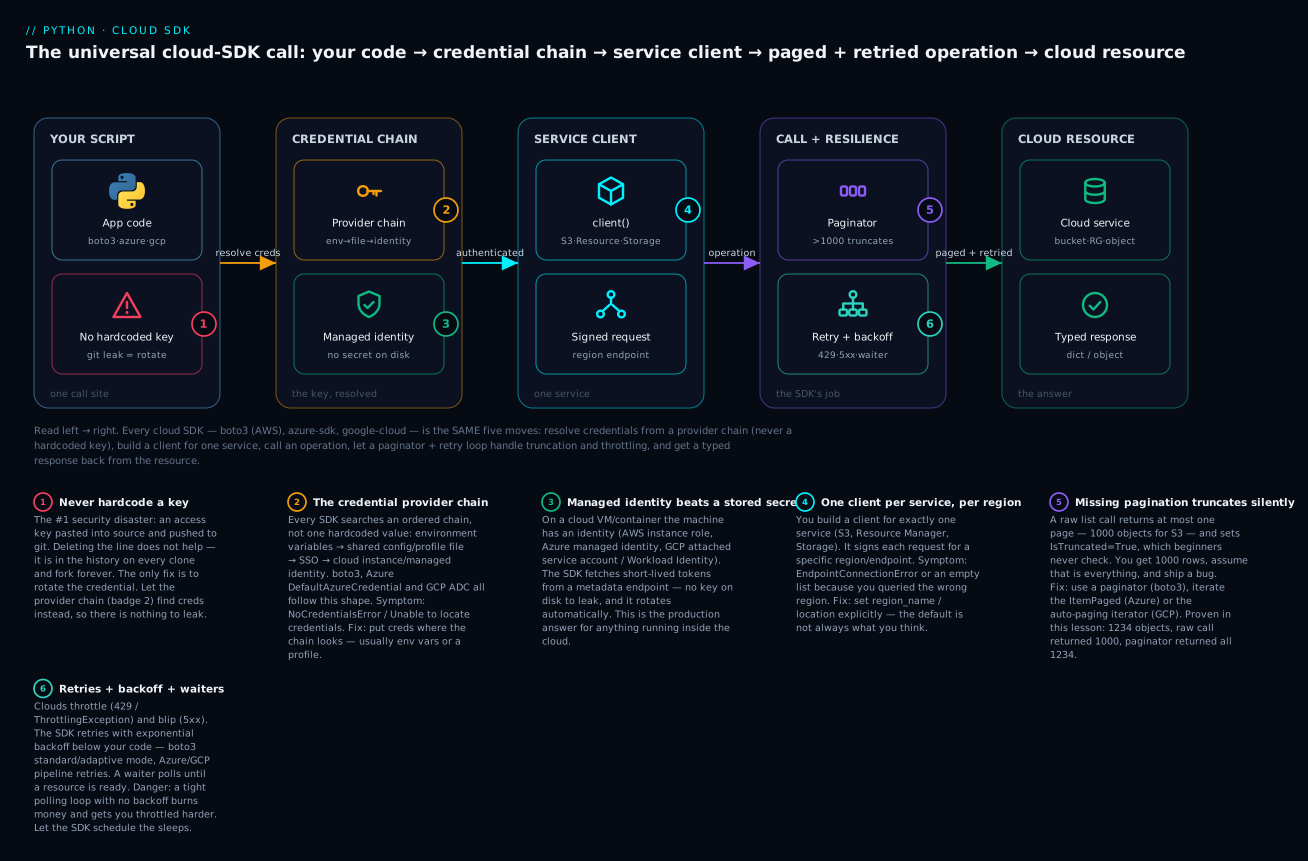
Follow it left to right. The credential chain (the amber key) resolves who you are without a secret in your code; the client signs each request for one service and region; and on the way to the answer, a paginator guarantees you see every page and a retry loop absorbs throttling and blips. The red mark on the script is the one thing you must never do — hardcode a key — and the purple mark on the paginator is the silent bug this lesson keeps returning to.
The same five moves in three languages. Watch them line up. Here is the shape in boto3 (executed later, in full):
import boto3                                        # 1. auth is implicit: chain resolves
s3 = boto3.client("s3", region_name="us-east-1")    # 2. a client for ONE service
resp = s3.list_objects_v2(Bucket="my-bucket")       # 3. call an operation
for obj in resp.get("Contents", []):                # 4. read the (paged) response
    print(obj["Key"])
# 5. errors surface as botocore.exceptions.ClientError; retries happen below this line
Here is the same shape in Azure (accurate, NOT executed — I have no Azure credentials):
from azure.identity import DefaultAzureCredential      # 1. auth
from azure.storage.blob import BlobServiceClient        # 2. a client for ONE service

cred = DefaultAzureCredential()
svc = BlobServiceClient("https://myacct.blob.core.windows.net", credential=cred)
container = svc.get_container_client("my-container")
for blob in container.list_blobs():                     # 3+4. call + iterate (ItemPaged)
    print(blob.name)
# 5. errors: azure.core.exceptions.HttpResponseError; retries: the client pipeline
And in Google Cloud (accurate, NOT executed — I have no GCP credentials):
from google.cloud import storage                    # 2. a client for ONE service

client = storage.Client()                            # 1. auth is implicit: ADC resolves
for blob in client.list_blobs("my-bucket"):          # 3+4. call + iterate (auto-pages)
    print(blob.name)
# 5. errors: google.api_core.exceptions.*; retries: google.api_core.retry.Retry
Three clouds, one skeleton. The differences are real but small: Azure makes you name the account endpoint and pass the credential explicitly; GCP hides both behind ADC and the project; AWS sits in between. But authenticate → client → operate → iterate → handle is invariant. The rest of this lesson drills into each move, executes the AWS version for real, and shows the Azure/GCP equivalents so you can see the rhyme.
One structural difference shows up at install time. boto3 is a single package for all of AWS, but Azure and GCP ship a separate package per service — so you install exactly what you use:
| Cloud | Auth package | A storage/blob package | A “list resources” package | Install |
|---|---|---|---|---|
| AWS | (built into boto3) | (built into boto3) | (built into boto3) | pip install boto3 — everything |
| Azure | azure-identity |
azure-storage-blob |
azure-mgmt-resource |
pip install azure-identity azure-storage-blob |
| GCP | (built into each client) | google-cloud-storage |
google-cloud-resource-manager |
pip install google-cloud-storage |
The Azure/GCP model means a dependency list that names each service — heavier to set up, but you never ship code for a service you don’t call. boto3’s single package is simpler but pulls the definitions for every AWS service (it stays lean by loading service models lazily at runtime).
Authentication done right (the #1 source of pain and risk)
More cloud-automation time is lost to authentication than to any other single cause, and it splits into two failure modes that look opposite but share a root: the call that can’t find credentials (NoCredentialsError) and the credential that should never have existed in that form (a secret key hardcoded and pushed to git). Both come from not understanding the credential provider chain — the ordered list of places the SDK looks. Learn the chain and both problems dissolve.
The golden rule: never hardcode a key
Start here because it is the one that ends careers and companies, not just afternoons.
# ❌ NEVER. This is a security disaster, not a shortcut.
s3 = boto3.client(
    "s3",
    aws_access_key_id="AKIAIOSFODNN7EXAMPLE",
    aws_secret_access_key="wJalrXUtnFEMI/K7MDENG/bPxRfiCYEXAMPLEKEY",
)
The problem is not that it fails. The problem is that it works — right up until that file lands in git. And once a secret is in git history, deleting the line does nothing: it lives in the commit history, on every clone, in every fork, in every CI cache, forever. Bots scan public GitHub for exactly this pattern and find fresh keys within minutes. The only remediation once a key is exposed is to rotate it — deactivate the old one and issue a new one — never to quietly delete the line and hope. (This is not hypothetical for this blog: it is written into the project’s own security notes precisely because it has bitten before.)
The fix is to never put the key in code at all. Let the chain find it.
The credential provider chain (AWS)
When you call boto3.client("s3") with no keys, botocore searches an ordered chain and uses the first source that yields credentials. This is the single most important table in the lesson:
| Order | Source | How it’s set | Use it for |
|---|---|---|---|
| 1 | Explicit params | aws_access_key_id=... in code |
⚠️ Almost never — this is the hardcoding trap |
| 2 | Environment variables | AWS_ACCESS_KEY_ID, AWS_SECRET_ACCESS_KEY, AWS_SESSION_TOKEN |
✅ CI, containers, quick local runs |
| 3 | Shared credentials file | ~/.aws/credentials [profile] |
✅ Local dev with multiple accounts |
| 4 | AWS config file | ~/.aws/config — profiles, SSO, role_arn |
✅ SSO + role assumption |
| 5 | SSO / AssumeRole |
resolved from the profile above | ✅ Human access, short-lived tokens |
| 6 | Container credentials | AWS_CONTAINER_CREDENTIALS_RELATIVE_URI (ECS) |
✅ ECS/Fargate tasks — automatic |
| 7 | Instance metadata (IMDS) | EC2 instance role via 169.254.169.254 |
✅ EC2 — the production answer |
Two things about this chain are worth internalising. First, “first match wins” explains a whole category of “why is it using the wrong account?” bugs: a stale AWS_ACCESS_KEY_ID in your shell (source 2) silently overrides the profile you carefully configured (source 3), because 2 comes first. When in doubt, check who you actually are:
import boto3
sts = boto3.client("sts", region_name="us-east-1")
print(sts.get_caller_identity())      # the "whoami" of AWS
Under the moto mock this returns a stand-in identity, which is exactly what you’d inspect against the real API:
{'UserId': ..., 'Account': '123456789012', 'Arn': 'arn:aws:sts::123456789012:user/moto', ...}
Second, sources 6 and 7 are the reason production code has no secrets at all. On an EC2 instance or ECS task, the machine itself has an identity (an IAM role), and botocore fetches short-lived, auto-rotating credentials from a metadata endpoint. There is no key on disk to leak. This is the model you should be driving toward everywhere.
Profiles let you name and switch between identities:
# ~/.aws/credentials
#   [default]      aws_access_key_id = ...
#   [prod]         aws_access_key_id = ...
session = boto3.Session(profile_name="prod")     # pick a profile explicitly
s3 = session.client("s3")
# or from the shell, no code change:  AWS_PROFILE=prod python myscript.py
And role assumption — the backbone of cross-account access — is one STS call: you start as identity A, call assume_role, and get temporary credentials for role B in another account.
sts = boto3.client("sts")
assumed = sts.assume_role(
    RoleArn="arn:aws:iam::222222222222:role/ReadOnlyAudit",
    RoleSessionName="inventory-scan",
)
creds = assumed["Credentials"]                    # temporary, auto-expiring
audit = boto3.client("s3",
    aws_access_key_id=creds["AccessKeyId"],
    aws_secret_access_key=creds["SecretAccessKey"],
    aws_session_token=creds["SessionToken"])      # note: the session token is required
⚠️ Those assumed credentials are temporary — they carry an expiry (creds["Expiration"]), typically an hour. A long-running process that assumes a role once and reuses the client past expiry starts getting ExpiredToken errors mid-run. For anything long-lived, don’t manage the refresh by hand: let boto3 do it. Constructing the session from a profile whose ~/.aws/config specifies the role_arn gives you auto-refreshing credentials — botocore re-assumes the role transparently before each expiry, so your client just keeps working. Hand-rolled assume_role is fine for a short script; for a daemon, drive it through a profile and let the SDK handle the clock.
The same idea in Azure and GCP
Here is where learning the concept pays off: Azure and Google Cloud have the identical chain idea under different names.
Azure — DefaultAzureCredential is the chain, as a single object. It tries each source in order and uses the first that works (accurate, NOT executed):
from azure.identity import DefaultAzureCredential
cred = DefaultAzureCredential()          # THE recommended default — it IS the chain
Internally that walks an ordered chain — the direct analogue of the AWS provider chain, and it stops at the first credential that works:
| Order | DefaultAzureCredential tries |
Fed by | Where it fits |
|---|---|---|---|
| 1 | EnvironmentCredential |
AZURE_CLIENT_ID/_TENANT_ID/_CLIENT_SECRET |
✅ CI / a service principal |
| 2 | WorkloadIdentityCredential |
projected token (AKS) | ✅ Kubernetes on Azure |
| 3 | ManagedIdentityCredential |
Azure instance metadata | ✅ Any Azure-hosted resource — production |
| 4 | SharedTokenCacheCredential |
local IDE token cache | Visual Studio / VS Code |
| 5 | AzureCliCredential |
your az login session |
✅ Local development |
| 6 | AzurePowerShellCredential |
Connect-AzAccount |
Local, PowerShell users |
| 7 | AzureDeveloperCliCredential |
azd auth login |
Local, azd users |
Same shape as AWS: env vars for CI (row 1), a local developer login for your laptop (row 5), managed identity in production (row 3). For an explicit service principal you skip the chain:
from azure.identity import ClientSecretCredential      # accurate, NOT executed
cred = ClientSecretCredential(tenant_id="...", client_id="...", client_secret="...")
# ⚠️ client_secret is still a secret — from a Key Vault or env var, NEVER hardcoded
GCP — Application Default Credentials (ADC) is the chain, resolved by google.auth.default() and used automatically by every client (accurate, NOT executed):
from google.cloud import storage
client = storage.Client()                # ADC resolves credentials with no arguments
ADC searches its own ordered chain, the third variation on the same theme:
| Order | ADC source | Fed by | Where it fits |
|---|---|---|---|
| 1 | Service-account key file | GOOGLE_APPLICATION_CREDENTIALS=path.json |
⚠️ CI (a long-lived secret — guard it) |
| 2 | gcloud user credentials | gcloud auth application-default login |
✅ Local development |
| 3 | Attached service account | metadata server (GCE/GKE/Cloud Run/Functions) | ✅ In-cloud — production; Workload Identity on GKE |
To be explicit with a service-account key:
from google.oauth2 import service_account            # accurate, NOT executed
from google.cloud import storage
creds = service_account.Credentials.from_service_account_file("sa-key.json")
client = storage.Client(credentials=creds, project="my-project")
# ⚠️ sa-key.json is a long-lived secret. Prefer Workload Identity so there's no file at all.
Per-cloud authentication, side by side
The whole auth story on one screen — this is the table to bookmark:
| Concern | AWS (boto3) | Azure (azure-identity) | GCP (google-cloud) |
|---|---|---|---|
| The “just works” default | provider chain (implicit) | DefaultAzureCredential() |
ADC (implicit) |
| Environment variables | AWS_ACCESS_KEY_ID + _SECRET_ACCESS_KEY |
AZURE_CLIENT_ID/_TENANT_ID/_CLIENT_SECRET |
GOOGLE_APPLICATION_CREDENTIALS=path.json |
| Local dev login | aws sso login / profiles |
az login → AzureCliCredential |
gcloud auth application-default login |
| A named machine identity | service principal ≈ IAM user access key | service principal (app registration) | service account (+ JSON key) |
| In-cloud, no secret on disk | instance role / ECS task role (IMDS) | managed identity | attached SA / Workload Identity |
| Assume another identity | sts.assume_role(...) |
multi-tenant SP / OBO flow | service-account impersonation |
| The “whoami” check | sts.get_caller_identity() |
decode the token / Graph /me |
gcloud auth list / token introspection |
| The cardinal sin | key in code/git | secret in code/git | SA JSON in code/git |
Read the bottom row across all three columns. Every cloud’s worst-case auth mistake is the same mistake: a long-lived secret committed to source control. And every cloud’s best answer is the same answer: an in-cloud managed identity so there is no long-lived secret at all. Learn it once, apply it three times.
boto3 in depth (the one we execute)
Now we run things. Everything in this section is real output from boto3 driving the moto mock — an in-memory reimplementation of AWS APIs that lets us create buckets, put objects and trigger errors with zero cloud cost and zero credentials. The decorator that switches it on is @mock_aws.
The mechanism is worth understanding because it’s why the output below is trustworthy. @mock_aws (from moto 5.x — earlier versions had per-service decorators like @mock_s3, now unified) patches botocore’s HTTP layer so that requests never leave your machine: instead of signing and sending to AWS, they’re answered by moto’s in-process models, which implement real S3 semantics — bucket-name validation, the 1000-key list cap, NoSuchBucket errors, tag sets, region constraints. So you are running the real boto3 code path (real credential resolution, real request building, real pagination and retry logic) against a fake backend. That is the ideal test setup for cloud code: fast (no network), free (no bill), deterministic (no flakiness), offline (works on a plane), and it exercises your actual SDK calls rather than a hand-written stub that might not match reality. Its limit is honest — moto implements most of the popular services well but not every edge of every API — so pair it with a thin layer of real-cloud smoke tests in CI for the paths that matter most.
client vs resource — the two front doors
boto3 gives you two ways to talk to a service, and confusing them is a rite of passage.
boto3.client("s3") |
boto3.resource("s3") |
|
|---|---|---|
| Level | Low — 1:1 with the REST API | High — object-oriented abstraction |
| Returns | plain dicts (raw JSON shape) |
objects with attributes & methods |
| Coverage | ✅ Every service & operation | ⚠️ A subset of services only |
| Pagination | Paginators (explicit) | ✅ Auto-paging collections |
| Example | s3.list_objects_v2(Bucket=b)["Contents"] |
for o in bucket.objects.all(): |
| Future | ✅ Actively maintained | ⚠️ No new features — AWS steers you to client |
| Use when | ✅ Anything — the safe default | Quick scripts against S3/EC2/DynamoDB |
Both, doing the same job, executed:
import boto3
from moto import mock_aws

@mock_aws
def main():
    # client: thin, 1:1 with the API, returns dicts
    client = boto3.client("s3", region_name="us-east-1")
    client.create_bucket(Bucket="demo")
    client.put_object(Bucket="demo", Key="a.txt", Body=b"hi")
    print("client  ->", client.get_object(Bucket="demo", Key="a.txt")["Body"].read())

    # resource: higher-level, object-oriented, lazy collections
    s3 = boto3.resource("s3", region_name="us-east-1")
    bucket = s3.Bucket("demo")
    obj = s3.Object("demo", "a.txt")
    print("resource ->", obj.get()["Body"].read(),
          "| count:", sum(1 for _ in bucket.objects.all()))

main()
client  -> b'hi'
resource -> b'hi' | count: 1
The guidance in one line: default to client. It covers every service, it is what the docs and AI assistants mostly show, and it is the one AWS is still investing in. Reach for resource only for a quick S3/EC2/DynamoDB script where bucket.objects.all() reads more nicely than a paginator — and know that some newer services have no resource interface at all.
Operations, tags, and reading a typed response
An “operation” is a named API method. The parameters are keyword arguments (Bucket=, Key=), and the response is a dict whose shape mirrors the API. Here is the core loop — create, put, list, tag, read — executed end to end:
import boto3
from botocore.exceptions import ClientError
from moto import mock_aws

@mock_aws
def main():
    s3 = boto3.client("s3", region_name="us-east-1")
    s3.create_bucket(Bucket="kloudvin-inventory")          # us-east-1 needs no LocationConstraint

    for key, body in [("reports/jan.csv", b"a,b,c\n1,2,3\n"),
                      ("reports/feb.csv", b"a,b,c\n4,5,6\n"),
                      ("logs/app.log",    b"boot ok\n")]:
        s3.put_object(Bucket="kloudvin-inventory", Key=key, Body=body)

    resp = s3.list_objects_v2(Bucket="kloudvin-inventory")
    print("keys:", [o["Key"] for o in resp["Contents"]])
    print("IsTruncated:", resp["IsTruncated"], "| KeyCount:", resp["KeyCount"])

    s3.put_object_tagging(Bucket="kloudvin-inventory", Key="reports/jan.csv",
        Tagging={"TagSet": [{"Key": "owner", "Value": "data-team"},
                            {"Key": "env",   "Value": "prod"}]})
    tags = s3.get_object_tagging(Bucket="kloudvin-inventory", Key="reports/jan.csv")
    print("tags:", {t["Key"]: t["Value"] for t in tags["TagSet"]})

main()
keys: ['logs/app.log', 'reports/feb.csv', 'reports/jan.csv']
IsTruncated: False | KeyCount: 3
tags: {'owner': 'data-team', 'env': 'prod'}
Three details that trip people up, all visible above. Object listings come back lexicographically sorted by key, not by upload time — logs/ sorts before reports/. The tag API is verbose on purpose: TagSet is a list of {"Key": ..., "Value": ...} dicts, not a plain mapping, because S3 preserves tag order and allows the same structure everywhere tags appear — you convert to a dict yourself for convenience. And IsTruncated is sitting right there in the response, False for our three objects — which is the exact flag the next section is about.
The handful of S3 operations you’ll reach for constantly, and the shape of each:
| Operation | Key parameters | Returns | Note |
|---|---|---|---|
create_bucket |
Bucket, CreateBucketConfiguration |
dict with Location |
⚠️ LocationConstraint required outside us-east-1 |
put_object |
Bucket, Key, Body, ContentType, Metadata |
ETag, VersionId |
Body is bytes or a file-like object |
get_object |
Bucket, Key, Range |
dict; ["Body"].read() for bytes |
Body is a stream — read it once |
head_object |
Bucket, Key |
metadata only, no body | ✅ Cheap existence/size check; ⚠️ bare 404 on miss |
copy_object |
Bucket, Key, CopySource |
CopyObjectResult |
Server-side copy — no download |
delete_object |
Bucket, Key |
(usually empty) | ⚠️ Idempotent: deleting a missing key still 204s |
list_objects_v2 |
Bucket, Prefix, MaxKeys, ContinuationToken |
⚠️ ≤1000 Contents |
Paginate it (below) |
put_object_tagging |
Bucket, Key, Tagging |
version info | ⚠️ Replaces the whole TagSet |
⚠️ Paginators, and the 1000-object truncation bug
This is the boto3 bug that reaches production most often, and it is silent. A single list_objects_v2 call returns at most 1000 objects — the service caps a page — and signals “there’s more” with IsTruncated: True. If you don’t check that flag, you process 1000 objects, conclude that’s the whole bucket, and ship a script that is quietly wrong by however many thousands the bucket really holds.
Let’s prove it. We create 1234 objects, then list them the naive way:
@mock_aws
def main():
    s3 = boto3.client("s3", region_name="us-east-1")
    s3.create_bucket(Bucket="big-bucket")
    for i in range(1234):
        s3.put_object(Bucket="big-bucket", Key=f"data/obj-{i:05d}.txt", Body=b"x")

    # ❌ THE BUG: one raw call silently stops at 1000
    resp = s3.list_objects_v2(Bucket="big-bucket")
    print("raw list -> len(Contents):", len(resp["Contents"]),
          "| IsTruncated:", resp["IsTruncated"])

    # ✅ THE FIX: a paginator threads the continuation token for you
    paginator = s3.get_paginator("list_objects_v2")
    total = pages = 0
    for page in paginator.paginate(Bucket="big-bucket"):
        pages += 1
        total += len(page.get("Contents", []))
    print(f"paginator -> {total} objects across {pages} pages")
raw list -> len(Contents): 1000 | IsTruncated: True
paginator -> 1234 objects across 2 pages
There it is in black and white: the raw call returned 1000, the paginator returned all 1234. A get_paginator("<operation>") gives you a paginator object; calling .paginate(**params) yields page dicts, and it handles the NextContinuationToken plumbing invisibly. You never touch a token, never write a while loop, never get the boundary wrong.
You can control the paging, which also lets us see multiple pages without creating thousands of objects — PageSize sets how many items per underlying API call:
    s3.create_bucket(Bucket="small-bucket")
    for i in range(5):
        s3.put_object(Bucket="small-bucket", Key=f"k{i}", Body=b"x")
    pager = s3.get_paginator("list_objects_v2")
    for n, page in enumerate(pager.paginate(
            Bucket="small-bucket", PaginationConfig={"PageSize": 2}), 1):
        print(f"page {n}: {[o['Key'] for o in page['Contents']]}")
page 1: ['k0', 'k1']
page 2: ['k2', 'k3']
page 3: ['k4']
Five objects, PageSize=2, three pages — pagination made visible. The PaginationConfig knobs:
PaginationConfig key |
Meaning | Typical use |
|---|---|---|
PageSize |
Items requested per underlying API call | Tune network round-trips vs memory |
MaxItems |
Stop after this many items total, across pages | Cap a scan: “first 500 and stop” |
StartingToken |
Resume from a token returned earlier | Checkpoint / restartable jobs |
And the deeper idiom: since paginators are lazy iterators, the Pythonic move is to wrap one in a generator so callers see a flat stream of items and never think about pages — the same generator pattern that powers the pagination lesson elsewhere in this course.
def iter_keys(s3, bucket):
    for page in s3.get_paginator("list_objects_v2").paginate(Bucket=bucket):
        for obj in page.get("Contents", []):
            yield obj["Key"]                      # one page in memory at a time
⚠️ Not every operation is paginated the same way, and a few (list_buckets) aren’t paginated at all because they can’t exceed a page. The rule of thumb: if an operation’s name starts with list, describe, or get_...s, assume it paginates and check for a paginator. s3.can_paginate("list_objects_v2") answers definitively.
Error handling: ClientError and the error Code
When an AWS operation fails, botocore raises ClientError, and the useful information is inside e.response["Error"]. This is not like requests, where a 404 comes back as a normal response — botocore raises. Executed against missing resources:
from botocore.exceptions import ClientError

@mock_aws
def main():
    s3 = boto3.client("s3", region_name="us-east-1")
    try:
        s3.list_objects_v2(Bucket="nope-nope-nope")
    except ClientError as e:
        print("str(e):", e)
        print("Code:", e.response["Error"]["Code"],
              "| HTTP:", e.response["ResponseMetadata"]["HTTPStatusCode"])
str(e): An error occurred (NoSuchBucket) when calling the ListObjectsV2 operation: The specified bucket does not exist
Code: NoSuchBucket | HTTP: 404
Everything useful about a failure lives in e.response, a dict with a fixed shape worth memorising:
e.response[...] path |
Type | What it is |
|---|---|---|
["Error"]["Code"] |
str |
✅ The stable code — branch on this (NoSuchKey, AccessDenied) |
["Error"]["Message"] |
str |
Human-readable; ⚠️ may be reworded — don’t parse it |
["ResponseMetadata"]["HTTPStatusCode"] |
int |
404, 403, 503 |
["ResponseMetadata"]["RequestId"] |
str |
✅ Quote this to AWS support to trace the call |
["ResponseMetadata"]["RetryAttempts"] |
int |
How many times botocore retried |
["Error"]["BucketName"] (varies) |
str |
Extra context keys some services add |
The pattern you will write a hundred times is branch on the error Code — a stable string like NoSuchBucket — never on the human-readable message, which can change:
    try:
        s3.get_object(Bucket="my-bucket", Key="maybe/here.txt")
    except ClientError as e:
        code = e.response["Error"]["Code"]
        if code == "NoSuchKey":
            handle_missing()                     # a normal outcome, not a crash
        elif code == "AccessDenied":
            raise PermissionError("fix the IAM policy") from e
        else:
            raise                                 # unknown — don't swallow it
That raise ... from e — re-raising as your own app-level error while preserving the original as __cause__ — is exactly the exception-wrapping discipline from Exceptions in Depth: catch the narrow cloud error, translate it into a name your callers understand, keep the chain for debugging.
The error Codes you will actually handle:
Error.Code |
HTTP | Means | Your move |
|---|---|---|---|
NoSuchBucket |
404 | Bucket doesn’t exist (or wrong region) | Create it, or fix the name/region |
NoSuchKey |
404 | Object key not found | Handle as a normal “not there” |
AccessDenied |
403 | IAM policy forbids this action | Fix the policy — don’t retry |
InvalidBucketName |
400 | Name breaks S3 rules (3–63 chars, etc.) | Fix the name — your bug |
BucketAlreadyOwnedByYou |
409 | You already made this bucket | Usually ignore — it’s idempotent-ish |
ThrottlingException / SlowDown |
503 | You’re going too fast | ✅ Back off and retry (next section) |
RequestTimeout |
400 | Request took too long | Retry |
ExpiredToken |
403 | Temp credentials expired | Refresh the session/role |
ValidationException |
400 | Bad parameter shape | Fix the call — your bug |
Two honest gotchas from the real runs. First, head_bucket and head_object are HEAD requests with no response body, so on failure their Error.Code is the bare HTTP status string ('404'), not a rich NoSuchKey — use get_object/list_objects_v2 when you want a meaningful code. Second, moto enforces real S3 rules: a one-character bucket name raises An error occurred (InvalidBucketName) when calling the CreateBucket operation, which is genuinely useful — the mock catches naming bugs before the real cloud would.
Retries and backoff — configured, and firing for real
Clouds throttle and blip. The SDK’s answer is a retry policy below your code, with exponential backoff, so a transient failure is invisible to you. You configure it with a Config object:
from botocore.config import Config
s3 = boto3.client("s3", region_name="us-east-1",
    config=Config(retries={"max_attempts": 5, "mode": "standard"}))
print(s3.meta.config.retries)
{'mode': 'standard', 'total_max_attempts': 6}
Note the normalisation, and the trap in it: you passed max_attempts: 5 and it stored total_max_attempts: 6. In the botocore Config object, max_attempts means the number of retries (attempts after the first), and botocore adds one for the initial attempt to get total_max_attempts. So max_attempts=5 means 1 initial + 5 retries = 6 total sends. Confusingly, the max_attempts key in ~/.aws/config and the AWS_MAX_ATTEMPTS env var mean the total instead — which is why total_max_attempts is the preferred, unambiguous key.
retries key |
Meaning | Value of 5 → |
|---|---|---|
max_attempts |
Retries after the first attempt | 6 total sends |
total_max_attempts |
Total sends including the first (preferred) | 5 total sends |
mode |
Which retry algorithm (below) | — |
The three modes:
mode |
What it does | When |
|---|---|---|
legacy |
The default. Older logic, retries a narrow set of errors | Back-compat; not your first choice |
standard |
Consistent across AWS SDKs; retries throttling and 5xx; token-bucket to cap retry storms | ✅ The modern default to set |
adaptive |
standard + client-side rate limiting that slows itself down when throttled |
Aggressive workloads; ⚠️ experimental, can reduce throughput |
Now the part the brief demanded: a retry actually firing, offline. Since moto always succeeds, we inject two 503s ahead of it using botocore’s event system, then let the third send reach the mock. This is real botocore retry logic running against a real (mock) backend:
from botocore.config import Config
from botocore.awsrequest import AWSResponse
from moto import mock_aws

class FakeRaw:                                     # minimal raw stream for the injection
    def __init__(self, body=b""): self._body = body
    def read(self, amt=None):
        b, self._body = self._body, b""; return b
    def stream(self, **k): yield self._body

@mock_aws
def main():
    attempts = {"n": 0}
    def inject(request, **kwargs):
        attempts["n"] += 1
        if attempts["n"] <= 2:                     # fail the first two sends with 503
            return AWSResponse(request.url, 503, {}, FakeRaw(
                b"<Error><Code>ServiceUnavailable</Code><Message>slow down</Message></Error>"))
        return None                                # 3rd send -> the real moto call

    s3 = boto3.client("s3", region_name="us-east-1",
        config=Config(retries={"max_attempts": 5, "mode": "standard"}))
    s3.meta.events.register("before-send.s3.ListBuckets", inject)
    resp = s3.list_buckets()
    print("succeeded after", attempts["n"], "sends; HTTP",
          resp["ResponseMetadata"]["HTTPStatusCode"],
          "| RetryAttempts:", resp["ResponseMetadata"]["RetryAttempts"])

main()
succeeded after 3 sends; HTTP 200 | RetryAttempts: 2
Your code called list_buckets() once. Botocore sent it three times — two 503s, then success — sleeping with exponential backoff between them, and handed you a clean 200. The RetryAttempts: 2 in the response metadata is botocore telling you, honestly, that it retried twice. This is the whole value proposition: transient failure, handled below your logic, with backoff you didn’t have to write. It is the exact same exponential-backoff-with-jitter idea you met at the HTTP layer in Consuming HTTP APIs with requests — the cloud SDK just wires it in for you and makes it throttle-aware.
Waiters — poll until ready, without a hand-rolled loop
Some cloud operations are asynchronous: you ask for a bucket, an instance, a table, and it isn’t usable the instant the call returns. The naive fix is a while loop with time.sleep() — which is exactly the tight-polling anti-pattern that burns money and invites throttling. boto3’s answer is a waiter: a pre-built poller with sane backoff.
@mock_aws
def main():
    s3 = boto3.client("s3", region_name="us-east-1")
    s3.create_bucket(Bucket="wait-for-me")
    waiter = s3.get_waiter("bucket_exists")
    waiter.wait(Bucket="wait-for-me",
                WaiterConfig={"Delay": 1, "MaxAttempts": 5})   # poll every 1s, ≤5 times
    print("bucket_exists: returned — the bucket is ready")

main()
bucket_exists: returned — the bucket is ready
WaiterConfig bounds the poll (Delay seconds between attempts, MaxAttempts before giving up with a WaiterError). Common S3 waiters are bucket_exists, bucket_not_exists, object_exists, object_not_exists; EC2 has instance_running, instance_stopped; and so on. The rule: before writing a polling loop, check for a waiter — s3.waiter_names lists them. A waiter you didn’t write beats a sleep loop you did.
A quick map of the paginators and waiters you’ll meet most, and how to discover them:
| Service | Common paginators | Common waiters | Discover with |
|---|---|---|---|
| S3 | list_objects_v2, list_object_versions, list_multipart_uploads |
bucket_exists, object_exists |
s3.get_paginator(...) / s3.waiter_names |
| EC2 | describe_instances, describe_volumes, describe_snapshots |
instance_running, instance_stopped, instance_terminated |
client.can_paginate("op") |
| DynamoDB | scan, query, list_tables |
table_exists, table_not_exists |
client.waiter_names |
| IAM | list_users, list_roles, list_policies |
user_exists, role_exists |
client.get_paginator(...) |
| CloudFormation | list_stacks, describe_stacks |
stack_create_complete, stack_delete_complete |
client.waiter_names |
⚠️ list_buckets is not paginated (an account’s bucket count can’t exceed a page), which is why s3.can_paginate("list_buckets") returns False — a reminder to check rather than assume.
azure-sdk: the same shape, different vocabulary
Everything below is accurate and idiomatic, but NOT executed — I have no Azure subscription or credentials, so I will not fabricate output. Read it as “here is the correct code and what it would do”, verified against the SDK’s documented API, not as a live run.
The first thing to understand about Azure’s Python SDK is that it is split into two families, and mixing them up is the most common Azure-beginner error:
| Family | Package pattern | Plane | Does what | Example |
|---|---|---|---|---|
| Management | azure-mgmt-* |
Control plane (ARM) | Create/configure/delete resources | make a storage account, list VMs, deploy |
| Client / data | azure-storage-*, azure-keyvault-*, … |
Data plane | Use a resource’s contents | upload a blob, read a secret |
The distinction is real: azure-mgmt-storage creates a storage account; azure-storage-blob puts blobs into one that already exists. They authenticate the same way (both take a DefaultAzureCredential) but hit different endpoints with different permissions. A management client to list resource groups (accurate, NOT executed):
from azure.identity import DefaultAzureCredential
from azure.mgmt.resource import ResourceManagementClient

credential = DefaultAzureCredential()                       # the credential chain
subscription_id = "00000000-0000-0000-0000-000000000000"
client = ResourceManagementClient(credential, subscription_id)

for rg in client.resource_groups.list():                    # 3+4: call + iterate
    print(rg.name, rg.location)
That client.resource_groups.list() returns an ItemPaged[ResourceGroup] — Azure’s paginated iterator, the equivalent of a boto3 paginator. The crucial part: you just iterate it, and it fetches pages transparently as you go. There is no truncation bug to fall into because the default iteration walks everything. If you need page-level control (to checkpoint, or to see the continuation token), call .by_page():
pages = client.resource_groups.list().by_page()             # accurate, NOT executed
first_page = next(pages)                                     # one page (a list) at a time
for rg in first_page:
    print(rg.name)
ItemPaged[T] usage |
What you get |
|---|---|
for item in paged: |
✅ Every item across all pages, fetched lazily |
paged.by_page() |
An iterator of pages, each a list — for checkpointing |
next(paged.by_page()) |
Just the first page |
paged.continuation_token |
Resume token (advanced / restartable scans) |
A data-plane blob example — note it targets an account endpoint directly, no subscription id (accurate, NOT executed):
from azure.identity import DefaultAzureCredential
from azure.storage.blob import BlobServiceClient

cred = DefaultAzureCredential()
svc = BlobServiceClient("https://myaccount.blob.core.windows.net", credential=cred)
container = svc.get_container_client("my-container")
for blob in container.list_blobs():                         # ItemPaged[BlobProperties]
    print(blob.name, blob.size)
Retries in Azure are built into the client pipeline and configured with keyword arguments at client construction (retry_total, retry_backoff_factor, retry_backoff_max), so ResourceManagementClient(cred, sub, retry_total=5) is the rough analogue of boto3’s Config(retries=...). Errors surface as azure.core.exceptions.HttpResponseError (and typed subclasses like ResourceNotFoundError), which carry .status_code and .error.code — the same “branch on a stable code” pattern as ClientError. And most Azure clients have an async twin under an .aio submodule (azure.identity.aio.DefaultAzureCredential, azure.mgmt.*.aio), which boto3 lacks entirely.
google-cloud: iterators that page themselves
Again: accurate and idiomatic, but NOT executed — no GCP project or credentials here, so no fabricated output.
Google’s libraries lean hardest into hiding the machinery. ADC means clients construct with no credential argument, and pagination is folded into a plain iterator that pages itself. A storage example (accurate, NOT executed):
from google.cloud import storage

client = storage.Client()                        # ADC resolves credentials + project
for bucket in client.list_buckets():             # auto-paging iterator
    print(bucket.name)

bucket = client.bucket("my-bucket")
for blob in bucket.list_blobs(prefix="logs/"):   # also auto-pages — no token handling
    print(blob.name, blob.size)
The thing to appreciate: list_blobs() returns an iterator that fetches each page from the API as you consume it. Iterate it fully and you get every object with no truncation — GCP’s default is the safe one. When you do need page awareness, the iterator exposes .pages (accurate, NOT executed):
blobs = client.list_blobs("my-bucket")           # accurate, NOT executed
for page in blobs.pages:                          # iterate PAGES explicitly
    print("page has", page.num_items, "items")
    for blob in page:
        ...
    token = blobs.next_page_token                 # continuation token, if you need it
| GCP iterator feature | What it gives you |
|---|---|
for item in iterator: |
✅ Every item, auto-paging — the default, and it’s safe |
iterator.pages |
An iterator of pages for explicit control |
page.num_items |
Count in the current page |
iterator.next_page_token |
The continuation token |
Retries in google-cloud are objects from google.api_core.retry: methods accept a retry= argument, and libraries ship a sensible DEFAULT_RETRY (with a Retry(...) you can customise — initial, maximum, multiplier, deadline). Errors live in google.api_core.exceptions (NotFound, Forbidden, TooManyRequests, …), each mapping to an HTTP status — the same branch-on-type pattern once more. Async support is uneven and honest to flag: the generated GAPIC libraries (Firestore, Pub/Sub, Spanner) offer first-class AsyncClients, but google-cloud-storage does not ship async — for async blob access you reach for the third-party gcloud-aio-storage. I would rather tell you that than imply a symmetry that isn’t there.
Cross-cloud capability and idiom table
The whole lesson compressed into one reference. This is the “I know one cloud, remind me of the other two” table:
| Capability | AWS (boto3) | Azure (azure-sdk) | GCP (google-cloud) |
|---|---|---|---|
| Auth default | provider chain (implicit) | DefaultAzureCredential() |
ADC (implicit) |
| Explicit secret cred | access key (avoid) / assume_role |
ClientSecretCredential |
service_account.Credentials |
| In-cloud identity | instance/task role | managed identity | attached SA / Workload Identity |
| Build a client | boto3.client("s3") |
BlobServiceClient(url, credential=) |
storage.Client() |
| Control vs data plane | one client per service | azure-mgmt-* vs azure-* (split!) |
one client per service |
| Call an operation | s3.list_objects_v2(...) |
container.list_blobs() |
bucket.list_blobs() |
| Pagination | get_paginator().paginate() |
iterate ItemPaged; .by_page() |
iterate; .pages |
| Truncation risk | ⚠️ High — raw call caps at 1000 | Low — iteration walks all | Low — iteration walks all |
| Retry config | Config(retries={...}) |
retry_total= at client init |
retry= per call / DEFAULT_RETRY |
| Error type | ClientError (.response["Error"]["Code"]) |
HttpResponseError (.error.code) |
google.api_core.exceptions.* |
| Waiters | ✅ get_waiter(...) |
pollers: begin_*() → .result() |
mostly manual / operation futures |
| Async support | ❌ None (use aioboto3, 3rd-party) |
✅ .aio submodules |
⚠️ Partial (GAPIC yes, storage no) |
| Local mock for tests | ✅ moto (excellent) |
limited (Azurite for storage) | emulators (Firestore, Pub/Sub, GCS) |
Two columns of that table are the “so what”. The truncation-risk row is why boto3 needs this lesson more than the others: AWS makes you opt in to walking all pages, so the bug is easy to ship; Azure and GCP make full iteration the default, so you have to opt out to get burned. And the waiters/async rows show where the SDKs genuinely diverge — Azure’s long-running operations return a poller you call .result() on, GCP leans on operation futures, and boto3 has purpose-built waiters but no async. The skeleton is shared; the ergonomics around asynchrony are where each cloud shows its own hand.
Async: the one place the three clouds part ways
If you’re fanning out thousands of independent cloud calls, blocking on each is wasteful, and async is the natural fit — but support is genuinely uneven, and being honest about it saves you a frustrating afternoon (all three snippets below are accurate, NOT executed):
| Cloud | Native async? | How you get it |
|---|---|---|
| AWS | ❌ No — boto3 is sync only | aioboto3 / aiobotocore (third-party wrappers) |
| Azure | ✅ Yes — first-class | .aio submodule on most clients |
| GCP | ⚠️ Partial | GAPIC libraries (Firestore, Pub/Sub) have AsyncClient; storage does not |
# AWS — third-party aioboto3, since boto3 has no async (accurate, NOT executed)
import aioboto3
async with aioboto3.Session().client("s3", region_name="us-east-1") as s3:
    resp = await s3.list_objects_v2(Bucket="my-bucket")

# Azure — native .aio submodule (accurate, NOT executed)
from azure.identity.aio import DefaultAzureCredential
from azure.storage.blob.aio import BlobServiceClient
async with BlobServiceClient("https://acct.blob.core.windows.net",
                             credential=DefaultAzureCredential()) as svc:
    container = svc.get_container_client("my-container")
    async for blob in container.list_blobs():        # note: async for
        print(blob.name)

# GCP — GAPIC AsyncClient exists for Firestore etc., NOT for storage (accurate, NOT executed)
from google.cloud import firestore
client = firestore.AsyncClient()
docs = await client.collection("users").get()
The trap here is assuming symmetry: reaching for boto3’s async (there is none) or google-cloud-storage’s async (there is none) and burning time on an import that will never exist. When you truly need async throughput on AWS, either use aioboto3 or — often simpler — run the sync SDK in a thread pool (asyncio.to_thread(s3.list_objects_v2, Bucket=b)), which sidesteps the whole question.
Honest gotchas across all three clouds
The bugs that survive the happy path. None of these are exotic; all of them will find you.
Region and endpoint are not optional, and the default is rarely what you want. An S3 client defaults to a region, and a bucket lives in exactly one — query the wrong region and you get an empty list or NoSuchBucket, not an error saying “wrong region”. Worse, us-east-1 is special: it is the only region where create_bucket needs no LocationConstraint. Anywhere else, omitting it fails — verified against moto:
s3w = boto3.client("s3", region_name="us-west-2")
s3w.create_bucket(Bucket="west-bucket")     # ❌ missing LocationConstraint
botocore.exceptions.ClientError: An error occurred (IllegalLocationConstraintException) ...
s3w.create_bucket(Bucket="west-bucket",     # ✅ correct outside us-east-1
    CreateBucketConfiguration={"LocationConstraint": "us-west-2"})
Azure and GCP have the same shape of trap under different names — a resource’s location/region is fixed at creation and a client scoped to the wrong one simply doesn’t see it. Where each cloud reads its region/location from:
| Cloud | How region/location is set | Default if unset | The trap |
|---|---|---|---|
| AWS | region_name= arg, AWS_REGION env, or ~/.aws/config |
⚠️ none → error or us-east-1 |
Buckets are region-scoped; wrong region = empty list, not an error |
| Azure | location= at resource creation; clients target an endpoint URL |
n/a — explicit | Data-plane URL (*.blob.core.windows.net) must match the account |
| GCP | location at bucket creation; project on the client |
project from ADC | Multi-region vs region buckets differ; project must be set |
Eventual consistency: a create can “succeed” before it’s visible. In distributed storage, a write may return 200 before every replica knows about it, so an immediate read can 404 a thing you just made. (S3 is strongly consistent for new objects today, but list-after-write and other services across all three clouds are not.) This is exactly what waiters exist for — don’t assume “created” means “instantly readable everywhere”. A retry-on-NotFound for a resource you know exists is often eventual consistency, not a bug in your code.
Throttling is a promise you should keep. Every cloud rate-limits, and every cloud signals it with a retryable status: AWS ThrottlingException/SlowDown (503), Azure/GCP 429 Too Many Requests. The correct response is exponential backoff — which the SDKs do for you if you let them (standard/adaptive mode in boto3, the pipeline in Azure, Retry in GCP). The incorrect response is to catch the error and immediately retry in a tight loop, which converts a brief throttle into a sustained one and, on a metered API, into a bill. Let the SDK schedule the sleeps.
A tight polling loop costs real money. while not ready(): check() with no sleep will, against a real cloud, make thousands of API calls a second — each one billable on some services, all of them counting toward your rate limit, and collectively a self-inflicted denial of service. This is the single most expensive beginner mistake in cloud automation. Use a waiter (boto3), a poller (Azure), or at minimum time.sleep() with backoff. Polling is fine; polling without a pause is a leak.
Least-privilege IAM is the difference between a bug and a breach. The credentials your code runs under should grant exactly the permissions it needs and nothing more. A read-only inventory script should hold a read-only policy; then a compromised token, a logic error, or a bad delete call in the wrong branch does nothing, because the identity simply cannot perform the action — you get AccessDenied, which is the system protecting you. The lazy path is to attach an admin-ish policy so “it just works”; the professional path is to scope the policy to the operations you actually call. For the inventory+tagger lab, the exact permissions map to the API calls it makes — and nothing else:
| Lab operation | IAM action required | ❌ The lazy over-grant |
|---|---|---|
list_buckets |
s3:ListAllMyBuckets |
s3:* |
list_objects_v2 (paginate) |
s3:ListBucket |
s3:* |
get_object_tagging |
s3:GetObjectTagging |
s3:* |
put_object_tagging |
s3:PutObjectTagging |
s3:* |
| — (never called) | ❌ no s3:DeleteObject, no s3:PutObject |
s3:* grants them anyway |
That right-hand column is the whole point: s3:* silently hands your read-only tagger the power to delete every object it can see. Grant the four actions on the left and a bug in the code — or a stolen token — cannot delete anything, because the identity was never given the ability. An AccessDenied in testing is a gift: it is telling you the boundary works. The same principle is Azure RBAC role assignments and GCP IAM roles — scope to the resource and the verb, never “Owner” / roles/editor for convenience.
Hands-on lab: a cloud inventory + tagger
You will build a real tool: a script that discovers every bucket, walks every object with a paginator (so it never truncates), tags the ones missing your required tags, handles a missing bucket gracefully, and prints a report. It runs entirely offline against moto — no AWS account, no credentials, no network, no cost. Then you’ll see the Azure and GCP equivalents (labelled, not executed).
⚠️ This lab touches no real cloud. Everything happens in-memory under @mock_aws. You can run it a hundred times for free.
Step 1 — Set up
mkdir cloud-inventory && cd cloud-inventory
python3 -m venv .venv
source .venv/bin/activate            # Windows: .venv\Scripts\activate
python -m pip install boto3 moto
What just happened: an isolated environment with boto3 (the SDK) and moto (the offline mock). No AWS credentials are configured anywhere, and that’s the point — moto intercepts every call before it can leave the machine.
Step 2 — The whole tool
# lab_inventory.py
from __future__ import annotations
import boto3
from botocore.config import Config
from botocore.exceptions import ClientError
from moto import mock_aws

REGION = "us-east-1"
REQUIRED_TAGS = {"owner": "unassigned", "env": "unknown"}    # every object must have these


def seed(s3) -> None:
    """Create buckets + objects; some already tagged, most not."""
    s3.create_bucket(Bucket="kv-reports")
    s3.create_bucket(Bucket="kv-archive")
    s3.put_object(Bucket="kv-reports", Key="q1/summary.csv", Body=b"...")
    s3.put_object(Bucket="kv-reports", Key="q1/detail.csv",  Body=b"...")
    s3.put_object_tagging(Bucket="kv-reports", Key="q1/summary.csv",
        Tagging={"TagSet": [{"Key": "owner", "Value": "finance"}]})   # partially tagged
    for i in range(25):                                # 25 objects -> multiple pages
        s3.put_object(Bucket="kv-archive", Key=f"old/log-{i:03d}.gz", Body=b"x")


def tags_of(s3, bucket: str, key: str) -> dict[str, str]:
    resp = s3.get_object_tagging(Bucket=bucket, Key=key)
    return {t["Key"]: t["Value"] for t in resp["TagSet"]}


def ensure_tags(s3, bucket: str, key: str) -> bool:
    """Add any missing REQUIRED_TAGS without clobbering existing ones. True if changed."""
    current = tags_of(s3, bucket, key)
    missing = {k: v for k, v in REQUIRED_TAGS.items() if k not in current}
    if not missing:
        return False
    merged = [{"Key": k, "Value": v} for k, v in {**current, **missing}.items()]
    s3.put_object_tagging(Bucket=bucket, Key=key, Tagging={"TagSet": merged})
    return True


@mock_aws
def main() -> None:
    s3 = boto3.client("s3", region_name=REGION,
        config=Config(retries={"max_attempts": 3, "mode": "standard"}))  # prod habit
    seed(s3)

    print("=" * 58, "\nCLOUD INVENTORY + TAGGER  (mock S3 via moto)\n", "=" * 58, sep="")
    buckets = [b["Name"] for b in s3.list_buckets()["Buckets"]]
    print(f"buckets discovered: {buckets}\n")

    total_objs = total_pages = fixed = 0
    for bucket in buckets:
        pages = list(s3.get_paginator("list_objects_v2")
                     .paginate(Bucket=bucket, PaginationConfig={"PageSize": 10}))
        keys = [o["Key"] for p in pages for o in p.get("Contents", [])]
        total_pages += len(pages); total_objs += len(keys)
        newly = sum(ensure_tags(s3, bucket, k) for k in keys)
        fixed += newly
        print(f"[{bucket}] {len(keys)} objects across {len(pages)} page(s); "
              f"tagged {newly} missing required tags")

    try:                                               # the error path
        s3.list_objects_v2(Bucket="kv-does-not-exist")
    except ClientError as e:
        print(f"\nhandled ClientError -> Code={e.response['Error']['Code']}")

    print("sample tags on kv-archive/old/log-000.gz:",
          tags_of(s3, "kv-archive", "old/log-000.gz"))
    print("-" * 58)
    print(f"REPORT: {len(buckets)} buckets | {total_objs} objects | "
          f"{total_pages} pages walked | {fixed} newly tagged")
    print("-" * 58)


if __name__ == "__main__":
    main()
python lab_inventory.py
==========================================================
CLOUD INVENTORY + TAGGER  (mock S3 via moto)
==========================================================
buckets discovered: ['kv-reports', 'kv-archive']

[kv-reports] 2 objects across 1 page(s); tagged 2 missing required tags
[kv-archive] 25 objects across 3 page(s); tagged 25 missing required tags

handled ClientError -> Code=NoSuchBucket
sample tags on kv-archive/old/log-000.gz: {'owner': 'unassigned', 'env': 'unknown'}
----------------------------------------------------------
REPORT: 2 buckets | 27 objects | 4 pages walked | 27 newly tagged
----------------------------------------------------------
What just happened: every idea in the lesson, wired together. The paginator walked 4 pages to reach all 27 objects (the 25-object bucket needed 3 pages at PageSize=10) — no truncation. The missing bucket raised ClientError with Code=NoSuchBucket, which you handled instead of crashing. And the tagger ran clean.
Step 3 — Prove the tagger merges instead of clobbering
kv-reports/q1/summary.csv was seeded with owner=finance but no env. A naive put_object_tagging replaces the whole tag set — it would erase finance. Our ensure_tags merges. Verify it:
# after main() has run inside the same @mock_aws context, or as a focused check:
print(tags_of(s3, "kv-reports", "q1/summary.csv"))
{'owner': 'finance', 'env': 'unknown'}
What just happened: owner stayed finance (not overwritten to unassigned), and only the missing env=unknown was added. ⚠️ This is a real S3 gotcha: put_object_tagging replaces the entire TagSet. To add a tag you must read the current set, merge, and write it back — exactly what {**current, **missing} does. Get this wrong and your “add a tag” script silently deletes every other tag.
Step 4 — The Azure equivalent (accurate, NOT executed)
The same inventory idea in Azure — list resource groups, add a missing tag. This is correct code; I have no Azure credentials, so it is not run here:
# azure_inventory.py  — accurate, NOT executed (no credentials)
from azure.identity import DefaultAzureCredential
from azure.mgmt.resource import ResourceManagementClient

cred = DefaultAzureCredential()                     # the credential chain
client = ResourceManagementClient(cred, subscription_id="<SUB_ID>")

for rg in client.resource_groups.list():            # ItemPaged — auto-pages, no truncation
    tags = rg.tags or {}
    if "owner" not in tags:
        tags["owner"] = "unassigned"
        client.resource_groups.update(rg.name, {"tags": tags})   # merge, then write
        print(f"tagged {rg.name}")
Step 5 — The GCP equivalent (accurate, NOT executed)
And in Google Cloud — list buckets, ensure a label. Again, correct but not run:
# gcp_inventory.py  — accurate, NOT executed (no credentials)
from google.cloud import storage

client = storage.Client()                           # ADC resolves credentials
for bucket in client.list_buckets():                # auto-paging iterator, no truncation
    labels = bucket.labels or {}
    if "owner" not in labels:
        labels["owner"] = "unassigned"
        bucket.labels = labels
        bucket.patch()                              # persist the change
        print(f"labelled {bucket.name}")
What just happened across steps 4–5: the exact same five-move skeleton — authenticate via the chain, get a client, list with an auto-paging iterator, merge a tag/label, write it back. Different nouns (resource groups, labels), identical shape. That is the whole thesis of the lesson: learn it once in boto3 (where you can run it), recognise it everywhere.
Common mistakes and troubleshooting
| Symptom / error | Cause | Fix |
|---|---|---|
NoCredentialsError: Unable to locate credentials |
No source in the provider chain yielded creds | Set env vars, configure a profile, or run on an instance role. Check sts.get_caller_identity() |
| Access key hardcoded and pushed to git | The secret is now public forever | ❌ Deleting the line does nothing. Rotate the key immediately; use the chain instead |
| List returns exactly 1000 items, silently | Raw list_objects_v2 truncates; you didn’t check IsTruncated |
Use get_paginator("list_objects_v2").paginate(...) |
ClientError (AccessDenied) (HTTP 403) |
IAM policy forbids the action | Fix the policy to grant the specific action. Don’t retry — it will never succeed |
NoSuchBucket on a bucket you’re sure exists |
Client is in the wrong region | Set region_name= to the bucket’s region; buckets are region-scoped |
IllegalLocationConstraintException on create |
Non-us-east-1 create without LocationConstraint |
Pass CreateBucketConfiguration={"LocationConstraint": region} |
ThrottlingException / 429 / SlowDown |
Calling too fast; being rate-limited | Use mode="standard"/"adaptive"; back off. Never tight-retry |
| Bill spikes; API quota exhausted | A tight polling loop with no sleep | Use a waiter/poller, or time.sleep() with backoff |
head_object/head_bucket error Code is just '404' |
HEAD has no body, so no rich error code | Use get_object/list_objects_v2 when you need NoSuchKey/NoSuchBucket |
AttributeError: 'S3' object has no attribute 'Bucket' |
Used client where resource is needed (or vice versa) |
client returns dicts; resource has objects. Pick one deliberately |
put_object_tagging erased other tags |
It replaces the whole TagSet |
Read current tags, merge, write back ({**current, **new}) |
Azure: DefaultAzureCredential fails through the whole chain |
No env SP, no managed identity, not logged into az |
az login locally; set a managed identity in prod; check the exception’s per-credential detail |
| Azure: 403 calling a data-plane API after mgmt worked | Mixed control-plane role with data-plane need | Data plane needs its own RBAC (e.g. “Storage Blob Data Reader”), separate from ARM roles |
GCP: DefaultCredentialsError |
ADC not configured | gcloud auth application-default login, or set GOOGLE_APPLICATION_CREDENTIALS |
| GCP: async blob code won’t import | google-cloud-storage ships no async client |
Use gcloud-aio-storage, or run sync calls in a thread pool |
Three of these deserve more than a row.
NoCredentialsError is a chain problem, not a bug in your code. It means every source in the provider chain came up empty — no env vars, no profile, no instance role. Reproduced in a scrubbed environment (no creds anywhere, metadata endpoint disabled), botocore raises it during request signing, before any network I/O:
NoCredentialsError -> Unable to locate credentials
The fix is never to hardcode a key to make it go away — it is to put credentials where the chain looks. Locally that’s a profile or env vars; in CI it’s the pipeline’s secret store exported as env vars; in production it’s an instance/managed identity so there is no secret at all — the same environment-and-secret-manager discipline covered in Web, Databases & Auth for Production. When it strikes, run sts.get_caller_identity() (or az account show / gcloud auth list) to see who the SDK thinks you are. And to watch the chain resolve step by step, turn on botocore’s own logging — logging.getLogger("botocore").setLevel(logging.DEBUG) prints every credential source it tries, which is the programmatic version of aws --debug and a technique straight out of Logging & Debugging.
The 1000-object truncation is the one that ships to production green. It has no error, no warning, no traceback — the code runs, returns data, and passes every test written against a bucket with fewer than 1000 objects. It only manifests months later when a bucket crosses the boundary and your “delete everything matching X” or “report on all objects” job silently ignores everything past the first thousand. The defence is a habit, not a check: never call a list_*/describe_* operation raw — always go through a paginator, so there is no boundary to forget.
AccessDenied in testing is the system working, not a nuisance. The reflex is to widen the IAM policy until the error goes away — which is how over-privileged credentials happen. The discipline is the opposite: when you hit AccessDenied, add the one specific action the error is about (s3:PutObjectTagging), not s3:*. A least-privilege policy means a compromised token or a stray delete in the wrong branch is contained by the cloud itself. The 403 is a boundary doing its job; keep the boundary tight.
Cheat-sheet
The universal SDK pattern (all clouds):
| Move | boto3 | azure-sdk | google-cloud |
|---|---|---|---|
| Authenticate | (implicit chain) / boto3.Session(profile_name=) |
DefaultAzureCredential() |
(implicit ADC) |
| Client | boto3.client("s3", region_name=) |
BlobServiceClient(url, credential=) |
storage.Client() |
| Operation | s3.list_objects_v2(Bucket=b) |
container.list_blobs() |
bucket.list_blobs() |
| Paginate | get_paginator(op).paginate(**p) |
for x in item_paged: |
for x in iterator: |
| Retry cfg | Config(retries={"mode":"standard"}) |
retry_total=5 at init |
retry=DEFAULT_RETRY |
| Errors | except ClientError as e: |
except HttpResponseError: |
except api_core.exceptions.*: |
| Whoami | sts.get_caller_identity() |
token / Graph /me |
gcloud auth list |
boto3 quick-reference:
| Call | What it does |
|---|---|
boto3.client("s3", region_name="us-east-1") |
✅ Low-level client (returns dicts). The default choice |
boto3.resource("s3") |
High-level objects (subset of services) |
boto3.Session(profile_name="prod") |
Pick a named credential profile |
s3.create_bucket(Bucket=b) |
Make a bucket (⚠️ needs LocationConstraint outside us-east-1) |
s3.put_object(Bucket=b, Key=k, Body=data) |
Upload an object |
s3.get_object(Bucket=b, Key=k)["Body"].read() |
Download an object’s bytes |
s3.list_objects_v2(Bucket=b) |
⚠️ Truncates at 1000. Check IsTruncated |
s3.get_paginator("list_objects_v2").paginate(Bucket=b) |
✅ Walk every page |
PaginationConfig={"PageSize": n, "MaxItems": m} |
Items per call / total cap |
s3.put_object_tagging(Bucket=b, Key=k, Tagging={"TagSet":[...]}) |
⚠️ Replaces all tags — merge first |
s3.get_waiter("bucket_exists").wait(Bucket=b) |
✅ Poll until ready (beats a sleep loop) |
Config(retries={"max_attempts": 5, "mode": "standard"}) |
Retry policy (max_attempts = retries, not total) |
except ClientError as e: e.response["Error"]["Code"] |
Branch on the stable error code |
sts.get_caller_identity() |
✅ Who am I? (AWS whoami) |
@mock_aws (from moto) |
✅ Run all of the above offline, free, in tests |
Interview and exam questions
Q: Why use an SDK instead of shelling out to the CLI or calling the REST API with requests?
A: The CLI is the SDK — it’s a Python program that imports botocore, so anything it does your code can do, plus branching, state, and streaming it can’t. Versus raw requests, the SDK gives you four things you’d otherwise reimplement badly: request signing (SigV4/AD/OAuth), credential resolution (the provider chain), pagination (walking every page), and retries with backoff (throttle-aware). Each is a place beginners lose hours or ship bugs — the truncation bug and the no-backoff retry storm especially.
Q: Describe the credential provider chain. Why does it matter that it’s ordered?
A: The SDK looks for credentials in an ordered list and uses the first source that yields them: explicit params → environment variables → shared credentials file / profile → SSO/AssumeRole → container credentials → instance metadata (IMDS). Order matters because earlier sources silently win: a stale AWS_ACCESS_KEY_ID in your shell overrides the profile you configured, which is a classic “why is it using the wrong account?” bug. The same concept exists as Azure’s DefaultAzureCredential and GCP’s ADC. The production endpoint of the chain — instance/managed identity — means no secret on disk at all.
Q: What is wrong with boto3.client("s3", aws_access_key_id="AKIA...", aws_secret_access_key="...")?
A: It hardcodes a secret, which will eventually land in git — and once a secret is in git history, deleting the line does nothing: it’s in every clone, fork, and CI cache forever, and bots find public keys within minutes. The only fix after exposure is to rotate the credential. The right approach is to never put it in code: let the provider chain resolve it from env vars, a profile, or an instance role.
Q: You list a bucket and get exactly 1000 objects. What’s happening?
A: list_objects_v2 returns at most one page (1000 objects) and sets IsTruncated: True with a continuation token. If you don’t follow the token you silently process only the first 1000 — a bug that passes every test against a small bucket and breaks in production. The fix is a paginator: s3.get_paginator("list_objects_v2").paginate(Bucket=b) threads the token for you and yields every page. Demonstrated in this lesson: 1234 objects, raw call returned 1000, paginator returned all 1234.
Q: client vs resource in boto3 — when do you use each?
A: client is low-level, 1:1 with the REST API, returns plain dicts, and covers every service — it’s the default and the one AWS still develops. resource is a higher-level, object-oriented layer (bucket.objects.all()) with auto-paging collections, but only for a subset of services and it’s in feature-freeze. Use client for anything real; reach for resource only for a quick S3/EC2/DynamoDB script where the object syntax reads more nicely.
Q: How do you handle errors in boto3, and why branch on Code rather than the message?
A: Failed operations raise botocore.exceptions.ClientError; the detail is in e.response["Error"]["Code"] (a stable string like NoSuchKey, AccessDenied, ThrottlingException) and e.response["ResponseMetadata"]["HTTPStatusCode"]. You branch on the Code because it’s a contract that won’t change, whereas the human-readable message can be reworded at any time. Typical logic: NoSuchKey → handle as “not found”; AccessDenied → fix IAM, don’t retry; ThrottlingException → back off and retry.
Q: In botocore’s Config, retries={"max_attempts": 5} — how many times does a request get sent?
A: Six. In the Config object, max_attempts means retries after the first attempt, so botocore normalises it to total_max_attempts: 6 (1 initial + 5 retries). It’s a genuine trap: the max_attempts key in ~/.aws/config and the AWS_MAX_ATTEMPTS env var mean the total instead, which is why total_max_attempts is the preferred, unambiguous key. Set mode="standard" too — the default legacy mode retries a narrower set of errors.
Q: What’s a waiter, and what problem does it solve?
A: A waiter is a pre-built poller for asynchronous operations — s3.get_waiter("bucket_exists").wait(Bucket=b) blocks (with sane backoff) until the resource is ready, bounded by WaiterConfig={"Delay":..., "MaxAttempts":...}. It solves the tight-polling anti-pattern: a hand-rolled while not ready(): check() with no sleep makes thousands of billable calls a second and gets you throttled. Before writing a polling loop, check s3.waiter_names for a waiter that already does it correctly.
Q: How do Azure and GCP handle pagination, and how does the truncation risk compare to AWS?
A: Azure list operations return an ItemPaged[T] you simply iterate (it fetches pages transparently; .by_page() gives page-level control). GCP returns an auto-paging iterator (with .pages for explicit control). Both default to walking everything, so the truncation bug is hard to hit — you’d have to opt out. AWS is the outlier: a raw list_* call caps at one page, so you must opt in to full iteration via a paginator. Same skeleton, but AWS puts the sharp edge in the default.
Q: What’s the difference between Azure’s azure-mgmt-* and azure-* packages?
A: They’re two planes. azure-mgmt-* (management/control plane, via ARM) creates and configures resources — make a storage account, list VMs. azure-* data-plane libraries (azure-storage-blob, azure-keyvault-secrets) use a resource’s contents — upload a blob, read a secret. azure-mgmt-storage creates the account; azure-storage-blob puts blobs in it. They authenticate the same way (DefaultAzureCredential) but hit different endpoints and need different RBAC roles — a common 403 is having a control-plane role but needing a data-plane one like “Storage Blob Data Reader”.
Q: Why is a tight polling loop dangerous, and what’s the fix?
A: while not ready(): check() with no pause makes thousands of API calls per second against a real cloud — each potentially billable, all counting toward your rate limit, collectively a self-inflicted DoS that gets you throttled harder. It’s the most expensive beginner mistake in cloud automation. The fix is backoff: a waiter (boto3), a poller (Azure begin_*().result()), or at minimum time.sleep() with an exponential schedule. Polling is fine; polling without a pause is a leak.
Q: What does least-privilege IAM buy you, and why is an AccessDenied in testing a good sign?
A: Least privilege means the identity your code runs under can perform exactly the actions it needs and nothing more, so a compromised token, a logic bug, or a stray delete in the wrong branch is contained by the cloud — it simply can’t do the damage, and you get AccessDenied. That 403 in testing is the boundary working: it tells you precisely which action to add (the specific one, e.g. s3:PutObjectTagging, never s3:*). Widening the policy until the error disappears is how over-privileged, dangerous credentials are born.
Key takeaways
- The SDK is the CLI’s engine, and it’s worth using directly. For real automation you call the cloud from code — the CLI is a thin wrapper, and the SDK adds signing, credential resolution, pagination, and retries you’d otherwise reimplement badly.
- Every cloud SDK is the same five moves: authenticate via a provider chain → get a client for one service → call an operation → handle a paged/typed response → handle errors and retries. Learn it once in boto3, recognise it in Azure and GCP.
- ⚠️ Never hardcode a credential. Once a key is in git it’s public forever — deleting the line does nothing, you must rotate it. Let the provider chain (env → profile → SSO → instance/managed identity) find creds; in production, use a machine identity so there’s no secret at all.
DefaultAzureCredentialand GCP ADC are the same idea. - ⚠️ Always paginate. A raw
list_objects_v2caps at 1000 objects and setsIsTruncated: True— miss it and you ship a silent bug. Proven here: 1234 objects, raw call returned 1000, paginator returned all 1234. AzureItemPagedand GCP iterators default to walking everything; AWS makes you opt in. - Branch on the error
Code, not the message. boto3 raisesClientError;e.response["Error"]["Code"]is a stable string (NoSuchKey,AccessDenied,ThrottlingException).AccessDenied→ fix IAM;ThrottlingException→ back off;NoSuchKey→ handle as normal. - Let the SDK retry for you.
Config(retries={"mode":"standard"})retries throttling and 5xx with exponential backoff below your code — demonstrated firing offline (3 sends, 2 recorded retries). Watch themax_attempts-means-retries trap; prefertotal_max_attempts. - Use waiters, not tight loops. Polling without a pause is a self-inflicted DoS that burns money and triggers throttling. A waiter (boto3), poller (Azure), or
sleep-with-backoff is the professional answer. - Scope IAM to least privilege. An
AccessDeniedin testing is the boundary working — add the one specific action, nevers3:*. Tight permissions turn a would-be breach into a harmless 403. - boto3 runs offline under
moto. Every AWS example here executed for real with no account, credentials, or network — which is exactly how you should test cloud code: fast, free, deterministic. (Azure/GCP mocking is thinner: Azurite and service emulators exist but cover less.)