Sooner or later an Ops task lands on you that has no clean answer. A vendor’s status page shows which of their regions is degraded, but there’s no webhook. An internal wiki lists who owns which service, but no API. A supplier publishes prices as an HTML table and nothing else. You need that data in a script — a dashboard, an alert, a nightly report — and the only door is the one a browser walks through.
That’s web scraping: pulling structured data out of a page that was built for human eyes, not for your program. It is a genuinely useful skill for anyone doing Ops or DevOps, because so much operational information lives on pages with no machine interface. It is also the skill most likely to get you a stern email from someone’s legal team, or a firewall block on your office IP, if you treat it as “just download the HTML and go.”
So this lesson has two jobs. The first is to make scraping work — the fetch, the parse tree, the selectors, the pagination, the gotchas that turn a five-line script into a 2 a.m. incident. The second, which comes first in every real project, is to make it legitimate: prefer an API when one exists, read robots.txt and obey it, identify yourself honestly, and go slower than you technically can. Get the second part wrong and the first part doesn’t matter — you’ll be blocked before your parser ever runs.
Everything below targets Python 3.12+. Every fetch and every parse is executed against a local fixture — a fake status site served from 127.0.0.1 — so the output blocks are real, reproducible, and don’t put load on anyone’s server. You’ll need one install, in a virtual environment:
python3 -m venv .venv
source .venv/bin/activate          # Windows: .venv\Scripts\activate
python -m pip install requests beautifulsoup4 lxml
requests 2.34.2 beautifulsoup4 4.15.0 lxml 6.1.1
This lesson leans directly on Consuming HTTP APIs with requests for the fetch, so if Session, timeout=(3.05, 10) and raise_for_status() aren’t reflexes yet, that’s the companion piece.
Why this matters
A web page is a serialization format that was never meant to be one. When a server sends you JSON, it has made you a promise: these keys, these types, this shape. When it sends you HTML, it has promised a human that the page will look right — and nothing more. The <div> your data lives in today can become a <section> tomorrow because a designer nudged the layout, and your scraper, which was reading “the third div,” silently starts reading the wrong thing. Nothing errors. The number is just wrong now.
That fragility is the whole story of scraping, and it shapes every decision in this lesson. You are extracting meaning from a structure that can change under you at any time, published by someone who never agreed to keep it stable. So the professional posture is defensive on two axes at once: defensive technically (assume every element might be missing, every selector might rot, every page might be JavaScript that hasn’t run yet) and defensive ethically (assume you are a guest, that the data might be personal, that “public” and “free to harvest” are not the same thing).
The mental model to carry through, and the thing that separates someone who scrapes professionally from someone who gets their key revoked:
- An API is a contract; a page is a courtesy. If a documented API exists, use it — it’s stable, rate-limit-aware, and permitted. Scraping is what you do when there is no API, and you accept the fragility that comes with it.
- Permission comes before the fetch, not after the complaint.
robots.txt, Terms of Service, and rate limits are things you check before the first request, not after someone notices. A scraper that ignores them isn’t clever; it’s a liability with your name on the commit. - A missing element is
None, andNonehas no.text. The single most common scraping crash is calling.texton afind()that matched nothing. Real pages always have the row with the blank field. Your code meets it in production, not in your test.
Get those three straight and the mechanics below are just careful work. Miss them and you’ll ship a scraper that’s illegal, fragile, and crashes on the fourth row — often all three.
API-first, scrape-last
Before you write a single line of BeautifulSoup, spend five minutes making sure you have to. Scraping is the most expensive way to get data — expensive to build, expensive to maintain, and the first thing to break when the site changes. An API is cheaper on every axis. So the decision tree is short and you run it every time:
| If the site has… | Do this | Why |
|---|---|---|
| A documented REST/GraphQL API | ✅ Use it. See the requests lesson | Stable contract, versioned, permitted, rate-limit headers |
| A hidden JSON/XHR endpoint the page calls | ✅ Call that endpoint directly | Structured data, no HTML parsing, usually faster |
| An RSS/Atom feed or a sitemap.xml | ✅ Parse the feed | Designed to be machine-read |
| A “Download CSV / Export” button | ✅ Fetch that URL | The owner built it for programmatic use |
| An official data dump or bulk file | ✅ Download it once | No per-request load on their servers |
| None of the above | ⚠️ Then scrape the HTML — carefully | You’ve earned the fragility; own it |
The hidden-endpoint case is worth internalising because it’s the one people miss. Modern pages are increasingly “empty” HTML shells that fetch their real data as JSON after loading (more on that later). When you see that, you don’t need to render the page — you need to find the JSON call it makes and hit that, which hands you clean structured data and skips HTML parsing entirely. Open your browser’s DevTools, watch the Network tab, filter to Fetch/XHR, and reload: the endpoint is usually right there.
Only when all of those doors are closed do you reach for a parser. Here is the whole flow of a well-behaved scraper — the thing this lesson builds, left to right — with the two red points where scrapers actually break:
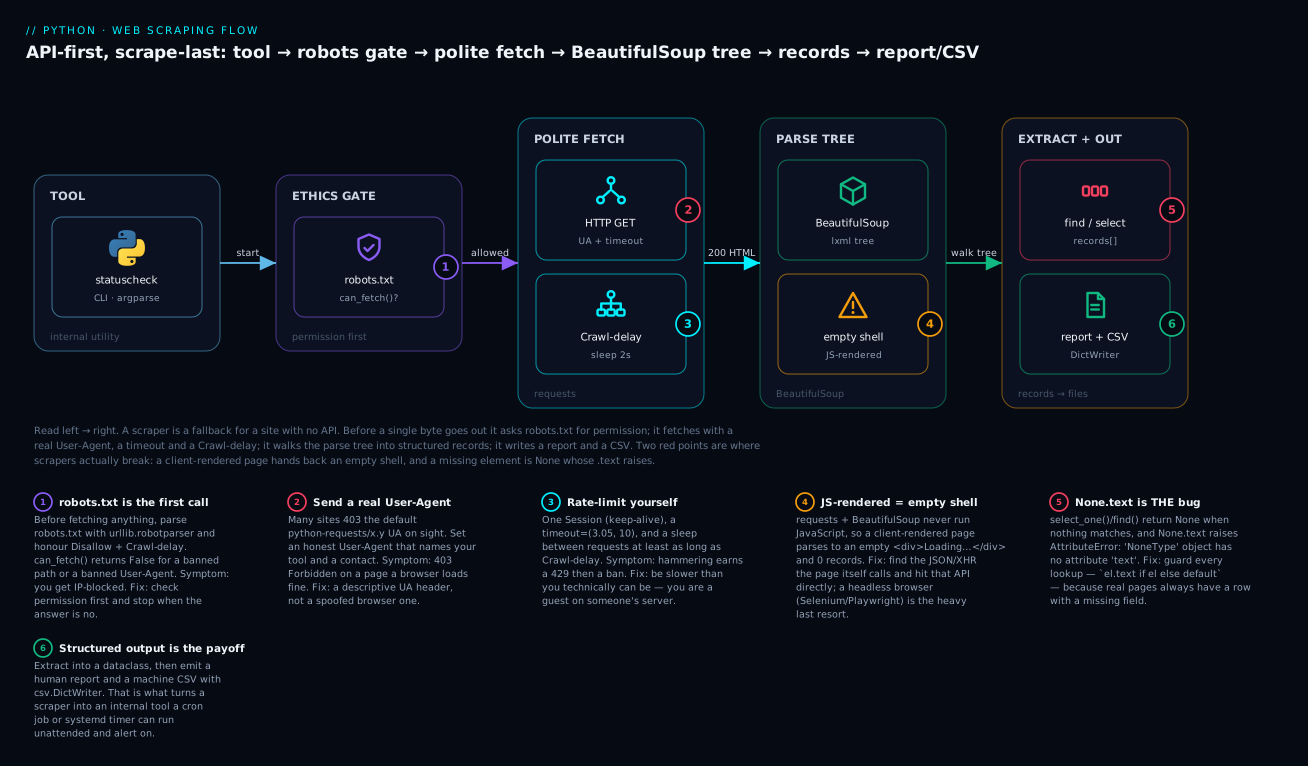
Follow the badges and the design of everything below falls out: permission first (the purple robots gate), fetch politely (a real User-Agent, a timeout, a delay), parse into a tree, extract into records, emit report + CSV. The two red badges are the failures that will actually bite you — a client-rendered page that parses to nothing, and the None.text crash on a row with a missing field.
The ethics and legality you must get right
This is the section a professional cannot skip. The code in the rest of the lesson is easy; being allowed to run it is the hard part, and getting it wrong has real consequences — a blocked IP, a revoked account, a cease-and-desist, or in the worst case a data-protection complaint. None of what follows is legal advice, but all of it is the baseline a working engineer is expected to know.
⚠️ The rules you break at your own risk
⚠️ Before you scrape anything, four things must be true.
robots.txtallows it. The site publishes machine-readable rules at/robots.txt. Honour theDisallowandCrawl-delaydirectives for your User-Agent. Ignoring them is the clearest possible signal of bad faith.- The Terms of Service don’t forbid it. Many sites’ ToS explicitly prohibit automated access or bulk extraction. A ToS you clicked “agree” on (or that binds you as a logged-in user) is a contract.
robots.txtbeing permissive does not override a ToS that isn’t.- You are not scraping personal data. Names, emails, profiles, anything tied to an identifiable person falls under GDPR (EU), the DPDP Act (India), CCPA (California) and friends. “It was on a public web page” is not a lawful basis for collecting and storing it. This is where scraping stops being a technical question and becomes a legal one — get advice before you harvest people.
- The data is genuinely public, not behind a login. Data behind authentication is offered to you, under terms, not to your scraper for redistribution. Scraping behind a login you agreed to terms for is both a ToS violation and, in several jurisdictions, potentially unauthorised access.
Those four are not a formality. They are, in order, the things that get scrapers blocked, sued, reported, and prosecuted. The good news is that the honest path is also the easy one, and Python has the tools for it in the standard library.
Reading robots.txt with urllib.robotparser
robots.txt is a plain-text file at the root of a site that tells automated clients what they may and may not fetch. You do not parse it by hand — the standard library has urllib.robotparser, which reads the file and answers can_fetch() for you. Here it is against our local fixture’s robots.txt:
from urllib.robotparser import RobotFileParser

UA = "kloudvin-status-tool/1.0"

rp = RobotFileParser()
rp.set_url("http://127.0.0.1:8817/robots.txt")
rp.read()                                        # fetches + parses the file

print("can_fetch /status.html :", rp.can_fetch(UA, "http://127.0.0.1:8817/status.html"))
print("can_fetch /admin/users :", rp.can_fetch(UA, "http://127.0.0.1:8817/admin/users"))
print("can_fetch /private/x   :", rp.can_fetch(UA, "http://127.0.0.1:8817/private/x"))
print("crawl_delay(*)         :", rp.crawl_delay(UA))
print("request_rate(*)        :", rp.request_rate(UA))
print("site_maps()            :", rp.site_maps())
print("\nAs 'BadBot' (banned entirely):")
print("  can_fetch /status.html:", rp.can_fetch("BadBot", "http://127.0.0.1:8817/status.html"))
can_fetch /status.html : True
can_fetch /admin/users : False
can_fetch /private/x   : False
crawl_delay(*)         : 2
request_rate(*)        : None
site_maps()            : ['http://127.0.0.1:8817/sitemap.xml']

As 'BadBot' (banned entirely):
  can_fetch /status.html: False
Read every line of that output, because each one is a rule you must obey:
| Call | Returned | What it means for your scraper |
|---|---|---|
can_fetch(UA, url) |
True/False |
✅ The gate. False → do not fetch that URL, full stop |
crawl_delay(UA) |
2 |
Wait ≥ 2 seconds between requests. Honour it |
request_rate(UA) |
None |
No Request-rate directive here; None means unspecified |
site_maps() |
['…/sitemap.xml'] |
✅ A gift: the site tells you its URLs — often better than crawling |
can_fetch("BadBot", …) |
False |
Rules are per-User-Agent; a Disallow: / block bans that agent everywhere |
The directives themselves are simple, and you’ll recognise them the moment you curl a real /robots.txt:
| Directive | Example | Meaning |
|---|---|---|
User-agent: |
User-agent: * |
Which crawler the block applies to (* = everyone) |
Disallow: |
Disallow: /admin/ |
❌ Don’t fetch anything under this path |
Allow: |
Allow: /status |
✅ Exception that re-permits a path inside a disallowed tree |
Crawl-delay: |
Crawl-delay: 2 |
Seconds to wait between requests |
Sitemap: |
Sitemap: https://…/sitemap.xml |
Where the machine-readable URL list lives |
⚠️ Two honest caveats. robots.txt is advisory, not enforced — nothing stops your code from fetching a Disallowed path, which is exactly why choosing to obey it is the mark of a professional. And it is not a substitute for the Terms of Service: a permissive robots.txt doesn’t grant you rights the ToS withholds. robotparser also silently treats an unreachable robots.txt as “allow everything,” so decide deliberately whether a missing file means “go ahead” or “stop and ask.”
Rate limiting, backoff, and a polite User-Agent
Even where scraping is allowed, how fast you do it decides whether you’re a good citizen or a denial-of-service attack with good intentions. A tight for loop hammering a site hundreds of times a second looks identical to an attack from the server’s side, and it will be treated as one: first a 429 Too Many Requests, then a block.
The politeness kit is small and non-negotiable:
| Practice | How | Why |
|---|---|---|
| Identify yourself | User-Agent: my-tool/1.0 (+contact) |
Honest, contactable. ⚠️ Never spoof a real browser to evade blocks |
| Bound every request | timeout=(3.05, 10) |
Never hang a worker forever — see the requests lesson |
| Reuse the connection | one requests.Session() |
Keep-alive; measurably faster; less load on them |
| Wait between requests | time.sleep(delay) ≥ Crawl-delay |
Don’t stampede. Slower than you can go |
| Back off on failure | Retry with backoff_factor |
A struggling server needs space, not a retry storm |
| Cache during development | save responses to disk | Don’t re-fetch 500 times while debugging your selector |
That last row saves you and the site both: while you’re iterating on a selector, fetch the page once, save the HTML to a file, and parse the file in your edit-run loop. There’s no reason to hit the network every time you tweak a select() string.
The fetch: requests, tuned for scraping
The fetch itself is ordinary requests — the same Session, timeout, and raise_for_status() from the requests lesson — with two scraping-specific wrinkles. First, you set an honest User-Agent, because the default one gets you blocked. Second, you often want the raw bytes (r.content) rather than decoded text, so BeautifulSoup can detect the encoding itself.
import requests

BASE = "http://127.0.0.1:8817"

session = requests.Session()
session.headers.update({
    "User-Agent": "kloudvin-status-tool/1.0 (+https://kloudvin.internal/ops; contact=platform-ops)",
    "Accept": "text/html,application/xhtml+xml",
})

r = session.get(f"{BASE}/status.html", timeout=(3.05, 10))
r.raise_for_status()                             # 4xx/5xx -> HTTPError; scraping needs this too

print("status      :", r.status_code)
print("content-type:", r.headers["Content-Type"])
print("encoding    :", r.encoding)
print("bytes       :", len(r.content))
print("first line  :", r.text.splitlines()[0])

missing = session.get(f"{BASE}/does-not-exist.html", timeout=(3.05, 10))
print("\n404 path -> status:", missing.status_code, "| r.ok:", missing.ok, "| raised nothing")
status      : 200
content-type: text/html
encoding    : ISO-8859-1
bytes       : 1715
first line  : <!doctype html>

404 path -> status: 404 | r.ok: False | raised nothing
Two things in that output matter for scraping specifically. The encoding came back ISO-8859-1 even though the file is UTF-8 — because the server sent Content-Type: text/html with no charset, and per the HTTP spec requests then guesses Latin-1. Hold that thought; it’s the mojibake trap, and we fix it in the messy-real-world section. And the 404 raised nothing — the same rule as any requests call: a response is not a success, so you check the status yourself.
The default User-Agent gets you blocked
This surprises beginners more than anything else in scraping: the exact same code that “works fine” from your browser gets a 403 Forbidden from your script. The reason is often the User-Agent. Out of the box, requests announces itself as python-requests/2.34.2, and a great many sites have a WAF rule that blocks precisely that string, because it’s the fingerprint of unsophisticated bots. Here’s the effect, against a tiny local gatekeeper that 403s the default UA:
default = requests.get(URL, timeout=5)                          # requests' own UA
print("default UA  -> status:", default.status_code, "|", requests.utils.default_headers()["User-Agent"])

real = requests.get(URL, timeout=5, headers={"User-Agent": "kloudvin-status-tool/1.0"})
print("real UA     -> status:", real.status_code, "|", real.text)
default UA  -> status: 403 | python-requests/2.34.2
real UA     -> status: 200 | <li class='service'>ok</li>
The fix is to set an honest User-Agent that names your tool and a way to reach you. ⚠️ Resist the urge to paste in a real Chrome UA string to evade a block — that crosses from “identifying myself politely” into “disguising a bot to defeat access controls,” which is exactly the behaviour that turns a ToS dispute into something worse. If a site blocks an honestly-identified tool, that’s the site telling you not to scrape it. Listen.
The status codes a scraper actually meets
A handful of HTTP statuses come up constantly in scraping, and each one wants a different response from your code. This is the scraping-flavoured subset of the full status table in the requests lesson:
| Code | Means | What your scraper should do |
|---|---|---|
200 |
OK | Parse the body |
301/302 |
Moved | requests follows it; check r.url to see where you landed |
403 |
Forbidden | ⚠️ Often a UA/bot block. Set an honest UA; if it persists, stop — you’re not wanted |
404 |
Not found | The page is gone; handle as a normal outcome, not a crash |
429 |
Too many requests | ⚠️ You’re too fast. Honour Retry-After, slow down. Ignore it and you get blocked |
503 |
Unavailable | Transient; back off and retry a few times |
999 |
(Non-standard) | Some sites return this as “we detected a bot.” Treat like 403 |
The two that decide whether you keep your access are 403 and 429. A 429 is a warning shot — the polite move is to slow down before you ever see one. A persistent 403 on an honestly-identified request is the site declining your business, and the professional response is to respect that, not to escalate the disguise.
Parsing HTML with BeautifulSoup
Now the payoff of the fetch: turning that wall of HTML into data. BeautifulSoup takes an HTML string (or bytes) plus a parser name and builds a navigable tree of Python objects. You then search that tree in two complementary styles — find/find_all (method calls with keyword filters) and select/select_one (CSS selectors) — and pull out text or attributes.
from bs4 import BeautifulSoup

soup = BeautifulSoup(html, "lxml")               # (html_string_or_bytes, parser_name)

# find: first match or None. find_all: a list of every match.
first = soup.find("li", class_="service")
print("find first name  :", first.find("h3").text)
print("find_all count   :", len(soup.find_all("li", class_="service")))
find first name  : API Gateway
find_all count   : 4
find / find_all vs select / select_one
Both styles find elements; they differ in how you spell the query. find_all takes a tag name and keyword filters; select takes a CSS selector string (the same syntax you’d use in CSS or document.querySelectorAll). Most people reach for select because one compact string can express what takes several find_all arguments — but find_all wins when you’re filtering on something awkward to express in CSS, like a regex on the text.
# CSS selectors: select() -> list, select_one() -> first or None
print("select_one .name :", soup.select_one("li.service .name").get_text(strip=True))
print("select count     :", len(soup.select("ul#services > li.service")))

# attribute selector: the stable way to target the one 'down' service
down = soup.select("li.service[data-status='down']")
print("down services    :", [li["data-service"] for li in down])
select_one .name : API Gateway
select count     : 4
down services    : ['billing-worker']
| Task | find / find_all |
select (CSS) |
|---|---|---|
| By tag | find_all("li") |
select("li") |
| By class | find_all("li", class_="service") |
select("li.service") |
| By id | find(id="services") |
select_one("#services") |
| By attribute | find_all(attrs={"data-status": "down"}) |
select("[data-status='down']") |
| Direct children only | find_all("li", recursive=False) |
select("ul > li") |
| Descendants | find_all("li") (default) |
select("ul li") |
| First match | find(...) |
select_one(...) |
| Text regex | find_all(string=re.compile("Bill")) |
❌ not in CSS |
| Returns when nothing matches | find → None; find_all → [] |
select_one → None; select → [] |
Note the last row, because it’s the source of the crash we’ll dwell on: find and select_one return None — not an empty string, not an error — when nothing matches.
Because CSS selectors do so much of the work, it’s worth knowing the forms that carry you through almost every real page. These are the ones BeautifulSoup’s selector engine (soupsieve) supports and that you’ll actually reach for:
| Selector | Matches | Example |
|---|---|---|
tag |
Every element of that tag | select("li") |
.class |
Elements with that class | select(".service") |
#id |
The element with that id | select_one("#services") |
[attr] |
Elements that have the attribute | select("[data-status]") |
[attr='v'] |
Attribute equals a value | select("[data-status='down']") |
[attr^='v'] |
Attribute starts with | select("[href^='/api']") |
[attr$='v'] |
Attribute ends with | select("[href$='.pdf']") |
[attr*='v'] |
Attribute contains | select("[class*='status']") |
A B |
B anywhere inside A (descendant) |
select("ul li") |
A > B |
B a direct child of A |
select("ul > li") |
A + B |
B immediately after A (adjacent sibling) |
select("h3 + span") |
A ~ B |
B a later sibling of A |
select("h3 ~ time") |
A, B |
Either (union) | select("li.up, li.down") |
:not(X) |
Elements not matching X |
select("li:not(.other)") |
:nth-of-type(n) |
The nth of its type | select("li:nth-of-type(1)") |
Lean on the attribute forms ([data-*]) and the descendant/child combinators; steer away from :nth-child and deep chains, for the durability reason the next section is entirely about.
Text versus attributes
Every element carries two very different kinds of information: its text (what’s rendered between the tags) and its attributes (the key="value" pairs in the tag). Extracting the wrong one is a common beginner mistake. The status label (“Operational”) is text; the machine-readable status (data-status="operational") is an attribute; the timestamp lives in a datetime attribute, not the tag’s text.
li = soup.select_one("li.service")
print("text of <span>   :", li.select_one(".status").get_text(strip=True))
print("attr data-status :", li["data-status"])           # KeyError if the attr is absent
print("attr .get()      :", li.get("data-missing"))       # None if absent - the safe form
print("<time> datetime  :", li.find("time")["datetime"])  # an attribute, not the text
text of <span>   : Operational
attr data-status : operational
attr .get()      : None
<time> datetime  : 2026-07-17T09:00:00Z
| You want | Use | Notes |
|---|---|---|
| Rendered text of an element | el.get_text(strip=True) |
✅ strip=True trims whitespace. .text is a shortcut alias |
| Text with a separator | el.get_text(" | ", strip=True) |
Joins nested strings, e.g. "API | Operational" |
| One attribute | el["data-status"] |
⚠️ KeyError if absent |
| One attribute, safely | el.get("data-status", default) |
✅ Returns None/default if absent — prefer this |
| All attributes | el.attrs |
A dict, e.g. {'class': ['service'], 'data-status': 'down'} |
| A multi-valued attribute | el["class"] |
⚠️ Returns a list ['service'], not a string |
| Whether an attribute exists | el.has_attr("data-status") |
True/False |
That class returns a list trips people constantly: soup.select_one("li")["class"] is ['service'], not "service", because HTML allows multiple classes on one element.
Navigating the tree
Sometimes you find one element and need its neighbours — the price next to a label, the row containing a matched cell. BeautifulSoup exposes the tree as parents, siblings, and children:
name = li.find("h3")
print("parent tag       :", name.parent.name, "| classes:", name.parent.get("class"))
print("next sibling tag :", name.find_next_sibling().name)                  # the <span>
print("children tags    :", [c.name for c in li.find_all(recursive=False)]) # direct kids only
print("stripped_strings :", list(li.stripped_strings))
parent tag       : li | classes: ['service']
next sibling tag : span
children tags    : ['h3', 'span', 'time']
stripped_strings : ['API Gateway', 'Operational', '2026-07-17 09:00']
| Navigation | Gives you | Use when |
|---|---|---|
el.parent |
The immediate enclosing tag | You matched a cell, need its row |
el.find_parent("tr") |
Nearest ancestor of a type | Climb to a specific container |
el.find_next_sibling() |
Next tag at the same level | Label → the value beside it |
el.find_previous_sibling() |
Previous tag at the same level | Value → its preceding label |
el.find_all(recursive=False) |
Direct children only | Avoid grabbing deep descendants |
el.find_next("span") |
Next matching tag anywhere after | Loose “the next status after this” |
el.stripped_strings |
All text pieces, whitespace-trimmed | Dump everything a node contains |
lxml versus html.parser: it changes your results
BeautifulSoup doesn’t parse HTML itself — it drives a parser you name in the second argument. The two you’ll use are html.parser (built into Python, no install) and lxml (fast, lenient, needs pip install lxml). They are not interchangeable on messy input, and that’s not a footnote — the same broken HTML gives you different data:
broken = "<div><p>one<p>two<ul><li>a<li>b</ul></b></div>"   # unclosed <p>, unclosed <li>, stray </b>

for parser in ("html.parser", "lxml", "html5lib"):
    try:
        soup = BeautifulSoup(broken, parser)
        li = [x.get_text(strip=True) for x in soup.find_all("li")]
        print(f"{parser:12} -> <li> items: {li}  | <p> count: {len(soup.find_all('p'))}")
    except Exception as e:
        print(f"{parser:12} -> not available ({type(e).__name__})")
html.parser  -> <li> items: ['ab', 'b']  | <p> count: 2
lxml         -> <li> items: ['a', 'b']  | <p> count: 2
html5lib     -> not available (FeatureNotFound)
Look at what happened. Given an unclosed <li>a, lxml auto-closed it and gave you two clean items ['a', 'b']; html.parser nested the second <li> inside the first and returned ['ab', 'b'] — the first item is now the garbled 'ab'. Same input, different output, and if your code expected ['a', 'b'] it now has a bug that only appears on malformed pages. The html5lib line shows the other lesson: naming a parser you haven’t installed raises FeatureNotFound, not a silent fallback.
| Parser | Install | Speed | Leniency | Use when |
|---|---|---|---|---|
"lxml" |
pip install lxml |
✅ Fastest | ✅ Very lenient | ✅ The default choice for real scraping |
"html.parser" |
✅ Built in | Slower | Moderate | Zero-dependency scripts; small pages |
"html5lib" |
pip install html5lib |
🐢 Slowest | ✅ Browser-exact | You need to match a browser’s parse precisely |
"lxml-xml" / "xml" |
pip install lxml |
Fast | — | Parsing XML/RSS, not HTML |
Pin the parser explicitly in every BeautifulSoup(...) call. If you omit it, BeautifulSoup picks “the best available,” which means your code parses differently on a machine where lxml isn’t installed — a genuinely nasty “works on my machine” bug.
Selectors that survive a redesign
Here is the truth nobody tells you when you start: your scraper’s real enemy is not the parser, it’s the next front-end deploy. The site’s designers owe you nothing. They will wrap your target in a new <div>, add an icon, reorder columns — all cosmetic to a human, all catastrophic to a selector that encoded the old layout. So the durability of a scraper is almost entirely decided by how you point at the data.
The worst way is by position — “the second child,” “the third column.” The best way is by meaning — a stable id, a data-* attribute, a semantic class. Watch the difference when a page gets a cosmetic redesign that shifts the DOM but changes nothing about the meaning:
def brittle(html):                               # position-based: prays the layout never moves
    soup = BeautifulSoup(html, "lxml")
    el = soup.select_one("li > *:nth-child(2)")  # "the 2nd child"
    return el.get_text(strip=True) if el else None

def stable(html):                                # meaning-based: targets the data attribute
    soup = BeautifulSoup(html, "lxml")
    return soup.select_one("li[data-status]")["data-status"]

print("brittle nth-child  before:", brittle(before), "| after:", brittle(after))
print("stable data-attr   before:", stable(before), "| after:", stable(after))
brittle nth-child  before: Down | after: eu-west-1
stable data-attr   before: down | after: down
This is the whole lesson of selector design in four lines of output. The redesign inserted a <small> region label before the status. The brittle selector didn’t crash — it silently returned eu-west-1, the wrong field, and your report now shows a region where a status should be. The stable selector returned down both times, because [data-status] targets what the element is, not where it sits. A scraper that returns wrong data without erroring is worse than one that crashes, because you’ll trust it until someone downstream notices the numbers are nonsense.
| Selector style | Example | Durability | Verdict |
|---|---|---|---|
By id |
#services |
✅ High — ids are meant to be unique + stable | ✅ Best when present |
By data-* attribute |
[data-status='down'] |
✅ High — added for machines, rarely restyled | ✅ Best when present |
| By semantic class | .service, .status |
🟡 Medium — classes get renamed in redesigns | 🟡 Good, verify |
| By tag + attribute | time[datetime] |
🟡 Medium — semantic tags are fairly stable | 🟡 Reasonable |
By nth-child / position |
li > *:nth-child(2) |
❌ Low — breaks on any layout shift | ❌ Avoid |
| By auto-generated class | .css-1a2b3c |
❌ Very low — regenerated every build | ❌ Never |
| By deep chain | div > div > ul > li > span |
❌ Very low — any wrapper breaks it | ❌ Never |
The practical rule: prefer id and data-*, tolerate semantic classes, never rely on position or generated hashes. And when the site gives you nothing stable to hold, that itself is a signal — the page wasn’t built to be scraped, and your scraper will be a maintenance burden forever.
Pagination and crawling without melting down
Real data rarely fits on one page. A status board, an inventory, a release list — they paginate, and you follow the “next” link until there isn’t one. Two dangers appear the moment you follow links automatically: you can loop forever (a page that links back to itself), and you can crawl far more than you meant to (following every link on every page until you’ve downloaded the whole site). Both are avoided with the same two guards: a visited-set and a hard cap.
import time
from urllib.parse import urljoin

def crawl_status(start_url, max_pages=10):
    session = requests.Session()
    session.headers["User-Agent"] = "kloudvin-status-tool/1.0"
    seen, url, pages = set(), start_url, 0

    while url and pages < max_pages:              # two independent stop conditions
        if url in seen:                           # a cycle -> stop, don't loop forever
            print(f"  already visited {url}, stopping")
            break
        seen.add(url)
        r = session.get(url, timeout=(3.05, 10))
        r.raise_for_status()
        soup = BeautifulSoup(r.text, "lxml")
        rows = soup.select("li.service")
        pages += 1
        print(f"  page {pages}: {url.split('/')[-1]} -> {len(rows)} services")
        for li in rows:
            yield li["data-service"]

        nxt = soup.select_one("nav.pager a.next")            # None on the last page
        url = urljoin(url, nxt["href"]) if nxt else None     # relative -> absolute
        if url:
            time.sleep(2)                         # honour the Crawl-delay
  page 1: status.html -> 4 services
  page 2: status-2.html -> 2 services

collected 6 services in 2.02s:
  ['api-gateway', 'auth-service', 'billing-worker', 'search-index', 'cdn-edge', 'metrics-store']
Four details make this a crawler you can trust to terminate:
urljoin(url, nxt["href"])turns the relative linkstatus-2.htmlinto a full absolute URL relative to the current page. Scrapedhrefs are usually relative; feeding a relative URL straight torequestsfails withMissingSchema.urljoinis the fix, and it correctly handles../,/absolute, and?queryforms.nxtisNoneon the last page, which ends thewhilecleanly — no counter arithmetic, no off-by-one. The generator stops when the site stops offering a next link.- The visited-set (
seen) breaks cycles: if page 3 links back to page 1, you detect the repeat and stop instead of looping forever. max_pagesis the seatbelt for when both other guards fail — a paginator with a subtly-changing URL that never repeats exactly. It guarantees termination no matter what the site does.
The 2.02-second wall time is the Crawl-delay doing its job: one 2-second sleep between the two pages. That’s the shape of politeness — the crawl is deliberately slower than the network allows.
| Crawl hazard | Symptom | Guard |
|---|---|---|
| Infinite loop | Same URLs forever, memory climbs | ✅ A visited set; skip seen URLs |
| Runaway scope | You downloaded the whole site | ✅ max_pages/depth cap; stay on-path |
| Relative URLs | MissingSchema: Invalid URL 'page2.html' |
✅ urljoin(base, href) |
| Leaving the domain | Following an external link off-site | ✅ Check urlparse(url).netloc matches |
| Hammering | 429, then a block |
✅ time.sleep(delay) between pages |
| Losing progress on crash | Re-crawl from zero after an error | ✅ Persist seen + results incrementally |
For anything beyond a handful of pages with real breadth-first crawling, don’t hand-roll it — reach for Scrapy, a framework that gives you the visited-set, concurrency, robots.txt obedience, retry and throttling out of the box. This hand-rolled loop is the right size for “follow the next link on one paginated report,” which is 90% of internal-tool scraping.
The messy real world
Clean fixtures lie. Real pages have rows with missing fields, wrong-guessed encodings, and malformed markup, and a scraper that assumed everything is tidy dies on the first exception. This section is the three failures you will hit, and how to survive each.
None.text — THE scraping bug
Say it out loud, because it’s the crash you’ll cause most: find() and select_one() return None when nothing matches, and None has no .text. Our fixture has a billing-worker row that’s missing its <time> element on purpose — exactly like a real page where one item lacks a timestamp. The naive loop dies on it:
for li in soup.select("li.service"):
    name = li.select_one(".name").text
    checked = li.select_one("time.checked").text     # billing-worker has no <time>
    print(f"  {name}: {checked}")
  API Gateway: 2026-07-17 09:00
  Auth Service: 2026-07-17 09:02
  AttributeError: 'NoneType' object has no attribute 'text'
There it is, and note where it died — on the third row, after two clean ones, which is why this so often escapes testing and detonates in production. The full traceback points a finger straight at the culprit (Python 3.11+ shows the exact sub-expression with carets):
Traceback (most recent call last):
  File "scrape.py", line 6, in <module>
    checked = li.select_one("time.checked").text
              ^^^^^^^^^^^^^^^^^^^^^^^^^^^^^^^^^^
AttributeError: 'NoneType' object has no attribute 'text'
The fix is to treat every lookup as possibly-None and supply a default:
for li in soup.select("li.service"):
    name = li.select_one(".name")
    time_el = li.select_one("time.checked")
    checked = time_el["datetime"] if time_el else "(never checked)"
    print(f"  {name.get_text(strip=True):16} {checked}")
  API Gateway      2026-07-17T09:00:00Z
  Auth Service     2026-07-17T09:02:00Z
  Billing Worker   (never checked)
  Search Index     2026-07-17T08:58:00Z
The billing worker now reports (never checked) instead of taking the whole run down. There are three idioms for this guard, and you’ll use all of them: the if el else default ternary (above), the walrus if (el := li.select_one(...)) is not None: when you want to both test and use it, and a tiny helper like def text_of(el): return el.get_text(strip=True) if el else "" that you call everywhere. Whichever you pick, the rule is absolute: never chain .text or ["attr"] directly onto a find/select_one result unless you have already proven it isn’t None.
Encoding and mojibake
Remember the ISO-8859-1 from the fetch section? Here’s what it does to non-ASCII text. When a server sends text/html with no charset, requests guesses Latin-1 per the HTTP spec — and in 2026 the body is almost always UTF-8, so r.text mangles it:
r = requests.get("http://127.0.0.1:8817/regions.html", timeout=(3.05, 10))
print("r.encoding (guessed) :", r.encoding)               # ISO-8859-1: no charset in header
print("r.apparent_encoding  :", r.apparent_encoding)      # what the bytes actually are

print("mojibake             :", repr(BeautifulSoup(r.text, "lxml").select_one("li").get_text(strip=True)))
print("from r.content       :", repr(BeautifulSoup(r.content, "lxml").select_one("li").get_text(strip=True)))
r.encoding = "utf-8"
print("after r.encoding fix :", repr(BeautifulSoup(r.text, "lxml").select_one("li").get_text(strip=True)))
r.encoding (guessed) : ISO-8859-1
r.apparent_encoding  : utf-8
mojibake             : 'München edge - café latency 12ms'
from r.content       : 'München edge - café latency 12ms'
after r.encoding fix : 'München edge - café latency 12ms'
München became München — the classic mojibake signature. There are two fixes and the first is the one to reach for in scraping: pass r.content (the raw bytes) to BeautifulSoup, not r.text. BeautifulSoup then reads the <meta charset="utf-8"> from inside the document and decodes correctly, which is smarter than trusting the HTTP header the server got wrong. The other fix is to correct r.encoding before touching r.text. The tell that you have this bug at all is r.apparent_encoding (a guess from the actual bytes) disagreeing with r.encoding.
Malformed HTML
You already saw the parser demo: real HTML is often broken, and lxml is lenient enough to make sense of unclosed tags where a strict XML parser would refuse. That leniency is a feature — you scrape what the browser sees, not what the spec demands. But it’s also why you must pin lxml explicitly and, when a page is truly pathological, consider html5lib to match a browser exactly. The defensive posture is the same throughout: assume the structure is imperfect, guard every extraction, and default rather than crash.
JavaScript-rendered pages
Here is the wall every scraper eventually hits. You fetch a page, it looked full of data in your browser, and BeautifulSoup finds nothing. The page is client-rendered: the HTML the server sends is an empty shell, and a browser runs JavaScript that fetches the real data and injects it into the DOM after load. requests doesn’t run JavaScript — it only downloads the initial HTML — so it sees the shell. Watch:
html = requests.get(f"{BASE}/app.html", timeout=(3.05, 10)).text
soup = BeautifulSoup(html, "lxml")
print("  services found in HTML:", len(soup.select(".service")))   # 0 - JS never ran
print("  the #app div holds     :", repr(soup.select_one("#app").get_text(strip=True)))
  services found in HTML: 0
  the #app div holds     : 'Loading services...'
Zero services, and the container just says Loading services... — the placeholder the JavaScript was supposed to replace. This is not a bug in your selector; it’s the page telling you the data isn’t in the HTML at all.
You have two ways forward, and the order matters:
First, find the JSON the page itself calls. That “Loading…” shell fetches its data from somewhere — an XHR/fetch call to a JSON endpoint. Find it (DevTools → Network → Fetch/XHR → reload), and hit that directly:
data = requests.get(f"{BASE}/status.json", timeout=(3.05, 10)).json()
for s in data["services"]:
    print(f"  {s['name']:16} {s['status']:12} checked={s['checked']}")
  API Gateway      operational  checked=2026-07-17T09:00:00Z
  Auth Service     degraded     checked=2026-07-17T09:02:00Z
  Billing Worker   down         checked=None
  Search Index     operational  checked=2026-07-17T08:58:00Z
  -> structured data, no HTML parsing, no headless browser needed
This is almost always the right move. It’s faster, it’s more robust (JSON has a stable shape; HTML doesn’t), and it skips parsing entirely — you’re back in requests + JSON territory. The client-rendered page did you a favour by making its data source explicit.
Only if there’s no reachable endpoint do you reach for a headless browser — a real browser engine, driven from code, that runs the JavaScript and hands you the rendered DOM:
📝 NOTE — Selenium / Playwright (described, not run here). When data genuinely only exists after JavaScript runs, you drive a real browser. Playwright (
pip install playwright && playwright install) and Selenium (pip install selenium+ a driver) both launch a headless Chromium/Firefox, load the URL, wait for the content to appear, and exposepage.content()— which you can then hand to BeautifulSoup, or query with the browser’s own selectors. This lesson does not install or run one, because a headless browser is a heavyweight dependency (hundreds of MB, a real browser process per scrape) and this environment shouldn’t download one. Know the shape of the option and its cost; reach for it last.
| Approach | Runs JS? | Cost | Speed | Reach for it when |
|---|---|---|---|---|
requests + BeautifulSoup |
❌ No | ✅ Tiny | ✅ Fast | ✅ Server-rendered HTML (default) |
| Hit the underlying JSON/XHR | ❌ No | ✅ Tiny | ✅ Fastest | ✅ Client-rendered but the API is reachable |
| Playwright | ✅ Yes | 🟡 Browser binary | 🐢 Slow | Data only exists post-render, no API |
| Selenium | ✅ Yes | 🟡 Browser + driver | 🐢 Slow | Same, or legacy test infra already uses it |
The instinct to reach for Selenium the moment BeautifulSoup returns nothing is the mark of someone who hasn’t checked the Network tab. Look for the JSON first — nine times in ten it’s right there.
From scraper to internal tool
A script that prints to your terminal is a toy. An internal tool is a script someone else — or a cron job — can run unattended, that produces output another program can consume, and that fails loudly instead of silently. Turning your scraper into one is mostly packaging, and it ties together three other lessons.
Give it a CLI. Arguments, not edited-in-place constants, are what make a tool reusable. argparse (stdlib) turns your scraper into something with --help, flags, and validation — covered fully in Building CLI Tools with argparse & click. The lab below wires up url, --csv, --user-agent, --delay, and a --max-pages seatbelt.
Emit machine-readable output. A human report is for you; a CSV or JSON file is for the next tool in the chain — a spreadsheet, a dashboard, an alerting rule. csv.DictWriter and json.dump (both stdlib) are the whole story, and they’re covered in Working with Data: JSON, CSV & Serialization. The rule of thumb:
| Output | Reach for | Good for |
|---|---|---|
| A person reading a terminal | An aligned text table | Eyeballing “what’s down right now” |
| A spreadsheet / BI tool | CSV (csv.DictWriter) |
Tabular records, opens in Excel/Sheets |
| Another program / API | JSON (json.dump) |
Nested data, feeds the next script |
| A time series / metrics | Append CSV or push to a TSDB | Trends over nightly runs |
| An alert | Exit code + a one-line message | cron/CI acts on non-zero exit |
Hold each record in the right shape. Between “extract” and “output” you need a container for one scraped row, and the choice affects how safe your code is. The lab uses a frozen dataclass, which is the sweet spot — named fields, defaults, immutability, and a free asdict() for the CSV writer:
| Container | Define | Pros / cons for a scraped record |
|---|---|---|
dict |
{"name": n, "status": s} |
✅ Zero ceremony · ❌ typos are silent (r["staus"] → KeyError at read) |
@dataclass |
class Service: name: str; ... |
✅ Named fields, defaults, asdict(), type hints · needs a class |
@dataclass(frozen=True) |
...frozen=True |
✅ The lab’s choice — immutable, hashable (dedupe in a set) |
NamedTuple |
class Service(NamedTuple): ... |
✅ Immutable + tuple-unpackable · lighter but less flexible than a dataclass |
pydantic.BaseModel |
class Service(BaseModel): ... |
✅ Validates + coerces types · ❌ a third-party dependency |
The immutability matters more than it looks: a frozen dataclass is hashable, so you can drop records into a set to de-duplicate across pages for free — exactly the kind of thing you want when a crawl might see the same item twice.
One field almost always needs a second pass: the scraped timestamp. Our checked value is an ISO-8601 string ("2026-07-17T09:00:00Z"), which is fine for the CSV but useless for logic. The moment you want to alert on “not checked in the last 10 minutes,” you parse it into a real datetime and compare — and pulling structured fields out of messy scraped text (dates, IDs, versions) with datetime.fromisoformat() and regular expressions is exactly Dates, Times & Text Processing. Scraping gets you the string; that lesson turns it into something you can compute on.
Schedule it. A tool that runs on demand is useful; a tool that runs every morning at 6 and emails you what’s down is an operator’s dream. You don’t build scheduling into the script — you let the OS do it:
| Scheduler | Where | Set up with |
|---|---|---|
| cron | Linux/macOS, simple recurring jobs | crontab -e → 0 6 * * * /path/.venv/bin/python /path/statuscheck.py … |
| systemd timer | Linux, when you want logging + retries | A .service + .timer unit; journalctl for logs |
| Task Scheduler | Windows | GUI or schtasks |
| CI schedule | GitHub Actions / GitLab CI | on: schedule: - cron: — runs in the cloud, no server |
| Airflow / Prefect | A fleet of dependent jobs | When one scrape feeds another; overkill for one tool |
⚠️ When you schedule an unattended scrape, the politeness rules matter more, not less — nobody’s watching, so a bug becomes a runaway. Bake the timeout, the Crawl-delay, and the max_pages cap into the tool, and make sure a failure exits non-zero so the scheduler notices.
That’s the arc: a scrape becomes a function, the function becomes a CLI, the CLI writes a CSV, and the scheduler runs it while you sleep. The lab builds exactly that.
Hands-on lab
You’ll build statuscheck — a real internal tool that scrapes a paginated service-status site into a report and a CSV. It checks robots.txt first, fetches politely, parses with BeautifulSoup, tolerates a row with a missing field, follows pagination with a visited-set and a cap, and exits non-zero when there’s nothing to report. Every step runs against a local fixture you create, so nothing hits a real site.
⚠️ Everything is served from 127.0.0.1. No external site is contacted at any point.
Step 1 — Set up
mkdir statustool && cd statustool
python3 -m venv .venv
source .venv/bin/activate            # Windows: .venv\Scripts\activate
python -m pip install requests beautifulsoup4 lxml
mkdir site
What just happened: an isolated environment with the three scraping libraries, and a site/ folder that will become our fake server’s document root.
Step 2 — Create the fixture site
Save these three files under site/. First site/status.html (page 1 — note the billing-worker row deliberately has no <time>):
<!doctype html>
<html lang="en"><head><meta charset="utf-8"><title>Service Status</title></head>
<body>
<ul class="service-list" id="services">
<li class="service" data-service="api-gateway" data-status="operational" data-region="ap-south-1">
<h3 class="name">API Gateway</h3>
<span class="status">Operational</span>
<time class="checked" datetime="2026-07-17T09:00:00Z">2026-07-17 09:00</time>
</li>
<li class="service" data-service="auth-service" data-status="degraded" data-region="ap-south-1">
<h3 class="name">Auth Service</h3>
<span class="status">Degraded</span>
<time class="checked" datetime="2026-07-17T09:02:00Z">2026-07-17 09:02</time>
</li>
<li class="service" data-service="billing-worker" data-status="down" data-region="eu-west-1">
<h3 class="name">Billing Worker</h3>
<span class="status">Down</span>
<!-- no <time>: this row is missing its last-checked field on purpose -->
</li>
<li class="service" data-service="search-index" data-status="operational" data-region="us-east-1">
<h3 class="name">Search Index</h3>
<span class="status">Operational</span>
<time class="checked" datetime="2026-07-17T08:58:00Z">2026-07-17 08:58</time>
</li>
</ul>
<nav class="pager"><a class="next" href="status-2.html">Next page »</a></nav>
</body></html>
Then site/status-2.html (page 2 — two more services, and no next link, so the crawl terminates):
<!doctype html>
<html lang="en"><head><meta charset="utf-8"><title>Service Status (2)</title></head>
<body>
  <ul class="service-list" id="services">
    <li class="service" data-service="cdn-edge" data-status="operational" data-region="global">
      <h3 class="name">CDN Edge</h3><span class="status">Operational</span>
      <time class="checked" datetime="2026-07-17T09:01:00Z">2026-07-17 09:01</time>
    </li>
    <li class="service" data-service="metrics-store" data-status="operational" data-region="ap-south-1">
      <h3 class="name">Metrics Store</h3><span class="status">Operational</span>
      <time class="checked" datetime="2026-07-17T09:03:00Z">2026-07-17 09:03</time>
    </li>
  </ul>
  <nav class="pager"><span class="next-disabled">No more pages</span></nav>
</body></html>
And site/robots.txt — the permission file, allowing /status but banning /admin/ and a bad bot:
User-agent: *
Disallow: /admin/
Disallow: /private/
Allow: /status
Crawl-delay: 2

User-agent: BadBot
Disallow: /

Sitemap: http://127.0.0.1:8817/sitemap.xml
What just happened: a two-page status site with one intentionally-missing field, plus a robots.txt that permits our crawl but sets a 2-second Crawl-delay. This is the exact file the robotparser demo earlier in the lesson read — so if you run that snippet against this server, you’ll get the same can_fetch, crawl_delay, and site_maps output.
Step 3 — Serve it locally
In a second terminal, from inside statustool/:
cd site && python -m http.server 8817 --bind 127.0.0.1
What just happened: http.server serves site/ at http://127.0.0.1:8817/, so robots.txt is at /robots.txt and page 1 is at /status.html. Leave it running. ⚠️ --bind 127.0.0.1 keeps it on your machine only.
Step 4 — The tool
Save this as statuscheck.py in statustool/:
#!/usr/bin/env python3
"""statuscheck - pull a service-status page into a report + CSV (API-first, scrape as fallback)."""
from __future__ import annotations

import argparse, csv, sys, time
from dataclasses import dataclass, asdict, fields
from urllib.parse import urljoin, urlparse
from urllib.robotparser import RobotFileParser

import requests
from bs4 import BeautifulSoup

USER_AGENT = "kloudvin-status-tool/1.0 (+https://kloudvin.internal/ops)"
TIMEOUT = (3.05, 10)                              # (connect, read) - NEVER omit


@dataclass(frozen=True)
class Service:
    name: str
    status: str
    region: str
    checked: str                                  # "" when the row omits it


def robots_ok(url: str, ua: str) -> tuple[bool, float | None]:
    """(allowed, crawl_delay). An unreadable robots.txt -> allow, but warn."""
    parts = urlparse(url)
    rp = RobotFileParser()
    rp.set_url(f"{parts.scheme}://{parts.netloc}/robots.txt")
    try:
        rp.read()
    except Exception as e:
        print(f"  ! could not read robots.txt ({type(e).__name__}); proceeding with care", file=sys.stderr)
        return True, None
    return rp.can_fetch(ua, url), rp.crawl_delay(ua)


def extract(soup: BeautifulSoup) -> list[Service]:
    """One record per <li class='service'>, tolerating a missing <time>."""
    out: list[Service] = []
    for li in soup.select("li.service"):
        name = li.select_one(".name")
        time_el = li.select_one("time.checked")   # may be None -> guard it
        out.append(Service(
            name=name.get_text(strip=True) if name else "(unknown)",
            status=li.get("data-status", "unknown"),          # stable attr, not label text
            region=li.get("data-region", "-"),
            checked=time_el["datetime"] if time_el else "",   # the graceful default
        ))
    return out


def scrape(start_url: str, ua: str, delay: float, max_pages: int, ignore_robots: bool) -> list[Service]:
    allowed, crawl_delay = (True, None) if ignore_robots else robots_ok(start_url, ua)
    if ignore_robots:
        print("  ! --ignore-robots set: skipping the robots.txt check", file=sys.stderr)
    if not allowed:
        raise SystemExit(f"robots.txt disallows {start_url} for '{ua}'. Stopping.")
    delay = max(delay, crawl_delay or 0)          # honour the site's Crawl-delay if larger
    print(f"  robots: allowed=True  crawl-delay={crawl_delay}  effective delay={delay}s")

    session = requests.Session()
    session.headers["User-Agent"] = ua
    records, seen, url, pages = [], set(), start_url, 0
    while url and pages < max_pages:
        if url in seen:
            break                                 # cycle guard
        seen.add(url)
        try:
            r = session.get(url, timeout=TIMEOUT)
            r.raise_for_status()
        except requests.exceptions.RequestException as e:
            print(f"  ! fetch failed for {url}: {type(e).__name__}", file=sys.stderr)
            break
        soup = BeautifulSoup(r.content, "lxml")    # bytes -> BS4 detects the charset
        page_records = extract(soup)
        records.extend(page_records)
        pages += 1
        print(f"  page {pages}: {url.split('/')[-1]} -> {len(page_records)} services")
        nxt = soup.select_one("nav.pager a.next")
        url = urljoin(url, nxt["href"]) if nxt else None
        if url:
            time.sleep(delay)
    return records


def report(records: list[Service]) -> None:
    width = max((len(s.name) for s in records), default=4)
    print(f"\n  {'SERVICE'.ljust(width)}  {'STATUS':11}  {'REGION':11}  CHECKED")
    print(f"  {'-' * width}  {'-'*11}  {'-'*11}  {'-'*20}")
    for s in records:
        print(f"  {s.name.ljust(width)}  {s.status:11}  {s.region:11}  {s.checked or '(never)'}")
    down = [s.name for s in records if s.status == "down"]
    print(f"\n  {len(records)} services | {len(down)} DOWN: {', '.join(down) or 'none'}")


def write_csv(records: list[Service], path: str) -> None:
    cols = [f.name for f in fields(Service)]
    with open(path, "w", newline="", encoding="utf-8") as fh:
        w = csv.DictWriter(fh, fieldnames=cols)
        w.writeheader()
        w.writerows(asdict(s) for s in records)
    print(f"  wrote {len(records)} rows -> {path}")


def main(argv: list[str] | None = None) -> int:
    ap = argparse.ArgumentParser(description="Scrape a service-status page into a report + CSV.")
    ap.add_argument("url", help="status page URL (page 1)")
    ap.add_argument("--csv", metavar="PATH", help="also write records to this CSV file")
    ap.add_argument("--user-agent", default=USER_AGENT, help="override the User-Agent")
    ap.add_argument("--delay", type=float, default=1.0, help="seconds between pages")
    ap.add_argument("--max-pages", type=int, default=20, help="hard cap on pages crawled")
    ap.add_argument("--ignore-robots", action="store_true", help="DANGER: skip the robots.txt check")
    args = ap.parse_args(argv)

    print(f"statuscheck {args.url}")
    records = scrape(args.url, args.user_agent, args.delay, args.max_pages, args.ignore_robots)
    if not records:
        print("  no services found (JS-rendered page? wrong selector?)", file=sys.stderr)
        return 1
    report(records)
    if args.csv:
        write_csv(records, args.csv)
    return 0


if __name__ == "__main__":
    raise SystemExit(main())
Step 5 — Run it
python statuscheck.py http://127.0.0.1:8817/status.html --csv status.csv
statuscheck http://127.0.0.1:8817/status.html
  robots: allowed=True  crawl-delay=2  effective delay=2s
  page 1: status.html -> 4 services
  page 2: status-2.html -> 2 services

  SERVICE         STATUS       REGION       CHECKED
  --------------  -----------  -----------  --------------------
  API Gateway     operational  ap-south-1   2026-07-17T09:00:00Z
  Auth Service    degraded     ap-south-1   2026-07-17T09:02:00Z
  Billing Worker  down         eu-west-1    (never)
  Search Index    operational  us-east-1    2026-07-17T08:58:00Z
  CDN Edge        operational  global       2026-07-17T09:01:00Z
  Metrics Store   operational  ap-south-1   2026-07-17T09:03:00Z

  6 services | 1 DOWN: Billing Worker
  wrote 6 rows -> status.csv
What just happened: the tool checked robots.txt (allowed, Crawl-delay: 2, so the effective delay became 2s even though the default is 1s), crawled both pages with a 2-second pause between them, and produced a clean report. The billing-worker row — the one with no <time> — shows (never) instead of crashing. That single graceful default is the difference between a demo and a tool.
Step 6 — Inspect the CSV
cat status.csv
name,status,region,checked
API Gateway,operational,ap-south-1,2026-07-17T09:00:00Z
Auth Service,degraded,ap-south-1,2026-07-17T09:02:00Z
Billing Worker,down,eu-west-1,
Search Index,operational,us-east-1,2026-07-17T08:58:00Z
CDN Edge,operational,global,2026-07-17T09:01:00Z
Metrics Store,operational,ap-south-1,2026-07-17T09:03:00Z
What just happened: every record, machine-readable, ready for a spreadsheet or the next script. Note the empty checked field for Billing Worker — a blank cell, not a crash and not the string "None".
Step 7 — Prove the ethics gate works
Point the tool at a path robots.txt forbids, or claim the banned BadBot identity:
python statuscheck.py http://127.0.0.1:8817/private/status.html
python statuscheck.py http://127.0.0.1:8817/status.html --user-agent BadBot
statuscheck http://127.0.0.1:8817/private/status.html
robots.txt disallows http://127.0.0.1:8817/private/status.html for 'kloudvin-status-tool/1.0 (+https://kloudvin.internal/ops)'. Stopping.

statuscheck http://127.0.0.1:8817/status.html
robots.txt disallows http://127.0.0.1:8817/status.html for 'BadBot'. Stopping.
What just happened: the tool refused to fetch a disallowed path, and refused entirely under a banned User-Agent — both exiting non-zero. The permission check is not decoration; it’s a gate the tool won’t cross. That’s what makes it safe to schedule unattended.
Step 8 (bonus) — Meet the JS wall
Add a client-rendered site/app.html whose body is just <div id="app">Loading...</div><script>...</script>, and point the tool at it:
python statuscheck.py http://127.0.0.1:8817/app.html
statuscheck http://127.0.0.1:8817/app.html
  robots: allowed=True  crawl-delay=2  effective delay=2s
  page 1: app.html -> 0 services
  no services found (JS-rendered page? wrong selector?)
What just happened: 0 services and a non-zero exit — because the data isn’t in the HTML, it’s fetched by JavaScript the scraper never runs. The tool’s error message names the two real causes. The fix, as always, is to find the JSON the page calls and scrape that.
Common mistakes and troubleshooting
| Symptom / traceback | Cause | Fix |
|---|---|---|
AttributeError: 'NoneType' object has no attribute 'text' |
find/select_one matched nothing → None → .text |
✅ THE scraping bug. Guard: el.text if el else default. Never chain onto a lookup |
| Data is silently wrong after a site redesign | Brittle nth-child/positional selector; DOM shifted |
Target id/data-*/semantic class, not position. It returns garbage, doesn’t crash |
0 results, but the page looks full in a browser |
JS-rendered — data injected after load; requests sees the shell |
Find the JSON/XHR endpoint and hit it; headless browser as last resort |
403 Forbidden from the script, fine in a browser |
Default User-Agent: python-requests/x.y is WAF-blocked |
Set an honest User-Agent header. ⚠️ Don’t spoof a browser to evade |
'München' instead of 'München' |
r.encoding guessed ISO-8859-1 (no charset in header) |
Pass r.content (bytes) to BeautifulSoup, or set r.encoding = "utf-8" |
IP blocked / 429 Too Many Requests after a while |
No delay between requests — you hammered the site | time.sleep(delay) ≥ Crawl-delay; add Retry backoff |
bs4.FeatureNotFound: Couldn't find a tree builder… |
Named a parser (lxml/html5lib) that isn’t installed |
pip install lxml, or use the stdlib "html.parser" |
| Same page, different results on another machine | No parser named → BeautifulSoup picked a different one | Always pass the parser explicitly: BeautifulSoup(html, "lxml") |
requests.exceptions.MissingSchema: Invalid URL 'page2.html' |
Followed a relative href straight into requests |
urljoin(current_url, href) to make it absolute |
| Crawler runs forever / memory climbs | No visited-set or page cap; a cycle or endless paginator | ✅ A seen set and a max_pages cap |
| Scraping behind a login “works” but violates ToS | Data behind auth is offered to you under terms, not to your bot | Don’t. Get an API/permission; a login ToS is a contract |
DeprecationWarning: Call to deprecated method findAll |
Old camelCase API (findAll, find_all(text=)) |
Use find_all and string= (not text=) |
el["class"] is ['service'], not "service" |
class is multi-valued → BeautifulSoup returns a list |
Expected. Use " ".join(el["class"]) or .get("class", []) |
Three of these deserve more than a row.
The None.text crash is the one you’ll cause on day one. It’s insidious because your scraper works perfectly on the first few rows and dies on the one with a missing field — which is never the row you tested. The discipline that prevents it is absolute and worth building into muscle memory: a find/select_one result is guilty until proven innocent. Assign it to a variable, check it against None, then read .text or ["attr"]. The frozen-dataclass-with-defaults pattern from the lab institutionalises this — every field has a fallback, so a missing element becomes an empty string, not an exception.
The silent-wrong-data failure is worse than any crash. A brittle selector that breaks after a redesign often doesn’t error — as you saw, nth-child(2) cheerfully returned eu-west-1 where a status should be. A crash pages you; wrong data poisons a dashboard for weeks before anyone notices. This is why selector durability is a correctness concern, not a style preference: prefer id and data-*, and when you must use a positional or generated-class selector, add an assertion (assert status in {"operational", "degraded", "down"}) so bad data fails loud instead of flowing downstream.
The JS wall wastes more beginner-hours than anything else. The reflex — “BeautifulSoup returns nothing, so I need Selenium” — skips the cheap, robust answer. A client-rendered page fetches its data from a JSON endpoint; that endpoint is visible in your browser’s Network tab, returns clean structured data, and needs no browser at all. Check for it first, every time. Reaching for a headless browser before you’ve looked at the Network tab is how a five-minute task becomes a day of fighting driver versions.
Cheat-sheet
Ethics + fetch (do these before parsing)
| Task | Code |
|---|---|
| Parse robots.txt | rp = RobotFileParser(); rp.set_url(".../robots.txt"); rp.read() |
| May I fetch this? | rp.can_fetch(ua, url) → True/False |
| Required delay | rp.crawl_delay(ua) → seconds or None |
| Site’s URL list | rp.site_maps() → list of sitemap URLs |
| Honest identity | session.headers["User-Agent"] = "my-tool/1.0 (+contact)" |
| Always time out | session.get(url, timeout=(3.05, 10)) |
| Check the status | r.raise_for_status() before parsing |
| Be polite | time.sleep(max(delay, crawl_delay or 0)) |
| Relative → absolute | urljoin(base_url, href) |
BeautifulSoup
| Task | Code |
|---|---|
| Build the tree (bytes → auto-charset) | soup = BeautifulSoup(r.content, "lxml") |
| First match / all matches | soup.find("li", class_="x") / soup.find_all(...) |
| CSS: first / all | soup.select_one("li.x") / soup.select("ul#id > li") |
| By attribute value | soup.select("[data-status='down']") |
| Text, trimmed | el.get_text(strip=True) (or el.text) |
| Text with separator | el.get_text(" | ", strip=True) |
| One attribute (safe) | el.get("href") (None if absent) vs el["href"] (KeyError) |
| All attributes | el.attrs → dict |
| Has attribute? | el.has_attr("data-x") |
| Regex on text | soup.find_all(string=re.compile("pat")) |
| Navigate | el.parent, el.find_parent("tr"), el.find_next_sibling() |
| Direct children only | el.find_all(recursive=False) |
| Remove noise before extract | el.decompose() |
| ⚠️ Missing element | find/select_one → None; guard before .text/[...] |
Crawl safely
| Guard | Code |
|---|---|
| No infinite loop | if url in seen: break then seen.add(url) |
| Hard cap | while url and pages < max_pages: |
| Follow next link | nxt = soup.select_one("a.next"); url = urljoin(url, nxt["href"]) if nxt else None |
| Stay on-domain | urlparse(url).netloc == base_netloc |
| Output for machines | csv.DictWriter(fh, fieldnames=cols) / json.dump(...) |
Interview and exam questions
Q: A vendor’s status data is on an HTML page. What’s the first thing you do — write a scraper? A: No. API-first, scrape-last. Check for a documented API, an RSS/sitemap feed, a hidden JSON/XHR endpoint the page calls, or an export/download button — any of those is stable, permitted, and cheaper to maintain than scraping. Only when every one of those doors is closed do you scrape the HTML, and you accept its fragility. The most-missed option is the hidden JSON endpoint: open DevTools → Network → Fetch/XHR, reload, and the structured data the page renders from is usually right there.
Q: What does urllib.robotparser do, and what does can_fetch returning False mean?
A: It reads a site’s /robots.txt and answers whether a given User-Agent may fetch a given URL. RobotFileParser().set_url(...); rp.read(), then rp.can_fetch(ua, url) returns False when a Disallow rule matches that path for that agent — meaning do not fetch it. It also exposes crawl_delay(ua) (seconds to wait between requests) and site_maps(). ⚠️ robots.txt is advisory, not enforced, and does not override a Terms of Service — a permissive robots file doesn’t grant rights the ToS withholds. Obeying it is what marks you as acting in good faith.
Q: You scrape a page that looks full of data in your browser, but BeautifulSoup finds nothing. Why?
A: The page is client-rendered — the server sends an empty HTML shell and JavaScript fetches the real data and injects it into the DOM after load. requests downloads only the initial HTML and never runs JS, so it sees the placeholder (<div id="app">Loading...</div>). Two fixes, in order: find the JSON/XHR endpoint the page calls and hit it directly (fast, robust, no browser) — this is almost always the right move; or, only if there’s no reachable API, drive a headless browser (Playwright/Selenium) that runs the JS and hands you the rendered DOM, at the cost of a heavyweight browser dependency.
Q: Explain the single most common scraping crash and how you prevent it.
A: AttributeError: 'NoneType' object has no attribute 'text'. find() and select_one() return None — not an empty string — when nothing matches, and None.text raises. It bites because real pages always have a row with a missing field, and that row is never the one you tested. Prevention is a discipline: treat every lookup as possibly-None — el = li.select_one("time"); val = el["datetime"] if el else "" — and never chain .text or ["attr"] directly onto a find/select_one result. A frozen dataclass with default values institutionalises the guard.
Q: Why is soup.select("[data-status='down']") a better selector than soup.select("li > *:nth-child(3)")?
A: Durability. The data-* selector targets what the element means; the nth-child selector targets where it sits, and any cosmetic redesign — a wrapper div, a reordered column, an added icon — shifts the position and breaks it. Worse, a broken positional selector usually doesn’t crash; it silently returns the wrong field (a region where a status should be), poisoning your data until someone notices. Prefer id > data-* > semantic class; never rely on position or auto-generated hash classes like .css-1a2b3c.
Q: What’s the difference between find_all and select, and when does each win?
A: They’re two spellings for finding elements. find_all(tag, **filters) uses method arguments; select(css) uses a CSS selector string. select wins for readability when the query is naturally CSS — "ul#services > li.service" — which is most of the time. find_all wins when the filter is awkward in CSS, notably a regex on text: find_all(string=re.compile("error")) has no CSS equivalent. Both have first-match variants (find / select_one) that return None when nothing matches, and both list variants (find_all / select) that return [].
Q: requests gave you ISO-8859-1 and your text is mojibake. What happened and how do you fix it?
A: The server sent Content-Type: text/html with no charset, so per the HTTP spec requests defaulted r.encoding to ISO-8859-1 — but the body was UTF-8, so r.text decoded it wrongly (München → München). Two fixes: pass r.content (raw bytes) to BeautifulSoup, which reads the <meta charset> inside the document and decodes correctly — the preferred move in scraping; or set r.encoding = "utf-8" before reading r.text. The diagnostic tell is r.apparent_encoding (guessed from the bytes) disagreeing with r.encoding.
Q: Why does lxml vs html.parser matter if they both “parse HTML”?
A: Because they disagree on malformed HTML, and malformed HTML is the norm. Given an unclosed <li>, lxml auto-closes it (yielding two sibling items) while the stdlib html.parser nests the second inside the first (yielding one garbled item) — same input, different extracted data. lxml is also much faster and more lenient, which is why it’s the default choice for real scraping; html.parser needs no install; html5lib matches a browser exactly but is slow. Always name the parser explicitly, or your code parses differently on a machine with a different set installed.
Q: How do you crawl a paginated resource without looping forever or downloading the whole site?
A: Two independent guards. A visited-set: record every URL in a seen set and break if you meet one again, which kills cycles. And a hard cap: while url and pages < max_pages, so even a paginator whose URL never exactly repeats still terminates. Follow the next link with urljoin(current, next_href) to turn relative hrefs absolute, stop when there’s no next link (select_one returns None), and time.sleep(delay) between pages to stay polite. For real breadth-first crawling at scale, use Scrapy rather than hand-rolling.
Q: You’ve built a scraper. What turns it into an internal tool an operator can rely on?
A: Packaging that ties three concerns together. A CLI (argparse) so it takes a URL and flags with --help instead of edited constants. Machine-readable output — csv.DictWriter or json.dump — so the next tool (spreadsheet, dashboard, alert) can consume it, plus a non-zero exit code on failure so a scheduler notices. And scheduling via cron or a systemd timer so it runs unattended. Bake the timeout, Crawl-delay, and max_pages cap into the tool, because an unattended scrape with a bug becomes a runaway nobody’s watching.
Q: Is scraping legal?
A: “It depends,” and it’s not purely a technical question. Four gates: robots.txt should permit it; the Terms of Service must not forbid automated access (a ToS you’re bound by is a contract, and it overrides a permissive robots.txt); the data must not be personal data (names, emails, profiles fall under GDPR/DPDP/CCPA, and “it was public” is not a lawful basis to collect it); and it must be genuinely public, not behind a login you agreed to terms for. Scraping public, non-personal data from a site whose robots.txt and ToS allow it, politely, is generally fine; harvesting personal data or scraping behind auth is where you get advice from an actual lawyer before proceeding.
Q (coding): Write a function that extracts (name, status) from status rows without crashing on a missing name.
A:
def extract_rows(soup):
    rows = []
    for li in soup.select("li.service"):
        name_el = li.select_one(".name")                 # may be None
        name = name_el.get_text(strip=True) if name_el else "(unknown)"
        status = li.get("data-status", "unknown")        # stable attr + default
        rows.append((name, status))
    return rows
The points tested: select_one can return None, so guard before .get_text(); use the stable data-status attribute with .get(key, default) rather than the display-text label or a positional selector; and supply defaults so a missing field yields "(unknown)", not an AttributeError.
Key takeaways
- API-first, scrape-last. A documented API (or a hidden JSON/XHR endpoint, RSS feed, or export button) is stable, permitted, and cheaper to maintain than any scraper. Scrape HTML only when every other door is closed — and accept the fragility you’re taking on.
- Permission before the fetch. Read
robots.txtwithurllib.robotparserand obeycan_fetchandCrawl-delay; respect the Terms of Service (it overrides a permissive robots.txt); don’t harvest personal data (GDPR/DPDP/CCPA — “it was public” isn’t a lawful basis); don’t scrape behind a login. ⚠️ These get scrapers blocked, sued, and reported — in that order. - Be a polite guest. An honest
User-Agent(the defaultpython-requestsUA gets you a 403), atimeout=(3.05, 10), one reusedSession, and asleepbetween requests. Go slower than you technically can. - A missing element is
None, andNone.textraises. THE scraping crash. Guard everyfind/select_oneresult before reading.textor["attr"]; a frozen dataclass with defaults makes the guard structural, so a blank field becomes"", not anAttributeError. - Selectors rot; choose durable ones. Prefer
idanddata-*, tolerate semantic classes, never usenth-childor generated hash classes. A brittle selector doesn’t crash after a redesign — it silently returns the wrong field, which is worse. - Pin the parser; feed it bytes.
BeautifulSoup(r.content, "lxml")—lxmlfor speed and leniency (it andhtml.parsergive different data on malformed HTML), andr.contentso BeautifulSoup detects the charset and dodges mojibake. - Crawl with a seatbelt. A visited-set kills cycles, a
max_pagescap guarantees termination, andurljointurns relative links absolute. Don’t crawl the whole internet by accident. - JS-rendered pages need the JSON, not Selenium. When
requestssees an empty shell, find the endpoint the page fetches from and scrape that. A headless browser (Playwright/Selenium) is the heavyweight last resort, not the first move. - Package it into a tool. A CLI (
argparse), machine output (CSV/JSON), a non-zero exit on failure, and a cron/systemd schedule turn a scraper into an internal utility that runs while you sleep — with the politeness limits baked in, because nobody’s watching an unattended run.