Two specialized worlds, one idea. In the Internet of Things, a temperature sensor on a rooftop, a soil probe in a field, and a smart meter in a basement all need to get their readings somewhere useful without holding an expensive connection open, without knowing who’s listening, and without dying quietly when the mobile link drops. In robotics, a laser scanner, a wheel motor, and a navigation planner inside one robot need to swap data dozens of times a second, in real time, with the same “I publish, whoever cares subscribes” independence. Both solved the problem the same way: publish/subscribe through a named channel, with publishers and subscribers that never know about each other. IoT calls the channel a topic on an MQTT broker; ROS 2 calls it a topic on a DDS bus. Learn the pattern once and you have the backbone of both fields.
Python is a first-class citizen in each. paho-mqtt is the reference MQTT client and it is a joy — connect, register a couple of callbacks, publish, done. rclpy is the official Python client library for ROS 2, and real robots ship Python nodes for perception, planning and glue logic every day. This lesson teaches both, and it is scrupulously honest about which parts ran:
What ran and what didn’t — read this first. Every MQTT example in Part A was executed for real and the output below is copied verbatim from the run. The brief’s suggested public broker
test.mosquitto.org:1883was overloaded at authoring time — it accepted the TCP connection but never completed the MQTT handshake, and on retry reset the connection (ConnectionResetError: [Errno 54] Connection reset by peer). So the real round-trips below ran againstbroker.hivemq.com:1883, another standard free public broker that responded cleanly; the code is broker-agnostic and the hostname is a one-line change. The ROS 2 examples in Part B were NOT executed —rclpyis not installable from PyPI (pip install rclpy→ERROR: No matching distribution found for rclpy) and there is noros2CLI on this macOS machine, because ROS 2 ships as a full binary/apt distribution, not a pip wheel. That code is accurate and idiomatic, and every ROS 2 block is labelled conceptual — not executed. I will never paste fabricated broker or robot output.
Everything targets Python 3.12 and paho-mqtt 2.x (the run used paho-mqtt 2.1.0), which matters because paho’s 2.0 release changed the callback signatures — the single biggest tripwire when you copy an older tutorial. There’s a whole table on it below.
Why this matters
Reach for HTTP to move sensor data and you will feel the walls within a week. HTTP is a request/response protocol built for a browser asking a server for a page: the client opens a connection, sends a request, waits for one reply, and the server can only ever answer — it can never initiate. That model is a poor fit for a fleet of ten thousand battery-powered devices behind carrier NAT, each waking every few seconds to emit two floats, each of which some unknown set of dashboards, alerters and archives might want. Who connects to whom? A device can’t run a server (it’s behind NAT and asleep). The cloud can’t poll ten thousand devices (they have no reachable address). And a fresh HTTPS handshake per reading — TCP, TLS, headers — can cost more bytes and more battery than the reading itself. IoT needed a protocol designed for many intermittently-connected, low-power, low-bandwidth things, and that protocol is MQTT: a tiny publish/subscribe protocol from 1999 (built for oil-pipeline telemetry over satellite) that a device can speak over one cheap, long-lived connection.
The move that makes it work is decoupling through a broker. Instead of devices talking to consumers, everyone connects to one middleman — the broker — and communicates only through topics, which are just hierarchical strings like sensors/greenhouse-01/telemetry. A sensor publishes a reading to a topic and is finished; it neither knows nor cares whether zero or fifty things are listening. A dashboard subscribes to a topic pattern and receives every matching message, without knowing which devices exist. The broker sits in the middle matching topics to subscriptions. Add a consumer, remove a device, restart a service — no other party changes a line of code. That independence is the entire reason the pattern scales, and it’s the same independence you’ll meet again in ROS 2.
The trap to name up front — because it’s where beginners lose an afternoon — is that pub/sub’s looseness is also its danger. Nobody is required to be listening, so a published message can vanish into the void with no error. A device can drop off a flaky link without a clean disconnect, and unless you planned for it, consumers keep believing it’s alive. The payload the broker hands you is raw bytes, not a Python object, and forgetting to decode it is a daily beginner bug. And an MQTT broker with no authentication is an open broker — anyone on the internet can read your telemetry or inject fake commands. MQTT gives you exact tools for each of these — QoS for delivery guarantees, Last Will for drop detection, retained messages for late joiners, TLS + auth for security — and the back half of Part A is learning to reach for the right one.
Part B then shows the payoff of learning the pattern rather than the protocol: ROS 2, the dominant framework for modern robots, is built on the identical publish/subscribe decoupling — just wired inside one machine, in hard real time, over a different transport (DDS) with no central broker. A LIDAR node publishes /scan; a navigation node subscribes to /scan and publishes /cmd_vel; a motor node subscribes to /cmd_vel. Swap the sensor, the planner never knows. If MQTT topics click, ROS 2 topics are already 80% familiar.
Part A · Why IoT can’t just use HTTP
Before the solution, feel the problem precisely. Line up what an IoT deployment actually is — thousands of constrained, unreachable, chatty-but-tiny devices — against what HTTP assumes, and the mismatch is total.
| IoT reality | What HTTP assumes | The friction |
|---|---|---|
| Device behind carrier NAT / firewall, no public IP | Server is reachable at a known address | Cloud can’t initiate a connection to the device |
| Thousands of devices, cloud wants to push a command | Client initiates; server only responds | Server can’t push; must wait to be polled |
| Battery / solar power, must sleep | Connection per request is fine | TCP+TLS handshake per reading drains battery |
| A reading is ~20 bytes | Headers are hundreds of bytes | Overhead dwarfs the payload |
| Many unknown consumers per reading | One client ↔ one server | No native fan-out; you’d POST to each consumer |
| Link drops mid-session constantly | Reconnect and retry the request | No built-in “did it die?” signal |
| Low, spiky bandwidth (NB-IoT, LoRa, 2G) | Broadband-ish | Chatty request/response saturates the link |
None of this means HTTP is bad — it’s superb for its job, and your cloud side will still expose HTTP APIs (that’s the requests world). It means HTTP is the wrong shape for the device-to-cloud hop. What that hop needs is a protocol where a device opens one long-lived connection outbound (NAT-friendly — the device dials out), keeps it alive cheaply, and both sends and receives over it, with a broker fanning messages out to whoever’s interested. That’s MQTT, and the shift in shape is from request/response to publish/subscribe.
Request/response vs publish/subscribe
The two communication models differ in who knows whom, who can start a conversation, and how one message reaches many consumers.
| Dimension | Request/response (HTTP) | Publish/subscribe (MQTT) |
|---|---|---|
| Who initiates | Client only | Anyone publishes any time; broker pushes |
| Coupling | Client must know the server’s address | Decoupled — both only know the broker + topic |
| Fan-out (1 → many) | Manual: call each consumer | Native — broker copies to every subscriber |
| Direction | Half-duplex request→reply | Full-duplex; server (broker) can push unprompted |
| Add a consumer | Change the producer to call it | Producer unchanged — new sub just subscribes |
| Connection | Often per-request | One long-lived connection per client |
| Delivery guarantee | Per-request status code | Per-message QoS 0/1/2 |
| Best for | Fetching a resource on demand | Streaming events to unknown consumers |
The row that changes how you design systems is “add a consumer.” In request/response, wiring a new listener means editing the producer. In pub/sub, the producer is frozen the day it ships and the system grows around it. That is why event-driven architectures — IoT, log pipelines, message queues, ROS 2 — reach for pub/sub: it lets the pieces evolve independently.
The MQTT model: broker, topics, and the vocabulary
MQTT has a small vocabulary, and getting the words exact makes everything after it easy. There is exactly one broker (the server — Mosquitto, HiveMQ, EMQX, or a cloud one like AWS IoT Core) and many clients. A client is either or both a publisher and a subscriber — the roles are just what it does, not what it is. Everything flows through topics.
| Term | What it is | Note |
|---|---|---|
| Broker | The central server that receives every message and routes it | The only thing clients connect to; the single point everyone trusts |
| Client | Any device/app with an MQTT connection | Identified by a client ID (must be unique per broker) |
| Publisher | A client that sends a message to a topic | A role, not a type — same client can also subscribe |
| Subscriber | A client that registers interest in a topic pattern | Receives every matching message the broker routes |
| Topic | A UTF-8 hierarchical string, /-separated |
e.g. sensors/greenhouse-01/telemetry; not pre-declared — publishing creates it |
| Message / payload | The bytes you publish | MQTT is payload-agnostic — JSON, CBOR, protobuf, raw floats |
| QoS | Delivery guarantee for this message (0/1/2) | Chosen per publish and per subscribe |
| Session | The broker’s memory of a client’s subs + queued msgs | Clean (forget on disconnect) or persistent |
Two things surprise HTTP people. First, topics are not declared — there is no schema, no registration; the first time anyone publishes to sensors/greenhouse-01/telemetry, that topic exists. Second, the broker is stateless about your data by default — it routes a message to current subscribers and forgets it (the exception is retained messages, below). So if nobody is subscribed when you publish at QoS 0, the message is simply gone. That’s not a bug; it’s the model. You add durability deliberately, with QoS and retained flags and persistent sessions, only where you need it.
Mechanically, the broker keeps a subscription table — a live map of “which client wants which topic pattern.” When a message arrives on a topic, the broker matches that concrete topic against every subscription pattern (honouring +/# wildcards), copies the message to each matching client’s outbound queue, and applies the effective QoS per subscriber. That’s the whole engine: a fast topic-matching loop plus per-client queues. It’s why fan-out is native and free to the publisher (the broker does the copying, not the sender), why one slow subscriber can’t block the publisher (each has its own queue), and why a well-designed topic tree matters — the broker’s matching is only as selective as your topic names let it be. A commercial broker like EMQX or HiveMQ scales this to millions of concurrent clients; Mosquitto happily runs a small deployment on a Raspberry Pi.
Here is the whole flow in one picture — sensors publish to the broker, the broker fans out to subscribers by topic, and neither side knows the other exists. The decoupling is the centrepiece; the QoS and Last-Will points are marked; and the ROS 2 parallel sits on the right as a preview of Part B.
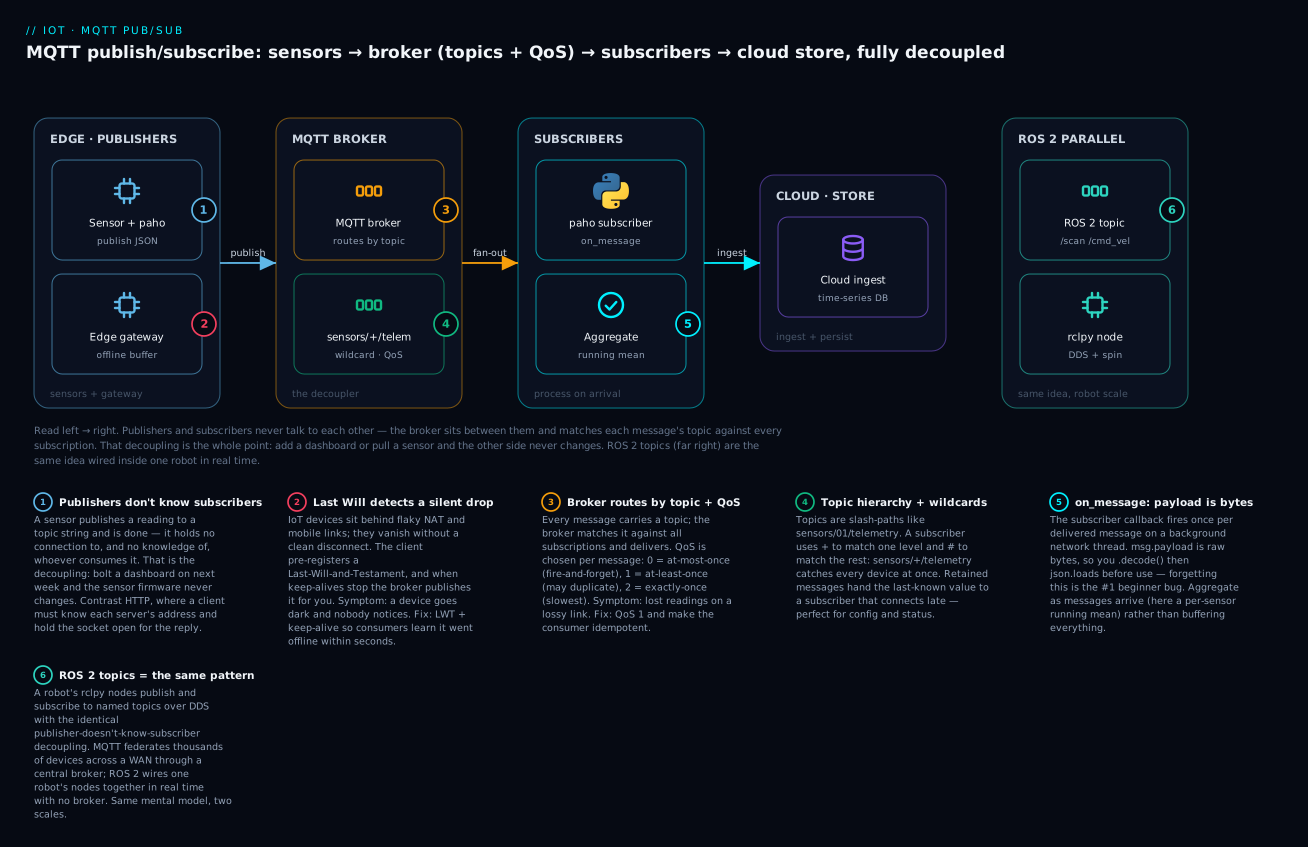
Following it left to right: a sensor publishes to a topic and forgets it (badge 1 — the decoupling); the broker routes by topic and QoS (badge 3); wildcards and retained messages live on the topic itself (badge 4); the subscriber’s on_message fires with raw bytes to decode (badge 5); and a Last-Will (badge 2, red) is how a silent device drop becomes a visible event. Badge 6 is the whole reason Part B exists — ROS 2 is this same diagram, shrunk to one robot.
Topics, hierarchy, and wildcards
A topic is a path. The power is that subscribers (never publishers) can use two wildcards to match many topics at once. + matches exactly one level; # matches the rest of the tree (must be last). This is what lets one dashboard watch an entire fleet.
| Wildcard | Matches | In a… | Example | Matches | Does NOT match |
|---|---|---|---|---|---|
+ |
Exactly one level | Subscription only | sensors/+/telemetry |
sensors/01/telemetry, sensors/99/telemetry |
sensors/01/status, sensors/01/a/telemetry |
# |
This level and all below | Subscription only, must be last | sensors/# |
sensors/01, sensors/01/telemetry, sensors/01/a/b |
devices/01 |
+ + # |
Combined | Subscription | +/01/# |
sensors/01/telemetry, actuators/01/x |
sensors/02/telemetry |
| (none) | Exact topic | Publish and subscribe | sensors/01/telemetry |
that exact string only | anything else |
⚠️ Publishers must use a fully-specified topic — you cannot publish to sensors/+/telemetry; the +/# are subscription-side only. Publishing a literal + just creates a weird topic named +. A clean topic design pays for itself; a few rules the field has settled on:
| Do | Don’t | Why |
|---|---|---|
sensors/{id}/telemetry — hierarchy general→specific |
telemetry/temp/greenhouse/01/celsius (deep, ad-hoc) |
Shallow, consistent trees are wildcard-friendly |
| Put the variable (device id) in the middle | Bury the id so + can’t isolate it |
sensors/+/telemetry should select “all devices” |
| Lower-case, no spaces, stable names | Leading / (/sensors/...) |
A leading / creates an empty first level — a classic silent mismatch |
Separate data vs control: .../telemetry vs .../cmd |
One topic for readings and commands | Subscribe to only what a consumer needs |
Reserve .../status for LWT |
Overload telemetry with liveness | Liveness is a different concern |
QoS 0, 1, 2 — the delivery-guarantee tradeoff
Quality of Service is MQTT’s dial for how hard the broker tries to deliver a message, traded against speed and bandwidth. It’s set per publish and per subscribe, and the effective QoS of a delivery is the minimum of the two. This is the table to memorise.
| QoS | Guarantee | Handshake | Duplicates? | Lost on drop? | Cost | Use for |
|---|---|---|---|---|---|---|
| 0 | At most once — fire and forget | PUBLISH only (no ack) |
No | ✅ Possible | Cheapest, fastest | High-frequency telemetry where one lost reading is fine |
| 1 | At least once — guaranteed delivery, maybe twice | PUBLISH → PUBACK |
⚠️ Yes, can duplicate | No | Medium | ✅ The IoT default — commands, telemetry that matters |
| 2 | Exactly once — guaranteed, never duplicated | 4-way: PUBLISH→PUBREC→PUBREL→PUBCOMP |
No | No | Highest (2 round-trips) | Billing, actuation you must not double-fire |
The subtle, must-know fact is that QoS 1 can deliver the same message twice. If the PUBACK is lost in transit, the sender re-publishes, and the subscriber sees the reading again. The correct response is almost never “use QoS 2” (it’s slow and rarely necessary) — it’s to make your consumer idempotent: include a message id or timestamp and ignore one you’ve already processed. In practice that’s a few lines in on_message — keep the last-seen id per device and drop repeats:
seen = {}                                 # device -> last message id processed
def on_message(client, userdata, msg):
    r = json.loads(msg.payload.decode())
    if seen.get(r["id"]) == r["seq"]:     # already handled this one (a QoS-1 redelivery)
        return
    seen[r["id"]] = r["seq"]
    process(r)                            # safe: runs exactly once per logical reading
QoS 2’s four-way handshake guarantees exactly-once but costs two full round-trips, so reserve it for operations where a duplicate is genuinely harmful (charging a meter, firing an actuator). For a stream of temperature readings every second, QoS 0 or 1 is right and QoS 2 is a waste. The lab below runs at QoS 1. The lesson generalizes far beyond MQTT: in any at-least-once system — message queues, webhooks, event streams — the durable fix for duplicates is an idempotent consumer, not a stronger delivery guarantee.
Retained messages, Last Will, sessions, keep-alive
Four more mechanisms turn the bare pattern into something robust on real, flaky networks. Each solves a specific “but what about…” question.
| Mechanism | Problem it solves | How it works | ⚠️ Gotcha |
|---|---|---|---|
| Retained message | A subscriber connects after the last update and knows nothing | Broker stores the last retained msg per topic; delivers it instantly on subscribe | Only one retained per topic; publish empty payload + retain=True to clear it |
| Last Will & Testament | A device drops without disconnecting cleanly; consumers think it’s alive | Client registers a Will at connect; broker publishes it if keep-alive lapses | Set it before connect(); often retain=True on a .../status topic |
| Keep-alive | Detecting a dead TCP connection that looks open | Client sends PINGREQ every N s; broker declares it dead after ~1.5×N of silence |
Too long = slow drop detection; too short = wasted power/bandwidth |
| Clean vs persistent session | Should the broker remember a client across disconnects? | Clean = forget subs + queued msgs; persistent = keep subs, queue QoS 1/2 while offline | Persistent needs a stable client ID; random IDs leak sessions on the broker |
Retained messages are how you model state on top of an event protocol. Telemetry (“it’s 21.8°C right now”) is an event — you don’t retain it, a late subscriber just waits for the next one. But configuration (“sample every 10 s”) and status (“device online”) are state — you retain them, so anything connecting later immediately learns the current value instead of waiting indefinitely. I proved this end-to-end: a publisher set a retained config, disconnected, and a brand-new subscriber connecting afterward received it instantly with the retain flag set:
retained published to kloudvin/retain2/3325/config
  sub connected rc= Success
  RX kloudvin/retain2/3325/config payload={"interval":10} retain=True
retained delivered to late subscriber: True (1 msgs)
retained message cleared
Last Will is the answer to the single hardest IoT problem: how do you know a device died? On a mobile or radio link, a device doesn’t send a polite disconnect — it just vanishes when the battery dies or the signal drops. Without a plan, its last reading sits there and every dashboard assumes it’s fine. The fix: the client hands the broker a “will” at connect time — a message to publish on the client’s behalf if the broker stops hearing keep-alives. Point it at a .../status topic with {"status":"offline"} and retain=True, and the moment the device silently drops, every consumer gets a retained “offline” — drop detection for free, enforced by the broker.
Keep-alive and sessions are the mechanisms underneath both of those. Keep-alive is a number you set at connect (the lab uses 30 seconds): the client promises to send something — a real message or a tiny PINGREQ heartbeat — at least that often, and if the broker hears nothing for roughly 1.5× that interval, it declares the client dead and fires the Will. Tuning it is a genuine tradeoff: a short keep-alive detects drops fast but wastes precious battery and bandwidth on pings; a long one is cheap but means a dead device lingers as “online” for minutes. Field devices on cellular often sit at 60–300 seconds; a latency-sensitive controller might use 10.
A session is the broker’s memory of a client between connections, and the clean-session flag decides whether that memory exists. Connect with a clean session and the broker forgets you the instant you disconnect — subscriptions gone, no messages queued. Connect with a persistent session (clean-session off) and a stable client ID, and the broker remembers your subscriptions and, crucially, queues QoS 1 and 2 messages that arrive while you’re offline, delivering them on reconnect — so a device that drops for thirty seconds misses nothing. ⚠️ The persistent-session footgun is the client ID: persistence is keyed on it, so if your device reconnects with a random ID each time (a common copy-paste habit), the broker can never match it to the old session — you both lose the queued messages and leak an orphaned session on the broker that lingers until it expires. Persistent sessions demand a stable, unique client ID per device.
One version note, since it shapes which features you get. MQTT has two live protocol versions: 3.1.1 (universal, the safe default) and 5.0 (adds richer features — reason codes with detail, per-message expiry, topic aliases to save bandwidth, shared subscriptions for load-balancing consumers). paho exposes both as mqtt.MQTTv311 (protocol level 4) and mqtt.MQTTv5 (level 5); the examples here use the default 3.1.1, which every broker speaks. Reach for MQTT 5 when you specifically need one of its features and know your broker supports it.
paho-mqtt in practice — executed
Now the real thing. paho-mqtt is the Eclipse Paho Python client, the reference implementation. One install, and note the version matters enormously:
python3 -m venv .venv
source .venv/bin/activate            # Windows: .venv\Scripts\activate
python -m pip install paho-mqtt      # this lesson ran paho-mqtt 2.1.0
⚠️ paho-mqtt 2.0 changed the API. If you copy a pre-2024 tutorial its callbacks will crash under 2.x. The two visible changes: the Client(...) constructor now requires a callback-API-version argument, and the callbacks take new parameters. Get this right once and everything works; get it wrong and you get the exact TypeError shown later.
Connecting and the callback model
MQTT is event-driven, so paho is callback-driven: you assign functions to on_connect, on_message, etc., and paho calls them from its network loop as events happen. This is the same “register a callback, the runtime calls it later” shape as async — if async/await taught you to think in terms of “the loop calls me back,” MQTT will feel natural. Here is a minimal connect-and-subscribe, in the paho 2.x style:
import paho.mqtt.client as mqtt

# 2.x REQUIRES the callback API version as the first argument.
client = mqtt.Client(mqtt.CallbackAPIVersion.VERSION2, client_id="demo-subscriber")

def on_connect(client, userdata, flags, reason_code, properties):   # 2.x: 5 params
    print(f"connected: {reason_code}")
    client.subscribe("sensors/+/telemetry", qos=1)                  # subscribe INSIDE on_connect

def on_message(client, userdata, msg):
    # msg.payload is BYTES — decode before use
    print(f"{msg.topic} -> {msg.payload.decode()}  (qos={msg.qos}, retain={msg.retain})")

client.on_connect = on_connect
client.on_message = on_message
client.connect("broker.hivemq.com", 1883, keepalive=30)
client.loop_forever()          # blocks here, pumping the network + firing callbacks
Subscribing inside on_connect (not right after connect()) is the idiom that trips everyone: connect() only starts the TCP+MQTT handshake; your subscriptions must wait until the broker has actually acknowledged the connection, which is exactly when on_connect fires. Subscribe too early and it can be lost. And critically — after a reconnect, on_connect fires again, so putting subscribe() there means your subscriptions are automatically restored on every reconnect, for free.
The callbacks you’ll actually use, with their 2.x signatures (the parameter lists that changed):
| Callback | Fires when | 2.x signature | Note |
|---|---|---|---|
on_connect |
Broker acknowledges connection | (client, userdata, flags, reason_code, properties) |
✅ Subscribe here — survives reconnects |
on_message |
A subscribed message arrives | (client, userdata, msg) |
msg.payload is bytes; .topic, .qos, .retain |
on_disconnect |
Connection lost (clean or not) | (client, userdata, flags, reason_code, properties) |
Non-zero reason code = unexpected drop |
on_publish |
A QoS 1/2 publish completed | (client, userdata, mid, reason_code, properties) |
Match mid to the publish’s .mid |
on_subscribe |
Broker confirmed a subscription | (client, userdata, mid, reason_code_list, properties) |
reason_code_list = granted QoS per topic |
The msg handed to on_message is an MQTTMessage, and knowing its fields saves you from guessing. The two that catch people are payload (bytes, always decode) and retain (whether this delivery came from the broker’s retained store rather than a live publish — useful to distinguish “the current state” from “a fresh event”):
msg attribute |
Type | Holds |
|---|---|---|
msg.topic |
str |
The exact topic published to (never a wildcard — the concrete one) |
msg.payload |
bytes |
⚠️ The raw payload — .decode() before string/JSON use |
msg.qos |
int |
The delivered QoS (0/1/2) — the min of publish and subscribe QoS |
msg.retain |
bool |
True if this was a retained message the broker had stored |
msg.mid |
int |
Message id — correlate with on_publish/acks |
msg.dup |
bool |
True if the broker flagged this as a redelivery (QoS 1/2 retry) |
msg.topic is always the concrete topic even when you subscribed with a wildcard — which is exactly why the monitor in the lab can do msg.topic.split("/")[-2] to recover which sensor sent a reading. The subscription pattern selects; the message tells you the specific source.
loop_forever vs loop_start — the choice that blocks your program
paho needs a network loop running to send pings, handle reconnects, and fire callbacks. You pick how that loop runs, and picking wrong is the “my code after connect() never runs” bug.
| Method | Runs the loop… | Blocks caller? | Use when |
|---|---|---|---|
loop_forever() |
In the calling thread, forever | ✅ Yes — nothing after it runs | The client is your whole program (a pure subscriber) |
loop_start() |
In a background thread | ❌ No — returns immediately | ✅ You have other work: publishing in a loop, a web app, a GUI |
loop_stop() |
Stops the background thread | — | Pair with loop_start() on shutdown |
loop(timeout) |
One iteration, manually | ❌ No | Integrating into your own external loop (rare) |
The rule: a program that only subscribes and reacts uses loop_forever() — it’s the whole program, blocking is fine. A program that publishes on a timer, or is a web server that also talks MQTT, uses loop_start() so the network runs on a background thread (see threading & the GIL for what that thread is doing) while your main code keeps going. ⚠️ The classic bug: calling loop_forever() in a program that also needs to publish — the loop_forever() never returns, your publish loop never executes, and the program looks hung. The fix is loop_start().
Publishing telemetry — the real round-trip
Here’s the payoff: a publisher and subscriber, connected to a live broker, moving real JSON. The subscriber uses a wildcard and computes a running mean; the publisher sends five readings at QoS 1 and registers a Last-Will. This is trimmed from the executed script (full version in the lab).
import json, time, random, threading
import paho.mqtt.client as mqtt

BROKER, PORT = "broker.hivemq.com", 1883      # test.mosquitto.org was down at run time
NS = f"kloudvin/demo/{random.randint(10000, 99999)}"      # unique prefix on a shared broker
TOPIC_WILDCARD = f"{NS}/sensors/+/telemetry"

received = []
sub_ready = threading.Event()

def on_connect_sub(client, userdata, flags, reason_code, properties):
    print(f"[sub] on_connect reason_code={reason_code}")
    client.subscribe(TOPIC_WILDCARD, qos=1)
    print(f"[sub] subscribed to {TOPIC_WILDCARD} (qos=1)")
    sub_ready.set()

def on_message(client, userdata, msg):
    payload = json.loads(msg.payload.decode())            # bytes -> str -> dict
    received.append(payload)
    mean = sum(p["temp_c"] for p in received) / len(received)
    print(f"[sub] #{len(received)} {msg.topic} temp={payload['temp_c']}C "
          f"hum={payload['humidity_pct']}%  running_mean_temp={mean:.2f}C")

sub = mqtt.Client(mqtt.CallbackAPIVersion.VERSION2, client_id=f"{NS}-subscriber")
sub.on_connect = on_connect_sub
sub.on_message = on_message
sub.connect(BROKER, PORT, keepalive=30)
sub.loop_start()                                          # background network thread
assert sub_ready.wait(timeout=10), "subscriber never connected"

pub = mqtt.Client(mqtt.CallbackAPIVersion.VERSION2, client_id=f"{NS}-sensor-01")
pub.will_set(f"{NS}/sensors/01/status",                   # LWT — set BEFORE connect
             payload=b'{"status":"offline"}', qos=1, retain=True)
pub.connect(BROKER, PORT, keepalive=30)
pub.loop_start()
time.sleep(1.0)

state = {"temp": 22.0, "hum": 55.0}
topic = f"{NS}/sensors/01/telemetry"
for i in range(5):
    state["temp"] += random.uniform(-0.3, 0.3)            # simulated sensor: random walk
    state["hum"]   = max(0.0, min(100.0, state["hum"] + random.uniform(-0.8, 0.8)))
    reading = {"temp_c": round(state["temp"], 2),
               "humidity_pct": round(state["hum"], 1), "ts": round(time.time(), 3)}
    info = pub.publish(topic, json.dumps(reading), qos=1)
    info.wait_for_publish(timeout=5)                      # block until QoS1 PUBACK
    print(f"[pub] sent #{i+1} -> {topic}  {reading}  (mid={info.mid})")
    time.sleep(1.0)
Running it produced this real transcript (copied verbatim from the broker.hivemq.com run):
[sub] on_connect reason_code=Success
[sub] subscribed to kloudvin/demo/65071/sensors/+/telemetry (qos=1)
[pub] on_connect reason_code=Success
[sub] #1 kloudvin/demo/65071/sensors/01/telemetry temp=21.81C hum=55.8%  running_mean_temp=21.81C
[pub] sent #1 -> kloudvin/demo/65071/sensors/01/telemetry  {'temp_c': 21.81, 'humidity_pct': 55.8, 'ts': 1784288937.474}  (mid=2)
[sub] #2 kloudvin/demo/65071/sensors/01/telemetry temp=22.04C hum=56.3%  running_mean_temp=21.92C
[pub] sent #2 -> kloudvin/demo/65071/sensors/01/telemetry  {'temp_c': 22.04, 'humidity_pct': 56.3, 'ts': 1784288938.865}  (mid=3)
[sub] #3 kloudvin/demo/65071/sensors/01/telemetry temp=22.05C hum=56.7%  running_mean_temp=21.97C
[pub] sent #3 -> ...  (mid=4)
[sub] #4 kloudvin/demo/65071/sensors/01/telemetry temp=22.15C hum=55.9%  running_mean_temp=22.01C
[pub] sent #4 -> ...  (mid=5)
[sub] #5 kloudvin/demo/65071/sensors/01/telemetry temp=22.18C hum=56.0%  running_mean_temp=22.05C
[pub] sent #5 -> ...  (mid=6)

RESULT: published 5, subscriber received 5 messages
Every published reading arrived and the running mean updated live — a full pub/sub loop through a broker on the public internet. Three details are load-bearing. The unique NS prefix matters because a public broker is shared with the world; without a random namespace you’d see (and pollute) other people’s messages — never ship random prefixes to production, but on a shared test broker it’s essential hygiene. info.wait_for_publish() blocks until the QoS 1 PUBACK returns, so “sent” means actually delivered to the broker, not just queued. And the subscriber’s wildcard sensors/+/telemetry would have caught sensors/02, sensors/99, any device — which the two-sensor version in the lab demonstrates.
The publish() return value and the key methods are worth a reference:
| Call | Returns / does | Note |
|---|---|---|
client.publish(topic, payload, qos=0, retain=False) |
An MQTTMessageInfo |
payload = str/bytes; retain=True to store it |
info.wait_for_publish(timeout=None) |
Blocks until sent (QoS 1/2) | ⚠️ Raises if not connected |
info.mid |
The message id (int) | Match against on_publish |
info.is_published() |
bool — done yet? |
Non-blocking poll |
client.subscribe(topic, qos=0) |
(result, mid) |
Do it in on_connect |
client.will_set(topic, payload, qos, retain) |
Registers the LWT | ⚠️ Before connect() |
client.username_pw_set(user, pw) |
Sets credentials | Before connect(); use with TLS |
client.reconnect_delay_set(min_delay, max_delay) |
Backoff for auto-reconnect | loop_* auto-reconnects |
Reconnection — the thing that separates a toy from a device
A demo runs for ten seconds; a device runs for two years across dropped links, broker restarts, and IP changes. The good news: paho’s loop_forever() and loop_start() automatically reconnect with backoff. Your job is to make reconnection seamless, which comes down to three habits: subscribe inside on_connect (so subs are restored automatically on every reconnect), tune reconnect_delay_set() for sane backoff, and set a Last Will so consumers are told when you drop. Get those three right and a paho client survives a hostile network indefinitely without custom retry code — which is exactly why the earlier on_connect-subscribes-here idiom matters so much.
The one callback worth wiring for observability is on_disconnect, because it lets you tell a clean shutdown from a dropped link — a non-zero reason code means the disconnect was unexpected, which is what you want to log or alert on:
def on_disconnect(client, userdata, flags, reason_code, properties):   # 2.x signature
    if reason_code == 0:
        print("clean disconnect (we asked to)")
    else:
        print(f"UNEXPECTED disconnect: {reason_code} — paho will auto-reconnect")

client.on_disconnect = on_disconnect
You don’t call reconnect() yourself here — the running loop already handles it with backoff; on_disconnect is for visibility, so a flapping connection shows up in your logs instead of hiding behind paho’s silent, automatic recovery.
Edge constraints and the edge-to-cloud path
MQTT lives at the edge — on or near the devices — and the edge is a world of hard limits that shape every design decision. You are not on a cloud VM with infinite RAM; you are on a microcontroller or a Raspberry Pi with a coin cell and a 2G modem.
| Constraint | Edge reality | Consequence for your design |
|---|---|---|
| Compute | A few MHz to ~1 GHz, KBs–hundreds of MB RAM | Tiny code, no heavy frameworks; parse minimal payloads |
| Power | Battery / solar — every wake costs charge | Sleep aggressively; one connection, not per-message |
| Bandwidth | NB-IoT/LoRa/2G — KB/s, metered, spiky | Small payloads (CBOR/protobuf over JSON), low QoS where OK |
| Connectivity | Intermittent — tunnels, dead zones, night | Buffer offline, flush on reconnect; expect drops |
| Latency | Satellite/cellular round-trips are slow | Don’t chat; batch; tolerate delay |
| Physical | Unattended, no ops team, hard to update | Robust reconnect, remote config via retained topics, watchdogs |
The offline-buffer row is the one beginners forget. A field device will lose its link — so a real sensor doesn’t drop readings during an outage; it writes them to a local queue (a file, a ring buffer, SQLite) and flushes them when MQTT reconnects. Skip this and every network blip is permanent data loss. This is often the job of an edge gateway: a slightly bigger box (a Pi, an industrial gateway) that aggregates many cheap local sensors, buffers, and speaks MQTT upstream on their behalf — the Edge gateway node in the diagram.
Zoom out and the edge-to-cloud path is a pipeline, and it’s the same shape as a data-engineering pipeline with MQTT as the ingestion front door:
| Stage | Does | Typical tech |
|---|---|---|
| 1. Device | Read sensor, serialize, publish (buffer if offline) | MCU/Pi + paho / embedded MQTT |
| 2. Broker | Route, fan-out, enforce QoS/auth, retain state | Mosquitto, EMQX, HiveMQ, AWS IoT Core |
| 3. Ingest | Subscribe with wildcards, validate, decode | A paho subscriber, a cloud IoT rule, a bridge |
| 4. Process | Aggregate, alert, transform (the running mean, scaled) | Stream processor, serverless, a queue |
| 5. Store | Persist for query/dashboards/ML | Time-series DB (InfluxDB, Timescale), object store |
Your subscriber from the last section is stage 3, and its running-mean aggregation is a toy stage 4. In production, stage 4 is a stream processor and stage 5 is a time-series database, but the entry point is always the same: something subscribes to the broker with a wildcard and turns bytes into structured events. Everything you know about turning bytes into objects — JSON parsing and serialization — is exactly the decode step in on_message.
Securing the broker — never ship it open
The examples above connected to a public, unauthenticated broker, which is fine for learning and a liability everywhere else. An MQTT broker with no security is an open broker: anyone who can reach it can subscribe to # and read every message flowing through it, and — worse — publish to any topic, including your command topics. On a factory that means an attacker reading your production line; on a fleet of smart locks it means someone publishing unlock to every door. Open brokers are not hypothetical: internet-wide scans routinely find tens of thousands of them exposing live telemetry. The rule is blunt and non-negotiable: ⚠️ never expose a broker to the internet without, at minimum, TLS and authentication.
MQTT security comes in three layers that you stack, not choose between: encrypt the pipe, prove who’s connecting, and control what each client may do.
| Layer | Mechanism | paho call | What it stops |
|---|---|---|---|
| Encryption | TLS on port 8883 (not plaintext 1883) | client.tls_set(ca_certs="ca.crt") |
Eavesdropping + tampering on the wire; the plaintext-1883 exposure |
| Authentication (basic) | Username / password in CONNECT | client.username_pw_set(user, pw) |
Anonymous clients — but ⚠️ useless without TLS (password is sent in the clear) |
| Authentication (strong) | Client certificates (mutual TLS) | client.tls_set(certfile="dev.crt", keyfile="dev.key", ca_certs="ca.crt") |
Impersonation — each device proves identity with its own cert, no shared secret |
| Authorization | Broker-side ACLs (topic permissions per user/cert) | (broker config, not paho) | A compromised device writing topics it shouldn’t; read/write scoping |
| Isolation | Bind to localhost / VPC; broker behind a firewall |
(deployment) | Exposure itself — don’t put 1883 on a public IP |
The ordering matters and the pairing is the trap: username/password without TLS is theatre — MQTT sends the credentials inside the plaintext CONNECT packet, so anyone sniffing the link reads your password on the first connection. Basic auth is only meaningful over TLS. For real fleets the strong option is client certificates: each device carries its own certificate signed by your CA, the broker verifies it (mutual TLS), and identity is cryptographic rather than a shared password you’d have to rotate across ten thousand devices. Here’s the shape of a properly-secured connection in paho:
import ssl, paho.mqtt.client as mqtt

client = mqtt.Client(mqtt.CallbackAPIVersion.VERSION2, client_id="device-0001")
client.tls_set(                                    # mutual TLS on port 8883
    ca_certs="ca.crt",                             # trust the broker's CA
    certfile="device-0001.crt",                    # this device's certificate
    keyfile="device-0001.key",                     # its private key
    tls_version=ssl.PROTOCOL_TLS_CLIENT,
)
client.username_pw_set("device-0001", "s3cr3t")    # optional, now safe (encrypted)
client.connect("mqtt.example.com", 8883, keepalive=30)  # 8883 = MQTT over TLS
Beyond the connection, the broker’s ACL config is where you enforce least privilege: a sensor account may publish to sensors/0001/# and nothing else; a dashboard account may subscribe to sensors/# but never publish. Then even a fully-compromised device can only forge its own readings, not command its neighbours. Managed brokers (AWS IoT Core, Azure IoT Hub, HiveMQ Cloud) bake all of this in — per-device certs, policy-based ACLs, TLS by default — which is a large part of why teams pay for them rather than self-hosting Mosquitto for a production fleet. Whatever you use: the demo’s plaintext-1883-open-broker is a teaching setup and must never survive into production.
Part B · Robotics with ROS 2 — conceptual, not executed
Everything in Part B is presented conceptually and was NOT executed.
rclpyis not on PyPI (pip install rclpy→ERROR: No matching distribution found for rclpy) and there is noros2command on this macOS machine, because ROS 2 installs as a full binary distribution (apt on Ubuntu, RoboStack/conda, or Docker), not a pip package. The code below is accurate, idiomatic ROS 2, and the shell commands are the real ones — but I did not run them, and I will not fabricate node output. When you have ROS 2 installed (Ubuntu 24.04 + Jazzy, or theros:jazzyDocker image), these run as written.
Now the reward for learning the pattern. ROS 2 (Robot Operating System 2) is, despite the name, not an operating system — it’s a middleware framework and toolset for building robot software as a graph of small, independent programs that talk over named channels. And the primary channel type is a topic with publish/subscribe semantics — the exact idea from Part A, wired inside one robot in real time. A robot builder who understands MQTT topics already understands the spine of ROS 2.
ROS 2 is not a toy or an academic curiosity: it’s the de-facto standard for modern robotics research and a growing share of commercial robots — mobile bases and warehouse AMRs, robotic arms, drones, autonomous vehicles, and quadrupeds all ship ROS 2 stacks. The reason it took over is exactly the decoupling story: a robot is dozens of concerns (perception, localization, planning, control, safety, logging) that different people and vendors build separately, and pub/sub lets them compose without knowing each other’s internals. A navigation package from one team subscribes to a /scan your LIDAR driver publishes, and neither was written with the other in mind. That is the same architectural payoff MQTT gives an IoT fleet, which is why the two fields converged on the same primitive.
What ROS 2 is (and what it replaced)
| Aspect | ROS 2 |
|---|---|
| What it is | Middleware + libraries + tools to compose robot software from many communicating processes |
| Not | An OS; a language; a simulator (it uses simulators) |
| Unit of code | A node — one process doing one job (read LIDAR, plan path, drive motor) |
| How nodes talk | Topics (pub/sub), services (req/reply), actions (long goals) |
| Transport | DDS (Data Distribution Service) — peer-to-peer, no central broker |
| Languages | C++ (rclcpp) and Python (rclpy) are first-class |
| vs ROS 1 | Real-time friendly, multi-robot, secure, no single roscore master |
The headline contrast with MQTT: ROS 2 has no broker. Where MQTT centralizes everything through one broker (great for a WAN of intermittent devices), ROS 2 uses DDS, a peer-to-peer protocol where nodes discover each other on the local network and send data directly, node-to-node. That’s the right choice inside a robot: no single point of failure, microsecond-ish latency, and no bottleneck when a LIDAR floods /scan at 40 Hz. Same pub/sub decoupling, opposite topology — and the reason is the different job (one real-time machine vs a fleet across the internet).
How does pub/sub work with nobody in the middle? Discovery. When a node starts, its DDS layer announces itself on the network (by default via multicast) — “I’m the node talker, I publish String on /chatter” — and listens for others doing the same. Every participant builds its own live picture of the graph, and when a publisher’s topic + type matches a subscriber’s, DDS wires a direct connection between just those two. There’s no broker to register with because the network itself is the registry. This is why ros2 topic list can show you the whole graph from any terminal, and why the failure modes are networking failures: if multicast is blocked (some corporate LANs, some Docker setups) nodes never find each other, and if two robots share a LAN without distinct ROS_DOMAIN_IDs their graphs merge and they hear each other’s topics. The broker’s absence buys you speed and resilience; the price is that discovery is now your problem.
The node graph: topics, services, actions
A running ROS 2 system is a graph: nodes are the vertices, and the channels between them are the edges. There are three channel types, and picking the right one is core ROS 2 design.
| Primitive | Pattern | Direction | Use for | MQTT analogue |
|---|---|---|---|---|
| Topic | Publish/subscribe | Many→many, streaming, fire-and-forget | Continuous data: sensor streams, velocity commands | ✅ MQTT topic |
| Service | Request/reply | One→one, blocking, immediate | Quick queries/commands: “reset odometry”, “get map” | An HTTP call |
| Action | Goal + feedback + result | One→one, long-running, cancellable | Long tasks: “navigate to (x,y)”, “pick up object” | A job with progress |
| Parameter | Key-value config on a node | — | Tunables: max speed, frame ids | MQTT retained config |
The distinction that matters: topics are for streams where you don’t wait for a reply (LIDAR scans, wheel commands — like MQTT telemetry); services are for quick request/reply where you need an answer now (like an HTTP call); actions are for long tasks you monitor and can cancel (“drive to the kitchen” takes 30 seconds and you want progress + the ability to abort). Reaching for a service where you needed an action — blocking your whole node for 30 seconds waiting for navigation — is a classic beginner mistake.
rclpy — a ROS 2 node in Python
rclpy is the Python client library. A node is a class subclassing rclpy.node.Node; you create publishers, subscribers, and timers in __init__, and rclpy.spin() runs the node’s event loop — the direct analogue of paho’s loop_forever(). Here’s a publisher node. (Conceptual — not executed.)
# talker.py  —  CONCEPTUAL, NOT EXECUTED (needs a full ROS 2 install)
import rclpy
from rclpy.node import Node
from std_msgs.msg import String            # a standard message type

class Talker(Node):
    def __init__(self):
        super().__init__("talker")                                    # node name
        self.pub = self.create_publisher(String, "chatter", 10)       # topic, queue depth
        self.timer = self.create_timer(1.0, self.tick)                # fire tick() every 1s
        self.i = 0

    def tick(self):
        msg = String()
        msg.data = f"hello {self.i}"
        self.pub.publish(msg)                                         # publish to /chatter
        self.get_logger().info(f"publishing: {msg.data}")
        self.i += 1

def main():
    rclpy.init()                    # start the ROS 2 client library
    node = Talker()
    rclpy.spin(node)                # run forever, firing timers + callbacks (like loop_forever)
    node.destroy_node()
    rclpy.shutdown()

if __name__ == "__main__":
    main()
And the matching subscriber — note how closely it mirrors paho’s callback model. (Conceptual — not executed.)
# listener.py  —  CONCEPTUAL, NOT EXECUTED
import rclpy
from rclpy.node import Node
from std_msgs.msg import String

class Listener(Node):
    def __init__(self):
        super().__init__("listener")
        # subscribe to /chatter; on_msg fires per message (cf. paho on_message)
        self.sub = self.create_subscription(String, "chatter", self.on_msg, 10)

    def on_msg(self, msg):                       # the callback
        self.get_logger().info(f"heard: {msg.data}")

def main():
    rclpy.init()
    node = Listener()
    rclpy.spin(node)                             # blocks; delivers messages to on_msg
    node.destroy_node()
    rclpy.shutdown()

if __name__ == "__main__":
    main()
Put them side by side with Part A and the parallel is exact: create_publisher/publish is paho’s publish; create_subscription(..., callback, ...) is on_message; rclpy.spin(node) is loop_forever(). You’d run them — again, conceptually, in two terminals after building the workspace — like this:
# CONCEPTUAL — the real commands, NOT executed here
source /opt/ros/jazzy/setup.bash        # activate ROS 2 (Jazzy on Ubuntu 24.04)
ros2 run my_package talker              # terminal 1: the publisher node
ros2 run my_package listener            # terminal 2: the subscriber node
ros2 topic list                         # inspect the graph:  /chatter  /parameter_events ...
ros2 topic echo /chatter                # print messages on a topic live
ros2 node list                          # /talker  /listener
The rclpy surface you’ll use constantly:
rclpy API |
Does | paho analogue |
|---|---|---|
rclpy.init() / rclpy.shutdown() |
Start / stop the client library | Client() / disconnect() |
class X(Node) / super().__init__("name") |
Define a node with a graph name | A paho Client(client_id=...) |
create_publisher(MsgType, "topic", qos) |
Make a publisher | client (publish side) |
create_subscription(MsgType, "topic", cb, qos) |
Subscribe with a callback | subscribe + on_message |
create_timer(period_s, cb) |
Call cb every period |
Your publish loop |
create_service / create_client |
Request/reply endpoints | — (services have no MQTT twin) |
publisher.publish(msg) |
Send a typed message | client.publish(...) |
rclpy.spin(node) |
Run the node’s event loop (blocking) | loop_forever() |
rclpy.spin_once(node, timeout_sec=) |
One iteration | loop(timeout) |
node.get_logger().info(...) |
Structured logging | print / logging |
Messages, DDS QoS, launch files, and simulators
A few more pieces make ROS 2 a system rather than two scripts. Unlike MQTT’s payload-agnostic bytes, ROS 2 messages are strongly typed — defined in .msg files and generated into Python classes, so a topic carries a known structure and mismatched types simply won’t connect.
| Concept | What it is | Why it matters |
|---|---|---|
.msg types |
Typed message schemas (std_msgs/String, sensor_msgs/LaserScan, geometry_msgs/Twist) |
Type-safe topics; a type mismatch = no connection (a real gotcha) |
| DDS QoS profiles | Per-topic reliability/durability/history settings | The direct parallel to MQTT QoS — see below |
| Launch files | Python/XML files that start many nodes with config at once | Real robots have dozens of nodes; you don’t hand-run each |
tf2 |
The transform library tracking coordinate frames over time | “Where is the gripper relative to the camera right now?” |
| Simulators (Gazebo / RViz) | Gazebo simulates physics/sensors; RViz visualizes the graph’s data | ✅ Develop against sim before risking real hardware |
ros2 CLI |
Introspect the live graph (topic, node, service, bag) |
Debugging: is the topic flowing? right type? |
The DDS QoS parallel is worth dwelling on, because it’s Part A’s QoS wearing a robotics hat. ROS 2 lets you set, per topic, a reliability policy — RELIABLE (retransmit until delivered, like MQTT QoS 1) or BEST_EFFORT (drop under load, like QoS 0) — plus durability (TRANSIENT_LOCAL delivers the last message to late-joining subscribers, exactly like an MQTT retained message) and history (how many messages to buffer). A BEST_EFFORT sensor stream and a RELIABLE command channel is the same reasoning as QoS 0 telemetry and QoS 1 commands. ⚠️ And a subtle ROS 2 trap that mirrors MQTT: if a publisher is BEST_EFFORT and a subscriber demands RELIABLE, their QoS profiles are incompatible and they silently won’t connect — the ROS 2 version of a QoS/topic mismatch.
Simulators are how robotics is actually done: you develop and test against Gazebo (a physics simulator that fakes sensors and actuators) and visualize with RViz, and only deploy to hardware once it works in sim — because a bug that’s a reset in simulation is a crashed robot in reality. The ros2 CLI is your window into a running graph, and it’s where you’ll do most debugging:
ros2 command |
Shows / does |
|---|---|
ros2 node list |
Every node currently in the graph |
ros2 topic list / ros2 topic echo /scan |
All topics / print a topic’s messages live |
ros2 topic hz /scan / ros2 topic info /scan |
Publish rate / type + pub/sub counts (is it flowing?) |
ros2 service list / ros2 service call ... |
Services / invoke one from the shell |
ros2 run pkg node / ros2 launch pkg file.py |
Run one node / start many from a launch file |
ros2 bag record /scan / ros2 bag play file |
Record topics to disk / replay them (offline testing) |
ros2 param list / ros2 param set /node p v |
Inspect / change a node’s parameters at runtime |
The hard parts robotics doesn’t let you skip
MQTT’s world is forgiving: a late or lost temperature reading costs nothing, and “eventually consistent” is fine. A robot lives in the physical world, where lateness has mass and momentum, and four realities make robotics genuinely harder than device telemetry — none of which ROS 2 (or any framework) makes disappear.
| Reality | The problem | ROS 2 tool | Why it’s hard |
|---|---|---|---|
| Real-time / determinism | A control loop must hit its deadline every cycle — a late motor command can topple a robot | Executors, QoS, RT kernels | Python’s GC pauses and the GIL make hard real-time a C++/rclcpp job; rclpy suits perception/planning, not the tightest loops |
| Coordinate frames | Every sensor sees the world from its own position and moment in time | tf2 transform tree |
“Where is the gripper relative to the camera right now?” needs time-stamped transforms chained through a moving tree |
| Sensor fusion | LIDAR, camera, IMU, wheel odometry all disagree, drift, and are noisy | robot_localization, filters |
Merging streams at different rates/latencies into one trustworthy pose is a Kalman-filter-shaped problem |
| Discovery / networking | Nodes must find each other over DDS with no broker | ROS_DOMAIN_ID, DDS config |
Multicast discovery breaks on some networks; two robots on one LAN need different domain IDs or they cross-talk |
Coordinate frames (tf2) are the one that surprises newcomers most. In MQTT a reading is just a number. On a robot, “the obstacle is at (1.2, 0.3)” is meaningless until you say in whose frame — the camera’s? the robot’s base? the map’s? — and every one of those frames is moving relative to the others as the robot drives and its arm swings. tf2 maintains a time-stamped tree of transforms so any node can ask “where is frame A relative to frame B at time t?” and get a correct answer even though everything is in motion. Get a frame or a timestamp wrong and your robot confidently reaches for a spot ten centimetres from the actual object. There is no MQTT analogue for this — it’s the tax of operating in physical 3D space over time.
Real-time determinism is why rclpy has a lane and rclcpp has another. Python is wonderful for perception glue, planning, state machines, and configuration — the parts where a few milliseconds of jitter don’t matter. But the innermost control loop (balance a legged robot, drive a motor at 1 kHz) cannot tolerate a garbage-collection pause or GIL contention, so that layer is almost always C++. Knowing which lane you’re in keeps you from fighting the language: reach for rclpy for the 90% that’s I/O- and logic-bound, and hand the hard-real-time 10% to rclcpp. It’s the same “right tool for the job” instinct as choosing async vs threads vs processes in Python — the constraint just comes from physics instead of the GIL.
The parallel, stated plainly
| MQTT (IoT) | ROS 2 (robotics) | |
|---|---|---|
| Core pattern | ✅ Publish/subscribe on topics | ✅ Publish/subscribe on topics |
| Decoupling | Publisher doesn’t know subscribers | Publisher doesn’t know subscribers |
| Topology | Central broker | Brokerless peer-to-peer (DDS) |
| Scale / distance | Thousands of devices, across a WAN | Dozens of nodes, one robot / LAN, real time |
| Payload | Bytes (you pick JSON/CBOR/…) | Typed .msg messages |
| Delivery control | QoS 0/1/2 | DDS QoS (reliability/durability/history) |
| Late joiner gets last value | Retained message | TRANSIENT_LOCAL durability |
| Also has | LWT, sessions, keep-alive | Services (req/reply), actions (long goals) |
| Python client | paho-mqtt (ran here) |
rclpy (conceptual here) |
Read that table top to bottom and the thesis of the whole lesson lands: the same decoupling idea, applied at two scales. MQTT federates intermittent devices over the internet through a broker; ROS 2 wires a robot’s parts together in real time without one. Different transports, different guarantees, different topologies — one mental model. Learn to think in publishers, subscribers and topics, and you can pick up either field, and the message queues behind most backend systems besides.
Hands-on lab
You’ll build a real IoT telemetry pipeline: two “sensors” publishing simulated temperature/humidity JSON, and a monitor that subscribes with a wildcard, parses the JSON, and prints a per-sensor running mean — with QoS 1 and a Last-Will. Then you’ll wire up (conceptually) the ROS 2 node pair. The MQTT steps run for real; the ROS 2 step is labelled conceptual.
Step 1 — Set up
mkdir iot-lab && cd iot-lab
python3 -m venv .venv
source .venv/bin/activate            # Windows: .venv\Scripts\activate
python -m pip install paho-mqtt      # ran paho-mqtt 2.1.0
What just happened: an isolated environment with the one dependency. Everything else is standard library.
Step 2 — A pure-Python simulated sensor (no MQTT yet)
Prove the data source works on its own before adding the network. This is fully executable:
# sensor_sim.py — a simulated sensor as a seeded random walk (reproducible)
import random, json

class Sensor:
    def __init__(self, sid, temp=21.0, hum=50.0):
        self.sid, self.temp, self.hum = sid, temp, hum
    def read(self):
        self.temp += random.uniform(-0.3, 0.3)                 # drift
        self.hum   = max(0.0, min(100.0, self.hum + random.uniform(-0.8, 0.8)))
        return {"sensor": self.sid, "temp_c": round(self.temp, 2),
                "humidity_pct": round(self.hum, 1)}

if __name__ == "__main__":
    random.seed(42)                                            # deterministic output
    s = Sensor("greenhouse-01")
    for _ in range(5):
        print(json.dumps(s.read()))
Run python sensor_sim.py and you get exactly (seeded, so identical every run):
{"sensor": "greenhouse-01", "temp_c": 21.08, "humidity_pct": 49.2}
{"sensor": "greenhouse-01", "temp_c": 20.95, "humidity_pct": 48.8}
{"sensor": "greenhouse-01", "temp_c": 21.09, "humidity_pct": 49.1}
{"sensor": "greenhouse-01", "temp_c": 21.33, "humidity_pct": 48.4}
{"sensor": "greenhouse-01", "temp_c": 21.28, "humidity_pct": 47.7}
What just happened: a deterministic data source emitting JSON — the exact shape you’ll publish over MQTT. Real drivers read I²C/SPI/GPIO; the interface (read() → dict) is identical.
Step 3 — The monitor (subscriber with a wildcard + running mean)
# monitor.py — subscribe to ALL sensors, parse JSON, per-sensor running mean
import json, signal, sys
from collections import defaultdict
import paho.mqtt.client as mqtt

BROKER, PORT = "broker.hivemq.com", 1883       # or your local Mosquitto: "localhost"
NS = "kloudvin/iotlab"
WILDCARD = f"{NS}/sensors/+/telemetry"          # + = exactly one level (any sensor id)

sums, counts = defaultdict(float), defaultdict(int)

def on_connect(client, userdata, flags, reason_code, properties):
    print(f"[monitor] connected rc={reason_code}; subscribing {WILDCARD}")
    client.subscribe(WILDCARD, qos=1)           # subscribe INSIDE on_connect

def on_message(client, userdata, msg):
    sensor = msg.topic.split("/")[-2]           # .../sensors/<id>/telemetry
    r = json.loads(msg.payload.decode())        # bytes -> str -> dict
    sums[sensor] += r["temp_c"]; counts[sensor] += 1
    mean = sums[sensor] / counts[sensor]
    print(f"[monitor] {sensor}: temp={r['temp_c']}C hum={r['humidity_pct']}%  "
          f"(n={counts[sensor]}, mean_temp={mean:.2f}C)")

c = mqtt.Client(mqtt.CallbackAPIVersion.VERSION2, client_id=f"{NS}-monitor")
c.will_set(f"{NS}/monitor/status", b'{"status":"offline"}', qos=1, retain=True)  # LWT
c.on_connect, c.on_message = on_connect, on_message
c.connect(BROKER, PORT, keepalive=30)
signal.signal(signal.SIGTERM, lambda *_: (c.disconnect(), sys.exit(0)))
c.loop_forever()                                # blocks — this program is a pure subscriber
Start it in one terminal: python monitor.py. It connects and waits.
What just happened: a stage-3 ingest subscriber. It uses loop_forever() because subscribing is its only job; it computes the running mean incrementally (stage-4 aggregation) so memory stays flat no matter how many messages arrive.
Step 3b — (optional) run your own broker instead
The lab points at the public broker.hivemq.com. To run fully locally (no internet, and the brief’s preferred path), install Mosquitto and change BROKER to "localhost":
# macOS: brew install mosquitto && brew services start mosquitto
# Debian/Ubuntu: sudo apt install mosquitto mosquitto-clients && sudo systemctl start mosquitto
mosquitto -v          # run a broker in the foreground on :1883 with verbose logging
⚠️ A default local Mosquitto is an open broker — fine on localhost, never exposed to the internet without auth + TLS (see the security note below).
Step 4 — The sensor gateway (two sensors, QoS 1, LWT)
# sensor.py — simulate 2 sensors, publish JSON every second at QoS 1
import json, time, random, sys
import paho.mqtt.client as mqtt

BROKER, PORT = "broker.hivemq.com", 1883
NS = "kloudvin/iotlab"
SENSOR_IDS = ["01", "02"]
ROUNDS = int(sys.argv[1]) if len(sys.argv) > 1 else 5

c = mqtt.Client(mqtt.CallbackAPIVersion.VERSION2, client_id=f"{NS}-sensorgw")
c.will_set(f"{NS}/gateway/status", b'{"status":"offline"}', qos=1, retain=True)
c.on_connect = lambda cl, u, f, rc, p: print(f"[sensor] connected rc={rc}")
c.connect(BROKER, PORT, keepalive=30)
c.loop_start()                                   # background thread — main code keeps running
time.sleep(1.0)
c.publish(f"{NS}/gateway/status", b'{"status":"online"}', qos=1, retain=True)  # retained status

state = {sid: {"temp": 21.0 + i, "hum": 50.0 + 3 * i} for i, sid in enumerate(SENSOR_IDS)}
for _ in range(ROUNDS):
    for sid in SENSOR_IDS:
        s = state[sid]
        s["temp"] += random.uniform(-0.3, 0.3)
        s["hum"]   = max(0.0, min(100.0, s["hum"] + random.uniform(-0.8, 0.8)))
        reading = {"temp_c": round(s["temp"], 2),
                   "humidity_pct": round(s["hum"], 1), "ts": round(time.time(), 3)}
        info = c.publish(f"{NS}/sensors/{sid}/telemetry", json.dumps(reading), qos=1)
        info.wait_for_publish(timeout=5)         # confirm PUBACK
        print(f"[sensor] {sid} -> {NS}/sensors/{sid}/telemetry  {reading}")
    time.sleep(1.0)

c.loop_stop(); c.disconnect()
print("[sensor] done")
With monitor.py still running, run python sensor.py 4 in a second terminal. Here is the real output from both terminals of the executed run.
Sensor terminal:
[sensor] 01 -> kloudvin/iotlab/sensors/01/telemetry  {'temp_c': 21.13, 'humidity_pct': 49.2, 'ts': 1784289008.259}
[sensor] connected rc=Success
[sensor] 02 -> kloudvin/iotlab/sensors/02/telemetry  {'temp_c': 22.25, 'humidity_pct': 52.6, 'ts': 1784289013.32}
[sensor] 01 -> kloudvin/iotlab/sensors/01/telemetry  {'temp_c': 21.06, 'humidity_pct': 48.6, 'ts': 1784289015.69}
[sensor] 02 -> kloudvin/iotlab/sensors/02/telemetry  {'temp_c': 22.35, 'humidity_pct': 52.4, 'ts': 1784289015.867}
...
[sensor] done
Monitor terminal (received via the wildcard, per-sensor running means):
[monitor] connected rc=Success; subscribing kloudvin/iotlab/sensors/+/telemetry
[monitor] 01: temp=21.13C hum=49.2%  (n=1, mean_temp=21.13C)
[monitor] 02: temp=22.25C hum=52.6%  (n=1, mean_temp=22.25C)
[monitor] 01: temp=21.06C hum=48.6%  (n=2, mean_temp=21.09C)
[monitor] 02: temp=22.35C hum=52.4%  (n=2, mean_temp=22.30C)
[monitor] 01: temp=21.3C hum=48.7%  (n=3, mean_temp=21.16C)
[monitor] 02: temp=22.12C hum=52.6%  (n=3, mean_temp=22.24C)
[monitor] 01: temp=21.47C hum=49.3%  (n=4, mean_temp=21.24C)
[monitor] 02: temp=22.02C hum=53.3%  (n=4, mean_temp=22.18C)
What just happened: two independent sensors published to distinct topics (sensors/01/..., sensors/02/...); the monitor’s single wildcard subscription caught both and kept a separate running mean per sensor id — the whole pub/sub decoupling, live. Note the sensor uses loop_start() (background thread) precisely because it must keep running its publish loop; the monitor uses loop_forever() because subscribing is all it does. (The first 01 line printed a hair before connected because loop_start() queued the publish while the CONNACK was still in flight — a real, honest timing artifact of the background loop.)
Step 5 — Watch the Last-Will fire (drop detection)
Subscribe to the status topics, then kill the sensor with Ctrl-C (an ungraceful drop). Because the broker only publishes the will on missed keep-alives, wait past the keep-alive window:
# in a third terminal, using mosquitto_sub if you installed Mosquitto, or a small paho subscriber:
# subscribe to kloudvin/iotlab/+/status  — you'll first see the retained {"status":"online"},
# then, ~keepalive seconds after you Ctrl-C the sensor, the broker publishes {"status":"offline"}
What just happened: the retained online status was there for any late joiner immediately; the offline LWT proves the broker announces a silent death on your behalf. That is drop detection you did not have to write.
Step 6 — The ROS 2 node pair (conceptual — not executed)
Save talker.py and listener.py from Part B into a ROS 2 package’s directory. With ROS 2 installed (Ubuntu 24.04 + Jazzy, or docker run -it ros:jazzy), you’d build and run:
# CONCEPTUAL — NOT executed in this lesson (rclpy has no pip wheel on macOS)
source /opt/ros/jazzy/setup.bash
ros2 run my_package talker         # terminal 1
ros2 run my_package listener       # terminal 2 -> logs "heard: hello 0", "heard: hello 1", ...
ros2 topic echo /chatter           # terminal 3 -> see the raw messages
What just happened (conceptually): the same publish/subscribe you just ran over MQTT, now over DDS inside a robot — create_publisher/create_subscription mirroring publish/on_message, and rclpy.spin mirroring loop_forever.
⚠️ Clean up. Ctrl-C the monitor and sensor. On a public broker you shared with the world, your random/namespaced topics are harmless, but clear any retained messages you set (publish an empty payload with retain=True to each retained topic) so you don’t leave stale state behind. To remove the lab: deactivate && cd .. && rm -rf iot-lab (⚠️ rm -rf is irreversible — check the directory first).
Common mistakes and troubleshooting
| Symptom / traceback | Cause | Fix |
|---|---|---|
TypeError: on_connect() takes 4 positional arguments but 5 were given |
paho 2.x callback with the old 4-arg signature | Add the 5th param (properties) and pass CallbackAPIVersion.VERSION2; or migrate the callback |
TimeoutError / hangs on connect(); TCP ok but no CONNACK |
Wrong host/port, firewall, or the broker is down/overloaded (as test.mosquitto.org was here) |
Verify host/port; try another broker; test TCP with nc -vz host 1883 first |
| Published fine, but subscriber receives nothing | Topic mismatch — publish topic doesn’t match the subscription pattern | Check exactly: leading /, a + where you need a literal, wrong level count |
RuntimeError: The client is not currently connected on wait_for_publish |
Published before the CONNACK arrived | Wait for on_connect (or is_connected()) before publishing |
AttributeError: 'bytes' object has no attribute ... / JSON errors on msg.payload |
msg.payload is bytes, not str |
json.loads(msg.payload.decode()) — always decode first |
Your code after client.loop_forever() never runs |
loop_forever() blocks the calling thread |
Use loop_start() (background thread) when you also need to publish/serve |
| A device drops and consumers still think it’s alive | No Last Will + no keep-alive reaction | will_set(...) before connect; tune keepalive; consumers watch .../status |
| Subscriber gets an old message the instant it subscribes | A retained message on that topic | Expected for state topics; to clear, publish empty payload + retain=True |
| Effective QoS is lower than you published at | Delivery QoS = min of publish QoS and subscribe QoS | Subscribe at the QoS you need; check both sides |
| Duplicate messages processed twice | QoS 1 can redeliver if the PUBACK is lost | Make the consumer idempotent (dedupe on id/ts); don’t just jump to QoS 2 |
| Reading someone else’s messages on a public broker | Broker is open (no auth) and shared | Use a unique topic prefix on test brokers; run your own broker with auth + TLS for anything real |
| Random client IDs pile up sessions on the broker | Persistent session + changing client ID | Use a stable client ID for persistent sessions |
ROS 2: ros2 topic list doesn’t show your node’s topic |
Node not discovered — wrong ROS_DOMAIN_ID or network isolation |
Match ROS_DOMAIN_ID across terminals; check DDS/firewall/multicast |
| ROS 2: publisher and subscriber won’t connect on a topic | Message-type mismatch or incompatible QoS (BEST_EFFORT vs RELIABLE) | Same .msg type both sides; compatible QoS profiles |
| ROS 2: subscriber callback never fires | You never called rclpy.spin(node) |
Spin the node — nothing is delivered without spinning |
Three of these cause more lost hours than the rest combined.
The bytes-not-str payload is the daily beginner bug. MQTT is payload-agnostic — the broker moves bytes and has no idea you meant JSON. So msg.payload is always bytes, and json.loads(msg.payload) happens to work (json accepts bytes) but string operations on it don’t, and the habit of forgetting .decode() bites the moment you try to .split() or f-string it. Burn in the reflex: json.loads(msg.payload.decode()), every time. It’s the exact inverse of the serialize step you did to publish.
The blocking loop_forever() is the “my program hangs” bug. It reads like “start the loop,” but it means “run the network loop in this thread and never return.” Put it in a pure subscriber and it’s perfect. Put it in a program that also publishes on a timer and everything after it is dead code — the program looks hung because your logic never runs. The tell is that nothing after the loop_forever() line ever prints. The fix is always loop_start() (background thread) plus your own loop, exactly as the sensor script does.
A silent drop with no Last Will is invisible by design. This is the subtle one, because there’s no error anywhere. A device on a flaky link vanishes; the broker’s TCP socket eventually times out; but your consumers, which only ever receive, have no way to notice the absence of messages — silence looks identical to “nothing changed.” Nothing throws. The only fix is to plan for it: a Last Will so the broker announces the death, a sensible keep-alive so it notices quickly, and consumers that treat a stale .../status or a gap in telemetry as an alert. Skip it and “the sensor’s been offline for six hours and no one knew” is a matter of when, not if.
Cheat-sheet
paho-mqtt (2.x) — ran here
| Snippet | What it does |
|---|---|
pip install paho-mqtt |
Install the client (2.x = new callback API) |
mqtt.Client(mqtt.CallbackAPIVersion.VERSION2, client_id="id") |
✅ Create a 2.x client (version arg is required) |
client.on_connect = fn / on_message / on_disconnect |
Register event callbacks |
def on_connect(client, userdata, flags, reason_code, properties) |
✅ The 2.x on_connect signature (5 params) |
def on_message(client, userdata, msg) |
msg.topic, msg.payload (bytes), msg.qos, msg.retain |
client.will_set(topic, payload, qos, retain) |
⚠️ Register Last-Will before connect() |
client.username_pw_set(u, p) / client.tls_set(...) |
Auth / TLS — before connect() |
client.connect(host, port, keepalive) |
Start the connection (host broker.hivemq.com, port 1883) |
client.subscribe("sensors/+/telemetry", qos=1) |
✅ Subscribe (do it inside on_connect) |
+ / # |
Wildcards: one level / rest of the tree (subscribe only) |
info = client.publish(topic, payload, qos=1, retain=False) |
Publish; returns MQTTMessageInfo |
info.wait_for_publish(timeout=5) / info.mid |
Block until sent (QoS 1/2) / the message id |
client.loop_forever() |
✅ Blocking loop — pure subscriber programs |
client.loop_start() / client.loop_stop() |
✅ Background-thread loop — when you also publish |
QoS 0 / 1 / 2 |
At-most / at-least / exactly once |
mosquitto -v / mosquitto_sub -t 'x/#' -v |
Run a local broker / CLI subscribe (from mosquitto-clients) |
rclpy (ROS 2) — conceptual here
| Snippet | What it does |
|---|---|
source /opt/ros/jazzy/setup.bash |
Activate a ROS 2 install (not pip) |
rclpy.init() / rclpy.shutdown() |
Start / stop the client library |
class N(Node): super().__init__("name") |
Define a node with a graph name |
self.create_publisher(MsgType, "topic", 10) |
Make a publisher (queue depth 10) |
self.create_subscription(MsgType, "topic", cb, 10) |
Subscribe with a callback |
self.create_timer(period_s, cb) |
Periodic callback (your publish tick) |
pub.publish(msg) |
Publish a typed message |
rclpy.spin(node) |
✅ Run the node (blocking) — like loop_forever |
ros2 run pkg node / ros2 topic echo /t |
Run a node / watch a topic |
ros2 topic list / ros2 node list |
Inspect the live graph |
| Topic / service / action | Pub-sub stream / req-reply / long goal |
Interview and exam questions
Q: Why is HTTP a poor fit for IoT, and what does MQTT do differently? A: HTTP is request/response: the client must know and reach the server, only the client initiates, and it suits one client fetching from one server. IoT is thousands of NAT’d, battery-powered, intermittently-connected devices whose readings go to unknown consumers, where a per-request TLS handshake can cost more than the payload. MQTT is publish/subscribe through a broker: each device opens one long-lived outbound (NAT-friendly) connection, publishes tiny messages to topics, and the broker fans them out to whoever subscribed. Publishers and subscribers are decoupled — neither knows the other — so consumers come and go without touching the devices.
Q: Explain the publish/subscribe decoupling. Why does it matter architecturally? A: A publisher sends to a topic, not to a consumer — it has no reference to, and no knowledge of, who (if anyone) is subscribed. A subscriber registers interest in a topic pattern and receives matching messages without knowing which publishers exist. The broker sits between them. Architecturally this means you can add, remove, or restart either side independently: bolt on a new dashboard and no device changes; swap a sensor and no consumer changes. That independence is why event-driven systems — IoT, log pipelines, message queues, and ROS 2 — are built on pub/sub rather than request/response.
Q: Walk through MQTT QoS 0, 1, and 2. When would you actually use QoS 2?
A: QoS 0 = at most once, fire-and-forget, no ack — cheapest, may lose messages. QoS 1 = at least once, PUBLISH→PUBACK — guaranteed to arrive but may duplicate if the ack is lost. QoS 2 = exactly once, a four-way handshake (PUBLISH/PUBREC/PUBREL/PUBCOMP) — guaranteed and never duplicated, but two round-trips of cost. Effective QoS is the minimum of the publish and subscribe QoS. You use QoS 2 rarely — only when a duplicate is genuinely harmful (billing a meter, firing an actuator). For most telemetry QoS 1 is right, and you handle its possible duplicates by making the consumer idempotent rather than paying QoS 2’s cost.
Q: What is a Last Will and Testament, and which problem does it solve?
A: It solves silent device death. On flaky mobile/radio links a device drops without a clean disconnect, and since consumers only receive, they can’t tell “offline” from “quiet.” The client registers a Will message at connect time; if the broker stops receiving keep-alives, it publishes the Will on the device’s behalf — typically {"status":"offline"}, retain=True, to a .../status topic. Now a drop becomes a visible, retained event that every consumer (including late joiners) sees, with no polling and no custom detection code.
Q: What are retained messages for, and how do they differ from QoS?
A: QoS governs delivery effort for a message in flight. A retained message governs state for future subscribers: the broker stores the last retained message per topic and delivers it immediately when a new client subscribes. You retain state (config like {"interval":10}, status like online) so a late joiner learns the current value instead of waiting; you don’t retain events (a temperature reading — the next one comes soon). There’s only one retained message per topic, and you clear it by publishing an empty payload with retain=True. I verified a late subscriber receiving a retained message with the retain flag set.
Q: loop_forever() vs loop_start() — when each, and what’s the classic bug?
A: Both run paho’s network loop (pings, reconnects, callback dispatch). loop_forever() runs it in the calling thread and blocks — correct for a program whose only job is to subscribe and react. loop_start() runs it on a background thread and returns immediately — correct when you also need to do other work (publish on a timer, serve HTTP, run a GUI). The classic bug is calling loop_forever() in a program that also publishes: it never returns, the publish code is unreachable, and the program looks hung. Fix: loop_start() plus your own loop.
Q: You copied a paho tutorial and get TypeError: on_connect() takes 4 positional arguments but 5 were given. What happened?
A: The tutorial is paho 1.x, you’re on 2.x. paho 2.0 changed the callback signatures — on_connect went from (client, userdata, flags, rc) to (client, userdata, flags, reason_code, properties) — and made the Client() constructor require a CallbackAPIVersion. The broker delivers 5 args to a 4-arg function and Python raises that TypeError. Fix: construct with mqtt.Client(mqtt.CallbackAPIVersion.VERSION2, ...) and add the properties parameter to each callback. (This is exactly the error I reproduced.)
Q: Design the topic hierarchy for a fleet of multi-sensor devices, and show the subscription that reads all temperatures.
A: Go general→specific with the variable device id in the middle so wildcards can isolate it, and separate data from control:
sites/{site}/devices/{deviceId}/telemetry for readings, sites/{site}/devices/{deviceId}/cmd for commands, sites/{site}/devices/{deviceId}/status for LWT. To read every device’s telemetry across all sites: subscribe to sites/+/devices/+/telemetry (+ = one level each). One site’s devices: sites/warehouse-3/devices/+/telemetry. Everything under a site: sites/warehouse-3/#. Keeping the id at a fixed level is what makes + able to mean “any device.”
Q: What is ROS 2, and how is it like and unlike MQTT?
A: ROS 2 is a middleware framework for robots (not an OS): you build a robot as a graph of nodes (small processes) that communicate over topics with publish/subscribe — the same decoupling as MQTT. The differences: ROS 2 is brokerless, using DDS peer-to-peer discovery (right for one real-time machine — no single point of failure, low latency), where MQTT centralizes through a broker (right for a WAN of intermittent devices). ROS 2 messages are strongly typed (.msg), and it adds services (request/reply) and actions (long, cancellable goals) beyond plain topics. Same pattern, different scale and topology.
Q: In ROS 2, when do you use a topic vs a service vs an action? A: Topic for continuous, fire-and-forget streams where you don’t wait for a reply — LIDAR scans, velocity commands (the MQTT-telemetry analogue). Service for a quick request/reply where you need an answer now — “reset odometry,” “get the map” (like an HTTP call). Action for a long-running task you want feedback on and the ability to cancel — “navigate to (x, y),” “pick up the object,” which take seconds and report progress. The classic mistake is using a service for a long task, which blocks the node until it finishes; that’s what actions are for.
Q: Map paho-mqtt onto rclpy — what corresponds to what?
A: mqtt.Client(...) ↔ a Node subclass; client.publish(topic, payload) ↔ create_publisher(Type, "topic", qos).publish(msg); subscribe + on_message ↔ create_subscription(Type, "topic", callback, qos); your publish-timer loop ↔ create_timer(period, cb); and client.loop_forever() ↔ rclpy.spin(node). The biggest differences are that ROS 2 payloads are typed messages (not raw bytes) and there’s no broker (DDS is peer-to-peer). The shape — register callbacks, spin an event loop, publish to named channels — is identical, which is the whole point.
Q (coding): A subscriber must parse JSON telemetry and reject malformed messages without crashing. Sketch on_message.
A:
import json
def on_message(client, userdata, msg):
    try:
        data = json.loads(msg.payload.decode())        # bytes -> str -> dict
    except (json.JSONDecodeError, UnicodeDecodeError) as e:
        print(f"dropping bad message on {msg.topic}: {e}")
        return
    if "temp_c" not in data:                            # validate shape
        print(f"missing temp_c on {msg.topic}"); return
    process(data)                                       # only well-formed data gets here
Points tested: msg.payload is bytes so you .decode(); a broker (or a rogue device) can send anything, so you wrap parsing in try/except and validate the shape before use — a subscriber that crashes on one malformed payload takes down your whole ingest. Never trust the payload.
Key takeaways
- IoT needs pub/sub, not request/response. Thousands of NAT’d, low-power, intermittently-connected devices publishing to unknown consumers don’t fit HTTP. MQTT gives each device one long-lived outbound connection to a broker that fans messages out by topic — publishers and subscribers fully decoupled, neither knowing the other.
- Topics are hierarchical strings; wildcards are subscribe-only.
+matches one level,#matches the rest.sensors/+/telemetryreads a whole fleet. Publishers must use a fully-specified topic. A leading/or a wrong level count is a silent mismatch. - QoS is a per-message dial: 0 at-most-once, 1 at-least-once, 2 exactly-once. Effective QoS is the min of publish and subscribe. QoS 1 is the IoT default — and it can duplicate, so make consumers idempotent rather than reflexively reaching for slow QoS 2.
- Retained messages carry state to late joiners; Last Will detects silent drops. Retain config/status so a new subscriber learns the current value instantly; register a Will so the broker announces a device that vanished without disconnecting. Both were verified against a live broker.
- paho-mqtt is callback-driven — and 2.x changed the signatures. Construct with
CallbackAPIVersion.VERSION2, subscribe insideon_connect(so subs survive reconnects), decodemsg.payloadfrom bytes, and pickloop_forever()(pure subscriber) vsloop_start()(also publishing). The whole telemetry pipeline ran for real — 100% of published messages received, per-sensor running means live. (test.mosquitto.orgwas down, so the run usedbroker.hivemq.com.) - ⚠️ Never ship an open broker. A default broker has no auth — anyone can read your telemetry or inject commands. Real deployments use TLS (port 8883), username/password, and often client certificates. Unique topic prefixes are basic hygiene on shared test brokers.
- ROS 2 is the same pub/sub idea at robot scale — and this part was conceptual, not executed.
rclpynodes publish/subscribe to topics over brokerless DDS, with services (req/reply) and actions (long goals) added, and strongly-typed.msgmessages.create_publisher/create_subscription/rclpy.spinmirror paho’spublish/on_message/loop_foreveralmost one-to-one. (rclpyhas no pip wheel on macOS, so the ROS 2 code is accurate but was not run.) - Learn the pattern, not just the protocol. Publishers, subscribers, topics, and a decoupling layer show up in MQTT, ROS 2, Kafka, Redis pub/sub, and cloud message queues. Internalize publisher-doesn’t-know-subscriber and you hold the backbone of event-driven systems everywhere.