You have written this loop a hundred times:
squares = []
for n in range(10):
    if n % 2 == 0:
        squares.append(n * n)
print(squares)      # => [0, 4, 16, 36, 64]
Four lines, and three of them are ceremony. The squares = [] exists only so the next lines have somewhere to put things. The .append(...) exists only because that is how you get things into a list. The one line that says anything about your problem is n * n, and it is buried three levels deep.
Python has a form that keeps the idea and deletes the ceremony:
squares = [n * n for n in range(10) if n % 2 == 0]
print(squares)      # => [0, 4, 16, 36, 64]
Same result, same order, same everything — and now the shape of the line tells you what it builds. That is a comprehension: a loop written as a single expression that evaluates to a collection.
Comprehensions have a reputation for being clever, and clever is the wrong word. A comprehension is a loop with its parts rearranged into a fixed order — and once you can perform that rearrangement in your head, in both directions, comprehensions stop being something you decode and become something you read. This lesson teaches that translation first, everything else second.
Then it teaches the part that actually earns money: change one bracket, [ to (, and the same pipeline stops building a list at all. It starts handing you one value at a time, on demand, forever if you like. On the measurements in this lesson, that single character takes a job from 194 MiB down to 544 bytes.
Why this matters
Almost everything a working program does to data is one of three verbs. Map: turn every item into something else (parse these strings into ints). Filter: keep some items and drop the rest (only the failed requests). Accumulate: crush many items into one answer (total the bytes, count the errors, find the slowest). Real work is these three verbs, stacked.
Written as loops, those three verbs disappear into scaffolding. Every one of them looks like an accumulator, a for, maybe an if, and an .append — so to find out what a loop does you have to read all of it and reconstruct the intent. Written as comprehensions, each verb has a fixed, visible position: the transform on the left, the source in the middle, the filter on the right. You stop parsing and start recognising.
The mental model to hold, and the one this whole lesson builds on: a comprehension is a pipeline that processes one item at a time. Python pulls a single item from the source, asks the filter whether to keep it, runs the expression on the survivors, and puts each result into a brand-new container. Item, item, item — never the whole collection at once. Everything that follows is a variation on where those items come from and what happens to them at the end.
That “one item at a time” is the hinge of the lesson, because it means the container at the end is optional. A generator expression is the same pipeline with the container removed: same loop, same filter, same expression — it just computes each value on demand and forgets it. Only the ending changes, and the ending is what costs you memory. A list of five million results needs somewhere to put five million results. A generator needs somewhere to put one.
If you are shaky on the for/if mechanics underneath all of this, Control Flow: Conditionals, Loops & Logical Operators is the prerequisite; comprehensions add no new logic, they only rearrange it.
The translation: every comprehension is a loop
Here is the entire idea, and it is worth more than any list of examples. Take the loop and the comprehension side by side, and draw the lines:
# THE LOOP                              # THE COMPREHENSION
result = []                             #  [
for n in range(10):                     #      n * n
    if n % 2 == 0:                      #      for n in range(10)
        result.append(n * n)            #      if n % 2 == 0
                                        #  ]
Two things moved, and nothing else changed:
- The
appendargument jumped to the front. Whatever you were appending —n * n— becomes the first thing in the brackets. This is the only part that changes position rather than just losing punctuation. - The
forand theifstayed in their original order, lost their colons, and lost their indentation.
That is the whole transformation. The accumulator and the .append() call vanish because the brackets do that job now.
The reason the expression moves to the front is worth a sentence, because it is the one thing that feels backwards at first. A comprehension is an expression — it produces a value — so it has to lead with the thing it produces. You read it as a sentence: “give me n * n, for each n in range(10), where n is even.” English does the same thing. You say “I want the red ones from that box” — the what first, the where second.
| Loop part | Comprehension part | Notes |
|---|---|---|
result = [] |
the [ ] brackets |
The brackets create the new list; you never name it |
for n in range(10): |
for n in range(10) |
Identical, minus the colon — same position |
if n % 2 == 0: |
if n % 2 == 0 |
Identical, minus the colon — same position, after the for |
result.append(n * n) |
n * n at the front |
The only part that moves |
result (the variable) |
the value of the expression | The comprehension is the result |
Now read it in the other direction, which is the skill that actually matters when you meet someone else’s code. Given a comprehension, put the parts back:
labels = [f"{r['host']}:{r['status']}" for r in records if r["status"] >= 400]
Take the clauses left to right, skipping the leading expression, and write them as nested statements. Then take the expression you skipped and append it in the innermost body:
labels = []
for r in records:                     # 1st clause -> outermost statement
    if r["status"] >= 400:            # 2nd clause -> nested inside it
        labels.append(f"{r['host']}:{r['status']}")   # the leading expr -> innermost
Clause order is loop order. That single rule is the whole grammar. It costs nothing to learn now and it will save you every time you meet a comprehension with two fors later in this lesson — because the rule does not change, it just applies more times.
The four forms
The brackets decide what you get. The machinery inside is identical in all four:
nums = [1, 2, 3, 4, 5, 6]

print([n * n for n in nums])              # => [1, 4, 9, 16, 25, 36]        list
print({n: n * n for n in nums})           # => {1: 1, 2: 4, 3: 9, 4: 16, 5: 25, 6: 36}   dict
print({n % 3 for n in nums})              # => {0, 1, 2}                    set — deduped!
print((n * n for n in nums))              # => <generator object <genexpr> at 0x102258450>
Three of those printed a collection. The fourth printed an object — and that object is the whole second half of this lesson.
| Form | Syntax | Builds | Key property |
|---|---|---|---|
| List comprehension | [expr for x in it] |
list |
Keeps order, keeps duplicates |
| Dict comprehension | {k: v for x in it} |
dict |
Keys unique — last duplicate wins |
| Set comprehension | {expr for x in it} |
set |
Dedupes, drops order, needs hashable items |
| Generator expression | (expr for x in it) |
generator |
Lazy — builds nothing until asked |
The dict and set forms both use {. Python tells them apart by the colon: {k: v for ...} has a key-value pair so it is a dict; {expr for ...} has a single value so it is a set. And note the one gap in the pattern — {} alone is an empty dict, never an empty set. For an empty set you must write set().
Here is the shape of the pipeline all four share. Read it left to right: a source hands over one item, the trailing if decides whether it survives, the expression transforms the survivors, and the result lands in a new container — unless you used ( ), in which case there is no container and each value goes straight to whatever asked for it.
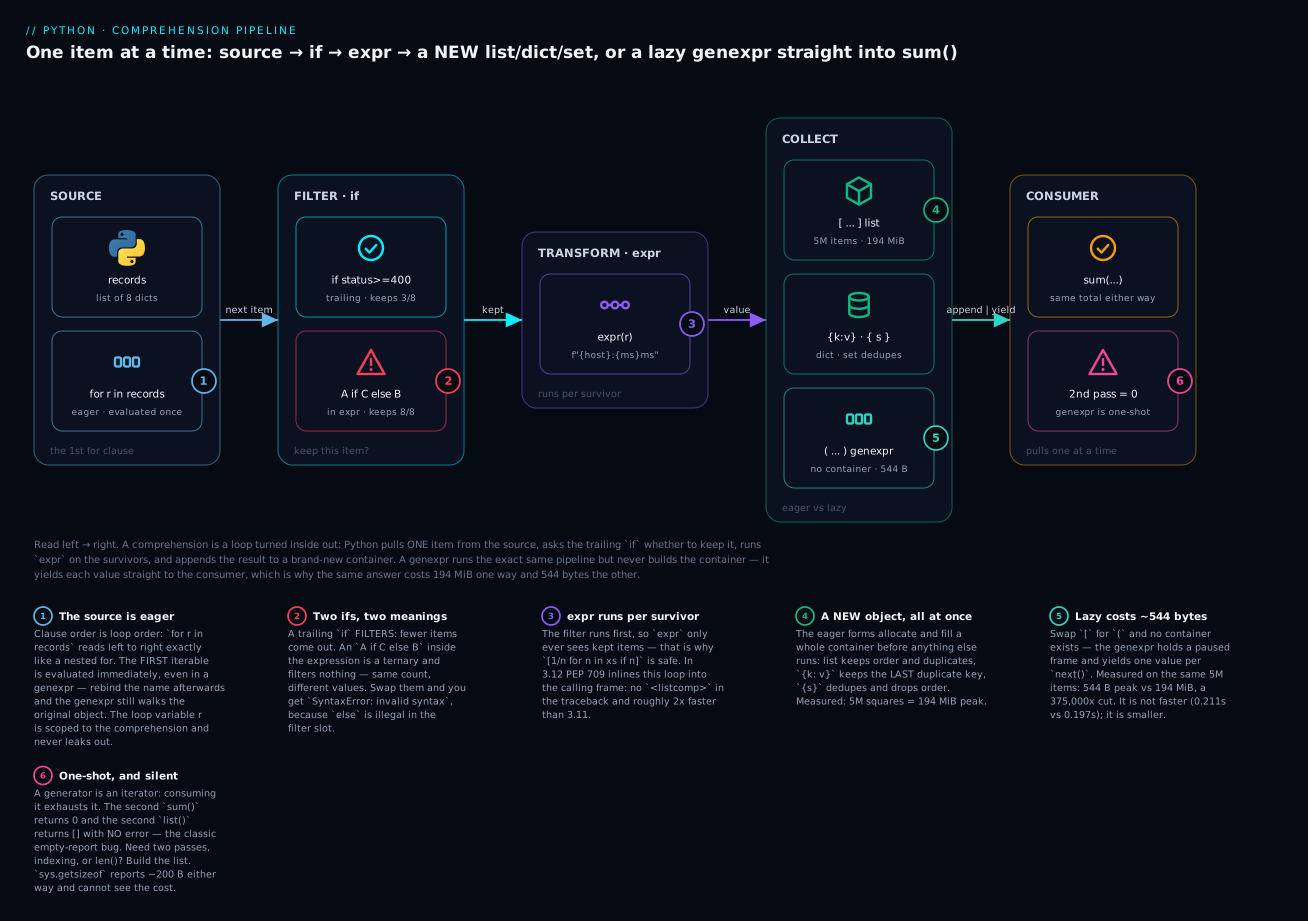
The six badges mark what actually bites. The first iterable is evaluated eagerly, even in a generator expression (1). The two if positions mean completely different things (2). The expression only ever runs on items that survived the filter (3). The eager forms allocate a whole container up front — 194 MiB for five million squares (4). The lazy form allocates 544 bytes for the same answer (5). And a generator is one-shot: the second pass silently returns nothing at all (6).
List comprehensions: mapping, filtering, and the two ifs
A list comprehension does map, filter, or both. Those are the only three shapes, and they are worth separating because beginners routinely fuse them into something that does neither.
Map only — every item in, every item out, transformed:
prices = [62.0, 45.5, 8.5]
with_tax = [round(p * 1.18, 2) for p in prices]
print(with_tax)                 # => [73.16, 53.69, 10.03]
print(len(prices), len(with_tax))   # => 3 3     <- same length, always
Filter only — some items in, fewer out, unchanged:
nums = [1, 2, 3, 4, 5, 6]
evens = [n for n in nums if n % 2 == 0]
print(evens)                    # => [2, 4, 6]
Notice the expression is just n. That is not a mistake or a waste — “give me the item itself, for each item, where it is even” is exactly a filter, and [n for n in nums if ...] is the standard spelling of one.
Both — filter first, then transform the survivors:
squares_of_evens = [n * n for n in nums if n % 2 == 0]
print(squares_of_evens)         # => [4, 16, 36]
The order matters and it is fixed: the filter runs first, the expression runs only on what survives. That is not a detail, it is a guarantee you can lean on. This is safe:
values = [10, 0, 5, 0, 2]
inverses = [100 / v for v in values if v]      # 'if v' drops the zeros FIRST
print(inverses)                 # => [10.0, 20.0, 50.0]
100 / v never sees a zero, because if v already threw the zeros away. Reverse the guarantee and you would get ZeroDivisionError. (if v works because 0 is falsy — any zero, empty string, or empty list is dropped.)
| Goal | Shape | Length of result |
|---|---|---|
| Map | [f(x) for x in xs] |
Same as xs |
| Filter | [x for x in xs if p(x)] |
≤ len(xs) |
| Filter, then map | [f(x) for x in xs if p(x)] |
≤ len(xs) |
| Map, then relabel each item | [f(x) if p(x) else g(x) for x in xs] |
Same as xs — see below |
| Drop falsy items | [x for x in xs if x] |
≤ len(xs) |
| Copy | [x for x in xs] |
Same — but use xs.copy(); it says what it means |
That fourth row is the one that causes real confusion, and it deserves its own section.
The two if positions are different features
This is the single most common point of genuine confusion with comprehensions, and it is not the reader’s fault — the same keyword does two unrelated jobs depending on where it sits.
nums = [1, 2, 3, 4, 5, 6]

print([n for n in nums if n > 3])            # => [4, 5, 6]              THREE items
print([n if n > 3 else 0 for n in nums])     # => [0, 0, 0, 4, 5, 6]     SIX items
Same list, same condition, completely different results. Here is why, and it has nothing to do with comprehensions:
ifat the end, after thefor— a filter clause. This is part of the comprehension’s own grammar, exactly like theifinside the loop you translated earlier. It answers “do I keep this item?” It changes the length. It never has anelse, because “keep it, otherwise…” is meaningless — the alternative to keeping an item is simply not keeping it.ifin the front, before thefor— a conditional expression. This is not comprehension syntax at all.A if C else Bis Python’s ternary operator, a plain expression that works anywhere, and it just happens to be sitting in the expression slot. It answers “what value do I produce for this item?” It cannot change the length, because it runs once per item and always produces exactly one value. It requireselse, because every expression must evaluate to something.
The position tells you which one you are looking at, and the presence of else confirms it. Put the ternary’s else in the filter slot and Python stops you immediately:
squares = [n for n in nums if n > 3 else 0]
  File "/home/you/bad_if.py", line 2
    squares = [n for n in nums if n > 3 else 0]
                                        ^^^^
SyntaxError: invalid syntax
The carets point straight at else 0 — the filter slot has no room for it. (On Python 3.11 and earlier the message is the same SyntaxError: invalid syntax, but you get a single ^ instead of the range of carets; 3.12’s wider marker is the improved error reporting doing its job.)
You can also use both — a ternary in the expression and a filter at the end. It is legal, it is occasionally exactly right, and it is the point at which you should ask whether a loop would read better:
labels = ["SLOW" if n > 4 else "ok" for n in nums if n % 2 == 0]
print(labels)                   # => ['ok', 'ok', 'SLOW']    filtered to 3, then labelled
| Position | Name | Job | else? |
Changes length? |
|---|---|---|---|---|
[x for x in xs if C] — after the for |
Filter clause | Keep this item, or drop it | Never — SyntaxError |
Yes |
[A if C else B for x in xs] — before the for |
Conditional expression (ternary) | Choose this item’s value | Always required | No |
[A if C else B for x in xs if D] |
Both | Drop with D, then choose value with C |
Required on the ternary only | Yes (via D) |
The test that settles it every time: count the output. If you wanted fewer items, you want the trailing filter. If you wanted the same number of items with different values, you want the ternary. If you find yourself writing else in a filter, you have mixed them up.
Dict and set comprehensions
Everything you just learned transfers unchanged. Only the brackets and the expression slot differ.
Dict comprehensions
The expression slot takes a key: value pair. The classic uses are building a lookup table and inverting one:
records = [
    {"host": "web01", "ms": 42},
    {"host": "db01",  "ms": 88},
]

by_host = {r["host"]: r["ms"] for r in records}
print(by_host)                  # => {'web01': 42, 'db01': 88}

d = {"a": 1, "b": 2, "c": 3}
print({v: k for k, v in d.items()})              # => {1: 'a', 2: 'b', 3: 'c'}   invert
print({k: v for k, v in d.items() if v > 1})     # => {'b': 2, 'c': 3}           filter
print({k.upper(): v * 10 for k, v in d.items()}) # => {'A': 10, 'B': 20, 'C': 30}
print({k: ("hi" if v > 2 else "lo") for k, v in d.items()})
# => {'a': 'lo', 'b': 'lo', 'c': 'hi'}           ternary in the VALUE slot
for k, v in d.items() is ordinary tuple unpacking — the same unpacking you use in a for loop, because it is the same for loop. If dicts and their .items() view are not yet second nature, Dictionaries & Sets: Key-Value Data & Membership covers them properly.
The trap is silent and it costs people real data: duplicate keys do not merge, and they do not warn. The last one wins.
print({k: v for k, v in [("a", 1), ("a", 2)]}) # => {'a': 2} the 1 is GONE
That is not a bug — it is d[k] = v running twice, which is exactly what the comprehension compiles to. But it means a dict comprehension over records with a repeated key silently discards data, and you will not notice until the numbers are wrong. If your source can repeat keys and you need all the values, a dict comprehension is the wrong tool: you want a loop with setdefault, or collections.defaultdict(list), or itertools.groupby on sorted input.
One more honest note: if you are only zipping two sequences together, dict(zip(...)) beats a comprehension for readability.
print(dict(zip("xyz", [1, 2, 3])))    # => {'x': 1, 'y': 2, 'z': 3}
# clearer than: {k: v for k, v in zip("xyz", [1, 2, 3])}
| Pattern | Code | Result |
|---|---|---|
| Lookup table from records | {r["host"]: r["ms"] for r in rs} |
{'web01': 42, ...} |
| Invert a dict | {v: k for k, v in d.items()} |
Values become keys — collides if values repeat |
| Filter by value | {k: v for k, v in d.items() if v > 1} |
Subset of the dict |
| Transform keys | {k.upper(): v for k, v in d.items()} |
New keys, same values |
| Transform values | {k: v * 10 for k, v in d.items()} |
Same keys, new values |
| Ternary on the value | {k: ("hi" if v > 2 else "lo") for ...} |
Same keys, chosen values |
| From two sequences | dict(zip(keys, vals)) |
Prefer this over a comprehension |
| Index a list by key | {r["id"]: r for r in rs} |
Whole record as the value |
| Duplicate keys | {k: v for k, v in [("a",1),("a",2)]} |
{'a': 2} — data lost, silently |
Set comprehensions
Same shape, one value, and the set does the deduping for free. This is the idiomatic way to answer “what distinct values are in here?”:
words = ["Log", "log", "LOG", "err"]
print({w.lower() for w in words})           # => {'log', 'err'}  — or {'err', 'log'}
print(len({w.lower() for w in words}))      # => 2
print(sorted({w.lower() for w in words}))   # => ['err', 'log']   <- deterministic
Look carefully at that first line’s comment, because it is a real correctness point that most tutorials get wrong. A set has no order, and for strings the print order genuinely varies between runs — CPython randomises string hashing per process as a security measure, so the same code prints {'log', 'err'} in one run and {'err', 'log'} in the next. That is not flakiness in your code; it is the documented behaviour.
The consequences are practical. Never rely on a set’s print order, never write a test that asserts it, and wrap it in sorted() the moment a human or a test needs to see it — which is why the lab later prints sorted(...) everywhere. (You can pin it with the PYTHONHASHSEED environment variable, but that is a debugging tool, not a fix.)
The other constraint is inherited from sets themselves: items must be hashable. Build a set of lists and Python refuses:
{[1, 2] for _ in range(2)}
TypeError: unhashable type: 'list'
The fix is to make the item immutable — {tuple(x) for x in rows}. That TypeError: unhashable type: 'list' is the same error you met with dict keys, arriving for the same reason.
| Pattern | Code | Note |
|---|---|---|
| Distinct values | {r["region"] for r in rs} |
Dedupes automatically |
| Distinct, normalised | {w.lower() for w in words} |
Dedupe after transforming |
| Distinct + filtered | {r["host"] for r in rs if r["status"] >= 400} |
Filter then dedupe |
| Count distinct | len({r["region"] for r in rs}) |
Cheaper than building a list then set() |
| Deterministic output | sorted({...}) |
Always for printing or asserting |
| Empty set | set() |
{} is an empty dict |
| Unhashable items | {[1,2] for _ in ...} |
TypeError: unhashable type: 'list' |
Nested comprehensions and multiple for clauses
Here is where people get lost, and here is the one rule that means you never have to: clause order is loop order. You already know it. It does not change. It just applies twice.
Read left to right, and each for nests inside the one before it:
matrix = [[1, 2, 3], [4, 5, 6], [7, 8, 9]]

flat = [n for row in matrix for n in row]
print(flat)                     # => [1, 2, 3, 4, 5, 6, 7, 8, 9]
Expand it with the same mechanical translation as before — clauses become nested statements in order, leading expression goes innermost:
flat = []
for row in matrix:              # 1st clause -> outer loop
    for n in row:               # 2nd clause -> inner loop
        flat.append(n)          # the expression
Identical. That is the flatten idiom, and it is the most common multi-for comprehension you will ever write.
The order feels wrong to almost everyone at first, because the expression at the front (n) refers to the variable defined by the last clause. You want to read it as “n… where n comes from row… where row comes from matrix” — right to left. Resist that. The clauses run left to right, outermost first, and the expression runs innermost. Say the loop out loud: “for each row in matrix, for each n in that row, give me n.”
Get the order backwards and the failure is instructive:
def clean():
    return [n for n in row for row in matrix]     # 'row' used before its clause
clean()
NameError: name 'row' is not defined
row does not exist yet when the first clause runs, so Python raises. That is the good outcome. The bad one is when row happens to exist already — because an earlier for loop leaked it:
for row in matrix:
    pass
print(row)                                # => [7, 8, 9]     the loop LEAKED row
print([n for n in row for row in matrix]) # => [7, 7, 7, 8, 8, 8, 9, 9, 9]
No error. Just nine wrong numbers, built by iterating the leftover [7, 8, 9] three times. This is a genuinely nasty class of bug: the wrong clause order plus a leaked loop variable equals silently wrong data. Write the clauses in loop order and it cannot happen.
The other kinds of nesting
Multiple for clauses are not the same as a comprehension inside a comprehension, and mixing them up is the second big confusion.
# 1. Multiple for clauses -> FLAT result. Loops are nested; output is one list.
print([n for row in matrix for n in row])
# => [1, 2, 3, 4, 5, 6, 7, 8, 9]

# 2. A comprehension INSIDE the expression slot -> NESTED result (list of lists).
print([[n * 2 for n in row] for row in matrix])
# => [[2, 4, 6], [8, 10, 12], [14, 16, 18]]

# 3. Cartesian product: the 2nd iterable is independent of the 1st.
print([(a, b) for a in "ab" for b in [1, 2]])
# => [('a', 1), ('a', 2), ('b', 1), ('b', 2)]

# 4. The 2nd iterable DEPENDS on the 1st — legal, and impossible with map/filter.
print([(i, j) for i in range(4) for j in range(i)])
# => [(1, 0), (2, 0), (2, 1), (3, 0), (3, 1), (3, 2)]

# 5. A filter can sit after ANY for clause.
print([n for row in matrix if sum(row) > 6 for n in row])
# => [4, 5, 6, 7, 8, 9]      drops row [1,2,3] before its inner loop runs

# 6. Transpose: the inner comprehension varies the OUTER variable.
print([[row[i] for row in matrix] for i in range(3)])
# => [[1, 4, 7], [2, 5, 8], [3, 6, 9]]
Example 5 is worth a second look — the filter after the first for runs before the inner loop, so it drops whole rows rather than individual items. Position controls what a filter filters.
Example 6 is the one to admire and then never write. It transposes a matrix correctly, and reading it requires holding two variables and two scopes in your head simultaneously. list(zip(*matrix)) does the same job and reads as “transpose”. Reach for the tool that says what it means.
| Form | Example | Result shape |
|---|---|---|
Two for clauses |
[n for row in m for n in row] |
Flat — one list |
| Comprehension in the expression | [[n*2 for n in row] for row in m] |
Nested — list of lists |
| Independent 2nd iterable | [(a,b) for a in A for b in B] |
Cartesian product, len(A)*len(B) |
| Dependent 2nd iterable | [(i,j) for i in range(4) for j in range(i)] |
Triangle — inner depends on outer |
Filter after 1st for |
[n for row in m if p(row) for n in row] |
Drops whole rows |
Filter after last for |
[n for row in m for n in row if p(n)] |
Drops individual items |
| Wrong clause order | [n for n in row for row in m] |
NameError — or silent garbage if row leaked |
When nesting becomes unreadable — use a loop
Comprehensions are a tool, not a scoreboard. There is no prize for one-lining, and the cost of a comprehension nobody can read is paid every time someone opens the file.
Use these as an honest stopping rule. If a comprehension trips any two of them, write the loop:
| Signal | Why it is a problem |
|---|---|
More than 2 for clauses |
Three nested loops on one line; nobody tracks that reliably |
A for and a filter and a ternary |
Three different mechanisms competing for one line |
| It does not fit on one screen line (~90 chars) | Wrapping a comprehension destroys the shape that made it readable |
| The expression is a nested comprehension with its own filter | Two scopes, two filters, one line |
Side effects — .append(), print(), writing a file |
A comprehension is for building a value; a loop is for doing things |
| You had to run it to know what it returns | The reader will have to as well |
| It builds a list you immediately throw away | You wanted a loop, or a generator expression |
That fifth row is a rule, not a preference. This is legal and it is wrong:
[print(n) for n in range(3)] # builds [None, None, None] and discards it
It prints, then quietly allocates a three-element list of None for the garbage collector. You wanted for n in range(3): print(n). If you are not using the result, do not build one.
And when the honest answer is “this is too much for one line,” the loop is not a defeat — it is the better code:
# Unreadable: 2 fors, 2 filters, a ternary. Technically one line. Practically write-only.
out = [f"{h}:{p}" if p != 443 else h for h in hosts if h.startswith("web")
       for p in ports if p not in blocked]

# Readable. Same work. Anyone can debug this, and you can breakpoint any line.
out = []
for h in hosts:
    if not h.startswith("web"):
        continue
    for p in ports:
        if p in blocked:
            continue
        out.append(f"{h}:{p}" if p != 443 else h)
The loop is longer and better. Ship the loop.
Generator expressions: the same pipeline, lazily
Change [ to ( and everything about the pipeline stays the same except the ending. Nothing is collected. Nothing is computed. You get an object that knows how to produce the values.
gen = (n * n for n in range(5))
print(gen)                      # => <generator object <genexpr> at 0x102258450>
print(sum(gen))                 # => 30      NOW the work happens
Between those lines, range(5) was never walked and n * n never ran. The generator sat there holding a paused loop. Only sum() — by asking for values — drove it forward.
This is lazy evaluation, and it has three consequences you must internalise before you use it. They are not edge cases; they are the deal you are making.
1. It is one-shot, and it fails silently
A generator is an iterator: consuming it uses it up. There is no rewind.
gen = (n for n in range(3))
print(list(gen))                # => [0, 1, 2]
print(list(gen))                # => []       <- empty. No error.
print(sum(gen))                 # => 0        <- zero. No error.
Read those last two lines again, because this is the bug that ships. Not a crash, not a warning — an empty list and a zero. Every symptom of “the report came out blank” and “the total is 0 and I can’t see why” lives here. And the silence is correct: an exhausted iterator’s job is to report that nothing is left, so sum() faithfully returns the sum of no numbers. If you need the data twice, you need a list.
max() and min() are the honest ones — with nothing to compare, they refuse:
gen = (n for n in range(3))
list(gen)                       # drain it
max(gen)
ValueError: max() iterable argument is empty
max(gen, default="EMPTY") returns "EMPTY" instead — which is a fine guard when empty is legitimate, and a way to hide a real bug when it is not.
Here is every common consumer against an already-exhausted generator. Only two of them tell you anything is wrong:
| Consumer | Result on an exhausted generator | Danger |
|---|---|---|
sum(gen) |
0 |
Silent — looks like a real total of zero |
list(gen) |
[] |
Silent — the blank-report bug |
tuple(gen) / set(gen) |
() / set() |
Silent |
sorted(gen) |
[] |
Silent |
"".join(...) |
'' |
Silent |
any(p(x) for x in gen) |
False |
Silent — “no failures found” |
all(p(x) for x in gen) |
True |
Worst. “Every check passed” — because none ran |
sum(1 for _ in gen) |
0 |
Silent — your count is zero |
max(gen) / min(gen) |
ValueError: max() iterable argument is empty |
Loud — the only honest ones |
max(gen, default=0) |
0 |
Silent again — the default hides it |
next(gen) |
StopIteration |
Loud |
That all(...) row is the one to fear. all() of nothing is True — vacuous truth, and mathematically correct. A validation pass over a drained generator reports “everything is valid” having checked nothing at all, without a single warning.
2. It has no length and no index
There is nothing to measure and nothing to index, because none of it exists yet:
gen = (n for n in range(5))
gen[0]
TypeError: 'generator' object is not subscriptable
len(gen)
TypeError: object of type 'generator' has no len()
'generator' object is not subscriptable almost always means the same thing: you wrote (...) where you meant [...]. You built a lazy pipeline and then treated it like a sequence. Either change the bracket, or wrap it: list(gen)[0]. If you only want the first item, next(gen) is the right tool and does not build anything.
3. The first iterable is evaluated immediately
The one part of a generator expression that is not lazy: the outermost iterable is evaluated the moment you create the generator.
data = [1, 2, 3]
gen = (x for x in data)
data = [9, 9, 9, 9]             # rebind the NAME
print(list(gen))                # => [1, 2, 3]     used the ORIGINAL list object
But because it holds a reference to that object rather than a copy, mutating it still shows through:
data = [1, 2, 3]
gen = (x for x in data)
data.append(4)                  # mutate the SAME object
print(list(gen))                # => [1, 2, 3, 4]     the generator saw it
Both behaviours follow from one fact: the generator grabbed the object at creation time and reads it at consumption time. This is the aliasing story from Lists & Tuples: Indexing, Slicing, Methods & Immutability showing up in a new place — and it is why a generator over data you are still mutating is a trap.
The memory story, measured
This is the reason generator expressions exist, so let us measure it rather than assert it.
The obvious first move is sys.getsizeof — and it lies. Not by being wrong, but by answering a different question than you asked:
import sys
lst = [i * i for i in range(5_000_000)]
gen = (i * i for i in range(5_000_000))

print(sys.getsizeof(lst))                      # => 43947864     ~42 MiB
print(sys.getsizeof(gen))                      # => 200
print(sys.getsizeof(i for i in range(10)))     # => 192          for TEN items!
Two hundred bytes for five million items and 192 bytes for ten. getsizeof is telling the truth about the generator object — a paused frame, a code pointer, a few slots — and that really is ~200 bytes regardless of what it will produce. But it measures one object, shallowly, so it cannot see the five million integers the list is pointing at either. Even the list’s 43,947,864 bytes is only the array of pointers, not the int objects.
To measure what actually matters — the peak memory the whole operation costs — use tracemalloc:
import tracemalloc

def peak_of(make_total):
    tracemalloc.start()
    total = make_total()
    _, peak = tracemalloc.get_traced_memory()
    tracemalloc.stop()
    return total, peak

N = 5_000_000
t1, p1 = peak_of(lambda: sum([i * i for i in range(N)]))   # eager list
t2, p2 = peak_of(lambda: sum(i * i for i in range(N)))     # lazy genexpr

print(t1 == t2, t1)              # => True 41666654166667500000    same answer
print(f"{p1:,} bytes")           # => 203,947,392 bytes    (194.50 MiB)
print(f"{p2:,} bytes")           # => 544 bytes            (0.000519 MiB)
print(f"{p1 / p2:,.0f}x")        # => 374,903x
194.50 MiB versus 544 bytes for the identical answer. That is the whole pitch, and it is not a micro-optimisation — it is the difference between a script that runs on a small container and one that gets killed.
Now the honest half, which most tutorials skip:
import timeit
# sum([i*i for i in range(5_000_000)])   ->  0.197 s
# sum(i*i for i in range(5_000_000))     ->  0.211 s
The generator expression is slightly slower. About 7% here. It is not a speed optimisation and never was — every next() costs a resume-and-suspend of the generator’s frame, and that overhead is real. What you buy is memory: constant instead of linear. Trading 7% of time for 99.9997% of memory is usually a spectacular deal, but call it what it is.
⚠️ Do not “prove” the failure by building a genuinely huge list on your own machine. It does not raise a polite MemoryError you can catch — the OS memory-pressure killer takes the process first. On the machine used for this lesson, [0] * (2**40) produced no traceback at all, just a dead process and shell exit code 137 (128 + signal 9). That is the real failure mode of “build a huge list”: not an exception you can handle, but a Killed: 9 and a job that vanishes.
| Measure | [i*i for i in range(5M)] |
(i*i for i in range(5M)) |
|---|---|---|
sys.getsizeof(obj) |
43,947,864 bytes (pointers only) |
200 bytes — and 192 for ten items |
tracemalloc peak of sum(...) |
203,947,392 B (194.50 MiB) |
544 B (0.000519 MiB) |
| Memory ratio | — | 374,903× less |
Time for sum(...) |
0.197 s | 0.211 s (~7% slower) |
| Memory growth | O(n) — linear | O(1) — constant |
| Reusable? | Yes, forever | No — one-shot |
len() / obj[0] |
Yes | TypeError both |
| Works on infinite input | Never | Yes |
When a generator expression is the right call
The decision is not about taste. It is about what happens to the values.
# Piping straight into a consumer: the list is pure waste.
print(sum(r["bytes"] for r in records))
print(any(r["status"] >= 500 for r in records))
print(max((r["ms"] for r in records), default=0))
print(", ".join(str(n) for n in range(5)))       # => 0, 1, 2, 3, 4
Every one of those consumes each value once and discards it. Building a list first would allocate the whole thing only to throw it away one item later.
any() and all() add a second win: they short-circuit. Feed them a generator and they stop at the first decisive item; feed them a list comprehension and you have already computed everything before any() even starts.
import time
def slow(n):
    time.sleep(0.05)
    return n

any(slow(n) > 1 for n in range(100))     # 0.16 s  <- stopped at n=2, after 3 items
any([slow(n) > 1 for n in range(5)])     # 0.27 s  <- built all 5 first, THEN checked
The generator checked 3 items out of 100 and quit. The list comprehension did all 5 — and had the range been 100, it would have taken 5 seconds to compute 100 results in order to look at 3 of them.
Then there is the case a list simply cannot do — infinite sources:
import itertools

def naturals():
    n = 0
    while True:
        yield n
        n += 1

squares = (n * n for n in naturals())            # infinite, and instant
print(list(itertools.islice(squares, 5)))        # => [0, 1, 4, 9, 16]
print(next(squares))                             # => 25    resumes where islice stopped
[n * n for n in naturals()] would hang forever and then die. The generator version is fine, because laziness means “infinite” costs the same as “empty” until you ask.
| Use a generator expression when | Use a list comprehension when |
|---|---|
Piping into sum/any/all/max/min/join/set |
You need the result more than once |
| The data is large enough to hurt (memory is O(1)) | You need len(), indexing, or slicing |
| The source is infinite or unbounded | The result is small and you want it concrete |
any/all can short-circuit and skip work |
You want to sort it, or reverse it |
| Chaining stages — each stays lazy | You are about to mutate or store it |
| Streaming a file line by line | You need to debug it (print shows real values) |
The bare generator expression as a sole argument
When a generator expression is the only argument to a function, you may drop the parentheses:
print(sum(n * n for n in range(5)))        # => 30    clean
print(sum((n * n for n in range(5))))      # => 30    same thing, noisier
Add a second argument and Python needs the parentheses back to know where the generator ends:
print(max(n for n in range(5), default=0))
  File "/home/you/bad_gen.py", line 1
    print(max(n for n in range(5), default=0))
              ^^^^^^^^^^^^^^^^^^^
SyntaxError: Generator expression must be parenthesized
The message is unusually helpful — do exactly what it says:
print(max((n for n in range(5)), default=0)) # => 4
These are the consumers you will actually pipe a bare generator expression into:
| Consumer | Example | Result |
|---|---|---|
sum |
sum(n*n for n in range(5)) |
30 |
any |
any(n > 3 for n in range(5)) |
True — short-circuits |
all |
all(n >= 0 for n in range(5)) |
True — short-circuits |
max / min |
max(n % 7 for n in range(20)) |
6 / 0 — ValueError if empty |
sorted |
sorted(n % 3 for n in range(7)) |
[0, 0, 0, 1, 1, 2, 2] |
str.join |
", ".join(str(n) for n in range(5)) |
'0, 1, 2, 3, 4' — needs str |
list / tuple |
list(n for n in range(3)) |
[0, 1, 2] — but just use [...] |
set |
set(n % 2 for n in range(5)) |
{0, 1} — but just use {...} |
dict |
dict((str(n), n) for n in range(3)) |
{'0': 0, '1': 1, '2': 2} |
itertools.islice |
islice(gen, 5) |
First 5 — the only safe way to slice a generator |
| Two arguments | max(n for n in xs, default=0) |
SyntaxError — parenthesise it |
The list(...) and set(...) rows are there to be dismissed: list(n for n in xs) is a slower, noisier spelling of [n for n in xs].
Comprehensions vs map and filter
map(f, xs) and filter(p, xs) predate comprehensions and do the same two jobs. Both return lazy iterators in Python 3, just like a generator expression. So the choice is about readability, with one honest performance wrinkle.
nums = [1, 2, 3, 4, 5, 6]

# map
print([n * n for n in nums])                     # => [1, 4, 9, 16, 25, 36]
print(list(map(lambda n: n * n, nums)))          # same, more punctuation

# filter
print([n for n in nums if n % 2 == 0])           # => [2, 4, 6]
print(list(filter(lambda n: n % 2 == 0, nums)))  # same

# both — and here the difference stops being cosmetic
print([n * n for n in nums if n % 2 == 0])       # => [4, 16, 36]
print(list(map(lambda n: n * n, filter(lambda n: n % 2 == 0, nums))))
That last pair is the argument. The comprehension reads left to right in one pass. The map/filter version has to be read inside out — find the innermost call, work outward — and it needs two lambdas and eight brackets to express “square the even ones.”
There is one case where map genuinely wins on looks: when you already have a named function and no filter, map is tidy and lambda-free.
print(list(map(str, nums)))          # => ['1', '2', '3', '4', '5', '6']
print([str(n) for n in nums])        # same; the comprehension names 'n' just to pass it on
print(list(map(str.upper, ["a", "b"])))     # => ['A', 'B']
The rule that follows from all of it: if you are writing map(lambda ...), write a comprehension instead. The lambda is a sign you are wrapping an expression in a function only to hand it to another function — which is precisely what a comprehension does natively, without the wrapper.
| Task | Comprehension | map/filter |
Verdict |
|---|---|---|---|
| Map with an expression | [n*n for n in xs] |
map(lambda n: n*n, xs) |
Comprehension — no lambda |
| Map with a named function | [str(n) for n in xs] |
map(str, xs) |
map — slightly tidier |
| Filter | [n for n in xs if p(n)] |
filter(p, xs) |
Tie; filter(p, xs) is neat with a named p |
| Filter + map | [n*n for n in xs if p(n)] |
map(lambda n: n*n, filter(p, xs)) |
Comprehension, decisively |
| Drop falsy | [x for x in xs if x] |
filter(None, xs) |
Tie — filter(None, xs) is a known idiom |
| Two sources | [(a,b) for a in A for b in B] |
needs itertools.product |
Comprehension |
| Dependent 2nd loop | [(i,j) for i in range(4) for j in range(i)] |
Impossible cleanly | Comprehension |
| Build a dict/set | {k: v for ...} / {x for ...} |
dict(map(...)) |
Comprehension |
| Lazy pipeline | (n*n for n in xs) |
map(lambda n: n*n, xs) |
Tie — both lazy, both O(1) memory |
Scope, the walrus, and late binding
Three related behaviours that all come from where the comprehension’s variables live.
The loop variable does not leak
A comprehension has its own scope. The loop variable is created inside it, and it is gone when the comprehension finishes:
[x for x in range(3)]
print(x)
NameError: name 'x' is not defined
A plain for loop is the opposite — its variable outlives it:
for y in range(3):
    pass
print(y)                        # => 2      the loop LEAKED y
This is a deliberate fix. In Python 2, list comprehensions leaked exactly like for loops, so [x for x in range(3)] would clobber any existing x in your function — a genuine source of bugs. Python 3 gave comprehensions their own scope, which means shadowing is now free:
x = "outer"
squares = [x for x in range(3)]
print(x)                        # => outer     untouched
You can safely name a comprehension variable x, i, or row without checking what else is in scope. (Generator expressions have always had their own scope. And in 3.12, PEP 709 inlines list, dict and set comprehensions into the enclosing function for speed — but the scoping behaviour is unchanged and deliberately so. Faster, same semantics.)
The one place this scoping bites is a class body, where the comprehension’s scope cannot see class-level names except in the first iterable:
class C:
    vals = [1, 2, 3]
    doubled = [v * 2 for v in vals]              # OK — 1st iterable, evaluated in class scope
    bad = [v * n for v in vals for n in vals]    # the 2nd 'vals' is NOT visible
NameError: name 'vals' is not defined
The first iterable is evaluated outside the comprehension’s scope, so it can see vals. Every other clause runs inside the comprehension’s scope, which skips the class body entirely. It is obscure until the day it bites; the fix is a loop, or a default argument, or hoisting vals out of the class.
| Construct | Loop variable after it runs | Notes |
|---|---|---|
for x in ...: |
Leaks — x survives |
Standard Python; often useful, occasionally a bug |
[x for x in ...] |
Gone — NameError |
Own scope since Python 3 |
{k: v for ...} / {x for ...} |
Gone | Same |
(x for x in ...) |
Gone | Same |
[... for x in ...] shadowing an outer x |
Outer x untouched |
Shadowing is safe |
| Class body, 2nd clause onward | Cannot see class names | NameError — use a loop |
Walrus (y := ...) in a comprehension |
Leaks to the enclosing scope | Deliberate — see below |
The walrus writes outward, on purpose
The walrus operator := assigns and returns a value in one expression. Inside a comprehension it earns its keep in exactly one situation: when you need a computed value in both the filter and the expression, and computing it twice would be wasteful or wrong.
The classic is a regex match:
import re
lines = ["GET /a 200", "junk", "GET /b 500"]
pat = re.compile(r"GET (\S+) (\d+)")

# Without the walrus: pat.match runs THREE times for every line that matches —
# once to test it, then once more for each group we pull out.
out = [(pat.match(l).group(1), int(pat.match(l).group(2))) for l in lines if pat.match(l)]
print(out)                      # => [('/a', 200), ('/b', 500)]

# With the walrus: match once, test it, reuse it.
out = [(m.group(1), int(m.group(2))) for line in lines if (m := pat.match(line))]
print(out)                      # => [('/a', 200), ('/b', 500)]
Same answer, one third of the regex work — and it reads better. That is the case where the walrus genuinely helps: filter on a computed value, then use that same value.
The catch — and it is a real one — is that unlike the loop variable, the walrus target leaks into the enclosing scope:
vals = [1, 2, 3]
res = [z for n in vals if (z := n * 10) > 10]
print(res)                      # => [20, 30]
print(z)                        # => 30      <- z ESCAPED the comprehension
That is specified behaviour, not an accident (PEP 572 defines it so the walrus is useful for exactly this pattern). But it means a comprehension can now quietly reassign a name in your function. Keep walrus targets in comprehensions rare, short-lived, and distinctively named.
⚠️ Do not use the walrus to fake an accumulator. This works, and it is the kind of clever that gets reverted in review:
total = 0
runs = [total := total + n for n in [1, 2, 3, 4]]
print(runs, total)              # => [1, 3, 6, 10] 10
Running totals have a name: itertools.accumulate([1,2,3,4]) gives the same [1, 3, 6, 10] and says so.
| Walrus in a comprehension | Verdict |
|---|---|
[... for l in ls if (m := pat.match(l))] then use m |
Yes — the canonical win: match once, filter and reuse |
[y for x in xs if (y := f(x)) is not None] |
Yes — call the expensive f once, not twice |
[(y := f(x)) for x in xs] with no filter |
No — the walrus buys nothing; write [f(x) for x in xs] |
[total := total + n for n in xs] |
No — fake accumulator; use itertools.accumulate(xs) |
| Reading the target afterwards | Works, but — it leaks to the enclosing scope (PEP 572) |
In the first iterable: [x for x in (ys := f())] |
SyntaxError — banned outright; assign on the line above |
The late-binding trap: closures in a comprehension
Save this one. It is a favourite interview question and a genuine production bug.
funcs = [lambda: i for i in range(3)]
print([f() for f in funcs])     # => [2, 2, 2]     <- expected [0, 1, 2]!
Three functions, all returning 2. Nothing about comprehensions is broken here — this is how closures work everywhere in Python, and the comprehension just makes it easy to write by accident.
A lambda does not capture the value of i. It captures the variable i — a live reference to the cell holding it. All three lambdas close over the same cell, because there is only one i in the comprehension’s scope. By the time you call them, the loop has finished and that one cell contains its final value, 2. So all three see 2. You can look straight at the shared cell:
print(funcs[0].__closure__[0].cell_contents) # => 2 the one cell they all share
The key insight: the lambda body runs when you call it, not when you define it. Defining it captured a variable; calling it read that variable — long after the loop moved on. The same trap exists in a plain for loop; it is not a comprehension bug.
The fix is to capture the value at definition time, and the idiomatic way is a default argument, because defaults are evaluated once, when the function is created:
fixed = [lambda i=i: i for i in range(3)]
print([f() for f in fixed])     # => [0, 1, 2]     correct
lambda i=i: i reads oddly but is precise: the parameter i defaults to the current value of the loop’s i, snapshotted now. functools.partial does the same thing more explicitly:
from functools import partial
ps = [partial(lambda i: i, i) for i in range(3)]
print([f() for f in ps])        # => [0, 1, 2]
| Attempt | Result | Why |
|---|---|---|
[lambda: i for i in range(3)] |
[2, 2, 2] |
All 3 close over one cell; read at call time |
list(lambda: i for i in range(3)) |
[2, 2, 2] |
Genexpr version — same trap |
[lambda i=i: i for i in range(3)] |
[0, 1, 2] |
Default arg snapshots the value at definition |
[partial(lambda i: i, i) for i in range(3)] |
[0, 1, 2] |
partial binds the argument now |
[f(i) for i in range(3)] where f returns a closure |
[0, 1, 2] |
Each call gets its own scope |
If closures and lambda are still fuzzy, Lambda & Higher-Order Functions is the lesson that makes this click.
Performance: measured, not folklore
Everything here was measured on CPython 3.12.3 (macOS, arm64), timeit with repeat=12, best-of run, mapping over a 1,000-item list. Ratios matter; absolute numbers will differ on your machine. Reproduce it with the script in the lab.
| Operation (1,000 items) | Python 3.12 | Python 3.9 | Notes |
|---|---|---|---|
[n*n for n in data] |
18.1 µs | 22.9 µs | The baseline. Fastest way to build the list |
out=[]; for n in data: out.append(n*n) |
21.4 µs | 41.0 µs | ~18% slower on 3.12; ~79% slower on 3.9 |
out=[]; ap=out.append; for n in data: ap(n*n) |
22.7 µs | 33.5 µs | Hoisting .append no longer helps on 3.12 |
list(map(lambda n: n*n, data)) |
33.6 µs | 43.6 µs | ~1.9× slower than the comprehension |
[str(n) for n in data] |
42.0 µs | 81.3 µs | Comprehension calling a builtin |
list(map(str, data)) |
59.3 µs | 69.7 µs | The result flips between versions |
sum([n*n for n in data]) |
20.6 µs | — | Eager |
sum(n*n for n in data) |
29.3 µs | — | Lazy — slower per item, O(1) memory |
Three findings, and one of them contradicts advice you will still find all over the internet.
1. The comprehension beats the manual loop, and the reason is real. A comprehension does not look up .append and call it through Python’s normal call machinery; it uses a dedicated bytecode (LIST_APPEND). That is why the old trick of hoisting ap = out.append used to close the gap — on 3.9 it took the loop from 41.0 µs to 33.5 µs. On 3.12 that trick is dead weight (22.7 µs vs 21.4 µs — slightly worse), because the interpreter’s specialising optimiser already handles the lookup.
2. map with a bare builtin is no longer faster — on 3.12 it is 41% slower. This is the folklore worth killing. On 3.9, list(map(str, data)) at 69.7 µs genuinely beat [str(n) for n in data] at 81.3 µs, and a decade of blog posts, Stack Overflow answers, and interview “gotchas” were built on that. On 3.12, the comprehension dropped to 42.0 µs and now wins comfortably. The advice did not become wrong because someone measured badly; the language changed underneath it.
3. The cause is PEP 709, and you can see it in a traceback. Python 3.12 inlines comprehensions: instead of creating and calling a throwaway function object for every comprehension, the loop runs directly in the enclosing frame. No function call, no frame push, no frame pop. The proof is visible without a profiler — raise an exception inside a comprehension and count the frames.
def boom(n):
    return 1 / n
def run_listcomp():
    return [boom(n) for n in [1, 0]]
run_listcomp()
On Python 3.12 — three frames. There is no comprehension frame at all:
Traceback (most recent call last):
  File "/home/you/tb.py", line 9, in <module>
    run_listcomp()
  File "/home/you/tb.py", line 4, in run_listcomp
    return [boom(n) for n in [1, 0]]
            ^^^^^^^
  File "/home/you/tb.py", line 2, in boom
    return 1 / n
           ~~^~~
ZeroDivisionError: division by zero
On Python 3.9 — four frames, including the <listcomp> that 3.12 optimised away:
  File "/home/you/tb.py", line 4, in run_listcomp
    return [boom(n) for n in [1, 0]]
  File "/home/you/tb.py", line 4, in <listcomp>
    return [boom(n) for n in [1, 0]]
  File "/home/you/tb.py", line 2, in boom
That missing <listcomp> line is the speedup. And the same test shows what PEP 709 did not touch — a generator expression still gets its own <genexpr> frame on both versions, because a generator fundamentally needs a suspendable frame of its own. That is the resume-and-suspend cost, and it is why sum(genexpr) runs slower than sum([listcomp]) while using 375,000× less memory.
| Claim you will read online | Verdict on 3.12 |
|---|---|
“map is faster than a comprehension” |
False now. Was true on ≤3.11 for bare builtins; PEP 709 flipped it |
“map(lambda ...) is faster” |
False, and always was — ~1.9× slower here |
“Hoist ap = lst.append for speed” |
Obsolete. Helped on 3.9; slightly hurts on 3.12 |
| “Comprehensions are just sugar for loops” | False. Dedicated bytecode + inlined frame; measurably faster |
| “Generator expressions are faster than lists” | False. ~7% slower — they save memory, not time |
“sys.getsizeof shows a genexpr saves memory” |
False. Reports ~200 B either way; use tracemalloc |
The takeaway is not “memorise this table.” It is: benchmark on the version you ship, and distrust performance folklore that does not name a version. Any claim in this table could flip again on 3.14.
Hands-on lab
Pure standard library — nothing to install, so no virtual environment is strictly required. (If you want the habit: python3 -m venv .venv && source .venv/bin/activate, or .venv\Scripts\activate on Windows, where the command is python, not python3.)
Check your version first — this lab targets Python 3.12+, and the memory step’s numbers depend on it:
python3 --version
# Python 3.12.3
Create comp_lab.py and add each step to the bottom as you go, running python3 comp_lab.py after each. Every output below is exact and reproducible — except the timings in Step 9, which depend on your machine, and the set ordering in Step 5, which is the point of that step. If anything else differs, you have found a real difference worth understanding.
Step 1 — The dataset.
records = [
    {"host": "web01",   "region": "ap-south-1", "status": 200, "ms": 42,  "bytes": 5120},
    {"host": "web02",   "region": "ap-south-1", "status": 500, "ms": 310, "bytes": 512},
    {"host": "db01",    "region": "us-east-1",  "status": 200, "ms": 88,  "bytes": 20480},
    {"host": "web01",   "region": "ap-south-1", "status": 404, "ms": 12,  "bytes": 256},
    {"host": "cache01", "region": "eu-west-1",  "status": 200, "ms": 3,   "bytes": 1024},
    {"host": "web02",   "region": "ap-south-1", "status": 200, "ms": 55,  "bytes": 8192},
    {"host": "db01",    "region": "us-east-1",  "status": 503, "ms": 950, "bytes": 128},
    {"host": "cache01", "region": "eu-west-1",  "status": 200, "ms": 2,   "bytes": 2048},
]
print(len(records))          # => 8
print(records[0]["host"])    # => web01
What just happened: a list of dicts — the shape of almost every real dataset you will meet (parsed JSON, a CSV via DictReader, a database query). Eight log lines, four hosts, three regions, three failures.
Step 2 — Filter: the failed requests.
errors = [r for r in records if r["status"] >= 400]
print(len(errors))                  # => 3
for r in errors:
    print(f'{r["host"]:<8} {r["status"]} {r["ms"]:>4}ms')
web02    500  310ms
web01    404   12ms
db01     503  950ms
What just happened: filter only — the expression is the bare r. Note the quote juggling: the f-string is delimited with ', so the dict keys inside use ". (Python 3.12 relaxed this via PEP 701 and would accept f"{r["host"]}", but mixing quotes still works everywhere and is the safer habit.)
Step 3 — Map: labels and flags.
labels = [f'{r["host"]}:{r["status"]}' for r in records]
print(labels)
slow_flags = ["SLOW" if r["ms"] > 100 else "ok" for r in records]
print(slow_flags)
print(len(records), len(labels), len(slow_flags))
['web01:200', 'web02:500', 'db01:200', 'web01:404', 'cache01:200', 'web02:200', 'db01:503', 'cache01:200']
['ok', 'SLOW', 'ok', 'ok', 'ok', 'ok', 'SLOW', 'ok']
8 8 8
What just happened: both are pure maps — 8 in, 8 out. slow_flags uses a ternary in the expression slot, so it relabels every item without dropping any. That is the difference from Step 2 made concrete: same if keyword, different position, 3 versus 8.
Step 4 — Build a lookup dict, and watch it eat your data.
by_host = {r["host"]: r["ms"] for r in records}
print(by_host)
{'web01': 12, 'web02': 55, 'db01': 950, 'cache01': 2}
Now compare it with a loop that keeps the worst latency per host:
worst = {}
for r in records:
    h = r["host"]
    if h not in worst or r["ms"] > worst[h]:
        worst[h] = r["ms"]
print(worst)
{'web01': 42, 'web02': 310, 'db01': 950, 'cache01': 3}
What just happened: the two dicts disagree on three of four hosts. There are 8 records but only 4 unique hosts, so the comprehension overwrote each key as it went and kept whatever came last — web01 reports 12 ms when it also had a 42 ms request. It threw away half the dataset without a word. When keys repeat and every value matters, a dict comprehension is the wrong tool: use a loop, defaultdict(list), or max() with a key.
Step 5 — Dedupe with a set comprehension.
regions = {r["region"] for r in records}
print(len(regions))               # => 3
print(sorted(regions))            # => ['ap-south-1', 'eu-west-1', 'us-east-1']

err_hosts = {r["host"] for r in records if r["status"] >= 400}
print(sorted(err_hosts))          # => ['db01', 'web01', 'web02']
What just happened: 8 records collapsed to 3 distinct regions, deduped for free. Print sorted(regions), not regions — run print(regions) a few times and you will see the order change between runs, because CPython randomises string hashing per process. Sorting is how you get output you can actually assert on.
Step 6 — Flatten nested data.
tags = [["prod", "web"], ["prod", "db"], ["dev"]]
print([t for group in tags for t in group])       # => ['prod', 'web', 'prod', 'db', 'dev']
print(sorted({t for group in tags for t in group}))  # => ['db', 'dev', 'prod', 'web']
What just happened: clause order = loop order. for group in tags is the outer loop, for t in group the inner, t the expression. Swap the two fors and you get NameError. The second line flattens and dedupes by swapping [ for {.
Step 7 — Prove sys.getsizeof lies.
import sys

N = 5_000_000
lst = [i * i for i in range(N)]
gen = (i * i for i in range(N))

print(f"list : {sys.getsizeof(lst):>10,} bytes")
print(f"gen  : {sys.getsizeof(gen):>10,} bytes")
print(f"gen(10): {sys.getsizeof(i for i in range(10))} bytes")
del lst
list : 43,947,864 bytes
gen  :        200 bytes
gen(10): 192 bytes
What just happened: the generator over five million items reports 200 bytes and the one over ten reports 192. getsizeof is measuring the generator object itself — a paused frame — which is genuinely ~200 bytes no matter what it will produce. It is not lying; it is answering a shallower question than you asked. (del lst frees ~200 MiB before the next step measures.)
Step 8 — Measure what actually matters.
import tracemalloc

def peak_of(fn):
    tracemalloc.start()
    total = fn()
    _, peak = tracemalloc.get_traced_memory()
    tracemalloc.stop()
    return total, peak

N = 5_000_000
t_list, p_list = peak_of(lambda: sum([i * i for i in range(N)]))
t_gen,  p_gen  = peak_of(lambda: sum(i * i for i in range(N)))

print(f"same answer? {t_list == t_gen}  ({t_list})")
print(f"list peak: {p_list:>12,} bytes  ({p_list/1024/1024:8.2f} MiB)")
print(f"gen  peak: {p_gen:>12,} bytes  ({p_gen/1024/1024:8.6f} MiB)")
print(f"ratio    : {p_list/p_gen:,.0f}x")
same answer? True  (41666654166667500000)
list peak:  203,947,392 bytes  (  194.50 MiB)
gen  peak:          544 bytes  (0.000519 MiB)
ratio    : 374,903x
What just happened: the identical answer for 194.50 MiB or 544 bytes. One bracket. tracemalloc sees what getsizeof cannot, because it tracks every allocation rather than one object. This is the entire argument for generator expressions in one output block.
Step 9 — Now time it, and accept the trade.
import timeit

n = 3
tl = min(timeit.repeat(f"sum([i*i for i in range({N})])", number=n, repeat=n)) / n
tg = min(timeit.repeat(f"sum(i*i for i in range({N}))",  number=n, repeat=n)) / n
print(f"sum([listcomp]) : {tl:.3f} s")
print(f"sum(genexpr)    : {tg:.3f} s")
sum([listcomp]) : 0.197 s
sum(genexpr)    : 0.211 s
What just happened: the generator is slower — by about 7% here, and 5–10% across repeated runs. Your absolute numbers will differ; what should reproduce is the direction. It was never a speed optimisation: every value costs a generator resume-and-suspend. You traded ~7% of runtime for 99.9997% of the memory. Take that trade almost every time, but know you are making it.
Step 10 — One-shot: the bug that ships.
total_bytes = (r["bytes"] for r in records)
print(sum(total_bytes))      # => 37760
print(sum(total_bytes))      # => 0      <- same expression, no error, wrong answer
print(list(total_bytes))     # => []

try:
    max(r["ms"] for r in [])
except ValueError as e:
    print("ValueError:", e)  # => ValueError: max() iterable argument is empty

g = (r["host"] for r in records)
try:
    g[0]
except TypeError as e:
    print("TypeError:", e)   # => TypeError: 'generator' object is not subscriptable
try:
    len(g)
except TypeError as e:
    print("TypeError:", e)   # => TypeError: object of type 'generator' has no len()
What just happened: the second sum() returned 0 with no error. That is the whole danger — an exhausted generator is indistinguishable from an empty one, so “the total is 0” and “the report is blank” are what you get instead of a traceback. max() at least raises. And a generator has no len() and no [0] because none of its values exist yet.
Step 11 — Where lazy wins outright.
import itertools

print(sum(r["bytes"] for r in records))                    # => 37760
print(any(r["status"] >= 500 for r in records))            # => True
print(all(r["ms"] < 1000 for r in records))                # => True
print(max((r["ms"] for r in records), default=0))          # => 950
print(", ".join(str(r["ms"]) for r in records))
# => 42, 310, 88, 12, 3, 55, 950, 2

def naturals():
    n = 0
    while True:
        yield n
        n += 1

squares = (n * n for n in naturals())          # infinite — and instant
print(list(itertools.islice(squares, 5)))      # => [0, 1, 4, 9, 16]
print(next(squares))                           # => 25    resumes where islice stopped
What just happened: every consumer took a bare generator expression as its sole argument — no extra brackets needed. max() needed real parentheses because default=0 is a second argument. And the infinite generator is fine: [n*n for n in naturals()] would hang until the process died, but laziness makes “infinite” cost the same as “empty” until you ask for a value.
You have now, in eleven steps, run the full pipeline on one real dataset: filtered it, mapped it, built a lookup dict (and watched it silently eat half the data), deduped with a set comprehension, flattened nested tags, and proved with tracemalloc that one bracket is worth 194 MiB.
Common mistakes and troubleshooting
| Symptom / traceback | Cause | Fix |
|---|---|---|
SyntaxError: invalid syntax, carets under else |
else in the filter slot: [n for n in xs if n > 3 else 0] |
Pick one. Filter → [n for n in xs if n > 3]. Ternary → [n if n > 3 else 0 for n in xs] (before the for) |
| Result has the same length when you wanted fewer | Ternary in the expression slot — it can’t filter | Move the condition to a trailing if, and drop the else |
SyntaxError: Generator expression must be parenthesized |
Bare genexpr alongside another argument: max(n for n in xs, default=0) |
Wrap it: max((n for n in xs), default=0). Bare is legal only as the sole argument |
| A generator works once, then everything is empty or 0 | Generators are one-shot; consuming exhausts them | Build a list once (xs = list(gen)) and reuse that, or rebuild the generator per pass |
sum() returns 0 / list() returns [], no error |
Same thing — an exhausted generator looks identical to an empty one | Never consume a generator twice. If in doubt, xs = list(gen) at the boundary |
ValueError: max() iterable argument is empty |
max/min on an exhausted or genuinely empty generator |
Pass default=: max(gen, default=0) — but confirm empty is legitimate first |
TypeError: 'generator' object is not subscriptable |
Indexing a genexpr: (x for x in xs)[0] |
You wanted [ not (. Or next(gen) for the first item, or list(gen)[0] |
TypeError: object of type 'generator' has no len() |
len(gen) — nothing exists yet to count |
len(list(gen)) (consumes it), or sum(1 for _ in gen) |
sys.getsizeof(gen) shows ~200 B — “it saves nothing” |
getsizeof measures the generator object, not what it yields; ~200 B for 10 items or 5M |
Measure the operation with tracemalloc.get_traced_memory() |
Process dies: Killed: 9, exit 137, no traceback |
Built a huge list; the OS memory-pressure killer got there before MemoryError |
Use a generator expression and stream. You cannot except a SIGKILL |
MemoryError (when you do get one) |
A single allocation Python itself refused | Same fix — don’t materialise it. sum(genexpr), itertools.islice, or chunk the input |
NameError: name 'x' is not defined after a comprehension |
The loop variable does not leak — it’s scoped to the comprehension | Assign what you need: xs = [...]. Use a for loop if you really want the variable |
NameError: name 'row' is not defined in a nested comp |
Clause order wrong: [n for n in row for row in m] |
Clause order = loop order. Outer first: [n for row in m for n in row] |
| Nested comp returns wrong values, no error | Wrong clause order plus a leaked row from an earlier for loop |
Same fix. This is why leaked loop variables are dangerous |
NameError for a class attribute in a comprehension |
Only the 1st iterable sees class scope; later clauses can’t | Use a loop in the class body, or hoist the data out |
TypeError: unhashable type: 'list' |
Set comp (or dict key) over lists | {tuple(x) for x in rows} — items must be hashable |
| Dict comp lost records | Duplicate keys — d[k] = v runs again; last wins, silently |
defaultdict(list), a loop, or max(..., key=...) per group |
| Set/dict prints in a different order each run | String hashing is randomised per process — sets are unordered | sorted(s) for output and assertions. Never assert raw set order |
| A list of lambdas all return the last value | Late binding — every closure shares one cell, read at call time | [lambda i=i: i for i in range(3)] — the default arg snapshots the value |
TypeError: sequence item 0: expected str instance, int found |
", ".join(n for n in range(3)) — join needs strings |
", ".join(str(n) for n in range(3)) |
Comprehension builds a list of None |
Side effects: [print(n) for n in xs] |
Use a for loop. If you don’t want the result, don’t build one |
Three of these cost the most hours.
1. The exhausted generator. This is the nastiest bug in the lesson because there is no error. You write a generator, pass it to a helper that sums it, then pass it to another that lists it — and the second one gets nothing. No exception, no warning, just 0 or [] flowing downstream until a number looks wrong three functions later. The reason it hides so well is that “empty” is a legitimate state: sum() of nothing really is 0. Your code cannot tell “I was drained” from “there was never anything.” The habit that prevents it: decide at the boundary. If a generator escapes the expression that consumes it — stored on an object, returned from a function, passed to two places — either make it a list right there, or make it a function that returns a fresh generator on each call. A generator is a one-time pipe, not a collection.
2. The two if positions. The tell is always the count. If you filtered and got the same number of items back, you wrote a ternary; if you got a SyntaxError pointing at else, you put a ternary in the filter slot. The underlying confusion is that only one of these is comprehension syntax at all: the trailing if is part of the grammar, while A if C else B is an ordinary expression that would work in a variable assignment or a function argument. Once you see them as two unrelated features that share a keyword, the position stops being arbitrary.
3. Wrong clause order in a nested comprehension. Reading right-to-left is the instinct, because the expression at the front uses the innermost variable. Fight it. Clauses run in the order you read them, exactly like nested for statements, and the expression runs innermost. The failure mode is usually a friendly NameError — but if an earlier for loop leaked a variable with the right name, you get silently wrong data instead, as Step 6’s [7, 7, 7, 8, 8, 8, 9, 9, 9] showed. When a nested comprehension fights back, expand it into real nested loops on scratch paper, confirm it, then collapse it again.
Cheat-sheet
| Syntax | What it does |
|---|---|
[expr for x in it] |
List comprehension — map |
[x for x in it if cond] |
List — filter (trailing if, no else, changes length) |
[expr for x in it if cond] |
Filter then map — expr only sees survivors |
[A if C else B for x in it] |
Ternary in the expression — same length, chosen values |
[A if C else B for x in it if D] |
Both: D filters, C chooses |
{k: v for x in it} |
Dict comprehension — duplicate keys: last wins |
{expr for x in it} |
Set comprehension — dedupes, unordered, needs hashable |
set() |
Empty set — {} is an empty dict |
(expr for x in it) |
Generator expression — lazy, one-shot, O(1) memory |
[n for row in m for n in row] |
Flatten — clause order = loop order |
[[f(n) for n in row] for row in m] |
Nested result — list of lists |
[(a, b) for a in A for b in B] |
Cartesian product |
[n for row in m if p(row) for n in row] |
Filter after the 1st for — drops whole rows |
list(zip(*m)) |
Transpose — clearer than a nested comprehension |
dict(zip(keys, vals)) |
Build a dict from two sequences — beats a comprehension |
[x for x in xs if x] |
Drop falsy items (same as filter(None, xs)) |
sum(expr for x in it) |
Bare genexpr — legal as the sole argument |
max((expr for x in it), default=0) |
Parens required with a 2nd argument |
any(p(x) for x in xs) |
Short-circuits on the first True |
all(p(x) for x in xs) |
Short-circuits on the first False |
", ".join(str(x) for x in xs) |
Join — needs str, else TypeError |
sum(1 for _ in gen) |
Count a generator (consumes it) |
next(gen) |
Pull one value; StopIteration when drained |
itertools.islice(gen, 5) |
First 5 of a lazy/infinite generator |
itertools.accumulate(xs) |
Running totals — not a walrus hack |
[expr for x in it if (m := f(x))] |
Walrus — compute once, filter and reuse; m leaks |
[lambda i=i: i for i in range(3)] |
Fix late binding — default arg snapshots the value |
sorted({...}) |
Deterministic output from a set — always for printing |
sys.getsizeof(gen) |
~200 B regardless — misleading, use tracemalloc |
tracemalloc.get_traced_memory() |
(current, peak) — the honest memory measurement |
[print(x) for x in xs] |
Never. Side effects → use a for loop |
Interview and exam questions
Q: Translate [n*n for n in range(10) if n % 2 == 0] into a loop, and explain the rule.
A: result = [] / for n in range(10): / if n % 2 == 0: / result.append(n*n). The rule: clause order is loop order. Read the clauses left to right and write them as nested statements; the leading expression becomes the .append() argument in the innermost body. The expression leads because a comprehension is an expression — it must start with the value it produces.
Q: What is the difference between [x for x in xs if C] and [x if C else y for x in xs]?
A: They are unrelated features that share a keyword. The trailing if is a filter clause — part of the comprehension grammar, answers “keep this item?”, never takes else, and changes the length. The leading A if C else B is a conditional expression (ternary) that would work anywhere in Python — it answers “what value for this item?”, requires else, and cannot change the length. The test: count the output. else in the filter slot is a SyntaxError.
Q: What does [n for n in row for row in matrix] do?
A: Raises NameError: name 'row' is not defined — row is used before the clause that defines it. The correct flatten is [n for row in matrix for n in row]. The dangerous case: if an earlier for row in ...: loop leaked row (loops leak, comprehensions don’t), there is no error and you get silently wrong data from iterating the stale value.
Q: What is a generator expression and how does it differ from a list comprehension?
A: (expr for x in it) — the same pipeline with no container. It computes nothing until something asks for a value, then yields one at a time. Versus a list: O(1) memory instead of O(n) (measured: 544 B vs 194.50 MiB for 5M items), one-shot rather than reusable, no len() and no indexing, works on infinite sources, and it is ~7% slower. It trades time for memory, not the reverse.
Q: Why does this print 0? g = (n for n in range(3)); print(sum(g)); print(sum(g))
A: The first sum() consumes the generator; generators are iterators and exhaust. The second sees nothing left, and the sum of nothing is 0 — no error, because an exhausted generator is indistinguishable from an empty one. This is the classic “blank report” bug. Build a list if you need two passes.
Q: Does sys.getsizeof prove a generator saves memory?
A: No — it’s the wrong tool and reports ~200 bytes for a genexpr over ten items or five million, because it measures the generator object (a paused frame) shallowly. It also under-reports the list, showing only the pointer array, not the int objects. Use tracemalloc.get_traced_memory() to measure the peak of the whole operation: 203,947,392 B for the list versus 544 B for the generator.
Q: Does the loop variable leak out of a comprehension?
A: No — comprehensions have their own scope, so [x for x in range(3)]; print(x) raises NameError. A plain for loop does leak (for y in range(3): pass; print(y) → 2). This was fixed in Python 3; in Python 2 list comprehensions leaked like loops. So shadowing is safe. Two exceptions: a walrus target (y := ...) deliberately leaks to the enclosing scope, and in a class body only the first iterable can see class-level names.
Q: Is map faster than a comprehension?
A: Not on 3.12, and this is version-dependent folklore. Measured here: list(map(str, data)) 59.3 µs vs [str(n) for n in data] 42.0 µs. On 3.9 it was the other way (69.7 vs 81.3 µs), which is where the advice came from. PEP 709 inlined comprehensions in 3.12 — no throwaway function frame per comprehension — and flipped the result. map(lambda ...) was always slower (~1.9× here). You can see the change in a traceback: 3.11 and earlier show a <listcomp> frame; 3.12 does not.
Q (coding): Given records (a list of dicts with host and ms), build a dict of host → ms. What goes wrong?
A: {r["host"]: r["ms"] for r in records}. With repeated hosts it silently keeps the last value — it compiles to d[k] = v running once per record, so earlier values are overwritten with no warning. If every value matters, use defaultdict(list), or for the worst case per host: a loop, or {h: max(r["ms"] for r in records if r["host"] == h) for h in {r["host"] for r in records}} (correct but O(n²) — prefer the loop).
Q (coding): funcs = [lambda: i for i in range(3)] — what does [f() for f in funcs] return, and why?
A: [2, 2, 2], not [0, 1, 2]. This is late binding: a lambda captures the variable i, not its value, and all three close over the same cell (funcs[0].__closure__[0].cell_contents is 2). The bodies run at call time, long after the loop finished, so all three read the final value. Fix by snapshotting at definition time with a default argument: [lambda i=i: i for i in range(3)]. Not a comprehension bug — plain for loops do it too.
Q: When does the walrus genuinely help in a comprehension?
A: When you must compute a value to filter on and then reuse it. [(m.group(1), int(m.group(2))) for line in lines if (m := pat.match(line))] calls pat.match once per line; without it you’d call it two or three times. Caveats: the target leaks to the enclosing scope (PEP 572, deliberate), and it should not be used to fake accumulators — itertools.accumulate exists for running totals.
Q: You need to total a 50 GB log file’s byte counts. List comprehension or generator expression?
A: Generator expression, and it isn’t close: total = sum(int(line.split()[-1]) for line in open(path)). The list version needs every value resident at once, and the failure is not a catchable MemoryError — the OS killer takes the process (Killed: 9, exit 137, no traceback). The generator holds one line at a time in O(1) memory. Use with open(path) as f: in real code so the file closes deterministically.
Key takeaways
- Clause order is loop order. Read the clauses left to right and write them as nested
for/ifstatements; the leading expression is what you.append()innermost. That one rule decodes every comprehension you will ever meet, including nested ones — translate in both directions until it is automatic. - The two
ifs are different features sharing a keyword. A trailingifis a filter clause: it changes the length and never takeselse.A if C else Bbefore theforis an ordinary ternary: it changes values, never the length, and always needselse. Swap them and you getSyntaxError. Count the output to tell which you wrote. - The brackets pick the container; the pipeline is identical.
[...]list,{k: v ...}dict,{...}set,(...)generator. Dicts keep the last duplicate key — silently discarding data. Sets dedupe, need hashable items, and have no order: alwayssorted()before printing or asserting. - A generator expression is the same pipeline with the container removed. Measured on 5M items: 194.50 MiB → 544 bytes, a 375,000× cut, for the identical answer. It is ~7% slower, not faster — you are trading time for memory.
sys.getsizeofcannot see this (≈200 B either way);tracemalloccan. - Lazy means one-shot, and it fails silently. Consuming a generator exhausts it: the second
sum()returns0and the secondlist()returns[], with no error, because “drained” is indistinguishable from “empty.” Nolen(), no[0]. Need two passes, indexing, or length? Build the list — and decide at the boundary, not three functions later. - Reach for lazy when the values are consumed once — piping into
sum/any/all/max/join, short-circuitingany/all, streaming a file, or anything infinite (itertools.islicetakes the first N). Bare genexprs are legal as a sole argument; add a second and you must parenthesise. - Comprehensions are not sugar and not a scoreboard. They beat the manual loop (dedicated
LIST_APPENDbytecode; 18.1 vs 21.4 µs), and on 3.12 PEP 709 inlines them — which killed the “mapis faster” folklore (42.0 vs 59.3 µs; the reverse was true on 3.9). But twofors plus a filter plus a ternary is write-only code: ship the loop. Never use one for side effects. - Comprehension variables don’t leak (
NameError— unlike aforloop), so shadowing is safe; walrus targets do leak, by design. And[lambda: i for i in range(3)]returns[2, 2, 2]because closures capture the variable, not the value — snapshot it withlambda i=i: i.