You have probably been told, more than once, that contributing to open source is good for your career. It is — we’ll get to exactly why. But if you’ve tried, you likely bounced off it, and the reason is worth naming out loud: the hard part of a first contribution is not the code. You already know Python. The hard part is everything around the code — reading a stranger’s project well enough to change it, following a process you can’t see, writing a change small enough to review, and surviving the moment a maintainer comments on your work in public.
Here is the reframe this whole lesson rests on. Contributing to a project you don’t own is roughly 80% process and courtesy, 20% code. And the 20% that is code has one non-negotiable property: it has to be mergeable. A maintainer reading your pull request is not asking “is this clever?” They’re asking “will I still understand this in a year, will it break anything, and is reviewing it worth my unpaid evening?” The code that passes that test is not clever code. It’s clean code — meaningful names, small functions, no surprises, formatted by a tool so nobody argues about it, typed so the machine catches mistakes, and tested so the maintainer doesn’t have to trust you.
So this lesson has two halves that turn out to be the same thing. The first half is the process: how to find an issue you can actually finish, the fork-branch-PR pipeline end to end, and how to write a PR that gets merged. The second half is the craft: what clean code is, the smells that get code rejected, and the tooling — ruff, black, mypy, pre-commit — that enforces it so you don’t have to. Everything tooling-related here was executed against real binaries (ruff 0.15, black 26.5, mypy 2.3, pre-commit 4.6, Python 3.12, git 2.50) and every violation and fix is copied from a terminal. Where a step happens in the GitHub web UI rather than on your machine, I’ll say so explicitly — you cannot open a real PR from a shell, and I won’t pretend otherwise.
This lesson assumes you’re comfortable with Git. If fork, upstream, rebase, and “the three trees” aren’t second nature yet, read Development Workflow: Git & GitHub for Python Projects first — every git step here builds directly on it.
Why this matters
Let’s make the career claim concrete, because “it’s good for you” is not a reason anyone acts on. Contributing to open source does five specific things, and they compound:
| What you get | Why it’s hard to get any other way |
|---|---|
| A public portfolio that’s real | A recruiter can read your actual merged code, your PR discussions, and how you responded to review — not a toy repo you wrote alone. This is the single most credible artifact you can show, and it ties directly to building a public professional presence |
| You learn from codebases better than yours | Reading how a mature project structures modules, writes tests, and handles errors teaches more than any tutorial. You absorb the conventions of people who’ve maintained code for years |
| You build a network | Maintainers and other contributors see your name. A good first PR is how a lot of people meet the person who later refers them for a job |
| Hiring increasingly runs through it | Many teams now look at GitHub activity before a résumé. “Show me a PR you’re proud of” is a real interview question. A merged PR to a project the interviewer has heard of is worth more than a paragraph of claims |
| You give back to tools you depend on | Every Python developer stands on a mountain of unpaid work — requests, pytest, Flask, the whole stack. Fixing one bug in a tool you use is how the mountain stays standing |
The portfolio point deserves emphasis because it’s the one people underrate. A private project proves you can write code. A merged pull request proves something harder and more valuable: that you can work inside someone else’s constraints, take feedback, and ship code good enough that a stranger accepted responsibility for maintaining it. That is the actual job. Interviewers know it, which is why “walk me through a contribution” has quietly become a standard question.
But there’s a trap in the enthusiasm, and it’s the reason most first attempts fail. People treat their first contribution like a grand gesture — they find a big project, pick an ambitious feature, disappear for three weeks, and open a 900-line pull request that no maintainer will ever review. It sits open for months and quietly dies, and the contributor concludes open source is unwelcoming. It isn’t. They just skipped the entire skill this lesson teaches: start absurdly small, follow the project’s process exactly, and make your change trivially easy to say yes to. A one-line documentation fix that gets merged this week teaches you more, and helps you more, than a heroic feature that never lands.
The mental model to hold for the rest of this lesson: a pull request is not the first step. It is the last of many, and most of the work happens before you ever open it.
Finding a first issue
You cannot contribute to a project you don’t understand, and you can’t understand every project. So the first real skill is selection — picking a change that is small enough to finish, on a project welcoming enough to accept it.
Start with projects you actually use. This is not sentimental advice; it’s practical. If you use a library daily, you already understand what it’s for, you’ll notice when its docs are wrong, and you’ll hit real bugs that annoy you enough to fix. Contributing to a random trending repo you’ve never run is contributing blind. Contributing to the tool you reached for yesterday is contributing from a position of knowledge.
Then look for the labels maintainers use specifically to flag work for newcomers. This is a real, widespread convention:
| Label / signal | What it means | Good for a first PR? |
|---|---|---|
good first issue |
The maintainer has explicitly marked this as newcomer-friendly, self-contained, and well-scoped | Yes — start here. This label exists for you |
help wanted |
The maintainers want outside help on this; may be larger than good first issue |
Often yes, once you’ve done one or two |
documentation / docs |
A docs fix — a typo, an unclear paragraph, a missing example | Excellent first PR. Low risk, real value, teaches the workflow |
bug (small, reproducible) |
A confirmed bug with clear reproduction steps | Yes, if the repro is clear and the fix is localized |
enhancement / feature |
New functionality | Not first. Features need design agreement — discuss in the issue before coding |
| No label, low comment count, months old | Nobody’s driving it | Risky — maybe abandoned, maybe controversial. Check why |
wontfix / discussion / blocked |
Decided against, or waiting on something | No. Don’t code against these |
Most forges expose these as a URL filter. On GitHub, an issue search like is:issue is:open label:"good first issue" in a repo, or the repo’s Issues → Labels page, lists them directly. Many projects also maintain a CONTRIBUTING.md section pointing at their preferred starter issues.
Before you write a line of code, read the project — not all of it, but enough. A project tells you how it wants to be treated in a handful of standard files, and skipping them is the fastest way to get a PR rejected:
| File / place | What it tells you | Consequence of ignoring it |
|---|---|---|
CONTRIBUTING.md |
The exact process: how to set up the dev env, run tests, format code, and what a PR must include | Your PR violates house rules and gets bounced before anyone reads the code |
CODE_OF_CONDUCT.md |
The behavioral norms; how disagreements are handled | You come across as someone who didn’t bother to check — a bad first impression |
README.md |
What the project is, how to install and run it | You propose something that misunderstands the project’s purpose |
LICENSE |
What you’re allowed to do with the code, and under what terms your contribution lands | You make a wrong assumption about reuse (covered later — this bites people) |
| The issue tracker | Whether your bug is already reported or your idea already rejected | You duplicate work or reopen a settled argument |
| Recent PRs (merged + closed) | The real bar: how big PRs are, how they’re described, how review goes | You misjudge scope and tone |
tests/ directory |
How the project tests, which you must match | Your PR has no tests, or tests in the wrong style, and stalls |
That last one — reading recently merged PRs — is the highest-leverage thing on the list and almost nobody does it. A project’s merged pull requests are its actual, enforced standard, more honest than any written guideline. Read three or four and you’ll learn the expected PR size, whether they want tests (they do), how commit messages are phrased, and how the maintainer talks to contributors. You’re about to imitate that, so study it.
One courtesy that prevents wasted work: on the issue you’ve chosen, leave a short comment saying you’d like to work on it (“I’d like to take this — planning to fix X by doing Y”) and wait for a nod, especially on active projects. It stops two people writing the same fix, and it gives the maintainer a chance to say “actually, we’d prefer a different approach” before you’ve written it. That single comment has saved more contributor-hours than any tool.
The contribution workflow, end to end
Here is the whole pipeline. Learn it once and it’s the same on almost every project: read the rules → fork → clone → branch → set up the dev env → make the change → run tests and linters locally → commit → push → open a PR → respond to review → get merged. Some steps are git commands you run in your shell (I’ll show the real ones); others happen in the GitHub web UI (I’ll describe those accurately, because you can’t script a click on github.com from here).
| # | Step | Where | Command / action |
|---|---|---|---|
| 1 | Read CONTRIBUTING.md + Code of Conduct |
The repo | Actually read them. Note the test + lint commands |
| 2 | Fork the repo | GitHub UI | Click Fork → you get github.com/you/project, a server-side copy you own |
| 3 | Clone your fork | Shell | git clone git@github.com:you/project.git |
| 4 | Add the original as upstream |
Shell | git remote add upstream git@github.com:orig/project.git |
| 5 | Branch | Shell | git switch -c fix/issue-42-empty-name — never work on main |
| 6 | Set up the dev env | Shell | python -m venv .venv && source .venv/bin/activate, then the project’s install (often pip install -e ".[dev]") |
| 7 | Make the change | Editor | Small. One concern. As if writing for the maintainer, because you are |
| 8 | Run tests + linters locally | Shell | pytest, ruff check, mypy — green before you push |
| 9 | Commit | Shell | git commit with a message that explains why |
| 10 | Push to your fork | Shell | git push -u origin fix/issue-42-empty-name |
| 11 | Open the PR | GitHub UI | GitHub shows a “Compare & pull request” button; fill in the template |
| 12 | CI runs | Automatic | The project’s pipeline re-runs tests/lint on a clean machine |
| 13 | Respond to review | GitHub UI + shell | Push more commits to the same branch; the PR updates itself |
| 14 | Merged | Maintainer | Usually squash-merged into main |
| 15 | Sync your fork, delete the branch | Shell | git fetch upstream && git rebase upstream/main; git branch -d ... |
The whole thing is drawn below. Read it left to right: finding the issue and forking is the setup, the clean-code-plus-local-gate is where the actual work is, and the PR is near the end, followed by the review loop and the merge. The red nodes are the two places contributions reliably die.
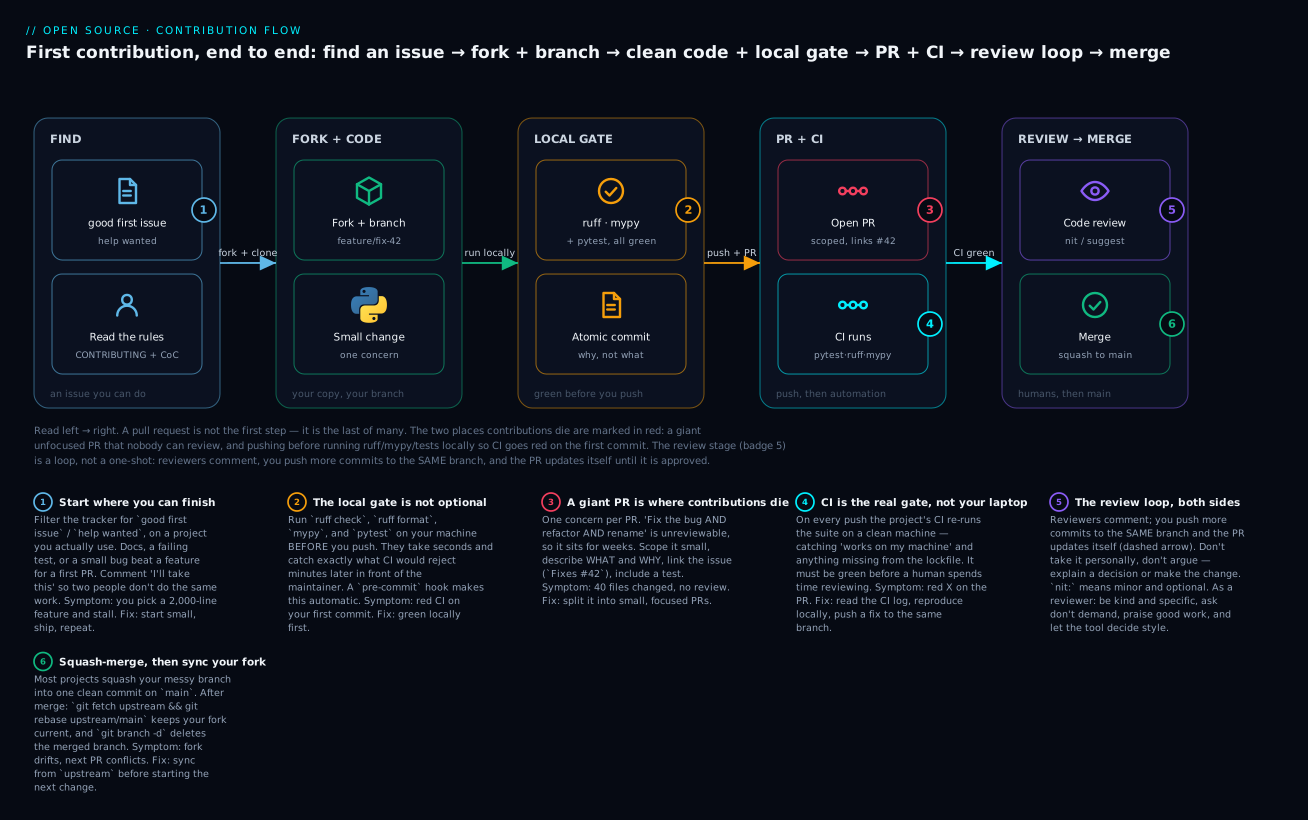
The badges narrate the six things that decide whether this pipeline ends in a merge. Finding an issue you can actually finish (1) is the difference between shipping and stalling. The local gate (2) — running ruff, mypy, and tests on your machine before pushing — is not optional, because everything it catches, CI catches minutes later in front of the maintainer. A giant PR (3) is the number-one killer: one concern per PR or it becomes unreviewable. CI is the real gate (4), not your laptop, because it runs on a clean machine and catches “works on my machine”. Review (5) is a loop, not a one-shot. And the merge (6) is usually a squash, after which you sync your fork or the next PR conflicts.
Fork, clone, branch — the real commands
Steps 2 and 11 are GitHub-UI clicks; everything between is git you run yourself. The distinction matters: a fork is a server-side copy of the repository under your account, created by GitHub when you click the Fork button — there is no git fork command. Once the fork exists, the rest is ordinary git you already know from the git lesson. You clone your fork (that’s origin), and you add the original project as a second remote called upstream, so you can pull in changes the maintainers merge while you work.
To make every command below real rather than hand-waved, I set up two local repositories that stand in for “the maintainer’s GitHub repo” (upstream) and “your fork” (origin), then ran the actual contribution flow against them. A branch workflow (you have write access, e.g. your own team’s repo) skips the fork; a fork workflow (open source, no write access) adds it:
| Branch workflow | Fork workflow | |
|---|---|---|
| When | You have write access to the repo | You don’t — the normal open-source case |
| Your branch lives in | The shared repo | Your fork |
| Remotes | Just origin |
origin (your fork) + upstream (the original) |
| Stay current with | git pull |
git fetch upstream && git rebase upstream/main |
| The PR goes from | feature/x → origin/main |
yourfork:feature/x → original:main |
Here is the real setup, remotes and all. origin is your fork; upstream is the project you’re contributing to:
git clone git@github.com:you/project.git
cd project
git remote add upstream git@github.com:orig/project.git
git remote -v
origin	git@github.com:you/project.git (fetch)
origin	git@github.com:you/project.git (push)
upstream	git@github.com:orig/project.git (fetch)
upstream	git@github.com:orig/project.git (push)
Now branch — never work directly on main, because you want main to stay a clean mirror of upstream so you can always sync to it:
git switch -c fix/greet-empty-name
Make your change, and then — this is the step people skip and regret — run the project’s tests and linters locally before you push. The commands are in CONTRIBUTING.md; typically some combination of pytest, ruff check, and mypy. Green locally means CI has nothing new to find. Red locally means you just saved yourself a public failure. Commit with a message that explains why, following the conventions from the git lesson, then push to your fork:
git push -u origin fix/greet-empty-name
To github.com:you/project.git
 * [new branch]      fix/greet-empty-name -> fix/greet-empty-name
branch 'fix/greet-empty-name' set up to track 'origin/fix/greet-empty-name'.
That’s the last shell command before the browser. In the GitHub UI (this part I’m describing, not executing — a shell cannot click github.com), the moment you push a new branch to your fork, GitHub shows a “Compare & pull request” button on both your fork’s page and the upstream repo’s page. Clicking it opens the PR form, pre-filled with your branch as the source and the upstream main as the target. You fill in the title and description (often against a template the project provides), and click Create pull request. Git itself hints at this: when you push to a real GitHub remote, it prints a remote: line with a direct https://github.com/orig/project/pull/new/... URL you can paste into a browser to skip straight to the form.
Keeping your fork in sync
While you work, the maintainers keep merging other people’s PRs. Your fork’s main doesn’t update automatically — it’s a snapshot from when you forked. If you don’t sync, your branch drifts further from upstream every day, and eventually your PR conflicts with changes that landed after you started. The fix is the upstream remote you added: fetch what’s new upstream, then rebase your work on top of it.
I ran this for real. The contributor made a fix on a branch; meanwhile the maintainer merged an unrelated farewell() feature upstream. Syncing:
git fetch upstream
From github.com:orig/project
 * [new branch]      main       -> upstream/main
git rebase upstream/main
Rebasing (1/1)
Successfully rebased and updated refs/heads/fix/greet-empty-name.
git log --oneline --all --graph
* 4e4340a fix: greet a friendly default when name is empty
* c8a0c9c feat: add farewell()
* ccea29c feat: add greet()
Read the graph: your fix now sits cleanly on top of the maintainer’s farewell() commit, as if you’d started your work after it landed. History is linear, there’s no noisy “Merge branch upstream/main” commit, and when the maintainer reviews your PR they see only your change against current main. This is the “rebase your own unshared work, merge shared work” rule from the git lesson, applied exactly where it’s designed to be applied — your feature branch is yours alone, so rewriting it is free and safe.
After a rebase you’ve already pushed, git push will be rejected (you rewrote history), so you force-push your own branch with the safe form:
git push --force-with-lease
⚠️ --force-with-lease refuses if someone else has pushed to your branch since you last fetched, which plain --force would silently overwrite. On your own PR branch this is the correct, routine tool. Never force-push a shared branch like upstream main.
Writing a great pull request
Your PR is a request — you are asking a busy volunteer to spend their evening reading your code and then take responsibility for it forever. Everything about a good PR is designed to make that request easy to grant. The single biggest factor, by a wide margin, is scope.
| Element | What a good PR does | Why it matters to the reviewer |
|---|---|---|
| Scope | One concern. One bug, or one small feature — nothing else | A focused PR can be reviewed in one sitting and reasoned about completely |
| Size | Small. Tens of lines, not hundreds | Review quality collapses past a few hundred lines; big PRs sit for weeks |
| Title | Imperative, specific: “Fix crash when name is empty” | It becomes the squashed commit message and the changelog line |
| Description: what | A sentence or two on what the change does | The reviewer knows what to expect before reading the diff |
| Description: why | The reason — the bug, the use case, the issue | The diff shows what; only you can explain why |
| Links the issue | Fixes #42 in the description |
GitHub auto-closes the issue on merge and cross-links them |
| Tests | A test that fails before your change and passes after | Proof it works, and a guard so nobody breaks it later |
| Passing CI | Green checks before you ask for review | You’ve done the machine’s job so the human can do theirs |
| No unrelated noise | No reformatting, no drive-by fixes, no renamed variables you happened to notice | Every extra changed line is a line the reviewer must check |
The Fixes #42 syntax is a real GitHub feature worth knowing: keywords like Fixes, Closes, or Resolves followed by an issue number, placed in the PR description, tell GitHub to automatically close that issue when the PR merges and to link the two together. It’s a small thing that makes the maintainer’s bookkeeping automatic.
The contrast that decides a PR’s fate:
| A PR that gets merged | A PR that dies |
|---|---|
“Fix crash when greet() is called with an empty name” — 8 lines + 1 test |
“Improvements” — 40 files, 900 lines |
| Does one thing | Fixes a bug and refactors and renames and reformats |
| Description explains the bug and links the issue | Description says “see code” |
| CI green | CI red, or no CI run at all |
| Diff is all signal | Diff is 90% formatter noise from your editor |
| Reviewer says yes in ten minutes | Reviewer opens it, sighs, closes the tab, never returns |
That last row is the honest mechanism. A maintainer with forty open PRs and two hours a week does not “reject” your 900-line PR — they simply never get to it, because reviewing it is a bigger commitment than they can make. The kindest thing you can do to your reviewer is make your PR small enough to review in the gaps of a busy day. If you have a big change, the professional move is to break it into a sequence of small PRs, each independently reviewable and mergeable. “This is the first of three PRs; it just adds the data model” is a sentence maintainers love.
And CI must be green before you ask for review. Continuous integration re-runs the test suite and linters on a clean machine on every push to your PR — it catches the test you forgot to run and the dependency that’s in your venv but not the lockfile. Asking for human review while CI is red says “I didn’t check my own work first.” The checks you’ll see on a PR, and what a red one usually means:
| CI check | What it runs | A red one usually means |
|---|---|---|
| tests | pytest on a clean machine |
A real failure, or a dependency in your venv that’s missing from the lockfile (“works on my machine”) |
| lint | ruff check |
A style/smell violation you didn’t run locally |
| format | ruff format --check / black --check |
You didn’t format before pushing |
| types | mypy |
A type error your annotations exposed |
| coverage | Coverage threshold | Your change lacks a test |
| build / docs | Package build, docs build | A broken import, or a docstring/config error |
Every one of these is something you can run locally before pushing — which is the whole point of the local gate. If you want to understand what that pipeline is actually doing and how to read its logs, CI/CD Integration: Jenkins, GitLab CI & GitHub Actions is the lesson on it — the checks on a PR are the same GitHub Actions workflow you’d write for your own project.
Clean code: the part that gets you merged
Now the craft. Everything above gets your PR read; clean code gets it merged. “Clean code” sounds like an aesthetic preference, but it has a precise, unsentimental definition: code a stranger can read, change, and trust without asking you what it does. A maintainer merging your code is signing up to own it. They will only do that if they understand it completely, and understanding is exactly what clean code optimizes for.
Here are the principles, each of which a reviewer will hold your code against:
| Principle | What it means | Why a reviewer cares |
|---|---|---|
| Meaningful names | discount_rate, not dr or x. Names say what a thing is or does |
The reviewer reads names far more than logic. Bad names force them to reverse-engineer intent |
| Small, single-purpose functions | A function does one thing. If you describe it with “and”, split it | Small functions are testable, reusable, and reviewable in isolation |
| DRY — don’t repeat yourself | Extract logic duplicated in three places into one named function | One place to fix a bug, one place to change behavior |
| …but not prematurely | Two similar-looking things that may diverge are not duplication. Don’t abstract on the first repeat | The wrong abstraction is more expensive than duplication — it couples things that should be separate |
| Comments say why, not what | The code says what. A comment explains a decision the code can’t | A “what” comment is noise that goes stale; a “why” comment saves the next reader an hour |
| Readable over clever | The obvious version a junior can read beats the one-line trick | Clever code is a liability the moment someone else has to change it |
| Consistent style, enforced by a tool | black/ruff decide formatting, not people |
Style arguments are a waste of everyone’s time. Let the tool be the authority |
| Type hints on public functions | def f(x: int) -> str: |
mypy catches whole classes of bugs before runtime, and the signature documents the contract |
| Docstrings (PEP 257) | A one-line summary of what a public function/class/module does | The reader learns the contract without reading the body |
| Error handling | Catch specific exceptions; fail loudly, not silently | Silent failures and bare except: hide bugs the reviewer will worry about |
| Tests as documentation | A test named test_empty_name_uses_default documents the behavior |
Tests prove intent and let the maintainer change code fearlessly |
Two of these are the ones beginners get most wrong in opposite directions, so they deserve prose.
Meaningful names. The name is the interface. A reader meets discount_rate(order) and knows what it returns without opening it; they meet dr(d) and have to read the whole body, then remember what they learned. Names are read an order of magnitude more often than they’re written, so an extra second spent naming pays back a hundred times. Avoid single letters except for genuinely generic loop indices, avoid abbreviations that aren’t universal (idx is fine, dsc is not), and make the name match the scope — a variable that lives for two lines can be short, a module-level constant should be spelled out.
| Bad name | Good name | Why |
|---|---|---|
d, x, o |
order, total, result |
Say what the thing is; the reader shouldn’t have to infer |
data, data2, tmp |
raw_orders, discounted, subtotal |
Numbered/tmp names carry no meaning and hide bugs |
process() |
discount_paid_orders() |
A verb + noun that states what the function does |
dr, ft, disc |
discount_rate, final_total, discount |
Non-universal abbreviations force a mental lookup |
flag, check, do_it |
is_paid, has_discount |
Booleans read as questions: if is_paid: |
list1, the_dict |
orders, rates_by_country |
Name the contents, not the container type |
helper(), util(), manager() |
apply_discount(), parse_config() |
Vague “helper/manager” names hide a missing responsibility |
Python’s own naming conventions (PEP 8) put a further, non-negotiable layer on top — a reviewer will flag violations, and ruff’s N rules catch them automatically:
| Kind | Convention | Example |
|---|---|---|
| Function / variable | snake_case |
discount_rate, final_total |
| Class | PascalCase (CapWords) |
Order, DiscountedOrder |
| Constant | UPPER_SNAKE_CASE |
LARGE_ORDER_THRESHOLD |
| Module / package | short lowercase |
orders.py, discounts/ |
| “Internal” (not public API) | leading underscore | _compute_rate, _cache |
| Unused / throwaway | single underscore | for _ in range(3): |
DRY, and when not to. “Don’t repeat yourself” is real: logic copy-pasted in four places is four places to introduce a bug and four places to forget the fix. But the rule is routinely over-applied, and the over-application is worse than the disease. When you see two chunks of code that look similar, the question is not “are these the same?” but “will these always change together, for the same reason?” If yes, extract. If they merely resemble each other today but represent different concepts that might diverge tomorrow, leaving them separate is the correct call — a premature abstraction welds two unrelated things together, and un-welding them later (once they’ve grown apart) is far more painful than the duplication ever was. The seasoned instinct is “duplicate until it hurts, then extract” — wait for the third occurrence, and for evidence the cases really are one thing.
| Signal | Extract (DRY it) | Leave it duplicated |
|---|---|---|
| Number of occurrences | Three or more | One or two |
| Will they change together? | Always, for the same reason | They might diverge |
| Do they mean the same thing? | Same concept | Look alike, different concepts |
| Result of a wrong choice | A little copy-paste | A tangled abstraction full of flags |
| Example | The discount arithmetic repeated four times → apply_discount() |
Two validate_* functions that happen to share two lines today |
Comments: why, not what. A comment that restates the code (x += 1 # add one to x) is pure noise — it can’t be trusted (it drifts out of date), and it clutters the thing it describes. The comments that earn their place explain what the code cannot: why a non-obvious choice was made, why a tempting simpler approach was rejected, a link to the issue or spec that forced a decision. # Splitting on whitespace is deliberate — punctuation handling is a separate PR tells the next reader something the code physically cannot show them. That’s a comment worth writing.
For the deeper treatment of docstrings, module layout, and how PEP 257 and packaging fit together, Project Structure, Packaging & Documentation is the companion lesson — this section is about the code-review-facing slice of it.
Type hints and docstrings: the conventions a reviewer expects
Type hints are the annotations a reviewer scans first — they are the function’s contract. Modern Python (3.10+) uses clean built-in generics; you’ll still see the old typing forms in older code:
| You want to say | Modern hint (3.10+) | Notes |
|---|---|---|
| An int, a string | x: int, s: str |
The basics |
| A list of ints | list[int] |
Lowercase built-in; not List from typing anymore |
| A dict of str→float | dict[str, float] |
Key type, value type |
| “int or None” | int | None |
The | union; replaces Optional[int] |
| “any of these types” | int | str |
A union; replaces Union[int, str] |
| Anything you can iterate | Iterable[Order] |
From collections.abc — accept the widest type that works |
| A function returns nothing | -> None |
Be explicit; mypy checks it |
| A fixed-shape record | @dataclass with typed fields |
Beats a bare dict — mypy can verify field access |
Docstrings follow PEP 257, the companion to PEP 8 for documentation. The rules are few and a reviewer expects them on every public module, class, and function:
| PEP 257 rule | What it means |
|---|---|
Use """triple double quotes""" |
Even for a one-line docstring |
| First line is a summary | A concise, imperative-mood phrase ending in a period |
| It’s the first statement | Directly under the def/class/module top — mypy and tools rely on this |
| One-liners stay on one line | """Return the discount rate for an order.""" |
| Multi-line: summary, blank line, details | The summary line stands alone, then a blank line, then the body |
| Document the contract, not the code | What it does and returns, not a line-by-line retelling |
| Public API only | Private _helpers need a docstring only if non-obvious |
The code smells that get code rejected
A “code smell” is a surface symptom of a deeper problem — not a bug, but a sign the code will be hard to change. Reviewers spot them instantly because they’ve been burned by all of them. Here are the common ones, what they look like, and the refactor that fixes each:
| Smell | What it looks like | The fix |
|---|---|---|
| Long function | One function of 40+ lines doing five things | Extract each thing into its own named function |
| Deep nesting | if inside if inside if inside a loop |
Guard clauses / early returns to flatten; extract inner logic |
| Magic numbers | if total > 100:, x * 0.1 |
Name them: LARGE_ORDER_THRESHOLD = 100.0 |
| Unclear names | d, r, ft, tmp, data2 |
Rename to what they mean: order, results, final_total |
| Duplicated logic | The same three lines pasted in four branches | Extract into one function called four times |
| God object / god function | One function/class that knows and does everything | Split by responsibility — each piece does one job |
| Boolean-blindness / flag args | process(data, True, False, True) |
Separate functions, or named enums/keyword-only args |
Bare except: |
try: ... except: pass |
Catch the specific exception; handle or re-raise, never swallow |
| Mutable default arg | def f(items=[]): |
def f(items=None): items = items or [] |
| Stringly-typed data | Passing dicts of {"id":..., "total":...} everywhere |
A @dataclass with typed fields |
The best way to feel why these matter is to fix them, so let’s take a module that has almost all of them at once and clean it up — with the tools telling us exactly what’s wrong at each step. Every command and every line of output below is real.
Tooling: let the machine decide
Before the refactor, meet the tools, because they do the boring 80% of clean-code enforcement so humans can focus on the 20% that needs judgment. The rule that saves the most time and friction on any project: style is not a matter of opinion, it’s a matter of configuration. Nobody should argue about spaces or quote styles in review; a formatter decides, everyone runs it, and the argument evaporates.
| Tool | What it does | Fixes automatically? | Replaces |
|---|---|---|---|
black |
Opinionated code formatter — one canonical style, almost no config | Yes — rewrites the file | Manual formatting, style debates |
ruff format |
A black-compatible formatter, written in Rust, far faster |
Yes | black (drop-in; byte-identical output) |
ruff check |
Linter — flags bugs, unused imports, smells, hundreds of rules | Many, with --fix |
flake8, isort, pylint, pyupgrade, and more |
isort |
Sorts and groups imports | Yes | (folded into ruff as the I rules) |
mypy |
Static type checker — verifies your type hints and catches type bugs | No — reports only | Runtime TypeError surprises |
A note on the modern landscape: ruff has largely absorbed the others. It’s a linter and a formatter, it implements the rules of flake8, isort, pyupgrade, pydocstyle, much of pylint, and more, and it runs in milliseconds. Many new projects use just ruff (for linting + formatting) and mypy (for types). black is still enormously popular and is the formatter ruff format was built to match — I verified they produce byte-identical output on the same file. You’ll meet both; they don’t conflict.
Here’s black (equivalently ruff format) on a scrap of badly formatted code, showing the diff it would apply:
ruff format --diff messy.py
--- messy.py
+++ messy.py
@@ -1,3 +1,3 @@
-def add(a,b):
-    x = {'k':a,   'v':b}
+def add(a, b):
+    x = {"k": a, "v": b}
     return x

1 file would be reformatted
Spacing after commas, spaces around the colon in the dict, double quotes instead of single, collapsed extra whitespace — all decided by the tool, none by you. This is the entire point: you stop having opinions about this and let the machine be consistent.
The refactor: a messy module, cleaned to green
Here is a module that would get rejected on sight. It computes tier-based discounts on a list of orders, and it commits nearly every smell in the table above: unused imports, no type hints, single-letter names, a magic number, deep nesting, duplicated arithmetic, and one long function doing everything. This is orders.py, exactly as executed:
import os
import sys
import json
def process( data ):
    r = []
    for d in data:
        if d['status'] == 'paid':
            if d['total'] > 100:
                if d['country'] == 'US':
                    disc = d['total'] * 0.1
                    ft = d['total'] - disc
                    r.append({'id':d['id'],'final':ft})
                else:
                    disc = d['total'] * 0.05
                    ft = d['total'] - disc
                    r.append({'id':d['id'],'final':ft})
            else:
                if d['country'] == 'US':
                    disc = d['total'] * 0.02
                    ft = d['total'] - disc
                    r.append({'id':d['id'],'final':ft})
                else:
                    ft = d['total']
                    r.append({'id':d['id'],'final':ft})
    return r
def get_total(data):
    t = 0
    for x in data:
        t = t + x['final']
    return t
Don’t fix it by eye. Ask the tools. First ruff check with its default rules:
ruff check orders.py
F401 [*] `os` imported but unused
 --> orders.py:1:8
F401 [*] `sys` imported but unused
 --> orders.py:2:8
F401 [*] `json` imported but unused
 --> orders.py:3:8
Found 3 errors.
[*] 3 fixable with the `--fix` option.
Three unused imports, all auto-fixable. But ruff’s default ruleset is deliberately small (pyflakes + a few pycodestyle rules). Turn on a broader, still-sensible set — via pyproject.toml, the standard place to configure Python tools — to surface the structural smells too:
[tool.ruff.lint]
select = ["E", "F", "I", "N", "UP", "B", "SIM", "C90", "PLR"]

[tool.ruff.lint.mccabe]
max-complexity = 5
Those codes are rule families, and knowing roughly what each catches is part of reading ruff output fluently:
| Code | Family | Catches |
|---|---|---|
E, W |
pycodestyle | PEP 8 layout: whitespace, blank lines, line length |
F |
Pyflakes | Real bugs: unused imports/variables, undefined names |
I |
isort | Unsorted / ungrouped imports |
N |
pep8-naming | Names that break convention (ClassName, func_name, CONSTANT) |
UP |
pyupgrade | Old idioms that a newer Python replaces |
B |
flake8-bugbear | Likely-bug patterns: mutable defaults, except traps |
SIM |
flake8-simplify | Needlessly complex code that has a simpler form |
C90 |
mccabe | Functions too complex (cyclomatic complexity over a threshold) |
PLR |
Pylint (refactor) | Refactoring smells: magic values, too many branches |
Now the same file, seen through the wider lens:
ruff check orders.py
I001 [*] Import block is un-sorted or un-formatted
 --> orders.py:1:1
F401 [*] `os` imported but unused
 --> orders.py:1:8
F401 [*] `sys` imported but unused
 --> orders.py:2:8
F401 [*] `json` imported but unused
 --> orders.py:3:8
C901 `process` is too complex (6 > 5)
 --> orders.py:4:5
PLR2004 Magic value used in comparison, consider replacing `100` with a constant variable
  --> orders.py:8:29
PLR5501 [*] Use `elif` instead of `else` then `if`, to reduce indentation
  --> orders.py:17:13
Found 7 errors.
[*] 5 fixable with the `--fix` option.
Now the machine has named the smells for you: C901 — process is too complex (a cyclomatic complexity of 6 against our threshold of 5, which is the deep nesting made measurable); PLR2004 — the magic value 100; PLR5501 — the else:-then-if that should be an elif. This is a checklist for the refactor, generated automatically.
And what does the type checker say? Here’s the crucial, under-appreciated fact about mypy:
mypy orders.py
Success: no issues found in 1 source file
mypy is happy — because it can’t see anything. By default, mypy does not check the bodies of functions that have no type annotations; to it, untyped code is invisible. This is the single most important thing to understand about type checking: mypy is only as useful as your annotations are complete. Run it in strict mode and the truth comes out:
mypy --strict orders.py
orders.py:4: error: Function is missing a type annotation  [no-untyped-def]
orders.py:26: error: Function is missing a type annotation  [no-untyped-def]
Found 2 errors in 1 file (checked 1 source file)
Two functions with no types — which is why mypy was blind. Now we refactor, addressing every complaint. Here is the cleaned orders.py: unused imports gone, magic numbers named as constants, the nested pyramid flattened into a small pure discount_rate function, the dict payloads replaced with typed @dataclasses (so an Order can never be confused with a DiscountedOrder), every function small and single-purpose, and every public function carrying a signature and a docstring:
"""Apply tier-based discounts to paid orders and total them."""

from collections.abc import Iterable
from dataclasses import dataclass

LARGE_ORDER_THRESHOLD = 100.0
US_LARGE_DISCOUNT = 0.10
INTL_LARGE_DISCOUNT = 0.05
US_SMALL_DISCOUNT = 0.02
NO_DISCOUNT = 0.0


@dataclass(frozen=True)
class Order:
    """A customer order as received from the store API."""

    id: int
    status: str
    total: float
    country: str


@dataclass(frozen=True)
class DiscountedOrder:
    """An order after its discount has been applied."""

    id: int
    final: float


def discount_rate(order: Order) -> float:
    """Return the fractional discount for one order, by size then country."""
    if order.total > LARGE_ORDER_THRESHOLD:
        return US_LARGE_DISCOUNT if order.country == "US" else INTL_LARGE_DISCOUNT
    if order.country == "US":
        return US_SMALL_DISCOUNT
    return NO_DISCOUNT


def apply_discount(order: Order) -> DiscountedOrder:
    """Return the order with its computed discount applied to the total."""
    final = order.total * (1 - discount_rate(order))
    return DiscountedOrder(id=order.id, final=final)


def discount_paid_orders(orders: Iterable[Order]) -> list[DiscountedOrder]:
    """Discount every paid order, skipping any that are not yet paid."""
    return [apply_discount(order) for order in orders if order.status == "paid"]


def total_final(orders: Iterable[DiscountedOrder]) -> float:
    """Return the sum of final amounts across discounted orders."""
    return sum(order.final for order in orders)
Notice what the flattening did to the logic. The original nested four conditionals and repeated disc = total * rate; ft = total - disc; append(...) four times. The clean version pulls rate selection into discount_rate — three lines, readable top to bottom — and applies it once in apply_discount. The four-way pyramid became a linear read. Now re-run all three tools:
ruff check orders.py
All checks passed!
ruff format --check orders.py
1 file already formatted
mypy orders.py
Success: no issues found in 1 source file
Green across the board — and this time mypy’s “Success” means something, because the code is fully typed. Crucially, the behavior is identical: fed the same five orders, both the messy and clean versions produce finals of 225.0, 237.5, 49.0, 50.0 (the pending order skipped) and a total of 561.5. A refactor changes the shape of the code, never its behavior — which is exactly why you need tests around it, coming up in the lab.
What the type hints just bought you
The dataclasses weren’t decoration. They let mypy catch a real, specific bug that the original dict-based code would have shipped. Suppose a caller mixes up the two types — passing raw Orders to total_final, which wants DiscountedOrders:
from orders import Order, total_final

orders = [Order(id=1, status="paid", total=250.0, country="US")]
print(total_final(orders))  # bug: total_final wants DiscountedOrder, not Order
mypy catches it before the code ever runs:
mypy buggy_caller.py
buggy_caller.py:6: error: Argument 1 to "total_final" has incompatible type
"list[Order]"; expected "Iterable[DiscountedOrder]"  [arg-type]
Found 1 error in 1 file (checked 1 source file)
Without types, Python discovers this only at runtime, when it’s too late to be cheap:
    return sum(order.final for order in orders)
               ^^^^^^^^^^^
AttributeError: 'Order' object has no attribute 'final'
That is the whole argument for type hints in one example. mypy turned a runtime AttributeError — the kind that surfaces in production, on real data, at the worst time — into a static error a reviewer (and CI) sees on the diff. In a stranger’s codebase you don’t fully know, that safety net is worth a great deal, and it’s why mature projects run mypy in CI.
Automated hygiene: pre-commit and editorconfig
Running ruff and mypy by hand works right up until the evening you forget. Discipline fails; mechanism doesn’t. pre-commit turns the tools into a Git hook that runs automatically on every commit, so broken code physically cannot enter history. It’s itself a Python tool (pip install pre-commit), and — conveniently for a Python project — the hooks you want are the Python tools you already met.
A .pre-commit-config.yaml in the repo root declares the hooks:
repos:
  - repo: https://github.com/pre-commit/pre-commit-hooks
    rev: v6.0.0
    hooks:
      - id: trailing-whitespace
      - id: end-of-file-fixer
      - id: check-yaml
      - id: check-added-large-files
      - id: check-merge-conflict
      - id: detect-private-key
  - repo: https://github.com/astral-sh/ruff-pre-commit
    rev: v0.15.2
    hooks:
      - id: ruff-check
        args: [--fix]
      - id: ruff-format
Install it once per clone, and run it across the whole repo the first time:
pre-commit install
pre-commit installed at .git/hooks/pre-commit
Adding pre-commit to an existing project almost always surfaces something on the first full run — that’s the point. When I ran it, it caught real issues in my test file: PLR2004 firing on the literal values in my assertions (assert discount_rate(...) == 0.10) and an E501 long line. The magic-value rule firing on test assertions is a well-known false positive — comparing against a literal is exactly what a test does — and the standard fix is to tell ruff that tests are allowed to, via a per-file ignore in pyproject.toml:
[tool.ruff.lint.per-file-ignores]
"test_*.py" = ["PLR2004"]  # literal assertions are the point of a test
That’s a genuine skill in itself: configuring the tool for legitimate exceptions rather than fighting it or disabling it globally. With that in place and the long line wrapped, the full run goes green:
pre-commit run --all-files
trim trailing whitespace.................................................Passed
fix end of files.........................................................Passed
check yaml...............................................................Passed
check for added large files..............................................Passed
check for merge conflicts................................................Passed
detect private key.......................................................Passed
ruff check...............................................................Passed
ruff format..............................................................Passed
Now the payoff. Every future git commit runs these first, and a bad commit is simply blocked. Try to commit a private key:
git commit -m "chore: add deploy key"
detect private key.......................................................Failed
- hook id: detect-private-key
- exit code: 1
The commit did not happen. Try to commit code with an unused import:
git commit -m "feat: add scratch"
ruff check...............................................................Failed
- hook id: ruff-check
- files were modified by this hook

Found 1 error (1 fixed, 0 remaining).
Ruff fixed it for you — the unused import is already stripped from the file — but the commit still failed, on purpose. A hook that modifies files fails the commit so that you review what it changed and re-stage it (git add then commit again), rather than committing a change you never saw. That two-step surprises everyone exactly once.
| Hook | Catches |
|---|---|
detect-private-key |
An SSH/PEM key about to be committed |
check-added-large-files |
Files over the size limit — models, data dumps, a stray .venv |
check-merge-conflict |
<<<<<<< markers left in a file mid-merge |
trailing-whitespace · end-of-file-fixer |
The diff noise that pollutes every review |
check-yaml |
A broken .yml before CI finds it |
ruff-check (--fix) |
Lint errors: unused imports, magic values, smells |
ruff-format |
Formatting (the fast black replacement) |
Two honest caveats. First, hooks are local and skippable — git commit --no-verify bypasses them, and a fresh clone has no hooks until someone runs pre-commit install. So hooks are a fast feedback loop, not a guarantee; CI is the guarantee, because it runs on a machine you don’t control. Run the same checks in both. Second, the first run is slow — pre-commit builds an isolated environment per hook repo — and every run after is cached and fast.
Alongside pre-commit, one more file makes hygiene automatic in the editor, before you even save: .editorconfig. It’s an editor-agnostic standard (VS Code, PyCharm, Vim, and most others honor it) that sets basic formatting so every contributor’s editor agrees, regardless of personal settings:
root = true

[*]
charset = utf-8
end_of_line = lf
insert_final_newline = true
trim_trailing_whitespace = true
indent_style = space

[*.py]
indent_size = 4

[*.{yml,yaml,json}]
indent_size = 2
It’s not a linter and it doesn’t replace one; it just prevents the trivial, annoying diffs — tabs vs spaces, missing final newlines, CRLF line endings — from ever entering a PR. Committing an .editorconfig is a small kindness to every future contributor.
Code review etiquette — both sides
Eventually a human reads your PR, and this is where technically-correct contributions succeed or fail on social grounds. Code review is a conversation, and there’s an etiquette to it that runs in both directions — you’ll be an author first, and a reviewer sooner than you think. Getting this right matters more to your reputation than any single line of code.
The core reframe for the author: review comments are about the code, not about you. A reviewer pointing out a problem is doing exactly what review is for — it’s a sign they took your work seriously enough to read it closely. The maintainer who leaves ten comments cares more than the one who ignores your PR. Internalize that and review stops feeling like criticism and starts feeling like free mentorship.
| Situation | Do (as author) | Don’t (as author) |
|---|---|---|
| A change is requested | Make it, or explain your reasoning politely and ask | Argue to win, or take it personally |
| You disagree | “I chose X because Y — would Z be better?” — a question | Dig in, get defensive, or relitigate endlessly |
| A comment stings | Assume good faith; the reviewer wants the code to be good | Read tone into a terse comment (reviewers are busy, not hostile) |
| The PR is big | Split it before asking; apologize for the reviewer’s time | Dump 900 lines and expect a fast review |
| A decision needs context | Explain why in the PR description up front | Make the reviewer ask “why did you do this?” |
| Review is taking a while | Wait patiently; a gentle ping after a week is fine | Ping daily, or @-mention the whole team |
| Something’s merged | Thank the reviewer | Vanish, or treat them as a code-vending machine |
And the other chair — because you review as much as you’re reviewed, and a good reviewer is who maintainers remember:
| Situation | Do (as reviewer) | Don’t (as reviewer) |
|---|---|---|
| You spot a problem | Be specific: point at the line, explain the risk, suggest a fix | Say “this is wrong” with no detail |
| You want a change | Ask, don’t command: “Could we…?” / “What do you think about…?” | Demand: “Change this.” “No.” |
| The code is good | Say so. “Nice — this is much clearer” costs nothing and means a lot | Comment only on the negatives |
| A nit vs a blocker | Prefix trivia with nit: so the author knows it’s optional |
Treat a style preference as a blocker |
| It’s a style question | Let the formatter/linter decide; don’t hand-police style | Bikeshed spaces and quotes a tool already governs |
| The author is new | Be extra kind and explanatory; this PR may be their first ever | Be curt — you might scare off a future regular |
| You approve | Approve clearly; don’t leave it hanging on trivia | Block a good PR over one optional nit |
Two conventions in that table are worth spelling out because they’re near-universal and beginners don’t know them.
The nit: prefix. A comment starting with nit: (short for “nitpick”) signals this is minor and optional — take it or leave it, I won’t block on it. It lets a reviewer mention a small preference without it carrying the weight of a required change. “nit: I’d call this total rather than t” is friendly; the same words without the prefix read as a demand. As an author, treat nit: comments as genuinely optional. As a reviewer, prefix generously — most of your comments are nits, and labeling them keeps the important ones visible.
Approve / comment / request-changes. GitHub reviews come in three verdicts, and using the right one is part of the etiquette:
| Verdict | Means | Use when |
|---|---|---|
| Approve | “This is good to merge” (possibly with optional nits) | The PR is correct and you’re happy for it to land |
| Comment | Feedback without a verdict | You have questions or notes but aren’t gating the merge |
| Request changes | “Please address these before merging” — blocks the merge | There’s a real problem: a bug, a missing test, a design issue |
The mistake to avoid as a reviewer is request-changes over a nit. Blocking a correct, well-tested PR because you’d have named a variable differently is the kind of thing that makes contributors give up. Reserve request-changes for things that genuinely should not merge as-is; for everything else, approve-with-comments and trust the author. The mistake as an author is the mirror image: do not bikeshed. If a linter or formatter already governs a style point, there is nothing to debate — run the tool and move on. Style arguments in review are almost always a sign that the project should have configured a tool, and letting the tool be the authority is how mature teams stay sane.
Community: being a good citizen
A project is a community, and contributions are only one way to be part of it. Understanding the human side — how maintainers actually experience the flood of issues and PRs — will make you the kind of contributor projects are glad to have.
The most important thing to internalize is maintainer burnout is real and pervasive. The person who merges your PR is very often a single volunteer maintaining a widely-used project in their spare time, unpaid, while fielding a stream of demands from strangers — bug reports with no reproduction, feature requests phrased as entitlements, “when will this be fixed?” comments, and the occasional rude one. Many maintainers eventually walk away. Every interaction you have is with a tired human doing a favor for the world, and small courtesies land disproportionately:
| Be a good citizen | Not |
|---|---|
| Search before filing — your bug may exist | File a duplicate without looking |
| Write a minimal reproduction | “It doesn’t work” with no details |
| Say please and thank you | Treat maintainers as paid support |
| Accept “no” gracefully | Argue when a maintainer declines your feature |
| Offer to help, don’t just demand | “When will you fix this?” |
| Report bugs kindly and specifically | Complain publicly or aggressively |
| Help others in issues/discussions | Only ever take, never give |
| Respect the project’s scope and taste | Insist they adopt your use case |
There’s a distinction worth knowing on modern forges: issues vs discussions. Issues are for concrete, actionable things — a specific bug, a specific proposed change. Discussions (GitHub Discussions, and similar) are for open-ended questions, ideas, and help (“how do I do X?”, “would you consider Y?”). Filing a vague question as a bug report adds noise to the tracker the maintainer uses to manage actual work; taking it to Discussions keeps the tracker clean. Reading which a project prefers, and using the right one, is a small signal that you respect how they operate.
Licenses: what you’re allowed to do
Finally, the legal layer, because it governs both what you may reuse and under what terms your contribution lands — and wrong assumptions here cause real problems. Open-source licenses fall into two broad camps: permissive (do almost anything, just keep the notice) and copyleft (derivatives must stay open under the same license). Here are the ones you’ll actually meet:
| License | Type | In plain terms | Key obligation |
|---|---|---|---|
| MIT | Permissive | Do almost anything — use, modify, sell, embed in closed source | Keep the copyright + license notice. That’s essentially it |
| BSD (2/3-clause) | Permissive | Like MIT | Keep the notice; 3-clause adds “don’t use our name to endorse” |
| Apache 2.0 | Permissive | Like MIT, plus an explicit patent grant protecting users | Keep notices; state significant changes; include NOTICE file |
| LGPL | Weak copyleft | You can link to it from closed source without relicensing | Changes to the library itself must be shared |
| GPL (v2/v3) | Strong copyleft | If you distribute a derivative work, it must also be GPL, source available | Your whole distributed derivative becomes GPL (“viral”) |
| MPL 2.0 | File-level copyleft | Middle ground — modified files stay open, the rest needn’t | Share changes to MPL-licensed files |
| Unlicense / CC0 | Public domain | No rights reserved at all | None |
The practical rules that keep you out of trouble:
- Your contribution is licensed under the project’s license. When you open a PR to an MIT project, you’re agreeing your code goes in under MIT. That’s the deal, and it’s usually automatic.
- Don’t copy code across incompatible licenses. Pasting a chunk of GPL code into an MIT-licensed project is a genuine license violation — the GPL code would “infect” the MIT project, which the maintainers did not agree to. When in doubt, write it yourself or ask.
- Some projects require a DCO sign-off or a CLA. A DCO (Developer Certificate of Origin) is a promise that you wrote the code and have the right to contribute it, made by adding a
Signed-off-by: Your Name <email>line to your commit —git commit -sadds it automatically. A CLA (Contributor License Agreement) is a more formal document some larger/corporate-backed projects ask you to sign once.CONTRIBUTING.mdwill say if either is needed; skipping a required one blocks your merge. - Choosing a license for your own project? MIT if you want maximum adoption and don’t care what people do with it; Apache 2.0 if you also want patent protection; GPL if you want to require that improvements stay open. When unsure, MIT is the safe, popular default, and choosealicense.com walks you through it.
The two “prove you may contribute this” mechanisms are worth distinguishing, because you’ll hit one or the other on bigger projects:
| DCO (Developer Certificate of Origin) | CLA (Contributor License Agreement) | |
|---|---|---|
| What it is | A lightweight promise that you wrote the code and may contribute it | A formal legal agreement, often granting the project extra rights |
| How you do it | Add Signed-off-by: You <email> — git commit -s does it |
Sign a document once (often via a bot on your first PR) |
| Effort | Per commit, automatic | Once per project (or per employer) |
| Common on | Linux kernel, many community projects | Corporate-backed projects (Apache, Google, Meta, etc.) |
| If you skip it | CI blocks the merge until commits are signed off | The PR can’t be merged until you’ve signed |
Hands-on lab
You’ll do the whole thing end to end on a throwaway local repo: take a genuinely messy module, use the tools to see what’s wrong, refactor it to green, wire up pre-commit, and record the cleanup as well-scoped commits with good messages. Then we’ll walk through the parts that happen on GitHub. Everything runs locally — no GitHub account, nothing pushed anywhere. About 25 minutes.
Requires Python 3.12+ and git 2.23+. Set up an isolated environment and the tools:
mkdir -p ~/oss-lab && cd ~/oss-lab
python3.12 -m venv .venv
source .venv/bin/activate           # Windows: .venv\Scripts\activate
pip install ruff black mypy pre-commit pytest
git init -b main
git config user.name "Your Name"
git config user.email "you@example.com"
Step 1 — commit the mess as your starting point. Save the messy orders.py from the refactor section above (the one with import os/sys/json and def process(data)) and a sample.json:
cat > sample.json <<'EOF'
[
  {"id": 1, "status": "paid",    "total": 250.0, "country": "US"},
  {"id": 2, "status": "paid",    "total": 250.0, "country": "IN"},
  {"id": 3, "status": "paid",    "total":  50.0, "country": "US"},
  {"id": 4, "status": "paid",    "total":  50.0, "country": "IN"},
  {"id": 5, "status": "pending", "total": 999.0, "country": "US"}
]
EOF
git add orders.py sample.json
git commit -m "feat: add order discounting module"
Record what it does now, so you can prove the refactor changes nothing:
python -c "
import json, orders
data = json.load(open('sample.json'))
r = orders.process(data)
print([(o['id'], round(o['final'],2)) for o in r], 'total', round(orders.get_total(r),2))
"
[(1, 225.0), (2, 237.5), (3, 49.0), (4, 50.0)] total 561.5
What just happened: your baseline. The refactor must reproduce these numbers exactly, or it’s not a refactor — it’s a bug.
Step 2 — configure the tools, then let them find the smells.
cat > pyproject.toml <<'EOF'
[tool.ruff]
line-length = 88
target-version = "py312"

[tool.ruff.lint]
select = ["E", "F", "I", "N", "UP", "B", "SIM", "C90", "PLR"]

[tool.ruff.lint.mccabe]
max-complexity = 5

[tool.mypy]
strict = true
EOF
git add pyproject.toml && git commit -m "chore: add ruff and mypy config"
ruff check orders.py
You should see the seven violations — I001, three F401, C901 (too complex), PLR2004 (magic 100), PLR5501 (else-then-if). What just happened: the tool wrote your refactoring checklist for you.
Step 3 — the mechanical fixes as their own commit. Some fixes are safe and automatic; keep them separate from the thinking:
ruff check --fix --select F401,I001 orders.py    # remove unused imports, sort
ruff format orders.py                             # canonical formatting
git add orders.py
git commit -m "style: remove unused imports and apply ruff-format"
What just happened: an atomic commit containing only mechanical churn — no logic changed. Keeping formatting separate from real changes is what stops a one-line fix from hiding inside a 400-line reformat.
Step 4 — the real refactor. Replace orders.py with the clean, typed version from the refactor section (dataclasses, discount_rate, named constants, docstrings). Verify all three tools are green and behavior is preserved:
ruff check orders.py && ruff format --check orders.py && mypy orders.py
python -c "
import json
from orders import Order, discount_paid_orders, total_final
orders = [Order(**row) for row in json.load(open('sample.json'))]
r = discount_paid_orders(orders)
print([(o.id, round(o.final,2)) for o in r], 'total', round(total_final(r),2))
"
All checks passed!
1 file already formatted
Success: no issues found in 1 source file
[(1, 225.0), (2, 237.5), (3, 49.0), (4, 50.0)] total 561.5
Same numbers as Step 1. Commit it with a message that explains the why:
git commit -am "refactor: replace nested conditionals with a discount-rate helper

The old process() nested four conditionals and repeated the discount
arithmetic four times. Splitting rate selection into discount_rate()
flattens the logic and lets each tier be read on its own line. The
0.1/0.05/0.02 literals are now named constants."
What just happened: the refactor and the earlier mechanical style change are two commits, so a reviewer can see the real logic change without the formatting noise around it.
Step 5 — add tests (the change isn’t done without them). Tests double as documentation — each name states a rule:
cat > test_orders.py <<'EOF'
"""Tests double as documentation: each name states a discount rule."""
from orders import DiscountedOrder, Order, discount_paid_orders, discount_rate, total_final


def order(total, country, status="paid"):
    return Order(id=1, status=status, total=total, country=country)


def test_large_us_order_gets_ten_percent():
    assert discount_rate(order(250.0, "US")) == 0.10


def test_small_intl_order_gets_no_discount():
    assert discount_rate(order(50.0, "IN")) == 0.0


def test_unpaid_orders_are_skipped():
    assert discount_paid_orders([order(250.0, "US", status="pending")]) == []
EOF
pytest -q
...                                                                      [100%]
3 passed in 0.01s
Commit: git commit -m "test: cover discount tiers and skipping unpaid orders". What just happened: the refactor is now safe — anyone can change discount_rate and the tests will catch a mistake. For the deeper testing toolkit behind this, see Testing in Python: unittest & pytest.
Step 6 — automate it with pre-commit.
cat > .pre-commit-config.yaml <<'EOF'
repos:
  - repo: https://github.com/pre-commit/pre-commit-hooks
    rev: v6.0.0
    hooks:
      - id: trailing-whitespace
      - id: check-added-large-files
      - id: detect-private-key
  - repo: https://github.com/astral-sh/ruff-pre-commit
    rev: v0.15.2
    hooks:
      - id: ruff-check
        args: [--fix]
      - id: ruff-format
EOF
git add .pre-commit-config.yaml && git commit -m "chore: add pre-commit hooks"
pre-commit install
Now prove it blocks a bad commit:
printf -- '-----BEGIN OPENSSH PRIVATE KEY-----\nfake\n-----END OPENSSH PRIVATE KEY-----\n' > id_key
git add -f id_key && git commit -m "chore: add key"
detect private key.......................................................Failed
- hook id: detect-private-key
- exit code: 1
The commit was blocked. Clean up: git restore --staged id_key && rm id_key. What just happened: a secret can no longer enter this repo by accident.
Step 7 — read your history. The whole cleanup, as well-scoped commits:
git log --oneline
94be37c chore: add pre-commit hooks
5be727a test: cover discount tiers and skipping unpaid orders
cc6b4dc refactor: replace nested conditionals with a discount-rate helper
651c1ff style: remove unused imports and apply ruff-format
5517f6c chore: add ruff and mypy config
d71b32a feat: add order discounting module
What just happened: six commits, each one idea, each independently understandable. This is what a maintainer wants to see — a story, not a data-dump.
Step 8 — the GitHub part (walkthrough). In a real contribution, you’d now (a) have forked the upstream repo on github.com, (b) git clone your fork and git remote add upstream <original>, © done Steps 1–7 on a branch (git switch -c fix/...), (d) git push -u origin fix/..., and (e) opened the PR in the GitHub UI via the “Compare & pull request” button, filling in what changed, why, and Fixes #<issue>. CI would run your checks; you’d respond to review by pushing more commits to the same branch; and finally the maintainer squash-merges. To keep your fork current between PRs: git fetch upstream && git rebase upstream/main.
Step 9 — clean up. ⚠️ rm -rf is permanent.
cd ~ && rm -rf ~/oss-lab
Now try these:
- In Step 4, deliberately introduce a bug (change
US_LARGE_DISCOUNTto0.20). Doespytestcatch it? Doesmypy? Which tool is the right guard for which kind of mistake? - Add a caller that passes an
Ordertototal_final(which wantsDiscountedOrder). Runmypy— does it catch the mismatch before you run the code? - Split Step 4’s refactor into two commits: one that names the constants, one that extracts
discount_rate. Which history reads better ingit log -p? - Add
mypyas a pre-commit hook. Commit code with a type error. What happens? - Set
max-complexity = 3inpyproject.tomland re-runruff checkon the clean file. Does any function now tripC901? What does that tell you about the threshold?
Common mistakes and troubleshooting
| Symptom / situation | Cause | Fix |
|---|---|---|
| PR opened weeks ago, no review, no response | Giant, unfocused PR — too big to review | Close it; split into small, single-concern PRs. One thing per PR |
| PR rejected/ignored despite correct code | Ignored CONTRIBUTING.md — wrong format, no tests, wrong branch |
Read CONTRIBUTING.md first; match it exactly; re-submit |
| CI is red the moment you open the PR | Didn’t run tests/linters locally first | Run pytest && ruff check && mypy locally before pushing. Add pre-commit |
Your branch conflicts with main |
Fork out of sync — upstream moved while you worked | git fetch upstream && git rebase upstream/main, resolve, git push --force-with-lease |
| Review feels like a personal attack | Reading tone into terse, busy comments | Assume good faith. Comments are about the code. The reviewer is helping |
| You keep arguing a reviewer’s point | Treating review as a debate to win | Explain your reasoning once, politely, as a question — then defer. It’s their project |
| Reviewer asks “why did you do this?” | Unexplained change, no context in the description | Put the why in the PR description and commit body up front |
| Endless back-and-forth over spaces/quotes | Style bikeshedding — arguing what a tool should decide | Configure ruff/black; let the tool be the authority. Stop debating |
| Your “clean” abstraction made things worse | Premature abstraction — you DRY’d two things that then diverged | Inline it back; wait for the third real occurrence before extracting |
| Reviewer can’t tell what a number means | Magic numbers — if x > 100, * 0.1 |
Name them as constants. ruff’s PLR2004 flags them |
“What is dr? What’s ft?” in review |
Unclear names | Rename to intent: discount_rate, final_total |
| PR merged then reverted; it broke something | No tests shipped with the change | Every change ships a test that fails before and passes after |
| Told you can’t reuse that code you copied | Wrong license assumption — e.g. GPL code into an MIT project | Check LICENSE before copying; write it yourself or ask. Never mix incompatible licenses |
| Merge blocked on “sign-off required” | Missing DCO Signed-off-by or unsigned CLA |
git commit -s for DCO; sign the CLA the project links |
mypy says “Success” but you have no types |
mypy ignores untyped function bodies by default | Add annotations; run mypy --strict. It’s only as good as your types |
Four of these are worth more than a row.
The giant PR is the number-one killer, and it’s entirely self-inflicted. New contributors conflate “impressive” with “large” and open a PR that fixes a bug, refactors the surrounding module, renames some variables they didn’t like, and reformats the file — all at once. To the author it feels productive. To the maintainer it’s un-reviewable: they can’t separate the fix from the noise, can’t reason about the blast radius, and can’t merge part of it. So it sits. The discipline is ruthless: one concern per PR. If you notice unrelated things to fix while you’re in there, note them for separate PRs (or open issues). A reviewer can say yes to a ten-line fix in the gaps of a meeting; they cannot say yes to 900 lines without a block of time they don’t have.
Taking review personally is the fastest way to burn out on contributing — and it’s a misreading. When a reviewer writes “this could leak a file handle; use a with block,” they are not saying you’re a bad programmer. They’re doing the one thing review exists to do: making the code better before it becomes their responsibility. The contributors who thrive are the ones who treat every comment as free, targeted mentorship from someone who read their code carefully — which is a scarce and valuable thing. The ones who flame out read criticism into it and get defensive, and defensiveness is exhausting for everyone. Separate your ego from the diff. The diff is not you.
Premature abstraction is the clean-code mistake that looks like good practice. You learn “DRY” and start eliminating every repetition on sight — and then two call sites that looked identical need to diverge, and your shared abstraction now has a mode flag, then two flags, then a special case, and it’s worse than the duplication ever was. The rule that actually works: duplicate until it hurts. The first repeat is a coincidence. The second might be. The third is a pattern — and only then, when you can see what genuinely varies and what’s genuinely constant, do you have enough information to abstract well. A little copy-paste is far cheaper than the wrong abstraction.
Bikeshedding is a real failure mode with a real cure. The term comes from arguing over the color of a bike shed while ignoring the nuclear plant it’s next to — spending disproportionate energy on trivial, easy-to-have-opinions-about things. In code review it’s arguing about quote style, spaces, or naming a tool could enforce. The cure is not “have better arguments” — it’s to remove the argument entirely by configuring a formatter and a linter so the answer is mechanical. If two people are debating a style point in a PR, the correct resolution is almost always “let’s make ruff decide and move on,” not “let’s each make our case.”
Cheat-sheet
| Command / concept | What it does |
|---|---|
| The fork/PR flow | |
| (GitHub UI) Fork button | Server-side copy of the repo under your account |
git clone git@github.com:you/proj.git |
Clone your fork (this is origin) |
git remote add upstream git@github.com:orig/proj.git |
Add the original repo as upstream |
git switch -c fix/issue-42 |
Branch — never work on main |
git fetch upstream && git rebase upstream/main |
Sync your fork with the original |
git push -u origin fix/issue-42 |
Push your branch to your fork |
| (GitHub UI) Compare & pull request | Open the PR: your branch → upstream main |
Fixes #42 (in PR description) |
Auto-closes + links the issue on merge |
git push --force-with-lease |
Push your branch after a rebase (safe force) |
git commit -s |
Add a DCO Signed-off-by line |
| Clean-code tools | |
ruff check . |
Lint: bugs, smells, unused imports, magic values |
ruff check --fix . |
Auto-fix the fixable violations |
ruff format . |
Format (black-compatible; --diff / --check to preview) |
black . |
Format (the original; identical output to ruff-format) |
mypy . |
Type-check (add annotations first — it ignores untyped code) |
mypy --strict . |
Type-check hard: also flags missing annotations |
pyproject.toml → [tool.ruff.lint] select = [...] |
Choose which rule families are active |
[tool.ruff.lint.per-file-ignores] |
Legitimate exceptions (e.g. PLR2004 in tests) |
| Automation | |
pip install pre-commit |
Install the hook manager |
.pre-commit-config.yaml |
Declare the hooks (ruff, format, secret/key checks) |
pre-commit install |
Wire it into git commit (once per clone) |
pre-commit run --all-files |
Run every hook across the whole repo |
git commit --no-verify |
⚠️ Bypass hooks (avoid; CI is the real gate) |
.editorconfig |
Editor-agnostic basic formatting for all contributors |
| Clean-code principles | |
| Meaningful names | discount_rate, not dr |
| Small functions | One thing; if you say “and”, split it |
| Name magic numbers | LARGE_ORDER_THRESHOLD = 100.0 |
| Comments say why | The code already says what |
| DRY — but not prematurely | Extract on the third occurrence, not the first |
| Type hints + docstrings | On every public function |
| Tests ship with the change | Fails before, passes after |
| Review etiquette | |
nit: prefix |
Marks a comment minor/optional |
| Approve / Comment / Request-changes | The three review verdicts — use the right one |
| Let the tool decide style | Don’t bikeshed what ruff/black governs |
Interview and exam questions
Q: Why contribute to open source, in career terms? A: A merged PR is the most credible portfolio artifact you can show — it proves you can work inside someone else’s constraints, take review, and ship code a stranger accepted responsibility for, which is the actual job. It also teaches you from codebases better than your own, builds a network with maintainers and contributors, and increasingly feeds hiring directly (“walk me through a contribution” is a standard question now). And it gives back to the tools every Python developer depends on.
Q: What makes a good first issue, and where do you find one?
A: Small, self-contained, and on a project you actually use. Look for the good first issue and help wanted labels (a real convention maintainers use to flag newcomer work), and prefer docs fixes, small reproducible bugs, or a failing test over a feature — features need design agreement first. Read CONTRIBUTING.md, the Code of Conduct, and especially a few recently merged PRs, which show the project’s real, enforced standard. Comment “I’d like to take this” and wait for a nod before coding.
Q: Walk through the fork-based contribution workflow end to end.
A: Fork the repo on GitHub (a server-side copy you own); git clone your fork (that’s origin) and git remote add upstream the original; git switch -c fix/... (never work on main); set up the dev env in a venv; make a small change; run pytest, ruff check, and mypy locally until green; commit with a why message; git push -u origin fix/...; open the PR in the GitHub UI against upstream main, describing what and why and linking the issue with Fixes #N; CI runs; you respond to review by pushing more commits to the same branch; the maintainer squash-merges; then git fetch upstream && git rebase upstream/main to keep your fork current.
Q: How do you keep a fork in sync with the upstream project?
A: You added the original repo as the upstream remote when you cloned. To sync: git fetch upstream downloads what’s new, then git rebase upstream/main replays your branch’s commits on top of the current upstream tip — so your work sits cleanly on the latest code with a linear history and no noisy merge commit. Since your feature branch is unshared, rewriting it this way is safe; after a rebase you’ve already pushed, use git push --force-with-lease. This is the “rebase your own work, merge shared work” rule applied exactly where it belongs.
Q: What makes a pull request likely to be merged? A: Above all, scope — one concern, small (tens of lines, not hundreds), because review quality collapses past a few hundred lines and big PRs simply never get the block of time they’d need. Then: an imperative, specific title; a description that says what and why and links the issue; a test that fails before and passes after; green CI before you ask for review; and zero unrelated noise (no drive-by reformatting or renames). The kindest thing you can do to a busy volunteer reviewer is make saying “yes” easy.
Q: Define clean code without hand-waving. Why does it matter for getting merged? A: Clean code is code a stranger can read, change, and trust without asking you what it does: meaningful names, small single-purpose functions, no magic numbers, comments that explain why not what, consistent tool-enforced style, type hints, docstrings, and tests. It matters because a maintainer merging your code is signing up to own it — they’ll only do that if they understand it completely, and clean code optimizes for exactly that understanding. Clever code is a liability the moment someone else has to touch it.
Q: Name four code smells and the refactor for each.
A: (1) Long function → extract each responsibility into its own named function. (2) Deep nesting → guard clauses / early returns to flatten, or extract inner logic. (3) Magic numbers → name them as constants (LARGE_ORDER_THRESHOLD = 100.0). (4) Unclear names (d, r, ft) → rename to intent (order, results, final_total). Others: duplicated logic → extract one function; god function → split by responsibility; bare except: → catch the specific exception; stringly-typed dicts → a typed @dataclass.
Q: What do ruff, black, and mypy each do, and how do they differ?
A: black (and the byte-identical ruff format) is a formatter — it rewrites layout to one canonical style so nobody argues about it. ruff check is a linter — it flags bugs, unused imports, magic values, and smells across hundreds of rules (absorbing flake8, isort, pyupgrade, much of pylint), and can auto-fix many with --fix. mypy is a static type checker — it verifies your type hints and catches type mismatches before runtime. Formatter and linter fix; the type checker only reports. Modern projects often use just ruff + mypy.
Q: Why did mypy report “Success: no issues found” on obviously untyped, messy code?
A: Because by default mypy does not check the bodies of functions that have no type annotations — to it, untyped code is invisible. It wasn’t validating the code; it had nothing to validate. mypy --strict exposes this by also flagging the missing annotations (Function is missing a type annotation). The lesson: mypy is only as useful as your annotations are complete. Add types, and it starts catching real bugs — like passing a list[Order] where an Iterable[DiscountedOrder] is expected, which it reports statically instead of you hitting an AttributeError at runtime.
Q: DRY is a principle — when should you not apply it? A: When the repetition is coincidental rather than essential — two chunks that look alike today but represent different concepts that may diverge tomorrow. Abstracting them prematurely welds unrelated things together, and un-welding later (once they’ve grown apart, accreting flags and special cases) is far more painful than the duplication. The working rule is “duplicate until it hurts, then extract” — wait for the third occurrence and for evidence the cases really are one thing. The wrong abstraction is more expensive than a little copy-paste.
Q: What’s the etiquette of code review, from both chairs?
A: As author: review is about the code, not you — assume good faith, don’t take it personally, don’t argue to win (explain your reasoning once as a question, then defer), keep PRs small, and thank the reviewer. As reviewer: be kind and specific (point at the line, explain the risk, suggest a fix), ask don’t demand (“could we…?”), praise good work, prefix trivia with nit: so it’s clearly optional, let the formatter decide style instead of bikeshedding, and reserve request-changes for real problems — don’t block a correct PR over a nit.
Q: What does the nit: prefix mean, and what are the three GitHub review verdicts?
A: nit: (nitpick) marks a comment as minor and optional — take it or leave it, the reviewer won’t block on it. It lets a reviewer voice a small preference without it reading as a demand. The three verdicts: Approve (“good to merge”, possibly with optional nits), Comment (feedback without gating the merge), and Request changes (blocks the merge until addressed — reserve it for genuine problems like a bug or missing test, never a style nit).
Q: You want to copy a helper from a GPL-licensed project into your MIT-licensed contribution. Any problem?
A: Yes — that’s a license violation. GPL is strong copyleft: a distributed derivative that includes GPL code must itself be GPL, which would “infect” the MIT project the maintainers deliberately keep permissive. Don’t mix incompatible licenses; write the helper yourself or ask the maintainers. More generally: your contribution lands under the project’s license, some projects require a DCO Signed-off-by (git commit -s) or a CLA, and you should check LICENSE and CONTRIBUTING.md before assuming what you can reuse.
Q: A maintainer is slow to review your PR and seems curt. How do you handle it? A: Patiently and generously. Maintainers are very often unpaid volunteers fielding a stream of demands, so terseness is busyness, not hostility — don’t read tone into it. Wait; a single gentle ping after about a week is fine, daily pinging is not. Make sure you’ve done your part: CI green, small scope, clear description, tests included — that’s what makes reviewing fast. And model the behavior you want: search before filing, write minimal reproductions, say thank you, help others in issues. Small courtesies to a tired human land disproportionately.
Key takeaways
- Contributing is 80% process and courtesy, 20% code — and the code has to be mergeable, not clever. A merged PR is the most credible thing you can show a hiring manager because it proves you can work inside someone else’s constraints and ship code a stranger will own. Start absurdly small: a docs fix that merges this week beats a heroic feature that never lands.
- A pull request is the last step, not the first. The pipeline — read the rules → fork → clone → branch → dev env → change → run tests/linters locally → commit → push → PR → review → merge — is the same on almost every project. Steps happen in your shell (real git) or the GitHub UI (fork button, “Compare & pull request”); know which is which. Keep your fork current with
git fetch upstream && git rebase upstream/main. - Scope is the single biggest factor in whether a PR gets merged. One concern, small, described (what and why), issue linked with
Fixes #N, tests included, CI green, no unrelated noise. A busy volunteer can say yes to ten lines in the gaps of a meeting; they never find the hours a 900-line PR needs, so it dies. Split big work into a sequence of small PRs. - Clean code is code a stranger can read, change, and trust without asking you. Meaningful names, small single-purpose functions, named constants over magic numbers, comments that explain why, type hints, docstrings, and tests. The smells that get code rejected — long functions, deep nesting, magic numbers, unclear names, god objects, stringly-typed dicts — each have a standard refactor, and a reviewer spots all of them instantly.
- Let the tools be the authority on style, and never bikeshed.
ruff checkfinds bugs and smells (and auto-fixes many);ruff format/black(byte-identical) format;mypychecks types. Executed on a real messy module, they named every violation —C901for complexity,PLR2004for the magic100,F401for unused imports — turning a refactor into a checklist. Style is configuration, not opinion; if two people argue quotes, the answer is “configure the tool,” not “win the debate.” mypyis only as useful as your annotations are complete. It reported “Success” on fully untyped messy code because it can’t see untyped bodies. Add type hints (here,@dataclasses) and it catches real bugs statically — like alist[Order]passed whereIterable[DiscountedOrder]is expected — that untyped code only discovers as a runtimeAttributeErrorin production.mypy --strictalso flags the missing annotations.- Automate hygiene so discipline can’t fail.
pre-commitruns ruff, format, and secret/key checks on every commit and blocks a bad one — a leaked private key or an unused import never enters history. Configure legitimate exceptions (likePLR2004in tests) rather than fighting the tool. But hooks are local and skippable, so CI is the real gate; run the same checks in both..editorconfigprevents trivial whitespace diffs before you even save. - Code review is two-sided etiquette, and it’s social, not just technical. As author: review is about the code, not you — assume good faith, don’t argue to win, keep PRs small, say thanks. As reviewer: be kind and specific, ask don’t demand, praise good work, mark trivia
nit:, let the tool decide style, and reserve request-changes for real problems. Taking review personally is the fastest way to burn out — it’s free mentorship from someone who read your code closely. - Respect the community and the license. Maintainer burnout is real: the person merging your PR is usually an unpaid volunteer, so search before filing, write minimal reproductions, accept “no” gracefully, and use issues vs discussions correctly. Your contribution lands under the project’s license; don’t copy code across incompatible ones (GPL into MIT is a violation); and honor any DCO
Signed-off-by(git commit -s) or CLA the project requires.
Everything here converges on one idea: a contribution is a request you make easy to grant. Small scope makes it easy to review; clean code makes it easy to understand; tests make it easy to trust; passing CI makes it easy to merge; and courtesy makes it easy to want to. Master those and you’re no longer someone who “knows Python” — you’re someone who can join any project and make it better, which is the skill the whole course has been building toward. If the testing or CI pieces felt thin, Testing in Python: unittest & pytest and CI/CD Integration: Jenkins, GitLab CI & GitHub Actions are the two lessons that turn “I included a test and CI is green” from a checkbox into something you understand — and Project Structure, Packaging & Documentation is where the docstrings and layout a reviewer expects come from.