You’ve written enough scripts now to feel the friction of “first positional arg is the env, second is the tag, third is optional flag.” It works, until someone wants --dry-run. Or -v for verbose. Or sub-commands like mytool deploy vs mytool rollback. Suddenly your script needs proper argument parsing — the kind kubectl, git, aws, and every other production CLI has.
Bash gives you tools for this, but they’re not obvious:
getopts(built-in): handles short options (-v,-c FILE) cleanly. POSIX-portable. Doesn’t do long options.getopt(external GNU command, different fromgetopts): handles long options. Linux-only by default; macOS ships a BSDgetoptthat doesn’t support long options. Easy to confuse withgetopts.- Manual parsing with
case+shift: the most flexible, what you’ll actually use for serious CLIs.
By the end of this lesson, you’ll know when to use which, and you’ll have a copy-paste long-option parser that handles every edge case (combined flags, --key=value, --, optional vs required args).
In a nutshell
Level: Advanced · Time: ~40 min
Think about ordering a coffee: “one large oat-milk latte, decaf, to-go.” Buried in that sentence are two completely different kinds of information. There’s the thing you actually want — a latte — and there’s a pile of modifiers on it: large, oat-milk, decaf, to-go. Some modifiers carry a value (oat-milk — which milk?); others are just on/off switches (decaf, to-go). The barista’s first job, before making anything, is to pull that one order apart: the drink is the positional argument (what the command is fundamentally about), and the modifiers are the options (a.k.a. flags) that tune it. That splitting job — done in code, against "$@" — is argument parsing, and it’s the difference between a script only you can run and a tool that feels like git.
A script’s arguments arrive as one flat, ordered list of strings. ./deploy -v --config prod.yaml staging v1.2.3 is just six tokens in a row. Nothing in that list is labelled “flag” or “positional” — your parser has to decide, token by token, walking left to right: is this -v a switch? does --config need to grab the next token as its value? where do the flags stop and the real arguments (staging, v1.2.3) begin? Get the walk right and everything downstream is clean; get it wrong and a filename gets swallowed as an option’s value, or a --dry-run silently does nothing.
Bash hands you three ways to do this walk, and choosing between them is most of the lesson. getopts is a builtin trained only on the short “codes” — -v, -c FILE, even combined -vn — fast, POSIX-portable, on every machine, but it flatly does not understand long words like --verbose. A manual while/case loop is the barista who learned to understand both the codes and the spoken words (--config, --config=prod.yaml); it’s a dozen more lines but it’s fully portable and gives you total control — it’s what serious CLIs actually ship. And getopt(1) (note: no s, and a separate external program, not the builtin) is a translator you can hire who speaks long options — but only fluently on GNU/Linux; the one macOS ships is a different dialect that doesn’t do long options at all. Confusing the two getopts is the single most common trap here.
If you keep only three sentences: "$@" is an ordered token list, and parsing is walking it and sorting each token into a flag or a positional; getopts is the portable builtin for short options, a manual while/case loop is the portable way to add long options, and getopt(1) is a different, less portable external tool; and after you finish parsing, validate — parsing fills the variables, a separate step checks the combination makes sense. Everything below is the detail behind those three sentences.
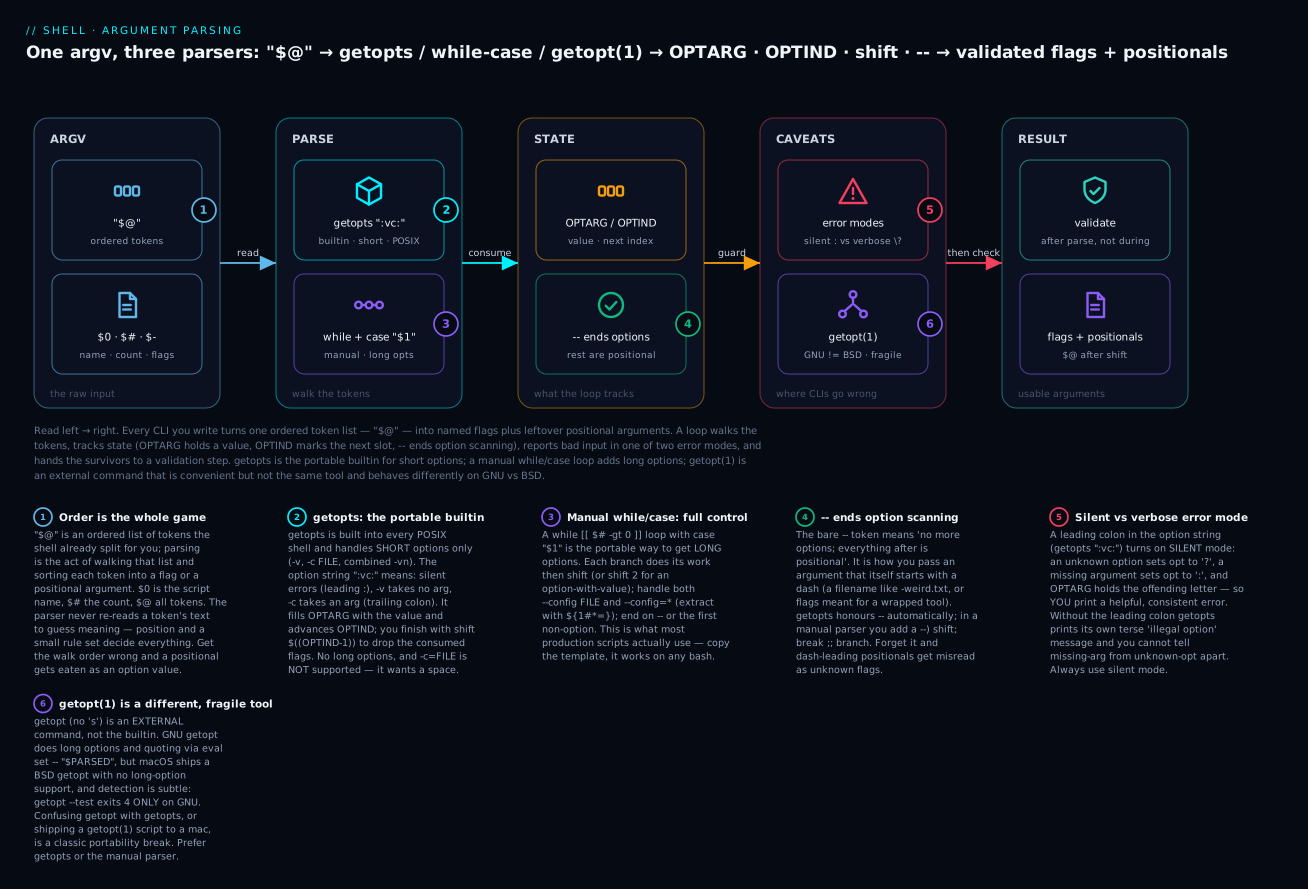
Read the diagram left to right as the life of one argument list: the raw "$@" tokens go into a parser (the getopts builtin, or a manual while/case loop), which tracks state as it walks — OPTARG holds the current option’s value, OPTIND marks the next token to read, and a bare -- says “options are over.” Two caveats bite everyone: the silent-vs-verbose error mode of getopts, and the fact that getopt(1) is a fragile, non-portable external command. What survives is a set of validated flags plus the leftover positional arguments in $@. The six badges are the six things to actually remember; every section below expands one.
Prerequisites & what you’ll be able to do
This is an advanced lesson — it assumes you’re comfortable with the fundamentals that argument parsing is built on. You should be fluent with positional parameters and quoting ("$@" vs $*, why "$1" needs quotes) from Variables, quoting & parameter expansion — parsing leans hard on parameter expansion like ${1#*=}. You should read exit codes and case as second nature (glob-pattern case, why usage 2 exits 2) from Conditionals, exit codes & status propagation. Sub-commands are just functions that parse their own arguments, and every example here opens with the strict-mode header from Defensive scripting: set -euo pipefail & ShellCheck.
After working through this lesson you will be able to:
- Parse short options with
getopts— write the option string correctly (silent mode, which letters take arguments), readOPTARG, and consume the flags withshift $((OPTIND-1)). - Hand-roll a long-option parser with
while/casethat handles--verbose,--config FILE,--config=FILE,--, and--no-boolean forms — and copy it into any script. - Choose the right tool on purpose —
getoptsfor short-only and maximum portability, a manual loop for long options,getopt(1)only when you’re Linux-locked — and explain the trade-off. - Detect and dodge the
getoptvsgetoptstraps, including the--test-exit-4 probe and why the naive!-negated version misfires on real GNU systems. - Build
git/kubectl-style sub-commands with a global parser that stops at the first non-option and dispatches to per-command functions. - Layer configuration correctly — CLI over environment variable over config file over hard-coded default — and validate the final combination after parsing.
1. Positional arguments — the baseline
Before parsing, recap what we have:
$0— script name$1,$2, …${10}, … — positional arguments$#— count of arguments$@/$*— all arguments$-— current shell flags (read-only)
#!/usr/bin/env bash
set -Eeuo pipefail
[[ $# -ge 2 ]] || die "usage: $0 <env> <tag>"
ENV="$1"
TAG="$2"
This works for simple cases. It breaks down once you have optional arguments or flags.
./script staging v1.2.3 --dry-run        # how do we get --dry-run out?
./script -v staging v1.2.3                # how do we get -v?
You can hand-roll all of this with if [[ "$1" == "-v" ]]; then …, but it gets ugly fast. Use a parser.
2. getopts — the bash built-in
getopts is the POSIX-standard short-option parser, built into bash. It iterates through $@ once, recognising -x and -x value patterns.
Basic usage
#!/usr/bin/env bash
set -Eeuo pipefail

VERBOSE=0
CONFIG=""
DRY_RUN=0

while getopts ":vc:n" opt; do
  case "$opt" in
    v) VERBOSE=1 ;;
    c) CONFIG="$OPTARG" ;;
    n) DRY_RUN=1 ;;
    \?) echo "Invalid option: -$OPTARG" >&2; exit 2 ;;
    :)  echo "Option -$OPTARG requires an argument" >&2; exit 2 ;;
  esac
done
shift $((OPTIND - 1))

# Now positional args are in $@
echo "verbose=$VERBOSE config='$CONFIG' dry_run=$DRY_RUN remaining=$*"
Run:
$ ./script -v -c /etc/app.conf -n staging prod
verbose=1 config='/etc/app.conf' dry_run=1 remaining=staging prod
The option string explained
":vc:n"
- Leading
:— silent mode: errors return:for missing argument and\?for unknown option. The script handles diagnostics. Without leading:, getopts prints its own (less helpful) errors. v— option-vtakes no argument.c:— option-crequires an argument (note the trailing colon).n— option-ntakes no argument.
To declare an optional argument, getopts has no syntax for it. You can fake it (covered later) or use long-options + manual parsing.
OPTIND — the index of the next argument
getopts updates OPTIND (Option InDex) as it consumes args. After the loop:
shift $((OPTIND - 1))
This shifts away the consumed flags, leaving the positional arguments in $@.
Combined flags (-vn)
getopts supports combined short flags:
$ ./script -vn config-file
# parses as -v, -n, then "config-file" is the positional
This is standard Unix behaviour and just works.
-c=value is NOT supported
Unlike GNU long-options, getopts wants a space:
./script -c /etc/app.conf      # CORRECT
./script -c=/etc/app.conf      # WRONG — getopts treats "=/etc/..." as the value
This is the #1 surprise for newcomers.
-- ends option parsing
The -- separator says “no more flags; rest are positional”:
./script -v -- -file-with-leading-dash.txt
# -v is parsed; then -- signals end; the dash-file is the positional
getopts handles this automatically.
Error handling — \? and :
In silent mode (option string starts with :):
- Unknown option:
optbecomes\?,OPTARGis the unknown letter. - Missing argument:
optbecomes:,OPTARGis the option letter.
Without leading :, getopts prints its own errors but still uses ? for both cases — you can’t tell them apart, and the message is “illegal option” — not very informative. Always use silent mode.
A more complete example with usage()
#!/usr/bin/env bash
set -Eeuo pipefail

readonly SCRIPT="${0##*/}"

usage() {
  cat <<EOF
Usage: $SCRIPT [-v] [-n] [-c CONFIG] <env> <tag>

  -v          verbose mode
  -n          dry run; don't actually deploy
  -c CONFIG   path to config file (default: \$HOME/.app.conf)

Examples:
  $SCRIPT staging v1.2.3
  $SCRIPT -v -n -c ./test.conf prod v1.2.3
EOF
  exit "${1:-0}"
}

VERBOSE=0
DRY_RUN=0
CONFIG="${HOME}/.app.conf"

while getopts ":vnc:h" opt; do
  case "$opt" in
    v) VERBOSE=1 ;;
    n) DRY_RUN=1 ;;
    c) CONFIG="$OPTARG" ;;
    h) usage 0 ;;
    \?) printf 'Invalid option: -%s\n\n' "$OPTARG" >&2; usage 2 ;;
    :)  printf 'Option -%s requires an argument\n\n' "$OPTARG" >&2; usage 2 ;;
  esac
done
shift $((OPTIND - 1))

[[ $# -eq 2 ]] || usage 2
ENV="$1"; TAG="$2"

echo "ENV=$ENV TAG=$TAG VERBOSE=$VERBOSE DRY_RUN=$DRY_RUN CONFIG=$CONFIG"
This is the production-grade getopts pattern. Use it when short options are enough.
getopts summary
| Feature | Supported |
|---|---|
Short options -v |
yes |
Short option with arg -c FILE |
yes |
Combined flags -vn |
yes |
Long options --verbose |
no |
--key=value |
no |
| Optional argument | no (workaround possible) |
| Sub-commands | no (do it yourself) |
When you need long options, switch to manual parsing or GNU getopt.
3. Manual long-option parsing — the canonical pattern
For full power and full portability (works on any bash), use a while loop with a case over $1, shifting as you go.
The template
#!/usr/bin/env bash
set -Eeuo pipefail

VERBOSE=0
DRY_RUN=0
CONFIG=""
ENV=""
TAG=""

usage() {
  cat <<EOF
Usage: ${0##*/} [OPTIONS] <env> <tag>

Options:
  -v, --verbose          verbose mode
  -n, --dry-run          don't actually deploy
  -c, --config FILE      path to config file
  -h, --help             show this help
EOF
  exit "${1:-0}"
}

while [[ $# -gt 0 ]]; do
  case "$1" in
    -v|--verbose)
      VERBOSE=1
      shift
      ;;
    -n|--dry-run)
      DRY_RUN=1
      shift
      ;;
    -c|--config)
      [[ $# -ge 2 ]] || { echo "missing value for $1" >&2; usage 2; }
      CONFIG="$2"
      shift 2
      ;;
    --config=*)
      CONFIG="${1#*=}"
      shift
      ;;
    -h|--help)
      usage 0
      ;;
    --)
      shift
      break
      ;;
    -*)
      echo "Unknown option: $1" >&2
      usage 2
      ;;
    *)
      # First non-option argument breaks out; rest are positional
      break
      ;;
  esac
done

# Remaining are positional
[[ $# -eq 2 ]] || usage 2
ENV="$1"
TAG="$2"

echo "ENV=$ENV TAG=$TAG VERBOSE=$VERBOSE DRY_RUN=$DRY_RUN CONFIG=$CONFIG"
This pattern handles:
- Short and long options together:
-vand--verbose. - Both
--config FILEand--config=FILEstyles. - The
--separator. - Help via
-h/--help. - Validates required arguments to options (the
[[ $# -ge 2 ]] || …check inside-ccase). - Preserves remaining positional args in
$@.
This is what most production shell scripts use. Master this template and copy-paste it.
Variations
Multiple values: collect into an array
INCLUDE=()

case "$1" in
  -i|--include)
    INCLUDE+=("$2")
    shift 2
    ;;
  --include=*)
    INCLUDE+=("${1#*=}")
    shift
    ;;
esac

# Use:
for path in "${INCLUDE[@]}"; do …; done
Now --include foo --include bar --include baz builds up a list. (Indexed and associative arrays get their own lesson later in the course.)
Counting occurrences (e.g. -vvv)
VERBOSE=0

case "$1" in
  -v|--verbose) VERBOSE=$((VERBOSE+1)); shift ;;
  -vv) VERBOSE=$((VERBOSE+2)); shift ;;
  -vvv) VERBOSE=$((VERBOSE+3)); shift ;;
esac
For real -v -v -v (separate args), the first case repeated handles it. For -vvv (combined), we need explicit cases or a parser that decomposes combined short flags (rare in shell — most scripts don’t bother).
Optional arguments to a flag
case "$1" in
  --color)
    # check if next arg is a recognised colour mode or another flag
    if [[ $# -ge 2 && "$2" != -* ]]; then
      COLOR="$2"
      shift 2
    else
      COLOR="auto"
      shift
    fi
    ;;
  --color=*)
    COLOR="${1#*=}"
    shift
    ;;
esac
This is messy — it’s why “optional argument to flag” is unusual in CLIs. Most tools just use --color=value (mandatory =) for optional values. The reason it’s messy is genuinely ambiguous input: with --color always you want to consume always, but with --color file.txt (where file.txt is meant to be a positional!) the peek-the-next-arg heuristic will wrongly swallow file.txt as the colour. The = form removes the ambiguity, which is why every well-behaved CLI reaches for it.
Boolean flags with --no- form
case "$1" in
  --color)    COLOR=1; shift ;;
  --no-color) COLOR=0; shift ;;
esac
Standard pattern. --color enables, --no-color disables explicitly. Useful when the default is configurable and the user wants to override.
4. GNU getopt — long options without rolling your own
GNU getopt (the external command, different from bash getopts built-in) handles long options for you. It’s not portable to macOS by default — macOS ships a BSD getopt that doesn’t support long options. You either:
- Use it on Linux only.
- Tell users to
brew install gnu-getoptand usegnu-getoptinstead. - Don’t use it; use manual parsing.
Detection
# GNU getopt's --test exits with status 4 — and nothing else does. That is the
# sentinel we key off. Two subtleties make this a classic bug magnet:
#   1. Put the probe INSIDE the if-condition list, so `set -e` (errexit) does
#      NOT abort on the non-zero status 4 (errexit is suppressed in an if test).
#   2. Do NOT negate it with `!`. Negation inverts getopt's exit code *before*
#      $? is read, so the 4 becomes a 1 and the [[ $? -ne 4 ]] check misfires
#      on real GNU systems — reporting "no GNU getopt" when GNU getopt is right
#      there. (Section "Going deeper" dissects exactly why.)
if getopt --test >/dev/null 2>&1; [[ $? -ne 4 ]]; then
  echo "this script requires GNU getopt; on macOS: brew install gnu-getopt" >&2
  exit 1
fi
GNU getopt’s --test option exits with status 4 specifically. BSD getopt doesn’t recognise --test and exits with a different status (0 on macOS), so the [[ $? -ne 4 ]] guard fires and we tell the user to install GNU getopt.
The pattern
#!/usr/bin/env bash
set -Eeuo pipefail

# Define short and long option strings
SHORT="vnc:h"
LONG="verbose,dry-run,config:,help"

# Run getopt to canonicalise; trap errors
PARSED=$(getopt --options="$SHORT" --longoptions="$LONG" --name "$0" -- "$@") || { usage 2; }

# Reset the positional args to the canonicalised form
eval set -- "$PARSED"

# Now parse normally with case (no need to handle --opt=value; getopt already split it)
VERBOSE=0; DRY_RUN=0; CONFIG=""

while true; do
  case "$1" in
    -v|--verbose) VERBOSE=1; shift ;;
    -n|--dry-run) DRY_RUN=1; shift ;;
    -c|--config)  CONFIG="$2"; shift 2 ;;
    -h|--help)    usage 0 ;;
    --)           shift; break ;;
    *)            echo "internal error" >&2; exit 2 ;;
  esac
done

ENV="$1"; TAG="$2"
The trick is eval set -- "$PARSED": getopt outputs a canonicalised, properly-quoted argument list, and eval set -- re-applies it as the new $@. After that, parsing is straightforward.
Why getopt is convenient: it handles --config=FILE for you (splits to --config FILE), supports option abbreviations (--ver matches --verbose if unambiguous), groups short flags, and — unlike our simple manual loop — permutes the arguments so options and positionals can be interleaved (getopt moves all the positionals to the end). You don’t need to handle the --config=* case or worry about -vn.
Why getopt is annoying:
- Not on macOS by default.
- Old
getopt(pre-GNU) behaves differently. - The
eval set --trick looks alarming and confuses junior engineers.
For new scripts, manual parsing (Section 3) is usually preferable. Use getopt only if you’re Linux-locked and the script has many options.
5. Sub-commands — the git/kubectl style
Real CLIs have sub-commands: git commit, kubectl apply, aws s3 cp. Build this with a case on the first non-option argument:
#!/usr/bin/env bash
set -Eeuo pipefail

usage_main() {
  cat <<EOF
Usage: ${0##*/} [GLOBAL_OPTIONS] <command> [COMMAND_OPTIONS] [ARGS]

Commands:
  deploy <env> <tag>       deploy a tag to an env
  rollback <env>           rollback the most recent deploy
  status <env>             show current deployed version

Global options:
  -v, --verbose            verbose mode
  -h, --help               show help
EOF
  exit "${1:-0}"
}

# Parse global options
VERBOSE=0
while [[ $# -gt 0 ]]; do
  case "$1" in
    -v|--verbose) VERBOSE=1; shift ;;
    -h|--help) usage_main 0 ;;
    -*) echo "Unknown global option: $1" >&2; usage_main 2 ;;
    *) break ;;     # first non-option arg is the sub-command
  esac
done

[[ $# -ge 1 ]] || usage_main 2
COMMAND="$1"
shift

# Dispatch
case "$COMMAND" in
  deploy)   cmd_deploy "$@" ;;
  rollback) cmd_rollback "$@" ;;
  status)   cmd_status "$@" ;;
  -h|--help|help) usage_main 0 ;;
  *) echo "Unknown command: $COMMAND" >&2; usage_main 2 ;;
esac
Each cmd_* function does its own argument parsing:
cmd_deploy() {
  local env="" tag="" dry_run=0
  while [[ $# -gt 0 ]]; do
    case "$1" in
      -n|--dry-run) dry_run=1; shift ;;
      -*) echo "deploy: unknown option $1" >&2; exit 2 ;;
      *) break ;;
    esac
  done
  [[ $# -eq 2 ]] || { echo "deploy: usage: deploy <env> <tag>" >&2; exit 2; }
  env="$1"; tag="$2"
  echo "deploying $tag to $env (dry_run=$dry_run, verbose=$VERBOSE)"
}

cmd_rollback() { … }
cmd_status()   { … }
This scales to dozens of sub-commands. Most CLIs end up with a lib/cmd_*.sh file per command and an entry point that just dispatches.
Auto-discovery of sub-commands
Even cooler — discover sub-commands at runtime by looking for cmd_* functions:
list_commands() {
  declare -F | awk '$NF ~ /^cmd_/ { sub(/^cmd_/, "", $NF); print $NF }'
}
declare -F lists all defined functions; we filter for cmd_* and strip the prefix. Now myapp help can list known commands without hard-coding them.
6. The usage() function pattern
Every CLI needs a usage function. Conventions:
usage() {
  cat <<EOF
Usage: ${0##*/} [OPTIONS] <env> <tag>

Description:
  Deploy a tag to a Kubernetes namespace.

Options:
  -v, --verbose          verbose output
  -n, --dry-run          show what would happen, but don't deploy
  -c, --config FILE      path to config file (default: \$HOME/.app.conf)
  -h, --help             show this help

Arguments:
  env                    target environment: dev, staging, prod
  tag                    image tag in vMAJOR.MINOR.PATCH form

Examples:
  ${0##*/} staging v1.2.3
  ${0##*/} -v --dry-run prod v1.2.3
  ${0##*/} --config ~/.app.staging.conf staging v1.2.3

Exit status:
  0  success
  1  general error
  2  invalid usage
EOF
  exit "${1:-0}"
}
Conventions:
- Use a here-doc — much easier to maintain than
printfchains. - Group by section: usage line, description, options, arguments, examples, exit status.
- The function takes an optional exit code; default 0. Calling
usage 2exits 2 (used for usage errors). ${0##*/}strips the path so the script’s name is correct regardless of how it was invoked.
For really comprehensive CLIs, generate the usage from a structured definition:
declare -A OPT_DESC=(
  [v|verbose]="verbose output"
  [n|dry-run]="don't actually deploy"
  [c|config FILE]="path to config file"
  [h|help]="show this help"
)
That’s overkill for most scripts but useful for very large ones. Most stop at static here-docs.
7. Default values from environment
Production scripts often allow defaults to come from environment variables (so CI can set them without command-line clutter):
# Default to env var, fall back to literal default
ENV="${TARGET_ENV:-dev}"
NAMESPACE="${KUBE_NAMESPACE:-default}"

# CLI overrides env var; env var overrides hard-coded default
while [[ $# -gt 0 ]]; do
  case "$1" in
    -e|--env) ENV="$2"; shift 2 ;;
    -n|--namespace) NAMESPACE="$2"; shift 2 ;;
    *) break ;;
  esac
done
This precedence (CLI > env > default) is standard for almost every CLI — kubectl, terraform, aws, etc. Implement it consistently.
--config as a YAML/JSON file
For complex configs, accept a config file:
CONFIG_FILE=""
ENV=""
NAMESPACE=""

# Parse args (CONFIG_FILE may be set here)

# Load config if specified
if [[ -n "$CONFIG_FILE" ]]; then
  [[ -r "$CONFIG_FILE" ]] || die "cannot read config: $CONFIG_FILE"
  ENV=$(yq '.env' "$CONFIG_FILE")
  NAMESPACE=$(yq '.namespace' "$CONFIG_FILE")
fi

# Now apply env-var overrides
ENV="${TARGET_ENV:-$ENV}"
NAMESPACE="${KUBE_NAMESPACE:-$NAMESPACE}"

# CLI overrides come last (already applied during parse, since we set ENV directly there)
The precedence stack: hard-coded default → config file → environment variable → command line.
8. Validation after parsing
After parsing, validate:
[[ -n "$ENV" ]] || die "missing required: env"
[[ -n "$TAG" ]] || die "missing required: tag"
[[ "$ENV" =~ ^(dev|staging|prod)$ ]] || die "invalid env: $ENV"
[[ "$TAG" =~ ^v[0-9]+\.[0-9]+\.[0-9]+$ ]] || die "invalid tag: $TAG"
[[ -z "$CONFIG" || -r "$CONFIG" ]] || die "config not readable: $CONFIG"
Always validate after parsing, never during. Parsing should just fill in the variables; a separate validation phase checks that the combination is sensible. This separates “user typed a bad option” from “config file doesn’t exist.”
9. Common pitfalls
Forgetting shift in a case branch
while [[ $# -gt 0 ]]; do
  case "$1" in
    -v) VERBOSE=1 ;;             # MISSING shift — infinite loop
  esac
done
Always shift (or shift 2 for options-with-values, or break to stop). The loop iterates until $# is 0.
Using $1 after shift without re-checking $#
case "$1" in
  -c|--config)
    shift
    CONFIG="$1"        # if user wrote `-c` with no value, $1 is unset; -u fires
    ;;
esac
Always check $# first:
case "$1" in
  -c|--config)
    [[ $# -ge 2 ]] || die "missing value for $1"
    CONFIG="$2"
    shift 2
    ;;
esac
Not handling --
If your script accepts pass-through args (./script --verbose -- some-other-tool --its-flag), the -- separator is essential. Always include it:
case "$1" in
  --) shift; break ;;
esac
getopt vs getopts confusion
They are different programs:
getopts: bash built-in; short options only; fully portable.getopt(no s): external GNU command; long options; not portable to BSD/macOS.
The error “getopts unrecognized option” usually means you typed getopt when you wanted getopts. The reverse is also a common bug. Triple-check spelling.
$OPTARG not in your case
After case "$opt", $OPTARG is the value (for options that take one). Don’t forget the colon in the option string, or OPTARG is empty:
while getopts ":vc" opt; do      # missing colon after c
  case "$opt" in
    c) CONFIG="$OPTARG" ;;       # OPTARG is empty
  esac
done
The fix: getopts ":vc:" opt — the trailing : after c.
Subcommand args being parsed by global parser
./tool deploy -v staging v1.2.3
# If the global parser consumes -v before reaching `deploy`, the sub-command never sees it
Either:
- Stop global parsing at the first non-option (the
*) break ;;we showed) — sub-command sees its own flags. - Document that global flags must come before the sub-command.
Long-option parsing with = mid-value
--config=/etc/app/config.yaml
In your manual parser, ${1#*=} strips everything up to and including the first =, leaving /etc/app/config.yaml. Good.
--config=foo=bar
${1#*=} strips only to the first =, giving foo=bar. Also good.
But:
--config # no value, no =
${1#*=} returns the whole $1 (no = to strip), so CONFIG="--config". Wrong. Detect this:
case "$1" in
  --config=*)
    CONFIG="${1#*=}"
    [[ -n "$CONFIG" ]] || die "missing value for --config"
    shift
    ;;
  --config)
    [[ $# -ge 2 ]] || die "missing value for --config"
    CONFIG="$2"
    shift 2
    ;;
esac
Always handle both forms explicitly.
Combined short flags with manual parser
getopts handles -vn (combined). Manual parsers don’t, by default. To support it:
# Decompose -vn into -v -n before parsing
ARGS=()
for arg in "$@"; do
  case "$arg" in
    -[a-zA-Z][a-zA-Z]*)
      # short flag combination — split each character into its own flag
      i=1
      while [[ $i -lt ${#arg} ]]; do
        ARGS+=("-${arg:$i:1}")
        ((i++))
      done
      ;;
    *)
      ARGS+=("$arg")
      ;;
  esac
done
set -- "${ARGS[@]}"

# Now parse normally — combined flags have been split
This is rarely necessary; most CLIs require separate flags (-v -n). Document it if you don’t support combined short flags.
10. Twelve idioms for daily use
# 1. getopts skeleton
while getopts ":vnc:h" opt; do
  case "$opt" in
    v) VERBOSE=1 ;;
    n) DRY_RUN=1 ;;
    c) CONFIG="$OPTARG" ;;
    h) usage 0 ;;
    \?) usage 2 ;;
    :)  echo "missing arg for -$OPTARG" >&2; usage 2 ;;
  esac
done
shift $((OPTIND - 1))

# 2. Manual long-option parser (template)
while [[ $# -gt 0 ]]; do
  case "$1" in
    -v|--verbose) VERBOSE=1; shift ;;
    -c|--config) CONFIG="$2"; shift 2 ;;
    --config=*)  CONFIG="${1#*=}"; shift ;;
    -h|--help)   usage 0 ;;
    --)          shift; break ;;
    -*)          echo "Unknown: $1" >&2; usage 2 ;;
    *)           break ;;
  esac
done

# 3. usage with optional exit code
usage() { cat <<EOF
Usage: ${0##*/} [-v] <env> <tag>
EOF
  exit "${1:-0}"
}

# 4. Default from env, override from CLI
ENV="${TARGET_ENV:-dev}"

# 5. Validate option arg
[[ $# -ge 2 ]] || die "missing value for $1"

# 6. Multi-value array
INCLUDE=()
case "$1" in
  -i|--include) INCLUDE+=("$2"); shift 2 ;;
esac

# 7. Boolean with --no- form
case "$1" in
  --color)    COLOR=1; shift ;;
  --no-color) COLOR=0; shift ;;
esac

# 8. Sub-command dispatcher
case "$COMMAND" in
  deploy) cmd_deploy "$@" ;;
  status) cmd_status "$@" ;;
  *)      die "unknown command: $COMMAND" ;;
esac

# 9. Auto-discover commands
list_commands() {
  declare -F | awk '$NF ~ /^cmd_/ { sub(/^cmd_/, "", $NF); print $NF }'
}

# 10. Detect GNU getopt
getopt --test >/dev/null 2>&1
[[ $? -eq 4 ]] || die "GNU getopt required"

# 11. Reset $@ from getopt output
PARSED=$(getopt --options="$SHORT" --longoptions="$LONG" -- "$@") || usage 2
eval set -- "$PARSED"

# 12. Validate environment after parsing
[[ "$ENV" =~ ^(dev|staging|prod)$ ]] || die "invalid env: $ENV"
11. What you must internalise before lesson 15
- What’s the difference between
getoptsandgetopt? (getopts= bash built-in, short options only, portable.getopt= external GNU command, long options, Linux-only by default.) - How does
getoptsknow which options take arguments? (Trailing colon:c:means-ctakes an arg.) - What’s
OPTIND? (The index of the next argument;shift $((OPTIND - 1))consumes parsed flags.) - What does the leading
:ingetopts ":vc:"mean? (Silent error mode —\?for unknown,:for missing arg, no auto-print.) - How do you support
--config=valuein a manual parser? (Match--config=*and use${1#*=}to extract the value.) - What’s the role of
--? (Separator: end of options. After--, all args are positional.) - How do you do sub-commands like
git commit? (Parse global options until you hit a non-option, then dispatch on$1with acase.) - What’s the standard precedence for option values? (CLI > env > config-file > hard-coded default.)
- Why validate after parsing rather than during? (Separates “bad option” from “bad combination of values”; allows env/config/CLI layered overrides.)
- What’s the canonical exit code for usage errors? (2. 1 is general error, 0 is success.)
Going deeper
You now have the working model. This section is the internals, edge cases, and production judgement that separate a parser that “works when I test it” from one that behaves correctly under strict mode, inside functions, on other platforms, and against hostile input.
getopts keeps its state in globals — reset OPTIND before you reuse it
getopts is not a pure function: it advances a global OPTIND (and sets a global OPTARG) as it walks. That has two consequences people trip over.
First, if you run two getopts loops in the same shell — for example a script that parses once, then sources something that parses again, or a loop you re-run — the second loop starts wherever the first one left OPTIND, not at 1. At the top of a fresh parse you may need to reset it explicitly:
OPTIND=1
while getopts ":v" opt; do … done
Second, and far more common in real code: if you parse arguments inside a function (every sub-command does), declare OPTIND — and usually OPTARG and opt — as local, so each call parses from a clean slate and the caller’s parsing state isn’t clobbered:
cmd_deploy() {
  local OPTIND=1 opt dry_run=0
  while getopts ":n" opt; do
    case "$opt" in n) dry_run=1 ;; esac
  done
  shift $((OPTIND - 1))
  echo "deploy dry_run=$dry_run env=$1 tag=$2"
}
cmd_deploy -n staging v1     # OPTIND is local → reentrant
cmd_deploy prod v2           # fresh call, fresh OPTIND → parses correctly
Making OPTIND local is the single most important habit for getopts-inside-functions; forget it and the second invocation silently mis-parses because OPTIND still points past the first call’s options.
There’s a lesser-known third mode: getopts can parse an explicit list instead of "$@" — getopts optstring name arg1 arg2 …. This is handy for parsing a captured array (e.g. a sub-command’s arguments held in an array). Note that with an explicit list, shift $((OPTIND-1)) is meaningless (there’s nothing to shift); instead you index the leftovers as "${list[@]:OPTIND-1}":
args=(-v -c file.txt keep1 keep2)
OPTIND=1
while getopts ":vc:" opt "${args[@]}"; do
  case "$opt" in v) V=1 ;; c) C="$OPTARG" ;; esac
done
positional=( "${args[@]:OPTIND-1}" )   # → (keep1 keep2)
Faking an optional argument to getopts (and why you shouldn’t)
getopts has no syntax for “this option takes an optional argument.” The commonly cited hack declares the option with no trailing colon, then peeks at the next raw token via indirect expansion ${!OPTIND}:
while getopts ":a" opt; do
  case "$opt" in
    a)
      next="${!OPTIND-}"
      if [[ -n "$next" && "$next" != -* ]]; then
        AVAL="$next"; OPTIND=$((OPTIND+1))     # consume it manually
      else
        AVAL="auto"                            # no value supplied
      fi ;;
  esac
done
It works — -a red gives red, bare -a gives auto — but it inherits the exact ambiguity we saw with the manual parser: a positional argument that legitimately follows -a gets eaten. This is precisely the signal to stop fighting getopts. If you need optional-argument options, that requirement alone is a good reason to switch to the manual while/case parser (or mandate the --opt=value form), where the intent is explicit and the code is readable.
Why getopt(1) is genuinely fragile — the full dissection
The single most-copied broken snippet for detecting GNU getopt looks like this:
if ! getopt --test >/dev/null 2>&1; [[ $? -ne 4 ]]; then   # BUG
  echo "requires GNU getopt" >&2; exit 1
fi
Walk it through on a real GNU system, where getopt --test exits 4:
! getopt --testruns the command (exit 4), then the leading!inverts it. Since 4 is “failure”,!turns the whole thing into success — exit 0.$?is therefore 0, not 4 — the!has already thrown the 4 away.[[ 0 -ne 4 ]]is true, so theiffires and prints “requires GNU getopt” — on a machine that has GNU getopt. The check is exactly backwards.
The fix is simply to drop the !, keeping the probe inside the if-condition list so set -e doesn’t abort on the 4:
if getopt --test >/dev/null 2>&1; [[ $? -ne 4 ]]; then     # correct
  echo "requires GNU getopt; on macOS: brew install gnu-getopt" >&2; exit 1
fi
Now on GNU: getopt --test exits 4, $? is 4, [[ 4 -ne 4 ]] is false → we proceed. On BSD/macOS: getopt --test doesn’t recognise the flag and exits 0, [[ 0 -ne 4 ]] is true → we bail with the helpful message. This is verified behaviour: on this macOS host getopt --test exits 0; a simulated GNU getopt returning 4 correctly falls through the fixed form and (wrongly) trips the negated form. Two facts make the corrected version robust: getopt --test’s exit 4 is a documented sentinel unique to GNU getopt, and a non-zero status inside an if-condition list is exempt from set -e, so the probe won’t kill a strict-mode script.
Beyond detection, three more getopt(1) sharp edges:
eval set -- "$PARSED"is load-bearing, not decoration. GNU getopt emits a shell-quoted rewrite of the arguments (spaces and quotes preserved), and onlyeval set --re-imposes it as"$@"with the quoting intact. Skip theevaland an argument containing spaces splits apart. It looks dangerous, but the input is getopt’s own trusted, correctly-quoted output — not user text — so it’s safe here specifically.- Abbreviation matching is a double-edged sword. GNU getopt accepts any unambiguous prefix (
--ver→--verbose). Convenient interactively, but it means adding a new long option later (say--version) can retroactively make a previously-unambiguous--verambiguous and break users’ muscle memory. A manual parser matches exactly and never surprises you this way. - The pre-2000 “traditional”
getopt(still lurking on some old Unixes) can’t handle whitespace or quotes in arguments at all — it’s the reason thegetopt(1)reputation is so poor. The--test/exit-4 probe exists precisely to refuse to run on anything but the modern enhanced GNU version.
Net: getopt(1) buys you long options, abbreviation, and argument permutation “for free,” but at the cost of an external dependency, a platform split, and a detection dance. For anything you might run on a mac or ship widely, the manual parser (Section 3) is the safer default.
Argument permutation: why option order matters (and where it doesn’t)
Our simple manual loop stops at the first non-option (*) break ;;), so ./script staging -v treats -v as a positional — options must come before positionals. getopts behaves the same way. GNU getopt, by contrast, permutes: it scans the whole list, pulls options out from anywhere, and moves positionals to the end, so ./script staging -v still sees -v as a flag. Neither is “right” — but you must document which your CLI does, because users absolutely will type myscript file --verbose and expect it to work. If you want permutation without getopt(1), do two passes: collect positionals into an array on the first pass, parse options on the second.
Performance: parsing is essentially free — the cost is elsewhere
getopts, case, [[ ]], shift, and parameter expansion like ${1#*=} are all in-process — no fork, no exec. Even a loop over a few hundred arguments costs microseconds. The performance mistakes in argument handling are never the parser itself; they’re what you do per argument: shelling out to sed/grep/awk to validate each value (two forks apiece), or calling getopt(1) (an external process) when a builtin would do. Keep validation in-shell ([[ =~ ]], case, arithmetic) and reserve external tools for genuinely text-heavy work. This is the same “stay in the shell” rule the performance lesson hammers on — it applies squarely to parsing.
Security: parsed arguments are untrusted input
Everything a user (or a CI job, or a webhook) passes on the command line is untrusted, and the parser is the first gate. Three rules:
- Quote every expansion, always.
CONFIG="$2",case "$1" in,shift-then-use"$1". An unquoted$2containing spaces or globs word-splits or file-globs into something you didn’t intend — a classic injection vector. - Validate as an allow-list, after parsing, not during.
[[ "$ENV" =~ ^(dev|staging|prod)$ ]]rejects anything unexpected; a deny-list (“block..”) always misses a case. Parsing fills variables; a separate validation phase decides whether the combination is acceptable and safe. - Never
evaluser-controlled argument text. Theeval set -- "$PARSED"idiom is safe only because it consumes GNU getopt’s own quoted output. Neverevala value that came straight from"$@". If a flag’s value later reaches a command, pass it as a data argument (cmd -- "$VALUE"), not spliced into a command string. Injection, quoting, and IFS attacks get a full treatment in the dedicated shell-security lesson.
Portability matrix
| Feature | getopts (builtin) |
Manual while/case |
getopt(1) (external) |
|---|---|---|---|
| On every POSIX shell | ✅ yes | ✅ yes | ❌ external dependency |
| Works on macOS out of the box | ✅ | ✅ | ⚠️ BSD getopt: no long opts |
Short options -v, -c FILE, -vn |
✅ | ✅ (combined needs extra code) | ✅ |
Long options --verbose, --config=X |
❌ | ✅ | ✅ (GNU only) |
| Optional-argument options | ❌ (hack only) | ✅ | ⚠️ awkward |
| Argument permutation (opts after positionals) | ❌ | ❌ (add a pass) | ✅ |
Abbreviation (--ver→--verbose) |
❌ | ❌ | ✅ (GNU) |
| Extra dependency / detection dance | none | none | yes |
The honest default: reach for getopts when short options are enough (most scripts), the manual parser when you want long options or portability with control (most serious CLIs), and getopt(1) only when you’re Linux-locked and specifically want permutation/abbreviation. Detecting the shell and gating bashisms is covered in the POSIX-portability-versus-bashisms lesson.
Common beginner mistakes
These are misconceptions, not just typos — each is a wrong mental model, followed by the right one.
- “
getoptandgetoptsare the same thing.” They are two different programs.getopts(with thes) is a shell builtin: short options only, on every machine.getopt(nos) is an external command: it does long options but isn’t the builtin and isn’t portable (macOS ships a crippled BSD version). Most “getopt doesn’t work” bugs are just this spelling/identity confusion. - “
getoptscan do--longoptions.” It cannot — full stop. There is no option string that makes the builtin understand--verbose. If you need long options, use the manualwhile/caseparser orgetopt(1); don’t hunt for agetoptsflag that doesn’t exist. - “
-c=valueworks like--config=value.” With thegetoptsbuiltin it does not:-c=valuemakesOPTARGthe literal=value. Short options take a space (-c value); only long options use=. - “I don’t need the leading
:in the option string.” Without it you’re in verbose mode:getoptsprints its own terse “illegal option” and — worse — you can’t distinguish unknown option from missing argument in yourcase. The leading:(silent mode) gives you the\?and:cases and lets you print helpful, consistent errors. Always use it. - “After the loop I can read
$1as my first positional.” Not until you runshift $((OPTIND - 1))(forgetopts) or haveshifted inside the manual loop. Skip the shift and$1is still the first option, not your first real argument. - “I’ll just
shiftonce for every option.” Options that take a value consume two tokens (-c FILE), so they needshift 2. And forgetting toshiftat all in a manualcasebranch is an infinite loop —$#never decreases. Every branch mustshift,shift 2, orbreak. - “
--config=$filein a manual parser is fine even when there’s no=.”${1#*=}only strips a value if a=is present; on a bare--configit returns the whole--configstring. Handle--configand--config=*as separatecasebranches. - “
getoptsinside a function just works.” ItsOPTIND/OPTARGare global; a second call resumes where the first stopped. Declarelocal OPTIND=1(andopt) in any function that parses, or the second invocation silently mis-parses. - “Options can come anywhere on the line.” With
getoptsand the simple manual loop, options must come before positionals (parsing stops at the first non-option). Only GNUgetopt(1)permutes. Decide which your tool does — and say so in--help. - “Validate while I parse.” Parsing should only fill in variables. Validate afterwards, as an allow-list, so you can layer CLI > env > config > default and cleanly separate “bad option” from “bad combination.”
Practice challenges
Work these in order — they escalate from a first getopts loop to fixing a real portability bug. Try each in a real shell before expanding the solution. (This host is macOS/bash 3.2 + BSD getopt; the answers target Linux bash 4+/5 + GNU coreutils, the course standard — where they differ it’s noted.)
1. (Beginner) Your first getopts loop. Write a loop that accepts -v (a switch) and -o FILE (takes a value), sets VERBOSE and OUT, then prints them plus the leftover positionals. Before running, predict what -o with no value does in silent mode.
<details> <summary>Solution</summary>
VERBOSE=0; OUT=""
while getopts ":vo:" opt; do
  case "$opt" in
    v) VERBOSE=1 ;;
    o) OUT="$OPTARG" ;;
    :)  echo "missing value for -$OPTARG" >&2; exit 2 ;;
    \?) echo "unknown option -$OPTARG" >&2; exit 2 ;;
  esac
done
shift $((OPTIND - 1))
echo "verbose=$VERBOSE out='$OUT' rest=$*"
# ./s -v -o log.txt a b  -> verbose=1 out='log.txt' rest=a b
# ./s -o                 -> "missing value for -o" (exit 2)
Why: the trailing colon in o: makes -o require an argument; in silent mode (leading :) a missing one lands in the : case with OPTARG=o.
</details>
2. (Beginner) Recover the positionals. Given the loop above, someone runs ./s -v -o out.txt staging prod. Which single line leaves only staging prod in $@, and why does removing it break the script?
<details> <summary>Solution</summary>
shift $((OPTIND - 1)) # OPTIND is 4 here → shift away the 3 consumed option tokens (-v -o out.txt)
Why: getopts advances OPTIND to the index of the first non-option (4). Without the shift, $1 is still -v, and $@ is the whole original list — so your “first positional” logic reads the flags instead of staging.
</details>
3. (Intermediate) A long-option parser. Write a while/case loop that accepts -o|--out FILE and --out=FILE, plus -v|--verbose, ends cleanly on --, and rejects unknown -* options. Test it with --out=a.txt, --out b.txt, and -- -weird.
<details> <summary>Solution</summary>
VERBOSE=0; OUT=""
while [[ $# -gt 0 ]]; do
  case "$1" in
    -v|--verbose) VERBOSE=1; shift ;;
    -o|--out) [[ $# -ge 2 ]] || { echo "missing value for $1" >&2; exit 2; }; OUT="$2"; shift 2 ;;
    --out=*)  OUT="${1#*=}"; shift ;;
    --) shift; break ;;
    -*) echo "unknown option $1" >&2; exit 2 ;;
    *) break ;;
  esac
done
echo "verbose=$VERBOSE out='$OUT' rest=[$*]"
# --out=a.txt        -> out='a.txt'
# --out b.txt x      -> out='b.txt' rest=[x]
# -v -- -weird       -> rest=[-weird]   (-- ended option scanning)
Why: --out FILE and --out=FILE are genuinely different token shapes, so they need separate branches; ${1#*=} extracts the value from the = form; --) shift; break hands a dash-leading positional through untouched.
</details>
4. (Intermediate) Make -- earn its keep. Write a one-liner-ish wrapper mygrep that greps for a pattern which may itself start with a dash (e.g. -v), passing it to grep safely. Show why grep "$pat" file fails and grep -- "$pat" file works.
<details> <summary>Solution</summary>
mygrep() {
  local pat="$1"; shift
  grep -- "$pat" "$@"          # -- tells grep "the pattern is data, not a flag"
}
mygrep -v access.log           # WITHOUT --: grep sees -v as its "invert match" flag → wrong results
Why: -- marks the end of options for the receiving command too. Without it, a pattern like -v is misread as grep’s invert-match flag; grep -- "$pat" forces everything after to be treated as operands.
</details>
5. (Advanced) A two-verb sub-command CLI. Build tool up|down [-f] where the top level parses a global -v, dispatches to cmd_up/cmd_down, and each sub-command parses its own -f (force) flag with a reentrant getopts. Verify tool -v up -f and tool down both work.
<details> <summary>Solution</summary>
#!/usr/bin/env bash
set -Eeuo pipefail
VERBOSE=0
cmd_up()   { local OPTIND=1 opt f=0; while getopts ":f" opt; do case "$opt" in f) f=1;; esac; done; echo "up   force=$f verbose=$VERBOSE"; }
cmd_down() { local OPTIND=1 opt f=0; while getopts ":f" opt; do case "$opt" in f) f=1;; esac; done; echo "down force=$f verbose=$VERBOSE"; }

while [[ $# -gt 0 ]]; do
  case "$1" in
    -v|--verbose) VERBOSE=1; shift ;;
    -*) echo "unknown global option $1" >&2; exit 2 ;;
    *) break ;;
  esac
done
[[ $# -ge 1 ]] || { echo "need a command" >&2; exit 2; }
cmd="$1"; shift
case "$cmd" in
  up)   cmd_up "$@" ;;
  down) cmd_down "$@" ;;
  *) echo "unknown command $cmd" >&2; exit 2 ;;
esac
# tool -v up -f  -> up   force=1 verbose=1
# tool down      -> down force=0 verbose=0
Why: the global loop stops at the first non-option so the sub-command name and its flags survive; local OPTIND=1 makes each sub-command’s getopts reentrant so the second verb parses from a clean slate.
</details>
6. (Advanced) Fix the getopt(1) detection bug. This guard is supposed to bail only when GNU getopt is absent, but on a real GNU/Linux box it wrongly reports “requires GNU getopt.” Explain the flaw and give the one-token fix.
if ! getopt --test >/dev/null 2>&1; [[ $? -ne 4 ]]; then
  echo "requires GNU getopt" >&2; exit 1
fi
<details> <summary>Solution</summary>
The ! inverts getopt --test’s exit code before $? is read. GNU getopt exits 4, but ! (exit 4) becomes exit 0, so $? is 0, [[ 0 -ne 4 ]] is true, and the guard fires on a machine that has GNU getopt. Drop the !:
if getopt --test >/dev/null 2>&1; [[ $? -ne 4 ]]; then
  echo "requires GNU getopt; on macOS: brew install gnu-getopt" >&2; exit 1
fi
Why: GNU getopt’s --test uniquely exits 4; keeping the probe inside the if-condition list means set -e won’t abort on that non-zero, and not negating it preserves the 4 so [[ $? -ne 4 ]] reads the real status. (Verified: on GNU the fixed form proceeds; on BSD/macOS, where --test exits 0, it correctly bails.)
</details>
Glossary
- Positional argument — An argument identified by its position on the command line (
$1,$2, …), not by a flag. The “what” of a command (git commit→ the message;deploy staging v1→ env and tag). - Option / flag — A named argument that tunes behaviour, written with a leading dash (
-v,--verbose). A switch takes no value; an option-with-argument takes one (-c FILE). - Short option — Single-dash, single-letter (
-v,-c FILE). Can be combined (-vn). Parsed bygetopts. - Long option — Double-dash word (
--verbose,--config=FILE). Not understood by thegetoptsbuiltin; needs a manual parser orgetopt(1). getopts— The POSIX shell builtin that parses short options. Portable, in-process, short-only. Reads the option string, fillsOPTARG, advancesOPTIND.getopt(1)— A separate external program (nos) that can parse long options. GNU version is capable but Linux-centric; the BSD/macOS version lacks long options. Different tool fromgetopts.- Option string — The
getoptsspec, e.g.":vc:n": a leading:selects silent-error mode, a letter is a switch, a letter followed by:is an option-with-argument. OPTARG— Variablegetoptssets to the current option’s argument value (or, in silent mode, to the offending option letter for a\?/:error).OPTIND— “Option index”: the position of the next tokengetoptswill read. Starts at 1; after the loop,shift $((OPTIND-1))drops the consumed options. Global — make itlocalinside functions.- Silent error mode — Enabled by a leading
:in the option string.getoptssetsoptto\?for an unknown option and:for a missing argument, and stays quiet, so you print diagnostics. \?(question case) — Thecasebranchgetoptsselects for an unknown option;OPTARGholds the bad letter.:(colon case) — Thecasebranchgetoptsselects for a missing required argument;OPTARGholds the option letter.--(double dash) — The end-of-options marker: every token after it is positional, even if it starts with a dash. Honoured bygetoptsautomatically; add a--) shift; break ;;branch in a manual parser.shift/shift N— Discards the first (or firstN) positional parameters, renumbering the rest. The engine of a manual parser:shifta switch,shift 2an option-with-value.${1#*=}— Parameter expansion that strips the shortest prefix up to and including the first=, extracting the value from--config=FILE.eval set -- "$PARSED"— Thegetopt(1)reset idiom: re-applies getopt’s quoted, canonicalised output as the new"$@". Safe only because the input is getopt’s own trusted output.- Sub-command — A verb that selects a mode (
git commit,kubectl apply). Implemented by parsing global options up to the first non-option, then dispatching on it with acaseto a per-command function that parses its own flags. - Argument permutation — Allowing options to appear after positionals (
script file --verbose). GNUgetopt(1)does this;getoptsand the simple manual loop do not. - Usage function — A
usage()that prints help (usually via a here-doc) and exits with a caller-supplied code (usage 2for a usage error). The user-facing contract of the CLI. - Precedence stack — The standard resolution order for a setting: hard-coded default → config file → environment variable → command-line flag (CLI wins).
What’s next
Lesson 15: Logging Frameworks — syslog/journald, Structured Logs, Levels & Rotation. We’ll move beyond info/warn/die printing to stderr and look at proper logging: syslog integration, structured (key=value or JSON) logs, log levels with thresholds, output destinations (stderr/file/journald), rotation, and the canonical lib/log.sh you can drop into any script. After L15 your scripts will leave traces that downstream tools (Loki, Splunk, Elastic) can actually parse.
See you there.