This is the first lesson of Wave 2. Wave 1 (L1–L12) gave you the mental model and the toolkit. From here onwards, the focus shifts: we’re not learning what shell can do — we’re learning how to write shell you’d be willing to ship to production and trust to run unattended at 03:00.
The first and biggest discipline is defensive scripting: writing scripts that, when something goes wrong, fail loudly and immediately rather than silently corrupting state and continuing. Every senior engineer has a horror story about a shell script that “ran fine” but actually skipped half its work because of an unquoted variable or a missing pipefail.
By the end of this lesson you will:
- Know every flag in
set -Eeuo pipefail, what it does, and (critically) where it doesn’t fire. - Apply IFS hardening as a routine reflex, not a special case.
- Run ShellCheck on every script and read its findings fluently — including knowing which rules to disable and how to suppress them safely.
- Write a reusable
lib/errors.shwithdie,warn,assert_*helpers that you can drop into any project. - Use the ERR trap to print line, function, and command context when something fails.
- Propagate errors across function boundaries (a non-trivial bash quirk most engineers get wrong).
This is the most important lesson in Tier 3. Internalise it now and the next nine lessons will land with much less friction.
In a nutshell
By default, a shell script is an optimist. Tell it to copy a file that doesn’t exist, read a variable you never set, or run a five-stage pipeline where stage two dies — and it shrugs, keeps going, and reports success at the end. Most of the time nothing bad happens. Occasionally it deletes the wrong directory, deploys half a release, or writes a truncated backup, and you find out hours later.
Defensive scripting is the habit of turning that optimist into a pessimist that fails loud and fails fast. The centrepiece is a short preamble — set -Eeuo pipefail plus IFS=$'\n\t' — that you paste at the top of every script.
Think of it like the safety systems in a modern building. A bare script is a warehouse with the smoke detectors unplugged because they kept chirping: it works fine right up until the day there’s a fire and nobody notices until the roof is gone. Strict mode plugs the detectors back in (-e — stop the moment something is wrong), wires them through to a control room that tells you which room and which sensor tripped (-E plus an ERR trap), adds an alarm for the tank someone forgot to fill (-u — unset variables), and stops two boxes on the conveyor being shrink-wrapped as one (IFS — word-splitting). pipefail is the inspector who checks every station on the line, not just the last one.
The twist that catches almost everyone: set -e has a handful of blind spots — places where it politely says nothing even though a command just failed. The back half of this lesson is mostly about knowing exactly where those blind spots are, because a script that thinks it’s strict but isn’t is more dangerous than one you know is fragile.
Level: Advanced · Time: ~40 min · Prerequisites: comfort with variables & quoting (L2), exit codes & conditionals (L6–L7), pipelines & pipefail (L8), and signal traps (L10). If $?, "${VAR}", and trap … EXIT are familiar, you’re ready.
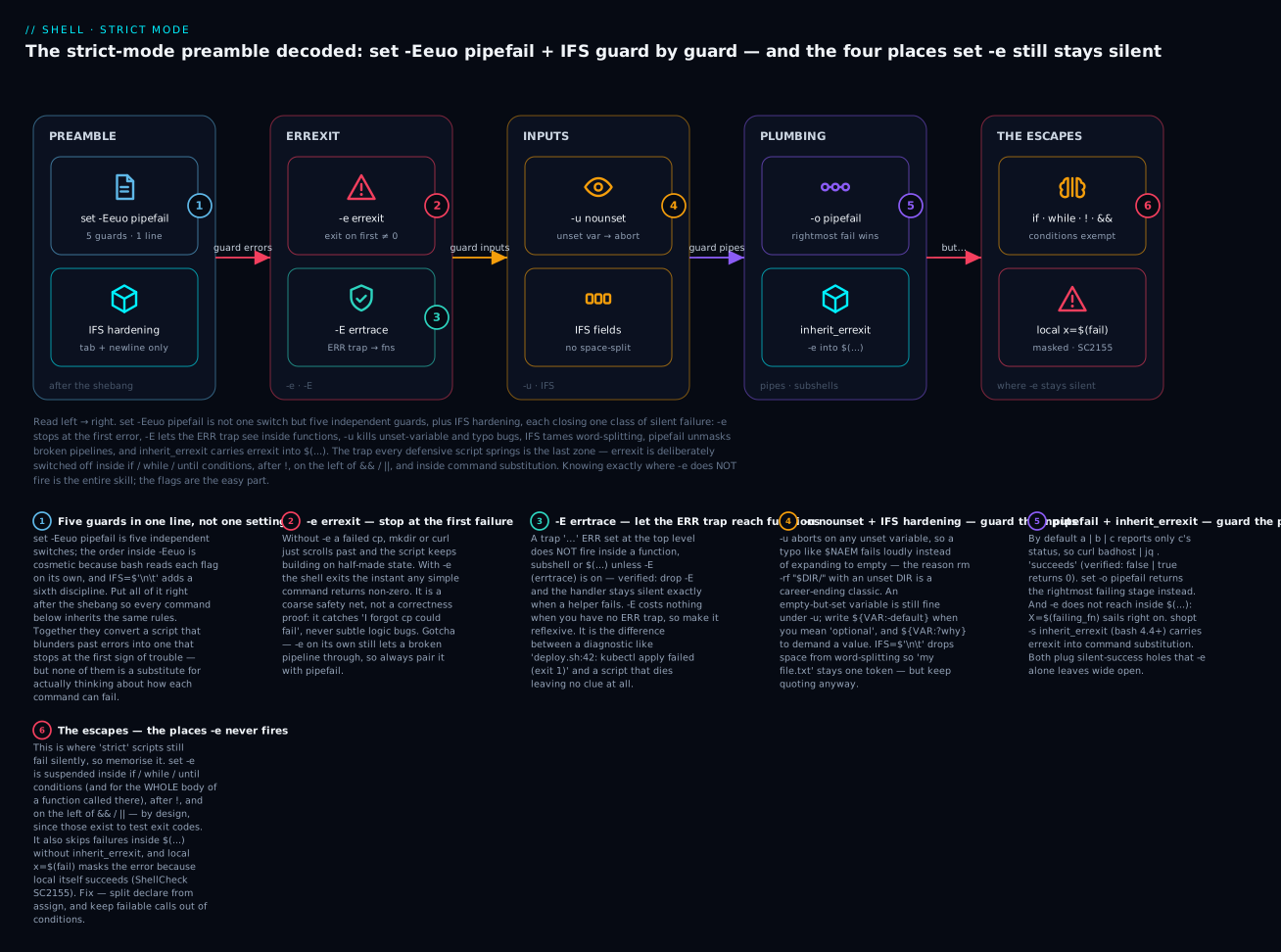
Read the diagram left → right as the anatomy of the preamble: each flag closes one class of silent failure — -e on the first error, -E so the ERR trap reaches functions, -u on unset variables, IFS on word-splitting, pipefail on broken pipelines, inherit_errexit on $(...) — and then the red ESCAPES zone (the six-badge) is the whole point of the lesson: the four places set -e is deliberately switched off, where “strict” scripts still fail in silence.
1. The strict-mode preamble in full
Every production shell script you write should start with the same five lines (after the shebang):
#!/usr/bin/env bash
set -Eeuo pipefail
IFS=$'\n\t'
That’s the canonical “strict mode” preamble. Let’s go through it flag by flag. The order in -Eeuo is conventional but irrelevant; bash treats them independently.
-e (errexit) — exit on any unhandled error
set -e
Causes the shell to exit immediately if any simple command exits with non-zero status. Without -e, scripts blunder through errors:
#!/usr/bin/env bash
# Without -e
cp /nonexistent /tmp/somewhere       # FAILS — but we keep going
echo "Done!"                          # prints "Done!" — but the cp failed
With -e, the script exits as soon as cp fails. This is what you want 99% of the time.
The gotcha: -e does NOT trigger in many cases that surprise people:
- Inside
if,while,untilconditions: that’s the whole point of those constructs — they test exit codes.if grep -q PATTERN file; then ... # grep returning 1 (no match) doesn't exit - After
&&or||in a chain (until the rightmost):cmd1 && cmd2 # cmd1 failing doesn't exit; the whole chain exits 1 - Negated commands (
! cmd):! cmd # never exits; the `!` *expects* failure - Inside command substitution (
$(…)) — by default, the failure of a command in$(...)does not propagate. (This was tightened in bash 4.4+ withinherit_errexit.)X=$(cmd1; cmd2) # cmd1 failing doesn't exit if cmd2 succeeds shopt -s inherit_errexit # bash 4.4+ — propagates errexit into $(...) - The last command in a pipeline is what
$?becomes; intermediate command failures are silently swallowed unlesspipefailis set. - Functions return-statuses for
set -epurposes: if a function fails insideif !,set -edoesn’t fire there either — same as any other command.
So -e is a coarse safety net, not a fine-grained correctness check. It catches “I forgot to handle the failure of cp” but won’t help with subtler bugs.
-E (errtrace) — extend ERR trap to functions and subshells
set -E
Without -E, an ERR trap defined at the top level does not fire inside functions, subshells, or command substitutions. With -E, traps inherit. This is essential if you want the ERR trap pattern (covered below) to be useful.
If you don’t use ERR traps, -E is harmless. But you should use ERR traps. So set -E always.
-u (nounset) — fail on unset variables
set -u
Causes the shell to exit when you reference an unset variable:
set -u
echo "$UNDEFINED_VAR"           # error: UNDEFINED_VAR: unbound variable
This catches typos:
NAME="alice"
echo "$NAEM"                    # without -u, prints empty string. with -u, fails immediately.
The gotcha: things you might think are “unset” actually aren’t. The empty string "" is a set variable with empty value:
NAME=""
echo "$NAME"                    # works fine — empty, but set
If you genuinely want “default if unset,” use parameter expansion:
echo "${NAME:-default}"         # default if unset OR empty
echo "${NAME-default}"          # default if unset only (empty stays empty)
For arrays, "${ARR[@]}" on an empty array sometimes triggers -u in older bash versions. The safe pattern:
ARR=()
for item in "${ARR[@]+"${ARR[@]}"}"; do …; done    # works on bash 3.2 with -u
For modern bash (4.4+), "${ARR[@]}" on an empty array is fine.
-o pipefail — pipeline returns first non-zero status
We covered this in L8. Without pipefail, the exit status of a | b | c is just c’s status. With pipefail, the whole pipeline returns the rightmost non-zero status. So:
set -o pipefail
cat /nonexistent | grep PATTERN     # cat fails with 1, grep "succeeds" with 1 (no match)
                                     # without pipefail: $? = 1 (looks like normal grep no-match)
                                     # with pipefail: $? = 1 (because cat failed)
Combined with -e, this means the script also exits.
IFS=$'\n\t' — restrict word splitting to newline + tab
We covered this in L2. The default IFS includes space, which means for f in $UNQUOTED_VAR splits on spaces — disastrous if $UNQUOTED_VAR contains filenames with spaces. Setting IFS to just newline and tab means word-splitting only happens on those, so spaces in filenames are preserved.
IFS=$'\n\t'
NAMES="alice bob carol"
for n in $NAMES; do echo "[$n]"; done   # one element: [alice bob carol] — no space-split
This forces you to always quote when iterating, which is the right discipline. for n in "${ARR[@]}" (quoted, array) is the canonical correct way; the loose for n in $VAR becomes harder to misuse.
Checking strict mode is active
# These lines should appear right after the shebang:
set -Eeuo pipefail
IFS=$'\n\t'

# To verify in a running script:
echo "flags: $-"
# e, u, B, E (and h) appear in $-  —  but NOT 'o':
# pipefail is an -o-only option with no single-letter flag, so it never
# shows up in $-. Check it explicitly instead:
[[ -o pipefail ]] && echo "pipefail is ON"
The $- variable shows the active single-letter flags as letters (e.g. ehuBE). Long options set with -o — pipefail, noclobber, nounset’s long name, and so on — are queried with [[ -o NAME ]] or shopt -o NAME, not by reading $-.
2. The ERR trap — line-precise diagnostics
The minimum-viable error handler is just set -e: exit on failure. But that gives you no information about what failed. The ERR trap is the next level:
#!/usr/bin/env bash
set -Eeuo pipefail
IFS=$'\n\t'

trap 'on_error $LINENO' ERR

on_error() {
  local line=$1
  echo "[ERROR] $0: line $line: command failed (exit $?)" >&2
  # cleanup if needed
  exit 1
}

# Now any uncaught failure prints which line failed
cp /nonexistent /tmp/x       # ERR trap fires before exit
Use single quotes for the trap argument so $LINENO expands at trap-time, not registration-time. (Same as L10’s signal trap rule.)
For richer diagnostics, capture more context:
trap 'on_error $? $LINENO "$BASH_COMMAND"' ERR

on_error() {
  local exit_code=$1 line=$2 cmd=$3
  printf '[ERROR] %s:%d: command "%s" exited with %d\n' "$0" "$line" "$cmd" "$exit_code" >&2
  exit "$exit_code"
}
$BASH_COMMAND is the command that just failed. Combined with $LINENO, this gives you a full diagnostic line:
[ERROR] ./deploy.sh:42: command "kubectl apply -f manifest.yaml" exited with 1
This is the level of diagnostics you want in production.
Why -E matters
Without -E, ERR traps registered at the top level do NOT fire inside functions:
#!/usr/bin/env bash
set -eo pipefail        # NOTE: no -E
trap 'echo "TRAPPED at $LINENO"' ERR

myfn() {
  cp /nonexistent /tmp/x   # this fails but ERR trap does NOT fire
}

myfn                       # script exits silently
With -E:
#!/usr/bin/env bash
set -Eeo pipefail
trap 'echo "TRAPPED at $LINENO"' ERR

myfn() {
  cp /nonexistent /tmp/x
}

myfn                       # ERR trap fires, prints line number
This is why -E is part of the canonical preamble.
Multi-line stack traces
For really verbose error reporting, walk the bash call stack:
on_error() {
  local exit_code=$? line=${BASH_LINENO[0]}
  printf '\n[FATAL] script %s exited with %d at line %d\n' "$0" "$exit_code" "$line" >&2
  printf 'Call stack:\n' >&2
  local i=0
  while caller $i >/dev/null 2>&1; do
    printf '  %s\n' "$(caller $i)" >&2
    ((i++))
  done
  exit "$exit_code"
}
trap on_error ERR
caller N prints LINE FUNCTION FILE for the Nth frame in the call stack. Combined with set -E, this gives full traces:
[FATAL] script ./deploy.sh exited with 1 at line 42
Call stack:
  42 do_deploy ./deploy.sh
  78 main ./deploy.sh
  103 main ./deploy.sh
Use this in any script complex enough to have nested functions.
3. The die / warn / info family
Every production script should have a small set of helpers for consistent error reporting and structured output. The canonical names are die (fatal), warn (non-fatal), info (informational). Here’s the minimum set:
#!/usr/bin/env bash
set -Eeuo pipefail
IFS=$'\n\t'

readonly SCRIPT_NAME="${0##*/}"

die()  { printf '[%s] FATAL: %s\n' "$SCRIPT_NAME" "$*" >&2; exit 1; }
warn() { printf '[%s] WARN:  %s\n' "$SCRIPT_NAME" "$*" >&2; }
info() { printf '[%s] INFO:  %s\n' "$SCRIPT_NAME" "$*" >&2; }
debug() { [[ "${DEBUG:-0}" == 1 ]] && printf '[%s] DEBUG: %s\n' "$SCRIPT_NAME" "$*" >&2 || true; }

# Usage:
[[ -f "$CONFIG" ]] || die "config file $CONFIG not found"
warn "skipping $f — not a regular file"
info "starting deploy of $TAG"
DEBUG=1 ./script    # turn on debug
Notes:
- All output goes to stderr (
>&2). Stdout is reserved for the script’s actual data output. This is how Unix tools have always worked, and it lets the script be used in pipelines:output_data=$(./myscript)works even if it logs heavily. diemustexit— it never returns. Convention: exit code 1 for general errors, 2 for “usage” errors, anything else as needed.${0##*/}strips the path so we just print the script’s basename.debugis a no-op unlessDEBUG=1is set in the environment.
Argument-validation idioms with die
[[ $# -ge 2 ]] || die "usage: $0 <env> <tag>"
[[ -d "$WORK_DIR" ]] || die "WORK_DIR ($WORK_DIR) is not a directory"
command -v kubectl >/dev/null 2>&1 || die "kubectl not found in PATH"
[[ "$ENV" =~ ^(dev|staging|prod)$ ]] || die "invalid env: $ENV"
Read those left-to-right: “this condition must be true OR die.” It’s the most idiomatic shell error-checking pattern.
assert_* helpers
For more elaborate validation, build up an assert family:
assert_command()  { command -v "$1" >/dev/null 2>&1 || die "command not found: $1"; }
assert_file()     { [[ -f "$1" ]] || die "file not found: $1"; }
assert_dir()      { [[ -d "$1" ]] || die "directory not found: $1"; }
assert_var()      { [[ -n "${!1:-}" ]] || die "required variable is unset or empty: $1"; }
assert_readable() { [[ -r "$1" ]] || die "file not readable: $1"; }

# Usage:
assert_command kubectl
assert_command jq
assert_var KUBE_NAMESPACE       # checks that $KUBE_NAMESPACE is set & non-empty
assert_dir "$DEPLOY_DIR"
${!1:-} is indirect variable expansion — the value of the variable whose name is $1. Combined with :- (default empty if unset), it lets us check arbitrary variable names.
This sort of helpers turn 30-line “validate inputs” blocks into a tight 5-line preamble.
4. ShellCheck — your script linter
ShellCheck is to shell what TypeScript is to JavaScript: it catches an enormous fraction of real bugs before runtime. Run it on every script. Always.
Install
# macOS
brew install shellcheck

# Debian / Ubuntu
sudo apt install shellcheck

# Alpine
apk add shellcheck

# Other: download from https://github.com/koalaman/shellcheck/releases
Run
shellcheck myscript.sh
shellcheck -x myscript.sh    # follow `source` statements (-x = external sources)
The most common findings (and what to do)
ShellCheck assigns each rule a number: SC2086, SC2155, etc. The most common in real scripts:
SC2086 — “Double quote to prevent globbing and word splitting”
NAME="alice smith"
cp $NAME /tmp/         # SC2086: cp alice smith /tmp/ — looks for two files
cp "$NAME" /tmp/       # CORRECT
The single most-common shell bug. The fix is always to quote.
SC2046 — “Quote this to prevent word splitting”
ls $(find . -name '*.txt')        # SC2046 — output of find may have spaces
ls "$(find . -name '*.txt')"      # NOPE — collapses all into single arg
mapfile -d '' FILES < <(find . -name '*.txt' -print0)
ls "${FILES[@]}"                  # CORRECT
This one is harder to fix mechanically — sometimes you really do want word-splitting. ShellCheck warns regardless; you have to think about which case applies.
SC2155 — “Declare and assign separately to avoid masking return values”
local var="$(get_value)"          # SC2155
# Why? `local` always succeeds, so $? after this is local's status, NOT get_value's.
# If get_value fails, you don't notice.

# CORRECT:
local var
var="$(get_value)"
Fix: declare first, assign on the next line. Otherwise set -e won’t catch failure of the assigned expression.
SC2034 — “var appears unused”
NAME="alice" # never used elsewhere — typo? dead code?
Either remove or use, or annotate as exported (export NAME=...).
SC2154 — “var is referenced but not assigned”
echo "$VAARS" # typo — meant $VARS?
SC2126 — “Consider using grep -c instead of grep | wc -l”
grep PATTERN file | wc -l       # SC2126 — slower
grep -c PATTERN file            # better
SC2068 — “Double quote array expansions”
for arg in $@; do …; done       # SC2068
for arg in "$@"; do …; done     # CORRECT
SC2002 — “Useless cat”
cat file | grep PATTERN         # SC2002
grep PATTERN < file             # better
grep PATTERN file               # best
SC2164 — “Use cd … || exit”
cd /tmp                         # SC2164 — what if /tmp doesn't exist?
cd /tmp || die "cannot cd"      # better
Suppressing rules
When ShellCheck is wrong (rare but happens), suppress the specific rule above the line:
# shellcheck disable=SC2086
COMMAND="ls -la"
$COMMAND        # we WANT word-splitting here

# Or for an entire file (top of file, after shebang):
# shellcheck disable=SC2086,SC2046
Always add a comment explaining why you suppressed:
# shellcheck disable=SC2086  # we deliberately split — kubectl args from build
$KUBECTL_ARGS
CI integration
Add a step to your pipeline that fails the build on any ShellCheck warning:
# .github/workflows/lint.yml (snippet)
- name: ShellCheck
  run: shellcheck scripts/*.sh
For pre-commit:
# .pre-commit-config.yaml
repos:
  - repo: https://github.com/koalaman/shellcheck-precommit
    rev: v0.10.0
    hooks:
      - id: shellcheck
There’s no excuse for not running ShellCheck. Install it on day one.
The other three directives you’ll actually use
# shellcheck disable= is the one everyone knows, but there are three more directives that pull their weight in real repos, and all four are just comments ShellCheck reads:
#!/usr/bin/env bash
# shellcheck shell=bash            # force the dialect (e.g. for a lib with no shebang)
# shellcheck source=lib/errors.sh  # tell it where a dynamic `source "$X"` resolves to
source "$SCRIPT_DIR/lib/errors.sh"

foo() {
  # shellcheck disable=SC2034      # SEEN_BY_TRAP is used inside the ERR trap string
  local SEEN_BY_TRAP=1
}
shell=bash— sets the dialect when ShellCheck can’t infer it (a sourced library with no shebang, or a POSIXshfile you want checked asshso it flags bashisms). This is how you make the linter enforce portability.source=PATH(orsource-path=DIR) — resolves asource "$VAR"whose target ShellCheck can’t compute, so cross-file checking with-xactually works.disable=SCxxxx— the workhorse; scope it as tightly as you can (one line beats one function beats one file).
Two habits keep suppressions honest: put the disable on the line above the offending statement (file-level disables at the top rot into blanket silencers), and always leave a # reason after it. A suppression without a reason is a future bug hiding behind a green check.
5. Error propagation across function boundaries
This is where most engineers get tripped up. Bash has subtle rules about how errors propagate, especially with command substitution and pipelines.
The problem: command-substitution exit codes
#!/usr/bin/env bash
set -Eeuo pipefail

get_count() {
  cat /nonexistent          # this fails
  echo "10"
}

# What does $COUNT become?
COUNT=$(get_count)           # $COUNT = "10"; the cat failure was swallowed!
echo "got: $COUNT"           # "got: 10" — function appeared to succeed!
The function get_count internally failed at cat /nonexistent, but because it ran inside $(...), set -e doesn’t propagate the failure out by default.
The fix is inherit_errexit (bash 4.4+):
shopt -s inherit_errexit     # add to your preamble
COUNT=$(get_count)            # NOW the cat failure does propagate; script exits
For older bash, the workaround is to capture and check explicitly:
if ! COUNT=$(get_count); then
  die "get_count failed"
fi
Or to split assignment from the failable command:
if ! OUTPUT=$(get_count 2>&1); then
  die "get_count failed: $OUTPUT"
fi
The pipefail dance with set -e
A subtle case:
set -eo pipefail
cmd1 | cmd2            # if cmd1 fails, $? becomes cmd1's status (pipefail), then -e fires
That’s the desired behaviour. But:
set -eo pipefail
output=$(cmd1 | cmd2)  # $? = the right-most failure ... but does -e fire?
Without inherit_errexit, no — the failure is contained in the command sub. With inherit_errexit, yes. Same lesson: enable inherit_errexit when on bash 4.4+.
Functions and local masking exit codes
We saw SC2155 above — but the symptom is worth re-stating:
process() {
  local result="$(some_failing_command)"   # SC2155
  echo "$result"
}
Here, local always succeeds. Even though some_failing_command failed, the value passed to local is its empty stdout, and the function continues. set -e does not fire. The fix:
process() {
  local result
  result="$(some_failing_command)"     # NOW set -e can fire on failure
  echo "$result"
}
This is one of the strongest reasons to lint with ShellCheck.
if ! and until swallow failures
if ! some_check; then
  …
fi
Inside an if (or while, until) condition, set -e is suspended for that command. Don’t put expensive logic in if conditions if you want set -e to catch its failures — restructure so the call is at the top level:
some_check
status=$?
if [[ $status -ne 0 ]]; then …; fi   # but now set -e already exited :(
Easier:
if some_check; then
  …
else
  die "some_check failed"
fi
The “explicit if/else with explicit error path” is sometimes the cleanest pattern.
6. The lib/errors.sh framework
Let’s assemble everything into a reusable library. Save this as lib/errors.sh and source it from every script:
# lib/errors.sh — defensive shell helpers
# Source this from every script:
#     source "$(dirname "${BASH_SOURCE[0]}")/lib/errors.sh"

# strict mode
set -Eeuo pipefail
shopt -s inherit_errexit nullglob 2>/dev/null || true   # bash 4.4+; nullglob always ok
IFS=$'\n\t'

readonly SCRIPT_NAME="${0##*/}"

# Logging
_log() { local lvl=$1; shift; printf '[%s] %s: %s\n' "$SCRIPT_NAME" "$lvl" "$*" >&2; }
die()   { _log "FATAL" "$@"; exit 1; }
warn()  { _log "WARN " "$@"; }
info()  { _log "INFO " "$@"; }
debug() { [[ "${DEBUG:-0}" == 1 ]] && _log "DEBUG" "$@" || true; }

# Validation
assert_command()  { command -v "$1" >/dev/null 2>&1 || die "command not found: $1"; }
assert_file()     { [[ -f "$1" ]] || die "file not found: $1"; }
assert_dir()      { [[ -d "$1" ]] || die "directory not found: $1"; }
assert_var()      { [[ -n "${!1:-}" ]] || die "required variable is unset or empty: \$$1"; }
assert_readable() { [[ -r "$1" ]] || die "file not readable: $1"; }
assert_writable() { [[ -w "$1" ]] || die "file not writable: $1"; }
assert_in()       {
  local val=$1; shift
  local choice
  for choice in "$@"; do [[ "$val" == "$choice" ]] && return 0; done
  die "value '$val' is not in: $*"
}

# ERR trap — run on any uncaught failure
_on_err() {
  local exit_code=$? line=${BASH_LINENO[0]} cmd=${BASH_COMMAND}
  printf '\n[%s] FATAL: %s:%d: "%s" exited %d\n' "$SCRIPT_NAME" "${BASH_SOURCE[1]:-$0}" "$line" "$cmd" "$exit_code" >&2
  if [[ ${#FUNCNAME[@]} -gt 1 ]]; then
    printf 'Call stack:\n' >&2
    local i=0
    while caller $i >/dev/null 2>&1; do
      printf '  %s\n' "$(caller $i)" >&2
      ((i++))
    done
  fi
  exit "$exit_code"
}
trap _on_err ERR
Now any script that sources this gets:
#!/usr/bin/env bash
source "$(dirname "${BASH_SOURCE[0]}")/lib/errors.sh"

# strict mode active, ERR trap active, helpers available
assert_command kubectl
assert_command jq
assert_var TARGET_ENV
assert_in "$TARGET_ENV" dev staging prod

info "deploying to $TARGET_ENV"
kubectl apply -f manifests/

info "deploy complete"
Any failure produces:
[deploy.sh] FATAL: ./deploy.sh:8: "kubectl apply -f manifests/" exited 1
Call stack:
  8 do_deploy ./deploy.sh
  20 main ./deploy.sh
This is what production-grade shell looks like.
7. Patterns for partial success
Strict mode is the default. But sometimes you genuinely want “do this, ignore failure”:
# Pattern 1: Explicit `|| true` to suppress one command
rm -rf /tmp/cache 2>/dev/null || true

# Pattern 2: Capture exit code without exiting
if some_optional_check; then
  info "optional check passed"
fi
# (no else — failure is fine)

# Pattern 3: Set a flag, branch on it
if has_optional_dep; then
  USE_OPTIONAL=1
else
  USE_OPTIONAL=0
fi

# Pattern 4: Run a series with set +e locally
do_optional_steps() {
  set +e
  cmd1
  cmd2
  cmd3
  set -e
}
Pattern 4 is sometimes necessary for “best effort” cleanup or batch operations — but use it sparingly and document why. For most production scripts, fail-fast is right.
try/catch the bash way
Bash has no try/catch. The closest pattern:
{
  some_thing
  another_thing
} || {
  warn "best-effort batch failed; continuing"
}
The { } group runs as a unit; the || after the closing brace gives you the “catch” branch. Use this for genuinely-optional work; don’t normalize it.
8. Complete example: a real defensive script
Putting it all together — a deploy script with full defensive engineering:
#!/usr/bin/env bash
# deploy.sh — push image to a Kubernetes namespace
# Usage: deploy.sh <env> <image-tag>

# 1. Strict-mode preamble
set -Eeuo pipefail
shopt -s inherit_errexit nullglob
IFS=$'\n\t'

# 2. Source our helpers
SCRIPT_DIR="$(cd "$(dirname "${BASH_SOURCE[0]}")" && pwd)"
# shellcheck source=lib/errors.sh
source "$SCRIPT_DIR/lib/errors.sh"

# 3. Argument validation
[[ $# -eq 2 ]] || die "usage: $0 <env> <image-tag>"

readonly ENV="$1"
readonly TAG="$2"

assert_in "$ENV" dev staging prod
[[ "$TAG" =~ ^v[0-9]+\.[0-9]+\.[0-9]+$ ]] || die "tag must be vMAJOR.MINOR.PATCH; got: $TAG"

assert_command kubectl
assert_command jq

# 4. Look up cluster context
KUBE_CONTEXT="kloudvin-${ENV}"
kubectl config get-contexts -o name | grep -qx "$KUBE_CONTEXT" || die "no kubectl context: $KUBE_CONTEXT"

# 5. Atomic deploy — set, then poll for rollout
info "switching to context $KUBE_CONTEXT"
kubectl config use-context "$KUBE_CONTEXT"

NAMESPACE="kloudvin"
DEPLOYMENT="api"

info "setting image to $TAG"
kubectl -n "$NAMESPACE" set image "deployment/$DEPLOYMENT" "$DEPLOYMENT=ghcr.io/kloudvin/api:$TAG"

info "waiting for rollout (timeout 5m)"
if ! kubectl -n "$NAMESPACE" rollout status "deployment/$DEPLOYMENT" --timeout=5m; then
  warn "rollout failed; rolling back"
  kubectl -n "$NAMESPACE" rollout undo "deployment/$DEPLOYMENT"
  die "rollout failed for $DEPLOYMENT in $NAMESPACE; rolled back"
fi

info "rollout complete: $DEPLOYMENT @ $TAG in $NAMESPACE/$ENV"
Breakdown:
- Section 1: strict-mode preamble.
- Section 2: import helpers via sourcing. The
# shellcheck source=...directive tells ShellCheck where to find the sourced file, so it can lint cross-file. - Section 3: every input validated up-front. We fail before doing any actual work.
- Section 4: validate cluster context exists.
- Section 5: do the actual work; on rollout failure, roll back and die. We want to die, so the CI pipeline marks the deploy as failed.
This kind of script — strict, validated, atomic, fail-loud — is what you ship to a team you’ll work with for years.
9. Common pitfalls
“I added set -e but it’s still not catching X”
set -e has many exemptions (covered above). When something isn’t being caught, check:
- Is it inside
if/while/until? - Is it in
$(...)withoutinherit_errexit? - Is it after
&&or||? - Is it a
local var=$(failing_cmd)?
The fix is usually to restructure or add explicit checking.
Trap fires twice on script exit
If you have both an EXIT trap and an ERR trap, they both fire. Either:
# Pattern A: ERR exits, EXIT does cleanup. ERR triggers EXIT.
trap '_on_err' ERR
trap '_cleanup' EXIT
Or:
# Pattern B: One unified handler that knows the difference
_on_exit() {
  local exit_code=$?
  if [[ $exit_code -ne 0 ]]; then
    warn "script exiting with $exit_code"
  fi
  _cleanup
}
trap _on_exit EXIT
We covered this in L10.
pipefail makes intentional head short-circuit fail
set -o pipefail
some_long_output | head -n 10        # head closes stdin early; some_long_output gets SIGPIPE; pipefail trips
The fix:
set -o pipefail
some_long_output | { head -n 10; cat >/dev/null; }   # absorb the rest
# Or:
some_long_output | head -n 10 || [[ $? -eq 141 ]]    # tolerate SIGPIPE (128+13)
Pick one; document the choice in a comment.
Sourcing lib/errors.sh from a non-standard relative path
source ./lib/errors.sh               # WRONG — depends on cwd at invocation
SCRIPT_DIR="$(cd "$(dirname "${BASH_SOURCE[0]}")" && pwd)"
source "$SCRIPT_DIR/lib/errors.sh"   # CORRECT — always relative to the script's location
Always use BASH_SOURCE[0] + dirname for reliable sourcing.
ShellCheck false positives
Sometimes you’ll really want word-splitting (SC2086) or really want to use unquoted $@. The right answer is to suppress the rule on that line with an explanatory comment:
# shellcheck disable=SC2086  # OPTS is built up as a string of safe shell tokens
some_command $OPTS
Don’t suppress globally to silence noise. Diagnose each case.
Going deeper
Everything above is the day-to-day discipline. This section is the fine print — the edge cases that separate “I paste set -euo pipefail and hope” from “I know precisely what this preamble does and does not guarantee.” These are the questions that come up in senior-engineer code reviews.
The arithmetic trap: (( )) and let “fail” when the result is zero
This one bites everybody exactly once. An arithmetic command returns exit status 1 whenever the expression evaluates to 0 — because in C-style arithmetic, zero is false. Post-increment returns the old value, so incrementing from zero returns zero, which is a “failure”:
i=0
((i++)); echo "exit: $?"   # exit: 1   (the expression evaluated to the OLD value, 0)
i=5
((i++)); echo "exit: $?"   # exit: 0   (old value 5 is "true")
(( 0 ));   echo "$?"       # 1
(( 1 ));   echo "$?"       # 0
let x=0;   echo "$?"       # 1
(Verified on the build host: ((i++)) from i=0 returns 1.) Now combine that with set -e:
set -e
count=0
for f in *.log; do
  ((count++))          # on bash where arithmetic participates in errexit, this ABORTS
                       # the script the first time — count went 0 → the expression was 0
done
echo "processed $count files"   # may never be reached
The exit-status-1 rule is universal across bash versions; whether set -e then acts on it inside a (( )) compound has shifted between bash releases (older bash 3.2 treats (( )) leniently; modern bash 5 is stricter — and let triggers -e on both). Because you can’t predict which behaviour a given host has, don’t rely on either. The robust fixes work everywhere:
((count++)) || true        # swallow the "failure" explicitly
((++count))                # pre-increment: 0 → 1, expression is 1, exit 0
count=$((count + 1))       # plain assignment never carries a non-zero status
The same trap hides in ((flag)) used as a boolean and ((a == b)) used as a test — both are commands with an exit code, not silent expressions. Use ((...)) for conditions (if ((a > b))), use $((...)) or || true for mutation.
set -e is suspended for an entire function body called in a condition
Most people know if cmd; then exempts cmd from -e. Fewer know that if cmd is a function, -e is disabled for every command inside that function, not just the call:
set -e
check() {
  false                    # you'd expect -e to abort here
  echo "STILL RUNNING"     # ...but this prints
}
if check; then :; fi       # prints "STILL RUNNING" — the whole body ran unguarded
(Verified: STILL RUNNING prints.) This is the single most surprising -e rule, and it’s why “wrap the risky call in an if” can silently defang all the error handling inside the function. If a function must run under strict -e, call it at the top level (check), not in a condition. If you need its exit code, capture it deliberately:
if check; then status=0; else status=$?; fi   # body still runs unguarded — beware
# Better: make check() itself return early on error, and call it bare:
check || die "check failed"                    # -e suspended only for the single call, not the body
Verifying which guards are actually on
$- holds the single-letter flags (e, u, x, B, E, …) but not -o-style options like pipefail. To audit a running shell precisely:
echo "$-"                       # e.g. ehuBE   — errexit/nounset/errtrace visible; pipefail is NOT
[[ -o pipefail ]] && echo on    # the correct pipefail check
[[ -o errexit  ]] && echo on    # errexit also has a long name
shopt -o pipefail               # tabular: "pipefail   on"
shopt inherit_errexit           # the shopt-style options (note: shopt, not shopt -o)
There are two option namespaces: set -o / shopt -o options (errexit, pipefail, nounset, noclobber, …) and shopt options (inherit_errexit, nullglob, globstar, extglob, …). inherit_errexit lives in the second namespace, which is why it’s shopt -s inherit_errexit, not set -o.
None of this is POSIX — portability matters
The strict-mode preamble is bash-specific. If your shebang is #!/bin/sh (which on Debian/Ubuntu is dash, on Alpine is busybox ash), most of it silently does nothing or errors:
| Feature | bash |
POSIX sh / dash |
Note |
|---|---|---|---|
set -e (errexit) |
yes | yes | but exemption rules differ subtly between shells |
set -u (nounset) |
yes | yes | portable |
set -o pipefail |
yes | no (not in POSIX) | dash errors; only bash/ksh/zsh have it |
set -E (errtrace) |
yes | no | bashism |
IFS=$'\n\t' (ANSI-C quoting) |
yes | no — $'…' is a bashism |
POSIX: build it with printf |
shopt -s inherit_errexit |
4.4+ only | no | bash-only, recent |
${BASH_COMMAND}, ${BASH_SOURCE}, caller |
yes | no | bash-only diagnostics |
The practical rule: pin your interpreter with #!/usr/bin/env bash (not #!/bin/sh) whenever you use this preamble, and let ShellCheck enforce it with # shellcheck shell=bash. If a script genuinely must be POSIX sh, drop -E, pipefail, and $'…', and lean harder on explicit || die checks — you lose the safety net and must replace it with discipline. This is why the packaging/portability lesson insists you choose your shell deliberately rather than default to /bin/sh.
The masking family beyond local
local x=$(cmd) (SC2155) is the famous one, but any builtin that succeeds independently of its right-hand side masks a command-substitution failure the same way:
export X="$(fail)"        # export succeeds → $? = 0, failure lost
declare -g Y="$(fail)"    # same
readonly Z="$(fail)"      # same
local w="$(fail)"         # same (SC2155)
The mechanism is identical: the builtin’s exit status wins, and set -e sees success. Same fix for all of them — split the declaration from the assignment so the assignment stands alone and its $? is the command sub’s:
local w
w="$(fail)"               # now $? is fail's; -e / the ERR trap can act
(Verified: with the split form, a function whose command sub returns 3 aborts the script with code 3.)
|| true and friends also silence the ERR trap
cmd || true doesn’t just stop -e — because the whole cmd || true list succeeds, the ERR trap never fires either. That’s usually what you want for a genuinely optional command, but it means you can’t use || true to “keep going but still log via the trap.” If you want the trap’s diagnostics and non-fatal behaviour, log explicitly:
cmd || warn "cmd failed (non-fatal): exit $?"
Likewise, a command anywhere left of &&/||, negated with !, or inside a condition is invisible to the ERR trap for exactly the same reasons it’s invisible to -e — the trap and -e share one suppression rule set.
Performance and when not to reach for strict mode
Strict mode has effectively zero runtime cost — -e, -u, and pipefail are status checks the shell already computes; the ERR trap runs only on failure. So performance is never a reason to skip it. There are, however, two contexts where you deliberately don’t paste the preamble:
- Interactive shells and
.bashrc.set -e/-uin your interactive shell will kick you out of your terminal on a trivial typo. Strict mode is for scripts, not sessions. - Sourced-into-someone-else’s-shell libraries. If a file is meant to be
sourced into an arbitrary shell (e.g. a completion script or a shared profile snippet), callingset -emutates the caller’s options and can break them. A library that’s sourced should set options only if it owns the process, or save/restore them.
For everything that runs as its own process with #!/usr/bin/env bash at the top — cron jobs, CI steps, deploy scripts, systemd ExecStart wrappers — the preamble is unconditional.
The errexit + ERR + EXIT interaction, precisely
The order of events when a command fails under the full preamble is worth committing to memory:
- Command exits non-zero.
-edecides whether to abort (subject to all the exemptions above).- If aborting, the
ERRtrap fires first (with$?,$LINENO,$BASH_COMMANDstill reflecting the failed command). - Then the shell begins exiting, which fires the
EXITtrap (your cleanup).
So the idiomatic split is: ERR reports (line, command, stack) and EXIT cleans up (temp files, locks, children). Don’t put exit inside both — let ERR report and fall through, and let EXIT do the one-and-only cleanup, exactly as the signal-handling lesson lays out.
10. Twelve idioms for daily use
# 1. Strict-mode preamble (every script)
set -Eeuo pipefail
shopt -s inherit_errexit nullglob
IFS=$'\n\t'

# 2. die / warn / info — minimum logging
die()  { printf '[%s] FATAL: %s\n' "${0##*/}" "$*" >&2; exit 1; }
warn() { printf '[%s] WARN:  %s\n' "${0##*/}" "$*" >&2; }
info() { printf '[%s] INFO:  %s\n' "${0##*/}" "$*" >&2; }

# 3. Basic ERR trap with line number
trap 'die "line $LINENO: $BASH_COMMAND failed (exit $?)"' ERR

# 4. assert_command
assert_command() { command -v "$1" >/dev/null 2>&1 || die "missing command: $1"; }

# 5. assert_var (checks variable is set and non-empty by name)
assert_var() { [[ -n "${!1:-}" ]] || die "required var unset: \$$1"; }

# 6. assert_in (value must be in a list)
assert_in() { local v=$1; shift; for c; do [[ "$v" == "$c" ]] && return 0; done; die "$v not in: $*"; }

# 7. Quoted argument validation
[[ $# -ge 2 ]] || die "usage: $0 <env> <tag>"

# 8. Regex validation
[[ "$TAG" =~ ^v[0-9]+\.[0-9]+\.[0-9]+$ ]] || die "bad tag: $TAG"

# 9. Robust source path
SCRIPT_DIR="$(cd "$(dirname "${BASH_SOURCE[0]}")" && pwd)"
source "$SCRIPT_DIR/lib/errors.sh"

# 10. Suppress ShellCheck rule with reason
# shellcheck disable=SC2086  # intentional split

# 11. local + assign on separate lines (avoid SC2155)
local result
result="$(some_command)"

# 12. Atomic write + rename
TMP=$(mktemp); some_command > "$TMP" && mv "$TMP" target
11. What you must internalise before lesson 14
- What does
set -Edo, and why is it necessary? (Propagates ERR trap into functions / subshells / command substitution.) - What’s
inherit_errexit? (Propagatesset -einto command substitution$(...).) - Where does
set -enot fire? (Insideif/while/untilconditions; in$(...)withoutinherit_errexit; after&&/||; on commands prefixed with!.) - What’s the fix for SC2155 (
local x="$(...)")? (Declare and assign on separate lines.) - Why must trap commands be in single quotes? (To prevent expansion at registration; expansion happens at fire time.)
- What’s the canonical ERR trap line? (
trap 'die "line $LINENO: $BASH_COMMAND failed (exit $?)"' ERR.) - What goes to stdout vs stderr? (Data → stdout. Logs and errors → stderr.)
- Why call ShellCheck on every script? (Catches an enormous fraction of common shell bugs at lint time.)
- How do you suppress a ShellCheck rule with explanation? (
# shellcheck disable=SC2086 # reason.) - What’s
assert_var "VAR_NAME"checking? (That the variable named “VAR_NAME” is set and non-empty, via indirect expansion${!1:-}.)
If anything felt fuzzy, re-read. The next nine lessons assume you internalised these.
Practice challenges
Work these in order — they escalate from beginner to advanced, and each one is a runnable exercise. Try it in a real terminal first; open the solution only to check yourself. On this build host the default /bin/bash is 3.2, so where a snippet needs bash 4.4+ (inherit_errexit) it’s called out.
Challenge 1 (beginner) — prove -u catches a typo
Write a three-line script that greets a $USERNAME variable, but deliberately misspell it as $USRENAME in the echo. Run it once without set -u and once with it. What changes?
<details> <summary>Solution</summary>
#!/usr/bin/env bash
set -Eeuo pipefail          # includes -u
USERNAME="alice"
echo "Hello, $USRENAME"     # typo
Without -u this prints Hello, (empty — the typo expands to nothing). With -u it aborts: USRENAME: unbound variable. Why: -u turns a silent empty expansion — the classic source of rm -rf "$UNSET/" disasters — into an immediate, loud failure at the point of the typo.
</details>
Challenge 2 (beginner) — kill an SC2086 word-splitting bug
You have SRC="my report.pdf" and run cp $SRC /backup/. It fails with “cp: cannot stat ‘my’: No such file or directory”. Fix it so a filename with spaces works, then confirm ShellCheck is happy (shellcheck script.sh).
<details> <summary>Solution</summary>
SRC="my report.pdf"
cp "$SRC" /backup/          # quote the expansion
Why: unquoted $SRC is word-split on IFS into two arguments (my and report.pdf); quoting keeps it a single argument. ShellCheck flags the unquoted form as SC2086 — “Double quote to prevent globbing and word splitting” — and the warning disappears once quoted. This is the single most common shell bug, and IFS=$'\n\t' in the preamble makes it far less dangerous by removing space from the split set.
</details>
Challenge 3 (intermediate) — make a broken pipeline actually fail
This “health check” always reports success even when the URL is down, because jq succeeds on empty input:
status=$(curl -s https://down.invalid | jq -r '.status')
echo "exit was $?"
Change one line so a failed curl makes the pipeline’s exit status non-zero. Demonstrate the difference with false | true.
<details> <summary>Solution</summary>
set -o pipefail
false | true; echo "$?"     # 1  (was 0 without pipefail)
Why: without pipefail, a pipeline’s exit status is only the last stage’s, so curl failing while jq “succeeds” reads as success — the most common silent bug in shell. set -o pipefail makes the pipeline return the rightmost non-zero status, so the upstream curl failure surfaces. (Verified: false | true returns 0 without pipefail, 1 with it.)
</details>
Challenge 4 (intermediate) — fix the local masking bug (SC2155)
This function is supposed to abort under set -e if wc can’t read the file, but it doesn’t:
count_lines() {
  local n="$(wc -l < "$1")"   # SC2155
  echo "$n"
}
Refactor it so a failing wc (e.g. an unreadable file) actually propagates. Explain in one line why the original hid the failure.
<details> <summary>Solution</summary>
count_lines() {
  local n
  n="$(wc -l < "$1")"         # declare first, then assign
  echo "$n"
}
Why: in local n="$(...)", the exit status of the whole statement is local’s — and local almost always succeeds — so the command substitution’s failure is discarded and set -e never sees it. Splitting declaration from assignment makes the assignment stand alone, so its $? is wc’s. ShellCheck flags the original as SC2155. (Verified: the split form aborts the script when the command sub returns non-zero.)
</details>
Challenge 5 (advanced) — an ERR trap that names the failing function
Write a script with a top-level ERR trap that prints file:line: "command" (exit N) and a call stack, then call a helper function that fails deep inside. Make sure the trap fires from inside the function. Which single flag makes the difference?
<details> <summary>Solution</summary>
#!/usr/bin/env bash
set -Eeuo pipefail                       # the -E is the key flag

on_err() {
  local ec=$? line=${BASH_LINENO[0]} cmd=$BASH_COMMAND
  printf '[ERR] %s:%d: "%s" exit %d\n' "${BASH_SOURCE[1]:-$0}" "$line" "$cmd" "$ec" >&2
  local i=0; while caller "$i" >/dev/null 2>&1; do printf '  %s\n' "$(caller "$i")" >&2; ((i++)); done
  exit "$ec"
}
trap on_err ERR

do_work() { cp /nonexistent /tmp/x; }    # fails inside a function
do_work
Why: -E (errtrace) is what makes the top-level ERR trap inherit into functions, subshells, and command substitutions. Without it, do_work’s failure exits the script but the trap never runs, so you get no diagnostic. (Verified: with set -eo and no -E, no “TRAPPED” prints; add -E and it does.) $BASH_COMMAND is the failed command, ${BASH_LINENO[0]} its line, and caller walks the stack.
</details>
Challenge 6 (advanced) — hunt two silent “strict-mode” bugs
This script passes shellcheck and looks strict, but it has two failures that slip through silently. Find and fix both, and note which bash version each fix needs:
#!/usr/bin/env bash
set -Eeuo pipefail

read_config() { cat /etc/myapp/missing.conf; echo "default"; }

CFG=$(read_config)          # BUG 1: read_config fails internally, but $CFG="default"
n=0
for f in a b c; do
  ((n++))                   # BUG 2: aborts (or not) unpredictably when n starts at 0
done
echo "config=$CFG count=$n"
<details> <summary>Solution</summary>
Bug 1 — command substitution swallows the failure. set -e does not propagate out of $(...). Two fixes:
# bash 4.4+: make errexit reach into $(...)
shopt -s inherit_errexit
CFG=$(read_config)                       # now the cat failure aborts the script

# portable (any bash): check the substitution explicitly
if ! CFG=$(read_config); then die "read_config failed"; fi
Bug 2 — arithmetic returns exit 1 when the result is 0. ((n++)) from n=0 evaluates to the old value 0, which is a “failure”; whether -e acts on it varies by bash version, so make it deterministic:
n=$((n + 1))     # plain assignment — never carries a non-zero status
# or  ((++n))    # pre-increment reaches 1 first
# or  ((n++)) || true
Why: both bugs are places -e is either bypassed ($(...) without inherit_errexit) or triggered surprisingly (arithmetic-evaluates-to-zero). They’re the two canonical “I set -euo pipefail, why did it still break?” traps — one lets a failure through, the other stops a perfectly good loop. (Verified: CFG becomes default despite the failing cat; ((n++)) from 0 returns exit 1.)
</details>
Common beginner mistakes
These are misconceptions about how strict mode thinks, distinct from the symptom-driven pitfalls in §9. Each is a wrong mental model plus the right one.
“set -e means my script is safe now.”
Wrong model: errexit is a force field that catches every failure. Right model: it’s a coarse net with well-documented holes — conditions, $(...), &&/||, !, local x=$(...), arithmetic-zero. It reduces one class of bug (unhandled failure of a simple command). You still have to think about the exemptions and about logic errors it can’t see. Treat -e as a seatbelt, not a self-driving car.
“-u protects me from unset variables, and empty counts as unset.”
Wrong model: "" and “unset” are the same to -u. Right model: an empty-but-set variable (NAME="") passes -u fine — only a variable that was never assigned trips it. When you want “use a default if missing,” reach for parameter expansion: ${VAR:-default} (default if unset or empty) vs ${VAR-default} (default only if unset). And when a value is mandatory, ${VAR:?must be set} fails loudly with your message.
“I’ll add the quotes later — it works on my machine.”
Wrong model: quoting is a style nicety. Right model: unquoted $VAR is word-split and glob-expanded every time — it works until a filename has a space or a *, then it silently does the wrong thing (SC2086). Quote by default; unquote only deliberately with a # shellcheck disable and a reason. The IFS=$'\n\t' preamble is your backstop, not your excuse to skip quotes.
“local result=$(cmd) is fine — it’s one clean line.”
Wrong model: the assignment’s success reflects cmd. Right model: local (and export, declare, readonly) succeed on their own, masking the command substitution’s exit status, so set -e never sees the failure (SC2155). Always split: local result then result="$(cmd)". This is the highest-value habit in the whole lesson.
“The ERR trap I set at the top will catch failures anywhere.”
Wrong model: a top-level trap is global. Right model: without set -E (errtrace), the ERR trap does not fire inside functions, subshells, or $(...) — exactly where your real logic lives. -E is cheap and belongs in every preamble; that’s the whole reason it’s the leading letter in -Eeuo.
“pipefail broke my script, so I removed it.”
Wrong model: the SIGPIPE 141 from cmd | head is a bug in your script. Right model: it’s expected — head closed the pipe early, so the upstream got SIGPIPE (128+13). Don’t drop pipefail (you’d re-hide real upstream failures); handle the one case: cmd | head -n 10 || [[ $? -eq 141 ]], or absorb the rest with { head -n 10; cat >/dev/null; }. Understand the exit code, don’t disable the guard.
“When strict mode is annoying, I’ll just set +e for a while.”
Wrong model: turning errexit off is a normal way to handle a tricky block. Right model: it’s occasionally right (best-effort cleanup, a batch that must finish), but it’s usually a smell that you haven’t decided what failure means there. If you must, scope it as tightly as possible and turn it back on immediately, with a comment saying why — don’t set +e at the top and forget to restore it.
Glossary
- Strict mode — informal name for the
set -Eeuo pipefail+IFS=$'\n\t'preamble that makes a bash script fail loudly and early instead of blundering on. errexit(set -e) — exit the shell as soon as any simple command returns non-zero, subject to its exemptions.errtrace(set -E) — make theERRtrap inherited by functions, subshells, and command substitutions (otherwise it only fires at the top level).nounset(set -u) — treat referencing an unset variable as an error and abort. Empty-but-set variables are fine.pipefail(set -o pipefail) — make a pipeline’s exit status the rightmost non-zero stage, instead of only the last stage’s.inherit_errexit—shoptoption (bash 4.4+) that carriesset -einto command substitution$(...), closing a silent-failure hole.- IFS (Internal Field Separator) — the characters bash word-splits unquoted expansions on; default is space, tab, newline. Hardening it to
$'\n\t'removes space from the split set. - Word-splitting — the step where the shell chops an unquoted expansion into separate arguments on IFS. The cause of most “filename with spaces” bugs.
- Simple command — a single command with its arguments (e.g.
cp a b), as opposed to a compound command (a pipeline,if,{ }group,(( ))).-ereacts to simple commands’ statuses. - Command substitution —
$(cmd)(or backticks): runcmdin a subshell and substitute its stdout. Its internal failures don’t escape withoutinherit_errexit. - Subshell — a child shell process (created by
$(...),( ), or a pipeline stage) with its own copy of variables; changes inside don’t affect the parent. ERRtrap — a handler (trap … ERR) that runs whenever a command would triggererrexit; the place to print line/command/stack diagnostics.EXITtrap — a handler that runs on any exit path (normal, error, or signal). Used for one-shot cleanup; pairs with theERRtrap.$BASH_COMMAND— the command currently executing (or the one that just failed inside a trap). Great for diagnostics.$LINENO/${BASH_LINENO[@]}— the current line number / the call-stack line numbers; used in traps to say where it failed.${BASH_SOURCE[@]}— the stack of source filenames;${BASH_SOURCE[0]}is the current file, used for robustdirname-based sourcing.FUNCNAME/caller— the call stack of function names / a builtin that printsLINE FUNCTION FILEper frame; together they produce a stack trace.- Indirect expansion (
${!name}) — expand the variable named by another variable’s value; howassert_varchecks an arbitrary variable by name. - Parameter expansion
:-vs-—${V:-d}substitutesdifVis unset or empty;${V-d}only ifVis unset.${V:?msg}errors out if unset/empty. - ShellCheck — a static analysis linter for shell scripts; catches quoting, word-splitting, and logic bugs before runtime.
- SC code — a ShellCheck rule identifier (e.g.
SC2086,SC2155). Each names one class of finding. - ShellCheck directive — a special comment ShellCheck reads:
disable=(silence a rule),source=(resolve a dynamicsource),shell=(force the dialect). die/warn/info— conventional helper functions that print a labelled message to stderr;diealsoexits.assert_*— small validation helpers (assert_command,assert_file,assert_var,assert_in) thatdiewith a clear message when a precondition fails.- SIGPIPE / exit 141 — the signal (13) sent to a writer when the reader closes the pipe early (e.g.
… | head); shows up as exit code128 + 13 = 141underpipefail. - Shebang — the
#!/usr/bin/env bashfirst line that pins which interpreter runs the script; essential because the preamble is bash-specific, not POSIX.
What’s next
Lesson 14: Argument Parsing — getopts, getopt, manual parsing & long options. Most real scripts take options (-v, --verbose, --config FILE). Bash gives you getopts for short options out of the box, but long options (--verbose) need extra work. We cover getopts deeply, the GNU getopt command (different! easy to confuse with getopts), the canonical manual long-option parsing pattern, optional vs required arguments, and how to integrate with usage() and the strict-mode preamble. After L14 your scripts will accept arguments the way kubectl, git, and other production CLIs do.
See you there.