If lesson 7 was “how shell talks to files,” lesson 8 is “how shell connects programs to each other.” The pipe (|) is the most distinctive feature of the Unix shell — the thing that made Doug McIlroy’s design philosophy (“write programs that do one thing well; write programs to work together”) real and operational. Every interesting shell command longer than two tokens usually involves a pipe.
Pipes are also the source of the single most common silent-bug class in shell: a pipeline whose exit code is zero even though three earlier stages failed. This lesson is about understanding why that happens, when it matters, and how set -o pipefail and the PIPESTATUS array let you build pipelines you can actually trust in production.
This is also the lesson that fixes the question we deferred from L4: “why does set -e not catch the failure of curl in curl ... | grep ...?” The answer is right here.
In a nutshell
Think of a pipeline — A | B | C — as an assembly line. Command A puts items on a conveyor belt; B works on each item as it arrives; C finishes them at the end. Three things follow from that mental picture, and they are the whole lesson:
- Each worker is a separate person at their own station.
A,B, andCare three separate processes, each with its own PID, its own copy of the environment, its own working directory. They cannot shout a sticky-note back up the line to each other — so a variable you set inside one stage is invisible to every other stage. (This is whycmd | while read ...; do count=$((count+1)); doneleavescountat zero.) - The belt has a fixed length. A pipe is a small (~64 KB) kernel buffer, not a file. If
Cis slow the belt fills up andAhas to wait — that automatic “take turns” behaviour is called back-pressure, and it is why a pipeline can stream gigabytes in a few kilobytes of memory. - The foreman only checks the last worker. Ask the shell “did the line succeed?” and by default it reports only whether
Cwas happy. IfAdropped everything on the floor butCstill stamped “done” on an empty box, you are told success. That lie is the number-one silent bug in shell scripting, andset -o pipefailis the fix that makes the foreman check every worker.
If you take one habit from this lesson, take this: start real scripts with set -euo pipefail, and when a pipeline matters, look at PIPESTATUS to see each stage’s exit code. Everything below is the “why” behind those two habits, plus the one genuinely confusing edge case (SIGPIPE, exit code 141) that pipefail introduces.
Level: Intermediate · Time: ~35–40 min
Prerequisites
- You can read and run a basic shell script and know that
$?holds the exit status of the last command (a value of0means success). If exit codes are fuzzy, revisit the conditionals / exit-codes lesson (L5) first. - You know what stdin/stdout/stderr and file descriptors 0/1/2 are. If not, read the I/O redirection lesson first — pipes are built on the same FD machinery.
- Helpful but not required: the defensive-scripting lesson on
set -euo pipefail, and the process-management lesson on subshells.
After this lesson you can
- Explain, at the kernel level, exactly what
A | Bdoes (pipe()+ two forks) and why every stage runs concurrently in its own process. - Predict a pipeline’s exit code both with and without
set -o pipefail, and read the per-stagePIPESTATUSarray. - Recognise and fix the “successful pipeline that actually failed” bug that hides broken
curl/jq/grepstages. - Handle the
SIGPIPE/ exit-141 edge case thatpipefailintroduces withcmd | head. - Refactor a fragile 10-stage one-liner into a debuggable, restartable, observable ETL-shaped script.
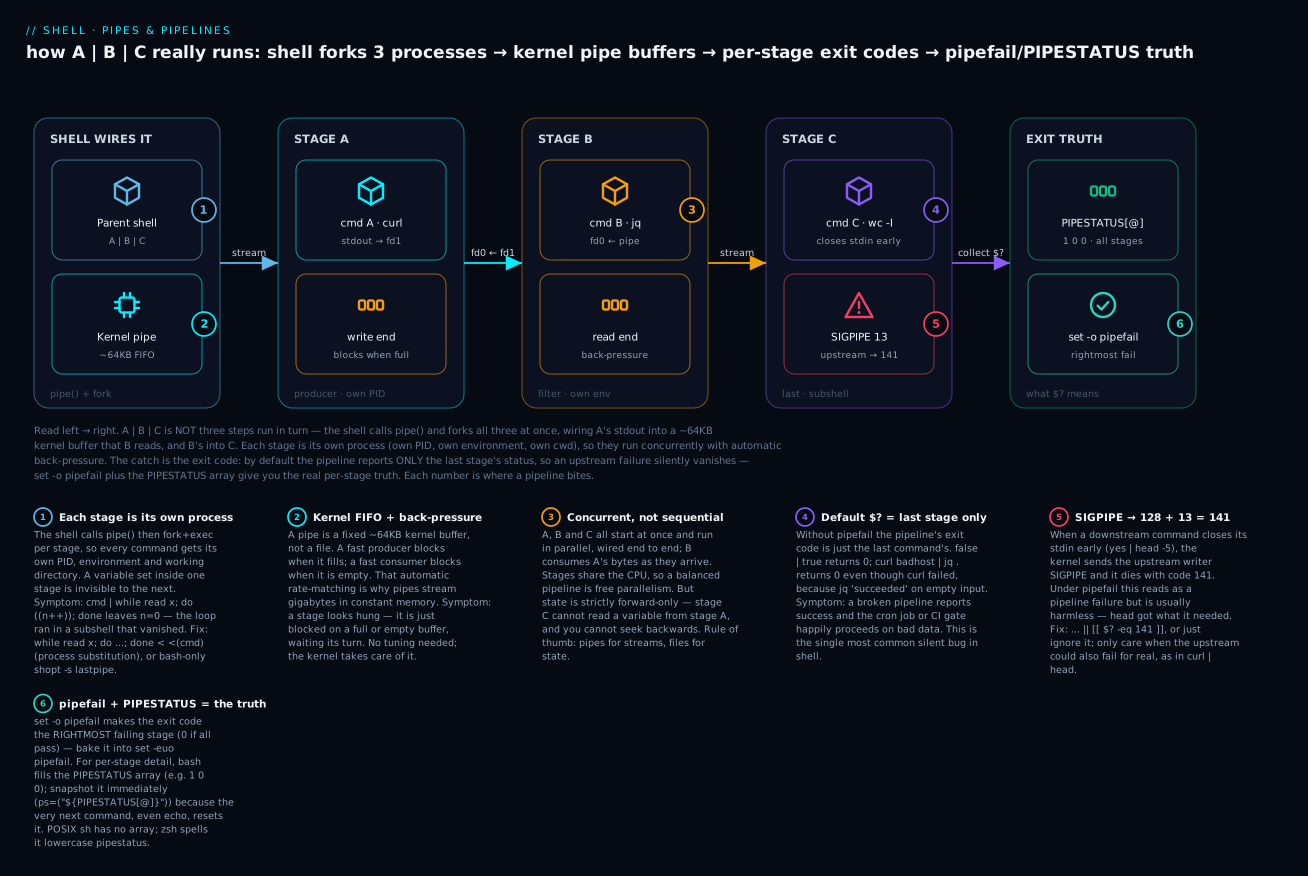
Read the diagram left → right: the shell forks all the stages at once and wires them through kernel buffers so they run concurrently with back-pressure, and the six badges walk you from “each stage is its own process” through the exit-code trap to the pipefail + PIPESTATUS fix that tells you the real per-stage truth.
1. What a pipe actually is
When you write A | B, the shell:
- Calls
pipe()to get a pair of FDs from the kernel: a read end and a write end. - Forks a child process for
A. In that child, it dups the write end of the pipe to fd 1, closes the read end, and execsA. SoA’s stdout is the pipe. - Forks a child process for
B. In that child, it dups the read end of the pipe to fd 0, closes the write end, and execsB. SoB’s stdin is the pipe. - Closes both ends of the pipe in the parent.
- Waits for one or both children, depending on the shell’s policy.
A and B run concurrently. As soon as A writes bytes to its stdout, those bytes are buffered in the kernel pipe (typical capacity: 64KB on Linux), and B reads them. If A is fast and B is slow, the pipe fills up and A blocks until B drains it. If B is fast and A is slow, B blocks waiting for input. This back-pressure is automatic and is the reason pipes scale to gigabytes — the kernel just makes producer and consumer take turns.
Two critical implications:
- Each pipe stage is a separate process — its own PID, its own copy of the environment, its own working directory. Variables set inside one stage cannot be read by another stage of the same pipeline.
- Each pipe stage may also be a separate subshell, depending on the shell. In bash by default, every stage runs in a subshell, including the last one. This is the cause of the L4 “while-read counter” bug.
The lastpipe shell option (covered in L4) changes the bash policy so the last stage runs in the current shell. It’s bash-only and disabled by default; relying on it is non-portable.
Watch the fork actually happen
You don’t have to take “each stage is its own process” on faith — you can see the distinct PIDs. Each side of the pipe reports a different process ID:
# Each stage is a separate process — different PIDs on each side
echo "left PID from a subshell:  $(sh -c 'echo $$')" \
  | { read -r left; echo "right side is PID $$, upstream said: $left"; }
Representative output (numbers vary run to run):
right side is PID 48213, upstream said: left PID from a subshell: 48212
Two PIDs, one per side. The same fact, stated as a rule of what each stage inherits vs. what stays private:
| A pipe stage gets its own… | …but it shares (inherited at fork time) |
|---|---|
| PID (own process) | A copy of the environment variables (changes don’t flow back) |
| stdin/stdout wired to the pipe FDs | Open file descriptors from the parent (unless closed) |
Working directory copy (a cd inside a stage is local) |
The same controlling terminal |
Its own exit status (recorded in PIPESTATUS) |
The same umask, signal dispositions at exec time |
The practical upshot: you cannot pass data “sideways” between stages except through the pipe itself. If stage B computes a total, stage C can’t read that variable — the only channel is the bytes B writes to stdout. Need shared state? Don’t use a pipe; use a file, a variable, or restructure (see §8).
Seeing back-pressure
Back-pressure isn’t abstract — a fast producer genuinely pauses for a slow consumer. This pipeline produces numbers as fast as it can but the consumer sleeps, so the producer spends almost all its time blocked on a full 64 KB buffer:
# Producer is throttled by the slow consumer, not by CPU
seq 1 100000000 | while read -r n; do
  [ "$n" -le 3 ] && printf 'consumed %s\n' "$n"
  sleep 1
done
seq could emit a hundred million lines in under a second, but it can’t: after ~64 KB of unread output the kernel puts it to sleep until the while loop drains the buffer. That is the whole reason big-file | grep x | head uses trivial memory no matter how big the file is — nothing is ever fully materialised.
2. The default exit-code rule and why it’s a trap
Bash’s default exit-code rule for a pipeline is: the exit code is the exit code of the last command.
false | true
echo $?              # 0 — because true (the last command) succeeded
Read that again. The pipeline false | true returns success — even though false clearly failed. The reason: the last command (true) succeeded, and that’s what bash reports.
This is the trap. Any pipeline whose final stage is reliable — grep, head, awk, tee — silently swallows earlier failures:
curl https://api.example.invalid | jq '.users[0].name'
echo $?              # 0 — even if curl couldn't resolve the host!
                     # Because jq successfully reported "null" or the input was empty
This pattern hides real production failures. You think your pipeline succeeded; it didn’t. The downstream system (a cron job, a deployment, a CI gate) sees zero and proceeds. Bad data, partial deployments, missed alerts — all because the wrong stage’s exit code became the pipeline’s exit code.
The trap in one table
Here is the same pipeline read two ways — what $? reports by default vs. what pipefail reports. The default column is the liar:
| Pipeline | Default $? (last stage) |
With pipefail $? |
What actually happened |
|---|---|---|---|
false | true |
0 |
1 |
false failed; last stage true masked it |
true | false |
1 |
1 |
last stage failed — default happens to be right |
curl badhost | jq . |
0 |
6 |
curl couldn’t resolve host; jq “succeeded” on empty input |
grep pat missing.txt | wc -l |
0 |
2 |
grep errored (no such file); wc printed 0 and returned 0 |
sort huge | head -5 |
0 |
0 (usually) |
genuine success — but see §5, head can trigger SIGPIPE |
The pattern: any time the last stage is a “sink” that almost always succeeds (wc, tee, head, jq, grep), the default rule is untrustworthy. That covers most real pipelines.
3. set -o pipefail — the fix
Add this to your strict-mode preamble (we already have it in the L2 strict-mode template):
set -o pipefail
With pipefail, the pipeline’s exit code is the exit code of the rightmost command that failed (or zero if all succeeded).
set -o pipefail
false | true
echo $?              # 1 — false's exit code propagates

curl https://api.example.invalid | jq .
echo $?              # 6 — curl's "couldn't resolve host"
This is essential. Every script you write past 20 lines should have set -o pipefail. Without it, your pipelines lie to you about success.
There’s a subtlety: pipefail returns the rightmost failure, not the leftmost. If both curl and jq fail, you get jq’s exit code, which often hides the more interesting failure (the network issue). But this is still vastly better than the default of always-zero.
Which stage’s code wins? (rightmost, verified)
You can prove the “rightmost failing stage” rule directly. Here two stages fail with different codes — pipefail reports the one on the right:
set -o pipefail
{ exit 6; } | { exit 4; }
echo "pipeline \$? = $?"          # 4  (rightmost failure, not 6)
echo "PIPESTATUS  = ${PIPESTATUS[*]}"   # 6 4  (both, left→right)
Representative output:
pipeline $? = 4
PIPESTATUS  = 6 4
So pipefail collapses the whole pipeline to one number — the last thing that went wrong. That’s enough to make set -e abort and enough for a CI gate to fail. When you need to know which stage and why — for retries, alerts, or a “curl failed vs. jq failed” branch — reach for PIPESTATUS (next section), which kept both 6 and 4.
For complete error inspection, use PIPESTATUS.
4. The PIPESTATUS array
Bash records the exit status of every stage of the most recent pipeline in a special array called PIPESTATUS:
false | true | false
echo "${PIPESTATUS[@]}"     # 1 0 1
Index 0 is the leftmost stage. You can inspect any stage:
curl https://api.example.com/users | jq '.[]' | wc -l
echo "curl exit: ${PIPESTATUS[0]}"
echo "jq exit: ${PIPESTATUS[1]}"
echo "wc exit: ${PIPESTATUS[2]}"
PIPESTATUS is reset by every command, including echo, so capture it immediately:
curl ... | jq ... | wc -l
PIPE_STATUSES=("${PIPESTATUS[@]}")     # snapshot
echo "Statuses: ${PIPE_STATUSES[*]}"
This is invaluable for debugging multi-stage pipelines or for retry logic that should fire only on specific stage failures.
PIPESTATUS is bash-specific. The POSIX equivalent is $? after pipefail (which gives you only the rightmost failure). Some shells (zsh) use pipestatus (lowercase) instead.
Why you must snapshot it immediately.
PIPESTATUSis rebuilt after every command — including theechoyou use to print it. In the snippet above, the moment you run any command after the pipeline,${PIPESTATUS[@]}becomes that command’s result (a single0for a successfulecho). Assigning the array to your own variable (PIPE=("${PIPESTATUS[@]}")) freezes it before it evaporates. A plain assignment likePIPE=...does not resetPIPESTATUS, which is exactly why the snapshot works.
Inspecting PIPESTATUS in conditions
set -o pipefail
curl -fsS https://api.example.com/users | jq -e '.[].id' > ids.txt

# After the pipeline
case "${PIPESTATUS[@]}" in
  "0 0")
    echo "All good"
    ;;
  *" 0")
    echo "curl failed but jq somehow succeeded — investigate"
    ;;
  "0 "*)
    echo "curl OK; jq failed (likely empty or malformed response)"
    ;;
  *)
    echo "Both failed"
    ;;
esac
Niche but powerful. For most cases pipefail plus a single $? check is enough.
5. SIGPIPE — when “failure” is intentional
Here’s a confusing scenario. With pipefail enabled:
set -o pipefail
yes | head -n 5
echo $?              # 141 (or sometimes 0; varies)
head reads 5 lines and closes its stdin. yes keeps writing forever, but its writes go to a closed pipe — at which point the kernel sends yes the signal SIGPIPE (signal 13). yes dies. With pipefail, the pipeline’s exit code becomes the exit code of yes, which (if it died from SIGPIPE) is 128 + 13 = 141.
This is a false positive. There’s nothing wrong — head deliberately stopped reading because it had what it needed. But pipefail reports failure. This is the most-cited downside of pipefail.
The fixes:
Option A: ignore the specific SIGPIPE exit code in your error handling
set -euo pipefail
yes | head -n 5 || [[ $? == 141 ]]
Or wrap in a function:
ignore_sigpipe() {
  "$@"
  local rc=$?
  (( rc == 141 )) && return 0
  return $rc
}

ignore_sigpipe yes | head -n 5
Option B: use a tool that handles its own EOF gracefully
head -n 5 can be replaced with awk 'NR<=5' which reads to end-of-input gracefully. But this throws away head’s laziness — it processes the entire upstream output, which defeats the optimisation.
Option C: turn off pipefail just for this pipeline
set +o pipefail
yes | head -n 5
set -o pipefail
Verbose; only worth it for one-off cases. In practice, most scripts ignore the SIGPIPE-with-pipefail issue because head is rarely fed by a command that you’d want to error-check anyway. If your upstream is cat or yes or seq, who cares if it dies. The cases where SIGPIPE matters are when the upstream might also legitimately fail (e.g. curl | head), and there you need explicit handling.
Why 128 + 13 exactly
The 128 + N convention isn’t arbitrary. When a process is killed by signal number N, the shell reports its exit status as 128 + N. SIGPIPE is signal 13 on Linux and macOS, so 128 + 13 = 141. You can confirm the number without guessing:
kill -l PIPE # prints: 13
The same convention explains other “weird” exit codes you’ll meet: 130 is 128 + 2 (SIGINT, i.e. Ctrl-C), 143 is 128 + 15 (SIGTERM), 137 is 128 + 9 (SIGKILL — the OOM killer’s calling card). So any exit code above 128 is really “the process didn’t exit on its own; a signal took it down,” and code - 128 names the signal.
The SIGPIPE signal in your own scripts
If your script writes to a closed pipe, your script also receives SIGPIPE. By default the shell will exit with 141. You can ignore SIGPIPE explicitly with trap '' PIPE (lesson 10). When SIGPIPE is ignored rather than fatal, the write() that hit the closed pipe fails with errno = EPIPE instead of killing the process — which is why a long-running Python or Go program piped into head may print a BrokenPipeError / write: broken pipe message instead of dying silently. Signal-handling nuance like this is the whole subject of the signal-handling lesson.
6. Pipelines and set -e
Recall from L3 that set -e exits the shell on a command failure. With pipelines:
- Without
pipefail: only the last stage’s failure can triggerset -e(because that’s the pipeline’s exit code). - With
pipefail: any stage’s failure can triggerset -e.
So set -e and pipefail are complementary; you want both. The standard preamble:
set -euo pipefail
is the right starting point.
There’s also a rarely-used flag set -e cousin: set -o errexit is just set -e. Bash also has set -E which makes traps inherited by functions. Lesson 10 covers trap and errtrace.
The one exception that trips people up.
set -e(even withpipefail) does not abort when the pipeline is the condition of anif,while,&&,||, or is negated with!. Soif curl ... | jq ...; thenwill not exit your script when curl fails — the whole point ofifis to test the outcome. That’s correct behaviour, but it means “I haveset -euo pipefail, so any failure aborts” is subtly false inside conditionals. CheckPIPESTATUSexplicitly there if a mid-pipeline failure should still be treated as fatal.
7. The |& operator (bash 4+)
|& is shorthand for 2>&1 | — pipe both stdout and stderr.
make build |& tee build.log
# equivalent to: make build 2>&1 | tee build.log
Useful when you want to capture or filter both streams together. It’s bash 4+. POSIX-portable scripts should use 2>&1 |.
Note: when both streams pipe together, they may interleave in surprising ways because they’re buffered separately at the producer. For deterministic ordering, the producer needs to flush stderr before stdout (or vice versa), or you need to fully capture and post-process.
Order matters in
2>&1 |. The redirection2>&1means “make fd 2 point wherever fd 1 currently points.” In a pipeline, fd 1 is already the pipe by the time redirections are applied, socmd 2>&1 | nextcorrectly sends both streams into the pipe. Butcmd | next 2>&1does something different — it redirectsnext’s stderr ontonext’s stdout, which is not what you want. Remember: put2>&1on the producer, before the|. On the build host here (bash 3.2)|&is a syntax error, which is a good reminder to prefer the portable2>&1 |form in anything that must run on older or non-bash shells.
8. Multi-stage pipeline discipline
A pipeline of 3-4 stages is normal. A pipeline of 10 stages is a code smell — break it up. Each | is a process boundary, and at some point the cognitive load of “which stage filtered out the records I’m now missing?” exceeds the elegance of one-liner shell.
The right shape for a long pipeline:
#!/usr/bin/env bash
set -euo pipefail
IFS=$'\n\t'

# Stage 1: collect raw data
RAW=$(curl -fsS https://api.example.com/users)

# Stage 2: extract fields
USERS=$(echo "$RAW" | jq -r '.users[] | "\(.id)\t\(.email)"')

# Stage 3: filter
ACTIVE=$(echo "$USERS" | awk -F'\t' '$2 ~ /@example\.com$/')

# Stage 4: count
COUNT=$(echo "$ACTIVE" | wc -l)

echo "Active users: $COUNT"
vs. the one-liner:
curl -fsS ... | jq -r ... | awk ... | wc -l
The intermediate-variables form is slower (each stage forks $(...) and re-parses) but vastly easier to debug. You can echo "$RAW" | head between stages to see what changed. For production scripts where correctness matters more than speed, prefer the explicit form.
For really long, performance-sensitive pipelines, write the data to a file at each major step and pick up from there:
curl ... > /tmp/raw.json
jq ... < /tmp/raw.json > /tmp/users.tsv
awk ... < /tmp/users.tsv > /tmp/active.tsv
wc -l < /tmp/active.tsv
This is the shape of an ETL job. Each step is restartable, debuggable, observable.
9. Common pipeline antipatterns
ls | grep
Don’t. We covered this in L4 — never parse ls output. Use a glob, find, or find -print0 | xargs -0.
ls /etc | grep -v conf       # WRONG
find /etc -mindepth 1 -maxdepth 1 ! -name '*.conf'   # RIGHT
cat | grep
Useless use of cat. cat file | grep pattern is the same as grep pattern file but with one more fork. The latter is preferred:
cat file.log | grep ERROR    # WRONG
grep ERROR file.log          # RIGHT
< file.log grep ERROR        # also correct, sometimes preferred for visual flow
The < file.log grep ERROR form puts the data source first, reading more naturally as “from this file, run grep.” Useful taste.
grep ... | wc -l
grep -c does this without forking wc:
grep ERROR file.log | wc -l   # WORKS but unnecessarily forks
grep -cE '^ERROR' file.log    # FAST and clearer
awk | sed
Anything sed can do, awk can do. If you’re already piping into awk, finish in awk:
awk '{print $1}' file | sed 's/old/new/'    # one fork too many
awk '{ gsub(/old/, "new", $1); print $1 }' file
Lesson 12 covers awk mastery in depth.
cmd | grep -v ^$
Filtering blank lines is a sed idiom (sed '/^$/d') or just grep . (matches “any non-empty line”):
cmd | grep -v '^$'           # fine
cmd | grep .                 # shorter
cmd | sed '/^$/d'            # also fine
Subshell pipe-into-while loop
Already covered in L4. cmd | while read line; do COUNT=...; done runs the loop in a subshell, so COUNT doesn’t update. Use while read; do ...; done < <(cmd) instead.
10. Pipeline performance and parallelism
Pipes are the simplest form of parallelism in shell — each stage runs in its own process and they share the CPU. For CPU-bound work this can give you 2-4x speedup if the stages are roughly balanced.
For more aggressive parallelism, lesson 14 covers xargs -P and GNU parallel. Quick preview:
# Process 1000 files, 4 in parallel
find /var/log -name '*.log' -print0 | xargs -0 -P 4 -I {} gzip {}
xargs -P 4 runs up to 4 instances of the command concurrently, distributing input lines among them. The pipe is to feed input; the parallelism is in xargs. The concurrency lesson (L14) goes deep on xargs -P, FIFOs, and flock.
When pipelines hurt
- Tiny inputs: a 2-stage pipeline on 5 lines is slower than two function calls because of the fork overhead.
- State that needs to survive: anything you compute in stage N is invisible to stage N+1 except via the pipe. If you need to share state, don’t use a pipe.
- Random access: pipes are strictly forward-streaming. If stage N+1 needs to look at line 47 after seeing line 50, write to a file instead.
When pipelines win
- Large inputs: streaming through a pipe is much faster than buffering everything to a file and re-reading.
- Composable steps: each step can be tested independently.
- Back-pressure: the kernel handles producer/consumer rate-matching automatically.
The mental rule: pipes for streams (data passing through stages once), files for state (data being mutated and re-read).
11. The tee family of pipeline observability tools
Once you have multi-stage pipelines, you need observability. The tee command from L7 is the basic tool; combine with process substitution for more.
# Capture intermediate stage output for debugging
curl -fsS https://api.example.com/users \
  | tee /tmp/raw.json \
  | jq -r '.users[].email' \
  | tee /tmp/emails.txt \
  | awk '/@example\.com$/' \
  | wc -l
After running, /tmp/raw.json has the original API response, /tmp/emails.txt has the extracted emails, and the terminal shows the count. You can re-run from any stage by feeding /tmp/... into the next stage manually.
pv (Pipe Viewer) is another observability tool — it shows progress and throughput:
pv huge-file.tsv | jq -r '.id' | sort -u > unique-ids.txt
pv reports MB/s, ETA, and progress bar. Brilliant for long-running pipelines on large files.
12. Real example: ingest, transform, validate
#!/usr/bin/env bash
# ingest.sh — pull users from an API, validate, store
set -euo pipefail
IFS=$'\n\t'

API_URL="${API_URL:?API_URL required}"
OUT_FILE="${OUT_FILE:-users.tsv}"

# Stage 1 + 2: fetch and extract — capture both for debugging
RAW_TMP=$(mktemp)
trap 'rm -f -- "$RAW_TMP"' EXIT

curl -fsS "$API_URL/users" > "$RAW_TMP"

# Stage 3: extract structured fields
mapfile -t USERS < <(jq -r '.users[] | "\(.id)\t\(.email)\t\(.role)"' < "$RAW_TMP")

# Sanity check the row count
EXPECTED_COUNT=$(jq -r '.users | length' < "$RAW_TMP")
ACTUAL_COUNT="${#USERS[@]}"
if (( ACTUAL_COUNT != EXPECTED_COUNT )); then
  echo "ERROR: extracted $ACTUAL_COUNT users but API said $EXPECTED_COUNT" >&2
  exit 3
fi

# Stage 4: validate each row
INVALID=0
for row in "${USERS[@]}"; do
  IFS=$'\t' read -r id email role <<< "$row"
  if [[ -z "$id" || -z "$email" || ! "$email" =~ @ ]]; then
    echo "WARN: bad row: $row" >&2
    (( INVALID++ ))
  fi
done

if (( INVALID > 0 )); then
  echo "ERROR: $INVALID invalid rows out of $ACTUAL_COUNT" >&2
  exit 4
fi

# Stage 5: write output atomically
TMP_OUT=$(mktemp)
printf '%s\n' "${USERS[@]}" > "$TMP_OUT"
mv -- "$TMP_OUT" "$OUT_FILE"

echo "Wrote $ACTUAL_COUNT users to $OUT_FILE"

# Stage 6: report PIPESTATUS-aware exit
exit 0
Things to notice:
- Strict-mode +
pipefail. - Each “stage” is an explicit step with intermediate state in a tempfile or array.
trap(lesson 10) cleans up the tempfile on exit.- Validation: extracted count is compared to API-reported count to catch silent jq filter bugs.
- Atomic output: write to a tempfile, then
mvinto place.mvon the same filesystem is atomic at the kernel level — readers either see the old file or the new file, never a partial write. - Distinct exit codes per failure mode.
- The earlier-pipeline observability fix is the
RAW_TMP=$(mktemp)plus writing the API response there before piping anywhere — you can re-run from there if jq is bad.
This is the production shape. Long pipelines should not be written as one-liners. Break them into testable, restartable, observable steps.
Portability note on
mapfile.mapfile -t ARR < <(...)(a.k.a.readarray) is bash 4+ and does not exist in bash 3.2 (the default/bin/bashshipped on macOS) or in POSIXsh/dash. The portable fallback is awhile readloop fed by process substitution:USERS=(); while IFS= read -r line; do USERS+=("$line"); done < <(jq -r ... < "$RAW_TMP"). The course targets Linux + bash 4/5 wheremapfileis available and preferred; just be aware of the caveat if you ship to a mixed fleet.
Going deeper
Everything above is enough to write correct pipelines. This section is for when you want to reason about the ones that misbehave — the “why is it hanging?”, “why did the exit code change?”, and “is curl | bash really that bad?” questions.
The syscalls, in order
A | B is four syscalls the shell issues on your behalf: pipe() to make the FD pair, fork() twice to make the two children, and dup2() inside each child to move the pipe end onto fd 0 or fd 1 before execve() replaces the process image. The ordering matters: the child must dup2(pipe_write_fd, 1) and then close() the original pipe FDs before it execs, because execve keeps open FDs but knows nothing about “the pipe” — it just inherits whatever is on fd 0/1/2. A subtle consequence: if any process in the chain forgets to close the write end of a pipe, the reader never sees EOF (the kernel only reports end-of-file when all write ends are closed). That is the classic cause of a pipeline that hangs forever with no CPU use — a leaked write FD holding the pipe open.
Pipe capacity and atomicity
The 64 KB figure is 16 * PAGE_SIZE on Linux (16 pages × 4 KB) and is tunable. /proc/sys/fs/pipe-max-size caps how large an unprivileged process may grow a pipe with fcntl(fd, F_SETPIPE_SZ, size); F_GETPIPE_SZ reads the current size. Separate from capacity is atomicity: writes of PIPE_BUF bytes or fewer (4096 on Linux) are guaranteed not to interleave with other writers’ data. This is exactly why |& (or 2>&1 |) can interleave stdout and stderr unpredictably — the two streams are two separate write() sequences into the same pipe, and once a message exceeds PIPE_BUF the kernel may split it. If you need clean separation, capture the streams to two files and merge deliberately.
The buffering gotcha that looks like a hang
This is the single most confusing pipeline behaviour in practice, and it has nothing to do with the pipe itself — it is stdio buffering in the middle commands. The C library (glibc) picks a buffering mode based on whether stdout is a terminal:
| stdout is a… | glibc buffering | effect in a pipeline |
|---|---|---|
| Terminal (tty) | line-buffered | you see each line immediately |
| Pipe or file | fully (block) buffered | output is held in a ~4–8 KB userspace buffer until it fills |
So tail -f app.log | grep ERROR | while read -r l; do alert "$l"; done can appear frozen: grep’s stdout is a pipe, so glibc block-buffers it, and your while loop sees nothing until grep has accumulated several KB of matches — which for rare ERRORs might be never. The data is not lost; it’s stuck in a userspace buffer. Fixes, in order of preference:
tail -f app.log | grep --line-buffered ERROR | while read -r l; do alert "$l"; done   # grep flushes per line
tail -f app.log | stdbuf -oL grep ERROR       | while read -r l; do alert "$l"; done   # force line-buffering on any tool
tail -f app.log | awk '/ERROR/{print; fflush()}' | while read -r l; do alert "$l"; done # awk flushes explicitly
stdbuf -oL cmd (from GNU coreutils) forces line buffering, stdbuf -o0 cmd forces unbuffered; sed -u and grep --line-buffered are per-tool equivalents; awk uses fflush(). stdbuf can’t help a program that manages its own buffering (like some statically-linked Go binaries), for which the unbuffer wrapper from the expect package is the escape hatch. Remember: this is a GNU coreutils feature — stdbuf isn’t present in BSD/macOS userland by default.
Anonymous pipes vs. named pipes vs. process substitution
The | operator makes an anonymous pipe — no name in the filesystem, alive only as long as the two processes are. Two variations are worth knowing:
- Named pipes (FIFOs):
mkfifo /tmp/myfifocreates a pipe with a filesystem path so unrelated processes can connect (one opens it for writing, another for reading).open()on a FIFO blocks until the other end shows up. Used for decoupling producers and consumers that aren’t in the same pipeline. Covered in the concurrency lesson. - Process substitution
<(cmd)/>(cmd): bash implements these as pipes exposed through/dev/fd/N(or a temporary FIFO on systems without/dev/fd).diff <(sort a) <(sort b)runs bothsorts concurrently and handsdifftwo read-only FDs. Crucially,while read; do ...; done < <(cmd)is the fix for the subshell-counter bug: thecmdruns in a subshell but thewhileloop runs in your current shell, so variables survive. The redirection lesson has the details.
Why rightmost, and portability of the truth
pipefail’s “rightmost failing stage” rule is a deliberate design choice: the rightmost stage is the one closest to the result you care about, and returning a single number lets $?/set -e/CI work unchanged. The cost is that it can hide an earlier, more interesting failure — which is precisely the gap PIPESTATUS fills. Portability of these features:
| Feature | bash | zsh | dash / POSIX sh |
|---|---|---|---|
set -o pipefail |
✅ (3.0+) | ✅ | ❌ (not in POSIX; dash lacks it) |
PIPESTATUS array |
✅ | pipestatus (lowercase) |
❌ |
|& operator |
✅ (4.0+) | ✅ | ❌ (use 2>&1 |) |
mapfile/readarray |
✅ (4.0+) | ❌ (use $(...) split) |
❌ |
lastpipe |
✅ (4.2+, job control off) | n/a (last stage already in shell) | ❌ |
If a script must run under /bin/sh (dash on Debian/Ubuntu), you have neither pipefail nor PIPESTATUS; the portable workaround is to avoid pipelines for anything whose exit code matters (use temp files and check $? per command) or to declare a #!/usr/bin/env bash shebang and accept the bash dependency. The POSIX-portability lesson covers detecting and guarding bashisms like these.
The curl | bash security problem
curl -fsSL https://get.example.com | bash is everywhere in install docs, and it is genuinely risky for reasons specific to piping:
- You execute code you never saw. The bytes go straight from the network into an interpreter. There is no review step, no checksum, no signature.
- Partial-download execution. Because
bashexecutes the stream as it arrives, a connection that drops halfway can run a truncated script — imagine the download cutting off right afterrm -rf "$TMP/but before the rest of the path. The interpreter has already run everything up to the break. - Server-side detection. The server can tell whether you’re piping to a shell (the request pattern differs from a browser fetch) and serve a benign script to auditors but a malicious one to real installs.
The safer pattern is download, inspect, verify, then run: curl -fsSLo install.sh https://get.example.com, read it (or at least sha256sum -c against a published hash), then bash install.sh. Same three lines, no streaming-execution class of risk. Input-trust and injection are the whole subject of the security lesson.
Performance: SIGPIPE is a feature
The SIGPIPE mechanism that annoys you in §5 is also what makes huge-file | grep -m1 pattern | head fast: as soon as head has its lines and closes the pipe, the SIGPIPE tears down the expensive upstream grep/cat immediately instead of letting it grind through the remaining gigabytes. Without SIGPIPE, every | head would read its entire input. So the “false failure” and the “early termination optimisation” are the same kernel behaviour seen from two angles — which is why the pragmatic advice is to tolerate exit 141 on | head pipelines rather than engineer it away. Fork/exec cost, on the other hand, is real: each stage is a fork + execve, so a pipeline in a tight loop over thousands of tiny inputs can spend more time forking than working. The performance-profiling lesson measures exactly this.
13. The pipefail cheat-sheet
set -o pipefail            # essential — don't let last-stage success hide upstream failures
"${PIPESTATUS[@]}"         # stage-by-stage exit codes (bash only)
PIPE=("${PIPESTATUS[@]}")  # capture before $? is reset

cmd1 | cmd2 | cmd3 || echo "Pipeline failed: ${PIPESTATUS[*]}"

# Ignore SIGPIPE
yes | head -n 5 || [[ $? == 141 ]]

# Pipe both stdout and stderr (bash 4+)
make build |& tee build.log

# POSIX equivalent
make build 2>&1 | tee build.log

# Tee to multiple destinations
cmd | tee >(gzip > out.gz) >(grep ERROR > errors.txt) > /dev/null

# Useless-use-of-cat avoidance
< file.txt grep ERROR     # right
grep ERROR file.txt       # also right
cat file.txt | grep ERROR # WRONG

# Force line-buffering so `| grep | while read` isn't stuck in a block buffer
tail -f app.log | grep --line-buffered ERROR | while read -r l; do ...; done
14. What you must internalise before lesson 9
- What does
A | Bactually do at the kernel level? (pipe()+ 2 forks; A’s stdout = B’s stdin.) - Why does each pipe stage run in its own process? (Each stage is a separate
exec’d binary or subshell — that’s how concurrency works.) - What’s the default pipeline exit-code rule? (Exit code of the last stage only.)
- What does
set -o pipefailchange? (Pipeline exit code = rightmost failing stage’s code, or zero if all OK.) - What’s
PIPESTATUS? (Bash array of every stage’s exit code; reset by next command.) - Why does
yes | head -n 5sometimes give exit code 141? (head closes stdin → yes gets SIGPIPE → dies → exit 141 = 128 + 13.) - What’s the bash shorthand for piping both stdout and stderr? (
|&, equivalent to2>&1 |.) - When should you NOT use a long one-liner pipeline? (When debuggability matters; when steps need state; when input is small.)
- What’s the right shape for ETL-style shell? (Explicit stages, intermediate files, tempfile + atomic mv.)
- What’s “useless use of cat”? (
cat file | cmdinstead ofcmd fileor< file cmd.)
If any felt fuzzy, re-read. Lesson 9 covers process management — subshells, command groups, jobs, wait, nohup — the building blocks for lesson 10’s signal-handling discussion.
Practice challenges
Work these in order — they escalate from “predict an exit code” to “debug a hanging real-world pipeline.” Try each before opening the solution. Everything runs on Linux + bash 4/5; where the build host (bash 3.2 / BSD) differs, the solution says so.
Challenge 1 — Prove the default-exit trap (beginner)
Run false | true and predict $?. Then add set -o pipefail and predict again. Explain in one sentence why the two answers differ.
<details> <summary>Solution</summary>
false | true;              echo $?   # 0  — default rule: exit code of the LAST stage (true)
set -o pipefail
false | true;              echo $?   # 1  — pipefail: exit code of the rightmost FAILING stage (false)
Why: by default a pipeline reports only its last stage’s status, so true masks false; pipefail makes any stage’s failure the pipeline’s failure.
</details>
Challenge 2 — Count matches the cheap way (beginner)
You have a log file. Count the lines containing ERROR. First do it with a pipe into wc -l, then do the same thing with one command and no pipe. Why is the second better?
<details> <summary>Solution</summary>
printf 'ERROR a\nok\nERROR b\n' > /tmp/app.log
grep ERROR /tmp/app.log | wc -l   # 2  — works, but forks a second process (wc)
grep -c ERROR /tmp/app.log        # 2  — same answer, no extra fork
Why: grep -c counts internally, so it avoids a “useless use of wc” — one fewer process, clearer intent, same result.
</details>
Challenge 3 — Read every stage with PIPESTATUS (intermediate)
Build a three-stage pipeline where the first stage fails but the last succeeds. Print each stage’s exit code, then print a message naming which stage failed. (Simulate a failing first stage with { exit 22; }.)
<details> <summary>Solution</summary>
set -o pipefail
{ exit 22; } | cat | cat
ps=("${PIPESTATUS[@]}")            # snapshot IMMEDIATELY — echo would reset it
echo "stages: ${ps[*]}"            # 22 0 0
for i in "${!ps[@]}"; do
  (( ps[i] != 0 )) && echo "stage $i failed with code ${ps[i]}"
done                               # stage 0 failed with code 22
Why: pipefail alone would only tell you the pipeline failed (rightmost non-zero); PIPESTATUS preserves every stage’s code so you can point at stage 0 — but only if you snapshot the array before the next command overwrites it.
</details>
Challenge 4 — Fix the counter that stays zero (intermediate)
This is meant to count lines but always prints 0. Explain why, then fix it so the count survives — without writing to a temp file.
count=0
printf 'a\nb\nc\n' | while read -r line; do count=$((count + 1)); done
echo "$count"        # prints 0 — why?
<details> <summary>Solution</summary>
# WHY: the right-hand side of a pipe runs in a SUBSHELL, so `count` is
# incremented in a child process that vanishes; the parent's count never changes.

count=0
while read -r line; do count=$((count + 1)); done < <(printf 'a\nb\nc\n')
echo "$count"        # 3  — process substitution keeps the loop in the CURRENT shell
Why: cmd | while ... puts the loop in a subshell (lost variables); while ... done < <(cmd) runs cmd in the subshell but the loop in your shell, so count persists. (bash-only. In POSIX sh, use a temp file or a here-string.)
</details>
Challenge 5 — Survive SIGPIPE under strict mode (advanced)
A script starts with set -euo pipefail. The line seq 1 100000000 | head -n 3 aborts the whole script with exit 141. Fix it so the script prints the three lines and keeps running, without disabling pipefail globally.
<details> <summary>Solution</summary>
set -euo pipefail
seq 1 100000000 | head -n 3 || [[ $? -eq 141 ]]   # tolerate SIGPIPE (128+13) only
echo "still running"                               # this line now executes
Why: head closes the pipe after 3 lines, the kernel kills seq with SIGPIPE, and pipefail surfaces seq’s 141. The || [[ $? -eq 141 ]] swallows exactly that code (and nothing else), so a genuine upstream error still aborts. Confirmed on the bash 3.2 build host: exit is 141, and the guard lets the script continue.
</details>
Challenge 6 — Debug the “frozen” streaming pipeline (advanced)
An on-call alert pipeline looks correct but never fires, even though ERROR lines are being written to the log continuously:
tail -f /var/log/app.log | grep ERROR | while read -r line; do
  echo "ALERT: $line"
done
The log genuinely contains new ERROR lines. Diagnose why nothing prints, and fix it with a one-word change.
<details> <summary>Solution</summary>
# DIAGNOSIS: grep's stdout is a pipe, so glibc BLOCK-buffers it (~4-8 KB).
# The `while` loop sees nothing until grep's buffer fills — which for rare
# ERRORs may be minutes or never. Nothing is lost; it's stuck in a userspace buffer.

tail -f /var/log/app.log | grep --line-buffered ERROR | while read -r line; do
  echo "ALERT: $line"
done
# Alternatives: `stdbuf -oL grep ERROR`  or  `awk '/ERROR/{print; fflush()}'`
Why: buffering mode depends on whether stdout is a terminal (line-buffered) or a pipe (block-buffered). --line-buffered forces grep to flush every matching line, so downstream stages get data in real time. This is a GNU coreutils / GNU grep feature; on BSD/macOS use stdbuf/awk fflush() equivalents where available.
</details>
Common beginner mistakes
These are misconceptions, not typos — each one is a wrong mental model that produces code that looks right and behaves wrong.
- “The stages run one after another.” No —
A | B | Cstarts all three at once and they run concurrently, connected by buffers.Bis already chewing onA’s early output whileAis still producing. If you’re thinking “A finishes, then B starts,” you’ll be baffled by streaming, back-pressure, and SIGPIPE. - “A variable I set inside the pipeline is still set afterwards.” Each stage is a separate process (and, on the right side of a pipe, a subshell).
cmd | while read; do total=$((total+1)); donethrowstotalaway. Right model: pipes carry bytes, not variables; use< <(cmd)process substitution to keep state in your shell. - “If the command finished without an error message, the pipeline succeeded.” The default exit code is only the last stage’s. A
curlthat failed can be completely invisible if the last stage isjq/grep/wc. Right model:set -o pipefail, and check$?orPIPESTATUS. - “
pipefailbroke my| head— exit code 141 means something’s wrong.” Almost always it doesn’t.headclosed the pipe early and the upstream died of SIGPIPE. Right model:141 = 128 + 13is expected onproducer | head; tolerate it with|| [[ $? -eq 141 ]]. - “
cat file | grep ...is the normal way to read a file.” It’s an extra process for nothing (a “useless use of cat”). Right model:grep pattern fileor< file grep pattern. Savecatfor actually concatenating multiple files. - “
PIPESTATUSwill still have my codes a few lines later.” It’s rebuilt after every command, includingecho. Right model: snapshot it the instant the pipeline returns —ps=("${PIPESTATUS[@]}"). - “
curl https://... | bashis fine, it’s the official install command.” It streams unreviewed code straight into an interpreter and can execute a truncated script on a dropped connection. Right model: download to a file, inspect/verify the checksum, then run.
Glossary
- Pipe (
|) — a kernel object connecting one process’s stdout to another’s stdin. Anonymous (no filesystem name), created by thepipe()syscall, backed by a small in-kernel buffer. - Pipeline — a chain of commands joined by
|, e.g.A | B | C. The shell runs all stages concurrently. - Stage — one command in a pipeline. Each stage is a separate process with its own PID, environment, and working directory.
- FIFO / kernel buffer — the “first in, first out” buffer inside a pipe (~64 KB on Linux). Also the name for a named pipe created with
mkfifo. - Back-pressure — the automatic blocking that happens when the pipe buffer is full (producer waits) or empty (consumer waits). Makes producer and consumer take turns without any coordination code.
- Subshell — a child shell that runs part of your script (the right side of a pipe,
(...),$(...)). Variables set inside it do not propagate to the parent. - PID — process ID; a unique number the kernel assigns to each running process.
- fd 0 / fd 1 / fd 2 — file descriptors for stdin, stdout, stderr. A pipe redirects one process’s fd 1 into another’s fd 0.
- Exit code / exit status (
$?) — a 0–255 number a command returns;0= success, non-zero = failure. Held in$?until the next command runs. set -o pipefail— bash option making a pipeline’s exit code the rightmost failing stage (instead of just the last stage). Part of theset -euo pipefailstrict-mode preamble.PIPESTATUS— bash array holding every stage’s exit code from the most recent pipeline, left→right. Reset by the next command; snapshot it immediately. (zsh: lowercasepipestatus; not in POSIX sh.)- SIGPIPE — signal 13, sent by the kernel to a process that writes to a pipe whose read end is closed. Default action: terminate. Produces exit code
128 + 13 = 141. - EPIPE — the
errnovalue awrite()returns instead of dying, when a process has ignored SIGPIPE (trap '' PIPE). Surfaces as “broken pipe” errors from long-running programs. 128 + Nconvention — a process killed by signalNreports exit status128 + N(e.g. 130 = Ctrl-C/SIGINT, 143 = SIGTERM, 137 = SIGKILL).|&— bash 4+ shorthand for2>&1 |: pipe both stdout and stderr. POSIX form is2>&1 |.- Process substitution
<(cmd)/>(cmd)— bash feature exposing a command’s output/input as a/dev/fd/Npath.done < <(cmd)is the standard fix for the subshell-counter bug. - Named pipe (FIFO) — a pipe with a filesystem path (
mkfifo /tmp/p) so unrelated processes can connect. lastpipe— bash-only, off-by-defaultshoptthat runs the last pipeline stage in the current shell (so its variables survive). Requires job control off.- UUOC (“useless use of cat”) — the antipattern
cat file | cmdwherecmd fileor< file cmdwould do, wasting a process. - Block vs. line buffering — glibc buffers stdout fully (block) when it’s a pipe/file, line-by-line when it’s a terminal. The cause of “frozen”
| grep | while readpipelines; fix withstdbuf -oL,grep --line-buffered, orawk … fflush(). tee— a command that copies stdin to a file and to stdout, letting you tap a pipeline for observability.pv(Pipe Viewer) — a drop-in pipeline stage that reports throughput, ETA, and a progress bar for long-running data flows.
What’s next
Lesson 9 covers process management: subshells (...), command groups {...; }, background &, jobs, fg/bg, wait, nohup, disown, and the precise lifecycle of a backgrounded process. Bring everything from lessons 1–8 — every backgrounded job is a process-tree decision.