In a nutshell
A shell script is a guest in someone else’s house — the operating system’s. A well-behaved guest tidies up before leaving no matter which door they use: the front door (the script finished normally), the back door in a hurry (someone pressed Ctrl+C), or being shown out by the landlord (systemd or Kubernetes said “time to go”). A badly-behaved guest leaves half-eaten food on the table (a half-written file), the front door propped open (a lock nobody can release), and the tap running (a background process still burning CPU). The next guest inherits the mess.
The trick is not to remember to clean up at every possible exit — there are too many. The trick is to install one habit at the door: “whatever happens, on my way out, tidy up.” In shell, that habit is a single line — trap cleanup EXIT — and it is the single most important idiom in this entire course for writing scripts you can trust in production. This lesson is about that line, the signals that trigger it, and the discipline (idempotent cleanup, atomic locks) that makes it bulletproof.
Here is the mental model to hold onto: many different things can stop your script, but they all get funnelled through one exit point. Ctrl+C, a kill from your orchestrator, a command failing under set -e, or a clean finish — every one of them ends by firing bash’s EXIT pseudo-signal, and that one place runs your one cleanup function exactly once. You do not write cleanup five times; you write it once, at the funnel. The only thing that escapes the funnel is kill -9 (SIGKILL) — the demolition crew that flattens the building with you still inside — so you also learn to design for the process simply vanishing.
Level: Intermediate · Time: ~40 min
Prerequisites: You should be comfortable with exit codes and strict mode from Defensive scripting: set -Eeuo pipefail, how a broken pipe produces exit 141 from Pipes, pipefail & SIGPIPE, and how background jobs and wait work from Process management: subshells, jobs & wait. If those feel shaky, skim them first — signal handling ties them all together.
After this lesson you will be able to:
- Explain what a signal is, name the ones you’ll actually handle (INT, TERM, HUP, KILL), and read the
128 + Nexit codes they produce. - Write the canonical
mktemp -d+trap 'rm -rf -- "$TMPDIR"' EXITcleanup so temporary state never leaks. - Handle Ctrl+C (INT) and orchestrator shutdown (TERM) gracefully, exiting with the correct 130 / 143 codes.
- Make cleanup idempotent so it is safe to run twice, and funnel INT/TERM/ERR through a single
EXIThandler. - Enforce single-instance execution with
flock(and a portablemkdirfallback), avoiding the classic check-then-create race. - Drop in a production-grade signal-aware template for anything that runs in cron, systemd, Kubernetes, or CI.
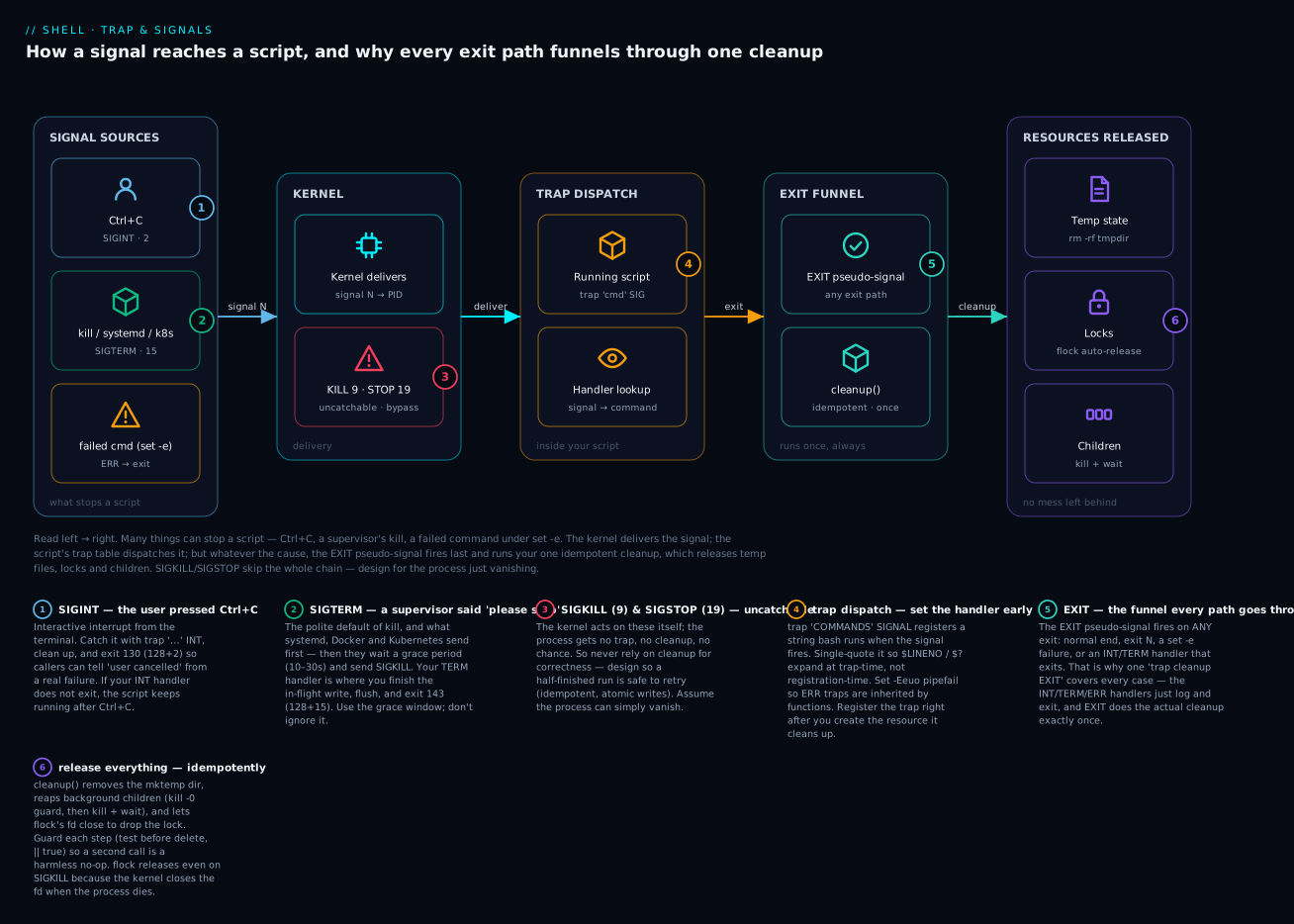
Read the diagram left → right: many things can stop a script (Ctrl+C, a supervisor’s kill, a failed command under set -e); the kernel delivers the signal to your process; your script’s trap table dispatches it — but whatever the cause, the EXIT pseudo-signal always fires last and runs your one idempotent cleanup, which releases temp files, locks, and children. The red node is the exception: SIGKILL/SIGSTOP skip the whole chain, which is why correctness must never depend on cleanup running.
Every long-running shell script will eventually be killed mid-execution. Ctrl+C from a tired engineer. A Kubernetes pod eviction. A systemd timeout. An OOM-killer. A laptop closed at the wrong moment. Servers reboot, networks die, and shell scripts that don’t plan for this leave behind a mess: half-written files, stuck lock files that will never be released, child processes still running with stale state, temporary directories on the filesystem forever.
The difference between a script that handles this gracefully and one that doesn’t is one shell idiom: trap. Every production-grade shell script you’ll ever write should set a trap EXIT handler at the top to clean up after itself, and most of them should also handle INT (Ctrl+C) and TERM (graceful shutdown) explicitly.
This lesson covers the signal model in just enough detail to write good handlers, the trap builtin, the canonical patterns for tempfile cleanup and lock files, and the production-grade signal-aware template you should adopt for all your scripts.
1. Signals in 90 seconds
A signal is a kernel-delivered interrupt to a process. The signaled process either has a handler installed (and that handler runs) or uses the default action for the signal (often: terminate). Signals are tiny — they carry no data, just an integer ID.
Bash signal numbers (Linux; differs slightly on macOS/BSD):
| Signal | Number | Default action | When it’s sent |
|---|---|---|---|
| SIGHUP | 1 | terminate | controlling terminal hangs up (e.g. SSH disconnect) |
| SIGINT | 2 | terminate | user pressed Ctrl+C |
| SIGQUIT | 3 | terminate + core dump | user pressed Ctrl+\ |
| SIGKILL | 9 | terminate (uncatchable) | kill -9 — forced kill |
| SIGTERM | 15 | terminate | kill default — polite “please stop” |
| SIGSTOP | 19 | stop (uncatchable) | kill -STOP |
| SIGTSTP | 20 | stop | user pressed Ctrl+Z |
| SIGCONT | 18 | continue | kill -CONT — resume a stopped process |
| SIGUSR1 | 10 | terminate | user-defined |
| SIGUSR2 | 12 | terminate | user-defined |
| SIGCHLD | 17 | ignore | a child process changed state |
| SIGPIPE | 13 | terminate | wrote to a closed pipe |
Two signals you cannot catch: SIGKILL (9) and SIGSTOP (19). The kernel handles them itself and the process gets no chance to react. Everything else can be caught (or ignored).
When a process exits because of signal N, its exit code is 128 + N:
kill -INT $PID→ process exits with 130 (= 128 + 2)kill -TERM $PID→ 143kill -KILL $PID→ 137
We saw this in lesson 8 (SIGPIPE → 141).
You send a signal with kill -SIG PID:
kill -INT 12345
kill -TERM 12345
kill -KILL 12345     # the brutal one
kill 12345           # SIGTERM by default
kill -USR1 12345     # user-defined; useful for "reload config"
Signal names can be given without the SIG prefix (kill -INT = kill -SIGINT).
Verify the exit codes yourself (representative output, Linux/macOS agree here):
$ bash -c 'sleep 5 & p=$!; kill -INT  $p; wait $p'; echo "rc=$?"   # rc=130
$ bash -c 'sleep 5 & p=$!; kill -TERM $p; wait $p'; echo "rc=$?"   # rc=143
$ bash -c 'sleep 5 & p=$!; kill -KILL $p; wait $p'; echo "rc=$?"   # rc=137
The
128 + Nrule is your read-back channel: an exit status ≥ 128 almost always means “killed by signal N = status − 128”, not an ordinary failure.list-signalswithkill -l 130(orkill -lfor the full table) decodes it.
2. trap — the only signal-handling primitive in shell
trap COMMANDS SIGNAL [SIGNAL ...] registers COMMANDS to run when any of the named signals are received.
trap 'echo "Caught signal!"' INT TERM
sleep 60
# Press Ctrl+C — you'll see "Caught signal!" and the script exits
A few things to understand:
COMMANDSis a string. Bash parses and runs it when the signal arrives.- Quote with single quotes to defer parameter expansion until handler-time.
trap "echo $LINENO" ERRwould substitute$LINENOnow (when the trap is set);trap 'echo $LINENO' ERRsubstitutes it at trap-time. - You can register handlers for multiple signals at once.
- Calling
trapagain replaces the previous handler for those signals. trap - SIGNALresets the signal to its default action.trap '' SIGNALignores the signal entirely (the empty string means “do nothing, but don’t fall through to default”).
trap 'echo "Hi"' INT
trap                                # list registered traps
trap - INT                          # remove the trap
trap '' INT                         # ignore SIGINT entirely (Ctrl+C does nothing)
trap -p [SIGNAL] prints the current handler in a re-usable form (trap -- 'cmd' SIGINT), which is handy for saving and restoring a trap around a critical section — more on that in Going deeper.
3. The four signals you’ll handle 95% of the time
EXIT — pseudo-signal for “the script is exiting”
The most useful signal in bash is one that doesn’t exist at the kernel level: EXIT. Bash fires it whenever the shell exits — for any reason: normal completion, exit N call, fatal error from set -e, signal-induced termination. Use EXIT for cleanup that must happen no matter what.
TMPDIR=$(mktemp -d)
trap 'rm -rf -- "$TMPDIR"' EXIT

# ... use $TMPDIR ...
# When the script exits, the trap runs and cleans up
This is the canonical tempfile-cleanup pattern. It’s bulletproof:
- Normal exit: handler runs.
exit 1after an error: handler runs.set -etriggers on a failed command: handler runs.- User pressed Ctrl+C: handler runs (because Ctrl+C kills the script, which triggers EXIT).
- Power cable yanked: well, no handler can save you from that. But for everything that lets bash exit cleanly, EXIT is your friend.
You should put a trap '...' EXIT at the top of nearly every script that creates temporary state.
ERR — pseudo-signal for “a command failed”
ERR is fired whenever a command exits non-zero (subject to the same suppression rules as set -e — not inside if, &&, ||, !, until conditions). Useful for error logging:
on_error() {
  local lineno="$1"
  local code="$2"
  echo "Error at line $lineno (exit $code)" >&2
}

trap 'on_error "$LINENO" "$?"' ERR
$LINENO inside the trap holds the line of the failing command. $? holds the exit code. This gives you a poor man’s stack trace when scripts fail.
ERR is fired in addition to EXIT — both fire on a failure. ERR fires first.
For ERR to propagate into functions, set set -E (also known as set -o errtrace). Without it, traps are not inherited by functions and command substitutions:
set -Eeuo pipefail
This is the right strict-mode preamble for any script with non-trivial functions.
INT — Ctrl+C
on_interrupt() {
  echo "Interrupted by user" >&2
  cleanup
  exit 130
}

trap on_interrupt INT
130 is the standard “I exited because of SIGINT” exit code (128 + 2). Use it consistently so your callers can distinguish “user interrupted” from “real failure.”
TERM — polite shutdown
Systemd, Kubernetes, Docker, and most supervisors send SIGTERM first. They wait some grace period (typically 10-30 seconds), then send SIGKILL.
on_term() {
  echo "Got SIGTERM, shutting down gracefully" >&2
  cleanup
  exit 143
}

trap on_term TERM
If your script is doing something that needs to finish cleanly — write a state file, close a connection, release a lock — your TERM handler is the place. Use the grace period.
Combined handler
A common idiom: same handler for INT and TERM:
on_signal() {
  local sig="$1"
  echo "Received SIG${sig}, shutting down" >&2
  cleanup
  case "$sig" in
    INT)  exit 130 ;;
    TERM) exit 143 ;;
    *)    exit 1 ;;
  esac
}

trap 'on_signal INT' INT
trap 'on_signal TERM' TERM
Or, more cleanly, with a separate cleanup and a trap EXIT that handles all paths:
cleanup() {
  rm -rf -- "$TMPDIR" 2>/dev/null || true
  kill "$BG_PID" 2>/dev/null || true
}

trap cleanup EXIT
trap 'echo "Interrupted"; exit 130' INT
trap 'echo "Terminated"; exit 143' TERM
This works because INT and TERM cause exit, which fires EXIT, which calls cleanup. Two layers, one cleanup function.
Here is a compact map of the handful of dispositions worth memorising:
| Signal / event | Who sends it | Typical handler intent | Exit code you emit |
|---|---|---|---|
EXIT |
bash itself, on any exit | run cleanup once, always |
(preserve $?) |
ERR |
failed command under set -e/-E |
log the failing line, then let it exit | (preserve $?) |
INT (2) |
Ctrl+C at the terminal | clean up, tell the user, stop | 130 |
TERM (15) |
kill, systemd, Docker, k8s |
finish in-flight work, flush, stop | 143 |
HUP (1) |
terminal/SSH hangup, or “reload” | reload config, or exit | 129 (or continue) |
KILL (9) |
kill -9, OOM-killer |
cannot handle — design for it | 137 (set by kernel) |
4. The canonical tempfile cleanup pattern
Every script that creates temp state should follow this template:
#!/usr/bin/env bash
set -Eeuo pipefail
IFS=$'\n\t'

TMPDIR=$(mktemp -d -t myscript.XXXXXX)
trap 'rm -rf -- "$TMPDIR"' EXIT

# ... use $TMPDIR ...
echo "Working in $TMPDIR"
touch "$TMPDIR/working-file.txt"

# When the script exits, $TMPDIR is automatically cleaned up.
Key points:
mktemp -dcreates a fresh directory in/tmp(or$TMPDIR) with an unguessable name. The-t myscript.XXXXXXis a template; mktemp replaces the X’s with random characters.rm -rf -- "$TMPDIR"— the--is essential to handle pathologically named tempfiles. Quoted to handle paths with spaces.trap '...' EXITruns the cleanup unconditionally on any exit path.
The template-style is preferable to ad-hoc trap calls scattered through the script. Set the trap immediately after creating the resource.
5. Multiple resources: handler stacking
If you have multiple resources to clean up, you have two options:
Option A: one cleanup function
TMPDIR=$(mktemp -d)
LOG_FILE=$(mktemp)

cleanup() {
  rm -rf -- "$TMPDIR"
  rm -f -- "$LOG_FILE"
}

trap cleanup EXIT
Clean. Easy to extend. Recommended for most scripts.
Option B: stack handlers via reassignment
If you want to add cleanup steps as resources are acquired, use this pattern:
add_cleanup() {
  local cmd="$1"
  CLEANUPS+=("$cmd")
  trap 'for c in "${CLEANUPS[@]}"; do eval "$c"; done' EXIT
}

CLEANUPS=()

# Acquire and register
TMPDIR=$(mktemp -d)
add_cleanup "rm -rf -- '$TMPDIR'"

LOCK=$(mktemp)
add_cleanup "rm -f -- '$LOCK'"

PID=$(start-bg-task)
add_cleanup "kill '$PID' 2>/dev/null || true"
Order is preserved. Niche, but useful when you’ve got many resources acquired conditionally throughout a long script. One caveat: because this pattern evals the stacked strings, never build a cleanup command from untrusted input — keep the strings literal, as above.
6. Lock files — the “only one instance running” pattern
If you’re writing a script that should not run concurrently with another instance of itself (cron jobs, daily backups, deployment scripts), you need a lock.
Naive approach (don’t)
LOCK=/tmp/myscript.lock

if [[ -f "$LOCK" ]]; then
  echo "Already running" >&2
  exit 1
fi
touch "$LOCK"
trap 'rm -f -- "$LOCK"' EXIT
This has a race condition: between the [[ -f ]] check and touch, another instance can do the same check, and you get two running instances. The test-and-create is not atomic.
Slightly better (mkdir as atomic)
LOCK=/tmp/myscript.lockdir

if ! mkdir "$LOCK" 2>/dev/null; then
  echo "Already running" >&2
  exit 1
fi
trap 'rmdir -- "$LOCK"' EXIT
mkdir is atomic (it either succeeds or fails with EEXIST). No race. But if your script crashes without cleanup, the lock dir is left behind and you’ll need to remove it manually next time.
The right way: flock(1)
LOCK=/var/lock/myscript.lock
exec 9>"$LOCK"

if ! flock -n 9; then
  echo "Already running" >&2
  exit 1
fi

# ... do work ...
# Lock is released automatically when fd 9 closes (i.e. on script exit)
flock uses kernel-level advisory locking on a file descriptor. The lock is held by the process and released when the process exits — no matter how it exits, including SIGKILL, OOM, power loss. There’s no leftover lock file to clean up (well, the file remains, but the lock on it is gone the moment the process is gone).
flock -n is non-blocking: returns immediately with status 1 if the lock is held. Without -n, it blocks until the lock becomes available. Use -n for “single instance, fail otherwise”; omit -n for “wait my turn.”
flock self-locking idiom — handy for cron:
#!/usr/bin/env bash
exec 9>"/var/lock/$(basename "$0").lock"
flock -n 9 || { echo "Already running"; exit 1; }

# ... work ...
In practice, the cleaner version that handles wrapping itself:
[[ "${LOCKED:-}" ]] || exec env LOCKED=1 flock -en /var/lock/myscript.lock "$0" "$@"
A bit cryptic but extremely effective: if the script is invoked without LOCKED=1, it re-execs itself under flock, which prevents two instances from running. Once flock is held, LOCKED=1 is set, so the inner invocation skips the re-exec.
Portability note:
flock(1)ships with util-linux, so it is present on essentially every Linux box but not on macOS/BSD (confirmed on this build host —command -v flockreturns nothing). On macOS use Homebrew’sflock, or fall back to the atomicmkdirlock above (which is fully portable). The sibling concurrency lesson goes deeper onflockfor coordinating parallel workers.
7. Idempotent cleanup
Your cleanup function will sometimes run twice — for instance, if cleanup itself fails partway through, the EXIT trap may re-fire. Make cleanup idempotent: safe to call repeatedly with no error.
cleanup() {
  if [[ -d "${TMPDIR:-}" ]]; then
    rm -rf -- "$TMPDIR"
    TMPDIR=""
  fi
  if [[ -n "${BG_PID:-}" ]] && kill -0 "$BG_PID" 2>/dev/null; then
    kill -TERM "$BG_PID" || true
    wait "$BG_PID" 2>/dev/null || true
    BG_PID=""
  fi
}
Patterns:
- Check existence before deleting (
[[ -d ]],kill -0). - Clear the variable after using it (
TMPDIR="") so a second call is a no-op. || trueafter operations that might “fail” because the resource is already gone.
Idempotent cleanup also matters for cleanup being called from both EXIT and a manual call — e.g., a script that wants to do cleanup before re-execing itself.
See it be idempotent (representative output):
$ bash -c '
  T=$(mktemp -d)
  cleanup(){ [[ -d "${T:-}" ]] && { rm -rf -- "$T"; T=""; echo removed; } || echo noop; }
  cleanup; cleanup'
removed
noop
First call removes and blanks
$T; the second call sees nothing to do and returns cleanly — no error, no “directory not found”. That is exactly the property that keeps a double-fired EXIT trap from turning a clean shutdown into a spurious failure.
8. The production template
Adopt this as the boilerplate for every non-trivial script:
#!/usr/bin/env bash
# myscript.sh — short description of what this does
set -Eeuo pipefail
IFS=$'\n\t'

# --- Logging ---

log() {
  printf '[%s] [%s] %s\n' "$(date -u +%Y-%m-%dT%H:%M:%SZ)" "$1" "${*:2}" >&2
}

die() {
  log error "$*"
  exit 1
}

# --- Cleanup ---

TMPDIR=""
BG_PIDS=()

cleanup() {
  local rc=$?
  log debug "Cleaning up (exit code ${rc})"

  for pid in "${BG_PIDS[@]}"; do
    if kill -0 "$pid" 2>/dev/null; then
      kill -TERM "$pid" 2>/dev/null || true
      wait "$pid" 2>/dev/null || true
    fi
  done

  if [[ -n "$TMPDIR" && -d "$TMPDIR" ]]; then
    rm -rf -- "$TMPDIR"
  fi

  exit "$rc"
}

on_error() {
  local lineno="$1"
  local code="$2"
  log error "Failure at line ${lineno} (exit ${code})"
}

trap cleanup EXIT
trap 'on_error "$LINENO" "$?"' ERR
trap 'log warn "Interrupted"; exit 130' INT
trap 'log warn "Terminated"; exit 143' TERM

# --- Main ---

main() {
  TMPDIR=$(mktemp -d -t "$(basename "$0").XXXXXX")
  log info "Working in ${TMPDIR}"

  # ... actual work ...

  log info "Done"
}

main "$@"
This template:
- Strict-mode preamble with
-Efor ERR-trap inheritance into functions. - A
logfunction with timestamps that writes to stderr. - A
diehelper that logs and exits. - A
cleanupfunction that:- Captures the exit code at entry.
- Kills any tracked background PIDs.
- Removes the tempdir.
- Exits with the original code.
- ERR trap that logs the failing line and exit code.
- INT and TERM traps that log and exit with the signal-derived code.
- All inside a
mainfunction called at the end.
Use this as your starting point. Cut what you don’t need, keep what you do.
9. Common signal-handling pitfalls
Forgetting set -E
Without set -E, ERR traps are not inherited by shell functions. So this:
set -e
trap 'echo "ERR at $LINENO"' ERR

myfunc() {
  false        # ERR will NOT fire here without set -E
}

myfunc
won’t fire the trap. Add -E:
set -Eeuo pipefail
trap 'echo "ERR at $LINENO"' ERR
Or use set -o errtrace (same thing, longer name).
Single-quote vs double-quote in trap
trap "echo $LINENO" ERR        # WRONG — substitutes LINENO when trap is SET, not when it FIRES
trap 'echo $LINENO' ERR        # CORRECT — substitutes at trap-time
Always single-quote the trap command unless you have a very specific reason to expand at registration time.
Trap for INT but not exiting
If your INT handler doesn’t exit, your script keeps running after Ctrl+C:
trap 'echo "ignoring Ctrl+C"' INT
sleep 60                       # Ctrl+C now just prints the message; sleep continues
This can be deliberate (long-running scripts that should not be Ctrl+C-able) but is more often a bug. If your INT handler should terminate, end it with exit 130.
Background processes don’t inherit traps
Traps reset to default when you fork a subshell or background a process:
trap 'echo caught' INT

(sleep 60) &              # the subshell doesn't inherit your INT trap
Set traps inside the subshell if you need them. Or use ( trap '...' INT; sleep 60 ).
Forgetting cleanup runs even on success
Your cleanup runs on every exit path, including normal successful exit. Make sure your cleanup is OK with running after success:
cleanup() {
  echo "Failure!"           # WRONG — also fires on success
  rm -f "$TMPFILE"
}
Use the exit-code variable:
cleanup() {
  local rc=$?
  if (( rc != 0 )); then
    echo "Failed with exit ${rc}" >&2
  fi
  rm -f "$TMPFILE"
  exit "$rc"
}
10. Sending signals to children
If your script spawned background work, your signal handlers should propagate signals to children:
BG_PID=""

cleanup() {
  if [[ -n "$BG_PID" ]] && kill -0 "$BG_PID" 2>/dev/null; then
    kill -TERM "$BG_PID"
    wait "$BG_PID" 2>/dev/null || true
  fi
}
trap cleanup EXIT

start-long-task &
BG_PID=$!

# main work...
For a whole process group (the script and all its descendants):
trap 'kill -- -$$' EXIT # send SIGTERM to the entire process group
-$$ (negative of own PID) is the syntax to target a process group. This is heavy-handed — you’ll kill yourself in the process — but for “everything stops now” it works.
For a more targeted approach, use pkill -P $$ -SIGTERM (kill all direct children of this PID).
11. Interaction with set -e
set -e and traps interact in subtle ways:
- ERR traps fire before
set -eexits the shell. - EXIT traps fire after
set -etriggers, as part of the exit process. - An ERR trap that exits zero (
return 0) does not preventset -efrom firing —set -eis based on the original command’s status.
The mental model: set -e triggers an exit; the exit triggers EXIT (and ERR fired earlier). Your traps should not try to “rescue” set -e-induced exits — instead, log diagnostics and let the exit happen.
Order, confirmed (representative output):
$ bash -c 'set -Eeuo pipefail; trap "echo ERR_TRAP" ERR; trap "echo EXIT_TRAP" EXIT; false'
ERR_TRAP
EXIT_TRAP
ERR runs first (at the moment
falsefails), then the shell exits and EXIT runs. The final status is 1 — the status offalse, not of the traps.
12. Real example: a robust deployment runner
#!/usr/bin/env bash
# run-deployment.sh — robust deployment with locking, cleanup, and signal handling
set -Eeuo pipefail
IFS=$'\n\t'

readonly SCRIPT_NAME=$(basename "$0")
readonly LOCK_FILE="/var/lock/${SCRIPT_NAME}.lock"

log() {
  printf '[%s] [%s] %s\n' "$(date -u +%Y-%m-%dT%H:%M:%SZ)" "$1" "${*:2}" >&2
}

die() { log error "$*"; exit 1; }

# --- Self-lock via flock ---
if [[ -z "${LOCKED:-}" ]]; then
  exec env LOCKED=1 flock -n "$LOCK_FILE" "$0" "$@"
  die "Could not obtain lock on $LOCK_FILE — another instance running?"
fi

# --- Cleanup state ---
TMPDIR=""
BG_PIDS=()

cleanup() {
  local rc=$?
  log info "Cleanup (exit ${rc})"

  for pid in "${BG_PIDS[@]}"; do
    if kill -0 "$pid" 2>/dev/null; then
      log info "Stopping bg process $pid"
      kill -TERM "$pid" 2>/dev/null || true
      wait "$pid" 2>/dev/null || true
    fi
  done

  if [[ -n "$TMPDIR" && -d "$TMPDIR" ]]; then
    log info "Removing $TMPDIR"
    rm -rf -- "$TMPDIR"
  fi

  exit "$rc"
}

on_err() {
  local lineno="$1"
  local code="$2"
  log error "Failure at line ${lineno} (exit ${code})"
}

trap cleanup EXIT
trap 'on_err "$LINENO" "$?"' ERR
trap 'log warn "Caught SIGINT"; exit 130' INT
trap 'log warn "Caught SIGTERM"; exit 143' TERM

# --- Main ---

main() {
  log info "Deployment starting (PID $$)"
  TMPDIR=$(mktemp -d -t "${SCRIPT_NAME}.XXXXXX")

  # 1. Pull the latest artifacts
  log info "Pulling artifacts"
  curl -fsS https://artifacts.example.com/latest.tgz -o "${TMPDIR}/artifact.tgz"
  tar -xzf "${TMPDIR}/artifact.tgz" -C "${TMPDIR}"

  # 2. Background a health-watch
  ( while true; do
      curl -fsS https://api.example.com/healthz >/dev/null 2>&1 || break
      sleep 5
    done
    log warn "Health check broke!" ) &
  BG_PIDS+=($!)

  # 3. Run the deploy
  log info "Running deploy script"
  "${TMPDIR}/deploy.sh"

  log info "Deployment OK"
}

main "$@"
Things to notice:
- Self-lock via
flock: the script re-execs itself under flock if not yet locked. Only one instance runs. - Strict-mode +
-Efor ERR-into-functions. cleanuphandles tempdir AND background processes, idempotently.- ERR trap logs the failing line.
- INT / TERM traps log and exit with the right codes (130/143).
- All actual work is inside
main.
This is the production template. Use it as your default.
Going deeper
You now have the working patterns. This section is the internals and edge cases that separate “it works on my laptop” from “it survives a Kubernetes rollout at 3am.”
When does a trap actually run? (Ctrl+C during a long sleep)
Bash does not interrupt a running foreign command to run a trap. When a signal arrives while bash is waiting on a foreground external command (like sleep 60 or curl), bash lets the signal terminate that command, then runs the handler. During bash’s own builtins and between commands, the handler runs at the next safe point. Practically this is invisible for short commands, but it bites in one common case: a script blocked in a long sleep or a long read sometimes feels sluggish to Ctrl+C.
The fix that makes a script instantly interruptible is to background the blocking call and wait on it:
# Sluggish: the trap can't run until sleep is done being killed
trap 'echo bye; exit 130' INT
sleep 3600

# Responsive: wait returns the moment a signal is delivered, then the trap runs
trap 'echo bye; exit 130' INT
sleep 3600 &
wait $!            # interruptible; the signal wakes `wait` immediately
This is the idiom for signal-aware daemons and watchdog loops: do the blocking part in the background and wait in the foreground so your handlers stay responsive.
Signals don’t queue, and handlers aren’t re-entrant by default
Standard Unix signals are not counted. If three SIGTERMs arrive while your handler is already running, you are not guaranteed three handler runs — they may collapse into one. Never write logic that assumes “one handler call per signal sent”. Design cleanup to be idempotent (which you already do) and treat a signal as an edge, not a count.
A related subtlety: while your handler runs, another instance of the same signal can arrive. Because your INT/TERM handlers usually end in exit, this is rarely a problem — but a handler that does slow work (flushing to a remote store) can be re-entered. Guard with a “already shutting down” flag if that matters:
_shutting_down=0
on_term() {
  (( _shutting_down )) && return
  _shutting_down=1
  # ... slow, must-not-repeat shutdown ...
  exit 143
}
trap on_term TERM
Saving and restoring a trap around a critical section
trap -p prints the current handler as a command you can eval later — useful when a small region must not be interrupted (e.g. a two-step rename), then normal handling resumes:
saved=$(trap -p INT)          # capture current INT handler (may be empty)
trap '' INT                   # ignore Ctrl+C during the critical bit
mv new.conf live.conf         # must complete atomically
eval "${saved:-trap - INT}"   # restore previous handler (or reset if none)
The other pseudo-signals: DEBUG and RETURN
Bash has two more pseudo-signals beyond EXIT/ERR:
DEBUGfires before every simple command — great for tracing/profiling, but potentially thousands of firings, so use it only in short debug windows.RETURNfires when a function or sourced script returns.
Both are inherited into functions only with set -T (functrace), the parallel of -E/errtrace for ERR. You will rarely need these in production scripts, but they explain why some debuggers and coverage tools (like bashcov) work.
Portability: what is POSIX vs a bashism
Signal handling is one of the areas where “it ran under bash” and “it ran under /bin/sh” diverge:
| Feature | POSIX sh |
bash | Note |
|---|---|---|---|
trap … EXIT (or trap … 0) |
✅ | ✅ | Portable — use everywhere |
trap … INT TERM HUP by name |
✅ | ✅ | Names portable; numbers are not |
trap … ERR |
❌ | ✅ | Bashism (also ksh/zsh) |
trap … DEBUG / RETURN |
❌ | ✅ | Bashism |
set -E / errtrace, set -T |
❌ | ✅ | Needed for ERR/DEBUG into functions |
set -o pipefail |
❌ | ✅ | bash/ksh/zsh, not POSIX sh |
flock(1) |
— | — | util-linux; absent on macOS/BSD |
And signal numbers are not portable — always use names. The common ones agree, but the user signals do not:
| Signal | Linux number | macOS/BSD number |
|---|---|---|
| SIGINT | 2 | 2 |
| SIGKILL | 9 | 9 |
| SIGTERM | 15 | 15 |
| SIGUSR1 | 10 | 30 |
| SIGUSR2 | 12 | 31 |
trap 'reload' 10 reloads config on Linux and does something surprising on macOS. trap 'reload' USR1 is correct on both. (This build host is macOS with bash 3.2, so bash-4+ features like mapfile are also absent here — another reason to target GNU/Linux explicitly and note the caveats.)
Security: temp files, the empty-variable rm, and untrusted cleanup
- Predictable temp names are an attack surface. A fixed path like
/tmp/mytool.$USERcan be pre-created by an attacker as a symlink to a file you’ll then overwrite (a classic symlink/TOCTOU attack). Always usemktemp -d— it creates the directory atomically with mode0700and an unguessable name. - The empty-variable
rm -rfdisaster. IfBASEis unset and you writerm -rf "$BASE/data", that expands torm -rf /data;rm -rf "$BASE"/can expand torm -rf /. Two defenses, always both: run underset -u(unset variable is a hard error), and guard with[[ -n "$TMPDIR" && -d "$TMPDIR" ]]before deleting. GNUrmalso refuses/via--preserve-root, but don’t rely on that. - Never
evala cleanup string built from untrusted input (see the Option B stack). Keep stacked commands literal.
Performance and the crash-only mindset
Traps themselves are effectively free — there is no polling; the kernel delivers, bash dispatches. The one exception is DEBUG, which fires per command. The bigger lesson is architectural: because SIGKILL (and a yanked power cable, and the OOM-killer) cannot be trapped, cleanup is a courtesy, not a guarantee. Correctness must survive the process vanishing between any two instructions. That is the crash-only design principle:
- Write outputs atomically: write to
tmp,fsync, thenmvinto place (a rename is atomic on a POSIX filesystem), so a killed run never leaves a half-written file. - Make the whole script re-runnable — see Idempotency & state files. A safe retry after a
kill -9beats any cleanup handler. - Prefer
flockover lock files precisely because the kernel releases the lock when the process dies, with no stale-lock cleanup required.
timeout(1) and how it maps onto your handlers
Orchestrators and the timeout command implement the same “polite then forced” escalation you now handle:
timeout --signal=TERM --kill-after=10s 30s ./job.sh
sends your script SIGTERM at 30s (your TERM handler gets to flush and exit 143), and if it’s still alive 10s later, an uncatchable SIGKILL. Kubernetes does the identical dance: SIGTERM, wait terminationGracePeriodSeconds, then SIGKILL. Your job is to make the TERM handler finish within that grace window.
13. What you must internalise before lesson 11
- What’s the difference between SIGTERM and SIGKILL? (TERM is catchable; KILL is not. SIGKILL gives the process no chance to clean up.)
- What’s the EXIT pseudo-signal in bash? (Fires whenever the shell exits, for any reason. Use it for cleanup that must always run.)
- What’s the ERR pseudo-signal? (Fires whenever a command exits non-zero, subject to set -e suppression rules.)
- What does
set -Edo? (Makes ERR traps inherited by functions and subshells.) - Why use single quotes around trap commands? (To defer parameter expansion until trap-time, not registration-time.)
- What’s the canonical tempfile cleanup pattern? (
TMPDIR=$(mktemp -d); trap 'rm -rf -- "$TMPDIR"' EXIT.) - Why is naive
[[ -f $LOCK ]] && touch $LOCKracy? (The check-and-create is not atomic; two instances can pass the check simultaneously.) - What’s the right lock-file primitive? (
flockon a file descriptor — kernel-level advisory lock that’s released automatically on process exit.) - What’s the standard exit code when killed by SIGINT? (130 = 128 + 2.)
- Why must cleanup be idempotent? (It may run twice if cleanup itself triggers another exit.)
If any felt fuzzy, re-read. Lesson 11 (globbing, regex, find, grep, sed) is where we go from process-and-error discipline back into the data-manipulation toolkit at scale.
Practice challenges
Work these in order — they climb from “just make the trap fire” to “assemble the production template from memory”. Try each before opening the solution.
Challenge 1 — Temp dir that always cleans up (beginner)
Write a script that creates a temp directory, writes a file into it, prints the path, and guarantees the directory is gone once the script exits — even if you add exit 1 at the end.
<details> <summary>Solution</summary>
#!/usr/bin/env bash
set -Eeuo pipefail
tmp=$(mktemp -d -t demo.XXXXXX)
trap 'rm -rf -- "$tmp"' EXIT
echo "working in $tmp"
touch "$tmp/data.txt"
exit 1        # cleanup still runs
Verify with ls "$tmp" after it exits — “No such file or directory”. Why: EXIT fires on every exit path (success, exit 1, set -e failure, Ctrl+C), so the one trap covers them all.
</details>
Challenge 2 — Read the signal from the exit code (beginner)
Without writing a handler, make a sleep 30 receive SIGINT, then SIGTERM, then SIGKILL from another shell, and record the exit code each time. State the formula.
<details> <summary>Solution</summary>
$ bash -c 'sleep 30 & p=$!; kill -INT  $p; wait $p'; echo $?   # 130
$ bash -c 'sleep 30 & p=$!; kill -TERM $p; wait $p'; echo $?   # 143
$ bash -c 'sleep 30 & p=$!; kill -KILL $p; wait $p'; echo $?   # 137
Why: a process killed by signal N exits with 128 + N (2→130, 15→143, 9→137). Any status ≥ 128 in the wild is a signal, not an ordinary error.
</details>
Challenge 3 — Make Ctrl+C instant (intermediate)
Write a “watcher” that loops forever sleeping 60s per iteration, but exits immediately (code 130) on Ctrl+C rather than waiting out the current sleep.
<details> <summary>Solution</summary>
#!/usr/bin/env bash
set -Eeuo pipefail
trap 'echo; echo "stopping"; exit 130' INT
while true; do
  echo "tick $(date +%T)"
  sleep 60 &        # background the blocking call
  wait $!           # wait is interruptible; the signal wakes it at once
done
Why: bash won’t run a trap in the middle of a foreground sleep, but a signal does wake a foreground wait, so sleep & wait $! makes the handler fire the instant you press Ctrl+C.
</details>
Challenge 4 — Cleanup safe to call twice (intermediate)
Write a cleanup that removes a temp dir and reaps a background PID, is wired to trap EXIT, and produces no error if it is also called manually earlier in the script.
<details> <summary>Solution</summary>
#!/usr/bin/env bash
set -Eeuo pipefail
tmp=$(mktemp -d); sleep 300 & bg=$!

cleanup() {
  if [[ -n "${bg:-}" ]] && kill -0 "$bg" 2>/dev/null; then
    kill -TERM "$bg" 2>/dev/null || true
    wait "$bg" 2>/dev/null || true
    bg=""
  fi
  [[ -d "${tmp:-}" ]] && { rm -rf -- "$tmp"; tmp=""; }
}
trap cleanup EXIT

cleanup    # manual early call — must be harmless
echo "still fine; EXIT will call cleanup again"
Why: each step is guarded (kill -0, [[ -d ]]) and each variable is blanked after use, so the second invocation from EXIT is a pure no-op — the definition of idempotent.
</details>
Challenge 5 — Single instance only (advanced)
Make a script refuse to run if another copy is already running. Provide the flock version and a portable fallback that also works where flock is missing (macOS).
<details> <summary>Solution</summary>
#!/usr/bin/env bash
set -Eeuo pipefail
lock="/tmp/$(basename "$0").lock"

if command -v flock >/dev/null 2>&1; then
  exec 9>"$lock"
  flock -n 9 || { echo "already running" >&2; exit 1; }
else
  # portable atomic fallback: mkdir succeeds for exactly one caller
  lockdir="${lock}.d"
  mkdir "$lockdir" 2>/dev/null || { echo "already running" >&2; exit 1; }
  trap 'rmdir -- "$lockdir"' EXIT
fi

echo "got the lock (PID $$); working…"
sleep 20
Test: run it in two terminals — the second prints “already running” and exits 1. Why: both flock -n and mkdir are atomic single-winner operations, so there is no check-then-act race. flock self-releases on death; the mkdir fallback needs the EXIT trap to clean the lock dir (and a stale one after a kill -9 must be cleared manually — the trade-off).
</details>
Challenge 6 — Assemble the production template (advanced)
From memory, write a script that: uses strict mode with ERR-into-functions; logs to stderr with a timestamp; on EXIT reaps a tracked background child and removes its temp dir, preserving the original exit code; logs the failing line on ERR; and exits 130/143 on INT/TERM. Prove the background child is gone after the script ends.
<details> <summary>Solution</summary>
#!/usr/bin/env bash
set -Eeuo pipefail
IFS=$'\n\t'

log() { printf '[%s] [%s] %s\n' "$(date -u +%FT%TZ)" "$1" "${*:2}" >&2; }

TMPDIR=""; BG_PIDS=()
cleanup() {
  local rc=$?
  for pid in "${BG_PIDS[@]:-}"; do
    [[ -n "$pid" ]] && kill -0 "$pid" 2>/dev/null && { kill -TERM "$pid" 2>/dev/null || true; wait "$pid" 2>/dev/null || true; }
  done
  [[ -n "$TMPDIR" && -d "$TMPDIR" ]] && rm -rf -- "$TMPDIR"
  log info "cleaned up (rc=$rc)"
  exit "$rc"
}
on_err() { log error "failed at line $1 (exit $2)"; }

trap cleanup EXIT
trap 'on_err "$LINENO" "$?"' ERR         # pass LINENO/$? in at fire-time
trap 'log warn interrupted; exit 130' INT
trap 'log warn terminated;  exit 143' TERM

main() {
  TMPDIR=$(mktemp -d)
  sleep 300 & BG_PIDS+=($!)
  log info "child ${BG_PIDS[0]} started; tmp=$TMPDIR"
  # ... real work ...
}
main "$@"
After it exits, ps -p <child-pid> shows nothing and ls "$TMPDIR" is gone. Why: every teardown path converges on the single EXIT/cleanup, which captures rc=$? first, reaps children with a kill -0 guard, removes the temp dir, and re-exits with the original code — the whole lesson in one block. The ERR trap is single-quoted so $LINENO and $? are captured when it fires, then passed into on_err.
</details>
Common beginner mistakes
These are conceptual traps — wrong mental models — distinct from the code-level pitfalls in section 9.
“trap can catch any signal, so I can always clean up.” No — SIGKILL (9) and SIGSTOP (19) are handled by the kernel and never reach your process. The right model: cleanup is a best-effort courtesy. Real correctness comes from designing so a half-finished run is safe to retry (atomic writes, idempotency), because the process can vanish at any instant.
“I need to write cleanup logic inside each of my INT, TERM and error handlers.” You don’t. The right model is the funnel: put the real cleanup in one trap cleanup EXIT, and let INT/TERM/ERR handlers just log and exit — the exit fires EXIT, which runs cleanup once. One place, one function.
“Cleanup only runs when something goes wrong.” It runs on every exit, including a clean success. If your cleanup prints “FAILED” or sends a failure alert unconditionally, you’ll cry wolf on every successful run. Branch on local rc=$? at the top of cleanup.
“The lock file exists, so another copy must be running.” A plain lock file left over from a crashed run (a “stale lock”) looks identical to a live one, and blocks you forever. The right model is to tie the lock to the process’s life: flock on an fd is released the instant the process dies — no stale state — which is why it beats touch-a-file locking.
“kill means SIGKILL.” kill with no signal sends SIGTERM (15), the polite, catchable “please stop”. Only kill -9 sends the uncatchable SIGKILL. Reaching for -9 first is a habit worth unlearning — it denies the process any chance to flush and clean up.
“Double-quoting the trap command is fine.” trap "cleanup $LINENO" ERR expands $LINENO when the trap is registered (usually the top of the file), so every error reports the same wrong line. Single-quote it — trap 'cleanup $LINENO' ERR — so expansion happens when the trap fires.
“The OS clears /tmp, so I don’t need to remove my temp files.” Cleanup of /tmp is not guaranteed on a schedule you can rely on (some systems clear on boot, some by age, some never within a session), and long-running boxes accumulate gigabytes of orphaned junk. Own your cleanup with mktemp + trap EXIT.
Glossary
- Signal — a small, kernel-delivered notification to a process, identified by a number/name (e.g. SIGINT = 2). Carries no payload beyond its identity.
- Pseudo-signal — a bash-only trap target that isn’t a real OS signal:
EXIT(any shell exit),ERR(a command failed),DEBUG(before each command),RETURN(function/source returns). trap— the bash builtin that registers a command string to run when a given signal or pseudo-signal fires. The only signal-handling primitive in shell.- Handler / disposition — the action bound to a signal: run a command (your trap), take the default (
trap - SIG), or ignore it (trap '' SIG). - SIGINT (2) — interactive interrupt (Ctrl+C). Catchable. Convention: exit 130.
- SIGTERM (15) — polite termination request; the default of
killand what systemd/Docker/Kubernetes send first. Catchable. Convention: exit 143. - SIGKILL (9) / SIGSTOP (19) — the two uncatchable signals; the kernel acts on them and the process gets no handler. Design for them.
- SIGHUP (1) — controlling terminal hung up (SSH drop); often repurposed as “reload config”.
- Exit code 128 + N — the status a process reports when terminated by signal N (INT→130, TERM→143, KILL→137). A status ≥ 128 signals “killed by a signal”.
- Strict mode (
set -Eeuo pipefail) — the defensive preamble:-eexit on error,-uerror on unset var,-o pipefaila failed pipe stage fails the pipe,-EERR trap inherited by functions. errtrace(set -E) /functrace(set -T) — makeERR(resp.DEBUG/RETURN) traps propagate into shell functions and command substitutions.- Idempotent — safe to run more than once with the same effect as running it once. An idempotent
cleanupguards each step so a second call is a no-op. mktemp -d— atomically create a fresh, unguessable, mode-0700 temp directory (ormktempfor a file). The safe way to make scratch space.flock(1)— util-linux tool for kernel advisory locks on a file descriptor; the lock is released automatically when the process (and thus the fd) dies. Absent on macOS/BSD.- Advisory lock — a lock that only participating processes honour (they must all call
flock); the kernel doesn’t forbid other access. Contrast with a mandatory lock. - Race condition / TOCTOU — a bug where the state checked (time-of-check) can change before it’s used (time-of-use); the naive
[[ -f lock ]] && touch lockis the classic example. - Atomic operation — one that completes wholly or not at all with no observable in-between state;
mkdir,flock, andrename/mvare atomic and so are safe for locking or publishing files. - Process group — a set of related processes (a script and its children) sharing a PGID;
kill -- -$$signals the whole group. $$/$!/$BASHPID— the shell’s PID / the last background job’s PID / the PID of the current (sub)shell, respectively.- Reaping /
wait— collecting a finished child’s exit status so it stops being a zombie;wait "$pid"blocks until that child ends (and is interruptible by signals). - Orphan / zombie — an orphan is a child whose parent exited (re-parented to init); a zombie is a finished child not yet
wait-ed for. Reaping in cleanup avoids leaving either. - Grace period — the window a supervisor waits after SIGTERM before sending SIGKILL (systemd
TimeoutStopSec, KubernetesterminationGracePeriodSeconds). Your TERM handler must finish within it. - Crash-only design — building so that “killed with
-9at any moment” is a normal, safe event: atomic writes plus idempotent re-runs, never depending on cleanup for correctness.
What’s next
Lesson 11 covers globbing in depth (nullglob, dotglob, globstar, extended globs), regex semantics (BRE vs ERE vs PCRE), the find command from beginner to advanced (filtering, actions, -print0), grep mastery (Perl regex, multiline, context flags), and sed for in-place editing. Bring everything from lessons 1-10.