In a nutshell
Bootstrapping is the code that turns a brand-new, blank virtual machine into a useful, configured host — the very first script that runs on first boot. The catch that makes it hard: it runs before the machine has finished building itself. The kernel is up and you’re root, but most of the tools you reach for every day — bash, curl, jq, even reliable DNS — may not exist yet. All you can truly count on is a plain POSIX /bin/sh and the basic coreutils.
Picture being the first construction worker on-site at 5 a.m. The land is there and the power is on, but the tool truck hasn’t arrived. You have your bare hands and whatever’s in your pockets (POSIX sh + coreutils). You can’t phone the hardware store yet (the network may not be up), and other crews are still unloading in parallel (cloud-init is installing packages while your script runs). Your job is to get the essentials standing in the right order, not trip over the crews still working, and pin a “done” note on the door so nobody redoes your work. That note — a marker file — is what makes the whole thing safe to run twice.
That is the entire discipline of this lesson: write portable, POSIX-first code; let cloud-init hand your script the machine at the right moment; wait (with timeouts) for the things that aren’t ready instead of racing them; detect which distro and package manager you landed on; pull per-instance config and secrets from the cloud metadata service; and gate everything behind a marker so a re-run is a harmless no-op.
Level: Intermediate · Time: ~40 min
Before you start, it helps to be comfortable with: POSIX sh basics, exit codes, and I/O redirection. If you want the ground underneath this lesson, the POSIX portability vs bashisms, idempotency & state files, and network operations & retry lessons are direct prerequisites.
After this lesson you’ll be able to:
- Write a
#!/bin/shbootstrap that runs unchanged on Ubuntu, Amazon Linux, Alpine, and RHEL. - Choose between a
#cloud-configYAML and a user-data shell script — and combine both with a multi-part MIME payload. - Detect the package manager from
/etc/os-releaseand branch toapt/dnf/apk/yum. - Wait — with bounded timeouts — for the network, systemd, and the package-manager lock instead of racing them.
- Pull instance identity, config, and secrets from the metadata service (AWS IMDSv2, Azure, GCP).
- Log usefully before syslog exists, and make the whole run idempotent with a versioned marker file.
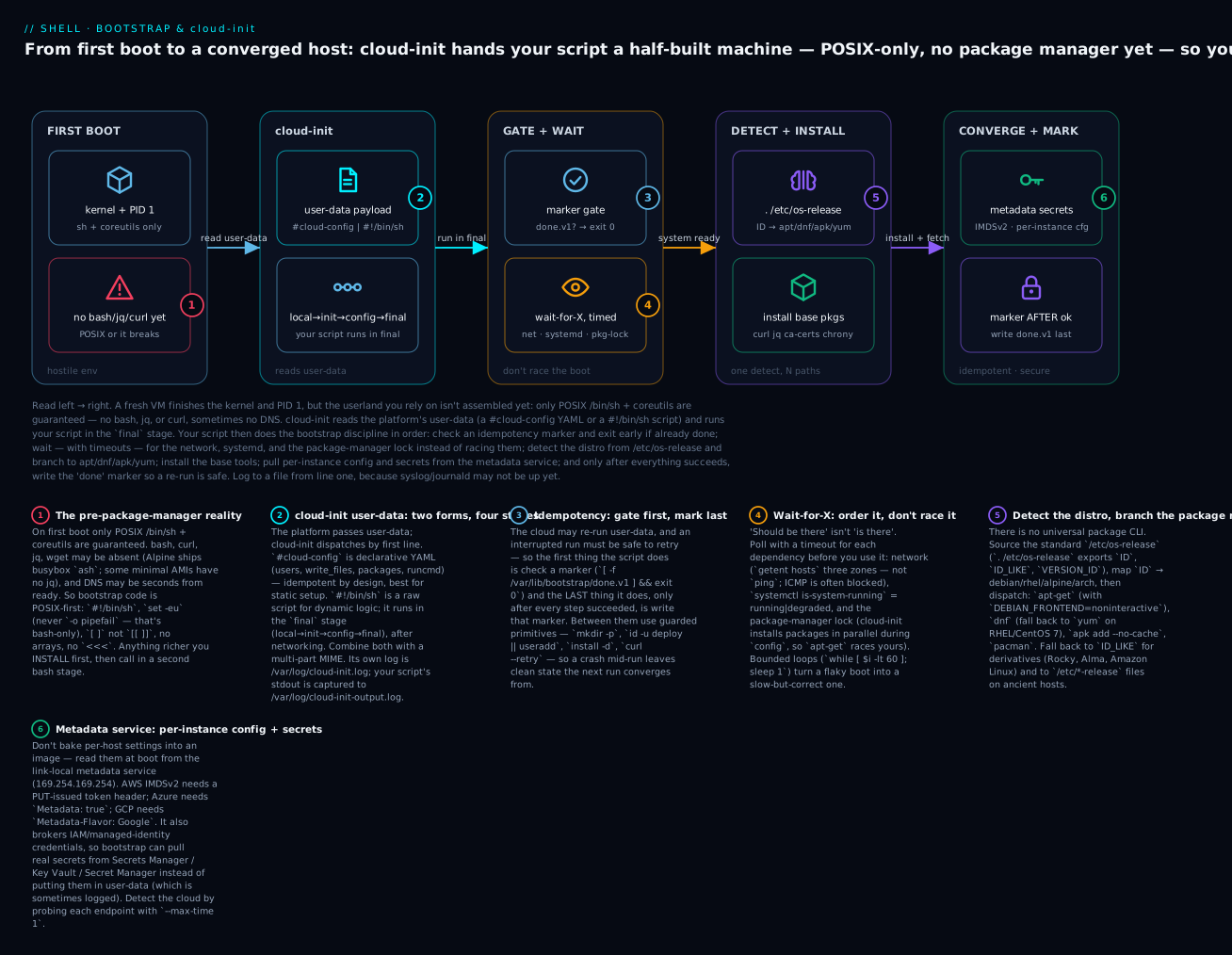
Read the diagram left to right: cloud-init hands your POSIX script a half-built machine, and the script’s job is to gate, wait, detect, install, and mark done — in that order. Every section below is one stage of that arc.
Why Bootstrap Is Its Own Discipline
You’ve written hundreds of shell scripts. Then you’re handed: “write the script that turns a freshly-booted Linux VM into a member of our cluster.” You write the same code you usually write — curl -fsSL https://api.example.com/..., jq -r '.token', apt-get install -y nginx — and 30% of the boots fail with errors you’ve never seen:
curl: command not found(Alpine, busybox-only)jq: command not found(some Amazon Linux AMIs)apt-get: not found(RHEL-family hosts)nslookup: SERVFAIL(DNS isn’t up yet — it’s 4 seconds into boot)connect: Network is unreachable(interface isloonly; eth0 not yet brought up)Error: Could not get lock /var/lib/dpkg/lock-frontend(cloud-init is also installing packages in parallel)
Bootstrap scripts run in a hostile environment because the system isn’t done assembling itself yet. The shell exists, PID 1 is running, but most of the userland tools you depend on either don’t exist or aren’t ready.
The disciplines that matter:
| Discipline | Why |
|---|---|
| POSIX-strict, busybox-compatible | Your script may run on Alpine where [[ ]], <<<, and arrays don’t exist |
| Wait-for-X loops with timeouts | Network, DNS, package manager locks, services — all may not be ready |
| Detect-then-act distro detection | apt-get on Ubuntu, dnf on RHEL, apk on Alpine — no universal package CLI |
| Idempotent from zero | Cloud may re-run user-data; running again must not break |
| No external dependencies on first run | Don’t curl https://... for code; embed it inline or fetch from instance metadata |
| Fail loud and recoverable | A failed bootstrap should leave clear logs and not produce a half-configured host |
This lesson is the cross-distro pattern set: cloud-init anatomy, the metadata-service contract, network-up detection, busybox-safe shell, and a copy-pasteable bootstrap template.
cloud-init: The Bootstrap Framework You Already Have
cloud-init is the de facto bootstrap framework on AWS, Azure, GCP, OpenStack, and bare metal. When a VM boots, cloud-init reads “user-data” supplied by the platform and acts on it. User-data can be:
- A shell script (starts with
#!/bin/shor#!) - A cloud-config YAML (starts with
#cloud-config) - A multi-part MIME archive (multiple shell scripts and cloud-configs together)
- A gzipped variant of any of the above (cloud-init auto-decompresses)
cloud-init runtime stages
                   BOOT
                    │
                    ▼
        ┌──────────────────────────┐
        │  cloud-init local        │  before networking
        │  (datasource, hostname)  │
        └────────────┬─────────────┘
                     │
                     ▼
        ┌──────────────────────────┐
        │  cloud-init init         │  network is up
        │  (resize disks, ssh keys)│
        └────────────┬─────────────┘
                     │
                     ▼
        ┌──────────────────────────┐
        │  cloud-init config       │  modules: write_files, runcmd, etc.
        │  (apt sources, packages) │
        └────────────┬─────────────┘
                     │
                     ▼
        ┌──────────────────────────┐
        │  cloud-init final        │  user_data runs here (shell scripts)
        │  (runcmd, scripts, etc.) │
        └────────────┬─────────────┘
                     │
                     ▼
                  READY
User-data scripts run during the final stage — after networking is configured, after package sources are set up, but before the system is fully “ready” for users. You’re root, you have network, you have a stable hostname, but other services may still be starting.
A minimal user-data shell script
#!/bin/sh
# cloud-init user-data: bootstrap-v1
# Runs ONCE on first boot. Output: /var/log/cloud-init-output.log

set -eu  # POSIX-strict; no -o pipefail (not POSIX)
exec >> /var/log/bootstrap.log 2>&1
echo "[$(date -u +%FT%TZ)] bootstrap starting"

# ... your bootstrap work ...

echo "[$(date -u +%FT%TZ)] bootstrap complete"
Three notes:
set -eu— POSIX-strict.set -euo pipefailis bash-only; if your script will run on Alpine (busyboxash), useset -euonly.exec >> file 2>&1— redirects everything from this point on. Output also goes to/var/log/cloud-init-output.log(cloud-init captures stdout) but we want a separate log we control.- The shebang
#!/bin/shis important: cloud-init recognizes the script type by shebang.#!/bin/bashworks but is non-portable across Alpine.
cloud-config: declarative bootstrap
For straightforward cases, cloud-config YAML is more reliable than shell scripts:
#cloud-config
hostname: web-001
fqdn: web-001.prod.internal
manage_etc_hosts: true

users:
  - name: deploy
    groups: sudo
    shell: /bin/bash
    sudo: 'ALL=(ALL) NOPASSWD:ALL'
    ssh_authorized_keys:
      - ssh-ed25519 AAAA... deploy@example

write_files:
  - path: /etc/myapp/config.json
    permissions: '0640'
    owner: 'root:myapp'
    content: |
      {"port": 8080, "log_level": "info"}

package_update: true
package_upgrade: false   # don't auto-upgrade in production; pin versions
packages:
  - curl
  - jq
  - chrony

runcmd:
  - systemctl enable --now chrony
  - /opt/myapp/bin/post-install.sh
cloud-config is declarative and idempotent by design. Use it for the static parts (users, packages, files); reserve shell scripts for dynamic logic that cloud-config can’t express.
When to reach for which: if you can describe the end state (this user exists, this file has these contents, these packages are installed), prefer #cloud-config — cloud-init’s modules already handle ordering, idempotency, and error reporting for you. Drop into a shell script only when you need logic cloud-config can’t express: “look up the DB endpoint from a tag, then template a config file from it”, “join this Kubernetes cluster if the control plane answers”, “loop until the volume is attached”. The most robust bootstraps use both, which is what multi-part MIME is for.
Multi-part user-data
For complex bootstraps, combine cloud-config and shell:
Content-Type: multipart/mixed; boundary="===PART==="
MIME-Version: 1.0

--===PART===
Content-Type: text/cloud-config

#cloud-config
packages: [jq, curl]

--===PART===
Content-Type: text/x-shellscript

#!/bin/sh
set -eu
echo "shell stage"
# ... your provisioning ...

--===PART===--
This runs the cloud-config first (installing jq, curl), then your shell script with those tools available. Generated easily with cloud-init devel make-mime:
cloud-init devel make-mime \
  -a packages.cfg:cloud-config \
  -a bootstrap.sh:x-shellscript \
  > combined.mime
This ordering — cloud-config installs your tools, then the shell part uses them — is the cleanest way out of the “no jq/curl yet” trap. Your shell script no longer has to be paranoid about missing tools, because the cloud-config part guaranteed them a stage earlier.
The Metadata Service: Bootstrap-Time Configuration
Each cloud platform exposes an HTTP metadata service at a well-known address that VMs can query for instance-specific data: hostname, IP, region, IAM credentials, user-supplied tags, and arbitrary user-data.
| Cloud | Endpoint | Token required? |
|---|---|---|
| AWS | http://169.254.169.254/latest/meta-data/ |
IMDSv2 requires PUT to get a token |
| Azure | http://169.254.169.254/metadata/instance?api-version=2021-02-01 |
Header: Metadata: true |
| GCP | http://metadata.google.internal/computeMetadata/v1/ |
Header: Metadata-Flavor: Google |
That 169.254.x.x address is a link-local address — it’s not routed anywhere, it’s answered by the hypervisor itself, so it works even before your instance has real internet connectivity. That’s exactly why it’s safe to rely on early in boot: reaching it doesn’t require DNS or a default route to the outside world.
AWS IMDSv2 (the modern, secured version)
# Get a session token (valid 6 hours).
TOKEN=$(curl -fsS -X PUT 'http://169.254.169.254/latest/api/token' \
  -H 'X-aws-ec2-metadata-token-ttl-seconds: 21600')

# Use it.
INSTANCE_ID=$(curl -fsS -H "X-aws-ec2-metadata-token: $TOKEN" \
  http://169.254.169.254/latest/meta-data/instance-id)
REGION=$(curl -fsS -H "X-aws-ec2-metadata-token: $TOKEN" \
  http://169.254.169.254/latest/meta-data/placement/region)
ROLE=$(curl -fsS -H "X-aws-ec2-metadata-token: $TOKEN" \
  http://169.254.169.254/latest/meta-data/iam/security-credentials/)

# Get IAM credentials for the role.
CREDS=$(curl -fsS -H "X-aws-ec2-metadata-token: $TOKEN" \
  "http://169.254.169.254/latest/meta-data/iam/security-credentials/$ROLE")
# CREDS is JSON: { AccessKeyId, SecretAccessKey, Token, Expiration, ... }
IMDSv1 (no token) is being phased out. Always use IMDSv2 in new bootstrap scripts.
Azure metadata
INSTANCE=$(curl -fsS -H 'Metadata: true' \
  'http://169.254.169.254/metadata/instance?api-version=2021-02-01')

# Parse with jq if available; otherwise sed.
VM_NAME=$(echo "$INSTANCE" | jq -r '.compute.name')
REGION=$(echo "$INSTANCE" | jq -r '.compute.location')
For managed-identity tokens:
TOKEN=$(curl -fsS -H 'Metadata: true' \
  'http://169.254.169.254/metadata/identity/oauth2/token?api-version=2018-02-01&resource=https://management.azure.com/' \
  | jq -r '.access_token')
GCP metadata
INSTANCE=$(curl -fsS -H 'Metadata-Flavor: Google' \
  'http://metadata.google.internal/computeMetadata/v1/instance/?recursive=true')

ZONE=$(curl -fsS -H 'Metadata-Flavor: Google' \
  'http://metadata.google.internal/computeMetadata/v1/instance/zone' \
  | awk -F/ '{print $NF}')

# Custom metadata key:
DEPLOY_ENV=$(curl -fsS -H 'Metadata-Flavor: Google' \
  'http://metadata.google.internal/computeMetadata/v1/instance/attributes/deploy-env')

# IAM identity token (for OIDC auth):
TOKEN=$(curl -fsS -H 'Metadata-Flavor: Google' \
  'http://metadata.google.internal/computeMetadata/v1/instance/service-accounts/default/identity?audience=https://my-service')
The metadata-service-as-secret-store pattern
Bootstrap scripts often need configuration that varies per-instance: which database to connect to, which API endpoint, what role to assume. Don’t bake these into AMIs; pass them via metadata:
# AWS launch template sets user-data including custom data:
# {"db_endpoint": "prod-db.us-west-2.internal", "feature_flags": ["x", "y"]}

USER_DATA=$(curl -fsS -H "X-aws-ec2-metadata-token: $TOKEN" \
  http://169.254.169.254/latest/user-data)

# Or instance tags via API (requires IAM):
TAGS=$(aws ec2 describe-tags \
  --filters "Name=resource-id,Values=$INSTANCE_ID" \
  --query 'Tags[].[Key,Value]' --output text)
For secrets that shouldn’t be in user-data (because user-data is sometimes logged), fetch from AWS Secrets Manager / Azure Key Vault / GCP Secret Manager during bootstrap, using IAM that the metadata service makes available.
Wait-For-X Patterns: Don’t Race the System
Bootstrap is racy. Things that “should be there” might not be yet. The discipline: never assume; wait with a timeout.
Wait for network connectivity
wait_for_network() {
  timeout=${1:-60}
  i=0
  while [ "$i" -lt "$timeout" ]; do
    # POSIX: do not use [[ ]] or arrays.
    if getent hosts deb.debian.org >/dev/null 2>&1 || \
       getent hosts amazon.com >/dev/null 2>&1 || \
       getent hosts google.com >/dev/null 2>&1; then
      return 0
    fi
    sleep 1
    i=$((i + 1))
  done
  echo "wait_for_network: timed out after ${timeout}s" >&2
  return 1
}

wait_for_network 60 || exit 1
Why three hosts? Because DNS-up + one specific host might be unreachable for unrelated reasons (a peering issue, a firewall rule). Three independent zones means “the internet is generally working.”
ping is the wrong primitive: ICMP is often blocked. DNS resolution + connection attempt is more reliable.
Wait for package-manager lock to release
wait_for_apt() {
  timeout=${1:-300}
  i=0
  while [ "$i" -lt "$timeout" ]; do
    if ! pgrep -x apt-get >/dev/null 2>&1 && ! pgrep -x dpkg >/dev/null 2>&1; then
      # No apt process running.
      return 0
    fi
    sleep 2
    i=$((i + 2))
  done
  return 1
}

wait_for_apt 300 || { echo "apt-get is busy; aborting"; exit 1; }
apt-get update
cloud-init runs apt itself in parallel during the config stage. If your final-stage script also runs apt, you race. Wait for the lock.
For dnf/yum: pgrep dnf|yum. For apk: pgrep apk.
Wait for systemd to finish booting
wait_for_systemd_running() {
  timeout=${1:-120}
  i=0
  while [ "$i" -lt "$timeout" ]; do
    state=$(systemctl is-system-running 2>/dev/null || true)
    case "$state" in
      running|degraded) return 0 ;;
    esac
    sleep 2
    i=$((i + 2))
  done
  return 1
}

wait_for_systemd_running
systemctl is-system-running returns:
initializing/starting— boot in progressrunning— fully booteddegraded— booted but some services failedmaintenance/stopping— shutdown in progress
degraded is acceptable for “system is functional”; it just means some non-critical service didn’t start.
Wait for a specific service
wait_for_service() {
  service=$1
  timeout=${2:-60}
  i=0
  while [ "$i" -lt "$timeout" ]; do
    if systemctl is-active --quiet "$service" 2>/dev/null; then
      return 0
    fi
    sleep 1
    i=$((i + 1))
  done
  return 1
}

wait_for_service docker 30 || exit 1
The shared shape. Notice every wait function above is the same skeleton: a counter, a bounded while, a cheap check, a sleep, and a non-zero return on timeout. That’s deliberate — bootstrap ordering is a graph of “A must be ready before B”, and each edge is one of these loops. Two rules keep them safe: always bound the wait (an unbounded while can hang the whole boot forever, and cloud-init has no watchdog to rescue you), and always poll a cheap, side-effect-free check (a DNS lookup, a pgrep, a systemctl is-active) rather than the expensive operation itself. Get those two right and a flaky boot becomes a slow-but-correct boot instead of a wedged instance.
Early Logging: Before syslog, journald, or Your Log Shipper Exists
Here is the debugging trap that catches everyone once: your bootstrap fails, you SSH in, you run journalctl or logger… and there’s nothing useful, because at the moment your script ran, the logging infrastructure you assume was itself still coming up. Your log shipper (Vector, Fluent Bit, the CloudWatch agent) isn’t installed yet — installing it is often what the bootstrap does. So bootstrap logging has to be self-contained: write to a plain file, on a filesystem that’s guaranteed to exist, from the very first line.
That’s what the exec redirect at the top of every good bootstrap does:
#!/bin/sh
set -eu
# /var/log always exists on a booted Linux system; /var/lib/bootstrap does not
# until we make it, so log to /var/log first.
exec >> /var/log/bootstrap.log 2>&1
exec with no command replaces the shell’s own file descriptors for the rest of the script: every subsequent echo, and every command’s stdout and stderr (2>&1), now append to /var/log/bootstrap.log with no per-command redirection needed. cloud-init also captures your stdout into /var/log/cloud-init-output.log, so you get the trace in two places — that’s a feature, not a bug, when you’re debugging a boot at 3 a.m.
Add timestamps and levels yourself, because the fancy tools that do it for you (ts, structured loggers) aren’t here:
log() {
  # $1 = level, rest = message. Timestamp in UTC ISO-8601.
  level=$1; shift
  echo "[$(date -u +%FT%TZ)] [$level] $*"
}

log INFO  "bootstrap starting on $(hostname)"
log WARN  "chrony not found; skipping time sync"
log ERROR "failed to reach config server after 3 retries"
Three habits pay off enormously when you’re staring at a failed boot:
- Timestamp everything in UTC. Boot logs are correlated across the fleet and across services; local time and unsynced clocks (chrony may not have run yet!) make correlation miserable.
date -u +%FT%TZis POSIX and unambiguous. - Tee to the console when you can.
exec > >(tee -a /var/log/bootstrap.log) 2>&1also writes to the serial console — invaluable when SSH itself is what failed to come up and the serial console is your only window in. Note>(...)is process substitution, a bashism: use it only after you know you’re in bash, or fall back to a plainexec >>file 2>&1under POSIXsh. - Log the “why”, not just the “what”.
log ERROR "config server unreachable: $url (exit $?)"beats a barecurlfailure, because on a fresh box you can’t reproduce the transient network state later.
Finally, once the box is up and syslog/journald exist, that’s the moment to hand off: later stages of provisioning (and the app itself) should log to journald or your shipper. Bootstrap logging is deliberately primitive precisely because it runs in the window before the grown-up tools exist.
Distro Detection: One Detection, Three Code Paths
detect_distro() {
  if [ -r /etc/os-release ]; then
    # /etc/os-release is the modern standard.
    . /etc/os-release   # exports ID, ID_LIKE, VERSION_ID, etc.
    case "$ID" in
      ubuntu|debian) DISTRO=debian; PKG=apt-get ;;
      rhel|centos|fedora|rocky|almalinux|amzn) DISTRO=rhel; PKG=dnf ;;
      alpine) DISTRO=alpine; PKG=apk ;;
      arch) DISTRO=arch; PKG=pacman ;;
      *)
        # Fall back to ID_LIKE for derivatives.
        case "$ID_LIKE" in
          *debian*) DISTRO=debian; PKG=apt-get ;;
          *rhel*|*fedora*) DISTRO=rhel; PKG=dnf ;;
          *) DISTRO=unknown; PKG="" ;;
        esac
        ;;
    esac
  else
    DISTRO=unknown; PKG=""
  fi

  # dnf may not exist on older RHEL/CentOS 7; fall back to yum.
  if [ "$PKG" = "dnf" ] && ! command -v dnf >/dev/null 2>&1; then
    PKG=yum
  fi

  export DISTRO PKG
}

detect_distro
echo "Detected: $DISTRO using $PKG"
/etc/os-release is supported on every modern Linux; it’s the canonical source. Older systems had /etc/redhat-release, /etc/alpine-release, etc. — fall back to those if needed.
Why . and not run it? . /etc/os-release (the POSIX source) reads the file into the current shell so $ID, $ID_LIKE, and $VERSION_ID become variables you can branch on. The file is deliberately a set of KEY=value shell assignments for exactly this reason — but that also means it’s executed, so never point . at a file you don’t trust. And note ID_LIKE may be empty or hold multiple space-separated values (ID_LIKE="rhel centos fedora"), which is why the fallback uses case glob matching (*rhel*) rather than string equality.
Cross-distro install function
install_pkg() {
  pkg=$1
  case "$DISTRO" in
    debian)
      DEBIAN_FRONTEND=noninteractive apt-get install -y "$pkg"
      ;;
    rhel)
      "$PKG" install -y "$pkg"
      ;;
    alpine)
      apk add --no-cache "$pkg"
      ;;
    arch)
      pacman -Sy --noconfirm "$pkg"
      ;;
    *)
      echo "install_pkg: unknown distro $DISTRO" >&2
      return 1
      ;;
  esac
}

install_pkg jq
install_pkg curl
Note DEBIAN_FRONTEND=noninteractive for apt: prevents prompts for things like grub config that hang the bootstrap.
One subtlety worth internalizing: package names are not portable even when the tool is. The Python 3 interpreter is python3 on Debian but often just python3 vs python311 on RHEL; ca-certificates exists everywhere but the SSL library package differs; iproute2 on Debian is iproute on RHEL. For a handful of packages that matter, keep a small per-distro name map rather than assuming one name works everywhere — the abstraction is the action (install), not the name.
A Cross-Distro Bootstrap Template
#!/bin/sh
# bootstrap.sh — first-boot provisioning, POSIX-strict.
# Usable as cloud-init user-data on AWS, Azure, GCP, bare metal.

set -eu
exec >> /var/log/bootstrap.log 2>&1

log() { echo "[$(date -u +%FT%TZ)] [bootstrap] $*"; }

# ─── 0. Idempotency guard ─────────────────────────────────────────────────
MARKER=/var/lib/bootstrap/done.v1
if [ -f "$MARKER" ]; then
  log "already bootstrapped at $(cat "$MARKER"); skipping"
  exit 0
fi

# ─── 1. Wait for system to be ready ───────────────────────────────────────
log "waiting for systemd to settle..."
i=0
while [ "$i" -lt 60 ]; do
  state=$(systemctl is-system-running 2>/dev/null || true)
  case "$state" in
    running|degraded) break ;;
  esac
  sleep 2
  i=$((i + 2))
done

log "waiting for network..."
i=0
while [ "$i" -lt 60 ]; do
  if getent hosts deb.debian.org >/dev/null 2>&1 \
     || getent hosts amazon.com >/dev/null 2>&1 \
     || getent hosts google.com >/dev/null 2>&1; then
    break
  fi
  sleep 1
  i=$((i + 1))
done

# ─── 2. Distro detection ──────────────────────────────────────────────────
. /etc/os-release
case "$ID" in
  ubuntu|debian) DISTRO=debian ;;
  rhel|centos|fedora|rocky|almalinux|amzn) DISTRO=rhel ;;
  alpine) DISTRO=alpine ;;
  *) log "unknown distro: $ID"; exit 1 ;;
esac
log "detected: $DISTRO ($PRETTY_NAME)"

# ─── 3. Wait for package manager lock ─────────────────────────────────────
log "waiting for package manager lock..."
i=0
while [ "$i" -lt 300 ]; do
  case "$DISTRO" in
    debian)
      pgrep -x apt-get >/dev/null 2>&1 || pgrep -x dpkg >/dev/null 2>&1 || break
      ;;
    rhel)
      pgrep -x dnf >/dev/null 2>&1 || pgrep -x yum >/dev/null 2>&1 || break
      ;;
    alpine)
      pgrep -x apk >/dev/null 2>&1 || break
      ;;
  esac
  sleep 2
  i=$((i + 2))
done

# ─── 4. Install base packages ─────────────────────────────────────────────
log "installing base packages..."
case "$DISTRO" in
  debian)
    DEBIAN_FRONTEND=noninteractive apt-get update
    DEBIAN_FRONTEND=noninteractive apt-get install -y \
      curl jq ca-certificates chrony
    ;;
  rhel)
    yum install -y curl jq ca-certificates chrony 2>/dev/null \
      || dnf install -y curl jq ca-certificates chrony
    ;;
  alpine)
    apk add --no-cache curl jq ca-certificates chrony bash
    ;;
esac

# ─── 5. Fetch metadata (cloud-specific) ───────────────────────────────────
log "fetching instance metadata..."
fetch_metadata_aws() {
  TOKEN=$(curl -fsS -X PUT 'http://169.254.169.254/latest/api/token' \
    -H 'X-aws-ec2-metadata-token-ttl-seconds: 21600' || true)
  if [ -n "${TOKEN:-}" ]; then
    INSTANCE_ID=$(curl -fsS -H "X-aws-ec2-metadata-token: $TOKEN" \
      http://169.254.169.254/latest/meta-data/instance-id || true)
    REGION=$(curl -fsS -H "X-aws-ec2-metadata-token: $TOKEN" \
      http://169.254.169.254/latest/meta-data/placement/region || true)
    log "AWS: instance=$INSTANCE_ID region=$REGION"
    echo "$INSTANCE_ID" > /etc/instance-id
    echo "$REGION" > /etc/region
  fi
}

fetch_metadata_azure() {
  if curl -fsS -H 'Metadata: true' \
    'http://169.254.169.254/metadata/instance?api-version=2021-02-01' >/tmp/azure.json; then
    VM_NAME=$(jq -r '.compute.name' /tmp/azure.json)
    REGION=$(jq -r '.compute.location' /tmp/azure.json)
    log "Azure: vm=$VM_NAME region=$REGION"
    echo "$VM_NAME" > /etc/instance-id
    echo "$REGION" > /etc/region
  fi
}

fetch_metadata_gcp() {
  if curl -fsS -H 'Metadata-Flavor: Google' \
    http://metadata.google.internal/computeMetadata/v1/instance/id >/tmp/gcp.id; then
    INSTANCE_ID=$(cat /tmp/gcp.id)
    ZONE=$(curl -fsS -H 'Metadata-Flavor: Google' \
      http://metadata.google.internal/computeMetadata/v1/instance/zone \
      | awk -F/ '{print $NF}')
    log "GCP: instance=$INSTANCE_ID zone=$ZONE"
    echo "$INSTANCE_ID" > /etc/instance-id
    echo "$ZONE" > /etc/region
  fi
}

# Detect cloud and fetch.
if curl -fsS --max-time 1 'http://169.254.169.254/latest/meta-data/' \
   -H 'X-aws-ec2-metadata-token: 1' >/dev/null 2>&1 \
   || curl -fsS --max-time 1 -X PUT 'http://169.254.169.254/latest/api/token' \
   -H 'X-aws-ec2-metadata-token-ttl-seconds: 60' >/dev/null 2>&1; then
  fetch_metadata_aws
elif curl -fsS --max-time 1 -H 'Metadata: true' \
  'http://169.254.169.254/metadata/instance?api-version=2021-02-01' >/dev/null 2>&1; then
  fetch_metadata_azure
elif curl -fsS --max-time 1 -H 'Metadata-Flavor: Google' \
  http://metadata.google.internal/computeMetadata/v1/instance/id >/dev/null 2>&1; then
  fetch_metadata_gcp
else
  log "no recognizable metadata service; running on bare metal?"
fi

# ─── 6. Configure timekeeping ─────────────────────────────────────────────
log "starting chrony..."
systemctl enable --now chrony chronyd 2>/dev/null || \
  systemctl enable --now chronyd 2>/dev/null || \
  systemctl enable --now chrony 2>/dev/null || true

# ─── 7. Create deploy user ────────────────────────────────────────────────
log "creating deploy user..."
if ! id -u deploy >/dev/null 2>&1; then
  useradd --system --create-home --shell /bin/bash deploy
  install -d -m 0700 -o deploy -g deploy /home/deploy/.ssh
fi

# ─── 8. Pull and run the post-bootstrap configuration ─────────────────────
log "fetching post-bootstrap configuration..."
mkdir -p /opt/bootstrap
if [ -f /etc/instance-id ]; then
  curl -fsSL --retry 3 --retry-delay 5 \
    "https://config.example.com/$(cat /etc/instance-id)/post-install.sh" \
    -o /opt/bootstrap/post-install.sh
  chmod +x /opt/bootstrap/post-install.sh
  /opt/bootstrap/post-install.sh
fi

# ─── 9. Mark complete ─────────────────────────────────────────────────────
mkdir -p "$(dirname "$MARKER")"
date -u +%FT%TZ > "$MARKER"
log "bootstrap complete"
Walk the numbered blocks and you’re walking the diagram at the top of this lesson: gate on the marker (0) → wait for the system and network (1) → detect the distro (2) → wait for the package lock (3) → install (4) → fetch metadata (5) → converge (6–8) → mark done (9). The marker being written last, only after every step succeeded, is the load-bearing detail: if block 8 dies because the config server was down, no marker is written, and the next boot (or a manual re-run) starts over cleanly instead of skipping on a lie.
Real-World Recipes
Recipe 1: Inject SSH keys from instance metadata
# AWS: SSH keys are at /latest/meta-data/public-keys/
inject_aws_ssh_keys() {
  TOKEN=$(curl -fsS -X PUT 'http://169.254.169.254/latest/api/token' \
    -H 'X-aws-ec2-metadata-token-ttl-seconds: 60')
  KEY_INDEXES=$(curl -fsS -H "X-aws-ec2-metadata-token: $TOKEN" \
    http://169.254.169.254/latest/meta-data/public-keys/ \
    | awk -F= '{print $1}')
  for idx in $KEY_INDEXES; do
    curl -fsS -H "X-aws-ec2-metadata-token: $TOKEN" \
      "http://169.254.169.254/latest/meta-data/public-keys/$idx/openssh-key" \
      >> /home/deploy/.ssh/authorized_keys
  done
  chmod 0600 /home/deploy/.ssh/authorized_keys
  chown deploy:deploy /home/deploy/.ssh/authorized_keys
}
Recipe 2: Bootstrap a Kubernetes node
# Install containerd and kubelet on a fresh Ubuntu host.
bootstrap_k8s_node() {
  apt-get update
  apt-get install -y curl ca-certificates apt-transport-https

  # containerd
  install -m 0755 -d /etc/apt/keyrings
  curl -fsSL https://download.docker.com/linux/ubuntu/gpg \
    | gpg --dearmor -o /etc/apt/keyrings/docker.gpg
  cat >/etc/apt/sources.list.d/docker.list <<EOF
deb [arch=$(dpkg --print-architecture) signed-by=/etc/apt/keyrings/docker.gpg] \
  https://download.docker.com/linux/ubuntu $(lsb_release -cs) stable
EOF
  apt-get update
  apt-get install -y containerd.io
  containerd config default >/etc/containerd/config.toml
  systemctl restart containerd

  # kubelet, kubeadm
  curl -fsSL https://pkgs.k8s.io/core:/stable:/v1.30/deb/Release.key \
    | gpg --dearmor -o /etc/apt/keyrings/kubernetes.gpg
  echo "deb [signed-by=/etc/apt/keyrings/kubernetes.gpg] \
    https://pkgs.k8s.io/core:/stable:/v1.30/deb/ /" \
    > /etc/apt/sources.list.d/kubernetes.list
  apt-get update
  apt-get install -y kubelet kubeadm kubectl
  apt-mark hold kubelet kubeadm kubectl

  # Disable swap (kubelet requirement).
  swapoff -a
  sed -i '/swap/s/^/#/' /etc/fstab

  # Sysctl tuning for k8s.
  cat >/etc/sysctl.d/99-kubernetes.conf <<EOF
net.bridge.bridge-nf-call-iptables = 1
net.ipv4.ip_forward = 1
EOF
  sysctl --system
}
Recipe 3: Recover from a partial bootstrap
# If bootstrap is interrupted (network glitch, OOM), the marker won't be set.
# Re-running the script picks up where it left off, IF each step is idempotent.

# This is why the template uses install -d (idempotent dir create), id -u || useradd
# (idempotent user create), and curl with --retry. A failed run leaves clean state
# that a re-run can converge from.

# To force a re-run on an already-bootstrapped host:
sudo rm /var/lib/bootstrap/done.v1
sudo /var/lib/cloud/instances/$(cloud-init query instance-id)/user-data.txt
# Or trigger cloud-init to re-run user-data (rarely supported; see your distro docs).
Going deeper
You can bootstrap a fleet with the template above and be right 95% of the time. This section is about the other 5% — the internals, security edges, and scale tradeoffs that separate “it worked in my test account” from “it survives a bad launch day across 10,000 instances.”
Network-up detection with zero tools (busybox reality)
wait_for_network above uses getent, which is present on glibc systems — but on a stripped Alpine/busybox box, getent may be absent too. Here’s a layered probe that degrades gracefully:
net_ready() {
  # 1. Best: resolve a name (proves DNS + routing).
  if command -v getent >/dev/null 2>&1; then
    getent hosts example.com >/dev/null 2>&1 && return 0
  fi
  # 2. busybox nslookup, if present.
  if command -v nslookup >/dev/null 2>&1; then
    nslookup example.com >/dev/null 2>&1 && return 0
  fi
  # 3. No resolver tool? Check the kernel's own link state.
  for f in /sys/class/net/e*/operstate /sys/class/net/en*/operstate; do
    [ -r "$f" ] || continue
    [ "$(cat "$f")" = "up" ] && return 0
  done
  return 1
}
Two things worth knowing. First, /dev/tcp/host/port is a bash feature, not a kernel one — it does not exist under dash or busybox ash, so a echo > /dev/tcp/1.1.1.1/443 probe silently does nothing (or errors) under POSIX sh. Reach for it only once you know you’re in bash. Second, reading /sys/class/net/*/operstate tells you the link is up (cable/virtual NIC present) but not that routing or DNS work — treat it as a weak last-resort signal, not proof of connectivity.
The metadata service is an SSRF magnet
The metadata endpoint hands out IAM credentials to anything on the box that can make an HTTP request to 169.254.169.254. That’s the entire mechanism behind some of the largest cloud breaches: an app with a server-side request forgery (SSRF) bug is tricked into fetching http://169.254.169.254/latest/meta-data/iam/security-credentials/..., and the attacker walks away with your instance role’s keys. IMDSv2 exists precisely to make this harder:
- The PUT-to-get-a-token dance can’t be triggered by a naive SSRF that only does
GET(many SSRF primitives can’t set a custom method or header). - The token request enforces a response hop limit (default 1) via
X-aws-ec2-metadata-token-ttl-secondsplus the IMDS hop-limit setting, so a request proxied through a container’s extra network hop is dropped. - You can require IMDSv2 (
HttpTokens: required) at the instance level so v1 is refused entirely.
Bootstrap-time consequences: always write IMDSv2 code, set the instance to require it, and if your workload runs containers, block the containers’ access to IMDS (e.g. a hop-limit of 1, or a network policy) so a compromised pod can’t mint node-role credentials. And never echo fetched credentials into your log file — remember exec >> bootstrap.log is capturing everything.
cloud-init re-run semantics and its own state files
“cloud-init runs user-data once” is true, but once per what? cloud-init tracks a datasource instance-id under /var/lib/cloud/. Modules have a frequency: once-per-instance (most user-data) or always (every boot). The instance-id is the key — if the platform gives the VM a new instance-id (a fresh launch, some clone operations), cloud-init treats it as a new instance and re-runs per-instance modules. This is why baking an image with a stale /var/lib/cloud/ can make cloud-init skip on first boot of the derived instances. The tools:
cloud-init query instance-id        # what cloud-init thinks this instance is
cloud-init schema --system          # validate the applied user-data/cloud-config
cloud-init status --long --wait     # block until cloud-init is fully done
cloud-init clean --logs --seed      # reset state so a re-image re-runs cleanly
The lesson for image-builders: cloud-init clean before you snapshot a golden image, or the derived instances inherit “already ran” state. And note the distinction from your marker — cloud-init’s semaphores gate cloud-init’s modules; your /var/lib/bootstrap/done.v1 gates your script. They’re independent, and you own the second one.
Marker-file discipline at scale
The single marker in the template is fine for one script. In a real fleet, treat markers like a tiny schema:
- Version them.
done.v1→done.v2when the bootstrap logic changes materially. An old host withdone.v1and new code that only checksdone.v2will correctly re-converge. This is how you roll out a bootstrap change to already-running instances without re-imaging. - Namespace them under
/var/lib/<app>/state/, never/tmp—/tmpmay be a tmpfs wiped on reboot, which would make your “once” script run every boot. - Write them atomically and last.
date -u +%FT%TZ > "$MARKER"after success. For extra safety on a crash-mid-write, write to a temp file andmv(rename is atomic on the same filesystem). - Record what succeeded, not just that it did — write the git SHA or version of the bootstrap into the marker, so an operator debugging drift can see which bootstrap version last touched the box.
Parsing metadata JSON when jq isn’t installed yet
The classic chicken-and-egg: you need jq to parse the metadata that tells you what to install, but jq isn’t installed yet. Options, best first: (1) install jq in a #cloud-config MIME part before the shell part; (2) use the cloud’s structured endpoints (AWS’s meta-data/ tree returns one value per path — no JSON to parse at all); (3) as a last resort, extract a single flat field with POSIX sed:
# Extract one string field from flat JSON without jq. VERIFIED to run under /bin/sh.
json_str() { printf '%s' "$2" | sed -n "s/.*\"$1\":\"\([^\"]*\)\".*/\1/p"; }

CREDS='{"AccessKeyId":"AKIAEXAMPLE","Expiration":"2026-07-19T13:00:00Z"}'
akid=$(json_str AccessKeyId "$CREDS")   # -> AKIAEXAMPLE
Be honest about the limits: this sed trick works for flat, unescaped, single-line JSON only. It breaks on nested objects, escaped quotes, arrays, and duplicate keys. It’s a bootstrap stopgap to get you to the point where you can install a real parser — never a general JSON solution. The moment jq (or python3 -c 'import json') is available, switch to it.
systemd-firstboot, Ignition, and when cloud-init isn’t there
cloud-init is dominant but not universal. Fedora CoreOS, Flatcar, and RHEL CoreOS use Ignition, which runs in the initramfs — even earlier than cloud-init, before the real root is pivoted to — and is declarative JSON, not shell. systemd-firstboot handles a narrower slice (locale, hostname, root password) on systemd systems. Immutable/container-optimized OSes deliberately restrict imperative bootstrap because they favor rebuild-the-image over mutate-the-host. The transferable idea: the earlier the mechanism runs, the less userland it can assume — Ignition assumes even less than cloud-init, which assumes less than a runcmd. Know which layer you’re writing for, because it dictates what tools you’re allowed to reach for.
Boot-time performance: the golden-image tradeoff
Every apt-get update, every package install, and every sleep in a wait loop adds to boot time — and boot time is scaling time. An autoscaling group that takes 4 minutes to bootstrap a node can’t respond to a traffic spike as fast as one that takes 30 seconds. The lever is the golden-image vs. bootstrap spectrum: bake the slow, static work (base packages, agents, the container runtime) into a pre-built AMI with Packer, and leave only the fast, dynamic per-instance work (fetch config, join the cluster, register with the LB) to the boot-time script. Rule of thumb: anything identical across every instance belongs in the image; anything that varies per-instance belongs in bootstrap. This also shrinks the blast radius of a flaky package mirror — a baked image doesn’t need the mirror to be up at 3 a.m. to launch a replacement node.
Practice challenges
Work these in order — they escalate from “make it idempotent” to “handle the cloud edges.” Each has a worked solution, but try it first; bootstrap is a muscle you build by getting the ordering wrong once. You can test POSIX behavior locally with dash (sudo apt-get install dash) or by running your script with sh script instead of bash script.
1. (Beginner) Add an idempotency gate. Given a script that creates a user and installs a package, add a marker so a second run is a clean no-op — and make sure the marker is written only after the work succeeds.
<details> <summary>Solution</summary>
#!/bin/sh
set -eu
MARKER=/var/lib/myboot/done.v1
[ -f "$MARKER" ] && { echo "already done; skipping"; exit 0; }

# ... do the real work here (idempotent commands) ...

mkdir -p "$(dirname "$MARKER")"
date -u +%FT%TZ > "$MARKER"      # marker is the LAST line
Why: the gate at the top makes re-runs free; writing the marker last means a crash mid-work leaves no marker, so the next run retries instead of falsely skipping. Store it under /var/lib, never /tmp (tmpfs is wiped on reboot).
</details>
2. (Beginner) De-bashify a snippet. Rewrite this so it runs under /bin/sh (busybox ash):
if [[ -d /opt/app ]]; then
  hosts=(a.example b.example)
  for h in "${hosts[@]}"; do echo "$h"; done
  read -r line <<< "$(cat /etc/hostname)"
fi
<details> <summary>Solution</summary>
if [ -d /opt/app ]; then
  hosts="a.example b.example"          # space-separated string, not an array
  for h in $hosts; do echo "$h"; done  # word-splitting iterates it
  line=$(cat /etc/hostname)            # command substitution, not a here-string
fi
Why: [[ ]], arrays, and <<< are all bashisms absent from POSIX sh. [ ], space-separated strings iterated by an unquoted for, and $(...) are the portable equivalents. (Test: dash -n script to syntax-check under POSIX.)
</details>
3. (Intermediate) Bounded network wait. Write wait_for_network that returns success as soon as any of three independent hosts resolves, gives up after 30 seconds, and does not use ping.
<details> <summary>Solution</summary>
wait_for_network() {
  timeout=${1:-30}; i=0
  while [ "$i" -lt "$timeout" ]; do
    getent hosts amazon.com   >/dev/null 2>&1 && return 0
    getent hosts google.com   >/dev/null 2>&1 && return 0
    getent hosts cloudflare.com >/dev/null 2>&1 && return 0
    sleep 1; i=$((i + 1))
  done
  echo "network not ready after ${timeout}s" >&2; return 1
}
wait_for_network 30 || exit 1
Why: ICMP (ping) is frequently firewalled, so it gives false negatives; DNS resolution proves both DNS and routing. Three independent zones avoid a single provider’s blip reading as “no internet.” The bounded loop guarantees the boot can’t hang forever.
</details>
4. (Intermediate) Distro dispatch with fallbacks. Write detect_distro that sources /etc/os-release, maps ID to a package manager, falls back to ID_LIKE for derivatives (Rocky, Amazon Linux), and downgrades dnf→yum when dnf is absent.
<details> <summary>Solution</summary>
detect_distro() {
  [ -r /etc/os-release ] || { echo "no os-release" >&2; return 1; }
  . /etc/os-release
  case "$ID" in
    ubuntu|debian) PKG=apt-get ;;
    rhel|centos|fedora|rocky|almalinux|amzn) PKG=dnf ;;
    alpine) PKG=apk ;;
    *) case "$ID_LIKE" in
         *debian*) PKG=apt-get ;;
         *rhel*|*fedora*) PKG=dnf ;;
         *) echo "unknown: $ID ($ID_LIKE)" >&2; return 1 ;;
       esac ;;
  esac
  [ "$PKG" = dnf ] && ! command -v dnf >/dev/null 2>&1 && PKG=yum
  echo "$PKG"
}
Why: ID is precise when known; ID_LIKE (glob-matched, since it can be multi-valued) catches the long tail of derivatives without enumerating every distro; the dnf→yum downgrade covers RHEL/CentOS 7 where dnf isn’t installed.
</details>
5. (Advanced) IMDSv2 two-step, absence-tolerant. Fetch the AWS instance-id using IMDSv2 (PUT for a token, then GET with the token header), but don’t crash the whole bootstrap if there’s no metadata service (e.g. running on bare metal or a laptop).
<details> <summary>Solution</summary>
get_instance_id_aws() {
  token=$(curl -fsS --max-time 2 -X PUT \
    'http://169.254.169.254/latest/api/token' \
    -H 'X-aws-ec2-metadata-token-ttl-seconds: 60' 2>/dev/null) || return 1
  [ -n "$token" ] || return 1
  curl -fsS --max-time 2 -H "X-aws-ec2-metadata-token: $token" \
    http://169.254.169.254/latest/meta-data/instance-id 2>/dev/null
}

if iid=$(get_instance_id_aws); then
  echo "instance: $iid"
else
  echo "no AWS IMDS; assuming non-EC2 host"
fi
Why: --max-time 2 stops a missing metadata service from hanging boot; the || return 1 and the if around the call turn “no metadata” into a handled branch instead of a set -e abort. Never assume the metadata service is present.
</details>
6. (Advanced) Chicken-and-egg with jq. You need a value from metadata JSON, but jq isn’t installed and you’re under set -eu. Produce the value both ways: the robust way (install jq first) and the stopgap way (POSIX sed), and say when each is safe.
<details> <summary>Solution</summary>
# Robust: guarantee jq via a cloud-config MIME part, OR install then parse.
command -v jq >/dev/null 2>&1 || {
  . /etc/os-release
  case "$ID" in debian|ubuntu) apt-get install -y jq ;; alpine) apk add --no-cache jq ;; *) dnf install -y jq ;; esac
}
name=$(printf '%s' "$JSON" | jq -r '.compute.name')

# Stopgap (flat JSON only, no jq): extract one string field with sed.
json_str() { printf '%s' "$2" | sed -n "s/.*\"$1\":\"\([^\"]*\)\".*/\1/p"; }
name=$(json_str name "$JSON")
Why: prefer real parsing — install jq (ideally in an earlier cloud-config stage) and use it. The sed extractor is acceptable only for flat, single-line, unescaped JSON to bridge the gap before a parser exists; it breaks on nesting, arrays, and escaped quotes, so it must never be your permanent solution.
</details>
Common beginner mistakes
These are the misconceptions — the wrong mental model, and the right one. (For the concrete technical traps, see the Footgun List below.)
-
“It’s Linux, so bash is there.” The wrong assumption behind most first-boot failures. Right model: only a POSIX
/bin/shand coreutils are guaranteed. Alpine ships busyboxash; minimal images may lackbash,curl, andjqentirely. Write POSIX-first and install the richer tools before you use them. Verify by running your script underdash, notbash. -
“The network is up when my script runs.” cloud-init’s
finalstage has configured networking, but “configured” isn’t “the DNS server is answering and the route to the internet is live.” Right model: external connectivity lags interface configuration by seconds; everycurlto the outside world is preceded by a boundedwait_for_network. -
“cloud-init re-runs my user-data on every reboot, so I don’t need to be idempotent.” Backwards on both counts. cloud-init runs user-data once per instance, not per boot — so a reboot does not re-run it — and yet you still must be idempotent, because cloud-init or an operator may re-run it, and an interrupted first run must be safe to retry. Right model: idempotency is your responsibility; gate on a marker and use re-runnable primitives.
-
“I’ll just
curlthe real script from our server at boot.” This makes your provisioning server a boot-time hard dependency and a single point of failure — if it’s down or slow during a scale-up, no new nodes come up. It’s also a supply-chain risk (you’re executing whatever that URL returns). Right model: embed the logic in user-data or bake it into the image; if you must fetch, pin it, verify it (checksum/signature), and--retry. -
“jq will parse the metadata.” On many first boots
jqisn’t installed yet — the very thing you’d use to read the config that tells you what to install. Right model: installjqin an earlier cloud-config stage, use the cloud’s per-path metadata endpoints, or parse a single flat field with POSIXsedas a stopgap. -
“I’ll bake everything into one giant script (or one giant AMI).” Both extremes hurt: an all-bootstrap approach makes every launch slow and mirror-dependent; an all-baked approach means per-environment differences force a rebuild. Right model: immutable, identical work goes in the image; per-instance, dynamic work goes in bootstrap — split along the “does this vary per instance?” line.
Footgun List
-
set -o pipefaildoesn’t exist in busybox/ash. POSIX-strict bootstrap scripts useset -euonly. Move pipefail-dependent logic into bash sub-scripts called after bash is installed. -
[[ ... ]]is bash-only. POSIX uses[ ... ]. Don’t write[[ -d /opt/app ]]in a script that may run under busybox. -
Arrays are bash-only. Use space-separated strings or files-as-iteration-source.
-
<<<(here-string) is bash-only. Use heredocs:cmd <<EOF\n$content\nEOF. -
apt-getanddpkglock simultaneously. cloud-init’s parallel install races your script. Wait for the lock to release before any apt invocation. -
DNS may not resolve external names for the first 5–10 seconds. Always have
wait_for_networkbefore anycurl. -
/etc/resolv.confmay be regenerated by cloud-init. Don’t modify it directly; useresolvectlor netplan. -
hostnameset before cloud-init applies its hostname directive. Set hostname via cloud-confighostname:directive, not in your script. -
Editing
/etc/hostsdirectly conflicts with cloud-init’smanage_etc_hosts: true. Pick one approach. -
Re-runs of cloud-init don’t re-run user-data by default. “Idempotent across reboots” is your responsibility; cloud-init runs user-data once unless you
cloud-init clean --logsor remove/var/lib/cloud/instance/sem/config_scripts_user. -
Logs at
/var/log/cloud-init.logand/var/log/cloud-init-output.logare different. First is cloud-init’s own log; second is the captured stdout/stderr of your scripts. -
exec >> log 2>&1redirects all subsequent output, but cloud-init still captures it too via its own pipe — you get the output in two places. Acceptable for traceability.
Quick-Reference Card
┌─ POSIX-STRICT BOOTSTRAP ──────────────────────────────────────────────┐
│  #!/bin/sh           shell language                                   │
│  set -eu             no -o pipefail (bash-only)                      │
│  Use [ ] not [[ ]]                                                    │
│  No arrays, no <<<, no $'...'                                         │
│  Use heredocs for multi-line strings                                  │
└────────────────────────────────────────────────────────────────────────┘

┌─ cloud-init RUNTIME ──────────────────────────────────────────────────┐
│  Stages: local → init → config → final                                │
│  user-data shell scripts run in `final`                              │
│  cloud-config YAML is more reliable for static config                │
│  Logs: /var/log/cloud-init.log + /var/log/cloud-init-output.log      │
│  Re-run: `cloud-init clean --logs && reboot`                         │
└────────────────────────────────────────────────────────────────────────┘

┌─ METADATA SERVICES ───────────────────────────────────────────────────┐
│  AWS: 169.254.169.254/latest/meta-data + IMDSv2 token                 │
│  Azure: 169.254.169.254/metadata + Metadata: true header              │
│  GCP: metadata.google.internal + Metadata-Flavor: Google              │
│  Detect cloud by trying each (with --max-time 1)                     │
└────────────────────────────────────────────────────────────────────────┘

┌─ WAIT-FOR-X TIMEOUTS ─────────────────────────────────────────────────┐
│  Network up:        60–120s    DNS resolves                          │
│  systemd:           60s        is-system-running != initializing      │
│  apt/dnf lock:      300s       no apt-get/dpkg/dnf processes          │
│  Specific service:  30–60s     systemctl is-active                    │
└────────────────────────────────────────────────────────────────────────┘

┌─ DISTRO DETECTION ────────────────────────────────────────────────────┐
│  . /etc/os-release                ID, ID_LIKE, VERSION_ID             │
│  Map ID → debian / rhel / alpine / arch                               │
│  Per-distro: apt-get / dnf (yum fallback) / apk / pacman             │
│  DEBIAN_FRONTEND=noninteractive for apt prompts                      │
└────────────────────────────────────────────────────────────────────────┘
Glossary
- Bootstrap — the first script that runs on a fresh machine, turning a blank OS into a configured, useful host. Runs before most userland is ready.
- cloud-init — the de-facto first-boot provisioning framework on AWS, Azure, GCP, OpenStack, and bare metal. Reads platform-supplied user-data and applies it in stages.
- user-data — the payload the cloud platform hands to cloud-init: a shell script, a
#cloud-configYAML, or a multi-part MIME of both. Chosen at instance-launch time. #cloud-config— declarative YAML consumed by cloud-init modules (users,write_files,packages,runcmd). Idempotent by design; best for static setup.finalstage — the last of cloud-init’s four stages (local → init → config → final); where user-data shell scripts run, after networking is configured.- Metadata service / IMDS — a link-local HTTP endpoint (
169.254.169.254, ormetadata.google.internal) that returns instance-specific data: identity, region, tags, user-data, and brokered IAM credentials. - IMDSv2 — the token-secured version of AWS’s Instance Metadata Service: you
PUTfor a session token, then send it as a header on every read. Hardens against SSRF credential theft. - Link-local address — an address (169.254.0.0/16) that isn’t routed off the host; answered by the hypervisor, so it works before real network connectivity exists.
- Managed identity / instance role — a cloud identity attached to the VM; the metadata service hands out short-lived credentials for it, so bootstrap can call cloud APIs without baked-in keys.
- POSIX
sh— the portable shell language standard. What/bin/shguarantees. Excludes bashisms like[[ ]], arrays,<<<, and-o pipefail. - busybox /
ash— a tiny multi-call binary providing a minimal shell and coreutils, standard on Alpine and many container/embedded images. Itsashshell is close to POSIX, not bash. - coreutils — the basic command-line utilities (
ls,cat,cp,date,install, …) present on essentially every Unix; the safe baseline for bootstrap. /etc/os-release— the standard file identifying the distro via shell-styleKEY=valuelines (ID,ID_LIKE,VERSION_ID); sourced with.to branch on distro.ID_LIKE— an/etc/os-releasefield listing the parent distros a derivative resembles (e.g. Rocky’sID_LIKE="rhel centos fedora"); used as a fallback for package-manager detection.- Package-manager lock — the exclusive lock (
/var/lib/dpkg/lock-frontend, dnf’s transaction lock) that prevents two installers running at once; cloud-init holds it duringconfig, so your script must wait. DEBIAN_FRONTEND=noninteractive— an environment variable that suppresses apt/dpkg interactive prompts, preventing a bootstrap from hanging on a config dialog.- Idempotent — safe to run more than once: running the script N times leaves the same end state as running it once. Essential because bootstraps get retried.
- Marker / sentinel file — a small file (e.g.
/var/lib/bootstrap/done.v1) written after a bootstrap succeeds, checked at the top to make re-runs a no-op. Version it and store it on persistent storage. - Multi-part MIME user-data — a single user-data payload bundling multiple parts (e.g. a cloud-config that installs
jq, then a shell script that uses it); built withcloud-init devel make-mime. - Golden image / baking — pre-building a machine image (with Packer, etc.) that already contains the slow, static setup, so boot-time bootstrap only does fast, per-instance work.
- Ignition — the declarative-JSON provisioning system used by CoreOS-family / Flatcar; runs in the initramfs, even earlier than cloud-init, assuming even less userland.
- SSRF (server-side request forgery) — a vulnerability where an app is tricked into making a request on the attacker’s behalf; a classic target is the metadata service, to steal instance credentials. IMDSv2 mitigates it.
- cloud-init semaphore — cloud-init’s own per-module state files under
/var/lib/cloud/that record which modules ran for this instance-id; distinct from your bootstrap’s marker file.
What’s Next
You’ve now bootstrapped a host from zero. Once it’s running, what makes it observable? The next lesson, Monitoring Agents in Shell: Writing Exporters, Health Probes & Watchdog Scripts, covers writing Prometheus-style exporters as shell scripts, building health-check endpoints, and wiring watchdogs that detect “the box is alive but the app is stuck” — the discipline that turns a bootstrapped host into a managed one.