In a nutshell
A shell monitoring agent is the building’s own caretaker walking the floors with a clipboard. The vendor’s smoke detectors — Datadog, CloudWatch, a stock Prometheus exporter — cover the standard hazards. But the caretaker knows the quirky things: the boiler that hums slightly wrong, the back-room door that sticks, the fact that “healthy” for your nightly job really means “the sentinel file at /var/lib/jobs/last-success is less than a day old.” The caretaker writes those readings on a card and pins it to a board (myapp.prom) where the inspector (Prometheus) reads it on rounds (a scrape). Crucially, the caretaker never hands over a half-filled card — they fill out a fresh one and swap it in a single motion (an atomic rename), so the inspector never reads a smudged half-number.
Four ideas carry the whole lesson, and they map onto the diagram below:
- Measure what the vendor can’t. The signals worth watching are often local and specific: a queue depth in
/var/spool, the exit code of a check command, the age of a heartbeat file, a percentage fromdf. A one-line shell reads each of them. - Render, then publish atomically. Metrics are just plain text in the Prometheus exposition format (
# HELP/# TYPEthenname{label="value"} 42). Write them to a temp file andmvit into place — becauserename()is atomic, a scraper reading mid-write sees the whole old file or the whole new one, never a splice. - Expose by pull or push. The default is pull: drop a
*.promfile where node_exporter’s textfile collector finds it, and Prometheus scrapes it for free. For jobs that finish and exit before any scrape can reach them (a backup, a CI step), push the result to the Pushgateway instead. - Detect, then heal. Prometheus evaluates alert thresholds against your metrics and pages a human. A watchdog goes one step further: it notices a process that is alive but stuck and restarts it — with exponential backoff and a max-restarts budget so it heals a blip without crash-looping forever.
If you take one habit from this lesson, take this: make every metric write atomic (temp file + rename), and let a command’s exit code be your health signal. A scraper must never read a half-written file, and a yes/no question never needs more than $?.
Level: Advanced · Time: ~35–40 min
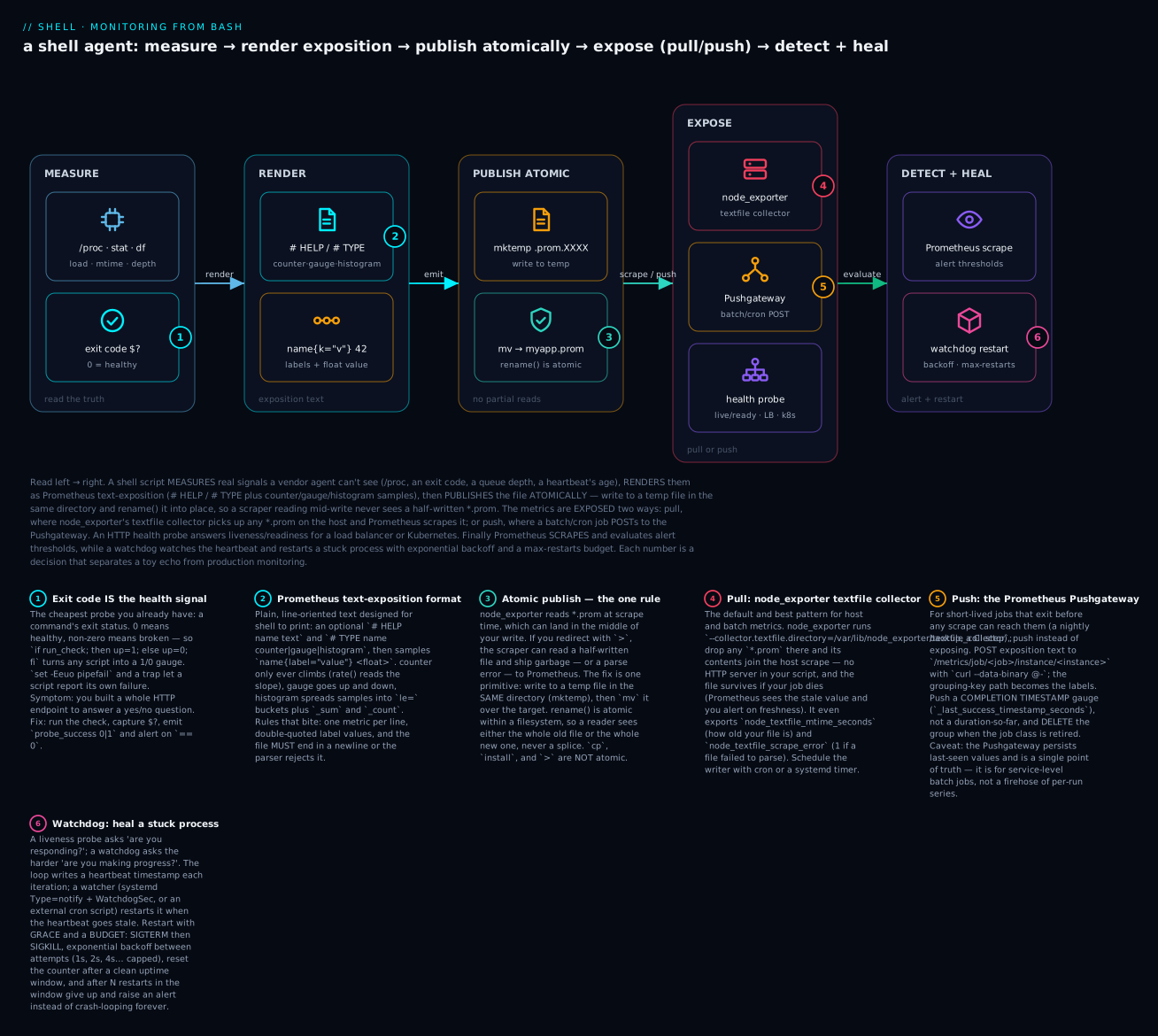
Read the diagram left → right: a shell agent measures signals a vendor can’t see, renders them as exposition text, and publishes the file atomically (temp + rename) so a scrape never catches a half-written file; the metrics are then exposed by pull (node_exporter’s textfile collector) or push (the Pushgateway), an HTTP probe answers liveness/readiness, and finally Prometheus evaluates alert thresholds while a watchdog heals a stuck process with backoff and a max-restarts budget. The six badges walk the exit-code health signal, the exposition format, the atomic-publish rule, the pull and push transports, and the self-healing watchdog.
Prerequisites
- You start real scripts with
set -Eeuo pipefailand know why a monitoring script must not die on the first transient error. If that is fuzzy, read the defensive-scripting lesson first — every pattern here depends on capturing exit codes deliberately rather than lettingset -eabort. - You are comfortable sending signals (
SIGTERM, thenSIGKILL) and cleaning up with atrap. The signal-handling lesson covers the kill-with-grace pattern the watchdog relies on. - Helpful but not required: the systemd-units lesson for
Type=notifyandWatchdogSec, which the sd_notify watchdog builds on.
After this lesson you can
- Emit valid Prometheus exposition (counter, gauge, histogram) from a shell script, with correct naming and units.
- Publish
*.promfiles atomically so node_exporter’s textfile collector never scrapes a partial file. - Turn any check into a health signal with the exit-code-as-health idiom, and expose it as a 1/0 gauge or an HTTP
200/503. - Write liveness and readiness probes that don’t cascade a dependency blip into a cluster-wide outage.
- Build a watchdog that restarts a stuck process with exponential backoff, a restart-window reset, and a max-restarts budget.
- Push short-lived job results to the Pushgateway with the correct grouping key, and write the PromQL alert thresholds that page on staleness, backlog, error rate, and latency.
Why Shell-Native Monitoring Matters Even With Vendors Everywhere
You have Datadog. You have Prometheus. You have CloudWatch. So why write monitoring in shell?
Because the gap between “what your vendor sees” and “what’s actually true” is exactly the surface where outages live. Vendor agents collect what their schema knows about; they don’t know that your nightly batch job emits a sentinel file at /var/lib/jobs/last-success, that your custom build of nginx puts a status JSON at /run/nginx/status.json, or that the real health of your app is “the queue depth in /var/spool/myapp is < 1000.” Shell-native monitoring lets you measure exactly those things.
The four shell-script monitoring patterns:
| Pattern | What it measures | Where it runs | Output |
|---|---|---|---|
| Textfile exporter | Custom metrics for Prometheus | Cron / timer | Files in /var/lib/node_exporter/textfile_collector/ |
| HTTP health probe | Liveness/readiness for LB or k8s | Service container | HTTP 200 or 5xx via simple HTTP server |
| Watchdog | Detect “alive but stuck” | sd_notify or external | systemd restart / alert |
| Push agent | Active reporting to dashboards | Continuous | HTTP POST to ingestion endpoint |
This lesson teaches the discipline of each pattern, the Prometheus exposition format your scripts must produce, the difference between liveness and readiness probes (and why getting it wrong cascades incidents), and a lib/metrics.sh you can source.
The Prometheus Exposition Format (5-Minute Tutorial)
Prometheus scrapes targets that expose metrics in a specific text format. The format is plain text, line-oriented, designed for shell scripts to emit:
# HELP myapp_jobs_total Total jobs processed.
# TYPE myapp_jobs_total counter
myapp_jobs_total{queue="orders",status="success"} 12345
myapp_jobs_total{queue="orders",status="failure"} 17
myapp_jobs_total{queue="billing",status="success"} 9821

# HELP myapp_queue_depth Current queue depth.
# TYPE myapp_queue_depth gauge
myapp_queue_depth{queue="orders"} 42
myapp_queue_depth{queue="billing"} 7

# HELP myapp_request_duration_seconds Request latency.
# TYPE myapp_request_duration_seconds histogram
myapp_request_duration_seconds_bucket{le="0.1"} 1450
myapp_request_duration_seconds_bucket{le="0.5"} 1490
myapp_request_duration_seconds_bucket{le="1.0"} 1500
myapp_request_duration_seconds_bucket{le="+Inf"} 1500
myapp_request_duration_seconds_sum 234.5
myapp_request_duration_seconds_count 1500
The four metric types
| Type | Semantic | Example |
|---|---|---|
counter |
Monotonically increasing; reset only on process restart | requests_total, errors_total |
gauge |
Goes up and down | memory_bytes, queue_depth |
histogram |
Sample distribution into buckets | request_duration_seconds |
summary |
Like histogram but with quantiles computed at the source | Less common in shell |
Format rules
- One metric per line.
- Optional
# HELP <name> <text>and# TYPE <name> <type>lines describe the metric. - Labels in
{key="value",key2="value2"}— comma-separated, double-quoted values. - Value is a float (or integer; integers are accepted).
- An optional trailing timestamp in milliseconds since epoch (rarely used).
- Empty lines and blank space are ignored.
- The whole exposition must end with a newline.
The format is forgiving but strict on structure: a missing newline at the end, or unquoted label values, breaks parsing.
Naming and units — do this, or your metrics quietly lie
The exposition format will happily accept a badly-named metric; Prometheus users then misread it forever. The official naming conventions are worth internalising because a shell exporter is exactly where they get ignored:
- Counters end in
_total.myapp_jobs_total, notmyapp_jobs. The suffix tells everyone (and some tooling) thatrate()is the right function. - Use base units, spelled out. Seconds, not milliseconds. Bytes, not megabytes.
myapp_request_duration_seconds,myapp_disk_free_bytes. Ratios are0–1and end in_ratio. Encoding the unit in the name means a dashboard never has to guess a multiplier. - One metric, one meaning. Don’t overload
myapp_statusto mean queue depth sometimes and error count other times. Split them. - Labels are for bounded dimensions.
status,queue,region— small, known sets. Neveruser_id,request_id, or a raw path: those explode cardinality (see Going deeper). - Prefix with your namespace.
myapp_,backup_,node_. It groups your series and avoids collisions with the 200-plus metrics node_exporter already emits.
Pattern 1: Textfile Exporter
The simplest pattern. node_exporter (the standard host-metrics agent) has a --collector.textfile.directory flag that picks up any *.prom file from a directory and exposes its contents as part of its scrape output.
# /etc/cron.d/nightly-job-metrics
*/5 * * * * root /opt/myapp/bin/emit-metrics.sh

# /opt/myapp/bin/emit-metrics.sh
#!/usr/bin/env bash
set -Eeuo pipefail

OUT=/var/lib/node_exporter/textfile_collector
TMP=$(mktemp "${OUT}/myapp.prom.XXXXXX")
trap 'rm -f "$TMP"' EXIT

# Compute metrics.
queue_depth=$(find /var/spool/myapp -type f | wc -l)
last_success_age=$(( $(date +%s) - $(stat -c %Y /var/lib/myapp/last-success 2>/dev/null || echo 0) ))
disk_used_pct=$(df --output=pcent /var/lib/myapp | tail -1 | tr -d ' %')

# Emit.
cat >"$TMP" <<EOF
# HELP myapp_queue_depth Pending jobs.
# TYPE myapp_queue_depth gauge
myapp_queue_depth $queue_depth

# HELP myapp_last_success_age_seconds Seconds since last successful run.
# TYPE myapp_last_success_age_seconds gauge
myapp_last_success_age_seconds $last_success_age

# HELP myapp_disk_used_percent Disk usage of /var/lib/myapp.
# TYPE myapp_disk_used_percent gauge
myapp_disk_used_percent $disk_used_pct
EOF

# Atomic move into place — so the exporter never reads a partial file.
mv "$TMP" "$OUT/myapp.prom"
trap - EXIT
The atomic-move-from-tmp pattern is critical: node_exporter reads *.prom files at scrape time. If you write directly with >, the exporter can read a half-written file and emit garbage to Prometheus. Always tmp-then-rename in the same directory.
Why atomic writes are non-negotiable (the one rule to internalise)
This is the single most important habit in the whole lesson, so it is worth the why, not just the how. A scrape and your write are two independent processes racing over the same file. Three facts decide the outcome:
rename()is atomic — but only within one filesystem.mvon the same filesystem is a singlerename(2)syscall: the directory entry flips from old inode to new inode in one indivisible step. A reader thatopen()smyapp.promgets either the complete old file or the complete new one — never a splice. This is exactly the atomic-write pattern from the file-operations lesson, applied to metrics.- The temp file must live in the target directory. That is why the example does
mktemp "${OUT}/myapp.prom.XXXXXX", notmktempin/tmp. If the temp is on a different filesystem,mvsilently degrades to copy-then-unlink — which is not atomic, and a scrape can land in the middle of the copy. >,cp, andinstallall write into the live inode. A redirect truncates the file to zero and then writes — a scrape between the two reads an empty file.cpandinstallopen the destination and stream into it — a scrape reads a half-copied file. Onlyrename()swaps atomically.
There is one more subtlety unique to textfile exporters: node_exporter globs *.prom. Your temp file is named myapp.prom.XXXXXX, which does not match *.prom — good, that is deliberate. If you named the temp myapp.XXXXXX.prom, node_exporter would try to scrape the half-written temp too. Keep the .prom at the end of the final name only.
# CORRECT — temp does not match *.prom, rename is atomic, same dir
tmp=$(mktemp "${OUT}/myapp.prom.XXXXXX")
printf '...' > "$tmp"
mv "$tmp" "${OUT}/myapp.prom"

# WRONG — reader can see an empty/partial file
printf '...' > "${OUT}/myapp.prom"          # truncate-then-write race

# WRONG — mktemp in /tmp: mv crosses filesystems → copy+unlink, not atomic
tmp=$(mktemp /tmp/myapp.prom.XXXXXX)
mv "$tmp" "${OUT}/myapp.prom"
Why textfile is the right pattern for batch / scheduled work
- No HTTP server in your script.
- node_exporter is already running on the host; you piggyback on its endpoint.
- Cron-driven, so works for jobs that run periodically (backups, sync jobs, batch).
- Survives if your script dies — the .prom file remains; Prometheus sees stale data, alerts on freshness.
Exit-Code-as-Health: The Cheapest Signal You Already Have
Before you build anything, notice you may already have a health signal: the exit code of a check command. Every well-behaved program exits 0 on success and non-zero on failure, so any check that can pass or fail is a boolean health metric in disguise. This is the smallest possible monitoring pattern — and it composes with all the others.
The idiom is: run the check, capture its status, emit 1 for healthy or 0 for broken.
# Compose several checks; healthy only if ALL pass.
check_health() {
  systemctl is-active --quiet myapp        || return 1
  curl -fsS --max-time 2 http://localhost:8080/ping >/dev/null || return 1
  (( $(find /var/spool/myapp -type f | wc -l) < 1000 ))         || return 1
}

if check_health; then up=1; else up=0; fi
Then publish up however you like — most often as a textfile gauge:
emit_gauge() {                 # emit_gauge NAME VALUE  → atomic .prom
  local dir=/var/lib/node_exporter/textfile_collector name=$1 val=$2 tmp
  tmp=$(mktemp "${dir}/${name}.prom.XXXXXX")
  printf '# HELP %s 1 if healthy, 0 if not.\n# TYPE %s gauge\n%s %s\n' \
         "$name" "$name" "$name" "$val" > "$tmp"
  mv "$tmp" "${dir}/${name}.prom"
}
emit_gauge myapp_up "$up"
Capturing $? correctly under set -e
The classic trap: with set -e active, a failing command aborts the script before the next line runs — so check_health; rc=$? never reaches the rc=$?. Capture the status inline, where set -e is suspended:
# RIGHT — the `if` context suspends errexit, so a failure is captured, not fatal
if check_health; then rc=0; else rc=$?; fi

# ALSO RIGHT — `||` suspends errexit for the left-hand command
check_health && rc=0 || rc=$?

# WRONG under set -e — the script exits on failure and never sets rc
check_health
rc=$?
For a pipeline, the exit code of the last command is $?, but ${PIPESTATUS[@]} holds each stage — with set -o pipefail on, $? is the first non-zero in the pipe. This is the exit-code discipline the defensive-scripting lesson drills; monitoring is where it pays off, because a swallowed failure means a green dashboard over a dead service.
The _last_success_timestamp_seconds idiom
For scheduled jobs, the single most useful exit-code metric is when did this last succeed? Write the timestamp on success and let Prometheus compute the age:
if run_backup; then
  date +%s > /var/lib/myapp/last-success        # only on success
fi
# exporter emits:  myapp_last_success_timestamp_seconds <mtime or file contents>
Emitting a timestamp (and computing time() - metric in PromQL) is strictly better than emitting a pre-computed age — because if the writer dies, a timestamp stops advancing while the age gauge freezes at its last value and under-reports staleness. More on that under Alerting.
Pattern 2: HTTP Health Probe
For liveness/readiness probes, you need an HTTP endpoint. The dead simple way is socat or ncat listening on a port and returning a static or computed response:
# /opt/myapp/bin/healthd
#!/usr/bin/env bash
set -Eeuo pipefail

PORT=${PORT:-8080}

while :; do
  # Accept one connection at a time. ncat -k keeps the listener open.
  ncat -l -p "$PORT" -k -e /opt/myapp/bin/health-handler.sh
done
# /opt/myapp/bin/health-handler.sh — invoked per request
#!/usr/bin/env bash
set -Eeuo pipefail

# Compute health.
last_heartbeat=$(stat -c %Y /var/lib/myapp/heartbeat 2>/dev/null || echo 0)
age=$(( $(date +%s) - last_heartbeat ))

if (( age < 30 )); then
  status_code="200 OK"
  body='{"status":"healthy","heartbeat_age_seconds":'"$age"'}'
else
  status_code="503 Service Unavailable"
  body='{"status":"unhealthy","heartbeat_age_seconds":'"$age"'}'
fi

# Read the request line (we don't care about its contents but must consume).
read -r request_line || true

printf 'HTTP/1.1 %s\r\n' "$status_code"
printf 'Content-Type: application/json\r\n'
printf 'Content-Length: %d\r\n' "${#body}"
printf 'Connection: close\r\n'
printf '\r\n'
printf '%s' "$body"
For Kubernetes liveness probe:
livenessProbe:
  httpGet:
    path: /healthz
    port: 8080
  initialDelaySeconds: 30
  periodSeconds: 10
  timeoutSeconds: 3
  failureThreshold: 3
Liveness vs Readiness: get this distinction right
Liveness: “is the process alive enough to be useful?” Failed liveness → restart the process. Should rarely fail; a transient failure ≠ kill.
Readiness: “is the process ready to serve traffic right now?” Failed readiness → remove from load-balancer rotation. Can flap freely; useful for “still warming up” or “circuit breaker open.”
Common bug: making liveness check too strict (e.g., requires an external database) — when the DB blips, all replicas fail liveness, k8s restarts them all simultaneously, and the DB blip becomes a full outage.
Rule: liveness checks only test “this process is responsive.” Readiness checks test “I’m fully functional.” External dependency checks belong in readiness, never in liveness.
# /healthz/live — only checks process self
liveness_check() {
  # Did our event loop tick recently?
  local hb_age
  hb_age=$(( $(date +%s) - $(stat -c %Y /var/lib/myapp/heartbeat 2>/dev/null || echo 0) ))
  (( hb_age < 60 ))   # tolerate up to 60s — restart is expensive
}

# /healthz/ready — checks downstream dependencies
readiness_check() {
  # Can we reach the database?
  pg_isready -h "$DB_HOST" -p 5432 -t 2 >/dev/null 2>&1 || return 1
  # Is the cache warm?
  [[ -f /var/lib/myapp/cache.warm ]] || return 1
  return 0
}
Pattern 3: Watchdog — Detecting “Alive But Stuck”
A liveness probe answers “is the process responding?” A watchdog answers “is the process making progress?” — a much harder question.
The pattern:
- The main loop writes a “heartbeat” timestamp on every iteration.
- A separate watchdog reads the heartbeat; if it’s stale, the process is stuck.
- Action: kill the process (so systemd restarts it) or trigger an alert.
sd_notify watchdog (preferred for systemd-managed services)
# In your service script:
main_loop() {
  systemd-notify --ready --status="Started"
  while :; do
    process_one_batch || break
    systemd-notify WATCHDOG=1 --status="Last batch: $(date -u +%FT%TZ)"
    sleep 5
  done
}
In the unit file:
[Service]
Type=notify
WatchdogSec=30
Restart=on-failure
WatchdogSec=30 — if 30s pass without WATCHDOG=1, systemd considers the service stuck and restarts it. The script must call systemd-notify WATCHDOG=1 more often than every 30s. Half the timeout is a good interval (so a 30s watchdog → ping every 15s).
External watchdog (for non-systemd or cron-driven contexts)
# /opt/myapp/bin/watchdog.sh — runs from cron every minute
#!/usr/bin/env bash
set -Eeuo pipefail

HEARTBEAT=/var/lib/myapp/heartbeat
MAX_AGE=120
PID_FILE=/var/run/myapp.pid

if [[ ! -f "$HEARTBEAT" || ! -f "$PID_FILE" ]]; then
  echo "watchdog: no heartbeat or pidfile; nothing to do" >&2
  exit 0
fi

age=$(( $(date +%s) - $(stat -c %Y "$HEARTBEAT") ))
pid=$(cat "$PID_FILE")

if (( age > MAX_AGE )) && kill -0 "$pid" 2>/dev/null; then
  echo "watchdog: pid=$pid heartbeat is ${age}s stale; SIGTERM"
  kill -TERM "$pid"
  sleep 5
  if kill -0 "$pid" 2>/dev/null; then
    echo "watchdog: pid=$pid still alive; SIGKILL"
    kill -KILL "$pid"
  fi
fi
The kill-with-grace pattern: SIGTERM first, give 5 seconds, then SIGKILL. SIGTERM lets the process clean up (close DB connections, flush buffers); SIGKILL is the hammer when grace is over.
Restart with backoff and a max-restarts budget
Killing the process is only half the job — something has to bring it back, and it must do so without turning a transient fault into a tight crash-loop that hammers the CPU and the logs. A supervisor loop restarts the child, but with three guards: exponential backoff between attempts, a restart-window reset so an occasional restart doesn’t count against a healthy service forever, and a max-restarts budget that gives up and raises an alert instead of looping to infinity.
#!/usr/bin/env bash
# supervise.sh — keep CMD running, with backoff + a restart budget.
# NOTE: deliberately NO `-e`. A supervisor that dies when its child dies is useless.
set -Euo pipefail

CMD=(/opt/myapp/bin/worker)
MAX_RESTARTS=5          # allowed restarts within the window
WINDOW=300              # seconds; the "flapping" window
BASE=1                  # first backoff, seconds
CAP=60                  # never back off longer than this

emit_gauge() {                 # emit_gauge NAME VALUE  → atomic .prom
  local dir=/var/lib/node_exporter/textfile_collector name=$1 val=$2 tmp
  tmp=$(mktemp "${dir}/${name}.prom.XXXXXX")
  printf '# TYPE %s gauge\n%s %s\n' "$name" "$name" "$val" > "$tmp"
  mv "$tmp" "${dir}/${name}.prom"
}

child=0
term() { echo "supervisor: stopping"; kill -TERM "$child" 2>/dev/null || true; exit 0; }
trap term TERM INT

restarts=0
window_start=$(date +%s)

while :; do
  now=$(date +%s)
  # If we've gone a full window without exhausting the budget, forgive past restarts.
  if (( now - window_start > WINDOW )); then
    restarts=0
    window_start=$now
  fi

  if (( restarts >= MAX_RESTARTS )); then
    echo "supervisor: $restarts restarts within ${WINDOW}s — giving up, alerting" >&2
    emit_gauge myapp_supervisor_gave_up 1     # let Prometheus page a human
    exit 1
  fi

  start=$(date +%s)
  "${CMD[@]}" &                 # launch the child
  child=$!
  wait "$child"                 # block until it exits
  rc=$?
  ran=$(( $(date +%s) - start ))
  echo "supervisor: child exited rc=$rc after ${ran}s" >&2

  # A long, clean run means the service was healthy — reset the flap counter.
  if (( ran > WINDOW )); then
    restarts=0
    window_start=$(date +%s)
  fi

  restarts=$(( restarts + 1 ))
  backoff=$(( BASE * (2 ** (restarts - 1)) ))   # 1, 2, 4, 8, 16 …
  (( backoff > CAP )) && backoff=$CAP
  echo "supervisor: restart #$restarts in ${backoff}s" >&2
  sleep "$backoff"
done
Three design points make this production-grade rather than a naive while :; do "$CMD"; done:
- Backoff protects the blast radius. If the worker dies because the database is down, restarting it instantly 1000 times a second just adds load to an already-struggling system.
1, 2, 4, 8 …seconds (capped) gives the dependency room to recover. - The window resets forgive rare faults. A service that restarts once a week is healthy; one that restarts five times in five minutes is flapping. Tracking restarts within a window — and resetting after a long clean run — distinguishes the two.
- The budget converts a crash-loop into an alert. When the budget is exhausted, the supervisor stops trying and emits
myapp_supervisor_gave_up 1. A human paging on that metric fixes the root cause; a silent infinite loop just burns resources until someone notices. This is the whole ethos of self-healing automation: heal automatically, but bound the healing so a fault you can’t fix becomes an alert, not a fire.
Pattern 4: Push-Based Reporting
Some monitoring systems ingest metrics over HTTP rather than scraping. A push agent runs continuously, computes metrics, sends them to the ingestion endpoint:
# /opt/myapp/bin/push-agent.sh
#!/usr/bin/env bash
set -Eeuo pipefail

METRICS_URL="${METRICS_URL:?metrics URL required}"
METRICS_TOKEN="${METRICS_TOKEN:?token required}"
INTERVAL=${INTERVAL:-60}

while :; do
  # Build payload.
  ts=$(date +%s)
  payload=$(jq -nc \
    --arg ts "$ts" \
    --arg host "$(hostname)" \
    --arg cpu "$(awk '{print $1}' /proc/loadavg)" \
    --arg mem "$(awk '/MemAvailable:/ {print $2}' /proc/meminfo)" \
    '{
      timestamp: ($ts | tonumber),
      host: $host,
      metrics: {
        load_1min: ($cpu | tonumber),
        memory_available_kb: ($mem | tonumber)
      }
    }')

  # Send. Don't crash on transient failures.
  if ! curl -fsS -X POST \
       -H "Authorization: Bearer $METRICS_TOKEN" \
       -H "Content-Type: application/json" \
       --max-time 10 \
       --data "$payload" \
       "$METRICS_URL"; then
    echo "$(date -u +%FT%TZ) push failed" >&2
    # Continue; maybe next iteration succeeds.
  fi

  sleep "$INTERVAL"
done
Run it under systemd with Restart=on-failure so a crash doesn’t silently stop reporting.
Prometheus Pushgateway (the standard push target)
The generic push agent above talks to whatever ingestion API you have. In a Prometheus shop there’s a purpose-built target: the Pushgateway. It exists for exactly one problem — a short-lived job that exits before any scrape can reach it. A nightly backup runs for 90 seconds at 02:00; Prometheus scrapes every 15 seconds but the job is gone by 02:02, so there is nothing to pull. The job pushes its result to the Pushgateway, which holds it until Prometheus scrapes the gateway on its normal cycle.
The API is simple: POST (or PUT) exposition text to a URL whose path is the grouping key.
#!/usr/bin/env bash
# push-batch-result.sh — run a batch job, push its outcome to the Pushgateway.
set -Eeuo pipefail

PUSHGW="${PUSHGW:-http://pushgateway:9091}"
JOB="nightly-backup"
INSTANCE="$(hostname -s)"
# The grouping-key path becomes the {job=,instance=} labels on every metric.
URL="$PUSHGW/metrics/job/$JOB/instance/$INSTANCE"

start=$(date +%s)
if /opt/myapp/bin/run-backup; then rc=0; else rc=$?; fi
end=$(date +%s)

# Build exposition. Push a COMPLETION TIMESTAMP, not an age or a duration-so-far.
payload=$(cat <<EOF
# TYPE myapp_backup_last_success_timestamp_seconds gauge
myapp_backup_last_success_timestamp_seconds $([ "$rc" -eq 0 ] && echo "$end" || echo 0)
# TYPE myapp_backup_duration_seconds gauge
myapp_backup_duration_seconds $(( end - start ))
# TYPE myapp_backup_exit_code gauge
myapp_backup_exit_code $rc
EOF
)

# --data-binary preserves the newlines; @- reads the payload from stdin.
printf '%s\n' "$payload" | curl -fsS --max-time 10 --data-binary @- "$URL"
Retire a group when its job class goes away (a decommissioned host, a renamed job) so its last values don’t linger:
curl -fsS -X DELETE "$PUSHGW/metrics/job/$JOB/instance/$INSTANCE"
Four Pushgateway rules that trip people up:
- The path sets
job/instance; don’t repeat them in the body. The gateway adds the grouping-key labels itself. Puttingjob="..."inside the exposition is an error. - The gateway remembers the last push forever until you
DELETEit or restart it. This is a feature for “last known state,” but it means a dead host’s stale metrics keep showing up. Key your groups by a stablejob/instanceand delete on retirement. - Push a timestamp, not a duration-so-far. Anything whose meaning depends on “now” (
age,time_remaining) should be a completion timestamp that PromQL turns into an age withtime() - metric. - It is not for scraping running services. If your process is alive at scrape time, expose metrics and let Prometheus pull. The Pushgateway is a narrow bridge for jobs that exit — abusing it as a metrics firehose creates a single point of truth and failure.
A Drop-In Library: lib/metrics.sh
# lib/metrics.sh — emit Prometheus textfile metrics from any script.

: "${METRICS_DIR:=/var/lib/node_exporter/textfile_collector}"
: "${METRICS_NAMESPACE:=myapp}"

# Internal: collected metrics buffered in associative arrays (bash 4+).
declare -A METRIC_HELP METRIC_TYPE
declare -a METRIC_LINES

metrics_init() {
  METRIC_HELP=()
  METRIC_TYPE=()
  METRIC_LINES=()
}

# Declare a metric. Idempotent.
metrics_declare() {
  local name="$1" type="$2" help="$3"
  METRIC_HELP["$name"]="$help"
  METRIC_TYPE["$name"]="$type"
}

# Add a sample. labels can be empty.
metrics_set() {
  local name="$1" value="$2" labels="${3:-}"
  if [[ -n "$labels" ]]; then
    METRIC_LINES+=("${name}{${labels}} ${value}")
  else
    METRIC_LINES+=("${name} ${value}")
  fi
}

# Increment a counter (read existing, add). Useful for cron-driven counters.
metrics_inc() {
  local name="$1" labels="${2:-}" by="${3:-1}"
  local file="${METRICS_DIR}/${METRICS_NAMESPACE}.counters"
  local key
  if [[ -n "$labels" ]]; then
    key="${name}{${labels}}"
  else
    key="${name}"
  fi
  # File format: "key value"
  local current
  current=$(awk -v k="$key" '$1==k {print $2; exit}' "$file" 2>/dev/null || echo 0)
  current=${current:-0}
  local new=$(( current + by ))
  # Atomic update via temp file.
  local tmp
  tmp=$(mktemp "${file}.XXXXXX")
  awk -v k="$key" -v v="$new" '
    $1==k {print k, v; found=1; next}
    {print}
    END { if (!found) print k, v }
  ' "$file" 2>/dev/null > "$tmp" || echo "$key $new" > "$tmp"
  mv "$tmp" "$file"
}

# Emit all collected metrics atomically.
metrics_emit() {
  local outfile="${METRICS_DIR}/${METRICS_NAMESPACE}.prom"
  local tmp
  tmp=$(mktemp "${outfile}.XXXXXX")
  trap "rm -f '$tmp'" EXIT

  # Group by metric name for HELP/TYPE headers.
  declare -A seen
  local line metric
  {
    for line in "${METRIC_LINES[@]}"; do
      metric="${line%%[ {]*}"
      if [[ -z "${seen[$metric]:-}" ]]; then
        seen[$metric]=1
        printf '# HELP %s %s\n' "$metric" "${METRIC_HELP[$metric]:-}"
        printf '# TYPE %s %s\n' "$metric" "${METRIC_TYPE[$metric]:-untyped}"
      fi
      printf '%s\n' "$line"
    done
  } > "$tmp"

  install -m 0644 "$tmp" "$outfile"
  rm -f "$tmp"
  trap - EXIT
}

# ─── Health endpoint helpers ───────────────────────────────────────────────

health_response_ok() {
  local body="${1:-{\"status\":\"healthy\"}}"
  printf 'HTTP/1.1 200 OK\r\n'
  printf 'Content-Type: application/json\r\n'
  printf 'Content-Length: %d\r\n' "${#body}"
  printf 'Connection: close\r\n\r\n'
  printf '%s' "$body"
}

health_response_unhealthy() {
  local reason="${1:-unhealthy}"
  local body="{\"status\":\"unhealthy\",\"reason\":\"$reason\"}"
  printf 'HTTP/1.1 503 Service Unavailable\r\n'
  printf 'Content-Type: application/json\r\n'
  printf 'Content-Length: %d\r\n' "${#body}"
  printf 'Connection: close\r\n\r\n'
  printf '%s' "$body"
}

# ─── Heartbeat ─────────────────────────────────────────────────────────────

heartbeat_write() {
  local file="${1:-/var/lib/myapp/heartbeat}"
  date -u +%s > "$file"
}

heartbeat_age() {
  local file="${1:-/var/lib/myapp/heartbeat}"
  echo $(( $(date +%s) - $(stat -c %Y "$file" 2>/dev/null || echo 0) ))
}
Usage:
. /opt/myapp/lib/metrics.sh
metrics_init

metrics_declare myapp_queue_depth gauge "Pending jobs."
metrics_set    myapp_queue_depth $(find /var/spool -type f | wc -l)

metrics_declare myapp_jobs_total counter "Total jobs processed."
metrics_set    myapp_jobs_total 12345 'queue="orders",status="success"'
metrics_set    myapp_jobs_total 17    'queue="orders",status="failure"'

metrics_emit
Heads-up: this library needs bash 4+ for
declare -A(associative arrays), and GNU coreutils forstat -c. That’s a non-issue on a modern Linux server, which is what the course targets. On macOS stock bash 3.2 (this build host),declare -Adoesn’t exist; swap the level/HELP maps for acasestatement, and usestat -f %minstead ofstat -c %Y. The portability matrix in Going deeper lists every such cliff-edge. One refinement worth making when you adaptmetrics_emit: prefer a finalmv(atomicrename()) overinstall/cpto the live path — see the atomic-write rule above.
Real-World Recipes
Recipe 1: Emit metrics about backup freshness
. /opt/myapp/lib/metrics.sh
metrics_init

backup_dir=/backups
metrics_declare backup_age_seconds gauge "Age of latest backup."
metrics_declare backup_size_bytes  gauge "Size of latest backup."
metrics_declare backup_count       gauge "Number of backups retained."

for app in myapp app2 app3; do
  latest=$(ls -t "$backup_dir/$app/"*.tar.gz 2>/dev/null | head -1)
  if [[ -n "$latest" ]]; then
    age=$(( $(date +%s) - $(stat -c %Y "$latest") ))
    size=$(stat -c %s "$latest")
    count=$(ls "$backup_dir/$app/"*.tar.gz 2>/dev/null | wc -l)
    metrics_set backup_age_seconds "$age" "app=\"$app\""
    metrics_set backup_size_bytes  "$size" "app=\"$app\""
    metrics_set backup_count       "$count" "app=\"$app\""
  fi
done

metrics_emit
Schedule via cron */5 * * * *. Prometheus alerts on backup_age_seconds > 86400 per app.
Recipe 2: HTTP health endpoint with multiple dependency checks
#!/usr/bin/env bash
. /opt/myapp/lib/metrics.sh
set -Eeuo pipefail

PORT="${PORT:-8080}"

handle_request() {
  read -r request_line || return
  # Read remaining headers until empty line.
  while IFS= read -r line && [[ "$line" != $'\r' ]]; do :; done

  local path
  path=$(echo "$request_line" | awk '{print $2}')

  case "$path" in
    /healthz/live)
      # Just check we're processing.
      if (( $(heartbeat_age /var/lib/myapp/heartbeat) < 60 )); then
        health_response_ok '{"status":"alive"}'
      else
        health_response_unhealthy "heartbeat stale"
      fi
      ;;
    /healthz/ready)
      # Check downstream dependencies.
      local issues=()
      pg_isready -h "$DB_HOST" -t 2 >/dev/null 2>&1 || issues+=("db")
      curl -fsS --max-time 2 "$REDIS_URL" >/dev/null || issues+=("redis")
      if [[ ${#issues[@]} -eq 0 ]]; then
        health_response_ok '{"status":"ready"}'
      else
        health_response_unhealthy "deps: ${issues[*]}"
      fi
      ;;
    *)
      printf 'HTTP/1.1 404 Not Found\r\nContent-Length: 0\r\n\r\n'
      ;;
  esac
}

while :; do
  ncat -l -p "$PORT" -e "$0 --handle"
done
Recipe 3: External watchdog with metrics
# /opt/myapp/bin/watchdog.sh — runs every minute via cron.
. /opt/myapp/lib/metrics.sh
metrics_init

services=(myapp-api myapp-worker myapp-scheduler)

metrics_declare service_active gauge "Service active state (1=active)."
metrics_declare service_restart_count counter "Service restart count."

for svc in "${services[@]}"; do
  if systemctl is-active --quiet "$svc"; then
    metrics_set service_active 1 "service=\"$svc\""
  else
    metrics_set service_active 0 "service=\"$svc\""
    # Try to restart.
    if systemctl restart "$svc"; then
      metrics_inc service_restart_count "service=\"$svc\""
    fi
  fi
done

metrics_emit
Recipe 4: Histogram-style request latency exporter
# Process a log file, emit latency histogram.
# Log format: "GET /api/users 0.342s 200"

. /opt/myapp/lib/metrics.sh
metrics_init

log=/var/log/myapp/access.log
buckets=(0.1 0.5 1.0 2.0 5.0)

declare -A bucket_counts
total_count=0
total_sum=0

# Read latencies from last 5 minutes.
since=$(date -d '5 minutes ago' +%s)

while IFS=' ' read -r _ _ duration _; do
  duration=${duration%s}
  total_count=$(( total_count + 1 ))
  total_sum=$(awk -v s="$total_sum" -v d="$duration" 'BEGIN { print s + d }')

  for bucket in "${buckets[@]}"; do
    if (( $(awk -v d="$duration" -v b="$bucket" 'BEGIN { print (d <= b) }') )); then
      bucket_counts[$bucket]=$((${bucket_counts[$bucket]:-0} + 1))
    fi
  done
done < <(tail -10000 "$log")

metrics_declare myapp_request_duration_seconds histogram "Request latency."
for bucket in "${buckets[@]}"; do
  metrics_set myapp_request_duration_seconds_bucket "${bucket_counts[$bucket]:-0}" "le=\"$bucket\""
done
metrics_set myapp_request_duration_seconds_bucket "$total_count" 'le="+Inf"'
metrics_set myapp_request_duration_seconds_sum "$total_sum"
metrics_set myapp_request_duration_seconds_count "$total_count"

metrics_emit
Histogram cumulative-bucket rule. Prometheus histogram buckets are cumulative:
le="0.5"must count every sample ≤ 0.5, which includes everything inle="0.1". The recipe above satisfies this because a 0.09s request increments both the 0.1 and the 0.5 bucket (eachd <= btest passes independently). The+Infbucket must equal_count. If your buckets aren’t cumulative,histogram_quantile()returns nonsense.
Alerting: Turning Metrics Into Pages
Emitting metrics is only half the job — a number nobody looks at is not monitoring. The other half is an alert threshold: a PromQL expression that, when true for long enough, fires. Alerts live in Prometheus rule files, not in your shell script, but they are designed around the metrics your script emits, so they belong here.
# /etc/prometheus/rules/shell-exporters.yml
groups:
- name: shell-exporters
  rules:
  # 1. Freshness — the job hasn't succeeded in over a day.
  - alert: MyappBackupStale
    expr: time() - myapp_backup_last_success_timestamp_seconds > 86400
    for: 10m
    labels: { severity: page }
    annotations:
      summary: "myapp backup on {{ $labels.instance }} is >24h old"

  # 2. Absence — the exporter stopped emitting the series entirely.
  - alert: MyappExporterMissing
    expr: absent(myapp_queue_depth)
    for: 15m
    labels: { severity: page }
    annotations:
      summary: "myapp textfile metrics stopped appearing"

  # 3. Backlog — a gauge over a threshold.
  - alert: MyappQueueBacklog
    expr: myapp_queue_depth > 1000
    for: 10m
    labels: { severity: ticket }

  # 4. Error ratio — derived from two counters with rate().
  - alert: MyappHighErrorRate
    expr: |
      sum(rate(myapp_jobs_total{status="failure"}[5m]))
        / sum(rate(myapp_jobs_total[5m])) > 0.05
    for: 10m
    labels: { severity: page }

  # 5. Latency SLO — 99th percentile from the histogram buckets.
  - alert: MyappSlowRequests
    expr: |
      histogram_quantile(0.99,
        sum by (le) (rate(myapp_request_duration_seconds_bucket[5m]))) > 1
    for: 10m
    labels: { severity: ticket }

  # 6. Your own file failed to parse — node_exporter tells you.
  - alert: MyappTextfileParseError
    expr: node_textfile_scrape_error > 0
    for: 5m
    labels: { severity: ticket }
Five threshold patterns cover almost everything a shell exporter needs:
- Threshold on a gauge (
myapp_queue_depth > 1000) — the direct case. - Freshness from a timestamp (
time() - myapp_..._timestamp_seconds > N) — this is why you emit a timestamp, not an age. If the writer dies,time()keeps advancing so the expression keeps rising and eventually fires; an emittedagegauge would freeze at its last value and never trip. - Absence (
absent(metric)) — catches “the exporter itself stopped.” A missing metric is the most dangerous state because a naive> thresholdalert simply never evaluates. Always pair a value alert with an absence alert. - Rate on counters (
rate(x_total[5m])) — never alert on a raw counter’s value; alert on its rate.rate()also transparently handles the counter resetting to zero on process restart. - Quantiles from a histogram (
histogram_quantile(0.99, sum by (le) (rate(..._bucket[5m])))) — turns your bucket counts into a latency SLO.
The up metric is free: Prometheus synthesises up{job="..."} 0 whenever a scrape fails, so up == 0 for 5m alerts on the target being down without you emitting anything. And for: matters — it requires the condition to hold continuously, which is what stops a single blippy scrape from paging someone at 3am.
Footgun List
-
Writing
.promfiles non-atomically. Always tmp-then-rename in the same dir. Otherwise node_exporter reads a half-written file and emits broken metrics. -
Metrics with high cardinality labels. Per-user-ID labels create millions of time series. Limit labels to bounded sets (status code, queue name, region — not request_id).
-
Counter going down. Counters must monotonically increase. If your script computes “errors in last 5 min” and emits as a counter, you’ll see negative deltas. Use a gauge for “current snapshot,” counter for “cumulative since process start.”
-
Liveness checking external deps. Cascades failures. Liveness only checks self; readiness checks deps.
-
Health endpoint without timeout. A hung DB query freezes the health endpoint, k8s thinks pod is dead, restarts it — and the new pod tries the same query and freezes too. Always timeout dep checks:
pg_isready -t 2. -
Watchdog with no grace. Killing on the first late heartbeat is wrong if heartbeats are best-effort. Allow 2–3 missed cycles before action.
-
Push agent that crashes on transient send failure. Wrap
curlinif/then; log the failure and continue. Don’tset -eyour way to silent monitor death. -
Forgetting trailing newline in textfile output. Prometheus parsers may reject; always end the file with a newline.
-
Label values with quotes/backslashes/newlines. Escape:
\\for backslash,\"for quote,\nfor newline. -
Health endpoint that performs writes. Don’t make
/healthzinsert a row to test the DB. The probe runs every 10 seconds — you’d flood the DB. Use read-only checks. -
Mixing systemd-notify watchdog with external watchdog. Pick one. Two watchdogs fighting over the same process leads to flapping restarts.
-
Sending raw timestamps as metric values. Prometheus expects floats.
date +%sis fine; ISO-8601 strings break parsing.
Going deeper
Everything above gets you a working exporter, probe, and watchdog. This section is for when you operate them at scale: what the textfile collector actually does on scrape, why cardinality is a memory bill, how counter resets and staleness really work, the push-vs-pull decision, the security surface, and the exact portability cliff-edges between the Linux/GNU target and this macOS/BSD build host.
How node_exporter’s textfile collector actually behaves
At every scrape, node_exporter re-reads every *.prom in the directory — it does not cache, it does not watch inotify. Two of its own metrics are your safety net:
node_textfile_mtime_seconds{file="myapp.prom"}— the file’s modification time. Alert ontime() - node_textfile_mtime_seconds > 900to catch a writer that has stopped updating even though the file still exists. This is your freshness signal for the exporter, distinct from freshness of the job.node_textfile_scrape_error—1if any file in the directory failed to parse (bad type, duplicate series, missing newline). A parse error means node_exporter drops the whole file’s metrics that scrape, so one malformed line silently blanks all your custom metrics. Alert on> 0.
A duplicate series across two files — the same metric name and label set in a.prom and b.prom — is also a parse error. Namespacing (app_a_, app_b_) prevents it.
Cardinality is a memory bill, computed as a product
Every unique combination of metric name + label values is one time series, and Prometheus holds recent samples of each in RAM. Cardinality multiplies: myapp_jobs_total with queue (10 values) × status (3 values) = 30 series — fine. Add user_id (100k values) and you have 3 million series from one metric, which can OOM a Prometheus. The rule: labels are for dimensions you’ll group or filter by, and whose value set is small and bounded. A request ID, a full URL path, a raw error message, an email — never labels. If you need per-request detail, that’s a log or a trace, not a metric.
Counter resets and staleness — the two things Prometheus does for you
- Counter resets. Your cron job emits
myapp_jobs_totalfresh each run starting from a value read out of a state file; a process restart or a state-file wipe can make it drop.rate()andincrease()detect a decrease and treat it as a reset, so a well-formed alert onrate(...)survives it. This is why you must never alert on a raw counter value. - Staleness. When a series stops appearing (you deleted the
.prom, the job stopped), Prometheus marks it stale after a few missed scrapes and it drops out of instant queries. That’s whymyapp_queue_depth > 1000silently stops evaluating when the exporter dies — and why you pair it withabsent().
Push vs pull — decide deliberately
| Pull (textfile / HTTP scrape) | Push (Pushgateway) | |
|---|---|---|
| Best for | Hosts and services alive at scrape time | Short-lived jobs that exit |
| Liveness | up is free — a dead target scrapes to up=0 |
Gateway is always up; a dead pusher looks fine |
| State | Prometheus owns it | Gateway persists last push until DELETE |
| Failure mode | Miss a scrape → gap (self-healing) | Stale value lingers → false “all good” |
| Default? | Yes — prefer pull | Only when pull is impossible |
The trap with push is the silent stale success: a job that stops running leaves its last “success” sitting in the gateway forever, so a naive freshness alert never fires. That’s the third time this lesson insists on a timestamp metric plus time() - metric — it’s the one construction that makes a stopped pusher look unhealthy.
The security surface of a monitoring agent
Monitoring code runs privileged and touches the network, which makes it a target:
- Textfile directory permissions. Anything that can write
/var/lib/node_exporter/textfile_collector/*.promcan inject arbitrary metrics — including overwritingup-style health to hide an outage. Own the directoryroot:node_exporter, mode0755, and write your files0644. - Health endpoints are unauthenticated and cheap to abuse. A
/healthzthat does real work (a DB query, a downstream call) is a free amplification vector: an attacker hits it in a loop and your “health check” DDoSes your own database. Keep probes read-only, cached, and timeout-bounded (--max-time 2,pg_isready -t 2). - SSRF via probe targets. A blackbox-style probe that takes a URL from an untrusted source can be pointed at
169.254.169.254(cloud metadata) or internal hosts. Allowlist probe targets; never probe a caller-supplied URL. - Secrets in push payloads. The push agent carries a bearer token — keep it in an env var or a
0600file, never on the command line (it shows inps), and never log the payload. This is the secrets discipline from the secrets-handling lesson.
Portability: GNU/Linux target vs this BSD build host
The course targets Linux + bash 4/5 + GNU coreutils; the examples use GNU forms. This build host is macOS (bash 3.2 + BSD userland), so these are tested differences, not guesses:
| Feature used above | Linux (GNU) | macOS (BSD) — verified here |
|---|---|---|
stat -c %Y / stat -c %s (mtime/size) |
yes | no — use stat -f %m / stat -f %z |
date -d '5 minutes ago' |
yes | no — use date -v-5M |
df --output=pcent |
yes | no — parse df -P columns |
declare -A (assoc arrays) |
bash 4+ | no (bash 3.2) — use case |
timeout 2 cmd |
yes | absent by default — brew install coreutils → gtimeout, or a ( cmd & … kill ) wrapper |
systemctl / systemd-notify / WatchdogSec |
yes | no — systemd is Linux-only |
The engineering answer is capability detection, not assumption: command -v timeout >/dev/null before using it, gate the sd_notify path behind command -v systemd-notify, and keep a BSD stat/date fallback if the script must also run on a Mac. A monitoring script that hard-requires GNU is fine on your servers and useless on a developer’s laptop — decide which you need.
Practice challenges
Work these in order — they escalate from “emit one gauge atomically” to “supervise a flapping process with a restart budget.” Try each before opening the solution. The canonical target is Linux + bash 4/5 + GNU coreutils; where the build host (bash 3.2 / BSD) differs, the solution says so.
Challenge 1 — Emit a gauge atomically (beginner)
Write a function emit_gauge NAME VALUE that writes a single gauge to $DIR/NAME.prom using the temp-file-then-rename pattern. Prove that the temp file’s name does not match *.prom (so node_exporter never scrapes it mid-write).
<details> <summary>Solution</summary>
DIR="${DIR:-./tfc}"; mkdir -p "$DIR"
emit_gauge() {
  local name=$1 value=$2 tmp
  tmp=$(mktemp "${DIR}/${name}.prom.XXXXXX")   # temp ends in .XXXXXX, not .prom
  printf '# HELP %s auto.\n# TYPE %s gauge\n%s %s\n' "$name" "$name" "$name" "$value" > "$tmp"
  mv "$tmp" "${DIR}/${name}.prom"              # rename() — atomic within one FS
}
emit_gauge myapp_up 1
ls "$DIR"          # myapp_up.prom  (the temp is gone)
cat "$DIR/myapp_up.prom"
Why: mktemp in the target directory keeps the mv a same-filesystem rename(), which is atomic; naming the temp NAME.prom.XXXXXX means the glob *.prom skips it while it’s being written.
</details>
Challenge 2 — Exit code as a 1/0 health gauge (beginner)
Turn the success/failure of a check command into probe_success 1 or probe_success 0, capturing the exit code correctly even with set -e active.
<details> <summary>Solution</summary>
set -Eeuo pipefail
check() { curl -fsS --max-time 2 http://localhost:8080/ping >/dev/null; }

if check; then up=1; else up=0; fi     # `if` suspends errexit → failure is captured, not fatal
printf 'probe_success %s\n' "$up"
Why: under set -e, a bare check; up=$? exits the script on failure before up is set. Testing the command inside if (or with check && up=1 || up=0) captures the outcome instead of aborting — the exit-code-as-health idiom.
</details>
Challenge 3 — Freshness timestamp + the alert that catches a dead writer (intermediate)
Emit myapp_last_success_timestamp_seconds on success, and write the PromQL alert that fires when the last success is over an hour old. Explain why a timestamp beats emitting a pre-computed age.
<details> <summary>Solution</summary>
if run_job; then
  emit_gauge myapp_last_success_timestamp_seconds "$(date +%s)"   # only on success
fi
- alert: MyappJobStale
  expr: time() - myapp_last_success_timestamp_seconds > 3600
  for: 5m
Why: time() is evaluated by Prometheus every rule cycle, so if the writer stops, the expression keeps climbing and eventually fires. An emitted age gauge would freeze at its last value the moment the writer died and never cross the threshold — the exact failure you’re trying to detect.
</details>
Challenge 4 — Health-probe loop with a consecutive-failure threshold (intermediate)
Poll a check every few seconds. Only declare the target DOWN after FAIL_THRESHOLD consecutive failures; a single success resets the counter. Print the state transitions.
<details> <summary>Solution</summary>
FAIL_THRESHOLD=3
fails=0
while :; do
  if check; then
    fails=0; state=UP
  else
    fails=$(( fails + 1 ))
    (( fails >= FAIL_THRESHOLD )) && state=DOWN || state="SOFT-FAIL($fails)"
  fi
  printf '%s state=%s\n' "$(date -u +%FT%TZ)" "$state"
  sleep 5
done
Why: requiring N consecutive failures before acting is exactly what Kubernetes’ failureThreshold does — it debounces a single blippy probe so a one-off timeout doesn’t trigger a restart or an LB removal. A success resets the count, so only sustained failure escalates.
</details>
Challenge 5 — Supervisor with backoff and a max-restarts budget (advanced)
Keep a command running. Restart it on exit with exponential backoff (1, 2, 4… capped at 30s), but if it restarts MAX_RESTARTS times inside a WINDOW, stop and emit supervisor_gave_up 1 instead of looping forever.
<details> <summary>Solution</summary>
set -Euo pipefail    # NOT -e: a supervisor must survive its child failing
CMD=(/opt/myapp/bin/worker); MAX_RESTARTS=5; WINDOW=300; CAP=30
restarts=0; window_start=$(date +%s)
while :; do
  now=$(date +%s)
  (( now - window_start > WINDOW )) && { restarts=0; window_start=$now; }
  if (( restarts >= MAX_RESTARTS )); then
    emit_gauge supervisor_gave_up 1; exit 1
  fi
  start=$(date +%s); "${CMD[@]}"; ran=$(( $(date +%s) - start ))
  (( ran > WINDOW )) && { restarts=0; window_start=$(date +%s); }
  restarts=$(( restarts + 1 ))
  backoff=$(( 2 ** (restarts - 1) )); (( backoff > CAP )) && backoff=$CAP
  sleep "$backoff"
done
Why: backoff stops a crash-loop from hammering a struggling dependency; the window reset forgives rare restarts so a healthy service isn’t penalised for one hiccup; and the budget converts an unfixable crash-loop into a single actionable alert (supervisor_gave_up) instead of an infinite, resource-burning retry.
</details>
Challenge 6 — Push a batch result to the Pushgateway, then clean up (advanced)
Push a backup job’s completion timestamp, duration, and exit code to a Pushgateway under job=nightly-backup, instance=$(hostname -s), using --data-binary. Then show how to DELETE the group, and say why you push a timestamp not a duration remaining.
<details> <summary>Solution</summary>
PUSHGW=http://pushgateway:9091
URL="$PUSHGW/metrics/job/nightly-backup/instance/$(hostname -s)"

start=$(date +%s); if run_backup; then rc=0; else rc=$?; fi; end=$(date +%s)

printf '# TYPE backup_last_success_timestamp_seconds gauge\nbackup_last_success_timestamp_seconds %s\n# TYPE backup_duration_seconds gauge\nbackup_duration_seconds %s\n# TYPE backup_exit_code gauge\nbackup_exit_code %s\n' \
  "$([ "$rc" -eq 0 ] && echo "$end" || echo 0)" "$(( end - start ))" "$rc" \
  | curl -fsS --max-time 10 --data-binary @- "$URL"

# Retire the group when the job class goes away:
curl -fsS -X DELETE "$URL"
Why: the path segments become the job/instance labels (don’t repeat them in the body). --data-binary @- preserves the newlines the exposition format requires. You push a completion timestamp because the gateway persists the last push — a duration-so-far would be meaningless once the job exits, whereas time() - backup_last_success_timestamp_seconds lets an alert catch a job that has stopped running entirely.
</details>
Common beginner mistakes
These are wrong mental models, not typos — each produces monitoring that looks fine and betrays you in an incident.
- “Writing with
>is fine, the file is tiny.” Size is irrelevant; the write is not instantaneous, and a scrape can land inside it.>truncates-then-writes, so a scrape reads an empty or partial file and ships broken metrics. Right model: the last step is always amv(atomicrename()) from a temp file in the same directory. - “A counter can hold ‘errors in the last 5 minutes.’” No — a counter only ever increases, and
rate()/increase()derive the per-window value for you. Emitting a snapshot that goes up and down as a counter produces negative rates and nonsense alerts. Right model: cumulative-since-start → counter; current-snapshot → gauge. - “The Pushgateway is how metrics get into Prometheus.” It’s a niche bridge for jobs that exit before a scrape, not the front door. Prometheus is pull-first: a live service should expose an endpoint and be scraped. Right model: pull by default; push only when the process is gone by scrape time.
- “Liveness should check the database.” Then one DB blip fails liveness on every replica at once, k8s restarts them all, and a blip becomes an outage. Right model: liveness tests only “this process is responsive”; dependency checks live in readiness, which merely removes a pod from rotation.
- “No metric means nothing’s wrong.” A
> thresholdalert silently stops evaluating when the series disappears — a dead exporter looks identical to a healthy one. Right model: pair every value alert withabsent(), and emit success timestamps so a stopped writer trips a freshness alert. - “The watchdog should kill on the first missed heartbeat.” Heartbeats are best-effort; one late tick during a GC pause or a slow disk is not “stuck.” Killing immediately turns normal jitter into restart storms. Right model: allow 2–3 missed cycles, restart with grace (SIGTERM→SIGKILL) and backoff, and cap total restarts.
- “More labels give me more insight.” Each label-value combination is a separate time series held in RAM; a
user_idorrequest_idlabel can mint millions and OOM Prometheus. Right model: labels are bounded dimensions (status, queue, region); per-request detail belongs in logs or traces.
Glossary
- Exposition format — the plain-text, line-oriented format Prometheus scrapes: optional
# HELP/# TYPElines, thenname{label="value"} <float>. Must end in a newline. - counter — a metric that only ever increases (resets to 0 on process restart). Alert on its
rate(), never its raw value. Names end in_total. - gauge — a metric that goes up and down: a queue depth, a temperature, a 1/0 health flag.
- histogram — samples bucketed by
le=(cumulative), plus_sumand_count;histogram_quantile()derives percentiles from it. - summary — like a histogram but with quantiles computed at the source; rarely emitted from shell.
- textfile collector — node_exporter’s
--collector.textfile.directoryfeature: it reads every*.promfile in a directory at scrape time and folds their contents into the host’s metrics. - node_exporter — the standard Prometheus agent for host metrics (CPU, memory, disk); the textfile collector is how you add custom shell metrics to it.
- scrape — Prometheus periodically pulling
/metricsfrom a target. The interval (e.g. 15s) is independent of how often your cron writes the file. - atomic write /
rename()— writing to a temp file thenmv-ing it over the target, so a reader sees the whole old or whole new file, never a partial one. Atomic only within one filesystem. - Pushgateway — a Prometheus component that holds pushed metrics from short-lived jobs until Prometheus scrapes it. Persists the last push until deleted.
- grouping key — the
job/instance(and any extra) labels encoded in a Pushgateway URL path; they’re added to every metric in the pushed body. - liveness probe — “is the process responsive?” Failure → restart. Checks self only, never external dependencies.
- readiness probe — “can it serve traffic right now?” Failure → remove from the load balancer. May check dependencies and may flap.
- probe — any check that returns healthy/unhealthy, whether an HTTP endpoint, a command’s exit code, or a script.
- watchdog — a mechanism that detects a process that is alive but not making progress (via a stale heartbeat) and restarts or alerts.
- heartbeat — a timestamp a process updates every iteration; its age tells a watchdog whether the process is still progressing.
- sd_notify /
WATCHDOG=1— the systemd protocol where aType=notifyservice pings systemd withinWatchdogSec; a missed ping triggers a restart. - backoff — increasing the wait between restart attempts (1, 2, 4… capped) so a crash-loop doesn’t overwhelm a struggling dependency.
- max-restarts budget — a cap on restarts within a time window; exceeding it stops the loop and raises an alert instead of retrying forever.
- exit code (
$?) — a command’s success (0) or failure (non-zero) status; the cheapest health signal. Capture it insideif/||soset -edoesn’t abort first. up— a metric Prometheus synthesises per target:1if the scrape succeeded,0if not. Free liveness for pulled targets.- PromQL — Prometheus’ query language, used in alert expressions:
rate(),histogram_quantile(),absent(),time(). absent()— a PromQL function that returns a result only when a series is missing; use it to alert on an exporter that stopped emitting.- staleness — Prometheus marking a series as gone after a few missed scrapes, so value-threshold alerts silently stop evaluating.
- cardinality — the number of distinct time series (name × label-value combinations); high cardinality (unbounded labels) is a memory cost that can OOM Prometheus.
- alert threshold / rule — a PromQL expression plus a
for:duration that, when continuously true, fires an alert. node_textfile_mtime_seconds/node_textfile_scrape_error— node_exporter’s own metrics for the age of your.promfile and whether it failed to parse.
Quick-Reference Card
┌─ PROMETHEUS METRIC TYPES ─────────────────────────────────────────────┐
│  counter    monotonically increasing (requests_total, errors_total)  │
│  gauge      goes up and down (queue_depth, memory_bytes)             │
│  histogram  bucketed sample distribution (request_duration_seconds)  │
│  summary    quantiles computed at source (less common in shell)      │
└────────────────────────────────────────────────────────────────────────┘

┌─ EXPOSITION FORMAT ───────────────────────────────────────────────────┐
│  # HELP <metric> <description>                                       │
│  # TYPE <metric> <type>                                              │
│  <metric>{label="value",...} <number>                                │
│  Trailing newline required                                           │
└────────────────────────────────────────────────────────────────────────┘

┌─ TEXTFILE EXPORTER ───────────────────────────────────────────────────┐
│  Drop *.prom in /var/lib/node_exporter/textfile_collector/           │
│  ATOMIC WRITE: tmp + mv (never `>`)                                  │
│  node_exporter --collector.textfile.directory=...                    │
│  Schedule via cron or systemd timer                                  │
└────────────────────────────────────────────────────────────────────────┘

┌─ EXIT-CODE-AS-HEALTH ─────────────────────────────────────────────────┐
│  if check; then up=1; else up=0; fi   # capture inside if under -e   │
│  emit_gauge myapp_up "$up"                                           │
│  on success: date +%s > last-success  → freshness metric            │
└────────────────────────────────────────────────────────────────────────┘

┌─ LIVENESS vs READINESS ───────────────────────────────────────────────┐
│  Liveness:  am I responsive? (Failed → restart process)              │
│             Only checks self; never external deps                    │
│  Readiness: am I serving traffic? (Failed → remove from LB)          │
│             Can check downstream deps; flapping is OK                │
└────────────────────────────────────────────────────────────────────────┘

┌─ WATCHDOG PATTERN ────────────────────────────────────────────────────┐
│  Process writes heartbeat (timestamp file) every iteration            │
│  Watcher checks heartbeat freshness                                  │
│  Stale → SIGTERM with grace, then SIGKILL                            │
│  Restart: backoff 1,2,4… capped + max-restarts budget → alert        │
│  systemd: Type=notify + WatchdogSec=N + systemd-notify WATCHDOG=1    │
└────────────────────────────────────────────────────────────────────────┘

┌─ PUSHGATEWAY (jobs that exit) ────────────────────────────────────────┐
│  POST /metrics/job/<job>/instance/<inst>   (path = grouping key)     │
│  printf '...' | curl --data-binary @- "$URL"                         │
│  push a COMPLETION TIMESTAMP, not a duration-so-far                   │
│  DELETE the group when the job class retires                         │
└────────────────────────────────────────────────────────────────────────┘

┌─ ALERT THRESHOLDS (PromQL) ───────────────────────────────────────────┐
│  gauge:      myapp_queue_depth > 1000                                │
│  freshness:  time() - myapp_last_success_timestamp_seconds > 86400   │
│  absence:    absent(myapp_queue_depth)                               │
│  error rate: rate(x_total{status="failure"}[5m]) / rate(x_total[5m]) │
│  latency:    histogram_quantile(0.99, sum by(le)(rate(..._bucket[5m])))│
│  target up:  up == 0                                                  │
└────────────────────────────────────────────────────────────────────────┘

┌─ KUBERNETES PROBE FIELDS ─────────────────────────────────────────────┐
│  initialDelaySeconds   wait before first probe (allow startup)       │
│  periodSeconds         interval between probes                        │
│  timeoutSeconds        per-probe timeout (set to 2-5)                │
│  failureThreshold      consecutive failures before action             │
│  successThreshold      consecutive successes (readiness only)         │
└────────────────────────────────────────────────────────────────────────┘
What’s Next
Monitoring tells you the system’s state. Backups protect you when the state is wrong. The next lesson, Backup & Restore Scripts: Integrity, Retention, Immutability & Drill Testing, covers the discipline of backups that actually work — checksumming for integrity, retention with grandfather-father-son schemes, immutable backups via S3 Object Lock, and the practice of regularly restoring from backups to verify they’re real.