In a nutshell
A backup is a second copy of your data you can fall back to when the first copy is lost, corrupted, encrypted by ransomware, or fat-fingered into oblivion. Simple idea. The trap is that making a copy is easy, and proving you can get your data back from it is the part everyone skips — right up until the day they need it and discover the copy was empty, corrupt, or already deleted by the same attacker who took the original.
Think of backups like the fire-safety system for your data, not a spare key under the mat. A single extinguisher you’ve never tested, bolted next to the stove where the fire starts, is not fire safety — it’s a decoration. Real fire safety is several extinguishers (multiple copies), in different rooms (offsite), inspected on a schedule (integrity checks), that a burglar can’t quietly empty (immutability), plus a fire drill the whole team has actually walked through (restore testing). This lesson is about building the whole system in shell, so “we have backups” becomes “we have proven, timed recovery.”
Everything below hangs off one sentence you should tattoo somewhere: an untested backup is not a backup — it’s a wish. The scripts here exist to turn that wish into a number (your measured recovery time) that you can put in front of a stakeholder without crossing your fingers.
Level: Intermediate · Time: ~45 min
Prerequisites & what you’ll be able to do
You’ll get the most from this if you’re already comfortable with bash functions, quoting, exit codes, and I/O redirection, and you’ve met tar, cron/systemd timers, and ssh. If any of those are shaky, skim these first:
- Defensive scripting:
set -euo pipefail& ShellCheck — every script here runs in strict mode. - File operations: rsync, find -print0 & atomic writes — the plumbing under a backup.
- Secrets handling: env vars, files, vault & ephemeral creds — where backup credentials should (and shouldn’t) live.
After this lesson you will be able to:
- Build a
tar-based backup that ships a sha256 manifest + sidecar checksum chain, so silent corruption is caught the day it happens, not the day you restore. - Choose between full, incremental, and differential backups against a stated RPO — and know the restore-chain cost of each.
- Implement GFS (Grandfather-Father-Son) retention pruning in bash without the classic octal footgun.
- Make backups immutable with S3 Object Lock (compliance mode), ZFS holds, or
chattr +a— so ransomware with your prod credentials still can’t delete the last good copy. - Encrypt backups at rest and keep the key somewhere the backup store can’t reach.
- Write an automated restore drill that proves your RTO in CI instead of hoping.
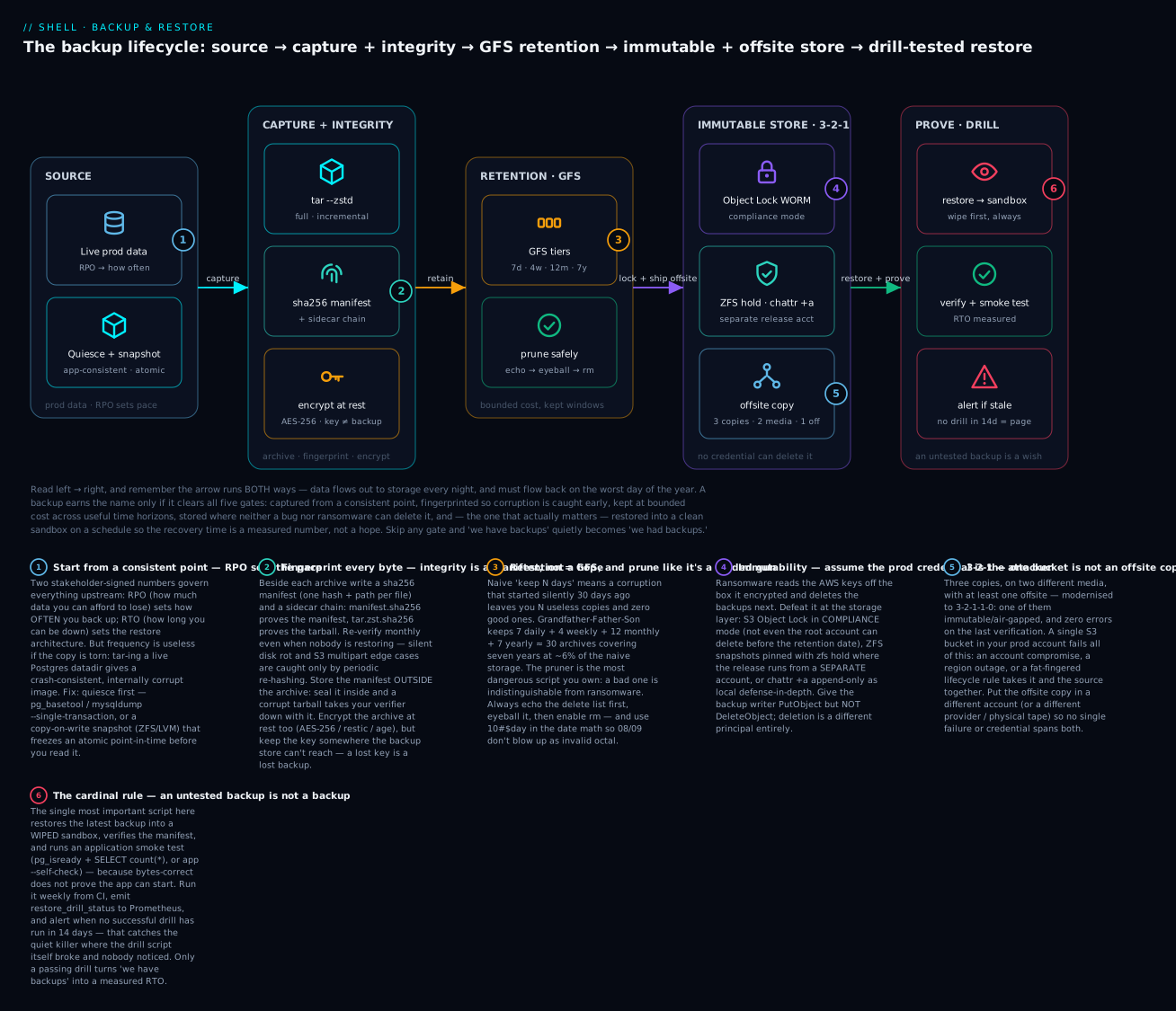
The diagram traces one archive left-to-right through the five gates every real backup must clear — captured from a consistent point, fingerprinted so corruption surfaces early, retained at bounded cost, stored where no credential can delete it, and restored into a wiped sandbox on a schedule — with the reminder that the arrow runs both ways: data flows out every night and must flow back on your worst day.
The Four Pillars (And Why Every Outage Has Failed at Least One of Them)
A backup is not a backup until it is integrity-verified, retention-bounded, immutable from the source, and drill-tested. Every public post-mortem you have read where “we had backups but couldn’t restore” was a failure on one of those four axes:
| Pillar | What it answers | Common failure |
|---|---|---|
| Integrity | “Is the byte stream the same as what we wrote?” | Tape corruption, S3 multipart edge cases, silent disk rot |
| Retention | “How long do we keep what?” | Storage cost spirals, or worse, the only good copy was pruned |
| Immutability | “Can the source attacker (or a bug) delete the backup?” | Ransomware encrypts both prod and backup; bug rm -rf’s an S3 prefix |
| Drill testing | “Can we actually restore in time?” | “Untested backup” — the only honest description until you prove otherwise |
This lesson teaches each pillar with shell scripts that work on Linux servers, including a lib/backup.sh you can source. We use sha256sum manifests for integrity, the GFS (Grandfather-Father-Son) retention scheme for bounded storage, S3 Object Lock and ZFS snapshots for immutability, and an automated restore-drill verifier that runs weekly in CI.
The 3-2-1 Rule (and Its Modern 3-2-1-1-0 Upgrade)
Before the four pillars there is one older, simpler rule that every backup design should satisfy first. It predates the cloud and still decides who survives a bad day:
3-2-1: keep 3 copies of your data, on 2 different media/storage types, with 1 of them offsite.
- 3 copies — the live production data plus (at least) two backups. Two backups because any single backup can itself be corrupt, and you find out only when you reach for it.
- 2 media — don’t keep every copy on the same kind of storage. If all three live on the same SAN, one controller firmware bug or one ransomware blast takes them together. “Media” in 2026 means different failure domains: local disk and object storage and tape, or two different cloud providers.
- 1 offsite — at least one copy must survive the loss of the whole building/region/account. A flood, a fire, a region outage, or a compromised cloud account must not be able to reach every copy.
The modern hardened form is 3-2-1-1-0, which adds the two lessons ransomware taught the industry:
| Digit | Means | Maps to |
|---|---|---|
| 3 | copies of the data | redundancy |
| 2 | different media / failure domains | media diversity |
| 1 | offsite | geographic/account isolation |
| +1 | immutable or air-gapped copy | Pillar 3 (Immutability) |
| 0 | zero errors on the last verification/restore test | Pillars 1 + 4 (Integrity + Drill) |
Notice the four pillars are just 3-2-1-1-0 made operational: the +1 is immutability, the 0 is integrity-verified-and-drill-tested. Keep the rule in your head as the acceptance test — “does this design give me three copies, two media, one offsite, one immutable, zero errors?” — and the rest of the lesson is how you build each piece in shell.
RTO vs RPO: The Two Numbers You Owe Your Stakeholders
Before you write a single line of backup code, you need two numbers signed off by a stakeholder:
- RPO (Recovery Point Objective): How much data can you afford to lose? “We can lose at most 1 hour of orders” → RPO = 1 hour. This sets your backup frequency.
- RTO (Recovery Time Objective): How long can you be down restoring? “We must be back in 4 hours” → RTO = 4 hours. This sets your restore architecture (full-from-cold vs. incremental-from-warm).
Without these two numbers you cannot decide between hourly snapshots vs. daily, or between cold tape (cheap, slow) and warm S3 (expensive, fast). Every script in this lesson references RTO/RPO at the top.
Full, Incremental & Differential Backups
Your RPO tells you how often; the full/incremental/differential choice tells you how to hit that frequency affordably. Backing up a 500 GB dataset in full every hour is neither cheap nor fast — so you take a full occasionally and capture only the changes in between.
| Type | What it copies | Restore needs | Storage per run | Restore speed |
|---|---|---|---|---|
| Full | Everything, every time | Just that one archive | Highest | Fastest (one archive) |
| Incremental | Only what changed since the previous backup (full or incremental) | Full + every incremental since, in order | Lowest | Slowest — long, fragile chain |
| Differential | Everything changed since the last full | Full + one differential | Medium, grows until the next full | Fast (two archives) |
The trade-off is write cost vs. restore cost. Incrementals are the cheapest to write but the riskiest to restore: lose or corrupt one link in a 30-deep incremental chain and every backup after it is unrecoverable. Differentials sit in the middle — you only ever need the full plus the newest differential, so a single lost archive costs you at most one differential’s worth.
Incremental backups with GNU tar
GNU tar implements incrementals with a snapshot file (.snar) that records the state of every file at backup time:
# Level 0 (a full backup): creates/overwrites the snapshot file
tar --create --listed-incremental=/var/backups/myapp.snar \
    --zstd --file=/var/backups/myapp-full.tar.zst \
    -C /var/lib/myapp .

# Level 1 (incremental): SAME snapshot file → only changed files are captured
tar --create --listed-incremental=/var/backups/myapp.snar \
    --zstd --file=/var/backups/myapp-incr-01.tar.zst \
    -C /var/lib/myapp .
To restore you replay the full first, then each incremental in order, all with --incremental so tar also deletes files that were removed between levels:
tar --extract --incremental --zstd -f myapp-full.tar.zst   -C /srv/restore
tar --extract --incremental --zstd -f myapp-incr-01.tar.zst -C /srv/restore
Portability caveat:
--listed-incrementalis a GNU tar feature. BSDtar/bsdtar(the default on macOS) does not support it — you’ll getOption --listed-incremental is not supported. On a BSD/macOS build host, use GNU tar (gtar, frombrew install gnu-tar) or reach forrestic/borg, which do incrementals natively and portably.
For a differential with GNU tar, copy the snapshot file right after the full and reuse that same frozen copy for every differential — that way each run compares against the full, not the previous run. In practice, though, most shops let a purpose-built tool handle this: restic and borg do incremental-forever with deduplication (see the restic section below), and can produce a synthetic full — a new standalone full assembled on the storage side by merging a full with its incrementals, so you never re-read the source yet keep restores to a single archive.
Pillar 1: Integrity — The sha256sum Manifest Pattern
The single most useful backup primitive is the manifest: a sidecar file listing every backed-up file along with its sha256 hash and size. With a manifest you can:
- Verify a backup is byte-identical to source at write time (catch network corruption).
- Verify months later that storage hasn’t rotted (catch silent disk failure).
- Compare two backups to find what changed (incremental planning).
- Prove to auditors that restoration was bit-perfect.
Generating a Manifest
# Generate manifest of /var/lib/myapp at backup time
manifest_create() {
  local src="$1" dest="$2"
  ( cd "$src" && find . -type f -print0 \
      | xargs -0 sha256sum \
      | sort -k 2 \
  ) > "$dest"
}

manifest_create /var/lib/myapp /var/backups/myapp-2026-06-22.manifest
The manifest format is the standard sha256sum format: <hash> <relative-path>. It’s plain text, sorted, and trivially comparable with diff.
Portability note:
sha256sumis GNU coreutils (Linux). On macOS/BSD the equivalents areshasum -a 256orgsha256sum(frombrew install coreutils). The-print0 | xargs -0pairing is what makes the manifest correct for filenames with spaces or newlines — never pipe a barefindintoxargsfor this.
Verifying a Manifest at Restore Time
manifest_verify() {
  local src="$1" manifest="$2"
  ( cd "$src" && sha256sum -c "$manifest" --quiet )
}

# Returns 0 if all files match, non-zero with mismatch list on stderr
manifest_verify /var/restore/myapp /var/backups/myapp-2026-06-22.manifest
Run this immediately after every restore drill and at scrape time (yes, monthly, even if no restore is happening). Silent corruption is real and the only defense is periodic re-checksumming.
Storing the Manifest Separately From the Backup
Anti-pattern: storing the manifest inside the same tar/zip as the data. If the archive corrupts, your verifier corrupts with it. Store the manifest as a sidecar file with a parallel name:
/var/backups/myapp-2026-06-22.tar.zst
/var/backups/myapp-2026-06-22.tar.zst.sha256   # checksum of the tarball itself
/var/backups/myapp-2026-06-22.manifest         # checksum of every file inside
/var/backups/myapp-2026-06-22.manifest.sha256  # checksum of the manifest
You now have a chain of trust:
manifest.sha256→ proves the manifest itself is uncorrupted.manifest→ proves every file is uncorrupted.tar.zst.sha256→ proves the tarball is uncorrupted (catches damage that wouldn’t be caught by file-level manifest because tar metadata could be wrong).
Why Not GPG Signatures?
GPG signatures are stronger than checksums (they prove origin, not just integrity), but they are operationally heavy: key management, expiry, revocation. For most internal backups, sha256 + immutable storage is sufficient. Reserve GPG for cross-org backup transfer (e.g., sending backups to a partner) where you need non-repudiation.
Pillar 2: Retention — GFS (Grandfather-Father-Son)
Naive retention is “keep N days.” The problem: a corruption that started 30 days ago (silent), discovered today, gives you N=30 useless backups and zero good ones.
GFS solves this by keeping backups at multiple time horizons:
| Tier | Frequency | Retention | Purpose |
|---|---|---|---|
| Son (daily) | Every day | 7 days | Recent operational rollback |
| Father (weekly) | Sunday of every week | 4 weeks | Last-month rollback |
| Grandfather (monthly) | First Sunday of month | 12 months | Audit, long-tail corruption discovery |
| Yearly (optional) | First Sunday of January | 7 years | Compliance (tax, HIPAA, etc.) |
Total backups kept: ~7 + 4 + 12 = 23 backups, vs. naive “keep 365 days” = 365 backups. Storage cost is ~6% of naive while preserving discovery windows of 1 year.
Implementing GFS Pruning in Bash
# Prune backups in a directory according to GFS policy.
# Assumes backups are named: myapp-YYYY-MM-DD.tar.zst
gfs_prune() {
  local dir="$1"
  local now today day_of_week day_of_month month
  now=$(date +%s)
  today=$(date +%Y-%m-%d)

  for f in "$dir"/myapp-*.tar.zst; do
    [[ -f "$f" ]] || continue
    local base date_str ts age_days
    base=$(basename "$f" .tar.zst)
    date_str=${base#myapp-}
    ts=$(date -d "$date_str" +%s 2>/dev/null) || continue
    age_days=$(( (now - ts) / 86400 ))

    day_of_week=$(date -d "$date_str" +%u)   # 1-7, Mon-Sun
    day_of_month=$(date -d "$date_str" +%d)
    month=$(date -d "$date_str" +%m)

    local keep=false
    # Son: keep last 7 days
    (( age_days <= 7 )) && keep=true
    # Father: Sundays in last 28 days
    (( age_days <= 28 )) && [[ "$day_of_week" == "7" ]] && keep=true
    # Grandfather: first Sunday of month in last 365 days
    (( age_days <= 365 )) && [[ "$day_of_week" == "7" ]] && (( 10#$day_of_month <= 7 )) && keep=true
    # Yearly: first Sunday of January in last 7 years
    (( age_days <= 365*7 )) && [[ "$day_of_week" == "7" ]] && (( 10#$day_of_month <= 7 )) && [[ "$month" == "01" ]] && keep=true

    if ! $keep; then
      echo "PRUNE: $f (age=${age_days}d)"
      # rm "$f" "$f.sha256" "${f%.tar.zst}.manifest" "${f%.tar.zst}.manifest.sha256"
    fi
  done
}
Note 10#$day_of_month: bash treats numbers with leading zeros as octal, so 08 and 09 would be parse errors. The 10# prefix forces base-10. This is a classic shell footgun in any date arithmetic.
The rm is commented out for safety — always run with echo first, eyeball the list, then enable deletes. A bad prune script is indistinguishable from ransomware.
Portability note:
date -d "$date_str"(parse an arbitrary date string) is GNU date. BSD/macOSdaterejects-d(illegal option -- d) and instead wantsdate -j -f "%Y-%m-%d" "$date_str" +%s. Install GNU coreutils (gdate) on a Mac, or keep this logic on the Linux hosts where it runs. This is exactly why serious retention often lives inrestic forget(below) rather than hand-rolled date math.
Why Not Just Use Restic’s Built-In Retention?
restic forget --keep-daily 7 --keep-weekly 4 --keep-monthly 12 --keep-yearly 7 does GFS for you and is the right answer for restic-native workflows. Use it when you can. The bash version above exists for tar-based backups, S3 prefixes, ZFS snapshots, and any other store where you don’t have a built-in retention engine.
Pillar 3: Immutability — Object Lock, WORM, ZFS Snapshots
Ransomware operators specifically target backup systems. If the backup credential is on the prod box, the ransomware uses it to delete or encrypt the backup. Mutable backups are not backups against ransomware; they are just slow disks.
The defense is immutability at the storage layer: even an attacker with valid credentials cannot delete the data until a retention period has passed. Three patterns:
Pattern A: S3 Object Lock (Compliance Mode)
S3 Object Lock in compliance mode means not even the AWS root account can delete the object before the retention date. This is the gold standard.
# Bucket must be created with object-lock enabled (cannot be added later)
aws s3api create-bucket \
  --bucket myapp-backups-prod \
  --object-lock-enabled-for-bucket \
  --region us-east-1

# Default 30-day compliance lock on every uploaded object
aws s3api put-object-lock-configuration \
  --bucket myapp-backups-prod \
  --object-lock-configuration '{
    "ObjectLockEnabled": "Enabled",
    "Rule": {
      "DefaultRetention": {
        "Mode": "COMPLIANCE",
        "Days": 30
      }
    }
  }'

# Upload — object is locked for 30 days from this moment
aws s3 cp myapp-2026-06-22.tar.zst s3://myapp-backups-prod/daily/
Once uploaded, that object cannot be deleted, overwritten, or have its retention shortened by anyone, including the AWS root user, until day 31. Governance mode is similar but allows specific IAM principals to override; for true ransomware defense use compliance mode.
Pair Object Lock with MFA Delete on the bucket and a separate AWS account for backups (so a compromise of the prod account cannot pivot to delete the backup account’s resources).
Pattern B: ZFS Snapshots With zfs hold
For on-prem or self-managed storage, ZFS snapshots are atomic, copy-on-write, and can be marked as held against deletion:
# Take snapshot
zfs snapshot tank/myapp@daily-2026-06-22

# Place a hold (named tag) — snapshot cannot be destroyed while hold exists
zfs hold compliance-30d tank/myapp@daily-2026-06-22

# Try to destroy — fails with "dataset is busy"
zfs destroy tank/myapp@daily-2026-06-22
# cannot destroy 'tank/myapp@daily-2026-06-22': snapshot is busy

# Cron job 30 days later releases hold
zfs release compliance-30d tank/myapp@daily-2026-06-22
The key property: the script that takes the snapshot has create+hold privilege but not release privilege. The release script runs from a separate account/host. Even if the backup-creator account is compromised, the attacker cannot release the hold.
Pattern C: Append-Only Filesystem (chattr +a)
For local backups, chattr +a on Linux ext4/xfs makes a file append-only — even root cannot truncate or delete it without first removing the attribute, which itself requires CAP_LINUX_IMMUTABLE. Combined with a tightly-scoped capability set, this gives partial immutability against compromised prod credentials:
# Run as root once at backup directory creation
chattr +a /var/backups/myapp/
# Now backups can be added but not modified or deleted by normal users
This is weaker than S3 Object Lock or ZFS holds because root with CAP_LINUX_IMMUTABLE can override it; it’s a defense-in-depth layer, not the primary control.
What “Air-Gapped” Really Means in 2026
A truly air-gapped backup is one that no online credential can reach. Examples:
- Tape backups physically rotated to a vault.
- A second AWS account whose credentials are never on the prod host (only on the backup-orchestrator host, which itself is firewalled).
- A WORM-mode S3 bucket where even the IAM admin is locked out by SCPs.
Cloud Object Lock is “air-gapped enough” for most threat models because the lock duration outlives the time-to-detect a compromise. Tape is the gold standard for nation-state-level threats but operationally heavy.
Pillar 4: Drill Testing — The Restore Verifier
A backup that has never been restored is a wish, not a plan. The single most important script in this lesson is the one that automatically restores the latest backup to a sandbox VM and verifies it works.
The Weekly Restore-Drill Script
#!/usr/bin/env bash
# weekly-restore-drill.sh — Run from CI every Sunday at 02:00.
# Restores latest backup to a clean sandbox, verifies the manifest,
# and runs application smoke tests. Posts results to monitoring.

set -euo pipefail

readonly SANDBOX=/srv/restore-sandbox
readonly BACKUP_BUCKET=s3://myapp-backups-prod
readonly REPORT_FILE=/var/log/restore-drill/$(date +%Y-%m-%d).log

log() { printf '[%s] %s\n' "$(date -Iseconds)" "$*"; }
metric() { printf '%s %s\n' "$1" "$2" > "/var/lib/node_exporter/textfile_collector/restore_drill.prom.tmp"
           mv "/var/lib/node_exporter/textfile_collector/restore_drill.prom.tmp" \
              "/var/lib/node_exporter/textfile_collector/restore_drill.prom"; }

# 1. Find latest backup
log "Finding latest backup"
LATEST=$(aws s3 ls "$BACKUP_BUCKET/daily/" \
  | sort | tail -1 | awk '{print $4}')
log "Latest: $LATEST"

# 2. Wipe sandbox (defense: ensure we're testing the backup, not stale data)
log "Wiping sandbox $SANDBOX"
rm -rf "${SANDBOX:?}"/*

# 3. Download backup + manifest
log "Downloading backup"
aws s3 cp "$BACKUP_BUCKET/daily/$LATEST" "$SANDBOX/$LATEST"
aws s3 cp "$BACKUP_BUCKET/daily/${LATEST%.tar.zst}.manifest" "$SANDBOX/manifest"
aws s3 cp "$BACKUP_BUCKET/daily/${LATEST%.tar.zst}.manifest.sha256" "$SANDBOX/manifest.sha256"

# 4. Verify manifest checksum
log "Verifying manifest integrity"
( cd "$SANDBOX" && sha256sum -c manifest.sha256 ) || {
  log "ERROR: manifest is corrupted"
  metric restore_drill_status 0
  exit 1
}

# 5. Extract
log "Extracting backup"
mkdir -p "$SANDBOX/data"
tar -xf "$SANDBOX/$LATEST" -C "$SANDBOX/data"

# 6. Verify file-level manifest
log "Verifying file manifest"
( cd "$SANDBOX/data" && sha256sum -c "$SANDBOX/manifest" --quiet ) || {
  log "ERROR: file manifest mismatch"
  metric restore_drill_status 0
  exit 1
}

# 7. Application smoke test (app-specific!)
log "Running smoke test"
if /usr/local/bin/myapp-smoke-test "$SANDBOX/data"; then
  log "Smoke test passed"
  metric restore_drill_status 1
  metric restore_drill_last_success "$(date +%s)"
else
  log "ERROR: smoke test failed"
  metric restore_drill_status 0
  exit 1
fi
Two non-obvious decisions in this script:
- Wipe before restore. If you don’t, a subtle bug where tar fails to extract a critical file gets masked by a leftover from the previous drill. Always start from empty.
- Application smoke test. The manifest only proves bytes are correct; it doesn’t prove the application can start. The smoke test for a Postgres backup is
pg_isready && SELECT count(*) FROM critical_table. For a stateful app it’sapp --self-check. An untested smoke test is half a drill.
What “Drill-Tested” Means Audit-Side
For SOC 2, ISO 27001, and HIPAA, “drill-tested” means:
- Restore-drill runs on a documented cadence (typically monthly minimum, weekly preferred).
- Each drill produces a timestamped log with pass/fail.
- Failures trigger a documented incident response.
- The log retention is at least 1 year (so auditors can sample).
Wire restore_drill_status and restore_drill_last_success to Prometheus alerts:
# prometheus/rules/backup.yml
groups:
- name: backup
  rules:
  - alert: RestoreDrillFailing
    expr: restore_drill_status == 0
    for: 1h
    annotations:
      summary: "Last weekly restore drill failed"

  - alert: RestoreDrillStale
    expr: time() - restore_drill_last_success > 86400 * 14
    annotations:
      summary: "No successful restore drill in 14 days"
RestoreDrillStale catches the “the drill script itself broke and nobody noticed” failure mode.
Encryption at Rest: Protecting the Backup Itself
Your backups travel over networks, sit on third-party object storage, get shipped to tape that leaves the building, and outlive the box that made them — often by years. So a copy of production data with no encryption is a data breach waiting for someone to find an old drive. Encryption at rest closes that gap: even if the storage medium is stolen or the bucket is misconfigured public, the bytes are unreadable without the key.
The primitive: symmetric encryption of the archive
To understand the mechanism, encrypt a tarball with openssl (this roundtrip is real and reproducible):
# Encrypt (AES-256, key stretched from a passphrase with PBKDF2 + random salt)
openssl enc -aes-256-cbc -pbkdf2 -salt \
  -in  myapp-2026-06-22.tar.zst \
  -out myapp-2026-06-22.tar.zst.enc \
  -pass file:/etc/backup/passphrase   # placeholder — never a literal on the CLI

# Decrypt at restore time
openssl enc -d -aes-256-cbc -pbkdf2 \
  -in  myapp-2026-06-22.tar.zst.enc \
  -out myapp-2026-06-22.tar.zst \
  -pass file:/etc/backup/passphrase
Be honest about the primitive:
-aes-256-cbcgives you confidentiality but not authentication — a flipped bit or a tampered ciphertext won’t be detected by the cipher itself (that’s what your sha256 manifest is still for). For production, prefer a tool that does authenticated encryption (AEAD) and key handling for you:age(age -r <recipient>),restic/borg(encrypted repositories by default), orgpg --symmetric --cipher-algo AES256. Never pass the passphrase as a command-line argument (it’s world-readable inps); use-pass file:or an env var from a secrets manager.
The rule that actually matters: where the key lives
Encryption only helps if the key is not reachable from the same place as the backup. Two failure modes to design against:
- Key next to the ciphertext → useless. If the passphrase file sits in the same bucket (or the same compromised host) as the encrypted archive, an attacker who took one took both. Use envelope encryption: a KMS (AWS KMS, GCP KMS, Vault transit) holds the key-encryption key; the backup only ever carries a wrapped data key that KMS must unwrap. The prod host can encrypt but the ability to decrypt is a separate, audited KMS permission.
- Lost key → lost backup. This is the mirror-image risk and it has killed more restores than theft. An encrypted backup whose key is gone is indistinguishable from random noise. So escrow the key: store it in a secrets manager with its own backup, split it (Shamir) among trustees, or print and vault it. Test that the drill (Pillar 4) can actually fetch and use the key — a restore drill that skips decryption is testing the wrong thing.
Encryption is a fourth property, orthogonal to the pillars: it does not give you integrity (you still need manifests), it does not give you immutability (an encrypted object can still be rm’d), and it does not give you recoverability (that’s the drill). Layer it with them, not instead of them.
The Drop-In lib/backup.sh
# lib/backup.sh — sourced helpers for backup scripts.
#
# Usage:
#   source /usr/local/lib/backup.sh
#   backup_create_tar /var/lib/myapp /var/backups myapp
#   backup_upload_s3 /var/backups/myapp-2026-06-22.tar.zst s3://bkp/daily/
#   backup_verify_remote s3://bkp/daily/myapp-2026-06-22.tar.zst

set -o errexit -o nounset -o pipefail

readonly BACKUP_LOG="${BACKUP_LOG:-/var/log/backup.log}"

backup_log() {
  printf '[%s] %s\n' "$(date -Iseconds)" "$*" | tee -a "$BACKUP_LOG"
}

# Create a tar.zst archive + manifest + sidecar checksums.
# Args: src_dir, dest_dir, name_prefix
backup_create_tar() {
  local src="$1" dest="$2" name="$3"
  local stamp out manifest
  stamp=$(date +%Y-%m-%d-%H%M%S)
  out="$dest/${name}-${stamp}.tar.zst"
  manifest="$dest/${name}-${stamp}.manifest"

  backup_log "Creating manifest for $src"
  ( cd "$src" && find . -type f -print0 | xargs -0 sha256sum | sort -k 2 ) > "$manifest"
  sha256sum "$manifest" > "$manifest.sha256"

  backup_log "Creating tar archive $out"
  tar --create --zstd --file="$out" -C "$src" .
  sha256sum "$out" > "$out.sha256"

  backup_log "Created: $out (size=$(stat -c %s "$out")B)"
  printf '%s\n' "$out"
}

# Upload tar + sidecars to S3.
# Args: tar_path, s3_prefix
backup_upload_s3() {
  local tar="$1" prefix="$2"
  local base="${tar%.tar.zst}"
  for f in "$tar" "$tar.sha256" "$base.manifest" "$base.manifest.sha256"; do
    [[ -f "$f" ]] || { backup_log "WARN: $f missing, skipping"; continue; }
    backup_log "Uploading $f to $prefix"
    aws s3 cp "$f" "$prefix" --no-progress
  done
}

# Verify a remote tar.zst by downloading sidecars and re-hashing the tar.
# Args: s3_url
backup_verify_remote() {
  local url="$1"
  local tmp
  tmp=$(mktemp -d)
  trap "rm -rf '$tmp'" EXIT

  aws s3 cp "$url" "$tmp/archive.tar.zst" --no-progress
  aws s3 cp "$url.sha256" "$tmp/archive.tar.zst.sha256" --no-progress

  ( cd "$tmp" && sha256sum -c archive.tar.zst.sha256 --quiet ) \
    && backup_log "OK: $url integrity verified" \
    || { backup_log "FAIL: $url integrity check failed"; return 1; }
}

# Local GFS prune. Args: dir, name_prefix
backup_gfs_prune() {
  local dir="$1" prefix="$2"
  local now today
  now=$(date +%s)

  find "$dir" -name "${prefix}-*.tar.zst" -print | while read -r f; do
    local base date_str ts age_days dow dom mon keep
    base=$(basename "$f" .tar.zst)
    date_str=${base#${prefix}-}
    date_str=${date_str%-*}  # strip HHMMSS suffix
    ts=$(date -d "$date_str" +%s 2>/dev/null) || continue
    age_days=$(( (now - ts) / 86400 ))
    dow=$(date -d "$date_str" +%u)
    dom=$(date -d "$date_str" +%d)
    mon=$(date -d "$date_str" +%m)

    keep=false
    (( age_days <= 7 )) && keep=true
    (( age_days <= 28 )) && [[ "$dow" == "7" ]] && keep=true
    (( age_days <= 365 )) && [[ "$dow" == "7" ]] && (( 10#$dom <= 7 )) && keep=true
    (( age_days <= 365*7 )) && [[ "$dow" == "7" ]] && (( 10#$dom <= 7 )) && [[ "$mon" == "01" ]] && keep=true

    if ! $keep; then
      backup_log "PRUNE: $f"
      rm -f "$f" "$f.sha256" "${f%.tar.zst}.manifest" "${f%.tar.zst}.manifest.sha256"
    fi
  done
}

# Restore + verify. Args: tar_path, dest_dir
backup_restore_verify() {
  local tar="$1" dest="$2"
  local base manifest
  base="${tar%.tar.zst}"
  manifest="$base.manifest"

  [[ -f "$manifest" ]] || { backup_log "FAIL: manifest missing for $tar"; return 1; }

  backup_log "Verifying tarball integrity"
  sha256sum -c "$tar.sha256" --quiet || return 1

  backup_log "Extracting to $dest"
  mkdir -p "$dest"
  tar -xf "$tar" -C "$dest"

  backup_log "Verifying file manifest"
  ( cd "$dest" && sha256sum -c "$manifest" --quiet ) || return 1

  backup_log "OK: restore verified at $dest"
}
Using the Library
#!/usr/bin/env bash
# nightly-backup.sh — runs from cron or systemd timer at 01:00
source /usr/local/lib/backup.sh

readonly SRC=/var/lib/myapp
readonly LOCAL_DEST=/var/backups
readonly S3_PREFIX=s3://myapp-backups-prod/daily/

backup_log "===== nightly backup starting ====="
tar=$(backup_create_tar "$SRC" "$LOCAL_DEST" myapp)
backup_upload_s3 "$tar" "$S3_PREFIX"
backup_verify_remote "$S3_PREFIX$(basename "$tar")"
backup_gfs_prune "$LOCAL_DEST" myapp
backup_log "===== nightly backup complete ====="
The whole nightly orchestration is ~10 lines of glue because the library encodes the discipline.
Restic: When You Want Dedup + Encryption Out of the Box
For datasets where dedup and encryption matter (tens of GB+, or where backups travel over untrusted networks), restic does it natively. Wrap it in shell:
#!/usr/bin/env bash
set -euo pipefail
export RESTIC_REPOSITORY=s3:s3.amazonaws.com/myapp-restic
export RESTIC_PASSWORD_FILE=/etc/restic/password
export AWS_ACCESS_KEY_ID="$(cat /etc/restic/aws-key)"
export AWS_SECRET_ACCESS_KEY="$(cat /etc/restic/aws-secret)"

# Backup
restic backup /var/lib/myapp --tag daily --tag "$(hostname)"

# Verify (re-hashes a 5% random sample of pack files)
restic check --read-data-subset=5%

# GFS prune
restic forget \
  --keep-daily 7 \
  --keep-weekly 4 \
  --keep-monthly 12 \
  --keep-yearly 7 \
  --prune
restic check --read-data-subset=5% is the integrity verifier — run it weekly. Over a year you’ll have re-read your entire backup at least once, catching silent corruption.
Pair restic’s S3 backend with Object Lock for immutability — restic will operate normally, but the backing objects are still locked against deletion until retention expires. This is the gold-standard combo for mid-size shops.
ZFS Snapshot Replication for Local-Plus-Remote
If your dataset is on ZFS, you get snapshot + send/recv built-in. The pattern:
#!/usr/bin/env bash
set -euo pipefail

readonly DATASET=tank/myapp
readonly REMOTE_HOST=backup.internal
readonly REMOTE_DATASET=backup-pool/myapp

# Local snapshot
SNAP="$DATASET@$(date +%Y-%m-%d-%H%M)"
zfs snapshot "$SNAP"
zfs hold compliance-30d "$SNAP"

# Find last snapshot on remote (incremental basis)
LAST_REMOTE=$(ssh "$REMOTE_HOST" "zfs list -t snapshot -H -o name $REMOTE_DATASET" \
  | tail -1 | awk -F@ '{print $2}')

# Send incremental
if [[ -n "$LAST_REMOTE" ]]; then
  zfs send -i "@$LAST_REMOTE" "$SNAP" | ssh "$REMOTE_HOST" zfs recv "$REMOTE_DATASET"
else
  zfs send "$SNAP" | ssh "$REMOTE_HOST" zfs recv "$REMOTE_DATASET"
fi
The zfs hold is critical: without it, a bug or attacker that runs zfs destroy -r tank/myapp deletes everything including snapshots. With holds, the destroy fails for held snapshots.
Going deeper
Everything above gets you a working, defensible pipeline. This section is for when you’re operating it at scale, in front of auditors, or against a determined attacker.
Backup consistency: crash-consistent vs application-consistent
Not all “point-in-time” copies are equal. There are three levels, and knowing which one you have decides whether a restore works or merely extracts:
- Crash-consistent — you copied the bytes as they were on disk at an instant, exactly as if the machine had lost power. A journalling filesystem or a database with a WAL can usually recover from this, but recovery is not free and some in-flight writes are lost. A naive
tarof a live datadir is, at best, crash-consistent — and often worse than crash-consistent, becausetarreads files over a span of seconds, not an instant, so different files reflect different moments (an “inconsistent” or “torn” backup). - Application-consistent — the application was told to flush and quiesce first, so the copy is a clean, transactionally coherent state.
pg_basebackup,mysqldump --single-transaction, or an app’s own--freezehook get you here. This is what you want for anything stateful. - Filesystem-freeze snapshots —
fsfreeze -f /mnt(Linux) or an LVM/ZFS/btrfs copy-on-write snapshot captures a genuine atomic instant across the whole filesystem. Combined with a pre-freeze application flush hook, a COW snapshot is both atomic and application-consistent — which is why snapshot-then-back-up-the-snapshot is the standard pattern for large live datasets. (Windows calls the same idea VSS.)
The reason COW snapshots are “atomic” is structural: copy-on-write never overwrites live blocks, so freezing a snapshot is just pinning the current block pointers — instantaneous and consistent by construction, no data copy required at snapshot time.
What a file manifest does not capture
sha256sum hashes file contents. A restore that passes the manifest can still be subtly wrong because the manifest is blind to:
- Metadata — ownership, permissions, timestamps, and especially extended attributes and POSIX ACLs. If your app relies on
setcapcapabilities or SELinux labels, a content-perfect restore can still fail to start. Back these up withtar --xattrs --acls --selinuxand restore with the same flags. - Sparse files — VM images and DB files are often sparse (holes that read as zeros without consuming disk). Without
tar --sparse, you restore a fully-allocated file that may not fit. The manifest hash matches (zeros are zeros) while the on-disk footprint explodes. - Hardlinks —
find -type flists each hardlinked inode once per name; the manifest hashes them all identically, but a restore that doesn’t preserve links silently multiplies your storage. - Empty directories & special files —
find . -type fskips them entirely. If your app needs an emptyspool/directory or a named pipe, the manifest never noticed it was gone.
The fix isn’t to distrust manifests — it’s to know they verify content and let tar’s own flags plus a real application smoke test (Pillar 4) verify the rest.
How restic (and borg) actually dedup: content-defined chunking
Restic doesn’t diff files; it splits every file into variable-length chunks using a rolling hash (content-defined chunking, CDC). A chunk boundary is placed wherever the rolling hash hits a pattern, so inserting a byte near the start of a file shifts only the first chunk’s boundary, not every chunk after it — the reason restic dedups even when files grow or shift. Identical chunks (by their own hash) are stored once, packed into encrypted pack files, and referenced by a tree. This is why incremental-forever works without a fragile chain: every snapshot is a full logical view, but physically only new chunks are written. restic check --read-data-subset re-downloads and re-hashes a fraction of those packs so that, over enough weeks, the entire repository is re-verified — the distributed, cloud-native equivalent of monthly re-checksumming.
S3 Object Lock, versioning, and legal hold — the details that bite
Object Lock has more moving parts than the happy path shows:
- Versioning is mandatory. Object Lock requires bucket versioning; a “delete” of a locked object just writes a delete marker over it — the locked version is still there and still billable. Your retention/lifecycle math must account for versions, not just keys.
- Retention vs. legal hold. A retention period expires on a date; a legal hold is a boolean with no expiry that you toggle for litigation/investigation and must explicitly remove. Use retention for routine immutability, legal hold for “freeze this until Legal says otherwise.”
- Governance vs. compliance, again. In governance mode a principal with
s3:BypassGovernanceRetentioncan shorten or remove the lock — useful for correcting a fat-fingered 99-year retention, but it means the lock is only as strong as that permission. Compliance mode has no bypass, not even for root, which is exactly why it’s the ransomware-grade choice and also why a mistake in compliance mode is permanent. Test retention durations in governance mode first.
Hashing at scale, and the RTO you actually get
Two numbers dominate large backups:
- Hash throughput.
sha256runs around 1–2 GB/s per core with hardware acceleration; on a multi-terabyte dataset the manifest pass alone is minutes-to-hours and single-threaded per file. If checksumming is your bottleneck, parallelise across files (find … -print0 | xargs -0 -P"$(nproc)" -n64 sha256sum) or switch the hash to BLAKE3 (b3sum), which is several times faster and tree-parallel. The trade-off:sha256sumis installed everywhere, and a backup you can’t verify on a stripped-down recovery box is a liability — so keepsha256unless the throughput genuinely hurts, and if you switch, archive theb3sumbinary alongside the data. - Restore time is mostly not the “restore”. Decompose your RTO honestly: detect → decide → provision target → transfer bytes → decompress/extract → verify → cut over. On a large dataset the wall-clock is dominated by transfer + extract, not the command you think of as “restoring”. This is the whole argument for incremental-from-warm architectures (a standby that’s already 99% populated, so restore = replay the last increment) over full-from-cold (download 2 TB from Glacier first). Your full/incremental choice and your storage tier are really RTO decisions in disguise.
The modern threat model in one paragraph
Assume the prod host will be compromised and its credentials used against the backups. That single assumption forces the whole design: backups go to a separate account (blast-radius isolation), the prod role has PutObject but not DeleteObject (least privilege), objects are Object-Lock compliance (immutable even to root), the account is fenced by SCPs + MFA delete, and a separate principal on a separate host performs expiry/release. Layer 3-2-1-1-0 on top and no single compromised credential — yours or an attacker’s — can reach every copy. That’s the difference between “we had backups” and “we restored in four hours.”
The 8 Footguns
1. Backing Up Open Database Files Without Quiescing
Copying /var/lib/postgresql while postgres is running gives you a backup that is internally inconsistent — pages that were partially written when the copy crossed them are corrupt. The result restores but corrupts on first read.
Fix: Use the database’s own backup tool (pg_dump, pg_basebackup, mysqldump --single-transaction, wal-g) which creates a transactionally consistent snapshot. Never tar a live datadir.
2. The “Backup Succeeded” That Wasn’t
tar returns exit 0 even when files were skipped due to permission errors (depending on flags). A successful exit code is not proof of a successful backup. Fix: Always cross-verify with the manifest count: if find | wc -l ≠ manifest line count, fail loudly.
src_count=$(find "$src" -type f | wc -l)
mfst_count=$(wc -l < "$manifest")
if (( src_count != mfst_count )); then
  backup_log "FAIL: file count mismatch (src=$src_count, manifest=$mfst_count)"
  exit 1
fi
3. Storing Backup Credentials On The Box Being Backed Up
Ransomware on the prod host reads /root/.aws/credentials and uses it to delete the S3 backup. Fix: Use IAM instance roles with s3:PutObject and s3:GetObject only — not s3:DeleteObject. Deletion is performed by a separate retention-orchestrator account that the prod host cannot impersonate.
4. Forgetting to Test the Sidecar Files
You verify the tar.zst, but never the manifest or its checksum. Months later you discover the manifest is the corrupted file. Fix: The drill script checksums every sidecar.
5. GFS Math With Leading-Zero Octal Bug
(( 08 <= 7 )) errors out with value too great for base. (( 10#$day <= 7 )) fixes it. Affects every script that does date arithmetic. Always use 10# for date numerics in bash.
6. The Backup-And-Restore-To-Same-Host Anti-Pattern
Drill-restoring on the production host means a bad restore can corrupt prod. Fix: Drill on a separate VM or container. Use cloud-init or Vagrant to spin up a clean target every time.
7. Compression Format Lock-In
You backed up everything as .tar.bz2 5 years ago. Today restoring on a stripped-down container that doesn’t have bzip2 is a 30-minute-into-an-incident discovery. Fix: Standardize on widely-available formats (.tar.gz, .tar.zst) and include the decompression binary alongside long-term archives (“backup the tools, not just the data”).
8. Missing Retention Stop on Compliance-Sensitive Data
You implemented GFS retention, but for a customer-data dataset under GDPR right-to-erasure, you cannot keep yearlies forever. Fix: GFS retention rules must encode both a maximum keep horizon and a deletion guarantee. For compliance buckets, the yearly tier might be capped at 7 years; for ephemeral dev data it might be capped at 30 days.
Common beginner mistakes
These are mental-model errors, distinct from the operational footguns above. Each is a belief that feels true and quietly loses your data.
- “The backup job exited 0, so we’re safe.” Exit code proves the command returned, not that your data is recoverable.
tarcan skip unreadable files and still exit 0; an upload can succeed to the wrong prefix. The right model: a backup is proven by a verify + restore drill, never by an exit code. - “We have backups” = “we can restore.” These are different claims. Having a copy says nothing about whether it’s complete, decryptable, uncorrupted, or restorable within your RTO. Only a drill into a wiped sandbox converts the first claim into the second.
- “More frequent backups = safer.” Frequency only improves your RPO (how little you lose). It does nothing against ransomware or a bad prune — a thousand daily copies an attacker can delete are worth zero. Safety is frequency plus immutability plus offsite, not frequency alone.
- “It’s in the cloud, so my offsite copy is done.” One bucket in your prod account is not offsite — an account compromise, a region outage, or a lifecycle-rule typo takes it and production together. Offsite means a different failure domain: another account, another provider, or physical tape.
- “It’s encrypted, so it’s safe.” Encryption protects confidentiality, not integrity (you still need manifests) or availability (an encrypted object still deletes). And it introduces a new way to lose everything: misplace the key and the backup is noise. Encrypt and escrow the key and keep the other pillars.
- “I’ll just keep the last N days.” Naive keep-N means a silent corruption that began N+1 days ago has already eaten every copy you kept. GFS exists precisely to hold long-horizon recovery points (monthly, yearly) so you can reach back past the moment corruption started.
- “We’ll test restores when we actually need to.” The incident is the worst possible moment to discover the archive is corrupt, the key is gone, or the runbook is wrong. Drills are cheap on a Tuesday and priceless at 3 a.m. Test on the calendar, not on the outage.
Practice challenges
Work these in a scratch directory (cd "$(mktemp -d)"). They escalate from a single manifest to a least-privilege immutability design. Commands use the GNU/Linux forms this course targets; portability notes call out where a Mac/BSD host differs.
Challenge 1 — Manifest create + verify + catch corruption (beginner)
Create a directory with a few files, generate a sha256 manifest, verify it passes, then corrupt one file and prove the verify fails.
<details> <summary>Solution</summary>
mkdir -p src && printf 'alpha\n' > src/a.txt && printf 'beta\n' > src/b.txt
( cd src && find . -type f -print0 | xargs -0 sha256sum | sort -k 2 ) > manifest

( cd src && sha256sum -c ../manifest --quiet ) && echo "clean: PASS"

printf 'tampered\n' > src/b.txt          # simulate silent rot
( cd src && sha256sum -c ../manifest --quiet ) || echo "corrupt: FAIL (as intended)"
Expected: clean: PASS, then ./b.txt: FAILED on stderr and corrupt: FAIL (as intended).
</details>
Why: the manifest is your early-warning system — this is the entire integrity pillar in five lines. (Mac/BSD: swap sha256sum → shasum -a 256.)
Challenge 2 — Build the full sidecar chain (beginner)
Write a function pack DIR NAME that produces all four artifacts — NAME.tar.zst, NAME.tar.zst.sha256, NAME.manifest, NAME.manifest.sha256 — and prints them.
<details> <summary>Solution</summary>
pack() {
  local dir="$1" name="$2"
  ( cd "$dir" && find . -type f -print0 | xargs -0 sha256sum | sort -k 2 ) > "$name.manifest"
  sha256sum "$name.manifest" > "$name.manifest.sha256"
  tar --create --zstd --file="$name.tar.zst" -C "$dir" .
  sha256sum "$name.tar.zst" > "$name.tar.zst.sha256"
  ls -1 "$name".*
}
pack src myapp-2026-06-22
Expected: the four filenames listed. Verify the chain with
sha256sum -c myapp-2026-06-22.manifest.sha256 && sha256sum -c myapp-2026-06-22.tar.zst.sha256.
</details>
Why: the sidecar chain (.sha256 of both the manifest and the tarball) is the chain of trust that lets you detect corruption in the verifier itself, not just the data.
Challenge 3 — Fail the backup when a file is skipped (intermediate)
Extend Challenge 2 so the backup exits non-zero if the number of files on disk doesn’t equal the number of lines in the manifest (footgun #2).
<details> <summary>Solution</summary>
pack_checked() {
  local dir="$1" name="$2"
  ( cd "$dir" && find . -type f -print0 | xargs -0 sha256sum | sort -k 2 ) > "$name.manifest"
  local src_count mfst_count
  src_count=$(find "$dir" -type f | wc -l | tr -d ' ')
  mfst_count=$(wc -l < "$name.manifest" | tr -d ' ')
  if (( src_count != mfst_count )); then
    echo "FAIL: count mismatch (src=$src_count manifest=$mfst_count)" >&2
    return 1
  fi
  tar --create --zstd --file="$name.tar.zst" -C "$dir" .
  sha256sum "$name.tar.zst" > "$name.tar.zst.sha256"
  echo "OK: $src_count files"
}
pack_checked src myapp-2026-06-22   # simulate a skip: chmod 000 a file, re-run as non-root
Expected: OK: N files normally; FAIL: count mismatch … and a non-zero return when a file couldn’t be hashed.
</details>
Why: a successful exit code is not proof of a successful backup — cross-checking the file count turns a silent partial backup into a loud failure.
Challenge 4 — GFS dry-run with the octal bug fixed (intermediate)
Given files named myapp-YYYY-MM-DD.tar.zst, print KEEP or PRUNE per file under the Son/Father/Grandfather rules, with the real rm commented out. Make sure a day like 08/09 doesn’t crash the arithmetic.
<details> <summary>Solution</summary>
# seed a few fake dated files
for d in 2026-06-22 2026-06-08 2026-05-31 2026-01-04 2025-06-01; do
  : > "myapp-$d.tar.zst"
done

now=$(date +%s)
for f in myapp-*.tar.zst; do
  date_str=${f#myapp-}; date_str=${date_str%.tar.zst}
  ts=$(date -d "$date_str" +%s 2>/dev/null) || continue   # GNU date
  age=$(( (now - ts) / 86400 ))
  dow=$(date -d "$date_str" +%u); dom=$(date -d "$date_str" +%d)
  keep=false
  (( age <= 7 )) && keep=true
  (( age <= 28 )) && [[ $dow == 7 ]] && keep=true
  (( age <= 365 )) && [[ $dow == 7 ]] && (( 10#$dom <= 7 )) && keep=true   # 10# avoids octal 08/09
  $keep && echo "KEEP  $f (age=${age}d)" || echo "PRUNE $f (age=${age}d)   # rm -f $f"
done
Expected: recent files KEEP, old non-Sunday files PRUNE; no value too great for base error on the 08 date.
</details>
Why: (( 10#$dom <= 7 )) forces base-10 so leading-zero days don’t parse as invalid octal — and the commented rm enforces “echo first, delete never on the first run.” (Mac/BSD date: use date -j -f "%Y-%m-%d" "$date_str" +%s.)
Challenge 5 — An idempotent restore drill with a Prometheus metric (advanced)
Write a drill.sh that: runs in strict mode, wipes a sandbox safely, extracts a given tar.zst, verifies its file manifest, and writes restore_drill_status 1|0 atomically to a textfile-collector path. Re-running it must be safe.
<details> <summary>Solution</summary>
#!/usr/bin/env bash
set -euo pipefail
SANDBOX=${1:?usage: drill.sh SANDBOX TARBALL MANIFEST}
TARBALL=${2:?}; MANIFEST=${3:?}
PROM=/var/lib/node_exporter/textfile_collector/restore_drill.prom

metric() { printf 'restore_drill_status %s\n' "$1" > "$PROM.tmp" && mv "$PROM.tmp" "$PROM"; }
fail() { echo "DRILL FAIL: $*" >&2; metric 0; exit 1; }

rm -rf "${SANDBOX:?}"/*                    # ':?' guard: never rm -rf an empty var
mkdir -p "$SANDBOX/data"
tar -xf "$TARBALL" -C "$SANDBOX/data"      || fail "extract"
( cd "$SANDBOX/data" && sha256sum -c "$MANIFEST" --quiet ) || fail "manifest mismatch"
echo "DRILL PASS"; metric 1
Run: ./drill.sh /srv/restore-sandbox myapp-2026-06-22.tar.zst "$PWD/myapp-2026-06-22.manifest".
</details>
Why: set -euo pipefail + the ${SANDBOX:?} guard + the atomic mv of the metric make the drill safe to re-run and safe to alert on — the metric is what turns a green drill into a page when it goes stale.
Challenge 6 — Least-privilege immutability by design (advanced)
Without running a cloud, design and justify the split that survives a compromised prod host: (a) a local append-only vault with chattr +a, and (b) the S3 IAM/account split. State who can write, who can delete, and why the attacker is stuck.
<details> <summary>Solution</summary>
(a) Local append-only vault (defense-in-depth):
sudo mkdir -p /var/backups/myapp
sudo chattr +a /var/backups/myapp        # append-only: add files, cannot modify/delete
# backups can now be written but not overwritten or removed by normal users;
# clearing +a needs CAP_LINUX_IMMUTABLE, which the app/backup user must NOT have.
lsattr -d /var/backups/myapp             # shows the 'a' flag
(b) S3 / account split:
- Prod host role:
s3:PutObject,s3:GetObjecton the backup prefix — nos3:DeleteObject, noPutObjectRetentiondowngrade. - Bucket: Object Lock compliance mode + versioning + MFA delete, in a separate AWS account.
- Expiry/release: a different principal on a different host (or a lifecycle rule the prod account can’t edit) removes objects only after retention.
Why the attacker is stuck: ransomware on prod holds only Put/Get, so it can upload junk but cannot delete or shorten the lock on existing backups; compliance mode blocks even root; and the delete authority lives in an account the prod credentials can’t reach. The last good copy survives.
</details>
Why: immutability is an authorization design, not a command — the writer and the deleter must be different principals, or the backup shares fate with production.
Glossary
- RPO (Recovery Point Objective): the maximum data loss you can tolerate, in time — sets backup frequency. “RPO = 1 h” means back up at least hourly.
- RTO (Recovery Time Objective): the maximum time you can be down while restoring — sets restore architecture.
- 3-2-1 rule: 3 copies, on 2 media, 1 offsite. 3-2-1-1-0 adds 1 immutable/air-gapped copy and 0 verification errors.
- Full backup: a complete standalone copy; fastest to restore, most expensive to store.
- Incremental backup: captures only what changed since the previous backup; cheapest to write, needs the full + every increment to restore.
- Differential backup: captures everything changed since the last full; restore needs just the full + one differential.
- Synthetic full: a new full assembled on the storage side by merging a full with its increments, without re-reading the source.
- Manifest: a sidecar file listing every backed-up file with its sha256 hash — the integrity ground truth.
- Sidecar / chain of trust:
.sha256files beside the manifest and the tarball, so the verifier itself can be verified. - sha256sum: GNU tool that computes/checks SHA-256 hashes (macOS:
shasum -a 256). Proves content integrity, not metadata. - BLAKE3 / b3sum: a faster, tree-parallel hash; a throughput alternative to sha256 at the cost of ubiquity.
- GFS (Grandfather-Father-Son): tiered retention (daily/weekly/monthly/yearly) that bounds storage while keeping long recovery windows.
- Pruning: deleting backups that fall outside the retention policy — the most dangerous script you run; echo before you
rm. - Octal footgun: in bash/POSIX arithmetic,
08/09are read as invalid octal (value too great for base); prefix10#to force base-10. - Immutability: the storage property that a valid credential still cannot delete/alter data until a retention period expires.
- WORM (Write Once, Read Many): storage that permits writes and reads but no modification/deletion — the generic name for object-lock-style immutability.
- S3 Object Lock: AWS immutability; compliance mode blocks deletion even by root, governance mode allows a privileged bypass.
- Legal hold: an expiry-less immutability flag toggled for litigation/investigation, independent of the retention period.
- MFA Delete: an S3 setting requiring an MFA token to delete object versions or change versioning — raises the bar on destructive actions.
- Air-gapped: a copy no online credential can reach (rotated tape, a fenced separate account, SCP-locked WORM bucket).
- Snapshot: a point-in-time image of a dataset. Copy-on-write (COW) snapshots (ZFS/btrfs/LVM) are atomic and cheap because they pin block pointers instead of copying data.
zfs hold: a named tag that prevents a ZFS snapshot from being destroyed until released — ideally by a separate account.chattr +a: Linux append-only file attribute; local defense-in-depth immutability (removable only withCAP_LINUX_IMMUTABLE).- Quiescing: telling an application to flush and pause writes so a copy is coherent — the path to an application-consistent backup.
- Crash-consistent vs application-consistent: the former is “as if power was pulled” (may need recovery); the latter is a clean, transactionally coherent state.
fsfreeze: Linux call that freezes filesystem writes so a snapshot captures an atomic instant.- Restore drill: an automated restore into a wiped sandbox + verification + smoke test; the only proof a backup is real.
- Smoke test: a minimal “does the app actually start/answer” check after restore (e.g.
pg_isready), proving usability beyond byte-correctness. - restic / borg: deduplicating, encrypted backup tools that do incremental-forever via content-defined chunking.
- Content-defined chunking (CDC): splitting files at boundaries chosen by a rolling hash so edits don’t reshuffle every later chunk — the basis of dedup.
- Envelope encryption: encrypting the data key with a separate key-encryption key (in a KMS/Vault), so the backup carries only a wrapped key.
- AEAD: authenticated encryption (e.g. AES-GCM) that also detects tampering — stronger than plain AES-CBC.
- PITR (Point-In-Time Recovery): restoring a database to any moment (via base backup + WAL replay); covered in the next lesson.
Quick-Reference Card
INTEGRITY
  - sha256sum manifest beside every archive
  - sha256sum sidecar for the manifest itself (chain of trust)
  - verify monthly even if no restore (catch silent rot)

RETENTION (GFS)
  - 7 daily + 4 weekly + 12 monthly + 7 yearly = ~30 backups for 7 years
  - Use restic forget --keep-* for restic; bash math for tar.zst
  - 10#$day to avoid octal parse errors in date math

IMMUTABILITY
  - S3 Object Lock COMPLIANCE mode (not even root can delete)
  - ZFS hold + separate release account
  - chattr +a as defense in depth (not primary)
  - Air-gap = credential cannot reach the data

DRILL TESTING
  - Weekly automated restore to clean sandbox
  - Manifest verification + application smoke test
  - Prometheus metric restore_drill_status; alert on stale

THREAT MODELS
  - Disk failure → integrity manifests catch it
  - Ransomware → immutability blocks the delete
  - Bug in retention → MFA-delete + separate account
  - Untested → only drills prove restorability
What’s Next
You now have a backup pipeline that produces integrity-verified, retention-bounded, immutable, drill-tested archives. But for databases specifically there’s a deeper layer: PITR (point-in-time recovery), online schema migrations that don’t lock production for 4 hours, and the orchestration of pg_dump / pg_basebackup / wal-g pipelines.
In the next lesson — Database Admin Scripting: pg_dump Pipelines, MySQL Backup Orchestration & Online Schema Patterns — we’ll build on lib/backup.sh with lib/db.sh, covering Postgres logical+physical backups with WAL archiving, MySQL mysqldump --single-transaction discipline, online schema change tooling (gh-ost, pt-online-schema-change) wrapped in shell, and PITR drills that prove you can restore to any second in the last 7 days.