In a nutshell
A database is not a folder of files. It is a live engine holding half its truth in memory — dirty pages, transaction-log buffers, lock tables — that only becomes consistent with the on-disk files at flush points. So the two things this lesson is really about are: (1) how to get a consistent copy out of a running database, and (2) how to drive that database from a shell script without shooting yourself in the foot.
Think of a busy bank vault during business hours. You cannot back it up by photographing the shelves while tellers are mid-transfer between drawers — you would catch some drawers empty and their cash “in flight,” and your snapshot would not balance. You have to ask the vault’s own system for a consistent statement. And when you want to remodel the vault — add a room, widen a doorway (a schema change) — you cannot lock every door during trading hours; you build the new room alongside the old one and switch customers over at the quiet moment.
Driving all that from a script comes down to a short list of manners: hand your ID through a slot instead of shouting the password across the lobby (credentials off the command line), give your instructions in writing so the whole batch is rejected if any single line is (ON_ERROR_STOP=1, one transaction), never hold a door open longer than a few seconds (lock timeouts), and count the cash afterwards instead of assuming the teller got it right (verify with a smoke query). Everything below is those manners, written out as bash.
Level: Advanced · Time: ~45 min
Prerequisites: you are comfortable with bash strict mode (set -euo pipefail) and here-docs, and you have met the ideas in Secrets Handling (a DB password is just a secret with a port number), Idempotency (a migration runner is a reconcile loop), and Backup, Restore & Retention (the lib/backup.sh helpers this lesson builds on). A Postgres or MySQL client installed to follow along.
After this lesson you can:
- Invoke
psqlandmysqlnon-interactively from a script and have a failed statement actually fail the script. - Keep every database password out of
ps, your shell history, and the process environment. - Wrap DDL in a single transaction and fence it with a lock timeout so a schema change never freezes a table.
- Write a versioned, idempotent migration runner that applies only what has not been applied, in order, and is safe to re-run after a crash.
- Take transactionally-consistent logical dumps and physical base backups, and drill point-in-time recovery.
- Reach for
gh-ost/pt-online-schema-change/CREATE INDEX CONCURRENTLYwhen anALTERon a huge table would otherwise mean an outage.
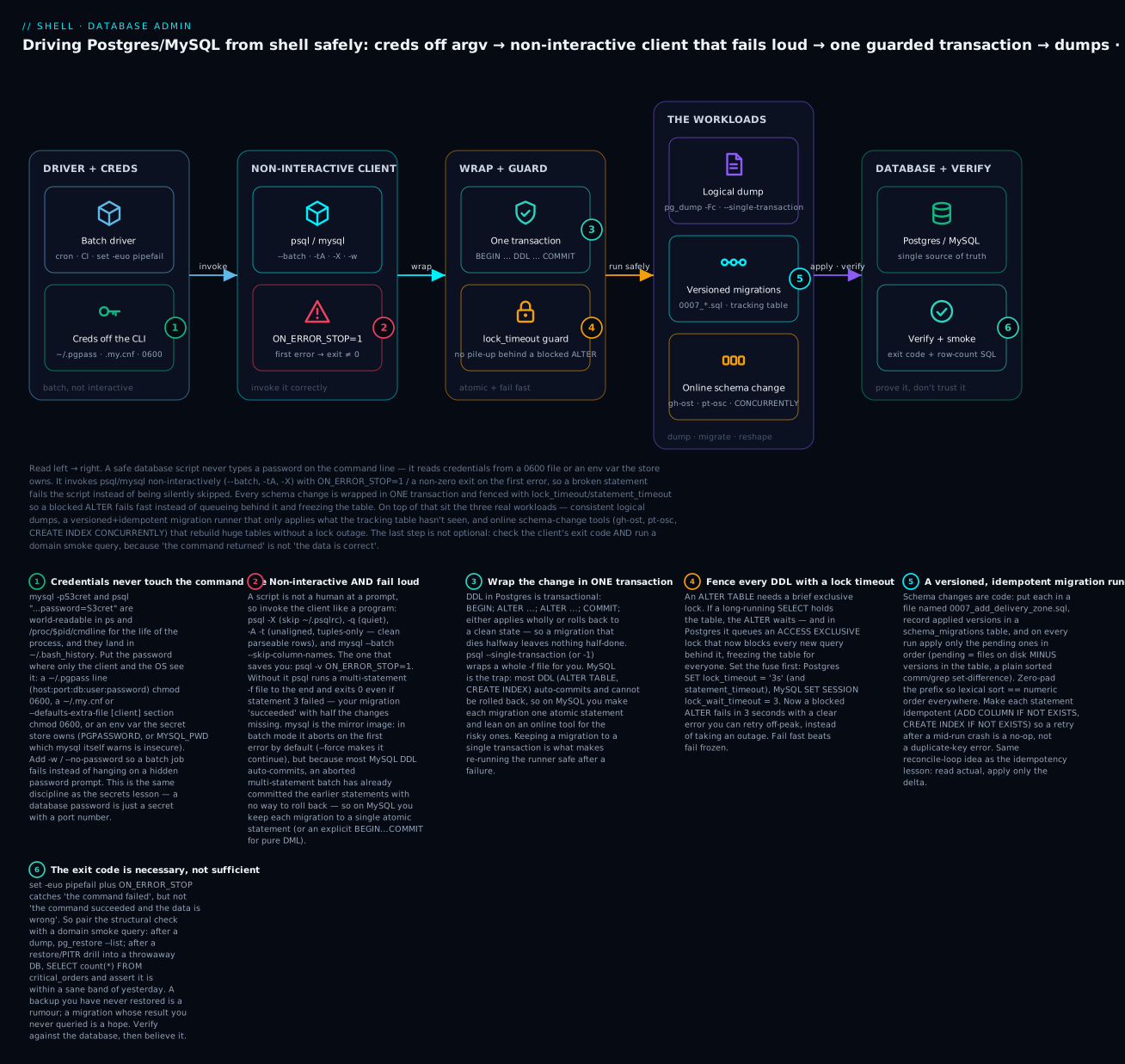
Read it left to right: the script feeds credentials from a 0600 file (never the command line) into a non-interactive psql/mysql that exits non-zero on the first error, wraps each change in one lock-timeout-fenced transaction, and only then runs the real work — dumps, versioned migrations, online schema changes — proving each one against the database with an exit code plus a smoke query.
The Cardinal Rule: Never Tar a Live Datadir
If you take one thing from this lesson, take this: a tar of /var/lib/postgresql/data while postgres is running is not a backup. It restores cleanly enough to fool you and corrupts on the first checkpoint. The same applies to MySQL’s /var/lib/mysql, MongoDB’s /var/lib/mongodb, and every other transactional store.
The reason is fundamental. Databases hold in-memory state (dirty pages, transaction log buffers, lock tables) that the on-disk files only become consistent with at flush points. Filesystem-level copy crosses files at arbitrary times relative to those flushes; the resulting copy is a frankenbackup that mixes pre-checkpoint and post-checkpoint pages from the same transaction. Postgres calls this “torn pages”; MySQL calls it “inconsistent InnoDB state.”
The fix is to use the database’s own backup tool, which coordinates with the running engine to produce a transactionally consistent snapshot. This lesson is about wrapping those tools in shell scripts that handle the operational reality: failure modes, retention, encryption, off-host transport, and PITR drills.
Talking to the Database From a Script: Non-Interactive psql & mysql
Before any backup or migration, you need to drive the client correctly. A shell script is not a human sitting at a prompt, and the default behaviour of psql and mysql is tuned for that human. Left unchanged, those defaults will happily hide a failed statement, leak your password, or hang forever waiting for input that never comes.
A script is not a human — invoke the client like a program
The interactive client pages output, prints a friendly header and row count, reads ~/.psqlrc, and — critically — keeps going after an error so you can fix your typo and carry on. Every one of those is wrong in a script.
Postgres — the non-interactive incantation:
psql \
  -X \                       # ignore ~/.psqlrc (no surprise \set from your dev config)
  -q \                       # quiet: no "SET" / "INSERT 0 1" chatter
  -v ON_ERROR_STOP=1 \       # THE important one: abort + exit non-zero on first error
  -A -t \                    # unaligned, tuples-only: clean rows a pipe can parse
  -w \                       # never prompt for a password (fail fast instead of hanging)
  -P pager=off \             # never invoke a pager
  --dbname="$DB"
The single most important flag is -v ON_ERROR_STOP=1. Without it, psql reading a multi-statement file runs to the end and exits 0 even if statement three threw an error. Your migration “succeeded” with a third of its changes silently missing. With it, the first error aborts the run and psql exits non-zero, so set -e in your script catches it.
The -A -t pair (or -tAc "SQL" as a combined short form) turns a single-value query into a bare string you can capture:
count=$(psql -X -tAc "SELECT count(*) FROM orders" --dbname="$DB")
echo "$count"          # -> 41822   (no header, no "(1 row)", no borders)
MySQL — the non-interactive incantation:
mysql \
  --batch \                  # tab-separated, no box-drawing, escape specials
  --skip-column-names \      # drop the header row
  --execute="SELECT count(*) FROM orders" \
  "$DB"
MySQL’s error default is the mirror image of Postgres. In batch mode mysql aborts on the first error by default and exits non-zero; --force is what makes it plough on. So you rarely need an ON_ERROR_STOP equivalent — but you do have to remember the MySQL-specific trap covered below: most DDL auto-commits, so an aborted multi-statement batch has already committed the earlier statements with no way to roll back.
Multi-statement scripts: -c, -f, and here-docs
Three ways to feed SQL to the client, in rough order of how much SQL:
| Method | Postgres | MySQL | Use for |
|---|---|---|---|
| Inline string | psql -c "SQL" |
mysql -e "SQL" |
one or two statements |
| A file | psql -f file.sql |
mysql < file.sql |
a migration file on disk |
| A here-doc | psql <<'SQL' … SQL |
mysql <<'SQL' … SQL |
SQL generated inline in the script |
The here-doc is the shell-native one, and its quoting of the delimiter is a decision, not a detail:
# QUOTED delimiter <<'SQL'  → the shell expands NOTHING. The SQL reaches the
# server exactly as written. This is the safe default.
psql -X -v ON_ERROR_STOP=1 --dbname="$DB" <<'SQL'
UPDATE config SET value = 'the literal $HOME stays literal' WHERE key = 'note';
SQL

# UNQUOTED delimiter <<SQL  → the shell expands $vars and `backticks` FIRST.
# Handy for injecting a value you already trust — dangerous for anything that
# came from outside your script (that is SQL injection via the shell).
tenant_id=42
psql -X -v ON_ERROR_STOP=1 --dbname="$DB" <<SQL
DELETE FROM sessions WHERE tenant_id = $tenant_id;
SQL
Rule of thumb: quote the delimiter (<<'SQL') unless you have a specific, trusted value to interpolate — and even then, prefer a server-side parameter (psql -v id="$tenant_id" then reference :'id') over string-building when the value is anything but a plain integer you fully control.
Credentials: never on the command line
This is the rule that outlives every tool version. A password passed as a command-line argument is public. mysql -pS3cret and a psql "postgres://u:S3cret@host/db" URL are both visible in ps aux, in /proc/<pid>/cmdline, and to every other user on the box, for the entire life of the process — and they land in your shell history. Put the password where only the client and the OS can see it:
Postgres — ~/.pgpass:
# One line per target: hostname:port:database:username:password
# * is a wildcard for any field.
printf '%s\n' 'db.internal:5432:myapp_prod:app_ro:PLACEHOLDER_PASSWORD' >> ~/.pgpass
chmod 0600 ~/.pgpass          # psql REFUSES a .pgpass that is group/world-readable
psql reads ~/.pgpass automatically (or $PGPASSFILE to point elsewhere, as the scripts in this lesson do with PGPASSFILE=/etc/postgres/pgpass). Host, port, user, and database come from -h/-p/-U/-d or the PGHOST/PGUSER/… environment — none of which are secret.
MySQL — an options file with a [client] section:
# ~/.my.cnf  (or a dedicated file passed with --defaults-extra-file)
[client]
user = app_ro
password = PLACEHOLDER_PASSWORD
host = db.internal
chmod 0600 ~/.my.cnf
mysql --defaults-extra-file=/etc/mysql/app.cnf --batch -N -e "SELECT 1"
--defaults-extra-file=FILE reads that file in addition to the usual locations; --defaults-file=FILE (used in this lesson’s backup scripts) reads only that file and skips system defaults — pick deliberately.
Environment variables are the third channel. PGPASSWORD (Postgres) and MYSQL_PWD (MySQL) both work, and env is the default for cloud CLIs, but env is visible via /proc/<pid>/environ to the same user, and the MySQL manual explicitly calls MYSQL_PWD insecure — prefer the options file. Whichever you choose, add -w / --no-password (Postgres) so a batch job fails instead of blocking on a hidden interactive password prompt when the credential is missing.
This is the Secrets Handling lesson applied to databases: fetch at runtime, move through exactly one non-argv channel, keep the file
0600. A database password is just a secret with a port number.
Wrapping DDL in a transaction
A migration that dies halfway is worse than one that never ran — you are left in an unknown, half-migrated state. The fix is atomicity: apply the whole change or none of it.
Postgres DDL is transactional. CREATE TABLE, ALTER TABLE, CREATE INDEX, even DROP can sit inside BEGIN … COMMIT, and a failure rolls the whole thing back to a clean state:
psql -X -v ON_ERROR_STOP=1 --dbname="$DB" --single-transaction <<'SQL'
ALTER TABLE orders ADD COLUMN delivery_zone text;
CREATE INDEX ix_orders_zone ON orders (delivery_zone);
SQL
# --single-transaction (-1) wraps the whole -f/heredoc in BEGIN…COMMIT for you.
# Combined with ON_ERROR_STOP: any error → ROLLBACK → nothing changed → exit ≠ 0.
MySQL DDL is the trap. Most MySQL DDL (ALTER TABLE, CREATE INDEX, DROP TABLE) performs an implicit commit and cannot be rolled back. Wrapping it in BEGIN … COMMIT does not make it atomic — the ALTER commits the moment it runs. So on MySQL:
- Keep each schema-changing migration to one statement, so “atomic” and “one statement” coincide.
- Use explicit transactions only for pure DML (
INSERT/UPDATE/DELETEon InnoDB), where they do roll back. - For anything risky on a big table, reach for an online tool (Pattern 4) that manages the cutover for you.
Lock-timeout guards: fail fast, not frozen
An ALTER TABLE needs a brief exclusive lock. The danger is not the lock itself — it is what happens while it waits. In Postgres, a pending ACCESS EXCLUSIVE lock queues in front of every new query, so one long-running SELECT holding the table makes your ALTER wait, and your ALTER now blocks everyone behind it. The table is frozen for the whole system until the old query finishes. Set a fuse before the DDL:
# Postgres — abort the ALTER in 3s instead of queueing behind a slow reader.
psql -X -v ON_ERROR_STOP=1 --dbname="$DB" --single-transaction <<'SQL'
SET lock_timeout = '3s';               -- how long to wait FOR a lock
SET statement_timeout = '15min';       -- cap the whole statement's runtime
ALTER TABLE orders ADD COLUMN delivery_zone text;
SQL
# MySQL — bound how long we wait for metadata / row locks.
mysql --defaults-extra-file=/etc/mysql/app.cnf "$DB" <<'SQL'
SET SESSION lock_wait_timeout = 3;        -- metadata-lock wait (seconds)
SET SESSION innodb_lock_wait_timeout = 3; -- InnoDB row-lock wait (seconds)
ALTER TABLE orders ADD COLUMN delivery_zone VARCHAR(64) NULL;
SQL
A blocked ALTER now fails in three seconds with a clear timeout error you can catch, log, and retry at 3am — instead of taking a production outage in the middle of the afternoon. Fail fast beats fail frozen. Also consider SET idle_in_transaction_session_timeout (Postgres) so a script that opens a transaction and then dies does not hold its locks forever.
The Four Patterns
| Pattern | Tool | Use case | Restore time |
|---|---|---|---|
| Logical dump | pg_dump, mysqldump --single-transaction |
Small DBs, version migrations, partial restores | O(data) — slow for large |
| Physical base backup | pg_basebackup, xtrabackup |
Large DBs, fast restore, PITR baseline | O(data on disk) — fast |
| WAL/binlog archiving | wal-g, barman, MySQL binlog |
Continuous backup, PITR to any second | Apply WAL since base |
| Online schema change | gh-ost, pt-online-schema-change |
DDL on huge tables without locks | N/A — migration tool |
A real production environment uses base backup + continuous WAL for PITR (point-in-time recovery), with logical dumps as a defense-in-depth secondary that’s portable across versions.
Pattern 1: Logical Dumps With Postgres pg_dump
pg_dump runs as a regular Postgres client. It opens a single transaction with REPEATABLE READ isolation, scans every table, and emits SQL or a custom binary format. Because it’s transactional, the dump is consistent regardless of concurrent writes.
#!/usr/bin/env bash
# pg-logical-backup.sh
set -euo pipefail

readonly DB=myapp_prod
readonly OUT_DIR=/var/backups/postgres
readonly STAMP=$(date +%Y-%m-%d-%H%M)
readonly OUT="$OUT_DIR/${DB}-${STAMP}.dump"

mkdir -p "$OUT_DIR"

# Custom format (-Fc) is compressed and supports parallel restore.
# --no-owner / --no-acl strip env-specific identifiers (useful for cross-env restore).
PGPASSFILE=/etc/postgres/pgpass \
pg_dump \
  --host="$PGHOST" \
  --username="$PGUSER" \
  --dbname="$DB" \
  --format=custom \
  --compress=9 \
  --jobs=4 \
  --no-owner --no-acl \
  --file="$OUT.tmp"

# Atomic rename (sidecar pattern from L28)
mv "$OUT.tmp" "$OUT"

# Sidecar checksum
sha256sum "$OUT" > "$OUT.sha256"

# Verify the dump can be listed (cheap structural sanity check)
pg_restore --list "$OUT" > /dev/null \
  || { echo "FAIL: pg_restore --list failed on $OUT"; exit 1; }

echo "OK: $OUT ($(stat -c %s "$OUT") bytes)"
Two non-obvious flags:
--jobs=4parallelizes the dump across 4 worker processes. Cuts dump time roughly proportionally on multi-core boxes. Only works with--format=directoryor--format=custom.--no-owner --no-acldropsOWNER TOandGRANTstatements. Critical for cross-environment restore (your prod owner doesn’t exist in staging) but dangerous for in-place restore because it loses ACLs. Use only for DR-to-different-env.
Why --format=custom Over Plain SQL
Plain SQL (--format=plain) is human-readable but cannot be parallel-restored, can’t selectively restore one table, and is ~3× larger uncompressed. Custom format (--format=custom) is a binary archive that:
- Compresses internally (no need to pipe through
gzip). - Supports
pg_restore --listfor inspection without restoring. - Supports
pg_restore --jobs=Nfor parallel restore. - Supports selective restore (
pg_restore --table=foo).
Always use custom format for production backups. Reserve plain SQL for dev exports where you want to grep or hand-edit the dump.
Restore Verification
# Fast structural verification (does NOT prove data correctness)
pg_restore --list "$OUT"

# Full restore to a sandbox DB
createdb "${DB}_drill"
pg_restore --dbname="${DB}_drill" --jobs=4 "$OUT"

# Smoke test — the most important step
psql --dbname="${DB}_drill" --command="SELECT count(*) FROM critical_orders_table"
The smoke test must be domain-specific. For an e-commerce DB it might be “orders count is within 5% of yesterday’s.” For a session store it might be “table exists and is queryable.” Always pair manifest verification with a domain smoke test.
Pattern 2: Logical Dumps With MySQL mysqldump
The MySQL equivalent is mysqldump. The critical flag is --single-transaction for InnoDB tables:
#!/usr/bin/env bash
# mysql-logical-backup.sh
set -euo pipefail

readonly DB=myapp_prod
readonly OUT_DIR=/var/backups/mysql
readonly STAMP=$(date +%Y-%m-%d-%H%M)
readonly OUT="$OUT_DIR/${DB}-${STAMP}.sql.zst"

mkdir -p "$OUT_DIR"

# --single-transaction → InnoDB consistent snapshot (no table locks)
# --routines --triggers → include stored procedures and triggers
# --master-data=2 → include binlog position as comment (for PITR baseline)
# --hex-blob → safe binary encoding for blob columns
# Pipe through zstd for compression
mysqldump \
  --defaults-file=/etc/mysql/backup.cnf \
  --single-transaction \
  --routines --triggers \
  --master-data=2 \
  --hex-blob \
  --databases "$DB" \
  | zstd -9 -o "$OUT.tmp"

mv "$OUT.tmp" "$OUT"
sha256sum "$OUT" > "$OUT.sha256"

# Quick sanity: extract first 100 lines, verify SQL header
zstd -d -c "$OUT" | head -100 | grep -q "MySQL dump" \
  || { echo "FAIL: $OUT does not look like a MySQL dump"; exit 1; }

echo "OK: $OUT ($(stat -c %s "$OUT") bytes)"
The MyISAM Trap
--single-transaction only provides consistency for InnoDB tables. If your schema has any MyISAM tables, they are not covered by the snapshot — mysqldump falls back to LOCK TABLES for those, which (a) blocks writers and (b) doesn’t give you a multi-table consistent view.
Fix: Convert all production tables to InnoDB. MyISAM has been deprecated for over a decade; it has no place in modern production. Or, if you must keep MyISAM, accept that backup time = downtime for those tables.
--master-data=2 for PITR Baseline
--master-data=2 writes the current binlog filename and position as a comment at the top of the dump. The comment is critical for PITR: when you restore the dump, you know the exact binlog position to start replaying from to reach any later state.
-- CHANGE MASTER TO MASTER_LOG_FILE='mysql-bin.000123', MASTER_LOG_POS=456789;
Without --master-data, the dump is a fixed point in time with no continuation. With it, the dump is a baseline that PITR can build on. Always use --master-data=2 for production backups (the =2 makes it a comment so it doesn’t auto-execute on restore).
Pattern 3: Physical Base Backups + WAL Archiving (PITR)
For databases over ~50 GB, logical dumps become too slow. The answer is physical backups + continuous WAL archiving, which gives:
- Fast base restore: just untar the data directory (vs. replaying SQL).
- PITR: restore to any second by replaying WAL since the base backup.
- Lower CPU overhead on the primary (no SQL serialization).
Postgres: pg_basebackup + WAL-G
The shell-friendly stack is:
pg_basebackupto take the base backup.wal-gfor continuous WAL push to S3 with compression and encryption.restore_commandinrecovery.conf(orrestore_commandGUC) to fetch WAL during recovery.
#!/usr/bin/env bash
# pg-base-backup.sh — weekly, takes a fresh PITR baseline
set -euo pipefail

readonly DEST=/var/backups/postgres-base
readonly STAMP=$(date +%Y-%m-%d)
readonly OUT="$DEST/$STAMP"

mkdir -p "$OUT"

pg_basebackup \
  --pgdata="$OUT" \
  --format=tar \
  --gzip \
  --progress \
  --verbose \
  --wal-method=stream \
  --checkpoint=fast \
  --label="weekly-base-$STAMP"

# wal-g handles continuous archive (separate systemd timer / cron)
# This script just creates the periodic baseline.

# Atomic flag file marks completion
touch "$OUT/.complete"

# sha256 the base files for integrity
( cd "$OUT" && find . -type f -print0 | xargs -0 sha256sum | sort -k 2 ) > "$OUT.manifest"
sha256sum "$OUT.manifest" > "$OUT.manifest.sha256"

echo "OK: base backup at $OUT"
The .complete flag file is the atomic completion marker. Restore scripts must check for .complete before considering a base backup usable; otherwise an in-progress (interrupted) backup could be picked up.
WAL Archiving Configuration
In postgresql.conf:
archive_mode = on
archive_command = 'wal-g wal-push %p'
archive_timeout = 60   # force WAL switch every 60s for tighter RPO
The archive_command runs synchronously on every WAL switch. If it fails, Postgres retains the WAL until archive_command succeeds — which means a broken archive_command can fill pg_wal/ and stop writes. Monitor it:
# Prometheus textfile exporter — runs every minute
unarchived_count=$(psql -tAc "SELECT count(*) FROM pg_ls_waldir() WHERE name NOT IN (SELECT wal_segment_name FROM pg_stat_archiver)")
last_archive_time=$(psql -tAc "SELECT extract(epoch from now() - last_archived_time) FROM pg_stat_archiver")

cat > /var/lib/node_exporter/textfile_collector/pg_archive.prom.tmp <<EOF
pg_wal_unarchived_count $unarchived_count
pg_wal_last_archive_age_seconds $last_archive_time
EOF
mv /var/lib/node_exporter/textfile_collector/pg_archive.prom{.tmp,}
Alert on pg_wal_last_archive_age_seconds > 300 — if WAL archiving stalls for >5 min, your PITR window is degrading.
MySQL: Percona XtraBackup
The MySQL equivalent of pg_basebackup is Percona XtraBackup (the official Oracle tool, MySQL Enterprise Backup, is closed source).
#!/usr/bin/env bash
# mysql-base-backup.sh
set -euo pipefail

readonly DEST=/var/backups/mysql-base
readonly STAMP=$(date +%Y-%m-%d)
readonly OUT="$DEST/$STAMP"

mkdir -p "$OUT"

xtrabackup \
  --backup \
  --target-dir="$OUT" \
  --datadir=/var/lib/mysql \
  --user=backup \
  --password-file=/etc/mysql/backup-pass \
  --parallel=4 \
  --compress \
  --compress-threads=4

# --prepare must run before restore to apply uncommitted log
# But run it in a separate sandbox during drill, NOT in-place,
# because --prepare modifies the backup files and breaks PITR chain.

touch "$OUT/.complete"
echo "OK: xtrabackup at $OUT"
For continuous binlog archiving, MySQL has no first-class equivalent of wal-g. The pattern is to copy mysql-bin.* files to S3 via cron:
# binlog-archive.sh — runs every 60s
flush_logs() {
  mysql --execute='FLUSH BINARY LOGS' 2>/dev/null
}

archive_logs() {
  for binlog in /var/log/mysql/mysql-bin.[0-9]*; do
    [[ -f "$binlog" ]] || continue
    # Skip the active log (mysqld is still writing to it)
    [[ "$binlog" == "$(mysql --execute='SHOW MASTER STATUS\G' \
                       | awk '/File:/ {print $2}')" ]] && continue
    aws s3 cp "$binlog" "s3://myapp-binlogs/$(basename "$binlog")" \
      && rm -f "$binlog"
  done
}

flush_logs
archive_logs
The SHOW MASTER STATUS check ensures we don’t archive the currently-active binlog (which would race with mysqld appending to it).
Pattern 4: Online Schema Migrations Without Lock Outages
ALTER TABLE big_table ADD COLUMN ... on a 100GB MySQL/Postgres table can lock the table for hours. Online schema change tools rebuild the table in the background by:
- Creating a shadow table with the new schema.
- Copying rows in chunks, throttled to avoid replication lag.
- Capturing changes via triggers (Postgres
pg_repack/gh-ostfor MySQL) or logical replication. - Atomic swap (
RENAME TABLE) at the end.
gh-ost for MySQL
GitHub’s gh-ost uses MySQL’s binlog instead of triggers, so it adds zero overhead to writes:
#!/usr/bin/env bash
# Wrapping gh-ost in shell with safety guardrails.
set -euo pipefail

readonly DB=myapp_prod
readonly TABLE=orders
readonly ALTER='ADD COLUMN delivery_zone VARCHAR(64) DEFAULT NULL'

# Pre-flight: replication lag must be low
LAG=$(mysql --batch --skip-column-names \
  --execute='SHOW SLAVE STATUS\G' \
  | awk '/Seconds_Behind_Master/ {print $2}')
if [[ "$LAG" == "NULL" ]] || (( LAG > 30 )); then
  echo "FAIL: replication lag is $LAG (must be < 30s)"
  exit 1
fi

# Pre-flight: free disk space must exceed 2× table size
TABLE_SIZE=$(mysql --batch --skip-column-names --execute="
  SELECT data_length + index_length FROM information_schema.tables
  WHERE table_schema='$DB' AND table_name='$TABLE'")
FREE=$(df --output=avail -B1 /var/lib/mysql | tail -1)
if (( FREE < TABLE_SIZE * 2 )); then
  echo "FAIL: free disk $FREE < 2× table size $TABLE_SIZE"
  exit 1
fi

# Run gh-ost
gh-ost \
  --user=ghost --password-file=/etc/mysql/ghost-pass \
  --host=replica.internal \
  --database="$DB" --table="$TABLE" \
  --alter="$ALTER" \
  --max-load='Threads_running=25' \
  --critical-load='Threads_running=100' \
  --chunk-size=1000 \
  --throttle-control-replicas='replica2.internal,replica3.internal' \
  --switch-to-rbr \
  --execute
Critical safety flags:
--max-load='Threads_running=25'— pause copying when concurrent threads exceed 25.--critical-load='Threads_running=100'— abort if it spikes beyond 100.--throttle-control-replicas— pause copying if any replica falls behind.--switch-to-rbr— switch the migration session to row-based replication for safer cutover.
Without these, gh-ost can saturate your DB during peak traffic. The pre-flight checks (replication lag, free disk) prevent the most common foot-shoot.
pt-online-schema-change: the triggers-based alternative
Before gh-ost, the standard MySQL tool was Percona’s pt-online-schema-change (pt-osc), and it is still widely used. Where gh-ost tails the binlog, pt-osc uses triggers: it creates the shadow table, installs AFTER INSERT/UPDATE/DELETE triggers on the original so live writes are mirrored, copies existing rows in chunks, then swaps.
pt-online-schema-change \
  --alter "ADD COLUMN delivery_zone VARCHAR(64) NULL" \
  --max-load "Threads_running=25" \
  --critical-load "Threads_running=100" \
  --chunk-time 0.5 \
  --set-vars "lock_wait_timeout=3" \
  --execute \
  D=myapp_prod,t=orders
The trade-off versus gh-ost:
pt-online-schema-change |
gh-ost |
|
|---|---|---|
| Change capture | triggers on the original table | reads the binlog (replica) |
| Write overhead | every write fires trigger(s) | none on the primary |
| Foreign keys | handled (with care) | not supported |
| Pause / throttle | --max-load |
--max-load + interactive control |
Use gh-ost when you want zero trigger overhead and can point it at a replica’s binlog; use pt-osc when you have foreign keys it must respect. Both are dry-run-first tools — run once without --execute (pt-osc prints a dry-run plan by default) and read what it intends to do before you commit.
pg_repack for Postgres
Postgres uses logical replication slots and triggers in pg_repack:
#!/usr/bin/env bash
set -euo pipefail

readonly DB=myapp_prod
readonly TABLE=orders

# pg_repack rewrites the table in place, removes bloat
pg_repack \
  --dbname="$DB" \
  --table="$TABLE" \
  --jobs=4 \
  --no-order  # skip CLUSTER-style sort, just reclaim bloat
For schema changes (vs. just bloat reclaim), the Postgres-native approach is:
- Add nullable column (
ALTER TABLE ... ADD COLUMN x text— fast metadata-only op in modern Postgres). - Backfill in batches (
UPDATE ... WHERE x IS NULL LIMIT 1000). - Add NOT NULL constraint with
NOT VALIDfirst, thenVALIDATE CONSTRAINTlater.
Wrapped in shell:
backfill_in_batches() {
  local total=0 batch=1000
  while :; do
    n=$(psql -tAc "
      WITH cte AS (
        SELECT id FROM orders WHERE delivery_zone IS NULL LIMIT $batch FOR UPDATE SKIP LOCKED
      )
      UPDATE orders SET delivery_zone = compute_zone(address)
      FROM cte WHERE orders.id = cte.id
      RETURNING 1
    " | wc -l)
    (( n == 0 )) && break
    total=$((total + n))
    echo "Backfilled $total rows so far"
    sleep 0.1   # throttle
  done
}
FOR UPDATE SKIP LOCKED is the magic: rows currently locked by an active transaction are skipped (rather than blocking), making the backfill safe to run during peak traffic.
Postgres: CREATE INDEX CONCURRENTLY
The single most common “why did adding an index take the site down” incident is a plain CREATE INDEX, which holds a write lock on the table for the entire build. Postgres’ answer is CREATE INDEX CONCURRENTLY, which builds the index without blocking writes — at a real cost you must script around:
# Note: NO --single-transaction here — CONCURRENTLY cannot run inside a txn block.
psql -X -v ON_ERROR_STOP=1 --dbname="$DB" \
  -c "CREATE INDEX CONCURRENTLY IF NOT EXISTS ix_orders_zone ON orders (delivery_zone)"
Two rules that trip people up:
- It cannot run inside a transaction block. So you cannot put it in a
--single-transactionmigration or aBEGIN…COMMIT. It gets its own non-transactional lane (the.concurrent.sqlfiles in the runner below). - If it fails, it leaves an
INVALIDindex behind. Postgres does not clean up automatically, andIF NOT EXISTSwill then happily skip recreating it — so your retry keeps a broken index. Detect and drop invalid indexes before retrying:
psql -X -tAc "
  SELECT 'DROP INDEX CONCURRENTLY IF EXISTS ' || quote_ident(c.relname) || ';'
  FROM pg_index i JOIN pg_class c ON c.oid = i.indexrelid
  WHERE NOT i.indisvalid" --dbname="$DB" | psql -X -v ON_ERROR_STOP=1 --dbname="$DB"
A Safe, Versioned, Idempotent Migration Runner
Ad-hoc psql -f change.sql by hand is how environments drift: staging got the index, prod did not, and nobody can say which of the twelve .sql files in the shared drive have run where. Treat schema as code: every change is a numbered file, checked into git, applied by a runner that records what it has done and applies only what is pending. This is the Idempotency reconcile loop pointed at a database — read the actual state (the tracking table), compare to desired (the files on disk), apply only the delta.
Four properties make a runner trustworthy:
- Versioned & ordered — files named
0007_add_delivery_zone.sql. Zero-pad the prefix so a plain lexicalsortequals numeric order on every platform (no reliance on GNUsort -V). - Tracked — a
schema_migrationstable records each applied version, so the runner knows what is already done. - Idempotent — each statement uses
IF NOT EXISTS/IF EXISTS, so re-running after a mid-run crash is a no-op, not a duplicate-object error. - Atomic & fenced — each migration runs in one transaction (on Postgres) with a
lock_timeout, and bookkeeping is committed in the same transaction as the change so the two can never disagree.
The pending set is a set difference — files on disk MINUS versions in the table — which is a two-line shell idiom:
# pending = every NNNN prefix on disk that is not in schema_migrations
comm -23 \
  <(ls migrations/[0-9]*.sql | sed 's|.*/||; s|_.*||' | sort) \
  <(psql -X -tAc 'SELECT version FROM schema_migrations' --dbname="$DB" | sort)
Here is the whole runner. It has two lanes: the default transactional lane, and a bare lane for *.concurrent.sql migrations (which contain CREATE INDEX CONCURRENTLY and therefore cannot run in a transaction).
#!/usr/bin/env bash
# migrate.sh — apply pending, versioned, idempotent Postgres migrations.
# Credentials come from ~/.pgpass + PGHOST/PGUSER in the environment — never argv.
set -euo pipefail

readonly DB="${DB:?set DB}"
readonly DIR="${MIGRATIONS_DIR:-./migrations}"
psql=(psql -X -q -v ON_ERROR_STOP=1 -w --dbname="$DB")   # array = correct quoting

# 1. Ensure the tracking table exists (idempotent).
"${psql[@]}" <<'SQL'
CREATE TABLE IF NOT EXISTS schema_migrations (
  version    text        PRIMARY KEY,
  applied_at timestamptz NOT NULL DEFAULT now()
);
SQL

# 2. Read the applied set once.
applied=$("${psql[@]}" -tAc 'SELECT version FROM schema_migrations' | sort)

# 3. Walk files in order; apply only the pending ones.
shopt -s nullglob
for path in "$DIR"/[0-9]*.sql; do
  file=$(basename "$path")
  version=${file%%_*}                               # 0007_add_zone.sql -> 0007
  grep -qxF "$version" <<<"$applied" && continue     # already applied -> skip

  echo ">> applying $file"
  if [[ "$file" == *.concurrent.sql ]]; then
    # CONCURRENTLY can't run in a transaction: run bare, then record.
    "${psql[@]}" -f "$path"
    "${psql[@]}" -c "INSERT INTO schema_migrations(version) VALUES ('$version')"
  else
    # Default lane: change + bookkeeping in ONE transaction, fenced by lock_timeout.
    "${psql[@]}" --single-transaction <<SQL
SET lock_timeout = '5s';
SET statement_timeout = '15min';
\i $path
INSERT INTO schema_migrations(version) VALUES ('$version');
SQL
  fi
done
echo "migrations up to date"
A migration file is then just idempotent SQL — no BEGIN/COMMIT of its own (the runner owns the transaction):
-- migrations/0007_add_delivery_zone.sql
ALTER TABLE orders ADD COLUMN IF NOT EXISTS delivery_zone text;
-- migrations/0008_index_delivery_zone.concurrent.sql   (bare lane)
CREATE INDEX CONCURRENTLY IF NOT EXISTS ix_orders_zone ON orders (delivery_zone);
Because the change and its schema_migrations row commit together, set -e plus ON_ERROR_STOP means a failure leaves both undone — the next run simply retries that version cleanly. Run it as often as you like: applied migrations are skipped, so a fresh checkout and a thousandth deploy do exactly the right, minimal amount of work.
MySQL note: the same runner shape works, but because MySQL DDL auto-commits you cannot wrap the change and the bookkeeping in one rollback-able transaction. Record the version after the statement succeeds (
mysqlaborts the batch on error by default), keep each migration to a single DDL statement, and write each so re-applying it is a safe no-op (ADD COLUMN IF NOT EXISTS,CREATE INDEX IF NOT EXISTSon MySQL 8.0+) — because a crash between the DDL and the bookkeeping insert will re-run it.
The Drop-In lib/db.sh
# lib/db.sh — sourced helpers for database backup scripts.
#
# Depends on lib/backup.sh for upload_s3 / verify_remote / GFS prune.
#
# Usage:
#   source /usr/local/lib/backup.sh
#   source /usr/local/lib/db.sh
#   pg_logical_dump myapp_prod /var/backups/postgres
#   pg_basebackup_take /var/backups/postgres-base
#   mysql_logical_dump myapp_prod /var/backups/mysql

set -o errexit -o nounset -o pipefail

db_log() { backup_log "[db] $*"; }

# Postgres logical dump in custom format. Args: db, dest_dir
pg_logical_dump() {
  local db="$1" dest="$2"
  local stamp out
  stamp=$(date +%Y-%m-%d-%H%M)
  mkdir -p "$dest"
  out="$dest/${db}-${stamp}.dump"

  db_log "pg_dump start: $db"
  PGPASSFILE=/etc/postgres/pgpass \
  pg_dump --dbname="$db" --format=custom --compress=9 --jobs=4 \
          --no-owner --no-acl --file="$out.tmp"
  mv "$out.tmp" "$out"
  sha256sum "$out" > "$out.sha256"

  pg_restore --list "$out" > /dev/null \
    || { db_log "FAIL: pg_restore --list failed"; return 1; }

  db_log "pg_dump OK: $out ($(stat -c %s "$out") bytes)"
  printf '%s\n' "$out"
}

# Postgres physical base backup. Args: dest_dir
pg_basebackup_take() {
  local dest="$1"
  local stamp out
  stamp=$(date +%Y-%m-%d)
  mkdir -p "$dest"
  out="$dest/$stamp"
  mkdir -p "$out"

  db_log "pg_basebackup start"
  pg_basebackup --pgdata="$out" --format=tar --gzip \
                --wal-method=stream --checkpoint=fast \
                --label="base-$stamp"

  ( cd "$out" && find . -type f -print0 | xargs -0 sha256sum | sort -k 2 ) > "$out.manifest"
  sha256sum "$out.manifest" > "$out.manifest.sha256"
  touch "$out/.complete"

  db_log "pg_basebackup OK: $out"
  printf '%s\n' "$out"
}

# MySQL logical dump with --single-transaction. Args: db, dest_dir
mysql_logical_dump() {
  local db="$1" dest="$2"
  local stamp out
  stamp=$(date +%Y-%m-%d-%H%M)
  mkdir -p "$dest"
  out="$dest/${db}-${stamp}.sql.zst"

  db_log "mysqldump start: $db"
  mysqldump --defaults-file=/etc/mysql/backup.cnf \
            --single-transaction --routines --triggers \
            --master-data=2 --hex-blob \
            --databases "$db" \
    | zstd -9 -o "$out.tmp"
  mv "$out.tmp" "$out"
  sha256sum "$out" > "$out.sha256"

  zstd -d -c "$out" | head -100 | grep -q "MySQL dump" \
    || { db_log "FAIL: dump format check failed"; return 1; }

  db_log "mysqldump OK: $out ($(stat -c %s "$out") bytes)"
  printf '%s\n' "$out"
}

# PITR drill — restore latest base + replay WAL to a target time. Args: target_iso
pg_pitr_drill() {
  local target="$1"
  local sandbox=/srv/pg-pitr-drill
  rm -rf "$sandbox"
  mkdir -p "$sandbox"

  # Fetch latest base backup from S3
  db_log "pg_pitr_drill: target=$target"
  local latest
  latest=$(aws s3 ls s3://myapp-pg-base/ | sort | tail -1 | awk '{print $4}')
  aws s3 cp "s3://myapp-pg-base/$latest" "$sandbox/base.tar.gz"
  tar -xzf "$sandbox/base.tar.gz" -C "$sandbox"

  cat > "$sandbox/recovery.signal" <<EOF
restore_command = 'wal-g wal-fetch %f %p'
recovery_target_time = '$target'
recovery_target_action = 'pause'
EOF

  pg_ctl -D "$sandbox" -l "$sandbox/log" start

  # Wait for recovery to reach target
  for _ in {1..60}; do
    if psql -h /tmp -p 5433 -tAc "SELECT pg_is_in_recovery() AND NOT pg_is_wal_replay_paused()" 2>/dev/null | grep -q '^t$'; then
      sleep 5
    else
      break
    fi
  done

  # Smoke test
  if psql -h /tmp -p 5433 -tAc "SELECT count(*) FROM critical_table" >/dev/null; then
    db_log "pg_pitr_drill OK: target=$target"
    pg_ctl -D "$sandbox" stop
    return 0
  else
    db_log "FAIL: smoke test failed at target=$target"
    pg_ctl -D "$sandbox" stop
    return 1
  fi
}
Using the Library
#!/usr/bin/env bash
# nightly-db-backup.sh
source /usr/local/lib/backup.sh
source /usr/local/lib/db.sh

# Postgres logical
out=$(pg_logical_dump myapp_prod /var/backups/postgres)
backup_upload_s3 "$out" s3://myapp-backups-prod/pg-logical/
backup_gfs_prune /var/backups/postgres myapp_prod

# Postgres physical base (weekly only)
if [[ "$(date +%u)" == "7" ]]; then
  out=$(pg_basebackup_take /var/backups/postgres-base)
  # pg_basebackup output is a directory — needs different upload pattern
fi

# Weekly PITR drill (Sunday)
if [[ "$(date +%u)" == "7" ]]; then
  pg_pitr_drill "$(date -d '1 hour ago' -Iseconds)"
fi
The PITR Window: How “Continuous” Is Continuous?
Your PITR window is bounded by:
| Bound | Determined by | Typical |
|---|---|---|
| Newest restorable point | Last WAL successfully archived | Within 60s with archive_timeout=60 |
| Oldest restorable point | Oldest base backup + retained WAL | 7-30 days |
| Granularity | WAL segment size (16MB default) | Can replay to second precision |
The shell discipline is:
- Archive WAL on
archive_timeout(60s) for tight RPO. - Keep base backups for at least 2× your maximum required PITR depth (so you always have one in case the latest base is corrupt).
- Keep WAL for the full PITR window (not just from the latest base).
- Drill PITR weekly — restore to “1 hour ago” and verify smoke test passes.
Alert on:
time() - last_wal_archive_time > 300→ archive lag, RPO degrading.pg_basebackup_age_days > 14→ base backup stale, restore time grows.pitr_drill_status == 0→ drill failing, PITR is unproven.
Going deeper
psql error semantics: -c vs -f are not the same
The ON_ERROR_STOP trap has a subtlety worth internalising. A single -c "stmt1; stmt2; stmt3" string is sent to the server as one simple query and runs as one implicit transaction — if stmt2 fails, stmt1 rolls back too, whether or not you set ON_ERROR_STOP. But -f file.sql (and stdin) is read statement-by-statement, each its own transaction by default, and processing continues past errors unless ON_ERROR_STOP=1. So the flag matters for files, not for a single -c string. This is exactly why a hand-run psql -f migration.sql can leave a half-applied schema and still exit 0, and why the runner above uses --single-transaction to force the whole file into one atomic unit.
Single-flight the runner with an advisory lock
Two deploy pipelines firing at once can both see version 0007 as pending and both try to apply it. Guard the whole runner with a Postgres advisory lock so only one instance proceeds:
"${psql[@]}" <<'SQL'
SELECT pg_advisory_lock(hashtext('schema_migrations'));
SQL
# ... run migrations in this same session ...
# The lock releases on session end, or with pg_advisory_unlock(...).
Advisory locks are cooperative (nothing forces callers to check them) but they are the standard way to make a migration runner, a cron job, or a leader-election single-flight without a separate lock service. Note that pg_advisory_lock is session-scoped — it must be taken and used in the same connection, which matters for pooling (below).
ADD COLUMN is cheap now — but it was not always
On modern Postgres (11+), ALTER TABLE … ADD COLUMN … DEFAULT <constant> is a metadata-only operation: the default is stored in the catalog and materialised lazily on read, so adding a column to a billion-row table is instant. Before 11, the same statement rewrote the entire table under an exclusive lock — the classic afternoon-killer. Two caveats remain: a volatile default (DEFAULT random(), DEFAULT clock_timestamp()) still forces a rewrite, and adding a column that is simultaneously NOT NULL with no default fails on existing rows. The safe recipe for a new non-null column on a hot table stays: add nullable → backfill in batches (the FOR UPDATE SKIP LOCKED loop above) → ADD CONSTRAINT … NOT NULL NOT VALID then VALIDATE CONSTRAINT (which takes only a SHARE UPDATE EXCLUSIVE lock, not a full one).
MySQL native online DDL vs gh-ost / pt-osc
Since MySQL 5.6, many ALTERs run with ALGORITHM=INPLACE, LOCK=NONE — no table copy, writes allowed. Since 8.0.12, ALGORITHM=INSTANT makes some changes (notably adding a column) a pure metadata edit. You can ask for the cheap path and refuse the expensive one:
ALTER TABLE orders ADD COLUMN delivery_zone VARCHAR(64) NULL,
  ALGORITHM=INSTANT;   -- fails loudly rather than silently doing a COPY
If the server rejects ALGORITHM=INSTANT/INPLACE for your change, that is your signal to reach for gh-ost / pt-osc — they exist precisely for the ALGORITHM=COPY changes (and to add throttling, pausability, and replica-lag awareness that native DDL lacks). Note that even INPLACE briefly needs a metadata lock (MDL) at start and finish, so a long-running transaction on the table can still stall the cutover — hence the lock_wait_timeout guard.
Connection poolers change the rules
If your script connects through PgBouncer in transaction pooling mode, session-level state does not survive between statements: SET lock_timeout, session advisory locks, SET ROLE, and server-side prepared statements can all silently break because the next statement may land on a different server connection. Run migrations and admin scripts against the database directly (or through a session-mode pool), not a transaction pooler. The same caution applies to MySQL ProxySQL rules that reroute or multiplex connections.
Least privilege and transport security
The credential your backup or read-only script uses should be able to do only its job. A dump job needs pg_read_all_data (Postgres 14+) or SELECT on the schema — not superuser. A backup S3 credential needs PutObject / GetObject, not DeleteObject. And the connection itself should be encrypted: sslmode=require at minimum, verify-full (Postgres) / --ssl-mode=VERIFY_IDENTITY (MySQL) to also authenticate the server and defeat a man-in-the-middle. Pointing gh-ost and read-only tools at a read replica DSN is a good default — schema tools do not need the primary.
Version caveats you will hit
- Postgres
recovery.confwas removed in 12. Recovery settings now live inpostgresql.conf/postgresql.auto.conf, and an emptyrecovery.signalfile triggers recovery mode. Thelib/db.shdrill above writes settings intorecovery.signalfor brevity; on 12+ putrestore_command/recovery_target_timeinpostgresql.auto.confand leaverecovery.signalempty. - MySQL
--master-datais deprecated (8.0). Use--source-data=2for new scripts; the meaning is identical. SHOW SLAVE STATUS/Seconds_Behind_Masterare deprecated (8.0.22). PreferSHOW REPLICA STATUS/Seconds_Behind_Source; the older forms still work for now (the Pattern 4 script uses the classic form).pg_dump/pg_restoremust be ≥ the server version. Always dump with the newer client when upgrading; a 14 client can dump a 13 server, not the reverse.
The 8 Footguns
1. Backing Up Without --single-transaction (MySQL) or Inside an Active Long Txn (Postgres)
mysqldump without --single-transaction takes table locks. pg_dump is fine in this regard but a long-running concurrent transaction can pin old row versions causing bloat. Fix: Always --single-transaction for MySQL; monitor pg_stat_activity for long-running txns before starting pg_dump.
2. Restoring a pg_dump to a Different Major Version Than It Was Taken From
Custom-format dumps are mostly portable across major versions but extension-related DDL (e.g., CREATE EXTENSION postgis) can fail. Fix: Test cross-version restore in CI for every major upgrade.
3. Forgetting --master-data=2 Means No PITR Baseline
A MySQL dump without --master-data is useless as a PITR baseline because you don’t know where to start replaying binlogs from. Fix: Always use --master-data=2 (the =2 makes it a comment so it doesn’t auto-execute on restore to a non-replica).
4. Tar of Datadir Instead of Using pg_basebackup / xtrabackup
Already covered in the cardinal rule. Worth restating: even with pg_start_backup() / pg_stop_backup() the tar approach has subtle hazards (concurrent file deletion, stat races). Use the dedicated tool.
5. Running gh-ost / pg_repack Without Replication Lag Pre-Flight
Online schema tools generate write load that can push replicas behind by minutes. Fix: Pre-flight check Seconds_Behind_Master (MySQL) / pg_last_xact_replay_timestamp (Postgres) and abort if behind.
6. Backup Credentials With DELETE Privileges
A compromised backup credential should not be able to delete S3 objects, drop database tables, or destroy ZFS snapshots. Fix: IAM policies with PutObject + GetObject only; database role with pg_read_all_data only; ZFS roles with snapshot,send,hold only.
7. PITR Drill That Restores to “Now” Instead of “1 Hour Ago”
A drill that restores to now() doesn’t actually test WAL replay because the latest WAL is already in the base backup. Fix: Drill to a specific past time (e.g., 1 hour ago) so the drill actually exercises WAL fetch + replay.
8. Forgetting To Drop the Sandbox DB Between Drills
If your drill restores into myapp_drill and you don’t drop it first, the second drill might silently restore over the previous one and a manifest mismatch is masked by stale data. Fix: DROP DATABASE myapp_drill (or wipe the sandbox PGDATA) at the start of every drill.
Common beginner mistakes
These are the misconceptions — the wrong mental model underneath a bug — as opposed to the operational footguns catalogued above.
“psql exited 0, so my SQL worked.” Not on a multi-statement -f file without ON_ERROR_STOP=1. The default is to print the error, skip that statement, and carry on — exiting 0 at the end. Right model: a script client must be told to treat the first error as fatal (-v ON_ERROR_STOP=1); the human-friendly default is a liability in automation.
“I’ll just put the password in the command so it’s simple.” mysql -pPASS and postgres://user:PASS@host/db are readable by every process and user on the box via ps / /proc, and saved in your shell history forever. Right model: the command line is a public broadcast channel. Credentials go in a 0600 file (~/.pgpass, ~/.my.cnf) or an environment variable, never argv.
“mysql -e 'DROP TABLE t; CREATE TABLE t (…)' is safe because it’s one command.” MySQL DDL auto-commits: the DROP is permanent the instant it runs, and if the CREATE then fails you have lost the table with no rollback. Right model: on MySQL, DDL is not transactional — never sequence a destructive DDL before a fragile one and assume atomicity.
“I’ll fix the migration by editing the file that already ran.” The runner has recorded that version as applied, so your edit will never re-run — prod keeps the old definition while a fresh database gets the new one, and now the two disagree forever. Right model: an applied migration is immutable. Fix forward with a new numbered migration.
“Let me parse the psql output” (with the default formatting). The default aligned output has a header, a ----+---- rule, and a (N rows) footer — your awk '{print $1}' will choke on all three. Right model: ask for machine output up front: psql -tAc / mysql -N -B.
“The ALTER will only take a second, so I’ll run it at peak.” The ALTER itself is quick, but if any long query is holding the table, your ALTER waits — and in Postgres it queues an ACCESS EXCLUSIVE lock in front of every new query, freezing the table for everyone until it gets in. Right model: always SET lock_timeout first; run schema changes in a quiet window; assume something is holding the table.
“We have backups” (that have never been restored). A dump file that has never been restored is a rumour, not a backup — corrupt archives, missing extensions, and wrong-version dumps all pass the “the file exists” test. Right model: a backup is only real once a drill has restored it into a throwaway database and a smoke query has passed.
Practice challenges
Work top to bottom — each builds on the last. Placeholders (PLACEHOLDER_PASSWORD, host names) are yours to fill. Solutions use Postgres unless noted; the MySQL shape is analogous.
1. (Beginner) Return a single number, cleanly. Write a command that prints only the row count of orders — no header, no borders, no (1 row) footer — suitable for capturing into a shell variable.
<details><summary>Solution</summary>
count=$(psql -X -tAc "SELECT count(*) FROM orders" --dbname="$DB")
# MySQL:  count=$(mysql -N -B -e "SELECT count(*) FROM orders" "$DB")
-t (tuples-only) drops the header/footer, -A (unaligned) drops the box-drawing, -c runs one command. Why: machine output is the default you want in scripts, not the human table.
</details>
2. (Beginner) Get a password off the command line. You have psql "host=db user=app password=PLACEHOLDER_PASSWORD dbname=myapp" in a cron job. Move the secret out of argv.
<details><summary>Solution</summary>
printf '%s\n' 'db:5432:myapp:app:PLACEHOLDER_PASSWORD' >> ~/.pgpass
chmod 0600 ~/.pgpass
psql -h db -U app -d myapp -w -X -c "SELECT 1"   # reads ~/.pgpass, never prompts
Why: the argument was visible in ps / /proc and your history; ~/.pgpass (mode 0600, which psql enforces) is readable only by you and the client.
</details>
3. (Intermediate) Make two statements all-or-nothing. Apply ALTER TABLE orders ADD COLUMN delivery_zone text and its index so that if either fails, neither is left behind, and the script exits non-zero.
<details><summary>Solution</summary>
psql -X -v ON_ERROR_STOP=1 --single-transaction --dbname="$DB" <<'SQL'
ALTER TABLE orders ADD COLUMN delivery_zone text;
CREATE INDEX ix_orders_zone ON orders (delivery_zone);
SQL
Why: --single-transaction wraps the here-doc in BEGIN…COMMIT; ON_ERROR_STOP=1 turns the first error into a ROLLBACK and a non-zero exit that set -e catches. (On MySQL this is not possible — DDL auto-commits; keep them as two independent, idempotent statements.)
</details>
4. (Intermediate) Fence an ALTER so it can’t freeze the table. Modify the change above so that, if the table is busy, the ALTER gives up after 3 seconds instead of queueing.
<details><summary>Solution</summary>
psql -X -v ON_ERROR_STOP=1 --single-transaction --dbname="$DB" <<'SQL'
SET lock_timeout = '3s';
ALTER TABLE orders ADD COLUMN delivery_zone text;
CREATE INDEX ix_orders_zone ON orders (delivery_zone);
SQL
# MySQL equivalent: SET SESSION lock_wait_timeout = 3;  (before the ALTER)
Why: lock_timeout bounds how long the statement waits for its lock, so a blocked ALTER fails fast with a clear error instead of holding an ACCESS EXCLUSIVE queue in front of the whole table.
</details>
5. (Advanced) Compute the pending migration set. Given migrations/NNNN_*.sql on disk and applied versions in schema_migrations, print only the versions that have not been applied, in ascending order.
<details><summary>Solution</summary>
comm -23 \
  <(ls migrations/[0-9]*.sql | sed 's|.*/||; s|_.*||' | sort) \
  <(psql -X -tAc 'SELECT version FROM schema_migrations' --dbname="$DB" | sort)
Why: comm -23 A B prints “lines in A not in B” — i.e. on-disk minus applied. Both inputs must be sorted; zero-padded prefixes make lexical sort match numeric order, so no GNU sort -V is needed.
</details>
6. (Advanced) Add an index to a 200M-row table without an outage — and make the migration re-runnable. Add ix_orders_zone on a hot Postgres table so that writes are never blocked, and so that re-running after a failed attempt does not leave or keep a broken index.
<details><summary>Solution</summary>
# 1) Clean up any INVALID index a previous failed attempt left behind.
psql -X -tAc "
  SELECT 'DROP INDEX CONCURRENTLY IF EXISTS '||quote_ident(c.relname)||';'
  FROM pg_index i JOIN pg_class c ON c.oid=i.indexrelid
  WHERE c.relname='ix_orders_zone' AND NOT i.indisvalid" --dbname="$DB" \
| psql -X -v ON_ERROR_STOP=1 --dbname="$DB"

# 2) Build concurrently — NOT in a transaction, idempotent.
psql -X -v ON_ERROR_STOP=1 --dbname="$DB" \
  -c "CREATE INDEX CONCURRENTLY IF NOT EXISTS ix_orders_zone ON orders (delivery_zone)"
Why: CONCURRENTLY builds without blocking writes but cannot run inside a transaction (so no --single-transaction); a failed build leaves an INVALID index that IF NOT EXISTS would wrongly skip, so step 1 drops it first. In the runner this lives in an *.concurrent.sql file that takes the bare lane.
</details>
Quick-Reference Card
DRIVE THE CLIENT NON-INTERACTIVELY
  Postgres: psql -X -q -v ON_ERROR_STOP=1 -tA -w --dbname=DB
  MySQL:    mysql --batch --skip-column-names -e 'SQL'   (aborts on error by default)
  Capture:  n=$(psql -X -tAc 'SELECT count(*) FROM t')   # bare value, no header

CREDENTIALS — NEVER on argv (ps / /proc / history leak)
  Postgres: ~/.pgpass  host:port:db:user:pass   chmod 0600   (or $PGPASSFILE)
  MySQL:    ~/.my.cnf [client] user=/password=   chmod 0600   (--defaults-extra-file)
  Batch:    add -w / --no-password so it fails instead of prompting

WRAP + GUARD DDL
  Postgres: psql --single-transaction ; SET lock_timeout='3s' ; DDL is transactional
  MySQL:    DDL auto-commits — one statement per migration ; SET lock_wait_timeout=3

VERSIONED MIGRATION RUNNER
  files 0007_name.sql (zero-padded) + schema_migrations tracking table
  pending = comm -23 <(ls|prefixes|sort) <(psql -tAc 'SELECT version...'|sort)
  apply pending in order, one txn each, record version in the SAME txn
  CONCURRENTLY -> bare lane (no txn) ; drop INVALID index before retry

LOGICAL DUMPS (small DB, partial restore, cross-version)
  Postgres: pg_dump -Fc --jobs=4 --no-owner --no-acl
  MySQL:    mysqldump --single-transaction --master-data=2 --hex-blob
  Verify:   pg_restore --list  /  zstd -d -c | head | grep "MySQL dump"

PHYSICAL + WAL (large DB, fast restore, PITR)
  Postgres: pg_basebackup -Ft -z + wal-g for archive
  MySQL:    xtrabackup --backup + binlog rsync to S3
  Recovery: restore_command (PG) / mysqlbinlog --start-position (MySQL)

ONLINE SCHEMA CHANGE
  MySQL:    gh-ost --max-load --throttle-control-replicas
  Postgres: ALTER TABLE ADD nullable, backfill, then NOT NULL
  Pre-flight: replication lag, free disk, table size

PITR DRILLS
  Drill weekly to "1 hour ago" target, not now()
  Drop sandbox between drills (DROP DATABASE / rm -rf PGDATA)
  Smoke test must be domain-specific, not just "table exists"

RPO / RPO BUDGETS
  archive_timeout=60 (PG) → 60s RPO worst case
  binlog flush every 60s → 60s RPO worst case
  PITR depth = retain base backup + all WAL since
Glossary
- Logical dump — a backup expressed as SQL /
COPYdata (pg_dump,mysqldump). Portable across versions and machines; slow to restore because the server re-executes it. - Physical / base backup — a byte-level copy of the data directory taken with a tool that coordinates with the running engine (
pg_basebackup, Percona XtraBackup). Fast to restore; version- and platform-specific. - Non-interactive — running a client (
psql/mysql) as a program with no human at the prompt: no pager, no prompts, machine-readable output, errors that fail the process. ON_ERROR_STOP— apsqlsetting (-v ON_ERROR_STOP=1) that makes the first SQL error abort the run and exit non-zero. Off by default, which is the classic automation trap.--batch(MySQL) — invokemysqlin non-interactive mode: tab-separated output, no box-drawing, special characters escaped.~/.pgpass/~/.my.cnf— per-user credential files (chmod 0600) that keep database passwords off the command line.psqlrefuses a.pgpassthat is group/world-readable.- argv leak — a secret passed as a command-line argument, visible to all users via
psand/proc/<pid>/cmdlinefor the life of the process. - DDL / DML — Data Definition Language (
CREATE,ALTER,DROP— schema) versus Data Manipulation Language (INSERT,UPDATE,DELETE— rows). - Autocommit — each statement commits immediately unless inside an explicit transaction. Postgres DDL respects transactions; most MySQL DDL auto-commits and cannot be rolled back.
--single-transaction— wrap a wholepsqlsession/file (or amysqldump) in one transaction, so it is a consistent, all-or-nothing unit.lock_timeout/statement_timeout— Postgres guards bounding how long a statement waits for a lock, and how long it may run, respectively. MySQL analogues:lock_wait_timeout(metadata) andinnodb_lock_wait_timeout(rows).ACCESS EXCLUSIVElock — the strongest Postgres table lock, taken by mostALTER TABLEs. A pending one queues in front of all new queries, which is how a schema change freezes a whole table.- Metadata lock (MDL) — MySQL’s brief table-definition lock held at the start and end of even an online
ALTER; a long transaction on the table can stall the cutover. - Online schema change — changing a large table’s structure without a long lock, by building a shadow table and copying rows in the background, then swapping. Tools:
gh-ost,pt-online-schema-change,pg_repack. gh-ost— GitHub’s online-schema tool; captures live changes from the binlog (no triggers, zero write overhead); point it at a replica.pt-online-schema-change— Percona’s online-schema tool; captures live changes with triggers on the original table; supports foreign keys.CREATE INDEX CONCURRENTLY— Postgres index build that does not block writes. Cannot run inside a transaction; a failed build leaves anINVALIDindex that must be dropped before retry.- Advisory lock — a cooperative, application-defined Postgres lock (
pg_advisory_lock) used to single-flight things like a migration runner. - Migration — a single, versioned, checked-in change to the schema (or reference data). An applied migration is immutable — you fix forward with a new one.
schema_migrations— the tracking table recording which migration versions have been applied, so a runner applies only what is pending.- Idempotent migration — one written so re-running it is a no-op (
ADD COLUMN IF NOT EXISTS,CREATE INDEX IF NOT EXISTS), making a crashed run safe to retry. - WAL / binlog — Postgres Write-Ahead Log / MySQL binary log: the ordered stream of changes that lets you replay a database forward from a base backup.
- PITR (point-in-time recovery) — restoring a base backup and then replaying WAL / binlog up to a chosen instant. Bounded by how far back your retained base + logs reach.
- RPO / RTO — Recovery Point Objective (how much data you can afford to lose — driven by archive frequency) and Recovery Time Objective (how long recovery may take).
--master-data/--source-data—mysqldumpoptions that record the binlog position in the dump, giving PITR a starting point.--master-datais deprecated (8.0) in favour of--source-data.- Torn page — a data page copied by a naive filesystem-level backup while the engine was mid-write, mixing pre- and post-flush bytes — the corruption the cardinal rule prevents.
What’s Next
You now have a database-admin layer that handles logical and physical backups, WAL archiving, online schema migrations, and drill-tested PITR. But databases produce mountains of logs — slow query logs, error logs, audit logs — and analyzing them at multi-terabyte scale needs a different toolkit: streaming awk pipelines, GNU parallel for distributed map-reduce on shell, and the discipline of avoiding the cat huge.log | grep | awk | sort | uniq trap that loads everything into memory.
In the next lesson — Log Analysis at Scale: Streaming awk, GNU parallel & Distributed grep / sort / uniq Pipelines — we’ll build lib/loganalyze.sh covering streaming aggregation that fits in O(distinct keys) memory, parallel processing with parallel, distributed map-reduce across hosts via SSH fan-out, and the standard slow-query log reduction patterns for Postgres and MySQL.