In a nutshell
Making a network call from a script is like phoning a busy call centre. You dial and it might ring forever (so you set a limit and hang up rather than wait all day). You might get a busy tone or be cut off mid-sentence (a transient failure — worth redialling after a pause). They might say “we have no record of that account” (a permanent failure — redialling with the same wrong details changes nothing). And if you’re placing an order, a careful caller reads back a reference number the first time, so that if the line drops right after they took the order, redialling doesn’t accidentally place it twice. A polite caller also doesn’t machine-gun redial a hundred times a second — they wait a little longer between attempts, and not everyone in the building redials on the exact same tick.
Every one of those instincts maps to a shell idiom in this lesson: bound the wait (--connect-timeout, --max-time), check the outcome instead of assuming it worked (read the HTTP status code, don’t trust exit 0), retry only what’s worth retrying (transient faults, not “you asked wrong”), make a retried write safe (an idempotency key = the order reference), and back off politely with jitter so a thousand scripts don’t stampede a struggling server at once.
Here’s the mental model to hold onto: a network call is a bet that the other machine is reachable, willing, and quick — and all three can be false at any moment. A one-line curl assumes the bet always pays off; a production call plans for it not to. This lesson turns the naive one-liner into the resilient loop in the diagram below — the single pattern behind every deploy script, health check, and API client you’ll ever trust in production.
Level: Advanced · Time: ~36 min
Prerequisites: You should be comfortable running commands and reading $? exit codes, and know strict mode from Defensive scripting: set -Eeuo pipefail. Handling API tokens safely builds on Secrets handling, the retry-and-idempotency ideas connect to Idempotency & state files, and parsing JSON responses uses jq. None are strictly required, but they make everything here click.
After this lesson you will be able to:
- Write the canonical production
curlinvocation (-fsSL+ timeouts) and explain what every flag buys you. - Capture an HTTP response body and its status code separately, and branch correctly on 2xx / 4xx / 5xx.
- Probe whether a TCP port is open using nothing but bash’s built-in
/dev/tcp, and write a fail-fast wait-for-port loop. - Drop in a retry-with-exponential-backoff-and-jitter function, and know exactly which failures are worth retrying.
- Make a retried
POSTsafe with an idempotency key, and explain why that key must be generated once, outside the loop. - Recognise and fix the classic traps: missing
-f, missing-L, unbounded timeouts, leaking secrets in URLs, and reaching for-k.
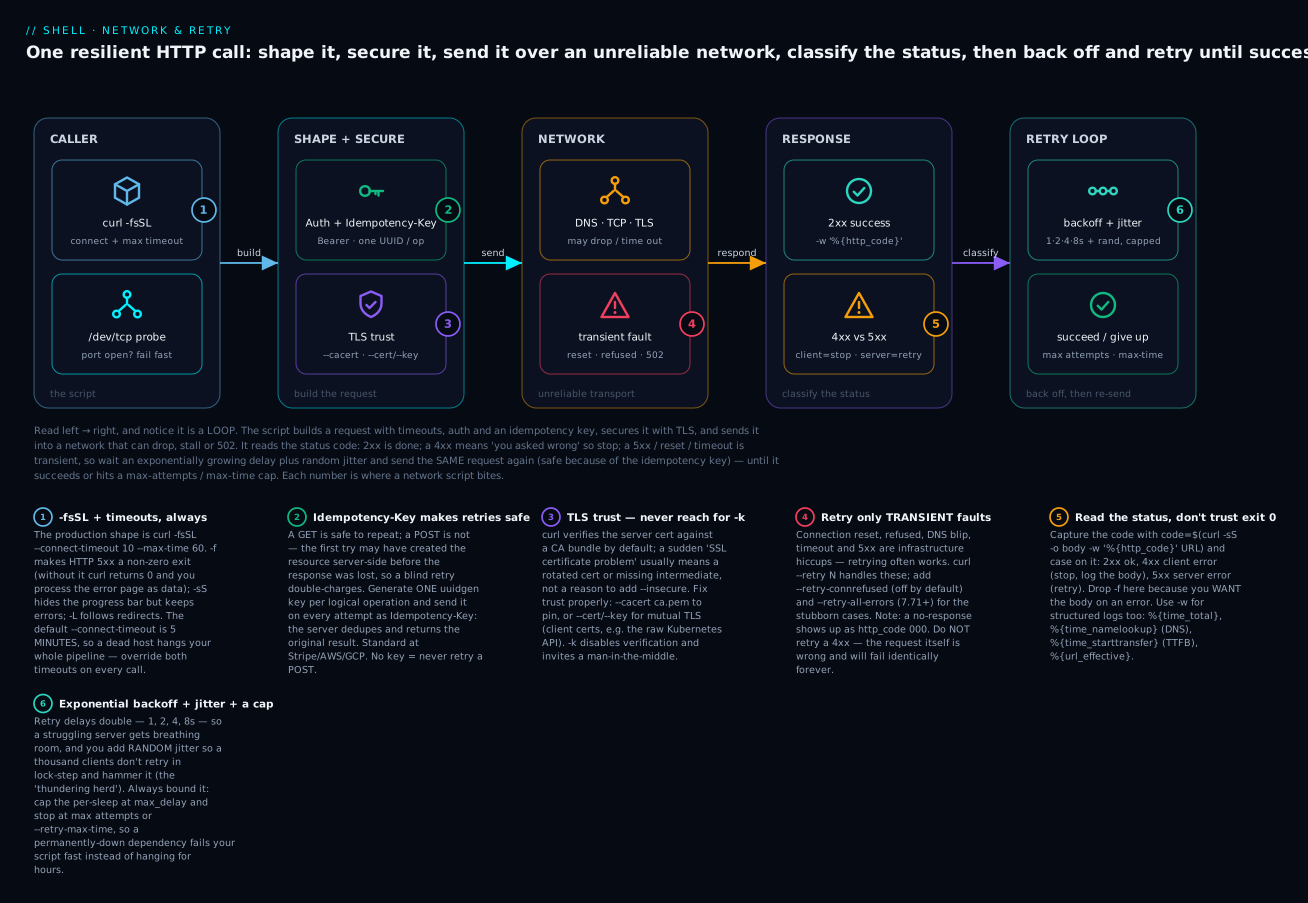
Read the diagram left → right, and notice it’s a loop: the script builds a request (timeouts + auth + idempotency key), secures it with TLS, and sends it into a network that can drop, stall, or 502. It reads the status code — 2xx is done, a 4xx means “you asked wrong” so it stops, and a 5xx / reset / timeout is transient, so it waits an exponentially growing delay plus random jitter and sends the same request again (safe because of the idempotency key) until it succeeds or hits a max-attempts / max-time cap. Everything else in this lesson is a detail of one of those five boxes.
If your script is more than a sysadmin one-liner, it almost certainly hits the network. Pulling artefacts, calling APIs, posting webhooks, fetching secrets, syncing with health endpoints — networking is everywhere.
The problem: networks are unreliable. Connections drop. DNS times out. Servers return 502 mid-deploy. Cloud APIs rate-limit. A script that calls the network without proper handling is a script that fails 1% of the time, mysteriously, and gives no useful error.
By the end of this lesson:
- You’ll know
curldeeply — every flag worth memorising and the canonical “production” command shape. - You’ll know when to use
wgetinstead. - You’ll know about bash’s
/dev/tcp— fanouts to “is that port open?” without curl. - You’ll have a retry-with-exponential-backoff implementation you can drop into any script.
- You’ll understand HTTP idempotency and how to use idempotency keys.
- You’ll have the canonical “wait for service to be up” loop.
1. The production curl invocation
A bare curl https://example.com works for one-shot. For scripts, the canonical incantation is:
curl --fail --silent --show-error --location \
     --connect-timeout 10 --max-time 60 \
     "$URL"
Or in short form:
curl -fsSL --connect-timeout 10 --max-time 60 "$URL"
Each flag earns its keep:
-f/--fail: exit non-zero on HTTP error responses (400, 500, etc.). Without-f,curlsucceeds (exit 0) even when the server returns 500 — the body becomes the error message in your data.-s/--silent: suppress progress meter. In a script, you don’t wantcurl’s progress on stderr.-S/--show-error: but DO show error messages on stderr (otherwise-ssilences those too).-L/--location: follow redirects. Many endpoints redirect (HTTP→HTTPS, www→non-www, login pages).--connect-timeout 10: max 10s to establish the connection. Default is 5 minutes — way too long.--max-time 60: total operation must finish in 60s. Default unlimited.
Memorise -fsSL. It goes on every curl in production.
Why “silent but show errors” isn’t a contradiction.
-ssilences two separate things: the progress meter and error messages. In a script you want the first gone (it’s noise on stderr) but the second kept (you need to know why a fetch failed).-Sre-enables just the error text. So-sStogether means “quiet on success, loud on failure” — exactly what a log wants.
Capturing both output and exit code
if ! out=$(curl -fsSL "$URL" 2>&1); then
  error "fetch failed: $out"
  exit 1
fi
echo "got: $out"
-fsSL ensures $? is non-zero on HTTP errors and the actual error message is on stderr (which we capture too with 2>&1).
curl -w for response metadata
curl -fsS -o output.json -w '%{http_code} %{time_total}\n' "$URL"
# 200 0.345
-w (write-out) prints metadata after the transfer. Useful values:
%{http_code}— HTTP status code.%{time_total}— total time (s).%{time_namelookup}— DNS time.%{time_connect}— connection time.%{time_starttransfer}— TTFB.%{size_download}— bytes received.%{url_effective}— final URL after redirects.%{header_json}— headers as JSON (curl 7.83+).
For a JSON-formatted line (great for structured logs):
curl -fsS -o /dev/null -w '{"code":%{http_code},"ttfb":%{time_starttransfer},"total":%{time_total}}\n' "$URL"
The
time_*breakdown is a built-in latency profiler. When “the API is slow”, one-wline tells you where: a bigtime_namelookupmeans DNS, a bigtime_connectmeans TCP/TLS handshake (or a distant server), and a bigtime_starttransferminustime_connectmeans the server is thinking. Notcpdumprequired.
Capturing both body and status code
HTTP_CODE=$(curl -sS -o response.body -w '%{http_code}' "$URL")
case "$HTTP_CODE" in
  2*) info "ok ($HTTP_CODE)" ;;
  4*) error "client error ($HTTP_CODE)"; cat response.body >&2; exit 1 ;;
  5*) error "server error ($HTTP_CODE)" ;;
  *)  error "unexpected ($HTTP_CODE)" ;;
esac
Note: with -w '%{http_code}', we drop -f because we want the response body even on 4xx/5xx.
HTTP status codes — the families you branch on
You don’t need to memorise all ~60 codes, only the families, because your retry logic branches on the first digit:
| Family | Meaning | Your script should… | Retry? |
|---|---|---|---|
| 1xx | Informational (rare in scripts) | ignore; curl handles it | — |
| 2xx | Success (200 OK, 201 Created, 204 No Content) | proceed; the body is your answer | no |
| 3xx | Redirect (301, 302, 307, 308) | follow with -L |
no |
| 4xx | Client error — you asked wrong | fix the request; log the body; stop | no |
| 5xx | Server error — they broke | it’s likely transient; back off and retry | yes |
| 000 | No HTTP response at all (DNS/TCP/TLS/timeout) | treat as transient network failure | yes |
Two 4xx codes deserve special handling: 401/403 (auth — refreshing the token may help, but retrying the same token won’t) and 429 Too Many Requests (you’re rate-limited — this one you do retry, but slowly, honouring the Retry-After header if present). The 000 “code” is curl’s stand-in for “the transfer never produced a status line” — you saw it earlier: a failed connect prints code=000. Treat 000 and 5xx the same way in a retry loop.
POST with JSON
curl -fsSL -X POST \
  -H "Content-Type: application/json" \
  -H "Authorization: Bearer $TOKEN" \
  --data '{"name":"alice","age":30}' \
  "https://api.example.com/users"
Or with data from a file:
curl -fsSL -X POST \
  -H "Content-Type: application/json" \
  -H "Authorization: Bearer $TOKEN" \
  --data @payload.json \
  "https://api.example.com/users"
Or via heredoc:
curl -fsSL -X POST \
  -H "Content-Type: application/json" \
  --data @- \
  "https://api.example.com/users" <<EOF
{"name":"alice","age":30}
EOF
--data-raw vs --data vs --data-urlencode
--data(-d) — sends asapplication/x-www-form-urlencoded.@prefix means “read from file.”--data-raw— same but@is literal. Use when your data starts with@.--data-urlencode— URL-encode the value. For form posts with special chars.--data-binary— send exactly as-is, no encoding. For uploading binary data.
# Common gotcha: --data with content starting with @
curl --data '@hello' ...           # tries to read file "hello"
curl --data-raw '@hello' ...       # sends literal "@hello"

# URL-encode form values
curl --data-urlencode 'q=hello world' --data-urlencode 'lang=en' "$URL"
# sends: q=hello%20world&lang=en
-dalso strips newlines;--data-binarydoesn’t. If you--data @file.jsonand the JSON is pretty-printed,-dsilently deletes the newlines (usually fine for JSON, fatal for anything whitespace-sensitive). When the bytes must go exactly as they are on disk, use--data-binary @file.
Multipart upload (file uploads)
curl -fsSL -X POST \
  -F "name=Alice" \
  -F "avatar=@./avatar.jpg" \
  -F "metadata=@./meta.json;type=application/json" \
  "https://api.example.com/upload"
Each -F is one form field. @ prefix means “file from disk.” ;type=... sets the MIME type.
Headers in bulk
curl -fsSL \
  -H "Authorization: Bearer $TOKEN" \
  -H "User-Agent: kloudvin-deploy/1.0" \
  -H "X-Request-ID: $REQUEST_ID" \
  "$URL"
To remove a default header:
curl -H "User-Agent:" "$URL" # empty value removes it
Auth — basic, bearer, OAuth
# Basic
curl -u user:pass "$URL"
curl --user user:pass "$URL"

# Bearer (most modern APIs)
curl -H "Authorization: Bearer $TOKEN" "$URL"

# Read auth from netrc
curl -n "$URL"            # uses ~/.netrc
Don’t put passwords in -u if they’re in $HISTFILE territory; use a file or env var:
curl --user "$USER:$(< /run/secrets/api-pass)" "$URL"
Unix sockets
For docker/containerd/local services:
curl --unix-socket /var/run/docker.sock http://localhost/v1.41/containers/json
Lets you talk to docker.sock directly without the docker CLI.
Stream large responses
# Save to file as it streams
curl -fsSL -o big.tar.gz "$URL"

# Pipe through another command line-by-line
curl -fsSLN "$URL" | jq -r '.events[]'
-N is “no buffering,” useful for streaming server-sent events or chunked responses.
2. wget — when to use it instead
wget is curl’s older cousin. It’s slightly better for file downloads:
wget -q https://example.com/big.tar.gz                # quiet
wget -c https://example.com/big.tar.gz                # continue interrupted download
wget -O renamed.tar.gz https://example.com/big.tar.gz # rename output
wget --tries=5 --timeout=30 https://example.com/file  # built-in retry
wget --no-check-certificate https://...               # skip TLS check (don't, except in tests)
-c (continue) is the killer feature: if the download is interrupted, retry with -c and it resumes from where it stopped. curl -C - does the same but is less polished.
For mirroring whole sites:
wget --recursive --level=2 --no-clobber --convert-links https://docs.example.com
Most scripts pick curl because it’s more flexible for API calls. wget is often pre-installed and excellent for “fetch this big file” tasks.
Three different
wgets exist — check which you have. GNUwget(most Linux distros), BusyBoxwget(Alpine, many containers — a tiny subset: no--tries, no-cresume, limited TLS), andwget2(the parallel rewrite). A script that relies on GNU-only flags will fail cryptically inside an Alpine image. When in doubt in a container, prefercurl(also usually present) or test withwget --help 2>&1 | head -1. This is the same “which flavour?” caution you apply tosed/date/grepwhen moving between GNU and BSD.
3. Bash’s /dev/tcp — networking without curl
Bash has a built-in TCP client! You can open /dev/tcp/HOST/PORT like a file:
# Test if port 80 is open on example.com
if (echo > /dev/tcp/example.com/80) 2>/dev/null; then
  echo "open"
else
  echo "closed"
fi
This doesn’t require curl, netcat, or anything else — just bash. Useful in minimal containers (alpine, distroless).
TCP port scanner
for port in 22 80 443 3306 5432 6379 8080; do
  if (echo > /dev/tcp/example.com/$port) 2>/dev/null; then
    echo "$port open"
  fi
done
Wait for a port to be open (with timeout)
wait_for_port() {
  local host=$1 port=$2 timeout=${3:-30}
  local elapsed=0
  while ! (echo > /dev/tcp/$host/$port) 2>/dev/null; do
    (( elapsed >= timeout )) && return 1
    sleep 1
    ((elapsed++))
  done
  return 0
}

wait_for_port db.internal 5432 60 || die "db never came up"
Better than sleep 30 && go — fail fast if the port stays closed.
Crude HTTP request
You can even speak HTTP directly:
exec 3<>/dev/tcp/example.com/80
echo -e "GET / HTTP/1.0\r\nHost: example.com\r\n\r\n" >&3
cat <&3
exec 3<&-
You wouldn’t do this in production (TLS is involved, headers are complicated), but it’s neat to know.
Limitations
- TCP only. No UDP, no TLS, no HTTP/2.
- The remote name is resolved by bash, which uses the system resolver — fine.
/dev/tcp/is a bash feature, not a kernel device. Doesn’t work in dash/sh.- Only useful for “is something on this port” or as an HTTP-by-hand demo. For real HTTP, use curl.
Why
(echo > /dev/tcp/...)and not justecho > /dev/tcp/...? The subshell( … )contains the redirection failure. If the port is closed, bash prints aconnection refusedmessage and — critically — the failed redirection would otherwise abort a script running underset -e. Wrapping it in a subshell and appending2>/dev/nullturns “port closed” into a clean non-zero exit you can test, instead of a crash./dev/tcpis also not available if bash was compiled with--disable-net-redirections(some hardened distros do this), and it’s absent entirely indash,ash(BusyBox), and/bin/sh— there, reach fornc -z host portinstead.
4. Retry-with-exponential-backoff
Networks fail intermittently. Retry is essential. The canonical pattern:
retry() {
  local max=${1:-3}; shift
  local delay=1
  local attempt
  for ((attempt=1; attempt<=max; attempt++)); do
    if "$@"; then
      return 0
    fi
    if (( attempt < max )); then
      warn "command failed (attempt $attempt/$max); retrying in ${delay}s"
      sleep "$delay"
      delay=$((delay * 2))         # exponential: 1, 2, 4, 8, ...
    fi
  done
  error "command failed after $max attempts"
  return 1
}

# Usage
retry 5 curl -fsSL https://flaky-api.example.com/data
Improvements:
retry() {
  local max=${1:-3}
  local base_delay=${2:-1}
  local max_delay=${3:-60}
  shift 3
  local delay=$base_delay
  local attempt
  for ((attempt=1; attempt<=max; attempt++)); do
    if "$@"; then
      return 0
    fi
    if (( attempt < max )); then
      # Add jitter (0..delay/2) to avoid thundering herd
      local jitter=$(( RANDOM % (delay / 2 + 1) ))
      local sleep_for=$((delay + jitter))
      (( sleep_for > max_delay )) && sleep_for=$max_delay
      warn "attempt $attempt/$max failed; retrying in ${sleep_for}s"
      sleep "$sleep_for"
      delay=$((delay * 2))
    fi
  done
  return 1
}

retry 5 1 30 curl -fsSL "$URL"
This adds jitter (random delay) to avoid thundering herd when many clients retry simultaneously, and caps the max delay at 30s.
What the numbers actually look like (base 1s, cap 30s). The sleeps grow
1, 2, 4, 8, 16, 30, 30, …before jitter, and jitter adds a random0..delay/2on top. Here’s a real run of just the arithmetic (representative —RANDOMdiffers each time):attempt 1 base=1s jitter=0s sleep=1s attempt 2 base=2s jitter=1s sleep=3s attempt 3 base=4s jitter=1s sleep=5s attempt 4 base=8s jitter=4s sleep=12s attempt 5 base=16s jitter=0s sleep=16s attempt 6 base=32s jitter=5s sleep=30s ← cappedThe doubling means a struggling server gets exponentially more breathing room; the jitter means a thousand of your scripts that all failed at the same instant don’t all wake up at the same instant. Without jitter, backoff just synchronises the herd into rhythmic waves.
curl --retry — built-in retry
curl has its own retry:
curl -fsSL --retry 5 --retry-delay 2 --retry-max-time 60 "$URL"
--retry N— retry up to N times on transient errors (network, 5xx).--retry-delay S— wait S seconds between retries.--retry-max-time S— give up after S seconds total.--retry-connrefused— also retry on “connection refused” (default: no).--retry-all-errors(curl 7.71+) — retry on all errors, not just specific ones.
For most cases, curl --retry 5 --retry-delay 2 --retry-max-time 60 --retry-all-errors is sufficient.
When does curl --retry not retry? On 4xx (client errors). 4xx means “you asked wrong” — retrying doesn’t help. The retry is meant for transient infrastructure issues.
5. HTTP idempotency
Retrying a GET is safe — GETs are idempotent by definition. Retrying a POST is dangerous: the first attempt might have succeeded server-side but the network dropped before the response. Retrying creates the same resource twice.
The cure: idempotency keys. The client generates a unique ID per logical operation; sends it in a header on every retry. The server deduplicates.
# Generate once per logical operation
IDEM_KEY=$(uuidgen)

# Use across all retries
retry 5 curl -fsSL -X POST \
  -H "Content-Type: application/json" \
  -H "Idempotency-Key: $IDEM_KEY" \
  --data "$PAYLOAD" \
  "$URL"
If the server sees the same Idempotency-Key twice, it returns the original response without re-creating. Standard at Stripe, AWS, GCP, etc. Always use idempotency keys for POSTs you might retry.
The one mistake that defeats the whole thing: generating the key inside the loop. If
IDEM_KEY=$(uuidgen)runs on every attempt, each retry carries a different key, the server sees each as a brand-new operation, and you’re back to creating duplicates. The key identifies the logical operation, not the attempt — so it must be generated once, before the retry loop, and reused unchanged across all attempts. This is why the example above assignsIDEM_KEYfirst and only then callsretry.
Generating UUIDs portably
# Linux + macOS modern: uuidgen
IDEM_KEY=$(uuidgen)

# /proc-based fallback (Linux only)
[[ -f /proc/sys/kernel/random/uuid ]] && IDEM_KEY=$(< /proc/sys/kernel/random/uuid)

# Pure bash (good entropy enough for idempotency keys)
random_uuid_v4() {
  local h
  h=$(printf '%04x%04x-%04x-%04x-%04x-%04x%04x%04x' \
    $RANDOM $RANDOM $RANDOM \
    $((RANDOM & 0x0fff | 0x4000)) \
    $((RANDOM & 0x3fff | 0x8000)) \
    $RANDOM $RANDOM $RANDOM)
  echo "$h"
}
IDEM_KEY=$(random_uuid_v4)
The pure-bash version isn’t cryptographically random but is fine for idempotency.
6. Wait-for-service-up
Common in scripts that depend on infrastructure: “deploy, then wait for the new pod to be healthy.”
wait_for_url() {
  local url=$1
  local timeout=${2:-60}
  local interval=${3:-2}
  local elapsed=0
  while (( elapsed < timeout )); do
    if curl -fsS -o /dev/null --connect-timeout 2 --max-time 5 "$url"; then
      return 0
    fi
    sleep "$interval"
    elapsed=$(( elapsed + interval ))
    debug "still waiting for $url ($elapsed/$timeout)"
  done
  error "timeout waiting for $url"
  return 1
}

wait_for_url "https://api.example.com/health" 120 5
Variants:
# Wait until response body matches expected
wait_for_response() {
  local url=$1 expected=$2 timeout=${3:-60} interval=${4:-2}
  local elapsed=0
  while (( elapsed < timeout )); do
    local body
    if body=$(curl -fsS --connect-timeout 2 --max-time 5 "$url" 2>/dev/null); then
      if [[ "$body" == *"$expected"* ]]; then
        return 0
      fi
    fi
    sleep "$interval"
    elapsed=$((elapsed + interval))
  done
  return 1
}

wait_for_response "https://api.example.com/version" '"version":"v1.2.3"' 120 5
# Wait for HTTP 200 specifically
wait_for_status() {
  local url=$1 expected=${2:-200} timeout=${3:-60} interval=${4:-2}
  local elapsed=0
  while (( elapsed < timeout )); do
    local code
    code=$(curl -sS -o /dev/null --connect-timeout 2 --max-time 5 -w '%{http_code}' "$url" 2>/dev/null || echo "000")
    if [[ "$code" == "$expected" ]]; then
      return 0
    fi
    sleep "$interval"
    elapsed=$((elapsed + interval))
  done
  return 1
}
Always cap the total wait, and prefer a readiness endpoint over a port probe. A
/dev/tcpport check tells you the socket is listening; it does not tell you the app finished migrating the database and is ready to serve. That’s whywait_for_urlhits a real/health(or/ready) endpoint. And thetimeoutargument is the safety net: a dependency that never comes up should fail your deploy in two minutes, not hang the pipeline until someone notices at 3am. “Wait forever” is never the right answer in automation.
7. Common patterns
Rate-limiting (sleep between requests)
for id in $(seq 1 1000); do
  curl -fsSL "https://api.example.com/items/$id"
  sleep 0.1   # max 10/s
done
Streaming JSON line-by-line (NDJSON / JSON Lines)
curl -fsSLN "https://api.example.com/stream" \
  | while IFS= read -r line; do
      jq -r '.event' <<<"$line"
    done
Following an SSE stream
curl -fsSLN -H "Accept: text/event-stream" "https://example.com/sse" \
  | while IFS= read -r line; do
      [[ "$line" == data:* ]] && echo "${line#data: }"
    done
Downloading with progress (interactive)
curl -L -o file.tar.gz "$URL"           # progress meter on
wget --progress=dot:giga -O file.tar.gz "$URL"
In scripts, leave progress off (-s).
Conditional GET (cache-aware)
# Save the ETag from a previous request
ETAG_FILE=/tmp/myresource.etag
curl -fsS -D - "$URL" -o resource.json \
  | awk '/^etag:/i { sub(/\r$/, ""); print $2 }' > "$ETAG_FILE"

# Next time, send If-None-Match
if [[ -f "$ETAG_FILE" ]]; then
  curl -fsS -H "If-None-Match: $(< "$ETAG_FILE")" "$URL" -o resource.json
fi
Server returns 304 (Not Modified) if the resource is unchanged — saves bandwidth.
Mutual TLS
curl --cert client.pem --key client-key.pem --cacert ca.pem "$URL"
For services that require client certs (like Kubernetes API directly).
HTTP/2 and HTTP/3
curl --http2 "$URL"      # require HTTP/2
curl --http3 "$URL"      # HTTP/3 (curl built with QUIC)
Default lets the server negotiate. Use these when you need to test specific behaviour.
8. Common pitfalls
Forgetting -f
Without -f, curl exits 0 on HTTP 500 and you process the error body as data. Always use -f (or capture -w '%{http_code}' and check explicitly).
Forgetting -L for HTTPS sites
Many sites redirect to a load balancer. Without -L, you get a 301 with empty body and think the site is broken.
Logging the URL with secrets in it
URL="https://api.example.com/data?token=$TOKEN"
info "fetching $URL"               # leaks $TOKEN to logs
Use Authorization headers instead, or sanitise:
info "fetching ${URL%%\?*}"
--data vs --data-raw and the @ problem
curl --data "$INPUT" "$URL"     # if $INPUT starts with @, treats as filename!
curl --data-raw "$INPUT" "$URL" # safe
Use --data-raw defensively.
Reading password from prompt
If the user runs the script with -u user: (no password), curl prompts. In a non-interactive script, that hangs. Provide both, or use env vars / netrc.
TLS mismatches
If a script worked yesterday but fails today with SSL certificate problem, the server’s cert may have rotated. Don’t add -k/--insecure as a permanent fix. Either:
- Update your CA bundle.
- Pin a specific cert (
--cacert). - Investigate why the trust chain broke.
Bash /dev/tcp and DNS caching
/dev/tcp/HOST/PORT resolves HOST every time you reference it. For high-frequency probes, you may want to resolve once:
ip=$(getent hosts example.com | awk '{print $1}')
(echo > /dev/tcp/$ip/80) 2>/dev/null
This avoids DNS overhead per attempt.
9. The lib/net.sh framework
Putting it together — drop this into any project:
# lib/net.sh — network helpers

http_get() {
  local url=$1; shift
  local extra_headers=("$@")
  local headers=()
  for h in "${extra_headers[@]}"; do headers+=(-H "$h"); done
  curl -fsSL --connect-timeout 10 --max-time 60 \
    --retry 3 --retry-delay 2 --retry-max-time 30 \
    "${headers[@]}" "$url"
}

http_post_json() {
  local url=$1
  local payload=$2
  shift 2
  local extra_headers=("$@")
  local headers=(-H "Content-Type: application/json" -H "Idempotency-Key: $(uuidgen)")
  for h in "${extra_headers[@]}"; do headers+=(-H "$h"); done
  curl -fsSL --connect-timeout 10 --max-time 60 \
    --retry 3 --retry-delay 2 --retry-max-time 30 \
    -X POST --data-raw "$payload" \
    "${headers[@]}" "$url"
}

wait_for_url() {
  local url=$1 timeout=${2:-60} interval=${3:-2}
  local elapsed=0
  while (( elapsed < timeout )); do
    curl -fsS -o /dev/null --connect-timeout 2 --max-time 5 "$url" && return 0
    sleep "$interval"
    elapsed=$((elapsed + interval))
  done
  return 1
}

port_open() {
  local host=$1 port=$2
  (echo > /dev/tcp/$host/$port) 2>/dev/null
}

retry() {
  local max=${1:-3} base=${2:-1} max_d=${3:-30}
  shift 3
  local delay=$base
  for ((i=1; i<=max; i++)); do
    if "$@"; then return 0; fi
    (( i < max )) || break
    local jitter=$(( RANDOM % (delay/2 + 1) ))
    local sleep_for=$((delay + jitter))
    (( sleep_for > max_d )) && sleep_for=$max_d
    sleep "$sleep_for"
    delay=$((delay * 2))
  done
  return 1
}
Use:
source "$(dirname "${BASH_SOURCE[0]}")/lib/net.sh"

http_get "https://api.example.com/users" "Authorization: Bearer $TOKEN"

port_open db.internal 5432 || wait_for_url "http://db.internal:5432" 60

retry 5 1 60 http_get "https://flaky.example.com/data"
One caveat in that
http_post_json: it embedsIdempotency-Key: $(uuidgen)inside the function, so each call gets a fresh key — good. But if you then wrap the call inretry, all attempts of that one call reuse the same function invocation’s header, which is exactly what you want. The subtle bug appears only if you rebuild the header per attempt (see §5). Also note--retry 3(curl’s own) and an outerretrystack multiplicatively — 3 curl-retries × 5 outer = up to 15 attempts. Pick one layer as the primary and keep the other small, or you’ll wait a very long time before failing.
Going deeper
You have the working patterns. This section is the internals and edge cases that separate “it worked on my laptop” from “it survived a regional API brownout during a deploy.”
curl’s exit codes are a diagnosis, not just “failed”
When curl returns non-zero, the number tells you where it broke — invaluable in logs. The ones you’ll actually see:
| Exit | Meaning | Typical cause |
|---|---|---|
6 |
Couldn’t resolve host | DNS wrong/down, typo in hostname |
7 |
Couldn’t connect | port closed, wrong port, firewall, service not up yet |
22 |
HTTP page not retrieved | an HTTP ≥ 400 and you used -f |
28 |
Operation timeout | hit --connect-timeout or --max-time |
35 |
SSL connect error | TLS handshake failed (protocol/cipher mismatch) |
52 |
Empty reply from server | server accepted the connection then hung up |
56 |
Failure receiving data | connection reset mid-transfer |
60 |
Peer certificate cannot be authenticated | CA bundle missing/expired, self-signed cert |
So [[ $rc == 6 ]] is “DNS problem”, [[ $rc == 28 ]] is “too slow”, [[ $rc == 60 ]] is “trust problem — do not paper over with -k”. Under strict mode you can capture and branch:
if ! curl -fsSL --max-time 30 "$URL" -o out; then
  rc=$?
  case $rc in
    6)  die "DNS: cannot resolve $(printf '%s' "$URL" | sed -E 's#https?://([^/]+).*#\1#')" ;;
    7)  die "connect refused — is the service up?" ;;
    28) die "timeout — server too slow or unreachable" ;;
    60) die "TLS trust failed — check CA bundle, do not use -k" ;;
    *)  die "curl failed (exit $rc)" ;;
  esac
fi
curl --retry vs a hand-rolled loop — they are not interchangeable
curl’s built-in --retry is convenient but narrow. It retries on a fixed set of transient conditions — connection problems, timeouts, and the transient HTTP statuses 408, 429, 500, 502, 503, 504 — with its own exponential backoff (starting ~1s, doubling), and since curl 7.66 it honours a Retry-After header on 429/503. What it will not do:
- Retry based on the response body (e.g.
{"status":"pending"}— that’s a 200, so curl is “done”). - Refresh a token between attempts (an expired-token 401 will retry with the same dead token).
- Add jitter (curl’s backoff is deterministic — fine for one client, a herd-synchroniser for thousands).
- Run your logic between tries (re-sign a request, rotate an endpoint, emit a metric).
Rule of thumb: use curl --retry for simple idempotent GETs of a flaky endpoint; hand-roll the retry() loop the moment you need body-aware, token-aware, or jittered retries. And never silently stack both to large values — see the framework caveat above.
Timeouts are three different things
--connect-timeout and --max-time are the famous pair, but they miss the nastiest failure mode: a transfer that starts fine, then stalls at 99%. That’s what the speed-limit knobs are for:
# Abort if throughput stays below 1 KB/s for 30 continuous seconds
curl -fsSL --speed-limit 1024 --speed-time 30 -o big.tar.gz "$URL"
--max-time alone is a blunt instrument for large downloads (you’d have to guess the whole transfer’s duration); --speed-limit/--speed-time say “abort a stalled transfer” without penalising a legitimately long one. This is the right timeout for artifact/image pulls.
The handshake tax: many small calls to the same host
Every separate curl process pays the full DNS → TCP → TLS handshake cost from scratch — often 50–200ms of pure setup before a single byte of your actual request. Loop over 1,000 items with 1,000 curl invocations and the handshake tax dwarfs the work. Options, cheapest first:
-
Batch into one curl with a config/URL list so it reuses the connection (HTTP keep-alive):
# urls.txt: one "url = https://api.example.com/items/N" per line curl -fsSL --parallel --parallel-max 8 --config urls.txt -
--parallel(-Z, curl 7.66+) runs multiple URLs concurrently over reused connections — far faster than a bashforloop of separate processes. -
For genuinely high throughput, step out of the shell (a small Python/Go client with a connection pool). Shell is glue; a tight per-item HTTP loop is the smell that you’ve outgrown it — that’s the signal to move the hot loop into a real HTTP client with connection reuse.
DNS control: --resolve and --connect-to
Sometimes you need to hit a specific backend without changing the URL (testing one node behind a load balancer, or bypassing stale DNS):
# Pretend api.example.com resolves to 10.0.0.7 for this call only
curl -fsSL --resolve api.example.com:443:10.0.0.7 "https://api.example.com/health"
--resolve HOST:PORT:ADDR pins the resolution (TLS SNI and cert validation still use the real hostname — so certs verify correctly, unlike hacking /etc/hosts or using the IP in the URL). --connect-to is similar but remaps host:port→host:port. Bash’s /dev/tcp has no equivalent — it always goes through the system resolver — which is another reason it’s for probes, not production HTTP.
TLS, deeper: pinning and minimum versions
--cacert changes which CAs you trust; --pinnedpubkey goes further and pins the server’s exact public key, so even a mis-issued cert from a trusted CA is rejected — the strongest option for a fixed, known peer:
curl -fsSL --tlsv1.2 \
     --pinnedpubkey 'sha256//K87oWBWM9UZfyddzYQ+R1eB1LZQ2G7A...' \
     "https://api.example.com"
--tlsv1.2 sets a minimum protocol version (reject downgrade attempts). SNI is sent automatically from the URL’s hostname — which matters when many domains share one IP behind a CDN; if you connect by IP, SNI is missing and you may get the wrong cert or a default vhost.
Security: SSRF and credential leakage are the real risks
Two failure modes bite production scripts, both about where the URL and secrets come from:
- SSRF (Server-Side Request Forgery). If any part of the URL comes from untrusted input and you run
curl -L "$USER_URL", an attacker can point it at internal services or the cloud metadata endpoint (http://169.254.169.254/…) to steal credentials. Defenses: an allowlist of permitted hosts,--proto '=https'(refuse anything but HTTPS), bound redirects with--max-redirs 2and re-validate eachLocation, and never blindly-La user-supplied URL. This is the shell mirror of input-validation discipline — never trust externally-supplied data as a command or request target. - Credential leakage. Secrets on the command line (
-u user:pass,?token=…) are visible to anyone who can runps, and land in your shell history and logs. Pass them via-H "Authorization: Bearer $TOKEN"from an environment variable, a--configfile (mode 600), or--netrc, and sanitise URLs before logging (${URL%%\?*}). This connects directly to Secrets handling.
Portability recap: what’s safe where
| Feature | GNU/Linux + bash 4+ | Alpine / BusyBox | macOS/BSD |
|---|---|---|---|
/dev/tcp/host/port |
✅ bash (not sh/ash) |
❌ (ash) — use nc -z |
✅ bash (incl. 3.2) |
curl --retry-all-errors |
✅ (7.71+) | depends on curl build | ✅ (recent) |
curl --parallel |
✅ (7.66+) | depends | ✅ (recent) |
GNU wget flags (-c, --tries) |
✅ | ❌ BusyBox subset | Homebrew wget only |
uuidgen |
✅ (util-linux) | may be absent | ✅ |
getent hosts |
✅ | ❌ | ❌ (use dscacheutil/host) |
The course targets Linux + bash 4+/5 + GNU coreutils; this build host is macOS with bash 3.2 and BSD userland, so several rows above were verified only for logic, not for the GNU-specific flag. When a script must run “everywhere”, prefer curl over wget, prefer nc -z over /dev/tcp in sh, and feature-detect (command -v uuidgen) with a pure-bash fallback.
10. Twelve idioms for daily use
# 1. Production curl flags
curl -fsSL --connect-timeout 10 --max-time 60 "$URL"

# 2. POST JSON
curl -fsSL -X POST -H 'Content-Type: application/json' --data "$JSON" "$URL"

# 3. Capture status code separately from body
HTTP_CODE=$(curl -sS -o response.body -w '%{http_code}' "$URL")

# 4. Bearer auth
curl -fsSL -H "Authorization: Bearer $TOKEN" "$URL"

# 5. Multipart file upload
curl -fsSL -F 'file=@./payload.bin' -F 'name=test' "$URL"

# 6. Wait for port to be open
while ! (echo > /dev/tcp/$HOST/$PORT) 2>/dev/null; do sleep 1; done

# 7. curl built-in retry
curl -fsSL --retry 5 --retry-delay 2 --retry-max-time 60 --retry-all-errors "$URL"

# 8. Idempotency key for POST retries
curl -fsSL -X POST -H "Idempotency-Key: $(uuidgen)" -d "$DATA" "$URL"

# 9. Time the request
curl -fsSL -o /dev/null -w '%{time_total}\n' "$URL"

# 10. Talk to docker.sock
curl --unix-socket /var/run/docker.sock http://localhost/v1.41/info

# 11. Stream and process line by line
curl -fsSLN "$URL" | jq -rc '.events[]' | while IFS= read -r evt; do …; done

# 12. Wait-for-URL with timeout
wait_for_url() { local u=$1 t=${2:-60}; for ((e=0; e<t; e+=2)); do curl -fsS "$u" >/dev/null 2>&1 && return 0; sleep 2; done; return 1; }
11. What you must internalise before lesson 18
- What does
-fsSLmean and why is it canonical? (-ffail on HTTP error,-ssilent,-Sshow errors despite silent,-Lfollow redirects.) - What’s the default
--connect-timeout? (5 minutes. Always override.) - What’s
--datavs--data-raw? (--datainterprets@FILEas “read from file”;--data-rawdoesn’t.) - What’s an idempotency key? (Unique ID per logical operation, sent on every retry; server deduplicates.)
- How do you check if a TCP port is open in bash with no extra tools? (
(echo > /dev/tcp/host/port) 2>/dev/null.) - What does
--retry-all-errorsdo? (Retry on any failure, not just transient ones — curl 7.71+.) - What’s exponential backoff with jitter? (Each retry waits 2x the previous, plus a random offset to avoid thundering herd.)
- Why does retrying a POST require idempotency keys? (POSTs can succeed server-side even if the response is lost; retrying without idempotency creates duplicates.)
- What’s the difference between
curl -Landwget --recursive? (-Lfollows redirects on the same request;--recursivemirrors a whole site.) - How do you wait for a service to be up? (Loop with
curl -fsSor(echo > /dev/tcp/...)until success or timeout.)
Practice challenges
Work these in order — they climb from “write the production one-liner” to “assemble a body-aware, transient-only retry from memory”. Try each before opening the solution. The shell is runnable on Linux + bash; where a flag is GNU/Linux-specific it’s flagged.
Challenge 1 — The production fetch (beginner)
Write a single curl that fetches "$URL", fails the script on any HTTP error, follows redirects, never spends more than 5s connecting or 15s total, and stays quiet on success but prints the error on failure.
<details> <summary>Solution</summary>
curl -fsSL --connect-timeout 5 --max-time 15 "$URL"
Why: -f turns HTTP ≥ 400 into a non-zero exit, -L follows redirects, -sS is “quiet but show errors”, and the two timeouts bound both the connect phase and the whole transfer so a dead host can’t hang the pipeline.
</details>
Challenge 2 — Body and status code (beginner)
Fetch "$URL" capturing the response body to a file and the status code to a variable at the same time. Print ok on 2xx, print the body and exit 1 on 4xx, and print server error on 5xx.
<details> <summary>Solution</summary>
code=$(curl -sS -o resp.body -w '%{http_code}' --max-time 15 "$URL")
case "$code" in
  2*) echo "ok ($code)" ;;
  4*) echo "client error ($code):" >&2; cat resp.body >&2; exit 1 ;;
  5*) echo "server error ($code)" >&2 ;;
  *)  echo "no/other response ($code)" >&2 ;;   # 000 = never connected
esac
Why: dropping -f lets you keep the body on an error, -o sends the body to a file, and -w '%{http_code}' puts only the code on stdout for capture — so one call yields both halves. 000 means the transfer never produced a status line.
</details>
Challenge 3 — Port probe with no tools (intermediate)
Using only bash builtins (no curl, no nc), write wait_for_port host port [timeout] that returns 0 the instant the TCP port accepts a connection, or 1 after timeout seconds.
<details> <summary>Solution</summary>
wait_for_port() {
  local host=$1 port=$2 timeout=${3:-30} elapsed=0
  while ! (echo > "/dev/tcp/$host/$port") 2>/dev/null; do
    (( elapsed >= timeout )) && return 1
    sleep 1; ((elapsed++))
  done
  return 0
}
wait_for_port db.internal 5432 60 || { echo "db never opened" >&2; exit 1; }
Why: (echo > /dev/tcp/host/port) succeeds only if bash can open the TCP connection; the subshell + 2>/dev/null contain the failure so a closed port is a clean testable non-zero, not a crash. (bash only — in sh/BusyBox use nc -z host port.)
</details>
Challenge 4 — A POST that’s safe to retry (intermediate)
Wrap a JSON POST in a 5-attempt retry so a transient failure recovers, without risking a duplicate resource. Explain in one line where the idempotency key must be generated.
<details> <summary>Solution</summary>
idem=$(uuidgen)                      # ONCE, before the loop
attempt=1; max=5
until curl -fsSL --max-time 20 -X POST \
        -H 'Content-Type: application/json' \
        -H "Idempotency-Key: $idem" \
        --data-raw "$PAYLOAD" "$URL"; do
  (( attempt++ >= max )) && { echo "gave up after $max" >&2; exit 1; }
  sleep $(( attempt ))               # simple backoff
done
Why: the key is generated once, outside the loop, so every retry carries the same Idempotency-Key; the server dedupes and a POST that secretly succeeded before the dropped response isn’t applied twice. Generate it inside the loop and you’re back to creating duplicates.
</details>
Challenge 5 — Transient-only backoff with jitter (advanced)
Write resilient_get URL that retries up to 5 times with exponential backoff plus jitter capped at 30s, but retries only on transient failures — a 5xx/timeout/connect error is worth retrying, a 4xx must fail immediately without further attempts.
<details> <summary>Solution</summary>
resilient_get() {
  local url=$1 max=5 base=1 cap=30 delay=1 attempt
  for (( attempt=1; attempt<=max; attempt++ )); do
    local code
    code=$(curl -sS -o /tmp/body.$$ -w '%{http_code}' \
                --connect-timeout 5 --max-time 20 "$url" 2>/dev/null || echo 000)
    case "$code" in
      2*) cat /tmp/body.$$; rm -f /tmp/body.$$; return 0 ;;                 # success
      4*) echo "permanent $code — not retrying" >&2; rm -f /tmp/body.$$; return 1 ;;  # your fault
      *)  : ;;                                                             # 5xx/000 → fall through & retry
    esac
    (( attempt < max )) || break
    local jitter=$(( RANDOM % (delay/2 + 1) ))
    local s=$(( delay + jitter )); (( s > cap )) && s=$cap
    echo "transient $code; retry $attempt/$max in ${s}s" >&2
    sleep "$s"; delay=$(( delay * 2 ))
  done
  rm -f /tmp/body.$$; return 1
}
Why: it classifies before deciding — 2* returns, 4* bails at once (retrying a bad request just fails slower), and only 5xx/000 fall through to the backoff. The delay doubles (1,2,4,8,16) with a random 0..delay/2 jitter and a 30s cap, so a herd of clients doesn’t retry in lock-step. (Verified: the loop and the 1→2→4→8 doubling run correctly under bash.)
</details>
Challenge 6 — Poll until ready, then bail (advanced)
Write wait_for_ready URL timeout that polls a health endpoint every 3s until its JSON body reports .status == "ready", returning 0 as soon as it does or non-zero after timeout seconds. Each probe must have its own short timeout so one slow response can’t blow the budget.
<details> <summary>Solution</summary>
wait_for_ready() {
  local url=$1 timeout=${2:-120} interval=3 elapsed=0 body
  while (( elapsed < timeout )); do
    if body=$(curl -fsS --connect-timeout 2 --max-time 5 "$url" 2>/dev/null) \
       && jq -e '.status == "ready"' <<<"$body" >/dev/null 2>&1; then
      return 0
    fi
    sleep "$interval"; elapsed=$(( elapsed + interval ))
  done
  echo "timed out after ${timeout}s waiting for $url" >&2
  return 1
}
wait_for_ready "https://api.example.com/health" 90 || exit 1
Why: a port probe only proves listening; hitting a real /health and testing the body proves ready to serve. jq -e sets its exit status from the expression, so the && gates readiness cleanly. Per-probe --max-time 5 keeps one slow reply from eating the whole timeout, which is the outer wall that guarantees the deploy fails fast instead of hanging.
</details>
Common beginner mistakes
These are conceptual traps — wrong mental models — distinct from the code-level pitfalls in section 8.
“curl exited 0, so the request worked.” Exit 0 from a bare curl means “I completed the transfer”, not “the server was happy”. Without -f, a 404 or 500 still exits 0 and you cheerfully process the error page as data. The right model: success is the status code you expected, checked explicitly (-w '%{http_code}') or enforced with -f.
“If it failed, just retry it.” Retrying only helps transient faults (5xx, timeouts, resets, DNS blips). A 4xx means the request itself is wrong — retrying it identically just fails slower and burns your rate limit. The right model: classify first, retry only 5xx/network/000, stop on 4xx (special-case 401→refresh token, 429→back off).
“I’ll retry the POST the same way I retry the GET.” A GET is idempotent; a POST is not. The first POST may have succeeded server-side before the network ate the response, so a blind retry creates a duplicate (a double charge, a double order). The right model: one idempotency key per logical operation, generated once outside the loop, so the server can dedupe.
“The SSL error is in the way — I’ll add -k.” --insecure/-k disables the one check that stops a man-in-the-middle from impersonating the server. A cert error almost always means a rotated cert, a missing intermediate, or a stale CA bundle. The right model: fix trust (--cacert, update the bundle, --pinnedpubkey), never disable it — a script that runs with -k is a script that will happily send your token to an attacker.
“Backoff means sleeping the same couple of seconds each time.” Fixed short delays hammer a struggling server exactly when it needs slack, and synchronise every client into rhythmic waves. The right model: the delay grows (1, 2, 4, 8…), you add jitter so clients desynchronise, and you cap it so one retry can’t sleep for an hour.
“No timeout needed — it’ll finish eventually.” curl’s default --connect-timeout is five minutes and --max-time is unlimited, so a single black-holed host can hang your whole pipeline. The right model: bound every production call, and for large downloads add --speed-limit/--speed-time to kill a stalled transfer.
“/dev/tcp lets bash do HTTPS.” It’s plaintext TCP only — no TLS, no HTTP/2, and it doesn’t exist in dash/sh/BusyBox. The right model: use /dev/tcp for “is this port open?” probes in bash; use curl for any real HTTP(S).
“curl … | jq is safe by default.” Without pipefail, curl badhost | jq . reports jq’s exit code and hides curl’s failure — the classic silent pipeline bug. The right model: set -o pipefail (see Pipes & SIGPIPE) or capture and check the code yourself.
Glossary
- Status code — the three-digit result of an HTTP request. You branch on the family: 2xx success, 3xx redirect, 4xx your error, 5xx their error. curl exposes it via
-w '%{http_code}'. 000(http_code) — curl’s placeholder when there was no HTTP response at all (DNS/TCP/TLS/timeout failure). Treat it like a 5xx: transient, retry.-f/--fail— make curl exit non-zero on HTTP ≥ 400. Without it, curl exits 0 even on 500 and you process the error body as data.-fsSL— the canonical production flag bundle: fail-on-error, silent, show-errors, follow-redirects. Memorise it.- Redirect (3xx) — the server pointing you elsewhere (
Locationheader).-Lfollows it on the same request;wget --recursiveinstead mirrors a whole site. - Timeout — connect vs max-time —
--connect-timeoutbounds establishing the TCP/TLS connection;--max-timebounds the entire transfer.--speed-limit/--speed-timeabort a stalled (too-slow) transfer without capping a legitimately long one. - TTFB (time to first byte) — how long until the server starts replying (
%{time_starttransfer}); high TTFB = the server is thinking, not the network. - Idempotent — an operation that has the same effect whether run once or many times. GET/PUT/DELETE are idempotent by design; POST usually is not.
- Idempotency key — a unique ID (per logical operation) sent in a header so the server deduplicates retries of a non-idempotent request. Generate it once, reuse across all attempts.
- Exponential backoff — waiting a delay that doubles each retry (1, 2, 4, 8s…), giving a struggling server progressively more room.
- Jitter — a small random offset added to each backoff delay so many clients don’t retry in lock-step.
- Thundering herd — the failure mode where many clients retry at the exact same instant and collectively overload a recovering server; jitter is the cure.
- Transient vs permanent failure — transient (5xx, timeout, reset, DNS blip,
000) may succeed on retry; permanent (4xx) will not — retrying is pointless. Retry-After— a response header (on 429/503) telling you how long to wait before retrying; curl 7.66+ honours it automatically with--retry.- TLS / mTLS — Transport Layer Security encrypts and authenticates the connection; mutual TLS also authenticates the client with a cert (
--cert/--key). - CA bundle — the set of trusted Certificate Authorities curl checks the server’s cert against. A “certificate problem” usually means a stale bundle or missing intermediate — fix it, don’t use
-k. -k/--insecure— disables TLS verification. A debugging-only flag; in production it invites man-in-the-middle attacks.--resolve/--connect-to— pin a hostname to a specific IP for one call (test a backend, bypass DNS) while keeping correct SNI and cert validation./dev/tcp/HOST/PORT— a bash feature (not a real device) that opens a plaintext TCP connection like a file; used for port probes. Absent indash/sh/BusyBox — there, usenc -z.nc(netcat) — the general-purpose TCP/UDP tool;nc -z host portis the portable port probe when/dev/tcpisn’t available.-w/--write-out— print transfer metadata (%{http_code},%{time_total},%{url_effective}…) after the request; a built-in latency profiler and the way to capture the status code.- SSE / NDJSON — streaming formats: Server-Sent Events (
data:lines) and newline-delimited JSON (one JSON object per line); consume withcurl -Npiped into awhile readloop. - ETag / conditional GET — a cache validator: save the
ETag, then sendIf-None-Matchnext time; the server replies304 Not Modifiedand no body when nothing changed. - SSRF (Server-Side Request Forgery) — an attack where untrusted input steers your
curlat internal or metadata endpoints; defend with a host allowlist,--proto '=https', and bounded/validated redirects. - Unix socket — a local IPC endpoint (a file like
/var/run/docker.sock);curl --unix-sockettalks to daemons (Docker, containerd) without a TCP port.
What’s next
Lesson 18: File Operations at Scale — rsync, find -print0, Parallel-Safe Patterns & Atomic Writes. When you’re moving GBs across machines or processing thousands of files, naive cp -r and for f in * break. We cover rsync (every flag worth knowing), filename-safe patterns (revisited from Wave 1), atomic write/replace patterns that survive interruption, and the canonical “process N files in parallel” idiom. After L18 you’ll handle large filesystems with confidence.
See you there.