If you’ve written shell for more than a year, you’ve been bitten by date handling. The classic failures:
date -d "yesterday"works on Linux, fails silently or differently on macOS.- A backup script keeps
last 7 daysfiles; on the day clocks roll back for DST, it keeps 6 or 8 by accident. - Cron job logs are in
Sun Mar 10 02:30:00 EST 2024format; trying to sort by date alphabetically gives nonsense. - A locale change on the build server (
de_DEinstead ofen_US) makesdate +'%x'emit13.03.2024and breaks downstream parsers. - Comparing timestamps as strings:
"2024-03-10" < "2024-03-09T23:00:00"because the right side is “longer.”
This lesson is a complete, defensive treatment of date handling in shell:
- ISO 8601 as the only acceptable wire format (and why).
- The GNU vs BSD
datechasm and how to write scripts that don’t care. - The
TZ=environment variable and why every cron-related script should set it explicitly. - Time arithmetic: yesterday, N-days-ago, last Monday, end-of-month, sleep-until-3am.
- Epoch (Unix-time) conversions both directions, including the 2038 wrap.
- DST, leap seconds, locale, and the other dragons.
- A reusable
lib/time.shyou can drop into any project.
By the end, your scripts will produce timestamps that sort correctly, parse the same on any machine, and survive DST.
In a nutshell
Level: Intermediate → Advanced · Time: ~45 min
Think of a moment in time the way the shipping industry thinks of a parcel. There is exactly one real thing — the parcel’s globally-unique tracking number — and then there are lots of labels printed on the box in different post offices, each in the local language and date format. The tracking number never changes; the labels are just renderings of it for humans in a place. In dates, the tracking number is epoch seconds — a single integer counting the seconds since a fixed birthday, 1970-01-01T00:00:00Z — and it is the same on every machine on Earth. Everything else you see, like Sun Mar 10 14:30:00 IST 2024, is just a label that some post office (your TZ and locale) printed. Store the tracking number; print labels only at the very end, for people.
That one idea dissolves most date bugs. Wall-clock time (what a clock on the wall says: “2:30 PM”) is not a property of the instant — it is the instant viewed through a time-zone lens. The same epoch integer shows 14:30 in Mumbai and 09:00 in London for the same second. So when a script writes a filename from the local wall-clock, two servers in two zones produce two different names for the same event, and your sort-by-date breaks. The fix is a discipline, not a trick: compute and store in UTC using ISO 8601 (2024-03-10T14:30:00Z), do arithmetic in epoch seconds, and only format to local wall-clock when a human is going to read it.
There is one more thing that makes shell dates uniquely painful, and it is not conceptual — it is that the date command comes in two incompatible dialects. GNU date (Linux) does date -d 'yesterday'; BSD date (macOS) does date -v -1d and can’t understand the GNU form at all. A script that “works” on your Mac can silently do the wrong thing in a Linux container, and vice-versa. Half of this lesson is teaching you both dialects and how to wrap them so your scripts stop caring which one they landed on.
If you keep only four sentences: epoch seconds is the one true instant, and integer math on it is immune to time zones, locale and DST; wall-clock time is only a rendering of that instant through a TZ lens, so never store it; ISO 8601 UTC is the only text format that sorts chronologically as a plain string and means the same thing everywhere; and GNU date and BSD date are different tools — detect which you have and wrap the difference. Everything below is the detail behind those four sentences.
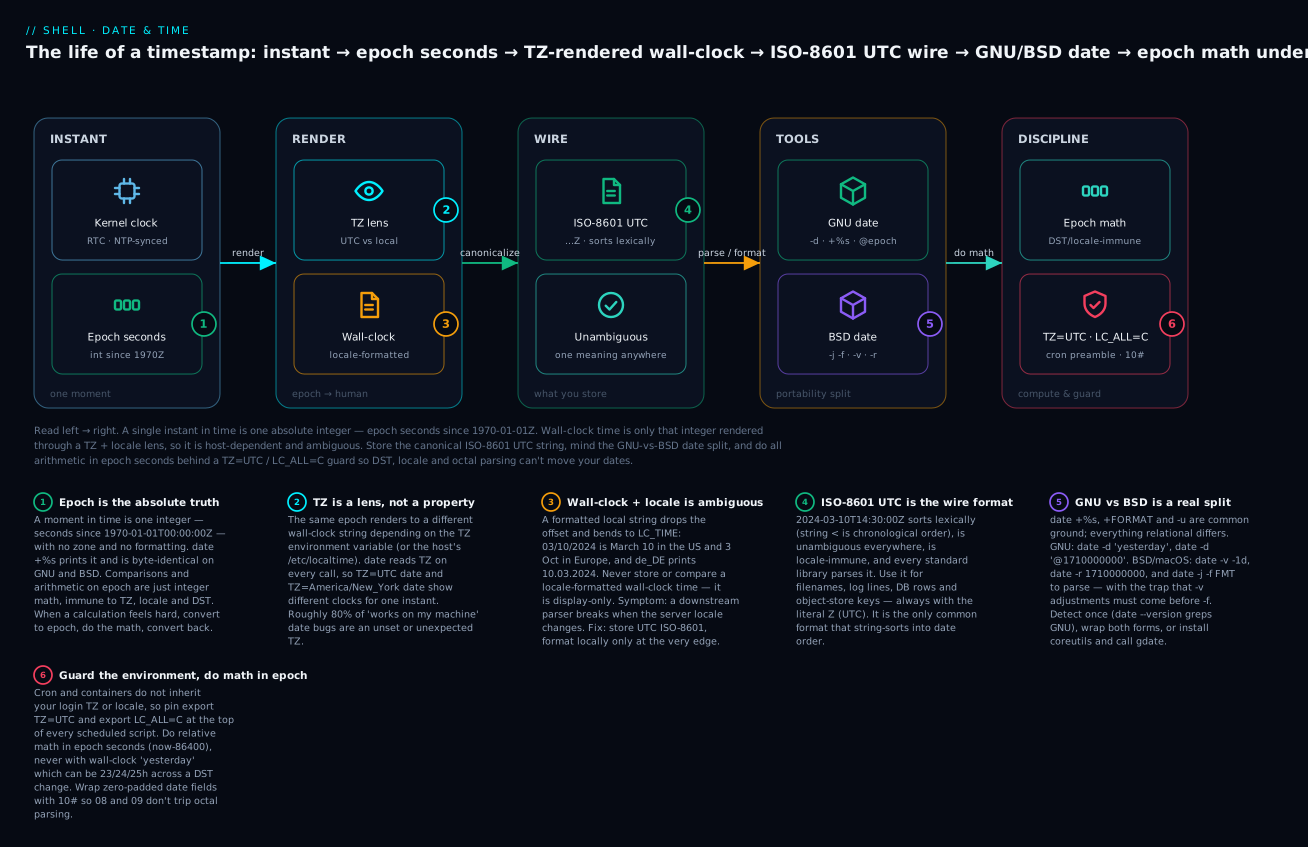
Read the diagram left to right as the life of one instant: it is born as an absolute epoch integer, gets rendered through a TZ + locale lens into an ambiguous wall-clock string, is canonicalised to an ISO-8601 UTC wire string you can store and sort, is manipulated by whichever GNU-or-BSD date your host happens to have, and is finally computed on in epoch seconds behind a UTC/locale guard. The six badges are the six habits the rest of this lesson drills into muscle memory.
Prerequisites & what you’ll be able to do
You should be comfortable running commands and capturing their output with $(...), reading and quoting shell variables ("$VAR"), and doing basic integer arithmetic with $(( )) — if word-splitting and quoting are still fuzzy, read Variables, quoting & parameter expansion first, because a mis-quoted date string is a classic silent failure. A working idea of why the same script behaves differently on macOS versus a Linux container will make the GNU/BSD split obvious. Nothing here needs a specific runtime — every command is real date/coreutils.
After working through this lesson you will be able to:
- Produce a correct, sortable timestamp on any machine — ISO 8601 UTC with a literal
Z, using the portabledate -u +%Y-%m-%dT%H:%M:%SZform that works on GNU, BSD, busybox and alpine. - Write date code that survives the GNU↔BSD divide — detect the implementation once and wrap the differing operations (
-d/-v,@epoch/-r,-d STR/-j -f) so the same script runs unchanged on Linux and macOS. - Do time arithmetic that DST can’t corrupt — convert to epoch seconds, do integer math, convert back, and know exactly when “yesterday” is 23, 24 or 25 hours.
- Make cron and container jobs deterministic — pin
TZ=UTCandLC_ALL=C, and know why the inherited environment cannot be trusted. - Convert cleanly in both directions — epoch ⇄ ISO 8601, compute human-readable durations, and sleep until a specific wall-clock time.
- Recognise and defuse the footguns — locale-flipped separators, the
08/09octal trap, the 2038 wrap, leap seconds, and the BSD-vargument-order gotcha.
1. ISO 8601 — the only date format you should write
ISO 8601 is the international standard for date/time strings. It looks like:
2024-03-10                       # date
2024-03-10T14:30:00              # datetime, local
2024-03-10T14:30:00Z             # datetime, UTC ('Z' = Zulu = UTC)
2024-03-10T14:30:00+05:30        # datetime, with offset
2024-03-10T14:30:00.123456Z      # with sub-second precision
Why it’s mandatory for scripts:
- Sorts lexically:
2024-03-10<2024-03-11as strings, no parser needed. - Unambiguous:
03/10/2024is March 10 in the US and October 3 in Europe. ISO 8601 has one meaning everywhere. - Locale-immune: doesn’t depend on
LC_TIME. - Universally parseable: every language’s stdlib understands it.
Producing ISO 8601 from date
GNU coreutils gives you a shortcut:
date -Iseconds                   # 2024-03-10T14:30:00+05:30
date -Iseconds -u                # 2024-03-10T09:00:00+00:00
date -u +%Y-%m-%dT%H:%M:%SZ      # 2024-03-10T09:00:00Z   (portable)
The last line is the portable form — it works on macOS, BSDs, Linux, busybox, alpine, everywhere. Use that.
A canonical iso_now function
# UTC, second precision, ISO 8601 with literal Z suffix.
iso_now() {
  date -u '+%Y-%m-%dT%H:%M:%SZ'
}

# With nanosecond precision (GNU only — falls back to seconds elsewhere).
iso_now_ns() {
  if date -u '+%Y-%m-%dT%H:%M:%S.%NZ' 2>/dev/null | grep -qv '%N'; then
    date -u '+%Y-%m-%dT%H:%M:%S.%NZ'
  else
    iso_now
  fi
}
Use iso_now for log timestamps, file naming (backup-2024-03-10T14:30:00Z.tar.gz), database INSERTs, anything that’s read by another process.
Why Z and not +00:00?
Both mean UTC. Z is one character shorter, less ambiguous to a quick reader, and matches what RFC 3339 (a stricter ISO 8601 subset used in HTTP, JSON APIs, etc.) prefers. +00:00 is also valid; pick one and stick to it.
2. GNU vs BSD date — the cross-platform chasm
There are two major date implementations:
- GNU coreutils
date— Linux, alpine, WSL. Extremely flexible:date -d "yesterday",date -d "next Monday",date -d "@1710000000". - BSD
date— macOS, FreeBSD, OpenBSD. Different flag style:date -v -1dfor “yesterday”,date -j -ffor parsing.
A script written for one will silently misbehave on the other. The differences:
| Task | GNU | BSD (macOS) |
|---|---|---|
| Yesterday | date -d 'yesterday' |
date -v -1d |
| Last week | date -d '7 days ago' |
date -v -7d |
| Specific epoch | date -d '@1710000000' |
date -r 1710000000 |
| Parse a string | date -d '2024-03-10 14:30' |
date -j -f '%Y-%m-%d %H:%M' '2024-03-10 14:30' |
| Format a date | +%Y-%m-%d (same) |
+%Y-%m-%d (same) |
| Force UTC | -u (same) |
-u (same) |
The +FORMAT and -u flags are common ground. Everything that involves arithmetic or parsing differs.
Detection pattern
# Returns "gnu" or "bsd" — sets a global once.
detect_date() {
  if date --version 2>/dev/null | grep -q 'GNU'; then
    echo gnu
  else
    echo bsd
  fi
}
DATE_IMPL=$(detect_date)
date --version exists on GNU but errors on BSD; that’s the cleanest test.
Portable wrappers
The pragmatic approach: write thin wrappers that branch internally and call them everywhere.
# yesterday — print yesterday's date in YYYY-MM-DD
yesterday() {
  if [[ $DATE_IMPL == gnu ]]; then
    date -u -d 'yesterday' +%Y-%m-%d
  else
    date -u -v -1d +%Y-%m-%d
  fi
}

# n_days_ago N — print the date N days ago
n_days_ago() {
  local n=$1
  if [[ $DATE_IMPL == gnu ]]; then
    date -u -d "$n days ago" +%Y-%m-%d
  else
    date -u -v "-${n}d" +%Y-%m-%d
  fi
}

# epoch_to_iso EPOCH — convert seconds-since-epoch to ISO 8601 UTC
epoch_to_iso() {
  local epoch=$1
  if [[ $DATE_IMPL == gnu ]]; then
    date -u -d "@$epoch" '+%Y-%m-%dT%H:%M:%SZ'
  else
    date -u -r "$epoch" '+%Y-%m-%dT%H:%M:%SZ'
  fi
}

# iso_to_epoch 'YYYY-MM-DDTHH:MM:SSZ' — reverse
iso_to_epoch() {
  local iso=$1
  if [[ $DATE_IMPL == gnu ]]; then
    date -u -d "$iso" +%s
  else
    # BSD: must specify the format. Strip Z, parse as UTC explicitly.
    iso=${iso%Z}
    TZ=UTC date -u -j -f '%Y-%m-%dT%H:%M:%S' "$iso" +%s
  fi
}
Drop those four functions in a project’s lib/time.sh and 90% of your portability problems go away.
The “just install GNU date on macOS” tip
On macOS, brew install coreutils installs GNU coreutils with a g prefix: gdate, gls, gsed, etc. If you require GNU date, do this and use gdate directly:
DATE=$(command -v gdate || command -v date)
"$DATE" -d 'yesterday' +%Y-%m-%d
For team-internal scripts this is often the cleanest answer. For tools you ship to others, write the portable wrappers.
3. The TZ= environment variable — your most important friend
Time zones are global state in your shell. date reads TZ (or falls back to system zone) to pick the displayed time. This is the source of about 80% of “works on my machine” date bugs.
The classic bug
$ date '+%Y-%m-%d %H:%M:%S'
2024-03-10 18:30:00
You write a backup that names files by this date. Same script runs on a server in America/Los_Angeles:
$ date '+%Y-%m-%d %H:%M:%S'
2024-03-10 06:00:00
Now the file naming is inconsistent across hosts. Search by date is broken.
The rule: everything in scripts is UTC, everything in human output can be local.
# WRONG — local time, host-dependent.
LOG_DATE=$(date '+%Y-%m-%d')

# RIGHT — UTC, deterministic.
LOG_DATE=$(date -u '+%Y-%m-%d')
For any timestamp that ends up in a filename, log line, database row, S3 key, or anywhere it might be read by another process: always UTC, always ISO 8601.
Setting TZ explicitly per command
You can override timezone for a single invocation:
TZ=UTC date '+%H:%M'                    # 14:30
TZ=America/New_York date '+%H:%M'       # 10:30
TZ=Asia/Kolkata date '+%H:%M'           # 20:00
This is invaluable for displaying user-facing times in their zone:
event_in_user_tz() {
  local event_iso=$1 user_tz=$2
  TZ="$user_tz" date -d "$event_iso" '+%a %b %d, %I:%M %p %Z'
}
event_in_user_tz '2024-03-10T14:00:00Z' 'America/New_York'
# Sun Mar 10, 10:00 AM EDT
Cron and TZ — the gotcha that bites every team
Cron daemons run with their own environment. Most cron jobs do not inherit TZ from your login shell. Common defaults:
cronon Debian/Ubuntu: uses system timezone (/etc/timezone).cronon Red Hat-likes: same.- Docker containers: usually UTC unless you specifically set
TZ. - Kubernetes CronJobs: UTC unless the pod sets
TZenv var. - macOS
launchd: reads system zone.
The pattern: at the top of every cron-invoked script, set TZ explicitly.
#!/usr/bin/env bash
set -Eeuo pipefail
export TZ=UTC                           # Now `date` is deterministic.
LOG_DATE=$(date '+%Y-%m-%d')
# ... rest of script
If your script needs to display a local time anywhere, that’s where you override per-invocation as above.
Where the system gets TZ from
Order of precedence:
TZenvironment variable (if set, wins)./etc/localtimesymlink (on most Linuxes).- Compiled-in default (UTC).
To check what the current zone is:
date '+%Z %z'                           # IST +0530
ls -l /etc/localtime                    # → /usr/share/zoneinfo/Asia/Kolkata
timedatectl                             # systemd-based Linux
timedatectl set-timezone UTC is the right way to change a server’s zone (don’t edit /etc/localtime by hand).
4. Time arithmetic — yesterday, last week, N days ago
The most common script need is “give me a date relative to now.”
Yesterday / today / tomorrow
yesterday()  { n_days_ago 1; }
today()      { date -u +%Y-%m-%d; }
tomorrow()   { n_days_ahead 1; }

n_days_ago() {
  local n=$1
  if [[ $DATE_IMPL == gnu ]]; then
    date -u -d "$n days ago" +%Y-%m-%d
  else
    date -u -v "-${n}d" +%Y-%m-%d
  fi
}

n_days_ahead() {
  local n=$1
  if [[ $DATE_IMPL == gnu ]]; then
    date -u -d "$n days" +%Y-%m-%d
  else
    date -u -v "+${n}d" +%Y-%m-%d
  fi
}
Last hour / N hours ago
n_hours_ago() {
  local n=$1
  if [[ $DATE_IMPL == gnu ]]; then
    date -u -d "$n hours ago" '+%Y-%m-%dT%H:%M:%SZ'
  else
    date -u -v "-${n}H" '+%Y-%m-%dT%H:%M:%SZ'
  fi
}
Note: BSD uses uppercase H for hours; lowercase h is not valid (it errors with “Cannot apply date adjustment”). The full set of -v unit letters is y (year), m (month), w (week), d (day), H (hour), M (minute), S (second) — and the footgun is that lowercase m is month while uppercase M is minute, the reverse of what many cheat-sheets print. So date -v +1m jumps a whole month, date -v +1M jumps one minute. The case-sensitivity is a constant trap; when in doubt, verify with a known date before shipping.
Last week (a specific weekday in the past)
GNU date understands phrases like last Monday, last Tuesday, etc.:
last_monday=$(date -u -d 'last Monday' +%Y-%m-%d)
last_friday=$(date -u -d 'last Friday' +%Y-%m-%d)
BSD does not have a direct equivalent. You have to compute it manually:
# Returns the most recent Monday (or today if today is Monday).
last_monday_bsd() {
  local today_dow
  today_dow=$(date -u +%u)              # 1=Mon..7=Sun
  local back=$(( (today_dow + 6) % 7 ))
  date -u -v "-${back}d" +%Y-%m-%d
}
Or, far simpler, use the GNU coreutils on macOS:
gdate -u -d 'last Monday' +%Y-%m-%d
Start / end of month
The standard trick: navigate to the first of next month, subtract one day.
end_of_month() {
  local year_month=$1                   # 'YYYY-MM'
  if [[ $DATE_IMPL == gnu ]]; then
    date -u -d "$year_month-01 + 1 month - 1 day" +%Y-%m-%d
  else
    # BSD: the -v adjustments MUST come BEFORE -f (else they're silently ignored).
    TZ=UTC date -j -v +1m -v -1d -f '%Y-%m-%d' "$year_month-01" +%Y-%m-%d
  fi
}
end_of_month 2024-02                    # 2024-02-29 (leap year, correctly)
end_of_month 2024-03                    # 2024-03-31
That argument order is not cosmetic. On BSD date, -v adjustments are applied only if they appear before the -f FORMAT VALUE group; put them after (as many blog snippets do) and they’re silently dropped — you get the unadjusted first-of-month back with today’s wall-clock time, which looks almost right and passes a casual eyeball. end_of_month 2024-02 would return 2024-02-01 instead of 2024-02-29. See Going deeper for why BSD parses the argument list this way.
Time-window queries: “logs from the last N hours”
Useful for log scrapers and metrics:
window_iso() {
  local hours=$1
  local now_iso since_iso
  now_iso=$(date -u '+%Y-%m-%dT%H:%M:%SZ')
  since_iso=$(n_hours_ago "$hours")
  printf '%s..%s\n' "$since_iso" "$now_iso"
}
window_iso 24                           # 2024-03-09T14:30:00Z..2024-03-10T14:30:00Z
Now you can do journalctl --since="$since_iso" --until="$now_iso" (journalctl accepts ISO 8601 directly).
5. Epoch (Unix time) — the universal interchange format
The Unix epoch is “seconds since 1970-01-01T00:00:00Z” as an integer. It’s:
- Single number, no time zone, no formatting choices.
- Trivially comparable:
[[ $a -lt $b ]]. - The format every system uses internally.
Now in epoch
date +%s # 1710081000
%s is the same on GNU and BSD. Always portable.
Bash’s EPOCHSECONDS (5.0+)
echo "$EPOCHSECONDS"                    # bash 5.0+
echo "$EPOCHREALTIME"                   # microsecond precision
EPOCHSECONDS doesn’t fork date, which matters in tight loops. Both EPOCHSECONDS and EPOCHREALTIME arrived in bash 5.0 (2019). Not available in dash/POSIX sh or bash 3.2 (macOS’s stock bash) — see Going deeper for the fork-free options across bash versions.
Epoch arithmetic — the easiest way to do time math
now=$(date +%s)
five_min_ago=$((now - 300))
# or:
sleep_until=$((now + 600))
Epoch math is timezone-, locale-, and DST-immune. It’s just integer arithmetic. When in doubt, convert to epoch, do the math, convert back.
Convert epoch → ISO 8601
epoch_to_iso() {
  local epoch=$1
  if [[ $DATE_IMPL == gnu ]]; then
    date -u -d "@$epoch" '+%Y-%m-%dT%H:%M:%SZ'
  else
    date -u -r "$epoch" '+%Y-%m-%dT%H:%M:%SZ'
  fi
}
epoch_to_iso 1710081000                 # 2024-03-10T14:30:00Z
Convert ISO 8601 → epoch
iso_to_epoch() {
  local iso=$1
  if [[ $DATE_IMPL == gnu ]]; then
    date -u -d "$iso" +%s
  else
    iso=${iso%Z}
    TZ=UTC date -j -f '%Y-%m-%dT%H:%M:%S' "$iso" +%s
  fi
}
iso_to_epoch '2024-03-10T14:30:00Z'     # 1710081000
The “elapsed since” pattern
Common in monitoring and alerting:
event_iso='2024-03-10T14:30:00Z'
event_epoch=$(iso_to_epoch "$event_iso")
now=$(date +%s)
elapsed=$(( now - event_epoch ))

if (( elapsed > 3600 )); then
  printf 'Event was %d seconds (%.1fh) ago — alerting.\n' \
    "$elapsed" "$(awk "BEGIN{print $elapsed/3600}")"
fi
The 2038 problem
32-bit signed time_t overflows on 2038-01-19T03:14:07Z. After that, scripts using 32-bit epoch values wrap to negative numbers (December 1901).
In practice:
- All 64-bit Linux/macOS distros use 64-bit
time_t. You’re fine. - Some embedded/IoT/old-router systems still use 32-bit. Test before relying on dates past 2038.
- Bash’s integer arithmetic is at least 64-bit on any modern build, regardless of
time_t.
6. Sleep until a specific time
A surprisingly common need: “wait until 3 AM.” Cron does this for you, but for in-script delays (e.g. wait for an API rate-limit reset), you compute the gap.
Sleep until next 03:00 UTC
sleep_until() {
  local target_iso=$1
  local target_epoch now sleep_for
  target_epoch=$(iso_to_epoch "$target_iso")
  now=$(date +%s)
  sleep_for=$(( target_epoch - now ))
  if (( sleep_for > 0 )); then
    printf 'Sleeping %d seconds until %s\n' "$sleep_for" "$target_iso" >&2
    sleep "$sleep_for"
  else
    printf 'Target %s already passed (%d seconds ago)\n' \
      "$target_iso" "$(( -sleep_for ))" >&2
  fi
}

# Wait until 3 AM tomorrow UTC.
target=$(date -u -d 'tomorrow 03:00' '+%Y-%m-%dT%H:%M:%SZ' 2>/dev/null \
        || TZ=UTC date -j -v +1d -v 3H -v 0M -v 0S '+%Y-%m-%dT%H:%M:%SZ')
sleep_until "$target"
Wait until a time today, or tomorrow if already past
sleep_until_hour_utc() {
  local hour=$1                         # 0-23
  local now today_target tomorrow_target target now_epoch
  now_epoch=$(date +%s)
  today_target=$(date -u +%Y-%m-%d)T${hour}:00:00Z
  if [[ $DATE_IMPL == gnu ]]; then
    tomorrow_target=$(date -u -d 'tomorrow' +%Y-%m-%d)T${hour}:00:00Z
  else
    tomorrow_target=$(date -u -v +1d +%Y-%m-%d)T${hour}:00:00Z
  fi
  if (( $(iso_to_epoch "$today_target") > now_epoch )); then
    sleep_until "$today_target"
  else
    sleep_until "$tomorrow_target"
  fi
}
sleep_until_hour_utc 3                  # Sleep until next 03:00 UTC.
7. Daylight Saving Time — the hour that doesn’t exist
DST is the largest source of date-arithmetic bugs in shell scripts. The two pathological cases:
- Spring forward: 02:00 jumps to 03:00. The hour 02:00–02:59 does not exist on that day. A timestamp like
02:30is undefined locally. - Fall back: 02:00 happens twice. A local timestamp like
01:30is ambiguous on that day.
If you do anything in a DST-observing zone, you can hit these. The fix is simple: do arithmetic in UTC. UTC has no DST.
# DST-correct way to compute "23 hours ago":
now=$(date +%s)
since=$((now - 23*3600))
since_iso=$(epoch_to_iso "$since")      # Always 23 real hours, no DST shifts.

# DST-fragile way:
since=$(date -d 'yesterday' '+%H:%M')   # Could be 22:00 or 24:00 (= 00:00 next day) on DST days.
DST-aware “1 day ago” — the operational nuance
If you literally want “the same wall-clock time yesterday in this zone,” date -d 'yesterday' is correct, but the duration between now and yesterday-same-time can be 23, 24, or 25 hours depending on DST.
For most operations (log retention, backup pruning, cache TTLs), you want 24 hours of real time, not “yesterday at this clock time.” Use epoch arithmetic.
# Real 24 hours ago.
yesterday_epoch=$(( $(date +%s) - 86400 ))
yesterday_iso=$(epoch_to_iso "$yesterday_epoch")
Summary rule
| Operation | Use |
|---|---|
| Log retention (“delete files older than N days”) | Epoch arithmetic |
| Cron scheduling (“run every day at 3 AM local”) | Wall-clock (cron handles DST for you) |
| Display (“when did X happen?”) | Local time, format only |
| Wire interchange | UTC ISO 8601 always |
8. Locale — the silent saboteur
date reads LC_TIME (or LC_ALL / LANG) for month names, day names, and the %x %X %c format specifiers.
$ LC_ALL=de_DE.UTF-8 date '+%a %b %d, %x'
So Mär 10, 10.03.2024

$ LC_ALL=en_US.UTF-8 date '+%a %b %d, %x'
Sun Mar 10, 03/10/2024

$ LC_ALL=fr_FR.UTF-8 date '+%a %b %d, %x'
dim. mars 10, 10/03/2024
If your script generates a date for use by another script, always lock the locale:
export LC_ALL=C                         # POSIX/C locale = English, predictable.
date '+%a %b %d %H:%M:%S %Y'            # Sun Mar 10 14:30:00 2024 — always.
LC_ALL=C (or C.UTF-8) is the right setting at the top of every script that emits or parses dates by name. It makes %a/%b/%A/%B always English and predictable, regardless of how the host is configured.
When to use LC_ALL=C vs LC_ALL=C.UTF-8
Cis bytes-as-bytes; safest, smallest behaviour set, no UTF-8 awareness.C.UTF-8is “C locale but with UTF-8 character handling” — better if you need to print non-ASCII in error messages while still locking date format.
Both fix the date issue. Pick C.UTF-8 if your script may print user data containing non-ASCII; otherwise C is the maximally portable choice.
9. Comparing dates correctly
ISO 8601 dates compare correctly as strings:
[[ '2024-03-10' < '2024-03-11' ]]       # true (lexical)
[[ '2024-03-10T14:30:00Z' < '2024-03-10T14:30:01Z' ]]  # true (lexical)
This is the killer feature. No other format does this. 03/10/2024 < 03/11/2024 happens to work but 12/31/2024 < 01/01/2025 does not (the strings sort 01/01/2025 < 12/31/2024).
For numeric comparison, convert to epoch:
a=$(iso_to_epoch '2024-03-10T14:30:00Z')
b=$(iso_to_epoch '2024-03-11T09:00:00Z')
if (( a < b )); then echo "a is earlier"; fi
Diff between two dates in seconds
diff_seconds() {
  local a_iso=$1 b_iso=$2
  echo $(( $(iso_to_epoch "$b_iso") - $(iso_to_epoch "$a_iso") ))
}
diff_seconds '2024-03-10T14:30:00Z' '2024-03-10T14:31:00Z'   # 60
Diff in days, hours, minutes
diff_human() {
  local sec=$1
  if   (( sec < 60 ));    then printf '%ds\n' "$sec"
  elif (( sec < 3600 ));  then printf '%dm %ds\n' $((sec/60)) $((sec%60))
  elif (( sec < 86400 )); then printf '%dh %dm\n' $((sec/3600)) $(((sec%3600)/60))
  else                         printf '%dd %dh\n' $((sec/86400)) $(((sec%86400)/3600))
  fi
}
diff_human 90                           # 1m 30s
diff_human 3700                         # 1h 1m
diff_human 123456                       # 1d 10h
10. Cron-safe timestamps
When you generate a filename or log entry from a cron job, follow this exact recipe:
#!/usr/bin/env bash
set -Eeuo pipefail
export TZ=UTC                           # Don't trust the cron environment.
export LC_ALL=C                         # Don't trust the locale.

iso_now() { date '+%Y-%m-%dT%H:%M:%SZ'; }

LOG_FILE="/var/log/myjob/myjob-$(iso_now).log"
exec >"$LOG_FILE" 2>&1

printf '[%s] starting myjob\n' "$(iso_now)"
# ... actual work ...
printf '[%s] myjob done\n' "$(iso_now)"
That preamble — set -Eeuo pipefail + export TZ=UTC + export LC_ALL=C + an iso_now helper — should be the default skeleton for every cron-invoked script you write.
Why files named with timestamps need UTC
Two cron jobs on different hosts producing files named backup-$(date +%Y-%m-%d).tar.gz:
host-A (UTC):  backup-2024-03-10.tar.gz
host-B (PST):  backup-2024-03-09.tar.gz   # same wall-clock event, different name
You merge them, sort by name, and it looks like host-B’s file is a day older than host-A’s. It’s not — they ran the same minute. The fix is date -u.
11. Reusable lib/time.sh
# lib/time.sh — drop-in time/date helpers. Source from any script.
# Requires bash 4+. Sets DATE_IMPL on first source.

if [[ -z ${DATE_IMPL:-} ]]; then
  if date --version 2>/dev/null | grep -q 'GNU'; then
    DATE_IMPL=gnu
  else
    DATE_IMPL=bsd
  fi
  export DATE_IMPL
fi

# Always-UTC ISO 8601 timestamp at second precision.
iso_now() {
  date -u '+%Y-%m-%dT%H:%M:%SZ'
}

# Date-only YYYY-MM-DD in UTC.
today_utc() {
  date -u '+%Y-%m-%d'
}

# Convert epoch seconds → ISO 8601 UTC.
epoch_to_iso() {
  local epoch=$1
  if [[ $DATE_IMPL == gnu ]]; then
    date -u -d "@$epoch" '+%Y-%m-%dT%H:%M:%SZ'
  else
    date -u -r "$epoch" '+%Y-%m-%dT%H:%M:%SZ'
  fi
}

# Convert ISO 8601 (UTC, with Z) → epoch seconds.
iso_to_epoch() {
  local iso=$1
  if [[ $DATE_IMPL == gnu ]]; then
    date -u -d "$iso" +%s
  else
    iso=${iso%Z}
    TZ=UTC date -u -j -f '%Y-%m-%dT%H:%M:%S' "$iso" +%s
  fi
}

# N days ago, YYYY-MM-DD UTC.
n_days_ago() {
  local n=$1
  if [[ $DATE_IMPL == gnu ]]; then
    date -u -d "$n days ago" +%Y-%m-%d
  else
    date -u -v "-${n}d" +%Y-%m-%d
  fi
}

# N days ahead, YYYY-MM-DD UTC.
n_days_ahead() {
  local n=$1
  if [[ $DATE_IMPL == gnu ]]; then
    date -u -d "$n days" +%Y-%m-%d
  else
    date -u -v "+${n}d" +%Y-%m-%d
  fi
}

# N hours ago, ISO 8601 UTC.
n_hours_ago() {
  local n=$1
  if [[ $DATE_IMPL == gnu ]]; then
    date -u -d "$n hours ago" '+%Y-%m-%dT%H:%M:%SZ'
  else
    date -u -v "-${n}H" '+%Y-%m-%dT%H:%M:%SZ'
  fi
}

# Diff between two ISO timestamps in seconds (b − a).
diff_seconds() {
  local a b
  a=$(iso_to_epoch "$1")
  b=$(iso_to_epoch "$2")
  echo $(( b - a ))
}

# Human-readable duration from seconds.
diff_human() {
  local s=$1
  if   (( s < 60 ));    then printf '%ds' "$s"
  elif (( s < 3600 ));  then printf '%dm %ds' $((s/60)) $((s%60))
  elif (( s < 86400 )); then printf '%dh %dm' $((s/3600)) $(((s%3600)/60))
  else                       printf '%dd %dh' $((s/86400)) $(((s%86400)/3600))
  fi
}

# Sleep until a specific ISO timestamp, no-op if past.
sleep_until() {
  local target=$1 t_epoch now sleep_for
  t_epoch=$(iso_to_epoch "$target")
  now=$(date +%s)
  sleep_for=$(( t_epoch - now ))
  if (( sleep_for > 0 )); then
    sleep "$sleep_for"
  fi
}
Using it
#!/usr/bin/env bash
set -Eeuo pipefail
export TZ=UTC LC_ALL=C
SCRIPT_DIR=$(cd -- "$(dirname -- "${BASH_SOURCE[0]}")" && pwd)
source "$SCRIPT_DIR/lib/time.sh"

start_iso=$(iso_now)
printf '[%s] starting backup\n' "$start_iso" >&2

# ... do work ...

end_iso=$(iso_now)
elapsed=$(diff_seconds "$start_iso" "$end_iso")
printf '[%s] backup completed in %s\n' "$end_iso" "$(diff_human "$elapsed")" >&2
That’s a fully-portable, DST-immune, locale-immune, cron-safe skeleton.
12. Real-world recipes
Retention: delete files older than N days
prune_old() {
  local dir=$1 days=$2
  local cutoff
  cutoff=$(( $(date +%s) - days*86400 ))

  # find -mtime is portable but rounds to whole days. Epoch is precise.
  while IFS= read -r -d '' f; do
    local ftime
    if [[ $DATE_IMPL == gnu ]]; then
      ftime=$(stat -c %Y "$f")
    else
      ftime=$(stat -f %m "$f")
    fi
    if (( ftime < cutoff )); then
      rm -- "$f"
      printf 'Pruned: %s\n' "$f" >&2
    fi
  done < <(find "$dir" -type f -print0)
}
prune_old /var/log/myapp 30
The stat invocation is also GNU vs BSD different — the lib/time.sh pattern is to wrap it.
Daily snapshot directory naming
today=$(today_utc)
snapshot_dir="/snapshots/$today"
mkdir -p "$snapshot_dir"
rsync -aP --link-dest="/snapshots/$(n_days_ago 1)" /data/ "$snapshot_dir/"
ISO date as directory name → sorts correctly when listed. --link-dest to yesterday’s snapshot for hardlink-based incremental.
Run only between business hours (UTC)
hour_utc=$(date -u +%H)
hour_int=$((10#$hour_utc))              # force base-10 (avoid octal trap on 08, 09)
if (( hour_int < 9 || hour_int >= 17 )); then
  printf 'Outside business hours (%s UTC), skipping.\n' "$hour_utc" >&2
  exit 0
fi
The 10# prefix forces base-10 interpretation — without it, 08 and 09 would be parsed as invalid octal and error out. Always use 10#$var when doing arithmetic on zero-padded numbers from date.
Wait for a deadline, with progress
deadline_iso='2024-03-10T18:00:00Z'
deadline_epoch=$(iso_to_epoch "$deadline_iso")

while :; do
  now=$(date +%s)
  remaining=$(( deadline_epoch - now ))
  if (( remaining <= 0 )); then
    printf 'Deadline reached.\n' >&2
    break
  fi
  printf '\rWaiting: %s remaining...   ' "$(diff_human "$remaining")" >&2
  sleep 1
done
echo >&2
Nightly batch cutoff: “include only events from yesterday”
yesterday_start=$(n_days_ago 1)T00:00:00Z
yesterday_end=$(today_utc)T00:00:00Z

# psql, BigQuery, S3 prefix, whatever — this gives you exactly one UTC day.
psql -c "SELECT * FROM events WHERE created_at >= '$yesterday_start' AND created_at < '$yesterday_end'"
UTC, half-open interval, ISO 8601. The “right” way to query a day in any database.
13. Edge cases & dragons
Leap seconds
UTC occasionally has a 60th second in a minute (e.g. 2016-12-31T23:59:60Z). Most date libraries silently flatten this. In shell:
datetypically does not produce:60even when one occurred.- Treat leap seconds as off-by-one curiosities; if you’re doing physics-grade timing you should not be in shell.
Year boundaries
2024-12-31 + 1 day = 2025-01-01. Verified — but watch out:
date -d '2024-12-31 + 1 day' # 2025-01-01 — OK on GNU
The arithmetic is correct. The bug surface is only if you try to do it manually with string slicing.
%j (day of year) and rollover
date -u +%j # 070 (March 10 = day 70 of year)
Useful for Julian-style file naming, not common in DevOps.
%V vs %U vs %W — week number
Three different week numberings:
%V— ISO 8601 week (week starts Monday, week 1 contains Jan 4). Use this.%U— Sunday-starting, week 1 starts on first Sunday.%W— Monday-starting, week 1 starts on first Monday.
If you’re emitting week numbers for any reason, use %V. It’s the only one with a fixed, well-defined rule across calendars.
macOS BSD date with no -d
A common surprise: date -d on macOS interprets the argument completely differently from GNU. On BSD, -d sets the DST flag (whether DST is in effect for the given time), not the date string — and on newer macOS builds -d isn’t accepted at all (date: illegal option -- d). Either way, do not rely on -d working like it does on Linux; use -v for adjustments or -j -f for parsing.
14. Putting it all together — a backup retention script
A real cron script, using lib/errors.sh, lib/log.sh, and lib/time.sh:
#!/usr/bin/env bash
# /usr/local/bin/backup-rotate
# Daily UTC backup, keeps 7 daily + 4 weekly + 12 monthly snapshots.

set -Eeuo pipefail
export TZ=UTC LC_ALL=C

SCRIPT_DIR=$(cd -- "$(dirname -- "${BASH_SOURCE[0]}")" && pwd)
source "$SCRIPT_DIR/lib/errors.sh"
source "$SCRIPT_DIR/lib/log.sh"
source "$SCRIPT_DIR/lib/time.sh"

SNAP_ROOT=/var/backups/snapshots
SOURCE=/data

today=$(today_utc)
snap_dir="$SNAP_ROOT/$today"

log_info "Starting daily backup → $snap_dir"

# Hardlink-based incremental from yesterday if it exists.
yesterday_dir="$SNAP_ROOT/$(n_days_ago 1)"
if [[ -d $yesterday_dir ]]; then
  log_info "Hardlinking from $yesterday_dir"
  rsync -aP --link-dest="$yesterday_dir" "$SOURCE/" "$snap_dir/"
else
  log_warn "No yesterday snapshot — full copy"
  rsync -aP "$SOURCE/" "$snap_dir/"
fi

# Daily retention: keep last 7.
log_info "Pruning daily snapshots older than 7 days"
cutoff=$(( $(date +%s) - 7*86400 ))
for d in "$SNAP_ROOT"/*/; do
  d_name=$(basename "$d")
  # Only YYYY-MM-DD format; skip weekly/monthly subdirs.
  [[ $d_name =~ ^[0-9]{4}-[0-9]{2}-[0-9]{2}$ ]] || continue
  d_epoch=$(iso_to_epoch "${d_name}T00:00:00Z")
  if (( d_epoch < cutoff )); then
    log_info "Pruning $d_name"
    rm -rf -- "$d"
  fi
done

# Weekly: every Monday, copy today's snapshot to the weekly bucket.
dow=$(date -u +%u)                      # 1=Mon..7=Sun
if (( dow == 1 )); then
  log_info "Today is Monday — promoting to weekly"
  cp -al "$snap_dir" "$SNAP_ROOT/weekly/$today" 2>/dev/null \
    || cp -R "$snap_dir" "$SNAP_ROOT/weekly/$today"
fi

# Monthly: on the 1st, promote to monthly.
dom=$(date -u +%d)
dom_int=$((10#$dom))
if (( dom_int == 1 )); then
  log_info "First of month — promoting to monthly"
  month=$(date -u +%Y-%m)
  cp -al "$snap_dir" "$SNAP_ROOT/monthly/$month" 2>/dev/null \
    || cp -R "$snap_dir" "$SNAP_ROOT/monthly/$month"
fi

log_info "Backup rotation complete"
Cron line:
# /etc/cron.d/backup-rotate
0 2 * * *  root  /usr/local/bin/backup-rotate >> /var/log/backup.log 2>&1
Notice:
TZ=UTCandLC_ALL=Cset at the top — independent of cron’s environment.- Every timestamp in filenames is UTC ISO date.
- Retention math is in epoch — DST-immune.
10#$domforces base-10 —08and09won’t trip octal parsing.- Date format in filenames sorts correctly by name →
lsshows them in order.
15. Quick reference card
Always-portable formats
date +%s                  → epoch seconds
date +%Y-%m-%d            → 2024-03-10
date -u +%Y-%m-%dT%H:%M:%SZ → 2024-03-10T14:30:00Z
GNU vs BSD cheat sheet
| What | GNU | BSD |
|---|---|---|
| Yesterday | date -d 'yesterday' |
date -v -1d |
| N days ago | date -d 'N days ago' |
date -v -Nd |
| From epoch | date -d '@1234567890' |
date -r 1234567890 |
| Parse string | date -d '2024-03-10 14:00' |
date -j -f '%Y-%m-%d %H:%M' '...' |
| Last Monday | date -d 'last Monday' |
(compute manually) |
| File mtime as epoch | stat -c %Y file |
stat -f %m file |
Always at the top of every cron script
#!/usr/bin/env bash
set -Eeuo pipefail
export TZ=UTC
export LC_ALL=C
The 5 commandments
- UTC for storage, local for display.
- ISO 8601 for everything written to disk or sent over a wire.
- Epoch seconds for arithmetic. Never do
date -dmath when you can do integer math. 10#$xfor any zero-padded number fromdatewhen you’ll do arithmetic on it.- Always set
TZandLC_ALLat the top of cron scripts. Never trust the inherited environment.
Going deeper
You now have the working model and a portable helper library. This section is the internals, the version and platform caveats, and the performance nuances that separate a script that “works on my laptop” from one that behaves correctly on every host in a fleet, in a container, and at 3 AM during an incident.
Why the BSD -v argument order matters
The end_of_month fix earlier — -v adjustments must come before the -f FORMAT VALUE group — is not a bug in BSD date; it is how BSD parses its argument list. BSD date reads its adjustments (-v) as it walks the options, then -f FMT tells it how to interpret the operand (the date string) that follows, and finally it applies the accumulated adjustments to that parsed time. Crucially, in practice the adjustments are consumed in option-parsing order, so -v flags that appear after the operand and format are treated as no-ops for the produced value. The result looks almost right — you get a well-formed date back — which is exactly why it slips through review. The GNU form (date -d '2024-02-01 + 1 month - 1 day') puts everything in one relative expression, so it has no ordering pitfall. Rule of thumb for BSD: all -v first, then -j -f FMT VALUE, then +OUTPUT. When you write a wrapper, always test it against a leap February (end_of_month 2024-02 must be 29) — that single case catches both the ordering bug and off-by-one month math.
Where date gets the zone from — tzdata, zoneinfo, and the Etc/GMT sign trap
TZ=Asia/Kolkata is not magic; it is a filename under the zoneinfo database, usually /usr/share/zoneinfo/. Those compiled binary files (the TZif format) encode every historical offset and DST transition for a region, shipped as the tzdata package and updated several times a year as governments change their rules. That is why an old container image can render a past date wrong: its tzdata predates a rule change. date resolves TZ by opening that file; TZ=UTC (or TZ=Etc/UTC) short-circuits to a fixed zero offset.
The sharpest trap here is the Etc/GMT±N zones, which use the POSIX sign convention — reversed from what you expect. Etc/GMT+5 is UTC minus 5 hours (the Americas), not plus 5. The POSIX rule is “hours west of the prime meridian are positive,” which inverts the intuitive sign. If you ever hand-build a zone string, prefer a named region (America/New_York) or a literal offset in the timestamp (+05:30), and never trust Etc/GMT+N to mean what its plus sign suggests.
Wall-clock is not monotonic — clocks jump
date, %s, and EPOCHSECONDS all read the wall clock, and the wall clock can move backwards. NTP can step it, a VM can resume from a snapshot with a stale clock, or an operator can set it by hand. So this innocent stopwatch is subtly broken:
start=$(date +%s)
# ... long operation; NTP steps the clock back 3s in the middle ...
elapsed=$(( $(date +%s) - start ))      # can be negative, or wrong
For timestamps (when did this happen?) wall-clock is correct and what you want. For measuring an interval you technically want a monotonic clock (CLOCK_MONOTONIC), which only ever moves forward and ignores clock steps. Shell has no direct monotonic source, but two pragmatic options exist: bash’s SECONDS variable (seconds since the shell started, driven by the shell’s own counter and good enough for coarse timing), and /proc/uptime on Linux (awk '{print $1}' /proc/uptime gives fractional seconds since boot, monotonic). For anything where a backwards clock step would cause real harm — rate limiters, timeouts, retry backoff — measure with SECONDS or /proc/uptime, not with date.
Sub-second precision and the %N portability cliff
GNU date supports %N (nanoseconds): date -u '+%Y-%m-%dT%H:%M:%S.%NZ'. BSD/macOS date does not — it prints the literal characters %N, silently corrupting your timestamp into something like ...:30.%NZ. That is why the iso_now_ns helper earlier probes for a real value before trusting %N. For sub-second timing that must be portable, prefer bash’s EPOCHREALTIME (microseconds, e.g. 1710081000.123456) where bash 5.0+ is available, and fall back to whole seconds elsewhere. Never assume a fractional second exists in a timestamp you didn’t format yourself.
Not forking date in hot loops
Every $(date …) is a fork + exec of an external process — cheap once, but in a loop over 100k log lines it dominates the runtime. Three fork-free options, in order of portability:
printf '%(FMT)T'— bash 4.2+ has aprintftime conversion.printf '%(%Y-%m-%dT%H:%M:%SZ)T\n' -1formats now (the-1argument) with no external process. It honoursTZ, soTZ=UTCstill applies. This is the best in-shell formatter on modern bash/Linux.$EPOCHSECONDS/$EPOCHREALTIME— bash 5.0+, no fork, integer/float epoch. Ideal when you only need the number.- Compute once, reuse — if you need “now” many times in a burst, capture
now=$(date +%s)once and do integer math off it, rather than callingdateper iteration.
# bash 4.2+ (Linux). Representative output:
TZ=UTC printf '%(%Y-%m-%dT%H:%M:%SZ)T\n' -1     # 2024-03-10T14:30:00Z  — no fork
On macOS’s stock bash 3.2, neither printf %()T nor EPOCHSECONDS exists, so date +%s (which is portable) or an installed gdate/newer bash is the fallback.
ISO 8601 vs RFC 3339 — the stricter subset APIs actually want
“ISO 8601” is a large, permissive standard (it allows week dates, ordinal dates, , as the decimal separator, omitted separators like 20240310T1430Z, and more). Most APIs and databases actually want RFC 3339, a strict subset: full YYYY-MM-DDTHH:MM:SS, a mandatory offset (Z or ±HH:MM), . for fractional seconds, and T as the date/time separator (though RFC 3339 also permits a space). The portable date -u +%Y-%m-%dT%H:%M:%SZ you’ve been using is valid RFC 3339 — which is why it round-trips cleanly through PostgreSQL timestamptz, JSON APIs, journalctl --since, and every language stdlib. If a picky parser rejects your timestamp, the usual cause is a missing offset (a bare 2024-03-10T14:30:00 with no Z) — the parser can’t know the zone, so it either guesses local or errors.
GNU date -d is a parser, not a calculator — power and peril
GNU date -d accepts a startlingly loose grammar: date -d 'next Thursday', date -d '2 fortnights ago', date -d 'tomorrow 3pm', date -d '@1710000000', even date -d 'Sun, 10 Mar 2024 14:30:00 +0000' (RFC 2822 email dates). That flexibility is a gift interactively and a liability in scripts: the grammar is English-ish and can be locale-sensitive, and an unexpected input string can parse to a plausible-but-wrong date instead of failing loudly. Two rules keep you safe: (1) when the input is a machine timestamp, feed date -d a strict ISO/RFC-3339 string, never free text; (2) never pass untrusted text to date -d and trust the result — it is a parser, and a hostile or malformed value can yield a silently wrong date that then drives a retention delete or a query window. Validate the shape first ([[ $s =~ ^[0-9]{4}-[0-9]{2}-[0-9]{2}T ]]) before you compute on it. Input-validation discipline in general is covered in Defensive scripting: set -euo pipefail & ShellCheck.
Leap seconds, smearing, and why your diffs are usually fine
Since 1972, UTC has had 27 leap seconds inserted to keep it aligned with Earth’s rotation. Unix time_t ignores them — a leap second is not counted, so a naïve epoch difference across a leap-second boundary is off by one second from “true” elapsed SI seconds. In practice this never matters for shell work, and it’s made even more invisible by leap smearing: large clouds (Google, AWS, Meta) spread the extra second across a ~24-hour window by slightly slowing every clock, so no :60 ever appears and no client sees a discontinuity. The upshot: treat epoch differences as correct to the second for any operational purpose, and don’t try to represent :60 yourself — nearly nothing downstream accepts it.
The 2038 wrap in more detail
The 2038-01-19T03:14:07Z limit is 2^31 − 1 seconds — the largest value a signed 32-bit time_t holds. One second later it wraps to −2^31, i.e. December 1901. 64-bit time_t (every modern Linux/macOS on 64-bit hardware) pushes the limit to roughly 292 billion years, so you’re safe there. The residual risk is 32-bit userland: old embedded devices, some routers, armv7 containers, and a handful of int-truncating C programs and databases. If your script writes dates that will be read back on such a system, or computes far-future expiries, test the boundary explicitly. Bash’s own arithmetic is 64-bit intmax_t on any modern build, so $(( )) won’t be your weak link — the C library on the other host will be.
Practice challenges
Work these in order — they escalate from “print a timestamp” to “make a cron job DST-proof.” Try each in a real shell before expanding the solution. (This build host is macOS/bash 3.2 + BSD date; the answers give both GNU and BSD forms because the course targets Linux/GNU — where they differ it’s noted, and the BSD forms below were verified on this host.)
1. (Beginner) Print now, three ways. Emit the current time as (a) epoch seconds, (b) a UTC ISO-8601 string with a literal Z, and © the local date only. Predict which two are host-independent.
<details> <summary>Solution</summary>
date +%s                         # (a) epoch — same integer on every host
date -u +%Y-%m-%dT%H:%M:%SZ      # (b) 2024-03-10T14:30:00Z — UTC, portable
date +%F                         # (c) 2024-03-10 — LOCAL date (%F == %Y-%m-%d)
Why: (a) and (b) are UTC/absolute so they’re identical everywhere at a given instant; © uses the host’s TZ, so a machine in America/Los_Angeles can show the previous day for the same moment.
</details>
2. (Beginner) A filename-safe stamp. date -u +%Y-%m-%dT%H:%M:%SZ contains colons, which are legal on Linux but awful in filenames (and illegal on Windows/FAT). Produce a colon-free, still-sortable UTC stamp and explain why it still sorts chronologically.
<details> <summary>Solution</summary>
date -u +%Y%m%dT%H%M%SZ # 20240310T143000Z — no colons, still lexical-sortable
Why: the fields still run most-significant → least-significant (year, month, day, hour…), so plain string sort equals chronological sort; removing the separators doesn’t change field order. This is the “basic format” of ISO 8601. </details>
3. (Intermediate) Round-trip an epoch, portably. Convert epoch 1710081000 to a UTC ISO-8601 string and back to epoch, and have it work on both GNU and BSD. Confirm the round-trip returns the original number.
<details> <summary>Solution</summary>
DATE_IMPL=$(date --version 2>/dev/null | grep -q GNU && echo gnu || echo bsd)

epoch_to_iso() { if [[ $DATE_IMPL == gnu ]]; then date -u -d "@$1" '+%Y-%m-%dT%H:%M:%SZ'
                 else date -u -r "$1" '+%Y-%m-%dT%H:%M:%SZ'; fi; }
iso_to_epoch()  { local i=${1%Z}; if [[ $DATE_IMPL == gnu ]]; then date -u -d "$1" +%s
                 else TZ=UTC date -j -f '%Y-%m-%dT%H:%M:%S' "$i" +%s; fi; }

iso=$(epoch_to_iso 1710081000)   # 2024-03-10T14:30:00Z
iso_to_epoch "$iso"              # 1710081000  ✓
Why: GNU reads epoch with -d '@N' and formats it with -u; BSD reads epoch with -r N and parses a string with -j -f FMT. Stripping the Z (${1%Z}) is required because BSD’s -f '%Y-%m-%dT%H:%M:%S' has no % code for a literal trailing Z.
</details>
4. (Intermediate) Human-readable duration between two stamps. Given A='2024-03-10T09:00:00Z' and B='2024-03-11T11:30:00Z', print the gap as 1d 2h 30m.
<details> <summary>Solution</summary>
a=$(iso_to_epoch 2024-03-10T09:00:00Z)   # uses helper from challenge 3
b=$(iso_to_epoch 2024-03-11T11:30:00Z)
s=$(( b - a ))                            # 95400 seconds
printf '%dd %dh %dm\n' $((s/86400)) $(((s%86400)/3600)) $(((s%3600)/60))
# 1d 2h 30m
Why: convert both to epoch (integer seconds, DST-immune), subtract, then decompose with integer division and modulo. Doing this on the ISO strings directly would be far harder and locale-fragile. </details>
5. (Advanced) Correct, portable end-of-month — including leap February. Write end_of_month YYYY-MM that returns the last calendar day, working on GNU and BSD. Verify 2024-02 → 2024-02-29 and 2025-02 → 2025-02-28. (This is the one where the BSD argument order bites.)
<details> <summary>Solution</summary>
end_of_month() {
  local ym=$1
  if [[ $DATE_IMPL == gnu ]]; then
    date -u -d "$ym-01 + 1 month - 1 day" +%Y-%m-%d
  else
    # -v adjustments BEFORE -f, or they're silently ignored:
    TZ=UTC date -j -v +1m -v -1d -f '%Y-%m-%d' "$ym-01" +%Y-%m-%d
  fi
}
end_of_month 2024-02    # 2024-02-29  (leap)
end_of_month 2025-02    # 2025-02-28
end_of_month 2024-03    # 2024-03-31
Why: “first of next month minus one day” lets the calendar decide the length, so leap years and 30/31-day months are handled for free. On BSD the -v +1m -v -1d must precede -f '%Y-%m-%d' "$ym-01"; place them after and you get $ym-01 back unchanged (2024-02-01), which passes a careless test but is wrong.
</details>
6. (Advanced) A DST-proof retention gate. Write a snippet that (a) only proceeds between 09:00 and 17:00 UTC, and (b) computes the cutoff for “delete files older than 7 real days” using epoch math. Explain the two footguns you must dodge.
<details> <summary>Solution</summary>
export TZ=UTC LC_ALL=C

# (a) business-hours gate — note the 10# to defuse octal on 08/09
hour=$((10#$(date +%H)))
(( hour >= 9 && hour < 17 )) || { echo "off-hours ($hour UTC), skip" >&2; exit 0; }

# (b) cutoff = now minus 7 real days, in epoch (no DST drift)
cutoff=$(( $(date +%s) - 7*86400 ))
find /var/log/myapp -type f | while read -r f; do
  mtime=$(stat -c %Y "$f" 2>/dev/null || stat -f %m "$f")   # GNU || BSD
  (( mtime < cutoff )) && rm -- "$f"
done
Why: footgun one — $(date +%H) yields 08/09, which $(( )) reads as octal and rejects; 10# forces base-10. Footgun two — “7 days” as wall-clock (date -d '7 days ago') can be 167 or 169 hours across a DST change; 7*86400 epoch seconds is exactly 7×24h. TZ=UTC at the top makes the whole thing host-independent.
</details>
Common beginner mistakes
These are wrong mental models, not just typos — each is a misconception followed by the model that replaces it.
- “
date -d 'yesterday'is how you get yesterday.” That’s the GNU way; on macOS/BSD it errors or misparses. There is no single portable relative-date syntax — either detect the implementation and branch (-dvs-v), or install coreutils and callgdate. Assume nothing about whichdateyou landed on. - “I’ll store the local time and convert later.” You can’t reliably: a bare local timestamp has lost the zone it was taken in, and DST makes some local times ambiguous or nonexistent. Store UTC ISO-8601; the zone is baked in (
Z), and you can render any local view from it later. - “‘Yesterday’ is 24 hours ago.” Only in UTC. In a DST zone, “yesterday at this clock time” can be 23, 24, or 25 hours away. For durations (retention, TTLs, backoff), subtract
86400epoch seconds; reserve wall-clock “yesterday” for human-facing display. - “Comparing date strings works.” Only for ISO-8601.
12/31/2024sorts before01/01/2025as a string, giving you the wrong order. ISO-8601 is the one text format where lexical sort equals chronological sort. - “Cron inherits my shell’s timezone and locale.” It usually doesn’t — cron, Docker, and Kubernetes CronJobs run with a minimal, often-UTC environment. Pin
export TZ=UTCandexport LC_ALL=Cat the top of the script so behaviour is identical everywhere. - “
date +%sneeds GNU coreutils.” No —%s(epoch out) and+FORMATand-uare common to GNU and BSD. It’s relative math and parsing (-d/-v,@epoch/-r,-j -f) that differ. Reach for epoch whenever you can, precisely because it’s the portable common ground. - “
date -d '@1710000000'reads an epoch anywhere.” GNU only. BSD reads an epoch withdate -r 1710000000. Mixing them up is a top cause of “the timestamp is from 1970” bugs (the string@…is misparsed as invalid → falls back to the epoch, i.e. 1970). - “Formatting is the same in every locale.”
LC_TIMErewrites%a/%b/%A/%Binto the host language and flips%x/%Xseparators (03/10/2024vs10.03.2024). If a machine reads your output, lockLC_ALL=Cso names and separators are fixed and English. - “
08and09are just numbers to bash.” A leading zero makes$(( ))interpret them as octal, and8/9aren’t valid octal digits, so$((10#$var))is mandatory for any zero-padded field out ofdate(%H,%M,%d,%m) that you’ll do arithmetic on. - “BSD
-vusesMfor months.” Reversed: lowercasemis month, uppercaseMis minute (andHis hour). Many cheat-sheets get this backwards.date -v +1mmoves a month;date -v +1Mmoves a minute. Verify against a known date before you trust an adjustment. - “A timestamp without a
Zor offset is fine — it’s obviously UTC.” It’s obvious to you, not to a parser: a bare2024-03-10T14:30:00has no zone, so a strict RFC-3339 consumer either rejects it or assumes local. Always emit the offset (Z).
Glossary
- Epoch / Unix time — Seconds elapsed since
1970-01-01T00:00:00Z, as an integer. Zone-free and format-free; the absolute representation of an instant. Get it withdate +%s. - Wall-clock time — The time a clock on the wall shows (“2:30 PM”). It is an instant rendered through a
TZlens, not a property of the instant itself; the same epoch is a different wall-clock time in each zone. - UTC (Coordinated Universal Time) — The global reference time, offset zero. The zone all storage/interchange should use. Successor to GMT for practical purposes.
- GMT (Greenwich Mean Time) — A legacy name effectively equal to UTC for scripting; prefer “UTC” to avoid the DST-observing
Europe/Londonconfusion. - ISO 8601 — The international date/time string standard (
2024-03-10T14:30:00Z). Large and permissive; sorts lexically when using the extended calendar format. - RFC 3339 — A strict, unambiguous subset of ISO 8601 used by most APIs/databases: full date-time, mandatory offset (
Zor±HH:MM),.fractions,T(or space) separator.date -u +%Y-%m-%dT%H:%M:%SZis valid RFC 3339. Z/ Zulu — The offset suffix meaning UTC (zero offset). Equivalent to+00:00; one character, RFC-3339-preferred.- Offset — The
±HH:MM(orZ) part of a timestamp giving its distance from UTC (e.g.+05:30for IST). Not the same as a zone name — an offset doesn’t know about DST rules. TZ— The environment variable that selects the zonedaterenders into (TZ=Asia/Kolkata). Read on everydatecall; the single biggest source of “works on my machine” date bugs.- tzdata / zoneinfo — The database of zone rules and historical DST transitions, shipped as compiled
TZiffiles under/usr/share/zoneinfo/. Updated several times a year; stale tzdata renders past dates wrong. Etc/GMT±N— Fixed-offset pseudo-zones with the POSIX reversed sign:Etc/GMT+5is UTC minus 5 hours. Avoid; use a region name or a literal offset instead.- DST (Daylight Saving Time) — Seasonal ±1h clock shift in some zones. Creates a nonexistent hour (spring forward) and a repeated hour (fall back); the reason wall-clock arithmetic is unsafe and UTC/epoch math is not.
- Leap second — An occasional extra
:60second added to UTC to track Earth’s rotation. Unix time ignores them; large clouds “smear” them across a day so clients never see the discontinuity. - Leap smearing — Spreading a leap second across ~24h by slightly slowing all clocks (Google/AWS/Meta), so no
:60ever appears and no client sees a jump. time_t— The C type holding epoch seconds. 64-bit on modern systems; the signed 32-bit variant overflows at the 2038 limit.- 2038 problem — Signed 32-bit
time_toverflows at2038-01-19T03:14:07Z(2^31−1s), wrapping to 1901. A concern only on 32-bit/embedded userland; 64-bit hosts are effectively immune. %s—dateformat code for epoch seconds; identical on GNU and BSD, hence always portable.strftime/strptime— The underlying C library functions for formatting and parsing time with%-codes;date’s+FORMATand BSD’s-j -fare thin wrappers over them.LC_TIME/ locale — The locale category controlling month/day names (%a %b %A %B) and%x %X %cseparators. SetLC_ALL=Cto force fixed, English, machine-parseable output.EPOCHSECONDS/EPOCHREALTIME— Bash 5.0+ variables giving epoch seconds / microsecond-float without forkingdate. Absent in bash 3.2 (stock macOS) and POSIXsh.printf '%(FMT)T'— Bash 4.2+ built-in time formatter (-1argument = now); formats without forking an externaldate. HonoursTZ.- GNU coreutils
date— The Linux/alpine/WSLdate; flexible relative parsing (-d 'yesterday',-d '@epoch'). Installable on macOS asgdateviabrew install coreutils. - BSD
date— The macOS/FreeBSD/OpenBSDdate; adjustments via-v, epoch input via-r, parsing via-j -f. No relative English grammar;-vmust precede-f. - Monotonic clock (
CLOCK_MONOTONIC) — A clock that only moves forward and ignores clock steps; the correct source for measuring intervals. Shell approximations: bashSECONDS, or/proc/uptimeon Linux. - Half-open interval — A range
[start, end)that includes the start and excludes the end; the correct shape for “one day” queries (>= day, < next_day) so boundaries aren’t double-counted. %V(ISO week) — ISO-8601 week number (Monday-based, week 1 contains Jan 4); the only week numbering with a well-defined cross-year rule. Contrast%U/%W.%z/%Z— Numeric offset (+0530) / zone abbreviation (IST).%Zis ambiguous across regions; prefer the numeric offset orZin stored data.10#prefix — Forces base-10 interpretation in$(( )), defusing the octal trap on zero-padded values like08/09fromdate.
16. Wrap-up
Date and time bugs are insidious because they often manifest only on DST days, only in certain locales, or only on the BSD vs GNU half of your fleet. The fixes are:
- Treat ISO 8601 + UTC as the wire protocol of timestamps.
- Wrap GNU/BSD differences in a small
lib/time.sh. - Do all math in epoch seconds.
- Pin
TZ=UTCandLC_ALL=Cat the top of every cron-touched script. - Use
10#$nwhenever you do arithmetic on values fromdatethat can be zero-padded.
Once those habits are in place, your scripts will produce deterministic, sortable, portable timestamps that survive DST and don’t surprise anyone — including future-you reading the logs at 3 AM during an incident.
Next up: Scheduling: cron, systemd timers & anacron — which to choose and why. We’ll use the time helpers from this lesson, plus the flock patterns from Concurrency: parallelism, xargs, FIFOs & flock, to build truly idempotent scheduled jobs.