In a nutshell
A data migration is moving rows from one place to another — an old table to a new one, a CSV file into a database, one system into its replacement — and transforming them on the way (lowercase an email, split a full name, add a column). ETL is the same shape done on a schedule: Extract from a source, Transform the data, Load it into a destination. The scary part isn’t the moving. It’s that real migrations touch millions of rows, run for hours, and fail halfway through — and when they do, you have to be able to press “go” again without making things worse.
Think of it like moving house. You don’t set the old house on fire the moment the first box leaves. You pack in batches, you keep a checklist of what’s already on the truck (so if the truck breaks down you know which boxes made it), you unpack into the new house while the old one still stands, you count the boxes at both ends to make sure nothing was left behind, and you keep the old keys until you’re certain everything arrived intact. Only then do you hand them back. A production migration script is exactly this discipline written in bash: pack in batches, keep a checklist you can resume from, load into a shadow copy, count both ends, and keep a way back.
The one idea that ties it all together is idempotency: a script you can run twice and land in the same correct final state, not one with double the rows. If your migration is idempotent and resumable, a failure at 3am is a shrug — you re-run it and it continues. If it isn’t, a failure at 3am is an incident with a war room. This lesson turns the second thing into the first.
Level: Advanced · Time: ~35 min
Prerequisites — this lesson leans on ideas taught earlier in the course. If any feel shaky, skim these first:
- Idempotency, state files, reconciliation & dry-run — the foundation; migration is idempotency applied to data at scale.
- Database admin: Postgres/MySQL & online schema change — how
psql, transactions, andALTER TABLEbehave. - Defensive scripting:
set -euo pipefail& shellcheck — why a migration that ignores errors is a migration that lies about success.
After this lesson you will be able to:
- Structure any migration as extract → transform → load and say exactly where idempotency, checkpoints, and validation attach.
- Write a checkpoint file (atomic temp+rename) so a crashed run resumes at the next row instead of restarting from zero.
- Use the watermark pattern to turn a one-off backfill into an hourly incremental ETL — and handle late-arriving data.
- Load into a staging/shadow table and perform an atomic cutover readers never see mid-flight.
- Prove a migration moved the data with row-count, column-sum, and checksum reconciliation — and abort the cutover on a mismatch.
- Write and rehearse a back-out plan so every migration has a tested reverse before it goes live.
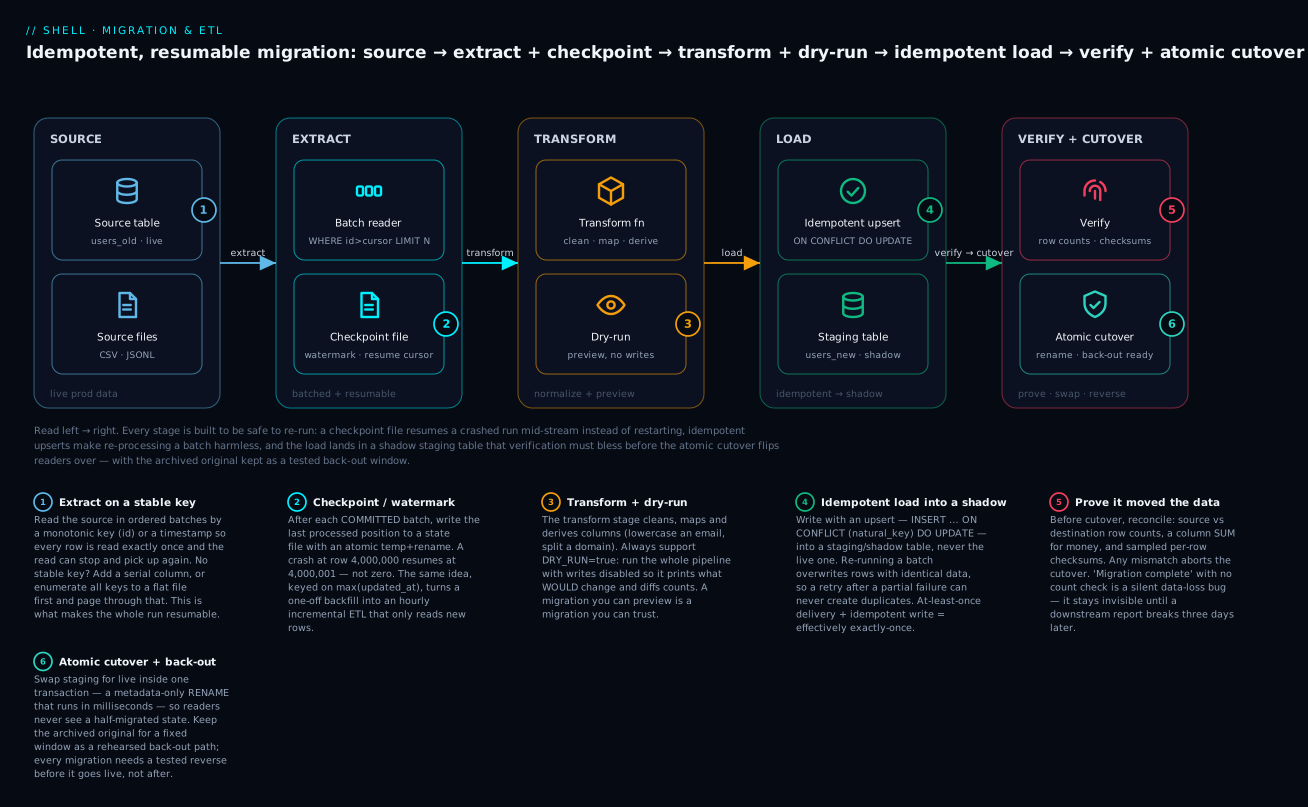
The diagram traces one migration left to right: the source is read in resumable batches tracked by a checkpoint file, each batch is transformed (and can be dry-run), the load upserts idempotently into a shadow staging table, and only after verification (counts + checksums) does the atomic cutover swap it in — with the archived original standing by as a back-out.
The Cardinal Property: Re-Runnable Or Not A Migration
A migration script that you can run twice and get the same final state is idempotent. A migration script that you run twice and get duplicate rows, half the data, or a corrupt state is a single-shot weapon. Every production migration script must be idempotent — because the alternative is “we can’t retry on failure, so we’d better hope nothing fails.”
The cardinal property has four pillars:
| Pillar | What it provides | Failure if missing |
|---|---|---|
| Checkpoint | Resume from where you stopped | Re-process N hours of data on every retry |
| Watermark | Know what you’ve already processed | Duplicates from re-reading the same source range |
| Staging table | Atomic cutover at the end | Partial state visible to readers mid-migration |
| Back-out plan | Reverse the change cleanly | “We can’t roll back” → 6-hour outage |
Every script in this lesson encodes these pillars. The companion lib/migrate.sh makes them one-liner calls.
The Extract → Transform → Load Shape
Before the pillars, hold the whole shape in your head. Every migration — old table to new, file to database, database to another database — is three stages, and each pillar attaches to a specific stage:
| Stage | What happens | The one job | Pillar that guards it |
|---|---|---|---|
| Extract | Read a batch from the source in a stable order | Read each row once, and be able to stop and resume | Checkpoint / watermark |
| Transform | Clean, map, derive, validate each row | Be a pure function — same input, same output | Dry-run (preview the transform) |
| Load | Write the batch to the destination | Be idempotent — re-writing is a no-op, not a duplicate | Staging table + upsert |
The discipline is to keep the three stages separable. When a migration goes wrong at 3am, “which stage failed?” is the first question, and a script that smears extract, transform, and load into one tangled loop can’t answer it. A clean pipeline reads like the stages: pull rows → shape rows → write rows → checkpoint → repeat.
# The shape, in one loop. Each stage is one clear step.
while batch=$(extract_next_batch "$cursor"); [[ -n "$batch" ]]; do
  transformed=$(printf '%s\n' "$batch" | transform)   # T: pure, testable
  printf '%s\n' "$transformed" | load_idempotent       # L: upsert, safe to redo
  cursor=$(last_key_of "$batch")
  checkpoint_write "$cursor"                            # after L commits, not before
done
Streaming vs Staging — Two Ways To Hold The Data
There are two fundamentally different ways a migration can carry data from extract to load, and choosing wrong is how a script eats all the RAM on the box:
- Streaming (row-at-a-time through a pipe): the source is a
psql/catproducer, piped into awhile readloop that transforms and loads each row. Memory stays flat no matter how big the source is — you only ever hold one row (plus a pipe buffer). This is the default and correct choice for large migrations. The cost: a crash mid-stream needs a checkpoint to know where it stopped, because the pipe holds no position. - Staging (materialise, then process): pull the whole batch (or the whole source) into a file or a variable first, then process it. Simpler to reason about and to re-read, but memory (or disk) scales with the data. Fine for a batch of 1,000 rows; fatal if you slurp 10 million rows into a bash variable with
rows=$(psql ...).
The sweet spot most migrations use is stream in batches: extract a bounded batch (say 1,000 rows) into memory, process it, checkpoint, discard it, extract the next. Bounded memory and a natural checkpoint boundary. That is exactly what Pillar 1 builds.
Batching For Memory — Why LIMIT N Is A Memory Knob
... WHERE id > $last ORDER BY id ASC LIMIT $BATCH isn’t just about throughput — the LIMIT is the ceiling on how much data is in flight at once. Batch size trades three things:
- Small batches (100): fine-grained recovery (a crash loses at most 100 rows of progress), low memory, but more round-trips and more checkpoint writes → slower.
- Large batches (100,000): fewer round-trips, higher throughput, but more memory per batch, a longer transaction (more lock contention), and a crash re-does more work.
Pick the batch size from the cost per row of your load: cheap upserts want big batches, expensive per-row work (an API call, a heavy transform) wants small ones. When in doubt, 1,000 is a sane default that keeps memory in kilobytes.
Partial Failure Is The Normal Case, Not The Exception
A migration that runs for two hours will eventually meet a network blip, a lock timeout, a full disk, or an operator pressing Ctrl-C. The design question is never “what if it fails?” — it’s “when it fails at row 4,000,000, what does the next run do?” Idempotency + checkpoint together make the answer boring: the next run reads the checkpoint, skips the 4M rows already loaded, re-does at most one partial batch (harmlessly, because the load is idempotent), and continues. Every pillar below exists to make partial failure a non-event.
Pillar 1: Checkpoint Files — Resume From The Middle
A migration that processes 10 million rows fails at row 4 million. Without a checkpoint, retry starts from zero — re-processing 4M rows you already wrote and risking duplicates. With a checkpoint, retry starts at 4M+1.
The pattern:
#!/usr/bin/env bash
set -euo pipefail

readonly STATE=/var/lib/migrate/users-2026-06-22.state
readonly BATCH=1000

mkdir -p "$(dirname "$STATE")"
last=$(cat "$STATE" 2>/dev/null || echo 0)

while :; do
  # Read next batch from source, starting after the last processed id
  rows=$(psql --tuples-only --no-align -F$'\t' --command="
    SELECT id, name, email FROM users_old
    WHERE id > $last ORDER BY id ASC LIMIT $BATCH
  ")
  [[ -z "$rows" ]] && break

  # Process the batch — apply transformations, write to destination
  while IFS=$'\t' read -r id name email; do
    upsert_user "$id" "$name" "$email"
    last="$id"
  done <<< "$rows"

  # Persist checkpoint AFTER the batch — atomic write via temp+mv
  echo "$last" > "$STATE.tmp"
  mv "$STATE.tmp" "$STATE"
done

echo "Migration complete; last processed id=$last"
Critical details:
- Atomic checkpoint write: temp file + mv. A crash mid-write of a non-atomic file would leave the checkpoint corrupted, defeating the whole point.
- Checkpoint after batch, not after each row: rows-per-batch is a knob. Smaller = finer-grained recovery, slower throughput. Common choice: 100-10,000 depending on cost-per-row of the upsert.
- Checkpoint file is per-migration, dated:
users-2026-06-22.state. Don’t reuse files across migrations — confusion guaranteed. ORDER BY id ASC: the checkpoint discipline only works if the source has a stable, monotonic key. If your source table has no such key, you must add one (a serial column or a composite key) before migrating.
Why temp+rename is atomic (the detail that matters). On a POSIX filesystem,
mvwithin the same directory is arename(2)syscall, andrename(2)is atomic: at any instant the checkpoint path points at either the old complete file or the new complete file — never a half-written one. If you instead didecho "$last" > "$STATE"and the process died mid-write, the file could be truncated to empty or a partial number, and the next run would resume from the wrong place (or from zero). The.tmpmust live on the same filesystem as the target, ormvdegrades to copy-then-delete and loses atomicity — so put it right next to the real file, not in/tmp.
Keyset Pagination Beats OFFSET (Do Not Page With LIMIT ... OFFSET)
The WHERE id > $last ... LIMIT $BATCH above is keyset pagination (a.k.a. seek pagination), and it is deliberately not LIMIT $BATCH OFFSET $n. The difference is not cosmetic:
OFFSET 4000000forces the database to scan and discard four million rows to reach the batch you want. Page N costs O(N) — the migration gets quadratically slower as it progresses, and the last batches crawl.WHERE id > $lastuses the primary-key index to seek straight to the next row. Every batch costs the same. It also survives concurrent inserts/deletes without skipping or repeating rows, whichOFFSETdoes not.
Keyset pagination is why the checkpoint is a key value (last id), not a row number. Store the last key, not the count.
When The Source Has No Monotonic Key
If you’re migrating from a key-value store or a denormalized log, you may not have an integer id. Solutions:
- Hash-based pagination: process all rows where
hash(key) % 100 = 0, then1, then2, etc. Each shard checkpoints independently. - Time-based: source has a
created_atcolumn. Watermark by timestamp (next pillar). - External enumeration: list all keys to a flat file at start, process the flat file with line-number checkpoint.
The last option is most robust for “mostly static” sources because the enumeration is taken once at the start and the migration is reading from a stable offline list, not the live source.
Pillar 2: Watermarks — The Key To Incremental ETL
A watermark is “the highest source value we’ve already processed.” It’s a checkpoint that’s also a resume cursor for incremental ETL — the migration runs once for backfill, then runs every hour to capture new rows.
#!/usr/bin/env bash
# incremental-etl.sh — runs every hour from cron
set -euo pipefail

readonly WATERMARK=/var/lib/etl/orders.watermark
readonly LOG=/var/log/etl/orders.log

mkdir -p "$(dirname "$WATERMARK")" "$(dirname "$LOG")"
last_ts=$(cat "$WATERMARK" 2>/dev/null || echo "1970-01-01T00:00:00")

# Read everything modified since the watermark
new_max=$(psql --tuples-only --no-align --command="
  WITH new_rows AS (
    SELECT * FROM orders WHERE updated_at > '$last_ts' ORDER BY updated_at ASC
  )
  SELECT max(updated_at) FROM new_rows
")

# Process the rows — left as exercise to reader (call upsert_order on each)
psql --tuples-only --no-align -F$'\t' --command="
  SELECT id, customer_id, total, updated_at FROM orders
  WHERE updated_at > '$last_ts' ORDER BY updated_at ASC
" | while IFS=$'\t' read -r id customer total ts; do
  upsert_order "$id" "$customer" "$total" "$ts"
done

# Advance the watermark — only if processing succeeded (set -e bails otherwise)
if [[ -n "$new_max" && "$new_max" != "" ]]; then
  echo "$new_max" > "$WATERMARK.tmp"
  mv "$WATERMARK.tmp" "$WATERMARK"
fi
The watermark advances monotonically. If the script fails midway, the watermark stays at the last successful run; the next hour’s run picks up everything since then.
Watermark + Late-Arriving Data
What if a row’s updated_at is set to a time before the current watermark (clock skew on writers, or out-of-order replication)? Late-arriving data is invisible to the watermark, and silently lost.
Mitigations:
- Lookback window: process anything in the last 24 hours, not just since the watermark. Idempotent upserts make duplicates harmless.
cutoff=$(date -u -d "24 hours ago" -Iseconds) effective_watermark=$(awk -v a="$last_ts" -v b="$cutoff" 'BEGIN { print (a < b) ? a : b }') - Source-level event time + watermark: add
event_timeseparate fromupdated_at. Watermark onevent_time, process by both. - Reconciliation pass: a separate weekly job that diff-counts source vs. destination and re-syncs any drift.
Reconciliation passes are the gold standard. The hourly watermark gives you near-realtime; the weekly recon catches everything else.
Portability note (this bites everyone).
date -u -d "24 hours ago" -Isecondsis GNUdate(Linux, which this course targets). BSD/macOSdatehas no-dand no-Iseconds; there the same thing isdate -u -v-24H +%FT%TZ. If your migration hosts are mixed, detect once:date --version >/dev/null 2>&1 && GNU=1. This lesson teaches the GNU form because production migration boxes are almost always Linux — but write the caveat into any script that might run on a developer’s Mac.
Pillar 3: Staging Tables — The Atomic Cutover
When migrating to a new schema or a new system, you have a window where:
- Source has all data, destination has none.
- You want to backfill destination without writers seeing inconsistent state.
- At the end, you want to atomically swap source for destination.
The staging table pattern:
- Create destination table
users_newwith new schema. - Backfill
users_newfromusers_old(resumable with checkpoint). - Verify row counts and checksums match.
- In a single transaction:
BEGIN; ALTER TABLE users RENAME TO users_old_archive; ALTER TABLE users_new RENAME TO users; COMMIT;.
The RENAME TO is metadata-only and runs in milliseconds. Readers see consistent state before and after; there’s no in-between.
#!/usr/bin/env bash
# users-migration.sh
set -euo pipefail

source /usr/local/lib/migrate.sh

readonly SRC=users_old
readonly STAGE=users_new
readonly FINAL=users

# 1. Create staging table
psql --command="
  CREATE TABLE IF NOT EXISTS $STAGE (
    id BIGINT PRIMARY KEY,
    name TEXT NOT NULL,
    email_norm TEXT NOT NULL,
    email_domain TEXT GENERATED ALWAYS AS (split_part(email_norm,'@',2)) STORED
  );
  CREATE INDEX IF NOT EXISTS $STAGE_email_idx ON $STAGE (email_norm);
"

# 2. Backfill (resumable with checkpoint)
migrate_resumable_batch "$SRC" "$STAGE" 1000 backfill_user_record

# 3. Verify
src_count=$(psql --tuples-only --no-align --command="SELECT count(*) FROM $SRC")
stg_count=$(psql --tuples-only --no-align --command="SELECT count(*) FROM $STAGE")
if (( src_count != stg_count )); then
  echo "FAIL: src=$src_count stage=$stg_count"
  exit 1
fi

# Domain-specific verification — sample a random subset and diff
migrate_sample_diff "$SRC" "$STAGE" 100 || exit 1

# 4. Atomic cutover
psql --command="
  BEGIN;
  ALTER TABLE $FINAL RENAME TO ${SRC}_archived;
  ALTER TABLE $STAGE RENAME TO $FINAL;
  COMMIT;
"

echo "OK: cutover complete. Old data in ${SRC}_archived (drop after 30 days)"
The 30-day retention on users_old_archived is your back-out window: if a problem surfaces in week 2, you can reverse the cutover by running the rename in opposite order.
When The Source Is The Live Production Table
The pattern above assumes you can read from users_old while it’s still being written. For most cases, this is fine because:
- Backfill reads at a snapshot (Postgres MVCC).
- New writes during backfill are captured by a trigger on the source that mirrors them to the staging table.
CREATE OR REPLACE FUNCTION users_mirror_trigger() RETURNS TRIGGER AS $$
BEGIN
  IF TG_OP = 'INSERT' OR TG_OP = 'UPDATE' THEN
    INSERT INTO users_new (id, name, email_norm)
    VALUES (NEW.id, NEW.name, lower(trim(NEW.email)))
    ON CONFLICT (id) DO UPDATE SET name = EXCLUDED.name, email_norm = EXCLUDED.email_norm;
  ELSIF TG_OP = 'DELETE' THEN
    DELETE FROM users_new WHERE id = OLD.id;
  END IF;
  RETURN NEW;
END;
$$ LANGUAGE plpgsql;

CREATE TRIGGER users_mirror AFTER INSERT OR UPDATE OR DELETE ON users
  FOR EACH ROW EXECUTE FUNCTION users_mirror_trigger();
Pattern: install trigger → start backfill → verify → cutover (RENAME TO) → drop trigger after observed stable.
This is exactly what gh-ost does for online schema change. For the shell version, the discipline is to install the trigger first, then start the backfill — so any writes during backfill are captured.
Why MVCC makes the backfill consistent. Postgres gives each statement (or transaction, in
REPEATABLE READ) a snapshot: it sees the database as it was at a single instant, ignoring rows committed by other transactions after that point. So a long backfillSELECTreads a coherent picture even while writers hammer the table — no torn reads, no rows appearing twice because someone updated them mid-scan. The trigger is what covers the gap: the snapshot misses writes that land after it started, and the trigger mirrors exactly those into staging. Snapshot for the past, trigger for the present — together they cover every row.
Pillar 4: The Back-Out Plan
Every migration must have a documented, tested back-out path. Without it, you’re betting the company on the migration script being perfect.
A back-out plan answers:
- What is reversed? (“Drop the new column”, “Rename users_new back to users_old”, “Restore from backup”.)
- At what point in the migration is each step viable? (Pre-cutover: just delete staging table. Post-cutover-pre-archive-drop: rename back. Post-archive-drop: restore from backup.)
- What is the RTO of the back-out? (Pre-cutover: seconds. Post-archive-drop: 4 hours from PITR.)
- What data loss does back-out cause? (Writes since cutover are lost — measure how many.)
Sample Back-Out Document
# Back-out plan: users-migration v1

## Stage A — pre-staging-table-creation
- Action: nothing, no state has changed.
- RTO: 0.

## Stage B — staging table created, backfill in progress
- Action: `DROP TABLE users_new; -- and disable trigger if installed`
- RTO: < 1 min.
- Data loss: none (source untouched).

## Stage C — backfill complete, before cutover
- Action: drop staging table + trigger.
- RTO: < 5 min.
- Data loss: none.

## Stage D — cutover done, archive table still present (within 30 days)
- Action:
  ```sql
  BEGIN;
  ALTER TABLE users RENAME TO users_new_archived;
  ALTER TABLE users_old_archived RENAME TO users;
  COMMIT;
- RTO: < 5 min.
- Data loss: any writes since cutover are lost. Measure via:
SELECT max(updated_at) FROM users WHERE updated_at > '<cutover_time>';
Stage E — archive table dropped (post day 30)
- Action: PITR restore from backup taken at cutover.
- RTO: 2-4 hours.
- Data loss: 0 with PITR; full data since cutover replayed.
The discipline is to **rehearse stages B-D in a staging environment** before going live. Stage E should be tested at least once a year as part of standard DR drills.

> **Back-out vs rollback — the words matter.** A database *rollback* is free and automatic: it un-does an *uncommitted* transaction. A *back-out* (sometimes "compensation") reverses an *already-committed* change and is neither free nor automatic — you have to script it, and it may lose data written since the change. Wrapping your cutover in `BEGIN; … COMMIT;` gives you rollback safety *up to the COMMIT*; after that, only your back-out plan protects you. This is why the archive table and its retention window exist: they are the raw material your back-out needs. Design the reverse path at the same time as the forward path, never after.

## The Drop-In `lib/migrate.sh`

```bash
# lib/migrate.sh — sourced helpers for migration scripts.
#
# Required env:
#   MIGRATION_NAME — short identifier (e.g., users-2026-06-22)
#
# Optional env:
#   MIGRATION_STATE_DIR — default /var/lib/migrate
#   DRY_RUN — true|false, default false

set -o errexit -o nounset -o pipefail

: "${MIGRATION_NAME:?MIGRATION_NAME must be set}"
: "${MIGRATION_STATE_DIR:=/var/lib/migrate}"
: "${DRY_RUN:=false}"

readonly MIGRATE_STATE="$MIGRATION_STATE_DIR/$MIGRATION_NAME.state"
readonly MIGRATE_LOG="$MIGRATION_STATE_DIR/$MIGRATION_NAME.log"

migrate_log() {
  printf '[%s] [%s] %s\n' "$(date -Iseconds)" "$MIGRATION_NAME" "$*" \
    | tee -a "$MIGRATE_LOG"
}

migrate_init() {
  mkdir -p "$MIGRATION_STATE_DIR"
}

# Atomic checkpoint write
migrate_checkpoint_write() {
  local value="$1"
  echo "$value" > "$MIGRATE_STATE.tmp"
  mv "$MIGRATE_STATE.tmp" "$MIGRATE_STATE"
}

migrate_checkpoint_read() {
  cat "$MIGRATE_STATE" 2>/dev/null || echo 0
}

# Resumable batch loop. Args: src_table, dest_table, batch_size, process_fn
# process_fn is called with (id, line) for each row.
migrate_resumable_batch() {
  local src="$1" dest="$2" batch="$3" process_fn="$4"
  local last total=0

  migrate_init
  last=$(migrate_checkpoint_read)
  migrate_log "START batch migration: src=$src dest=$dest batch=$batch resume_from=$last"

  while :; do
    local rows
    rows=$(psql --tuples-only --no-align -F$'\t' --command="
      SELECT * FROM $src WHERE id > $last ORDER BY id ASC LIMIT $batch
    ")
    [[ -z "$rows" ]] && break

    local batch_count=0
    while IFS=$'\t' read -r id rest; do
      [[ -z "$id" ]] && continue
      if $DRY_RUN; then
        migrate_log "DRY-RUN: would process id=$id"
      else
        "$process_fn" "$id" "$rest"
      fi
      last="$id"
      batch_count=$((batch_count + 1))
    done <<< "$rows"

    migrate_checkpoint_write "$last"
    total=$((total + batch_count))
    migrate_log "batch=$batch_count total=$total last=$last"
  done

  migrate_log "DONE: total=$total final_id=$last"
}

# Watermark-based incremental. Args: src_table, watermark_col, process_fn
migrate_watermark_incremental() {
  local src="$1" wmcol="$2" process_fn="$3"
  local last new_max

  migrate_init
  last=$(migrate_checkpoint_read)
  [[ -z "$last" || "$last" == "0" ]] && last="1970-01-01T00:00:00"
  migrate_log "START watermark: src=$src col=$wmcol since=$last"

  # Get new max for atomic advance
  new_max=$(psql --tuples-only --no-align --command="
    SELECT max($wmcol) FROM $src WHERE $wmcol > '$last'
  ")
  [[ -z "$new_max" ]] && { migrate_log "no new rows since $last"; return 0; }

  psql --tuples-only --no-align -F$'\t' --command="
    SELECT * FROM $src WHERE $wmcol > '$last' AND $wmcol <= '$new_max'
    ORDER BY $wmcol ASC
  " | while IFS=$'\t' read -r line; do
    if $DRY_RUN; then
      migrate_log "DRY-RUN: $line"
    else
      "$process_fn" "$line"
    fi
  done

  if ! $DRY_RUN; then
    migrate_checkpoint_write "$new_max"
  fi
  migrate_log "DONE: advanced watermark to $new_max"
}

# Verify counts match between source and destination. Args: src, dest, [where_clause]
migrate_verify_counts() {
  local src="$1" dest="$2" where="${3:-}"
  local src_count dest_count
  src_count=$(psql --tuples-only --no-align --command="SELECT count(*) FROM $src ${where:+WHERE $where}")
  dest_count=$(psql --tuples-only --no-align --command="SELECT count(*) FROM $dest ${where:+WHERE $where}")

  migrate_log "VERIFY: src=$src_count dest=$dest_count"
  if [[ "$src_count" != "$dest_count" ]]; then
    migrate_log "FAIL: count mismatch (delta=$((src_count - dest_count)))"
    return 1
  fi
  migrate_log "OK: counts match"
}

# Sample-and-diff verifier. Args: src, dest, sample_size
migrate_sample_diff() {
  local src="$1" dest="$2" n="${3:-100}"
  local mismatches=0

  for id in $(psql --tuples-only --no-align --command="SELECT id FROM $src ORDER BY random() LIMIT $n"); do
    local s d
    s=$(psql --tuples-only --no-align --command="SELECT md5(row($src.*)::text) FROM $src WHERE id=$id")
    d=$(psql --tuples-only --no-align --command="SELECT md5(row($dest.*)::text) FROM $dest WHERE id=$id")
    if [[ "$s" != "$d" ]]; then
      migrate_log "DIFF id=$id"
      mismatches=$((mismatches + 1))
    fi
  done

  migrate_log "Sample diff: $mismatches/$n mismatches"
  (( mismatches == 0 ))
}

# Atomic cutover via rename. Args: live_table, staging_table, archive_suffix
migrate_cutover() {
  local live="$1" stage="$2" suffix="${3:-_archived_$(date +%Y%m%d)}"

  migrate_log "CUTOVER: $live → ${live}${suffix}; $stage → $live"
  if $DRY_RUN; then
    migrate_log "DRY-RUN: skipping cutover"
    return 0
  fi

  psql --command="
    BEGIN;
    ALTER TABLE $live RENAME TO ${live}${suffix};
    ALTER TABLE $stage RENAME TO $live;
    COMMIT;
  "
  migrate_log "OK: cutover complete"
}
Worked Example: User Email Normalization Migration
#!/usr/bin/env bash
# users-email-normalize-migration.sh
set -euo pipefail

MIGRATION_NAME=users-email-normalize-2026-06-22
DRY_RUN=${DRY_RUN:-false}

source /usr/local/lib/migrate.sh

# Process function — called once per source row
process_user() {
  local id="$1" line="$2"
  local name email
  name=$(echo "$line" | awk -F$'\t' '{print $1}')
  email=$(echo "$line" | awk -F$'\t' '{print $2}')
  local email_norm
  email_norm=$(echo "$email" | tr '[:upper:]' '[:lower:]' | sed 's/^ *//; s/ *$//')

  psql --command="
    INSERT INTO users_new (id, name, email_norm)
    VALUES ($id, '$(echo "$name" | sed "s/'/''/g")', '$email_norm')
    ON CONFLICT (id) DO UPDATE SET name = EXCLUDED.name, email_norm = EXCLUDED.email_norm
  "
}

# 1. Backfill
migrate_resumable_batch users users_new 1000 process_user

# 2. Verify counts
migrate_verify_counts users users_new

# 3. Sample-diff (NB: this won't match because schema differs — example only)
# migrate_sample_diff users users_new 100

# 4. Cutover (run only when verified — typically a separate runbook step)
# migrate_cutover users users_new
The ON CONFLICT (id) DO UPDATE is the upsert that makes processing idempotent — re-running the same row just overwrites the destination with the same data, no duplicates.
Escape SQL Single Quotes — The sed "s/'/''/g" Trick
In Postgres, single quotes in string literals are escaped by doubling: 'O''Brien'. The sed "s/'/''/g" does this. Use parameterized queries (psql -v, prepared statements) wherever possible — the sed approach is fine for trusted internal data but is SQL injection waiting for user-controlled input.
For untrusted input, switch to a real DB driver:
python3 -c "
import psycopg2, sys
conn = psycopg2.connect(...)
cur = conn.cursor()
for line in sys.stdin:
    name, email = line.strip().split('\t')
    cur.execute('INSERT ... VALUES (%s, %s, %s)', (id, name, email))
conn.commit()
"
The hybrid pattern — bash for orchestration, Python for DB work — is the right answer for migrations involving user-controlled fields.
ETL From Files: The Same Pattern, Different Source
ETL from CSV/JSONL into a database uses the same checkpoint discipline:
#!/usr/bin/env bash
# csv-to-db-etl.sh
set -euo pipefail

MIGRATION_NAME=etl-orders-csv-2026-06-22
source /usr/local/lib/migrate.sh

readonly SRC=/data/orders.csv

migrate_init
last_line=$(migrate_checkpoint_read)
[[ -z "$last_line" || "$last_line" == "0" ]] && last_line=0

# tail -n +$((last_line + 2)) skips header and previously-processed lines
total=0
tail -n "+$((last_line + 2))" "$SRC" | while IFS=, read -r id customer total ts; do
  migrate_log "DEBUG: processing line $((last_line + 1))"
  if ! $DRY_RUN; then
    psql --command="INSERT INTO orders (id,customer,total,ts) VALUES ($id,$customer,$total,'$ts') ON CONFLICT (id) DO NOTHING"
  fi
  last_line=$((last_line + 1))
  if (( last_line % 1000 == 0 )); then
    migrate_checkpoint_write "$last_line"
    migrate_log "checkpoint: $last_line"
  fi
done
migrate_checkpoint_write "$last_line"
migrate_log "DONE: processed up to line $last_line"
The line-number checkpoint works because CSV is read in order. For JSONL the same pattern applies. For Parquet you’d use row-group-level checkpoints or a real ETL tool (dbt, Airflow).
A subtle bug in the loop above — know it. The
whileloop runs in a subshell because it’s on the right of a pipe (tail | while ...). That meanslast_lineincremented inside the loop is lost when the pipe ends — the finalmigrate_checkpoint_write "$last_line"writes the value from before the loop, not after. On real GNU/bash this is the classic “pipe subshell eats my variable” trap. The robust fixes: feed the loop with process substitution so the loop runs in the current shell —while IFS=, read -r ... done < <(tail -n "+$((last_line+2))" "$SRC")— or checkpoint inside the loop (as the% 1000line already does) and read the final position back from the state file. The course’s I/O-redirection and process-substitution lesson covers exactly why< <(...)keeps you in the parent shell.
Going Deeper
This section is for the reader who already ships migrations and wants the internals, the scaling limits, and the failure modes that only show up at ten million rows and 2am.
Exactly-Once Is A Myth — Chase Effectively-Once
You will read vendor copy promising “exactly-once” data movement. In a system where the network can drop an acknowledgement, exactly-once delivery is provably impossible: the sender that didn’t get an ack cannot know whether the write landed, so it must choose to retry (risking a duplicate — at-least-once) or not (risking a loss — at-most-once). Every serious migration chooses at-least-once and then makes duplicates harmless with an idempotent load. That combination — at-least-once delivery + idempotent write keyed by a natural key — is effectively-once, and it is the strongest guarantee shell (or anything else) can actually give. This is why Pillar 4’s upsert isn’t optional polish: it’s the mechanism that converts “might run twice” into “runs to the same state.”
Transactional Checkpoints — Commit The Position With The Data
Pillar 1 writes the checkpoint file after the batch’s COMMIT. There’s a narrow window between the two: if the process dies after the DB commit but before the file write, the next run re-does that batch. With an idempotent load that’s harmless (it re-upserts identical rows) — which is exactly why order matters:
- Load first, checkpoint second → worst case is re-processing one batch. Safe if the load is idempotent.
- Checkpoint first, load second → worst case is skipping a batch that never landed. Data loss. Never do this.
The gold-standard version removes the window entirely by storing the checkpoint in the database, in the same transaction as the data:
BEGIN;
  -- ... the batch's upserts ...
  INSERT INTO migration_state (name, last_id) VALUES ('users-mig', 4000000)
    ON CONFLICT (name) DO UPDATE SET last_id = EXCLUDED.last_id;
COMMIT;
Now the position and the data commit atomically: either both land or neither does. A file checkpoint can’t achieve that (the file and the DB are two systems); it’s the pragmatic choice when the destination isn’t transactional or is a different system entirely.
Parallel & Sharded Migrations — And The Single-Runner Lock
A single-threaded backfill of 500M rows can take a day. Shard it: split the key space into N ranges (or hash(key) % N) and run N workers, each with its own checkpoint file, so a crashed shard resumes independently:
# shard k of N — its own state file, its own key range
migrate_shard() {
  local k="$1" n="$2"
  MIGRATION_NAME="users-mig-shard-$k" \
    psql ... --command="SELECT * FROM users WHERE id % $n = $k AND id > $last ORDER BY id LIMIT 1000"
}
The danger with any resumable job is two copies running at once — a stuck cron plus a manual re-run — both reading the same checkpoint and double-writing (idempotency saves correctness but wastes hours and hammers the DB). Guard every migration with an exclusive lock so a second invocation exits immediately:
exec 9>/var/lock/users-mig.lock
flock -n 9 || { echo "another run holds the lock; exiting"; exit 0; }
# ... migration body; lock releases automatically when fd 9 closes at exit
flock is Linux/util-linux; it’s the standard single-runner guard on production hosts. (macOS lacks flock by default — another reason migrations belong on Linux.)
Reconciliation: The Three-Tier Proof That Data Moved
“Verify” is not one check — it’s a ladder from cheap-and-weak to expensive-and-strong. Run as many tiers as the data’s value justifies:
| Tier | Check | Catches | Cost |
|---|---|---|---|
| 1 | Row count match | Whole batches dropped | O(1)-ish, always run it |
| 2 | Column SUM / min / max on key numeric fields | Wrong values, truncation, sign flips | One aggregate scan |
| 3 | Sampled per-row checksum (random N rows) | Corruption in specific rows | N point lookups |
| 4 | Full checksum of every row, sorted | Any difference at all | Full scan both sides — reconciliation job, not inline |
Tiers 1-3 are the inline pre-cutover gate (migrate_verify_counts + a sum check + migrate_sample_diff). Tier 4 is the weekly reconciliation that catches late-arriving drift. A quick shell reconciliation between two extracts, no database round-trips per row:
# Which ids are in source but missing from destination? (sorted-set difference)
comm -23 <(sort src_ids.txt) <(sort dst_ids.txt)      # in src, not in dst  → unmigrated
comm -13 <(sort src_ids.txt) <(sort dst_ids.txt)      # in dst, not in src  → orphans

# Do the money totals agree to the cent?
awk -F, 'NR>1{s+=$2} END{printf "%.2f\n", s}' src.csv   # compare to same over dst.csv

# Row-level drift: join on id, flag rows whose amount differs
join <(sort src.txt) <(sort dst.txt) | awk '$2!=$3{print "DRIFT id="$1" src="$2" dst="$3}'
For financial data, a sum check is non-negotiable: a count can match while values are silently wrong (a truncated numeric, a timezone-shifted timestamp). Count says “the right number of rows”; sum says “the right data in them.”
CDC vs Watermark — When Polling Isn’t Enough
The watermark pattern polls: every hour it asks “what changed since $last?” That’s simple and robust but has two limits — it can’t see deletes (a deleted row just stops appearing; the watermark never learns it’s gone), and its freshness is bounded by the poll interval. Change Data Capture (CDC) reads the database’s write-ahead log (Postgres logical replication, MySQL binlog) and streams every insert/update/delete as it happens. Reach for CDC when you need deletes reflected, sub-second freshness, or a true zero-loss stream; stick with a shell watermark when hourly is fine and you’d rather not run replication infrastructure. Many teams do both: CDC for the live tail, a weekly full reconciliation (Tier 4) to catch anything the stream dropped.
The Performance Cliff: One psql Per Row
The examples call psql (or python3) once per row for clarity, but each call is a fork + exec + TCP connect + auth — easily 10-50ms of pure overhead per row. At 10M rows that’s days of overhead alone. This is the single biggest reason shell migrations feel slow. Fixes, in order of impact:
- Bulk load, not row inserts: pipe a whole batch into
psql’s\copy/COPY FROM STDIN. One connection, thousands of rows, orders of magnitude faster. - Batch the inserts: build a multi-row
INSERT ... VALUES (...),(...),(...) ON CONFLICT ...per batch instead of one statement per row. - One long-lived connection: keep a single
psqlopen and feed it statements, rather than reconnecting each time. - Know when to leave the shell: heavy per-row transformation or untrusted input is Python/
psycopg2territory (parameterised, one connection, real types). Bash orchestrates; the driver does the DB work. The course’s performance and profiling lesson measures exactly this fork/exec cost.
Backpressure — Don’t Melt The Destination
A migration that loads as fast as it can will happily saturate the destination’s IO/CPU and degrade live traffic sharing that database. Production backfills throttle themselves: a short sleep between batches, a smaller batch size during business hours, or a check that pauses when replication lag or destination load crosses a threshold. “Finish by tomorrow morning without paging anyone” usually beats “finish in two hours and cause an incident.”
Portability Ledger (GNU/Linux target vs BSD/macOS dev box)
This course targets Linux + bash 4/5 + GNU coreutils; migration hosts are almost always Linux. But you’ll draft scripts on a Mac, so know where they’ll bite:
| Feature used here | GNU/Linux (target) | BSD/macOS (dev box) |
|---|---|---|
| Timestamp math | date -u -d "24 hours ago" -Iseconds |
date -u -v-24H +%FT%TZ (no -d, no -Iseconds) |
| Checksums | sha256sum, md5sum |
shasum -a 256, md5 |
| In-place edit | sed -i 's/…/…/' |
sed -i '' 's/…/…/' (mandatory empty suffix) |
| Read file into array | mapfile -t arr < f (bash 4+) |
bash 3.2 has no mapfile |
| Single-runner lock | flock -n 9 |
not present by default |
Detect rather than assume: date --version >/dev/null 2>&1 tells you it’s GNU. Or just declare “this runs on Linux” in the runbook and stop supporting two worlds — a migration is not the place for clever cross-platform gymnastics.
The 8 Footguns
1. Non-Idempotent Processing
INSERT INTO ... (without ON CONFLICT) on a re-run gives unique-constraint violations or duplicates. Fix: Always INSERT ... ON CONFLICT DO UPDATE (Postgres) or INSERT IGNORE / ON DUPLICATE KEY UPDATE (MySQL), keyed by a natural key not a surrogate.
2. Checkpoint Saved Before Batch Commits
Save checkpoint before COMMIT and a crash leaves the checkpoint advanced past data that didn’t actually persist. Fix: Write checkpoint after commit. If using transactions, save the checkpoint inside the same transaction.
3. Watermark On updated_at With No Lookback
Late-arriving data is silently dropped. Fix: Lookback window of N hours, idempotent processing makes overlap harmless.
4. Mistaking set -e For Error Handling
set -e aborts on first error, but it does NOT abort on errors inside &&/|| chains, in pipes (without set -o pipefail), or in subshells. A failed psql inside a pipe might still let the script proceed and write checkpoint as if it succeeded. Fix: set -o pipefail, explicit return-code checks on critical commands.
5. Forgetting To Run The Trigger Before Backfill (Live Source)
If the trigger is added after backfill starts, writes during backfill are not mirrored to staging. Fix: Trigger first, then backfill. Verify trigger captures writes by running INSERT on source and checking destination immediately.
6. Cutover With Active Long Transactions
ALTER TABLE ... RENAME TO ... requires an ACCESS EXCLUSIVE lock; if a long-running query holds an ACCESS SHARE lock, the rename blocks indefinitely. Fix: Cancel long queries before cutover, or SET lock_timeout = '5s' to fail fast. Run cutover in a low-traffic window.
7. Missing Back-Out Test In Staging
You wrote the back-out plan but never executed it. The first time you actually run it, it fails on a permission issue or a forgotten cascade. Fix: Rehearse the back-out in staging before running the migration in prod. The dress rehearsal catches the broken back-out.
8. ETL Loads Without Validation Of Counts/Sums
Migration says “complete” but a transient psql error mid-batch silently dropped 50,000 rows. The loss is invisible until a downstream report fails three days later. Fix: Always run migrate_verify_counts after backfill, and a sum-of-numeric-columns check (SELECT sum(amount) FROM src/dest) for financial data. Differences > 0 abort the cutover.
Common Beginner Mistakes
These are mental-model errors — the wrong belief that produces the footguns above. Fix the belief and the bugs stop coming.
-
“It exited 0, so the data is there.” Exit status tells you the script didn’t crash; it says nothing about whether the rows arrived correctly. A migration proves success with a count + sum + sample reconciliation, not with
echo "done". Right model: a migration isn’t complete when the script ends — it’s complete when verification passes. -
“Idempotent means it only runs once.” Backwards. Idempotent means it’s safe to run many times and always lands in the same state. You want to be able to re-run it — that’s the whole point. Right model: idempotency is what makes a retry boring instead of dangerous.
-
“I’ll add resume/checkpoint later if I need it.” Resumability is a structural property — it dictates that you page by key, load idempotently, and checkpoint after commit. Retrofitting it onto a script that slurped everything into one transaction means a rewrite. Right model: design for resume from the first line, because the failure that needs it always arrives before the refactor does.
-
“Dry-run is a nice-to-have.” A migration you cannot preview is a migration you cannot review. Dry-run (writes disabled, prints the diff) is how you and your reviewer see what will change before it changes irreversibly. Right model:
DRY_RUN=trueis a required feature, wired in from the start, not bolted on after the scare. -
“The checkpoint is just a progress bar.” It’s a correctness mechanism. If it’s written non-atomically, or before the data commits, it will happily point at data that isn’t there and cause silent loss or skips. Right model: the checkpoint is as load-bearing as the data — write it atomically (temp+rename), and only after the batch commits.
-
“A migration is a script.” The script is one step. The deliverable is a runbook: pre-checks, the script, verification, cutover, back-out, post-checks — plus who owns it and how to reverse it. Right model: you ship a runbook that happens to invoke a script, not a script someone runs and hopes.
-
“Bigger batches are always faster.” Up to a point — then the transaction gets long, locks pile up, memory balloons, and a crash re-does more work. Right model: batch size is a trade-off knob (recovery granularity vs throughput vs lock time), not a “max it out” dial. Start at ~1,000 and measure.
Practice Challenges
Work these in order — each builds on the last. Try before opening the solution; the one-line why is the part worth internalising.
1. Atomic checkpoint helper (Beginner)
Write checkpoint_write <value> that persists <value> to ./mig.state such that a crash mid-write can never leave a partial file. Then read it back with a default of 0 when the file doesn’t exist yet.
<details> <summary>Solution</summary>
STATE=./mig.state
checkpoint_write() { printf '%s\n' "$1" > "$STATE.tmp" && mv "$STATE.tmp" "$STATE"; }
checkpoint_read()  { cat "$STATE" 2>/dev/null || echo 0; }

checkpoint_write 4000000
echo "resume from: $(checkpoint_read)"      # -> 4000000
Why: mv on the same filesystem is an atomic rename(2) — readers see the old or new file, never a half-written one. Writing straight to $STATE risks a truncated checkpoint and a resume from the wrong place.
</details>
2. Resume a CSV load from a line checkpoint (Beginner)
Given orders.csv (a header + data rows) and a checkpoint holding the count of data lines already loaded, print only the not-yet-processed rows — skipping both the header and everything already done.
<details> <summary>Solution</summary>
last=$(checkpoint_read)                      # e.g. 3 lines already done
# +N is 1-based; header is line 1, so skip header + $last processed lines
tail -n "+$(( last + 2 ))" orders.csv
For last=3: tail -n +5 starts at the 5th physical line (header=1, rows 1-3 = lines 2-4, so the next new row is line 5).
Why: CSV is read in order, so a line-number checkpoint is a valid resume cursor. +$((last+2)) accounts for the one header line plus the last data lines already loaded.
</details>
3. Make the load idempotent (Intermediate)
You re-run a load and get duplicate key value violates unique constraint. Rewrite the insert so re-running the same row is a harmless no-op-or-update, keyed by the natural key id. Give both the Postgres and MySQL forms.
<details> <summary>Solution</summary>
-- Postgres: upsert on the natural key
INSERT INTO orders (id, customer, total)
VALUES (:id, :customer, :total)
ON CONFLICT (id) DO UPDATE
  SET customer = EXCLUDED.customer, total = EXCLUDED.total;

-- MySQL equivalent
INSERT INTO orders (id, customer, total)
VALUES (:id, :customer, :total)
ON DUPLICATE KEY UPDATE customer = VALUES(customer), total = VALUES(total);
Why: the upsert converts “insert or explode” into “insert or overwrite with identical data” — the write becomes idempotent, so a retry after a partial failure can never create duplicates. Key on the natural key (id), never an auto-increment surrogate.
</details>
4. Three-way reconciliation (Intermediate)
You have src_ids.txt and dst_ids.txt (one id per line) plus src.csv/dst.csv with an amount column. Prove the migration is complete: (a) list any ids in source but missing from destination, and (b) confirm the money totals match to the cent.
<details> <summary>Solution</summary>
# (a) set difference — in source but not in destination
comm -23 <(sort src_ids.txt) <(sort dst_ids.txt)     # empty output = nothing unmigrated

# (b) column sums must agree
s=$(awk -F, 'NR>1{s+=$2} END{printf "%.2f", s}' src.csv)
d=$(awk -F, 'NR>1{s+=$2} END{printf "%.2f", s}' dst.csv)
[[ "$s" == "$d" ]] && echo "OK sums match ($s)" || echo "FAIL src=$s dst=$d"
Why: a count/set check catches dropped rows; a sum check catches wrong values (truncation, timezone shifts) that a count can’t see. For money you need both — matching row counts with silently wrong amounts is the classic invisible migration bug. </details>
5. Dry-run with a count diff (Advanced)
Add a DRY_RUN mode to a loader: when DRY_RUN=true, it must perform no writes but still report exactly how many rows would be inserted vs updated, so a reviewer can sanity-check the blast radius before the real run.
<details> <summary>Solution</summary>
: "${DRY_RUN:=false}"
would_insert=0 would_update=0
while IFS=$'\t' read -r id rest; do
  exists=$(psql -tA -c "SELECT 1 FROM orders WHERE id=$id")
  if [[ -z "$exists" ]]; then would_insert=$((would_insert+1)); else would_update=$((would_update+1)); fi
  if ! $DRY_RUN; then
    psql -c "INSERT INTO orders ... ON CONFLICT (id) DO UPDATE ..."
  fi
done < <(psql -tA -F$'\t' -c "SELECT id, ... FROM staging")
echo "DRY_RUN=$DRY_RUN would_insert=$would_insert would_update=$would_update"
Why: a dry-run makes the change reviewable — “12 inserts, 3 updates” is a number a human can approve; “trust me” is not. Note the < <(...) process substitution keeps the loop in the current shell so the counters survive (a piped while runs in a subshell and loses them).
</details>
6. Single-runner watermark ETL with lookback (Advanced)
Write the skeleton of an hourly incremental ETL that (a) refuses to run if another copy is already running, (b) processes rows since the last watermark minus a 24h lookback so late-arriving rows aren’t lost, and © only advances the watermark after a successful pass.
<details> <summary>Solution</summary>
#!/usr/bin/env bash
set -euo pipefail
exec 9>/var/lock/orders-etl.lock
flock -n 9 || { echo "already running"; exit 0; }        # (a) single runner

WM=/var/lib/etl/orders.watermark
last=$(cat "$WM" 2>/dev/null || echo "1970-01-01T00:00:00")
cutoff=$(date -u -d "24 hours ago" -Iseconds)             # GNU date (Linux)
effective=$(awk -v a="$last" -v b="$cutoff" 'BEGIN{print (a<b)?a:b}')  # (b) lookback

new_max=$(psql -tA -c "SELECT max(updated_at) FROM orders WHERE updated_at > '$effective'")
[[ -z "$new_max" ]] && { echo "no new rows"; exit 0; }

psql -tA -F$'\t' -c "SELECT * FROM orders WHERE updated_at > '$effective' ORDER BY updated_at" \
  | while IFS=$'\t' read -r line; do process_order "$line"; done

printf '%s\n' "$new_max" > "$WM.tmp" && mv "$WM.tmp" "$WM"   # (c) advance only on success
Why: flock stops a stuck cron + manual re-run from double-processing; the min(watermark, now-24h) lookback re-scans a safe overlap so out-of-order writes are captured (idempotent upserts make the overlap harmless); advancing the watermark last means a mid-run crash simply re-runs the same window next hour. On BSD/macOS there’s no flock and date needs -v-24H — this belongs on Linux.
</details>
The Migration Runbook Template
Every migration script should have a parallel runbook document. Sample skeleton:
# Migration: <name>
**Owner**: <team>
**Risk**: low/medium/high
**Estimated downtime**: <duration>

## Pre-checks
- [ ] Staging environment migration completed cleanly
- [ ] Back-out plan tested in staging
- [ ] Source table has stable monotonic key OR watermark column
- [ ] Replication lag < 30s (if cross-region)
- [ ] No long-running queries (cancel any active sessions in target schema)
- [ ] Backup taken within last 24h

## Execution
1. Install mirror trigger:    `migration-trigger.sql` — runtime ~5s
2. Start backfill:            `users-migration.sh` — runtime ~2h
3. Verify:                    `verify.sh` — runtime ~10min
4. Cutover (low-traffic window):  `cutover.sql` — runtime <1s
5. Drop trigger:              `drop-trigger.sql` — runtime ~5s

## Post-checks
- [ ] Application smoke test passes
- [ ] Replication caught up
- [ ] Monitoring graphs show no error spike
- [ ] Schedule archive table drop for +30 days

## Back-out
See backout.md.
The runbook is the operational artifact. The script is just one of its steps.
Glossary
- Migration — a one-off move of data from one place/shape to another (old table → new, file → DB), usually transforming it on the way.
- ETL — Extract, Transform, Load: the same shape run repeatedly (often on a schedule) rather than once.
- Idempotent — safe to run any number of times, always landing in the same correct final state. The cardinal property of a migration.
- Checkpoint — a saved position (usually a key value) marking the last successfully processed row, so a re-run resumes instead of restarting. Written atomically, after the batch commits.
- Watermark — a checkpoint on a timestamp/version column (“highest source value processed”); turns a backfill into an incremental ETL.
- Keyset (seek) pagination — reading the next batch with
WHERE key > $last ... LIMIT Ninstead ofOFFSET; constant cost per page and stable under concurrent writes. - Backfill — the initial bulk load of all existing data into the destination (as opposed to the ongoing incremental catch-up).
- Upsert — insert-or-update:
INSERT ... ON CONFLICT DO UPDATE(Postgres) /ON DUPLICATE KEY UPDATE(MySQL). The mechanism that makes a load idempotent. - Natural key vs surrogate key — a natural key identifies a row by real business data (email, order number); a surrogate key is a generated id (auto-increment). Idempotent loads must key on the natural key.
- Staging / shadow table — a destination table populated in the background while the live table serves traffic; swapped in atomically at cutover.
- Cutover — the moment the destination replaces the source, ideally via a metadata-only
RENAMEinside one transaction so readers never see a half-migrated state. - Back-out (compensation) — a scripted, tested reversal of an already-committed change; distinct from a database rollback, which only un-does an uncommitted transaction.
- Reconciliation — proving source and destination agree via row counts, column sums, and per-row checksums; the evidence that the migration actually moved the data.
- Dry-run — executing the whole pipeline with writes disabled so it reports what would change; makes a migration reviewable before it’s irreversible.
- Streaming vs staging — carrying data row-at-a-time through a pipe (flat memory) vs materialising it first (memory scales with data). Most migrations stream in bounded batches.
- Late-arriving data — rows whose timestamp is older than the current watermark (clock skew, out-of-order replication); handled with a lookback window and idempotent loads.
- Lookback window — re-scanning the last N hours on every run, not just since the watermark, so out-of-order rows are captured; safe because the load is idempotent.
- CDC (Change Data Capture) — streaming every insert/update/delete from the database’s write-ahead log/binlog; the alternative to polling with a watermark, and the only way to reflect deletes.
- MVCC snapshot — a consistent point-in-time view of the database that lets a long backfill read a coherent picture while writers continue.
- At-least-once / effectively-once — a retrying producer may deliver a row more than once (at-least-once); an idempotent load makes duplicates harmless, yielding effectively-once — the strongest achievable guarantee.
- RTO (Recovery Time Objective) — how long a recovery/back-out takes; a required field of the back-out plan.
- PITR (Point-In-Time Recovery) — restoring a database to a specific past instant from backups + WAL; the last-resort back-out once the archive table is gone.
Quick-Reference Card
PILLARS
  Checkpoint  : resume from last successful position
  Watermark   : track highest processed source value
  Staging     : backfill into shadow table, atomic rename
  Back-out    : documented, tested reverse path

CHECKPOINT WRITES
  - Atomic: write to .tmp, rename
  - After batch commits, not before
  - Per-migration file (don't reuse across migrations)

IDEMPOTENT PROCESSING
  Postgres: INSERT ... ON CONFLICT (key) DO UPDATE SET ...
  MySQL:    INSERT ... ON DUPLICATE KEY UPDATE ...
  Or:       MERGE statement

WATERMARK + LOOKBACK
  cutoff = max(watermark, now() - 24h)
  Process where updated_at > cutoff
  Idempotent processing makes overlap harmless

STAGING TABLE CUTOVER
  1. CREATE TABLE users_new
  2. Install mirror trigger
  3. Backfill (resumable)
  4. Verify counts + sample diff
  5. BEGIN; rename; rename; COMMIT;
  6. Drop trigger
  7. Drop archive after retention

BACK-OUT STAGES
  A: pre-staging                — nothing to undo
  B: staging exists, backfill   — drop staging
  C: backfill done, pre-cutover — drop staging
  D: post-cutover, pre-drop     — reverse rename (within 30d)
  E: archive dropped            — PITR restore (4h RTO)
What’s Next
You can now perform safe, idempotent, resumable data migrations. The next dimension is compliance scanning: writing shell scripts that produce machine-readable evidence of CIS/STIG/PCI control compliance, signed and bundled in a way auditors accept and engineers can act on.
In the next lesson — Compliance Scanning: STIG/CIS-as-Shell, Evidence Bundles & Signed Reports — we’ll build lib/compliance.sh covering CIS benchmark checks coded as shell tests, evidence bundle generation (JSON + signed metadata), drift detection across the fleet, and the integration pattern with audit tools (OpenSCAP, OSCAL) that turns shell scripts into formal compliance artifacts.