In a nutshell
This is the “set up your workshop” lesson. Before you can build anything on Azure with Terraform, you do three ordinary things — the same three you’d do before starting work in a physical workshop. You lay out your tools (declare the azurerm provider, pinned to a version, with its mandatory features {} block). You show your ID badge at the door (authenticate — prove to Azure which identity you are and let its RBAC decide what you may touch). And you hang the logbook on the shared wall instead of scribbling on a sticky note at your own desk (put Terraform’s state in an Azure Storage blob the whole team reads, with a lock so two people can’t write over each other).
Get those three right once and the rest of the Azure track is just “more resource blocks.” Get any one wrong and you meet the four errors this lesson exists to prevent: Insufficient features blocks, building AzureRM Client, AuthorizationFailed, and the silent disaster of two people clobbering each other’s local state.
Level: Intermediate (assumes core Terraform) · Time: ~61 min
Prerequisites — comfortable with core Terraform from Terraform fundamentals: HCL, providers, state & the workflow: HCL, resources, variables, state, and the plan/apply loop. Plus an Azure subscription you can create resources in, and the Azure CLI and Terraform ≥ 1.6 installed locally.
After this lesson you will be able to:
- Declare the
hashicorp/azurermprovider with a pinned version and the mandatoryfeatures {}block, and know why azurerm v4 now demandssubscription_id. - Authenticate to Azure four ways — Azure CLI, service principal (secret or certificate), managed identity, and OIDC / workload-identity federation — and pick the right one for laptop vs CI vs an in-Azure runner.
- Grant an identity the exact RBAC it needs, and tell the management plane (
Contributor) apart from the data plane (Storage Blob Data Contributor). - Move state into an Azure Storage blob with automatic blob-lease locking, solve the chicken-and-egg bootstrap, and swap the backend target per environment with partial
-backend-config.
Every Azure-with-Terraform lesson you will ever read starts by assuming three things already work: Terraform knows which Azure it is talking to (the azurerm provider), Terraform is allowed to talk to it (an authenticated identity with the right RBAC), and Terraform can safely remember what it built (remote state with locking). Get those three right once and everything else — virtual networks, AKS clusters, Key Vaults, SQL databases — is just more resource blocks. Get any of them wrong and you hit the same wall of confusing errors: Insufficient features blocks, building AzureRM Client, AuthorizationFailed, or the quietly catastrophic one where two engineers apply against local state and silently clobber each other’s infrastructure.
This lesson builds that foundation properly, and it is the on-ramp for the entire real-world Azure track. You will declare the hashicorp/azurerm provider with a pinned version and the mandatory features {} block, then authenticate to Azure four ways and understand exactly when each belongs: the Azure CLI (az login, unbeatable for local development), a service principal with a client secret (the classic CI credential, driven by ARM_* environment variables), a managed identity (for Terraform running on an Azure VM or agent, with no secret at all), and OIDC / workload-identity federation (a short-lived token from GitHub Actions or Azure DevOps — the modern best practice, and the one you should reach for in any pipeline you build in 2026). Then you will move state off your laptop into an Azure Storage blob with a real backend "azurerm" block, understand how blob-lease locking protects it automatically, and solve the chicken-and-egg problem of creating the very storage account that holds your state.
Because this is the foundation the rest of the course stands on, it is relentlessly hands-on: complete .tf files you can copy verbatim, a real terraform init → plan → apply walkthrough, az commands to verify what Terraform actually created in Azure, and a terraform destroy to clean up. It assumes you already know core Terraform — HCL, resources, variables, state, the plan/apply workflow — from the course’s foundation tier; if any of that is fuzzy, the Terraform fundamentals: HCL, providers, state & the workflow lesson is the prerequisite. Here we take that generic knowledge and make it Azure.
What you’ll build
The scenario is the one every team faces on day one: you have an Azure subscription and you want to manage its resources with Terraform, from your laptop today and from a CI/CD pipeline tomorrow, without ever pasting a secret into a file or racing a colleague on shared state. By the end you will have a working Terraform root module that authenticates to Azure, creates a real resource group, and stores its state in a locked Azure Storage blob — the exact skeleton you will copy into every future Azure project.
Concretely, you will produce a small set of files — versions.tf (the provider and backend), providers.tf (the azurerm provider block), variables.tf, main.tf (a resource group, your first managed resource), and outputs.tf — and run them end to end. Along the way you will stand up a dedicated state storage account (its own resource group, a Standard LRS storage account, a tfstate blob container), point Terraform’s backend at it, and watch terraform init migrate your state from the laptop into the blob. You will authenticate as yourself via the CLI for the interactive build, then wire the same configuration to run non-interactively under a service principal and under OIDC — the two ways it will run in automation.
Why Terraform for this at all, rather than the portal, a pile of az commands, or ARM/Bicep templates? Because Terraform gives you a declarative, version-controlled, plan-before-apply description of your Azure estate that is identical whether a human or a pipeline runs it, with a state file that lets it compute precise diffs and detect drift. The portal is unauditable click-ops; raw az scripts are imperative and non-idempotent; ARM/Bicep are Azure-only and lack Terraform’s multi-cloud module ecosystem and mature state tooling. Here is the honest comparison for this task — provisioning and continuously managing Azure infrastructure:
| Approach | Declarative? | Idempotent | Plan preview | State / drift | Multi-cloud | Best for |
|---|---|---|---|---|---|---|
| Azure Portal | No (click-ops) | No | No | None | No | Learning, one-off inspection |
az CLI scripts |
No (imperative) | Rarely | No | None | No | Glue, quick fixes, bootstrap |
| ARM templates | Yes (JSON) | Yes | what-if (partial) |
Azure-managed | No | Azure-only shops avoiding a tool |
| Bicep | Yes (DSL over ARM) | Yes | what-if |
Azure-managed | No | Azure-only, first-party tooling |
Terraform (azurerm) |
Yes (HCL) | Yes | terraform plan |
Explicit state + drift | Yes | Repeatable, reviewable, portable IaC |
The architecture you are wiring together has four moving parts on the request path plus a state plane, and the diagram below is the mental model to keep open for the rest of the lesson.
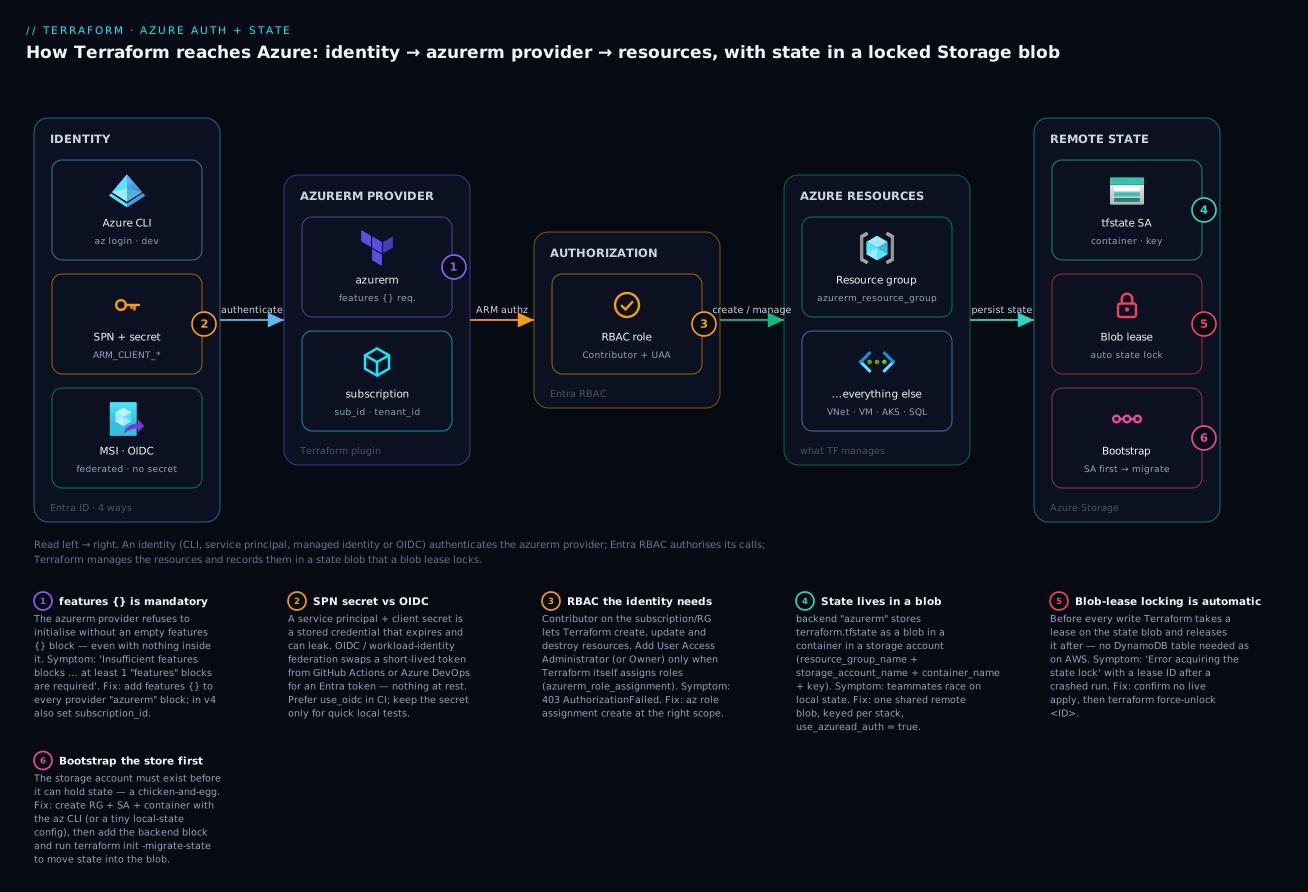
Reading it left to right: an identity (one of the four methods) authenticates the azurerm provider; Entra ID authorises each API call against the identity’s RBAC role; Terraform then creates and manages Azure resources; and it persists state into an Azure Storage blob that a blob lease locks on every write. The six badges mark the decisions that trip people up — the mandatory features {} block, the service-principal-versus-OIDC choice, the RBAC the identity needs, remote state in a blob, the automatic lease lock, and the bootstrap ordering — and each is a section below.
The azurerm provider: required_providers, version pinning & features {}
A Terraform provider is the plugin that translates your HCL resource blocks into Azure REST API calls. For Azure the main one is hashicorp/azurerm, which manages the Azure Resource Manager (ARM) control plane — resource groups, VNets, VMs, AKS, storage, and hundreds more. (Two siblings exist and you will meet them later: azuread manages Entra ID objects — users, groups, app registrations — and azapi reaches ARM resources or properties the azurerm provider hasn’t modelled yet. This lesson is azurerm.)
You declare it in a terraform {} block with required_providers, and you pin the version — never let a fresh init silently pull a new major that renames arguments under you. The deep mechanics of version constraints, the dependency lock file, and provider aliases are covered in Terraform providers deep dive: versions, aliases & the lock file; here is the Azure-specific shape:
# versions.tf
terraform {
  required_version = ">= 1.6"

  required_providers {
    azurerm = {
      source  = "hashicorp/azurerm"
      version = "~> 4.0"   # allow 4.x, refuse 5.0 — pin tighter (e.g. ~> 4.20) in prod
    }
  }
}
The required_providers entry has two parts, and the source address matters more than beginners expect:
| Argument | Example | What it does | Gotcha |
|---|---|---|---|
source |
"hashicorp/azurerm" |
Registry address namespace/type |
Omitting it makes Terraform guess hashicorp/<name>; always write it explicitly |
version |
"~> 4.0" |
Version constraint for init to resolve |
Unpinned = a future init can jump majors and break your config |
The constraint operators you will actually use, and what each admits:
| Constraint | Meaning | Admits | Refuses | When to use |
|---|---|---|---|---|
~> 4.0 |
Pessimistic, minor-level | 4.1, 4.20, 4.99 |
5.0 |
Libraries/roots that want 4.x fixes, not a major |
~> 4.20.0 |
Pessimistic, patch-level | 4.20.1, 4.20.9 |
4.21.0 |
Tightest sane pin for production stability |
>= 4.0, < 5.0 |
Explicit range | any 4.x | 5.0+ |
Same effect, spelled out |
= 4.20.1 |
Exact | only 4.20.1 |
everything else | Reproducing a specific bug/version |
⚠️ azurerm 4.x breaking change. Since v4.0 the provider requires
subscription_idto be set explicitly (a plainplan/applyerrors without it, where 3.x inferred it from the CLI). Set it in the provider block or viaARM_SUBSCRIPTION_ID. This is the single most common “it worked in the tutorial from 2023” surprise.
Why features {} is mandatory
The azurerm provider will not initialise without a features {} block — even an empty one. If you forget it, terraform plan fails immediately:
Error: Insufficient features blocks

  on providers.tf line 1, in provider "azurerm":
   1: provider "azurerm" {

At least 1 "features" blocks are required.
The block exists because a handful of destructive behaviours needed a per-configuration opt-in switch — for example, whether deleting a resource group should also purge resources still inside it, or whether a soft-deleted Key Vault should be recovered or purged. Rather than scatter those as top-level arguments, HashiCorp put them inside features {}. Empty is valid and means “all defaults”; you only add sub-blocks to change a default:
# providers.tf
provider "azurerm" {
  features {}   # MANDATORY — empty is fine

  subscription_id = var.subscription_id  # required in v4.x
  tenant_id       = var.tenant_id        # optional if a single-tenant CLI login
}
A few of the sub-blocks worth knowing exist (you rarely set these on day one, but they explain why the block is there):
features {} sub-block |
Example toggle | Default | Effect when changed |
|---|---|---|---|
resource_group |
prevent_deletion_if_contains_resources = false |
true |
Allow destroying an RG that still holds resources |
key_vault |
purge_soft_delete_on_destroy = false |
true |
Leave soft-deleted vaults recoverable instead of purging |
virtual_machine |
delete_os_disk_on_deletion = true |
true |
Whether the OS disk dies with the VM |
log_analytics_workspace |
permanently_delete_on_destroy = true |
false |
Skip the soft-delete retention window |
The core provider arguments you will set — most can also come from ARM_* environment variables (next section), which is how CI passes them without touching your files:
| Provider argument | Env var equivalent | Purpose | Notes |
|---|---|---|---|
features {} |
— | Mandatory opt-in switches | Empty is valid; no env equivalent |
subscription_id |
ARM_SUBSCRIPTION_ID |
Which subscription to manage | Required in v4.x |
tenant_id |
ARM_TENANT_ID |
Entra tenant | Needed for SPN/OIDC/MSI; optional for single-tenant CLI |
client_id |
ARM_CLIENT_ID |
App/SP or user-assigned MI id | For SPN, OIDC, user-assigned MSI |
client_secret |
ARM_CLIENT_SECRET |
SP password | SPN-with-secret only — keep out of .tf |
use_oidc |
ARM_USE_OIDC |
Turn on OIDC federation | CI pipelines |
use_msi |
ARM_USE_MSI |
Turn on managed identity | On an Azure VM/agent |
use_cli |
ARM_USE_CLI |
Use the logged-in az session |
Defaults true locally |
environment |
ARM_ENVIRONMENT |
Cloud: public, usgovernment, china |
Sovereign clouds |
The golden rule: secrets never go in .tf files. subscription_id and tenant_id are not secrets (they are just identifiers) and are fine to commit; client_secret is a secret and belongs only in an environment variable or, better, avoided entirely via OIDC.
The four ways Terraform authenticates to Azure
The azurerm provider needs an authenticated identity before it can make a single API call. It supports four practical methods, and choosing the right one per context is the whole skill. Here is the decision matrix first — memorise this table and the rest is detail:
| Method | Secret stored? | Where it belongs | How Terraform detects it | Expires? | Best for |
|---|---|---|---|---|---|
| Azure CLI | No (uses your az session) |
Local development | Falls back to az when nothing else set |
With your login | Interactive work on your laptop |
| Service principal + secret | Yes (client secret) | CI (legacy), scripts | ARM_CLIENT_ID+ARM_CLIENT_SECRET+ARM_TENANT_ID |
Secret expiry (you rotate) | Pipelines without OIDC support |
| Managed identity (MSI) | No (platform-issued token) | Terraform on an Azure VM/agent | ARM_USE_MSI=true |
Auto-rotated by Azure | Self-hosted runners in Azure |
| OIDC / workload identity | No (short-lived token) | GitHub Actions, Azure DevOps | ARM_USE_OIDC=true + federated credential |
Minutes (per run) | The modern default for CI/CD |
The ranking by security posture is unambiguous: OIDC > managed identity > service principal secret, with the CLI in its own lane (local only, never automation). Reach for OIDC in any pipeline that supports it; fall back to a service-principal secret only when it genuinely doesn’t; use managed identity when your runner already lives in Azure; and use the CLI for everything you do by hand.
Method 1 — Azure CLI (az login) for local development
The simplest and the right choice on your laptop. You log in once with the Azure CLI; Terraform, finding no other credentials configured, automatically uses that session’s token. No secrets, no environment variables, no provider changes.
# One-time (or when your token expires): authenticate the CLI
az login
# Pick the subscription Terraform should target
az account set --subscription "0000aaaa-11bb-22cc-33dd-444444eeeeee"
# Confirm who you are and which subscription is active
az account show --query "{sub:name, id:id, tenant:tenantId, user:user.name}" -o table
With that in place, the provider block needs nothing but features {} and (for v4) subscription_id:
provider "azurerm" {
  features {}
  subscription_id = "0000aaaa-11bb-22cc-33dd-444444eeeeee"
}
Terraform inherits your identity — with all your permissions, which is exactly why the CLI path is for humans, not automation. It is interactive (a browser prompt), the token is tied to your account, and you never want a pipeline depending on a person’s login. The trade-offs at a glance:
| Aspect | Azure CLI auth |
|---|---|
| Setup | az login — seconds |
| Secret management | None (you own the session) |
| Permissions | Your full RBAC — powerful, and a footgun |
| CI/CD suitability | None — interactive, personal |
| Multi-subscription | az account set or subscription_id per provider |
Method 2 — Service principal with a client secret
A service principal (SP) is a non-human identity in Entra ID — an “app account” with its own credentials and its own RBAC. The classic automation credential: create an SP, give it a client secret, and hand Terraform four values as environment variables. Create one scoped to your subscription with Contributor:
az ad sp create-for-rbac \
  --name "sp-terraform-kloudvin" \
  --role "Contributor" \
  --scopes "/subscriptions/0000aaaa-11bb-22cc-33dd-444444eeeeee"
The command prints exactly the values you need (this is the only time the secret is shown — capture it now):
{
  "appId":       "11111111-2222-3333-4444-555555555555",   // -> ARM_CLIENT_ID
  "password":    "abc~SECRET~value~you~only~see~once",       // -> ARM_CLIENT_SECRET
  "tenant":      "99999999-8888-7777-6666-555555555555"      // -> ARM_TENANT_ID
}
You pass them to Terraform as ARM_* environment variables — not in any .tf file:
export ARM_CLIENT_ID="11111111-2222-3333-4444-555555555555"
export ARM_CLIENT_SECRET="abc~SECRET~value~you~only~see~once"
export ARM_TENANT_ID="99999999-8888-7777-6666-555555555555"
export ARM_SUBSCRIPTION_ID="0000aaaa-11bb-22cc-33dd-444444eeeeee"

terraform plan   # the provider picks these up automatically — no provider edits
The provider block stays clean; the environment supplies the identity:
provider "azurerm" {
  features {}
  # subscription_id / client_id / client_secret / tenant_id all come from ARM_* env vars
}
The full ARM_* environment-variable surface — this is a reference you will return to when a pipeline “can’t find credentials”:
| Variable | Used by | Meaning |
|---|---|---|
ARM_SUBSCRIPTION_ID |
all methods | Subscription to manage (required in v4) |
ARM_TENANT_ID |
SPN, MSI, OIDC | Entra tenant id |
ARM_CLIENT_ID |
SPN, OIDC, user-assigned MSI | App/SP or MI client id |
ARM_CLIENT_SECRET |
SPN (secret) | The SP password — a secret |
ARM_CLIENT_CERTIFICATE_PATH |
SPN (cert) | PFX path if using a certificate instead of a secret |
ARM_CLIENT_CERTIFICATE_PASSWORD |
SPN (cert) | PFX password |
ARM_USE_OIDC |
OIDC | true to enable federation |
ARM_OIDC_TOKEN |
OIDC | The federated token (usually injected by the platform) |
ARM_OIDC_REQUEST_TOKEN / ARM_OIDC_REQUEST_URL |
OIDC | GitHub-provided values to fetch the token |
ARM_USE_MSI |
MSI | true to use a managed identity |
ARM_USE_CLI |
CLI | true (default) to use the az session |
ARM_ENVIRONMENT |
all | public (default), usgovernment, china |
The downside of this method is the secret: it is a real credential that can leak, expires (breaking your pipeline at the worst moment), and must be rotated and stored somewhere secure. That is precisely the pain OIDC removes.
⚠️ Never commit a client secret. Not in
.tf, not in.tfvars, not in a committed.env. A leaked SP secret is a subscription-level breach. If one lands in git, rotate it immediately (az ad sp credential reset) and treat the repo as compromised. The safest secret is the one you never create — see OIDC below.
Method 3 — Managed identity (Terraform running on an Azure VM/agent)
When Terraform runs on an Azure resource — a self-hosted CI agent on a VM, an Azure DevOps scale-set agent, a VM you ssh into to run applies — you can use a managed identity (MSI). Azure issues and rotates the token; there is no secret anywhere. You enable the VM’s identity, give it the RBAC, and tell Terraform to use it:
# Assign a system-assigned managed identity to the VM (once)
az vm identity assign --name vm-tf-agent --resource-group rg-ci

# Grant that identity Contributor on the target subscription
PRINCIPAL_ID=$(az vm show -n vm-tf-agent -g rg-ci --query identity.principalId -o tsv)
az role assignment create --assignee "$PRINCIPAL_ID" --role "Contributor" \
  --scope "/subscriptions/0000aaaa-11bb-22cc-33dd-444444eeeeee"
Then, on that VM, one environment variable (or provider argument) switches it on:
export ARM_USE_MSI=true
export ARM_SUBSCRIPTION_ID="0000aaaa-11bb-22cc-33dd-444444eeeeee"
export ARM_TENANT_ID="99999999-8888-7777-6666-555555555555"
# For a USER-assigned identity, also set the identity's client id:
# export ARM_CLIENT_ID="<user-assigned-identity-client-id>"
provider "azurerm" {
  features {}
  use_msi          = true
  subscription_id  = var.subscription_id
  tenant_id        = var.tenant_id
  # client_id       = var.uami_client_id   # only for a USER-assigned identity
}
System-assigned versus user-assigned is the one choice to get right:
| Managed identity type | Lifecycle | client_id needed? |
Use when |
|---|---|---|---|
| System-assigned | Tied to the VM; dies with it | No (only one) | One VM, one identity |
| User-assigned | Standalone; attach to many resources | Yes (disambiguates) | Shared identity across agents |
The catch is obvious: MSI only works inside Azure. Your laptop and GitHub-hosted runners can’t use it — for those, OIDC is the no-secret answer.
Method 4 — OIDC / workload identity federation (the modern best practice)
OIDC (OpenID Connect) federation — also called workload identity federation — is how you authenticate a pipeline to Azure with no stored secret at all. You register an app/SP as usual, but instead of giving it a client secret you configure a federated credential: a trust relationship saying “tokens issued by GitHub Actions (or Azure DevOps) for this specific repo/branch/environment are allowed to act as this identity.” At run time the platform mints a short-lived OIDC token, Terraform exchanges it with Entra ID for an access token, and the whole thing expires in minutes. Nothing to store, nothing to rotate, nothing to leak.
Set it up once. Create the app/SP, then add a federated credential describing exactly which pipeline may use it:
# Create the app registration + service principal (no secret!)
APP_ID=$(az ad app create --display-name "gha-terraform-kloudvin" --query appId -o tsv)
az ad sp create --id "$APP_ID"

# Federated credential: trust GitHub Actions from this repo's main branch
az ad app federated-credential create --id "$APP_ID" --parameters '{
  "name": "gha-main",
  "issuer": "https://token.actions.githubusercontent.com",
  "subject": "repo:kloudvin/infra:ref:refs/heads/main",
  "audiences": ["api://AzureADTokenExchange"]
}'

# Give the identity Contributor on the subscription
az role assignment create --assignee "$APP_ID" --role "Contributor" \
  --scope "/subscriptions/0000aaaa-11bb-22cc-33dd-444444eeeeee"
The subject is the security boundary — it must match the workflow’s OIDC claim exactly (branch, tag, pull request, or environment). Common subject shapes:
| Pipeline trigger | subject value |
|---|---|
| Branch | repo:ORG/REPO:ref:refs/heads/main |
| Tag | repo:ORG/REPO:ref:refs/tags/v1.2.3 |
| Pull request | repo:ORG/REPO:pull_request |
| GitHub Environment | repo:ORG/REPO:environment:production |
Then the GitHub Actions workflow requests the token (id-token: write) and sets the OIDC env vars — no secret in sight:
# .github/workflows/terraform.yml
permissions:
  id-token: write      # REQUIRED to mint the OIDC token
  contents: read

jobs:
  apply:
    runs-on: ubuntu-latest
    env:
      ARM_USE_OIDC: "true"
      ARM_CLIENT_ID: ${{ vars.AZURE_CLIENT_ID }}       # not a secret — just an id
      ARM_TENANT_ID: ${{ vars.AZURE_TENANT_ID }}
      ARM_SUBSCRIPTION_ID: ${{ vars.AZURE_SUBSCRIPTION_ID }}
    steps:
      - uses: actions/checkout@v4
      - uses: hashicorp/setup-terraform@v3
      - run: terraform init
      - run: terraform apply -auto-approve
provider "azurerm" {
  features {}
  use_oidc        = true
  subscription_id = var.subscription_id
  tenant_id       = var.tenant_id
  client_id       = var.client_id
}
The GitHub Actions Terraform automation flow — with OIDC front and centre, and how it sidesteps the PR-plan automation covered in the CI lessons — pairs naturally with the PR-driven plan you may have seen elsewhere in the course. The federation setup is identical for Azure DevOps (a workload-identity-federation service connection) and any OIDC-capable runner. This is the method to standardise on.
RBAC: the roles the identity needs
Authentication proves who the identity is; RBAC (role-based access control) decides what it may do. An identity Terraform authenticates with but that lacks the right role produces the second-most-common Azure error after features {}:
Error: authorization.RoleAssignmentsClient#Create: ... AuthorizationFailed:
The client '...' with object id '...' does not have authorization to perform
action 'Microsoft.Authorization/roleAssignments/write' over scope '...'.
For most infrastructure — create/update/delete resource groups, networks, VMs, storage — Contributor at the subscription (or a resource-group scope) is enough. The nuance that catches people: Contributor cannot manage RBAC itself. The moment your Terraform creates an azurerm_role_assignment (e.g. granting a managed identity access to a Key Vault), it needs authority over Microsoft.Authorization/roleAssignments, which Contributor lacks. For that you add User Access Administrator (or use Owner, which is Contributor + User Access Administrator combined — broad, so prefer the two narrower roles):
| Built-in role | Can manage resources | Can assign RBAC roles | Give Terraform this when… |
|---|---|---|---|
| Reader | No (read-only) | No | A plan-only / drift-check identity |
| Contributor | Yes | No | The common case — no role assignments in your config |
| User Access Administrator | No | Yes | Add alongside Contributor when you create role assignments |
| Owner | Yes | Yes | Avoid unless necessary — too broad (Contributor + UAA) |
| Custom role | Scoped set | Scoped set | Least-privilege: exactly the Actions you use |
Scope matters as much as the role. Grant at the narrowest scope that works — a single resource group beats the whole subscription; a management group only when you truly manage many subscriptions:
| Scope | Assign at | Blast radius | Use for |
|---|---|---|---|
| Resource group | /subscriptions/<id>/resourceGroups/<rg> |
One RG | App-team Terraform confined to its RG |
| Subscription | /subscriptions/<id> |
Whole subscription | Platform team managing a subscription |
| Management group | /providers/Microsoft.Management/managementGroups/<id> |
Many subscriptions | Landing-zone / org-wide IaC |
Remote state in Azure Storage: the backend “azurerm” block
Terraform records everything it manages in a state file. By default that file (terraform.tfstate) sits on your local disk — fine for a solo experiment, disastrous for a team: it can’t be shared, isn’t locked (two applies race and corrupt it), holds secrets in plaintext on a laptop, and vanishes if the disk dies. A remote backend moves state to shared, durable, lockable storage. On Azure that backend is azurerm, and it stores state as a blob in an Azure Storage account. (The full taxonomy of backend types and migration mechanics lives in Terraform backends deep dive: local, remote, types & migration; the team-scale patterns are in Terraform remote state at scale.)
A real backend "azurerm" block names four things — the resource group, the storage account, the container, and the blob key:
# versions.tf  (backend goes inside the SAME terraform {} block)
terraform {
  required_version = ">= 1.6"
  required_providers {
    azurerm = { source = "hashicorp/azurerm", version = "~> 4.0" }
  }

  backend "azurerm" {
    resource_group_name  = "rg-tfstate"
    storage_account_name = "sttfstatekloudvin01"   # globally unique, 3-24 lc alnum
    container_name       = "tfstate"
    key                  = "prod/networking.tfstate" # the blob name — one per stack
    use_azuread_auth     = true                       # authenticate with Entra, not a key
  }
}
Every argument and why it is there:
| Backend argument | Required | Purpose | Notes |
|---|---|---|---|
resource_group_name |
Yes | RG holding the storage account | Often a dedicated rg-tfstate |
storage_account_name |
Yes | The storage account | Globally unique, 3–24 lowercase alphanumerics |
container_name |
Yes | Blob container holding state | Commonly tfstate |
key |
Yes | The blob name = this stack’s state | Use a path per stack, e.g. prod/network.tfstate |
use_azuread_auth |
Recommended | Authenticate to the blob via Entra ID | Avoids using the storage account key |
subscription_id |
Sometimes | Subscription of the state SA | If different from the resources’ subscription |
use_oidc / use_msi |
CI | Auth method to the backend | Mirrors how the provider authenticates |
snapshot |
Optional | Blob snapshot before write | Extra recovery point per apply |
Two design rules pay off immediately. First, one key per stack — never share a single state blob across unrelated stacks; give each root module its own key (prod/network.tfstate, prod/aks.tfstate) so their state and their locks are independent. Second, isolate environments — a dev/ vs prod/ key prefix (or separate storage accounts entirely for hard isolation) keeps a dev apply from ever touching prod state.
State locking via the blob lease (automatic)
The reason two people can’t corrupt shared state is locking, and on Azure it is beautifully simple: Terraform uses the blob lease built into Azure Storage. Before any write, Terraform acquires a lease on the state blob; while it holds the lease, no other run can write; when it finishes, it releases the lease. This is automatic — you configure nothing, and unlike AWS you need no separate lock table (AWS’s S3 backend historically needed a DynamoDB table; Azure’s blob lease is built in). The AWS-versus-Azure locking contrast is worth pinning:
Azure (azurerm) |
AWS (s3) |
|
|---|---|---|
| State store | Storage account blob | S3 object |
| Lock mechanism | Blob lease (built-in, automatic) | S3 conditional writes / DynamoDB (legacy) |
| Extra resource for locking | None | A lock item (native) or DynamoDB table (older) |
| Unlock command | terraform force-unlock <ID> |
terraform force-unlock <ID> |
When a run crashes mid-apply, the lease can be left held, and the next run reports:
Error: Error acquiring the state lock

Lock Info:
  ID:        3f2b1c9a-...    Operation: OperationTypeApply
  Who:       vinod@laptop    Created:   2026-07-09 06:14:22 UTC
Only after confirming no apply is genuinely still running do you break it with the lock ID:
terraform force-unlock 3f2b1c9a-1234-5678-9abc-def012345678
Never wire force-unlock into automation — breaking a lock that a live apply still holds is exactly how you corrupt state.
Authenticating to the backend, and use_azuread_auth
The backend authenticates separately from the provider (it’s initialised earlier, at init, before the provider even loads). By default it uses the storage account access key; the modern, more secure choice is use_azuread_auth = true, which authenticates to the blob with the same Entra identity — no account key in play. That requires a data-plane role on the storage account, which is not the same as the management-plane Contributor you gave for resources:
| Backend auth method | Setting | Credential | RBAC needed on the storage account |
|---|---|---|---|
| Access key | (default) | Storage account key | None (key = full access) — but keys are a secret to manage |
| SAS token | sas_token / ARM_SAS_TOKEN |
Scoped SAS | Per the SAS grant |
| Entra ID | use_azuread_auth = true |
Your provider identity | Storage Blob Data Contributor (or Owner) |
| Entra + OIDC | use_azuread_auth + use_oidc |
Federated token | Storage Blob Data Contributor |
| Entra + MSI | use_azuread_auth + use_msi |
VM identity | Storage Blob Data Contributor |
The data-plane role is the classic gotcha: an identity with Contributor (management plane) can create the storage account but gets 403 trying to read/write the state blob until it also has Storage Blob Data Contributor (data plane). Grant it:
az role assignment create \
  --assignee "<identity-object-or-app-id>" \
  --role "Storage Blob Data Contributor" \
  --scope "/subscriptions/<sub>/resourceGroups/rg-tfstate/providers/Microsoft.Storage/storageAccounts/sttfstatekloudvin01"
The chicken-and-egg bootstrap
Here is the puzzle: the backend needs a storage account to hold state, but you manage storage accounts with Terraform, which needs a backend. You cannot have Terraform create the very account its own backend points at in one shot. You break the cycle by creating the state storage first, out of band, then pointing the backend at it. Two approaches:
| Bootstrap approach | How | Pros | Cons |
|---|---|---|---|
| CLI bootstrap (recommended) | az commands create RG + SA + container |
Simple, no state to babysit, one-time | Imperative — document/script it |
| Local-state Terraform | A tiny root with backend "local" creates the SA, then migrate |
Fully in Terraform, reviewable | You have a bit of local state for the bootstrap itself |
The CLI bootstrap is the pragmatic default — the state storage is foundational plumbing you create once and rarely touch:
# 1. A dedicated resource group and storage account for state
az group create -n rg-tfstate -l centralindia

az storage account create \
  -n sttfstatekloudvin01 -g rg-tfstate -l centralindia \
  --sku Standard_LRS --kind StorageV2 \
  --min-tls-version TLS1_2 \
  --allow-blob-public-access false \
  --https-only true

# 2. A container to hold the state blobs (auth as yourself via Entra)
az storage container create \
  --name tfstate \
  --account-name sttfstatekloudvin01 \
  --auth-mode login
With the account in place you add the backend "azurerm" block (shown above) and run terraform init. If you had been using local state, init detects the change and offers to migrate it into the blob:
terraform init -migrate-state
# Terraform prompts:
#   Do you want to copy existing state to the new backend? -> yes
The alternative — a small local-state Terraform root that creates the SA and container, applied once, then reconfigured to use itself — is the same idea in HCL. Either way the ordering is the invariant: state storage exists → backend points at it → everything else.
Hands-on: build it with Terraform
Now the full walkthrough. You will bootstrap a state storage account, write the starter files, authenticate via the CLI, and run init → plan → apply to create a resource group whose state lives in the blob — then verify with az and destroy. Everything is free-tier-friendly except a few paise of storage; the cleanup step removes it all.
⚠️ Real cloud spend. A resource group is free; the state storage account costs a trivial amount (a few paise/day for a tiny blob). The final
destroy+az group deleteremove everything. Run in your own subscription.
Step 0 — Prerequisites. Terraform ≥ 1.6 and the Azure CLI installed, and you’re logged in:
terraform version          # expect Terraform v1.6+  (OpenTofu 1.6+ works identically)
az login
az account set --subscription "<your-subscription-id>"
az account show -o table
Step 1 — Bootstrap the state storage (the chicken-and-egg fix; run once). Pick a globally-unique storage account name:
SA=sttfstate$RANDOM$RANDOM      # must be globally unique, lowercase, <=24 chars
az group create -n rg-tfstate -l centralindia -o table
az storage account create -n "$SA" -g rg-tfstate -l centralindia \
  --sku Standard_LRS --kind StorageV2 --min-tls-version TLS1_2 \
  --allow-blob-public-access false --https-only true -o table
az storage container create --name tfstate --account-name "$SA" --auth-mode login
echo "State storage account: $SA"   # note this — you'll paste it into the backend block
Grant yourself the data-plane role so use_azuread_auth can read/write the blob:
ME=$(az ad signed-in-user show --query id -o tsv)
az role assignment create --assignee "$ME" --role "Storage Blob Data Contributor" \
  --scope "$(az storage account show -n "$SA" -g rg-tfstate --query id -o tsv)"
Step 2 — Write the starter files. Four files in an empty directory. versions.tf (provider + backend — paste your $SA name into storage_account_name):
# versions.tf
terraform {
  required_version = ">= 1.6"

  required_providers {
    azurerm = {
      source  = "hashicorp/azurerm"
      version = "~> 4.0"
    }
  }

  backend "azurerm" {
    resource_group_name  = "rg-tfstate"
    storage_account_name = "sttfstateXXXXXXXX"   # <-- your $SA from Step 1
    container_name       = "tfstate"
    key                  = "demo/getting-started.tfstate"
    use_azuread_auth     = true
  }
}
# providers.tf
provider "azurerm" {
  features {}
  subscription_id = var.subscription_id
}
# variables.tf
variable "subscription_id" {
  description = "Target Azure subscription id"
  type        = string
}

variable "location" {
  description = "Azure region"
  type        = string
  default     = "centralindia"
}

variable "environment" {
  description = "Environment tag"
  type        = string
  default     = "demo"
}
# main.tf  — your first managed resource
resource "azurerm_resource_group" "demo" {
  name     = "rg-tf-getting-started"
  location = var.location

  tags = {
    environment = var.environment
    managed_by  = "terraform"
    lesson      = "azure-getting-started"
  }
}
# outputs.tf
output "resource_group_name" {
  description = "Name of the created resource group"
  value       = azurerm_resource_group.demo.name
}

output "resource_group_id" {
  description = "Full ARM id of the resource group"
  value       = azurerm_resource_group.demo.id
}
Provide the subscription id — either via a terraform.tfvars (fine; the id is not a secret) or an env var:
export TF_VAR_subscription_id="$(az account show --query id -o tsv)"
Step 3 — terraform init. This downloads the azurerm provider and initialises the backend against your storage account:
terraform init
Initializing the backend...
Successfully configured the backend "azurerm"! Terraform will automatically
use this backend unless the backend configuration changes.

Initializing provider plugins...
- Finding hashicorp/azurerm versions matching "~> 4.0"...
- Installing hashicorp/azurerm v4.x.x...

Terraform has been successfully initialized!
If you had existing local state, you’d add -migrate-state and confirm the copy. A fresh directory just wires the backend.
Step 4 — terraform plan. Preview the change. One resource to add:
terraform plan
Terraform will perform the following actions:

  # azurerm_resource_group.demo will be created
  + resource "azurerm_resource_group" "demo" {
      + id       = (known after apply)
      + location = "centralindia"
      + name     = "rg-tf-getting-started"
      + tags     = {
          + "environment" = "demo"
          + "lesson"      = "azure-getting-started"
          + "managed_by"  = "terraform"
        }
    }

Plan: 1 to add, 0 to change, 0 to destroy.
If instead you see Error: Insufficient features blocks, you dropped the features {} block; if you see a subscription_id error, set ARM_SUBSCRIPTION_ID/var.subscription_id (the v4 requirement).
Step 5 — terraform apply. Create it for real. Terraform takes the blob lease on the state, applies, writes state, releases the lease:
terraform apply # review, type: yes
azurerm_resource_group.demo: Creating...
azurerm_resource_group.demo: Creation complete after 3s [id=/subscriptions/.../resourceGroups/rg-tf-getting-started]

Apply complete! Resources: 1 added, 0 changed, 0 destroyed.

Outputs:
resource_group_name = "rg-tf-getting-started"
Step 6 — Verify in Azure with az. Confirm the resource group exists and that the state is a blob in your container:
# The resource group Terraform created
az group show -n rg-tf-getting-started --query "{name:name, location:location, tags:tags}" -o jsonc

# The state blob is really in Azure Storage
az storage blob list --account-name "$SA" --container-name tfstate \
  --auth-mode login --query "[].{name:name, size:properties.contentLength}" -o table
# -> demo/getting-started.tfstate   <size>
Seeing demo/getting-started.tfstate listed is the whole point: your state is not on your laptop — it’s a locked, shared, durable blob in Azure.
Step 7 — Destroy and clean up (⚠️ removes the resources):
terraform destroy # type: yes — removes the resource group
Plan: 0 to add, 0 to change, 1 to destroy.
...
Destroy complete! Resources: 1 destroyed.
Then remove the state storage itself when you’re done with the lesson entirely (this deletes your state blob too):
az group delete -n rg-tfstate --yes --no-wait
The steps mapped to what each one proves:
| Step | Command | What it proves |
|---|---|---|
| 1 | az storage account create |
Bootstrap breaks the chicken-and-egg |
| 3 | terraform init |
Provider install + backend wiring in one |
| 4 | terraform plan |
Declarative preview before any change |
| 5 | terraform apply |
Real resource created; blob lease locks state |
| 6 | az storage blob list |
State genuinely lives in the remote blob |
| 7 | terraform destroy + az group delete |
Clean teardown, no lingering spend |
Variables, outputs & making it reusable
The starter hardcodes almost nothing already, but two patterns turn it from a demo into something you’d actually reuse. First, partial backend configuration — you should not hardcode the storage account name in versions.tf if the same code deploys to several environments. Leave the backend block’s values out and supply them at init time:
# versions.tf — partial backend (values supplied at init)
terraform {
  backend "azurerm" {
    use_azuread_auth = true
    key              = "network.tfstate"
  }
}
# One .tfbackend file per environment
terraform init -backend-config=prod.tfbackend
# prod.tfbackend
resource_group_name  = "rg-tfstate"
storage_account_name = "sttfstateprod01"
container_name       = "tfstate"
This keeps one set of .tf files and swaps only the backend target per environment — the pattern the remote state at scale lesson builds on. Second, for_each to create many resource groups from a map — the leap from one resource to a parameterised set:
variable "resource_groups" {
  description = "Map of resource groups to create: name => region"
  type        = map(string)
  default = {
    "rg-app-dev"  = "centralindia"
    "rg-app-prod" = "centralindia"
    "rg-data"     = "southindia"
  }
}

resource "azurerm_resource_group" "these" {
  for_each = var.resource_groups
  name     = each.key
  location = each.value
  tags     = { managed_by = "terraform", environment = var.environment }
}
For real Azure infrastructure you will often reach for community modules from the registry rather than rolling your own. When to use each:
| Option | Example | Use when |
|---|---|---|
| Roll your own resources | azurerm_resource_group, azurerm_virtual_network |
Simple, few resources, full control |
| Azure Verified Modules (AVM) | Azure/avm-res-network-virtualnetwork/azurerm |
Microsoft-maintained, opinionated, well-tested building blocks |
| Community registry modules | Azure/naming/azurerm (name generation) |
A solved problem you don’t want to re-solve |
| A private module registry | your org’s modules | Standardising patterns across teams |
The inputs your reusable root should expose, so it’s environment-agnostic:
| Input variable | Type | Why parameterise it |
|---|---|---|
subscription_id |
string |
Different subscription per environment |
location |
string |
Region per environment/region |
environment |
string |
Drives tags and naming |
tags |
map(string) |
Org-wide tag policy |
| backend values | via -backend-config |
State target per environment |
Going deeper
The core lesson gets you authenticated and storing state. This section is for the reader who wants the internals — how the provider chooses a credential, the certificate path the decision matrix only hinted at, driving many subscriptions from one config, and how the backend authenticates on its own before the provider ever loads.
Credential precedence: why leftover ARM_* beats your az login
The provider does not “try everything at once.” It resolves a credential from the first method whose inputs are fully present, and the Azure CLI is the last-resort fallback — used only when nothing more explicit is configured. Roughly, an identity is chosen in this order: a client certificate (client_certificate_path), then a client secret (client_secret), then OIDC (use_oidc = true), then managed identity (use_msi = true), and finally the Azure CLI (use_cli, default true).
The practical consequence bites people constantly: if ARM_CLIENT_ID and ARM_CLIENT_SECRET are still exported in your shell from an earlier experiment, Terraform authenticates as that service principal and quietly ignores your az login session — even though you thought you were “logged in as yourself.” Symptoms are a baffling AuthorizationFailed (the SP lacks a role you personally have) or resources appearing under the wrong identity. When “it authenticates as the wrong thing,” audit your environment first:
env | grep -i ARM_          # any stray ARM_* shadows the CLI
unset ARM_CLIENT_ID ARM_CLIENT_SECRET ARM_TENANT_ID   # fall back to `az login`
This is also why CI is deterministic: pipelines set exactly one method’s variables, so there is nothing to shadow. The same ARM_USE_* / ARM_* names and precedence apply identically to OpenTofu 1.6+.
Service principal with a certificate instead of a secret
The decision matrix listed ARM_CLIENT_CERTIFICATE_PATH, but the certificate path deserves a real look — it is the stronger sibling of the client secret and the right fallback when a platform can’t do OIDC. Instead of a password string, the SP trusts a certificate; Terraform proves possession of the private key. Generate one at creation time, or bring your own:
# Creates the SP AND a self-signed cert; prints the PEM path it wrote
az ad sp create-for-rbac --name "sp-tf-cert" --role Contributor \
  --scopes "/subscriptions/0000aaaa-11bb-22cc-33dd-444444eeeeee" \
  --create-cert
Terraform reads it from a PKCS#12 (.pfx) bundle via environment variables (convert the emitted PEM with openssl pkcs12 -export …, or supply a PFX you already hold):
export ARM_CLIENT_ID="11111111-2222-3333-4444-555555555555"
export ARM_TENANT_ID="99999999-8888-7777-6666-555555555555"
export ARM_SUBSCRIPTION_ID="0000aaaa-11bb-22cc-33dd-444444eeeeee"
export ARM_CLIENT_CERTIFICATE_PATH="/secure/sp-tf.pfx"
export ARM_CLIENT_CERTIFICATE_PASSWORD="<pfx-password>"   # only if the PFX is protected
A certificate is harder to leak than a plaintext secret (the private key never appears in a log or a .tfvars), it lives naturally in Key Vault, and it still expires so you still rotate it. Ranking, unchanged: OIDC (no material at all) > certificate > secret. Reach for a cert only when OIDC isn’t available and you refuse to store a password.
One config, many subscriptions: provider aliases
subscription_id scopes a provider to a single subscription — but a landing-zone root often touches a hub subscription and one or more spoke subscriptions at once. You declare a second azurerm provider with an alias and point individual resources at it, exactly as with any aliased provider:
provider "azurerm" {                 # default — the spoke
  features {}
  subscription_id = var.spoke_subscription_id
}

provider "azurerm" {                 # a second instance for the hub
  features {}
  alias           = "hub"
  subscription_id = var.hub_subscription_id
  # tenant_id = var.hub_tenant_id    # set for a cross-tenant hub
}

resource "azurerm_resource_group" "hub_network" {
  provider = azurerm.hub             # this RG lands in the HUB subscription
  name     = "rg-hub-network"
  location = var.location
}
The authenticated identity still needs RBAC in each subscription it reaches. Cross-tenant work additionally needs the identity (or a guest principal) authorised in the other tenant — set tenant_id on the aliased provider and grant the role there too.
The backend authenticates separately, at init
A subtle mental-model correction: the backend is not the provider. Terraform initialises and authenticates the backend during terraform init, before any provider plugin loads, because it must read state to do anything at all. Consequences worth internalising:
- CI must have credentials at
init, not justapply. An OIDC or SP setup that only exports variables right beforeterraform applyfails atinittrying to reach the state blob. SetARM_*for the whole job. - The backend has its own auth switches —
use_azuread_auth,use_oidc,use_msi,sas_token— mirroring the provider’s, because it may authenticate to the state storage account differently than the provider authenticates to your resources. -backend-configcomposes and overrides. You can pass a file and inline pairs, and later values win — handy for keeping a stablekeyin a file while injecting the account per environment:
terraform init \
  -backend-config=prod.tfbackend \
  -backend-config="key=prod/network.tfstate"   # overrides any key in the file
Changing backend settings afterwards is not a plain re-init: Terraform stops and asks you to choose -migrate-state (copy the existing state to the new target) or -reconfigure (discard the cached backend and start fresh — never point this at a different blob you expect to already hold state, or your next plan proposes recreating everything).
Pinning that survives a different CI OS: the lock file
Version pinning (~> 4.0) chooses which release init may resolve; the .terraform.lock.hcl file records the exact version it did resolve plus per-platform checksums, and you commit it so every run — and every teammate — installs byte-identical plugins. The trap: if you init on darwin_arm64 (Apple Silicon) but CI runs on linux_amd64, the lock file holds only the macOS hashes and CI fails verification. Record hashes for every platform you build on, once:
terraform providers lock \
  -platform=linux_amd64 -platform=darwin_arm64 -platform=windows_amd64
Commit the updated lock file. Now terraform init is reproducible everywhere, which is the whole point of pinning in the first place. (The full mechanics of constraints, aliases and the lock file live in the providers deep dive.)
Common mistakes and troubleshooting
The failure modes are predictable and almost all live in the three foundations — provider config, authentication/RBAC, and the backend. Scan the table, then read the detail for the ones that bite hardest.
| # | Symptom | Root cause | Confirm | Fix |
|---|---|---|---|---|
| 1 | Insufficient features blocks at plan |
features {} missing from provider |
The error names the provider "azurerm" line |
Add features {} (empty is fine) |
| 2 | subscription_id is a required provider property |
azurerm v4 needs it explicit | Only since provider 4.0 | Set subscription_id or ARM_SUBSCRIPTION_ID |
| 3 | building AzureRM Client: ... no credentials |
No auth method resolved | No az login and no ARM_* set |
az login, or export ARM_*, or set use_oidc/use_msi |
| 4 | AADSTS7000215: Invalid client secret |
Wrong/expired SP secret | 401 at plan | Reset secret (az ad sp credential reset); re-export ARM_CLIENT_SECRET |
| 5 | AuthorizationFailed on create |
Identity lacks RBAC (or wrong scope) | 403 naming the action/scope | Grant Contributor at the right scope |
| 6 | roleAssignments/write ... AuthorizationFailed |
Contributor can’t assign roles |
Fails only on azurerm_role_assignment |
Add User Access Administrator |
| 7 | Backend init 403 reading state blob | Missing data-plane role | Have Contributor, not Storage Blob Data Contributor |
Grant Storage Blob Data Contributor on the SA |
| 8 | Error acquiring the state lock |
Lease held by a crashed/parallel run | Lock info shows ID + Who/Created | Ensure no live apply, then terraform force-unlock <ID> |
| 9 | plan wants to create everything that exists |
Backend points at empty/wrong key |
Full-create plan instead of no-op | Fix key/backend target; do not apply |
| 10 | Storage account name error at init | Name not globally unique / invalid | 3–24 lowercase alphanumerics, taken | Choose a unique name; retry bootstrap |
| 11 | OIDC login fails in CI | Missing id-token: write or bad subject |
GitHub token/claim mismatch | Add the permission; match the federated subject exactly |
| 12 | use_azuread_auth 403 even with the role |
RBAC propagation delay / key access disabled | Role just granted; or SA disallows key + no data role | Wait a minute; confirm the data-plane role at SA scope |
The four that cause the most lost hours, expanded:
1. Insufficient features blocks. The provider won’t initialise without features {}. It’s a one-line omission with a scary message. Add an empty features {} to every provider "azurerm" block (including aliased ones). This is the number-one first-run Azure error.
5 & 6. AuthorizationFailed. Two flavours. The common one is the identity simply lacking a role — you authenticated fine but Contributor was never granted at a scope covering the resource; fix with az role assignment create --role Contributor. The subtle one is when your config creates an azurerm_role_assignment: Contributor can manage resources but not RBAC, so it’s forbidden from Microsoft.Authorization/roleAssignments/write. Add User Access Administrator alongside Contributor (don’t jump to Owner).
7. Backend 403 — the management-plane vs data-plane trap. With use_azuread_auth = true, the identity needs a data-plane role on the storage account (Storage Blob Data Contributor), which is separate from the management-plane Contributor that lets it create the account. Teams grant Contributor, see init create nothing wrong, then get 403 the moment Terraform reads/writes the blob. Grant Storage Blob Data Contributor at the storage-account scope and allow a minute for RBAC to propagate.
8. Error acquiring the state lock. A blob lease left held by a run that crashed (or a colleague applying right now). First confirm no apply is actually running — the lock info shows who and when. Only then terraform force-unlock <ID>. Never automate this; force-unlocking a live apply corrupts state. The mechanics of locking and safe recovery are covered end to end in the backends deep dive.
9. plan proposes creating resources that already exist. Almost always the backend is pointing at the wrong or empty key/account (a typo, a wrong -backend-config, or an accidental -reconfigure). Terraform read empty state and thinks nothing exists. Do not apply — you’ll create duplicates. Re-point the backend at the correct blob and re-init.
Common beginner mistakes
These are misconceptions, not error messages — the wrong mental models that lead a beginner into the symptoms tabulated above. Fix the model and the errors stop happening in the first place.
“subscription_id and tenant_id are secrets, so keep them out of git.” They are identifiers, not credentials — a GUID naming which subscription and which tenant, useless to an attacker without an authenticated identity. They are fine to commit. The thing that must never touch git is the client secret (or a certificate/PFX). Conflating the two leads people to over-engineer the harmless IDs while leaving the real secret in a .tfvars.
“az login is authentication, so my pipeline can use it too.” The CLI session is a person’s interactive, browser-obtained token tied to your account and permissions. A pipeline has no browser and no person. Automation must use a non-human identity — OIDC (best), managed identity (in Azure), or an SP. The right model: az login is for hands on a keyboard; everything unattended gets its own machine identity.
“I have Contributor, so Terraform can do anything.” Contributor manages resources but deliberately cannot manage RBAC and cannot read the state blob under Entra auth. So the day your config adds an azurerm_role_assignment you get AuthorizationFailed (need User Access Administrator), and the day you enable use_azuread_auth you get 403 on the blob (need the data-plane Storage Blob Data Contributor). Authentication and authorization are separate, and authorization is per-plane and per-scope.
“Remote state means my secrets are safe now.” Moving state off your laptop makes it shared, locked and durable — it does not encrypt or hide anything. The state file still records resource attributes, including generated passwords and connection strings, in plaintext. Remote just relocates that plaintext into a blob, which is exactly why you must harden the state storage like a vault: Entra-only auth, no public access, versioning, soft delete. Treat rg-tfstate as tier-0.
“Terraform manages my infrastructure, so let it create the storage account that holds its own state.” That is the chicken-and-egg loop: the backend needs the account to exist before init, but Terraform needs the backend to run. It cannot bootstrap itself in one shot. The right model: the state storage is foundational plumbing you create out of band first (a few az commands, once), then point the backend at it.
“I set up the backend; to change the account I’ll just edit the name and re-run plan.” Backend settings are cached in .terraform/; editing them and running plan doesn’t quietly re-point anything — Terraform detects the change and stops, requiring terraform init -migrate-state (copy state to the new target) or -reconfigure (start fresh). Skipping this is how people end up with a plan that proposes recreating everything because it’s reading an empty blob.
Cost, cleanup & production notes
The cost of this foundation is essentially free — the only paid thing is the state storage, and it is negligible:
| Item | What you pay for | Rough cost | Notes |
|---|---|---|---|
| Resource group | Nothing | ₹0 | RGs are free containers |
| State storage account (Standard LRS) | Capacity + transactions | a few paise/day | A tiny blob + light traffic |
| Blob state operations | Read/write per apply | negligible | Pennies even in busy CI |
| Service principal / app registration | Nothing | ₹0 | Entra objects are free |
| The resources you go on to build | Per-service | varies | The real bill is downstream |
Cleanup is two commands: terraform destroy removes what a root created, and az group delete -n rg-tfstate removes the state storage when you’re finished with it. Because state is remote, don’t just delete local files — destroy through Terraform so state stays consistent.
Production hardening notes — the discipline that keeps this foundation safe at scale:
| Practice | Why it matters | How |
|---|---|---|
| OIDC over secrets in CI | No credential to leak or rotate | use_oidc + federated credential; never a committed secret |
| Least-privilege RBAC + narrow scope | Limit blast radius | Contributor at RG scope, not Owner at subscription; custom roles for tight control |
| Lock down the state storage | State holds secrets in plaintext | Disable public blob access, firewall/private endpoint, use_azuread_auth, disable shared keys |
| Enable blob versioning + soft delete | Recover a clobbered state | Turn on versioning and a soft-delete window on the SA |
| One state key per stack; isolate envs | Contain lock scope and failure | dev/ vs prod/ keys or separate accounts |
| Pin provider + commit the lock file | Reproducible plans | ~> pin in required_providers; commit .terraform.lock.hcl |
| Detect drift | Catch out-of-band changes | Scheduled plan/plan -detailed-exitcode in CI |
On state security specifically: the state file records resource attributes including secrets (a generated password, a connection string) in plaintext. That is exactly why the state storage account deserves the same protection as a secrets store — private networking, Entra-only auth (use_azuread_auth, shared-key access disabled), versioning, and soft delete. Treat rg-tfstate as tier-0 infrastructure.
Practice challenges
Work these in order — each builds on the last, and together they rehearse every foundation the lesson taught. Try each before opening its solution.
1. Beginner — make the provider initialise. You paste this and terraform plan errors with Insufficient features blocks. Fix it with the smallest possible change.
provider "azurerm" {
  subscription_id = var.subscription_id
}
<details> <summary>Solution</summary>
Add an empty features {} block:
provider "azurerm" {
  features {}
  subscription_id = var.subscription_id
}
Why: the azurerm provider refuses to initialise without at least one features {} block; empty is valid and means “all defaults.”
</details>
2. Beginner — pin so a major can’t ambush you. Write a required_providers entry that accepts azurerm 4.20 and future 4.x patches, but refuses 5.0.
<details> <summary>Solution</summary>
required_providers {
  azurerm = {
    source  = "hashicorp/azurerm"
    version = "~> 4.0"
  }
}
Why: the pessimistic operator ~> 4.0 admits any 4.x (4.20, 4.99) but forbids 5.0, so a fresh init can’t jump a major and rename arguments under you.
</details>
3. Intermediate — migrate local state to a blob. You’ve been running with local state. Write the backend "azurerm" block for account sttfstatekloudvin01 / container tfstate / key demo/net.tfstate (Entra auth), and give the exact init command that copies your existing state in.
<details> <summary>Solution</summary>
terraform {
  backend "azurerm" {
    resource_group_name  = "rg-tfstate"
    storage_account_name = "sttfstatekloudvin01"
    container_name       = "tfstate"
    key                  = "demo/net.tfstate"
    use_azuread_auth     = true
  }
}
terraform init -migrate-state # answer "yes" to copy existing state
Why: adding or changing a backend is not a plain re-init — -migrate-state is what copies your current state into the new blob instead of starting empty.
</details>
4. Intermediate — OIDC in GitHub Actions with zero stored secrets. Name the three things you must configure so a workflow on main authenticates to Azure without a client secret.
<details> <summary>Solution</summary>
- A federated credential on the app/SP whose
subjectmatches the run exactly —repo:ORG/REPO:ref:refs/heads/main, issuerhttps://token.actions.githubusercontent.com. - The job permission
id-token: write(so GitHub will mint the OIDC token). ARM_USE_OIDC: "true"plusARM_CLIENT_ID/ARM_TENANT_ID/ARM_SUBSCRIPTION_IDas workflow vars (not secrets — they’re just identifiers).
Why: the federated credential establishes trust, id-token: write lets the runner obtain the short-lived token, and ARM_USE_OIDC tells Terraform to exchange it — no secret is ever stored or rotated.
</details>
5. Advanced — the 403-on-the-blob trap. Your CI identity has Contributor on the subscription. terraform init succeeds, the storage account exists, but Terraform gets 403 reading/writing the state blob under use_azuread_auth. Diagnose and fix.
<details> <summary>Solution</summary>
az role assignment create \
  --assignee "<identity-app-or-object-id>" \
  --role "Storage Blob Data Contributor" \
  --scope "/subscriptions/<sub>/resourceGroups/rg-tfstate/providers/Microsoft.Storage/storageAccounts/sttfstatekloudvin01"
Why: Contributor is a management-plane role — it can create the account but not read its blobs; use_azuread_auth needs the data-plane role Storage Blob Data Contributor (allow a minute for RBAC to propagate).
</details>
6. Advanced — one codebase, two environments, no duplicated .tf. Deploy the same root to dev and prod, each with its own state storage account, without copying files or hardcoding the account name.
<details> <summary>Solution</summary>
Use partial backend configuration — leave the account out of the .tf and supply it at init:
terraform {
  backend "azurerm" {
    use_azuread_auth = true
    key              = "network.tfstate"
  }
}
# dev.tfbackend / prod.tfbackend each name their own account
terraform init -reconfigure -backend-config=prod.tfbackend
Why: partial config keeps a single set of files and swaps only the backend target per environment; each .tfbackend points at a different storage_account_name, so dev and prod state can never collide. (For a fuller pattern, see remote state at scale.)
</details>
Cheat-sheet
The whole foundation on one screen.
Provider + backend skeleton:
terraform {
  required_version = ">= 1.6"
  required_providers {
    azurerm = { source = "hashicorp/azurerm", version = "~> 4.0" }
  }
  backend "azurerm" {
    resource_group_name  = "rg-tfstate"
    storage_account_name = "sttfstate<unique>"
    container_name       = "tfstate"
    key                  = "env/stack.tfstate"
    use_azuread_auth     = true
  }
}

provider "azurerm" {
  features {}
  subscription_id = var.subscription_id   # required in v4.x
}
Auth method → how to turn it on:
| Method | Turn on with |
|---|---|
| Azure CLI | az login (default when nothing else set) |
| SPN + secret | ARM_CLIENT_ID, ARM_CLIENT_SECRET, ARM_TENANT_ID, ARM_SUBSCRIPTION_ID |
| Managed identity | ARM_USE_MSI=true (+ ARM_CLIENT_ID for user-assigned) |
| OIDC | ARM_USE_OIDC=true + federated credential + id-token: write |
Commands you’ll run constantly:
| Command | Does |
|---|---|
az login / az account set -s <id> |
Authenticate; pick subscription |
az ad sp create-for-rbac --role Contributor --scopes <scope> |
Create an SP with a role |
terraform init (-migrate-state, -backend-config=f.tfbackend) |
Install providers; wire/migrate backend |
terraform plan / apply / destroy |
Preview / make / remove changes |
terraform force-unlock <ID> |
Break a stale state lock (carefully) |
az storage blob list --auth-mode login |
Confirm state is in the blob |
RBAC quick map:
| Need | Role |
|---|---|
| Manage resources | Contributor |
| Create role assignments too | + User Access Administrator |
Read/write the state blob (use_azuread_auth) |
Storage Blob Data Contributor |
Interview and exam questions
1. Why is the features {} block mandatory in the azurerm provider, and what happens if you omit it? It’s a required (even if empty) container for per-configuration opt-in switches over destructive behaviours (e.g. purging Key Vaults, deleting non-empty resource groups). Omit it and the provider fails to initialise with Insufficient features blocks … at least 1 "features" blocks are required. Empty features {} means “all defaults.”
2. Compare the four Azure authentication methods and say which you’d use in CI. Azure CLI (uses your az session — local dev only, interactive, personal); service principal + client secret (a stored, expiring credential via ARM_* env vars — CI without OIDC); managed identity (platform-issued token, no secret — Terraform running on an Azure VM/agent); OIDC/workload-identity federation (short-lived token, no stored secret — the modern default). In CI, prefer OIDC; fall back to an SP secret only if the platform can’t do OIDC; use MSI if the runner is in Azure.
3. What RBAC does the Terraform identity need, and what’s the Contributor nuance? Contributor to create/update/delete resources. But Contributor cannot manage RBAC, so if your config creates an azurerm_role_assignment, you also need User Access Administrator (or Owner, which is broader — prefer the two narrow roles). Grant at the narrowest scope that works (RG over subscription).
4. Write a backend "azurerm" block and name each argument. resource_group_name (RG of the state storage account), storage_account_name (the account), container_name (the blob container), key (the blob name = this stack’s state), and ideally use_azuread_auth = true (authenticate via Entra rather than the account key).
5. How does state locking work on Azure, and how does it differ from AWS? Azure uses the blob lease built into Azure Storage — Terraform acquires a lease on the state blob before a write and releases it after, automatically, with no extra resource. AWS’s S3 backend historically needed a separate DynamoDB lock table (native conditional writes now cover it). Azure needs no lock table.
6. Explain the chicken-and-egg bootstrap problem and how you solve it. The backend needs a storage account to hold state, but you’d manage that account with Terraform, which needs the backend — circular. You break it by creating the RG + storage account + container out of band first (the az CLI, or a tiny local-state Terraform root), then adding the backend block and running terraform init (with -migrate-state if you had local state).
7. What is use_azuread_auth, and what RBAC does it require? It tells the backend to authenticate to the state blob with an Entra ID identity instead of the storage account key — more secure (no key to manage). It requires a data-plane role, Storage Blob Data Contributor, on the storage account, which is distinct from the management-plane Contributor.
8. Which ARM_* variables authenticate a service principal, and where must the secret live? ARM_CLIENT_ID, ARM_CLIENT_SECRET, ARM_TENANT_ID, and ARM_SUBSCRIPTION_ID. The secret must live only in an environment variable / secret store — never in a .tf or committed .tfvars. Better still, use OIDC and have no secret at all.
9. How does OIDC authenticate a GitHub Actions run to Azure with no stored secret? You register an app/SP and attach a federated credential trusting tokens issued by GitHub’s OIDC provider for a specific subject (repo + branch/tag/environment). At run time GitHub mints a short-lived OIDC token (the job needs id-token: write), Terraform (with use_oidc/ARM_USE_OIDC) exchanges it with Entra ID for an access token. Nothing is stored or rotated.
10. (Terraform Associate style) You run terraform plan and it proposes creating resources that already exist in Azure. What happened? The backend initialised against empty or wrong state — a mistyped key, wrong -backend-config, or an accidental -reconfigure — so Terraform read no state and thinks nothing exists. Do not apply (you’d create duplicates). Re-point the backend at the correct state blob and re-init.
11. (Terraform Associate style) Where should you set the subscription id, and why did it break when upgrading the provider? In the provider (subscription_id) or ARM_SUBSCRIPTION_ID. It broke because azurerm 4.0 made subscription_id required (3.x inferred it from the CLI) — a v4 breaking change.
12. A teammate’s crashed apply left the state locked. What do you do? Read the lock info (ID, who, when), confirm no apply is genuinely still running, then terraform force-unlock <ID>. Never force-unlock blindly or from automation — breaking a live lock corrupts state.
These map cleanly onto the certification landscape:
| Question theme | Primary cert | Objective area |
|---|---|---|
| Provider config, backends, state locking | HashiCorp Terraform Associate (003) | Providers; backends & state |
Auth methods, ARM_*, OIDC |
Terraform Associate + AZ-500 | Automation identity; secure IaC |
| RBAC roles & scope | AZ-104 / AZ-500 | Manage Azure identities & access |
| State security, storage hardening | AZ-500 | Secure data & storage |
Glossary
azurermprovider — the HashiCorp plugin that turns your HCL into Azure Resource Manager (ARM) API calls; manages the Azure control plane (resource groups, networks, VMs, storage, …).features {}block — a mandatory (even if empty) container insideprovider "azurerm"holding per-configuration opt-in switches over destructive behaviours. Nofeatures {}, no provider.- Provider version pinning — constraining which provider release
initmay install (e.g.~> 4.0) so a new major can’t silently rename arguments under you. .terraform.lock.hcl(lock file) — records the exact provider version resolved plus per-platform checksums; commit it for reproducible installs across machines and CI.- Entra ID — Microsoft’s identity service (formerly Azure AD); issues the tokens every authentication method here ultimately relies on.
- Subscription / tenant — a subscription is a billing-and-resource boundary; a tenant is the Entra directory that owns identities.
subscription_idandtenant_idare identifiers, not secrets. - Service principal (SP) — a non-human “app account” identity in Entra ID with its own credential (secret or certificate) and its own RBAC.
- Managed identity (MSI) — an Azure-issued, auto-rotated identity attached to an Azure resource (VM/agent); no secret to store. System-assigned (tied to one resource) or user-assigned (shared).
- OIDC / workload identity federation — a trust relationship (a federated credential) letting a CI platform mint a short-lived token that acts as an SP, with no stored secret. The modern default for pipelines.
- Federated credential — the config on an app/SP that says “tokens from this issuer for this
subjectmay act as me”; thesubject(repo + branch/tag/environment) is the security boundary. - RBAC (role-based access control) — Azure’s authorization model: a role (set of allowed actions) assigned to an identity at a scope.
Contributor— the common built-in role: full management of resources, but cannot assign RBAC roles and cannot read blob data.User Access Administrator— the role that can assign RBAC; add it alongsideContributorwhen your config createsazurerm_role_assignment.Storage Blob Data Contributor— the data-plane role needed to read/write blobs (including the state blob underuse_azuread_auth); distinct from the management-planeContributor.- Management plane vs data plane — management plane = create/configure the resource (the storage account); data plane = read/write the contents (the blobs). Different roles.
ARM_*environment variables — how credentials and settings reach the provider/backend without editing.tffiles (ARM_CLIENT_ID,ARM_CLIENT_SECRET,ARM_USE_OIDC,ARM_SUBSCRIPTION_ID, …).- Remote backend — storage for Terraform state that is shared, durable and lockable, instead of a local file. On Azure it is
backend "azurerm". key(state blob name) — the blob path inside the container that holds this stack’s state; onekeyper root module so states and locks stay independent.- Blob lease (state locking) — Azure Storage’s built-in lease that Terraform acquires before a write and releases after, preventing concurrent applies from corrupting state — no separate lock table (unlike AWS/DynamoDB).
use_azuread_auth— backend setting to authenticate to the state blob with an Entra identity instead of the storage account key (more secure; needs the data-plane role).- Partial backend configuration — leaving backend values out of the
.tfand supplying them atterraform init -backend-config=…, so one codebase targets different state per environment. - Bootstrap (chicken-and-egg) — creating the state storage account out of band before wiring the backend, because Terraform can’t create the very account its own backend depends on.
terraform force-unlock <ID>— manually breaks a stale state lock left by a crashed run; only after confirming no apply is genuinely still running.
Key takeaways
features {}is mandatory in everyprovider "azurerm"block — empty is valid — and azurerm v4 requiressubscription_idexplicitly. These are the two first-run errors.- Four auth methods, ranked: OIDC/workload-identity (no secret, modern default) > managed identity (on Azure runners) > service-principal secret (legacy CI) with the Azure CLI for local dev only. Never put a secret in a
.tffile. - RBAC is separate from auth:
Contributormanages resources but can’t assign roles — addUser Access Administratorwhen your config createsazurerm_role_assignment; grant at the narrowest scope. - Remote state =
backend "azurerm"in an Azure Storage blob (resource_group_name+storage_account_name+container_name+key), and locking is automatic via the blob lease — no DynamoDB-style table as on AWS. use_azuread_auth = trueauthenticates to the state blob via Entra (no account key) but needs the data-plane roleStorage Blob Data Contributor— distinct fromContributor.- Bootstrap the state storage first (CLI or tiny local-state root), then point the backend at it and
init -migrate-state— the chicken-and-egg is solved by ordering. - Harden the state store like a secrets vault: private access, Entra-only auth, versioning + soft delete, one
keyper stack — state holds plaintext secrets. - This is the on-ramp: with provider, auth, and remote state solid, every later Azure lesson is just more resource blocks against the same reliable foundation.