In a nutshell
Think of naming and tagging as the filing system for your cloud. Get the labels on your folders and files right on day one and anyone — you in six months, the finance team, the security auditor, the engineer paged at 2 a.m. — can find exactly the thing they need. Skip it, and within a quarter you are squinting at rg-final, rg-final2, and rg-prod-REAL spread across three subscriptions, unsure which one actually holds production. That is the whole reason this lesson exists.
You build the smallest piece of real Azure infrastructure that still teaches the discipline: a resource group (the box things live and die in together), a storage account (durable object storage whose name must be unique across all of Azure), a private blob container, and one uploaded blob. Then you name every piece with a convention that is built by code rather than typed by hand, and tag every piece so it is findable by cost, owner and environment. The networks, databases and clusters in later lessons all inherit these exact habits.
Level: Intermediate · Time: ~45 min
Prerequisites. Comfort with Terraform’s core loop (init → plan → apply → destroy), variables/outputs/locals, and an Azure subscription with Contributor. New to those? Do getting started & remote backend and variables, outputs & locals first.
After this lesson you can: write real azurerm HCL for a resource group, storage account, container and blob; generate a globally-unique name with the random provider capped by substr; apply a DRY common_tags map with merge(); choose a replication SKU deliberately; and harden a storage account (TLS floor, no public blobs, a network firewall) while knowing which plane each setting touches.
Every Azure estate you will ever build starts the same way: a resource group to hold things, a storage account for state, logs, artifacts or app data, a name that a human can read and a machine can guarantee is unique, and tags that let finance and security find the thing six months later. Get these four right and the rest of your Terraform — networks, databases, clusters — inherits good habits. Get them wrong and you end up with storageaccount1, storageaccount1prod, storageaccount1prodFINAL scattered across three subscriptions, none of them tagged, none of them findable, one of them holding your production Terraform state.
This lesson is the disciplined version. You will provision a resource group, a globally-unique storage account (StorageV2, a chosen replication SKU, TLS 1.2, a network firewall), and a private blob container with an uploaded blob — all in real azurerm HCL you can copy and run. Along the way you learn the Cloud Adoption Framework (CAF) naming convention and three ways to implement it (locals interpolation, the Azure/naming/azurerm module, and a random suffix for global uniqueness), and a tagging strategy you apply DRY with a common_tags local and merge(). The naming and tagging patterns you build here are the foundation the rest of the Azure track stands on.
What you’ll build
The scenario is the smallest piece of real infrastructure that still teaches the whole discipline: a storage account for an application’s data, living in its own resource group, with a private blob container and one uploaded object. It sounds trivial, and the happy path is four resources — but “trivial” is exactly where the hard-won rules live. A storage account name must be globally unique across all of Azure and may contain only 3–24 lowercase letters and digits, so you cannot just interpolate a friendly string and hope. Its replication SKU is a durability-versus-cost decision you make once and can’t casually reverse. Its network firewall can lock you out of your own data plane the instant you set it. And none of it is discoverable later unless you tag it on the way in — because, unlike the AWS provider’s default_tags, azurerm has no provider-level tag inheritance and Azure resource groups do not propagate their tags to the resources inside them.
Here is the full inventory — four azurerm resources plus a random helper — and why each exists:
| # | Terraform resource | Azure object | Why it’s here |
|---|---|---|---|
| 1 | random_string |
(none — a value) | Generates a stable suffix so the storage account name is globally unique |
| 2 | azurerm_resource_group |
Resource group | The lifecycle boundary: everything below is created and destroyed together |
| 3 | azurerm_storage_account |
Storage account | The durable object store — StorageV2, chosen replication, secure defaults |
| 4 | azurerm_storage_container |
Blob container | A private container (management-plane, addressed by account ID) |
| 5 | azurerm_storage_blob |
Blob | One uploaded object (data-plane — the firewall applies here) |
Why Terraform for something you could click together in the portal in ninety seconds? Because you will build this a hundred times — one per environment, one per app, one per team — and the value is in the repeatability, the review, and the record:
| Approach | Naming discipline | Tags applied every time | Repeatable across envs | Review before change | Drift visible |
|---|---|---|---|---|---|
| Azure Portal (click-ops) | Whatever the human types | Only if remembered | No — re-clicked each time | No | No |
az CLI script |
Ad-hoc string building | If scripted | Partly (scripts rot) | Diff the script, not the cloud | No |
| ARM/Bicep | Params + functions | If templated | Yes | Yes (what-if) | Partial |
| Terraform | locals + module + validation |
merge(common_tags,…) on every resource |
Yes (for_each, workspaces) |
terraform plan |
terraform plan shows it |
The pipeline you are about to build, left to right — Terraform locals produce the name and the tag map; the resource group is the lifecycle boundary; the storage account gets a unique name, a replication SKU and a firewall; the container holds the blobs — looks like this:
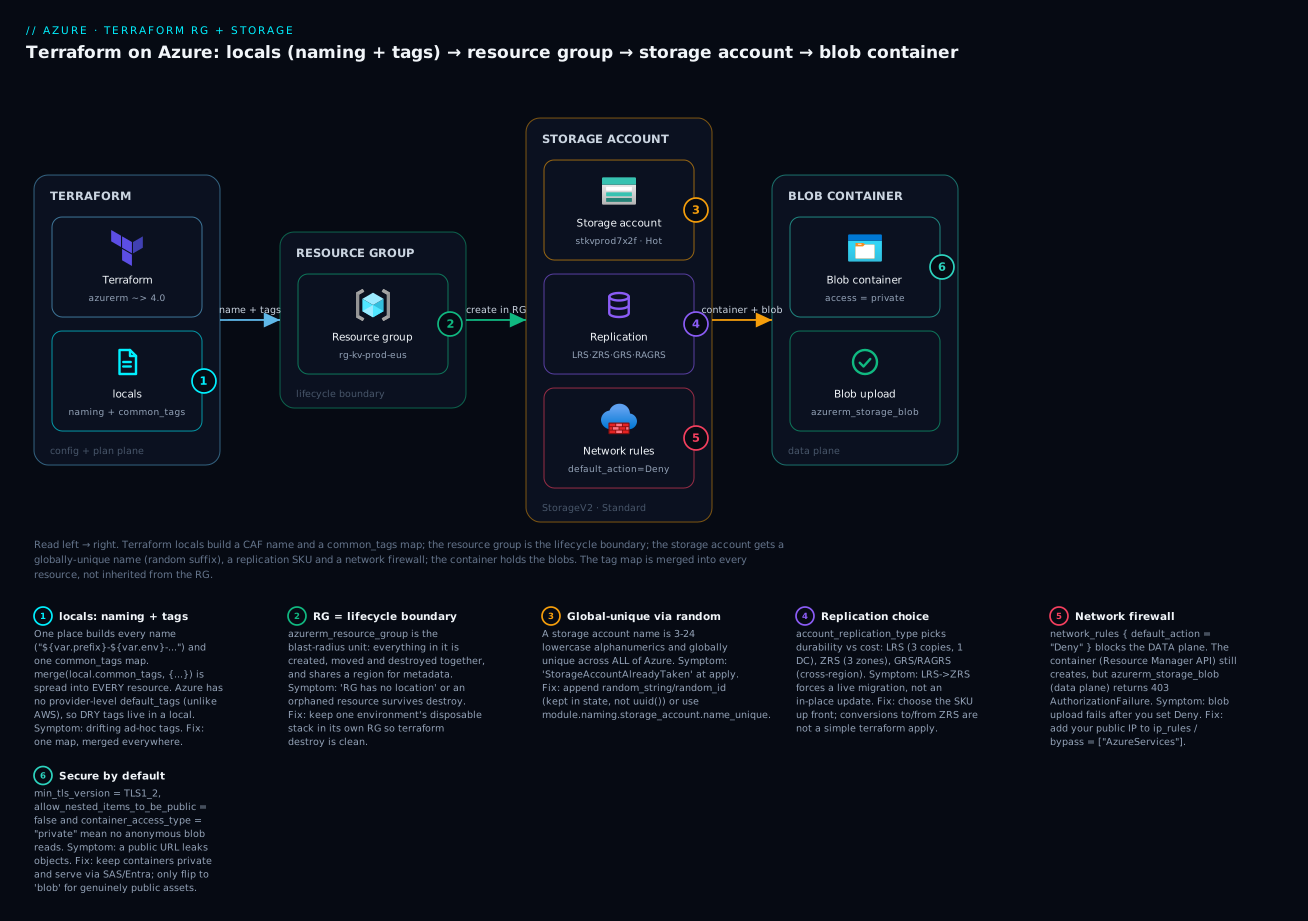
Read it left to right: the locals plane (badge 1) is the single source of every name and the common_tags map that is merge()-d into every resource; the resource group (badge 2) is the blast-radius unit; the storage account carries the global-unique name (badge 3), the replication choice (badge 4) and the firewall (badge 5); and the container is private by default (badge 6). Keep this picture in mind — every section below fills in one box.
The resource group: Azure’s lifecycle boundary
A resource group (RG) is a logical container that holds related Azure resources. Two facts make it more than a folder. First, it is a lifecycle and blast-radius boundary: deleting the RG deletes everything in it, and RBAC, policy and locks assigned at the RG scope apply to every child. Second, an RG has its own location — a region where the group’s metadata lives — which is independent of where the resources inside it are deployed (though keeping them aligned is the sane default). In Terraform terms, the RG is almost always the first resource you create and the thing most other resources take a dependency on via resource_group_name.
The resource is refreshingly small:
resource "azurerm_resource_group" "this" {
  name     = "rg-kvdemo-dev"
  location = "eastus"

  tags = {
    environment = "dev"
    managed_by  = "terraform"
  }
}
That is the entire required surface. The arguments, and the ones people trip over:
| Argument | Required | Type | Notes / gotcha |
|---|---|---|---|
name |
Yes | string | 1–90 chars; alphanumerics, _ - . ( ); unique within the subscription |
location |
Yes | string | Region for the RG’s metadata; changing it forces replacement (ForceNew) |
tags |
No | map(string) | RG tags do not inherit to child resources — a top myth |
managed_by |
No | string | Cosmetic “managed by” ID (e.g. a managed-app ID); not access control |
The single most useful mental model is RG-as-lifecycle-boundary: put things that are born, changed and destroyed together in the same RG, and things with different lifecycles in different RGs. That is what makes terraform destroy clean and a blast radius small. A few worked decisions:
| Scenario | One RG or many? | Why |
|---|---|---|
| A disposable demo / PR environment | One RG for the whole stack | terraform destroy (or deleting the RG) wipes it in one shot |
| Prod app + its shared platform (DNS, ACR) | Separate RGs | The app is redeployed often; the platform is long-lived |
| Per-environment (dev/test/prod) | One RG each | Different RBAC, different lifecycle, clean isolation |
| Networking hub vs spokes | Separate RGs | The hub outlives any single spoke |
| Terraform remote-state storage | Its own RG, created once | State must not be destroyed with the workloads it tracks |
That last row matters for this very lesson: the storage account that holds your Terraform state belongs in its own long-lived RG, bootstrapped once — never in the same destroy-able stack as the workloads. We set that backend up in Terraform on Azure: getting started, provider authentication & remote backend; here we focus on the resources. Two RG gotchas worth pre-empting: a resource group whose child resources are not all managed by this configuration will refuse to destroy (Azure returns CanNotDeleteResourceGroup while it still contains something), and a resource lock (CanNotDelete) placed at the RG scope will silently block terraform destroy until removed.
Naming at scale: CAF, locals, and the naming module
Names are where discipline pays off, because Azure enforces different rules for every resource type and some names are globally unique. Microsoft’s Cloud Adoption Framework (CAF) publishes both a recommended pattern and a table of abbreviations so that rg-shop-prod-eastus-001 is instantly legible: it is a resource group, for the shop workload, in prod, in eastus, instance 001. Adopting CAF means your names are self-documenting and your Terraform can build them mechanically.
The recommended component order, and what each part answers:
| Component | Example | Answers | Source in Terraform |
|---|---|---|---|
| Resource type abbreviation | rg, st, kv |
What is it? | CAF table (hard-coded per resource) |
| Workload / application | shop, kvdemo |
Whose is it? | var.project |
| Environment | dev, test, prod |
Which stage? | var.environment |
| Region (optional) | eus, weu |
Where? | short code from var.location |
| Instance (optional) | 001, 002 |
Which of several? | count.index / a variable |
The CAF abbreviations you will use most (the full list is larger):
| Resource type | CAF abbreviation | Example name |
|---|---|---|
| Resource group | rg |
rg-shop-prod |
| Storage account | st |
stshopprod7x2f (no hyphens!) |
| Virtual network | vnet |
vnet-shop-prod-eus |
| Subnet | snet |
snet-app-prod |
| Network security group | nsg |
nsg-app-prod |
| Public IP address | pip |
pip-agw-prod |
| Key vault | kv |
kv-shop-prod |
| Log Analytics workspace | log |
log-shop-prod |
| User-assigned identity | id |
id-shop-prod |
| Container registry | cr |
crshopprod (no hyphens!) |
| AKS cluster | aks |
aks-shop-prod |
| SQL database | sqldb |
sqldb-shop-prod |
The trap hiding in that table: not every resource allows hyphens or mixed case. A storage account and a container registry are 3–24 (or 5–50) lowercase alphanumerics only — no hyphens — so st-shop-prod is invalid and you must collapse to stshopprod. And several names are globally unique across every Azure tenant on earth, so even a perfect CAF name can collide with someone else’s. The constraint matrix you must respect:
| Resource | Length | Allowed characters | Uniqueness scope | Hyphens? |
|---|---|---|---|---|
| Storage account | 3–24 | lowercase a–z, 0–9 |
Global | No |
| Resource group | 1–90 | alphanumerics, _ - . ( ) |
Subscription | Yes |
| Key vault | 3–24 | alphanumerics + hyphens, start with letter | Global (DNS) | Yes |
| Container registry | 5–50 | alphanumerics | Global (DNS) | No |
| Virtual network | 2–64 | alphanumerics, _ - . |
Resource group | Yes |
| Blob container | 3–63 | lowercase a–z, 0–9, hyphens |
Within account | Yes (not consecutive) |
| App Service | 2–60 | alphanumerics + hyphens | Global (DNS) | Yes |
Approach 1 — build names with locals + interpolation
The idiomatic Terraform move is to build every name once in a locals block and reference it everywhere, so a change of convention is a one-line edit:
locals {
  name_prefix = "${var.project}-${var.environment}"          # e.g. "shop-prod"

  resource_group_name = "rg-${local.name_prefix}"            # "rg-shop-prod"

  # Storage account: strip to lowercase alphanumerics, hard-cap at 24 chars,
  # and append a random suffix for global uniqueness.
  storage_account_name = substr(
    lower("st${var.project}${var.environment}${random_string.sa_suffix.result}"),
    0, 24
  )
}
substr(..., 0, 24) is not optional decoration — it is the guard that keeps a long project from producing an invalid 27-character storage name. This is the pattern the hands-on demo uses.
Approach 2 — the Azure/naming/azurerm module
If you would rather not hand-roll length and charset rules for every resource type, Microsoft maintains a community naming module that knows them all:
module "naming" {
  source  = "Azure/naming/azurerm"
  version = "~> 0.4"
  suffix  = [var.project, var.environment]   # ["shop", "prod"]
}

resource "azurerm_resource_group" "this" {
  name     = module.naming.resource_group.name          # "rg-shop-prod"
  location = var.location
}

resource "azurerm_storage_account" "this" {
  name = module.naming.storage_account.name_unique      # valid + globally unique
  # ...
}
Every resource type exposes .name (CAF-formatted) and .name_unique (the same, plus a built-in random suffix and the correct length trim). For storage accounts and other globally-unique names, .name_unique does exactly what our substr + random_string does — for free, correctly, for every resource type. When to reach for it:
| You want… | Use | Because |
|---|---|---|
| Total control / a house convention that differs from CAF | locals + interpolation |
No dependency; you own every character |
| Correct length + charset for many resource types, fast | Azure/naming/azurerm module |
It encodes every rule so you don’t |
| Guaranteed global uniqueness with least code | module.naming.<type>.name_unique |
Built-in suffix + trim |
| Enterprise policy-enforced naming | Your own wrapper module + Azure Policy | Names become auditable and required |
Approach 3 — the random provider for global uniqueness
However you build the base name, a globally-unique resource needs an unpredictable, stable suffix. “Stable” is the key word: it must be generated once and then stored in state, not regenerated on every plan. That rules out the uuid() function (which returns a new value each run unless pinned) and rules in the random provider’s resources, which persist their result in state:
random resource / function |
Output | Stable across applies? | Use it for |
|---|---|---|---|
random_string |
Configurable-charset string | Yes (stored in state) | Storage/registry name suffixes |
random_id |
Hex/base64 from byte_length |
Yes | Short hex suffix (.hex) |
random_pet |
Human-friendly words | Yes | Readable unique names |
random_integer |
Integer in a range | Yes | Ports, indices |
random_password |
Secret string (sensitive) | Yes | Generated secrets |
uuid() function |
A UUID | No — new each plan | Avoid for names; causes perpetual diff |
resource "random_string" "sa_suffix" {
  length  = 6
  lower   = true
  upper   = false     # storage names are lowercase-only
  numeric = true
  special = false
}
# -> feeds local.storage_account_name; regenerates only if you change `keepers`
The keepers argument is the escape hatch: add keepers = { project = var.project } and the suffix is regenerated (a new account) whenever project changes — otherwise it is frozen for the life of the state.
The storage account, argument by argument
The storage account is the workhorse: it fronts Blob, File, Queue and Table services behind one globally-addressable namespace (https://<name>.blob.core.windows.net). It is also where the most consequential Terraform decisions in this lesson live — replication, access tier, and a security posture that is not safe by default in older provider versions. azurerm_storage_account has a wide surface; take it in three passes.
Pass 1 — the core. Five required arguments define what kind of account you get, and two optional ones shape its behaviour:
| Argument | Required | Default / typical | What it controls |
|---|---|---|---|
name |
Yes | stshopprod7x2f |
The global DNS name (3–24 lowercase alnum) |
resource_group_name |
Yes | azurerm_resource_group.this.name |
Which RG owns it |
location |
Yes | eastus |
Region (align with the RG) |
account_tier |
Yes | Standard |
Standard (HDD-backed) or Premium (SSD) — immutable |
account_replication_type |
Yes | LRS |
Durability SKU (see below) |
account_kind |
No | StorageV2 |
StorageV2 / BlockBlobStorage / FileStorage / BlobStorage / Storage — use StorageV2 |
access_tier |
No | Hot |
Hot / Cool / Cold — Hot for hot data; Cool/Cold cost less to store, more to read |
Pass 2 — replication (account_replication_type). This one argument sets how many copies of your data exist and where, trading durability and availability against cost. You choose it up front because converting between some SKUs is not an in-place apply — flipping to or from zone-redundant storage (ZRS) generally requires a live migration (a support request) or a rebuild, not a Terraform edit.
| Value | Copies & placement | Survives… | Read at secondary? | Relative cost | Use when |
|---|---|---|---|---|---|
| LRS | 3 copies, one datacenter | A disk/rack failure | No | Lowest | Dev/test, reconstructable data, state you back up |
| ZRS | 3 copies across 3 availability zones | A zone outage | No | Low–mid | Production in AZ-enabled regions |
| GRS | LRS + async copy to the paired region (6 total) | A regional outage (after failover) | No | Mid | Cross-region DR |
| RA-GRS | GRS + read endpoint at the secondary | A regional outage; read during it | Yes (read-only) | Mid–high | DR and read scale-out |
| GZRS | ZRS + async copy to paired region | Zone and region outage | No | High | Zone + region resilience |
| RA-GZRS | GZRS + read secondary | Zone + region; read the secondary | Yes (read-only) | Highest | Maximum resilience |
Pass 3 — the security posture. This is the part that has changed, and the part that bites teams who copied a 2021 tutorial. Modern azurerm defaults min_tls_version to TLS1_2, but anonymous public blob access is not locked down for you — you must set allow_nested_items_to_be_public = false to forbid containers being made publicly readable. The hardening arguments:
| Argument | Default | Set to | Why |
|---|---|---|---|
min_tls_version |
TLS1_2 |
TLS1_2 |
Reject TLS 1.0/1.1 clients |
https_traffic_only_enabled |
true |
true |
No plaintext HTTP (renamed from enable_https_traffic_only in provider v4) |
allow_nested_items_to_be_public |
true |
false |
Forbid anyone from making a container/blob anonymously public |
shared_access_key_enabled |
true |
true (or false for Entra-only) |
false forces Azure AD/Entra auth, disables account keys |
public_network_access_enabled |
true |
true (demo) / false (private) |
false = reach it only via private endpoint |
infrastructure_encryption_enabled |
false |
true for regulated data |
Double-encrypts at rest (set at create; immutable) |
Nested blocks. Two blocks carry the data-protection and network settings. blob_properties holds versioning_enabled and the soft-delete windows (delete_retention_policy { days } for blobs, container_delete_retention_policy { days } for containers). network_rules is the storage firewall — default_action (Allow/Deny), plus bypass, ip_rules and virtual_network_subnet_ids.
The network_rules block is where you can lock yourself out. Setting default_action = "Deny" blocks the data plane — but not the management plane. The subtle, real consequence you must internalise before the demo:
| Operation | Which API | Blocked by default_action = "Deny"? |
|---|---|---|
azurerm_storage_account create/update |
Resource Manager (management) | No |
azurerm_storage_container (via storage_account_id) |
Resource Manager (management) | No |
azurerm_storage_blob upload |
Data plane | Yes — 403 unless your IP is in ip_rules |
Portal “Containers” blade / az storage blob |
Data plane | Yes — unless allowed |
That is why the demo defaults the firewall to Allow: so the blob upload succeeds out of the box. Flipping to Deny is the production posture, and it requires adding your runner’s public IP to ip_rules — which is also the number-one “why did my apply suddenly 403?” support ticket.
Containers and blobs
A container is a folder-like grouping inside the blob service; a blob is an object in it. The important recent change: on azurerm_storage_container, the old storage_account_name argument was deprecated in provider 4.9.0 in favour of storage_account_id, which routes the operation through the Resource Manager API (so it works even behind a Deny firewall). Use the ID form:
resource "azurerm_storage_container" "this" {
  name                  = "app-data"
  storage_account_id    = azurerm_storage_account.this.id   # not storage_account_name (deprecated 4.9+)
  container_access_type = "private"
}
container_access_type is the anonymous-access switch, and private is what you want unless you are deliberately hosting public web assets:
container_access_type |
Anonymous access | Use for |
|---|---|---|
private (default) |
None — needs SAS or Entra | Almost everything |
blob |
Anonymous read of blobs (not listing) | Public static assets by exact URL |
container |
Anonymous read and list | Rarely — public browsable buckets |
Note that even container_access_type = "blob" only works if the account allows it (allow_nested_items_to_be_public = true); with our hardened false, containers are forced private regardless. Blobs themselves are addressed by the older data-plane arguments (blobs still use name-based addressing):
resource "azurerm_storage_blob" "hello" {
  name                   = "hello.txt"
  storage_account_name   = azurerm_storage_account.this.name       # blobs: still name-based
  storage_container_name = azurerm_storage_container.this.name
  type                   = "Block"                                 # Block | Append | Page
  content_type           = "text/plain"
  source_content         = "Provisioned by Terraform. env=${var.environment}\n"
}
Tagging strategy: governance you can query
Tags are key/value labels on Azure resources, and they are the difference between an estate you can govern and one you can only guess at. They drive cost allocation (Cost Management groups spend by tag), policy (Azure Policy can require a tag or deny creation without it), ownership (who to page), and automation (a managed_by = terraform tag tells humans “do not click-fix this in the portal”). A minimal governance tag set every resource should carry:
| Tag | Example value | Consumed by | Why it matters |
|---|---|---|---|
environment |
prod |
Cost, policy, dashboards | Split spend and rules by stage |
owner |
platform-team |
On-call, audits | Who to contact / who is accountable |
cost_center |
CC-1001 |
Finance chargeback | Bill the right budget |
project |
kvdemo |
Cost, inventory | Group spend by workload |
managed_by |
terraform |
Humans, drift audits | Signals “IaC-owned — don’t hand-edit” |
The hard part is not which tags but applying them consistently to every resource. And here Azure differs from AWS in a way that catches people: the azurerm provider has no default_tags (AWS’s provider-level tag inheritance), and resource-group tags do not propagate to the resources inside the group. So DRY tagging in Terraform is a code pattern, not a platform feature: define the map once in locals, and merge() it into every resource — adding per-resource extras without repeating the base:
locals {
  common_tags = {
    environment = var.environment
    owner       = var.owner
    cost_center = var.cost_center
    project     = var.project
    managed_by  = "terraform"
  }
}

resource "azurerm_storage_account" "this" {
  # ...
  tags = merge(local.common_tags, {
    role = "app-data"          # per-resource extra, base tags inherited
  })
}
merge() takes maps left to right, later keys winning — so a resource can override environment in a special case, or just add role. The ways to keep tags DRY, ranked:
| Technique | DRY? | Enforced? | Notes |
|---|---|---|---|
Repeat tags = {…} per resource |
No | No | The anti-pattern — drifts immediately |
locals.common_tags + merge() |
Yes | No (convention) | The idiom — one map, merged everywhere |
| A shared module that sets tags internally | Yes | Within the module | Callers can’t forget |
Azure Policy (Require a tag, Inherit tag from RG) |
n/a | Yes — platform-enforced | Belt-and-braces: policy adds/denies at deploy |
The mature setup is both: merge(local.common_tags, …) for authoring discipline and an Azure Policy that requires the tags (and can even inherit missing ones from the RG) so a resource created outside Terraform still gets governed. The payoff is concrete: an untagged estate answers “the Azure bill is ₹X” with a shrug, while a tagged one breaks spend out by cost_center and project, names the responsible team via owner, lets FinOps safely filter environment = dev + managed_by = terraform for cleanup, and lets governance deny untagged creates outright.
Hands-on: build it with Terraform
Now build the whole thing end to end. Five files, then init → plan → apply → verify → destroy. Everything here is copy-pasteable; the only values you must supply are your subscription ID and (optionally) your project name.
⚠️ This creates real Azure resources. A Standard_LRS StorageV2 account costs pennies to hold and near-zero to leave briefly, but always run the destroy step at the end.
Prerequisites: Terraform ≥ 1.6 (or OpenTofu ≥ 1.6 — the config is identical), the Azure CLI, and a signed-in session with Contributor on a subscription.
az login
az account set --subscription "<your-subscription-id>"
export ARM_SUBSCRIPTION_ID="$(az account show --query id -o tsv)"   # azurerm v4 requires this
Step 1 — versions.tf (providers + backend)
terraform {
  required_version = ">= 1.6.0"

  required_providers {
    azurerm = {
      source  = "hashicorp/azurerm"
      version = "~> 4.0"
    }
    random = {
      source  = "hashicorp/random"
      version = "~> 3.6"
    }
  }

  # Remote state lives in its OWN long-lived storage account — see the
  # getting-started lesson for the one-time backend bootstrap. Local state
  # is fine for this throwaway demo; uncomment to use the azurerm backend.
  #
  # backend "azurerm" {
  #   resource_group_name  = "rg-tfstate-prod"
  #   storage_account_name = "sttfstateprod7x2f"
  #   container_name       = "tfstate"
  #   key                  = "azure-storage-demo.terraform.tfstate"
  #   use_azuread_auth     = true
  # }
}

provider "azurerm" {
  features {}
  subscription_id = var.subscription_id   # or rely on ARM_SUBSCRIPTION_ID
}
Two things bite newcomers here: azurerm v4 makes subscription_id mandatory (v3 inferred it from az login), and the empty features {} block is required even when empty.
Step 2 — variables.tf
variable "subscription_id" {
  description = "Target Azure subscription ID (azurerm v4 requires this explicitly)."
  type        = string
}

variable "project" {
  description = "Short workload name used in every resource name."
  type        = string
  default     = "kvdemo"

  validation {
    condition     = can(regex("^[a-z0-9]{2,12}$", var.project))
    error_message = "project must be 2-12 lowercase letters/digits (it feeds the 24-char storage name)."
  }
}

variable "environment" {
  description = "Deployment environment."
  type        = string
  default     = "dev"

  validation {
    condition     = contains(["dev", "test", "prod"], var.environment)
    error_message = "environment must be one of: dev, test, prod."
  }
}

variable "location" {
  description = "Azure region."
  type        = string
  default     = "eastus"
}

variable "owner" {
  description = "Owning team (governance tag)."
  type        = string
  default     = "platform-team"
}

variable "cost_center" {
  description = "Finance cost-center code (governance tag)."
  type        = string
  default     = "CC-1001"
}

variable "replication_type" {
  description = "Storage replication SKU."
  type        = string
  default     = "LRS"

  validation {
    condition     = contains(["LRS", "ZRS", "GRS", "RAGRS", "GZRS", "RAGZRS"], var.replication_type)
    error_message = "replication_type must be one of LRS, ZRS, GRS, RAGRS, GZRS, RAGZRS."
  }
}

variable "network_default_action" {
  description = "Storage firewall default. 'Allow' for the demo; 'Deny' in prod (then set allowed_ips)."
  type        = string
  default     = "Allow"
}

variable "allowed_ips" {
  description = "Public IPs/CIDRs allowed through the firewall when default_action = Deny."
  type        = list(string)
  default     = []
}
Step 3 — locals.tf (naming + tags)
locals {
  name_prefix = "${var.project}-${var.environment}"

  resource_group_name = "rg-${local.name_prefix}"

  # Storage account: lowercase, alnum only, <= 24 chars, globally unique.
  storage_account_name = substr(
    lower("st${var.project}${var.environment}${random_string.sa_suffix.result}"),
    0, 24
  )

  container_name = "app-data"

  # One governance tag set, merged into every resource.
  common_tags = {
    environment = var.environment
    owner       = var.owner
    cost_center = var.cost_center
    project     = var.project
    managed_by  = "terraform"
  }
}
Step 4 — main.tf (the resources)
# 1) Stable random suffix -> global uniqueness for the storage name.
resource "random_string" "sa_suffix" {
  length  = 6
  lower   = true
  upper   = false
  numeric = true
  special = false
}

# 2) Resource group — the lifecycle boundary.
resource "azurerm_resource_group" "this" {
  name     = local.resource_group_name
  location = var.location
  tags     = local.common_tags
}

# 3) Storage account — StorageV2, secure defaults, chosen replication.
resource "azurerm_storage_account" "this" {
  name                = local.storage_account_name
  resource_group_name = azurerm_resource_group.this.name
  location            = azurerm_resource_group.this.location

  account_tier             = "Standard"
  account_replication_type = var.replication_type
  account_kind             = "StorageV2"
  access_tier              = "Hot"

  # Secure-by-default posture
  min_tls_version                 = "TLS1_2"
  https_traffic_only_enabled      = true
  allow_nested_items_to_be_public = false
  shared_access_key_enabled       = true
  public_network_access_enabled   = true

  blob_properties {
    versioning_enabled = true

    delete_retention_policy {
      days = 7
    }
    container_delete_retention_policy {
      days = 7
    }
  }

  network_rules {
    default_action = var.network_default_action   # "Allow" (demo) or "Deny" (prod)
    bypass         = ["AzureServices"]
    ip_rules       = var.allowed_ips
  }

  tags = merge(local.common_tags, {
    role = "app-data"
  })
}

# 4) Private blob container — management-plane, addressed by account ID.
resource "azurerm_storage_container" "this" {
  name                  = local.container_name
  storage_account_id    = azurerm_storage_account.this.id
  container_access_type = "private"
}

# 5) A blob — DATA-plane (403 if firewall = Deny and your IP isn't allowed).
resource "azurerm_storage_blob" "hello" {
  name                   = "hello.txt"
  storage_account_name   = azurerm_storage_account.this.name
  storage_container_name = azurerm_storage_container.this.name
  type                   = "Block"
  content_type           = "text/plain"
  source_content         = "Provisioned by Terraform. env=${var.environment}\n"
}
Step 5 — outputs.tf
output "resource_group_name" {
  description = "Created resource group."
  value       = azurerm_resource_group.this.name
}

output "storage_account_name" {
  description = "Globally-unique storage account name (with random suffix)."
  value       = azurerm_storage_account.this.name
}

output "primary_blob_endpoint" {
  description = "Base URL of the blob service."
  value       = azurerm_storage_account.this.primary_blob_endpoint
}

output "blob_url" {
  description = "Full URL of the uploaded blob (private — needs SAS/Entra to read)."
  value       = "${azurerm_storage_account.this.primary_blob_endpoint}${azurerm_storage_container.this.name}/${azurerm_storage_blob.hello.name}"
}
Step 6 — init, plan, apply
terraform init      # downloads hashicorp/azurerm ~> 4.0 and hashicorp/random ~> 3.6
terraform fmt       # canonical formatting
terraform validate  # "Success! The configuration is valid."
terraform init reports the providers installed and pins them in .terraform.lock.hcl:
Initializing provider plugins...
- Installing hashicorp/azurerm v4.30.0...
- Installing hashicorp/random v3.6.3...
Terraform has been successfully initialized!
Then plan and read it:
terraform plan -out tfplan
Terraform will perform the following actions:

  # azurerm_resource_group.this will be created
  # azurerm_storage_account.this will be created
  # azurerm_storage_blob.hello will be created
  # azurerm_storage_container.this will be created
  # random_string.sa_suffix will be created

Plan: 5 to add, 0 to change, 0 to destroy.

Changes to Outputs:
  + blob_url              = (known after apply)
  + primary_blob_endpoint = (known after apply)
  + resource_group_name   = "rg-kvdemo-dev"
  + storage_account_name  = (known after apply)   # depends on the random suffix
storage_account_name is “(known after apply)” precisely because it depends on random_string.sa_suffix.result, which is computed during apply. Apply the saved plan:
terraform apply tfplan
random_string.sa_suffix: Creating...
azurerm_resource_group.this: Creating...
azurerm_resource_group.this: Creation complete after 2s
azurerm_storage_account.this: Creating...
azurerm_storage_account.this: Still creating... [20s elapsed]
azurerm_storage_account.this: Creation complete after 24s
azurerm_storage_container.this: Creation complete after 1s
azurerm_storage_blob.hello: Creation complete after 1s

Apply complete! Resources: 5 added, 0 changed, 0 destroyed.

Outputs:
blob_url             = "https://stkvdemodev7x2f.blob.core.windows.net/app-data/hello.txt"
storage_account_name = "stkvdemodev7x2f"
Step 7 — verify
Terraform’s own view first:
terraform output storage_account_name    # -> "stkvdemodev7x2f"
terraform state list                     # the 5 resources under management
Then confirm in Azure independently:
RG=$(terraform output -raw resource_group_name)
SA=$(terraform output -raw storage_account_name)

# Account settings — confirm kind, SKU, TLS floor, access tier
az storage account show -g "$RG" -n "$SA" \
  --query "{name:name, kind:kind, sku:sku.name, tls:minimumTlsVersion, access:accessTier, public:allowBlobPublicAccess}" -o table

# List the blob we uploaded (Entra auth — no account key needed)
az storage blob list --account-name "$SA" --container-name app-data \
  --auth-mode login -o table
Name              Kind       Sku            Tls      Access    Public
----------------  ---------  -------------  -------  --------  --------
stkvdemodev7x2f   StorageV2  Standard_LRS   TLS1_2   Hot       False
The Public = False column is your allow_nested_items_to_be_public = false taking effect. Tags are visible with az resource show ... --query tags or in the portal’s Tags blade.
Step 8 — destroy (⚠️ real cloud spend)
terraform destroy
Plan: 0 to add, 0 to change, 5 to destroy.

  Enter a value: yes

Destroy complete! Resources: 5 destroyed.
Because every resource lives in the one resource group, destroy is clean and total. One caveat covered in troubleshooting: soft-delete/versioning retains deleted blobs for the configured window, and a globally-unique storage name is reserved briefly after deletion, so reusing the exact name immediately can fail.
Variables, outputs & making it reusable
The demo is already parameterised — the validation blocks and locals follow the patterns from Terraform variables, outputs & locals: precedence & validation. The next step is turning it into something you invoke many times. A terraform.tfvars pins the inputs for one environment:
# terraform.tfvars — dev
subscription_id  = "00000000-0000-0000-0000-000000000000"
project          = "kvdemo"
environment      = "dev"
location         = "eastus"
replication_type = "LRS"
network_default_action = "Allow"
For production you would flip the durability and firewall knobs — the same code, different values:
| Input | Dev | Prod |
|---|---|---|
replication_type |
LRS |
ZRS or GZRS |
access_tier (via a var) |
Hot |
per-workload |
network_default_action |
Allow |
Deny |
allowed_ips |
[] |
your egress IPs / CI ranges |
shared_access_key_enabled (var) |
true |
false (Entra-only) |
for_each for several accounts. When one environment needs multiple accounts (say logs and assets), drive them from a map so adding a fourth is a one-line change — and give each its own random suffix so the names can’t collide:
variable "accounts" {
  type = map(object({
    replication_type = string
    access_tier      = string
  }))
  default = {
    logs   = { replication_type = "LRS", access_tier = "Cool" }
    assets = { replication_type = "ZRS", access_tier = "Hot" }
  }
}

resource "random_string" "suffix" {
  for_each = var.accounts
  length   = 6
  special  = false
  upper    = false
}

resource "azurerm_storage_account" "acct" {
  for_each = var.accounts

  name                = substr(lower("st${var.project}${each.key}${random_string.suffix[each.key].result}"), 0, 24)
  resource_group_name = azurerm_resource_group.this.name
  location            = azurerm_resource_group.this.location

  account_tier             = "Standard"
  account_replication_type = each.value.replication_type
  account_kind             = "StorageV2"
  access_tier              = each.value.access_tier

  min_tls_version                 = "TLS1_2"
  allow_nested_items_to_be_public = false

  tags = merge(local.common_tags, { role = each.key })
}
Roll-your-own module vs the registry. Wrap the RG-plus-storage pattern in a local module (modules/storage-account/) when your organisation has house rules — a mandated tag schema, a fixed firewall posture, a naming wrapper — that you want enforced so callers can’t forget them. Reach for a published module when you want batteries included:
| Option | When to use | Trade-off |
|---|---|---|
| Roll-your-own module | House conventions you must enforce | You maintain it |
Azure/naming/azurerm |
Just want correct names | Naming only, not the resources |
Azure/avm-res-storage-storageaccount/azurerm (Azure Verified Modules) |
Want a hardened, Microsoft-supported storage module | Opinionated; many inputs to learn |
The module-authoring mechanics — inputs, outputs, versioning and structure — are covered in depth in Terraform modules: authoring, structure, inputs/outputs & versioning; the reusable naming/tagging locals you built here are exactly what a good module encapsulates.
Common mistakes and troubleshooting
The failures below are the ones that actually stop an apply. Scan the table, then read the prose on the nastiest three.
| Symptom | Cause | Fix |
|---|---|---|
StorageAccountAlreadyTaken at apply |
The 3–24 global name collides with another tenant’s account | Append random_string/random_id; or use module.naming.storage_account.name_unique |
The storage account named … is invalid |
Uppercase, hyphen, or > 24 chars in the name | lower() + strip non-alnum + substr(...,0,24) |
403 AuthorizationFailure on the blob only |
Firewall default_action = "Deny" blocks the data plane |
Add your public IP to ip_rules, or bypass, or use Allow to bootstrap |
| Plan shows the account must be replaced | Changed account_tier/account_kind/name/location (all ForceNew) |
Accept the recreate (data loss!) or revert; migrate data deliberately |
LRS → ZRS won’t apply in place |
ZRS conversion is a live migration, not an apply |
Request the migration via Azure support, or rebuild + copy data |
| Reusing a just-deleted account name fails | The global name is reserved briefly after delete; soft-delete retains data | Wait, or pick a new suffix; purge soft-deleted data if needed |
RG cannot be deleted on destroy |
A resource lock, or a child resource not managed here | Remove the CanNotDelete lock; import/clean stray resources |
| Child resources have no tags | Assumed RG tags inherit (they don’t) | merge(local.common_tags, …) on every resource; or Azure Policy inherit |
| Random suffix changes every plan | Used the uuid() function, not a random_* resource |
Use random_string (stored in state); add keepers to control regen |
A resource with the ID … already exists |
The account/RG was created out-of-band | terraform import it, or delete and let Terraform own it |
subscription_id is required on init/plan |
azurerm v4 needs it explicitly | Set provider.subscription_id or ARM_SUBSCRIPTION_ID |
403 on storage_account_id container despite firewall Allow |
shared_access_key_enabled = false and no data role |
Assign Storage Blob Data Contributor, or keep keys enabled |
The firewall lock-out. The cruel one, because it passes in review and fails at apply. You set network_rules { default_action = "Deny" } to harden the account, apply, and the container creates fine — then azurerm_storage_blob.hello fails with 403 This request is not authorized to perform this operation. Nothing is wrong with your permissions; the storage firewall rejected the data-plane call from your machine’s IP. The container survived because Terraform now addresses it via storage_account_id (Resource Manager, management plane), but the blob upload is pure data plane. Fix by allowing your egress IP (ip_rules = ["203.0.113.10"]) or, for a bootstrap, keeping Allow and switching to Deny on a second apply once the data is in.
Tier and name immutability. account_tier, account_kind, name and location are all ForceNew — change any and terraform plan shows -/+ destroy and then create, which for a storage account means deleting your data. Always read the plan’s # forces replacement annotations before typing yes. If you genuinely must change an immutable field, treat it as a migration: create the new account, copy data (azcopy), repoint consumers, then remove the old one — never let a careless apply do it for you.
Soft-delete and name reuse. With delete_retention_policy and versioning_enabled on, deleting a blob doesn’t immediately free it — it is retained for the window (7 days in the demo). And a storage account’s globally-unique name is reserved for a short period after the account is deleted, so a test that destroys and immediately recreates with the same name can hit a transient conflict. This is a feature (it prevents accidental data loss and name hijacking), not a bug; give it a fresh random suffix or a moment to release.
Cost, cleanup & production notes
What it costs. The demo is deliberately cheap — a Standard_LRS StorageV2 account has no hourly charge; you pay for what you store and transact:
| Component | Billing basis | Demo cost | Notes |
|---|---|---|---|
| Storage account (existence) | None | ₹0 | No per-hour charge for the account itself |
| Blob storage (Hot, LRS) | Per GB-month | ~₹0 (a few bytes) | Cool/Cold are cheaper to store, pricier to read |
| Transactions | Per 10k operations | Negligible | The demo does a handful |
| Replication upgrade (GRS/GZRS) | ~2× storage + egress | — | Cross-region copy adds real cost |
| Data egress | Per GB out | ₹0 here | Reads leaving Azure cost money |
The account is nearly free to leave running, but destroy anyway — it is good hygiene and keeps your subscription tidy: terraform destroy, confirm 5 to destroy, done. Because everything is in one RG, nothing is orphaned.
Production hardening — five notes:
| Area | Do this in production |
|---|---|
| State | Keep Terraform state in its own long-lived storage account with use_azuread_auth, versioning and soft-delete — never in a workload’s destroyable RG |
| Least privilege | Prefer shared_access_key_enabled = false (Entra-only) and RBAC data roles over account keys and SAS |
| Network | public_network_access_enabled = false + a private endpoint, or a Deny firewall with explicit ip_rules |
| Tags + policy | Enforce the tag schema with Azure Policy (Require a tag), so resources created outside Terraform are still governed |
| Drift | Run terraform plan on a schedule (CI) to catch portal hand-edits; the managed_by = terraform tag tells humans not to click-fix |
Going deeper
The demo signs in with az login and targets one subscription, but production Terraform runs in CI where no human logs in, spans more than one subscription, and shares state that must lock. Four things separate that from a laptop demo: how the provider authenticates, what features {} actually governs, how you scope across subscriptions and management groups, and the precise v3→v4 changes you hit migrating older code.
How azurerm gets a token — four credentials
az login is only one of several ways the provider authenticates, and it is the one you must not use in automation. You select a method by supplying its inputs — almost always as ARM_* environment variables, never hard-coded in .tf:
| Method | How it gets a token | Set via | Use when |
|---|---|---|---|
| Azure CLI | Reuses your az login session |
nothing (default) | Local development only |
| Service principal + secret | App registration ID + client secret | ARM_CLIENT_ID, ARM_CLIENT_SECRET, ARM_TENANT_ID |
Legacy CI; the secret must be rotated |
| Service principal + certificate | App ID + a PEM/PFX certificate | ARM_CLIENT_CERTIFICATE_PATH (+ password) |
CI with a certificate store |
| Managed identity | The Azure host’s own identity via IMDS | ARM_USE_MSI=true |
Terraform running on Azure (VM, ACI, runner) |
| OIDC / workload identity federation | A short-lived token federated from GitHub/GitLab/ADO | ARM_USE_OIDC=true (+ ARM_CLIENT_ID, ARM_TENANT_ID) |
Modern CI — no stored secret at all |
OIDC is current best practice: your CI system exchanges a signed workflow token for an Azure access token, so there is no client secret to leak or rotate. It is the same instinct as the random_string-over-uuid() rule from earlier — prefer the mechanism that leaves no durable secret lying around.
What features {} actually does
The empty features {} block is mandatory, but it is not decorative — it is where you tune the provider’s destructive behaviours. Populated, it changes how azurerm handles deletes and purges:
provider "azurerm" {
  subscription_id = var.subscription_id
  features {
    resource_group {
      prevent_deletion_if_contains_resources = true   # refuse to delete a non-empty RG
    }
    key_vault {
      purge_soft_delete_on_destroy = false             # keep deleted vaults recoverable
    }
  }
}
The default prevent_deletion_if_contains_resources = true is exactly why a destroy refuses on a resource group that still holds an out-of-band resource — the CanNotDeleteResourceGroup you met earlier is this setting talking. Knowing the block exists turns those surprises into deliberate choices.
Scoping across subscriptions and management groups
One provider "azurerm" block targets one subscription. A landing zone spans many, so you declare aliased providers and pass them explicitly:
provider "azurerm" {
  features {}
  subscription_id = var.hub_subscription_id
}

provider "azurerm" {
  alias           = "spoke"
  features {}
  subscription_id = var.spoke_subscription_id
}

resource "azurerm_resource_group" "spoke" {
  provider = azurerm.spoke          # created in the SPOKE subscription
  name     = "rg-spoke-prod"
  location = var.location
}
The naming and tagging conventions here do not stop at the subscription boundary — CAF applies at the management group level too, and that is where an Azure Policy that requires your tags is assigned so every subscription beneath it inherits the rule. That is the enforcement half of the tagging story: merge(local.common_tags, …) is authoring discipline; a Require a tag policy at the management group is the guarantee.
The remote backend, one level down
versions.tf comments out an azurerm backend; two mechanics are worth knowing before you enable it. First, state locking is a blob lease — Terraform takes an exclusive lease on the state blob for the length of an apply, so a second concurrent apply blocks instead of corrupting state, with no separate lock table (unlike AWS’s classic S3-plus-DynamoDB pattern). Second, prefer use_azuread_auth = true (and use_oidc = true in CI) so the backend authenticates with your identity rather than a storage account key — the same least-privilege posture you set on the workload account. The bootstrap is a chicken-and-egg: the account that holds state cannot live in the state it holds, so you create it once and treat it as long-lived infrastructure.
azurerm v3 → v4: the changes you actually hit
You already met three of these in passing; here is the consolidated checklist for migrating an older config onto ~> 4.0:
| Change | v3 | v4 | Fix |
|---|---|---|---|
| Subscription ID | Inferred from the CLI | Mandatory | Set subscription_id or ARM_SUBSCRIPTION_ID |
| HTTPS-only argument | enable_https_traffic_only |
https_traffic_only_enabled |
Rename the argument |
| Container → account link | storage_account_name |
storage_account_id (name deprecated 4.9+) |
Switch to the .id reference |
| Provider registration | skip_provider_registration |
resource_provider_registrations |
Use "none"/"core" if you lack registration rights |
Pin the provider (version = "~> 4.0") so a fresh terraform init can’t silently jump a major version under you — the cheapest guard there is against “but it worked yesterday.”
Cheat-sheet
Resources & the arguments that matter:
| Resource | Must-set arguments | Immutable (ForceNew) |
|---|---|---|
azurerm_resource_group |
name, location |
location, name |
azurerm_storage_account |
name, resource_group_name, location, account_tier, account_replication_type |
account_tier, account_kind, name, location |
azurerm_storage_container |
name, storage_account_id (not _name — deprecated 4.9+) |
name, storage account |
azurerm_storage_blob |
name, storage_account_name, storage_container_name, type |
name, container |
random_string |
length |
via keepers |
Naming & uniqueness one-liners:
| Goal | Snippet |
|---|---|
| CAF RG name | "rg-${var.project}-${var.environment}" |
| Valid storage name | substr(lower("st${var.project}${var.environment}${random_string.sa_suffix.result}"), 0, 24) |
| Global uniqueness | random_string { length = 6, upper = false, special = false } |
| DRY tags | merge(local.common_tags, { role = "x" }) |
| Naming module | module.naming.storage_account.name_unique |
Commands:
| Command | Does |
|---|---|
export ARM_SUBSCRIPTION_ID=$(az account show --query id -o tsv) |
Satisfy azurerm v4’s subscription requirement |
terraform init / validate / plan -out tfplan / apply tfplan |
The core loop |
terraform output -raw storage_account_name |
Read a computed name |
az storage account show -g $RG -n $SA -o table |
Verify outside Terraform |
az storage blob list --account-name $SA -c app-data --auth-mode login |
Confirm the blob (Entra auth) |
terraform destroy |
Tear the RG and everything in it down |
Practice challenges
Six exercises, easy to hard. Try each before opening the solution; the one-line why is the point.
1. (Beginner) Name it the CAF way. Give CAF-compliant names for a resource group and a key vault, both for workload orders in environment test.
<details><summary>Solution</summary>
rg-orders-test and kv-orders-test. Both allow hyphens; a key vault name must additionally start with a letter and be globally unique. Why: CAF is type-workload-environment, and the type abbreviation comes straight from the CAF table.
</details>
2. (Beginner) Spot the invalid storage name. Why is st_Orders_Test01 an invalid storage account name, and what is a valid form?
<details><summary>Solution</summary>
Underscores and uppercase are both illegal — storage account names are 3–24 lowercase alphanumerics, no hyphens or underscores. A valid form is storderstest01. Why: the storage charset is the strictest of any common Azure resource, which is why the demo runs lower() + substr(...,0,24).
</details>
3. (Intermediate) Add a tag to one resource only. Add backup = "nightly" to the storage account without editing local.common_tags or touching any other resource.
<details><summary>Solution</summary>
tags = merge(local.common_tags, {
  role   = "app-data"
  backup = "nightly"
})
Why: merge() layers per-resource extras onto the shared base, so every other resource keeps the common set untouched.
</details>
4. (Intermediate) Two accounts from a map. Turn the single storage account into two — logs (Cool / LRS) and assets (Hot / ZRS) — each globally unique, driven by for_each.
<details><summary>Solution</summary>
Use the var.accounts map with a per-key random_string and for_each (as in Variables, outputs & making it reusable above): name = substr(lower("st${var.project}${each.key}${random_string.suffix[each.key].result}"), 0, 24). Why: one map entry per account makes adding a third a one-line change, and a per-key suffix stops the two names colliding.
</details>
5. (Advanced) Harden without locking out CI. You set network_default_action = "Deny". The container still creates, but azurerm_storage_blob.hello fails with 403. Make the upload succeed while keeping Deny.
<details><summary>Solution</summary>
Add the runner’s public IP to allowed_ips (which feeds ip_rules), or set an appropriate bypass. The container was never blocked because it is created through the management plane (storage_account_id); only the blob upload is a data-plane call the firewall filters. Why: Deny gates the data plane, not Resource Manager.
</details>
6. (Advanced) Migrate a v3 config to v4. You inherit a config that sets enable_https_traffic_only = true, uses storage_account_name on the container, and relies on CLI subscription inference. List the three edits to make it apply on ~> 4.0.
<details><summary>Solution</summary>
(1) Provide subscription_id / ARM_SUBSCRIPTION_ID; (2) rename enable_https_traffic_only → https_traffic_only_enabled; (3) switch the container from storage_account_name to storage_account_id. Why: all three are v4 breaking changes — the first errors at plan, the other two at apply.
</details>
Common beginner mistakes
These are misconceptions, not error messages — the wrong mental model that produces the errors in the troubleshooting table above.
- “Tags on the resource group flow down to everything inside it.” They do not. Azure never inherits RG tags to child resources, and
azurermhas nodefault_tagslike the AWS provider. Right model: tags are per-resource;merge()a sharedlocalonto every resource, and add an Azure Policy if you want the platform to enforce it. - “A well-formed CAF name is automatically unique.” For most resources a name is unique only within the subscription — but storage accounts, key vaults and container registries are unique across all of Azure, so a perfect name can still collide with a stranger’s. Right model: global names need a stable
random_*suffix, full stop. - “
uuid()gives me a unique suffix.” It returns a new value on every plan, so the name changes constantly and Terraform wants to recreate the account forever. Right model: arandom_string/random_idresource stores its value in state and stays put untilkeeperschange. - “Turning the firewall to
Denyblocks Terraform.” It blocks only the data plane. The resource group, the account, and the container (addressed bystorage_account_id) are all management-plane creates that still succeed; only the blob upload 403s. Right model: separate management-plane from data-plane operations in your head before you harden. - “Changing the tier or replication SKU is just another apply.” Some of those fields are
ForceNew(a destroy-and-recreate that deletes your data), and a ZRS conversion is a live migration, not a Terraform edit at all. Right model: read the plan’s# forces replacementlines, and treat SKU changes as data migrations. - “One big resource group is simpler.” Until
terraform destroyon a demo also takes out the shared platform or the state account sitting in the same RG. Right model: a resource group is a blast-radius and lifecycle unit — group things that are born and die together, and keep state and shared platform in their own long-lived RGs.
Interview and exam questions
1. Why must a storage account name use a random_* resource rather than the uuid() function?
uuid() is a function that returns a new value on every plan unless pinned, causing a perpetual diff / constant recreation. random_string/random_id are resources whose result is stored in state and stays stable until keepers change — so the globally-unique name is generated once and preserved.
2. Do resource-group tags propagate to the resources inside the group?
No. Azure does not inherit RG tags to child resources, and the azurerm provider has no default_tags (unlike AWS). DRY tagging is a code pattern: locals.common_tags + merge() per resource, optionally enforced by Azure Policy (which can inherit a tag from the RG).
3. You set network_rules { default_action = "Deny" } and the container creates but the blob upload returns 403. Why?
The container is created via the Resource Manager API (management plane, addressed by storage_account_id), which the storage firewall does not block. The blob upload is a data-plane operation, which the firewall does block. Add your IP to ip_rules, use bypass, or bootstrap with Allow.
4. Which storage-account arguments are immutable, and why does it matter?
account_tier, account_kind, name, and location are ForceNew — changing them makes plan replace the account, deleting its data. Always read the # forces replacement lines before applying.
5. Contrast LRS, ZRS and GRS. LRS: 3 copies in one datacenter (cheapest, survives disk/rack failure). ZRS: 3 copies across availability zones (survives a zone outage). GRS: LRS plus an async copy to the paired region (survives a regional outage after failover). RA-GRS adds read access to the secondary.
6. Why is substr(..., 0, 24) in the storage-account name expression?
Storage account names are hard-capped at 24 characters; a long project value plus prefixes and a suffix can exceed that and fail with an invalid-name error. substr guarantees the result is ≤ 24.
7. (Terraform Associate) What does merge() return when two maps share a key?
A single map with the later map’s value winning for the shared key. merge(local.common_tags, { environment = "prod" }) overrides environment while keeping the rest.
8. Why does azurerm v4 fail without a subscription ID, when v3 didn’t?
v4.0 made subscription_id mandatory — set it on the provider block or via ARM_SUBSCRIPTION_ID. v3 inferred it from the Azure CLI login context.
9. What is the current argument to attach a container to its account, and what changed?
storage_account_id (a Resource Manager reference). storage_account_name was deprecated in provider 4.9.0 in favour of storage_account_id, which routes through the management plane.
10. (Terraform Associate) Why is storage_account_name “(known after apply)” in the plan?
It is derived from random_string.sa_suffix.result, an unknown value until the resource is created during apply — so Terraform cannot print it at plan time.
11. How do you keep one environment’s stack cleanly destroyable?
Put the whole disposable stack in its own resource group so terraform destroy (and RG deletion) removes everything together, and keep long-lived things (state, shared platform) in separate RGs.
12. What is the difference between container_access_type = "blob" and "container", and when do you use private?
blob allows anonymous read of blobs by URL (no listing); container allows anonymous read and listing. Use private (the default) for essentially everything; only widen it for genuinely public assets, and only if allow_nested_items_to_be_public = true.
Glossary
- Resource group (RG) — a logical container holding related Azure resources; a lifecycle and blast-radius boundary (delete it and everything inside goes). Has its own region for metadata.
- Storage account — the top-level namespace for Blob, File, Queue and Table storage, reachable at
https://<name>.blob.core.windows.net; its name is globally unique across Azure. - Container / blob — a container is a folder-like grouping inside the blob service; a blob is a single object in it.
- Replication SKU (
account_replication_type) — how many copies of your data exist and where: LRS (one datacenter), ZRS (across zones), GRS/GZRS (paired region), RA-* (readable secondary). - Access tier —
Hot/Cool/Cold, trading cheaper storage for pricier reads as the data gets colder. - CAF — Microsoft’s Cloud Adoption Framework, whose naming pattern (
type-workload-environment-region-instance) and abbreviation table make names self-documenting. - Global uniqueness — some names (storage, key vault, ACR, App Service) must be unique across every Azure tenant, not just yours — hence the random suffix.
locals— a Terraform block for named intermediate values computed once and reused, e.g. the resource-group name and thecommon_tagsmap.merge()— a Terraform function that combines maps left-to-right (later keys win); the idiom for DRY tagging:merge(local.common_tags, { role = "x" }).- Governance tag — a key/value label consumed by Cost Management, Azure Policy and humans for cost allocation, ownership and drift signalling.
default_tags— the AWS provider’s automatic tag inheritance;azurermhas none, which is why DRY tagging here is a code pattern.- ForceNew / immutable argument — an argument that cannot change in place; editing it makes
plandestroy and recreate the resource (account_tier,account_kind,name,location). - Management plane vs data plane — Resource Manager operations (create the account/container) versus operations on the data itself (upload a blob); the storage firewall filters only the data plane.
- Storage firewall (
network_rules) — the account’sdefault_action(Allow/Deny) plusip_rules,bypassand allowed subnets. - Service principal / managed identity / OIDC — non-human ways for Terraform to authenticate: an app registration, an Azure host’s own identity, and a federated short-lived token, respectively.
- Remote backend — where Terraform stores state centrally; the
azurermbackend keeps it in a blob and locks it with a blob lease. - Entra ID — Microsoft’s identity service (formerly Azure AD);
use_azuread_authand--auth-mode loginauthenticate against it instead of using account keys.
Key takeaways
- The resource group is a lifecycle boundary — put things that live and die together in one RG so
destroyis clean, and keep state in its own long-lived RG. - Storage account names are global and constrained (3–24 lowercase alphanumerics): build them from a CAF prefix and a stable
random_stringsuffix, capped withsubstr(...,0,24). - Implement CAF naming with
localsinterpolation, or lean on theAzure/naming/azurermmodule’s.name_uniquefor correctness across every resource type. - Pick replication (
account_replication_type) up front — LRS/ZRS/GRS is a durability-vs-cost decision, and ZRS conversions are migrations, notapplys. - Harden storage explicitly:
min_tls_version = "TLS1_2",allow_nested_items_to_be_public = false, private containers, and anetwork_rulesfirewall — rememberingDenyblocks the data plane and can 403 your blob uploads. - Tag DRY with
merge(local.common_tags, …)on every resource — Azure has nodefault_tagsand RG tags don’t inherit — and back it with Azure Policy for real enforcement. - Watch the immutable fields (
account_tier,account_kind,name,location): a careless change replaces the account and destroys data. Read every# forces replacementbeforeyes.