Every workload you will ever run on Azure — a VM, an AKS cluster, a private database, a Function behind a private endpoint — sits inside a Virtual Network (VNet). The VNet is the software-defined boundary that decides which packets can reach which resource, where traffic egresses, and how two clouds’ worth of subnets connect without colliding. Get the network right and everything above it is easy; get it wrong and you spend the next quarter renumbering subnets on a running estate, which is exactly the kind of surgery nobody enjoys. This lesson builds the network layer the way a platform team actually builds it: as Terraform, so the address plan, the firewall rules, the routing, and the cross-VNet peering are all reviewed in a pull request and reproduced identically in dev, staging and prod.
You will build a small but genuinely production-shaped hub-spoke topology: a hub VNet with a public and a private subnet, a Network Security Group that allows SSH and HTTP, a route table that forces outbound traffic through a network virtual appliance (NVA), the subnet associations that bind those two to the private subnet, and a bidirectional peering to a spoke VNet. Along the way you will meet the four things that make Azure networking in Terraform subtly harder than clicking around the portal: the for_each-over-a-subnets-map pattern that keeps subnets DRY, the NSG-association-is-a-separate-resource rule, the inline-block-versus-standalone-resource conflict that thrashes your plan, and the non-overlapping-CIDR discipline that peering enforces at create time. We finish with a complete init → plan → apply → verify → destroy walkthrough and a troubleshooting table for the errors you will actually hit.
This lesson assumes you can already run the Terraform loop and have the Azure provider authenticated with a remote backend. If that is not yet true, read Terraform on Azure: Getting Started, Provider Authentication & Remote Backend first — it sets up the azurerm provider, the Storage-Account backend, and the login flow this lesson depends on. The for_each pattern used heavily here is covered in depth in Resources & Meta-Arguments: count, for_each, lifecycle. And once the network exists, Terraform on Azure: Linux & Windows VMs, VMSS & cloud-init drops compute into the very subnets you build here.
In a nutshell
Think of an Azure Virtual Network (VNet) as a gated neighbourhood you build on private land. The neighbourhood has a boundary wall — the VNet’s address range — and inside it you lay out streets, which are your subnets. Every house (a VM, a database, a container) sits on exactly one street. At the entrance to each street stands a gate guard with a rulebook: that is a Network Security Group (NSG), checking every visitor against a numbered list of allow/deny rules and turning away anyone not on it. Road signs at the junctions — the route table — tell traffic which way to leave: straight out to the main road, or via the neighbourhood’s security checkpoint (a firewall or NVA). And when two neighbourhoods need to visit each other privately, you build a private road between them — that is VNet peering — instead of sending cars out onto the public highway.
Two rules of the neighbourhood explain most of the surprises in this lesson. First, no two streets can share house numbers: subnet ranges must not overlap, and two neighbourhoods you ever intend to connect must not overlap either — which is why address planning comes before any Terraform. Second, a private road only runs the way you build it: peering is one-directional, so hub↔spoke needs two roads, and a car cannot hop from neighbourhood A to neighbourhood C just because both connect to B (peering is non-transitive).
That is the entire mental model. Everything below is Terraform syntax for drawing the boundary, carving the streets, writing the guards’ rulebooks, posting the road signs, and laying the private roads — as reviewed code in a pull request rather than portal clicks nobody can reproduce.
Level: Intermediate · Time: ~40 min
Before you start. You should be comfortable with the terraform init → plan → apply loop, have the azurerm provider authenticated against a subscription with a remote backend (set up in Terraform on Azure: Getting Started, Provider Authentication & Remote Backend), and know what for_each does from Resources & Meta-Arguments: count, for_each, lifecycle. Basic CIDR reading — that a /24 is a smaller slice than a /16 — helps, though the next section re-teaches it from scratch.
After this lesson you will be able to:
- Plan a non-overlapping address space for a multi-VNet estate and carve subnets out of it with room to grow.
- Write a complete hub-spoke topology in Terraform: VNet,
for_eachsubnets, NSG with rules, route table with a UDR, and bidirectional peering. - Explain and sidestep the association traps — inline-versus-standalone subnets, NSG rules and routes, plus the separate association resources that own the bindings.
- Choose deliberately between service endpoints and private endpoints, and between the inline and standalone rule models.
- Verify what actually landed in Azure with
az, then tear the whole estate down cleanly with onedestroy.
What you’ll build
The scenario is the one every organisation reaches within its first month on Azure: a hub VNet that holds shared services (a firewall/NVA, a VPN or ExpressRoute gateway, shared DNS) and one or more spoke VNets that hold the actual workloads. Spokes peer to the hub, route their internet-bound traffic through the hub’s firewall, and stay isolated from each other. It is the reference topology in Microsoft’s Cloud Adoption Framework, and it is small enough to stand up in one terraform apply yet complete enough to teach every core networking resource.
Concretely, the demo provisions: one resource group; one hub VNet (10.0.0.0/16); two subnets carved from it — a public subnet (10.0.1.0/24) and a private subnet (10.0.2.0/24) — created from a single for_each map so adding a third subnet is a one-line change; one NSG (nsg-web) that allows inbound SSH (22) and HTTP (80) and is associated to the public subnet; one route table with a user-defined route (UDR) that sends 0.0.0.0/0 to a VirtualAppliance next hop, associated to the private subnet; and a second spoke VNet (10.1.0.0/16) with a bidirectional peering to the hub. Verification uses az network vnet show, az network nsg rule list, and az network vnet peering list; cleanup is a single terraform destroy.
Why Terraform rather than the portal, az CLI, or ARM/Bicep? Because a network is the one layer where drift is dangerous and reproducibility is mandatory. A subnet added by hand in the portal breaks the next apply; an NSG rule someone loosened during an incident and forgot to revert is a silent hole. Terraform makes the whole topology a reviewed artifact and refuses to forget. The table below frames the trade-off.
| Tool | How you express the network | Reproducible across envs? | Drift handling | Best for |
|---|---|---|---|---|
| Azure Portal | Click through blades | No — manual, unversioned | None; changes are invisible | Learning, one-off inspection |
az CLI / scripts |
Imperative commands | Partly (if scripted) | You write your own diffing | Quick fixes, glue automation |
| ARM / Bicep | Declarative JSON/DSL, Azure-native | Yes | what-if; drift not auto-corrected |
Azure-only shops, Azure Policy tie-in |
Terraform (azurerm) |
Declarative HCL, multi-cloud | Yes — same code, per-env vars | plan shows drift; apply reconciles |
Platform teams, multi-cloud, PR review |
Here is the component map you will end the lesson with — every resource, the Terraform type that models it, and the one thing to remember about each.
| Component | Terraform resource | Address / key detail | One-line gotcha |
|---|---|---|---|
| Resource group | azurerm_resource_group |
rg-network-hub |
Deleting it destroys everything inside |
| Hub VNet | azurerm_virtual_network |
address_space = ["10.0.0.0/16"] |
Address space is a list; subnets live inside it |
| Subnets | azurerm_subnet (via for_each) |
10.0.1.0/24, 10.0.2.0/24 |
address_prefixes is plural; Azure reserves 5 IPs |
| NSG | azurerm_network_security_group |
nsg-web, allow 22/80 |
Lower priority number wins |
| NSG ↔ subnet | azurerm_subnet_network_security_group_association |
binds nsg-web → public subnet |
Separate resource; never also set inline |
| Route table | azurerm_route_table + azurerm_route |
0.0.0.0/0 → VirtualAppliance |
UDR overrides system routes |
| Route ↔ subnet | azurerm_subnet_route_table_association |
binds RT → private subnet | Separate resource, like the NSG one |
| Spoke VNet | azurerm_virtual_network |
address_space = ["10.1.0.0/16"] |
Must not overlap the hub |
| Peering | azurerm_virtual_network_peering ×2 |
hub↔spoke | One resource per direction |
IP address planning: non-overlapping CIDRs
Before a single resource, you plan addresses — because in Azure, IP ranges are effectively immutable once workloads land in them, and peering refuses to connect VNets whose ranges overlap. This is the discipline that separates a network you can grow from one you have to rebuild.
A VNet owns one or more CIDR blocks (its address_space); subnets are non-overlapping slices of that space. Azure works with RFC 1918 private ranges (10.0.0.0/8, 172.16.0.0/12, 192.168.0.0/16). The prefix length sets the size, and — this trips up everyone coming from on-prem — Azure reserves five addresses in every subnet: the network address, the first three host addresses (.1 gateway, .2 and .3 for Azure DNS mapping), and the broadcast address. A /24 therefore gives you 251 usable IPs, not 254.
| CIDR prefix | Total addresses | Azure-reserved | Usable | Typical use |
|---|---|---|---|---|
/29 |
8 | 5 | 3 | Tiny — gateway/appliance only |
/28 |
16 | 5 | 11 | Small management subnet |
/27 |
32 | 5 | 27 | Bastion, jumpbox |
/26 |
64 | 5 | 59 | Small app tier |
/24 |
256 | 5 | 251 | Standard app/data subnet |
/22 |
1024 | 5 | 1019 | AKS node pool (needs headroom) |
/16 |
65536 | 5 per subnet | — | Whole VNet address space |
The rule that governs everything downstream: subnet prefixes must fall inside the VNet’s address_space, must not overlap each other, and — for any VNets you intend to peer — the whole VNets must not overlap each other. Plan the estate’s supernet once. A common scheme gives each VNet a /16 from a reserved /12, and each subnet a /24 from the VNet. The demo uses exactly that.
| VNet / subnet | CIDR | Purpose | Peers with |
|---|---|---|---|
| Hub VNet | 10.0.0.0/16 |
Shared services | Spoke |
— snet-public |
10.0.1.0/24 |
Internet-facing tier | — |
— snet-private |
10.0.2.0/24 |
Private tier, routed via NVA | — |
— (reserved) AzureFirewallSubnet |
10.0.3.0/24 |
NVA / firewall (named subnet) | — |
| Spoke VNet | 10.1.0.0/16 |
Workload | Hub |
— snet-workload |
10.1.1.0/24 |
App servers | — |
Note the reserved-name subnet: certain Azure services demand an exactly-named subnet — AzureFirewallSubnet (min /26), GatewaySubnet (for VPN/ExpressRoute gateways), AzureBastionSubnet (min /26). If you deploy those services you must name the subnet precisely and size it to the service’s minimum, or the deployment fails.
The Virtual Network: azurerm_virtual_network
The VNet is the top-level container. Its most important argument is address_space — a list of CIDR blocks (you can attach several non-contiguous ranges to one VNet). Everything else — DNS servers, DDoS plan, encryption — is optional.
resource "azurerm_virtual_network" "hub" {
  name                = "vnet-hub"
  location            = azurerm_resource_group.net.location
  resource_group_name = azurerm_resource_group.net.name
  address_space       = ["10.0.0.0/16"]

  # Optional: custom DNS (omit to use Azure-provided DNS)
  dns_servers = []

  tags = {
    environment = "demo"
    tier        = "network"
  }
}
A deliberate choice is visible here: there are no subnet blocks inside this resource. azurerm_virtual_network accepts inline subnet blocks, but mixing them with standalone azurerm_subnet resources causes the two to fight — a conflict we cover in the next section. Keep subnets as their own resources.
| Argument | Type | Required | Notes |
|---|---|---|---|
name |
string | yes | VNet name, unique in the resource group |
location |
string | yes | Azure region, e.g. centralindia |
resource_group_name |
string | yes | Parent RG |
address_space |
list(string) | yes | One or more CIDRs; list, not a scalar |
dns_servers |
list(string) | no | Custom DNS; empty/omit = Azure DNS |
subnet |
block | no | Inline subnets — avoid; use azurerm_subnet |
ddos_protection_plan |
block | no | Attach a DDoS plan (paid) |
bgp_community |
string | no | Advertise a BGP community over ExpressRoute |
flow_timeout_in_minutes |
number | no | Connection flow timeout (4–30) |
tags |
map(string) | no | Cost/ownership tags |
Subnets, service endpoints, delegation & the for_each pattern
Subnets slice the VNet. In azurerm the key argument is address_prefixes — note the plural and the list; a very common first error is writing address_prefix = "10.0.1.0/24" (the deprecated singular) and getting an “Unsupported argument” error. Beyond the prefix, three optional features matter:
- Service endpoints extend a subnet’s identity to selected Azure PaaS services (Storage, SQL, Key Vault) so those services can firewall to the subnet over the Azure backbone — the traffic never touches the public internet, and you never manage an IP allow-list.
- Delegation hands a subnet to a specific Azure service that needs to inject its own infrastructure (Azure Container Instances, App Service VNet integration, PostgreSQL Flexible Server). A delegated subnet can only host that service.
- Private-endpoint network policies control whether NSGs and UDRs apply to private endpoints placed in the subnet.
Here is one subnet written longhand, then the pattern you will actually use.
resource "azurerm_subnet" "private" {
  name                 = "snet-private"
  resource_group_name  = azurerm_resource_group.net.name
  virtual_network_name = azurerm_virtual_network.hub.name
  address_prefixes     = ["10.0.2.0/24"]          # plural + list
  service_endpoints    = ["Microsoft.Storage", "Microsoft.KeyVault"]

  # Example delegation (commented — a delegated subnet is single-purpose):
  # delegation {
  #   name = "aci"
  #   service_delegation {
  #     name    = "Microsoft.ContainerInstance/containerGroups"
  #     actions = ["Microsoft.Network/virtualNetworks/subnets/action"]
  #   }
  # }
}
| Argument | Type | Notes |
|---|---|---|
name |
string | Subnet name; some services require an exact name |
resource_group_name |
string | Same RG as the VNet |
virtual_network_name |
string | Parent VNet |
address_prefixes |
list(string) | Plural; the deprecated address_prefix scalar is gone in v4 |
service_endpoints |
list(string) | e.g. Microsoft.Storage, Microsoft.Sql |
delegation |
block | name + service_delegation { name, actions } |
private_endpoint_network_policies |
string | Enabled / Disabled / NetworkSecurityGroupEnabled / RouteTableEnabled |
service_endpoint_policy_ids |
list(string) | Attach service-endpoint policies |
Common service endpoints and what they gate:
| Service endpoint value | Locks down access to | Typical pairing |
|---|---|---|
Microsoft.Storage |
Blob/File/Queue/Table accounts | Private app tier reading blobs |
Microsoft.Sql |
Azure SQL / Synapse | App subnet → SQL firewall rule |
Microsoft.KeyVault |
Key Vault | Secrets access from the subnet |
Microsoft.ServiceBus |
Service Bus namespaces | Messaging tier |
Microsoft.ContainerRegistry |
ACR | AKS/agent nodes pulling images |
Microsoft.Web |
App Service | VNet-integrated web apps |
And the common delegations (a delegated subnet is dedicated to that one service):
Delegation service_delegation.name |
Service that owns the subnet |
|---|---|
Microsoft.ContainerInstance/containerGroups |
Azure Container Instances |
Microsoft.Web/serverFarms |
App Service regional VNet integration |
Microsoft.DBforPostgreSQL/flexibleServers |
PostgreSQL Flexible Server |
Microsoft.DBforMySQL/flexibleServers |
MySQL Flexible Server |
Microsoft.Netapp/volumes |
Azure NetApp Files |
Microsoft.ServiceFabricMesh/networks |
Service Fabric Mesh |
The for_each-over-a-subnets-map pattern
Writing one azurerm_subnet block per subnet does not scale — five subnets means five near-identical blocks, and adding one is copy-paste. The idiomatic answer is a map variable plus a single for_each resource. Define the shape once:
variable "subnets" {
  description = "Map of subnet name => config. Add a key to add a subnet."
  type = map(object({
    address_prefixes  = list(string)
    service_endpoints = optional(list(string), [])
    delegation        = optional(string, null)
  }))
  default = {
    public = {
      address_prefixes = ["10.0.1.0/24"]
    }
    private = {
      address_prefixes  = ["10.0.2.0/24"]
      service_endpoints = ["Microsoft.Storage", "Microsoft.KeyVault"]
    }
  }
}
Then create every subnet from the map in one resource block:
resource "azurerm_subnet" "this" {
  for_each = var.subnets

  name                 = "snet-${each.key}"
  resource_group_name  = azurerm_resource_group.net.name
  virtual_network_name = azurerm_virtual_network.hub.name
  address_prefixes     = each.value.address_prefixes
  service_endpoints    = each.value.service_endpoints

  dynamic "delegation" {
    for_each = each.value.delegation == null ? [] : [each.value.delegation]
    content {
      name = "delegation"
      service_delegation {
        name    = delegation.value
        actions = ["Microsoft.Network/virtualNetworks/subnets/action"]
      }
    }
  }
}
Now the subnets are addressed as azurerm_subnet.this["public"] and azurerm_subnet.this["private"]. Adding a subnet is a one-line map entry; removing one deletes exactly that subnet. Crucially, because for_each keys on the map key (a stable string like public), Terraform tracks each subnet by name — adding management to the map does not renumber or force-replace public and private, which is precisely the failure mode of count (index shifting). This is the single most important reason to prefer for_each for a set of similar-but-named resources; the mechanics are covered in Resources & Meta-Arguments: count, for_each, lifecycle.
Inline subnet blocks vs standalone azurerm_subnet
Azure exposes subnets two ways and Terraform mirrors both, which creates a genuine trap: you can declare subnets inside azurerm_virtual_network (as subnet blocks) or as standalone azurerm_subnet resources — but not both for the same VNet. If you do, each apply sees the other as drift: the VNet resource wants to remove the subnet it doesn’t know about, the standalone resource re-creates it, and your plan is never empty.
| Aspect | Inline subnet {} in the VNet |
Standalone azurerm_subnet |
|---|---|---|
| Where defined | Nested in azurerm_virtual_network |
Its own resource |
| Granular add/remove | No — whole VNet re-planned | Yes — per subnet |
Works with for_each per subnet |
Awkward | Natural |
| Associations (NSG/route table) | Harder to wire | Clean — reference .id |
| Verdict | Avoid | Use this |
The fix for the conflict is to pick one model and stick to it. Use standalone azurerm_subnet (as this lesson does) and never add inline subnet blocks to the VNet. If you inherit a config that mixes them, remove the inline blocks and let the standalone resources own the subnets.
Network Security Groups: NSG + rules
A Network Security Group is a stateful packet filter — a list of allow/deny rules evaluated by priority — that you attach to a subnet or a NIC. Lower priority numbers are evaluated first; the first matching rule wins and evaluation stops. Azure ships a set of hidden default rules (allow intra-VNet, allow Azure load-balancer probes, deny everything else inbound; allow all outbound) at priorities ≥ 65000, so your rules layer on top at priorities 100–4096.
In Terraform there are two ways to express rules, and — exactly like subnets — mixing them conflicts. You can put security_rule blocks inline in the NSG, or declare each rule as a standalone azurerm_network_security_rule. Here is the inline form (compact, good for a fixed rule set):
resource "azurerm_network_security_group" "web" {
  name                = "nsg-web"
  location            = azurerm_resource_group.net.location
  resource_group_name = azurerm_resource_group.net.name

  security_rule {
    name                       = "allow-ssh"
    priority                   = 100
    direction                  = "Inbound"
    access                     = "Allow"
    protocol                   = "Tcp"
    source_port_range          = "*"
    destination_port_range     = "22"
    source_address_prefix      = "1.2.3.4/32"   # your office IP, NOT *
    destination_address_prefix = "*"
  }

  security_rule {
    name                       = "allow-http"
    priority                   = 110
    direction                  = "Inbound"
    access                     = "Allow"
    protocol                   = "Tcp"
    source_port_range          = "*"
    destination_port_range     = "80"
    source_address_prefix      = "Internet"     # a service tag
    destination_address_prefix = "*"
  }

  tags = { tier = "network" }
}
Every rule takes the same core attributes:
| Attribute | Values | Meaning |
|---|---|---|
priority |
100–4096 | Lower = evaluated first; must be unique per NSG |
direction |
Inbound / Outbound |
Which way the flow initiates |
access |
Allow / Deny |
What to do on match |
protocol |
Tcp / Udp / Icmp / Ah / Esp / * |
Transport protocol |
source_port_range(s) |
*, 80, 1024-2048, list |
Almost always * (ephemeral source ports) |
destination_port_range(s) |
22, 443, 8080, range, list |
The listening port(s) |
source_address_prefix(es) |
CIDR, IP, *, or a service tag |
Where traffic comes from |
destination_address_prefix(es) |
CIDR, IP, *, ASG id |
Where it’s going |
Note the plural variants (destination_port_ranges, source_address_prefixes) for lists — use the singular for one value, the plural for several; setting both on one rule errors. Service tags like Internet, VirtualNetwork, AzureLoadBalancer, and Storage let you name Azure’s managed IP sets instead of hard-coding ranges. Application Security Groups (ASGs) let you target rules at logical groups of NICs instead of IPs.
The worked rule set for the demo — read it top-to-bottom as Azure does:
| Prio | Name | Dir | Access | Proto | Src | Dst port | Purpose |
|---|---|---|---|---|---|---|---|
| 100 | allow-ssh | Inbound | Allow | Tcp | 1.2.3.4/32 |
22 | Admin SSH from office IP only |
| 110 | allow-http | Inbound | Allow | Tcp | Internet |
80 | Public web traffic |
| 120 | allow-https | Inbound | Allow | Tcp | Internet |
443 | Public TLS |
| 200 | allow-vnet | Inbound | Allow | * |
VirtualNetwork |
* |
Intra-VNet (redundant w/ default, explicit) |
| 4096 | deny-all-in | Inbound | Deny | * |
* |
* |
Explicit belt-and-braces deny |
Inline security_rule vs standalone azurerm_network_security_rule
The standalone form declares each rule as its own resource pointing back at the NSG:
resource "azurerm_network_security_rule" "allow_https" {
  name                        = "allow-https"
  priority                    = 120
  direction                   = "Inbound"
  access                      = "Allow"
  protocol                    = "Tcp"
  source_port_range           = "*"
  destination_port_range      = "443"
  source_address_prefix       = "Internet"
  destination_address_prefix  = "*"
  resource_group_name         = azurerm_resource_group.net.name
  network_security_group_name = azurerm_network_security_group.web.name
}
⚠️ The conflict: if the NSG resource contains any inline security_rule block, it takes exclusive ownership of the rule set — Terraform believes the inline list is the complete, authoritative set of rules. A standalone azurerm_network_security_rule pointing at that same NSG is then seen as an extra rule the NSG doesn’t know about, so every plan flaps: the NSG wants to delete the standalone rule, the standalone resource re-creates it, forever. Pick one model:
| Model | When to use | Rule of thumb |
|---|---|---|
Inline security_rule blocks |
Rules are fixed and defined with the NSG | Simple, all rules in one place |
Standalone azurerm_network_security_rule |
Rules added dynamically or by other modules | Never also put inline rules on that NSG |
The safe default: use inline security_rule blocks for a self-contained NSG (as the demo does), and switch to standalone rules only when a separate module or for_each must contribute rules to an NSG it doesn’t own — and in that case the NSG must have zero inline rules.
For reference, the platform default rules you are layering on top of:
| Priority | Name | Direction | Access | Effect |
|---|---|---|---|---|
| 65000 | AllowVnetInBound | Inbound | Allow | Traffic within the VNet |
| 65001 | AllowAzureLoadBalancerInBound | Inbound | Allow | LB health probes |
| 65500 | DenyAllInBound | Inbound | Deny | Everything else inbound |
| 65000 | AllowVnetOutBound | Outbound | Allow | Traffic within the VNet |
| 65001 | AllowInternetOutBound | Outbound | Allow | All outbound to internet |
| 65500 | DenyAllOutBound | Outbound | Deny | (After the allow above) |
Associating an NSG to a subnet
Creating the NSG does nothing on its own — it filters traffic only once bound to a subnet (or NIC). In Terraform that binding is a separate resource: azurerm_subnet_network_security_group_association. This surprises people: why not just set network_security_group_id on the subnet? Because a subnet and its NSG (and its route table) have independent lifecycles — you frequently swap an NSG without touching the subnet, or reuse one NSG across subnets — and modelling the association as its own resource lets Terraform manage that relationship cleanly and avoids a circular dependency between the subnet and the NSG.
resource "azurerm_subnet_network_security_group_association" "public" {
  subnet_id                 = azurerm_subnet.this["public"].id
  network_security_group_id = azurerm_network_security_group.web.id
}
The same pattern binds a route table to a subnet:
resource "azurerm_subnet_route_table_association" "private" {
  subnet_id      = azurerm_subnet.this["private"].id
  route_table_id = azurerm_route_table.egress.id
}
| Association resource | Binds | Key arguments | Why separate |
|---|---|---|---|
azurerm_subnet_network_security_group_association |
NSG → subnet | subnet_id, network_security_group_id |
Independent NSG lifecycle; reuse across subnets |
azurerm_subnet_route_table_association |
Route table → subnet | subnet_id, route_table_id |
Independent RT lifecycle; swap routing without touching subnet |
azurerm_network_interface_security_group_association |
NSG → NIC | network_interface_id, network_security_group_id |
Per-VM override of subnet NSG |
⚠️ The association conflict: do not also set the NSG or route table inside the azurerm_subnet block (older configs sometimes used network_security_group_id on the subnet). If both the subnet and the association resource try to own the relationship, every apply thrashes — one attaches, the other detaches. Own it in exactly one place: the association resource. If you see a plan that repeatedly attaches/detaches an NSG with no config change, this is the cause.
Route tables & UDRs: forcing traffic through an NVA
By default Azure gives every subnet a set of invisible system routes: local VNet traffic stays local, 0.0.0.0/0 goes straight to the internet, peered ranges route to the peer. A route table with user-defined routes (UDRs) overrides those system routes so you can, most importantly, force egress through a firewall or NVA for inspection — the security control that makes hub-spoke worth building.
The classic UDR sends all internet-bound traffic (0.0.0.0/0) to a VirtualAppliance next hop (the firewall’s private IP) instead of straight out:
resource "azurerm_route_table" "egress" {
  name                = "rt-egress"
  location            = azurerm_resource_group.net.location
  resource_group_name = azurerm_resource_group.net.name

  # v4 renamed disable_bgp_route_propagation -> bgp_route_propagation_enabled
  bgp_route_propagation_enabled = false
}

resource "azurerm_route" "default_via_nva" {
  name                   = "default-to-firewall"
  resource_group_name    = azurerm_resource_group.net.name
  route_table_name       = azurerm_route_table.egress.name
  address_prefix         = "0.0.0.0/0"
  next_hop_type          = "VirtualAppliance"
  next_hop_in_ip_address = "10.0.3.4"   # the firewall/NVA private IP
}
The next_hop_type is the heart of a route. next_hop_in_ip_address is set only for VirtualAppliance; for any other type it must be omitted (setting it errors).
next_hop_type |
Sends matching traffic to | Needs next_hop_in_ip_address? |
|---|---|---|
VirtualAppliance |
A firewall/NVA at a given IP | Yes — the appliance’s IP |
VirtualNetworkGateway |
VPN / ExpressRoute gateway | No |
VnetLocal |
Stay inside the VNet | No |
Internet |
Azure’s internet edge | No |
None |
Blackhole — drop the traffic | No |
The demo route table, in table form (this is the UDR reference to keep):
| Route name | address_prefix |
next_hop_type |
next_hop_in_ip_address |
Effect |
|---|---|---|---|---|
| default-to-firewall | 0.0.0.0/0 |
VirtualAppliance |
10.0.3.4 |
All egress inspected by the NVA |
| to-onprem | 192.168.0.0/16 |
VirtualNetworkGateway |
— | On-prem via VPN/ER gateway |
| blackhole-metadata | 169.254.169.254/32 |
None |
— | Block instance metadata abuse |
azurerm_route_table / azurerm_route argument |
Belongs to | Notes |
|---|---|---|
bgp_route_propagation_enabled |
route_table | v4 name (was disable_bgp_route_propagation, inverted) |
route (inline block) |
route_table | Optional inline routes — same inline-vs-standalone caution as NSG rules |
address_prefix |
route | The destination CIDR this route matches |
next_hop_type |
route | One of the five values above |
next_hop_in_ip_address |
route | Only with VirtualAppliance |
Like NSG rules, routes come in inline (route {} inside the table) and standalone (azurerm_route) forms with the same conflict — don’t mix them for one table. The demo uses standalone azurerm_route so a module can contribute routes cleanly.
VNet peering: hub-spoke
Peering connects two VNets over the Azure backbone so their resources talk by private IP as if on one network — no gateway, no public hop, low latency. Two facts drive the Terraform model:
- Peering is directional.
azurerm_virtual_network_peeringdescribes one direction. To connect hub and spoke you declare two resources: hub→spoke and spoke→hub. Omit one and traffic flows only one way (and the portal shows the link as “Initiated”, never “Connected”). - Peering is non-transitive. If spoke-A peers to the hub and spoke-B peers to the hub, spoke-A and spoke-B cannot talk through the hub automatically — you either peer them directly or route them through an NVA in the hub (the reason the UDR above exists).
# hub -> spoke
resource "azurerm_virtual_network_peering" "hub_to_spoke" {
  name                         = "peer-hub-to-spoke"
  resource_group_name          = azurerm_resource_group.net.name
  virtual_network_name         = azurerm_virtual_network.hub.name
  remote_virtual_network_id    = azurerm_virtual_network.spoke.id
  allow_virtual_network_access = true
  allow_forwarded_traffic      = true    # accept traffic the NVA forwards
  allow_gateway_transit        = true    # hub shares its gateway
  use_remote_gateways          = false
}

# spoke -> hub
resource "azurerm_virtual_network_peering" "spoke_to_hub" {
  name                         = "peer-spoke-to-hub"
  resource_group_name          = azurerm_resource_group.net.name
  virtual_network_name         = azurerm_virtual_network.spoke.name
  remote_virtual_network_id    = azurerm_virtual_network.hub.id
  allow_virtual_network_access = true
  allow_forwarded_traffic      = true
  allow_gateway_transit        = false
  use_remote_gateways          = true    # spoke uses the hub's gateway
}
The four boolean toggles are where hub-spoke behaviour actually lives:
| Argument | Default | What it does | Hub-spoke setting |
|---|---|---|---|
allow_virtual_network_access |
true |
Let the peered VNet’s resources reach this one | true both sides |
allow_forwarded_traffic |
false |
Accept traffic forwarded by an NVA (not originating in the peer) | true (so NVA-routed traffic is accepted) |
allow_gateway_transit |
false |
This VNet shares its VPN/ER gateway with the peer | true on hub |
use_remote_gateways |
false |
This VNet uses the peer’s gateway (can’t have its own) | true on spoke |
The allow_gateway_transit / use_remote_gateways pair is the classic spoke-uses-hub-gateway setup: set transit on the hub and use-remote on the spoke, and never both use_remote_gateways = true on both sides (only one VNet can own the gateway). A subtle ordering point: both peering resources should be applied together; Azure marks the link “Connected” only once both directions exist, which Terraform handles because it creates both in one apply.
Private endpoints vs service endpoints, briefly
Two features secure access to Azure PaaS from a subnet, and they are often confused. Service endpoints (seen earlier on the subnet) keep traffic to a PaaS service on the Azure backbone and let the service firewall to your subnet — but the service still has a public IP. Private endpoints (azurerm_private_endpoint) go further: they place a private NIC for the PaaS service inside your subnet, giving the service a private IP in your address space and (with Private DNS) removing its public exposure entirely.
| Aspect | Service endpoint | Private endpoint |
|---|---|---|
| Terraform | service_endpoints on the subnet |
azurerm_private_endpoint resource |
| Service gets | Firewall rule allowing your subnet | A private NIC/IP in your subnet |
| Public IP of service | Still public | Can be fully removed |
| Cost | Free | Per-endpoint + data processing |
| DNS | Unchanged | Needs Private DNS zone override |
| Use when | Cheap subnet-level lockdown | Full private connectivity / compliance |
Private endpoints are a lesson of their own; the important thing here is that the subnet is where both land, and that a subnet hosting private endpoints may need private_endpoint_network_policies = "Enabled" to have NSGs/UDRs apply to them.
Hands-on: build it with Terraform
Now assemble everything into a working configuration and run it end to end. ⚠️ This provisions real Azure resources. The good news: VNets, subnets, NSGs, route tables and peering are free — you pay only for data and gateways, neither of which this demo creates — so the cost of running it is effectively ₹0, and destroy returns you to zero. (Leave it running only if you add VMs or gateways later.)
Layout:
azure-network/
├── versions.tf
├── providers.tf
├── variables.tf
├── main.tf
└── outputs.tf
versions.tf — pin Terraform and the provider, and configure the remote backend (a Storage Account created in the getting-started lesson):
terraform {
  required_version = ">= 1.6.0"

  required_providers {
    azurerm = {
      source  = "hashicorp/azurerm"
      version = "~> 4.0"
    }
  }

  backend "azurerm" {
    resource_group_name  = "rg-tfstate"
    storage_account_name = "kvtfstate2026"      # your unique account
    container_name       = "tfstate"
    key                  = "network/hub.tfstate"
  }
}
providers.tf — in azurerm v4 the subscription_id is required (here or via ARM_SUBSCRIPTION_ID):
provider "azurerm" {
  features {}
  subscription_id = var.subscription_id
}
variables.tf — parameterise region, subscription, and the subnets map:
variable "subscription_id" {
  type        = string
  description = "Target Azure subscription ID."
}

variable "location" {
  type    = string
  default = "centralindia"
}

variable "hub_address_space" {
  type    = list(string)
  default = ["10.0.0.0/16"]
}

variable "spoke_address_space" {
  type    = list(string)
  default = ["10.1.0.0/16"]
}

variable "nva_ip" {
  type        = string
  default     = "10.0.3.4"
  description = "Private IP of the firewall/NVA the UDR points at."
}

variable "admin_source_cidr" {
  type        = string
  default     = "1.2.3.4/32"
  description = "Your office/home IP for SSH. NEVER use 0.0.0.0/0."
}

variable "subnets" {
  type = map(object({
    address_prefixes  = list(string)
    service_endpoints = optional(list(string), [])
  }))
  default = {
    public  = { address_prefixes = ["10.0.1.0/24"] }
    private = { address_prefixes = ["10.0.2.0/24"], service_endpoints = ["Microsoft.Storage", "Microsoft.KeyVault"] }
  }
}
main.tf — the whole topology:
resource "azurerm_resource_group" "net" {
  name     = "rg-network-hub"
  location = var.location
}

# ---- Hub VNet + subnets (for_each) ----
resource "azurerm_virtual_network" "hub" {
  name                = "vnet-hub"
  location            = azurerm_resource_group.net.location
  resource_group_name = azurerm_resource_group.net.name
  address_space       = var.hub_address_space
  tags                = { tier = "network" }
}

resource "azurerm_subnet" "this" {
  for_each = var.subnets

  name                 = "snet-${each.key}"
  resource_group_name  = azurerm_resource_group.net.name
  virtual_network_name = azurerm_virtual_network.hub.name
  address_prefixes     = each.value.address_prefixes
  service_endpoints    = each.value.service_endpoints
}

# ---- NSG + rules, associated to the public subnet ----
resource "azurerm_network_security_group" "web" {
  name                = "nsg-web"
  location            = azurerm_resource_group.net.location
  resource_group_name = azurerm_resource_group.net.name

  security_rule {
    name                       = "allow-ssh"
    priority                   = 100
    direction                  = "Inbound"
    access                     = "Allow"
    protocol                   = "Tcp"
    source_port_range          = "*"
    destination_port_range     = "22"
    source_address_prefix      = var.admin_source_cidr
    destination_address_prefix = "*"
  }

  security_rule {
    name                       = "allow-http"
    priority                   = 110
    direction                  = "Inbound"
    access                     = "Allow"
    protocol                   = "Tcp"
    source_port_range          = "*"
    destination_port_range     = "80"
    source_address_prefix      = "Internet"
    destination_address_prefix = "*"
  }
}

resource "azurerm_subnet_network_security_group_association" "public" {
  subnet_id                 = azurerm_subnet.this["public"].id
  network_security_group_id = azurerm_network_security_group.web.id
}

# ---- Route table + UDR, associated to the private subnet ----
resource "azurerm_route_table" "egress" {
  name                          = "rt-egress"
  location                      = azurerm_resource_group.net.location
  resource_group_name           = azurerm_resource_group.net.name
  bgp_route_propagation_enabled = false
}

resource "azurerm_route" "default_via_nva" {
  name                   = "default-to-firewall"
  resource_group_name    = azurerm_resource_group.net.name
  route_table_name       = azurerm_route_table.egress.name
  address_prefix         = "0.0.0.0/0"
  next_hop_type          = "VirtualAppliance"
  next_hop_in_ip_address = var.nva_ip
}

resource "azurerm_subnet_route_table_association" "private" {
  subnet_id      = azurerm_subnet.this["private"].id
  route_table_id = azurerm_route_table.egress.id
}

# ---- Spoke VNet + bidirectional peering ----
resource "azurerm_virtual_network" "spoke" {
  name                = "vnet-spoke"
  location            = azurerm_resource_group.net.location
  resource_group_name = azurerm_resource_group.net.name
  address_space       = var.spoke_address_space
  tags                = { tier = "workload" }
}

resource "azurerm_virtual_network_peering" "hub_to_spoke" {
  name                         = "peer-hub-to-spoke"
  resource_group_name          = azurerm_resource_group.net.name
  virtual_network_name         = azurerm_virtual_network.hub.name
  remote_virtual_network_id    = azurerm_virtual_network.spoke.id
  allow_virtual_network_access = true
  allow_forwarded_traffic      = true
}

resource "azurerm_virtual_network_peering" "spoke_to_hub" {
  name                         = "peer-spoke-to-hub"
  resource_group_name          = azurerm_resource_group.net.name
  virtual_network_name         = azurerm_virtual_network.spoke.name
  remote_virtual_network_id    = azurerm_virtual_network.hub.id
  allow_virtual_network_access = true
  allow_forwarded_traffic      = true
}
outputs.tf — surface the IDs downstream resources (VMs, endpoints) will need:
output "hub_vnet_id" {
  value = azurerm_virtual_network.hub.id
}

output "subnet_ids" {
  description = "Map of subnet name => id, for VM/NIC placement."
  value       = { for k, s in azurerm_subnet.this : k => s.id }
}

output "nsg_id" {
  value = azurerm_network_security_group.web.id
}

output "peering_state" {
  value = azurerm_virtual_network_peering.hub_to_spoke.name
}
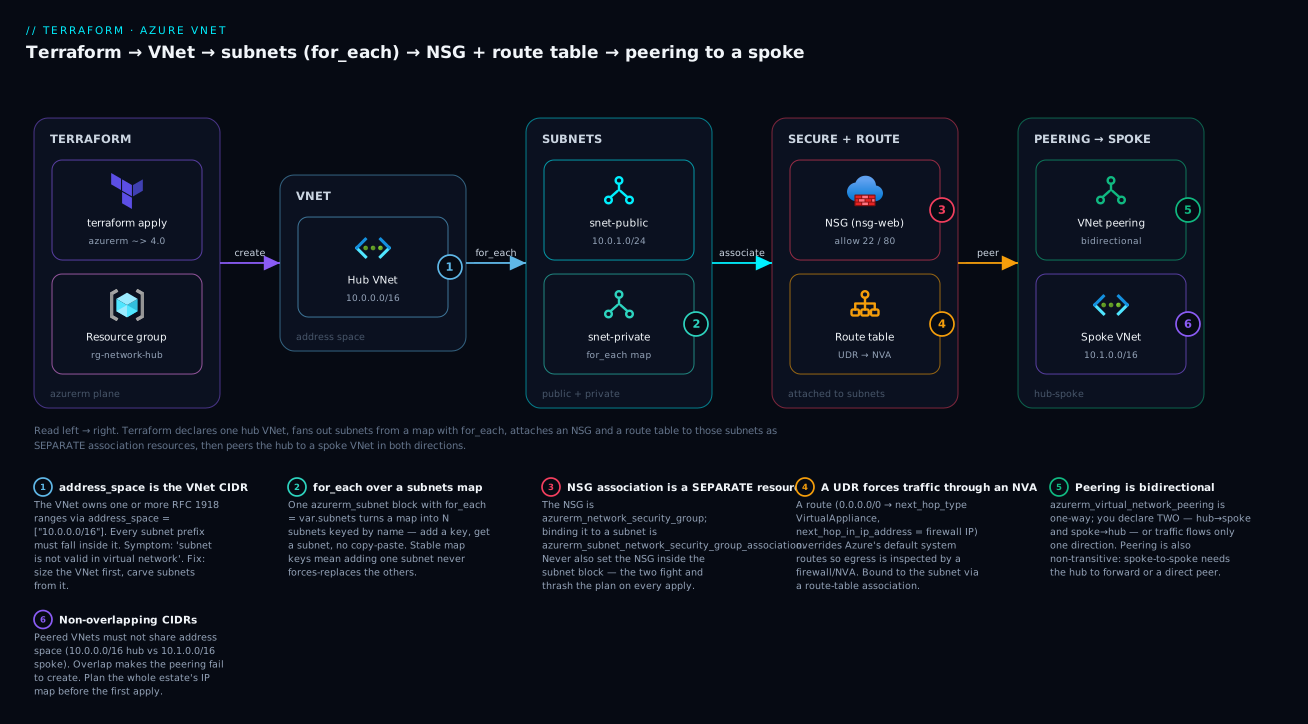
The diagram below is what this configuration builds — read it left to right: Terraform declares the resource group and hub VNet, fans out the subnets from the map with for_each, attaches the NSG and route table as separate association resources, then peers the hub to the spoke in both directions.
Step 1 — terraform init
export ARM_SUBSCRIPTION_ID="<your-sub-id>"   # or set var.subscription_id
az login                                     # if not already
terraform init
You should see the backend initialise against the Storage Account and the azurerm provider download:
Initializing the backend...
Successfully configured the backend "azurerm"!
Initializing provider plugins...
- Installing hashicorp/azurerm v4.x.x...
Terraform has been successfully initialized!
Step 2 — terraform plan
terraform plan -out=tfplan
Representative tail — note two subnets from one block (["public"], ["private"]) and both peering directions:
  # azurerm_subnet.this["private"] will be created
  # azurerm_subnet.this["public"] will be created
  # azurerm_virtual_network_peering.hub_to_spoke will be created
  # azurerm_virtual_network_peering.spoke_to_hub will be created
  ...
Plan: 11 to add, 0 to change, 0 to destroy.
Eleven resources: RG, 2 VNets, 2 subnets, NSG, NSG association, route table, route, route-table association, and 2 peerings.
Step 3 — terraform apply
terraform apply tfplan
Terraform respects dependencies automatically — the VNet before its subnets, the subnets before their associations, both VNets before the peerings — because each association references the other resource’s .id. Expect Apply complete! Resources: 11 added, 0 changed, 0 destroyed. and your outputs printed.
Step 4 — verify with az
Confirm the real cloud state, not just Terraform’s word:
# VNet + its address space and subnets
az network vnet show -g rg-network-hub -n vnet-hub \
  --query "{name:name, space:addressSpace.addressPrefixes, subnets:subnets[].name}" -o jsonc

# NSG rules actually landed
az network nsg rule list --nsg-name nsg-web -g rg-network-hub \
  --query "[].{name:name, prio:priority, port:destinationPortRange, access:access}" -o table

# Route table + UDR
az network route-table route list -g rg-network-hub \
  --route-table-name rt-egress -o table

# Peering state — must say 'Connected' both ways
az network vnet peering list -g rg-network-hub --vnet-name vnet-hub \
  --query "[].{name:name, state:peeringState, remote:remoteVirtualNetwork.id}" -o table
The peering peeringState should read Connected (not “Initiated”) because both directions exist. If it says “Initiated”, one peering resource is missing — the single most common peering mistake.
Step 5 — terraform destroy (⚠️ cleanup)
terraform destroy
Everything is free, but destroy anyway to keep the subscription clean and rehearse teardown. Terraform removes resources in reverse-dependency order: peerings and associations first, then subnets, then VNets and the RG. Expect Destroy complete! Resources: 11 destroyed. If destroy stalls on a subnet (“subnet is in use”), something outside this config (a VM NIC, a private endpoint) is still attached — see troubleshooting.
Variables, outputs & making it reusable
The demo is already parameterised (region, address spaces, the subnets map, the NVA IP). The natural next step is to lift it into a reusable module so every environment and every spoke calls the same code with different inputs. A minimal module interface:
# modules/vnet/variables.tf
variable "name"          { type = string }
variable "location"      { type = string }
variable "rg_name"       { type = string }
variable "address_space" { type = list(string) }
variable "subnets" {
  type = map(object({
    address_prefixes  = list(string)
    service_endpoints = optional(list(string), [])
  }))
}

# root: call it per environment / per spoke
module "hub" {
  source        = "./modules/vnet"
  name          = "vnet-hub"
  location      = var.location
  rg_name       = azurerm_resource_group.net.name
  address_space = ["10.0.0.0/16"]
  subnets       = var.subnets
}
Because subnets are a map, the module needs no code change to support 2 or 20 subnets — the caller’s map drives it. Outputs should return the subnet_ids map (shown above) so callers place NICs by subnet name (module.hub.subnet_ids["private"]) rather than by fragile index.
Should you write your own or use a registry module? The community Azure/vnet/azurerm and Azure/network-security-group/azurerm modules are battle-tested and worth using for standard topologies; roll your own when your subnet/association/peering conventions are opinionated enough that bending a generic module costs more than owning a thin one.
| Approach | Use when | Trade-off |
|---|---|---|
Registry module (Azure/vnet/azurerm) |
Standard VNet/subnet layout, want speed | Less control; pin the version, read its inputs |
| Thin roll-your-own module | Opinionated naming/associations/peering | You maintain it; but it’s exactly your shape |
| No module (root only) | One environment, learning | Copy-paste across envs; drifts over time |
Common mistakes and troubleshooting
Networking errors in azurerm are usually one of a dozen recognisable shapes. Match the symptom, apply the fix.
| Symptom / error | Cause | Fix |
|---|---|---|
Unsupported argument: address_prefix |
Used the deprecated singular scalar | Use address_prefixes = ["10.0.1.0/24"] (plural list) |
| Plan flaps: NSG attach/detach every apply, no config change | Subnet and an association resource both own the NSG link | Own it in one place — the association resource; remove network_security_group_id from the subnet |
| Plan flaps: a security rule added then removed forever | NSG has inline security_rule and a standalone azurerm_network_security_rule |
Pick one model; if standalone, the NSG must have zero inline rules |
Address space ... overlaps with ... on peering create |
Hub and spoke CIDRs overlap | Renumber one VNet; peered VNets must not overlap |
Peering shows Initiated, traffic one-way |
Only one direction declared | Declare both azurerm_virtual_network_peering resources |
Two spokes can't reach each other |
Peering is non-transitive | Peer spokes directly, or route via an NVA in the hub |
Subnet <x> is in use and cannot be deleted on destroy |
A NIC / private endpoint / delegation still attached | Delete the attached resource (or its config) first, then destroy |
Security rule has conflicting priority |
Two rules share a priority in one NSG |
Priorities must be unique per NSG; renumber |
next_hop_in_ip_address must be specified / must not be specified |
Set it with a non-VirtualAppliance hop, or omitted for VirtualAppliance | Set the IP only for VirtualAppliance; omit otherwise |
subnet is not valid in virtual network |
Subnet prefix outside the VNet address_space |
Carve subnet CIDRs from inside the VNet range |
AuthorizationFailed creating the VNet |
Identity lacks Network Contributor on the RG/sub | Grant Network Contributor; re-run |
| Delegated subnet won’t host your resource | Subnet delegated to a different service (single-purpose) | Use a dedicated subnet per delegated service |
The four you will actually hit in your first week deserve prose. The NSG-association thrash is the number-one confusion: if a plan endlessly attaches and detaches an NSG with no source change, you have two owners for the relationship — delete the network_security_group_id from the subnet block and let azurerm_subnet_network_security_group_association own it. The inline-vs-standalone conflict is the same disease for rules and routes: an NSG (or route table) with inline blocks believes it owns the complete set, so a standalone rule/route pointed at it flaps forever — choose one model per NSG/table. Overlapping CIDRs fail loudly at peering-create time, which is a gift (it fails before anything is half-built); the fix is always upstream in your address plan, never a Terraform flag. And subnet-in-use on destroy means something outside this config is still attached — a VM’s NIC, a private endpoint, a service delegation — so Terraform can’t remove the subnet; find and remove the attachment, then destroy.
Cost, cleanup & production notes
Cost. The resources in this lesson are among Azure’s free networking primitives. VNets, subnets, NSGs, route tables and intra-region peering carry no hourly charge; you pay for the things you did not build here.
| Resource | Cost while running |
|---|---|
| VNet, subnets, NSG, route table | Free |
| VNet peering (same region) | Free to configure; ~₹0.008/GB each direction for data |
| VNet peering (cross-region / global) | Higher per-GB inbound + outbound |
| VPN / ExpressRoute gateway (not in demo) | Hourly + data — the expensive part |
| Azure Firewall / NVA (the UDR target) | Hourly + data if you deploy a real one |
| Public IP, NAT Gateway (not in demo) | Hourly + data |
So the demo costs effectively nothing, but the UDR points at an NVA IP (10.0.3.4) that doesn’t exist yet — traffic to 0.0.0.0/0 from the private subnet would blackhole until you deploy a firewall there. That’s fine for a networking demo with no VMs; just know the route is “armed” for when compute and a firewall arrive.
Cleanup is terraform destroy. Because everything is free, the only reason to destroy is hygiene and rehearsal — but do it, because a forgotten gateway added later is not free.
Production hardening notes:
- Remote state, always. A network is shared infrastructure; its state must be remote (Azure Storage backend) with locking so two engineers can’t apply concurrently — set up in the getting-started lesson.
- Least privilege. The pipeline identity needs
Network Contributorscoped to the networking RG, notOwneron the subscription. - Tag everything (
environment,owner,cost-center) via adefault_tags-style local merged onto every resource, so networking spend and ownership are queryable. - Never
0.0.0.0/0on SSH. The demo scopes SSH toadmin_source_cidr; in production front management with Azure Bastion and drop the public SSH rule entirely. - Watch drift. Run
terraform planon a schedule (or in CI) so a portal change to an NSG rule surfaces as drift before it becomes a silent security hole.
Going deeper
The happy-path demo applies cleanly on an empty subscription. What follows is what decides whether the network survives its second year — the mechanics behind the resources you just wrote.
Changing a subnet’s CIDR is effectively destructive. Azure will not resize a subnet that has resources attached, so a plan that widens 10.0.2.0/24 to 10.0.2.0/23 becomes a delete-then-create — and fails outright with “subnet is in use” if a single NIC, private endpoint or delegation lives there. This is why the address plan came first and why AKS subnets get a /22: sizing is the one decision you cannot cheaply revise on a live subnet. Related, and easy to miss on current providers: azurerm_subnet exposes default_outbound_access_enabled. Azure is retiring the implicit “every VM gets free outbound internet” behaviour, so set it to false on new subnets and give egress an explicit path — NAT Gateway, Azure Firewall, or the UDR-to-NVA above — rather than depending on a platform default that is going away.
Adopting a brownfield network: import, never rewrite. Most real estates already contain VNets somebody built in the portal. Terraform 1.5+ import blocks bring them under management by resource ID, so the next plan is a no-op instead of a destroy/create that would drop every workload inside:
import {
  to = azurerm_virtual_network.hub
  id = "/subscriptions/<SUB_ID>/resourceGroups/rg-network-hub/providers/Microsoft.Network/virtualNetworks/vnet-hub"
}
Run terraform plan -generate-config-out=hub.tf to scaffold matching HCL, reconcile it against reality, then apply. Subnets, NSGs, route tables and peerings each import by their own full resource ID — the VNet import does not pull its children in with it.
Refactoring count → for_each: moved, not destroy. Inherit subnets built with count (addressed [0], [1]) and switch to the map pattern this lesson teaches (addressed ["public"]) and Terraform sees entirely new addresses — it plans a destroy and a create. A moved block rewrites the state address in place with zero cloud churn:
moved {
  from = azurerm_subnet.this[0]
  to   = azurerm_subnet.this["public"]
}
NSGs stack — subnet and NIC both apply. A packet can traverse two NSGs. For inbound traffic Azure evaluates the subnet NSG first, then the NIC NSG; for outbound it is NIC first, then subnet. Both must allow, so a permissive subnet rule means nothing if the NIC NSG denies — the single most common “but I allowed port 443” confusion. Rather than reading rule lists by eye, ask Azure for the merged verdict:
az network nic list-effective-nsg --name <nic-name> -g <rg> -o jsonc
az network nic show-effective-route-table --name <nic-name> -g <rg> -o table
Route selection is longest-prefix-first, then source priority. When several routes match a destination Azure picks the longest prefix; only on a tie does source rank decide, and there the order is UDR > BGP (VPN/ExpressRoute) > system route. That ranking is exactly why a 0.0.0.0/0 UDR beats the system default-to-internet route. The classic self-inflicted outage: apply that same 0.0.0.0/0→NVA route to the NVA’s own subnet, and the appliance’s return traffic routes back into itself in a loop. The firewall’s subnet must stay on system routing, or carry a narrower UDR that never points at itself.
Peering does not auto-sync address-space changes. Add a new CIDR to a VNet that is already peered and the peer keeps routing on the old ranges until the link is re-synced — az network vnet peering sync, or bump the triggers map on azurerm_virtual_network_peering to force the provider to re-establish it. Gateway transit carries an ordering constraint too: use_remote_gateways = true on the spoke fails unless the hub already has a provisioned gateway and allow_gateway_transit = true. The gateway must exist before a spoke can borrow it, which in practice means the hub’s gateway is a separate, earlier apply.
Scale and blast radius. A VNet supports hundreds of peerings (500 by default), which sounds generous until you price a full mesh: connecting n spokes directly costs n(n-1) peering resources, versus 2n for hub-and-spoke. That arithmetic — not security alone — is why hub-spoke wins past a handful of spokes. And because the network is shared infrastructure, its state file is the highest blast-radius object you own: remote backend with locking, Network Contributor scoped to the networking resource group rather than Owner on the subscription, and a scheduled terraform plan in CI so a portal-loosened NSG rule surfaces as drift instead of quietly becoming a hole.
Common beginner mistakes
These are misconceptions rather than error strings — the wrong mental model that produces the symptoms in the troubleshooting table above.
“I’ll define the subnet inside the VNet and as its own resource — belt and braces.” This is the single most common Azure-Terraform trap, and belt-and-braces is exactly the wrong instinct. azurerm_virtual_network with inline subnet {} blocks believes it owns the complete, authoritative subnet list; a standalone azurerm_subnet is then a stray it wants to remove, while the standalone resource re-creates it. Every apply flaps and no plan is ever empty. Right model: exactly one owner per relationship. Use standalone azurerm_subnet and never put subnet {} in the VNet — the same either/or governs NSG rules and route table routes.
“The NSG binds to the subnet with an argument on the subnet.” It reads like it should, and older configs did it that way. Today the binding is its own resource, azurerm_subnet_network_security_group_association. Right model: the association resource is the one true owner of the NSG↔subnet link, because the subnet, the NSG and the route table all have independent lifecycles. Set network_security_group_id on the subnet as well and every plan attaches then detaches, forever.
“I created the NSG, so my subnet is protected now.” An unassociated NSG filters precisely nothing — it is a rulebook with no guard posted at the gate. Right model: creating the NSG is step one of two; it takes effect only once an association binds it to a subnet or a NIC. A green apply is not evidence that traffic is being filtered.
“One peering resource connects the two VNets.” Peering is directional. Declare one and you get a half-open link the portal labels “Initiated,” with traffic flowing one way at best. Right model: a connection is two azurerm_virtual_network_peering resources, one per direction; the state reads “Connected” only when both exist. Terraform creates both in a single apply, so this is a config omission, not a timing problem.
“A /24 gives me 254 usable IPs, like on-prem.” Azure reserves five addresses in every subnet — the network address, .1 (gateway), .2 and .3 (DNS mapping), and broadcast — so a /24 yields 251. Right model: subtract five from the textbook host count on every subnet, every time. It bites hardest at the small end, where a /29 gives you three usable addresses rather than six.
“Peering to the hub means all my spokes can reach each other.” Transitivity is the intuition everyone imports from routing, and Azure peering does not have it. Right model: A↔B and B↔C never imply A↔C. Connect spokes by peering them directly, or by routing their traffic through an NVA in the hub with allow_forwarded_traffic = true on the hub-side peerings.
“0.0.0.0/0 on the SSH rule is fine, it’s only a demo.” A demo where the entire internet can reach port 22 is a demo that gets its VM cryptomined, usually within hours of the first public IP appearing. Right model: scope admin rules to a known source CIDR (admin_source_cidr) from the very first apply, and in production drop the public SSH rule altogether in favour of Azure Bastion.
Practice challenges
Work these against the demo configuration, escalating from a one-line edit to brownfield adoption. Each solution explains why, not just what — reason them through first, then check.
1. (Beginner) Add a management subnet at 10.0.4.0/24 without touching any resource block.
<details> <summary>Solution</summary>
Add a single key to the subnets map in variables.tf:
management = { address_prefixes = ["10.0.4.0/24"] }
Why: every subnet comes from one for_each over that map, so a new key creates exactly one new subnet — azurerm_subnet.this["management"]. Because for_each keys on a stable string rather than an index, public and private are untouched; with count this insertion would have renumbered and force-replaced them.
</details>
2. (Beginner) How many usable IP addresses does 10.0.6.0/26 give you, and why not 64?
<details> <summary>Solution</summary>
59. A /26 spans 64 addresses, and Azure reserves five in every subnet: the network address, .1 as the default gateway, .2 and .3 for DNS mapping, and the broadcast address.
Why it matters: the reservation is per subnet and never scales away, so it dominates small subnets — a /29 yields 3 usable, not 6. Size AKS node pools and any auto-scaling tier with that haircut already subtracted.
</details>
3. (Intermediate) Allow inbound HTTPS on 443 from the internet, keeping the existing rules valid.
<details> <summary>Solution</summary>
Add a third inline security_rule with a unique priority:
security_rule {
  name                       = "allow-https"
  priority                   = 120
  direction                  = "Inbound"
  access                     = "Allow"
  protocol                   = "Tcp"
  source_port_range          = "*"
  destination_port_range     = "443"
  source_address_prefix      = "Internet"
  destination_address_prefix = "*"
}
Why: priorities must be unique per NSG and lower numbers evaluate first, so 120 slots in cleanly after SSH (100) and HTTP (110). Critically, because this NSG already uses inline rules it owns the whole set — adding the rule as a standalone azurerm_network_security_rule instead would trigger the inline-versus-standalone flap.
</details>
4. (Intermediate) Protect the private subnet with the same nsg-web NSG, without writing a second NSG.
<details> <summary>Solution</summary>
Declare a second association resource pointing the existing NSG at the other subnet:
resource "azurerm_subnet_network_security_group_association" "private" {
  subnet_id                 = azurerm_subnet.this["private"].id
  network_security_group_id = azurerm_network_security_group.web.id
}
Why: the NSG↔subnet relationship lives entirely in the association resource, so one NSG binds to many subnets by declaring one association each. This reuse is precisely the reason the binding is modelled as its own resource rather than as an argument on the subnet. </details>
5. (Advanced) Two spokes both peer to the hub but cannot reach each other. Give them connectivity two different ways, and say which one scales.
<details> <summary>Solution</summary>
Peering is non-transitive, so peering each spoke to the hub never connects spoke-A to spoke-B. Two fixes:
- Direct peering — declare both directions of an A↔B
azurerm_virtual_network_peeringpair. - Route through the hub NVA — put a UDR on each spoke sending the other spoke’s range (or
0.0.0.0/0) to the hub firewall’s private IP, and setallow_forwarded_traffic = trueon the hub-side peerings so the hub accepts packets the NVA forwards rather than dropping them.
Why: direct peering is simplest and lowest-latency for a handful of spokes, but it is a full mesh — n(n-1) peerings as spokes multiply. The hub-NVA route keeps each spoke at one peering, and it is the only option when the traffic must actually be inspected. allow_forwarded_traffic is the toggle people forget, and its absence looks exactly like a routing bug.
</details>
6. (Advanced) A VNet named vnet-legacy was built by hand in the portal. Bring it under Terraform management without destroying it.
<details> <summary>Solution</summary>
Use a Terraform 1.5+ import block keyed on the Azure resource ID:
import {
  to = azurerm_virtual_network.legacy
  id = "/subscriptions/<SUB_ID>/resourceGroups/<RG_NAME>/providers/Microsoft.Network/virtualNetworks/vnet-legacy"
}

resource "azurerm_virtual_network" "legacy" {
  # scaffold with: terraform plan -generate-config-out=legacy.tf
}
Once the HCL matches reality, terraform plan should report 0 to add, 0 to change, 0 to destroy.
Why: import binds existing cloud state to a Terraform address, transferring management with zero downtime; the naive alternative — delete and re-create in code — would drop every workload in the VNet. Note that each subnet, NSG and peering imports by its own resource ID: importing the VNet does not adopt its children.
</details>
Cheat-sheet
The resources and their load-bearing arguments:
| Resource | Key arguments | Remember |
|---|---|---|
azurerm_virtual_network |
address_space (list), dns_servers |
Address space is a list of CIDRs |
azurerm_subnet |
address_prefixes (list), service_endpoints, delegation |
Plural address_prefixes; use for_each |
azurerm_network_security_group |
inline security_rule, tags |
Inline or standalone rules, never both |
azurerm_network_security_rule |
priority, direction, access, protocol |
Standalone; NSG must have zero inline rules |
azurerm_subnet_network_security_group_association |
subnet_id, network_security_group_id |
Separate resource — the one true owner |
azurerm_route_table |
bgp_route_propagation_enabled |
v4 renamed the BGP flag (inverted) |
azurerm_route |
address_prefix, next_hop_type, next_hop_in_ip_address |
IP only with VirtualAppliance |
azurerm_subnet_route_table_association |
subnet_id, route_table_id |
Separate resource |
azurerm_virtual_network_peering |
remote_virtual_network_id, allow_forwarded_traffic, allow_gateway_transit, use_remote_gateways |
Two resources; transit on hub, use-remote on spoke |
Commands:
| Command | Purpose |
|---|---|
terraform init |
Init backend + download azurerm |
terraform plan -out=tfplan |
Preview; save the plan |
terraform apply tfplan |
Apply the saved plan |
terraform state list |
See azurerm_subnet.this["public"] etc. |
az network vnet show -g <rg> -n <vnet> |
Verify VNet + subnets |
az network nsg rule list --nsg-name <nsg> -g <rg> -o table |
Verify NSG rules |
az network route-table route list -g <rg> --route-table-name <rt> -o table |
Verify UDRs |
az network vnet peering list -g <rg> --vnet-name <vnet> -o table |
Verify peering (expect Connected) |
terraform destroy |
Tear it all down |
Interview and exam questions
1. Why is address_prefixes plural and what breaks if you use address_prefix?
azurerm_subnet takes address_prefixes as a list (a subnet can carry more than one prefix). The old singular address_prefix is deprecated/removed in provider v4, so using it raises “Unsupported argument.” Always use the plural list form.
2. Why is the NSG-to-subnet binding a separate resource instead of an argument on the subnet?
Because the subnet, its NSG, and its route table have independent lifecycles — you swap or reuse NSGs without touching subnets — and modelling the association separately (azurerm_subnet_network_security_group_association) avoids a circular dependency and lets each be managed on its own. Setting it in two places (subnet + association) makes every apply thrash.
3. You added a subnet to your for_each map and Terraform wants to replace existing subnets. What went wrong — and would count have been better?
It shouldn’t with for_each keyed on stable map keys — adding a key only adds that subnet. If you saw replacement you were likely using count (index-based), where inserting an element shifts indices and forces-replaces everything after it. for_each over a map is exactly the fix; keys are stable identities.
4. Explain the inline-security_rule-vs-azurerm_network_security_rule conflict.
An NSG with inline security_rule blocks owns the entire rule set authoritatively. A standalone azurerm_network_security_rule targeting the same NSG is then perpetual drift — the NSG removes it, the resource re-creates it, every apply. Use one model: inline for a self-contained NSG, standalone only when the NSG has no inline rules.
5. Two VNets won’t peer — the apply errors on overlapping address space. Fix?
Peered VNets must have non-overlapping CIDRs. Renumber one VNet’s address_space so the ranges are disjoint (e.g. hub 10.0.0.0/16, spoke 10.1.0.0/16). This is an address-plan fix, not a provider flag.
6. How many peering resources connect a hub and a spoke, and why?
Two — one per direction (hub_to_spoke, spoke_to_hub). azurerm_virtual_network_peering is directional; with only one, the link stays “Initiated” and traffic flows one way. Both together make it “Connected.”
7. What does a UDR with next_hop_type = "VirtualAppliance" achieve, and what else must you set?
It overrides Azure’s default system route so matching traffic (often 0.0.0.0/0) is sent to a firewall/NVA for inspection instead of straight to the internet. You must also set next_hop_in_ip_address to the appliance’s private IP — required for VirtualAppliance, forbidden for every other hop type.
8. In hub-spoke, which peering gets allow_gateway_transit and which gets use_remote_gateways?
The hub (owning the VPN/ExpressRoute gateway) sets allow_gateway_transit = true; the spoke sets use_remote_gateways = true to use the hub’s gateway. Only one VNet can own the gateway, so never set use_remote_gateways on both.
9. Peering is non-transitive — what does that mean for two spokes? Spoke-A ↔ hub and Spoke-B ↔ hub does not give Spoke-A ↔ Spoke-B. To connect them you either peer the two spokes directly or force their traffic through an NVA in the hub (via UDRs), which is why hub-spoke pairs peering with routing.
10. How many usable IPs does a /24 subnet give you on Azure, and why not 254?
251. Azure reserves five addresses in every subnet — the network address, three host addresses (.1 default gateway, .2/.3 for DNS mapping), and the broadcast address.
11. (Associate-style) True/False: you can create subnets both inline in azurerm_virtual_network and as standalone azurerm_subnet resources for the same VNet.
False. Mixing the two makes each apply fight the other (the VNet removes the “unknown” subnet, the standalone resource re-creates it). Pick one model — standalone azurerm_subnet is recommended.
12. Service endpoint vs private endpoint — one-line distinction? A service endpoint keeps subnet→PaaS traffic on the backbone and lets the PaaS service firewall to your subnet (service keeps a public IP); a private endpoint puts a private NIC for the PaaS service inside your subnet, giving it a private IP and removing public exposure.
Glossary
| Term | Plain-language meaning |
|---|---|
| Virtual Network (VNet) | Azure’s private, software-defined network boundary — the “gated neighbourhood” every resource lives inside. Modelled by azurerm_virtual_network. |
| Address space | The VNet’s overall IP range(s), given as a list of CIDR blocks (e.g. ["10.0.0.0/16"]). All subnets are carved from inside it. |
| CIDR | Notation like 10.0.1.0/24; the /24 says how many leading bits are fixed, i.e. how big the range is. A smaller number means a bigger range. |
| Subnet | A non-overlapping slice of the VNet’s address space where resources actually attach — a “street”. Key argument address_prefixes (plural list). |
| Reserved addresses | The five IPs Azure takes in every subnet (network, .1 gateway, .2/.3 DNS, broadcast) — why a /24 gives 251 usable, not 254. |
| Network Security Group (NSG) | A stateful allow/deny firewall list evaluated by priority — the gate guard’s rulebook. azurerm_network_security_group. |
| Security rule | One line in an NSG: priority, direction, access, protocol, source and destination. The first match wins and evaluation stops. |
| Priority | The 100–4096 number that orders NSG rules; lower is evaluated first and must be unique within an NSG. |
| Default rules | Hidden platform NSG rules at priorities ≥ 65000 that allow intra-VNet and load-balancer traffic and deny the rest. Your rules layer on top. |
| Service tag | A named, Azure-managed set of IP ranges (Internet, VirtualNetwork, AzureLoadBalancer, Storage) used in a rule instead of hard-coded addresses. |
| Application Security Group (ASG) | A logical group of NICs you can target in NSG rules instead of IPs, so rules follow the workload rather than the address. |
| Route table / UDR | User-defined routes that override Azure’s system routes — the road signs. azurerm_route_table plus azurerm_route. |
| Next hop | Where a matching route sends traffic: VirtualAppliance, VirtualNetworkGateway, VnetLocal, Internet, or None (blackhole). |
| System route | The invisible default routes Azure supplies (local VNet, internet, peered ranges) before any UDR is applied. |
| NVA | Network Virtual Appliance — a firewall or router (a VM, or Azure Firewall) that traffic is forced through for inspection via a UDR. |
| Association resource | The standalone resource binding an NSG or route table to a subnet (azurerm_subnet_network_security_group_association, azurerm_subnet_route_table_association) — the one true owner of that link. |
| Service endpoint | A subnet setting keeping traffic to an Azure PaaS service on the backbone and letting that service firewall to your subnet. The service keeps a public IP. |
| Private endpoint | A private NIC for a PaaS service placed inside your subnet, giving it a private IP so its public exposure can be removed entirely. |
| Delegation | Handing a subnet exclusively to one Azure service (ACI, App Service, PostgreSQL Flexible Server) that injects its own infrastructure. The subnet becomes single-purpose. |
| VNet peering | A private, low-latency link between two VNets over the Azure backbone. Directional — one azurerm_virtual_network_peering per direction. |
| Non-transitive | A↔B and B↔C peerings do not create A↔C. Connect spokes directly, or route them through a hub NVA. |
| Gateway transit | The peering pair where the hub shares its VPN/ExpressRoute gateway (allow_gateway_transit) and the spoke uses it (use_remote_gateways). |
| Hub-spoke | The reference topology: a shared-services hub VNet with workload spokes peered to it, egressing through the hub’s firewall. |
| Drift | Cloud state diverging from code — a portal-edited NSG rule, say. terraform plan reveals it; apply reconciles it. |
Key takeaways
- Plan addresses first. VNets and subnets carve from a non-overlapping supernet; Azure reserves 5 IPs per subnet, and peering hard-fails on overlap — the address plan is the one decision you can’t cheaply undo.
address_spaceis a list;address_prefixesis a plural list. The singular scalar is gone in provider v4.- Use
for_eachover a subnets map, not repeated blocks orcount— stable map keys mean adding a subnet never renumbers the others. - Associations are separate resources.
azurerm_subnet_network_security_group_associationandazurerm_subnet_route_table_associationare the one true owner of those bindings — never also set them on the subnet, or the plan thrashes. - Inline vs standalone is an either/or. NSG rules and routes must use one model per NSG/table; mixing them flaps forever.
- A UDR to a
VirtualAppliancenext hop is how hub-spoke forces egress through a firewall — setnext_hop_in_ip_addressonly for that hop type. - Peering is two directional resources and is non-transitive — declare both directions (transit on hub, use-remote on spoke), and connect spokes via the hub’s NVA, not through the peering.
- It’s all free to build, so stand it up, verify with
az, anddestroy— then drop VMs into these subnets with Terraform on Azure: Linux & Windows VMs, VMSS & cloud-init.