Open the Remote Desktop client, click your desktop icon, and a few seconds later you are looking at a Windows session running on a VM you will never see an IP address for. That VM has no public IP, no inbound RDP port, and is not reachable from the internet at all — yet your keystrokes and pixels flow to and from it just fine. If you have ever tried to explain how that works to a security reviewer who keeps asking “so what port did you open inbound on the session host?”, you know the honest answer (“none”) sounds like hand-waving until you can draw the actual connection sequence. This article draws it.
Azure Virtual Desktop (AVD) connects a user to a session host through a sequence with three distinct actors: the connection broker (which decides which host you get), the Remote Desktop Gateway (which relays the session), and the reverse-connect transport (the trick that lets the host answer without ever listening for an inbound call). Most people blur these into “the AVD service connects you,” and that blur is exactly why the failures are confusing — a broker failure (“no resources available”) looks nothing like a gateway failure (“because of a security error”), which looks nothing like a Shortpath/UDP failure (a session that works but feels laggy). Once you can place each actor on the path, every symptom maps to a hop.
By the end you will be able to narrate the full launch — from the client fetching its feed, through token-based authorization, broker host-selection, the outbound gateway tunnel the host dials, the reverse-connect handshake, and the optional upgrade to a direct RDP Shortpath (UDP) path — and explain to that security reviewer, with the exact ports and FQDNs on the table, why nothing inbound is ever opened on the VM. This is the connection-flow companion to the higher-level Azure Virtual Desktop Architecture Explained: Control Plane, Host Pools, Workspaces, and Session Hosts in Plain English; that article gives you the static map, this one gives you the moving sequence.
What problem this solves
Traditional VDI made you choose between two bad network postures. Either you put session hosts on a public IP and opened RDP (TCP 3389) to the internet — the single most-scanned, most-brute-forced port on the planet and a top ransomware entry vector — or you stood up a fleet of Remote Desktop Gateway servers, Connection Brokers, and Web Access servers yourself, patched them, made them highly available, and published them through your own load balancer and firewall. The first option is a breach waiting to happen; the second is a standing operational tax just to reach your desktops, before you have served a single user.
AVD removes that choice by running the broker and gateway as a managed, multi-tenant control plane and by inverting the connection direction. The session host does not wait for a user to connect in; it dials out to the gateway and parks a connection there, and the broker stitches the user’s outbound connection to the host’s outbound connection inside the gateway. This is reverse connect. Because both legs are outbound over TLS 443, the host needs no public IP, no inbound NSG rule, and no port-forward — and you do not run a single gateway VM. The hard parts (gateway HA, broker logic, the web feed, token issuance) are Microsoft’s; you own only the Windows VMs and their outbound path to a handful of Azure FQDNs.
Who hits the confusion this article clears up: anyone debugging “why can’t this user connect when the VM is clearly running,” anyone whose network team blocked an outbound FQDN and broke new connections while existing ones kept working, anyone who turned on RDP Shortpath and now sees some users on a fast UDP path and others stuck on TCP, and every AZ-140 candidate who has to explain reverse connect on the exam. The fix for all of these starts with the same thing: knowing which actor owns which hop.
| Symptom | What it usually means | Which actor owns it | First place to look |
|---|---|---|---|
| “No resources available” | Broker found no healthy/assignable host | Broker / host registration | Host pool → session hosts status |
| “…because of a security error” | RDP-layer auth to an Entra-joined host failed | Client ↔ host auth (gateway-brokered) | Host pool custom RDP properties |
| Session connects but feels laggy | Stuck on TCP gateway relay, not UDP Shortpath | Reverse-connect transport / Shortpath | Get-RdpShortpathStats / connection info |
| New connections fail, old ones survive | An outbound control-plane FQDN got blocked | Host outbound path (broker/gateway endpoints) | Required-URL check tool / firewall logs |
| Feed is empty / icons missing | App-group assignment or workspace issue | Web feed / control plane | App group role assignments |
Learning objectives
By the end of this article you can:
- Name the three actors in an AVD connection — broker, gateway, reverse-connect transport — and state exactly what each one does and does not do.
- Trace a single launch end to end: client feed → token authorization → broker host-selection → host’s outbound gateway tunnel → reverse-connect stitch → session → optional Shortpath upgrade.
- Explain reverse connect precisely enough to justify “zero inbound ports on the session host” to a security reviewer, with the ports and direction of every leg.
- Distinguish the TCP reverse-connect relay path from the RDP Shortpath (UDP) path, say when each is used, and list what has to be true for Shortpath to engage.
- List the outbound FQDNs and ports a session host needs, and predict which failure you will see when each is blocked.
- Localise a failed or degraded connection to one hop — feed, auth, broker, gateway, transport — using the exact portal blade or PowerShell command.
- Map the whole flow to the AZ-140 “plan and implement network connectivity” and “implement and manage host pools” objectives.
Prerequisites & where this fits
You should already hold the static AVD picture: that AVD splits into a control plane Microsoft runs (broker, gateway, web client, and the metadata objects — host pool, application group, workspace) and a data plane you run (the session-host VMs). If those terms are fuzzy, read the architecture explainer first; this article assumes you know a host pool is “the set of VMs plus their connection settings” and that pooled vs personal is a host-selection concern. The decision between those two models lives in Personal vs Pooled Host Pools: A Decision Framework for Picking the Right AVD Desktop Model and Sizing It, and the end-to-end build is in Deploy Your First AVD Pooled Host Pool End to End: Host Pool, App Group, Workspace, and User Assignment.
You should be comfortable with TLS on 443, the difference between TCP and UDP, what an NSG rule and a UDR are, and that Microsoft Entra ID issues the tokens that authorize access. Basic familiarity with az in Cloud Shell and reading JSON output is assumed. You do not need to have run a gateway server — the whole point is that you never will.
This sits in the Networking & connectivity track of AVD knowledge. Upstream of it is identity (sign-in and Conditional Access); downstream is the session-host estate (images, scaling, FSLogix). It pairs with How to Configure Point-to-Site VPN with Microsoft Entra Authentication and OpenVPN only by contrast — AVD deliberately needs no VPN to reach desktops, because reverse connect replaces the inbound path a VPN would otherwise carry. Here is the quick map of who owns which hop, so you escalate to the right team during an incident.
| Hop on the path | What happens here | Who owns it | Failure it can cause |
|---|---|---|---|
| Client → Entra ID | Interactive sign-in, MFA, token issue | Identity team | Blocked sign-in, CA block |
| Client → workspace feed | Pull assigned desktops/apps as icons | Microsoft (control plane) | Empty feed, stale icons |
| Client → broker (with token) | Request a host for the chosen resource | Microsoft (broker) | “No resources available” |
| Broker → host metadata | Apply load-balancing + session limit | Microsoft + your config | Wrong host, over-packed host |
| Host → gateway (outbound) | Host dials out, parks a reverse-connect leg | Microsoft + your egress | New connections fail (blocked FQDN) |
| Gateway stitch | Join client leg ↔ host leg | Microsoft (gateway) | Gateway/transport errors |
| Client ↔ host RDP auth | Authenticate the RDP session itself | Your host-pool config | “…because of a security error” |
| Transport upgrade (Shortpath) | Try direct UDP, else stay on TCP | Microsoft + your network | Laggy session (no UDP) |
Core concepts
Six mental models make every later step and every failure obvious.
Three actors, not one “service.” A connection is a hand-off between a broker (the decision-maker — it authorizes the request and selects a host), a gateway (the relay — it carries bytes between client and host), and the reverse-connect transport (the direction-inverting trick that lets the host be reachable without listening). Keep them separate. The broker never carries your pixels; the gateway never decides which host you get. When you can say which actor is misbehaving, you are 80% of the way to the fix.
Reverse connect inverts who dials whom. In a normal client/server connection the client opens a socket to the server, so the server must listen on a port reachable by the client. AVD flips this: the session host opens an outbound TLS connection to the gateway and leaves it parked; the client also connects outbound to the gateway; the gateway joins the two outbound legs into one logical channel. Neither the client nor the host ever accepts an inbound connection from the other. That single inversion is why the host needs no public IP and no inbound 3389 — there is nothing to connect to. Say it as: “the host calls the gateway; the user calls the gateway; the gateway introduces them.”
The token is the ticket; the broker checks it. Before the broker will select a host, the client presents a token proving the user is authenticated (via Entra) and authorized to the resource (the app group is assigned to them). The broker validates this, then applies the host pool’s load-balancing rule (breadth-first or depth-first for pooled; direct-assignment for personal) and max session limit to pick one healthy, registered host. “No resources available” almost always means this step found nothing assignable — not that the network is down.
There are two transports, and the session prefers the fast one. The reverse-connect channel can be carried two ways. The baseline is a TCP-based relay through the gateway (works everywhere TLS 443 outbound works). The optimization is RDP Shortpath — a direct UDP path that bypasses the gateway relay for the bulk media stream, reducing latency and jitter. Shortpath has two flavours: managed networks (a private path, e.g. over ExpressRoute/VPN, host listens on UDP 3390 inbound from the client’s network) and public networks (uses STUN/TURN over UDP to traverse NAT without any inbound rule). If Shortpath cannot establish, the session falls back to TCP automatically — it still works, just slower. So “my session is laggy but connected” is usually “I’m on TCP, I wanted UDP.”
Setup happens over the control plane; the session rides the data path. The orchestration (feed, token, host-selection, the instruction to set up the reverse-connect channel) flows through Microsoft’s control-plane endpoints. The session itself (your keystrokes and pixels) flows through the gateway relay (TCP) and/or directly host-to-client (Shortpath UDP). This is why blocking a control-plane FQDN breaks new connections (no orchestration) but not existing ones (already-stitched data flows keep going) — a classic, baffling-until-you-see-it symptom.
Every hop is a failure point, and they fail differently. A blocked sign-in is identity. An empty feed is the web/control plane. “No resources available” is the broker (or host registration). “…because of a security error” is the RDP-layer auth between client and host. A laggy-but-connected session is the transport (no Shortpath). New-connections-only failures are an outbound FQDN. Knowing the shape of each failure is the whole diagnostic skill.
The vocabulary in one table
Pin down every moving part before the deep sections. The glossary repeats these for lookup; this is the mental model side by side.
| Term | One-line definition | Where it lives | Why it matters to the connection |
|---|---|---|---|
| Connection broker | Selects a healthy host for the request | Control plane (Microsoft) | Owns “no resources available” |
| Remote Desktop Gateway | Relays the session between client and host | Control plane (Microsoft) | Carries the TCP path; reverse-connect anchor |
| Reverse connect | Host dials out; gateway stitches the two legs | The transport design | Why zero inbound ports on the host |
| Workspace feed | The list of assigned desktops/apps as icons | Control plane / client | Empty feed = assignment problem |
| Token (Entra) | Proof of auth + authorization to the resource | Issued by Entra ID | Broker won’t act without it |
| Load-balancing rule | Breadth-first / depth-first / direct | Host pool config | Decides which host you land on |
| RDP Shortpath | Direct UDP path that bypasses the relay | Transport optimization | Lower latency; falls back to TCP |
| STUN / TURN | NAT-traversal for public Shortpath (UDP) | Public Shortpath path | Lets UDP work without inbound rules |
| UDP 3390 | Port the host listens on for managed Shortpath | Session host (managed only) | Only opened for managed Shortpath |
| Session host | The Windows VM that runs your desktop | Data plane (you) | Has no public IP / no inbound 3389 |
| AVD agent | Software on the host that registers + connects out | On the session host | Registers the host; dials the gateway |
| Required FQDNs | The outbound endpoints the host must reach | Your egress / firewall | Block one → new connections fail |
The connection sequence, step by step
This is the spine of the article. A single click-to-desktop launch is a precise sequence; here it is as an ordered table, then each phase explained.
| # | Phase | Who initiates | Talks to | Transport | What completes it |
|---|---|---|---|---|---|
| 1 | Sign-in | Client | Microsoft Entra ID | HTTPS 443 | A token (after MFA/CA) |
| 2 | Feed discovery | Client | Workspace/feed endpoint | HTTPS 443 | Assigned resources as icons |
| 3 | Launch + authorize | Client (user clicks) | Broker | HTTPS 443 | Broker validates the token |
| 4 | Host selection | Broker | Host pool metadata | (internal) | One healthy host chosen |
| 5 | Reverse-connect setup | Broker → host | Session host (via gateway) | TLS 443 | Host dials out; leg parked |
| 6 | Gateway stitch | Gateway | Client leg + host leg | TLS 443 | One logical channel formed |
| 7 | RDP auth | Client ↔ host | Each other (relayed) | Over the channel | Session credentials accepted |
| 8 | Transport upgrade | Client + host | Each other (Shortpath) | UDP (3390 / STUN-TURN) | Direct UDP path, or stay TCP |
| 9 | Session active | Both | Each other | UDP (preferred) / TCP | Pixels + input flowing |
Phase 1–2: Sign-in and the feed
The user opens the Remote Desktop client (the Windows app, the web client, macOS/iOS/Android, or a thin client) and signs in to Microsoft Entra ID. This is where MFA and Conditional Access apply — if a CA policy blocks the AVD application or demands a compliant device, the launch dies here with an identity error, long before any host is involved. (Rolling those policies out without locking yourself out is its own discipline; see Deploying Conditional Access Safely: Report-Only Rollout to Enforcement.)
With a token in hand the client pulls the workspace feed — the set of desktops and RemoteApps the user is assigned, rendered as icons. The feed is metadata: it does not connect to any host, it just answers “what may this user launch?” An empty feed is therefore never a network or host problem — it is an assignment problem (the app group is not assigned to the user or their group, or the workspace does not reference the app group).
| Feed symptom | Likely cause | Confirm | Fix |
|---|---|---|---|
| No workspaces at all | User signed in to wrong tenant/account | Check signed-in UPN in the client | Sign in with the assigned account |
| Workspace present, no icons | App group not assigned to the user/group | App group → Assignments | Assign the Entra group |
| Old icons / removed app still shows | Feed cached client-side | Refresh / re-subscribe the feed | Force feed refresh |
| Icons present, launch fails later | Feed is fine — problem is downstream | Proceed to broker/host checks | Not a feed issue |
Phase 3–4: Launch, authorize, and host selection
The user clicks an icon. The client sends the launch request with its token to the broker. The broker does two jobs: it validates that the token authorizes this user to this resource, then it selects a host. Selection is where your host pool configuration bites:
- For a pooled pool, the broker applies the load-balancing algorithm — breadth-first (spread users across hosts to keep each responsive) or depth-first (fill one host to its session limit before using the next, to keep VM count low) — and respects the max session limit per host. It will only consider hosts that are registered, marked Available, and not in drain mode.
- For a personal pool, there is no load-balancing — the broker routes the user to their assigned host (direct assignment), and if that host is deallocated it may need to start first (with Start VM on Connect).
“No resources available” is the broker telling you it found nothing to select. The causes are almost always host-side, not network-side.
| Load-balancing setting | Behaviour | Best for | Trade-off |
|---|---|---|---|
| Breadth-first | Next user → least-loaded host | Consistent performance | More hosts running (higher cost) |
| Depth-first | Fill a host to its limit first | Lowest VM count / cost | One host’s blip hits more users |
| Direct (personal) | User → their assigned host | Persistent desktops | No spreading; idle hosts still cost |
| “No resources available” cause | Why the broker found nothing | Confirm | Fix |
|---|---|---|---|
| All hosts at session limit | Pooled pool genuinely full | Host pool → sessions vs limit | Scale out / raise limit (sized) |
| Hosts in drain mode | Excluded from new sessions on purpose | Host status shows “drain” | Turn drain off after maintenance |
| Host not registered | Expired registration token at deploy | Host status ≠ Available | Issue a new token; re-register |
| Host deallocated (personal) | VM stopped, no Start-on-Connect | VM power state | Enable Start VM on Connect |
| User has no assigned host (personal) | Personal pool, unassigned user | Host pool → assignments | Assign the user to a host |
Phase 5–6: Reverse connect and the gateway stitch
Now the actual inversion. The broker instructs the chosen session host to set up a connection for this user. The host’s AVD agent opens an outbound TLS 443 connection to the Remote Desktop Gateway and parks it — a half-open leg waiting to be matched. The client likewise connects outbound to the gateway. The gateway stitches the client’s leg to the host’s leg, forming one logical RDP channel. No inbound connection is ever accepted by either side; both dialled out.
This is the crux to internalise: the host is the one that calls the gateway, triggered by the broker, after a user requests it. The session host is not sitting on an open listener — it reaches out on demand. That is why an outbound firewall that blocks the gateway/broker FQDNs breaks new connections (the host cannot dial out to park a leg) while sessions already stitched keep flowing.
The session host needs unimpeded outbound 443 to a specific set of FQDNs for this to work. Block one and you get a precise failure.
| Outbound endpoint (host) | Purpose | Port | Block it → |
|---|---|---|---|
*.wvd.microsoft.com |
Broker + gateway + feed control plane | 443 | New connections fail entirely |
rdgateway/rdbroker regional FQDNs |
Reverse-connect setup + relay | 443 | Host can’t park a leg → “no resources”/timeouts |
*.servicebus.windows.net |
Agent ↔ control-plane messaging | 443 | Agent unhealthy; registration/health breaks |
Login endpoints (login.microsoftonline.com) |
Token/auth for the host + agent | 443 | Auth/registration failures |
| Azure monitoring/agent endpoints | Diagnostics, agent updates | 443 | Degraded telemetry; stale agent |
The defining traits of the gateway relay (the always-available baseline transport) versus opening RDP directly:
| Property | Reverse-connect TCP relay (AVD) | Classic inbound RDP (3389) |
|---|---|---|
| Who dials whom | Both dial out to gateway | Client dials in to host |
| Inbound port on host | None | TCP 3389 open |
| Public IP on host | Not required | Usually required |
| Internet exposure | Zero (no listener) | High (scanned constantly) |
| Gateway you operate | None (managed) | You build/patch RDGW |
| Transport | TLS 443 outbound | Raw RDP 3389 |
Phase 7: The RDP-layer authentication
The channel exists, but the RDP session still authenticates between client and host. For modern, cloud-only estates the hosts are Microsoft Entra-joined, and the client must be told to use Entra auth and to expect an Entra-joined target. This is governed by the host pool’s custom RDP properties — correctness settings, not cosmetics. The two that matter most:
enablerdsaadauth:i:1— use Entra authentication for the RDP connection.targetisaadjoined:i:1— tells the client the target host is Entra-joined (needed especially from unmanaged devices).
Get these wrong and the channel forms but the RDP auth fails with the infamous “…because of a security error.” It is set on the host pool, so no change on the VM fixes it.
| RDP property | What it does | Set when | Symptom if missing |
|---|---|---|---|
enablerdsaadauth:i:1 |
Use Entra auth for RDP | Entra-joined hosts | Auth fails / wrong prompt |
targetisaadjoined:i:1 |
Client expects Entra-joined target | Connecting from unmanaged devices | “…because of a security error” |
audiomode:i:0 |
Play audio on the local device | Default UX | (UX only, not a connect blocker) |
redirectclipboard:i:1 |
Clipboard redirection | Productivity | (UX only) |
drivestoredirect:s: |
Control drive redirection | Security hardening | (UX/security, not a connect blocker) |
Phase 8–9: The transport upgrade — Shortpath vs the relay
With auth done, the session is live over the gateway’s TCP relay. Then AVD tries to upgrade the bulk media stream to RDP Shortpath — a direct UDP path that does not bottleneck through the gateway, giving lower latency and far better behaviour on lossy links. If Shortpath cannot establish (UDP blocked, NAT in the way and no TURN, feature off), the session silently stays on TCP. It still works; it is just slower and more jitter-prone. This is why “connected but laggy” is a transport question, not a “is it down” question.
Shortpath comes in two modes, and they have different network requirements:
| Mode | Path | Host inbound need | NAT traversal | Use when |
|---|---|---|---|---|
| Managed networks | Direct UDP over private connectivity | Host listens on UDP 3390 from client’s network | Not needed (private path) | ExpressRoute / VPN to the host subnet |
| Public networks | UDP via STUN/TURN | None (outbound only) | STUN/TURN handle NAT | Internet clients, no private link |
| (Fallback) | TCP relay through gateway | None (outbound 443) | Gateway relays | Shortpath can’t establish |
What must be true for Shortpath to engage (any one missing → TCP fallback):
| Requirement | Managed | Public | Notes |
|---|---|---|---|
| RDP Shortpath enabled (host setting) | Yes | Yes | Off by default historically; verify |
| UDP allowed end to end | Yes (3390) | Yes (STUN/TURN range) | A firewall dropping UDP forces TCP |
| Reachable path host↔client | Private route | STUN/TURN reachable | NAT alone is fine for public mode |
| Client supports Shortpath | Yes | Yes | Recent Windows client / web varies |
| NSG/UDR not blocking the UDP | For 3390 | For STUN/TURN egress | Common cause of “no UDP” |
What the difference actually feels like, and why it matters for the workloads people run on AVD:
| Aspect | TCP relay (via gateway) | RDP Shortpath (UDP) |
|---|---|---|
| Path | Through the gateway relay | Direct host ↔ client |
| Latency overhead | Higher (extra hop) | Lower (no relay hop) |
| Behaviour on packet loss | Degrades (head-of-line blocking) | Graceful (UDP, FEC) |
| Scrolling / video / maps | Can feel “sticky” | Near-LAN smoothness |
| Availability | Works wherever 443 out works | Needs UDP + right network |
| When you’re on it | Always, or as Shortpath fallback | When Shortpath establishes |
How to tell which transport a live session is using — the connection-info dialog in the session shows the transport, and on the host you can read Shortpath stats:
# On the session host: are Shortpath (UDP) connections actually being used?
Get-RdpShortpathStats
# In the active session, the connection-information bar shows "UDP" when Shortpath is engaged,
# or "TCP" when it fell back to the gateway relay.
Architecture at a glance
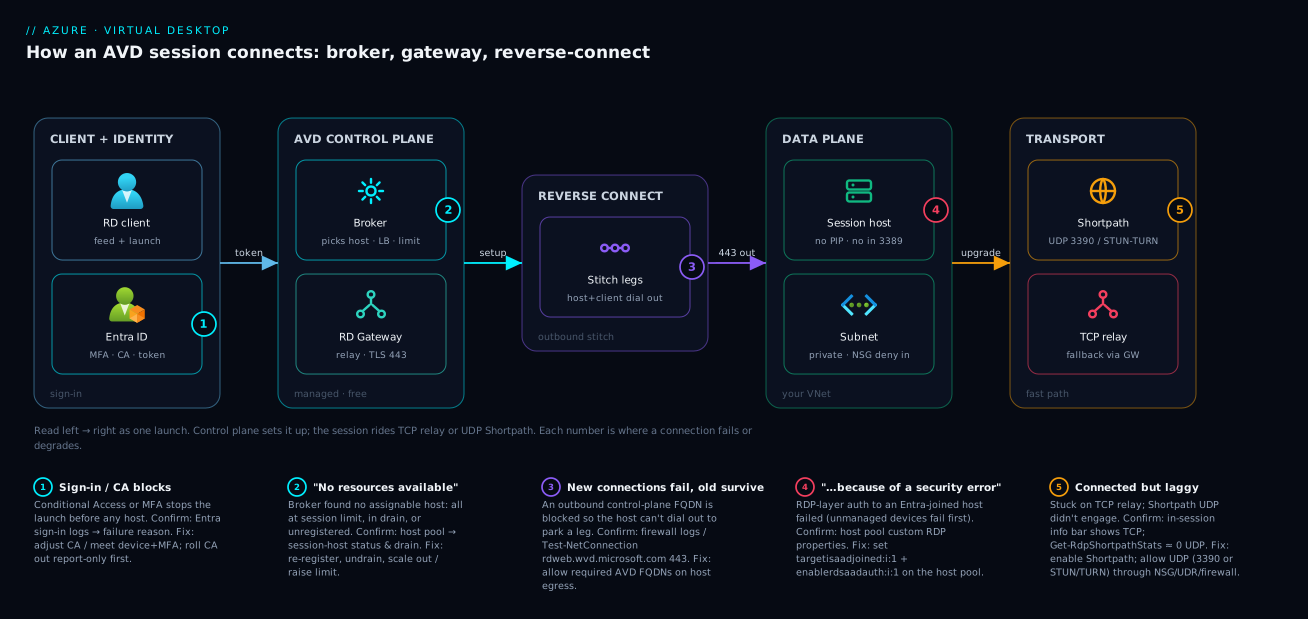
Read the diagram left to right as the exact sequence above. On the left, a user on the Remote Desktop client signs in to Microsoft Entra ID (HTTPS 443, MFA/Conditional Access) and pulls the workspace feed. The client then sends the launch request, carrying its token, into the AVD control plane, where the broker validates authorization and applies the host pool’s load-balancing rule and session limit to pick one healthy session host. The broker tells that host to set up the connection, and here the inversion happens: the host’s AVD agent dials outbound on TLS 443 to the Remote Desktop Gateway, the client also dials outbound to the gateway, and the gateway stitches the two outbound legs into one channel — so the host in your virtual network subnet keeps no public IP and no inbound 3389. The RDP layer then authenticates (the Entra-join custom RDP properties live here), and finally the transport tries to upgrade to a direct RDP Shortpath (UDP) path — over UDP 3390 on a managed/private network, or via STUN/TURN across public NAT — falling back to the TCP relay if UDP cannot establish.
The badges mark the five hops where launches actually fail: the Conditional Access/sign-in gate, the broker’s “no resources available” host-selection, the host’s outbound dependency on the gateway/broker FQDNs (block one and new connections die), the RDP-layer “…because of a security error” auth, and the Shortpath/UDP upgrade that decides whether the session is fast or merely working. The legend narrates each as symptom, how to confirm, and the fix.
Real-world scenario
Northwind Logistics moved 600 dispatch and back-office staff to a pooled AVD estate in centralindia — Windows 11 Enterprise multi-session, breadth-first load-balancing, Entra-joined hosts, FSLogix profiles on Azure Files, and a hub-and-spoke network where all session-host egress is forced through an Azure Firewall in the hub via a UDR. The build passed UAT from IT laptops on the corporate LAN. Go-live, with dispatchers connecting from home over residential broadband and a few from the warehouse floor on tablets, broke in three instructive ways — each landing on a different actor.
The loudest issue was new connections timing out for everyone in the first hour while the handful of sessions opened during UAT kept running perfectly. That contradiction is the signature of a control-plane outbound block: the firewall’s application rules allowed *.wvd.microsoft.com but the network team had not whitelisted the regional reverse-connect gateway/broker endpoints and *.servicebus.windows.net. Existing sessions were already stitched and rode the data path; new launches needed the host to dial out to park a reverse-connect leg, and that egress was being dropped. They confirmed it from the Azure Firewall logs (denied 443 to the gateway FQDNs) and by running the AVD agent’s required-URL/health check on a host, then added the missing FQDN allow-rules. New connections recovered immediately — no host or broker change required, because nothing was wrong with the host or the broker.
The second issue hit only home users on unmanaged personal laptops: “…because of a security error.” The hosts were Entra-joined, the host pool had enablerdsaadauth:i:1, but targetisaadjoined:i:1 had been dropped from the custom RDP properties during a late edit. Corporate (managed) devices tolerated the omission; unmanaged ones did not. Adding the property back at the host pool level — not on any VM — fixed every unmanaged client at once. The tell was that the symptom correlated perfectly with device management state, pointing straight at the RDP-auth hop rather than the network.
The third was not an outage at all — dispatchers complained the desktops felt “sticky” when scrolling maps, while warehouse tablets on the same Wi-Fi were crisp. The desktops were stuck on the TCP gateway relay; the tablets had negotiated RDP Shortpath. The home UDR forced all egress through the firewall, which was dropping the UDP Shortpath traffic, so those sessions silently fell back to TCP. The connection-information bar showed “TCP” for the laggy users and “UDP” for the crisp ones; Get-RdpShortpathStats on the hosts confirmed near-zero UDP for the affected segment. Allowing the Shortpath UDP egress (STUN/TURN for public Shortpath) let those sessions upgrade to UDP, and the stickiness vanished. Three symptoms, three actors — broker-path egress, RDP auth, and transport — and not one of them was fixed by touching application code or restarting a VM. The architecture told them which hop each time.
Advantages and disadvantages
The reverse-connect + managed-broker design is a strong default, but it is not free of trade-offs. The two-column view first, then where each side bites.
| Advantages | Disadvantages |
|---|---|
| Zero inbound ports on the host — no 3389, no public IP | The host’s outbound path becomes a hard dependency (blocked FQDN = no new connections) |
| No gateway/broker VMs to build, patch, or scale | You give up low-level control of the broker/gateway (it’s Microsoft’s black box) |
| Connection path is HA and global by Microsoft, under SLA | Diagnosing the control plane is limited to the signals Microsoft exposes |
| Shortpath (UDP) gives near-LAN feel when it engages | Shortpath needs UDP + the right network; silently falls back to slower TCP |
| Identity-front-door: MFA/Conditional Access gate every launch | A CA misconfig can lock out all users at the sign-in hop |
| Works from any device without a VPN to the host | “Any device” raises the bar on the Entra-join RDP properties being exactly right |
Where each matters: the zero-inbound posture is the headline security win and the reason auditors accept AVD where they would reject internet-facing RDP — lean into it and never “temporarily” attach a public IP. The outbound-dependency flip side is the most common production surprise: teams who lock down egress through a firewall or proxy will break new connections unless the required FQDNs are allowed, and because existing sessions survive, the failure looks intermittent and baffling until you realise it only affects new launches. The Shortpath trade-off is a performance, not availability, concern — sessions still work on TCP, so it is easy to miss that half your users are on the slow path; treat UDP enablement as a deliberate step, not an assumption.
Hands-on lab
This lab does not require you to deploy AVD from scratch — it assumes you have (or can use) an existing pooled host pool from the deploy walkthrough, and focuses on observing the connection sequence and its dependencies. Everything here is read-only or trivially reversible. Run the az parts in Cloud Shell; run the PowerShell parts on a session host (via an admin RDP session or Run Command).
Step 1 — Inspect the host pool’s load-balancing and RDP properties (the broker + auth inputs).
# What rule will the broker apply, and what RDP properties shape the auth hop?
az desktopvirtualization hostpool show \
  --name hp-northwind-pooled --resource-group rg-avd-prod \
  --query "{type:hostPoolType, lb:loadBalancerType, maxSession:maxSessionLimit, rdp:customRdpProperty}" -o jsonc
Expected: hostPoolType Pooled, loadBalancerType BreadthFirst or DepthFirst, and a customRdpProperty string. Confirm it contains enablerdsaadauth:i:1 and targetisaadjoined:i:1 if your hosts are Entra-joined.
Step 2 — Check that hosts are registered and assignable (so the broker has something to pick).
# List session hosts and their status — anything not "Available" the broker won't select
az desktopvirtualization sessionhost list \
  --host-pool-name hp-northwind-pooled --resource-group rg-avd-prod \
  --query "[].{host:name, status:status, sessions:sessions, drain:allowNewSession}" -o table
Expected: each host status = Available and allowNewSession = true. A host in Unavailable/NeedsAssistance, or with allowNewSession=false (drain mode), is invisible to the broker — the cause of many “no resources available” reports.
Step 3 — Verify the host’s outbound path to the required endpoints (the reverse-connect dependency). On a session host, run the AVD agent health/URL check:
# The AVD agent ships a health check that validates the required outbound URLs/ports.
# (Path may vary by agent version; this is the canonical health checker on the host.)
& "C:\Program Files\Microsoft RDInfra\AgentInstall\RDAgentBootLoader.exe" /verify 2>$null
# Practical alternative: test reachability of the control-plane endpoint on 443
Test-NetConnection -ComputerName rdweb.wvd.microsoft.com -Port 443
Expected: TCP 443 reachable. If Test-NetConnection fails for the gateway/broker FQDNs, your egress is the problem — new connections will fail even though the VM is up.
Step 4 — Confirm the transport in a live session. Connect to a desktop, then inside the session open the connection-information bar (the network/quality indicator) and note UDP vs TCP. On the host:
# Is Shortpath (UDP) actually being used, or is everyone on the TCP relay?
Get-RdpShortpathStats
Expected: non-zero UDP/Shortpath connection counts if Shortpath is enabled and UDP is permitted; all-TCP means Shortpath isn’t engaging (feature off, or UDP blocked by NSG/UDR/firewall).
Step 5 — Prove the zero-inbound posture. From Cloud Shell, confirm the session host has no public IP and no inbound 3389 rule:
# No public IP on the NIC, and no inbound 3389 allow on the NSG = correct reverse-connect posture
NIC=$(az vm show -g rg-avd-prod -n vm-host-0 --query "networkProfile.networkInterfaces[0].id" -o tsv)
az network nic show --ids "$NIC" --query "ipConfigurations[0].publicIPAddress" -o tsv   # should be empty
az network nsg rule list -g rg-avd-prod --nsg-name nsg-avd-hosts \
  --query "[?destinationPortRange=='3389' && access=='Allow']" -o table                 # should be empty
Expected: empty output for both. If either returns a value, you have drifted from the reverse-connect design and reopened the exact exposure AVD exists to close.
Teardown: nothing to undo — every step was read-only. If you temporarily relaxed a firewall rule to test, revert it.
Common mistakes & troubleshooting
The connection path fails in a small number of repeatable ways. This is the focused playbook: symptom → root cause → how to confirm → fix. Scan the table, then read the note for the two that trip people most.
| # | Symptom | Root cause | Confirm (command / portal path) | Fix |
|---|---|---|---|---|
| 1 | New connections fail; existing sessions fine | Outbound control-plane FQDN blocked (gateway/broker/Service Bus) | Firewall logs (denied 443); Test-NetConnection rdweb.wvd.microsoft.com 443 on host |
Allow the required AVD FQDNs/ports for host egress |
| 2 | “No resources available” | Broker found no assignable host (full / drain / unregistered) | Host pool → session hosts status & drain; sessions vs limit | Re-register host; turn off drain; scale out / raise limit |
| 3 | “…because of a security error” (Entra-joined host) | Missing targetisaadjoined:i:1 (and/or enablerdsaadauth) |
Host pool → custom RDP properties | Add the property at the host pool level |
| 4 | Connects but laggy/sticky | Stuck on TCP relay; Shortpath UDP not engaging | In-session info bar shows “TCP”; Get-RdpShortpathStats ≈ 0 UDP |
Enable Shortpath; allow UDP (3390 or STUN/TURN) through NSG/UDR/firewall |
| 5 | Empty workspace / no icons | App group not assigned to user/group | App group → Assignments | Assign the Entra group; refresh the feed |
| 6 | Personal-pool user can’t connect to their VM | Host deallocated, no Start-on-Connect | VM power state; host pool Start VM on Connect | Enable Start VM on Connect; start the VM |
| 7 | Sign-in blocked before any host | Conditional Access blocks AVD app or device | Entra sign-in logs → failure reason | Adjust CA policy; meet device/MFA requirement |
| 8 | Host shows “NeedsAssistance”/unhealthy | AVD agent can’t reach control plane (Service Bus/login) | Session host status; agent logs on host | Fix egress to *.servicebus.windows.net + login endpoints |
| 9 | Random users land on an overloaded host | Depth-first packing one host to its limit | Host pool LB type + per-host session count | Switch to breadth-first, or size session limit down |
| 10 | Works on managed device, fails on personal device | targetisaadjoined needed for unmanaged clients |
Correlate failures with device management state | Set targetisaadjoined:i:1 on the host pool |
The two that eat the most time:
#1 — “new connections fail, existing ones survive.” This contradiction is the diagnosis. Because session setup (orchestration + reverse-connect) flows through control-plane FQDNs but the live session rides an already-established data path, blocking an outbound endpoint kills future launches while current sessions keep working. People chase ghosts in the host or the broker for hours; the answer is in the firewall/proxy egress logs. Whenever a network change preceded the breakage and only new connections fail, check egress to the AVD FQDNs first.
#3 / #10 — “…because of a security error.” This is not a network failure and not a broker failure — the channel formed, but the RDP-layer auth to an Entra-joined host failed. The single most common cause is a missing targetisaadjoined:i:1 in the host pool’s custom RDP properties, and the giveaway is that unmanaged devices fail while managed ones often don’t. It is set on the host pool, so no amount of poking the VM helps. Set the property, re-launch.
# Add/repair the Entra-join RDP properties on the host pool (corrects "security error" for unmanaged clients)
az desktopvirtualization hostpool update \
  --name hp-northwind-pooled --resource-group rg-avd-prod \
  --custom-rdp-property "enablerdsaadauth:i:1;targetisaadjoined:i:1;audiomode:i:0;"
Best practices
- Allow the required AVD outbound FQDNs explicitly in any firewall/proxy on the host egress path, and re-test new connections after every network change — egress is the reverse-connect design’s one hard dependency.
- Set the Entra-join RDP properties at the host-pool level (
enablerdsaadauth:i:1,targetisaadjoined:i:1) before users connect from unmanaged devices, so the auth hop works on day one. - Enable RDP Shortpath deliberately and verify it with
Get-RdpShortpathStatsand the in-session info bar — don’t assume UDP; a UDR or firewall dropping UDP silently degrades everyone to TCP. - Run pooled pools breadth-first by default for consistent performance; choose depth-first only when minimising VM count outweighs the blast radius of packing users onto one host.
- Keep session hosts with no public IP and no inbound 3389, ever — make it a policy guardrail, not a convention, because reopening 3389 reintroduces the exact risk AVD removed.
- Use registration tokens with a sane lifetime and automate re-issue so rebuilt hosts don’t come up unregistered and shrink the pool the broker can pick from.
- Gate every launch with MFA and Conditional Access on the AVD app, and roll CA out report-only first so an over-broad policy doesn’t lock out the whole estate at the sign-in hop.
- Monitor the connection path, not just the VMs — surface failed connections and their stage so you can tell a broker rejection from an auth failure from a transport fallback without screen-sharing with a user.
- Document the required FQDN allow-list as code (firewall rules in Bicep/Terraform) so a future “tighten egress” change can’t silently delete the rule that keeps new connections working.
- Separate the data path (session) from the control path (setup) in your mental model when triaging — it instantly explains the “new fails, old survives” class of incident.
Security notes
The connection design is, itself, the security headline: session hosts have no public IP and no inbound RDP port, because the host reaches the gateway outbound and the gateway stitches the legs. There is nothing on the host to scan or brute-force. Protect that posture as policy — deploy hosts into a private subnet, use NSGs to deny inbound from the internet, and use Azure Policy to flag any public IP attached to a host NIC. The PaaS-isolation patterns for the storage and secrets these hosts call (FSLogix on Azure Files, app secrets in Key Vault) are covered in Azure Private Endpoint vs Service Endpoint: Which One Secures Your PaaS Traffic?.
Identity is the real front door. Every launch authenticates through Microsoft Entra ID, so the strongest controls live there: require MFA, apply Conditional Access to the AVD application (device compliance, location, risk), and grant the Desktop Virtualization User role to least-privilege Entra groups rather than individuals. The RDP-layer auth (the enablerdsaadauth/targetisaadjoined properties) is part of this story — set correctly, it ensures the session itself is authenticated with Entra, not a local password. Secrets the hosted apps consume belong in Azure Key Vault: Secrets, Keys, and Certificates Done Right, never baked into the image. The control plane’s security (broker, gateway, token issuance) is Microsoft’s responsibility under its SLA; everything from the image and the host egress configuration down is yours.
One subtlety worth flagging: enabling public-network RDP Shortpath uses STUN/TURN over UDP for NAT traversal, which is outbound-initiated and requires no inbound rule on the host — so it does not weaken the zero-inbound posture. Managed-network Shortpath, by contrast, has the host listen on UDP 3390 for clients arriving over a private path (ExpressRoute/VPN); scope that inbound allowance tightly to the client networks that actually use it, not the world.
Cost & sizing
The connection path itself is free — the broker, gateway, web feed, and reverse-connect relay are managed control-plane services you do not pay for per-connection. Where money lives is unchanged from the static architecture: the session-host VMs (compute + disks) and the FSLogix storage on Azure Files carry essentially the entire bill. The connection design influences cost only indirectly, through two levers.
| Cost lever | Driver | Direction | Note |
|---|---|---|---|
| Load-balancing choice | Breadth-first runs more hosts | Breadth ↑ cost, Depth ↓ cost | Depth-first packs users → fewer VMs |
| Session limit per host | Higher limit → fewer hosts | Higher limit ↓ cost (to a point) | Too high degrades UX → support cost |
| Idle hosts | Hosts billed while running | Major lever | Autoscale/scaling plan to deallocate off-peak |
| Shortpath (UDP) | No extra service charge | Neutral on bill | Saves on support by improving UX |
| Egress data | Session traffic egress | Minor vs compute | Pixels are modest; compute dominates |
Right-sizing the connection experience is mostly a VM exercise: pick a VM family and session limit that keeps each user responsive (breadth-first for consistency), then use a scaling plan to ramp hosts down outside business hours so you are not paying for idle capacity overnight. As a rough order of magnitude in INR terms, a small pooled estate of a few D-series multi-session hosts running business-hours-only with a scaling plan typically lands in the low tens of thousands of rupees per month — but the number is dominated entirely by VM size × hours × count, not by anything on the connection path. RDP Shortpath has no per-connection charge; its value is reduced support load and happier users, not a line item. There is no AVD-specific free tier for the hosts, though Microsoft 365 / Windows licensing you may already own can cover the AVD user-access entitlement.
Interview & exam questions
1. Name the three actors in an AVD connection and what each does. The connection broker authorizes the request and selects a healthy session host (applying the load-balancing rule and session limit). The Remote Desktop Gateway relays the session (the TCP path) and is where the reverse-connect legs are stitched. The reverse-connect transport is the design that has the host dial outbound so it never needs an inbound port. Broker decides, gateway relays, reverse-connect inverts the direction.
2. Explain reverse connect and why it means zero inbound ports on the host. Both the client and the session host open outbound TLS 443 connections to the gateway; the gateway joins the two outbound legs into one logical channel. Neither side accepts an inbound connection, so the host needs no public IP and no inbound 3389 — there is nothing to connect to. The host calls the gateway; the user calls the gateway; the gateway introduces them.
3. A network team blocked an outbound FQDN and now new AVD connections fail but existing sessions keep working — why? Session setup (orchestration and the reverse-connect handshake) flows through control-plane FQDNs, while a live session rides an already-established data path. Blocking a control-plane endpoint stops new launches (the host can’t dial out to park a leg) but doesn’t tear down sessions already stitched. Check host egress to the required AVD FQDNs.
4. What is the difference between the gateway TCP relay and RDP Shortpath? The TCP relay carries the session through the gateway and works wherever outbound 443 works — it’s the always-available baseline. RDP Shortpath is a direct UDP path that bypasses the relay for the media stream, cutting latency and jitter; if it can’t establish, the session falls back to TCP automatically. “Connected but laggy” usually means TCP fallback.
5. A user gets “…because of a security error” on an Entra-joined desktop, from an unmanaged laptop. Cause and fix? The RDP-layer auth failed because the host pool is missing targetisaadjoined:i:1 (usually alongside enablerdsaadauth:i:1). It’s set on the host pool, not the VM, and unmanaged devices are the ones that fail without it. Add the property at the host-pool level and re-launch.
6. What does “no resources available” most often indicate? That the broker found no assignable host — all hosts at their session limit, in drain mode, or not registered (often an expired registration token at deploy time) — not a network outage. Confirm via the host pool’s session-host status and drain state, then re-register, undrain, or scale out.
7. Which load-balancing algorithm spreads users, and which packs them? Breadth-first sends each new user to the least-loaded host (consistent performance, more VMs running); depth-first fills one host to its session limit before using the next (fewer VMs, lower cost, larger blast radius per host). Personal pools use direct assignment instead.
8. For public-network RDP Shortpath, what inbound rule does the host need? None. Public Shortpath uses STUN/TURN over UDP for NAT traversal and is outbound-initiated, so it doesn’t require an inbound rule and doesn’t weaken the zero-inbound posture. Only managed-network Shortpath has the host listen inbound on UDP 3390 from the client’s private network.
9. Where does Conditional Access apply in the connection sequence, and what’s the risk? At sign-in (phase 1), before any host is selected — Entra evaluates MFA/CA against the AVD application. The risk is that an over-broad CA policy blocks every launch at that first hop, so roll CA out report-only before enforcing.
10. Why might half your users have crisp sessions and half laggy ones on the same Wi-Fi? The crisp ones negotiated RDP Shortpath (UDP); the laggy ones fell back to the TCP gateway relay because UDP was blocked on their path (NSG/UDR/firewall) or Shortpath wasn’t enabled. Confirm with the in-session transport indicator and Get-RdpShortpathStats, then allow the UDP path.
11. Which certification covers this most directly, and which domains? AZ-140 (Azure Virtual Desktop Specialty) — specifically “plan and implement network connectivity” (reverse connect, required FQDNs, Shortpath) and “implement and manage host pools” (load-balancing, registration, RDP properties). The identity/Conditional Access angle also touches AZ-104 and AZ-500.
12. Why does AVD need no VPN to reach the desktops, when classic VDI often does? Because reverse connect provides the inbound reachability a VPN would otherwise carry — the host dials out to the managed gateway, so there’s no inbound path to tunnel. A VPN may still be used for Shortpath managed networks or to reach other private resources, but it is not required to establish the AVD session itself.
Quick check
- In one sentence each, what does the broker do and what does the gateway do?
- True or false: the session host opens an inbound port for the gateway to connect to. Explain.
- New AVD connections are failing but sessions opened an hour ago still work. What’s the most likely cause, and where do you look?
- A user reports a working but laggy desktop. Which transport are they probably on, and what would you check to confirm?
- From an unmanaged laptop, a user gets “…because of a security error” launching an Entra-joined desktop. What single host-pool setting most likely fixes it?
Answers
- The broker validates the user’s token and selects a healthy session host (applying the load-balancing rule and session limit); the gateway relays the session between client and host and is where the reverse-connect legs are stitched. Broker decides which host; gateway carries the bytes.
- False. The session host dials outbound on TLS 443 to the gateway and the client does too; the gateway joins the two outbound legs. The host accepts no inbound connection, which is exactly why it needs no public IP and no inbound 3389.
- A blocked outbound control-plane FQDN (gateway/broker/Service Bus). Setup needs the host to dial out, but live sessions ride an already-established path — so new launches fail while existing ones survive. Check the host’s egress / firewall logs for denied 443 to the AVD FQDNs.
- They’re probably on the TCP gateway relay instead of RDP Shortpath (UDP). Confirm with the in-session connection-information bar (shows “TCP” vs “UDP”) and
Get-RdpShortpathStatson the host; if it’s TCP, allow the UDP path or enable Shortpath. targetisaadjoined:i:1in the host pool’s custom RDP properties (usually withenablerdsaadauth:i:1). It’s set on the host pool, not the VM, and unmanaged devices are the ones that fail without it.
Glossary
- Azure Virtual Desktop (AVD) — Microsoft’s managed VDI: Windows desktops and apps run on Azure VMs and users are brokered onto them from any device.
- Connection broker — the managed control-plane service that authorizes a launch request and selects a healthy session host per the load-balancing rule and session limit.
- Remote Desktop Gateway — the managed control-plane service that relays the session between client and host over TLS 443 and anchors the reverse-connect legs.
- Reverse connect — the design where both client and host dial outbound to the gateway and the gateway stitches the two legs, so the host needs no inbound port.
- Workspace feed — the list of desktops and RemoteApps a user is assigned, pulled by the client as icons; metadata only, no host involved.
- Token (Entra) — the proof of authentication and authorization the client presents to the broker; without it the broker takes no action.
- Load-balancing rule — how a pooled pool distributes users across hosts: breadth-first (spread) or depth-first (pack); personal pools use direct assignment.
- Max session limit — the cap on concurrent sessions per host in a pooled pool, respected by the broker during selection.
- Drain mode — a host state that excludes it from new sessions (for maintenance) while existing sessions continue; drained hosts are invisible to the broker.
- RDP Shortpath — a direct UDP transport that bypasses the gateway relay for the media stream, lowering latency; falls back to TCP if it can’t establish.
- STUN / TURN — NAT-traversal services that let public-network Shortpath establish a UDP path without any inbound rule on the host.
- UDP 3390 — the port a host listens on for managed-network Shortpath (private path only); not used by public Shortpath.
- AVD agent — the software on the session host that registers the host with the control plane and dials the gateway to set up the reverse-connect channel.
- Required FQDNs — the set of outbound endpoints (gateway/broker, Service Bus, login, monitoring) the host must reach on 443; blocking one breaks new connections.
- Custom RDP properties — host-pool settings that shape the RDP session, including the Entra-join auth properties (
enablerdsaadauth,targetisaadjoined). - Registration token — the time-limited token a session host uses to join its host pool; an expired one leaves a host unregistered and unselectable.
Next steps
- Get the static map under this moving sequence in Azure Virtual Desktop Architecture Explained: Control Plane, Host Pools, Workspaces, and Session Hosts in Plain English.
- Decide pooled vs personal (which changes how the broker selects) in Personal vs Pooled Host Pools: A Decision Framework for Picking the Right AVD Desktop Model and Sizing It.
- Build the whole thing end to end in Deploy Your First AVD Pooled Host Pool End to End: Host Pool, App Group, Workspace, and User Assignment.
- Gate every launch safely with Deploying Conditional Access Safely: Report-Only Rollout to Enforcement.
- Decide between cloud-PC and full AVD in Windows 365 Cloud PC vs Azure Virtual Desktop: Cost, Control, and Use-Case Trade-offs Compared.